

If you’ve ever tried to gate a WordPress post behind a paid plan, you already know the membership-plugin market is a maze. Some plugins do levels well but charge per gateway. Some have nice drip features but no real coupon system. Some are basically just paywalls glued to WooCommerce. Ultimate Membership Pro is the CodeCanyon entry that tries to do all of it in one purchase: multi-tier plans, recurring billing through eleven gateways, per-post and per-category restriction, drip-fed content, custom registration forms, social login, coupons, gift codes, member directories, and invoices.
This walkthrough covers the plugin from both ends. The first half is for the person setting up a membership site for the first time and trying to figure out where to click. The second half is for the developer who needs to know which actions and filters to hook so the rest of their stack (CRM, email, LMS, analytics) reacts when a membership changes state.
Table of contents
- What Ultimate Membership Pro does
- Who it’s for
- Core features
- The plugin’s admin layout
- Installation and first-run setup
- Creating your first membership plan
- Protecting content: the four ways
- Drip-fed content: scheduling release
- Payment gateways: which one to pick
- Coupons, gifts, and the discount stack
- Email notifications and merge tags
- Showcases: the front-end forms and pages
- Members, orders, and the admin reports
- Shortcodes reference
- Developer reference
- Real-world use cases
- Performance, compatibility, and gotchas
- How it compares to other membership plugins
- Pricing and licensing
- Frequently asked questions
- Final thoughts
What Ultimate Membership Pro does
Ultimate Membership Pro (UMP for short) is a WordPress plugin that turns any site into a paid-content site. You define one or more membership levels, decide what content each level can see, charge for those levels via one of eleven payment gateways, and let the plugin manage signups, renewals, expirations, and cancellations. Members get a personal dashboard, an order history, downloadable invoices, and access to whatever content you’ve gated. You get a members table, a payment ledger, an email-notification builder, drip schedules, and a coupon system.
The plugin has been on CodeCanyon for years, which means two things. The codebase carries some weight (legacy ihc_ function prefixes from its original "Indeed Hide Content" days), but it also means almost every membership edge case has been bolted on and tested over time. Built-in coupon stacking, sign-up fees, prorated upgrades, lifetime memberships, free trials, invoice templates, captcha, social login, BuddyPress integration, GamiPress integration, WPML translation, restricted-domain email registration: it’s all there, and you don’t need a separate add-on for any of it.
Who it’s for
UMP fits anyone who wants a paid-content WordPress site without renewing an annual SaaS licence:
- Course creators who want drip-fed lessons released one per week and a paywall in front of each lesson.
- Newsletter or blog writers with a free tier + a paid tier, where paid readers see full articles and free readers see truncated previews.
- Local club or association sites that need a real membership directory, monthly dues, and a card with a QR code each member can show at the door.
- Coaches and consultants charging monthly for premium content, downloadable resources, or a private community area.
- Anyone migrating off Patreon, Substack, or MemberStack because the SaaS fees stopped making sense.
It’s less ideal for SaaS-style apps that need API keys and rate limits per plan. UMP gates content, not API throughput. If you need both, run UMP for the content tier and wire a separate API gateway for the developer tier.
Core features
Below is the short list of what UMP does out of the box. Each item is something I’d want to know before installing.
- Unlimited multi-tier membership plans. Each plan has a name, slug, description, price, currency, access mode (lifetime, one-time period, recurring subscription, free), trial length, and the WordPress role to assign on activation.
- Eleven payment gateways. Stripe Checkout, Stripe Connect (marketplace mode with vendor payouts), PayPal Standard, PayPal Express Checkout, Authorize.Net, 2Checkout, Mollie, Pagseguro (Brazil), Braintree, bank transfer / manual, and a token-based virtual currency. The bundle pack adds Razorpay, Paystack, and Iyzico for regional markets.
- Subscription billing modes. Lifetime, one-time fixed period, recurring (daily, weekly, monthly, yearly), with optional free or discounted trial, optional sign-up fee, optional maximum cycle count, and optional auto-renewal.
- Content protection on five surfaces. Single posts and pages, custom post types, categories and tags, URL patterns (so dynamic pages get protected), and downloadable files (members-only downloads with hash-protected URLs).
- In-line content lockers. Wrap part of a post in a shortcode and that block becomes a "buy to read more" overlay without hiding the whole article. Useful for free previews.
- Drip-fed content. Each post or lesson can be released X days, weeks, or months after a member’s signup date, or on a fixed calendar date. Combine with a course-style structure and you have a basic LMS.
- Custom registration form. Drag-in custom fields (text, number, dropdown, date, country, file upload, checkbox), assign required-ness, and route the user to a specific plan or role after submit.
- Social registration. Sign up or log in with Facebook, Google, Twitter, or LinkedIn. Configurable per plan.
- Coupon system. Percentage or flat-amount coupons, target one or many memberships, usage caps, expiry dates, single-use per user.
- Gift codes. Generate prepaid one-shot codes that gift a specific plan. Members can buy gift codes for friends or you can hand them out as marketing.
- Email notifications. Triggered on twenty-plus events (signup, first activation, renewal, expiry, cancellation, payment failed, password reset, manual approval, expiry warning). Each notification has its own template with merge tags.
- Invoices. Auto-generated PDF invoices on every successful payment, customisable header / footer, downloadable from the member dashboard.
- Front-end member dashboard. Subscriptions table, payments table, edit-profile form, change-password form, manage-payment-method, cancel-subscription, view-orders. Each piece is its own shortcode so you can compose a custom dashboard.
- Member directory. Front-end listing of all members with avatar, name, role, and link to profile. Filterable.
- Multi-currency. Set base currency, override per plan if needed.
- Restricted-domain registration. Lock registrations to a specific email domain (so only
@acme.comusers can sign up). Useful for company portals. - reCAPTCHA. Built-in v2 and v3 reCAPTCHA on registration, login, and password reset.
- Audit log. Every member action (login, payment, cancel, plan change) gets logged to a database table for later review.
- WooCommerce bridge. Sell a membership as a Woo product, so checkout can run through Woo’s native flow and inherit Woo coupons, taxes, and shipping logic.
- WPML compatible. All UI strings, level descriptions, and email templates are translation-ready.
- BuddyPress and GamiPress integration. Members get UMP tabs inside their BP profile; GamiPress can award points or badges when a UMP membership activates.
The plugin’s admin layout
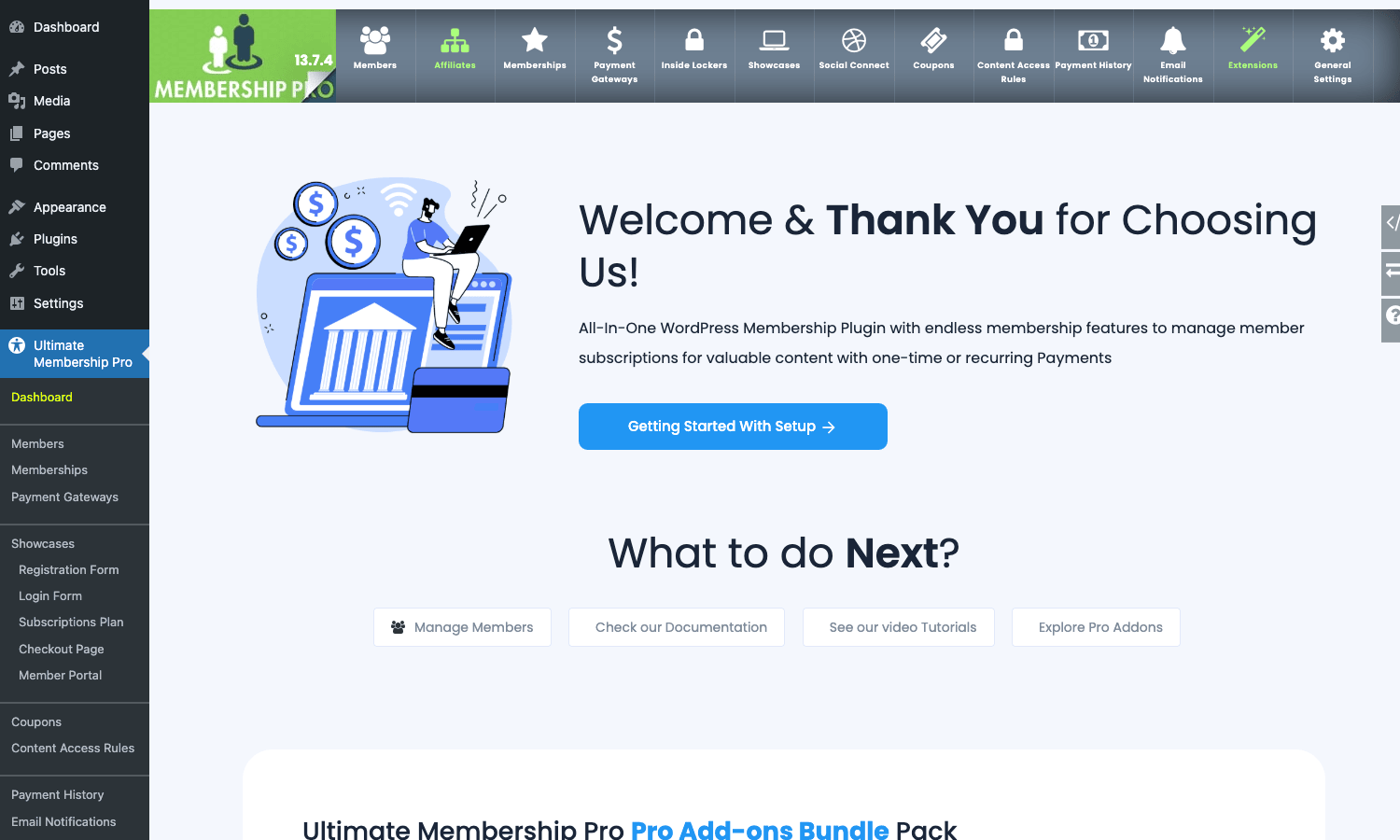
The plugin lives at wp-admin/admin.php?page=ihc_manage. It uses a horizontal top-bar nav inside the content area, plus a parallel set of items in the WordPress admin sidebar. The top bar is where most of the work happens. The current tabs (left to right) are: Members, Affiliates, Memberships, Payment Gateways, Inside Lockers, Showcases, Social Connect, Coupons, Content Access Rules, Payment History, Email Notifications, Extensions, and General Settings.
Each tab usually splits into sub-tabs, which is where most of the actual settings hide. Manage Members has Add New Member and Manage Members. Memberships has Add New Membership, Manage Memberships, and Subscription Plan Showcase. General Settings has fifteen sub-tabs by itself (Pages Setup, Restrict WordPress Menu, Payment Settings, Notification Settings, Admin Workflow, Public Workflow, WP Dashboard Access, Custom Messages, Uploads Settings, reCAPTCHA Settings, Security, Debug, and a few others). It’s a lot, but the layout is consistent: pick the area at the top, pick the sub-tab below, scroll the settings, save.
If you’re new to the plugin, two pages help most. Memberships → Manage Memberships is where you’ll spend the first hour. Content Access Rules is where you’ll spend the second.
Installation and first-run setup
The first time you activate UMP, it offers a Setup Wizard at admin.php?page=ihc_manage&tab=wizard. The wizard auto-creates the pages it needs:
- Register: public page with the
[ihc-register]shortcode - Login: public page with the
[ihc-login-form]shortcode - Subscription Plan: pricing-table page with
[ihc-select-level] - Checkout Page: final payment page with
[ihc-checkout-page] - Thank You Page: post-payment confirmation
- Member Portal: front-end dashboard with
[ihc-user-page]
You can skip the wizard and set the same pages manually under General Settings → Pages Setup, but the wizard saves about ten minutes. After the wizard, the rough order of operations is:
- Pick a base currency under General Settings → Payment Settings.
- Enable at least one payment gateway under Payment Gateways. For most sites that’s Stripe Checkout. Add your publishable + secret keys and switch from test mode to live when you’re ready.
- Create at least one membership plan under Memberships → Add New Membership.
- Decide what’s protected under Content Access Rules.
- Optional but recommended: customise the registration form under Showcases → Registration Form so the fields match what you actually need to collect.
After that the public pages are wired up and people can register and pay.
Creating your first membership plan
This is the heart of the plugin and the page you’ll come back to most often. Memberships → Add New Membership opens a long form. Here’s what each block does:
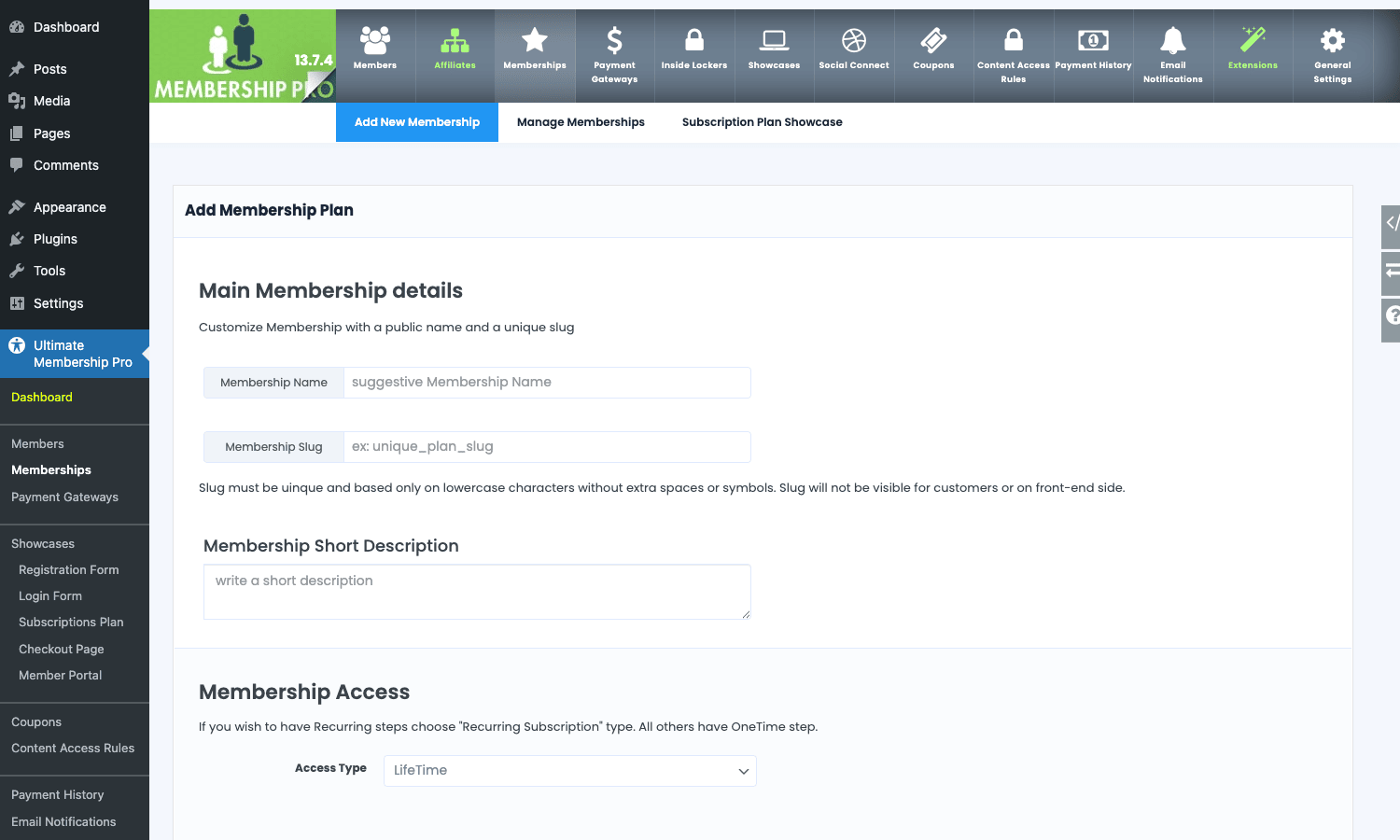
Main Membership Details. Pick a public-facing name and a slug. The slug is the unique identifier used in shortcodes ([ihc-purchase-link level="gold"]), so make it lowercase and hyphenated. Add a short description; this is what shows in the pricing-table widget.
Membership Access. This is the mode picker. Lifetime never expires. OneTime gives access for a fixed period (say, 90 days) and then the membership status flips to expired. Subscription is recurring on a chosen interval. Free is just a tier with no payment step.
Price and Billing. For paid plans you set the price, currency, billing interval (days / weeks / months / years), and the number of cycles before the plan auto-stops (0 = unlimited). Below that you can enable a sign-up fee that’s billed once at activation, a free or discounted trial (length in days, optional discounted trial price), and a maximum number of allowed cycles before forced renewal stop.
Roles and capabilities. You choose which WordPress role is assigned to a user when this membership activates (Subscriber by default, but you can pick Editor, Contributor, or any custom role). When the plan expires or is cancelled, the role reverts to the configured fallback.
Restrictions. A "Restrict only to one per user" toggle prevents the same user from buying the same plan twice (which is what you usually want for lifetime / one-time plans). For subscription plans you usually leave that off.
Custom price (Pay What You Want). Optional. Enable it and the public checkout shows a price input instead of a fixed amount, with optional minimum and maximum. Useful for donations or tip-based content.
Tax + currency override. Per-plan tax rate and currency. Most sites leave this on the global default. If you sell internationally with both USD and EUR plans, set the override here.
Save the plan and it shows up in Manage Memberships. The slug is now a valid target for [ihc-purchase-link], [ihc-hide-content level="..."], and the Content Access Rules.
Protecting content: the four ways
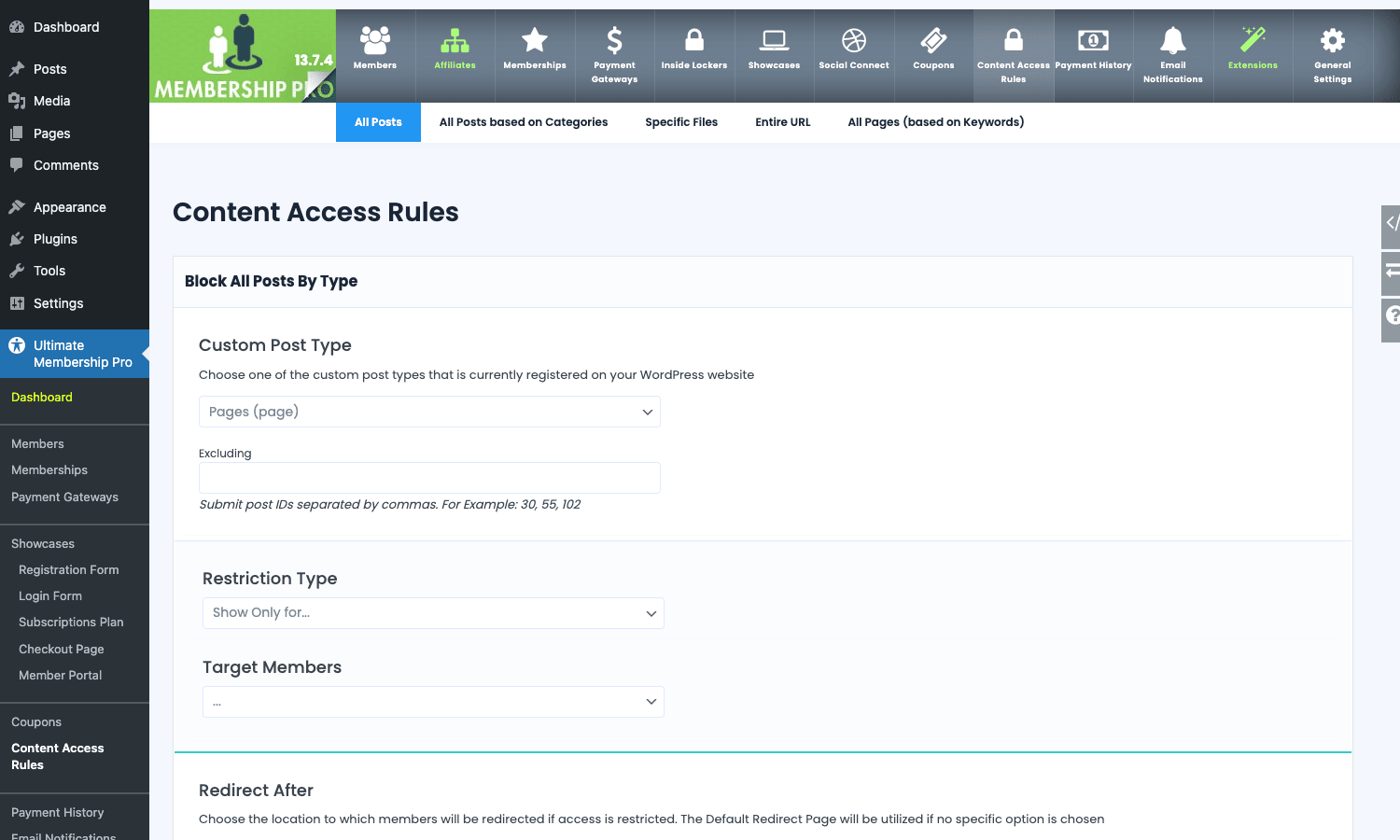
UMP gives you four protection mechanisms, and you’ll want to know which one applies when. They live under Content Access Rules in the top nav.
1. Per-post / per-page restriction (in the post editor). Once UMP is active, every post and page gets a "Ultimate Membership Pro" meta box in the editor. You tick which memberships can view the post. Non-members get the configured redirect page (the "Restricted" page) or a configurable message.
2. Bulk by post type or category. Under Content Access Rules → All Posts, you pick a custom post type (or category, or tag) and apply a restriction rule to all posts in it. Useful for "all posts in the Premium category require a Pro membership."
3. URL-pattern restriction. Under Content Access Rules → Specific Files / Entire URL, you can protect arbitrary URLs (regex or exact match) without touching the post itself. Useful for protecting third-party-rendered pages or specific download URLs.
4. Inside-Locker (in-line paywall). Wrap a portion of a post with the [ihc-hide-content level="2"]...[/ihc-hide-content] shortcode and that block becomes a paywall overlay. Non-members see the preview text above the locker and a "Subscribe to read the rest" CTA. Members see the full content. This is the cleanest pattern for free previews of paid articles.
The plugin also lets you protect WordPress menu items (hide a "Members Only" menu link from logged-out visitors) under General Settings → Restrict WordPress Menu, and you can filter search results so restricted posts don’t leak through search.
Drip-fed content: scheduling release
Drip means "release content over time after a member signs up." It’s the killer feature for course-style sites where you don’t want everyone to binge the full course on day one.
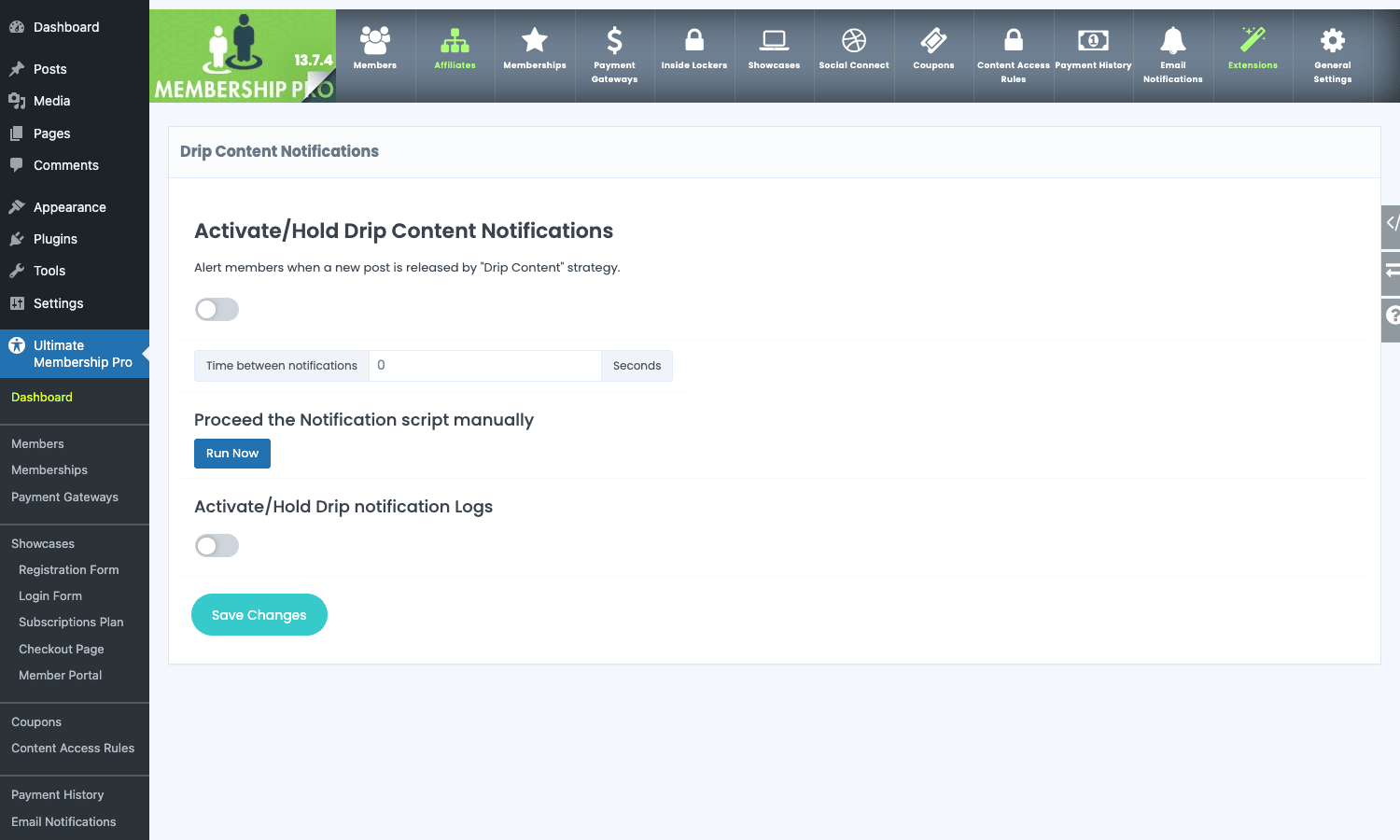
Each post can be set to "unlock" X days, weeks, or months after the member’s signup date, or on a fixed absolute date. The drip rules sit on the post editor screen, inside the same UMP meta box that handles per-post restriction. So a Lesson 3 post might be set to "unlock 14 days after signup." On day 13, the member still sees the "Coming Soon" placeholder. On day 14, the post becomes accessible, and (if you’ve enabled it) the plugin fires a notification email letting them know the new lesson is available.
The Drip Content Notifications tab activates the email alerts, sets the minimum time between alerts (so you don’t carpet-bomb members who unlock several lessons at once), and provides a manual "Run Now" button to force the cron to fire (useful for testing).
A nice trick: the drip release date can be tied not just to signup but to any custom date field in the member’s profile. So if you collect "course start date" during registration, you can drip relative to that instead of relative to payment.
Payment gateways: which one to pick
Eleven gateways is a lot, and they’re not all equal. The Payment Gateways tab shows each one as a card with a "settings" link.
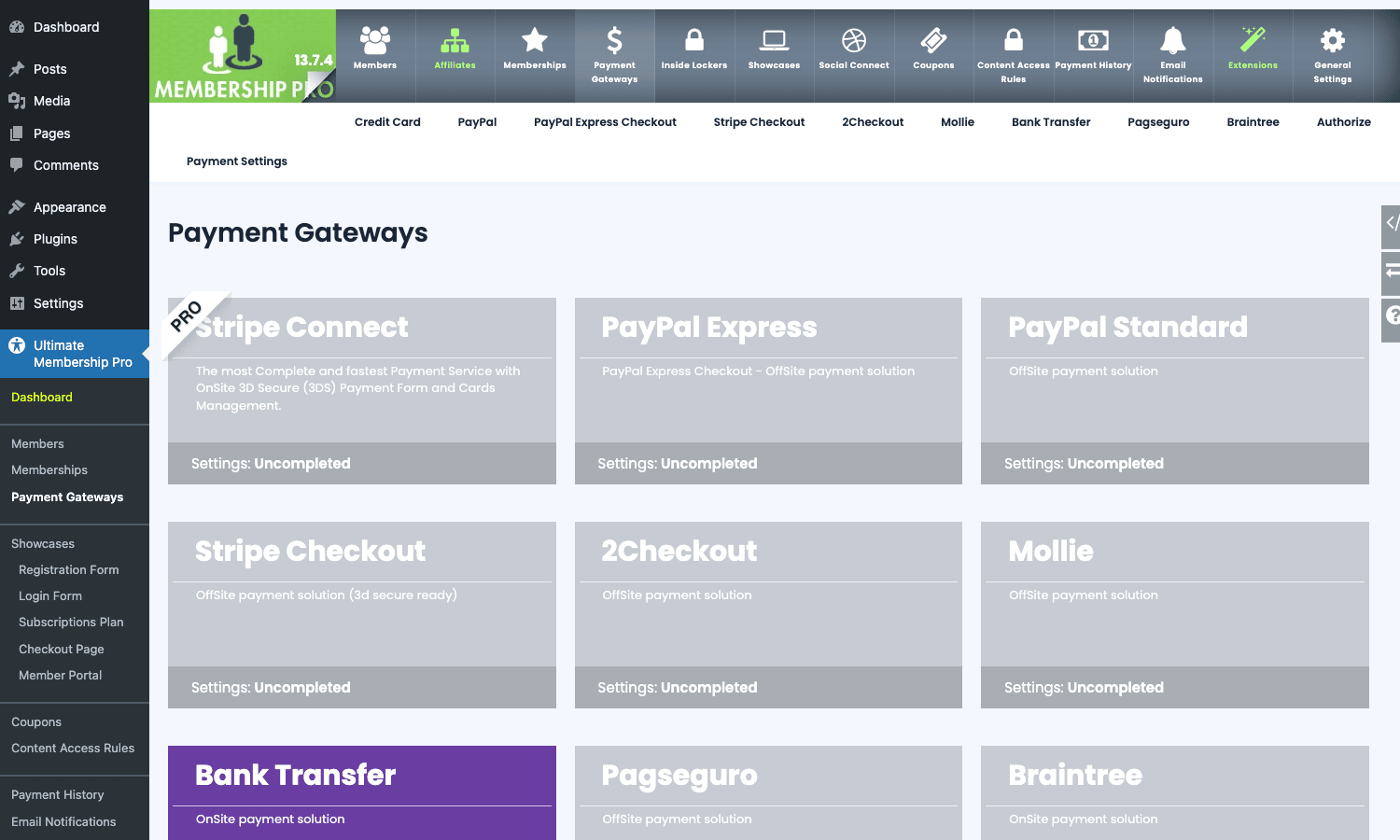
The short version of which to use:
- Stripe Checkout is the default for almost every site. It’s the simplest to configure (publishable + secret keys), the prettiest checkout, and supports cards, Apple Pay, Google Pay, SEPA, and BACS. Use this unless you have a reason not to.
- Stripe Connect is for marketplace-style sites where multiple authors / vendors get a share of each membership payment. The site owner sets an application fee percentage and Stripe routes the rest to the vendor’s connected account.
- PayPal Standard is the IPN-based classic PayPal. Use this if your members are PayPal-only and don’t want to enter a card. Standard PayPal recurring subscriptions are limited compared to Stripe.
- PayPal Express Checkout is the REST-based newer flow. Pick this over Standard if you can.
- Authorize.Net for North America where Authorize.Net is the de-facto card processor.
- 2Checkout, Mollie, Braintree, Pagseguro for region-specific markets (2C in EU and many emerging markets, Mollie in NL / DE / BE, Braintree owned by PayPal for the same regions, Pagseguro in Brazil).
- Bank Transfer is offline / manual. The member gets bank details after checkout, the admin manually approves once funds arrive.
- Virtual Payment is a token system: members can pre-load credits and spend them on memberships. Niche but useful for sites with in-house "coins."
Each gateway has its own settings sub-tab with API keys, webhook URLs, refund handling, and (for Stripe / PayPal Express) a separate "test mode" toggle. Always test in sandbox first, then switch live.
Coupons, gifts, and the discount stack
Under Coupons → Add Single Coupon you build a discount code. Each coupon has a code (auto-generate or pick your own), a description, a percentage or flat-amount discount, a target list of memberships (or all), a usage cap (total uses across all members), a per-member cap (so a single user can’t keep using the same code), an optional expiry date, and an optional minimum spend.
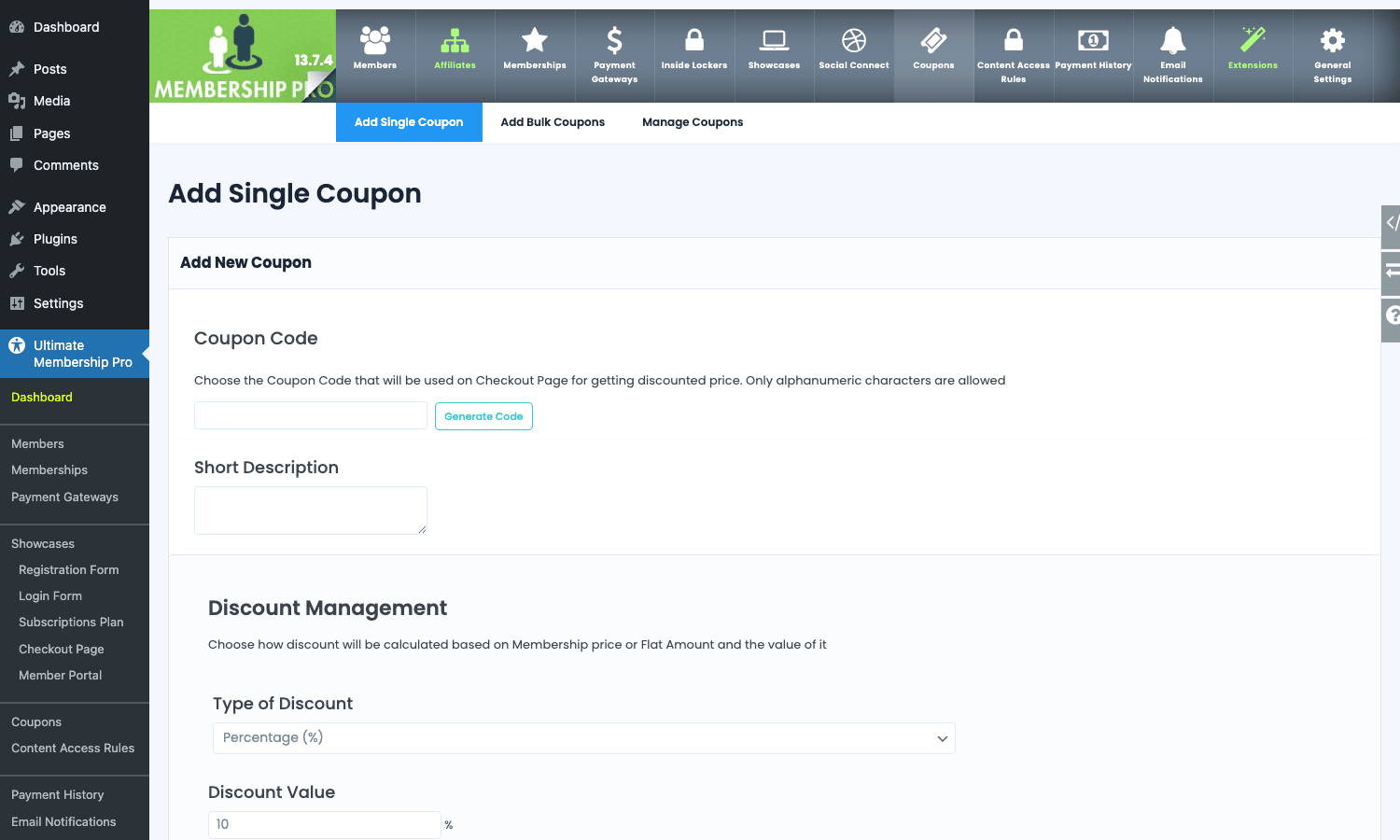
If you need to hand out twenty codes at once for a campaign, Add Bulk Coupons generates them in one batch with a shared rule set and a unique code each.
Gift codes are similar but they’re prepaid: the buyer pays for a code, the recipient redeems it for a free membership. This sits under Memberships → Showcases → Gifts and is its own little flow with separate templates and emails.
The discount stack respects coupon + sign-up fee + trial. A coupon discounts the recurring price; the sign-up fee is charged in full unless the coupon explicitly covers it (there’s a toggle for that).
Email notifications and merge tags
Notifications live under Email Notifications. The defaults that ship are useful but generic. You’ll want to customise at least the first-activation email and the renewal email so they sound like your brand.
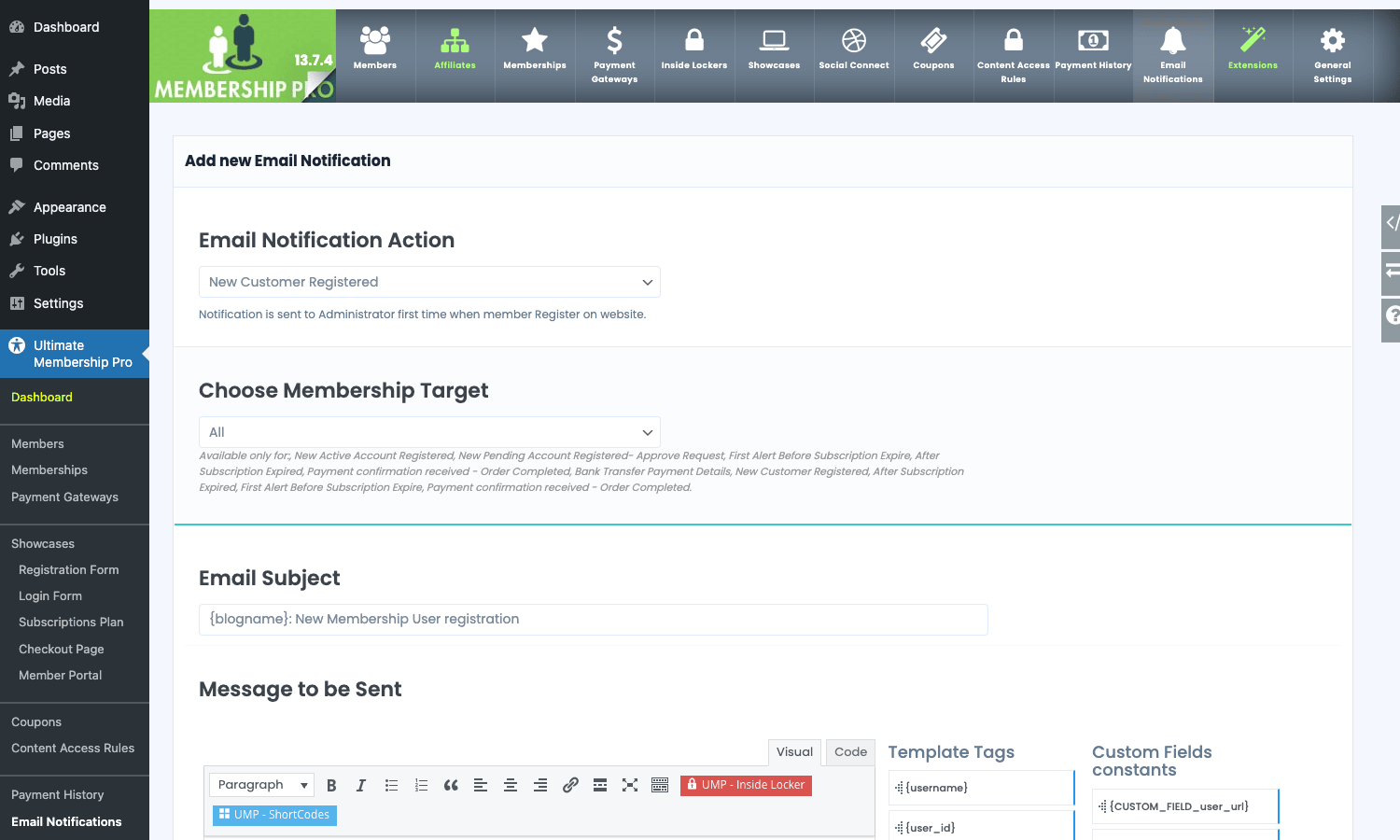
For each notification you pick:
- Action: what event fires it (New Customer Registered, New Pending Account, Subscription First Time Activated, Subscription Renew Activated, After Subscription Expired, Payment Failed, Payment Refund, Order Completed, Order Pending, First Alert Before Expiry, Card Expire Reminder, manual approval, password reset, etc.). About twenty actions in total.
- Membership target: only fire for specific plans, or for all.
- Subject: supports merge tags like
{blogname}and{username}. - Message: full HTML editor with merge tags for username, email, level name, expiry date, payment amount, invoice link, login URL, password, custom field values, and so on. There’s a sidebar listing every available constant.
- Goes to: the member, the admin, or both.
The plugin uses wp_mail() by default, which means whatever SMTP setup you already have (SMTP via WP Mail SMTP, or transactional via SendGrid, Mailgun, Postmark) works as-is. There’s a "Check SMTP Mail Server" button on the notifications page that sends a test email immediately so you don’t have to make a real signup to find out delivery is broken.
Showcases: the front-end forms and pages
Showcases is UMP’s term for "the things your visitors actually see and interact with." The Showcases tab is a grid of designers, one per public surface.
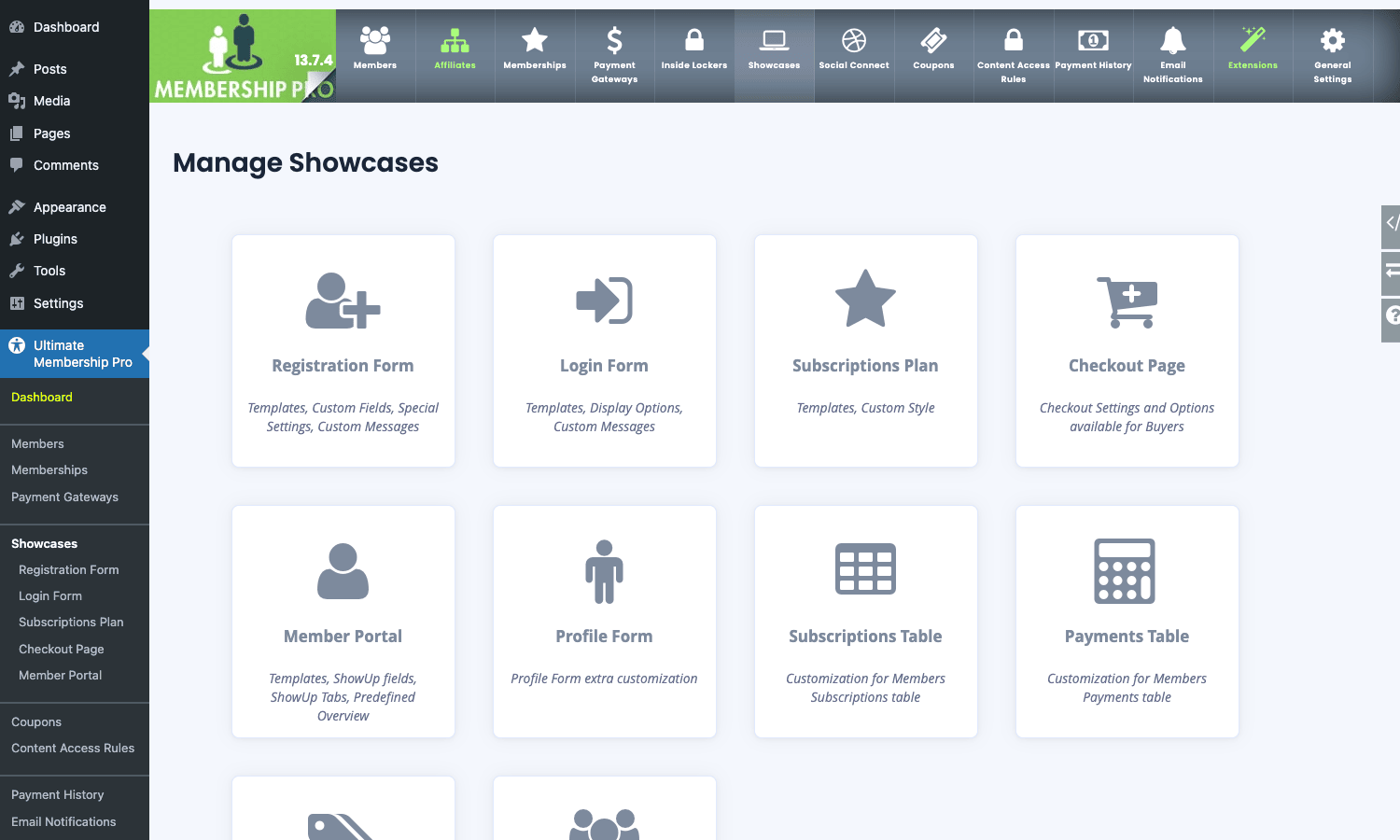
The most useful ones:
- Registration Form. This is where you add custom fields (text, number, date, dropdown, country, file upload, checkbox), mark them required, decide which ones are public on the profile, and pick a visual template. Several templates ship; pick the one that matches your theme.
- Login Form. Style + behaviour of the front-end login. You can add a "Remember me," a forgot-password link, social-login buttons, and CAPTCHA.
- Subscriptions Plan. The pricing-table widget. Pick the columns, the highlight ("Most Popular"), and the styling. The output is a shortcode you drop on any page.
- Checkout Page. Order summary template, billing fields, gateway selector, terms-and-conditions checkbox, and the final pay button.
- Member Portal. The post-login dashboard. Each block (Overview, Subscriptions, Payments, Edit Profile, etc.) can be toggled on or off.
- Profile Form. Standalone edit-profile widget for when you want a "Settings" page separate from the portal.
- Subscriptions Table and Payments Table. Two separate widgets if you want to compose your own dashboard from individual pieces instead of using the all-in-one Member Portal.
This is where most of the visual customisation happens. You don’t usually need to touch the theme PHP; the Showcases templates already match a flat, neutral design that fits most sites.
Members, orders, and the admin reports
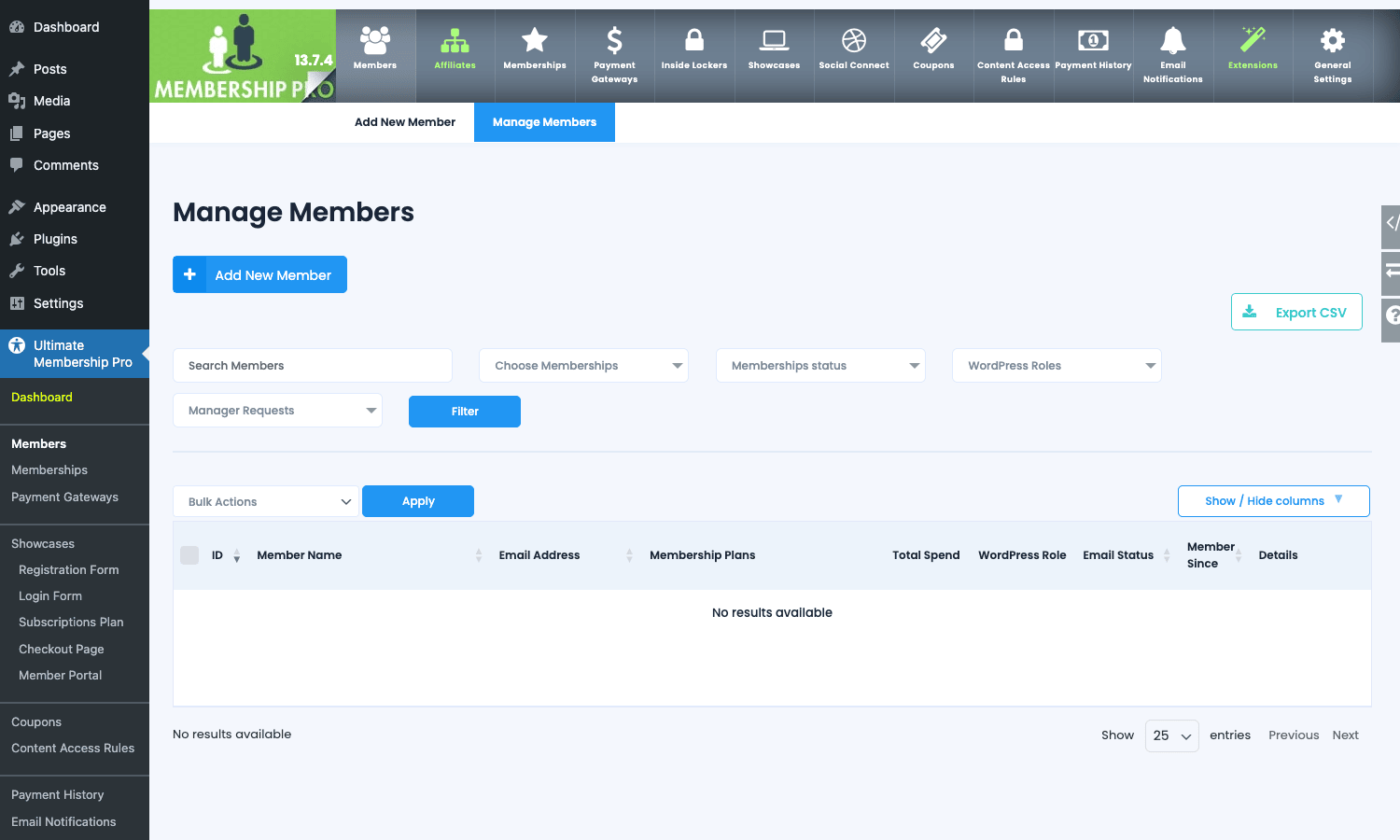
Members → Manage Members lists every registered member with searchable columns. You can filter by membership, by status (active / pending / expired / cancelled), by role, and by manual-approval state. Bulk actions let you delete, change status, send manual notifications, or export to CSV.
Each member row has a Details link that opens the per-member page: contact info, all their memberships, all their payments, all their custom-field values, audit log, and admin actions (add a manual membership, refund a payment, force-cancel a subscription, generate an invoice).
Payment History (a separate top-nav tab) is the ledger view of every order. You can search by member, gateway, status, and date range. Each order has an Invoice link that downloads the PDF.
If you need a quick "how much MRR is this site doing" answer, the Dashboard has a few summary widgets, but the real reports live under Payment History → Reports, which gives you signups per day, revenue per gateway, and refund counts.
Shortcodes reference
UMP registers 35 shortcodes. The ones you’ll use most often:
[ihc-register]: full registration form[ihc-register-lite]: email + password only, no custom fields[ihc-login-form]: login form[ihc-logout-link]: logout link (renders as "Logout")[ihc-pass-reset]: password reset form[ihc-hide-content level="1,2"]...[/ihc-hide-content]: inline content gate (the inside-locker)[ihc-user-page]: full member dashboard[ihc-select-level]: pricing-table / plan showcase[ihc-thank-you-page]: order success page[ihc-list-users]: member directory[ihc-user field="display_name"]: print a field from the current user[ihc-level-link level="gold"]: link to "buy this plan"[ihc-purchase-link level="gold"]: alias for the above[ihc-checkout-page]: full checkout form[ihc-membership-card]: member card with QR code[ihc-account-page-overview]/[ihc-account-page-subscriptions-table]/[ihc-account-page-orders-table]/[ihc-edit-profile-form]: granular widgets for composing a custom dashboard[ihc-list-all-access-posts]: list of every post the current user can read[ihc-change-password-form]: standalone change-password form[ihc-individual-page-link]: buy-this-single-page link (for pay-per-post)
The full list lives at Ultimate Membership Pro → Shortcodes in the admin menu, with a copy-to-clipboard button next to each one.
Developer reference
If you’re a developer, here’s what to grep for. UMP exposes around a hundred actions and ninety filters, all prefixed ihc_. The patterns below cover the events you’ll actually want to hook in production. For background on WordPress action and filter mechanics generally, the Plugin API reference on developer.wordpress.org is the standard.
Action: sync new registrations to a CRM
Fired right after a user finishes registration. Use it to push the new contact into a CRM, an email service, a Slack channel, or anything else.
add_action( 'ihc_action_create_user_register', function( $user_id ) {
 $user = get_userdata( $user_id );
 $level_data = get_user_meta( $user_id, 'ihc_user_levels', true );

 wp_remote_post( 'https://api.example-crm.com/v1/contacts', array(
 'headers' => array( 'Authorization' => 'Bearer ' . API_KEY ),
 'body' => wp_json_encode( array(
 'email' => $user->user_email,
 'first_name' => get_user_meta( $user_id, 'first_name', true ),
 'tags' => array( 'ump-signup' ),
 ) ),
 ) );
}, 20, 1 );
Action: track subscription activations in analytics
Fires after a plan first activates for a user (not on renewal). Useful for conversion tracking.
add_action( 'ihc_action_after_subscription_first_time_activated', function( $user_id, $level_id ) {
 $level = Ihc_Db::get_level( $level_id );
 $price = isset( $level['price'] ) ? floatval( $level['price'] ) : 0;

 // Push to your analytics or warehouse
 do_action( 'mysite_track_event', 'membership_started', array(
 'user_id' => $user_id,
 'level_id' => $level_id,
 'price' => $price,
 'currency' => $level['currency'] ?? 'USD',
 ) );
}, 20, 2 );
Action: send a Slack ping on failed payments
ihc_action_payment_failed is fired by the cron when a recurring charge fails. Hooking it gives you an instant notification so you can chase the member before they churn.
add_action( 'ihc_action_payment_failed', function( $user_id, $level_id, $payment_data ) {
 $user = get_userdata( $user_id );
 wp_remote_post( SLACK_WEBHOOK, array(
 'body' => wp_json_encode( array(
 'text' => sprintf(
 'Payment failed for %s on plan %d. Last error: %s',
 $user->user_email,
 $level_id,
 $payment_data['error'] ?? 'unknown'
 ),
 ) ),
 ) );
}, 10, 3 );
Filter: gate a specific post type behind any active membership
ihc_filter_post_meta runs when the plugin saves restriction metadata. You can also restrict programmatically without touching the meta box:
add_filter( 'ihc_check_post_restriction', function( $is_restricted, $post_id, $user_id ) {
 $post = get_post( $post_id );
 if ( 'recipe' === $post->post_type ) {
 // Every recipe requires at least membership 2 or 3
 $user_levels = Ihc_Db::get_user_active_levels( $user_id );
 return ! array_intersect( $user_levels, array( 2, 3 ) );
 }
 return $is_restricted;
}, 10, 3 );
Filter: add a custom merge tag to email templates
ihc_filter_constants_for_notifications lets you register your own template tag (for example, the member’s first paid date).
add_filter( 'ihc_filter_constants_for_notifications', function( $constants, $user_id ) {
 $orders = Ihc_Db::get_user_orders( $user_id );
 $first_order = end( $orders );
 $constants['{first_paid_date}'] = $first_order ? date( 'F j, Y', strtotime( $first_order['date'] ) ) : '';
 return $constants;
}, 10, 2 );
Now you can write {first_paid_date} inside any email template and it’ll be replaced at send time.
Filter: change the drip release date dynamically
filter_on_ihc_check_drip_content lets you override the unlock date. Use it when you want drip to follow something other than the signup date (such as a custom "course start date" field).
add_filter( 'filter_on_ihc_check_drip_content', function( $unlock_timestamp, $user_id, $post_id ) {
 $course_start = get_user_meta( $user_id, 'course_start_date', true );
 if ( $course_start ) {
 $post_drip_days = (int) get_post_meta( $post_id, '_ihc_drip_days', true );
 return strtotime( $course_start ) + ( $post_drip_days * DAY_IN_SECONDS );
 }
 return $unlock_timestamp;
}, 10, 3 );
Action: log every meaningful event
The plugin already writes to its own audit table (ihc_user_logs), but if you want events in your own logging stack, hook the action variants:
foreach ( array(
 'ihc_action_after_subscription_first_time_activated',
 'ihc_action_after_subscription_renew_activated',
 'ihc_action_after_cancel_subscription',
 'ihc_action_payment_failed',
 'ihc_action_after_charge_payment',
 'ihc_action_password_has_been_reset',
) as $event ) {
 add_action( $event, function( ...$args ) use ( $event ) {
 error_log( sprintf( '[UMP] %s : %s', $event, wp_json_encode( $args ) ) );
 }, 99 );
}
Adding a new payment gateway
The plugin’s gateway model is classes/gateways/PaymentAbstract.php plus one concrete class per gateway. Drop a new file in wp-content/mu-plugins/ (or your own plugin) that extends PaymentAbstract and implements the abstract methods (charge, cancel_subscription, refund, webhook_handler). Then register it via ihc_filter_payment_workflow. There’s also a SamplePaymentGateway.php in the same folder that’s intentionally minimal and works as a starting template.
Custom admin tab
You can add your own tab to the UMP admin via ihc_filter_admin_dashboard_tabs:
add_filter( 'ihc_filter_admin_dashboard_tabs', function( $tabs ) {
 $tabs['my_reports'] = array(
 'label' => 'Custom Reports',
 'icon' => 'dashicons-chart-bar',
 );
 return $tabs;
} );

add_action( 'ihc_render_admin_tab_my_reports', function() {
 echo '<div class="wrap"><h2>Custom Reports</h2><p>Your code here.</p></div>';
} );
Real-world use cases
A short tour of how teams actually use UMP. Each pattern below is a real configuration, not a feature dump.
1. Two-tier paid newsletter. Free tier with truncated posts and a CTA to upgrade. Paid tier with full posts and a weekly bonus essay. Implementation: two membership plans (Free and Paid), Content Access Rules → All Posts → Show full content only to "Paid," and [ihc-hide-content level="paid"] shortcodes inside posts to gate the bottom half of each article.
2. Multi-week course with drip. Each lesson is a post. Lessons unlock 7 days after signup, then 14, then 21, etc. Drip Content Notifications send an email each time a lesson opens. Implementation: one Course membership plan with subscription billing (monthly), drip days configured on each lesson post, notifications enabled. If you also want certificates and quizzes, pair UMP with LearnDash LMS or Tutor LMS Pro and gate the LMS courses behind UMP plans.
3. Local club site with monthly dues. Members pay £10/month. They get a physical-looking digital card with their name and QR code. Implementation: Subscription plan at £10/month, [ihc-membership-card] shortcode on the member dashboard, Bank Transfer enabled as a backup gateway for older members who don’t use cards online.
4. Marketplace of independent authors. Each author has their own paid newsletter. Site owner takes a 15% cut. Implementation: Stripe Connect enabled, each author registered as a vendor with their own connected Stripe account, plans created per author, the 15% application fee handled by Stripe automatically.
5. Company-portal with restricted-domain signup. Internal team portal where only @acme.com email addresses can register. Implementation: General Settings → Public Workflow → Restricted Email Domain, set to acme.com. Everyone else gets a polite error at registration.
6. Freemium WordPress site with social registration. Free tier requires only an email. Implementation: [ihc-register-lite] shortcode (email + password only, no custom fields), Social Connect enabled for Google and Facebook, paid plans hidden until the user upgrades through a CTA.
Performance, compatibility, and gotchas
UMP is a large plugin. It registers a lot of options, cron jobs, and custom database tables. Some honest observations from running it on a real site:
Database footprint. UMP creates around ten custom tables (ihc_orders, ihc_invoices, ihc_user_levels, ihc_user_subscription_data, ihc_user_subscription_history, ihc_user_payment_data, ihc_user_logs, ihc_coupon_codes, ihc_user_temp_data, and a few more). On busy sites, the logs table can grow large; consider periodically truncating it via WP-CLI if you don’t need long retention.
Cron jobs. The plugin schedules several recurring WP-Cron events (recurring billing checks, expiry notifications, drip-release checks, card-expire reminders). If you’ve disabled WP-Cron in favour of a real system cron, make sure your system cron hits wp-cron.php at least every five minutes.
Caching. Page-cache plugins like WP-Optimize Premium and Perfmatters need to be configured so that members-only pages are not cached. The plugin sets a wordpress_logged_in_* cookie like every other plugin, but if your cache plugin’s logged-in detection isn’t working, members will see anonymous content. Add ihc_user_logs, account_page, and the Member Portal URL to your cache exclusions to be safe.
Stripe webhooks. Set the Stripe webhook to https://yoursite.com/?ihc_stripe_webhook=1. Without it, subscription state will drift (cancellations and failed payments processed inside Stripe won’t sync back to UMP). The Stripe webhooks guide is the canonical reference for which events to subscribe to. Use Stripe CLI to test webhook reception during development.
Page builders. UMP works with Gutenberg, Classic Editor, Elementor, and Bricks. Block-level protection inside Gutenberg works through the per-post meta box. If you use a page builder like Bricks Builder, you can hide individual sections by wrapping them in the [ihc-hide-content] shortcode inside a Shortcode widget.
WooCommerce. UMP can sell memberships as Woo products via IhcPaymentViaWoo. If you also use WooCommerce Subscriptions or WooCommerce Memberships, pick one membership system. Running UMP and Woo Memberships side by side leads to double-charges and conflicting role assignments.
SMTP and deliverability. UMP uses wp_mail() for everything. Set up real SMTP (transactional providers like Postmark, Mailgun, or SES) before going live, otherwise welcome and renewal emails will hit spam.
Translation. WPML support is solid for level names, descriptions, and notification templates. Some hard-coded English strings in the front-end forms might need string-translation overrides if you’re shipping a non-English site.
Mobile checkout. The default checkout template is responsive. Test on a real phone before going live; some custom themes break the form-input width.
How it compares to other membership plugins
WordPress has half a dozen serious membership plugins. Here’s how UMP stacks up against each.
MemberPress is the closest commercial competitor. Both plugins do levels, restrictions, recurring billing, drip, and email notifications. MemberPress has a slightly cleaner admin UI and stronger integrations with LMSs like LearnDash. UMP wins on gateway count (eleven vs MemberPress’s three by default) and on the one-time-purchase pricing model. If you want a no-annual-fee site with international gateway support, UMP is the easier call. If you’re already on the WordPress.com / Bluehost / managed-host ecosystem, MemberPress is more familiar.
Paid Memberships Pro is a free-core plugin with paid add-ons. Each add-on is its own paid module (Stripe, PayPal, recurring, advanced features). PMP’s core is rock-solid and very lean. UMP’s appeal vs PMP is that everything ships in one package: you don’t have to buy ten separate add-ons.
Restrict Content Pro has a similar level + restriction model and a slightly more developer-friendly codebase. RCP’s add-on ecosystem covers LMS, CRM, gift codes, and drip. UMP includes most of those in core. Performance-wise RCP is leaner; UMP is more feature-dense.
WishList Member is the oldest membership plugin in the space and still capable. WishList wins on protection granularity (it has fine-grained sequencing and very tight per-post controls). UMP wins on gateway support and on the built-in front-end forms.
Ultimate Member is a different category despite the similar name. Ultimate Member focuses on profile pages, community features, and free membership directories. UMP focuses on paid content. The two can run side by side if you want UMP for billing and Ultimate Member for nicer profile pages.
BuddyBoss Platform is a social-network platform with paid-tier support via BuddyBoss App. If your site is primarily a private community, BuddyBoss is the better starting point and UMP is overkill. If your site is primarily paid content with a community attached, UMP is the better starting point.
WooCommerce Memberships is the right choice when you’re already deeply on WooCommerce, selling products plus memberships, and want everything inside the Woo dashboard. UMP is the right choice when you don’t have or don’t want a full WooCommerce stack.
Pricing and licensing
Ultimate Membership Pro is sold on CodeCanyon under a Regular License (one site, lifetime updates, six months of support that can be extended) and an Extended License (redistribution). All extensions ship in a single Bundle Pack, which is included with the core purchase, so you don’t need to buy individual gateway add-ons.
That’s the most painless way to install it on a real site and start clicking through every tab without hitting "this feature requires the bundle" prompts. You won’t need to chase add-on licences separately.
For ongoing updates, the GPL Times catalog keeps the plugin current as new versions ship, so you can pull the latest build whenever WPIndeed releases a fix.
Frequently asked questions
Does Ultimate Membership Pro work without WooCommerce?
Yes. UMP is a standalone plugin with its own checkout, orders, and ledger. WooCommerce is only needed if you want to sell memberships as Woo products through the Woo checkout flow.
Can I run free memberships?
Yes. Set a plan’s access type to Free. The plan will appear in the pricing table and members can register for it without a payment step. This is useful as a free tier alongside paid plans, or to gate a downloadable lead magnet behind email registration.
Can I sell physical products and memberships on the same site?
Yes. Use WooCommerce for products and UMP for memberships. If you want a single checkout for both, sell the membership as a Woo product using UMP’s IhcPaymentViaWoo bridge so the checkout runs through Woo’s flow but UMP still tracks the membership.
Does it support tax / VAT?
There’s a per-plan tax rate and a global tax setting under General Settings → Payment Settings. For complex tax (per-country VAT with reverse charge), you’ll usually want to handle tax through the gateway (Stripe Tax) or pair UMP with a tax-handling add-on.
What happens when a payment fails?
The plugin retries based on the gateway’s own dunning logic (Stripe Smart Retries, PayPal automatic retries). After a configurable number of failed attempts, the membership status is moved to "expired" and the corresponding email notification (Payment Failed) is sent. The user can update their card via the Member Portal and the plugin reactivates them on the next successful charge.
Can I prorate plan upgrades?
Yes. Under Memberships → Prorate Settings you define the rule for charging the difference when a user upgrades from one plan to a more expensive one. The default is "prorate by remaining days," but you can set it to "no proration" if you want full new-plan billing on every upgrade.
Can I import existing members from another plugin?
Use Tools → Import Users (under General Settings) to import a CSV of users with email, username, and assigned membership. UMP will create the accounts, send invitation emails, and assign the plans. For more complex migrations (existing recurring subscriptions on Stripe that need to keep billing), you’ll want to use the WP-CLI route plus the Stripe customer migration API.
Does it integrate with email marketing tools?
Yes. The plugin has integrations for MailChimp, MailPoet, Pushover, Twilio, and several CRMs (via the Bundle Pack). For more flexible CRM sync, hook the ihc_action_after_subscription_first_time_activated action and call your CRM’s API directly, or pair with WP Fusion or FluentCRM Pro for a generic bridge to dozens of marketing tools.
Can I have different registration forms per plan?
Sort of. The plugin has one global registration form template at the Showcases level, but you can show or hide custom fields per plan via the field’s "Display on" setting. You can also have multiple registration pages on the front end, each one with a different [ihc-register] shortcode pre-targeting a different plan via the level attribute.
Does Ultimate Membership Pro slow down a WordPress site?
The plugin adds a database query or two to most page loads (to check membership status and post restrictions). On a well-cached site this is negligible. On a slow shared host with no caching, you’ll feel it. Pair with a page-cache plugin and a transient cache for the membership-lookup queries; UMP already caches its own option lookups, so the overhead is mostly the per-request DB hits.
What’s the difference between Stripe Checkout and Stripe Connect?
Stripe Checkout sends all payments to the site owner’s Stripe account. Stripe Connect lets multiple vendors / authors have their own Stripe accounts; UMP routes the customer’s payment to the right vendor and takes a configurable application fee. Use Connect only if your site is a marketplace with multiple payees.
Can I customise the invoice PDF?
Yes. Under Email Notifications → Invoices you can edit the invoice header, footer, logo, and the merge tags used inside the template. The PDF is generated server-side using a bundled HTML-to-PDF library, so any HTML you put in the template renders into the PDF.
Final thoughts
Ultimate Membership Pro is the kind of plugin that grew over a decade and shows it. The admin has a lot of tabs. The settings are dense. Some of the labels (Inside Lockers, Showcases) take a minute to map to what they actually do. But once you’ve spent half an hour clicking around, the layout starts to make sense, and the feature density turns from intimidating into a relief: you don’t need three other plugins on top to ship a real paid-content site.
For people running a single-author paid newsletter or a small-team course site, this is enough plugin for years. For people running a marketplace or a multi-author publication, Stripe Connect support and the per-vendor checkout flow make it one of the very few WordPress options worth seriously considering. And because it’s a CodeCanyon purchase rather than a SaaS subscription, the cost stays the same whether you have 50 members or 50,000. That math gets attractive fast.
Walk through the wizard, build a level, gate a post, and you’ll know within an hour whether UMP is the right fit for your site.