

Here is a common WordPress scenario. You have a blog, a small list of customers or readers, and you want to send them a monthly newsletter. You sign up for Mailchimp, paste in your contacts, and three months later you get an invoice for $30 a month because your list crossed 500 subscribers. You pay it. Your list grows again. The invoice doubles. By the time you reach 5,000 subscribers you are paying $80+ per month to a service that does roughly what your WordPress site could already do, sitting on a database you already pay for.
FluentCRM Pro is the plugin that says "your WordPress site can do this". It is a complete email marketing platform that lives inside WordPress. Contacts are stored in your own database. Campaigns are sent through whatever SMTP or transactional provider you configure. Visual automation funnels handle behavioral sequences. The interface is a polished React app that compares favorably to standalone tools like ActiveCampaign or ConvertKit, but the data and the runtime are all yours.
This guide is for two readers. If you are a creator, course teacher, or small business owner who is tired of paying monthly to ESPs and wants a one-time payment + self-hosted approach, the first half walks you through every step. If you are a developer building a WordPress site for a client that needs CRM and email marketing baked in, the second half covers the hook surface, the REST API, the custom data sources, and the integration patterns.
Table of Contents
- What is FluentCRM Pro?
- Key features
- How it works (for users)
- Installation and setup
- Step-by-step: send your first campaign
- Real-world use cases
- Developer reference
- Performance, compatibility, and gotchas
- Pricing and licensing
- FAQ
- Final thoughts
What is FluentCRM Pro?
FluentCRM is a self-hosted email marketing automation and CRM plugin for WordPress, built by WPManageNinja (the team behind Fluent Forms, FluentSMTP, FluentSupport, and Fluent Boards). The same team also makes FluentBooking for appointment scheduling. The core plugin (on WordPress.org as "FluentCRM") is free and already capable. The Pro addon adds advanced automation triggers, deeper third-party integrations, recurring campaigns, SMS, and the team’s commercial roadmap features.
The mental model is "ActiveCampaign as a WordPress plugin". You import or auto-sync contacts. You organize them into lists (subscription buckets) and tags (behavioral labels). You build campaigns (one-shot blasts) or sequences (drip emails) or funnels (visual flowcharts that fire on triggers). FluentCRM stores everything in its own custom tables in your WordPress database, sends mail through whatever WordPress mail backend you have set up (we recommend WP Mail SMTP Pro or the free FluentSMTP), and tracks opens, clicks, and conversions itself.
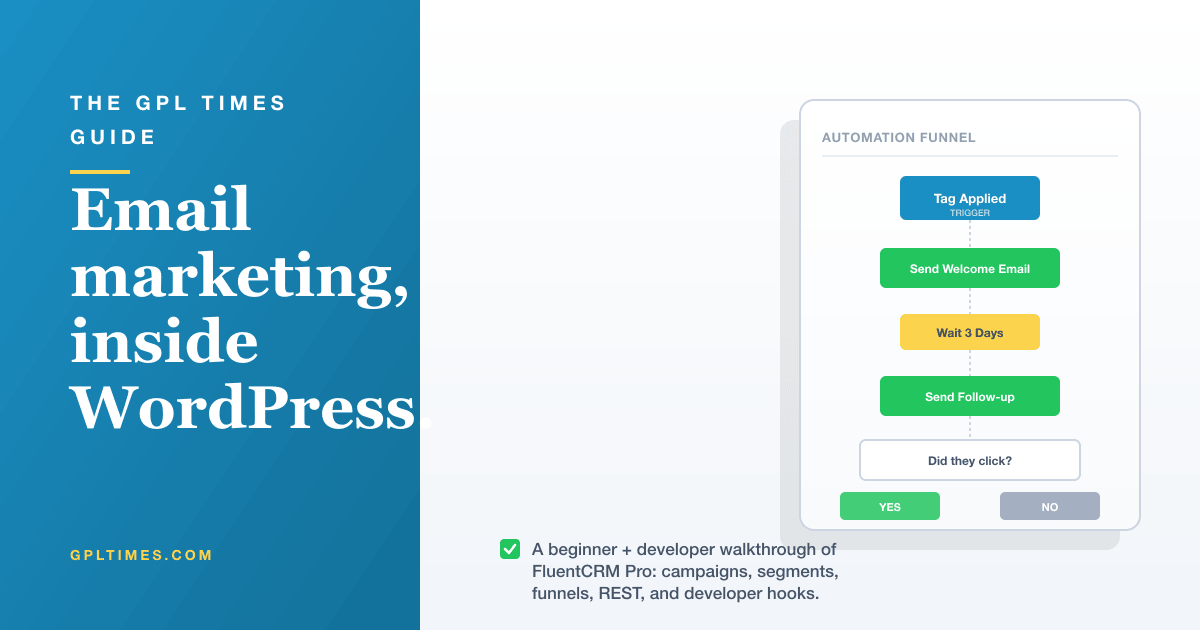
What makes FluentCRM different from "newsletter plugin X" is the automation engine. Where a basic newsletter plugin lets you blast a single email to your whole list, FluentCRM lets you build "if-then" sequences: "If a contact joins the ‘Customers’ list AND has the tag ‘Premium’, wait 3 days, send Email 1, wait 7 more days, check if they opened it, send Email 2 only if they did". This is the kind of behavioral marketing that used to require ConvertKit, ActiveCampaign, or Drip. Now it runs inside your WordPress install.
The Pro version is what unlocks the full toolset for production use. Without Pro you get the core CRM, basic campaigns, simple sequences, and form-builder integration. Pro adds: more automation triggers (LearnDash enrollment, WooCommerce purchase, AffiliateWP referral, Paid Memberships Pro signup, etc.), advanced reports, recurring campaigns, SMS, the addon ecosystem, and the commercial integrations (Mailchimp two-way sync, ActiveCampaign migration, etc).
Key features
- Contact management. Unified contact record with lists, tags, custom fields, activity history (every email opened, every form submitted, every purchase). Note-taking and pinned tasks per contact.
- Lists and tags. Lists are subscription buckets (newsletter, customers, leads). Tags are behavioral labels (clicked "buy" link, attended webinar, downloaded PDF). Use both.
- Dynamic segments. Saved filters that match contacts in real time ("All Pro customers in EU who have not opened email in 30 days").
- Email campaigns. One-shot newsletter-style blasts. Drag-and-drop editor with templates, HTML editor, plain text option, A/B subject testing.
- Recurring campaigns (Pro). Repeat the same campaign on a schedule (e.g. "weekly digest of new blog posts").
- Email sequences. Drip sequences (Day 1, Day 3, Day 7) that auto-send when a contact joins a list or gets a tag.
- Automation funnels. Visual flowchart builder. Triggers (contact joined list, tag applied, WooCommerce purchase, etc.) connect to actions (send email, add tag, remove tag, wait X days, conditional branch).
- Form integration. Native integration with Fluent Forms, WPForms, Gravity Forms, Elementor Forms, Ninja Forms, Contact Form 7, and Formidable Forms. Form submission auto-adds to a list.
- WooCommerce automation (Pro). Triggers for order completed, refund issued, subscription created, abandoned cart restore.
- LearnDash and LifterLMS automation (Pro). Triggers for course enrolled, lesson completed, course completed.
- MemberPress and Paid Memberships Pro (Pro). Triggers for member signed up, level changed, subscription cancelled.
- AffiliateWP, EDD, BuddyBoss, FluentCommunity (Pro). Each comes with native triggers and actions.
- SMS marketing (Pro). Twilio integration for SMS-style automation steps.
- Email Templates. Block-based editor with reusable layouts. Save your own as templates.
- Smart Links. Track which contacts click which links. Auto-add tags based on link clicks.
- Reports. Per-campaign performance (open rate, click rate, click-through, unsubscribe, bounce). Aggregated trends across the site.
- Two-way Mailchimp/ActiveCampaign sync (Pro). Migrate from another ESP without losing automation state.
- REST API. Full read/write API for contacts, lists, tags, campaigns. Public docs.
- Multisite (Pro). Network-wide configuration.
How it works (for users)
The mental shortcut is: FluentCRM gives WordPress its own contacts database, plus email marketing tools, plus an automation engine. Three pieces in one plugin.
When you install FluentCRM, you get a new top-level admin menu with everything inside it. The Dashboard is the home view, showing the day-over-day subscriber growth, recent campaigns, email performance, and a Getting Started checklist for new installs:
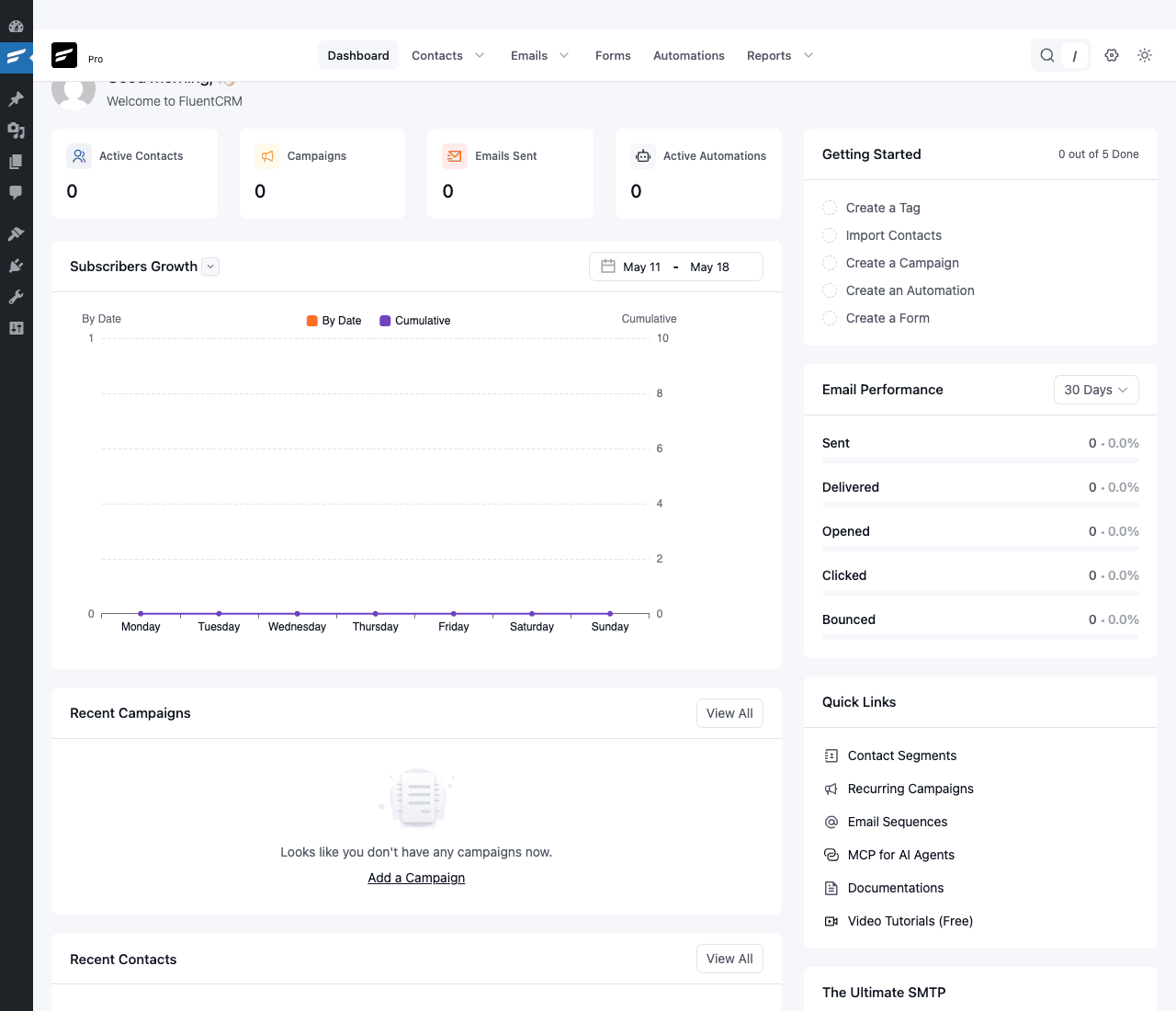
The dashboard reveals the structure. Top nav: Dashboard, Contacts, Emails, Forms, Automations, Reports. That is the entire mental model of FluentCRM.
The Contacts section is where you manage subscribers. Every contact has a profile page with full activity timeline. The list view is searchable, filterable, taggable in bulk:
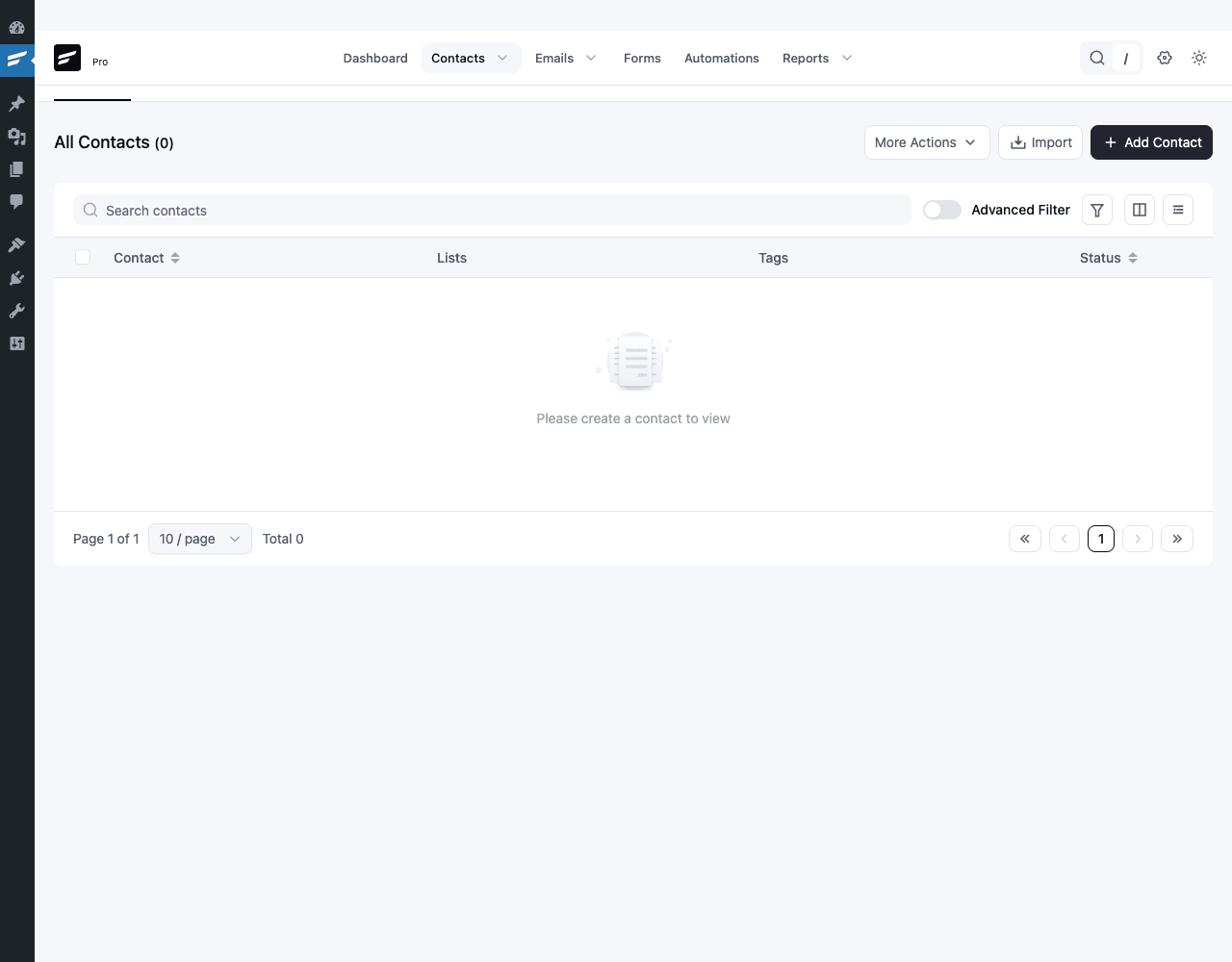
You can import contacts from CSV (with column mapping), Mailchimp export, FluentForms submissions, WooCommerce customers, LearnDash students, or by manually adding. The Advanced Filter toggle is the Pro feature that lets you build saved segments like "tag=premium AND list=newsletter AND last_activity > 30 days ago".
Automations are the most powerful surface. When you click "New Automation", the trigger picker opens:
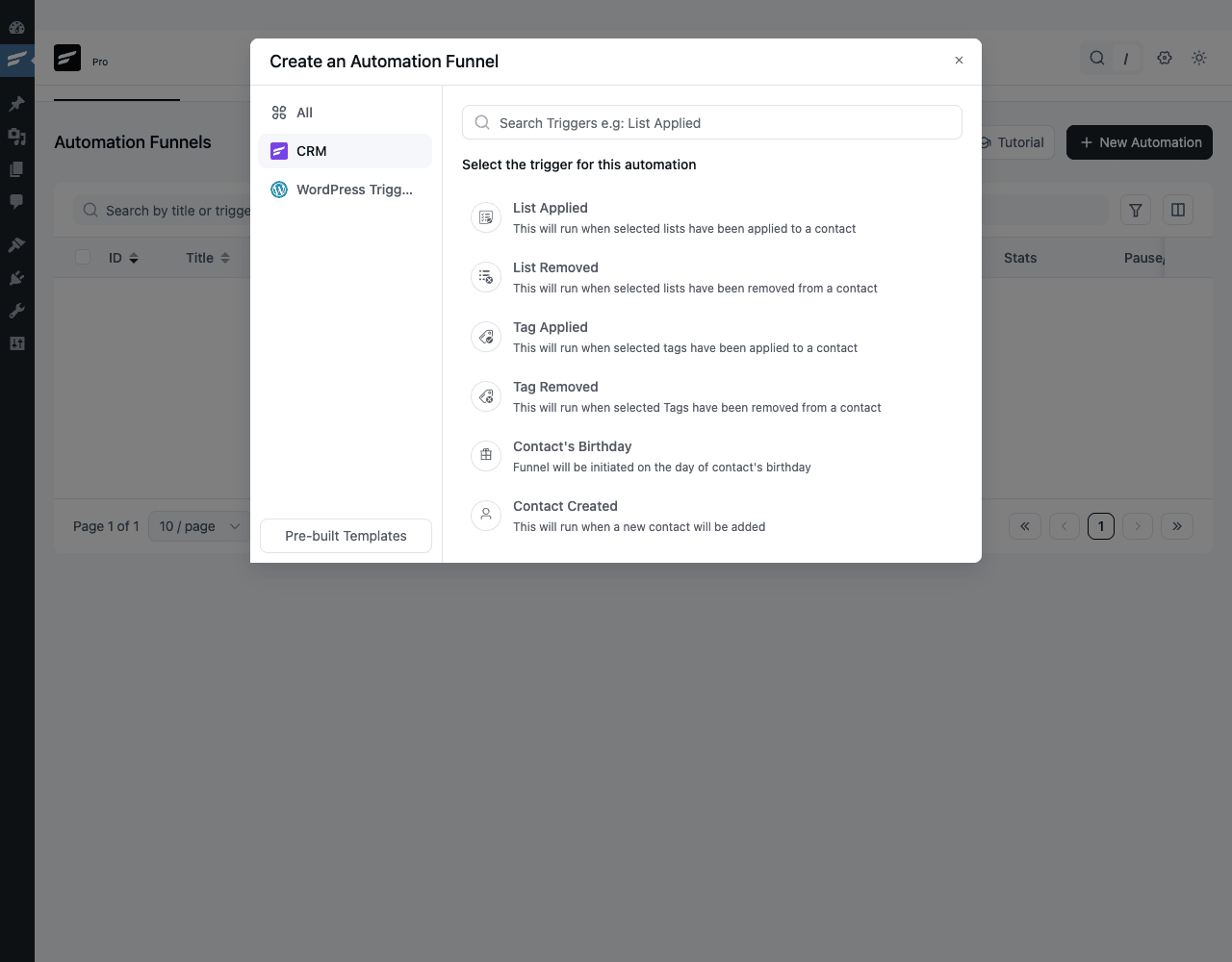
Pick a trigger (e.g. "Tag Applied"), and the funnel canvas opens. You drag actions (Send Email, Add to List, Remove Tag, Wait, Conditional Branch, Webhook) into a flowchart. Save and activate. From that point forward, whenever a contact gets the configured tag, the funnel runs.
The Automations list view shows all your active funnels:
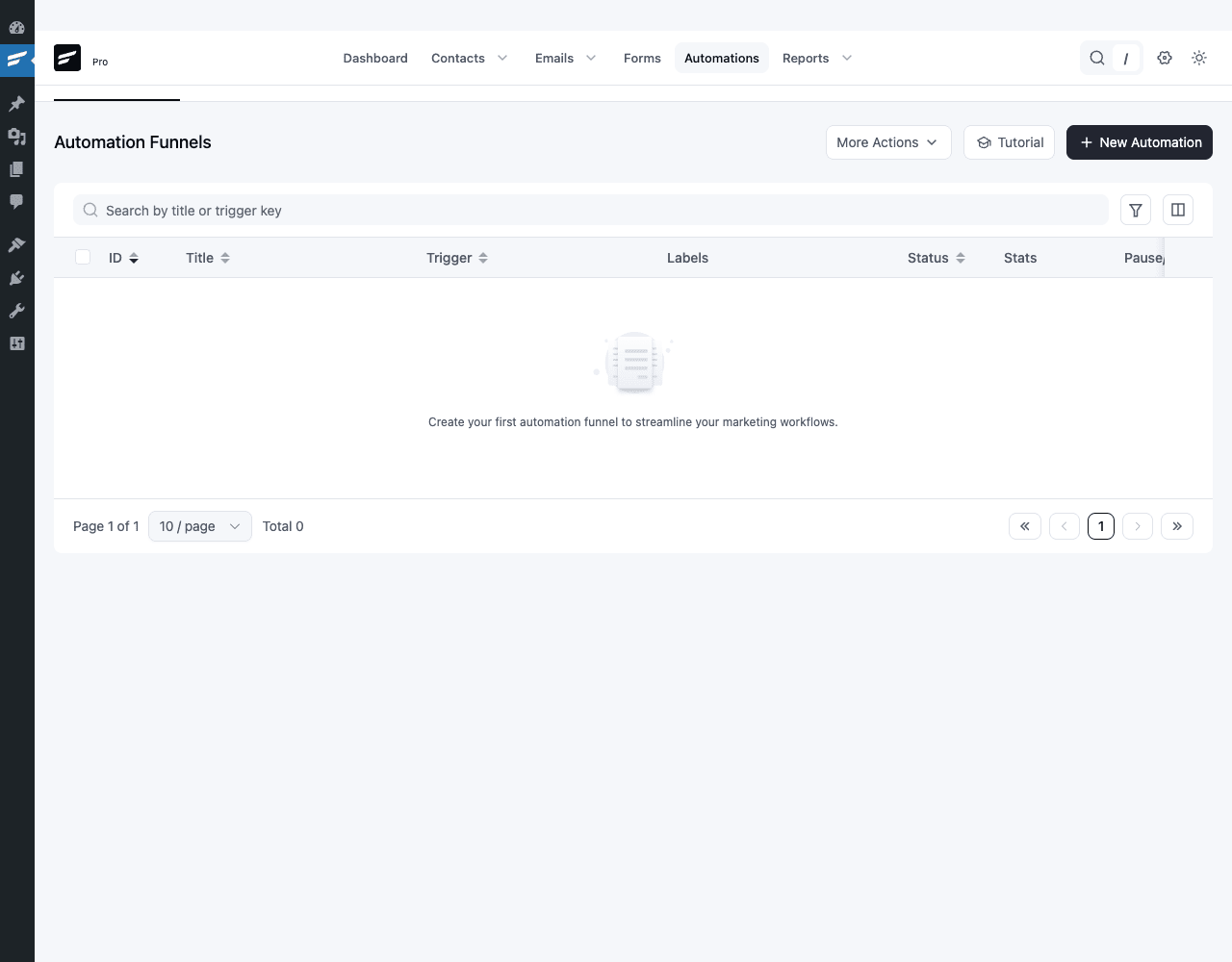
The Emails section splits into Campaigns (one-off blasts), Recurring Campaigns (Pro, scheduled repeats), Sequences (drip series), and Templates. The Forms section is where you embed opt-in forms in WordPress pages or sync existing form plugins. The Reports section aggregates everything: campaign performance, contact growth, email volume by mailer.
Installation and setup
FluentCRM Pro requires the free FluentCRM core. You install both.
Step 1: Install FluentCRM (free core). In WordPress admin, go to Plugins → Add New, search for "FluentCRM", install the result by WPManageNinja, click Activate.
Step 2: Install FluentCRM Pro. Go to Plugins → Add New → Upload Plugin, choose the fluentcampaign-pro.zip file, click Install Now, then Activate. (The Pro plugin is technically named "FluentCampaign Pro" in its filename, which can be confusing. It is the same product.)
Step 3: Run the Setup Wizard. The wizard launches automatically. Enter your business name, business address (required for legal compliance with CAN-SPAM and similar laws), your logo, and a default From email/name. You can skip any of these and configure later.
Step 4: Configure email sending. This is the most important step. FluentCRM uses WordPress’s wp_mail() function to send. By default that uses your host’s PHP mail, which has terrible deliverability. Install WP Mail SMTP Pro or the free FluentSMTP and connect to a transactional provider (SendLayer, Postmark, Amazon SES, Brevo). Without this step, your emails will land in spam.
Step 5: Activate your Pro license. Go to FluentCRM → Settings → License. Paste your key, click Activate. The plugin works without it but the official update channel and support are gated.
Step 6: Import your contacts (if migrating). Go to Contacts → More Actions → Import. Upload a CSV. The wizard handles column mapping (email, first name, last name, tags, lists). For Mailchimp migrations, export from Mailchimp as CSV, import into FluentCRM, then optionally use the Mailchimp Sync addon (Pro) to keep them in sync during the transition.
Step 7: Create your first list. Go to Lists → Add New. Name it ("Newsletter Subscribers"), give it a description, save. Lists are subscription buckets, which is what GDPR-style consent maps to (pair this with Complianz Privacy Suite Premium if you also need a site-wide cookie banner and proof-of-consent records).
Step 8: Test send. Go to Emails → Campaigns → Add Campaign. Compose a quick test email, select "Send to a specific email" with your own address, send. If it arrives in your inbox (and not spam), your mail backend is configured correctly.
That is the install. From here you can build campaigns, sequences, automation funnels, and integrate with your existing site flows.
Step-by-step: send your first campaign
Let me walk through a concrete example. Vikram runs a small online course (data analytics tutorials on his WordPress site). He has 800 students who bought courses and 200 newsletter subscribers. He wants to send a "monthly tip" email to both groups.
Step 1: Set up the lists and tags. Vikram creates two lists: "Customers" (the 800 paying students) and "Newsletter" (the 200 leads). He creates two tags: "active-learner" (for customers who finished a course in the last 30 days) and "high-value" (for customers who bought multiple courses).
Step 2: Import contacts. From Contacts → Import, Vikram uploads a CSV export from his WooCommerce customers (mapped to the Customers list) and a CSV from his old newsletter signup form (mapped to the Newsletter list). FluentCRM dedupes by email so contacts in both lists are stored once with both list memberships.
Step 3: Build the email template. Vikram goes to Emails → Templates → Add New. He builds a reusable template: header logo, big title, body content area, footer with social links and unsubscribe. He saves as "Monthly Tip Template".
Step 4: Compose the campaign. From Emails → Campaigns → Add Campaign, Vikram creates "May 2026 Tip: How to Read a Box Plot". He picks the "Monthly Tip Template", drops in his content (a 200-word explainer plus a link to the full blog post), and previews. He uses {{contact.first_name}} as a personalization placeholder ("Hi {{contact.first_name}}, …").
Step 5: Pick recipients. He selects both Customers and Newsletter lists. FluentCRM shows the estimated recipient count: ~990 unique contacts.
Step 6: Schedule the send. Vikram picks "Send Later" and sets it for Tuesday 9am local time. FluentCRM queues the campaign. At Tuesday 9am, his WordPress cron starts dripping out emails to his configured mailer.
Step 7: Watch the report. A few hours after the send, Vikram opens the campaign report. He sees 980 sent, 920 delivered (40 bounced), 312 opened (34% open rate, good for educational content), 89 clicked the "Read full post" link. He sees the top clickers as a list, which he can tag "engaged-may-2026" with one click for future targeting.
Step 8: Build a follow-up automation. Vikram goes to Automations → New Automation. Trigger: "Tag Applied → engaged-may-2026". Action 1: Wait 3 days. Action 2: Send a follow-up email ("Loved the box plot tip? Here are three more I posted last year"). Action 3: Conditional ("Did they click the email?"). If yes, send another email about a paid mini-course. If no, end. He activates the funnel.
Step 9: Set up a recurring monthly campaign. Under Emails → Recurring Campaigns → Add New, Vikram sets up "Monthly Tip" to fire on the second Tuesday of every month at 9am, using a recurring template. He no longer needs to remember.
That is the loop. Compose, schedule, send, report, automate. The whole workflow lives inside WordPress and reads from his own database.
Real-world use cases
1. A course creator with a tiered customer base. Priya runs an online photography course. She uses tags to segment customers: "beginner", "intermediate", "advanced", plus "buyer-2024", "buyer-2025", "buyer-2026". Her automations send tier-appropriate content based on tag membership. When a "beginner" customer completes a course (LearnDash trigger), they get a "Ready for the intermediate course?" email three days later with a coupon.
2. A WooCommerce store with abandoned-cart recovery. Anika sells handmade jewelry. The FluentCRM WooCommerce automation triggers on "abandoned cart". The funnel sends: 1 hour later, "Hey, you left something in your cart". 24 hours later, "Still thinking? Here is a 10% off code". 72 hours later, "Last chance" with the code expiring. Recovery rate on her abandoned carts increased from near-zero (her previous setup had nothing) to 8-12%.
3. A SaaS-style WordPress plugin developer. Marcus sells a Pro WordPress plugin via Easy Digital Downloads. When a customer buys, an EDD trigger adds them to the "Customers" list with the tag "version-X". When a new version ships, he sends a release-notes email only to contacts tagged "version-X" or older, automatically skipping the customers already on the latest version.
4. A membership site with engagement-based content. Raj runs a paid membership site on MemberPress. He uses FluentCRM’s MemberPress integration to track which members are actively logging in vs becoming dormant. After 30 days of inactivity, a re-engagement email fires automatically. After 60 days of inactivity, a "we’re sorry, here’s what you might have missed" digest. Member retention rose by 20%.
5. A small newsletter creator. Maya runs a personal essay newsletter with 1,500 subscribers. She moved from Substack (which was great but took a cut of paid subscriptions) to FluentCRM Pro + WP Stripe Checkout. She owns her list, owns the data, and her annual costs went from "10% of paid revenue to Substack" to "$110/year for the plugin + maybe $5/month for SES".
6. A bookings business. Vikram (different Vikram) runs a one-person consulting practice with WooCommerce Bookings. When a customer books a session, FluentCRM auto-sends a "What to expect" email immediately, a "Got any questions?" email 1 day before, and a "Thanks, here is a feedback form" email the day after. All on autopilot.
Developer reference
This section is for developers extending FluentCRM or integrating it with custom code. You should be familiar with WordPress hooks and the WP_Query/REST API patterns before going further.
Custom database tables
FluentCRM stores its data in dedicated tables (not in wp_postmeta or wp_options). Common tables:
wp_fc_subscribers– contactswp_fc_subscriber_meta– per-contact custom fieldswp_fc_listsandwp_fc_subscriber_lists– list membershipswp_fc_tagsandwp_fc_subscriber_tags– tag membershipswp_fc_campaignsandwp_fc_campaign_emails– campaign records and per-recipient statewp_fc_funnelsandwp_fc_funnel_subscribers– automation funnels and their per-contact progresswp_fc_funnel_sequences– sequence definitionswp_fc_meta– generic plugin meta storage
The dedicated tables are why FluentCRM scales to large lists without bloating wp_postmeta. Query them via the plugin’s API rather than directly when possible.
Reading contacts via the API
// Get a contact by email.
$contact = FluentCrmApi('contacts')->getContact( 'maya@example.com' );

if ( $contact ) {
 $first_name = $contact->first_name;
 $tags = $contact->tags->pluck( 'title' )->toArray();
 $lists = $contact->lists->pluck( 'title' )->toArray();
}

// Get a contact by ID.
$contact = FluentCrmApi('contacts')->getContact( 42 );

// Query contacts with conditions.
$contacts = FluentCrmApi('contacts')->getContacts([
 'tags' => [ 'newsletter', 'high-value' ],
 'lists' => [ 'customers' ],
 'status' => [ 'subscribed' ],
 'limit' => 50,
]);
Creating or updating contacts
$contactData = [
 'email' => 'new@example.com',
 'first_name' => 'New',
 'last_name' => 'Person',
 'status' => 'subscribed',
 'tags' => [ 1, 2 ], // tag IDs
 'lists' => [ 3 ], // list IDs
];

$contact = FluentCrmApi('contacts')->createOrUpdate( $contactData );

// Add a tag to an existing contact.
$contact->attachTags( [ 'engaged-may-2026' ] );

// Remove a tag.
$contact->detachTags( [ 'old-tag' ] );

// Add to a list.
$contact->attachLists( [ 'newsletter' ] );

// Mark as unsubscribed.
$contact->status = 'unsubscribed';
$contact->save();
Key action hooks
// A contact is added to FluentCRM.
add_action( 'fluentcrm_contact_created', function( $subscriber ) {
 // Subscribe them to your own external system.
 do_action( 'my_app_user_signup', $subscriber->email );
}, 10, 1 );

// A contact's tag is added.
add_action( 'fluentcrm_contact_added_to_tags', function( $tag_ids, $subscriber ) {
 // React to tag changes.
}, 10, 2 );

// A contact's tag is removed.
add_action( 'fluentcrm_contact_removed_from_tags', function( $tag_ids, $subscriber ) {
 // React to tag removal.
}, 10, 2 );

// A contact's list membership changes.
add_action( 'fluentcrm_contact_added_to_lists', function( $list_ids, $subscriber ) {
 // React to list join.
}, 10, 2 );

// A contact's birthday automation triggers (Pro).
add_action( 'fluentcrm_contact_birthday', function( $subscriber ) {
 // Send a custom birthday SMS or webhook.
}, 10, 1 );

// An email sequence completes.
add_action( 'fluentcrm_email_sequence_completed', function( $subscriber_id, $campaign_id ) {
 // Take action after the drip finishes.
}, 10, 2 );

// A funnel is deleted.
add_action( 'fluentcrm_sequence_deleted', function( $sequence_id ) {
 // Clean up downstream references.
}, 10, 1 );
Key filter hooks
// Modify the dynamic segments list (used in the Pro segment builder).
add_filter( 'fluentcrm_dynamic_segments', function( $segments ) {
 $segments[] = [
 'id' => 'high-ltv',
 'title' => 'High Lifetime Value',
 'slug' => 'high-ltv',
 'count' => fluent_crm_count_high_ltv_contacts(),
 ];
 return $segments;
} );

// Provide contacts for a custom dynamic segment.
add_filter( 'fluentcrm_dynamic_segment_high-ltv', function( $segment, $segment_id, $args ) {
 return [
 'subscribers' => my_get_high_ltv_subscribers( $args ),
 'count' => my_get_high_ltv_count(),
 ];
}, 10, 3 );

// Customize available funnel triggers.
add_filter( 'fluentcrm_funnel_triggers', function( $triggers ) {
 $triggers[] = [
 'category' => 'my-app',
 'title' => 'My App: User Signed Up',
 'description' => 'Fires when a new user signs up in My App',
 'icon' => 'el-icon-user-solid',
 ];
 return $triggers;
} );

// Modify the list of post types available in the latest-posts block.
add_filter( 'fluentcrm/latest_post_blocks_post_types', function( $post_types ) {
 return $post_types;
} );

// Toggle whether unfiltered HTML is allowed in custom field values.
add_filter( 'fluentcrm_allow_unfiltered_html', '__return_true' );
Custom triggers
A "trigger" in FluentCRM is something that can start a funnel. You can register your own:
add_action( 'fluentcrm_loading_app', function( $app ) {
 new MyCustomTrigger();
} );

class MyCustomTrigger extends FluentCrmAppServicesFunnelBaseTrigger {
 public $triggerName = 'my_app_user_signup';
 public $actionArgNum = 1;

 public function __construct() {
 $this->triggerName = 'my_app_user_signup';
 $this->priority = 12;
 $this->actionArgNum = 1;
 parent::__construct();
 }

 public function getTrigger() {
 return [
 'category' => 'My App',
 'label' => 'User Signed Up',
 'description' => 'Fires when a new user signs up in My App',
 'icon' => 'el-icon-user',
 ];
 }

 public function handle( $funnel, $args ) {
 $user = $args[0];
 $subscriberData = [
 'email' => $user->email,
 'first_name' => $user->first_name,
 'status' => 'subscribed',
 ];
 $this->startFunnelSequence( $funnel, $subscriberData, [
 'source_trigger_name' => $this->triggerName,
 ] );
 }
}
Now anyone in FluentCRM can pick "My App: User Signed Up" as a trigger and connect actions to it.
REST API
FluentCRM exposes a documented REST API at /wp-json/fluent-crm/v2/. Endpoints:
GET /fluent-crm/v2/subscribers
POST /fluent-crm/v2/subscribers
GET /fluent-crm/v2/subscribers/<id>
PUT /fluent-crm/v2/subscribers/<id>
DELETE /fluent-crm/v2/subscribers/<id>

GET /fluent-crm/v2/lists
POST /fluent-crm/v2/lists

GET /fluent-crm/v2/tags
POST /fluent-crm/v2/tags

GET /fluent-crm/v2/campaigns
POST /fluent-crm/v2/campaigns/<id>/send-now

GET /fluent-crm/v2/funnels
Authenticate with WordPress Application Passwords or a custom REST API key (configured under FluentCRM → Settings → REST API). Example:
curl -u "username:application_password"
 -H "Content-Type: application/json"
 -X POST
 -d '{"email":"new@example.com","first_name":"New","lists":[1],"tags":[2]}'
 "https://yoursite.com/wp-json/fluent-crm/v2/subscribers"
WP-CLI commands
The free FluentCRM does not ship CLI commands by default, but the Pro version’s email queue and bulk operations work well with standard wp cron and wp db query:
# Trigger pending automations.
wp cron event run --all

# Get a quick contact count.
wp db query "SELECT COUNT(*) FROM wp_fc_subscribers WHERE status='subscribed'"

# Bulk-tag contacts who match a meta condition (advanced).
wp eval '
$contacts = FluentCrmApi("contacts")->getContacts(["status" => ["subscribed"], "limit" => 1000]);
foreach ($contacts as $c) {
 if (strpos($c->email, "@example.com")) {
 $c->attachTags(["internal"]);
 }
}
'
Form integration
If you ship a form plugin and want to integrate with FluentCRM, the integration pattern is:
add_action( 'your_form_submitted', function( $entry, $form ) {
 $email = $entry['email'];
 if ( ! $email ) return;

 $subscriber = FluentCrmApi('contacts')->createOrUpdate([
 'email' => $email,
 'first_name' => $entry['first_name'] ?? '',
 'last_name' => $entry['last_name'] ?? '',
 'status' => 'subscribed',
 'source' => 'your_form_plugin',
 'lists' => [ 1 ], // Use the FluentCRM list IDs you want
 ]);
}, 10, 2 );
If your form plugin is on the FluentCRM official integrations list (WPForms, Gravity Forms, Fluent Forms, Elementor Forms, Ninja Forms, Contact Form 7), the integration is built-in and configured in the form’s settings, no code needed.
Email send via the queue
If you want to send a custom email through FluentCRM (e.g. from your own plugin), use the queue:
$subscriber = FluentCrmApi('contacts')->getContact( $email );
if ( ! $subscriber ) return;

// Compose and queue.
$mailQueueData = [
 'campaign_id' => null, // null = not a campaign-related email
 'subscriber_id' => $subscriber->id,
 'email_address' => $subscriber->email,
 'email_subject' => 'Welcome!',
 'email_body' => '<p>Hi {{contact.first_name}}, welcome.</p>',
 'email_headers' => maybe_serialize([]),
];
FluentCrmAppServicesHelper::sendEmail( $mailQueueData );
Custom data sources for segments
The fluentcrm_dynamic_segments filter lets you contribute custom segment types. Practical use: expose your own plugin’s data as a segment filter:
add_filter( 'fluentcrm_dynamic_segments', function( $segments ) {
 $segments[] = [
 'id' => 9001,
 'title' => 'High Course Completion Rate',
 'slug' => 'high_course_completion',
 ];
 return $segments;
} );

add_filter( 'fluentcrm_dynamic_segment_high_course_completion', function( $segment, $id, $args ) {
 global $wpdb;
 // Custom query: students who completed >75% of any course.
 $subscriber_ids = $wpdb->get_col( $wpdb->prepare( "
 SELECT s.id
 FROM {$wpdb->prefix}fc_subscribers s
 JOIN learndash_progress lp ON lp.user_id = s.user_id
 WHERE lp.percent_complete >= %d
 GROUP BY s.id
 ", 75 ) );

 return [
 'subscribers' => $subscriber_ids,
 'count' => count( $subscriber_ids ),
 ];
}, 10, 3 );
This is how you get LearnDash, MemberPress, AffiliateWP, etc. surfaces inside FluentCRM. The official integrations use exactly this pattern; you can mirror it for any custom data.
Performance, compatibility, and gotchas
FluentCRM is designed for self-hosted scale. The team’s published benchmarks claim 200,000+ contacts on a $20/month VPS. Real-world numbers depend on your host and your sending infrastructure.
Performance considerations:
- The biggest cost is the email queue. When you blast a 10,000-recipient campaign, FluentCRM queues 10,000 separate email-send jobs in
wp_fc_campaign_emails. WordPress cron processes them in batches. Make sure your wp-cron is healthy (or use a real system cron) so the queue drains within hours, not days. - The visual automation funnel evaluates triggers on every WordPress request that fires a relevant hook. Avoid using "Every page load" trigger types unless you really need them. Stick to event-driven triggers (purchase, form submission, tag applied).
- Dynamic segments are evaluated at campaign-send time, not stored. A complex segment ("active customers in EU who bought last year and have tag X") is fast for the database but can be slow if you point a campaign at it without testing. Send to a tiny test segment first.
- The Pro version’s open and click tracking adds tracking pixels and link rewrites. For sites that send 100,000+ emails per month, the rewrite step adds CPU overhead. The plugin can be configured to skip rewrites for plain-text-only emails.
Compatibility caveats:
- FluentCRM requires PHP 7.4+ and WordPress 5.6+.
- The Pro plugin needs the matching free core version. Mismatched versions can cause silent failures. Update both together.
- FluentCRM’s email-sending uses
wp_mail(). If you also use WP Mail SMTP, the SMTP plugin takes over and routes through your configured provider. This is the recommended setup. - The plugin does not natively integrate with WPMU DEV’s Hummingbird or W3 Total Cache. Object caching works fine; full-page caching has no impact (CRM admin pages are not cached).
- If you migrate from Mailchimp or ActiveCampaign mid-flow, your in-progress automations from the old ESP do NOT carry over. Plan a migration window where you pause campaigns, export+import, and rebuild any in-flight sequences.
Common gotchas:
- Cron not running often enough. WordPress cron only fires when someone visits the site. On a low-traffic site, the email queue can stall. Set up a real system cron:
*/5 * * * * curl https://yoursite.com/wp-cron.php?doing_wp_cron > /dev/null 2>&1. - Missing From email/name causes weird sender names. Always set a default From email and name in FluentCRM Settings, otherwise WordPress falls back to
wordpress@yoursite.com. - Tags vs lists confusion. Lists are subscription buckets (user explicitly opted in). Tags are behavioral labels (user did X). Use lists for legal consent boundaries (GDPR), tags for everything else.
- The "Status: subscribed" requirement. Contacts in any other status (pending, unsubscribed, bounced) are excluded from sends. If you import contacts and they show up as "pending", they will not receive your campaigns until you bulk-change status to subscribed (or send them a re-confirm email).
- The free Pro license URL substitution. Some redistributed builds (including the one from GPL Times) bypass the license check by intercepting the wpmailsmtpapi.com request. This is normal and means the plugin works without contacting the home server, but you do not get update notifications inside WordPress.
Pricing and licensing
FluentCRM Pro is sold by WPManageNinja on an annual-license-per-site model. Tiers: Single Site, Agency (50 sites), and Enterprise (unlimited). All tiers include the same feature set; only the site count differs. There is also a lifetime option (occasionally promoted) that is worth considering if you plan to use the plugin for multiple years.
The plugin is GPL-licensed (the WordPress license requires it). The license sold by WPManageNinja is a support and update license, not a use license. After install, you can use it on any number of sites; the license only gates support replies and the official update channel.
Because of GPL, the same plugin file is legally redistributable. Same plugin, same features, no WPManageNinja support channel.
For sites where email marketing is part of revenue (membership sites, course creators, paid newsletters), the official license is worth considering. The WPManageNinja team is responsive and the plugin gets monthly updates as they add new integrations.
FAQ
Q: Do I need a separate SMTP service or does FluentCRM send emails directly?
You need a separate SMTP or transactional email service. FluentCRM uses WordPress’s wp_mail() function. By default that routes through PHP’s mail(), which has terrible deliverability. Install WP Mail SMTP Pro or FluentSMTP and connect to SendLayer, Postmark, Amazon SES, Brevo, or similar.
Q: How many contacts can FluentCRM handle?
The plugin’s official benchmarks claim 200,000+ contacts on a modest VPS. Real-world reports from users go higher. The bottleneck is usually your hosting and your transactional email provider’s rate limits, not FluentCRM itself.
Q: How does it compare to Mailchimp or ActiveCampaign?
FluentCRM is self-hosted, so you pay once for the plugin and only ongoing costs for the SMTP provider (typically $0-20/month for normal volume). Mailchimp and ActiveCampaign charge $30-200+/month at the volumes most WordPress sites have. Feature-wise, FluentCRM Pro covers most of the automation use cases of those platforms but does not have ActiveCampaign-level CRM features (lead scoring, deal pipelines) or Mailchimp-level ad integration.
Q: Can I migrate my Mailchimp list to FluentCRM?
Yes. Export contacts from Mailchimp as CSV. Import into FluentCRM via Contacts → More Actions → Import. The Pro Mailchimp Sync addon (separate) provides two-way sync if you want to run both in parallel during the migration.
Q: Does FluentCRM work with WooCommerce, LearnDash, MemberPress, AffiliateWP, etc?
Yes. The Pro version has native integrations with all of these. Each adds its own triggers (new order, course enrollment, member signed up) and actions to the automation funnel builder.
Q: Can I send SMS through FluentCRM?
Yes, via the Pro SMS module. Connect your Twilio account and SMS becomes a usable action step inside any automation funnel.
Q: Is FluentCRM GDPR-compliant?
It has the tooling for GDPR compliance (double opt-in, consent tracking, unsubscribe link in every email, contact deletion, data export). Whether you are compliant overall depends on your forms, your privacy policy, and how you collect contacts. The plugin gives you the infrastructure; the business decisions are still yours.
Q: Will FluentCRM slow down my WordPress site?
No measurable impact on non-CRM page loads. The admin interface is a React app, which loads CSS/JS only on the FluentCRM admin pages. Front-end pages are unaffected.
Q: What happens if my license expires?
The plugin continues to work. You lose access to support and the official update channel. Existing automations keep running. Some Pro integrations may stop receiving updates as the underlying third-party APIs change over time, so renewing the license is recommended for production sites.
Q: Does it work with WPForms and Fluent Forms?
Yes. Both are first-class integrations. Form submissions can auto-add contacts to specific lists/tags, and can trigger automation funnels directly.
Final thoughts
FluentCRM Pro is one of those plugins that quietly changes how you think about WordPress’s role in your business. The platform’s "WordPress as a database + a marketing automation engine" pitch is real once you start using it. You import contacts, build campaigns, set up funnels, watch reports, all without leaving WordPress. The data lives in your database. The send-rate is throttled by your SMTP provider, not by per-contact billing.
For a beginner the path is short. Install the plugin, run the setup wizard, configure SMTP, import contacts, send a test campaign. Forty-five minutes total and you have something that compares well to a paid SaaS.
For a developer the plugin is impressively well-designed. The hook surface is large (and growing each release). The REST API is documented. Custom triggers, custom segment data sources, and integration-style features are all extensible without touching plugin core. The team ships frequent updates and a public roadmap.
The places where FluentCRM is not the right answer: if you only have a tiny list (under 200 contacts) and never plan to grow, a free Mailchimp plan is simpler. If you need enterprise-grade deliverability with deep CRM features (lead scoring, deal pipelines, pre-built B2B nurture sequences), ActiveCampaign or HubSpot are more mature. If your marketing flow is entirely on Substack-style paid newsletter dynamics with subscription billing baked in, ConvertKit might cover more end-to-end.
For everything else, especially the very common "I run a WordPress site, I have a list growing past 1,000 contacts, paying $30+ a month to Mailchimp annoys me" scenario, FluentCRM Pro is the boring-good answer. Pair it with WP Mail SMTP Pro for reliable delivery, and you have a complete in-WordPress email marketing stack.
Useful external references:
- FluentCRM official documentation covers every screen, setting, and integration in detail.
- FluentCRM REST API reference for full endpoint documentation.
- FluentCRM developer documentation for hook reference and custom trigger patterns.
If your store runs on WooCommerce specifically and you want behaviour-triggered emails tied directly to cart/order events, pair FluentCRM with AutomateWoo; FluentCRM handles broadcasts, AutomateWoo handles WooCommerce-aware automation.