

Almost every commercial WordPress membership plugin makes the same bet: charge $200 to $400 a year for the core, lock the gateways and the reporting behind tiers, and hope nobody notices that the underlying job (gate content, take money, renew subscriptions) is fairly small. Paid Memberships Pro made the opposite bet back in 2011 and has stuck with it. The core plugin is, and always has been, free on WordPress.org with no paid Pro version sitting next to it. Stripe checkout works. PayPal works. Recurring billing works. Discount codes, reports, member dashboard, all in the free download.
The money is in the Add Ons subscription, which is roughly fifty premium extensions sold as a yearly bundle, plus paid support. That single decision shapes the whole product. It is the reason PMPro looks a little spare next to MemberPress, the reason its admin uses tabs instead of a glossy onboarding wizard, and the reason it is still the plugin I reach for when a client wants a paid newsletter that won’t bankrupt them in renewal fees five years from now.
Table of Contents
- What Paid Memberships Pro actually is
- Why the free-core model changes the math
- Core capabilities, in plain terms
- The admin walkthrough
- Membership levels, the unit of everything
- The Add Ons library, and what’s actually paid
- Installing PMPro and the first hour of setup
- Real site types I’ve seen this work on
- Developer reference: shortcodes, hooks, tables, REST
- Performance and compatibility notes
- Honest limits
- Pricing and licensing
- Final thoughts
What Paid Memberships Pro actually is
Paid Memberships Pro is a WordPress plugin built by Stranger Studios that turns a regular WordPress site into a paid membership site. You define one or more membership levels (Free Trial, Monthly, Yearly, Lifetime, whatever shape your business takes), you connect a payment gateway, and you mark which content sits behind which level. From the visitor’s perspective: they hit a gated post, see your checkout page, pay, and become a member. From the admin’s perspective: you have a Members tab, an Orders tab, a Subscriptions tab, recurring billing that runs in the background, and a Reports tab that shows you what the business actually looks like in dollars.
It has been on the WordPress.org repository since 2011, which makes it one of the longer-running commercial WordPress plugins still in active development. The shop URI is paidmembershipspro.com and the company behind it is Stranger Studios, who are also the maintainers. The plugin reserves the PMPRO_VERSION, PMPRO_USER_AGENT, and PMPRO_MIN_PHP_VERSION constants in its bootstrap file, and the admin is a top-level Memberships menu hung off admin.php?page=pmpro-dashboard.
The category I’d put it in: a payment-first membership plugin. It’s not a profile-first plugin (that’s Ultimate Member) or a course-first one (that’s LearnDash). It’s a plugin whose job is to take the money, recur the subscription, and tell WordPress who is allowed to see what. Everything else (course delivery, gamification, gated forums) is either a separate plugin you bolt on or a PMPro add-on.
Why the free-core model changes the math
This part is worth its own section because it is the single fact that explains every other decision the plugin has made.
If you run a membership site, you have an annual software bill. With MemberPress, that bill starts around $179 per year for the entry plan and climbs. With WishList Member, you’re paying a yearly licence on top of any addons. With Restrict Content Pro, you renew the core annually. In all three cases, if you stop paying, the plugin keeps working but you stop getting updates and security patches.
With PMPro the plugin core itself is free forever, downloaded straight from WordPress.org, no licence key on the file. You only pay if you want the premium Add Ons (the Stripe Checkout addon, the WP-CLI commands, the Multiple Memberships per User addon, the Email Templates addon, and roughly forty more), or if you want their commercial support tier. If your site only needs the free features, you can run a real, transactional membership business on PMPro and pay zero in plugin renewals.
That sounds like marketing copy when I write it that way, so let me give the version with sharp edges. The trade-off PMPro makes is that several features other plugins keep in the core are sold separately here. Some examples: the Multiple Memberships Per User addon, the Add Member Admin addon (lets you grant memberships from the admin without going through checkout), the WP-CLI commands, and most of the email designer features. If your project needs even two or three of those, you’re going to want the Add Ons subscription, which currently runs around $228 per year at the standard tier and goes up to $897 a year at the unlimited-sites tier.
So the actual decision tree is: do you only need the core feature set, in which case PMPro is genuinely free and you should treat that as a structural advantage. Or do you need three or more premium add-ons, in which case the Add Ons subscription costs roughly the same as MemberPress and the price comparison becomes a wash. Either way, on year five of running the site, you’re still in cheaper territory than you would have been on a paid-core plugin, because if you ever decide to stop subscribing the core keeps updating itself.
I migrated a 7,000-member subscription site off MemberPress to PMPro last year, and the Import Members From CSV addon plus a small WP-CLI script saved me about a week of regex work. The motivation for the migration was not the renewal price. It was that the client wanted to add three custom flows (a gift-membership form, an institution-license seat manager, and a paused-membership state) and the PMPro hook surface, particularly pmpro_after_change_membership_level and pmpro_checkout_level, was a lot cleaner than the equivalent on the previous plugin.
Core capabilities, in plain terms
The free core does, honestly, a lot. Here is the practical list.
- Unlimited membership levels. You can have a $5 monthly tier, a $50 yearly tier, a $500 lifetime tier, and a free newsletter tier all running side-by-side. No artificial cap.
- Recurring billing and one-time payments. Both work in the free core. You configure the level once with billing amount, cycle period (day, week, month, year), and whether it ever expires.
- Trial periods and initial payments. A level can charge $1 for the first month and then $20 a month after, or charge a setup fee, or run a free trial.
- Pro-rated upgrades. When a member moves from Monthly to Yearly, PMPro can pro-rate the credit. Useful for SaaS-shaped sites.
- Discount codes. Full coupon system with per-level limits, expiry dates, and use counts, in a dedicated
pmpro_discount_codestable. - Tax handling. Country and state-based tax rates that apply at checkout. Not as deep as a full tax-engine plugin, but enough for most one-jurisdiction businesses.
- Multiple gateways in the core. Stripe, PayPal Standard, PayPal Express, PayPal Pro, Authorize.net, Braintree, 2Checkout, Cybersource, and eWAY all ship with the free download. You don’t pay extra for a "Stripe addon".
- Per-post, per-page, per-category, per-tag, per-CPT content restriction. Inside the post editor there’s a "Require Membership" sidebar. You can also restrict whole categories or custom post types in the Pages settings.
- Member account dashboard. A
[pmpro_account]shortcode that renders the logged-in member’s profile, current level, billing info, invoices, and cancellation link. - Email customisation. All transactional emails (welcome, billing failed, cancellation, expiration) can be edited from
Settings > Email Templates. - Reports. Built-in reports for sales, members count over time, cancellation reasons (if you ask), monthly recurring revenue, and signups by source.
- REST API and WP-CLI. The REST endpoints are part of the free core. The WP-CLI commands ship as a paid addon.
The gateway list is worth pausing on. On most other commercial membership plugins, "Stripe support" is a $100 to $200 per-year addon you have to renew, and Authorize.net is locked even higher. With PMPro you connect a Stripe Secret/Publishable key pair under Settings > Payments, save, and you’re taking real card payments inside the next minute. There’s no upsell screen in the way.
The admin walkthrough
When you first activate PMPro, the admin sidebar grows a Memberships item, and inside it sits a Dashboard. The dashboard is the visible centre of the plugin and looks like this.
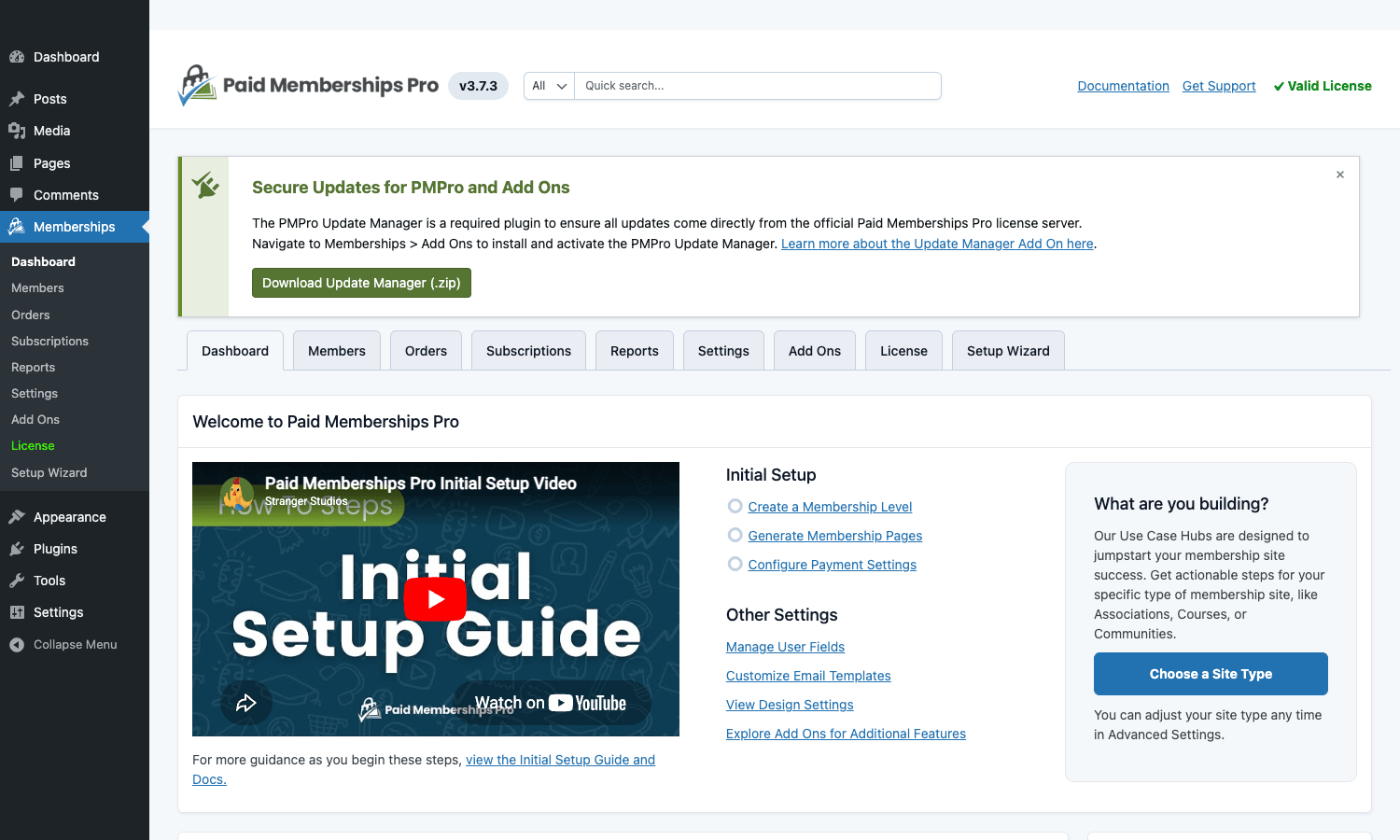
A few things to notice in that screenshot. The top white bar has the PMPro logo on the left, a global search across members and orders in the middle, and Documentation / Get Support / Valid License on the right. The green-bordered Secure Updates banner explains that an Update Manager addon needs to be installed to receive updates for the premium add-ons, which is a small wrinkle (more on that later). The tab row across the page (Dashboard, Members, Subscriptions, Orders, Reports, Settings, Add Ons, License, Setup Wizard) is how you navigate the plugin’s surface, and the welcome pane in the middle has the Initial Setup video plus jump-off buttons for Create a Membership Level, Generate Membership Pages, and Configure Payment Settings.
The right-hand "What are you building?" card is one of the more thoughtful pieces of onboarding I’ve seen on a membership plugin. PMPro publishes Use Case Hubs (Associations, Courses, Communities, News, Online Coaching, etc.) with site-type-specific guides. The Choose a Site Type button drops you into the right one.
The Members tab is what you’ll use most. It’s a sortable table of every member with columns for level, billing status, last sign-in, last order, and total order amount. You can filter by level, status (active, cancelled, expired, paused), join date range, and country. Clicking a member opens a per-member view where you can change their level, refund an order, add a note, and (with the right addon) impersonate them for support.
Orders and Subscriptions are sibling tabs. Orders is the actual money log: every transaction, every refund, every failed renewal. Subscriptions is the recurring-billing relationship: who is on a monthly cycle, when their next renewal is due, which gateway holds the token. The two-tab split is correct because a subscription can have many orders attached to it, and the dual view stops you confusing "this person had one order" with "this person had one subscription" (very different things when a renewal fails).
Reports is the one tab that looks dated, and I’ll say that openly. The reports are accurate but the visualisations are basic HTML tables with sparse styling. If you need beautiful dashboards you’ll either use the Members Report addon or pipe the data into an external BI tool via the REST API. For the median membership site, the built-in reports are enough.
Membership levels, the unit of everything
Levels are how PMPro thinks about the world. Every member belongs to exactly one level at a time (or multiple, if you’ve enabled the Multiple Memberships per User addon). Every protected piece of content is gated by one or more levels. Every coupon is tied to a level. Every subscription is bound to a level. So creating levels well is most of the work of setting up the plugin.
A fresh install has no levels by default, which is why the Levels tab looks like this until you create one:
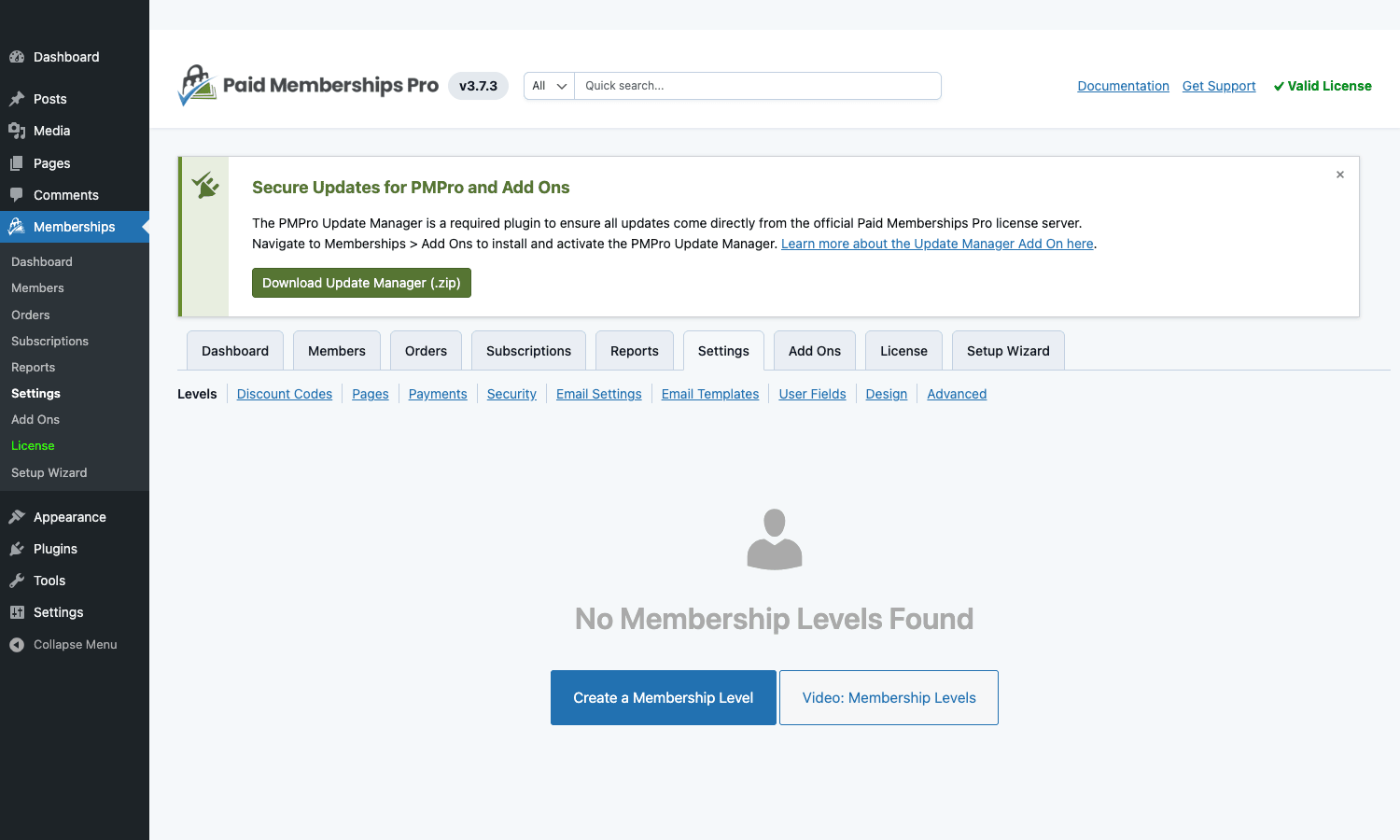
Notice the row of sub-tabs above the empty state: Levels, Discount Codes, Pages, Payments, Security, Email Settings, Email Templates, User Fields, Design, Advanced. That’s the entire Settings area, structured as a horizontal tab strip rather than the usual WP options-page jumble. It is genuinely easier to navigate than most WP admin screens I work on, and I’ve come to appreciate the discipline of putting all the configuration into one tabbed area.
The Create Level form itself has the fields you’d expect: Name, Description, Confirmation Message, Allow Signups, Initial Payment, Recurring Payment, Billing Cycle Number/Period (e.g. 1 month), Trial Settings, Membership Expiration. Below that, two important blocks. The Categories block lets you tick which post categories are included for this level (gating content in bulk). The Custom Level Code lets you paste a level code, which is what shortcodes and URLs reference.
A small but important detail: PMPro stores levels in their own table (pmpro_membership_levels), separate from WP options. That’s good architecture but it means migrating levels between sites isn’t a copy-options operation. Use the Import/Export addon or the WP-CLI commands if you do this often.
The Add Ons library, and what’s actually paid
The Add Ons tab is where the freemium model becomes visible. It looks like this:
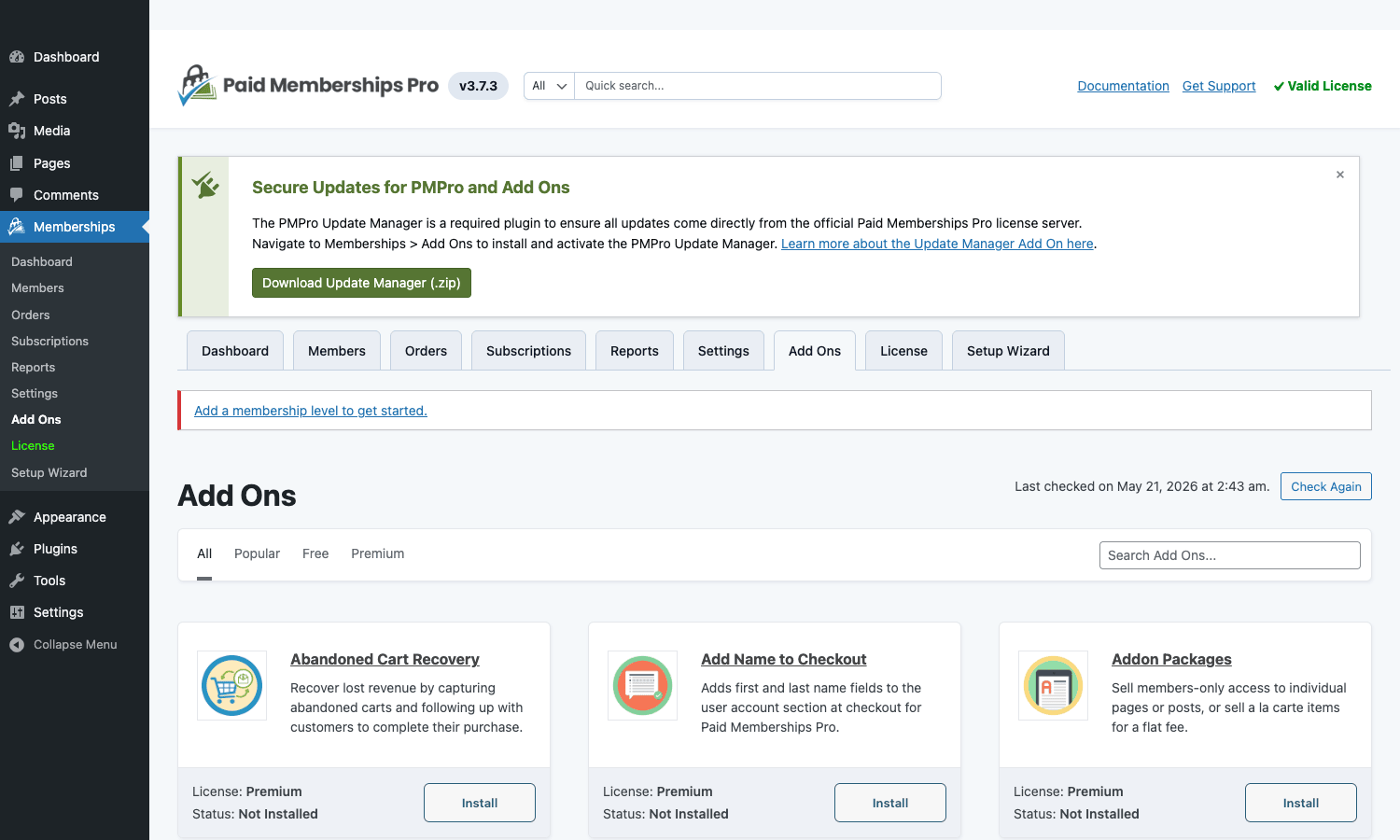
The filter row across the top (All / Popular / Free / Premium) is the honest part. Click Free and you’ll see roughly 15 to 20 addons that are free but live in the directory rather than the core: BuddyPress Integration, bbPress Integration, the older Stripe Checkout flow, AffiliateWP integration, and similar. Click Premium and you see the rest, around 35 or so, which require an active Add Ons subscription to install.
I’ll give a few examples of what’s premium and what isn’t, because the list isn’t always intuitive.
Premium (subscription required):
- Multiple Memberships per User. Lets one user hold more than one level simultaneously. Important for sites where you want a "Member" + "VIP" pair.
- WP-CLI Add On. Adds
wp pmprocommands for bulk operations. - Add Member Admin. Grant a level from
Members > Add Newwithout going through checkout. - Stripe Checkout. The newer Stripe Checkout (hosted) flow. The older Stripe.js inline form is in the core for free.
- Email Templates Admin. WYSIWYG editor for transactional emails.
- Reports Database. Persists report snapshots so the reports tab stops recomputing from raw orders every page load.
- Abandoned Cart Recovery, Addon Packages, Add Name to Checkout (visible in the screenshot above).
Free (in the directory but not core):
- BuddyPress / BuddyBoss Integration.
- bbPress Integration.
- AffiliateWP Integration.
- Custom Level Cost.
- Recurring Email Reminders.
If you only need the free addons, the install flow is identical to any WordPress.org plugin: click Install, then Activate. If you click Install on a premium addon without a licence, PMPro routes you to their checkout for the Add Ons subscription. There’s no nag flow inside the core admin (the only premium-related messaging is the green Update Manager banner at the top).
One thing I genuinely like: the addons are real, well-scoped WordPress plugins. They drop into wp-content/plugins/ like any other plugin and they leave when you deactivate them. Compared to monolithic plugins that ship everything in one zip and feature-flag based on a licence key, PMPro’s add-on architecture is easier to audit and easier to selectively disable when debugging.
Installing PMPro and the first hour of setup
Here’s the workflow I use on every new install. It takes roughly 30 to 45 minutes if you already know what your levels look like.
- Install the plugin. From
Plugins > Add New, search "Paid Memberships Pro", install, activate. You’ll see the Memberships menu item appear. - Run the Setup Wizard or skip it. The wizard creates the system pages (Membership Account, Checkout, Confirmation, Levels, Invoice, Cancel, Member Login) and asks for a payment gateway and a currency. If you know what you want, the wizard is fast. If not, you can build the same setup tab-by-tab in Settings.
- Pick a payment gateway.
Settings > Payments. For most sites this is Stripe (just paste the publishable and secret keys, and ideally a webhook signing secret). PayPal is the second most common. Set the gateway environment to Test first. - Set the currency, tax, and country defaults. Same Payments tab.
- Create your first level.
Settings > Levels > Add New Level. Name, price, billing cycle, expiry. Save. - Decide what’s restricted. Two approaches. Either edit each post and use the Require Membership meta box on the right, or use
Settings > Pagesto gate whole categories / CPTs in bulk. For a content site I usually do bulk gating by category. - Customise the Levels page. The page created at
/membership-levels/is where prospects land to pick a tier. PMPro renders this with the[pmpro_levels]shortcode by default. You’ll almost certainly want to replace it with a hand-built block layout that lists features per tier. - Test the checkout end-to-end in Stripe test mode. Card
4242 4242 4242 4242, any future expiry, any CVC. Confirm the welcome email lands and the member’s account page shows the right level. - Switch to live keys. Update both publishable and secret. Update the webhook endpoint to point at your live Stripe webhook URL.
- Watch the first real order. Subscription, order, email, member status, all should align.
I cannot overemphasise step 8. The most common failure mode I’ve seen on a new PMPro site is that the welcome email goes to spam (or the from-address is the WordPress default and gets blocked outright). Use a transactional email plugin or service from day one, and verify SPF/DKIM before launch.
Real site types I’ve seen this work on
Membership plugins live or die by use-case fit, so let me give the concrete shapes PMPro slots into well.
Paid newsletters and content libraries. Substack-style sites where the value is the writing itself. PMPro’s content gating + per-category restrictions handle the "free posts public, paid posts members-only" pattern out of the box. Add the Limit Post Views addon if you want metered access (read 3 free articles, then prompt to subscribe).
Online communities with paid tiers. Pair PMPro with the BuddyBoss or BuddyPress integration and you have a Discord-style paid community without the Discord. Forums are gated by level, profiles work normally, and members are billed monthly. This is one of the patterns where the "Multiple Memberships per User" addon.
Online courses on a budget. PMPro itself is not an LMS. But the Pay-What-You-Want addon plus a basic course CPT setup is plenty for a small course business that doesn’t want LearnDash’s complexity. If you grow into needing real LMS features (drip lessons, quizzes, certificates, gradebook), the LearnDash + PMPro integration addon bridges the two systems.
Professional associations and chambers. Annual dues, member directories, downloadable resources, gated event registrations. PMPro’s per-tag + per-CPT restriction is what handles this. The Member Directory and Member Profile Pages addons are usually needed too.
Premium download / digital product gates. Films, sample packs, design assets. The Add Recurring Downloads addon turns a level into a monthly "drop a new file" workflow.
A pattern I’d push back on: large e-commerce stores where memberships are a side feature. If your primary business is product sales and memberships are a "VIP customer" tier on top, you’re better off with WooCommerce Subscriptions plus a Memberships extension. PMPro is happiest when memberships are the main product, not an add-on to a Woo store.
Developer reference: shortcodes, hooks, tables, REST
PMPro is one of the most developer-friendly membership plugins I’ve worked with. The hook surface is broad, the function naming is consistent (everything is pmpro_*), and the database schema is sane.
Shortcodes
The shortcodes you’ll use most often, with the parameters that matter:
// Gate a chunk of content to one or more levels (comma-separated)
[membership level="2,3"]
 Only Silver and Gold members see this.
[/membership]

// Reverse: show only to non-members of a level
[membership level="2" delay="3"]
 Visible 3 days after the user reaches level 2.
[/membership]

// The member account page
[pmpro_account]

// Login form (use on a "Member Login" page if you don't want wp-login.php exposed)
[pmpro_login]

// A "Sign Up" button that goes straight to checkout for a level
[pmpro_checkout_button level="2" text="Join the Silver tier"]

// List of all PMPro system pages (useful for footer nav)
[pmpro_pages]

// Display a member's own meta field
[pmpro_member field="user_email"]
The [membership] shortcode supports a delay attribute (in days) which is how PMPro implements basic drip content without an addon. Plenty of small sites get a fully functional drip feed using just delay.
Hook examples
The hooks file in PMPro’s source is hundreds of lines. Here are the calls you’ll reach for most often, with practical examples.
pmpro_after_checkout runs after a member successfully completes checkout. The classic place to push a tag to your CRM, kick off an external API call, or write a row to an audit table.
add_action( 'pmpro_after_checkout', function( $user_id, $morder ) {
 if ( empty( $user_id ) || empty( $morder ) ) {
 return;
 }

 $user = get_userdata( $user_id );
 $level = pmpro_getMembershipLevelForUser( $user_id );

 // Push the new member to your CRM (replace with your real provider).
 wp_remote_post( 'https://api.example-crm.com/contacts', array(
 'headers' => array( 'Authorization' => 'Bearer '. CRM_TOKEN ),
 'body' => wp_json_encode( array(
 'email' => $user->user_email,
 'tags' => array( 'pmpro_member', 'level_'. $level->id ),
 'amount' => $morder->total,
 'gateway' => $morder->gateway,
 ) ),
 'timeout' => 8,
 ) );
}, 10, 2 );
pmpro_after_change_membership_level runs whenever a user’s level changes (signup, upgrade, downgrade, cancellation, expiration). This is the hook I use most. It’s the single source of truth for "the user’s membership status just changed".
add_action( 'pmpro_after_change_membership_level', function( $level_id, $user_id, $cancel_level ) {
 if ( 0 === intval( $level_id ) ) {
 // The user lost their membership (cancellation or expiration).
 do_action( 'mysite/member_lost', $user_id, $cancel_level );
 return;
 }

 // The user gained a membership or moved between levels.
 if (! empty( $cancel_level ) && $cancel_level!== $level_id ) {
 do_action( 'mysite/member_upgraded', $user_id, $cancel_level, $level_id );
 } else {
 do_action( 'mysite/member_joined', $user_id, $level_id );
 }
}, 10, 3 );
pmpro_checkout_level filters the level a user is about to be charged for during the checkout flow. Use it to apply dynamic pricing, employee discounts, or referral logic that doesn’t fit the coupon system.
add_filter( 'pmpro_checkout_level', function( $level ) {
 // Employees of acme.com get the Pro tier at 50% off.
 $email = isset( $_REQUEST['bemail'] )? sanitize_email( $_REQUEST['bemail'] ) : '';

 if ( $email && str_ends_with( $email, '@acme.com' ) && intval( $level->id ) === 3 ) {
 $level->initial_payment = $level->initial_payment * 0.5;
 $level->billing_amount = $level->billing_amount * 0.5;
 }

 return $level;
} );
pmpro_checkout_start_date / pmpro_checkout_end_date filter the date math for a membership. Useful when you want a "billed annually but always renews on December 31" pattern.
add_filter( 'pmpro_checkout_end_date', function( $end_date, $user_id, $level ) {
 if ( intval( $level->id ) === 5 ) {
 // Calendar-year level always ends Dec 31.
 return date( 'Y-m-d', strtotime( date( 'Y' ). '-12-31' ) );
 }
 return $end_date;
}, 10, 3 );
pmpro_currencies and pmpro_default_currency let you add custom currencies and pick the default. PMPro ships with about 30 currencies in pmpro_currencies, but adding a missing one is two lines.
add_filter( 'pmpro_currencies', function( $currencies ) {
 $currencies['NGN'] = array(
 'name' => 'Nigerian Naira (NGN)',
 'symbol' => '₦',
 'position' => 'left',
 'decimals' => 2,
 'thousands_separator' => ',',
 'decimal_separator' => '.',
 );
 return $currencies;
} );
pmpro_edit_member_capability changes which capability is required to edit a member’s record. Default is manage_options, which is heavy. On a site with a dedicated membership manager role, drop it down.
add_filter( 'pmpro_edit_member_capability', function() {
 return 'pmpro_edit_members';
} );
A few more worth noting: pmpro_before_send_to_paypal_standard and pmpro_before_send_to_twocheckout are your hooks for the moment immediately before redirect to PayPal Standard or 2Checkout. They are how you append custom IPN parameters or stash an order reference on the user.
Database tables
PMPro creates its own tables (prefixed with the site’s WP prefix; below I’ll use wp_ for clarity).
wp_pmpro_membership_levelsis the master list of levels.wp_pmpro_memberships_usersis the user-level history table. Each row is a user holding a level at a point in time; this is what makes membership history queries possible.wp_pmpro_membership_ordersis the order log. Every successful payment, refund, and failed renewal becomes a row.wp_pmpro_memberships_pagesandwp_pmpro_memberships_categoriesare the access-control joins for page-level and category-level restriction.wp_pmpro_discount_codes,wp_pmpro_discount_codes_levels,wp_pmpro_discount_codes_usestogether form the coupon system.
You can query these directly when you need a report PMPro’s built-in reports don’t cover. Example: total revenue this calendar year, grouped by level.
SELECT
 l.name AS level,
 COUNT(o.id) AS orders,
 SUM(o.total) AS revenue
FROM wp_pmpro_membership_orders o
INNER JOIN wp_pmpro_membership_levels l ON l.id = o.membership_id
WHERE o.status = 'success'
 AND o.timestamp >= '2026-01-01 00:00:00'
GROUP BY l.id
ORDER BY revenue DESC;
REST API
PMPro registers REST endpoints under wp-json/pmpro/v1/. The most useful ones (free, no addon needed):
GET /wp-json/pmpro/v1/has_membership_accesswithuser_id,post_idparameters returnstrue|false. This is how you check "can this user see this post?" from a headless frontend or a separate service.GET /wp-json/pmpro/v1/get_membership_level_for_userreturns the level object for a given user.POST /wp-json/pmpro/v1/change_membership_level(admin-only, capability-gated) sets a user to a level. Useful for back-office tooling.
For anything that touches money (creating orders, refunds) you’ll either use Stripe’s API directly (see the Stripe API reference) and let PMPro’s webhook handle the result, or you’ll need the paid WP-CLI / REST addon for the extra endpoints.
WP-CLI (paid addon)
If you have the WP-CLI Add On installed, the most useful commands are:
# List levels
wp pmpro level list

# Add a user to a level (no checkout, no charge)
wp pmpro user add-level <user_id> <level_id>

# Remove a user from all levels
wp pmpro user remove-levels <user_id>

# Export members to CSV
wp pmpro member export --level=2 > silver-members.csv
I’d argue WP-CLI commands should be in the core, but they’re not, so factor that into the pricing decision.
Performance and compatibility notes
PMPro is reasonably well-behaved on the front end. Its content-gating logic runs on the the_content filter and a few related hooks, which means it has a small per-page cost but nothing dramatic. The bigger performance question is the admin reports: on a site with 50,000+ members and several years of order history, the Reports tab gets slow because each report query scans the full orders table. The Reports Database addon fixes this by snapshotting reports daily.
Cache compatibility is straightforward. Static page caches (the kind you get from WP Rocket or Cloudflare APO) need to know they shouldn’t cache pages for logged-in users, which is the default for any decent cache plugin. PMPro doesn’t fight that. The one wrinkle is the Levels page (/membership-levels/) which shows different content per-user (the "you’re already on this level" badge); make sure your cache excludes it for logged-in members.
Multisite works but is not what PMPro is optimised for. You’ll want the Network Subscriptions addon for that case.
REST API and headless: the has_membership_access endpoint is fast (one indexed query) and is what I use to glue PMPro to a Next.js or Astro front end.
Honest limits
I want to be straight about where PMPro is not the right pick.
The admin UI is less polished than the competition. MemberPress has a more designed feel, with cards and gradients and a more "modern SaaS" admin aesthetic. PMPro’s admin is functional, tabular, slightly utilitarian. If a polished admin is a sales-cycle issue for you (e.g. you’re handing the site off to a client who’ll judge it on appearance), this matters.
Content protection is less granular than WishList Member. WishList Member supports things like sequential drip levels, per-comment protection, and time-based access windows out of the box. PMPro can do most of these with addons or custom code, but the WishList Member UI for these is more direct.
Some core-feeling features cost extra. The list of premium add-ons includes things many users will assume are core: Multiple Memberships per User, the email template designer, the WP-CLI commands, the Members List CSV export with extended fields. None of these are deal-breakers, but it’s worth pricing them before you commit.
The Add Ons subscription is not cheap if you only want one addon. $228 a year for a single addon (say, just Multiple Memberships per User) is hard to justify. The pricing assumes you’ll use the bundle. If your site only needs one specific addon, look closely.
Updates for premium addons need the Update Manager. The green banner on the dashboard is honest: premium add-on updates flow through PMPro’s own license server, not WordPress.org. You install the Update Manager addon (it’s free, from PMPro directly) and it handles license-keyed updates for the premium addons. It’s not painful, but it’s an extra moving part.
Reports are basic. I’ve said this above but it’s worth repeating. If you need true cohort analysis, retention curves, churn dashboards, you’ll be exporting to Metabase or similar.
Pricing and licensing
PMPro’s pricing has two layers.
The core plugin is free. Download from WordPress.org, install, run a membership site. This is genuinely the full thing; the gateways are in the core, the levels are unlimited, recurring billing works.
The Add Ons subscription buys you the premium addons (around 35 of them at the time of writing) and PMPro’s official support. There are three tiers, currently roughly:
- Standard, around $228 per year, single site.
- Plus, around $497 per year, up to 5 sites.
- Unlimited, around $897 per year, unlimited sites.
The Unlimited tier is what membership-focused agencies usually want. The Standard tier is fine for one growing membership site.
On the GPL Times store you’ll find Paid Memberships Pro available at our standard plugin price, which is dramatically less than the official Add Ons subscription tier if you want the premium addons too.
You can also read the WordPress.org plugin page for the free core and the official documentation for the canonical guides on every feature, hook, and addon.
Final thoughts
The reason I keep coming back to Paid Memberships Pro isn’t because it’s the prettiest membership plugin, because it isn’t. It’s because PMPro made one bet in 2011 that almost every other plugin in the category eventually wished they’d made: keep the core free, make the money on the bundle of optional add-ons. That decision protects you, the site owner, from the slow-creep renewal-fee model that consumes membership-site margins year after year. If the worst happens and you stop paying for the Add Ons subscription, your site keeps running, Stripe keeps charging your members, the gates keep working, and you keep getting security patches from WordPress.org.
That’s not a small thing. It’s the thing.
The trade-offs are real (admin polish, some core-feeling features behind the paywall, the Update Manager extra step), but they’re trade-offs you can see and price. And the underlying hook surface, particularly pmpro_after_change_membership_level and pmpro_checkout_level, is the cleanest in this category, which makes PMPro the easiest membership plugin to bend into the exact business model your site needs. That combination, free core plus an honest add-on architecture plus developer-friendly hooks, is why eight years after I first installed it, it still ships on the sites I build.