

Most small companies juggle three SaaS bills: a CRM, a payroll/HR tool, and an accounting app. Each one syncs poorly with the others, none of them talks to the WordPress site that everything else already runs on, and the monthly cost keeps climbing as the team grows.
WP ERP takes a different swing at the problem. It bolts a full Customer Relationship Manager, a Human Resource module, and a double-entry Accounting module straight into wp-admin, and lets one WordPress install run a real chunk of a small business. This article is a hands-on walk through what the plugin actually does, how the three modules fit together, what the developer surface looks like, and where it makes sense (and where it doesn’t).
Table of contents
- What WP ERP is
- The three core modules at a glance
- Setup wizard and module activation
- The HR module in detail
- The CRM module in detail
- The Accounting module in detail
- Pro extensions and integrations
- Roles, permissions, and team access
- Developer reference
- Common use cases
- Performance, compatibility, and gotchas
- Pricing and licensing
- How it compares to other options
- Frequently asked questions
- Final thoughts
What WP ERP is
WP ERP is a plugin by weDevs (the team behind Dokan and weMail) that turns a vanilla WordPress install into a business-management hub. After activation you get a new top-level WP ERP menu in wp-admin with three big children: HR, CRM, and Accounting. Each module ships with its own database tables, its own admin UI, its own role and capability set, and its own REST endpoints.
The free core, available on the WordPress.org repository, already covers most of what a five-to-twenty person company needs: employee directory, leave management, contact and deal management, double-entry bookkeeping with chart of accounts, financial reports. WP ERP PRO layers on the addons that round out the system, things like Attendance, Payroll, Workflow, Document Manager, Asset Management, Recruitment, Salesforce/HubSpot/Mailchimp/Zendesk sync, Twilio SMS, and an employee self-service frontend.
The product is built by the same vendor as the WP Project Manager, which means the two plugins coexist nicely and share a few UI patterns. If you already run weMail or Dokan you’ll recognise the menu style, the modal-driven forms, and the "Vue inside wp-admin" feel of the heavier screens.
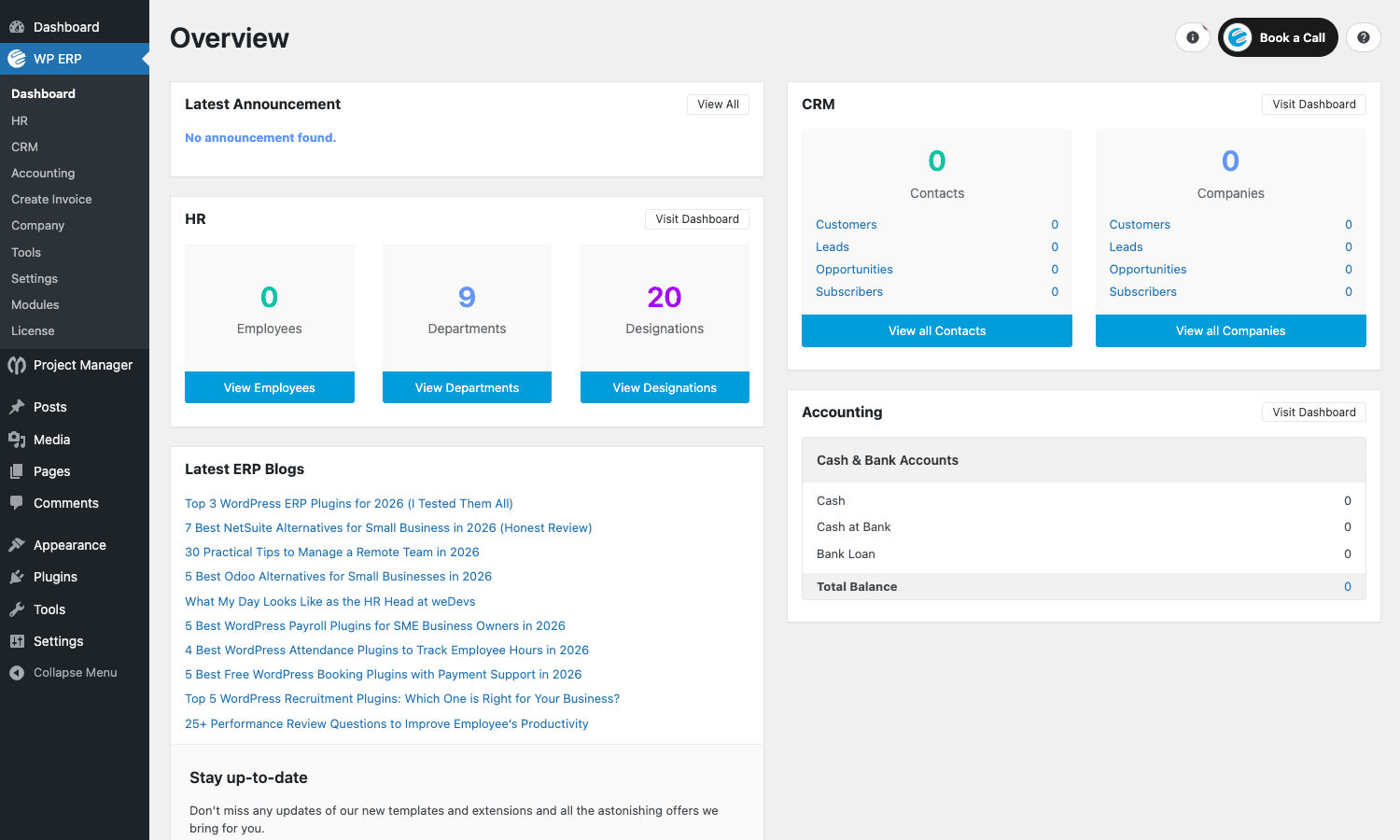
The screenshot above is the unified Dashboard. It pulls live counts from each active module: employees and departments from HR, contacts and companies from CRM, and account balances from Accounting. It’s the first thing every team member lands on after logging in, and it’s where the "one tool instead of three" pitch starts to feel real.
The three core modules at a glance
Before diving into each module, here’s the shape of what you get.
Human Resource Management (HR). Employee directory with custom fields, departments, designations (job titles), holidays calendar, leave types and policies, leave application + approval workflow, announcements, performance reviews, an org chart view, and exportable records. The pro Attendance extension adds shift definitions and check-in/check-out, optionally IP-locked. The Payroll extension handles pay types, deductions, and payslip generation. Recruitment manages job postings and applicant pipelines. Asset Manager tracks who has the laptop, the office key, the company phone.
Customer Relationship Management (CRM). Contacts and companies stored separately, each tagged with one of four Life Stages (Customer, Lead, Opportunity, Subscriber). Activity log of every email/call/meeting/note logged against a contact. Tasks. Contact groups for segmentation. Saved search segments. Email templates and inbound IMAP. A separate Deals module with custom pipelines and drag-and-drop stages (Discovery, Qualified, Proposal, etc). Reports for life-stage conversion. Pro: HubSpot, Salesforce, Mailchimp, Help Scout, Zendesk, and Gravity Forms sync; Twilio SMS.
Accounting. A real double-entry accounting system: chart of accounts (assets, liabilities, income, expenses, equity), journal entries, customer and vendor records, sales invoices, payments, purchase bills, expenses, transfers, tax categories and rates, fixed assets, financial year, multi-currency. Reports include Trial Balance, Ledger Report, Income Statement (P&L), Sales Tax, and Balance Sheet. Pro adds Inventory (with warehouses) and a WooCommerce sync that funnels orders into the books automatically.
Each module can be turned on or off independently. You can use WP ERP as a CRM only, an HR system only, or all three together. Tables aren’t created for modules you don’t activate.
Setup wizard and module activation
When you first activate WP ERP you land on a six-step setup wizard. The steps are: Basic (company info, country, currency, financial year), Module (which of HR / CRM / Accounting / Project Manager to enable), E-Marketing (newsletter opt-in to weDevs, can be skipped), Departments, Designations, Work Days, and Ready. Each step is skippable and re-runnable from wp-admin/index.php?page=erp-setup.
The Module step is the one that matters. The first time I ran the wizard I left it on the default (HR only) and then spent ten minutes wondering why CRM and Accounting weren’t in the sidebar. The fix is to come back to that step, tick every module you want, and save. Activating a module triggers the install of that module’s database tables and the registration of its admin pages. Deactivating doesn’t drop the tables, so toggling back and forth is safe.
After the wizard, the Modules page (Modules screenshot below) shows three big toggles at the top for HR, CRM, and Accounting, plus a grid of pro addon cards underneath. Each addon card has its own enable/disable toggle, a short description, and a "Pro" or "Free" badge.
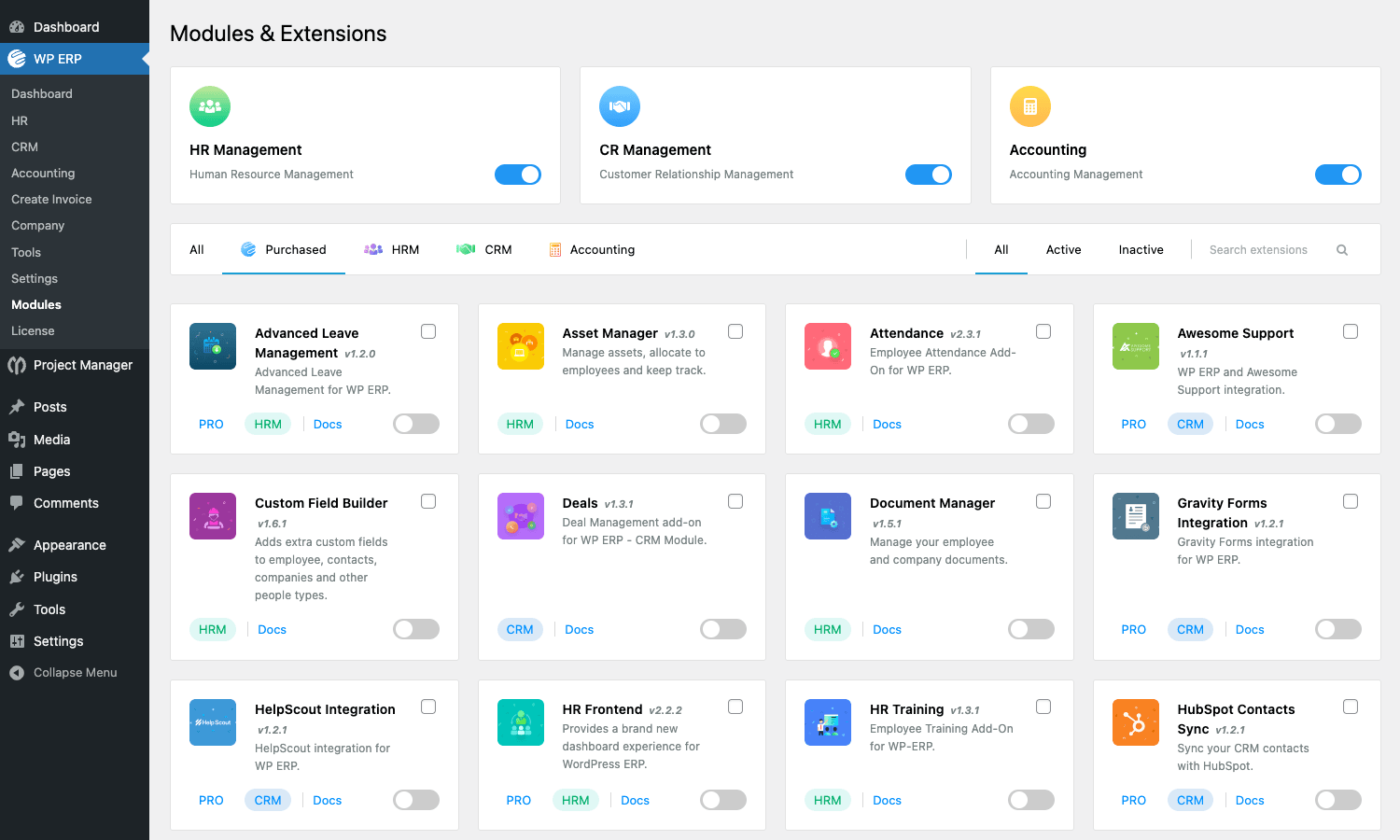
This page is also where you’d switch on extensions like Asset Manager, Attendance, Custom Field Builder, Deals, Document Manager, Gravity Forms Integration, Help Scout Integration, HR Frontend, HR Training, HubSpot, Inventory, Mailchimp, Reimbursement, Salesforce, SMS Notification, and Workflow. Each one ships as part of the WP ERP PRO bundle.
The HR module in detail
HR is the module most teams turn on first because the value is obvious: a single employee directory beats a Google Sheet, and a real leave system beats Slack threads.
People (employees, departments, designations)
People is the master directory. The Employees tab lists every staff member with avatar, name, designation, department, employment type, joined date, and status. Clicking a row opens the employee profile, which has its own tabs for personal info, contact, employment history, salary, leave history, performance reviews, documents, and notes. You can attach custom fields per employee using the Custom Field Builder (a pro extension).
Departments and Designations are the second and third tabs under People. They’re simple taxonomies, but departments support a manager assignment and a parent department (so you can model "Engineering > Frontend Team"). Designations are flat job titles. The demo install ships with nine departments (Procurement, Production, Engineering, Purchase, Human Resource, Sales, Finance, Operations, General Management) and twenty designations as starter data.
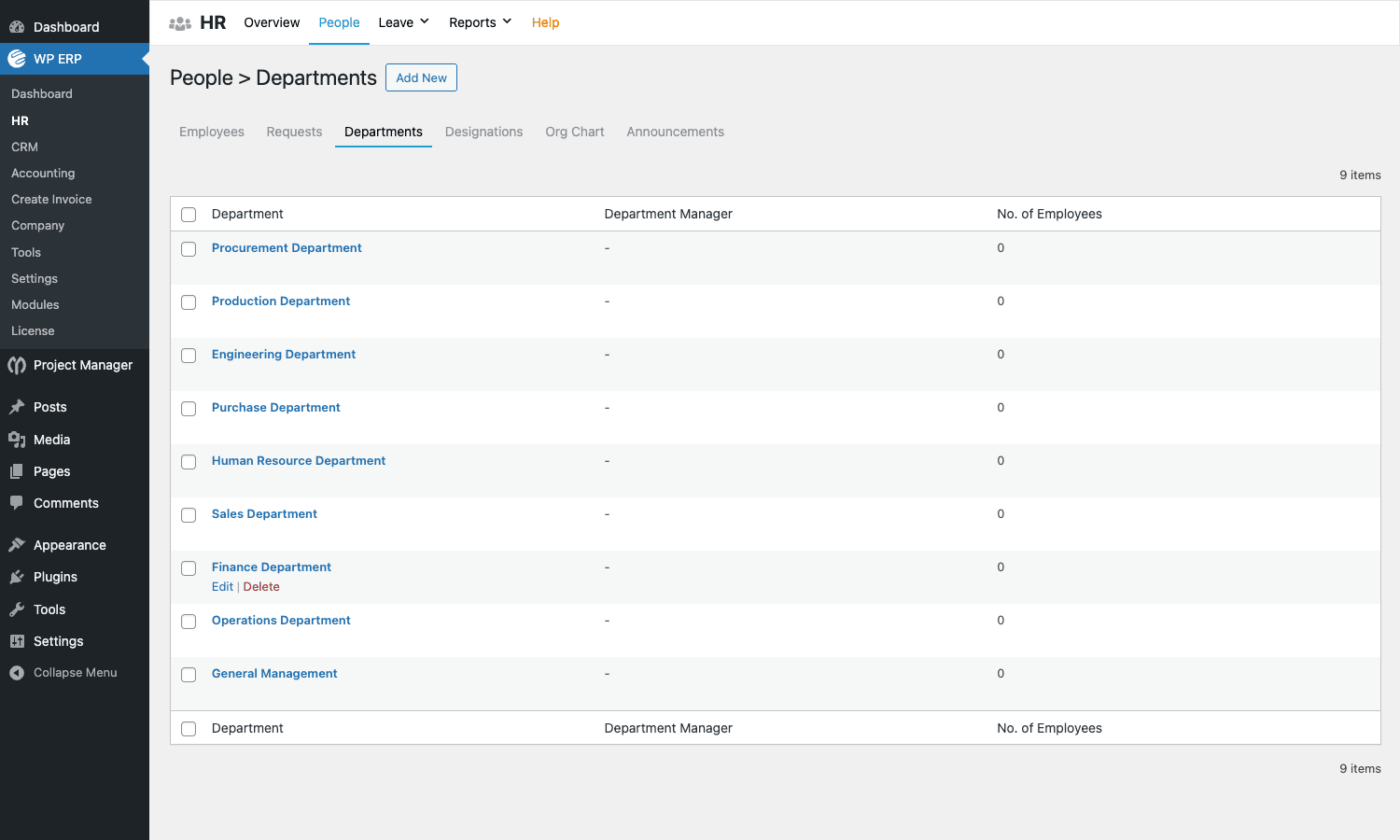
The Org Chart tab renders a tree view of the same data, which is genuinely useful for new-hire onboarding ("here’s the company shape, here’s where you sit").
The Announcements tab lets the HR manager broadcast a message to all employees or a single department. The announcement shows on the employee’s dashboard widget and can optionally trigger an email.
Leave management
Leave is more involved. You define Leave Types (Casual, Sick, Annual, Maternity, custom) with an allowed number of days per year and rules like "carry forward unused", "minimum service days required", "approval required". You define Holidays for the year, with optional repeat across years. You define Leave Policies that pair leave types with departments/designations/locations so different employee groups can have different allowances.
When an employee needs time off they file a Leave Request with a from/to date, reason, and optional document attachment. The form looks like this:
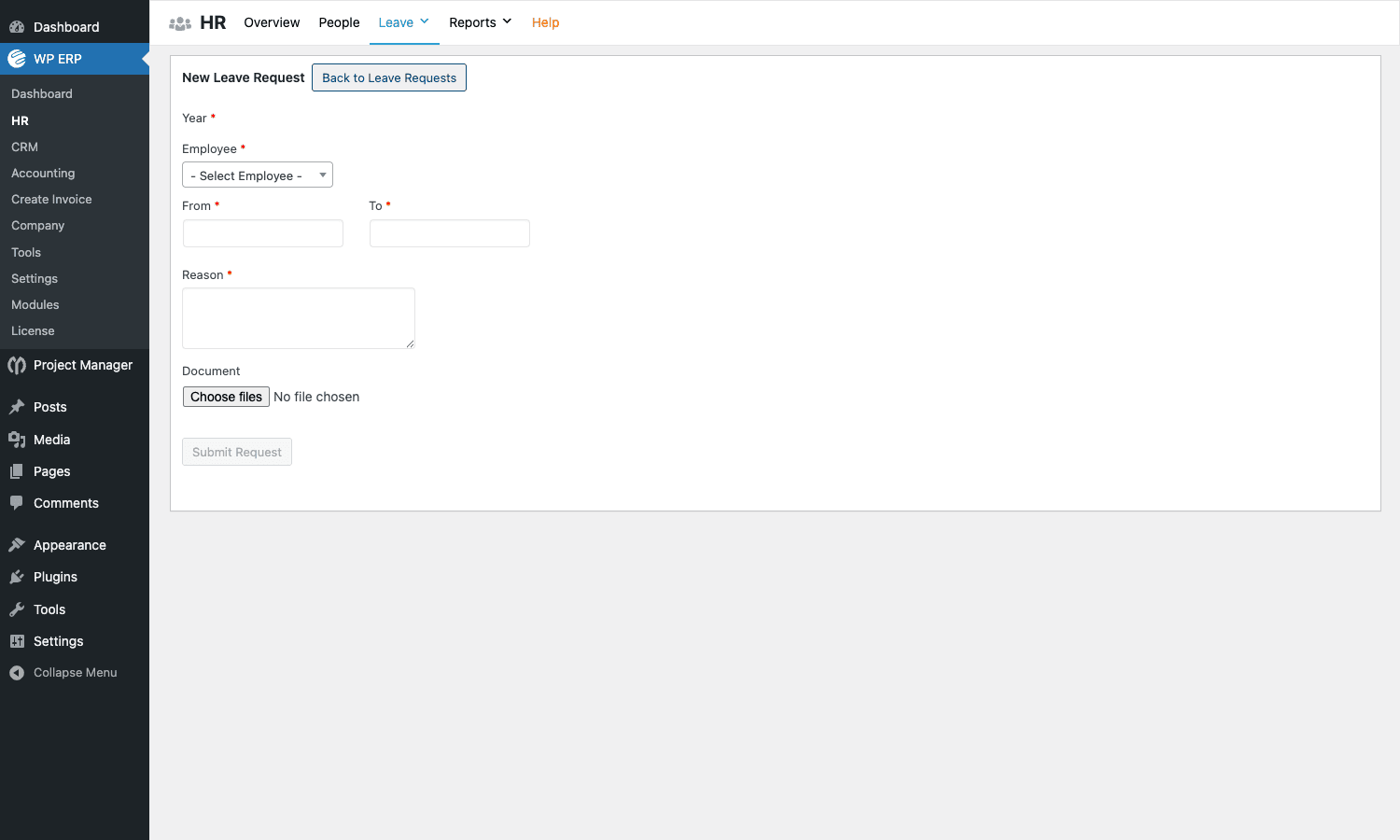
The HR manager (or the department manager, if you’ve set them as an approver) sees the request in the Leave Requests tab and can approve or reject it. Approved leave decrements the employee’s balance for that type. The whole flow is auditable, with status transitions visible in the request detail.
The pro Advanced Leave extension adds: leave entitlement based on length of service, accrual policies (e.g. 1.5 days earned per worked month), leave encashment, forwarded balance from prior years, multi-level approval chains (department manager then HR head), and a vacation calendar that overlays everyone’s approved time off on a single view.
Attendance and shifts
The pro Attendance extension adds a top-level Attendance menu where you define shifts (start time, end time, grace minutes for late check-in), assign employees to shifts, and let employees check in and out from a frontend button or from the wp-admin bar. You can lock check-in to a list of allowed IP addresses (so people can only clock in from the office network), and you can flag late check-ins or early check-outs for the manager’s review.
Reports show per-employee attendance with hours worked, lates, absences, and on-leave days for any date range. That export feeds straight into Payroll.
Payroll, Recruitment, Reimbursement, Assets
The Payroll extension defines Pay Types (basic salary, allowances, bonuses, overtime), Deductions (tax, provident fund, loan repayment), and Pay Periods (monthly, fortnightly). You run a pay batch ("payrun") at the end of the period and the plugin computes net pay per employee, generates payslips, and optionally posts the totals to the Accounting module as expenses.
Recruitment manages job postings (title, description, department, designation, deadline) and applicant tracking (CV upload, stage progression: Applied, Phone screen, Interview, Offered, Hired/Rejected).
Reimbursement is the small but daily-useful feature where employees submit expense claims with receipts, the manager approves, and the Accounting module records the reimbursement as a real expense entry. Saves an enormous amount of "did we ever pay you back for that?" Slack.
Asset Management tracks company-owned items (laptops, phones, monitors, badges) and who currently has them, with allot/return history per item. Useful for offboarding (run the report, demand the gear back).
The CRM module in detail
The CRM is more compact than something like Salesforce, but it covers the basics well enough that a sub-twenty-seat team can run their pipeline inside it.
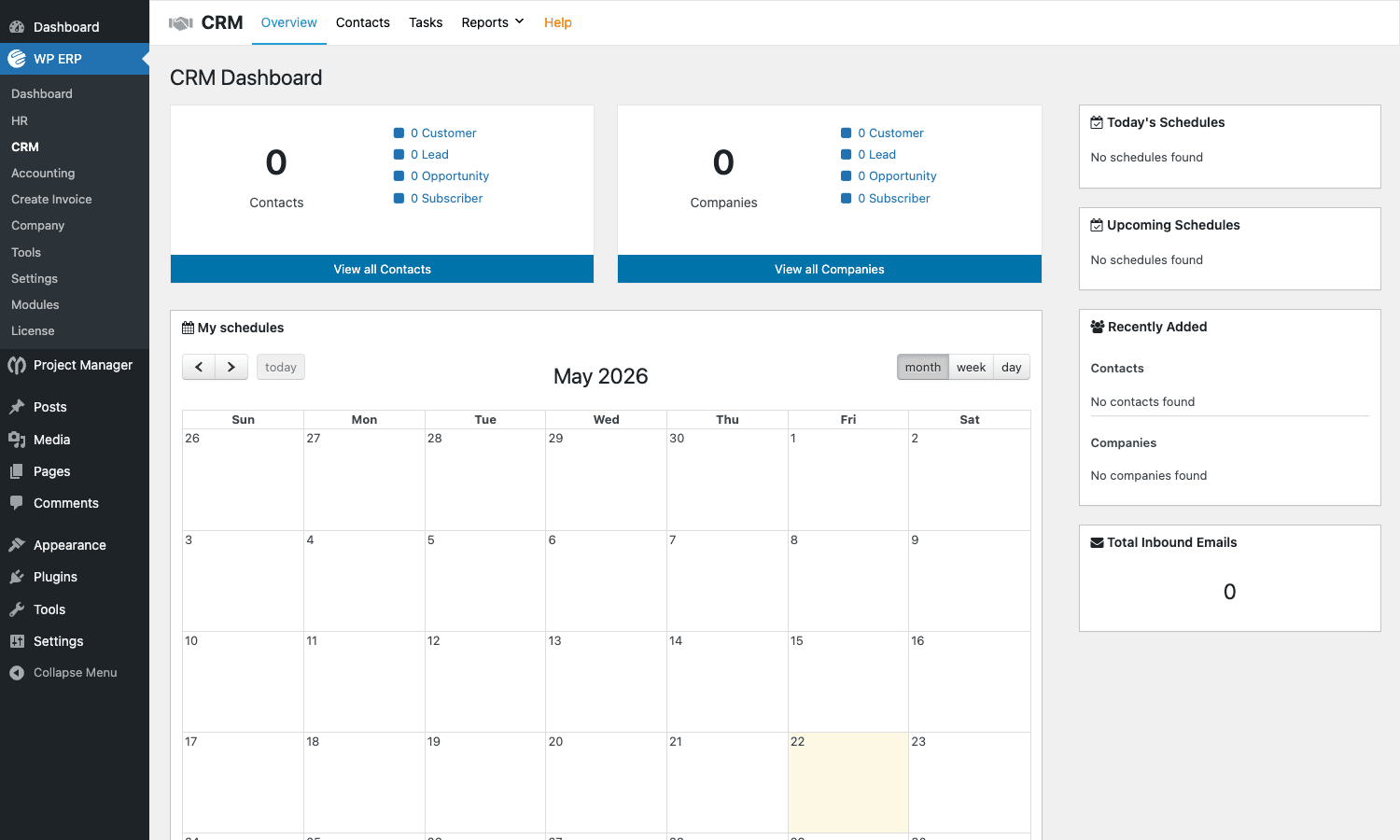
The CRM Dashboard shows totals at the top (Contacts, Companies, with Life Stage breakdown), a month calendar of scheduled activities in the middle, and right-side widgets for today’s and upcoming schedules, recently added records, and total inbound emails.
Contacts and Companies
Contacts are people. Companies are organizations. Each contact can optionally be associated with a company. Both share a similar layout: a list view with filters (by Life Stage, by Contact Owner, by created date), and a detail view per record with tabs for Profile, Notes, Activities, Schedules, Emails, Tasks, Contact Groups, Subscriptions, and Custom Fields.
The Life Stage field is the spine of the whole CRM. The four stages (Customer, Lead, Opportunity, Subscriber) are mutually exclusive, and the dashboard counts roll up to them. You can extend the list with custom stages via the erp_crm_limit_life_stage filter.
Adding a contact opens a small modal:
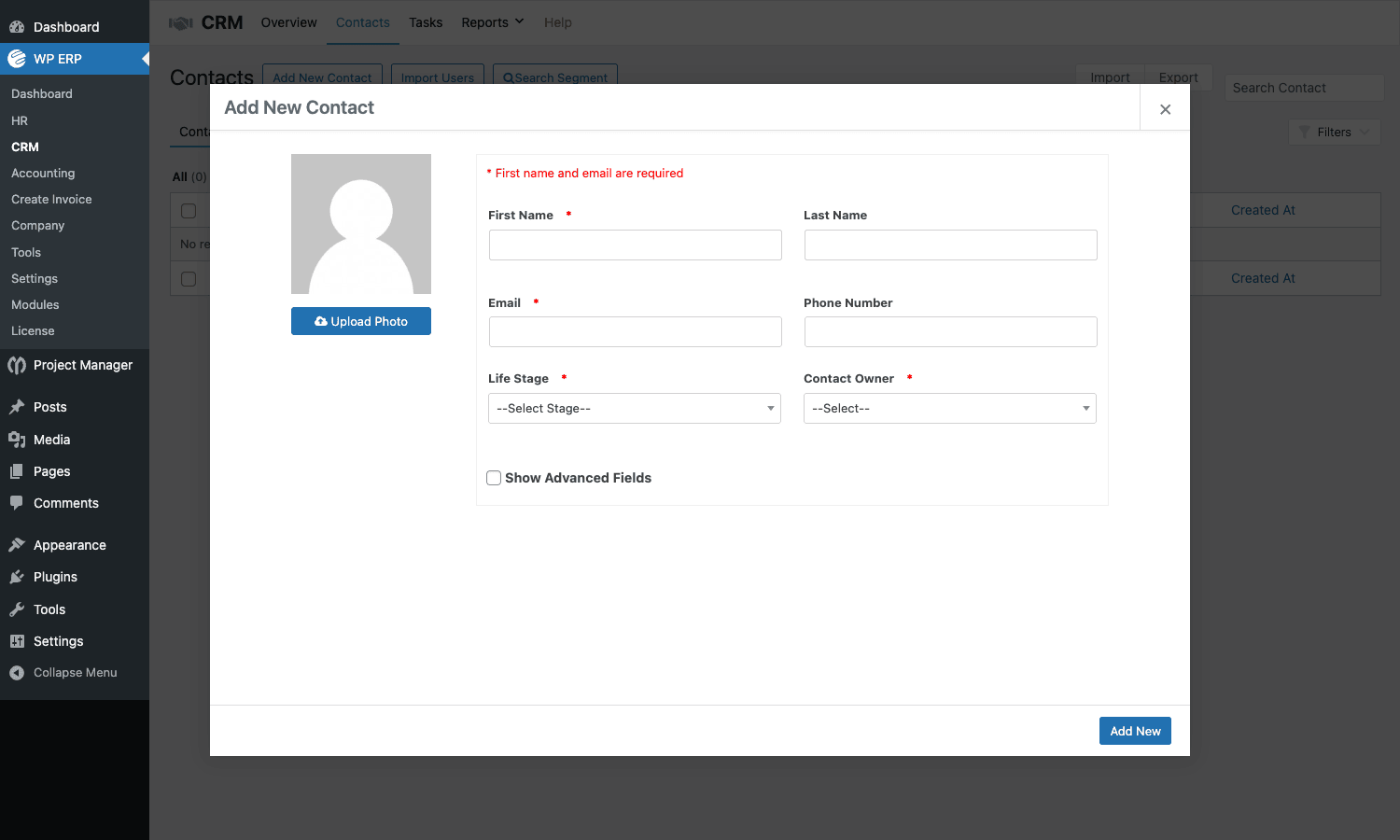
Required fields are first name and email. The "Show Advanced Fields" toggle expands the form to include date of birth, social profiles, address, and the custom fields you’ve defined via the Custom Field Builder.
Contact Groups are saved segments. You build a group by filtering the contacts list (e.g. "Life Stage = Lead AND Country = Germany AND Created date > 30 days ago"), then save the filter as a group with a name. Groups are the unit you target for bulk email or Mailchimp/HubSpot sync.
Activities and Tasks
Every interaction with a contact is an Activity: a logged email, a call note, a meeting summary, a generic note. Activities show on the contact’s detail page and on the CRM Dashboard timeline. They’re searchable and exportable.
Tasks are the simpler "TODO assigned to a CRM agent" list: title, due date, assignee, contact reference. The agent sees their open tasks on the CRM Dashboard.
The Schedules widget on the CRM Dashboard is the calendar view of activities that have a scheduled date (a future meeting, a follow-up call). Click a date on the month grid to see what’s scheduled.
Deals and pipelines
The Deals module is a separate top-level menu (wp-admin/admin.php?page=erp-deals) that activates when you enable the Deals extension. It’s a kanban-style pipeline view where each deal card flows left-to-right across stages.
Out of the box you get one pipeline ("Sales Pipeline") with five stages (Discovery, Qualified, Proposal, Negotiation, Won). You can define additional pipelines (one per product line, or per geographic territory, or per sales team), add or rename stages, and set custom stage colours. Each deal carries an amount, an expected close date, an assigned agent, a primary contact, and a freeform list of participants and competitors.
Filters at the top of the kanban let you scope to one agent, one date range, or one specific pipeline. The Activities tab inside a deal logs everything that happened on it: stage changes, notes added, emails sent, attachments. Won/Lost reasons are captured at the moment a deal closes, so you can later run reports on "why we lost the last twenty deals".
Inbound and outbound email
CRM has an IMAP inbound configuration so emails sent to your CRM mailbox (typically crm@yourdomain.com) are auto-parsed, matched to a contact by sender email, and logged as activities. You can reply from the contact detail view and the message goes out through your WP mail config. For reliable delivery you want a real SMTP plugin in front of WP_Mail, and the free Post SMTP handles that with no extra setup.
Outbound bulk email goes through saved templates with merge tags ({first_name}, {company}, {owner_name}). For real broadcast email you’d combine this with MailPoet Premium or a dedicated CRM like FluentCRM Pro, since WP ERP’s mail is intended for one-to-one and small batches rather than newsletter blasts.
The Accounting module in detail
This is the most ambitious of the three modules, and the most polished. It’s an actual double-entry accounting system, not a glorified invoice generator.
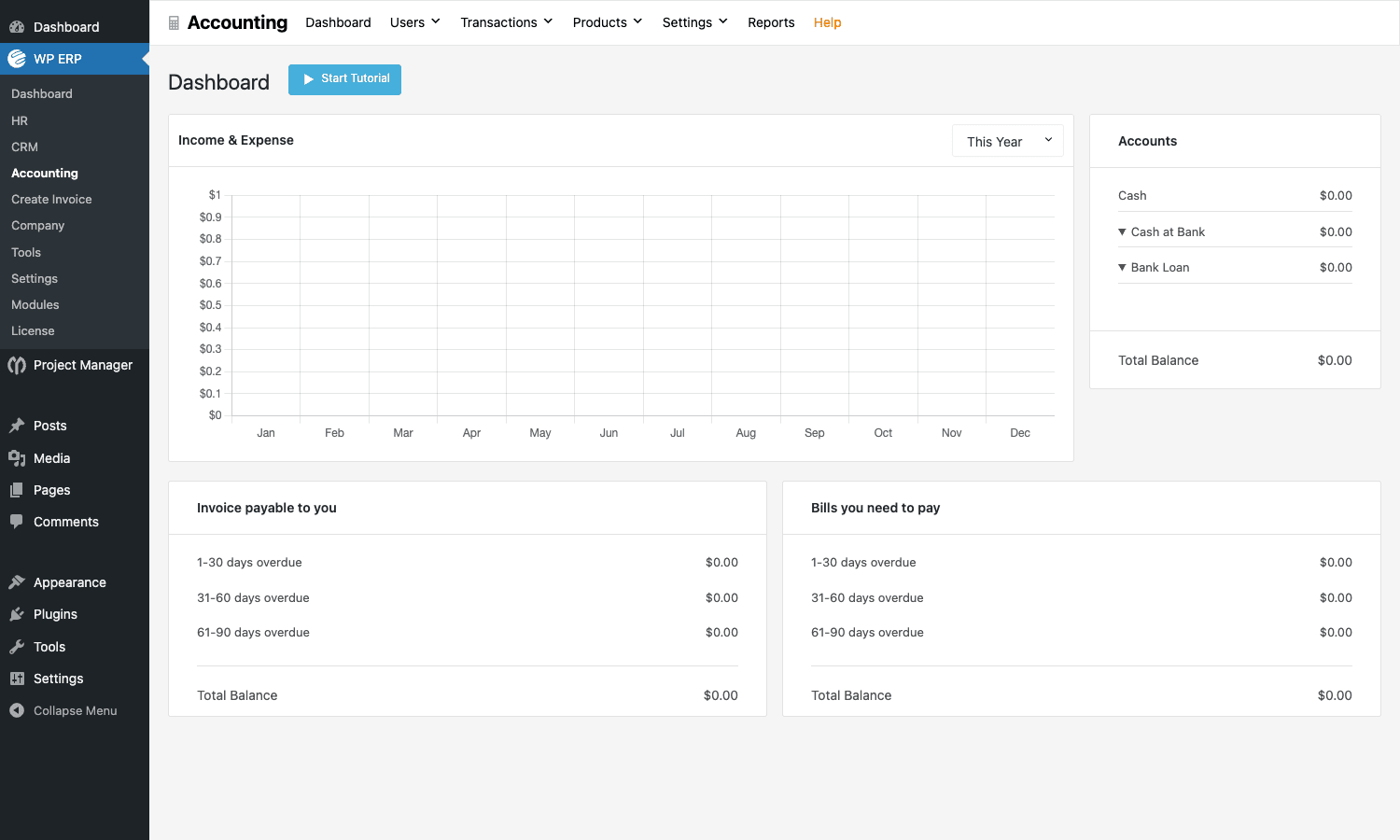
The dashboard shows a twelve-month income-vs-expense chart, the current balances of every account in your chart of accounts, the invoices customers owe you aged by 1-30/31-60/61-90 days, and the bills you owe vendors aged the same way. That’s the daily-driver screen for a bookkeeper.
Chart of Accounts
The chart of accounts is set up under Settings > Ledger. WP ERP creates default accounts (Cash, Cash at Bank, Bank Loan, Sales Revenue, etc.) at install, grouped under the five classical heads: Assets, Liabilities, Income, Expenses, Equity. You add custom ledger accounts as needed (separate bank accounts, a "Marketing" expense head, a "Founder Loan" liability).
Every transaction creates balanced debit and credit entries against ledger accounts, which is what makes this a proper accounting system rather than a list of invoices.
Customers, Vendors, Products
Customers are the people you sell to. Vendors are the people you buy from. Both have a record with billing/shipping address, opening balance, payment terms, and tax ID. A Customer in Accounting can be the same person as a Contact in CRM, but the two records aren’t auto-linked, so if you want a unified profile you sync them manually or via the integrations addon.
Products is a flat catalog of items you sell or buy: name, SKU, type (product or service), default price, default tax category, default ledger account. Used as line items in invoices and bills.
Sales: Invoices, Estimates, Payments
A new invoice opens this form:
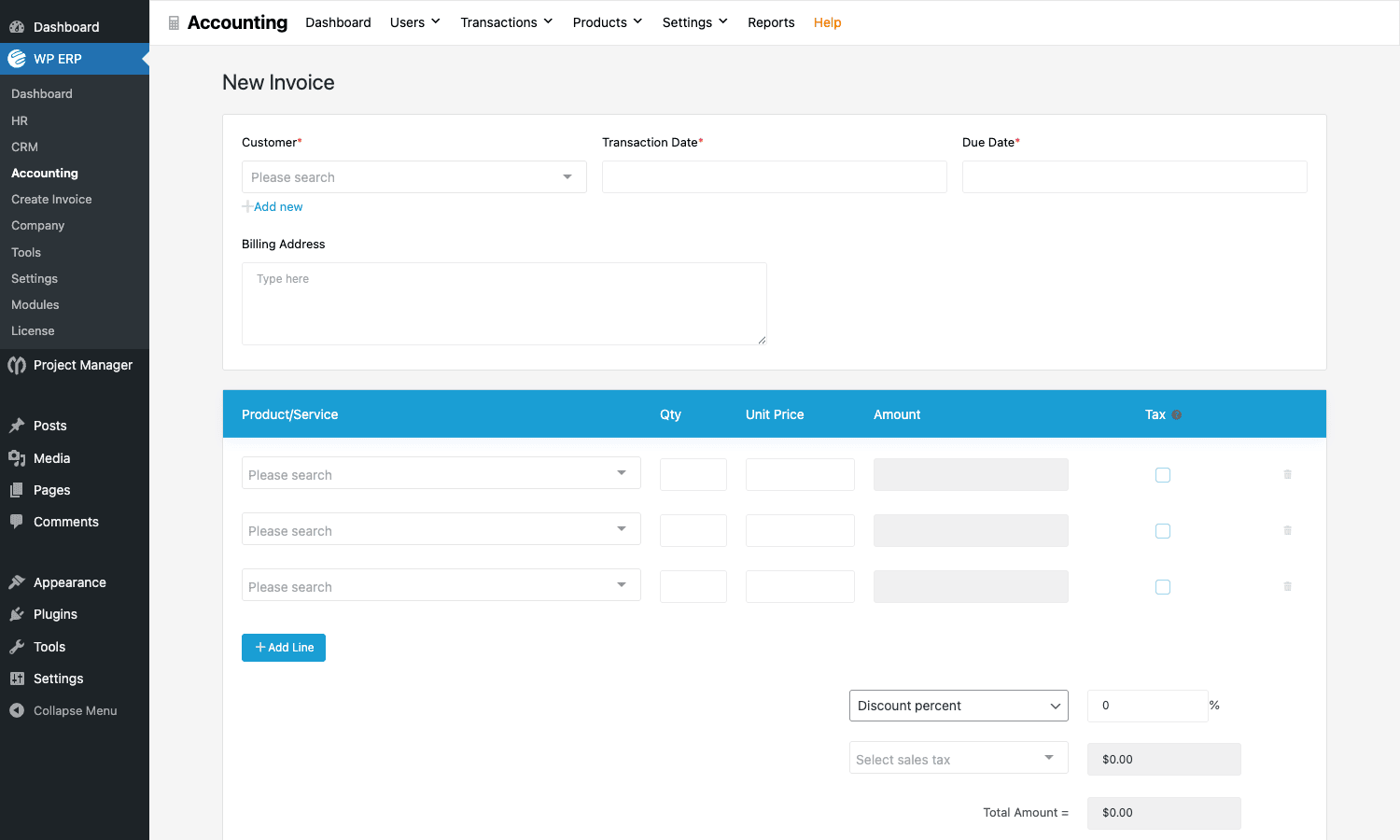
Pick a customer (or click "Add new" to create one inline), set transaction date and due date, add line items with quantity, unit price, and an optional per-line tax. The discount section at the bottom supports either flat amount or percentage. Total is computed live.
Saving the invoice creates the journal entries (debit Accounts Receivable, credit Sales Revenue, credit Tax Payable), emails the PDF to the customer, and adds the invoice to the customer’s ledger.
When the customer pays, you record a Payment against the invoice. The payment can be partial; the invoice stays open with a reduced outstanding balance until the full amount is received. Estimates work the same as invoices but don’t post to the ledger until accepted.
Purchases: Bills, Pay Bills, Purchase Orders
The vendor-side equivalents. A Bill is what you owe a vendor. Pay Bill records the payment. Purchase Orders are pre-bill documents you send to vendors. All of them create the right ledger entries.
Expenses
For one-off costs that aren’t tied to a vendor invoice (a Stripe processing fee, a coffee receipt, a domain renewal), use the Expenses screen. Pick the expense ledger account, the bank/cash account it was paid from, the date, the amount, and an optional note. One transaction, two ledger entries, done.
Journal Entries
For corrections, opening balances, or anything the standard forms don’t cover, you can write a free-form Journal Entry: pick the ledger accounts on either side, enter the debit and credit amounts, post. The plugin enforces that debit total equals credit total before letting you save.
Reports
The Reports screen lists the available financial reports:
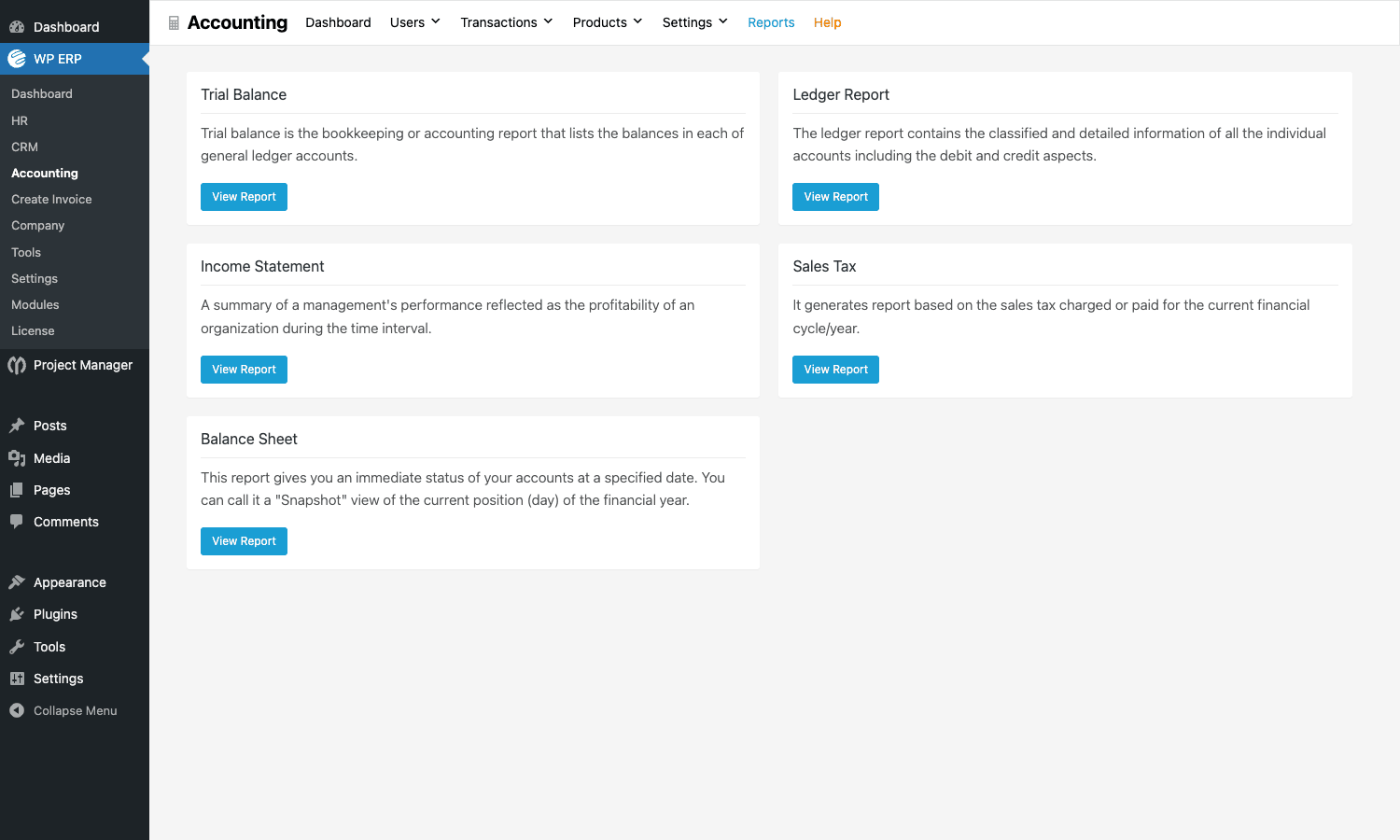
Each one is generated on demand for a date range and exportable to CSV or PDF.
- Trial Balance lists every ledger account with its debit/credit balance as of the chosen date. The two totals must equal; if they don’t, the books are off.
- Ledger Report is a detailed transaction log per account: every debit and credit posted against that account over the period.
- Income Statement (P&L) is the classic profit-and-loss report: total income minus total expenses for the period, by category.
- Sales Tax is the report you hand your accountant at tax time. Total tax charged, by category, with the underlying invoices.
- Balance Sheet is the snapshot of assets, liabilities, and equity as of a date.
This is the screen that makes WP ERP look like a real accounting product instead of a hobbyist invoicer.
Multi-currency and tax
You set a base currency at install. You can add secondary currencies under Settings, with manual or auto-updating exchange rates. Customers and vendors can be billed in their own currency; the conversion to base currency is recorded at the transaction date’s rate.
Tax categories (VAT, GST, sales tax, custom) live in Settings. Each category can hold multiple rates (e.g. GST > 5%, 12%, 18%, 28%). Products and customers can be assigned a default category so invoices pre-fill correctly.
WooCommerce sync (pro)
The pro WooCommerce Accounting integration listens for new WooCommerce orders and pushes them into Accounting as sales invoices, with the WooCommerce customer mapped to an Accounting customer. Refunds become credit notes. Payment gateway fees are auto-posted to a configured expense account. For a WooCommerce store this is the single biggest reason to use WP ERP for accounting instead of a generic invoice plugin.
Pro extensions and integrations
The Pro plan unlocks a stack of addons. The headline ones:
Workflow. Visual rule builder: "When event X happens, run action Y". Triggers cover most of the CRM and HR hooks (new contact added, deal stage changed, leave approved). Actions include sending an email, posting to Slack, creating a task, updating a custom field. It’s a smaller, more focused version of what AutomatorWP Pro does for the broader WordPress ecosystem.
HR Frontend. Spins up a frontend dashboard page for employees so they don’t need wp-admin access. Employees can view their profile, request leave, see announcements, view their salary slip, check their attendance, and submit reimbursements, all from the front end.
Custom Field Builder. Per-people-type custom fields with text, number, date, dropdown, checkbox, file upload, and section divider field types. Defined fields show up in the contact/employee detail view and are searchable.
Document Manager. Hierarchical folders and files under HR. Useful for HR document templates (employment contracts, NDAs, policy docs) and per-employee documents (signed contracts, ID copies). Permissions are role-based.
Inventory (under Accounting). Track stock per product, define warehouses, log stock movements (in/out/transfer), generate inventory valuation reports.
Twilio SMS (HRM extension). Send transactional SMS to employees for events like leave approval, payslip ready, or attendance summary. Costs Twilio credit per message, but a $10 prepaid Twilio balance covers months of HR notifications.
Mailchimp / HubSpot / Salesforce / Zendesk / Help Scout sync. Two-way sync between WP ERP CRM and the named external system. Useful if you already use one of these and want WP ERP as a secondary record store, or if you’re migrating to or from one of them.
Gravity Forms integration. Form submissions on the front end (contact form, demo request, application form) flow straight into the CRM as a new contact with a chosen Life Stage. Works with Gravity Forms on a vanilla install. There’s no first-party Fluent Forms or WPForms integration, but it’s straightforward to write one yourself via the erp_crm_contact_created action.
Roles, permissions, and team access
WP ERP creates dedicated roles when you install each module:
- HR creates
erp_hr_manager(full HR access) and uses the WordPressemployeecapability for regular employees. - CRM creates
erp_crm_manager(full CRM access) anderp_crm_agent(assigned-contacts-only access). - Accounting creates
erp_ac_manager(full Accounting access) anderp_ac_assistant(limited, no Reports or Settings).
You can assign multiple of these roles to a single user (an "Office manager" might be erp_hr_manager and erp_ac_assistant). The capability checks gate every admin page and every REST endpoint, so a CRM agent literally can’t see the Accounting menu, even if they know the URL.
Three things worth knowing about the permission model:
- Per-record ownership applies on top of role capabilities. A
erp_crm_agentcan only see contacts where they are the Contact Owner. A manager sees everything. - Approval routing for leave is configurable. By default the HR manager approves all leave; if you set a department manager on a department, that person approves leave for their team and the HR manager only sees an escalation.
- Accounting permission is binary at the report level. Either you can see reports or you can’t. There’s no "you can see Sales but not P&L" granularity.
Developer reference
WP ERP exposes ~100 hooks and filters across the three modules. They all use the erp_ prefix, with sub-prefixes for module (erp_crm_, erp_hr_, erp_acct_, erp_attendance_, erp_payroll_, erp_deals_). Below are the patterns I reach for most.
Action: react to a new CRM contact
Fire whenever a contact is created via the UI or via REST. Useful for kicking off a welcome sequence in another tool.
add_action( 'erp_crm_contact_created', function( $contact_id, $data ) {
 if ( empty( $data['email'] ) ) {
 return;
 }

 // Push the new lead to a third-party tool
 wp_remote_post( 'https://hooks.example.com/new-lead', [
 'body' => wp_json_encode([
 'email' => $data['email'],
 'first_name' => $data['first_name']?? '',
 'last_name' => $data['last_name']?? '',
 'life_stage' => $data['life_stage']?? 'lead',
 'source' => 'wordpress',
 ]),
 'headers' => [ 'Content-Type' => 'application/json' ],
 ]);
}, 10, 2 );
Action: log every deal stage change
The CRM Deals module fires erp_deals_change_stage whenever a deal moves left-or-right on the kanban. You can use it to ping Slack, update a custom audit table, or trigger downstream automation.
add_action( 'erp_deals_change_stage', function( $deal_id, $old_stage_id, $new_stage_id ) {
 $deal = function_exists( 'erp_crm_get_deal' )? erp_crm_get_deal( $deal_id ) : null;
 if (! $deal ) {
 return;
 }

 error_log( sprintf(
 '[deals] #%d (%s, $%s) moved from stage %d to stage %d',
 $deal_id,
 $deal->title?? 'Untitled',
 $deal->amount?? '0',
 (int) $old_stage_id,
 (int) $new_stage_id
 ));
}, 10, 3 );
Filter: customize the CRM Life Stages
The Life Stage list is hard-coded to four values by default. If your business needs an extra category (say, "Partner" or "Past Customer") you can extend the list.
add_filter( 'erp_crm_limit_life_stage', function( $stages ) {
 $stages['partner'] = __( 'Partner', 'my-textdomain' );
 $stages['past_customer'] = __( 'Past Customer', 'my-textdomain' );
 return $stages;
});
The new stages will appear in the contact form dropdown, in segment filters, and as columns on the CRM dashboard.
Filter: customize deal pipeline stages
The pipeline stages used on the kanban come from a filterable list per pipeline. Use this to hard-code a default set when bootstrapping a new install, or to swap stages for a specific pipeline based on user role.
add_filter( 'erp_crm_deals_progress_by_stages', function( $stages, $pipeline_id ) {
 if ( $pipeline_id!== 2 ) { // only modify pipeline 2
 return $stages;
 }

 return [
 [ 'name' => 'Inbound', 'color' => '#9ca3af' ],
 [ 'name' => 'Demo', 'color' => '#3b82f6' ],
 [ 'name' => 'POC', 'color' => '#8b5cf6' ],
 [ 'name' => 'Closing', 'color' => '#f97316' ],
 [ 'name' => 'Won', 'color' => '#22c55e' ],
 ];
}, 10, 2 );
Action: hook into leave approval
erp_hr_leave_request_new (when an employee files) and the matching approval action let you mirror the request into a calendar tool or notify the requester’s team.
add_action( 'erp_hr_leave_request_new', function( $request_id, $employee_id, $data ) {
 $employee = get_user_by( 'ID', $employee_id );
 if (! $employee ) {
 return;
 }

 $message = sprintf(
 ":calendar: %s requested leave from %s to %s. Reason: %s",
 $employee->display_name,
 $data['start_date']?? '?',
 $data['end_date']?? '?',
 $data['reason']?? '-'
 );

 // Send to a team Slack channel
 wp_remote_post( get_option( 'slack_webhook_url' ), [
 'body' => wp_json_encode([ 'text' => $message ]),
 'headers' => [ 'Content-Type' => 'application/json' ],
 ]);
}, 10, 3 );
Filter: gate access to a deal
erp_crm_deal_user_can_read is checked before any deal detail is shown. Return false to hide a deal from a user even if their role would normally allow it.
add_filter( 'erp_crm_deal_user_can_read', function( $can, $deal_id, $user_id ) {
 // Only the assigned agent or a manager can read deals over $100,000
 $deal = function_exists( 'erp_crm_get_deal' )? erp_crm_get_deal( $deal_id ) : null;
 if ( $deal && (float) $deal->amount > 100000 ) {
 $user = get_user_by( 'ID', $user_id );
 if (! $user ||! in_array( 'erp_crm_manager', (array) $user->roles, true ) ) {
 return (int) $deal->owner_id === (int) $user_id;
 }
 }
 return $can;
}, 10, 3 );
Action: push accounting transactions to an external ledger
The Accounting module fires module-specific actions for every transaction type. You can use them to mirror entries to an external accounting system during a migration period.
add_action( 'erp_acct_new_transaction_invoice', function( $voucher_no, $data ) {
 // Mirror to an external accounting webhook
 wp_remote_post( 'https://accounting.example.com/wp-erp/invoice', [
 'body' => wp_json_encode( $data ),
 'headers' => [ 'Content-Type' => 'application/json' ],
 ]);
}, 10, 2 );

add_action( 'erp_acct_new_transaction_expense', function( $voucher_no, $data ) {
 wp_remote_post( 'https://accounting.example.com/wp-erp/expense', [
 'body' => wp_json_encode( $data ),
 'headers' => [ 'Content-Type' => 'application/json' ],
 ]);
}, 10, 2 );
If you keep extending these snippets, dropping the resulting hook handlers into Code Snippets Pro is the cleanest place for them. You avoid touching the theme functions.php, and you get version control on the snippets themselves.
REST API
The free WP ERP plugin exposes REST endpoints under the erp/v1/ namespace:
GET /wp-json/erp/v1/hrm/employees(list employees)POST /wp-json/erp/v1/hrm/employees(create employee)GET /wp-json/erp/v1/crm/contacts(list CRM contacts)POST /wp-json/erp/v1/crm/contacts(create contact)GET /wp-json/erp/v1/accounting/invoices(list invoices)POST /wp-json/erp/v1/accounting/invoices(create invoice)
All endpoints require authentication and respect the role-capability map. Use the standard WordPress REST API authentication (application passwords are the simplest option).
Common use cases
A few real-world shapes where WP ERP makes sense.
The small WooCommerce store that wants its books in order. Sales orders pile up in WooCommerce, payment gateway fees vanish into Stripe statements, you have no idea what the gross margin actually is. Turn on WP ERP Accounting + the WooCommerce sync, point your refunds and shipping costs at the right ledger accounts, and at the end of the month run the P&L. No double-entry by hand, no SaaS subscription.
The five-person agency tracking client work. Use CRM for prospects, Deals for active proposals, HR for the team (five employee records, two departments, leave management), and Accounting for client invoicing and expense tracking. The whole company runs in one wp-admin. No QuickBooks, no HubSpot, no BambooHR. The cost is one yearly Pro subscription instead of three monthly SaaS bills.
The bootstrapped SaaS that doesn’t want Salesforce yet. You have 50 paying customers and 200 leads. Salesforce starts at $25/user/month and would cost more than your dev tools combined. CRM in WP ERP, Deals for the larger accounts, Gravity Forms on the marketing site pushing leads in via the integration. When you outgrow it, you can sync to HubSpot or Salesforce with the pro addons.
The non-profit running on WordPress. Donations flow through WooCommerce or Easy Digital Downloads. Volunteers are tracked as CRM contacts. Staff are HR employees. Grant reports are Accounting ledger exports. One install, one set of credentials, one backup.
The membership site that needs member management beyond Paid Memberships Pro or Restrict Content Pro. Members live in WP_Users, but you want a richer record per member with custom fields, segmentation, activity log, and email history. Sync members to WP ERP CRM as Subscribers (the fourth Life Stage), and treat the CRM as the relationship layer over the membership plugin’s billing layer.
The B2B service business that bills monthly retainers. Customers are Accounting customers. Each monthly retainer is a recurring invoice (created from a saved invoice template). Time tracked against the customer becomes line items on next month’s invoice. Reports tell you which customers are profitable.
Performance, compatibility, and gotchas
The plugin is large. The Pro zip is ~13 MB unzipped. It installs around 40 custom database tables across the three modules. On a fresh install that’s fine; on an existing site with hundreds of plugins it adds noticeable overhead because both the admin and the front end load some WP ERP CSS/JS for the dashboard widget.
Hosting requirements are modest: PHP 7.4 or higher, MySQL 5.6 or higher, WordPress 5.0 or higher. Memory limit should be at least 256 MB; the Accounting reports can be memory-hungry on large datasets.
A few gotchas worth knowing about up front:
- CRM contacts and Accounting customers are separate records. A contact in CRM isn’t auto-linked to a customer in Accounting. If you want one unified profile, you sync them via the workflow module or write a small hook handler.
- The Deals module needs separate build assets. If you grab the source from GitHub rather than the official zip, you need to run
npm install && grunt installinsidemodules/crm/deals/before the kanban renders. The bundled zip ships with assets pre-built so this is only a concern for contributors. - Multi-site is partially supported. You can activate on a single site within a network, but network-wide ERP across multiple subsites with shared data isn’t supported. Each subsite gets its own ERP install.
- Reports run unbounded queries on the full ledger. If you have years of data and slow MySQL, the P&L for the entire fiscal year can take 10-20 seconds. Filter by quarter to keep it snappy.
- Inbound IMAP is polling-based. A WordPress cron fetches the mailbox on a schedule. If your
wp-cron.phpisn’t being hit reliably (most low-traffic sites have this problem), use a real system cron pointed atcron.phpevery 5 minutes. - The Pro license validates against
wperp.com. The GPL-licensed copy on the WP ERP product page ships with that validator stubbed out so the addon menus are all available without a key. - Don’t run WP ERP on the same install as a dedicated CRM like FluentCRM. They each want to be "the place where contacts live", and you’ll end up syncing in circles. Pick one as the source of truth.
Pricing and licensing
The core WP ERP plugin (CRM + HR + Accounting + a handful of small extensions) is free on WordPress.org. That’s already enough to run a small business, and a lot of teams never need anything else.
WP ERP PRO is sold on subscription (Personal, Professional, Business, Enterprise) on wperp.com. The Pro plan unlocks the bigger extensions (Workflow, Attendance, Payroll, Recruitment, Asset Manager, Custom Field Builder, Document Manager, HR Frontend, Inventory, Twilio SMS, HubSpot, Salesforce, Mailchimp, Help Scout, Zendesk sync, etc.).
WP ERP product page bundles every Pro addon into one install, with the license check pre-stubbed.
How it compares to other options
vs Salesforce / HubSpot / Zoho One. Those are SaaS giants with thousands of features, deep ecosystems, and per-seat monthly pricing. WP ERP is one self-hosted plugin with a fraction of the surface area but no per-seat fee and no data leaving your server. Use the SaaS if your team is 50+ and the per-seat cost is justified by the integrations and advanced features. Use WP ERP if you’re under 25 people and would rather not pay a SaaS bill for each module.
vs Odoo / SuiteCRM. Both are open-source self-hosted business systems. Odoo is the more feature-complete by miles (manufacturing modules, project costing, multi-warehouse logistics, custom workflows), but it’s a Python/JS stack you have to host separately and maintain. SuiteCRM is CRM-only and runs on PHP. WP ERP is plugin-on-WordPress, so if your team already runs a WordPress site, the marginal install cost is zero, your team already knows the wp-admin UI, and your backups already cover the data.
vs the FluentCRM + WP Project Manager + a separate accounting tool combo. This is the most apples-to-apples comparison. FluentCRM Pro is a more focused CRM with stronger email automation than WP ERP’s CRM module. WP Project Manager is a fuller project management tool. WP ERP’s edge over those two is that the same install also gives you HR and Accounting; their edge over WP ERP is depth in their narrow domain. If your team does heavy email marketing, FluentCRM wins; if your team needs payroll and accounting too, WP ERP wins.
vs WP Fusion + an external CRM. WP Fusion is a bridge: it syncs WordPress user data with an external CRM (HubSpot, ActiveCampaign, Mailchimp, dozens of others). WP ERP is the destination: it IS the CRM. If you’ve already settled on an external CRM and just need WordPress to talk to it, WP Fusion is the right tool. If you’d rather not pay for a separate CRM at all, WP ERP is.
Frequently asked questions
Can I use just one module?
Yes. Each module activates independently. You can run WP ERP as a CRM only, an HR system only, or an accounting system only. Modules you don’t activate don’t install their tables, register their menus, or load their assets.
Does WP ERP work on a multisite network?
It works on individual sites in a network but doesn’t support network-wide ERP with shared employees or customers across sites. Each site gets its own ERP install with its own data.
Will my Accounting data be safe?
The plugin uses standard WordPress database tables (with the erp_acct_ prefix) so it’s covered by whatever WordPress backup you run. Use a real backup plugin like Duplicator Pro or All-in-One WP Migration, schedule daily backups, and store them off the server. The Accounting tables are the ones you really, really don’t want to lose.
Is there a mobile app?
No first-party mobile app. The wp-admin UI is responsive enough that an iPad works for everything and a phone works for the dashboard and Leave Requests. The pro HR Frontend extension makes leave requests and attendance check-in friendlier on mobile by avoiding wp-admin entirely.
Can two users edit the same record at the same time?
WP ERP uses standard form submissions for most edits, so it’s last-write-wins. If two managers edit the same employee profile at the same time, the second save overwrites the first. This is fine for the small-team use case but is a real limitation at higher concurrency.
How does WP ERP handle GDPR?
The plugin stores personal data (employees, contacts) like any other WordPress plugin. It plugs into the WordPress core export and erase tools for user data requests. For GDPR-strict use cases you’d want to combine it with a privacy/cookie consent tool and run a data audit before storing EU resident records.
Can I import existing data?
Yes. The Tools menu has CSV importers for Employees, Contacts, Customers, Vendors, and Products. The columns are documented inside the import screen. For Accounting opening balances you’d typically use Journal Entries rather than the importer.
Does WP ERP integrate with WooCommerce subscriptions?
The WooCommerce sync addon brings WooCommerce orders into Accounting as invoices. Subscription renewals are treated as recurring orders, which is what you want. The CRM side doesn’t auto-tag subscription customers separately, but a simple woocommerce_subscription_status_updated hook handler can update the Life Stage to "Customer" or "Past Customer" automatically.
How do I migrate from FluentCRM to WP ERP CRM (or vice versa)?
Both tools export contacts to CSV. Export from one, map the columns (especially the segmentation columns), import to the other. Activities and emails don’t transfer cleanly, only contact metadata. Plan a fresh start for the activity log.
Does the pro license tie to a domain?
The official WP ERP PRO license from wperp.com is per-site (or per-domain-set, depending on the tier you buy).
Can I export reports to PDF for my accountant?
Yes. Every report (Trial Balance, Income Statement, Sales Tax, Balance Sheet, Ledger Report) has an export button that produces a printable PDF and a CSV. The PDF includes your company header and date range so it’s accountant-ready.
Where do I update settings like fiscal year and base currency?
Under WP ERP > Settings (general tab for company info and base currency, accounting tab for fiscal year start month, tax tab for tax categories and rates). Changing the fiscal year start mid-year is supported but renumbers vouchers, so do it on a fresh install if possible.
Final thoughts
WP ERP is the most ambitious "WordPress as full business system" plugin in the wild. It’s not trying to replace Salesforce or QuickBooks one-for-one, and pretending it does would be silly. What it actually does is give a sub-twenty-person team a coherent, self-hosted alternative to the three-SaaS-stack: CRM + HR + Accounting, all in one wp-admin, all backed up together, all extensible with the same set of hooks.
The free core is genuinely enough for many small companies. The Pro plan is worth it when you start needing Payroll, Attendance, Workflow automation, or external integrations like Salesforce/HubSpot sync. If you already run your business on WordPress, the case for at least trying it is almost free: install, click through the wizard, enable one module, see if it fits your team’s flow.
The places it isn’t a fit are honest ones. If your CRM needs are dominated by marketing automation and email sequences, FluentCRM Pro is the better tool. If your team is fifty seats and growing fast and you need third-party app integrations beyond the WP ERP catalog, you’ll outgrow it. If your accounting needs include manufacturing, multi-warehouse logistics, or complex inter-company consolidation, Odoo or NetSuite is where you go.