

If you’re building a paid membership site on WordPress, you’ll find a dozen plugins competing for the job. Most try to do everything: complex member dashboards, course delivery, gamification, social features, drip campaigns, email marketing integration, affiliate tracking. By the time you’ve configured all of it, you’ve spent a week setting up software you’ll only use 20% of.
Restrict Content Pro (from SolidWP, the same team behind Solid Security Pro and the iThemes plugin suite) takes the opposite approach. It does exactly one thing well: lock content behind paid memberships, collect payments via Stripe/PayPal/Braintree/Authorize.net/2Checkout, and stay out of your way. No course builder. No social network. No affiliate platform. Just clean, fast, focused membership management.
This is a walkthrough of how Restrict Content Pro actually works on a real site, the membership levels system, payment gateways setup, content restriction methods, discount codes, registration forms, the reports dashboard, and how it stacks up against MemberPress and Paid Memberships Pro.
Quick decision guide: do you need Restrict Content Pro?
Use Restrict Content Pro if you:
- Want a focused membership plugin that does paid access well and nothing else
- Already use other plugins for courses (LearnDash, Tutor LMS), email (FluentCRM, Mailchimp), or community (BuddyBoss)
- Prefer composing your own stack over bundled all-in-ones
- Need multiple membership levels (Basic, Premium, VIP) with different access
- Value clean code and a smaller plugin footprint
Use MemberPress instead if you:
- Need drip content (release content over weeks)
- Want a built-in member dashboard with download history
- Prefer a more "complete" feature set with fewer add-ons
- Have a more complex pricing scheme (corporate tiers, group memberships)
Use Paid Memberships Pro instead if you:
- Need a free tier with no upgrade pressure (PMP’s free plugin is more capable than RCP’s)
- Want LearnDash-style integrations baked in
- Don’t mind a slightly more dated admin UI
Skip both and use Ultimate Member + payment add-on if you:
- Care more about user profiles and community than paid access
- Don’t need recurring billing
Table of contents
- The RCP / SolidWP context
- Pricing reality check
- Step 1: Install and the welcome wizard
- Step 2: Create membership levels
- Step 3: Configure payment gateways
- Step 4: Set up registration and account pages
- Step 5: Restrict content (3 ways)
- Step 6: Customer and Memberships management
- Step 7: Discount codes
- Step 8: Track payments and reports
- Step 9: Tune Settings
- Add-ons that turn RCP into a complete stack
- Real-world recipes (3 membership setups)
- Performance impact
- Restrict Content Pro vs MemberPress vs PMP
- 12 common gotchas
- Developer reference: hooks, filters, REST API
- FAQ
- Final thoughts
The RCP / SolidWP context {#context}
Restrict Content Pro started as a plugin from Pippin Williamson (also the creator of Easy Digital Downloads and AffiliateWP). In 2020, Pippin sold his businesses to Sandhills Development; in 2024 Liquid Web acquired RCP and folded it into the SolidWP brand alongside Solid Security Pro, Solid Backups, and the rest of the iThemes plugin suite.
So today RCP is part of the StellarWP/Liquid Web family. The plugin slug is still restrict-content-pro, the namespace is still rcp_*, and the WP-CLI command is still wp rcp. The change is mostly branding, the team is largely the same, and existing customers haven’t been disrupted.
There’s also a free version called just Restrict Content on WordPress.org. It’s the same plugin with a limited feature set (no Stripe, no recurring payments, basic level controls). Pro adds everything that matters for real membership sites.
Pricing reality check {#pricing}
Restrict Content Pro pricing (annual, all tiers include all features):
- Personal: $99/year, 1 site
- Plus: $149/year, 3 sites
- Professional: $249/year, 10 sites + premium add-ons (group memberships, drip, advanced reporting)
- Ultimate: $499/year, unlimited sites + premium add-ons + priority support
- Lifetime: not officially available; occasional Black Friday deals
Renewal is at 30% off year-1, then full price.
The Personal tier is enough for most small memberships. Plus is what most growing sites pick. Professional is when you need the premium add-ons (drip content, group memberships).
On the GPL Times store, Restrict Content Pro and many of its add-ons are included in the GPL membership. If you’re already a member, install and skip the per-site math.
What you lose on the GPL-licensed version: automatic updates from SolidWP and direct support tickets. Their support is decent (StellarWP team) so it’s a real loss for sites that need handholding.
Step 1: Install and the welcome wizard {#step-1-install}
Install path: WP Admin -> Plugins -> Add New -> Upload Plugin -> upload restrict-content-pro.zip -> Activate. RCP adds a new top-level Restrict menu in the WP admin sidebar.
On activation, the plugin runs a quick welcome flow asking if you want to share usage data with SolidWP (telemetry, optional, skip on the GPL-licensed version).
Then you land on the Memberships page (initially empty).
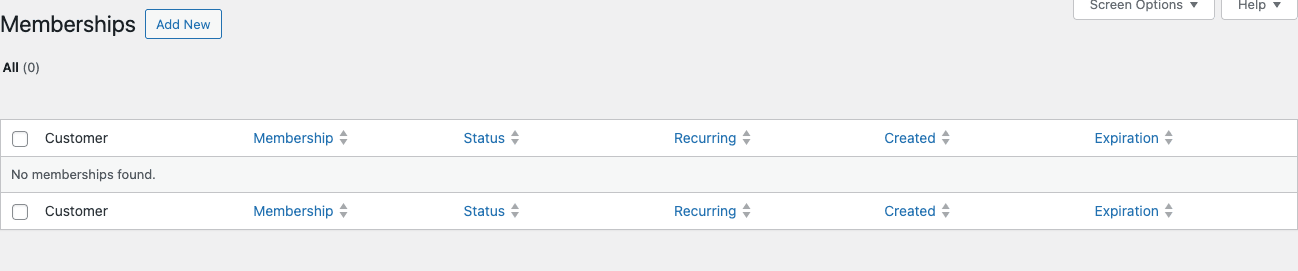
This is the "active memberships" view. Each row is one paid (or trial) membership; columns show the customer, membership level, payment status, whether it auto-renews, creation date, and expiration. Empty at the start; fills up as customers sign up.
The five sub-menu items under Restrict:
- Memberships (this page) – active memberships, where you’ll spend most admin time.
- Customers – one row per customer (regardless of how many memberships they have).
- Membership Levels – the pricing tiers you offer.
- Payments – financial transactions.
- Discount Codes – coupon codes for sign-up discounts.
- Settings – global config.
- Reports – revenue, signups, refunds, member counts.
- Tools – import/export, debug, log cleanup.
Step 2: Create membership levels {#step-2-levels}
Click Restrict -> Membership Levels. The empty page shows the table plus an "Add New Level" form below.
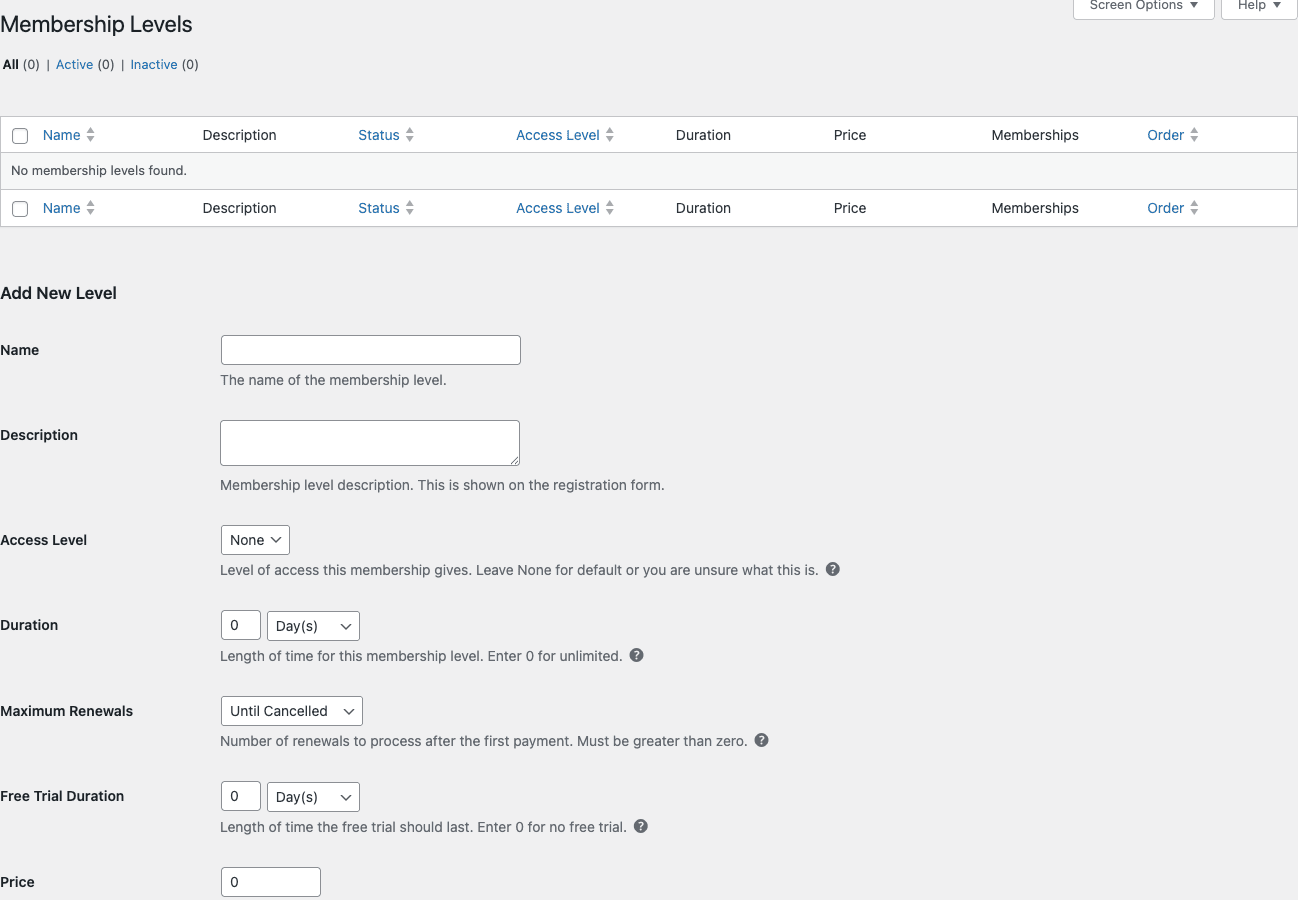
The Add New Level form has these fields:
- Name – public-facing name (e.g. "Premium", "Pro Annual", "VIP Lifetime").
- Description – shown on the registration form.
- Access Level – dropdown 0-10. Higher numbers can access content marked for lower-or-equal levels. Use this to build tiers (Basic = 1, Premium = 2, VIP = 3 means VIP can access everything).
- Duration – how long the membership lasts. Set to "0 Days" for lifetime/unlimited.
- Maximum Renewals – how many times to auto-renew. "Until Cancelled" = forever.
- Free Trial Duration – days/weeks of free access before billing kicks in.
- Price – in your store’s default currency. Set to 0 for free.
- Signup Fee – one-time fee on first payment (separate from recurring).
- Status – Active or Inactive (Inactive levels don’t show on the signup form).
Real-world level setup:
Common 3-tier pricing for a content site:
- Free – Price 0, Duration 0 days (forever), Access Level 1, free trial off.
- Premium Monthly – Price $9, Duration 1 Month, Access Level 2.
- Premium Annual – Price $79, Duration 1 Year, Access Level 2 (same access as monthly, different billing cycle).
- Lifetime – Price $299, Duration 0 Days, Access Level 3.
Save. Repeat for each tier you want to offer. Reorder via drag-drop in the table.
Step 3: Configure payment gateways {#step-3-gateways}
Without a payment gateway, RCP can only handle free signups. Click Restrict -> Settings -> Payments tab.
RCP supports 5 payment gateways out of the box:
- Stripe – the modern default. Recurring subscriptions, refunds, all major cards, Apple Pay/Google Pay via Stripe Checkout.
- PayPal Express – widely accepted, easy customer signup. PayPal handles the checkout flow on PayPal’s site.
- PayPal Standard – older PayPal flow with redirect.
- PayPal Pro – PayPal direct checkout (no redirect), requires PayPal Pro account ($30/month from PayPal).
- Braintree – PayPal’s enterprise gateway, supports recurring well.
- Authorize.net – mostly US-focused, mature, traditional credit card processor.
- 2Checkout – global card processor.
- Manual – manually mark people as paid (useful for offline/check payments).
To configure Stripe (the most common):
- Settings -> Payments -> select Stripe as a default gateway.
- Get your Publishable + Secret keys from Stripe Dashboard -> Developers -> API keys.
- Paste into the RCP Stripe settings (Test mode and Live mode separately).
- Configure webhook endpoint in Stripe Dashboard pointing to
https://yoursite.com/?listener=stripe. - Save and test with a 4242 4242 4242 4242 test card.
Critical: webhooks must be configured. Without them, Stripe subscription renewals, cancellations, and refunds won’t sync to WordPress. Test with Stripe CLI’s stripe listen --forward-to https://yoursite.com/?listener=stripe.
Step 4: Set up registration and account pages {#step-4-pages}
RCP needs WordPress pages where users register, see their account, and edit their profile. The Welcome wizard creates these automatically; if you skipped, you can recreate them.
The pages and their shortcodes:
- Register –
[register_form]– the main signup form. Shows membership level cards plus payment form. - Welcome – landing page after successful signup.
- Account –
[subscription_details]– shows the user’s current membership, expiration date, billing history. - Edit Profile –
[rcp_profile_editor]– lets users update name/email/password. - Update Billing Card –
[rcp_update_card]– lets users update their card on file.
Assign these in Settings -> General:
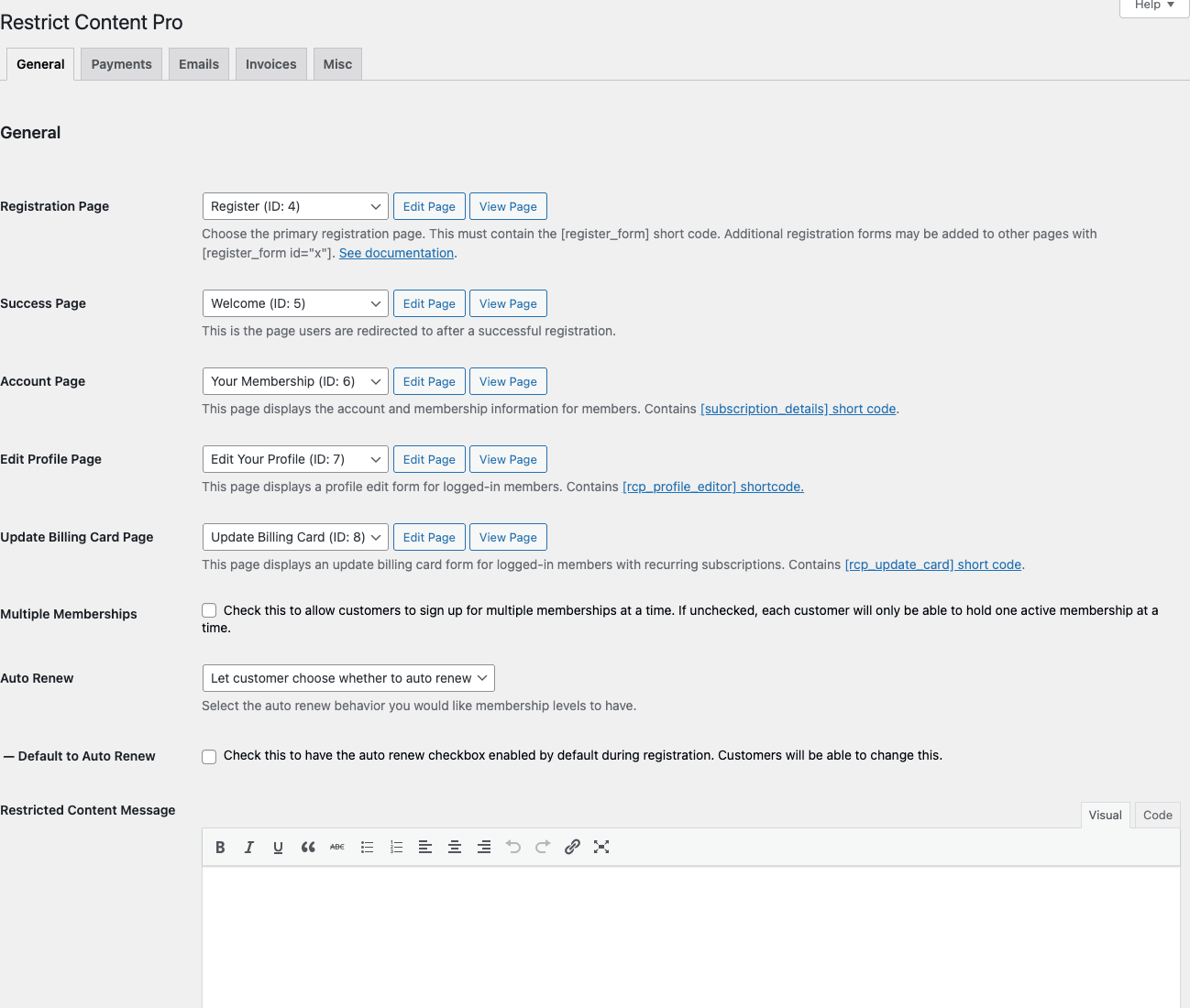
The General tab settings:
- Registration Page: the page with the register form. Default page auto-created.
- Success Page: where users land after signup. Often "Welcome".
- Account Page: the user’s dashboard. Shows current membership, expiration, billing.
- Edit Profile Page: lets users edit their info.
- Update Billing Card Page: lets users update their card.
- Multiple Memberships: allow customers to hold multiple memberships at once. Default off (one active per customer). Useful for sites where users buy course + community separately.
- Auto Renew: how to behave on recurring memberships. Let customer choose, or always-on, or always-off.
- Default to Auto Renew: pre-check the "Auto Renew" checkbox on signup.
- Restricted Content Message: rich text editor for the message shown to non-members trying to access restricted content. Use shortcodes like
[register_form]here for the upgrade prompt.
This is where you’d customize "You need a Premium membership to read this.
Step 5: Restrict content (3 ways) {#step-5-restrict}
RCP gives you three different methods to lock content behind a membership.
Method 1: Per-post restriction (most common)
Edit any post or page. Scroll below the editor to the Restrict this content metabox. Pick which membership level(s) can access. Save the post.
Now only logged-in users with the matching membership level see the full content. Non-members see the Restricted Content Message you configured in Settings.
Method 2: Shortcode restriction (mid-post)
Wrap a section of a post in the [restrict] shortcode:
This is public.

[restrict level="2"]
This paragraph is only visible to Premium members (level 2).
[/restrict]

Public again.
Useful when only part of a post is gated (the conclusion, the source code, the discount link).
Method 3: Bulk by category/tag/post type
Settings -> Restrictions tab. Lock entire categories, tags, custom post types to specific membership levels. One toggle sets the rule for everything in that taxonomy.
Useful for "every post in the Tutorials category is Premium-only" rules.
Edge cases:
- Excerpts: by default RCP hides the full content but shows excerpts (so search engines can index). Toggle "Hide Excerpt" in Settings if you want true paywall.
- Search results: restricted posts can appear in search. Use the
rcp_hide_from_searchfilter to exclude them. - REST API: by default RCP doesn’t filter REST API responses. Restricted posts ARE returned via
/wp-json/wp/v2/posts. Important to know for headless setups.
Step 6: Customer and Memberships management {#step-6-members}
The Memberships and Customers pages are where you manage individual users.
The Memberships page shows the active subscription view. Click any membership row to edit:
- Change the membership level (upgrade/downgrade)
- Change the expiration date (extend or shorten)
- Cancel the membership
- Refund a payment
- Add notes (admin-only)
The Customers page is one row per customer regardless of how many memberships they have. Useful for "show me all customers who’ve ever paid" view. Click to see all their memberships.
Manual membership grant: Edit a customer -> "Add Membership" -> pick a level -> set as paid. Useful for comp memberships, refunds-with-replacement, or moving customers from one system to RCP.
Bulk actions: select multiple memberships -> apply actions (cancel, change status, expire).
Step 7: Discount codes {#step-7-discounts}
Click Restrict -> Discount Codes. Add new code, set:
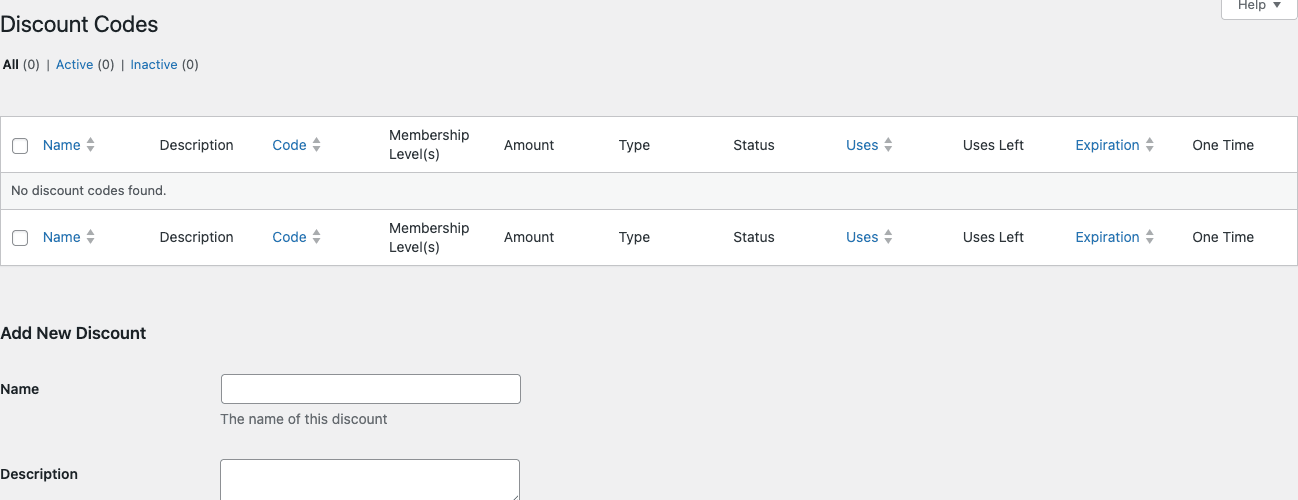
- Name – internal admin name.
- Description – shown to customers.
- Code – what customers enter at checkout (e.g.
LAUNCH50). - Type – Percentage or Flat Amount.
- Amount – the discount value.
- One-time or Recurring – apply to first payment only, or every renewal.
- Limit by Membership Level – only valid for specific levels.
- Max Uses – how many times the code can be used total.
- Expiration Date – when the code stops working.
Codes are entered on the registration form as a "Discount Code" field. Customers see the price update in real time.
This is bare-minimum compared to dedicated coupon plugins, but for typical "$10 off first month" promo codes, it’s exactly enough.
Step 8: Track payments and reports {#step-8-reports}
The Payments page lists every financial transaction.
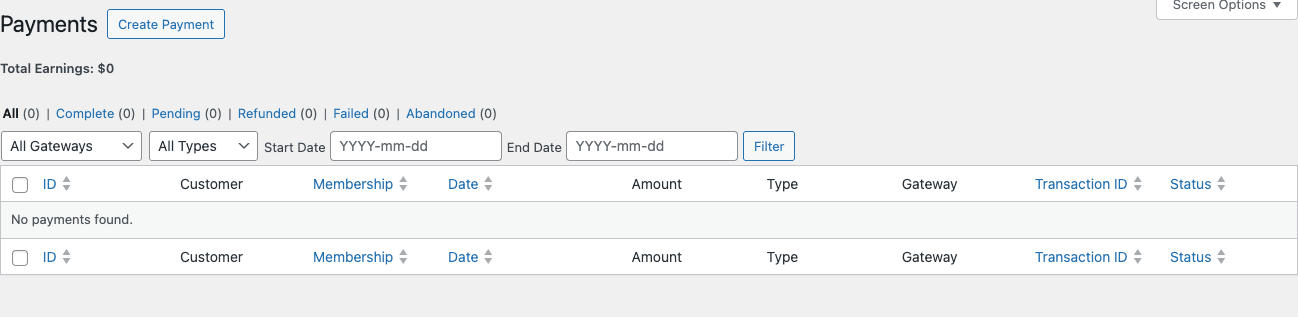
Columns: ID, Customer, Membership, Date, Amount, Type (signup, renewal, etc.), Gateway, Transaction ID, Status.
Filters: All / Complete / Pending / Refunded / Failed / Abandoned. Plus gateway, type, date range.
Click any payment to see:
- Full transaction details
- Stripe/PayPal transaction ID (deep link)
- Refund button (issues refund through the original gateway)
- Resend invoice button
- Manual edit (rare, but available)
The Reports page shows aggregate charts:
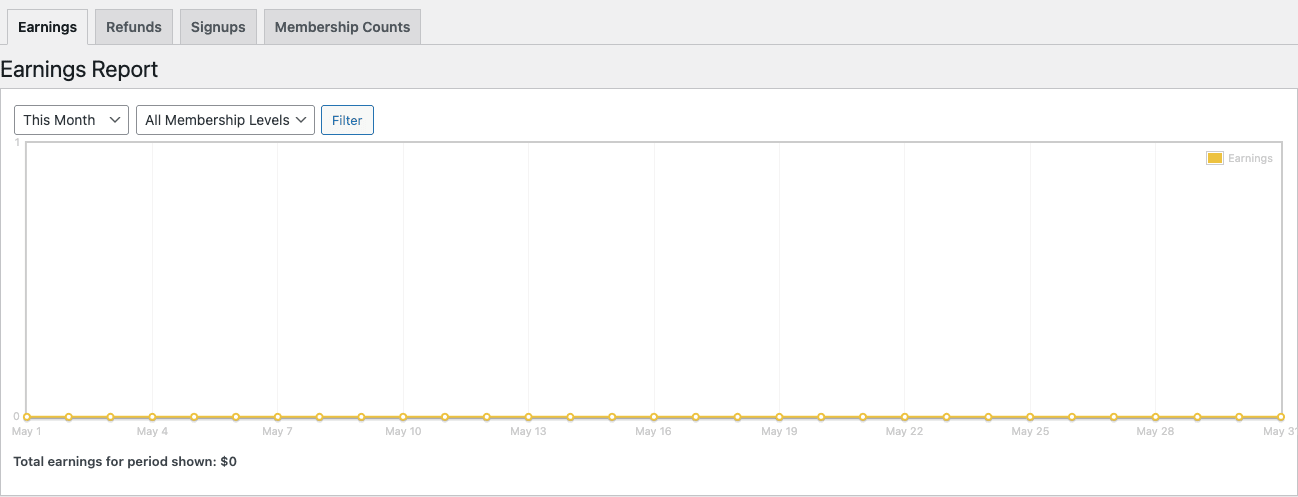
Four report tabs:
- Earnings – daily/monthly revenue line chart, filterable by membership level.
- Refunds – refund volume over time.
- Signups – new memberships chart.
- Membership Counts – active memberships by level over time.
Each tab has filters: time period (Today, This Week, This Month, This Year, Custom Range, All Time), and Membership Level filter.
This is the dashboard you’ll check daily/weekly to understand business health. No fancy cohort analysis, MRR breakdowns, or churn cohorts – that’s where dedicated tools like ChartMogul shine. But for "how much did I make this month and how many people signed up?" RCP’s reports are perfectly adequate.
Step 9: Tune Settings {#step-9-settings}
The Settings page has 5 tabs:
General
Page assignments (Registration, Success, Account, etc.), Multiple Memberships toggle, Auto Renew behavior, Restricted Content Message. Covered above.
Payments
Default currency, default gateway selection, payment gateway configuration (Stripe keys, PayPal credentials, etc.).
Emails
8 default email templates:
- Member Signup Email – sent after signup.
- Active Member Email – sent when membership becomes active.
- Expiration Email – sent N days before expiration.
- Renewal Email – sent after successful renewal.
- Cancelled Email – sent when membership cancels.
- Expired Email – sent when membership expires.
- Trial Ending Email – sent before trial ends.
- Failed Payment Email – sent when payment fails.
Each is customizable rich text with merge tags like {name}, {firstname}, {membership_name}, {expiration}, {site_name}.
Invoices
Toggle invoice generation, customize the PDF template, set company info.
Misc
Debug mode, log retention, hide login bar, IPN log.
Add-ons that turn RCP into a complete stack {#addons}
RCP’s "focused" approach means it needs add-ons to do common things. SolidWP sells official add-ons:
Free add-ons (bundled with all licenses):
- Stripe – the main Stripe integration. Required for Stripe payments.
- PayPal Pro / PayPal Standard / PayPal Express – the PayPal integrations.
- Braintree, Authorize.net, 2Checkout – alternative gateways.
Premium add-ons (Professional and Ultimate tiers):
- Group Accounts – one account holds multiple memberships (corporate/B2B).
- Drip Content – release content over weeks (e.g. "Week 3 content unlocks 14 days after signup").
- MailChimp – auto-add members to Mailchimp lists by level.
- ActiveCampaign – same for ActiveCampaign.
- Constant Contact, Mailster, Drip, ConvertKit – email integrations.
- AffiliateWP – integrates with the AffiliateWP plugin for referrals.
- bbPress – integrate forums with memberships.
- BuddyPress – integrate social communities.
- CSV Importer – bulk import members from CSV.
- Custom Capabilities – per-level WP capabilities (control what each level can do beyond access).
- Advanced Reporting – cohort analysis, retention, churn.
- Member Login Tracking – audit log of member logins.
- Restricted Items – lock individual files/downloads.
- Recurring License Keys – sell software licenses with renewals.
Third-party add-ons:
- RCP Per Level Emails – different email content per membership tier.
- RCP Hard Set Expiration – all members expire on a specific date.
- RCP Site Creator – multisite membership signups.
The add-ons available on GPL Times vary; check the membership for specifics.
Real-world recipes (3 membership setups) {#recipes}
Recipe 1: Premium content blog ($5/mo paywall)
Goal: Free posts on the homepage, premium posts behind a $5/month paywall.
Stack: RCP Personal + Stripe + WP Mail SMTP.
Setup:
- Create 2 levels: Free (no paywall) and Premium ($5/month, 1 Month duration, recurring).
- Stripe configured with webhook.
- Per-post: mark Premium-only articles in the Restrict metabox.
- Restricted Content Message: a one-paragraph upgrade prompt with
[register_form]shortcode. - Settings -> General -> Hide Excerpt: OFF (let SEO see excerpts).
- Emails: customize Welcome email with reading recommendations.
Time: 2 hours setup. The bottleneck is writing the upgrade copy.
Recipe 2: SaaS-style monthly membership with annual discount
Goal: Monthly $19 and Annual $190 ($228/yr → $190 = 17% discount). Customers can upgrade/downgrade.
Stack: RCP Plus + Stripe + WP Mail SMTP.
Setup:
- Create 2 levels: Monthly ($19, 1 Month, recurring) and Annual ($190, 1 Year, recurring).
- Both have Access Level 2.
- Settings: allow Multiple Memberships OFF (one active at a time, customers can switch).
- Customer Service: when customer wants to upgrade Monthly -> Annual, admin manually cancels Monthly and grants Annual (no built-in upgrade flow, that’s an add-on or custom code).
- Discount Code:
ANNUAL2024for 50% off first year of Annual tier.
Time: 4 hours setup including testing.
Recipe 3: Multi-tier site with courses, content, and community
Goal: $9/mo Basic (community only), $19/mo Premium (community + content), $49/mo VIP (community + content + 1-on-1).
Stack: RCP Professional + Stripe + LearnDash (for courses) + BuddyBoss (for community) + RCP LearnDash add-on + RCP BuddyPress add-on + WP Mail SMTP.
Setup:
- RCP: 3 levels with access levels 1, 2, 3.
- RCP LearnDash add-on: auto-enroll Premium and VIP members in specific LearnDash courses.
- RCP BuddyPress add-on: gate BuddyBoss groups by RCP level.
- Drip Content add-on: VIP members get a new bonus video each week.
- Settings -> Restrictions: gate the entire "Premium Content" post category by level 2+.
Time: A week including testing all the integration paths.
Performance impact {#performance}
RCP is one of the lighter membership plugins. Honest numbers:
Front-end impact:
- Restricted content check: ~5ms per page load. Single DB query.
- Logged-in member check: ~3ms.
- Total: ~8ms added to page render. Negligible.
Asset overhead:
- Adds 1 CSS file (~12KB) on registration / account pages only.
- Adds 1 JS file (~20KB) on the same pages.
- ZERO assets on non-RCP pages. Restricted posts only get a tiny PHP check, no front-end overhead.
Database:
- ~5 custom tables (
wp_rcp_memberships,wp_rcp_payments,wp_rcp_customers, etc.). - On a busy membership site (10K+ members), these tables stay performant with indexes.
- Cron tasks for expiration emails, renewal processing.
Compared to MemberPress: RCP is roughly 30-40% lighter on PHP memory. MemberPress loads more on every admin page.
Pair RCP with WP Rocket for caching. Configure WP Rocket to bypass caching on /account/, /edit-profile/, /update-billing-card/, and the registration page (these are dynamic per-user pages).
Restrict Content Pro vs MemberPress vs Paid Memberships Pro {#comparison}
| Feature | RCP | MemberPress Pro | PMP (Free/Plus) |
|---|---|---|---|
| Multiple membership levels | Yes | Yes | Yes |
| Recurring subscriptions (Stripe) | Yes | Yes | Yes |
| Free tier | Yes (level price 0) | Yes | Yes (full free plugin) |
| Stripe / PayPal / Braintree | Yes | Yes | Stripe + PayPal (paid for more) |
| Free trial | Yes | Yes | Yes |
| Drip content | Add-on (Pro+) | Yes (core) | Add-on |
| Discount codes | Yes | Yes | Add-on |
| Group memberships | Add-on (Pro+) | Add-on ($199+) | Add-on |
| Course integration (LearnDash) | Add-on | Yes (core) | Add-on |
| Email marketing integration | Add-on per platform | Add-on per platform | Add-on per platform |
| Reports / Analytics | Built-in (good) | Built-in (good) | Limited free, paid extension |
| Custom registration fields | Limited | Yes | Yes |
| Admin UI quality | Clean, modern | Most polished | Functional |
| Performance overhead | Lowest | Medium | Low |
| Annual price (1 site) | $99 | $179 (Pro) | Free / $199 (Plus) |
| Annual price (unlimited) | $499 | $399 | $399 |
| Add-on philosophy | Many separate add-ons | Few add-ons, more in core | Free core + paid integrations |
Pick RCP if you want a focused, fast plugin and don’t mind buying add-ons for advanced features.
Pick MemberPress if you want drip content + course integration + more polished admin in the core (no add-ons).
Pick PMP if budget matters and the free plugin’s feature set is enough (PMP free is genuinely capable).
For deeper comparisons, see our MemberPress walkthrough.
12 common gotchas {#gotchas}
-
Stripe webhooks must be configured or renewals/refunds won’t sync. Test with Stripe CLI.
-
Cron jobs handle renewals. If your hosting blocks WP-Cron (some shared hosts do), set up real cron:
*/5 * * * * wget -q https://yoursite.com/wp-cron.php. -
Email delivery is the #1 cause of broken signups. Welcome emails, password resets, expiration warnings all rely on
wp_mail(). Install WP Mail SMTP on day one. -
REST API doesn’t respect content restriction by default.
wp-json/wp/v2/postsreturns restricted posts. Usercp_filter_rest_apiadd-on or custom code to filter. -
Multiple Memberships off doesn’t prevent admin from granting multiples. Admins can manually add multiple memberships to a customer regardless of the setting. Customer-side signup is what gets blocked.
-
Expired memberships still see Restricted Content Message, not the registration form. Customize the Restricted Content Message to include a re-subscribe shortcode.
-
Stripe Tax / PayPal Tax isn’t built in. Set up tax in your gateway dashboard (Stripe Tax for Stripe) or use an add-on.
-
Drip content with Pro tier add-on respects the original signup date, not membership level start. Customers who upgrade tiers don’t get drip content re-released from the upgrade date.
-
The
[restrict]shortcode does NOT block REST API. It only affects the front-end render. REST returns the full content. -
Signup fees are one-time per customer, not per membership. If a customer cancels and re-signs, they pay the signup fee again. Use Discount Codes to waive for returning customers.
-
Annual memberships don’t pro-rate. Customer signing up on March 15th with Annual tier pays full $190 and expires March 15th next year. No pro-rate to calendar year.
-
Tax-inclusive vs tax-exclusive pricing isn’t configurable in core. The listed price is what customers pay. If you need tax-inclusive display, use a custom filter or the Stripe Tax add-on.
Developer reference: hooks, filters, REST API {#developer-reference}
RCP exposes 200+ hooks. Highest-impact:
Send custom welcome email after signup
add_action('rcp_set_status', function($status, $user_id, $old_status, $membership) {
 if ($status === 'active' && $old_status!== 'active') {
 // Send custom welcome email
 wp_mail(
 get_userdata($user_id)->user_email,
 'Welcome to '. get_bloginfo('name'),
 'Custom HTML body here'
 );
 }
}, 10, 4);
Add custom registration field
add_action('rcp_after_register_form_fields', function() {?>
 <p>
 <label for="rcp_company">Company Name</label>
 <input name="rcp_company" id="rcp_company" type="text" />
 </p>
 <?php
});

add_action('rcp_form_processing', function($posted, $user_id) {
 if (!empty($_POST['rcp_company'])) {
 update_user_meta($user_id, 'company', sanitize_text_field($_POST['rcp_company']));
 }
}, 10, 2);
Validate registration data
add_filter('rcp_register_form_errors', function($errors, $posted) {
 if (empty($posted['rcp_company']) || strlen($posted['rcp_company']) < 2) {
 $errors->add('invalid_company', 'Please enter a company name.');
 }
 return $errors;
}, 10, 2);
Hide restricted content from search results
add_action('pre_get_posts', function($query) {
 if ($query->is_search &&!is_admin()) {
 $query->set('meta_query', [
 ['key' => 'rcp_restrict_post', 'compare' => 'NOT EXISTS'],
 ]);
 }
});
Programmatically create a paid membership
$customer = rcp_get_customer_by_user_id(123);
if (!$customer) {
 $customer_id = rcp_add_customer(['user_id' => 123]);
 $customer = rcp_get_customer($customer_id);
}

rcp_add_membership([
 'customer_id' => $customer->get_id(),
 'object_id' => 2, // membership level ID
 'status' => 'active',
 'created_date' => current_time('mysql'),
 'expiration_date' => date('Y-m-d H:i:s', strtotime('+1 year')),
]);
Add a custom membership level capability
add_filter('rcp_user_has_active_membership', function($has, $user_id, $level_id) {
 // Override: VIP also gets access to Premium content
 if (user_can($user_id, 'rcp_vip')) {
 return true;
 }
 return $has;
}, 10, 3);
Customize email content
add_filter('rcp_email_body', function($body, $email_type, $user) {
 if ($email_type === 'welcome') {
 $body.= "\n\nP.S. Check out our community group: https://discord.gg/example";
 }
 return $body;
}, 10, 3);
Override which posts are restricted globally
add_filter('rcp_is_restricted_content', function($is_restricted, $post_id) {
 // Make all posts in category "Premium" restricted to level 2+
 if (has_category('premium', $post_id)) {
 return true;
 }
 return $is_restricted;
}, 10, 2);
REST API endpoints (logged-in admin):
GET /wp-json/rcp/v1/customers - List customers
GET /wp-json/rcp/v1/customers/{id} - Single customer
GET /wp-json/rcp/v1/memberships - List memberships
POST /wp-json/rcp/v1/memberships - Create membership (admin)
GET /wp-json/rcp/v1/payments - List payments
WP-CLI commands
# Sync subscriptions from Stripe
wp rcp stripe sync

# Process pending memberships
wp rcp process-pending

# Expire old memberships
wp rcp expire

# Clear log
wp rcp logs clear

# Recount memberships
wp rcp recount
FAQ {#faq}
Is Restrict Content Pro the same as Restrict Content (free)?
The free Restrict Content plugin is the simpler open-source version. Pro adds Stripe, recurring payments, payment gateways, discount codes, reports, and most features required for a real membership site.
Does RCP work with WooCommerce?
Not by default for selling memberships through WooCommerce. RCP has its own registration / checkout flow. If you need WooCommerce, use WooCommerce Memberships or WooCommerce Subscriptions instead.
Can I migrate from MemberPress / Paid Memberships Pro to RCP?
Manual migration only. Export users from old system, create their memberships in RCP via admin or CLI. No automated importer.
Does RCP support Stripe Apple Pay / Google Pay?
Yes. Stripe Checkout (the embedded modal) shows Apple Pay / Google Pay on supported devices automatically.
Can RCP do annual + monthly memberships at the same time?
Yes. Create two membership levels (Monthly $19, Annual $190). Customer picks at checkout.
Does RCP slow down my site?
Adds ~8ms per page load for the restriction check. No assets on non-membership pages. One of the lightest membership plugins.
Will my data survive if I uninstall?
Yes. RCP keeps its tables (wp_rcp_*) by default. Use Tools -> Uninstall to wipe.
Can I use RCP with Gutenberg?
Yes. All RCP shortcodes work in Gutenberg’s Shortcode block. The Restrict this content metabox appears in both Gutenberg and Classic.
Does RCP support multilingual sites?
Compatible with WPML and Polylang. Use translatable strings for membership level names. Each translated post can have its own restriction settings.
Can RCP handle a membership upgrade / downgrade flow?
Not in core. Customer upgrades typically require: admin cancels old membership, admin adds new membership. Or use a custom code via rcp_set_status to automate. The Group Accounts add-on handles parent/child memberships.
How do I handle EU VAT / sales tax?
Use your gateway’s tax engine (Stripe Tax is the most modern). RCP doesn’t compute tax in core.
Does RCP have an affiliate system?
Not native. Use AffiliateWP plugin + the RCP AffiliateWP add-on.
Can I sell digital downloads with RCP?
RCP can restrict downloads. For actual download delivery, pair with EDD (Easy Digital Downloads), originally built by the same Pippin Williamson.
What’s the difference between Customers and Memberships?
A Customer is the user account. A Membership is their active subscription. One customer can have multiple memberships (if Multiple Memberships is enabled).
Can guests sign up without registering a WP account?
No. RCP creates a WordPress user account for every signup. The user can log in afterward.
How do I export members for email marketing?
Tools -> Export -> Customers / Memberships -> CSV. Or use the MailChimp/ActiveCampaign add-ons for automatic sync.
Final thoughts {#final-thoughts}
Restrict Content Pro is the WordPress membership plugin for people who want focus over features. The core does paid memberships well. The add-ons fill specific needs. The pricing is reasonable. The performance is excellent. The admin UI is clean.
It’s not the right plugin if you want drip content, course delivery, group accounts, and email marketing all bundled into one tool. That’s MemberPress’s territory, and MemberPress is excellent at that. It’s not the right plugin if you want maximum free features without buying anything. Paid Memberships Pro’s free plugin is more capable than RCP’s.
But for a content site that needs "paywall with Stripe", or a small SaaS with $10-$50 monthly pricing, or a content blog with a free + premium tier, RCP is the cleanest implementation in the WordPress ecosystem. The plugin gets out of your way.
Pair RCP with WP Mail SMTP (mandatory for transactional emails), WP Rocket configured to bypass cache on account/registration pages, Solid Security Pro (same SolidWP family) for hardening, and FluentCRM for member email automation.