


WooCommerce’s built-in review system is fine for a basic store. It gives you a star, a text box, and a comment thread. The problem is that the moment your store crosses a few hundred orders, you start wanting more. You want a photo on the review. You want customers rating quality and shipping separately. You want a reminder email to go out two weeks after delivery, and you want the resulting reviews to actually show up as rich snippets on Google. That’s where ReviewX Pro.
It comes from WPDeveloper, the same team behind BetterDocs Pro and EmbedPress Pro, and it has the same quiet, settings-heavy approach those plugins are known for.
Table of Contents
- What ReviewX Pro is
- Core features
- How a customer experiences it
- How to install and configure
- Setting up multi-criteria ratings
- Configuring photo and video reviews
- The review summary on the product page
- Review reminder emails after purchase
- Auto-issued discount coupons for review submitters
- Importing reviews from Shopify, Trustpilot, and CSV
- Schema markup and Google rich snippets
- Builder integrations: Elementor, Oxygen, Divi
- Developer reference
- Real-world use cases
- Performance and compatibility
- Pricing and licensing
- Frequently asked questions
- Final thoughts
What ReviewX Pro is
ReviewX Pro is a WordPress and WooCommerce plugin that replaces the default product review section with a richer review system. The product page still uses WooCommerce’s "Reviews" tab, but everything inside it changes. You get multi-criteria ratings (Quality, Price, Service, plus whatever axes you add), photo and video uploads, a recommendation field, helpful-vote buttons, and a summary visualization at the top of the review list.
On the backend, it adds an admin area under a top-level ReviewX menu, with submenus for moderation, settings, email reminders, manual review entry, CSV import/export, and a discount-for-review feature. Reviews themselves are stored both as WooCommerce comments (for compatibility) and as a custom post type, so they can be queried independently or wired into shortcodes.
The plugin works on top of plain WordPress posts too, but its real home is WooCommerce. Once you switch the multi-criteria rating system on, the WooCommerce star rating column on the products screen starts averaging across the criteria you defined.
Core features
- Multi-criteria ratings. Customers don’t give one star rating, they give one per criterion. The summary widget breaks the average down per criterion (quality bar, price bar, service bar) so a shopper can see why a product is rated 4.6 stars: maybe it scores 4.9 on quality and 4.0 on shipping.
- Photo and video reviews. Customers can attach images and link a video URL to their review. The frontend renders a thumbnail strip that opens a lightbox.
- Recommendation field. Three-state Recommended / Neutral / Not Recommended toggle that aggregates into a "X% of customers recommend this product" line.
- Helpful voting. Other shoppers vote a review helpful or unhelpful. ReviewX sorts the most-helpful reviews to the top by default.
- Review reminder emails. Configurable drip: N days after the order reaches Completed status, send a reminder with a one-click write-review link.
- Review for Discount. Auto-generate a coupon and email it to the customer when they submit a qualifying review. Coupon amount, type, and conditions are all configurable.
- Verified-purchase badge. Reviews from a confirmed paying customer get a small "Verified" badge.
- Order-status gating. Choose which order statuses count as eligible to leave a review (Completed by default, but you can include Processing or On Hold).
- Anonymous reviews. Optional toggle to allow logged-out users (or anonymized accounts) to submit reviews. Spam filtering still applies.
- Schema markup. ReviewX outputs Product, Review, and AggregateRating JSON markup so the review stars show up in Google search snippets.
- Filters and sorting. Frontend filter buttons for Recent, Photo only, Video only, Highest / Lowest rated.
- CSV import. Wizard for importing reviews from Shopify, Trustpilot, AliExpress, Etsy, or any tool that exports CSV.
- CSV export. Bulk export for migration or external reporting.
- Page builder widgets. Native Elementor widget, Oxygen element, and Divi module that drop the review section anywhere.
- Gutenberg-friendly. The review summary renders fine inside block-themed product templates.
How a customer experiences it
The reviewer journey is the part most articles skip, but it’s the whole point. Here’s what a customer sees with ReviewX Pro switched on.
They arrive on a product page. The Reviews tab now leads with a summary panel: a big average star rating, a recommendation percentage, and a per-criterion bar chart (Quality, Price, Service, plus a count of how many reviews back each number). Below that, the list of reviews shows each reviewer’s name, the date, the criterion-by-criterion star breakdown, the photos they attached, and a helpful / unhelpful button pair.
If they decide to leave a review themselves, the form is different from default Woo. Instead of one star widget, they see the list of criteria you’ve defined, each with its own star input. They get an optional image upload, an optional video URL, the recommend / neutral / don’t-recommend toggle, and the standard title and body fields. If they’re not logged in but anonymous reviews are enabled, the form still accepts their submission.
A few weeks later, if the auto-reminder is on and they haven’t left a review, they get an email: "How was your order? Tell us what you thought." The email contains a direct write-review link that drops them right back on the product page with the form open. If you’ve enabled Review for Discount, the success page shows them their coupon code.
This is the loop ReviewX Pro is built around: rich review on the page, drip reminder, optional reward.
How to install and configure
Installation is the standard plugin flow. Upload the zip via Plugins, Add New, Upload Plugin, activate, and a new top-level ReviewX menu appears.
The Quick Setup wizard at wp-admin/admin.php?page=reviewx-quick-setup walks through the basics: enable multi-criteria, set up your default criteria list, choose which order statuses are eligible, and pick your summary design. You can do the same thing manually from ReviewX, WC Settings, but the wizard is the fastest way to get a working setup.
The two screens that matter most are WC Settings, Criteria (which defines your rating axes) and WC Settings, Settings (which controls everything else: filters, order status, image/video toggles, anonymous review, recommendation field). Get those two right and the rest is mostly cosmetic.
Setting up multi-criteria ratings
This is the headline feature, so it deserves its own pass.
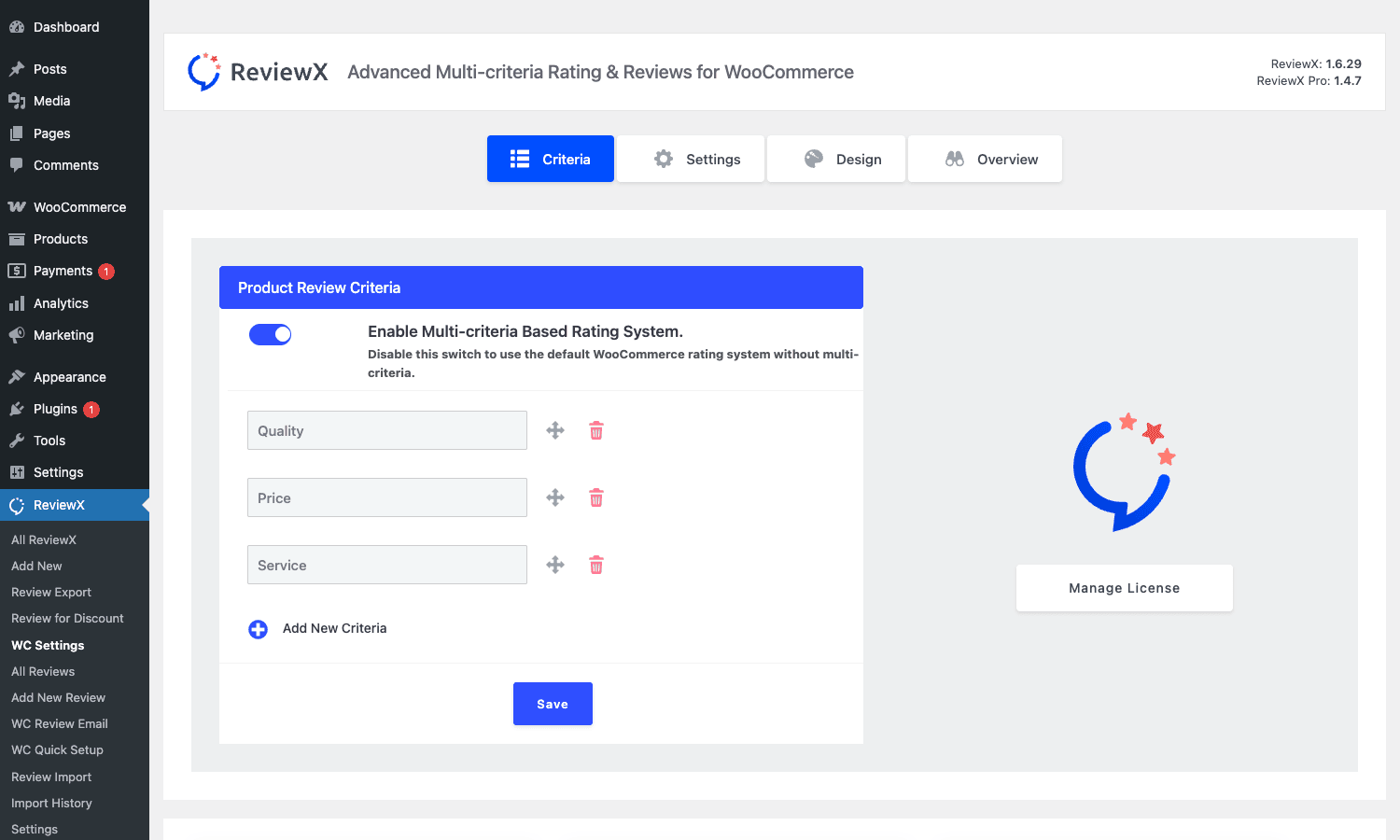
Open ReviewX, WC Settings, Criteria. You see a toggle at the top ("Enable Multi-criteria Based Rating System") and a list of criterion rows underneath, each with a label field and drag handle. Out of the box you get Quality, Price, and Service. You can rename any of them, delete what you don’t want, and add new ones with "Add New Criteria". Drag the rows to reorder.
What you choose here matters a lot. For a clothing store, "Fit", "Material", "Value" make more sense than "Service". For a food store, "Taste", "Freshness", "Packaging" is the typical split. For a digital download store, "Quality", "Ease of use", "Support" is reasonable. The criterion names are public, customers see them on the form, so write them as questions a buyer can answer in a glance.
If you toggle multi-criteria off, ReviewX falls back to a single star rating per review and the summary widget collapses to one bar. Useful if you’re starting cautiously and want to add criteria later.
There’s no hard cap on the number of criteria. In practice three to five is the sweet spot. Beyond that the review form starts looking like a survey and submission rates drop.
Configuring photo and video reviews
In WC Settings, Settings you’ll find a column of toggles labelled Other Settings. The relevant ones for media are:
- Image Review. Turn on to let customers attach images.
- Allow Customer Profile Image. Lets customers upload an avatar that displays alongside their review.
- Allow Video. Turn on to add a video URL input.
- Video Source. Choose Internal (uploaded video) or External (YouTube / Vimeo URL) or Both.
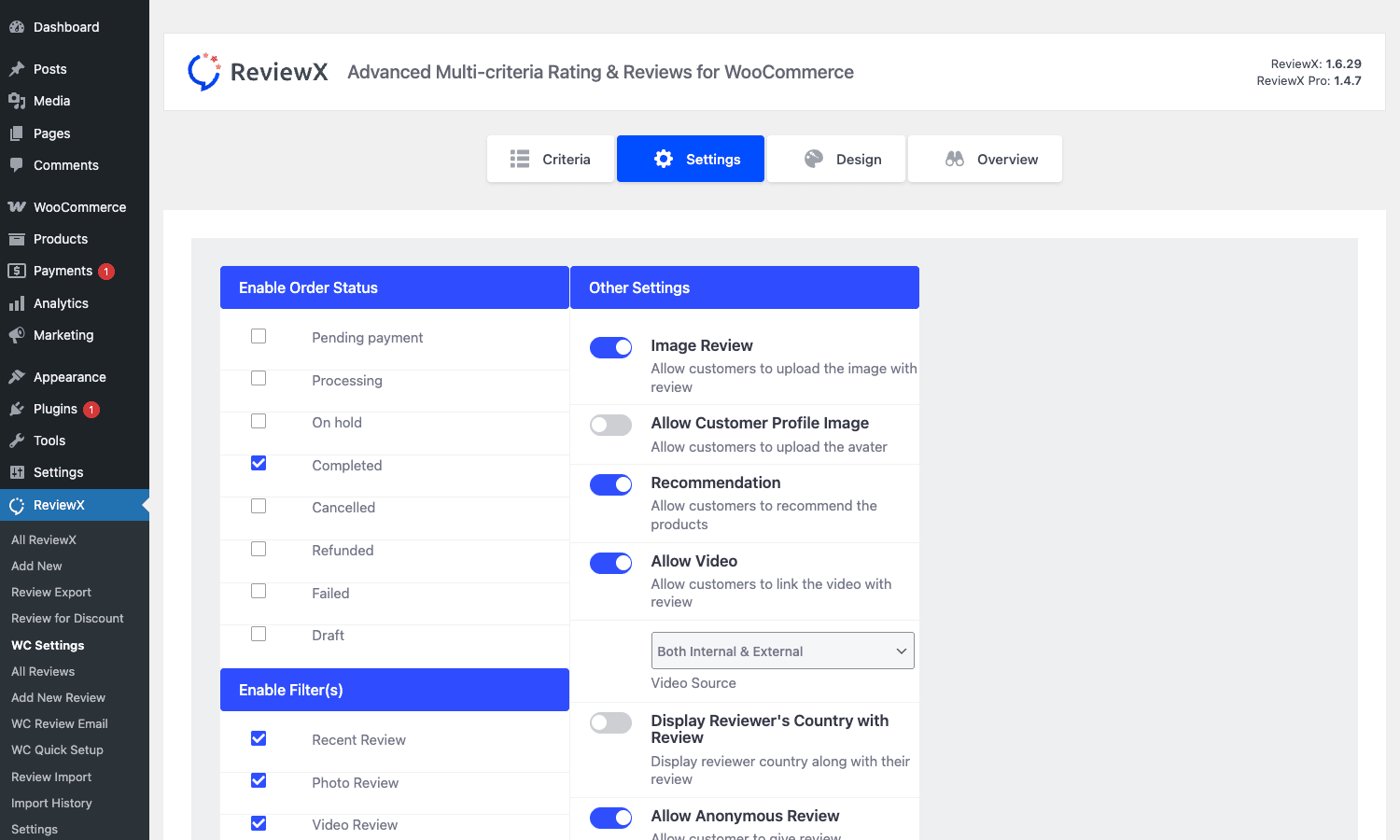
The same screen has Enable Order Status checkboxes (Completed is the safe default), Enable Filter(s) for the frontend filter pills (Recent Review, Photo Review, Video Review, plus rating buckets), and the Recommendation toggle. The Display Reviewer’s Country toggle is a small touch that some stores like, others don’t.
A note on video: hosting customer-uploaded video files on your own server gets expensive fast and can blow past your storage quota. If you expect more than a handful of videos, set Video Source to External only and ask customers to upload to YouTube and paste the link. The thumbnail and player still embed cleanly.
The review summary on the product page
The summary panel is the first thing a shopper sees when they scroll to the reviews. ReviewX gives you four built-in styles. Open WC Settings, Design to pick.
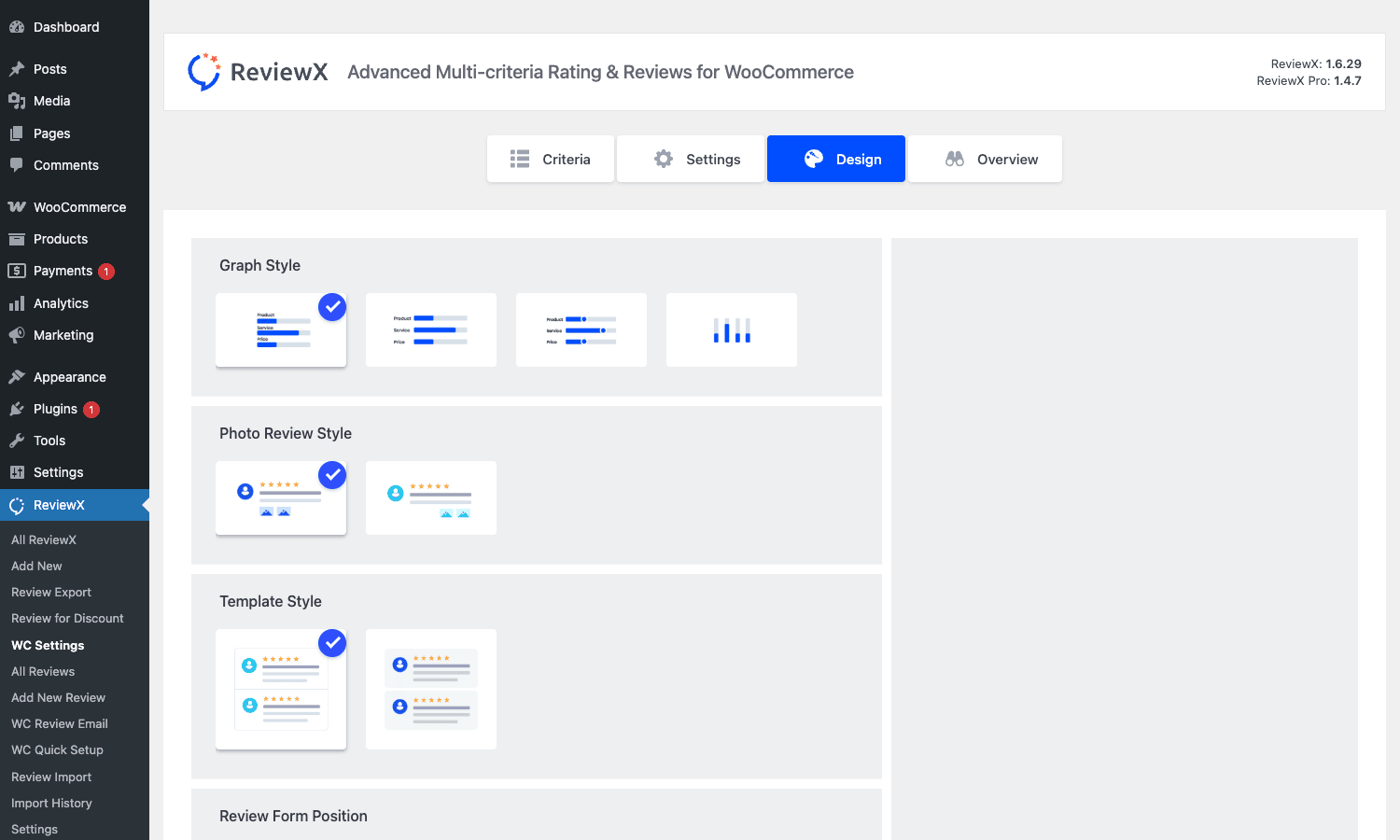
Graph Style is the layout of the per-criterion bars: stacked bars next to the criterion label, a side-by-side variant, or a compact dots view. Photo Review Style controls how attached photos render in the review card (thumbnail row, single-image emphasis). Template Style is the overall card layout (which I’d describe as "boxed" vs "flat"). Review Form Position lets you put the form above or below the review list.
Picking a style here is a one-click change. There’s no CSS to write, no theme override needed. If your theme already has a strong card aesthetic the boxed template tends to clash, so go with the flat one. If your theme is minimal the boxed template adds welcome structure.
Review reminder emails after purchase
This is the feature that most directly drives up your review count. Open ReviewX, WC Review Email.
There are three sub-tabs. Email Content is the template editor: subject line, body with shortcode-like placeholders, and a choice between two visual templates.
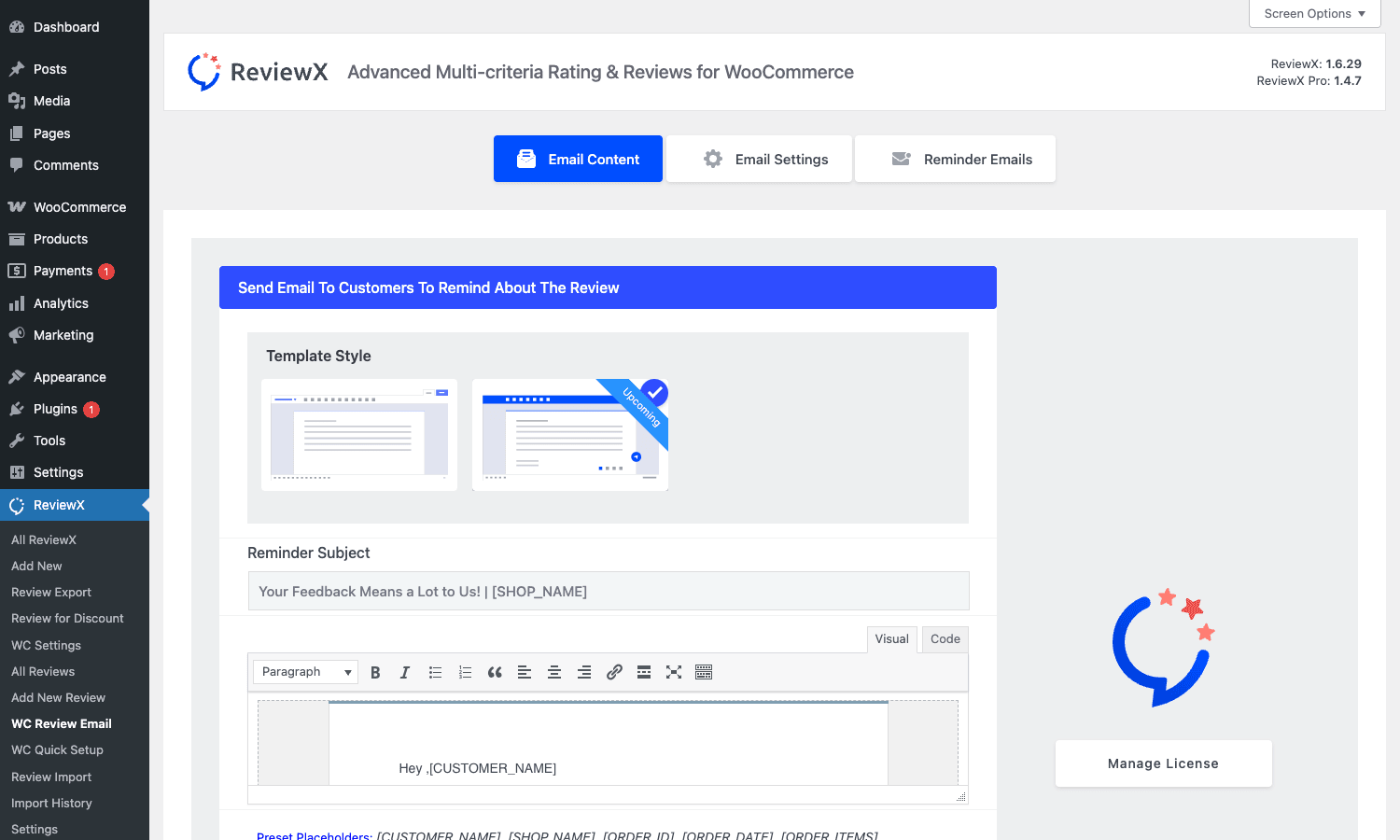
The default placeholders ReviewX understands are [CUSTOMER_NAME], [SHOP_NAME], [ORDER_ID], [ORDER_DATE], and [ORDER_ITEMS]. The Visual / Code toggle is the same TinyMCE / HTML editor you already know from WordPress posts, so you can paste any HTML you like.
Email Settings is where you turn the whole drip on. Auto Review Reminder is a master toggle.
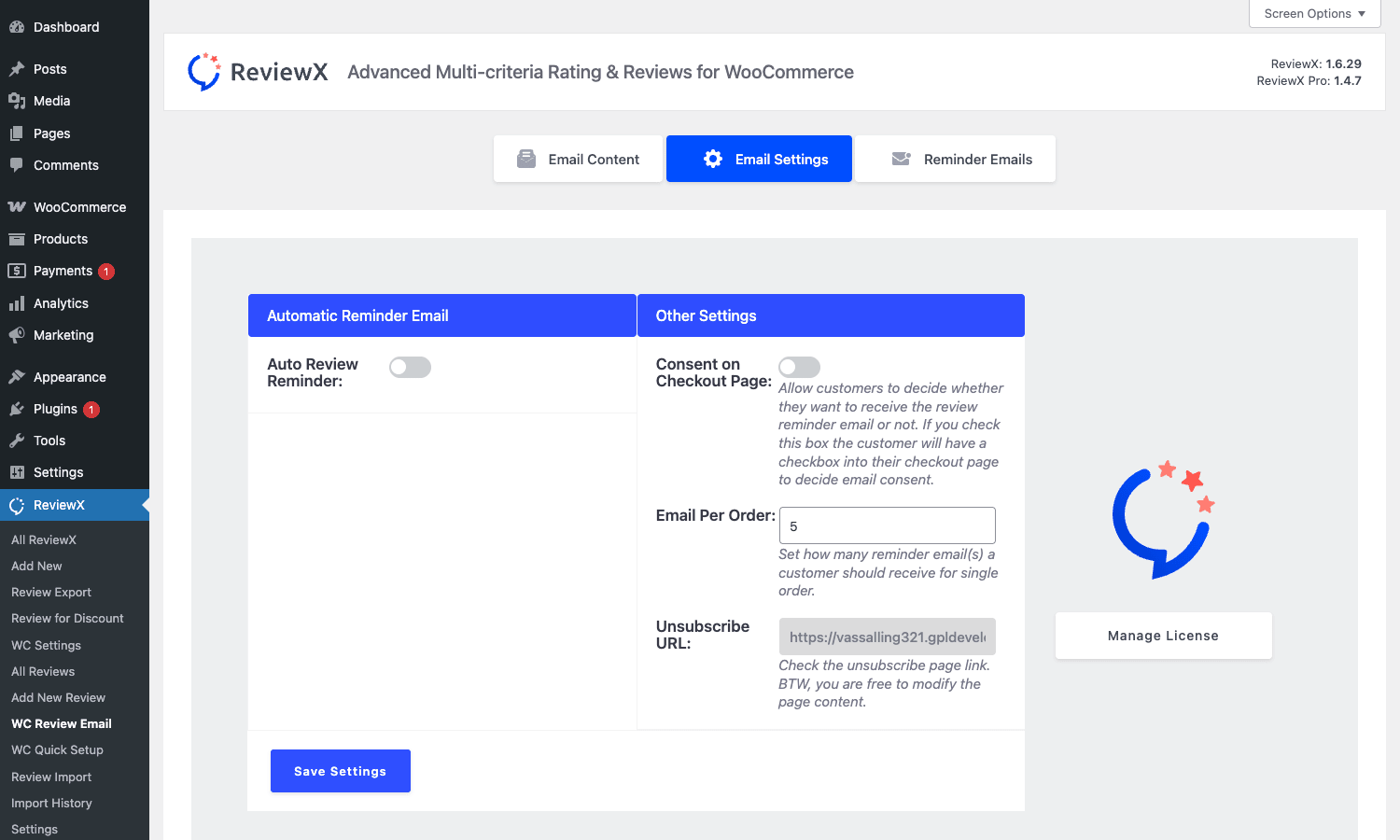
Inside Email Settings you set Email Per Order (how many reminders to send before giving up, default 5), Consent on Checkout Page (adds a checkbox to the WC checkout so reminders only go out when the customer agreed), and the Unsubscribe URL (auto-generated, you can change it). The plugin notes you’ll need a working WordPress mail setup; the docs nudge you toward Fluent SMTP, and that nudge is honest because PHP’s mail() will end up in spam more often than not.
Reminder Emails is the schedule. You define one or more delays (e.g. 7 days after order completion, 14 days, 30 days) and ReviewX queues a send for each. The plugin uses WP-Cron, so the reminders go out when your site has traffic. On low-traffic sites consider a real cron (wp cron event run --all) to keep the schedule on time.
Auto-issued discount coupons for review submitters
A neat feature buried in ReviewX, Review for Discount.
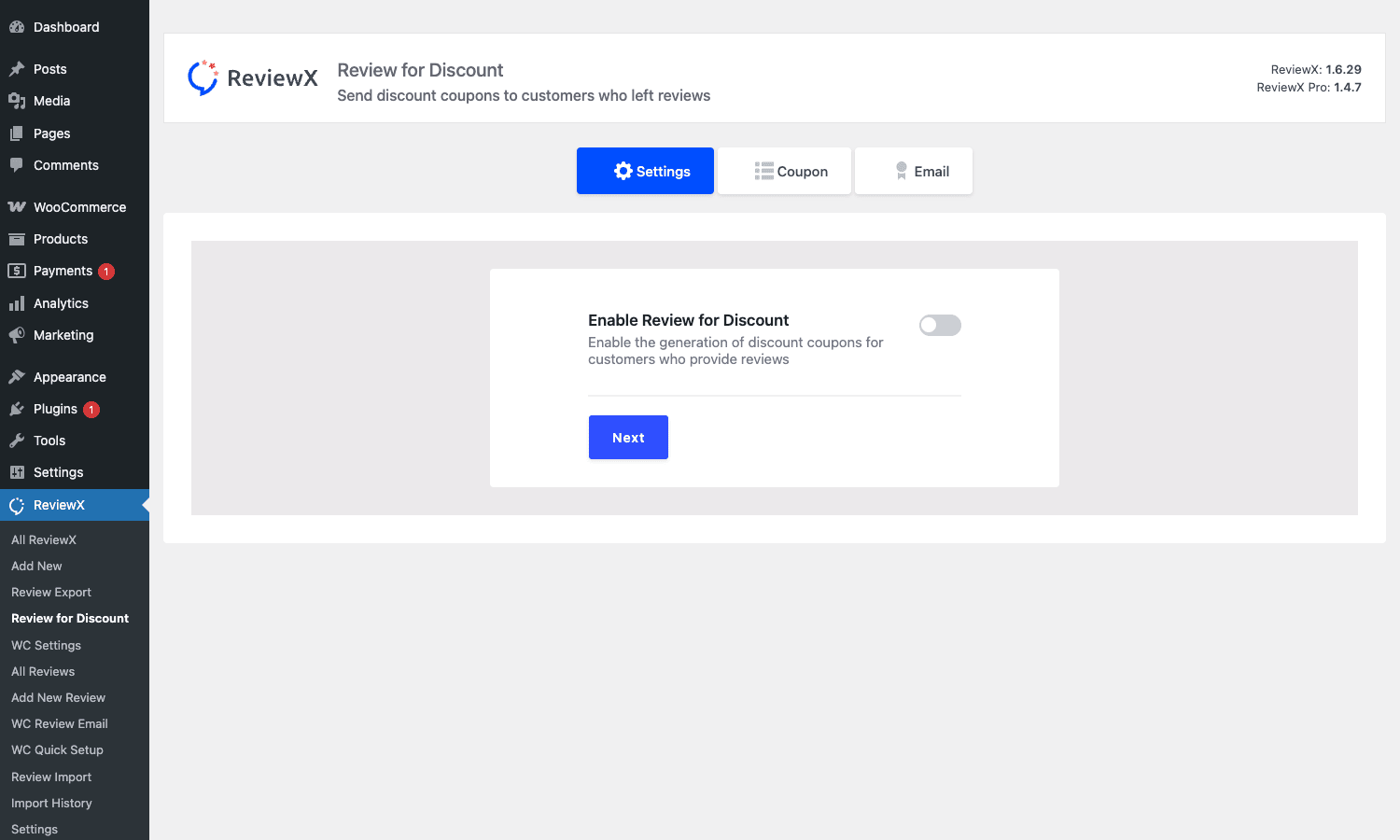
Flip the master toggle, then walk through three steps: enable, pick a coupon (Coupon tab), customize the email that sends the coupon (Email tab). When a customer’s review is approved (or auto-published, depending on your moderation setting), they get a coupon code emailed to them. You can scope coupons to specific products or categories, set an expiry, and limit per-user usage. Standard WooCommerce coupon options apply.
It’s basically a tiny loyalty loop: review now, save 10% on your next order. The conversion lift is real but the side effect is also real, you’ll get more positive reviews than negative ones because people who hated the product won’t bother chasing the coupon. That’s a feature in some industries (apparel, beauty) and a problem in others (B2B SaaS, regulated products).
If you’re already running something like WooCommerce Smart Coupons, the Review for Discount feature plays nicely. ReviewX issues the coupon, Smart Coupons handles the rest of the lifecycle.
Importing reviews from Shopify, Trustpilot, and CSV
If you’re migrating a store from Shopify, BigCommerce, or another platform, you’ve probably got a stack of existing reviews you’d hate to lose. ReviewX Pro has a multi-step import wizard for this.
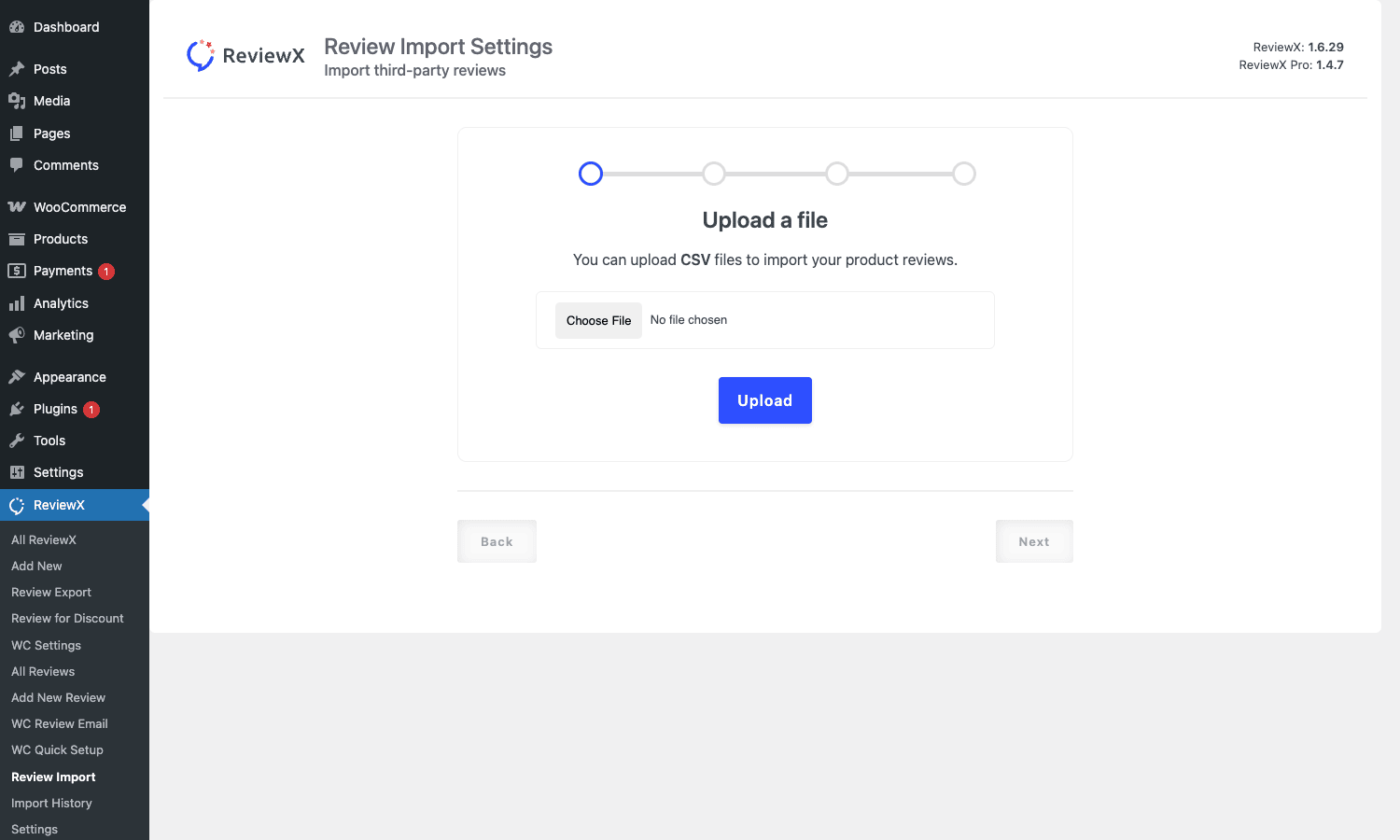
The flow is: upload a CSV, map columns (reviewer name to display name, body to review text, rating to star count, product SKU to the matching WC product), preview a few rows, then run the import. You can re-run the same CSV against the Import History to catch failed rows.
Common CSV layouts the plugin handles well are Shopify Product Reviews exports, Yotpo exports (after you delete a couple of columns it doesn’t recognize), Loox exports, and Trustpilot CSV. For arbitrary CSV you’ll need columns for product identifier, reviewer name, rating, body, and date at minimum.
If you have thousands of historical reviews, do the import in batches of a couple hundred so the PHP request doesn’t time out. The wizard doesn’t natively chunk, so it’s safer to slice the CSV manually.
Schema markup and Google rich snippets
Search engines reward review markup with star snippets in the SERP. ReviewX Pro outputs the markup automatically. The supported types are:
Product(linked to the WooCommerce product)Review(one per submitted review)AggregateRating(the average across all reviews for the product)
No setup needed beyond enabling the schema option in ReviewX, WC Settings, Settings. Validate by passing a product URL through Google’s Rich Results Test. If you also run Rank Math SEO PRO or WP Schema Pro, you’ll need to make sure they aren’t also injecting their own Product schema; two competing AggregateRating blocks on the same page confuse Google and the rich result can disappear entirely. Pick one source of truth and disable the other for products.
For more on the schema spec itself, the official reference is at the Schema.org Review type and Google’s review snippet documentation is the authoritative source on which fields earn stars in the SERP.
Builder integrations: Elementor, Oxygen, Divi
ReviewX ships widgets for the three biggest page builders so you can drop the review summary outside the default WooCommerce template if your storefront uses a custom product layout.
- Elementor. Search "ReviewX" in the widget panel. You get a Reviews widget that mirrors the default summary panel. Settings include filter by criteria, max reviews, and design preset. Useful when you’ve built a custom Theme Builder product template that doesn’t include the default Reviews tab.
- Oxygen Builder. Comes as an Oxygen element under the WooCommerce category. Same options.
- Divi. Adds a Divi module. If you’re rebuilding product templates with the Divi Theme Builder, drop this in instead of Divi’s built-in Reviews module.
The widgets all read from the same data store, so a review submitted via the default form still appears in the Elementor widget on a different page.
Developer reference
If you’re a developer dropping into a ReviewX Pro site, here are the hooks and filters you’ll actually use. All snippets go in your theme’s functions.php or, better, a small must-use plugin.
Filter: customize the criteria array
reviewx_add_criteria runs right before the summary panel renders. The array is the list of criterion objects (label + slug + value).
add_filter( 'reviewx_add_criteria', function ( $criteria ) {
 // Append a synthetic criterion for use in custom templates.
 $criteria[] = (object) array(
 'cri_name' => 'Sustainability',
 'rating' => 4.5,
 );
 return $criteria;
} );
This is useful if you store an additional sustainability or accessibility score on the product as post meta and want it to appear alongside the customer-submitted criteria.
Filter: change the rating UI
rx_load_product_rating_type lets you swap stars for hearts, thumbs, or bars at render time, per product or per category.
add_filter( 'rx_load_product_rating_type', function ( $settings ) {
 global $product;
 if ( $product && has_term( 'jewelry', 'product_cat', $product->get_id() ) ) {
 $settings['rating_type'] = 'heart';
 }
 return $settings;
} );
The default is star. The other values ReviewX understands are heart, circle, and bar.
Filter: gate video URL by user role
rx_allow_video_url toggles the video field on the review form. Combined with current_user_can() you can restrict video uploads to verified customers only.
add_filter( 'rx_allow_video_url', function ( $html ) {
 if (! current_user_can( 'customer' ) ) {
 return ''; // hide the field for anonymous / non-customer users
 }
 return $html;
} );
This is one way to reduce the noise from spammy video submissions on a high-traffic store.
Filter: customize anonymous review behaviour
rx_allow_anonymouse_user (typo and all, that’s the actual hook name in the plugin code) returns the markup for the anonymous-toggle UI. Override it to force-disable anonymous reviews on a specific product category.
add_filter( 'rx_allow_anonymouse_user', function ( $html ) {
 if ( is_product_category( 'restricted-items' ) ) {
 return '';
 }
 return $html;
} );
Filter: change which sections appear in the source tab
rx_source_tab_sections runs early when ReviewX builds its source tab (where you choose which post types accept reviews). If you’ve registered a custom CPT you want to enable reviews on, you can inject it here.
add_filter( 'rx_source_tab_sections', function ( $sections ) {
 $sections['my_courses'] = array(
 'label' => 'Courses',
 'cpt' => 'sfwd-courses',
 );
 return $sections;
} );
LMS plugins that use a non-WooCommerce CPT (LearnDash courses, Tutor LMS lessons) benefit from this.
Filter: customize the social sharing buttons
rx_social_sharing outputs the markup for the social row at the bottom of each review card. Override to add or remove networks.
add_filter( 'rx_social_sharing', function ( $data ) {
 // Strip Facebook share, append WhatsApp share.
 $data = preg_replace( '#<a[^>]*facebook[^>]*>.*?</a>#i', '', $data );
 $data.= '<a class="rx-share whatsapp" href="https://wa.me/?text='. rawurlencode( get_permalink() ). '">WhatsApp</a>';
 return $data;
} );
Filter: customize the JS arguments passed to the frontend bundle
reviewx_js_filter is the catch-all for tweaking the JS config object. It runs once per page load.
add_filter( 'reviewx_js_filter', function ( $args ) {
 $args['max_image_uploads'] = 3; // cap photo uploads at 3
 $args['min_review_length'] = 30; // require 30+ characters in the body
 return $args;
} );
Keys like max_image_uploads and min_review_length are read by the frontend Vue bundle to enforce the limits client-side. They’re also enforced server-side, but setting them on the JS side means the user sees the limit immediately instead of getting a rejection after submit.
Filter: extra post data on save
rx_save_extra_post_data fires when a review is being saved and lets you inject custom meta. Combined with a custom field on the form (added via comment_form_after_fields) you can collect a "size purchased" or "use case" tag with every review.
add_filter( 'rx_save_extra_post_data', function ( $posts ) {
 if ( isset( $_POST['rx_size_purchased'] ) ) {
 $posts['size_purchased'] = sanitize_text_field( wp_unslash( $_POST['rx_size_purchased'] ) );
 }
 return $posts;
} );
Querying reviews programmatically
Reviews live in two places: as WooCommerce comments (comment_type = 'review') and as a custom post type with slug reviewx. For most queries the comments table is what you want.
$args = array(
 'post_id' => $product->get_id(),
 'type' => 'review',
 'status' => 'approve',
 'number' => 20,
);
$reviews = get_comments( $args );
foreach ( $reviews as $review ) {
 $criteria_meta = get_comment_meta( $review->comment_ID, 'reviewx_meta', true );
 // $criteria_meta is an array keyed by criterion slug => star value
}
The per-criterion rating array is stored on each comment as reviewx_meta. The aggregate sits on the product as _rx_avg_rating and the count as _rx_review_count.
Real-world use cases
A few scenarios where ReviewX Pro.
Apparel store with returns problems. Adding "Fit" and "Material" criteria, plus mandatory photo reviews, gives shoppers data that drops returns dramatically. Customers self-select on fit comments and stop ordering items they’re not sure of. The photo gallery doubles as a UGC bank you can reference in product copy.
Electronics affiliate or comparison store. Multi-criteria reviews (Build quality, Battery life, Sound, Value) generate the kind of structured data that scores well in Google product carousels, and the JSON markup feeds rich snippets so your listings stand out in the SERP.
Single-product launch store. One product, one focused page. Photo reviews and a tall trust signal block are the entire conversion strategy. Pair ReviewX with WPfomify for the social-proof popups and you’ve got the same setup used by most direct-to-consumer Shopify clones, except hosted in WooCommerce and so much cheaper to run.
Subscription product store. If you run WooCommerce Subscriptions, the reminder email is a great place to tap into the "I’ve been using it for a month, do I have an opinion now?" moment. Set the reminder at 30 days after initial purchase rather than 7, because subscription products take longer to form an opinion on.
Store migrating off Shopify. The CSV import wizard is the unsung hero. Most platform migrations lose review history because the destination has no import path. ReviewX takes a Shopify Product Reviews CSV directly.
Any store fielding pre-sale questions. Reviews answer “is it any good?” after the fact, but shoppers still want to ask “will it work for me?” before they buy. Pair ReviewX with a product Q&A section so both signals live on the page; our YITH WooCommerce Questions and Answers review walks through that side of the social-proof picture.
Performance and compatibility
A few things worth knowing before you flip this on in production.
The frontend bundle is a Vue.js app that loads on product pages only. It’s not massive (around 80-90 KB minified) but it’s not nothing, so if you’re chasing a sub-second LCP it’s worth combining with a cache plugin like WP-Optimize Premium. Use the cache to defer or async the ReviewX JS file if your theme allows.
ReviewX adds two tables-worth of meta (comment meta + post meta on products) and a custom post type. The custom post type’s main use is queries; if you don’t query it directly the rows mostly sit dormant. A store with 100,000 reviews will see modest table-size growth but no real performance hit on product page rendering, because the per-page query is a normal get_comments against wp_comments.
The plugin plays well with major themes (Storefront, Astra, Flatsome, Avada, GeneratePress) and the three major page builders. Compatibility with WooCommerce Smart Coupons is solid because the Review for Discount feature delegates coupon creation to WooCommerce’s own coupon system.
A known sharp edge: if you’re running an aggressive translation plugin (WPML or Polylang) and you’ve translated criterion labels, make sure the slugs underneath stay stable. Changing a slug after reviews have been submitted unlinks the existing reviews from that criterion’s aggregate.
On the analytics side, if you track reviews as an event in Google Analytics, Pixel Manager for WooCommerce makes that easy: add a custom event firing on the ReviewX submit handler and you’ll see your review submission funnel in GA4. MonsterInsights Pro handles the GA4 plumbing if you’d rather not write that yourself.
For email deliverability of the reminders, point your WordPress at a real SMTP provider. FluentCRM Pro also lets you offload review reminders to its own automation engine if you’d prefer to keep all your customer email in one tool instead of split between ReviewX and your CRM.
Pricing and licensing
WPDeveloper sells ReviewX Pro from reviewx.io with the usual single-site, multi-site, and lifetime tiers. The premium-only features in the paid tiers are the multi-criteria editor with unlimited axes, photo and video reviews, the reminder drip, the Review for Discount module, the CSV import wizard, and the page-builder widgets.
You can install the ReviewX Pro GPL package on as many staging or sandbox stores as you need while you test, then move it onto your live store when you’re ready.
For broader context on the free version, the ReviewX listing on WordPress.org is the source. The free tier has limited multi-criteria, no reminder drip, and no CSV import.
Frequently asked questions
Does ReviewX Pro replace WooCommerce’s built-in reviews?
No. It extends them. Reviews are still stored as WooCommerce comments, so any other plugin that reads wp_comments (analytics, anti-spam, comment moderation tools) keeps working. ReviewX just adds richer fields and replaces the default review block on the product page.
Will my existing reviews still display?
Yes. Reviews left before you activated ReviewX show up in the new review list with whatever data they had: just a star and text body, no criteria breakdown, no photo. You can backfill the per-criterion ratings by editing each review and submitting an admin rating, but most stores leave the legacy reviews alone.
Can customers edit their reviews after submission?
Yes. On the My Account page, customers see their submitted reviews and can edit the text, ratings, photos, or video URL. The edit triggers re-moderation if you have auto-publish off.
How does ReviewX handle spam?
The plugin hooks into the standard WordPress comment spam pipeline, so Akismet catches obvious spam if you have it on. The Spam tab in All Reviews shows the spam queue. There’s also a per-review IP and email-domain throttle, plus an optional reCAPTCHA toggle.
Does it support custom post types, not just WooCommerce products?
Yes. Open the source tab (rx_source_tab_sections filter, or the UI in WC Settings) and you can enable reviews on any registered CPT. Useful for course platforms, knowledge base articles, or service listings.
Can I display reviews on a different page (not just the product page)?
Yes. The Elementor, Oxygen, and Divi widgets render the summary anywhere. There are also shortcodes for the review list and the summary panel if you prefer block markup.
Does ReviewX work with the WooCommerce REST API?
Reviews surface through the WC REST API as the standard product review endpoint (/wc/v3/products/<id>/reviews). The multi-criteria data sits in the meta_data array on each review, keyed under reviewx_meta. If you’re building a headless storefront, that’s where the per-criterion star ratings are.
How do I disable the reminder emails for a specific product?
There’s no native per-product toggle. The workaround is the reviewx_js_filter hook or a small custom filter on the cron callback that checks the product ID and bails if it’s on a blacklist. WPDeveloper has discussed adding a UI for this; for now it’s a code change.
Will the schema markup conflict with my SEO plugin’s product schema?
It can. If you have Rank Math, Yoast, or WP Schema Pro outputting Product/AggregateRating JSON for the same product, you’ll have two competing schema blocks. Google usually picks one and ignores the other, but in some cases it gives up on both. The fix is to disable the AggregateRating output in whichever plugin you don’t want as the source of truth, and let the other one handle it.
Final thoughts
ReviewX Pro is the kind of plugin you forget you installed within two weeks, which I mean as a compliment. The multi-criteria editor sits in a side menu you barely touch, the reminder drip runs on its own, the schema markup quietly improves your search snippets, and the rare time you need to dig into the moderation queue, the All Reviews screen does what you’d expect.
If your store has the volume to justify rich reviews (let’s say at least a couple of orders a day), the photo and video features alone change how the product page reads. A page with a few customer-uploaded photos converts visibly better than the same page with text-only reviews. The reminder drip is the second-biggest lever: most stores that turn it on see their review count multiply within a couple of months, just because the email reaches customers at the moment they actually have an opinion.
It’s not a Yotpo replacement at the enterprise tier (Yotpo has Q&A, SMS reminders, and visual UGC widgets that ReviewX doesn’t match), but at the small and mid-market end the gap closes fast. And ReviewX is self-hosted: your reviews live in your database, not on someone else’s API.