

Every WooCommerce store, after a few months of trading, ends up with the same shopping list. Multi-currency. Custom checkout fields. Sequential order numbers. PDF invoices. Custom shipping rules. Cart abandonment recovery. Each one is a separate plugin from a separate vendor, with a separate license to renew, a separate update channel, and a separate code style. By year two the active plugins list has fifteen rows and nobody remembers why half of them were installed.
Booster Plus for WooCommerce, from Pluggabl, takes the other approach. One plugin, one license, more than a hundred optional modules covering most of those one-feature add-ons. You enable only what you need, the rest never loads. That’s the pitch. Whether it holds up depends on the architecture, the depth of each module, and how it plays with the rest of your stack. So this is a long look at all of that.
Table of Contents
- What Booster Plus is
- Why "one plugin, many modules" matters
- The full module map
- Walkthrough: installing and turning modules on
- Module deep dives that store owners actually use
- Booster Tools: the one-shot utilities
- PDF Invoicing and Packing Slips
- Developer reference: hooks, filters, and shortcodes
- Performance, compatibility, and gotchas
- Booster Plus vs the alternative stacks
- Pricing and licensing
- Frequently asked questions
- Final thoughts
What Booster Plus is
Booster Plus for WooCommerce (the Pro / paid edition of what used to be called WooCommerce Jetpack, then Booster for WooCommerce) is a single WordPress plugin made by Pluggabl LLC. The core idea has not changed in years: instead of selling fifty separate add-ons, ship them all in one codebase and let the store owner flip the relevant features on.
The plugin slug inside the WordPress code is still woocommerce-jetpack, and the function prefix everywhere is wcj_. That history is worth knowing because much of the documentation, every shortcode, every hook, and every option name uses that legacy prefix. The product was renamed but not refactored.
After install, you get one new top-level admin menu item, "Booster", with sub-pages for the dashboard, the module list ("Plugins"), General Settings, License, Support, and a separate Booster Tools area for one-shot utilities like the barcode generator and the order renumberer. Modules are grouped into nine functional areas. We’ll look at all of them.
Pluggabl distributes a free version under the original "Booster for WooCommerce" name on WordPress.org, with a meaningful subset of the modules included. Booster Plus unlocks Pro-only modules (Bookings, PDF Invoicing, Crowdfunding, Wholesale Pricing, Cart Abandonment, Custom Payment Gateways, full Multicurrency without the currency cap, Sales Notifications, Email Verification, and a handful of others) plus lifts caps on shared modules.
Why "one plugin, many modules" matters
The architectural choice is the interesting bit. It would have been easier to ship each module as its own plugin. Booster does the opposite, and the reason is the loader.
When you install Booster Plus, none of the 127 module class files are loaded by default. The plugin reads the wcj_active_modules option, which is a flat array of module IDs, and only includes the PHP files for the modules in that list. So if your store has Multicurrency, Order Numbers, and PDF Invoicing on and nothing else, exactly three module class files are required at boot. The other 124 modules are inert PHP sitting on disk.
That matters for two reasons. First, the active plugin footprint is small even though the install footprint isn’t. Second, you can pay for the entire catalog without paying the per-plugin overhead WordPress imposes on every active extension. Each active third-party plugin adds boot cost, admin notice noise, settings page registration, and (often) script and style enqueues. With Booster, every module you don’t use contributes zero to those numbers.
The trade-off is that the active modules share one settings UI, one update channel, and one error path. If Booster breaks, every module you have on breaks together. So the value depends on how stable the codebase is in practice. It’s been shipping for over a decade and the architecture is mature, but if you’re allergic to the "one plugin to rule them all" pattern this won’t change your mind.
The full module map
Booster Plus organises its modules into nine top-level categories that show up as a sidebar on the Plugins page inside the Booster admin. Here is what each one contains and which problems each module solves. Read it as a menu, not a feature list.
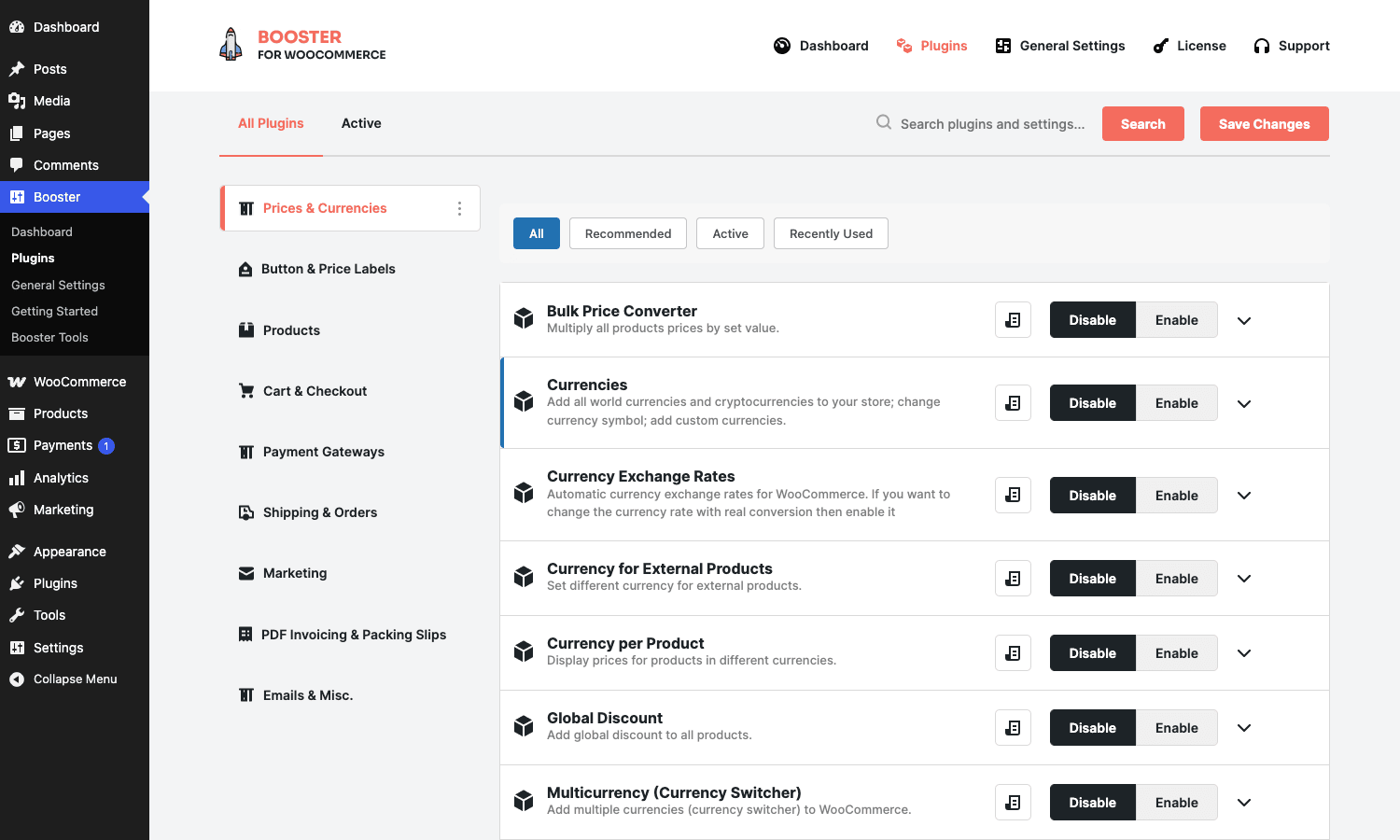
Prices and Currencies
Fifteen modules, all about how the price the customer sees gets calculated, formatted, and converted.
- Multicurrency (Currency Switcher) adds a real currency switcher with per-currency rates, formatting, rounding, and product-level overrides. Booster Plus lifts the two-currency cap from the free build so you can run as many as you need.
- Multicurrency Product Base Price lets you set the base price of any product in a different currency than the store default. Useful for shops that buy from a single foreign supplier and price internally in that supplier’s currency.
- Currency per Product assigns an entirely different currency to specific products instead of a converted price.
- Currency Exchange Rates pulls rates from ECB, TCMB, Yahoo, Google, Currencylayer, or a manual override. Updates run on cron at a configurable interval.
- Currency for External Products lets you display a different currency on external/affiliate products than the rest of the catalog uses.
- Price by Country changes the storewide price based on detected visitor country. Different from a converted price: you set tier prices explicitly per country.
- Price by User Role is the dynamic-pricing-by-customer-segment module. Wholesalers see one set of prices, retail visitors see another, by user role.
- Wholesale Price runs quantity-based tier pricing for B2B carts, also gateable by role.
- Open Pricing (Name Your Price) turns the price field into a customer-input box with min and max. Good for tip jars, custom donation amounts, pay-what-you-want digital goods.
- Offer Your Price is similar in shape but routes through an admin-approval flow.
- Bulk Price Converter is a one-shot batch tool: multiply every price in the catalog by a number. Pricing a product line up 7 percent across the catalog is two clicks.
- Product Price by Formula stores a formula instead of a price and recalculates on render. Custom-build products (square metres of vinyl, hours of labour, etc) become possible without code.
- Global Discount applies a percentage or fixed discount to selected products or categories without touching the underlying price.
- Price Formats controls currency symbol position, decimal separator, thousands separator, and trailing zero behaviour per currency.
If your problem was anywhere in this list, you’d otherwise be looking at four to six separate plugins (a multi-currency plugin, a role-based pricing plugin, a wholesale plugin, a currency rate updater, and a name-your-price plugin) each at $50 to $80 per year.
Button and Price Labels
Five modules. The "small but annoying" category.
- Add to Cart Labels customises the Add to Cart button text per product type (simple, variable, grouped, external) and per scope (single product page, archives, cart). You can replace "Add to cart" with "Buy now", "Subscribe", "Book this room" without touching theme files.
- Call for Price shows a custom label and phone number on products with no price. Standard for B2B catalogs where pricing is on request.
- Free Price Labels changes how "Free" appears (or hides the price entirely on zero-priced products).
- Custom Price Labels lets you append text like "incl. VAT" or "from" to displayed prices, with rules per product or category.
- More Button Labels tweaks the rest: "View Cart", "Update Cart", "Place Order", "Proceed to Checkout", "Apply Coupon", and so on.
Products
The largest category. 32 modules covering product display, product data, and product-level conditional logic.
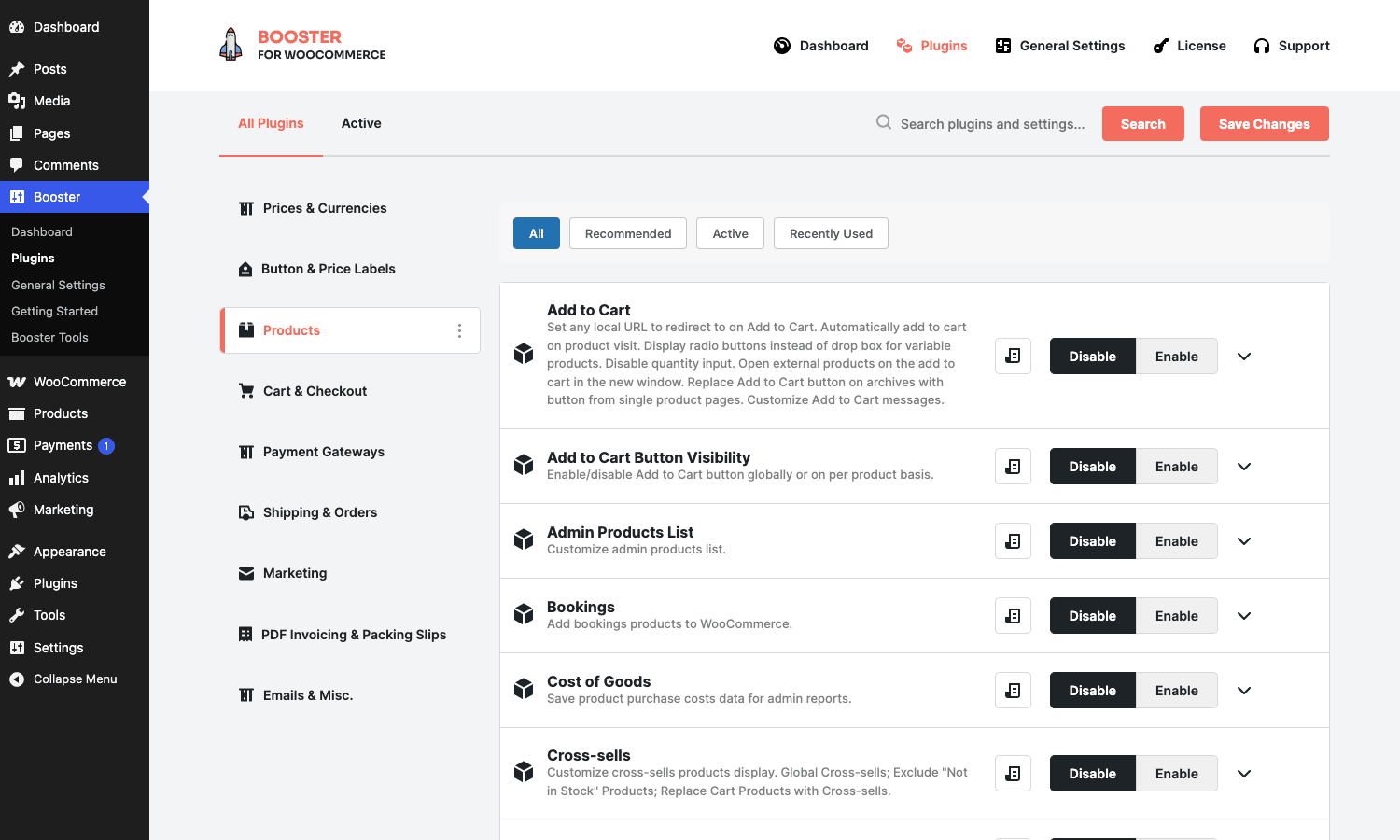
Highlights worth pulling out:
- Bookings turns products into bookable resources with time slots and rates. Limited compared with a dedicated bookings plugin but covers the common case of one-room rentals or appointment-style services.
- Crowdfunding turns a product into a fundable goal with a backer list and progress bar.
- Product Add-ons is the configurable extras module: checkboxes, radios, file uploads, text inputs that change the price.
- Product Input Fields is a thinner version of add-ons for capturing per-line text or file inputs without changing the price.
- Product Images adds extra product image fields, custom positioning, archive-thumbnail overrides, and so on.
- Product Variation Swatches turns variation dropdowns into colour, image, or label swatches. (Worth noting we have a dedicated review of Variation Swatches for WooCommerce Pro if you only want that one feature done deeply.)
- Related Products gives full control over which products appear in the related-products grid (by category, by tag, by product, or fully manual).
- Cross-sells and Upsells modules let you set defaults and bulk-edit across the catalog.
- Add to Cart Button Visibility hides the Add to Cart button on specific products, categories, or for specific user roles. Useful for "request quote" workflows.
- Product by Country / by User Role / by Time / by Date / by User are conditional visibility modules. Each one hides or shows entire products to specific audiences.
- Products XML Feed generates a Google Merchant Center compatible XML feed of the catalog on a schedule. (One of the modules that, on its own, replaces a $79/year plugin.)
- MSRP / Compare-at Price stores a separate retail price next to the selling price and surfaces the difference as savings.
- Product Extra Fees attaches a per-product fee (handling, gift wrap, surcharge) that appears at cart.
- Tax Display controls how prices show with or without tax on the product page, archives, cart, and checkout independently.
- Admin Products List customises the product admin list with sortable, filterable columns and bulk-edit shortcuts.
- Stock, SKU, Sorting, Products per Page, Product Tabs, Sale Flash, Product Custom Info, Product Bulk Meta Editor round out the data and display side.
If you’re nodding through more than three of these, you’re in Booster’s target market.
Cart and Checkout
Eighteen modules. Big surface area because the checkout is where most stores want to bend things to local needs.
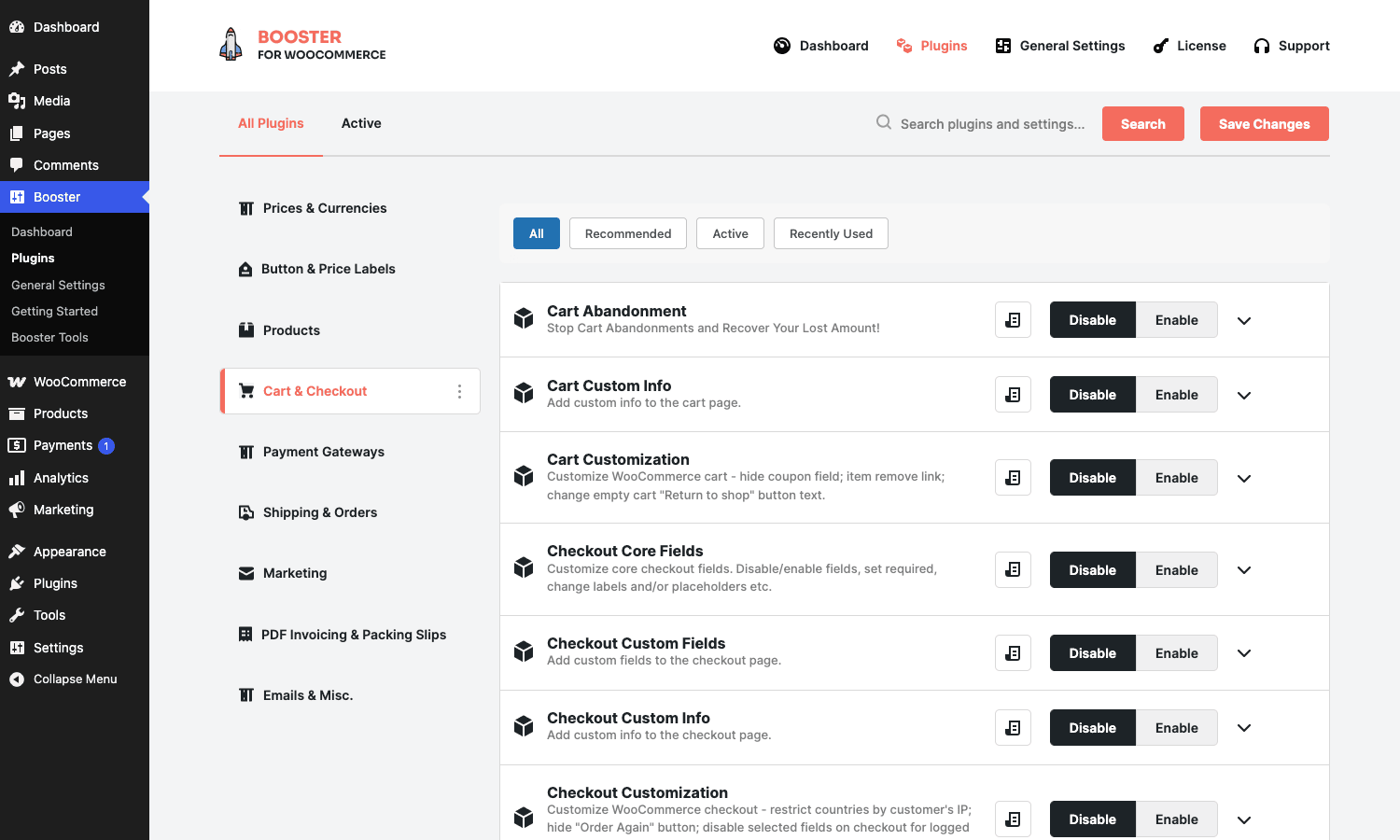
- Checkout Custom Fields is the headline. Text, textarea, select, checkbox, file upload, date, time, country, state. Place fields in any checkout section, gate by user role, gate by product or category, mark required or optional. This single module replaces the "Checkout Field Editor" extension on WooCommerce.com.
- Checkout Core Fields strips, hides, or rearranges the default WooCommerce checkout fields. Disable the phone field, force VAT number above the address, hide the second address line.
- Checkout Custom Info drops static HTML or instructions between checkout sections (a note about delivery, an SSL trust badge, country-specific compliance text).
- Checkout Customization is the rule engine on top: hide payment gateways under a country, force a shipping method for a product, restrict checkout entirely below a cart total.
- Checkout Files Upload adds file-upload fields to the cart or checkout (think "upload your design for the t-shirt").
- Checkout Fees adds conditional fees (handling, COD surcharge, low-cart-total fee) with rules.
- EU VAT Number adds VIES VAT validation and conditional VAT removal for B2B intra-EU transactions.
- Cart Customization rewrites cart table columns, totals labels, and the "calculate shipping" block.
- Empty Cart Button adds the one button that’s missing by default.
- Mini Cart is a shortcode-driven cart fragment for placement in widgets or page builders.
- Cart Abandonment stores the cart and order details when a customer drops, and lets you trigger recovery emails by cron. Tracks both authenticated and guest sessions.
- Frequently Bought Together generates the Amazon-style three-product upsell at checkout.
- One Page Checkout condenses the multi-page flow into a single page (cart, checkout, payment) for stores selling one or two products.
- Wishlist is a basic wishlist with shortcodes for placement and account-page integration.
- URL Coupons auto-applies a coupon based on a referral query string.
- Coupon Code Generator generates batches of coupon codes for marketing campaigns.
- Coupon by User Role restricts coupons to specific roles.
If "checkout fields and conditional rules" is your only problem, you might still want a dedicated tool. A pair of options worth comparing are WooCommerce Smart Coupons, Advanced Coupons, and Discount Rules for WooCommerce Pro for coupons specifically.
Payment Gateways
Eleven modules that all sit alongside whatever payment gateway plugin you already have (Stripe, PayPal, the Woo built-in offline options).
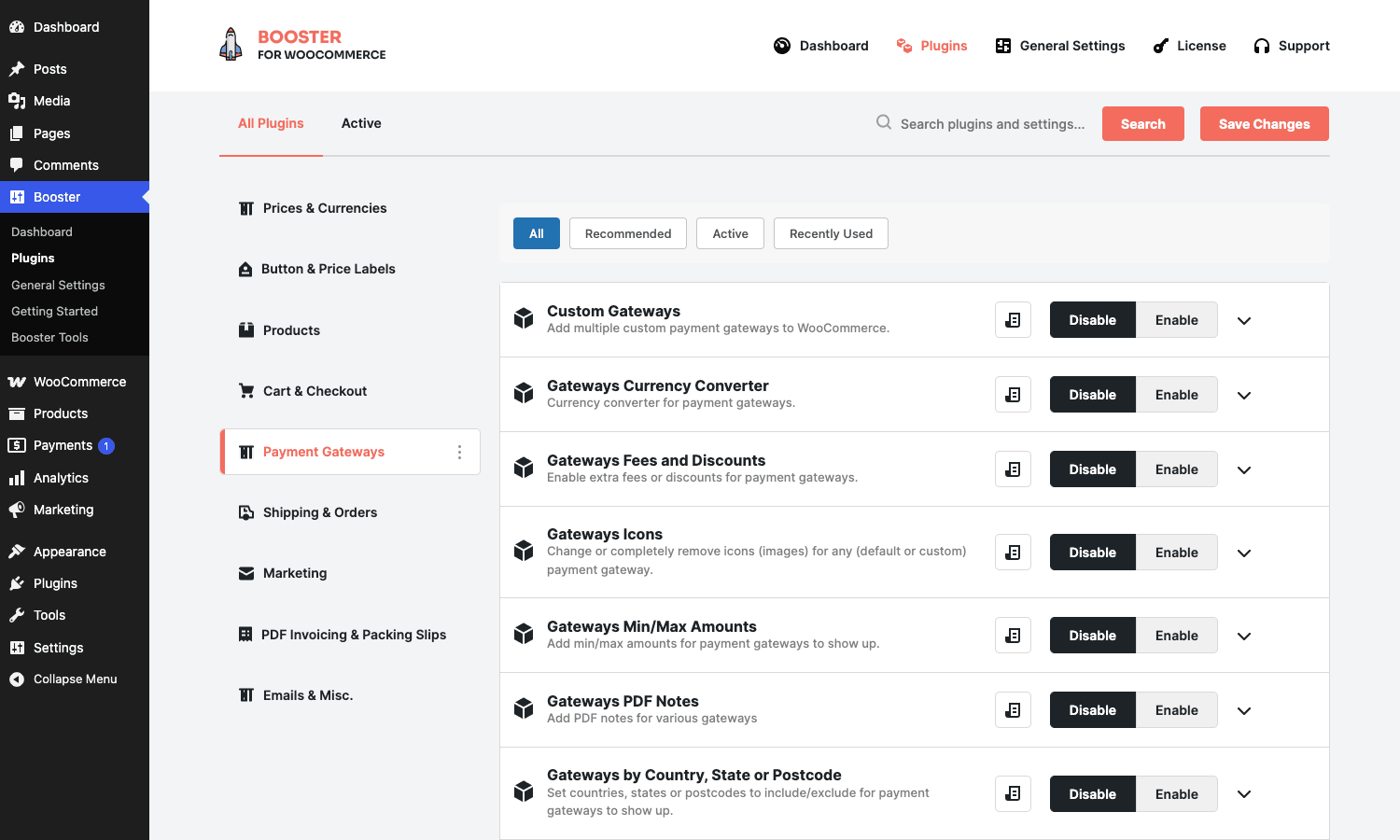
- Custom Payment Gateways adds up to eight extra "offline" gateways. Useful for store-credit, bank transfer with different account numbers per region, or a custom escrow flow.
- Gateways Icons changes or removes the small logos next to each gateway at checkout.
- Gateways Currency Converter routes payments through a gateway in a different currency than the cart, with explicit FX rules.
- Gateways Fees and Discounts adds a percentage or fixed fee (or discount) per gateway. The COD surcharge case.
- Gateways by Country, State, or Postcode restricts which gateways appear based on the billing address.
- Gateways by User Role restricts gateways by who’s buying.
- Gateways by Shipping restricts gateways by which shipping method is selected.
- Gateways Min/Max Amounts hides gateways outside a cart-total range. Hide PayPal under $5 because the fees eat the margin.
- Gateways per Category restricts gateways depending on what’s in the cart.
- Gateways PDF Notes attaches a per-gateway PDF note to the order email.
None of these add a new gateway integration. They sit on top of gateways you already have. If you need a new actual gateway integration (Stripe, Klarna, Razorpay) you still need the dedicated gateway plugin. The WooCommerce Stripe Payment Gateway review covers what to use for the actual Stripe integration.
Shipping and Orders
Twenty-two modules. The other big bucket.
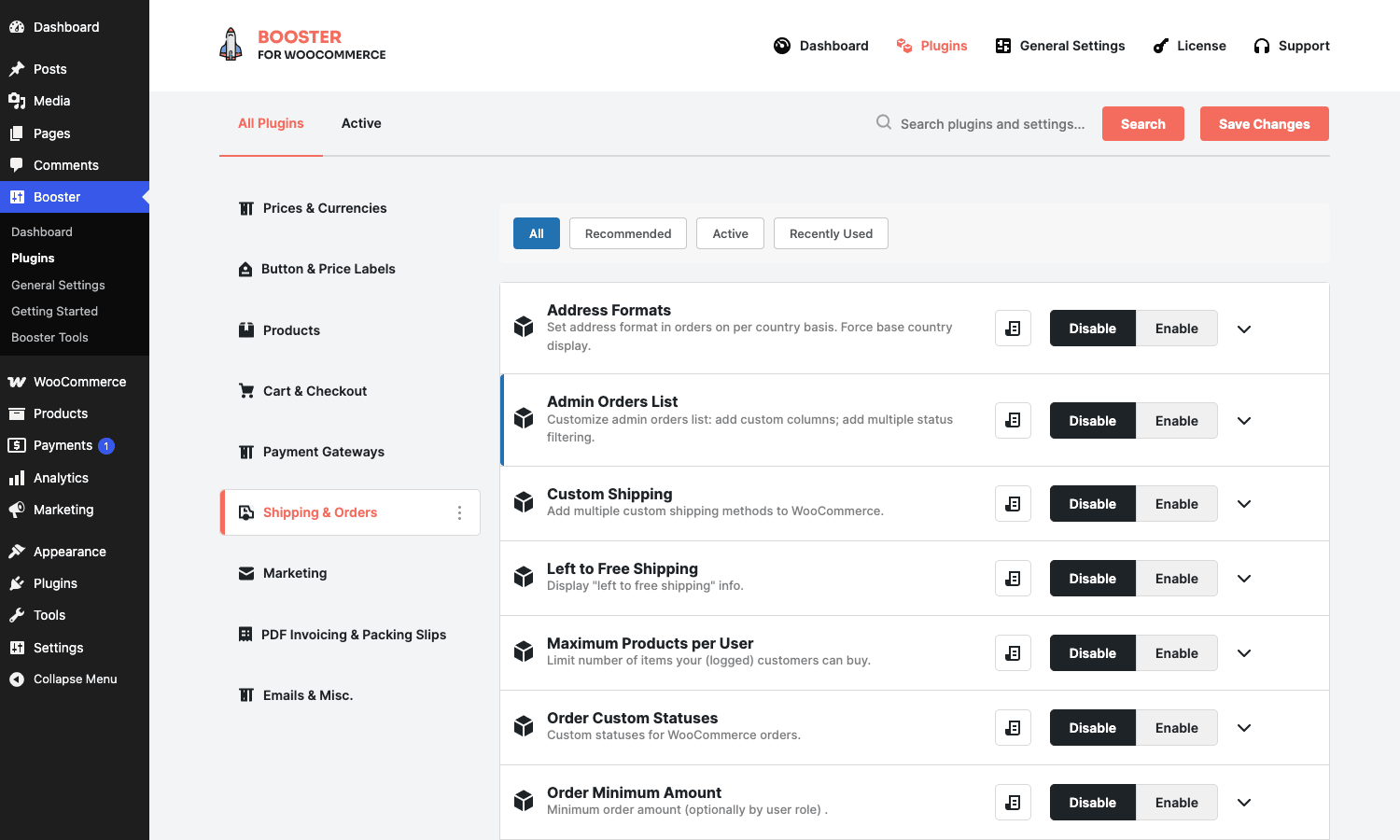
Shipping side:
- Custom Shipping adds unlimited custom shipping methods. Each has its own cost formula and conditions.
- Shipping Calculator customises the calculator widget on cart pages.
- Left to Free Shipping shows the "$15 more for free shipping" progress bar.
- Shipping by User Role / by Products / by Cities / by Time / by Order Amount / by Order Quantity are conditional method hides.
- Shipping Icons, Shipping Description, Shipping Time add the small details Woo doesn’t ship with: icons next to each method label, an extra description, an estimated delivery time.
- Shipping Options changes the shipping calculator’s "Update shipping" behaviour and label.
Orders side:
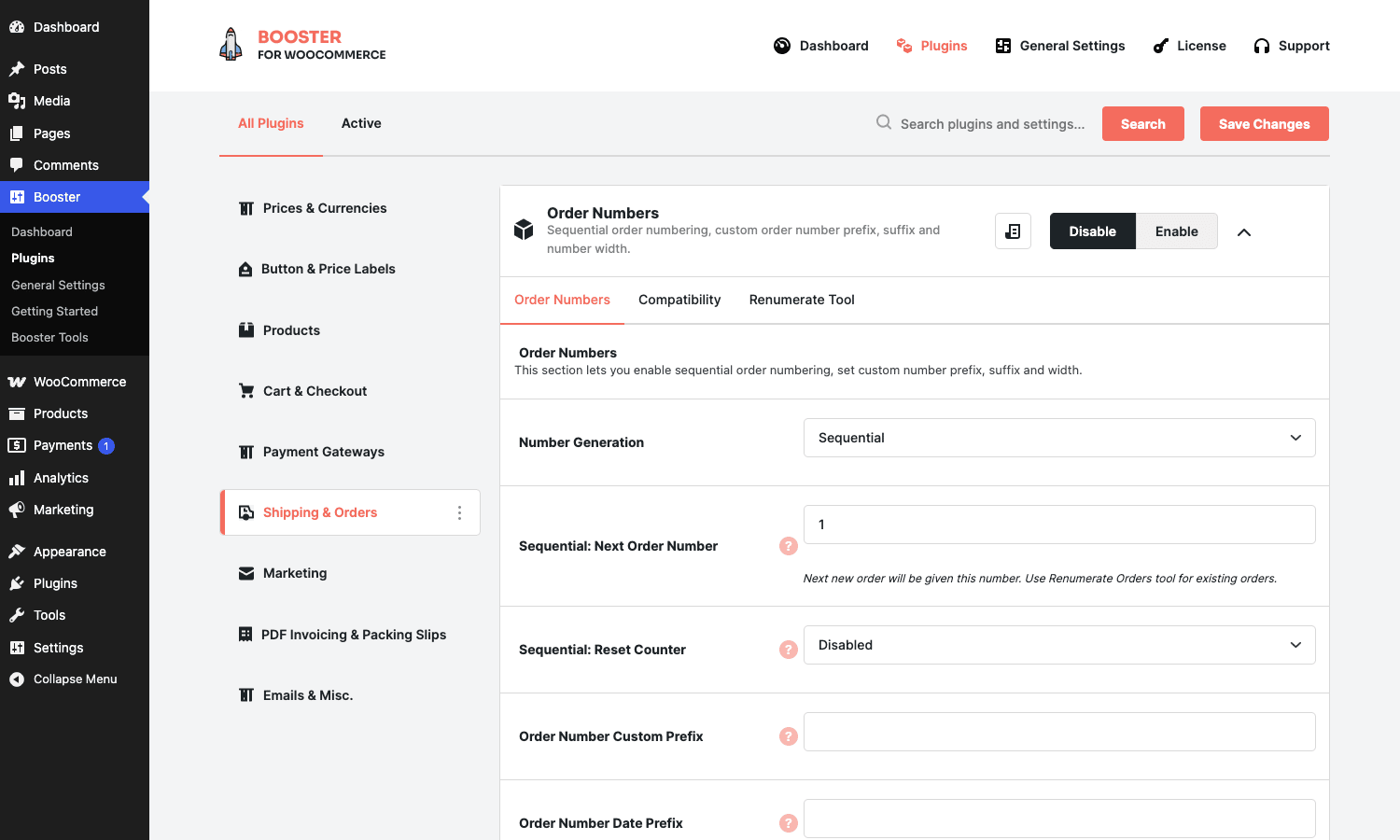
- Order Numbers replaces Woo’s default post-ID order numbers with a sequential counter, custom prefix, custom suffix, padded width, and a one-shot renumber tool for historical orders. The screenshot below shows the Number Generation modes and the Renumerate Tool sub-tab.
- Order Custom Statuses adds custom order statuses with colour, label, and email rules. ("Awaiting design proof", "Sent for fabrication", "Ready for pickup".)
- Admin Orders List customises the order admin list with extra columns, bulk filter, and the order-total breakdown.
- Order Minimum Amount blocks checkout under a cart-total floor.
- Order Quantities sets min and max per-product quantity, with role overrides.
- Maximum Products per User is a lifetime cap (one-per-customer giveaways, sample orders).
- Preorders lets you sell out-of-stock products as preorders with a release date.
- Address Formats rewrites how addresses appear on receipts, invoices, and shipping labels per country.
Marketing
One module here so far, but expanding in recent updates:
- Sales Notifications is the live-purchase popup ("Sarah from Berlin just bought…"). Light pop-up generator without the bloat of a dedicated social-proof plugin. If you want a richer take on this category, our NotificationX Pro walkthrough goes deeper.
PDF Invoicing and Packing Slips
Twelve sub-modules under one roof.
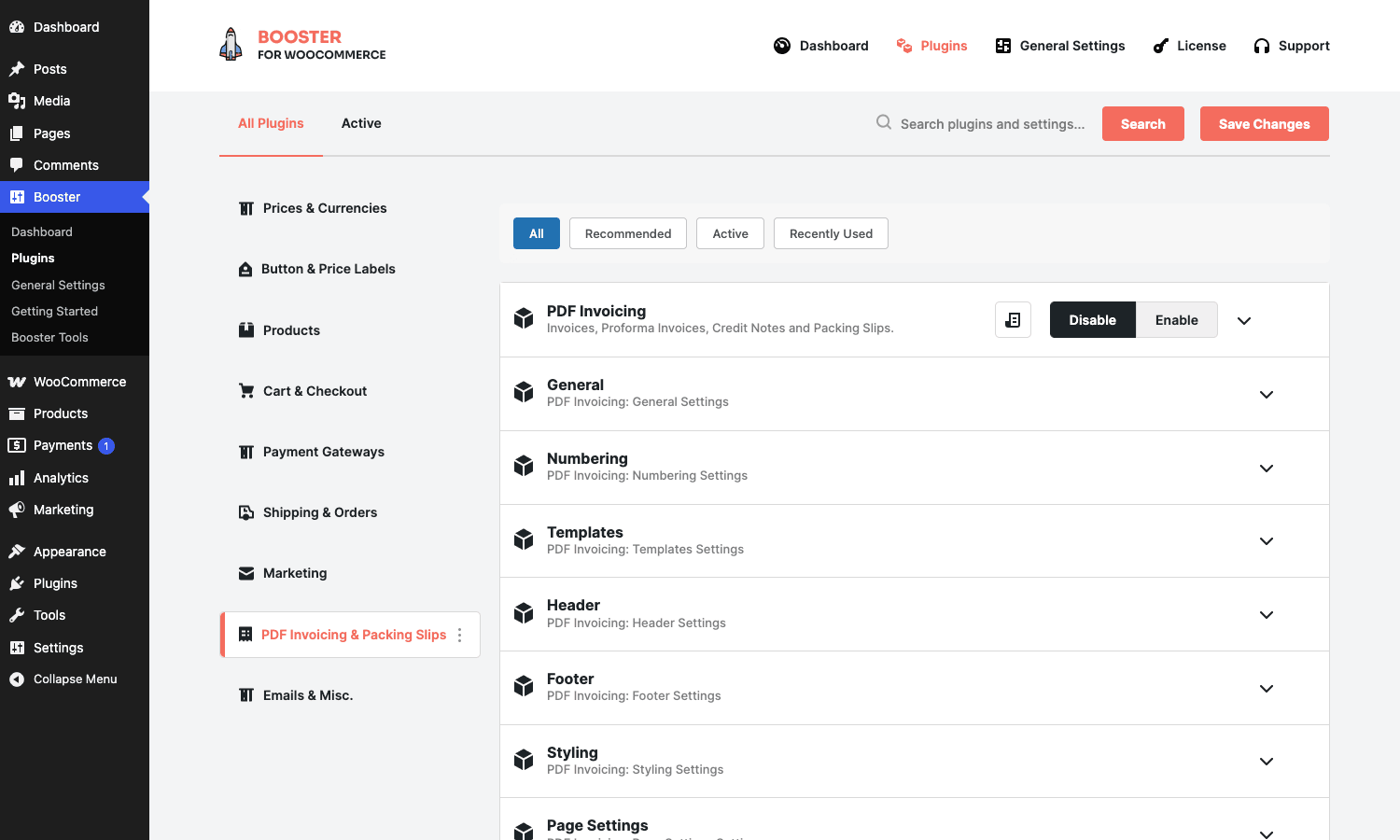
- PDF Invoicing is the master switch. Once on, it adds invoice attachment to the order-confirmation email and a "Download Invoice" link on the My Account orders page.
- Numbering sets prefix, suffix, padding, sequential vs date-based.
- Templates controls layout (single column, two-column, with or without shipping address, with or without VAT block).
- Header, Footer, Styling, Page Settings each customise their part of the PDF.
- Paid Stamp adds a "PAID" watermark on completed orders.
- Display controls where invoice download links appear (My Account, admin order page, order email).
- Advanced, Emails, Extra Columns are the rest of the knobs.
Booster’s PDF invoicing is solid for B2C and small-B2B use. It generates invoices, proforma invoices, credit notes, and packing slips. Comparable dedicated plugins exist if you need EU-style strict numbering, multi-language invoices, or a specific tax jurisdiction’s format. A dedicated reference here is the WooCommerce PDF Invoices comparison.
Emails and Misc.
The catch-all bucket. Nineteen modules covering email customisation, admin tools, exports, custom code, and WPML compatibility.
- Emails lets you add custom recipients to any WooCommerce email by order condition.
- Email Options tweaks SMTP-related options and per-email subject and heading.
- Email Verification sends a verification link on registration and blocks login until verified.
- Admin Tools is the parent module that exposes the Booster Tools page (more on that below).
- Custom CSS / Custom JS / Custom PHP are inline code editors with admin-side execution. The PHP module specifically runs your snippet through
eval()so guard who has access. - Export dumps customers, orders, order items, products to CSV with filterable columns.
- Reports adds extra report views to WooCommerce reports.
- Modules by User Roles lets you scope which Booster modules are visible per admin role.
- WPML integration helpers.
Walkthrough: installing and turning modules on
The first-time setup is faster than the catalog might suggest. Upload the plugin, activate. You get a Booster admin item in the sidebar and a Getting Started screen with three "preset" bundles (Grow Sales, Faster Checkout, Work Smarter) that turn on a curated set of modules. Skip those if you’d rather hand-pick.
The Plugins page is where the actual module toggles live. Left sidebar is the nine category groups. Main pane is the list of modules in the current group, each one with a one-line description, an Enable button, a Disable button, and an expand caret that opens the module’s inline settings.
To enable a module: click Enable. The Save Changes button at the top right writes the wcj_active_modules option. Any settings the module exposes can be edited in line on the same page; many modules also have a "Settings" deep-link that opens the full settings page with all sub-tabs.
That’s it. There’s no separate "activate" step, no per-module license to enter (the master license covers everything), no per-module update channel.
Module deep dives that store owners actually use
A few modules carry their weight on their own and are worth a closer look because most stores will turn at least one of them on.
Multicurrency (Currency Switcher)
This is one of the most-used reasons people install Booster Plus.
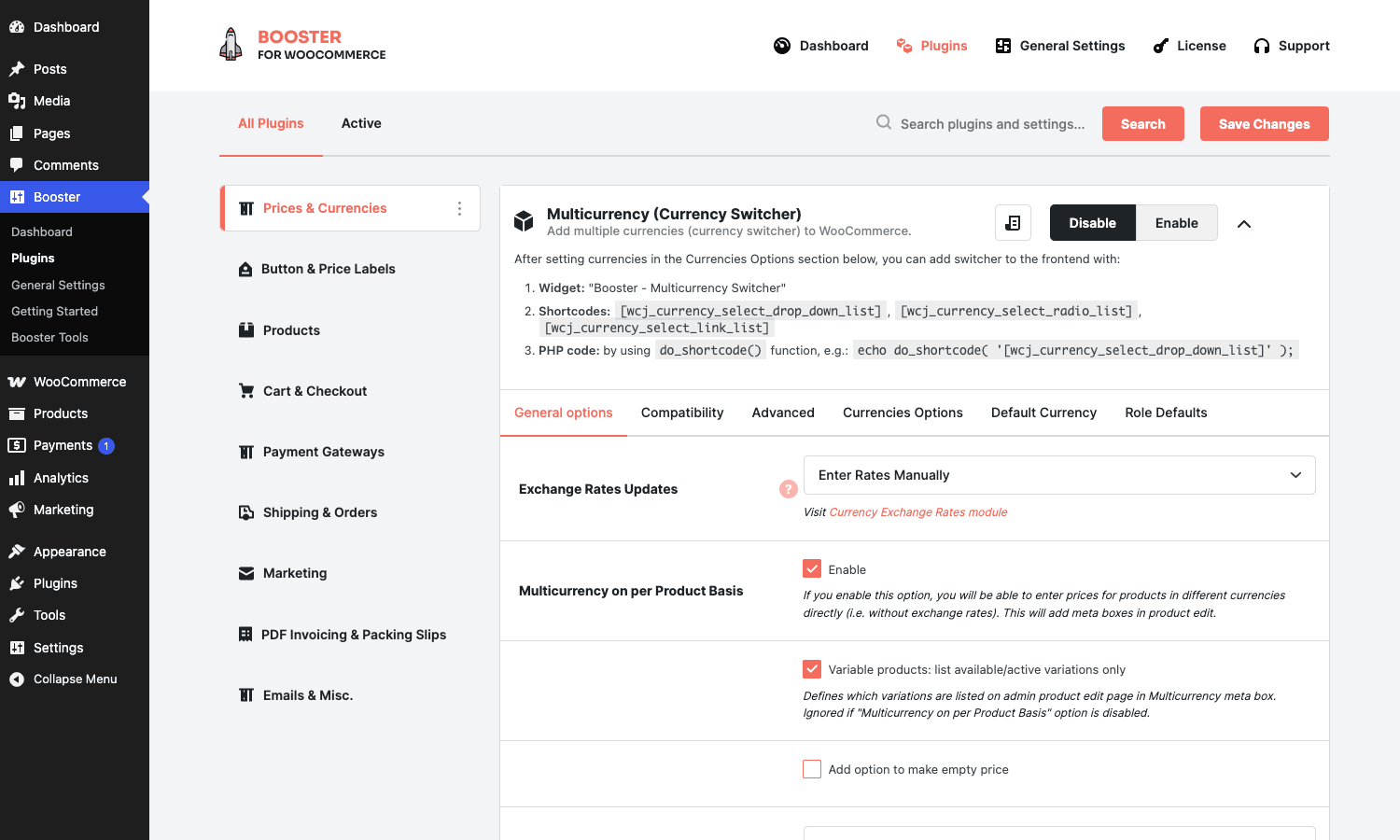
What it does:
- Adds a currency switcher (you can place it as a widget or with a shortcode).
- For each enabled currency, lets you set: symbol, position, decimals, thousand separator, rounding, custom price multiplier.
- Updates rates on cron from any of ten sources (ECB, TCMB, manual, Yahoo, Google, Currencylayer, Fixer, Coinbase, free.currconv, currencyconverterapi) or you can enter rates manually.
- The "Multicurrency on per Product Basis" option lets a single product override the storewide currency entirely.
- Includes a "Default Currency" tab to pick which currency loads for which country (by geolocation or by manual select).
- Compatible-with-cache option resets the chosen currency back to default on cart and checkout (because page caches will otherwise serve the wrong currency).
Comparable dedicated multi-currency plugins exist. A separate take on this specific problem is FOX Currency Switcher Pro, which goes deeper on the country-to-currency mapping side. Booster’s Multicurrency is faster to set up but FOX has more granular currency-by-geo rules.
For developers, the rate is filterable:
add_filter( 'wcj_currency_exchange_rate', function( $rate, $from, $to ) {
    // Apply a 2 percent markup over the live rate.
    return $rate * 1.02;
}, 10, 3 );
And the price-conversion step exposes:
add_filter( 'wcj_currency_per_product_cart_checkout_currency', function( $currency, $product_id ) {
    // Force a specific product to charge in EUR even at cart and checkout.
    if ( 1234 === (int) $product_id ) {
        return 'EUR';
    }
    return $currency;
}, 10, 2 );
Checkout Custom Fields
The other heavyweight. The field editor UI lives at WooCommerce -> Settings -> Booster -> Cart & Checkout -> Checkout Custom Fields. (In the new top-level admin, it’s Booster -> Plugins -> Cart & Checkout.)
You add a field by giving it a key, a label, a type (text, textarea, select, checkbox, file upload, date, time, country, state), a position (one of nine slots inside the checkout form), and a set of conditions. Conditions include cart total, cart contents (specific products or categories), user role, billing country, and shipping country.
Saved field values land on the order as order meta and surface automatically on the admin order edit screen, the customer’s order-received page, the order email, and (when PDF Invoicing is on) the PDF invoice.
For developers there are two filters worth knowing:
// Hide a custom checkout field for guest users only.
add_filter( 'wcj_checkout_custom_field_visible', function( $visible, $field_id, $field ) {
    if ( 'company_vat_id' === $field_id && ! is_user_logged_in() ) {
        return false;
    }
    return $visible;
}, 10, 3 );

// Keep a field visible even when the cart is empty.
add_filter( 'wcj_checkout_custom_field_always_visible_on_empty_cart', '__return_true' );
Order Numbers
A favourite for accounting workflows that need sequential, non-gap order IDs.
Without Booster, your WooCommerce order numbers are post IDs (so they jump every time you save a draft post or upload media). Accountants hate gaps in those sequences. Order Numbers replaces that with a counter you control: starting value, prefix, suffix, padding width, and date-based options ("INV-{year}-{counter}"). WooCommerce’s own write-up on sequential order numbers is a useful reference for the why.
The Renumerate Tool sub-tab renumbers all existing orders to the new pattern (a one-shot run, not idempotent, so back up first).
add_filter( '_wcj_order_number', function( $number, $order_id ) {
    // Prefix orders containing a subscription with "SUB-".
    $order = wc_get_order( $order_id );
    foreach ( $order->get_items() as $item ) {
        if ( wcj_is_subscription_product( $item->get_product() ) ) {
            return 'SUB-' . $number;
        }
    }
    return $number;
}, 10, 2 );
Cart Abandonment
Booster’s abandonment module stores the cart contents and customer email as soon as the customer enters one on checkout (or as soon as they’re logged in if cart-tracking is enabled). A cron job marks the cart abandoned after N minutes of inactivity. From there you can trigger a recovery email via Booster’s own email module or via a custom action.
The cron interval is filterable:
add_filter( 'wcj_cart_abandonment_update_order_cron_interval', function( $seconds ) {
    // Run the abandonment check every 5 minutes instead of every 15.
    return 5 * MINUTE_IN_SECONDS;
} );
The list of captured abandoned carts lives at Booster Tools -> Cart Abandonment with email, captured cart total, last activity timestamp, and a manual "send recovery email" action. This is lighter than a dedicated tool like the Iconic Sales Booster or a funnel-focused plugin like CartFlows Pro or WPFunnels Pro (those build the whole flow, Booster just captures the cart). But if all you need is the captured-email-and-cart side, Booster does it.
Sales Notifications
The recent-purchase popup. Easy to mess up: the wrong popup spec slows the page (a fresh database query every page load to find the most recent order), shows the same name to every visitor, or hits the catalogue with N+1 queries.
Booster’s implementation queries once, caches the most recent order, and reuses it across visits until a new sale happens. A recent release note calls this out specifically: the recent-purchase popup is now noticeably lighter on busy stores, and Booster reuses the most recent result for a short window instead of querying your orders on every popup cycle.
That’s the right design choice for a popup that fires on every page view.
Booster Tools: the one-shot utilities
Booster Tools is a separate top-level admin item that exposes everything that doesn’t fit the "module with settings" pattern.
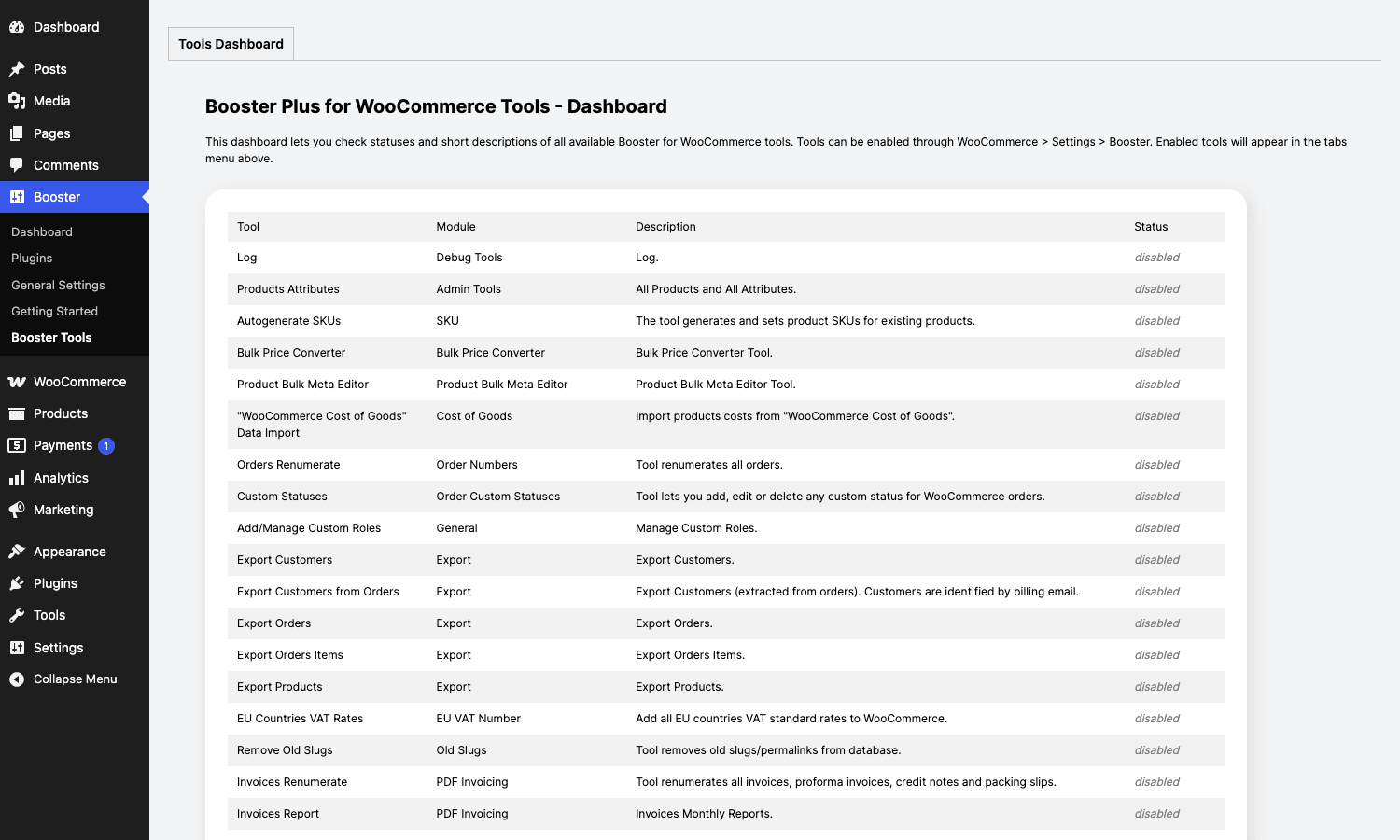
Examples of what lives there:
- Coupon Code Generator generates batches (e.g. 500 unique single-use codes) for a marketing campaign.
- Bulk Price Converter runs the price-multiply against the catalog.
- Renumerate Orders runs the Order Numbers tool against history.
- PDF Invoice Bulk Generator generates invoices for an arbitrary date range.
- Export dumps orders, customers, items to CSV.
- EU VAT Number validation tester.
- System prints the runtime environment for debugging.
- Debug Tools logs hook firing order and option reads.
- Custom Fields is a meta editor for products.
Each tool is its own admin page accessed via a sub-tab. The page slug is wcj-tools and tools register against do_action( 'wcj_tools_<tab>' ) which makes them extendable.
PDF Invoicing and Packing Slips
PDF Invoicing deserves its own section because it’s one of the modules that, if you turned it on alone, would justify Booster Plus’s price.
Once enabled, Booster gives you four document types: invoice, proforma invoice, credit note, packing slip. Each one has independent numbering, layout, header, footer, styling, and email behaviour. Numbering can be sequential, sequential per year, sequential per month, or based on order ID. You can include the invoice as an attachment on any WooCommerce email (defaults to the "Completed" email), expose a download link on the customer’s My Account page, expose a separate admin download on the order edit screen, and add a "PAID" watermark for completed orders.
The header and footer are templated. They support a list of placeholder tokens ({order_number}, {order_date}, {customer_billing_address}, {customer_total_spent}, and most of Booster’s general shortcodes). So a typical workflow is to design the layout once, drop in your VAT registration number and trade-number block in the footer, and let it run.
Hooks worth knowing:
// Override the billing address that prints on the invoice (e.g. add a company name line).
add_filter( 'wcj_order_billing_address', function( $address, $order ) {
    $company = $order->get_billing_company();
    if ( $company ) {
        $address = $company . "\n" . $address;
    }
    return $address;
}, 10, 2 );

// Truncate the header content to a tighter cap on small papers.
add_filter( 'wcj_invoicing_header_content_length', function( $length ) {
    return 400;
} );
The PDF rendering uses TCPDF under the hood, which is mature and handles UTF-8 and right-to-left text correctly. It’s heavier than DOMPDF (the rendering is slightly slower for large invoices, 50+ line items), but it’s also more forgiving of malformed HTML in your template.
Developer reference: hooks, filters, and shortcodes
Booster Plus exposes a generous public API. Everything’s prefixed wcj_ (legacy "WooCommerce Jetpack"). The free build’s source is mirrored on Pluggabl’s GitHub, useful when you want to read the implementation around a specific filter.
Action: extend the module catalog
add_filter( 'wcj_modules', function( $modules ) {
    $modules['products']['all_cat_ids'][] = 'my_custom_module';
    return $modules;
} );

add_action( 'wcj_loaded', function() {
    // Instantiate your module class so it loads alongside Booster's.
    require_once __DIR__ . '/class-my-custom-wcj-module.php';
    new My_Custom_WCJ_Module();
} );
Your custom module extends WCJ_Module and gets its own toggle on the Plugins page automatically.
Filter: change the FX rate per pair
add_filter( 'wcj_currency_exchange_rate', function( $rate, $from, $to ) {
    if ( 'USD' === $from && 'EUR' === $to ) {
        // Pin EUR/USD at a custom rate during a known volatile window.
        return 0.92;
    }
    return $rate;
}, 10, 3 );
Filter: short-circuit the rate lookup
Return false to fall through to Booster’s default:
add_filter( 'wcj_currency_exchange_rate_pre', function( $pre, $from, $to ) {
    // Pull live rates from your own internal FX service first.
    $rate = my_fx_service_get_rate( $from, $to );
    return $rate ? $rate : false;
}, 10, 3 );
Filter: role-based pricing exceptions
add_filter( 'wcj_price_by_user_role_do_change_price', function( $apply, $product ) {
    // Don't apply wholesale role pricing to clearance products.
    if ( $product->is_on_sale() && (int) $product->get_meta( '_clearance' ) === 1 ) {
        return false;
    }
    return $apply;
}, 10, 2 );
Filter: customise the order CSV export columns
add_filter( 'wcj_export_orders_items_fields', function( $fields ) {
    $fields['supplier_sku'] = 'Supplier SKU';
    return $fields;
} );
Filter: invoice line item table data
add_filter( 'wcj_order_items_table_data', function( $rows, $order ) {
    // Inject a "Weight (kg)" column into the invoice item table.
    foreach ( $rows as &$row ) {
        $product = wc_get_product( $row['product_id'] );
        $row['weight'] = $product ? $product->get_weight() : '';
    }
    return $rows;
}, 10, 2 );
Shortcodes
Booster Plus ships dozens of shortcodes, grouped by class:
- General (
wcj_general_shortcodes):[wcj_current_currency_code],[wcj_current_date],[wcj_customer_total_spent],[wcj_customer_order_count],[wcj_empty_cart_button],[wcj_get_left_to_free_shipping],[wcj_store_address],[wcj_currency_exchange_rates_table],[wcj_country_select_drop_down_list],[wcj_currency_select_drop_down_list],[wcj_text condition="..." then="..." else="..."]. - Products:
[wcj_product_sku],[wcj_product_price],[wcj_product_stock],[wcj_product_image],[wcj_product_categories],[wcj_product_total_sales]. - Orders:
[wcj_order_number],[wcj_order_total],[wcj_order_billing_address],[wcj_order_items_table]. - Cart:
[wcj_cart_items_table],[wcj_cart_total]. - Invoice-specific:
[wcj_invoice_number],[wcj_invoice_date]. - Misc:
[wcj_barcode],[wcj_wholesale_price_table],[wcj_wishlist],[wcj_one_page_checkout].
A useful pattern: [wcj_text condition="customer_total_spent_>=_500" then="VIP customer" else=""] lets you build conditional content in pages and emails without code.
Performance, compatibility, and gotchas
A few honest notes.
What runs fast
With ten or fewer modules on, Booster’s overhead is barely measurable. The loader is conservative: disabled modules don’t include their PHP, don’t enqueue their assets, don’t register their settings. A store running Multicurrency + Order Numbers + Checkout Custom Fields + PDF Invoicing has maybe four extra includes on every request and a small admin-side script bundle. That’s it.
What slows you down
A few specific modules can cost you if you turn them on without thinking:
- Custom PHP module. The
eval()is fine in principle but heavy snippets run on every page. Be specific with your hooks. - Cart Abandonment with a very short cron interval. The default is sensible. If you tune it down to one minute, expect noisy cron output.
- Sales Notifications without the modern caching path. Recent Booster releases enable caching by default; older installs should still verify their settings.
- Products XML Feed on a 50,000-SKU catalog rebuilds the entire feed each cron run. Schedule it daily, not hourly.
Theme and plugin compatibility
Booster Plus declares HPOS (High-Performance Order Storage) compatibility. The order modules (Order Numbers, Custom Statuses, PDF Invoicing) read from the order CRUD, not from wp_posts. So HPOS-on stores are fully supported.
WPML compatibility is explicit and ships as its own module. Multi-language label translation works out of the box.
Booster’s Multicurrency does not conflict with WooCommerce Subscriptions’s per-currency renewal handling, but the two have to be configured carefully so the renewal currency matches the original subscription currency. If you run WooCommerce Subscriptions, pick one source of currency truth.
The PDF Invoicing module is mostly bullet-proof. The rare reports of broken layouts trace back to two things: a header or footer image that’s not square (TCPDF stretches it) or non-UTF-8 characters in custom fields (set the storefront encoding to UTF-8 everywhere).
Where Booster doesn’t try
Booster does not try to be a page builder. It does not try to build sales funnels (use CartFlows Pro or WPFunnels Pro for that). It does not try to be a full subscription engine (use WooCommerce Subscriptions). It does not replace a deep coupon engine like Discount Rules for WooCommerce Pro. Recognising the boundary is part of using it well.
Booster Plus vs the alternative stacks
Three honest comparisons worth making.
Vs the WooCommerce.com extension stack
The closest like-for-like is the official WooCommerce.com extensions catalog. To replicate the most popular Booster modules you’d buy: Multi Currency for WooCommerce, Sequential Order Numbers Pro, Order Status Manager, Checkout Field Editor, Cart Notices, Product Add-ons, WooCommerce PDF Invoices, Sales Booster Bundle. That’s roughly $700 to $1,200 per year per site, depending on which year’s pricing you catch. Booster Plus is a single license that covers all of the above plus the rest of the catalog.
The flip side: the WooCommerce.com extensions are individually deeper. Multi Currency for WooCommerce has more multi-currency edge cases handled than Booster’s Multicurrency. Sequential Order Numbers Pro has a slightly slicker UI. Checkout Field Editor has nicer conditional logic. None of these gaps are dealbreakers, but if you only need one feature and you want the absolute best implementation of just that one feature, the dedicated tool sometimes wins.
Vs YITH’s catalog
YITH’s all-in-one strategy is similar in spirit but different in shipping: ~120 separate plugins, one vendor, similar prices to single WooCommerce.com extensions. The trade-off is operational. With YITH you install only the plugins you need, but you’re managing each plugin separately (each one with its own update channel, its own settings page, its own author byline in admin notices). With Booster, you have one update channel and one settings home for the same coverage.
If you tend to enable a lot of small features, Booster’s one-license, one-update approach is operationally simpler. If you enable two YITH plugins, YITH wins on focus.
Vs assembling free plugins
You can replicate parts of Booster from free WordPress.org plugins. Free sequential order numbers plugins exist, free PDF invoicing plugins exist, free checkout field editors exist. The problem is the quality bar and the consistency. Five free plugins means five different code styles, five different vendors, five different abandonment risks (a free plugin that hasn’t been updated in two years is a risk). Booster Plus has one vendor, one codebase, and an active release cycle.
Pricing and licensing
Booster Plus is sold by Pluggabl as an annual license. Pluggabl’s pricing tiers, at the time of writing, are roughly:
- Booster Plus, single-site, annual renewal.
- Booster Plus + extended support, similar with priority support.
- Booster Plus White Label, a separate paid tier that lets agencies rebrand the plugin admin label so end-clients don’t see "Booster".
The free version ("Booster for WooCommerce", on WordPress.org) covers a useful subset and is fine for hobby stores. The moment you need PDF invoicing, more than two currencies, role-based pricing, custom payment gateways, cart abandonment, or sales notifications, you’re in Plus territory.
If you want to install Booster Plus for WooCommerce without going through the Pluggabl checkout, that’s available through GPL Times directly.
Frequently asked questions
Will Booster Plus slow my store?
Only the modules you enable load any code. Ten modules on is barely measurable in Query Monitor. Twenty modules on is still fine. The plugin design assumes most stores will use a small subset, and the loader is optimised for that pattern.
Can I install Booster Plus next to the free Booster?
No, only one. The Plus build is a superset of the free build. The plugin self-detects and short-circuits boot if both are active. Deactivate the free version before installing Plus.
Does it work with HPOS (High-Performance Order Storage)?
Yes. Booster declares HPOS compatibility via FeaturesUtil::declare_compatibility. The order-related modules read from the WooCommerce order CRUD, not from wp_posts.
Does it work with WPML and Polylang?
WPML is explicitly supported via a dedicated WPML module. Translatable strings include all customer-facing module output, custom field labels, custom status labels, and invoice template tokens. Polylang has community-tested compatibility for the same set of strings.
Can I write my own module?
Yes. The architecture is documented in class-wcj-module.php. Extend WCJ_Module, register against the wcj_modules filter, instantiate on wcj_loaded. Your module gets a toggle on the Plugins page like the built-in ones.
How is it different from WooCommerce Subscriptions?
Different problem. WooCommerce Subscriptions is a subscription billing engine: recurring charges, subscription products, customer self-service. Booster Plus doesn’t do subscriptions. The two run side by side without conflict.
Does the PDF invoicing handle complex tax scenarios?
It handles the common ones: per-item VAT, multiple VAT rates, EU intra-community zero-rate via the EU VAT Number module, country-specific VAT-inclusive vs VAT-exclusive display. For something more specialised (US sales tax with sourcing rules across 50 states, India GST with HSN codes, Brazilian NFe), you’ll want a jurisdiction-specific tool, but Booster handles a comfortable majority of European and global B2C cases.
What happens to my settings if I deactivate Booster Plus?
The settings stay in the database (they’re stored as wp_options rows). Reactivating restores the previous configuration. Uninstalling the plugin (deletion through the WordPress plugin admin) removes the options.
Final thoughts
Booster Plus for WooCommerce is the rare "kitchen sink" plugin that earns the description honestly. It’s not a wrapper around half-finished features; the modules people actually use (Multicurrency, Checkout Custom Fields, Order Numbers, PDF Invoicing, Cart Abandonment, Sales Notifications) are each substantial enough that, on a different vendor’s site, they’d be sold as standalone plugins.
What you trade for the breadth is depth at the margins. A purpose-built multi-currency plugin will handle one edge case better. A purpose-built coupon engine will model BOGO rules in three more permutations. If your store’s single biggest gap is one of those edge cases, buy the dedicated tool.
For everything else (and for any store where the answer is "we need six different small things, not one big thing"), Booster Plus is the most operationally simple way to get there. One install, one settings page, one update channel, and the rest of your plugin list stays short.