

Most WooCommerce stores leave money on the table at checkout. A customer adds one product, pays, and leaves. CartFlows Pro is the plugin that changes that equation. It lets you add an order bump on the checkout page, a one-click upsell after payment, and a downsell if they decline, all without the customer ever re-entering their card details. You can also split-test every step, track funnel analytics, and route customers to different offers based on what they bought.
Table of Contents
- What is CartFlows Pro?
- How the Funnel System Works
- Order Bumps
- One-Click Upsells and Downsells
- Multi-Step Checkout
- Pre-Checkout Offers
- A/B Testing Funnels
- Funnel Analytics
- Installation and Setup
- Real-World Use Cases
- Developer Reference
- Performance, Compatibility, and Gotchas
- Pricing and Licensing
- FAQ
- Final Thoughts
What is CartFlows Pro?
CartFlows is a sales funnel builder for WordPress, built on top of WooCommerce. The free version gives you the funnel framework: a "flow" that chains pages together (landing page → checkout → thank you). CartFlows Pro is the add-on that unlocks the revenue-boosting features: order bumps, post-purchase upsells and downsells, optin steps, A/B testing, dynamic offer routing, and detailed analytics.
It was built by Brainstorm Force, the same team behind the Astra theme. The plugin has been around since 2018 and has grown into one of the more mature funnel builders for the WordPress ecosystem.
The core architecture is simple. CartFlows registers two custom post types: cartflows_flow (a funnel) and cartflows_step (a page in that funnel). A flow is an ordered list of steps. Each step is a WordPress page that CartFlows hijacks to add funnel behavior. You design each step using whatever page builder you normally use (Elementor, Gutenberg, Beaver Builder, Bricks, CartFlows has integrations for all of them).
CartFlows Pro does not replace WooCommerce. It sits on top of it. All orders, products, subscriptions, and payment processing still go through WooCommerce. CartFlows Pro just orchestrates the customer journey between those WooCommerce events.
How the Funnel System Works
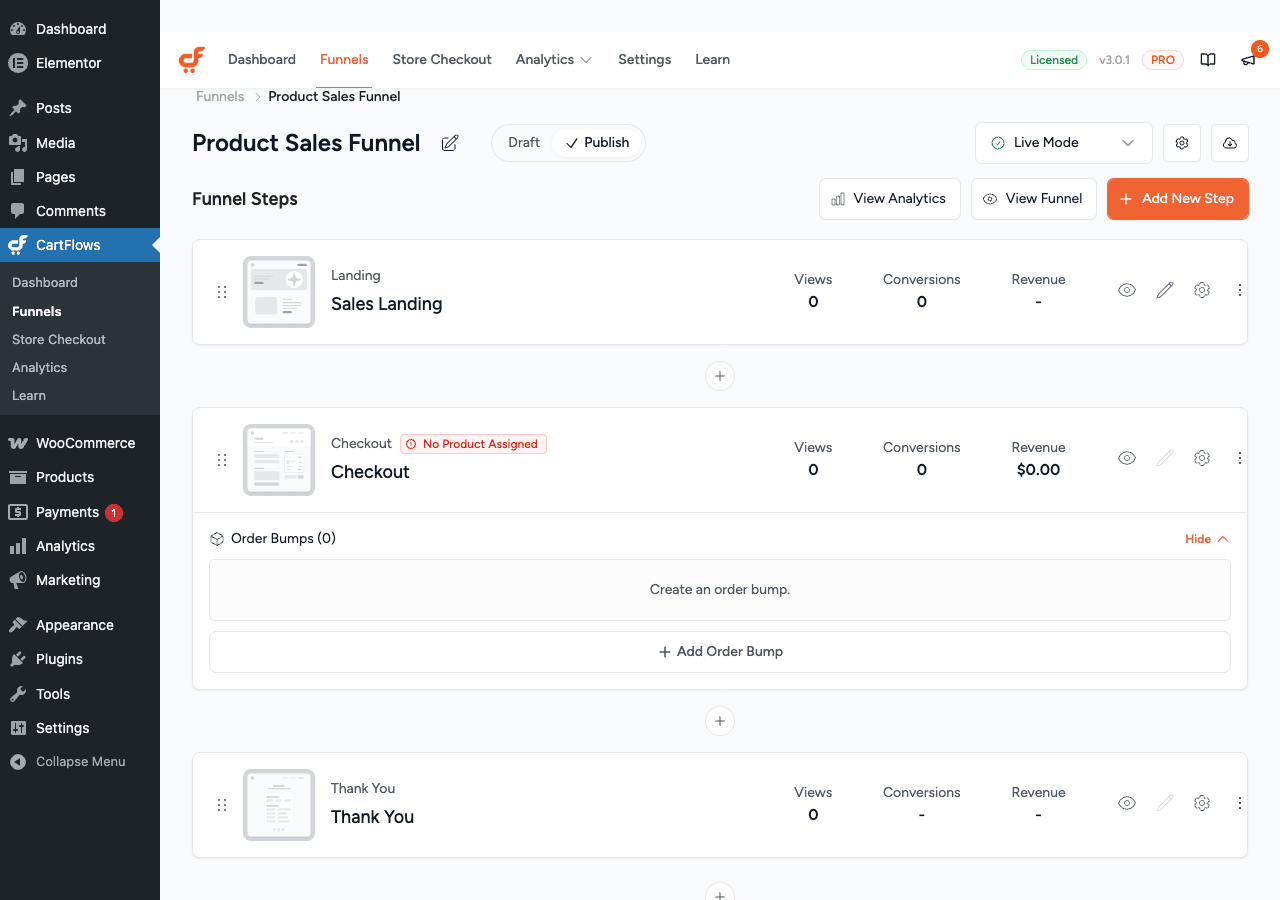
A CartFlows "flow" is a named sequence of steps. Each step has a type:
- Landing Page, any page you want to drive traffic to, often a product sales page
- Checkout, a custom WooCommerce checkout page, skinned and simplified by CartFlows
- Upsell, shown after successful payment, offers an additional product with one click
- Downsell, shown if the customer declines the upsell, offers a lower-priced alternative
- Thank You, order confirmation page, customizable with dynamic order details
- Optin, an email capture step, no payment required
The flow controls the redirect chain. After the customer pays on the Checkout step, CartFlows intercepts the WooCommerce order confirmation redirect and sends the customer to the next step in the funnel (the Upsell page) instead. If they accept the upsell, they go to the next step. If they decline, they go to the Downsell step. Eventually they land on the Thank You step.
The key to CartFlows Pro’s one-click functionality is that the customer’s payment method is already stored (or their session has a valid nonce from the recent transaction). CartFlows uses the saved card token or re-uses the same payment nonce to charge the upsell product without asking for card details again. This is why only specific payment gateways support upsells: only those that support tokenized re-charge (Stripe, WooCommerce Payments, PayPal Express, Square, and a handful of others).
Order Bumps
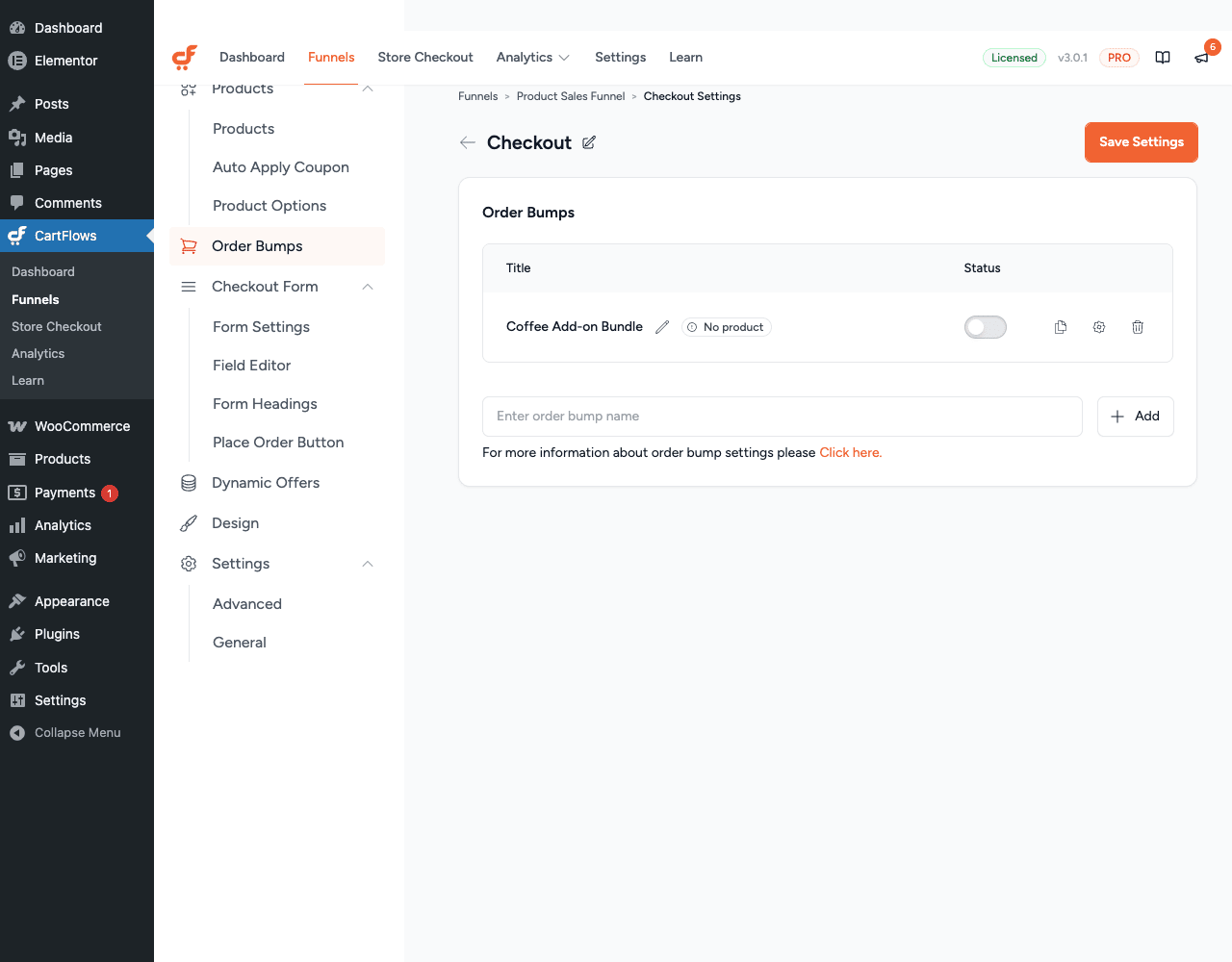
An order bump is an add-on offer displayed on the checkout page, before the customer clicks "Place Order". It’s typically a checkbox or a call-to-action box above the payment section saying "Add for only [price]."
CartFlows Pro lets you create multiple order bumps per checkout step. Each order bump has:
- Product, any WooCommerce product or subscription
- Position, above payment, below payment, before or after order details
- Skin, a visual style (box, horizontal card, minimal, etc.)
- Discount, an optional percentage or fixed discount on the bump product
- Conditions, show the bump only if certain products are in the cart, or if order total exceeds a threshold
Order bump products are added to or removed from the cart in real time. When the customer checks the checkbox, CartFlows fires an AJAX call that adds the product to the WooCommerce cart and re-renders the order summary. When they uncheck it, the product is removed. The final WooCommerce order includes the bump products naturally, so they appear in the admin order view, emails, and reports like any other line item.
One-Click Upsells and Downsells
Upsells and downsells are post-purchase offers. The customer has already paid. CartFlows intercepts the WooCommerce thank-you redirect and shows an offer page instead.
A one-click upsell works like this: the customer clicks "Yes, add this to my order" and CartFlows fires an AJAX request that charges their saved payment method for the upsell product and attaches it to their existing order as a child order. No new checkout. No re-entering card details. One click.
If they click "No thanks" (or ignore it and it times out), CartFlows routes them to either the downsell step or the thank-you page, depending on how you’ve configured the flow.
A downsell is the same mechanism with a different product and usually a lower price. The canonical pattern: upsell is the full premium version, downsell is a lighter version or a payment plan. Accepting the downsell also fires a one-click charge.
Each upsell/downsell step has:
- Offer product, a single WooCommerce product
- Instant Layout, CartFlows renders the product details (image, price, description, buy/skip buttons) automatically, without requiring you to build the whole page layout
- Custom Layout, you build the page yourself with a page builder and use CartFlows shortcodes to place the product info and the accept/reject buttons
- Conditions, CartFlows Pro’s Dynamic Offers can route to different upsell pages based on what was purchased, the order total, applied coupons, user role, or device type
Multi-Step Checkout
The standard WooCommerce checkout is a single long page. CartFlows Pro’s multi-step checkout breaks it into two or three columns/sections shown sequentially:
- Customer info (name, email, address)
- Shipping selection
- Payment
The customer fills in step 1, clicks "Continue", step 2 appears, then step 3. It reduces cognitive load and can increase completion rates for longer forms.
Under the hood, multi-step checkout is CSS and JavaScript that progressively shows sections of the same WooCommerce form. The data is all submitted as one WooCommerce checkout POST at the end. CartFlows doesn’t actually submit partial forms in between steps. This means WooCommerce compatibility remains intact.
Pre-Checkout Offers
A pre-checkout offer fires before the customer reaches the checkout form. When they click "Proceed to checkout" (or land on the checkout step URL), CartFlows intercepts and shows a lightweight offer popup or inline section above the checkout form.
This is useful for upselling quantity ("Buy 2, get one free"), offering a bundle, or suggesting a related product before the customer is in full checkout-focus mode. The offer is accepted via a checkbox or button click, which adds the product to the cart before the form renders.
A/B Testing Funnels
CartFlows Pro lets you run split tests on any funnel step. You create a "variation" of a step, CartFlows randomly assigns visitors to the original or the variation, and tracks conversion metrics for both.
What counts as a "conversion" is configurable: reaching the next step, completing a purchase, or accepting an offer. CartFlows shows the conversion rate, revenue per visitor, and statistical confidence for each variation.
To set up a test: open a funnel step, click "A/B Test", add a variation page, set the traffic split percentage (e.g., 50/50), and start. CartFlows handles the randomized routing and records the results in the analytics dashboard.
When you have a clear winner, you click "End Test" and CartFlows automatically routes all traffic to the winning variation and removes the test.
Funnel Analytics
CartFlows Pro’s analytics dashboard shows per-funnel performance data:
- Visits, how many times each step was viewed
- Conversions, how many times the step was completed (purchased, opted in, etc.)
- Conversion Rate, the percentage of visitors who completed the step
- Revenue, total revenue generated at each step
- Order Bumps Revenue, revenue from order bumps specifically
- Upsell/Downsell Revenue, revenue from post-purchase offers specifically
- A/B Test Results, side-by-side comparison when a test is running
The analytics data is stored in a custom database table created by CartFlows on activation. It’s separate from WooCommerce reports, which can be confusing: a sale on an upsell step appears in CartFlows analytics as "upsell revenue" but in WooCommerce reports as a regular order. Both are correct, they’re just different views of the same data.
Installation and Setup
Step 1: Install the free CartFlows plugin. CartFlows Pro requires the free base plugin. Install it from the WordPress plugin repository (Plugins → Add New → search "CartFlows") or via WP-CLI: wp plugin install cartflows --activate.
Step 2: Install CartFlows Pro. Upload the Pro add-on zip at Plugins → Add New → Upload Plugin and activate it.
Step 3: Create your first funnel. Go to CartFlows → Flows → Add New. You’ll see a step picker. Add a Checkout step, then a Upsell step, then a Thank You step.
Step 4: Configure the Checkout step. Open the Checkout step and select the product(s) to sell. CartFlows lets you pre-load products into the cart (so customers don’t need to go through the product page first), or you can direct customers to a product page that has an "Add to Cart" button linking to your funnel URL.
Step 5: Add an Order Bump. Inside the Checkout step settings, find the Order Bump tab. Add a product, pick a skin, set any discount, and configure display conditions.
Step 6: Configure the Upsell. Open the Upsell step, pick the offer product. Enable "Instant Layout" to let CartFlows auto-render the offer, or choose "Custom Layout" and design it yourself with your page builder.
Step 7: Set up the Thank You step. The default CartFlows Thank You template shows the order details. You can customize it with any page builder, using CartFlows’ dynamic order shortcodes to pull in the customer’s name, order total, and line items.
Step 8: Connect the funnel to traffic. You need to get customers into the funnel. The most common approach is replacing the WooCommerce default checkout URL with the CartFlows checkout step URL. Go to CartFlows → Settings → Global Checkout and set the CartFlows checkout step as the site-wide default.
Alternatively, use the "Dynamic Links" feature to generate product-specific URLs like ?wcf-checkout-id=123&product_id=456 that send customers directly to a specific funnel’s checkout with a specific product pre-loaded.
Real-World Use Cases
Digital product launches. Build a launch funnel: landing page → checkout (pre-loaded with the course or ebook) → upsell (the premium bundle or coaching add-on) → thank you with next steps. A/B test the upsell page between a short-form and long-form version. CartFlows handles the entire flow without a third-party funnel platform.
Physical product stores. A customer buys a coffee grinder. The order bump offers a pack of coffee pods for 20% off. The upsell offers a coffee subscription. The downsell offers a smaller subscription box. All three additional offers are one-click, no re-entering payment info. This pattern is what tools like ThriveCart and SamCart charge high monthly fees for; CartFlows Pro does it natively in WooCommerce.
Membership sites. Pair CartFlows with MemberPress or another membership plugin. Sell a base membership tier on the checkout step, upsell to the higher tier, and the membership plugin handles the access control. CartFlows handles the conversion mechanics.
Lead generation with monetization. Use an Optin step to capture email leads before showing the checkout. Integrate with your email platform (Mailchimp, ActiveCampaign, FluentCRM) via CartFlows’ webhook triggers or the FluentCRM Pro native integration. Leads who opt in but don’t buy get a follow-up sequence. Leads who do buy are tagged as customers automatically.
Subscription box stores. Sell a subscription as the main product with WooCommerce Subscriptions handling the recurring billing. The CartFlows upsell can offer an annual prepay discount. The downsell offers a shorter trial. CartFlows’ subscription-aware offer handling fires cartflows_offer_subscription_created when the subscription is set up via the offer, giving you a hook to customize what happens next.
Course platforms. Integrate with LearnDash or Tutor LMS. Sell a single course on the checkout, upsell the course bundle, and add an order bump for a one-time content upgrade like a workbook or community access.
Developer Reference
CartFlows Pro exposes a solid hook surface for customizing funnel behavior. All hooks prefixed cartflows_ or wcf_ are CartFlows-specific.
Hooking into offer outcomes
The most commonly useful hooks are on offer accept/reject:
// Fire when any offer (upsell or downsell) is accepted
add_action( 'cartflows_offer_accepted', function( $order, $offer_product ) {
 // $order is a WC_Order; $offer_product is a WC_Product
 $customer_email = $order->get_billing_email();

 // Example: tag the customer in CRM
 do_action( 'my_crm_tag_customer', $customer_email, 'accepted-upsell' );
}, 10, 2 );

// Fire specifically when a upsell is accepted
add_action( 'cartflows_upsell_offer_accepted', function( $order, $offer_product ) {
 // Only fires for upsells, not downsells
 my_plugin_log( 'Upsell accepted: '. $offer_product->get_name(). ' on order '. $order->get_id() );
}, 10, 2 );

// Fire when an offer is rejected
add_action( 'cartflows_offer_rejected', function( $order, $offer_product ) {
 // Track rejection for analytics or retargeting
 update_order_meta( $order->get_id(), '_declined_offer_product', $offer_product->get_id() );
}, 10, 2 );
Order bump hooks
// Fire when an order bump product is added to cart
add_action( 'wcf_order_bump_item_added', function( $product_id ) {
 // Add a free gift based on the bump product
 if ( 456 === $product_id ) {
 WC()->cart->add_to_cart( 789, 1 ); // add bonus gift
 }
} );

// Fire after the full order bump processing completes
add_action( 'wcf_after_order_bump_process', function( $ob_data ) {
 // $ob_data has product_id, quantity, and other bump config
 do_action( 'my_plugin_bump_processed', $ob_data['product_id'] );
} );
Controlling the next step
// Redirect to a different next step based on order properties
add_filter( 'cartflows_checkout_next_step_id', function( $next_step_id, $order, $checkout_id ) {
 // Route high-value orders to a different upsell step
 if ( $order->get_total() > 200 ) {
 return 9876; // premium upsell step ID
 }
 return $next_step_id;
}, 10, 3 );
Customizing offer display prices
// Show a different price in offer pages (e.g. subscriber discount)
add_filter( 'cartflows_filter_display_price', function( $price, $product_id, $context ) {
 if ( is_user_logged_in() && current_user_can( 'subscriber' ) ) {
 return $price * 0.9; // 10% subscriber discount
 }
 return $price;
}, 10, 3 );
Payment gateway support for offers
One-click upsells only work with gateways that support re-charge. You can extend the supported list:
// Add a custom gateway to the supported list
add_filter( 'cartflows_offer_supported_payment_gateway_slugs', function( $gateways ) {
 $gateways[] = 'my_custom_gateway';
 return $gateways;
} );
Webhook events
CartFlows Pro’s Webhook module lets you configure HTTP POST events without code, but if you need programmatic control:
// Fire on order start (includes funnel orders)
add_action( 'cartflows_order_started', function( $order ) {
 // Send order data to external system
 wp_remote_post( 'https://hooks.example.com/order-started', array(
 'body' => json_encode( array(
 'order_id' => $order->get_id(),
 'total' => $order->get_total(),
 'email' => $order->get_billing_email(),
 ) ),
 'headers' => array( 'Content-Type' => 'application/json' ),
 ) );
} );
A/B test hook
// Fire when an A/B test control is updated (test ended or variation changed)
add_action( 'cartflows_ab_test_update_control', function( $flow_id, $step ) {
 // Notify team of test update
 wp_mail(
 'team@yoursite.com',
 'CartFlows A/B test updated',
 'Funnel ID '. $flow_id. ' step updated.'
 );
}, 10, 2 );
Dynamic offer conditions
CartFlows Pro’s Dynamic Offers let you set conditions in the UI (product purchased, order total, user role, etc.). For conditions not available in the UI, hook into the redirect filter:
// Route to a different step based on applied coupon
add_filter( 'cartflows_checkout_next_step_id', function( $next_step_id, $order, $checkout_id ) {
 $coupons = $order->get_coupon_codes();
 if ( in_array( 'PARTNER_CODE', $coupons ) ) {
 return 8765; // partner-specific upsell step
 }
 return $next_step_id;
}, 10, 3 );
Session management
CartFlows stores funnel session data in its own session handler. The expire time is 30 minutes by default:
// Extend session to 2 hours
add_filter( 'cartflows_session_data_expire_time', function( $time ) {
 return HOUR_IN_SECONDS * 2;
} );
Offer JS localization
If you’re building a custom offer template and need to add data to the JavaScript payload:
add_filter( 'cartflows_offer_js_localize', function( $localize ) {
 $localize['my_custom_data'] = array(
 'flag' => 'some_value',
 'expiry' => strtotime( '+24 hours' ),
 );
 return $localize;
} );
Performance, Compatibility, and Gotchas
CartFlows Pro requires CartFlows Free
The Pro plugin is an add-on. The free CartFlows plugin must be installed and active. The Requires Plugins: cartflows header in the plugin file enforces this in WordPress 6.5+, so activating Pro without the free plugin now triggers an error rather than a silent failure.
Payment gateway compatibility for upsells
This is the most common support question. One-click upsells only work when the customer’s payment method supports a stored token re-charge. Gateways that do: Stripe (via WooCommerce Stripe Gateway), WooCommerce Payments, PayPal Express, Square, and Authorize.Net. PayPal Standard (redirect-based) does not support one-click upsells because there’s no stored token. If you’re running PayPal Standard, your upsell and downsell steps won’t work. Check the cartflows_offer_supported_payment_gateways filter output to confirm what’s active on your install.
Child orders vs. main orders
When a customer accepts a upsell, CartFlows creates a new WooCommerce order (a "child order") linked to the original order (the "main order"). This is important for WooCommerce reporting: the upsell revenue appears in WooCommerce as a separate order. If you’re reconciling CartFlows analytics revenue against WooCommerce reports, you’ll need to sum across both the main and child orders.
This also affects fulfillment plugins: a fulfillment system that only looks at the most recent order might miss the child order. Test your fulfillment pipeline with a upsell acceptance before going live.
Caching conflicts
CartFlows funnel pages must not be cached by server-side caches when the user is in the checkout process, because the cart state, session data, and offer routing are all session-dependent. CartFlows adds no-store cache headers on funnel step pages by default. But some caching plugins override those headers. Test your cache plugin (WP Rocket, W3TC, LiteSpeed Cache) against your funnel to confirm that checkout and offer pages are not being served from cache.
When WP Rocket is active, CartFlows’ funnel step pages should be excluded from caching in WP Rocket’s exclusion list. CartFlows does try to add these exclusions automatically, but verify after installation.
Page builder compatibility
CartFlows Pro has explicit integrations for Elementor, Gutenberg, Beaver Builder, and Bricks. For other builders (Divi, WPBakery, Oxygen), CartFlows works with the "default template" skin, which renders CartFlows’ own minimal checkout/offer layout. You can still customize these pages via CSS, but you won’t get a visual drag-and-drop editing experience for the CartFlows-specific elements (bump positions, offer accept/reject buttons) in unsupported builders.
The global checkout setting
CartFlows has a "Global Checkout" setting that replaces WooCommerce’s default checkout URL with a CartFlows funnel checkout step. If you enable this but don’t have a product assigned to that checkout step, customers adding products to cart and clicking "Proceed to Checkout" will land on a blank CartFlows step. Double-check your global checkout configuration.
Pricing and Licensing
CartFlows Pro is a premium plugin sold by Brainstorm Force on an annual subscription. The pricing tiers differ by site limit (single site, up to 10 sites, or unlimited). The free CartFlows plugin handles basic funnels with no upsells or order bumps.
The GPL license that governs WordPress plugins means the code is fully available, and you can install it on any WordPress site.
FAQ
Does CartFlows Pro work with any WooCommerce theme?
Yes. CartFlows replaces WooCommerce’s checkout page with its own step, so the theme’s checkout template is bypassed for CartFlows funnels. Your theme’s header and footer (if not using a blank template) still render around the CartFlows step.
Can I use CartFlows without a page builder?
Yes. CartFlows Pro’s "Instant Layout" feature auto-renders the offer content without requiring a page builder. For checkout pages, CartFlows provides its own checkout template skins. For the everyday store checkout rather than campaign funnels, a dedicated checkout plugin like CheckoutWC gives you finer template and field control. You can still use Gutenberg (block editor) for basic layout work.
Do upsells work with subscription products?
Yes, with WooCommerce Subscriptions active. When a customer accepts a upsell that’s a subscription product, CartFlows creates the subscription and links it to the parent order. The cartflows_offer_subscription_created action fires, giving you a hook into the subscription creation.
How does order bump pricing work? Can I offer a discount?
Yes. Each order bump has an optional discount field: flat amount or percentage off the product’s regular price. CartFlows applies the discount in the cart calculation automatically. The discounted price shows in the bump description and in the order line item.
Can I redirect to an external URL instead of the next funnel step?
Yes, via the cartflows_checkout_next_step_id filter. Return 0 or use wp_redirect() inside the filter callback (before the return) to redirect to any URL.
Does CartFlows work with WPML or Polylang for multilingual funnels?
CartFlows has basic WPML compatibility. Each funnel step is a page, and WPML can translate pages. You’d create separate translated versions of each step and point the translated product pages to the translated funnel URL. It works but requires manual setup per language.
What happens if a customer declines both the upsell and downsell?
They continue to the Thank You step. CartFlows routes them there after the last step in the sequence. The main order is unaffected.
Can I have multiple order bumps on one checkout page?
Yes. CartFlows Pro supports multiple order bumps per checkout step. Each has independent conditions, so you can show different bumps based on cart contents.
Does CartFlows track conversions in Google Analytics?
Via the Tracking module. CartFlows Pro can push purchase events, add-to-cart events (including bump and upsell events), and page view events to Google Analytics (GA4 via gtag), Facebook Pixel, and Google Ads conversion tracking. The cartflows_pro_enable_addtocart_for_offer_steps filter controls whether offer step add-to-cart events are tracked.
Final Thoughts
CartFlows Pro does one thing well: it extends WooCommerce with a proper post-purchase and checkout-time upsell system. The order bump, one-click upsell/downsell flow, and A/B testing cover the core conversion optimization playbook without needing a third-party funnel platform or a custom integration.
The gotchas are real. Payment gateway compatibility for one-click offers is the biggest limitation, and child-order accounting takes some getting used to if you’re comparing revenue numbers across tools. But for a WordPress-native WooCommerce funnel, CartFlows Pro is the most complete solution in the ecosystem.
The developer hook surface is generous. The ability to reroute the post-checkout flow, fire on offer events, and modify display prices programmatically means you can build highly custom funnel logic without patching the plugin.
Grab CartFlows Pro from GPL Times and build your first funnel. The learning curve is about an afternoon, and a working order bump by end of day is entirely realistic.