

If you sell anything on WooCommerce, the conversion rate on a stock product page is roughly half what a properly designed sales funnel can deliver. The funnel beats the default by replacing the generic add-to-cart -> cart -> checkout flow with a focused sequence: landing page -> checkout (often pre-filled) -> one-click upsell -> downsell on rejection -> thank you. WPFunnels Pro is the plugin that adds that whole sequence to a stock WooCommerce site, with a drag-and-drop visual canvas instead of theme-hacking.
This article walks through what WPFunnels Pro actually does, the funnel canvas, one-click upsells and downsells (the conversion-rate killer feature), A/B testing, global funnels (single sale flow applied site-wide), CRM integrations, the developer hook surface, and how it stacks up against CartFlows and FunnelKit.
Table of contents
- What WPFunnels Pro is
- Free WPFunnels vs Pro
- Installation and the first funnel
- The visual funnel canvas
- Funnel step types
- One-click upsells and downsells
- Templates and the funnel library
- Page builder support: Elementor, Divi, Bricks, Oxygen, Gutenberg
- Custom checkout fields
- Global funnels
- A/B testing
- CRM and email marketing integrations
- Automations
- Tracking: Facebook Pixel and Google Tag Manager
- Analytics and revenue attribution
- Developer reference: hooks and filters
- REST API and webhooks
- Real-world use cases
- WPFunnels vs CartFlows vs FunnelKit
- Performance, compatibility, gotchas
- Pricing and licensing
- FAQ
- Final thoughts
What WPFunnels Pro is
WPFunnels Pro is a sales-funnel builder for WordPress + WooCommerce, built by the Code Rex team. It adds a visual funnel canvas where you drag and connect steps (landing page, checkout, upsell, downsell, thank-you) and configure each step independently. On the front end, the customer flows through your funnel sequence instead of the default WooCommerce product/cart/checkout path. Behind the scenes, the plugin handles the order creation, the one-click upsell logic, the A/B testing variants, and the analytics rollup.
The plugin sits on top of WooCommerce, it doesn’t replace WooCommerce, it routes traffic through a custom path that ends up creating standard WooCommerce orders. Existing WC functionality (taxes, shipping, payment gateways, products) keeps working. The customer experience is what changes.
What you get with WPFunnels Pro that you don’t get with stock WooCommerce:
- Visual funnel canvas. Build the flow as a flowchart instead of editing pages and writing redirects.
- One-click upsells and downsells that post-charge the same payment method without re-entering card details.
- Pre-built funnel templates (lead magnet, tripwire, product launch, webinar funnel, course funnel, book funnel).
- A/B testing with cookie-based variant assignment and per-variant analytics.
- Global funnels that fire on any matching cart event across the store, not just on dedicated funnel pages.
- Custom checkout field editor for the in-funnel checkout.
- CRM + email integrations triggered by funnel steps.
- Conversion analytics at the funnel and step level.
That set is what you actually need to run a "tripwire + upsell + downsell" or "high-ticket landing page + checkout + upsell" sequence inside WooCommerce. Building any of those by hand is a multi-week project.
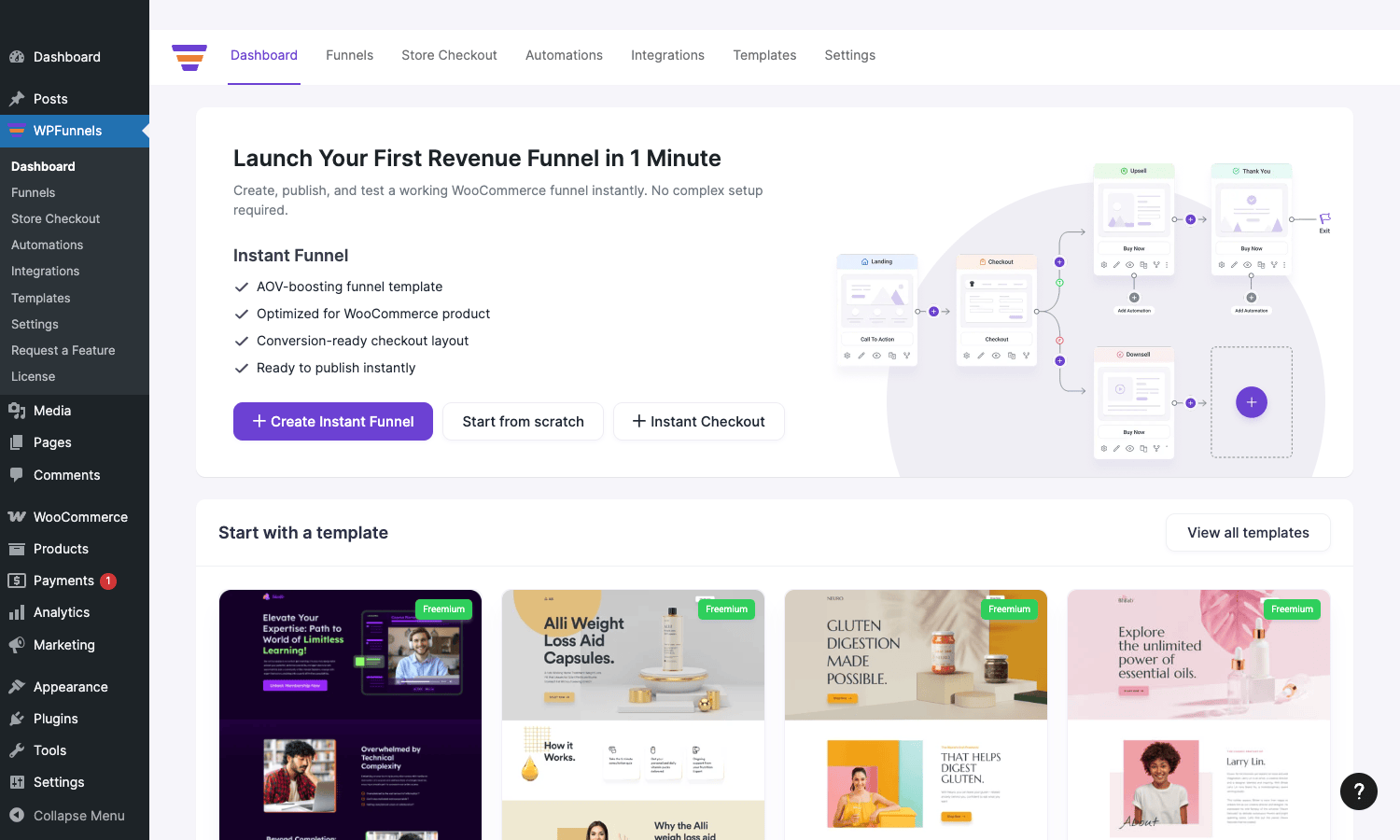
The dashboard above is the landing screen after install. Instant Funnel CTA, template gallery, and the top-nav for Funnels, Store Checkout, Automations, Integrations, Templates, Settings.
Free WPFunnels vs Pro
WPFunnels has a generous free version on WordPress.org. Free includes:
- The funnel canvas (drag-and-drop step builder).
- Landing page, checkout, and thank-you step types.
- Pre-built templates (limited library).
- Basic analytics (impressions, conversions per step).
- Page builder support (Elementor, Divi, Gutenberg, Oxygen, Bricks) for the step templates.
Pro adds:
- One-click upsell and downsell steps.
- A/B testing for any step.
- Global funnels (sitewide funnel triggers).
- CRM integrations (Mailchimp, ActiveCampaign, ConvertKit, HubSpot, MailerLite, Zoho, FluentCRM, and others).
- Webhook events for external automation tools.
- Custom checkout fields in the in-funnel checkout.
- Order bumps in checkout (a "yes, add this to my order for $X more" checkbox).
- Advanced analytics with revenue attribution.
- Subscription product support (with WooCommerce Subscriptions).
- Payment gateway expansion (Stripe one-click, PayPal one-click, Square, Authorize.net, Mollie, PayFast).
- Facebook Pixel + GTM integration.
- Premium templates library.
For a tripwire-and-upsell funnel, you need Pro. The free version is fine for a simple lead-magnet-to-thank-you sequence with no upsell.
Installation and the first funnel
WPFunnels Pro requires WPFunnels (free) as a base. Install both:
Plugins -> Add New -> Search "WPFunnels" -> Install -> Activate. Then upload WPFunnels Pro from the GPL Times zip: Plugins -> Add New -> Upload Plugin -> wpfunnels-pro.zip -> Install -> Activate.
After activation, the WPFunnels menu appears in WP admin. Click "Create Instant Funnel" on the dashboard or "Start from scratch" to begin.
The Create Instant Funnel flow is the fastest path: pick a template, select a WooCommerce product to map into the funnel, choose your page builder, and the plugin generates the entire funnel (landing -> checkout -> upsell -> thank-you) prefilled with your product data. Five minutes from "I just installed this" to "I have a working tripwire funnel live on my staging site".
Start from scratch is the longer path: empty canvas, drop steps in manually, configure each one. Use this when you want a non-standard flow or you’re building a funnel that doesn’t match any template.
The visual funnel canvas
The canvas is the central UI. It looks like a flowchart: each box is a step, lines between them show the customer journey, and you can branch on conditions (e.g., "if upsell accepted -> thank you A, if rejected -> downsell -> thank you B").
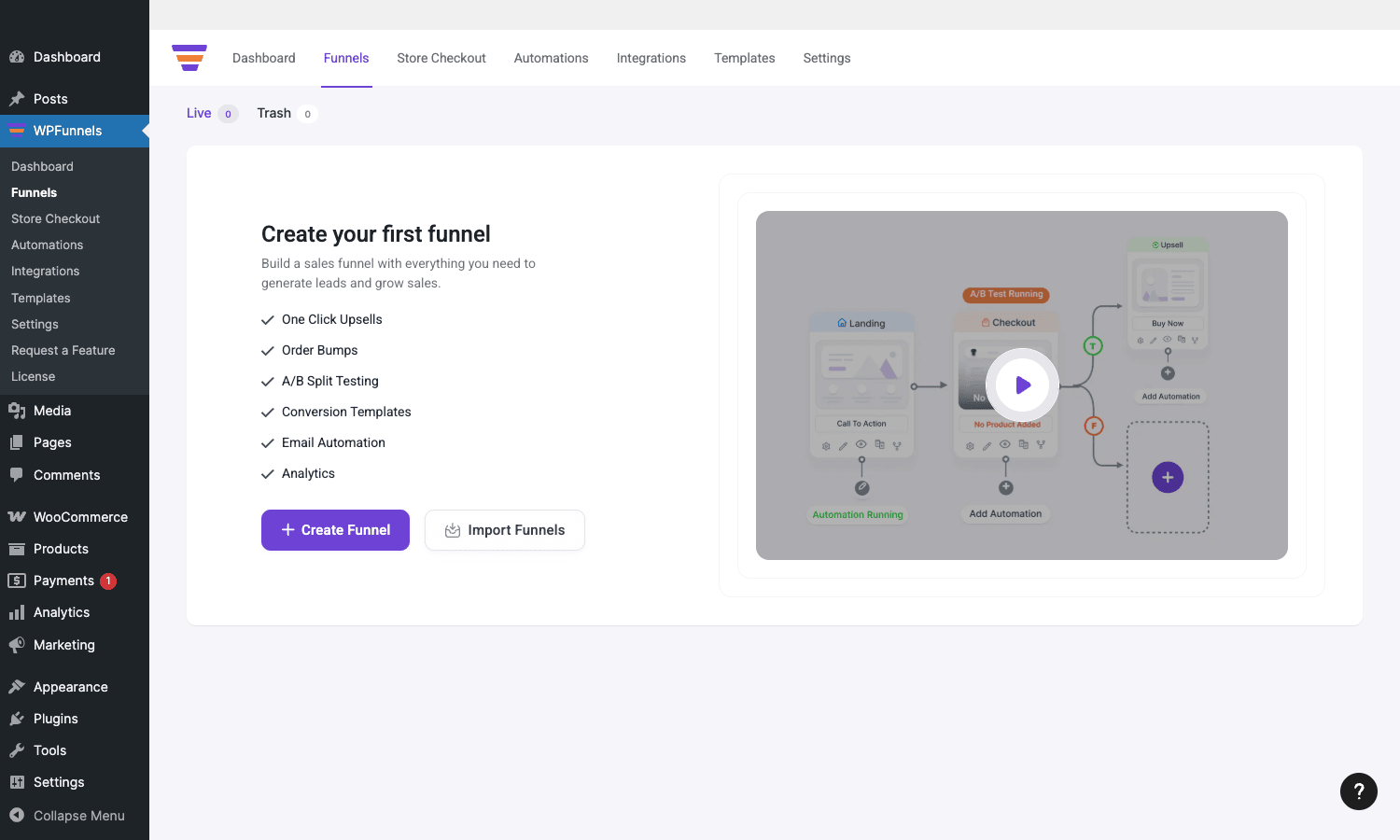
Inside a funnel you can:
- Drag step types from the toolbar (landing, checkout, upsell, downsell, thank you, custom HTML page).
- Connect them with arrows. Each arrow has a condition (always, on accept, on reject, etc).
- Click any step to edit its content (opens your page builder in a new tab).
- Preview the funnel as the customer would see it.
- Publish the funnel to a public URL.
- View live analytics overlay on each step.
The canvas saves automatically. Multi-step funnels (4-6 steps) render comfortably; very large funnels (15+ steps) get visually busy and benefit from grouping into smaller chained funnels.
Funnel step types
WPFunnels supports several step types, each with its own configuration:
- Landing page. The funnel entry point. Usually a sales page with a single CTA. The CTA links to the next step.
- Checkout. WooCommerce checkout, optionally with custom fields, order bumps, express payment buttons. The product being purchased is pinned at the funnel level (so the checkout doesn’t show "what’s in your cart", it shows the funnel’s product).
- Upsell (Pro). Post-purchase one-click upsell. The customer has already paid; this step offers "add this for $X more, one click, no re-entering card". On accept, the same payment method is charged again and the order is updated.
- Downsell (Pro). Triggered on rejection of an upsell. "No thanks to A? How about B at half the price?" Same one-click mechanism.
- Thank you. Final step. Order confirmation, social share buttons, follow-up CTA.
- Custom page. Any page you’ve already built. Useful for inserting an existing page mid-funnel.
You can chain steps in any order. A common pattern: Landing -> Checkout -> Upsell 1 -> on accept Thank You, on reject Downsell -> Thank You. Another: Lead magnet landing -> Optin -> Thank You -> (autoresponder kicks in) -> Tripwire landing -> Checkout -> Upsell -> Thank You.
One-click upsells and downsells
This is the killer feature. Standard WooCommerce has no concept of "post-purchase one-click upsell". To do it manually you’d need a custom payment-method storage and a custom checkout flow. WPFunnels Pro does it correctly across the major gateways:
- Stripe. Uses Setup Intents or off-session charges on the saved payment method.
- PayPal Standard/Express. Reference transactions or billing agreements.
- Square, Authorize.net, Mollie, PayFast. Vendor-specific tokenized one-click charges.
- WooCommerce Payments. Direct integration with WC Pay.
The user experience for the customer is:
- Customer completes checkout for the main product. Payment is captured.
- Customer is redirected to the upsell step. "Add this for $X more, one click."
- Customer clicks Accept. The plugin charges the same payment method without showing a card form. Order is updated to include the upsell product. Customer is shown the thank-you (or downsell rejection step).
- Or customer clicks Reject. Downsell step appears. Same mechanism: one click to accept the downsell, or reject and proceed to thank you.
Configuration on the admin side:
- Per-step: pick the upsell/downsell product (any WooCommerce product), set the upsell-specific price (often discounted), choose a template, and configure the redirect URL on accept and reject.
- Skip logic: optionally skip the upsell if the customer already owns the product, if the cart contains certain items, or based on custom conditions.
- Maximum offers per session, expiration time (e.g., "this offer expires in 15 minutes").
This is the part that justifies the Pro tier for most stores. Three lines of code wouldn’t build it; the plugin’s gateway integrations are non-trivial and battle-tested.
Templates and the funnel library
The template library has prebuilt funnels for common use cases:
- Tripwire funnels (low-priced front-end product to attract buyers).
- Lead magnet funnels (free PDF/checklist in exchange for email).
- High-ticket funnels (multi-step sales letters with deposit checkout).
- Webinar funnels (registration -> watch -> offer).
- Product launch funnels (announce -> waiting list -> launch -> checkout).
- Book funnels (free book + shipping -> upsells).
- Course funnels (paired with LMS plugins).
Each template includes the page designs (in your chosen builder), the step connections, and reasonable defaults for copy and offers. You replace the placeholder copy with your own, swap the product, and you have a launched funnel.
This is where new WPFunnels users get the most value. Even if you customize heavily later, starting from a template that’s 70% built and editing 30% is far faster than starting from blank.
Page builder support: Elementor, Divi, Bricks, Oxygen, Gutenberg
WPFunnels is page-builder agnostic. Each funnel step opens the page in your chosen builder when you click Edit. The plugin ships widgets/blocks for each major builder:
- Elementor. Offer Button, Upsell/Downsell layout, Product info widgets.
- Divi. Offer Button module, LMS Pay Button module. Divi 5 supported.
- Bricks. Offer Button element.
- Oxygen. Offer Button element.
- Gutenberg blocks. Offer Button, Offer Price, Offer Product, Offer Title, LMS Offer Button.
The widgets reference the funnel step’s pinned product, so when you swap the product at the funnel level, every page using these widgets updates automatically. This is more solid than copy-pasting product IDs across pages.
For sites built on Elementor Pro or Divi, you get the funnel inside the same builder you already use for the rest of the site. No context switching, no second-class editing UX.
Custom checkout fields
The Pro plugin adds a custom checkout field editor for the in-funnel checkout step. You can add billing, shipping, or additional fields beyond what WooCommerce ships by default:
- Field types: text, textarea, select, checkbox, radio, date, file upload.
- Conditional fields (show field X only if customer picks option Y).
- Required vs optional.
- Per-field validation rules.
- Custom CSS classes.
The fields save to the order and the customer record as standard WooCommerce checkout meta, so they show up in the WooCommerce order email, the admin order page, and any downstream reporting plugins. They’re also passed to CRM integrations as merge fields.
Common uses: "VAT number" for B2B sales, "Affiliate referral code", "Special instructions", "How did you hear about us?", "T-shirt size" for physical merchandise. Adding these to a stock WooCommerce checkout requires either a separate fields plugin or custom code; in WPFunnels they’re a panel inside the checkout step config.
Global funnels
Global funnels are a Pro-only feature for storewide upsells/downsells without making customers visit a dedicated funnel page.
A global funnel attaches to a trigger (cart item, product category, cart total, customer history) and inserts upsell/downsell steps after any matching WooCommerce checkout. The customer doesn’t realize they’re in a "funnel", they buy normally, and then a relevant upsell appears post-purchase.
Example: "If customer buys any product in ‘Cameras’ category, offer the camera bag as an upsell. If declined, offer the lens cleaner as a downsell."
You configure global funnels under the Funnels menu, separate from individual funnels. Each global funnel has:
- Trigger conditions (product, category, cart total, customer tag, custom).
- Offer sequence (one or more upsells/downsells).
- Priority (which global funnel fires first if multiple match).
- Display rules (max per customer per period, expiration).
This is the feature that turns WPFunnels from "funnel pages for specific products" into "site-wide post-purchase upsell engine". The Global Funnels (GBF) feature is plan-gated; you need the Growth, Business, or Lifetime tier of WPFunnels Pro to enable it.
A/B testing
A/B testing in WPFunnels Pro is built around the funnel step. You create variants of any step (typically the landing page, the upsell page, or the checkout) and the plugin assigns each visitor to a variant via a cookie.
The mechanics:
- Variant creation. Right-click a step on the canvas -> Create Variant. The plugin duplicates the step and lets you edit the variant independently.
- Traffic split. By default 50/50 between variants. You can adjust the split.
- Cookie-based assignment. Each visitor gets a sticky variant cookie so they see the same variant on return visits.
- Per-variant analytics. Impressions, conversions, conversion rate, revenue per visitor for each variant.
- Statistical confidence. The plugin computes a confidence number; you can see when one variant is clearly winning.
Common A/B test patterns:
- Landing page headline A vs B.
- Checkout layout (one-page vs multi-step) A vs B.
- Upsell offer A ($29 add-on) vs B ($49 premium add-on).
- Different upsell pages with different copy and design.
A/B testing only works once you have meaningful traffic (a couple hundred conversions per variant minimum). For low-traffic stores, save A/B testing for the few high-impact steps and lean on best-practice copy elsewhere.
CRM and email marketing integrations
The Pro plugin integrates with these CRMs and email marketing tools:
ActiveCampaign, AWeber, Constant Contact, ConvertKit, Drip, Encharge, GetResponse, HubSpot, Mailchimp, MailerLite, MailPoet, Omnisend, Pabbly, Sendinblue (Brevo), WP Fusion, Zapier, Zoho.
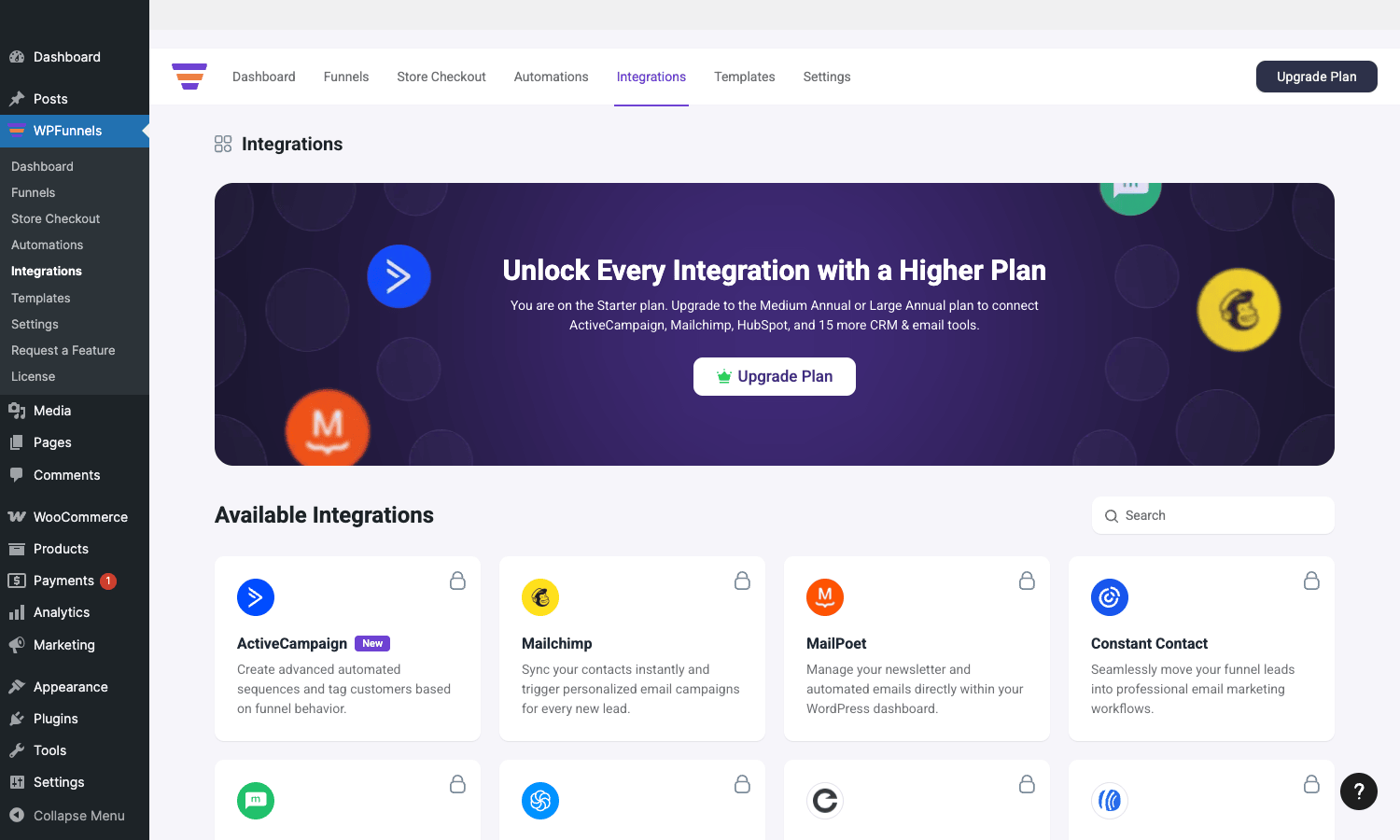
Configuration per integration:
- API connection. Paste the API key or OAuth-connect.
- List/tag mapping. Which lists or tags to add subscribers to.
- Field mapping. Which WPFunnels customer fields map to which CRM fields.
- Trigger conditions. "Add to list X when customer completes Step Y" or "Add tag Z when upsell accepted".
A typical setup: when a customer completes the checkout step in a tripwire funnel, the plugin adds them to a "Buyers" list in Mailchimp with the tag "Tripwire Q4 2026". The next funnel step (the upsell) might add a different tag based on acceptance. Email automations in Mailchimp then kick off based on these list/tag changes.
The integration is also a great fit with Mailster if you’re running self-hosted email. Map funnel events to Mailster lists and automations the same way.
Automations
WPFunnels Pro has its own automation layer (separate from the CRM event triggers). Automations let you build conditional flows entirely within WPFunnels:
- Triggers. Funnel step completed, upsell accepted, upsell rejected, customer registered.
- Actions. Add to list (in connected CRM), add tag, send webhook, change customer role, fire Zapier event.
- Delays and conditions between steps.
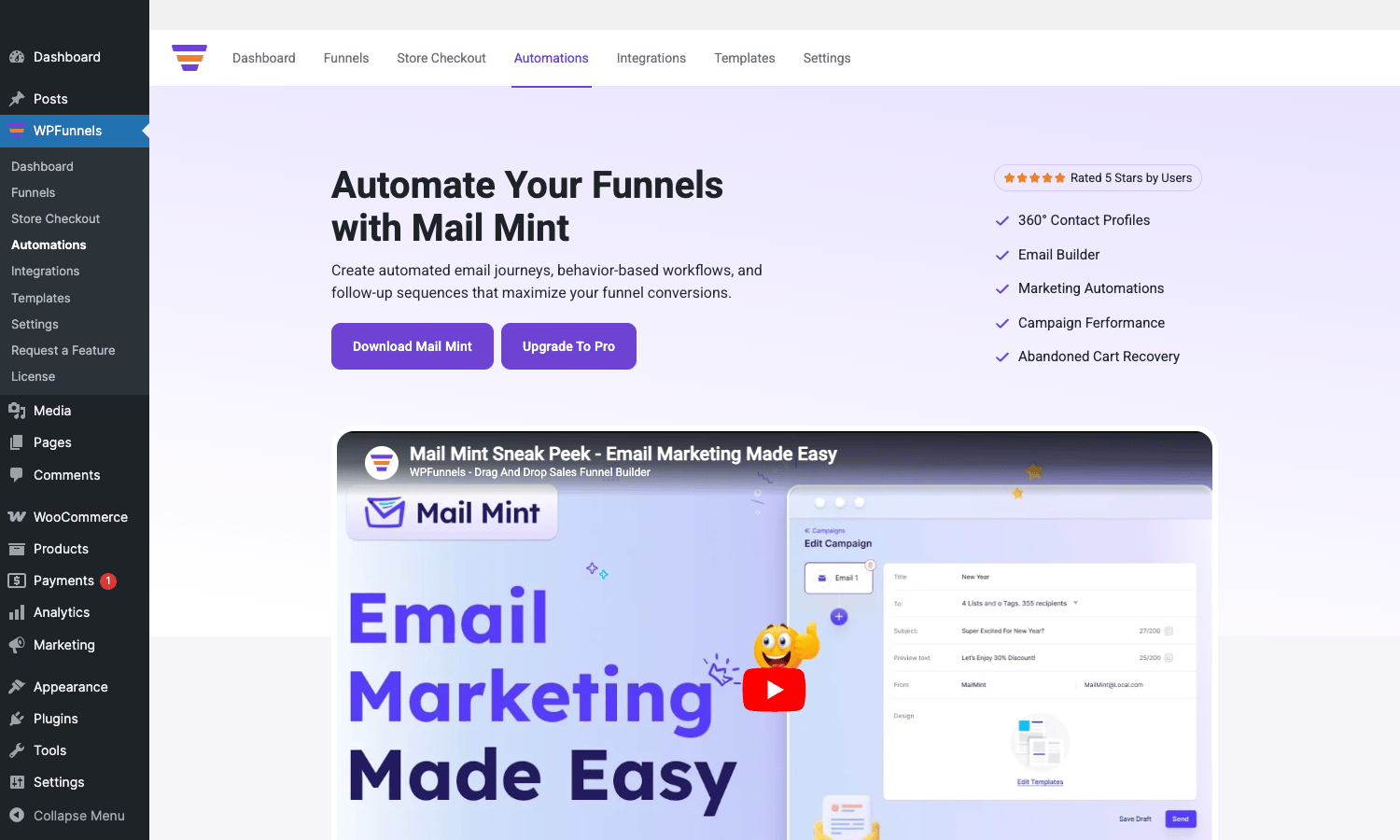
The automation builder is similar to what you’d see in MailChimp Automations or ActiveCampaign, a visual flow editor with conditions and delays. Useful for cases where the CRM integration alone isn’t expressive enough (e.g., "if a customer accepts the upsell AND has spent >$500 lifetime, add to VIP list").
Tracking: Facebook Pixel and Google Tag Manager
WPFunnels Pro has built-in Facebook Pixel and GTM integrations. Configure the Pixel ID (or GTM container ID) once in the WPFunnels Settings -> Tracking tab, and the plugin fires the right events at the right points:
- PageView on every funnel step.
- InitiateCheckout when the checkout step loads.
- Purchase with revenue data after checkout completes.
- AddPaymentInfo when payment fields are filled.
- Lead for opt-in steps.
- AddToCart when customer adds an item.
Custom events can be added via the action hooks (covered in the developer section). For Conversion API setup (server-side tracking), the Pixel addon supports passing events server-to-server, which preserves attribution when browser pixels get blocked.
This integration matters because conversion tracking is fundamental to running ad campaigns to your funnels. Without it you’re flying blind on which ad creative drove the upsell vs the downsell.
Analytics and revenue attribution
The Pro plugin has its own analytics tables (wpfnl_analytics and wpfnl_analytics_meta) that store per-step impression and conversion data. The Analytics dashboard shows:
- Funnel overview. Total visitors, completions, conversion rate, total revenue, average order value per funnel.
- Step-level metrics. Impressions, conversions, drop-offs per step.
- A/B variant comparison. Per-variant metrics with confidence scores.
- Time-series charts. Daily/weekly/monthly trends.
- Revenue attribution. Which funnel drove a given order.
This is more useful than WooCommerce’s built-in reports for funnel work because it tracks the entire funnel as a unit. WooCommerce only knows about orders, not about which landing page or which upsell sequence drove the order.
For cross-funnel attribution (which ad source -> which funnel -> which upsell -> conversion), pair WPFunnels analytics with Google Analytics 4 or MonsterInsights. WPFunnels gives the funnel-internal view; GA gives the cross-channel attribution.
Developer reference: hooks and filters
WPFunnels exposes hooks for almost every event in the funnel lifecycle. The patterns developers reach for most:
Customizing the upsell offer
// Modify the offer product data before display.
add_filter( 'wpfunnels/offer_product_data', function( $product_data, $offer_id, $step_id ) {
 if ( my_should_upgrade_offer( $offer_id ) ) {
 $product_data['price'] = '49.00';
 $product_data['title'] = 'Premium Bundle (limited time)';
 }
 return $product_data;
}, 10, 3 );
Hooking into the post-purchase flow
// Fires when a child order is created (from an upsell or downsell accept).
add_action( 'wpfunnels/child_order_created', function( $child_order_id, $parent_order_id, $offer_data ) {
 // Sync to your ERP, send a Slack notification, etc.
 do_action( 'myerp_log_upsell', $parent_order_id, $child_order_id, $offer_data['price'] );
}, 10, 3 );

// Fires when an offer is accepted.
add_action( 'wpfunnels/offer_accepted', function( $offer_id, $step_id, $customer_id ) {
 update_user_meta( $customer_id, '_last_upsell_accepted', current_time( 'mysql' ) );
}, 10, 3 );
Modifying funnel step conditions
// Filter which conditions show up in the GBF (Global Funnel) trigger builder.
add_filter( 'wpfunnels/check_global_funnel_conditions', function( $matched, $conditions, $cart ) {
 // Add custom condition: "customer is in subscriber tier"
 if ( in_array( 'is_subscriber', array_column( $conditions, 'type' ), true ) ) {
 return is_user_logged_in() && user_can( get_current_user_id(), 'subscriber_tier' );
 }
 return $matched;
}, 10, 3 );
Adding a custom CRM integration
The CRM integration layer is extensible. Register a new CRM via the supported-integrations filter:
add_filter( 'wpfunnels/supported_crm_integrations', function( $integrations ) {
 $integrations['mycustom'] = array(
 'name' => 'My Custom CRM',
 'description' => 'Send funnel events to mycrm.example.com',
 'class' => 'My_Custom_CRM_Integration',
 );
 return $integrations;
} );
The integration class implements the dispatcher interface and sends events to your CRM’s API. Look at any existing integration in includes/core/integrations/crm/ for the contract shape.
Skipping an upsell conditionally
add_filter( 'wpfunnels/upsell_product', function( $upsell, $customer_id, $offer_id ) {
 // Skip the upsell if the customer already owns this product.
 if ( my_customer_has_purchased( $customer_id, $upsell['product_id'] ) ) {
 return false; // Returning false skips the offer.
 }
 return $upsell;
}, 10, 3 );
Webhook events
The webhook system fires HTTP POSTs to configured URLs on funnel events. Configure webhook endpoints in the Pro plugin’s Webhooks tab. Events include: funnel-completed, upsell-accepted, upsell-rejected, downsell-accepted, abandoned-funnel. Each webhook is a JSON POST with the event data, ideal for integrating with tools the CRM layer doesn’t cover (n8n, Make, custom internal webhooks).
REST API and webhooks
The Pro plugin registers REST routes under /wp-json/wpfunnels/v1/:
/funnels– list/create/update funnels./funnels/<id>/steps– manage steps within a funnel./analytics– read analytics data./offers/<id>– read upsell/downsell offers./automation_canvas– read and write automation flows./abtesting/<id>– read A/B test results.
Authentication is via WP nonce (browser) or application passwords (server-to-server). Combined with the webhook system, these endpoints let you build headless and external integrations without modifying plugin code.
Real-world use cases
A few patterns WPFunnels Pro excels at:
-
Tripwire + upsell + downsell. Low-priced front-end product ($7-$27) sold via paid ads. On purchase, immediate one-click upsell to the main offer ($97-$297). On rejection, downsell to a smaller version. The classic info-product playbook.
-
High-ticket lead-gen funnel. Landing page -> application form -> calendar booking step -> thank you. No checkout (the sale happens on the call), but the funnel structures the lead-gen flow with attribution and conversion tracking.
-
Book funnel. Free + shipping book offer ($7.95 shipping) -> upsell to audiobook bundle ($49) -> downsell to discounted audiobook ($29) -> thank you with course offer. Russell Brunson’s playbook, fully expressible in WPFunnels.
-
Course launch. Pre-launch waiting-list landing -> waitlist confirmation step (gated content) -> launch announcement page -> checkout -> upsell to coaching add-on -> downsell to mastermind discount -> thank you with onboarding email trigger.
-
B2B SaaS / agency funnel. Whitepaper-gated landing page -> opt-in -> instant-download thank-you + 15-min discovery call CTA -> calendar booking step -> appointment confirmation. Pair with FluentCRM for follow-up sequences.
-
WooCommerce sitewide post-purchase upsell. Set up a Global Funnel with a trigger of "any product in category X" and an upsell of a complementary product. Customers buy normally; the upsell appears post-purchase, no funnel-specific landing pages needed.
WPFunnels vs CartFlows vs FunnelKit
The three major WordPress funnel plugins.
WPFunnels Pro has the most polished visual canvas. The drag-and-drop flowchart UI is the cleanest of the three. Strong on page-builder integration (Elementor, Divi, Bricks, Oxygen, Gutenberg). Newer to the market, so smaller community.
CartFlows is the long-time market leader. Tight integration with Astra theme and Elementor. Larger ecosystem. The Pro tier is comparable in features. Their analytics is less polished than WPFunnels’.
FunnelKit (formerly WooFunnels) is the most WooCommerce-native of the three. Deepest integration with WooCommerce’s order management, refunds, subscriptions. Best A/B testing. Highest price point. Generally favored by larger WooCommerce stores.
The honest take:
- For small-medium WooCommerce stores starting out with funnels: WPFunnels or CartFlows. Both have generous free tiers.
- For Elementor-first sites: WPFunnels Pro. The Elementor widget integration is the smoothest.
- For high-volume serious stores: FunnelKit. The WooCommerce integration depth matters at scale.
You can use exactly one of these at a time per site, they all hook the same WooCommerce checkout and would conflict.
Performance, compatibility, gotchas
- Funnel-specific cookies and session data. WPFunnels uses cookies to track the customer’s funnel state. Aggressive cookie blockers can break the flow. Make sure your privacy banner allows the relevant first-party cookies.
- Caching plugins. Funnel pages should generally not be cached at the page level. Configure WP Rocket or your caching plugin to exclude the funnel URL prefix.
- One-click upsell payment gateway compatibility. Some payment gateways don’t support tokenized off-session charges. If you’re using a non-standard gateway, test the upsell flow in staging before launch. Stripe, PayPal, Square, Authorize.net, Mollie, WC Pay are all supported; obscure regional gateways may not be.
- Cart and Checkout blocks. Modern WooCommerce uses block-based cart/checkout. WPFunnels supports both shortcode and block-based checkouts, but some advanced features only work with the legacy shortcode. Check compatibility per-feature.
- Subscription products in funnels. Requires WooCommerce Subscriptions. Upselling subscription products needs the matching tier of WPFunnels Pro.
- GBF (Global Funnels) and product matching. When a global funnel has overlapping triggers ("any product in Category A" AND "any product in Category B"), the priority field determines which fires. Set priorities explicitly; don’t rely on order.
- A/B test cookie expiration. Default is 30 days. Long-running tests may need a longer cookie. Configure via the
WPFNL_AB_TESTING_COOKIE_KEYconstant or a filter. - Tracking duplication. If you have GTM configured with a Pixel tag AND WPFunnels’ built-in Pixel tracking turned on, you’ll double-fire events. Pick one source.
These are the kind of issues you find in the first month of running funnels at any volume. Address them in staging before pushing to production.
Pricing and licensing
WPFunnels Pro is sold per-site/per-year on getwpfunnels.com:
- Starter: $97/year for 1 site. Core Pro features.
- Growth: $147/year for 5 sites. Adds CRM Integrations and Global Funnels.
- Business: $247/year for 30 sites. Adds advanced features.
- Lifetime tiers: $397+ one-time.
The free WPFunnels plugin is on WordPress.org and is genuinely useful on its own. For tripwire + upsell + downsell workflows, you need at least the Growth tier (CRM integrations and global funnels matter).
The plugin is GPL-licensed. Reasonable if you’re running multiple funnel-enabled stores or want all the addons without per-vendor licenses.
FAQ
Do I need WPFunnels free to use WPFunnels Pro?
Yes. Pro extends the free plugin. Install both.
Does it require WooCommerce?
Yes, for the checkout, upsell, and downsell steps. Lead-magnet and webinar funnels (just landing + opt-in + thank-you) work without WooCommerce, but you wouldn’t pay for Pro just for those.
Can I use my existing page builder?
Yes. Elementor, Divi, Bricks, Oxygen, and Gutenberg all work natively. WPFunnels widgets are available inside each of those builders for the funnel-specific UI elements (offer buttons, upsell layouts).
One-click upsells with PayPal, does it actually work?
Yes. WPFunnels uses PayPal’s reference transactions or billing agreements to charge the same PayPal account without re-authorization. The customer sees a smooth one-click flow. Works for PayPal Standard, Express, and the WooCommerce-native PayPal integration.
Can I A/B test the entire funnel, not just one step?
You A/B test at the step level. To test entire funnels, duplicate the funnel and use the funnel-routing logic to split traffic between Funnel A and Funnel B at the entry point. Slightly less convenient than step-level testing but achievable.
Will it slow down my store?
Funnel pages add a small overhead per page-load (a few queries to read funnel state). For typical WooCommerce traffic this is negligible. Pair with serious caching (WP Rocket configured to exclude funnel URLs from page cache but keep object cache active) and the impact disappears.
How does it handle refunds on upsell orders?
Upsell purchases create child orders linked to the parent order. Refund a child order normally through WooCommerce admin. The plugin keeps the parent-child relationship intact and updates the upsell analytics to reflect the refund.
Does it work with Easy Digital Downloads?
Currently WooCommerce-only. The plugin has WC-specific gateway integrations that don’t translate to EDD.
Final thoughts
Sales funnels are one of the few WooCommerce additions that move the conversion-rate needle by a meaningful percentage. The default WC flow is "view product -> add to cart -> checkout" and that’s it. A funnel turns the same traffic into 30-50% higher average order value through upsells and downsells without changing your traffic source or product.
WPFunnels Pro is the most polished WordPress-native way to set this up. The visual canvas is genuinely a pleasure to use. The Pro tier’s one-click upsell mechanism handles the payment gateway complexity correctly across Stripe, PayPal, Square, and the WooCommerce-native gateways, which is the part that would take weeks to build by hand. The page-builder integration means you don’t have to leave Elementor (or Divi or Bricks) to build the funnel pages.
The biggest mistake newcomers make is over-engineering the funnel before they’ve tested anything. Start with one tripwire funnel, one upsell, one downsell. Measure for two weeks. Then iterate. Adding more funnel steps before you’ve validated the basic flow just multiplies the surface where things can go wrong.
Pick a tripwire-style template, swap in your own product, send 100 test visits through, and watch the conversion data. You’ll know within a week whether the funnel justifies its place in your stack.