

Default WordPress search is famously bad. It does a SQL LIKE match against post titles and content, sorts the results by date, and quits. There’s no relevance ranking, no fuzzy match, no awareness of custom fields, no understanding that "shoe" and "shoes" might be the same word. Relevanssi Premium is the long-time fix for this. It rips out the built-in search engine, builds its own inverted index in a custom table, and serves results sorted by how well each post actually matches the query.
This article is a deep walkthrough: what Relevanssi Premium does, how to install and configure it, the seven settings tabs that matter most, the developer hooks I find myself reaching for, and how it stacks up against SearchWP, Algolia, ElasticPress, and friends. I’ve poked through the source so the code examples are based on what’s actually in the plugin, not what marketing pages claim.
Table of Contents
- What is Relevanssi Premium?
- Key features
- How it works (for users)
- Installation and setup
- Settings tour: the tabs that matter
- Real-world use cases
- Developer reference
- Performance, compatibility, and gotchas
- Relevanssi Premium vs the alternatives
- Pricing and licensing
- FAQ
- Final thoughts
What is Relevanssi Premium?
Relevanssi started as a free WordPress.org plugin by Finnish developer Mikko Saari and is now maintained by comesio Eurodata GmbH (you can see this in the plugin header: Author: comesio Eurodata GmbH). The free build has been around since 2008 and currently sits at over 100,000 active installs on WordPress.org. Relevanssi Premium is the paid sibling, with PDF indexing, multisite search, click tracking, related-posts, a WP-CLI command, redirects, and a small mountain of extra hooks.
The core idea is simple: WordPress’s built-in search uses WP_Query with a LIKE SQL match. That works for two-word title hunts on small sites. It falls apart the moment you have a few hundred posts, custom fields the search ignores, PDFs you want to be findable, plurals that don’t match singulars, or visitors who can’t quite remember whether the brand was "Webfont" or "Web Font".
Relevanssi sidesteps that by maintaining its own table, wp_relevanssi, full of (post_id, term, weight-per-field) rows. When somebody runs a search, it short-circuits the WordPress query, looks up the terms in its index, scores every matching document, and returns posts sorted by score, not date. The plugin replaces the engine, not the front end, so your existing search.php template and search form keep working without changes.
If you’ve spent any time configuring search on a WordPress site, you’ll appreciate how much surface area Relevanssi covers. Hundreds of options, an admin search of its own, a click-tracking dashboard, related-posts via search similarity, spelling correction. It’s a serious piece of software dressed up in a deliberately plain WordPress admin screen.
Key features
- Relevance ranking, not date sorting. Results are scored using BM25-style term frequency weighting (see Okapi BM25 on Wikipedia for the math). Title hits weigh more than body hits, recent posts can get a small boost, and you can configure all of it.
- Per-field weights. Titles, content, excerpts, comments, tags, categories, custom fields, SKUs, taxonomy descriptions, even MySQL columns and outgoing internal links: every part of a post indexes separately and gets its own weight slider.
- Fuzzy matching. Set it to match partial words so "rocke" finds "rocket" and "rockets". Optional Porter-style stemming groups "run", "running", and "ran".
- Did you mean? suggestions. When a query has zero results, Relevanssi can suggest a close spelling based on terms that exist in the index (it’s a Levenshtein-distance check, not a magic spellchecker).
- AND and OR query modes. Pick whether every word must appear in a result (AND) or any word counts (OR), and switch the fallback automatically when AND returns zero hits.
- Phrase search. Quoted phrases are searched as exact-order matches, just like Google.
- PDF and Word indexing (Premium). A cloud parser ingests attachment content so a PDF whitepaper or a Word doc shows up in search results based on what’s inside it, not just its filename.
- Click tracking and search analytics (Premium). Logs every query plus what users clicked. The "User searches" dashboard ranks queries by frequency, success rate, and click-through.
- Related posts via search similarity (Premium). Generates "you might also like" lists by running a hidden search on each post’s keywords.
- Multisite network search (Premium). One subsite can search across the whole network’s content with a single query.
- Redirects and synonyms. Map "support" to "help" so the search results merge, or send queries that match a regex straight to a specific URL.
- WP-CLI integration (Premium). Build, refresh, or wipe the index from the command line. Useful for automation and for large sites where the admin button hits a PHP timeout.
- Spam blocker. Drops queries from bots, queries with Cyrillic/Chinese/emoji characters, or queries shorter than
Nletters so your log stays clean. - 169+ developer filters. That’s not a typo. The plugin exposes 169 unique
apply_filters()hooks across its lib and premium directories, plus another dozen actions.
How it works (for users)
The flow is the same whether you’re on free Relevanssi or Premium:
- You activate the plugin. Relevanssi creates a custom MySQL table (
wp_relevanssi) and adds itself under Settings -> Relevanssi Premium. - You click "Build the index". Relevanssi reads every post you’ve told it to index, tokenises the content into individual words, drops stopwords (
and,the,of…), and writes one row per (post, word) combination with hit counts per field. - A visitor runs a search. WordPress builds its usual
WP_Queryand reaches theposts_requestfilter, where Relevanssi steps in. It looks up each query term in the index, scores every document that contains at least one term, sorts by score, and returns the matching post IDs. - WordPress renders your normal search results template, but now showing Relevanssi’s ordered list.
For most sites that’s a one-time setup. After that the index rebuilds itself on every post save, so newly published content is searchable instantly. You only need to touch the index manually when you change indexing settings (added a new post type, raised the weight on excerpts, started indexing a custom field), in which case a full rebuild is required.
Installation and setup
Install Relevanssi Premium the same way as any other plugin: Plugins -> Add new -> Upload plugin -> Choose the zip. Activate, and the menu item appears at the bottom of the Settings sidebar.
The free Relevanssi must NOT be active at the same time as Premium. Premium replaces free, it doesn’t extend it. If both are active you’ll see PHP errors and the index won’t build properly. Deactivate the free version first; the saved settings are preserved.
After activation, go through this short sequence:
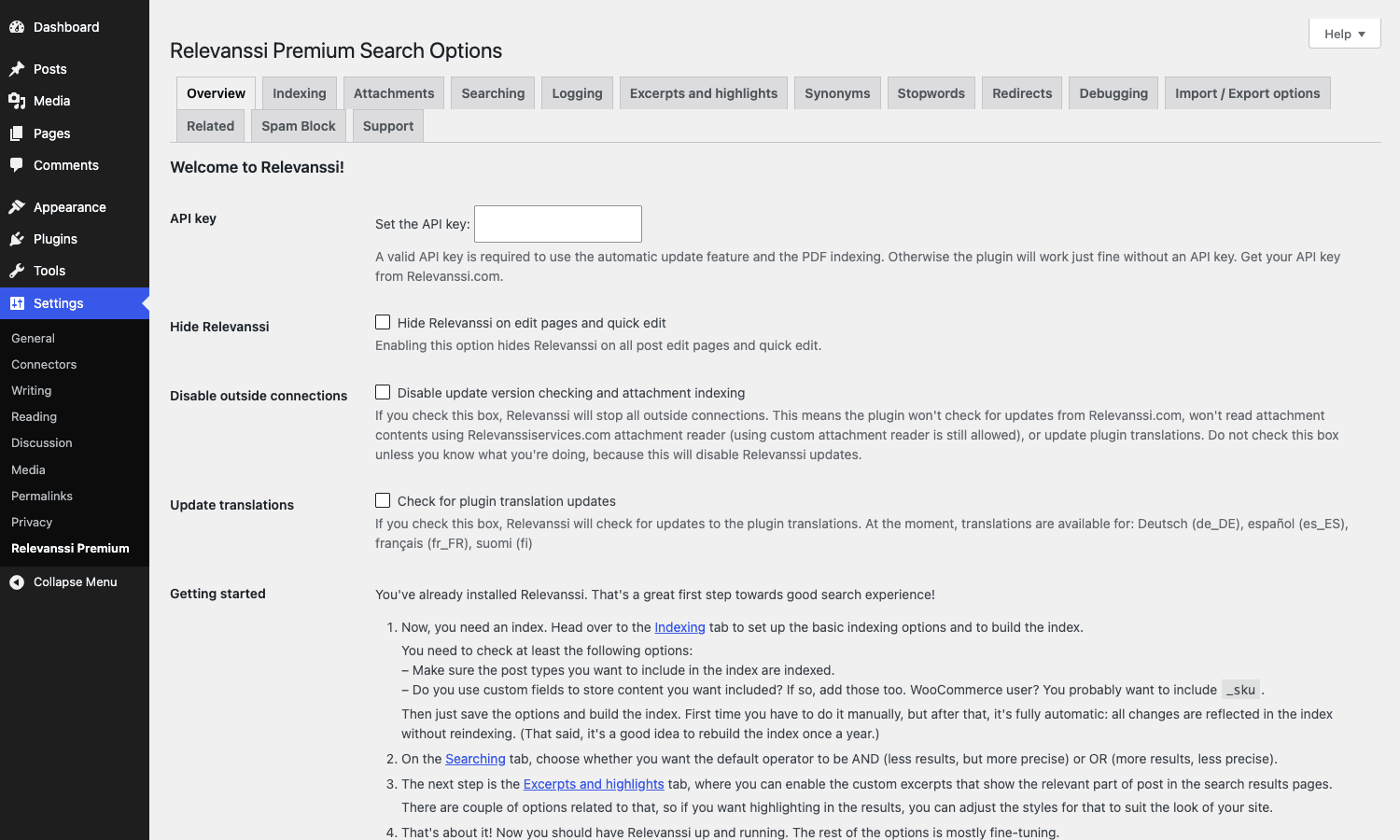
- Open Settings -> Relevanssi Premium. You land on the Overview tab. Paste your licence key into the "API key" field at the top. The key unlocks the auto-update channel and the PDF parser. Without a key the plugin still works, but PDFs won’t be parsed and you won’t see update notifications.
- Open the Indexing tab. Tick which post types you want indexed (
postandpageare on by default), pick the taxonomies, decide which custom fields to include (or use the "all" option), and set per-field weights. The defaults are sensible (title heavy, content light, comments lightest) so feel free to start there and tune later. - Click "Build the index". On a small site this takes a second or two. On a large site the AJAX indexer batches posts in chunks of 200 and you can watch the progress in real time. If a chunk fails (PHP timeout, weird shortcode), the page tells you which post ID broke it and you can investigate.
- Open the Searching tab. Set the default operator (AND or OR), pick the keyword matching mode (fuzzy or whole words), and toggle "Did you mean?" if you want it.
- Open the Logging tab and enable "Keep a log of user queries". This populates the User Searches dashboard. Without it, you have no idea what visitors are searching for or what queries are returning zero results.
- Run a few test searches on the front end to make sure the index is working. If you’ve never trusted the built-in WordPress search, running a fuzzy partial-word search and seeing the right post pop up first is satisfying.
That’s the minimum viable install. Most sites won’t need to touch the other tabs unless they have a specific problem to solve (synonyms, redirects, related posts, multisite, attachments).
Settings tour: the tabs that matter
Relevanssi Premium has fourteen settings tabs. You don’t need them all. Here’s what each one actually does and which ones you should care about.
Overview
The landing tab. Holds the API key field, an "Auto-update Relevanssi" toggle, and a row of green-bordered checkboxes that read like a getting-started checklist (build the index, save settings, etc.). The state of the index sits below: number of indexed documents, terms, taxonomy rows, and the lowest indexed post ID. If something looks wrong with search ("posts are missing"), this is where you confirm whether they’re actually in the index.
Indexing
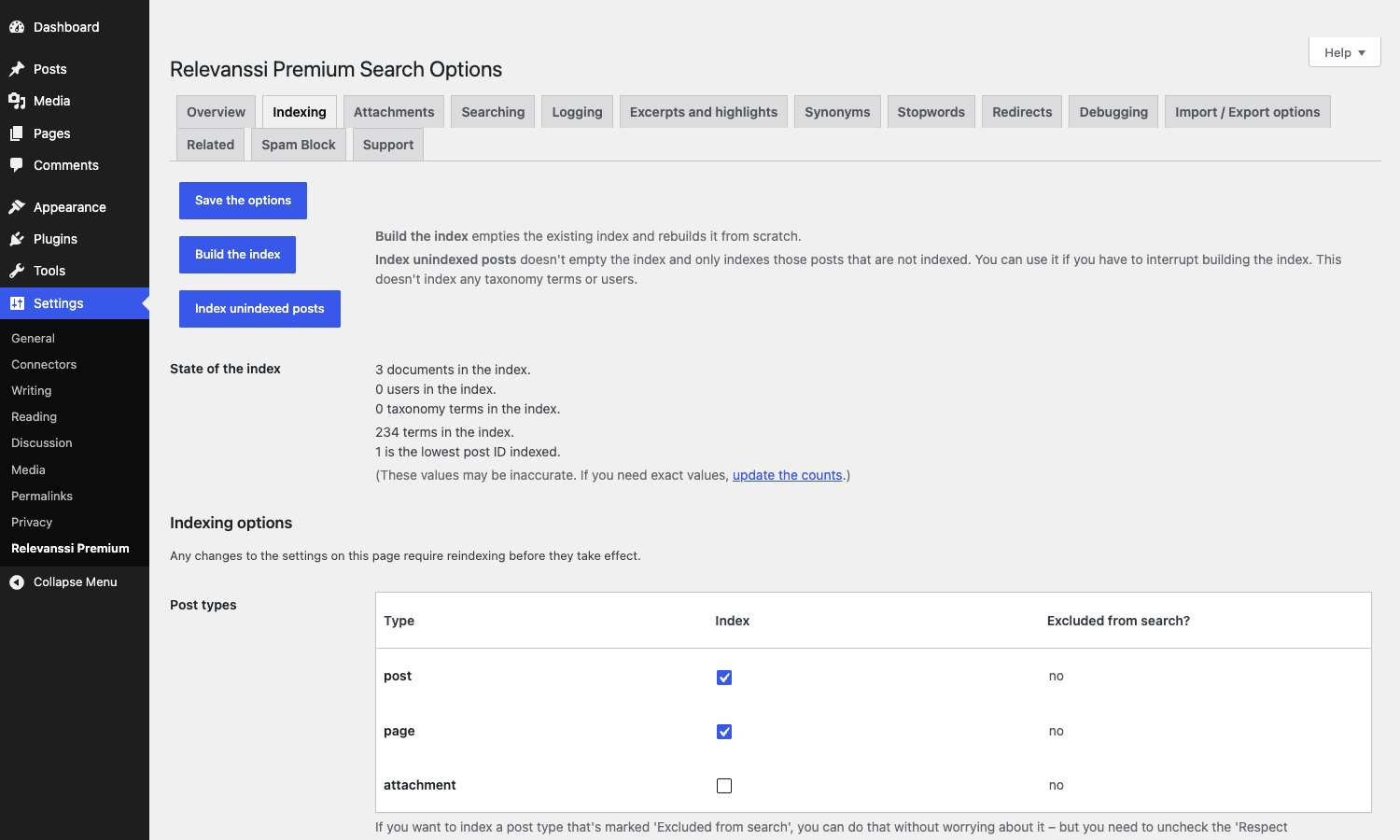
The most important tab. This is where you decide what gets indexed and how heavily.
Sections inside Indexing:
- Post types. Tick the ones to index. Custom post types from WooCommerce (products), Easy Digital Downloads, LearnDash courses, anything: they all appear here.
- Taxonomies. Pick which taxonomy terms count (categories, tags, product categories).
- Custom fields. Choose "all" if you want every meta key indexed (heavier but bulletproof), "visible" for non-underscored keys, or paste a comma-separated list of specific keys. ACF, MetaBox, and Pods fields all work; the plugin walks repeaters and flexible content correctly.
- Field weights. A table with sliders for title, content, excerpt, comments, tags, categories, taxonomies, custom fields, MySQL columns, and link targets. The defaults give title roughly 5x the weight of content. Raise the custom-field weight if your site lives in CPTs with most content in meta.
- Build buttons. "Build the index" wipes and rebuilds. "Index unindexed posts" is the incremental option, useful after you’ve activated a new post type and don’t want to wait for a full rebuild on a large site.
Searching
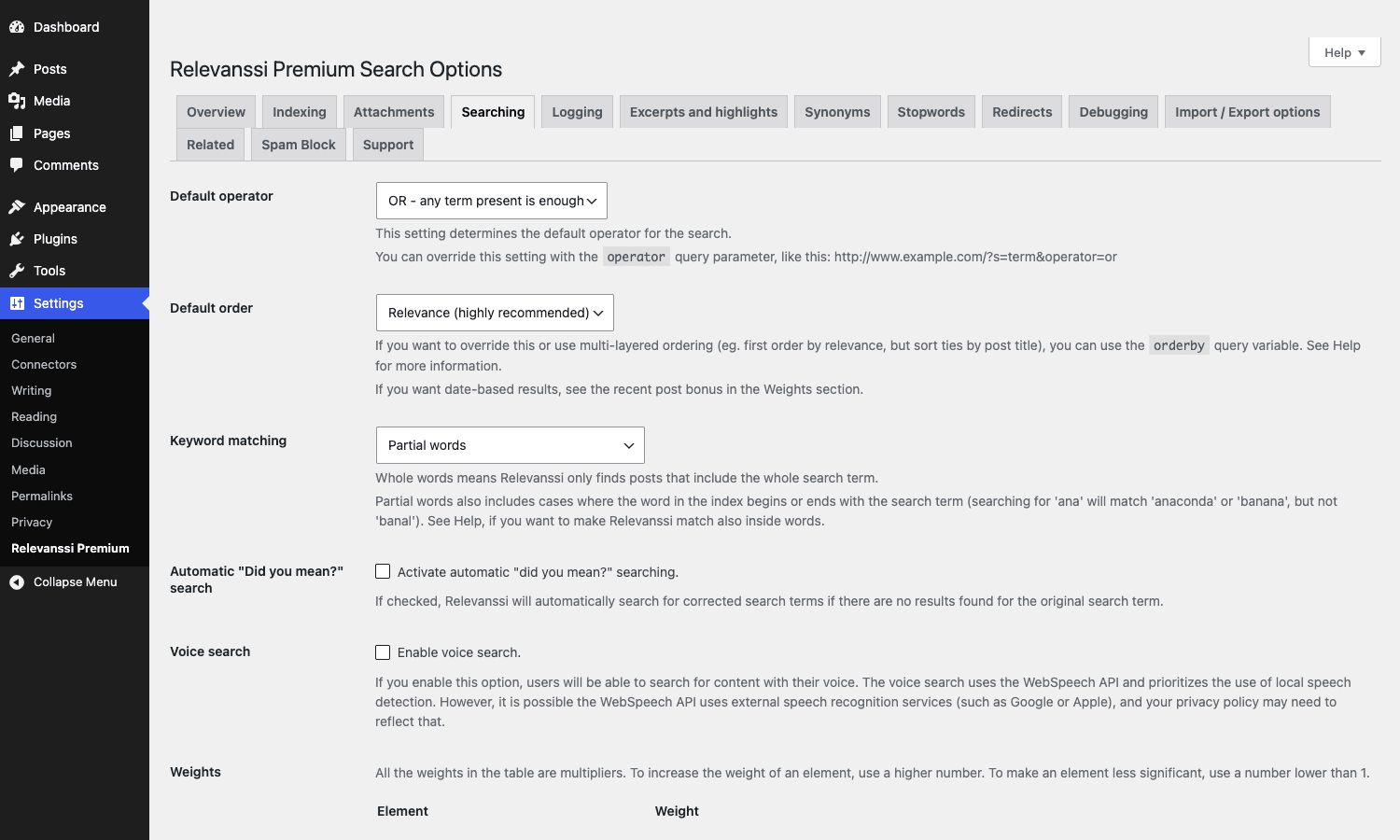
Where you tune the matching behaviour.
Key settings:
- Default operator. AND requires every search word in the result. OR is more permissive. Most sites want AND with a fallback to OR (return some OR results if AND returns nothing); that combination is one click here.
- Keyword matching. Whole words is strict (search "rocket" doesn’t match "rockets"). Partial words is fuzzy with stemming applied at index time.
- Default order. Relevance is the obvious choice. You can also pick date or a custom orderby.
- "Did you mean?" suggestions. Toggle this on for the spelling-correction line above the results.
- Voice search. Toggles WebSpeech-API voice input on the search form. Browser-supported, no server.
- Weights. Bottom of the page: bonus multipliers for newer posts, multi-term matches, and exact phrase hits.
Logging
Where the search log lives. Turn on "Keep a log of user queries" or you have no analytics later. The matching dashboard is at Dashboard -> User searches (it has its own menu item).
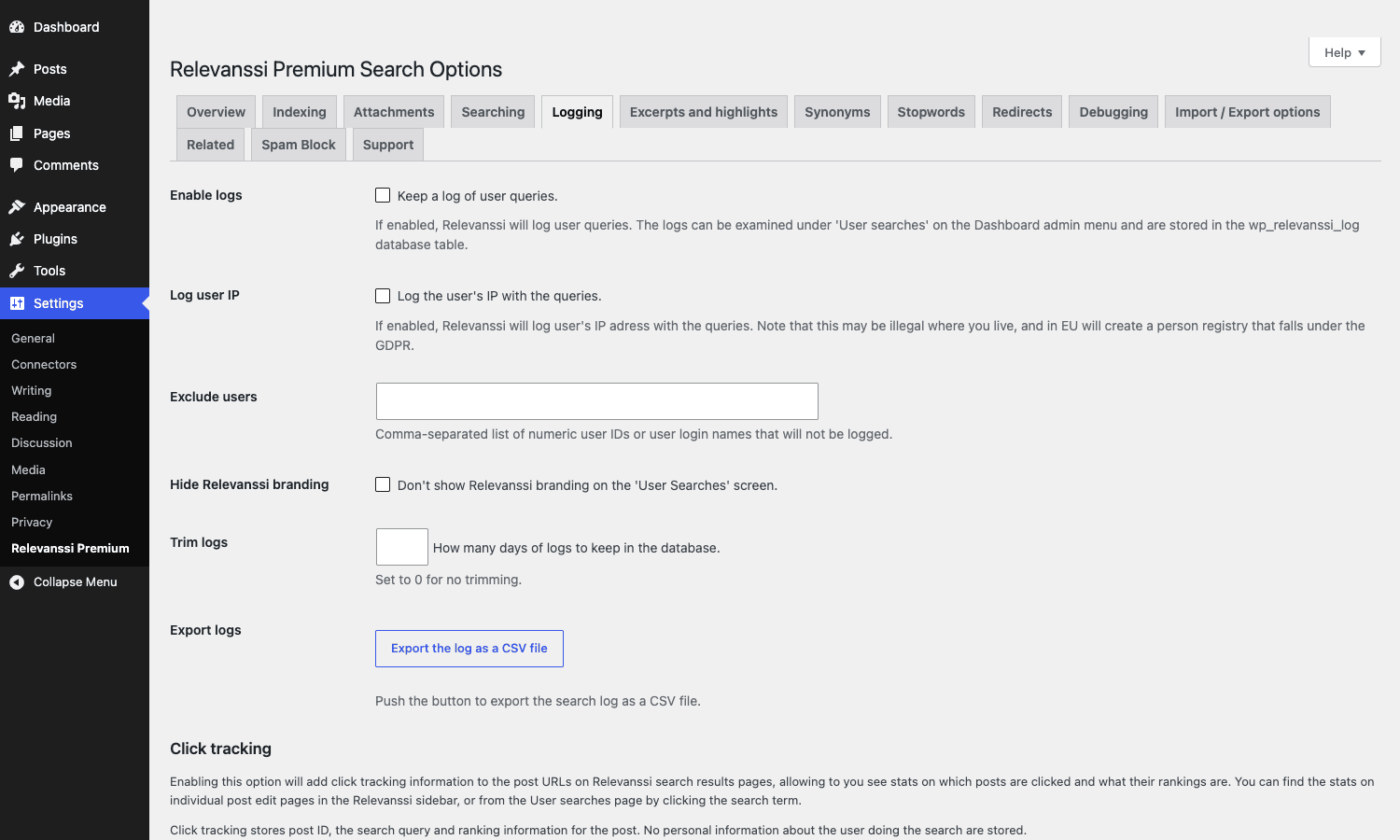
Other useful toggles here:
- Log user IP. Off by default for GDPR reasons. Leave it off in the EU unless you have a reason.
- Click tracking. Premium-only. When on, each result link gets a tiny redirect that records the clickthrough before forwarding the visitor. You can then see which results actually get clicked, not just which queries were run.
- Trim logs. Set how many days of logs to keep. Logs grow fast on busy sites.
User searches dashboard
This is where the log pays off. It lives under Dashboard -> User searches in the admin menu (not under the Relevanssi settings page).
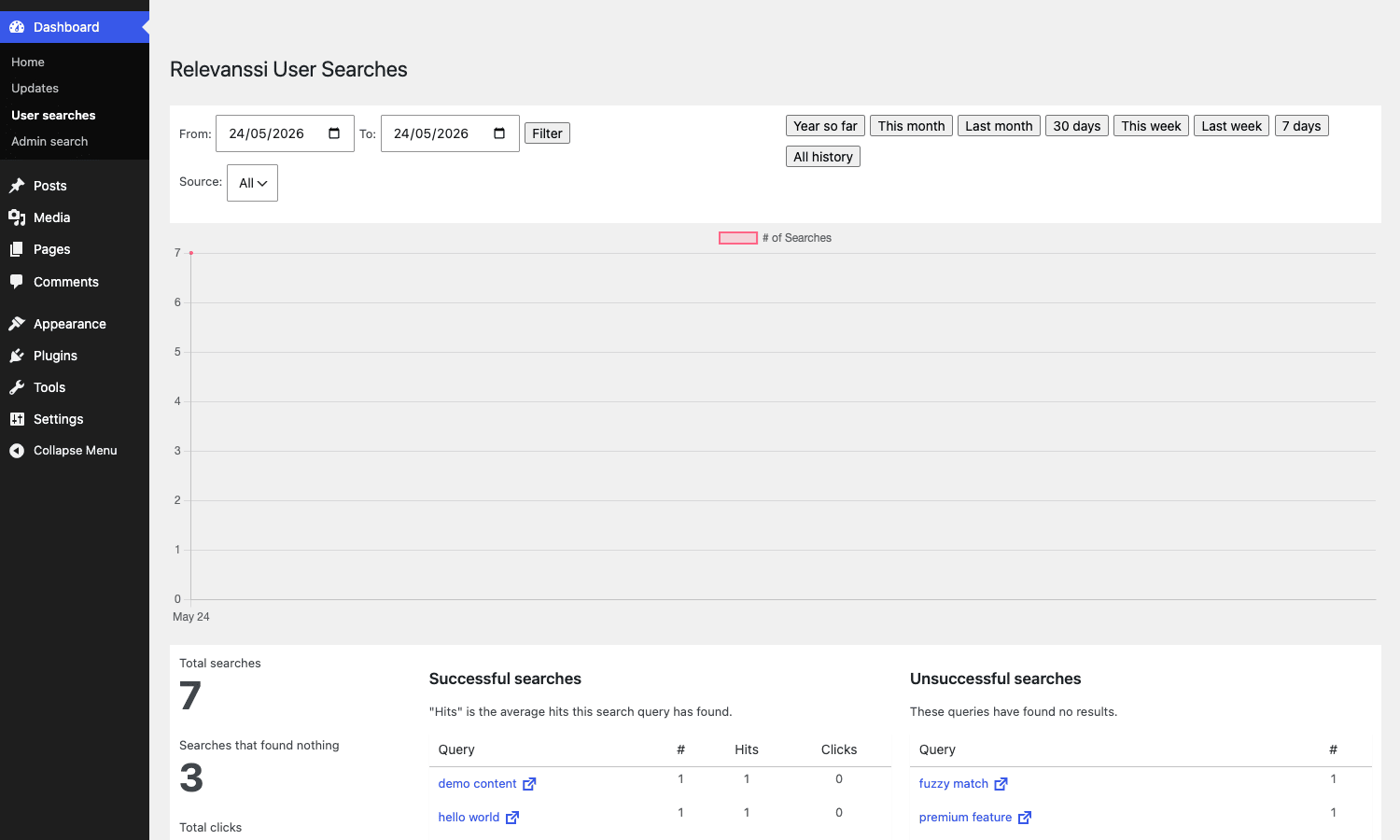
You get total searches, successful searches (returned at least one hit), unsuccessful searches (zero results), and a chart over the date range you pick. Each query is clickable so you can see how many hits it returned and how many clicks it received.
The unsuccessful searches list is the gold. It tells you what visitors expect to find but can’t. Maybe you don’t have a page for "refund policy"; that’s a content gap. Maybe the page exists but uses different terminology; that’s a synonym you should add. Maybe the term has a typo; that’s a redirect.
Related posts
Premium-only. Generates "related posts" by running an internal search for each post’s keywords and surfacing the highest-scoring other posts.
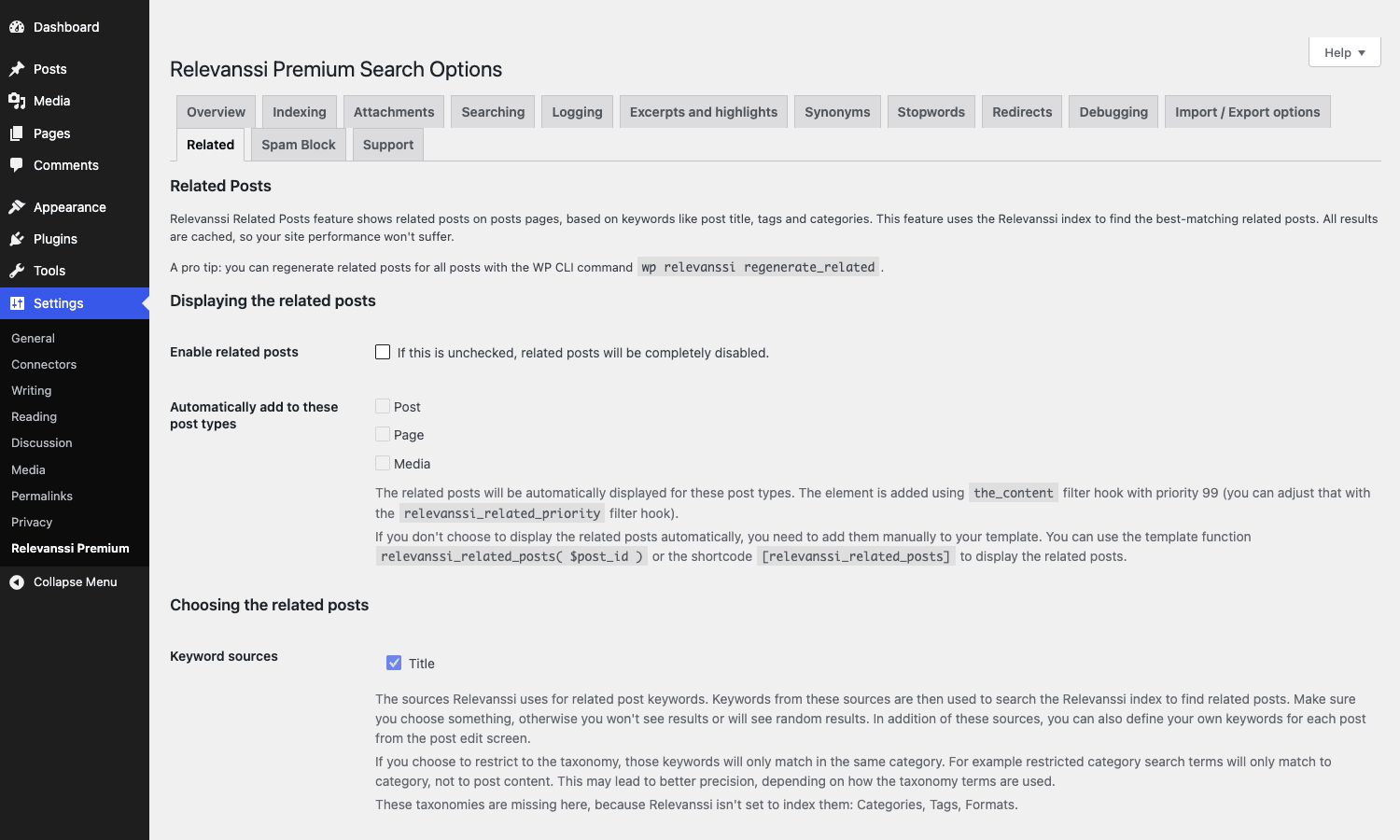
This is different from how most "related posts" plugins work. The usual approach picks posts in the same category or with overlapping tags. Relevanssi instead asks: if I treated this post’s title and tags as a search query, which other posts would score highest? You often get better matches because the algorithm is content-based, not taxonomy-based.
Settings here let you pick how many to show, which post types are eligible to be returned, where to keep the cache, and which keyword source(s) to use (title, tags, categories, custom fields). The output is a template you can paste into single.php or call via the [relevanssi_related_posts] shortcode.
Excerpts and highlights
Controls how the search result snippet is built. Relevanssi can create custom excerpts that show the part of the post where the query matched, with the matched words in <strong> tags. You can pick excerpt length (in words or characters), the ellipsis character, whether to highlight matches at all, what tags to use for highlighting, and a stylesheet for the highlight class.
Synonyms
A two-column textarea where you map words to alternatives. Format is synonym = original, one per line:
auto = car
hatchback = car
suv = car
sneaker = trainer
runner = trainer
Now a search for "suv" returns posts that mention "car" too. Sounds trivial. It’s enormous in practice. Visitors don’t use your internal vocabulary; synonyms bridge the gap.
Stopwords
The default English stopwords are loaded automatically (a, an, and, the, of, etc.). Add custom ones for terms that appear so often they’re useless ("free", "wordpress", "blog" on some sites). There are also language-specific stopword files in the stopwords/ directory; rename one to stopwords if your blog is in Finnish or German.
Redirects
Send specific queries to specific URLs without showing the search results page. Match by literal string, prefix, or regular expression. Handy when "checkout" should always go to the checkout page or "contact" to the contact form. The Premium build adds richer redirect rules (date-bounded, role-bounded) than the free version’s basic match.
Debugging
A search inspector. Paste a query, pick a user role to simulate, and Relevanssi shows the raw SQL it generates, the matching posts, their scores, and which fields the hits came from. When a result isn’t ranking where you think it should, the Debugging tab tells you exactly why.
Spam Block
Premium-only. Drops queries that look like spam before they hit the log or the search engine. Tick "Block queries from bots", "Block queries that contain Chinese characters", "Block queries shorter than 3 characters", etc. The defaults are reasonable for an English-language site; tune to your audience.
Import / Export options
Lets you export the Relevanssi settings to JSON and import them on another site. Useful when moving between staging and production or duplicating config across a network. Does NOT export the index itself; you rebuild on the destination.
Support
A debug-data exporter. Click the button and Relevanssi packages up your settings, plugin list, server config, and a few index stats into a text block to paste into a support ticket. Saves a lot of back-and-forth.
The Gutenberg post sidebar
If you write in the block editor, Relevanssi Premium adds a sidebar to every post that opens from the toolbar icon (it looks like a tiny key with a star).
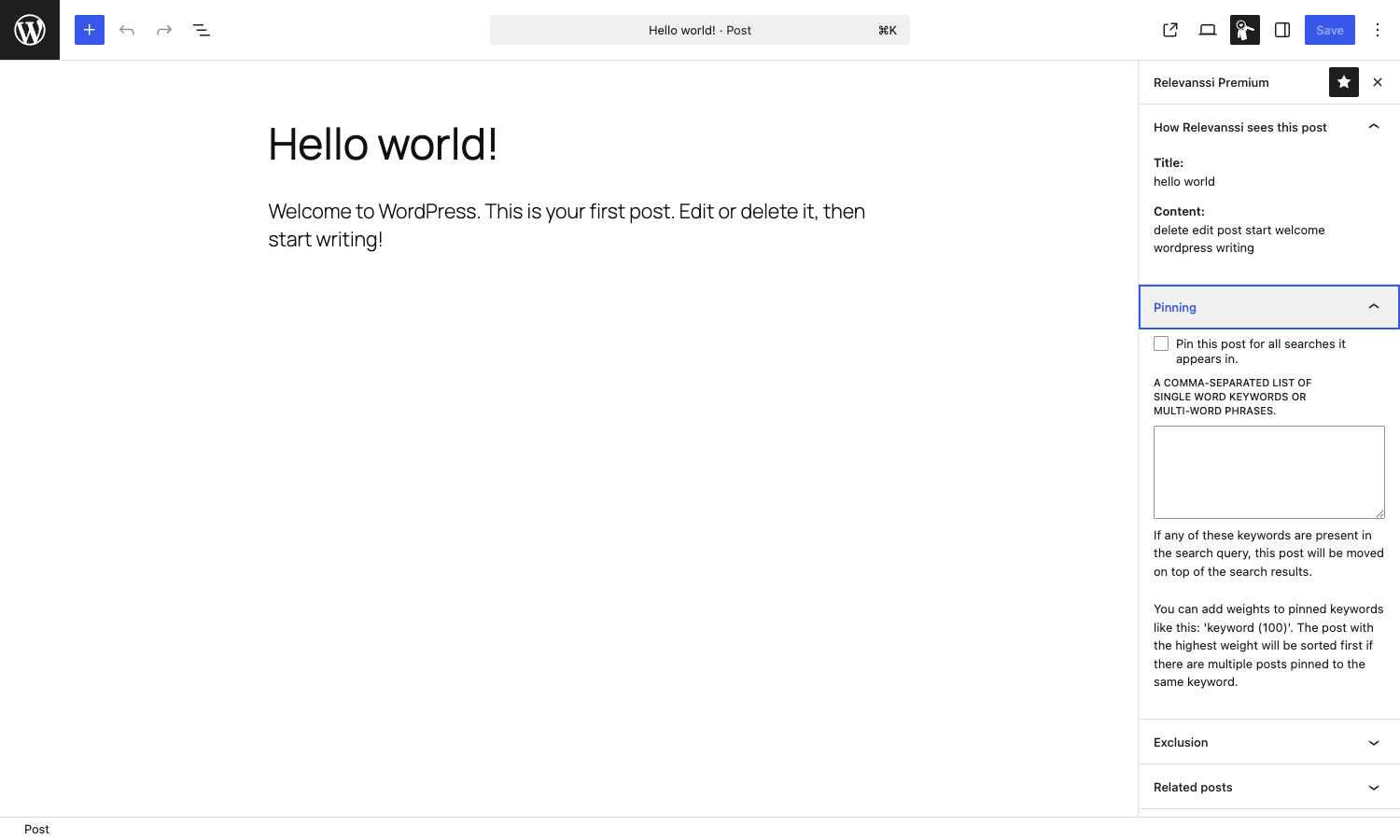
Five panels:
- How Relevanssi sees this post. Shows the indexed title and a short preview of the indexed content. Quick sanity check that your shortcodes expanded, your custom fields are included, etc.
- Pinning. Type a keyword and tick "Pin this post for all searches it appears in." That post jumps to the top whenever the keyword appears. Multi-word phrases are allowed, and you can attach weights (
keyword (100)) when you pin the same word to several posts. - Exclusion. Stop this specific post from ever appearing in results.
- Related posts. Manual override for the related-posts list.
- Insights. Per-post click and impression stats (populated by click tracking).
Pinning is the killer feature here. Marketing teams love being able to say "the new product launch page should be the first result when someone searches ‘launch’". One tick, one keyword, done. No more guessing whether the right SEO terms are in the post body.
Real-world use cases
E-commerce product search
Default WooCommerce search ignores SKU, variation attributes, and product meta. A shopper searching for "BLU-MD-T-SHIRT-001" gets zero results. With Relevanssi, you tick the product post type in Indexing, add _sku (or use the dedicated WooCommerce product GTIN integration), set the SKU field weight higher than content, and rebuild. The same SKU search now returns the matching product, and a search for a variation attribute like "medium blue" pulls back products that have those variations even when those words aren’t in the description. Pair it with FacetWP or JetSmartFilters for filtered storefronts where Relevanssi powers the text query and the facet plugin handles the dropdowns.
Knowledge base with PDFs
A support site I worked on had hundreds of PDF whitepapers attached to posts. Visitors needed to find a PDF by its content (a model number, an error code), not by the post that referenced it. We turned on Premium’s PDF indexing, pointed it at the WP Media library, and within an hour the PDFs were searchable. The plugin sends each PDF to its hosted parser, gets back plain text, and indexes that text against the attachment’s post record. A search for a model number now returns the PDF directly with a snippet showing the matching paragraph.
Multilingual sites
WPML and Polylang Pro both ship as out-of-the-box compatibility integrations in lib/compatibility/. Relevanssi indexes each language version separately and serves results in the visitor’s current language without you writing any code. Stemming is per-language: switch the stopword file in the stopwords/ directory to match your locale.
Multisite network with cross-site search
If you run a WordPress multisite (a publication group, a school district, a SaaS with per-tenant blogs), Premium’s network search indexes every subsite and merges results into one stream. The subsite handling its own search form gets to filter what’s in scope (per-site, all sites, network minus admin sites). Most plugins can’t touch this; Relevanssi has it as a checkbox in the network options screen.
Documentation site with synonyms
Technical docs are full of synonyms that the docs team standardised on but users don’t know. "Auth" vs "authentication", "API key" vs "token", "callback" vs "webhook". A small synonyms file turns all these alternate spellings into the canonical term and the documentation hit rate goes up dramatically. The user doesn’t see the magic, they just get better results.
Membership site with restricted content
MemberPress, Paid Memberships Pro, Restrict Content Pro, and Groups all have compatibility shims. Relevanssi calls each plugin’s access-check function on every hit before showing it, so a visitor without access to a paid post won’t see it in search results (no leakage of titles or excerpts to non-members). This is huge if you sell content. SearchWP requires a separate add-on for this; in Relevanssi it’s built-in.
Developer reference
Relevanssi exposes 169 unique apply_filters calls and around 18 actions. I’ll cover the ones I actually reach for. Full documentation lives at relevanssi.com/knowledge-base.
Filter: skip specific posts from indexing
Use relevanssi_do_not_index to keep a post out of the index based on any logic you want. Returning a truthy value (or a string explaining why) skips the post.
add_filter( 'relevanssi_do_not_index', function ( $block, $post_id ) {
 $post = get_post( $post_id );
 if ( $post && get_post_meta( $post_id, '_hidden_from_search', true ) === 'yes' ) {
 return 'Hidden via custom field.';
 }
 return $block;
}, 10, 2 );
The string you return shows up in the indexer’s debug output so you can see at a glance why something was skipped.
Filter: choose which custom fields to index
The relevanssi_index_custom_fields filter receives the array of keys Relevanssi will index. You can prepend, append, or replace it.
add_filter( 'relevanssi_index_custom_fields', function ( $fields ) {
 // Add a couple of ACF subfields manually.
 $fields[] = 'product_specifications';
 $fields[] = 'support_keywords';
 return $fields;
} );
If you set the admin option to "all", this filter still runs, so you can use it to subtract keys instead of adding them.
Filter: modify post content before indexing
relevanssi_post_content is your hook for cleaning up the indexed body without touching the actual post. Useful when shortcodes leave garbage strings behind or when you want to inject extra searchable text.
add_filter( 'relevanssi_post_content', function ( $content, $post ) {
 // Strip our shortcode markers but keep their inner text.
 $content = preg_replace( '/\[\/?do_box[^\]]*\]/', '', $content );

 // Append a hidden keyword list stored in a meta key.
 $extra = get_post_meta( $post->ID, '_search_keywords', true );
 if ( $extra ) {
 $content.= ' '. $extra;
 }
 return $content;
}, 10, 2 );
Filter: change result order or sort key
relevanssi_orderby overrides the column Relevanssi sorts by. relevanssi_order flips direction.
// Always sort by date descending on the /news/ search page.
add_filter( 'relevanssi_orderby', function ( $orderby ) {
 if ( strpos( $_SERVER['REQUEST_URI']?? '', '/news/' )!== false ) {
 return 'post_date';
 }
 return $orderby;
} );
add_filter( 'relevanssi_order', function ( $order ) {
 if ( strpos( $_SERVER['REQUEST_URI']?? '', '/news/' )!== false ) {
 return 'desc';
 }
 return $order;
} );
Filter: rewrite the entire hit list
relevanssi_hits_filter is the nuclear option. It receives the array of matching posts plus their scores after Relevanssi has finished ranking. You can re-sort, remove, deduplicate, or completely replace the array. Useful for business rules like "always boost product pages over blog posts" or "demote any post older than two years".
add_filter( 'relevanssi_hits_filter', function ( $hits ) {
 // hits[0] is the array of posts, hits[1] is the original query string.
 $posts = $hits[0];
 usort( $posts, function ( $a, $b ) {
 // Boost products by 50% of their score.
 $score_a = $a->relevance_score * ( $a->post_type === 'product'? 1.5 : 1 );
 $score_b = $b->relevance_score * ( $b->post_type === 'product'? 1.5 : 1 );
 return $score_b <=> $score_a;
 } );
 $hits[0] = $posts;
 return $hits;
} );
Filter: gate which posts are visible per user
relevanssi_post_ok is called once per hit and lets you say yes/no to whether the current visitor can see this post. Membership plugins use it; you can use it for any custom visibility logic.
add_filter( 'relevanssi_post_ok', function ( $post_ok, $post_id ) {
 if ( get_post_meta( $post_id, '_internal_only', true ) === 'yes' ) {
 return current_user_can( 'edit_posts' );
 }
 return $post_ok;
}, 10, 2 );
Filter: tweak the "Did you mean?" suggestion
relevanssi_didyoumean_suggestion runs after Relevanssi picks a correction. Replace, censor, or null it out.
add_filter( 'relevanssi_didyoumean_suggestion', function ( $suggestion, $query ) {
 // Never suggest the brand name as a misspelling.
 if ( strcasecmp( $suggestion, 'mycompany' ) === 0 ) {
 return $query;
 }
 return $suggestion;
}, 10, 2 );
Filter: change the admin capability
By default the settings page requires manage_options. Swap it for a custom cap.
add_filter( 'relevanssi_options_capability', function () {
 return 'edit_search_settings';
} );
Pair this with a custom role and you can hand Relevanssi over to your content team without giving them admin.
Action: do something after indexing finishes
relevanssi_indexing_options and relevanssi_post_index_taxonomies are batch hooks that fire after big sections of indexing complete. Use them to flush a CDN, ping a search analytics endpoint, or warm a cache.
add_action( 'relevanssi_post_index_taxonomies', function () {
 do_action( 'rocket_clean_domain' );
} );
Shortcodes
The Premium plugin ships four shortcodes (plus [relevanssi_related_posts]):
[search]prints the current search query, handy in "Search results for: X" headings.[noindex]wraps content that should be excluded from the index. Anything inside the tags is skipped during indexing but still shown on the front end.[searchform]renders the standard WordPress search form.[relevanssi_didyoumean]prints the "Did you mean?" suggestion if one was generated for the current query.[relevanssi_related_posts]outputs the related posts list. Accepts attributes for post type, count, and template.
WP-CLI commands
Premium registers wp relevanssi with these subcommands. All of them are great for cron jobs and CI/CD on large sites.
wp relevanssi index # Full rebuild.
wp relevanssi index --type=post,page # Limit to specific post types.
wp relevanssi refresh # Incremental, indexes new/changed posts only.
wp relevanssi truncate_index # Wipe the index.
wp relevanssi add_stopword "wordpress" # Stopword management.
wp relevanssi remove_stopword "wordpress"
wp relevanssi reset_log # Clear the user-search log.
wp relevanssi common --limit=50 # Show the 50 most common words.
wp relevanssi read_attachments # Push attachments to the PDF parser.
wp relevanssi remove_attachment_content # Drop attachment text from the index.
wp relevanssi remove_attachment_errors # Clear PDF parser errors.
wp relevanssi regenerate_related # Rebuild the related-posts cache.
wp relevanssi list_pinned_posts # List pinned and unpinned posts.
wp relevanssi list --keyword=foo # Inspect index for a keyword.
On large sites, the AJAX-based admin indexer hits PHP timeouts. The WP-CLI commands have no timeout and stream progress to your terminal, so reindexing a 50,000-post site goes from "babysit the browser tab for an hour" to "run a screen session over SSH and walk away".
REST endpoint
Premium registers a small REST route in premium/gutenberg-sidebar.php. It powers the post-editor sidebar (read indexed content, save pinning/exclusion meta). You generally don’t talk to it directly, but you can if you’re building a custom block-editor panel.
Performance, compatibility, and gotchas
Index size
The index table grows as roughly posts x unique words per post. For a 10,000-post site with 500 unique words per post, that’s about 5 million rows. MySQL handles that easily, but the table can hit hundreds of megabytes. Plan for it on your backup strategy (use --ignore-table=wp_relevanssi for nightly backups since you can always rebuild the index, then take a weekly backup of the full DB).
Initial index build time
Small sites (under 1,000 posts) index in seconds. Mid-size sites (10k-50k posts) take five to twenty minutes from the admin AJAX indexer. Beyond 50k, switch to wp relevanssi index over SSH. The plugin also has a relevanssi_indexing_limit filter that lets you cap how many posts are processed per batch if your server is touchy.
Caching plugins
Search result pages are dynamic per query and shouldn’t be cached. Configure your page-cache to skip URLs containing ?s=. Both WP Rocket and WP Super Cache do this out of the box. If you cache search pages by accident, you’ll see the same handful of results no matter what users type. Object caching (Redis, Memcached) is fine and actually speeds Relevanssi up by caching the post-object fetches.
Database optimisation
If your wp_relevanssi table starts to feel sluggish (very large sites), run an OPTIMIZE TABLE against it monthly. WP-Optimize Premium has a UI for this; on smaller hosts you can run it through phpMyAdmin or WP-CLI.
Page builders
Page builders (Elementor, Beaver Builder, Divi, Bricks, Oxygen) store content in custom fields and shortcodes, not in post_content. Relevanssi has compatibility shims for the common ones in lib/compatibility/ (Elementor, Bricks, Oxygen, Avada), but for a builder it doesn’t know about, you may need to add the relevant meta keys to the indexed custom fields list manually.
"Did you mean" weirdness
The "Did you mean?" feature only suggests words that are already in the index. So on a brand-new site with a small index, suggestions are often weak or absent. The free version is also a step behind Premium’s spelling correction algorithm, which uses a more aggressive Levenshtein-distance routine. The longer your site runs and the more content you have, the better suggestions become.
Logging and GDPR
If you turn on "Log user IP", you become a data controller in EU jurisdictions and must declare it in your privacy policy. The safer default is to log queries without IPs, which is what the plugin ships with.
Themes that override the search query
Some older themes use query_posts() in their search.php template instead of relying on the main query. That nukes Relevanssi because it overrides everything the plugin set up. The fix is to remove the query_posts() call and use the main query instead. The plugin’s debugging tab and the official query_posts() knowledge base article can talk you through this.
Spelling matters during indexing
If a typo gets indexed (the content of a post itself has a misspelling), Relevanssi will happily index the typo. Fix the post and either re-save it (auto-reindexes that post) or run wp relevanssi refresh.
Relevanssi Premium vs the alternatives
Relevanssi Premium vs SearchWP
SearchWP is the direct competitor. Both replace WordPress search with a custom-index-and-relevance-ranking engine. Both index custom fields and taxonomies. Both have synonyms, "Did you mean" style suggestions, related-posts add-ons, and click tracking.
Where they differ:
- Pricing. Relevanssi Premium starts around 100 euros for a single site, SearchWP starts around 99 USD. Multi-site Relevanssi tiers (9 sites, 30 sites) are noticeably cheaper than SearchWP’s equivalent. Both renew annually at the same price.
- Hooks. Relevanssi exposes more developer hooks (169 unique filters in Premium). SearchWP is more event-driven (filters plus its own engine class). Both let you customise ranking deeply; Relevanssi feels more "WordPress-idiomatic".
- Stemming. Relevanssi ships stemmer files for several languages out of the box. SearchWP focuses on English; non-English stemming is add-on territory.
- PDF parsing. Both support it. SearchWP’s PDF add-on costs extra on the cheaper plans, Relevanssi includes it in the base Premium price.
- WP-CLI. Relevanssi’s
wp relevanssiintegration is more mature (fourteen subcommands). SearchWP has CLI support too but a smaller surface. - UI. SearchWP has a more modern admin (drag-and-drop weight builder, multiple "engines" per install). Relevanssi’s admin is older-feeling but very dense; you can see every option on the same page without hopping between tabs as much. Personal preference.
For most sites, both work. SearchWP wins on UI polish, Relevanssi on per-site value and hook coverage. We’ve covered SearchWP in detail in the SearchWP review if you want to compare the screenshots side-by-side.
Relevanssi Premium vs Algolia
Algolia is a SaaS search engine. Index lives on Algolia’s servers; you push your WordPress content to them via their plugin, and queries hit their API. The upsides: instant search-as-you-type, near-zero query latency, geo-aware ranking. The downsides: monthly cost per record (small sites are cheap, large ones add up fast), data leaves your server, lock-in. For a content-heavy site that wants results in 30ms it’s the best in class. For most WordPress sites Relevanssi is good enough and stays on your own infrastructure.
Relevanssi Premium vs ElasticPress
ElasticPress is open-source and free at the plugin level, but requires an Elasticsearch cluster (self-hosted or paid via Elastic Cloud / 10up’s hosted service). It’s wickedly fast for very large datasets (millions of posts) and supports facets, autocomplete, and analytics. For sites with that scale and a DevOps team to run Elasticsearch, it’s the right answer. For sites with one server and a regular WordPress admin, Relevanssi is far less hassle.
Relevanssi Premium vs Jetpack Search
Jetpack Search is Automattic’s SaaS offering, priced per record. The setup is a one-click install if you already have Jetpack. The catch: queries go to Automattic’s servers, the customisation surface is much narrower than Relevanssi, and the per-record pricing scales linearly with content size. Works for plug-and-play sites; not flexible enough for a developer who wants to tune ranking.
Relevanssi Premium vs FiboSearch
FiboSearch (formerly Ajax Search for WooCommerce) is a frontend layer: pretty autocomplete dropdown, image thumbnails in results, AJAX. It doesn’t replace WordPress search itself, just dresses up the search form. Many sites pair FiboSearch as the frontend with Relevanssi as the engine underneath. There’s an explicit compatibility shim in Relevanssi’s lib/compatibility/fibosearch.php.
Pricing and licensing
Relevanssi Premium is licensed per site, annual subscription, with auto-renewal. Pricing from relevanssi.com is roughly:
- 1 site: about 100 euros / year
- 3 sites: about 200 euros / year
- 9 sites: about 400 euros / year
- 30 sites: about 800 euros / year
Renewal is the same as first-year price. The license unlocks updates, the PDF parser API, and support via email.
Relevanssi Premium is also available as a GPL-licensed version through the Relevanssi Premium product page on GPL Times. It’s the same plugin code; the license is GPLv2 (per the plugin header) so redistribution is legal. You won’t get the upstream PDF parser API access since that’s tied to comesio’s licence server, but the search engine itself works fully and the free Relevanssi PDF support (via the WordPress PDF parser) covers most use cases.
FAQ
Will Relevanssi slow my site down?
Indexing happens once per post save in the background; it’s a tiny extra write. Searching is faster than the default WordPress search on any non-trivial site because the index is purpose-built (one row per post-word combination) instead of running a full LIKE '%term%' table scan. Object caching helps further.
Does it work with WooCommerce?
Yes, via a dedicated compatibility integration. Tick the product post type on the Indexing tab, optionally add SKU as a custom field, and product searches will include SKU, variations, attributes, and meta. Pair with WP Grid Builder or FacetWP for filtered storefronts.
What happens if I deactivate the plugin?
The index table stays in the database (good if you reactivate later). Search reverts to the default WordPress engine. There’s no orphan rewrite or template change to undo.
Can I run free Relevanssi and Premium together?
No. Premium replaces free entirely. Deactivate the free version before activating Premium. Your saved settings carry over.
Does it index PDFs without Premium?
The free version can index PDF content via the older WordPress PDF parser if your server has the right PHP libraries (Smalot’s pdfparser). Premium uses a cloud parser that’s more reliable, handles OCR for image-based PDFs, and works on shared hosts that can’t install PHP extensions.
Does it work with WPML / Polylang?
Yes, both have first-class integrations in lib/compatibility/. The search respects the visitor’s language and stemming/stopwords are applied per-language.
How often does the index need rebuilding?
After config changes (added post types, changed field weights, added a custom field). For day-to-day content edits, the index updates automatically on save. Set up a weekly wp relevanssi refresh cron job if you’re paranoid.
What about Gutenberg blocks?
Block content is stored in post_content as HTML with block delimiters. Relevanssi reads post_content natively, so any block that renders to visible HTML is searchable. There’s also a relevanssi_block_to_render filter to customise how individual blocks are indexed if you have edge cases.
How do I exclude a specific post from results?
Open the post in the editor and tick the Exclusion option in the Relevanssi Premium sidebar. Or set the _relevanssi_hide_post meta to on. Or use the relevanssi_do_not_index filter for programmatic exclusion.
Is there a free trial?
Yes, the free Relevanssi on WordPress.org gives you most of the core engine (indexing, relevance ranking, fuzzy match, synonyms). Premium adds PDF parsing, multisite search, click tracking, related posts, pinning, the WP-CLI commands, and the extra hooks. Try the free version on a staging site first if you want to see the engine in action before paying.
Final thoughts
If you’ve spent any time fighting WordPress’s default search, Relevanssi Premium is the obvious upgrade. The engine is mature (2008 vintage, still actively maintained), the hook coverage is among the deepest of any WordPress plugin I’ve seen, and the admin is a one-stop shop: indexing, search config, logs, analytics, related posts, redirects, all in one settings screen.
What it isn’t: a fast as-you-type search UI like Algolia, or a billion-record engine like Elasticsearch. It runs on your own MySQL, so it’s bounded by your server. For 90% of WordPress sites those limits are invisible.
If you compare it head-to-head with SearchWP, the choice usually comes down to UI preference and hook style. Both engines do the job. Relevanssi is the better value at multi-site tiers and the friendlier choice for developers who like the WordPress filter-hook idiom. SearchWP wins if you want a more modern admin and don’t mind paying the extra. Take a careful look at both and pick whichever feels more natural.
Either way, the moment your site outgrows default WordPress search, you’ll know. And once you’ve installed a real search engine, you won’t go back.