

If you sell anything where the customer pays you again next month, you have two choices on WordPress: build a custom integration with a payment gateway, or use WooCommerce Subscriptions. Almost everyone picks the second one, because the alternative is a year of work and a thousand edge cases around card expiry, failed renewals, and proration.
This is a long, honest walk through WooCommerce Subscriptions. We’ll cover what it does, how the product types work, how renewals are actually processed, which payment gateways play nicely (and which don’t), the customer-facing experience, the admin views, the hook surface that developers actually use, and the gotchas you only discover after going live.
Table of Contents
- What is WooCommerce Subscriptions?
- The product types: simple vs variable subscription
- Key features at a glance
- Installation and setup
- Configuring a subscription product
- Settings page walkthrough
- The Subscriptions admin list
- Reports and analytics
- How renewals actually work
- Payment gateway compatibility
- The customer experience
- Real-world use cases
- Developer reference: hooks, filters, status flow, and APIs
- Performance, compatibility, and gotchas
- Troubleshooting
- Pricing and licensing
- FAQ
- Final thoughts
What is WooCommerce Subscriptions?
WooCommerce Subscriptions is an official extension built and maintained by the WooCommerce team. It adds two new product types to WooCommerce ("Simple Subscription" and "Variable Subscription"), introduces a new database concept called the subscription (which is essentially a recurring contract with a status, dates, and a customer), and hooks into your payment gateway to charge the customer again on schedule.
The plugin has been around for over a decade. It’s the most widely used recurring-billing extension on WordPress, with deep integrations into dozens of payment gateways. The product team at WooCommerce treats it as core infrastructure: the codebase is conservative, well-documented, and updated on the WooCommerce release cadence.
Under the hood, a subscription is a custom post type (shop_subscription) with extensive meta and a parent-child relationship to the order(s) that paid for it. New orders are created for each renewal (the renewal order), so the order history stays clean and you can see exactly when each payment happened.
The product types: simple vs variable subscription
WooCommerce Subscriptions adds two product types alongside the standard ones.
Simple Subscription. One billing cycle, one price. "$10 every month" or "$99 every year". The product has a subscription price, a billing period, a billing interval, a sign-up fee, a free trial, and an expiration. Use this for software-as-a-service, membership, content access, or any flat recurring product.
Variable Subscription. Multiple variations, each with its own subscription terms. Think "monthly $10 / quarterly $25 / yearly $80" as separate purchasable variations of the same product. Each variation can have its own free trial, sign-up fee, and billing period. Use this when you want a single product page with multiple plan choices.
You can also mix subscription products with non-subscription products in the same store. The cart and checkout handle the difference automatically: a customer’s cart can have a one-off T-shirt AND a monthly subscription, and the customer pays once for the T-shirt and starts a subscription for the membership.
Key features at a glance
Rather than dump every feature, here’s what actually matters in practice:
- Recurring billing on any schedule. Day, week, month, year, or a multiple of any of those. So "every 3 months" is a single Quarterly product, not three Monthly products.
- Free trials and sign-up fees. Combine them: "$10 sign-up + 7-day free trial + then $10/month".
- Automatic renewals. When the payment gateway supports it, renewals happen with zero customer interaction.
- Manual renewals. For gateways that don’t support automatic billing (or for stores that prefer it), the customer gets an email with a "Pay now" link.
- Failed renewal retry system. Configurable retry rules with email notifications at each step.
- Customer self-service. Customers can view, suspend, cancel, change payment method, change shipping address, and switch plans from their account page.
- Plan switching with proration. When a customer upgrades from monthly to yearly mid-cycle, the plugin can calculate a prorated charge for the upgrade.
- Synchronised renewals. Force all subscriptions to renew on the same day of the month (the 1st, 15th, whatever). Useful for SaaS billing alignment.
- Subscription gifting. A newer feature: let customers buy a subscription as a gift for someone else. If you want a separate gift-card option alongside it (codes, scheduled delivery, partial spends), see our YITH WooCommerce Gift Cards walkthrough.
- Coupons for recurring products. Sign-up discount, recurring discount, free trial extension.
- Reports and analytics. Built-in reports for signups, renewals, retention, switches, and revenue.
- REST API endpoints. Read and write subscriptions programmatically via
/wp-json/wc/v3/subscriptions.
The point is consolidation: every recurring-billing concern (proration, failed renewals, gateway changes, plan switches) is handled by one extension instead of three.
Installation and setup
Installation is standard.
- You need WooCommerce installed and activated first. Subscriptions is an extension, not a standalone plugin.
- Buy and download the zip from the GPL Times WooCommerce Subscriptions page.
- In WordPress, Plugins → Add New → Upload Plugin, choose the zip, Install Now, Activate.
After activation you’ll see a new Subscriptions entry in the WooCommerce admin menu, and the WooCommerce Settings page gets a new "Subscriptions" tab.
The first thing to do is configure the basics in WooCommerce → Settings → Subscriptions. Then create a subscription product (Products → Add New, change the Product Data dropdown to "Simple subscription"), and finally test a full purchase + renewal cycle in your gateway’s test mode before going live.
Configuring a subscription product
When you create or edit a product and change the Product Data dropdown to "Simple subscription" or "Variable subscription", the product data panel changes to expose subscription-specific fields.
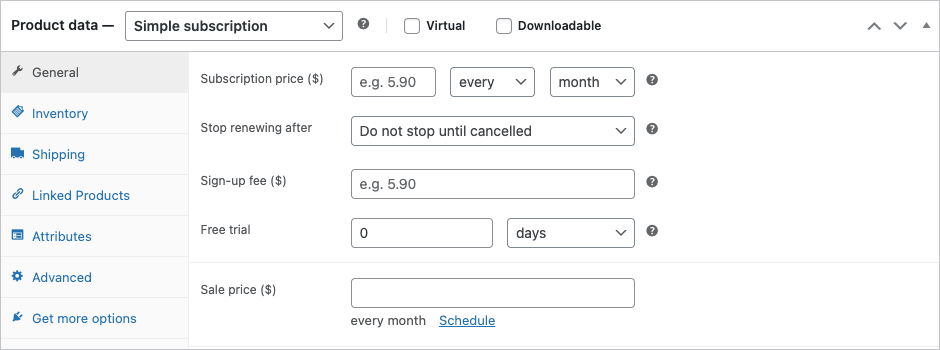
What each field does:
- Subscription price. The recurring amount. The dropdowns next to it set the billing interval and period: "every / 1 / month" means $X every 1 month. Change to "every / 3 / week" for a 3-weekly billing cycle.
- Stop renewing after. Either "Do not stop until cancelled" (open-ended subscription, the default for SaaS) or a specific number of billing cycles. Set to "12 months" for a one-year subscription that auto-cancels at the end.
- Sign-up fee. An optional one-time charge at the very first checkout, in addition to the first recurring payment. Use for setup fees or one-time service costs.
- Free trial. A free period at the start during which no payment is collected. "7 days" means the customer signs up, gets 7 days free, then gets charged the recurring price on day 8. The first renewal happens 7 days + 1 billing period after sign-up.
- Sale price. Same as a regular product sale price. Applies only to the recurring amount (not the sign-up fee).
For Variable Subscriptions, each variation has its own complete set of these fields, so a single product can offer multiple plans. If the variation attribute is something visual (a roast level, a fabric, a color), you can replace the default WC dropdown with Variation Swatches and Photos, which supports the variable-subscription product type out of the box.
A few decisions worth thinking through:
- Open-ended vs fixed term. Most SaaS products are open-ended (cancel anytime). Most courses or memberships with a specific duration are fixed-term. Mixing the two means juggling expiration logic.
- Free trial vs sign-up fee. Free trials reduce checkout friction; sign-up fees are useful when there’s a real cost to onboard the customer (setup, training, hardware).
- Sync renewals. If you bill 100 customers per month, having them all renew on different days creates 100 days of trickle revenue. If you sync to the 1st of every month, you process all renewals on the same day. Easier for cash-flow tracking and customer support. Enable in Settings → Subscriptions under "Synchronise renewals".
Settings page walkthrough
The plugin’s settings live in WooCommerce → Settings → Subscriptions.
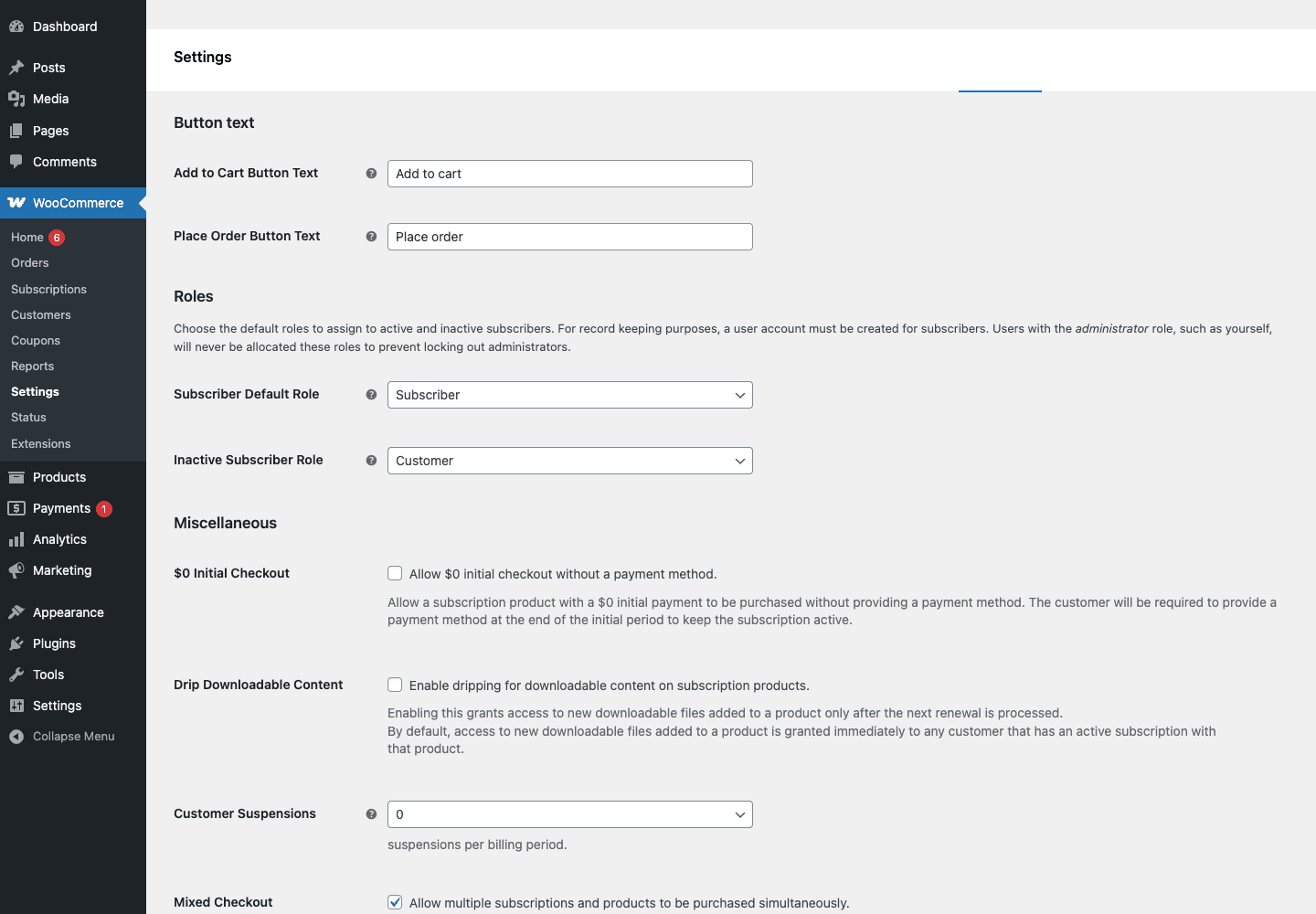
The main sections, top to bottom:
- Button text. The text shown on the "Add to cart" and "Place order" buttons when a subscription product is involved. Default is fine; customise if your brand voice needs it.
- Roles. What user role gets assigned to active subscribers, and what role inactive (cancelled, expired) subscribers fall back to. Default: "Subscriber" for active, "Customer" for inactive. Useful for content-gating plugins like MemberPress or Restrict Content Pro hooks.
- Miscellaneous.
- $0 Initial Checkout. Allow a subscription with a free trial to be purchased without entering a payment method. Off by default for fraud safety; on for sites where the free trial is the lead-generation step.
- Drip Downloadable Content. Whether downloadable subscription products release new files only after each renewal. Useful for serialised content (an audio course, a newsletter archive).
- Customer Suspensions. How many times per billing period a customer can suspend their own subscription. Default unlimited; set to 0 to disable customer-initiated suspensions entirely.
- Mixed Checkout. Allow non-subscription and subscription products in the same cart. Default on; turn off if you sell only subscriptions.
- Renewals.
- Manual Renewal Payments. Force all renewals to be manual (customer must click "Pay now") even when the gateway supports automatic billing. Useful for cash-flow-sensitive merchants who want explicit customer action on every renewal.
- Accept Manual Renewals. When a payment fails, fall back to letting the customer pay manually instead of cancelling.
- Turn off Automatic Payments. Same as above but stricter.
- Synchronisation. Sync renewals to specific dates so you process all customers on the same day.
- Renewal Failure Handling. A retry schedule for failed renewals. Default is 4 retries over 12 days, with email notifications. If you want to stop the renewal failures from happening in the first place, pair this with AutomateWoo and its credit-card expiry reminder workflow.
- Customer Notifications. Toggle each automated email: trial expiration warning, renewal coming up, payment failed, cancellation, expiration. Each has its own template you can customise.
For most stores, the defaults are sensible. The two settings worth thinking hard about are Synchronisation and Renewal Failure Handling.
The Subscriptions admin list
In the admin sidebar, Subscriptions opens the list view.
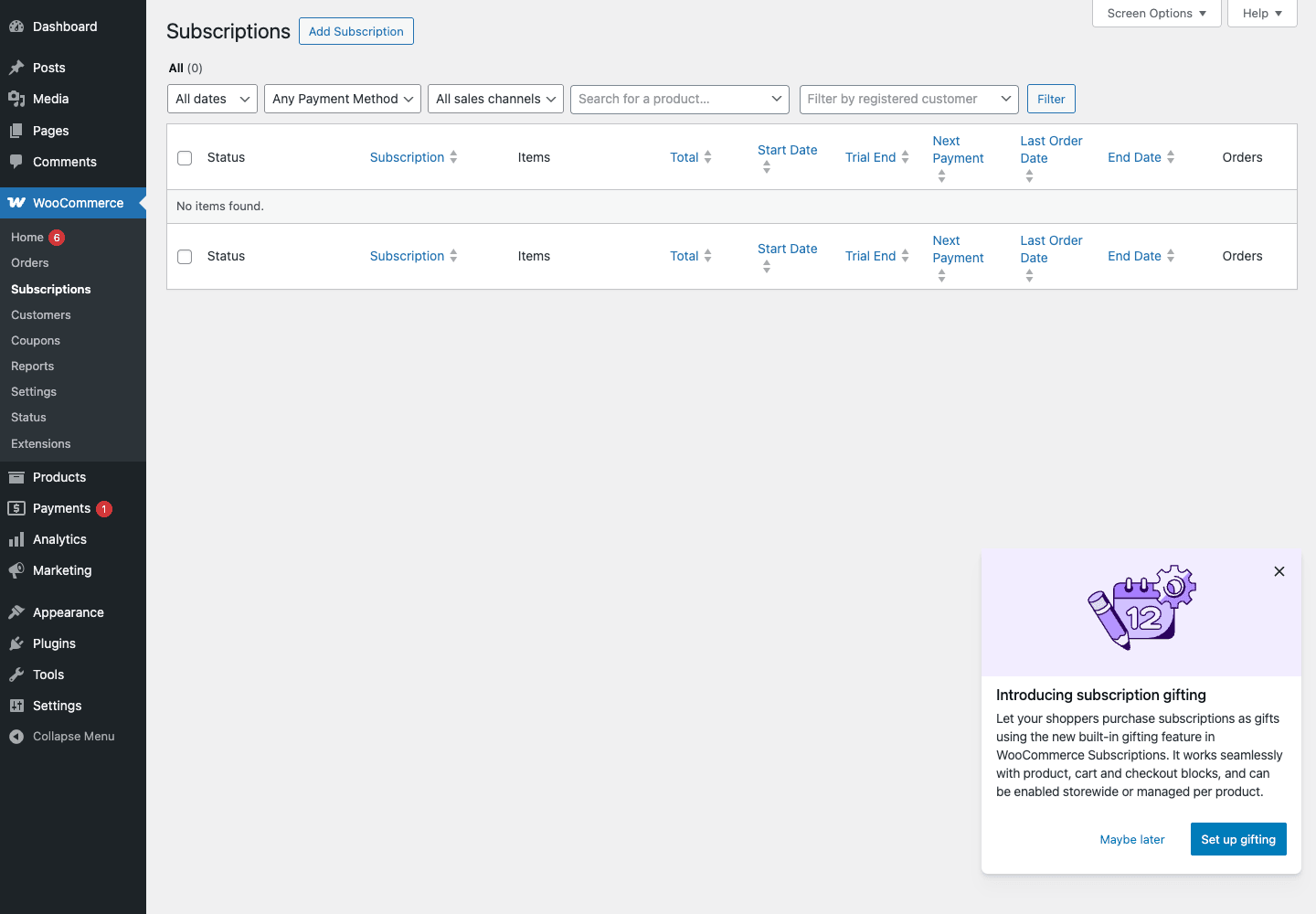
Each row is one subscription, with columns for:
- Status. Active, Pending Cancellation, On Hold, Cancelled, Expired, Switched, or Pending. Drives the entire renewal logic.
- Subscription. ID + customer name. Click to open the single subscription edit view.
- Items. The products on this subscription.
- Total. The recurring amount.
- Start Date / Trial End / Next Payment / Last Order Date / End Date. The lifecycle timestamps.
- Orders. Count of orders associated (initial + renewals).
Filters at the top: dates, payment method, sales channel, product, customer. Useful for support queries like "show me all on-hold Stripe subscriptions for product X".
Clicking into a subscription gives you the same level of detail as an order, plus subscription-specific actions: change next payment date, change billing schedule, suspend, reactivate, cancel, manually trigger renewal payment, change customer’s payment method.
Reports and analytics
WooCommerce → Reports → Subscriptions gives you a focused report set.
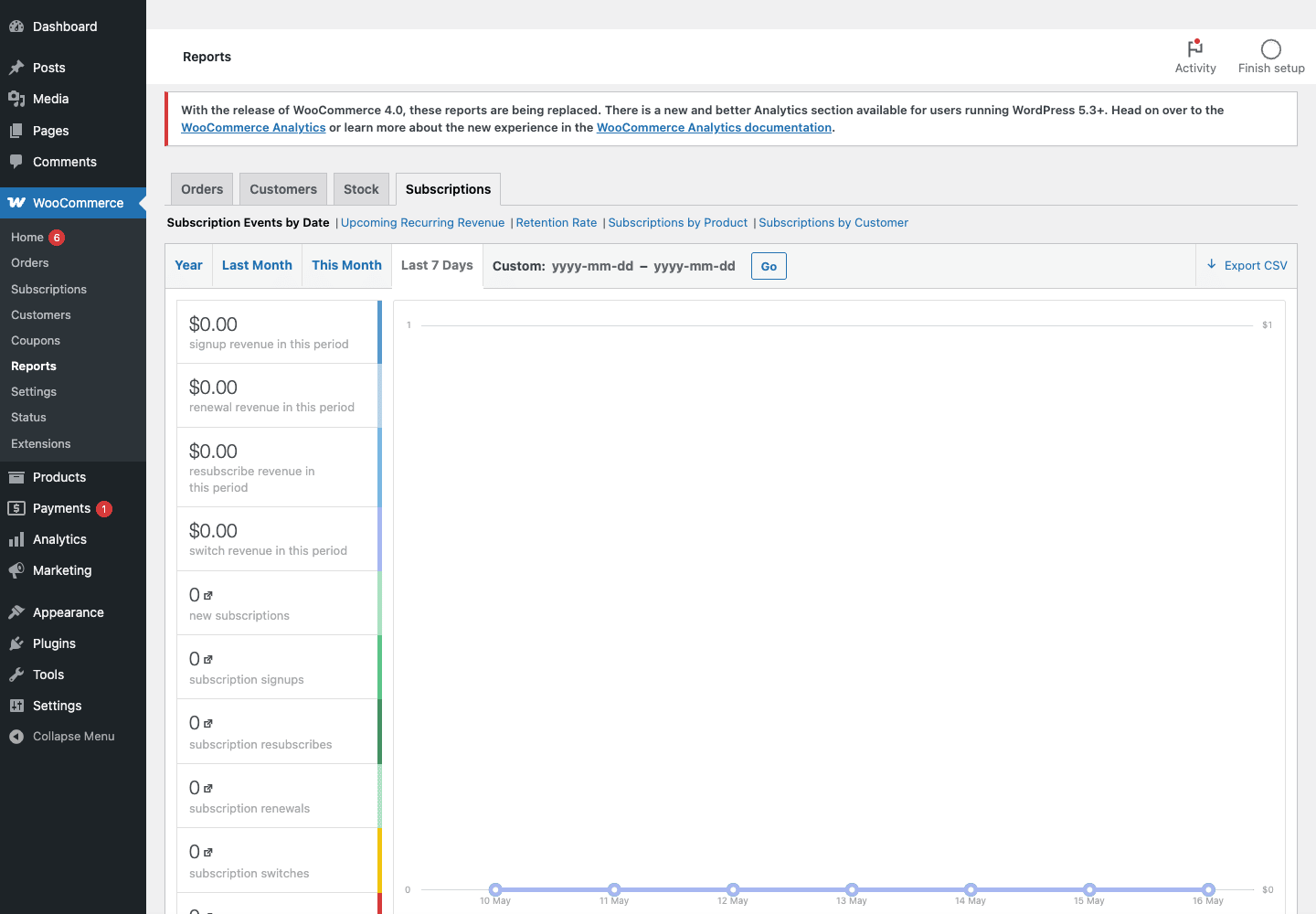
The available reports:
- Subscription Events by Date. Time series of signups, resubscribes, renewals, switches, and the revenue from each. Filter by year, month, week, or custom date range.
- Upcoming Recurring Revenue. Forecast of revenue from existing subscriptions over the next 12 weeks. Useful for cash-flow planning.
- Retention Rate. Cohort-style retention by signup month. Find your churn problem early.
- Subscriptions by Product. Which products are signing up most. Useful for marketing focus.
- Subscriptions by Customer. Top customers by recurring revenue. Useful for VIP outreach.
The reports are pre-dating the newer WooCommerce Analytics page. Both work; Analytics has cleaner visuals while Subscriptions Reports has subscription-specific metrics. Use both.
How renewals actually work
This is the part most reviewers skip and most store owners need to know.
When a subscription is created, the plugin schedules an Action Scheduler event for the next renewal date. Action Scheduler is WooCommerce’s WP-Cron-replacement, designed for reliable background processing.
When the renewal time arrives:
- Action Scheduler fires the
woocommerce_scheduled_subscription_payment_<gateway>hook. - The matching gateway’s renewal handler runs, charging the saved payment method.
- If successful, a renewal order is created in WooCommerce with status "Processing" or "Completed" (depending on the product type), the subscription’s
last_payment_dateis updated, and the next renewal is scheduled. - If failed, the plugin follows the configured retry schedule. After all retries exhausted, the subscription moves to "On Hold" and the customer is notified.
The renewal process happens entirely in the background. The customer doesn’t visit the site. The order shows up in their account history, and an email goes out. That’s it.
For manual renewals (where the customer must pay each time):
- Action Scheduler fires the renewal event.
- The plugin creates a "Pending payment" renewal order.
- The customer receives an email with a link to pay.
- The customer clicks, pays at checkout, and the order moves to "Processing".
Action Scheduler is the part that needs to be healthy. If WP-Cron is broken on your site, you’ll see scheduled renewals piling up in the queue without running. The fix is to either fix WP-Cron (a server-level loopback request issue, usually) or set up a system cron that hits wp-cron.php directly.
Payment gateway compatibility
Gateway support is the make-or-break detail. Not all gateways can charge a saved card without the customer present.
Gateways with full automatic renewal support:
- WooCommerce Payments (now WooPayments)
- Stripe (official Stripe for WooCommerce)
- PayPal Standard (via the official WooCommerce extension; legacy)
- PayPal Express Checkout
- PayPal Pro
- Authorize.Net CIM
- Braintree
- Square
- 2Checkout
- Amazon Pay
- iDEAL via Mollie / Stripe
- Mollie
- Worldpay (Total Online Payments)
Gateways with manual renewals only:
- Cheque, Cash on Delivery, Bank Transfer (no card on file)
- Some regional gateways that don’t store cards or tokens
Tip. If you’re picking a gateway specifically for subscriptions, Stripe or WooPayments are the safe defaults. Both have first-party WooCommerce extensions maintained by the WC team, and both handle the SCA (Strong Customer Authentication) requirements for European customers cleanly.
The plugin shows compatibility on every gateway settings page: a small "Supports Subscriptions" badge confirms automatic renewals work.
The customer experience
Three customer touchpoints matter.
Sign-up. Visiting a subscription product page shows the subscription terms below the price ("$10.00 / month with a 7-day free trial"). Adding to cart shows the recurring schedule prominently at checkout. The customer enters payment details, places the order, and is enrolled.
Account page. A new "Subscriptions" tab appears in the customer’s My Account page. Each subscription has its own page where the customer can:
- View the status, billing schedule, and next payment date.
- View past renewal orders.
- Change payment method (if the gateway supports it).
- Change shipping/billing address.
- Suspend the subscription (paused, no renewals).
- Reactivate a suspended subscription.
- Cancel the subscription.
- Switch to a different variation (if you have Variable Subscriptions enabled).
Emails. Customers receive automated emails for: confirmation, trial expiration warning, upcoming renewal, payment received, payment failed, retry, cancellation, expiration. All templates can be customised under WooCommerce → Settings → Emails.
The self-service model means customers cancel without contacting you. That’s good for support load; it’s also why retention design matters. A "Cancel" button in the account page is one click away.
Real-world use cases
SaaS product. Monthly or annual subscriptions, automatic renewals via Stripe, plan-switching with proration. The most common use case.
Membership site. Recurring access to gated content. Pair with a content-gating plugin (MemberPress, Restrict Content Pro) that hooks into the subscription status.
Box subscriptions (coffee, wine, snacks). Physical product shipped each month. Use shipping options like "Sync deliveries to the 5th of each month" + careful inventory management.
Online courses with monthly billing. "Pay $50/month for 12 months". A fixed-term subscription with monthly billing.
Newsletter or magazine subscriptions. Annual recurring access. Often combined with drip-downloadable content for the back catalogue.
Service retainers (web hosting, maintenance plans). A subscription product with a sign-up fee for setup, then monthly billing. Combine with WooCommerce Subscriptions Gifting features for gift purchases.
B2B recurring orders. A wholesale buyer subscribes to a regular case-pack restock at their tier price. Pair with B2BKing so the renewal honors the buyer’s group-based discount and (if needed) the Invoice/net-30 payment gateway.
Multilingual subscription store. Works with WPML for translated subscription product pages.
Subscription store with a custom page builder. Pair with Elementor Pro for visually-designed subscription product pages. Pair with WP Rocket for caching (cart and checkout stay uncached automatically). Yoast SEO Premium handles SEO metadata.
Developer reference: hooks, filters, status flow, and APIs
WooCommerce Subscriptions exposes a large filter and action surface. Below are the ones developers actually use.
Subscription status flow
Every subscription has a status. The states are:
wc-pending, Just created, not yet activated.wc-active, Currently active, renewing on schedule.wc-on-hold, Paused (by customer or by failed payment).wc-cancelled, Cancelled, no future renewals.wc-pending-cancel, Cancelled but still active until end of paid period.wc-expired, Reached end of fixed term, no longer billable.wc-switched, Replaced by a switch to a different variation/product.
Transitions fire actions: woocommerce_subscription_status_<from>_to_<to>. The most common:
add_action( 'woocommerce_subscription_status_active', function ( $subscription ) {
 // Subscription just became active (initial signup or reactivation).
 // Sync to your CRM, grant feature access, etc.
 do_action( 'mycrm_user_subscribed', $subscription->get_user_id(), $subscription->get_id() );
} );

add_action( 'woocommerce_subscription_status_cancelled', function ( $subscription ) {
 // Subscription was cancelled. Revoke access, send goodbye email, etc.
 do_action( 'mycrm_user_cancelled', $subscription->get_user_id(), $subscription->get_id() );
} );

add_action( 'woocommerce_subscription_status_on-hold', function ( $subscription ) {
 // Payment failed or customer suspended. Don't revoke yet; wait for retries.
} );
Modifying the next payment date
add_filter( 'woocommerce_subscription_calculated_next_payment_date', function ( $next_payment_date, $subscription ) {
 // Push next payment by 3 extra days (e.g. for a grace period bonus).
 $datetime = new DateTime( $next_payment_date, new DateTimeZone( 'UTC' ) );
 $datetime->modify( '+3 days' );
 return $datetime->format( 'Y-m-d H:i:s' );
}, 10, 2 );
Reacting to renewal payments
add_action( 'woocommerce_subscription_renewal_payment_complete', function ( $subscription, $last_order ) {
 // Successful renewal payment. The renewal order is in $last_order.
 update_user_meta( $subscription->get_user_id(), 'last_renewal_paid', current_time( 'mysql' ) );
}, 10, 2 );

add_action( 'woocommerce_subscription_renewal_payment_failed', function ( $subscription, $last_order ) {
 // Payment retry failed. Notify Slack, log to your CRM, etc.
 wp_remote_post( 'https://hooks.slack.com/services/...', [
 'body' => wp_json_encode( [
 'text' => sprintf( 'Payment failed for subscription #%d (%s)', $subscription->get_id(), $subscription->get_billing_email() ),
 ] ),
 ] );
}, 10, 2 );
Customising the product price display
add_filter( 'woocommerce_subscriptions_product_price_string', function ( $price_string, $product, $include ) {
 if ( $product->get_id() === 123 ) {
 return 'Just $10/mo, billed monthly';
 }
 return $price_string;
}, 10, 3 );
Restricting plan switches
add_filter( 'woocommerce_subscriptions_can_user_switch_subscription', function ( $can_switch, $subscription, $user_id ) {
 // Only allow switches in the first 60 days
 $start = $subscription->get_date( 'date_created' );
 if ( strtotime( $start ) < strtotime( '-60 days' ) ) {
 return false;
 }
 return $can_switch;
}, 10, 3 );
Adding a custom subscription meta field
// Add a custom field to the subscription product admin
add_action( 'woocommerce_product_options_general_product_data', function () {
 woocommerce_wp_text_input( [
 'id' => '_my_loyalty_bonus',
 'label' => 'Loyalty Bonus After (months)',
 'description' => 'Grant a loyalty discount after this many months.',
 'type' => 'number',
 ] );
} );

add_action( 'woocommerce_process_product_meta', function ( $post_id ) {
 if ( isset( $_POST['_my_loyalty_bonus'] ) ) {
 update_post_meta( $post_id, '_my_loyalty_bonus', sanitize_text_field( $_POST['_my_loyalty_bonus'] ) );
 }
} );
For a more complete loyalty layer (points-per-renewal, tier multipliers, referrals all bundled), see the SUMO Reward Points walkthrough. The renewal-earns-points pattern there pairs especially well with subscription billing.
Programmatically creating a subscription
$subscription = wcs_create_subscription( [
 'order_id' => $parent_order_id,
 'customer_id' => $customer_id,
 'billing_period' => 'month',
 'billing_interval' => 1,
 'start_date' => current_time( 'mysql', true ),
] );
if (! is_wp_error( $subscription ) ) {
 $subscription->add_product( wc_get_product( $product_id ), 1, [
 'subtotal' => 10.00,
 'total' => 10.00,
 ] );
 $subscription->update_status( 'active' );
}
Customising emails
Every subscription email is a WC_Email subclass. Override the template by copying it to your theme:
your-theme/woocommerce/emails/customer-renewal-invoice.php
Or filter the email content:
add_filter( 'woocommerce_email_subject_customer_renewal_invoice', function ( $subject, $order ) {
 return 'Your monthly payment is due, '. $order->get_billing_first_name();
}, 10, 2 );
REST API
# List subscriptions
curl -u user:pass 'https://example.com/wp-json/wc/v3/subscriptions?status=active&per_page=20'

# Get a single subscription
curl -u user:pass 'https://example.com/wp-json/wc/v3/subscriptions/123'

# Update status
curl -X PUT -u user:pass 'https://example.com/wp-json/wc/v3/subscriptions/123'
 -H 'Content-Type: application/json'
 -d '{"status":"on-hold"}'
The REST API supports the same status transitions as the admin UI, with the same validation. Use it for syncing subscription state to an external CRM, mobile app, or analytics tool.
WP-CLI
# Renew a subscription manually (force renewal)
wp wc subscription renew <id>

# Bulk-update subscriptions for a customer
wp post list --post_type=shop_subscription --author=<user_id> --field=ID | xargs -n1 wp post update --post_status=cancelled
Performance, compatibility, and gotchas
A few real-world things to know.
Action Scheduler is critical. Subscriptions depend on WooCommerce’s Action Scheduler for renewals, retries, and notifications. If WP-Cron is broken (a common shared-hosting issue), renewals stop happening. Set up a system cron that calls wp-cron.php directly: */5 * * * * curl https://yoursite.com/wp-cron.php?doing_wp_cron > /dev/null 2>&1.
HPOS (High Performance Order Storage). WooCommerce’s newer order storage system stores orders in a custom table instead of wp_posts. Subscriptions supports HPOS as of recent versions. If you enabled HPOS and see "incompatible plugin" warnings, update Subscriptions to the latest version.
Page caching for subscription pages. Cart, checkout, and my-account pages must NOT be cached. WooCommerce automatically excludes these from caching plugins like WP Rocket. Just confirm those exclusions are in place before going live.
The customer’s saved card. Different gateways store cards in different ways. Stripe uses Stripe Customer + PaymentMethod tokens. WooPayments uses similar. PayPal uses Billing Agreements. The plugin abstracts this, but if you migrate gateways, you’ll have to re-collect payment info from every customer (cards aren’t portable between gateway processors).
SCA / Strong Customer Authentication. European customers may need to authenticate every renewal under PSD2 rules. Stripe and WooPayments handle this with off-session authentication flows. If a customer’s renewal fails because authentication is required, the plugin sends them a "complete payment" email.
Tax calculation on renewals. Renewal orders inherit the tax setup of the original order. If you change tax rates after a customer signs up, the new rate doesn’t apply to existing subscriptions unless you manually update them.
Subscription switching is complex. The proration math is non-trivial: when a customer upgrades mid-cycle, the plugin calculates a prorated upfront charge, then schedules the next renewal at the new price. Test switching extensively before exposing it to customers.
Coupon types. Three subscription-specific coupon types: "Sign Up Discount" (one-off, first payment), "Sign Up Discount %" (one-off, first payment, %), "Recurring Discount" (every payment), "Recurring Discount %" (every payment, %). Regular coupon types apply only to the first payment.
WooCommerce updates can break gateway integrations. Major WC releases occasionally change order/cart APIs. Test in staging before updating production.
Troubleshooting
Renewals not processing. Almost always Action Scheduler. Visit WooCommerce → Status → Scheduled Actions. Filter to "Failed" or "Pending past due". If pending actions are piling up, WP-Cron is the issue. Switch to a system cron.
"Add to cart" missing on a subscription product. Check the Product Data dropdown is set to "Simple subscription" or "Variable subscription", not "Simple product". Check stock status is "In stock" and the product is published.
Customer can’t change payment method. Check the gateway supports "Tokenization" (saving cards). The "Change Payment Method" link only appears for gateways that can swap saved methods.
Free trial customer didn’t get charged. Expected behavior. The first charge happens after the trial period ends. Check the subscription’s "Next Payment Date" to confirm.
Renewal happened but customer didn’t get an email. Check WooCommerce → Settings → Emails. The "Customer Renewal Invoice" email must be enabled. If it is, the issue is wp_mail deliverability; install an SMTP plugin.
Subscription stuck in "Pending". The initial payment hasn’t completed. Check the original order: status should be "Processing" or "Completed". If the order is still pending, the gateway is the bottleneck.
Switching fails. Check Subscriptions → Settings → Switching. The product needs to allow switching, and the gateway needs to support payment method changes. Some gateways (like PayPal Standard) don’t support mid-cycle changes.
Pricing and licensing
WooCommerce Subscriptions is sold as an annual license per single site, with multi-site upgrades available. The license includes updates and access to WooCommerce’s premium support.
The version on GPL Times is GPL-licensed, redistributable under the GPL. You’ll save real money over time, especially if you run more than one store. Support comes from your own knowledge and the WooCommerce community rather than direct vendor support. For most installs, the plugin is stable enough that you rarely need vendor support.
There’s a Membership option on GPL Times that bundles WooCommerce Subscriptions with the other premium WordPress plugins. If you also need WP Rocket, Yoast SEO Premium, or Elementor Pro, the bundle usually.
FAQ
Do I need WooCommerce to use Subscriptions?
Yes. Subscriptions is a WooCommerce extension, not a standalone plugin.
Can I sell subscription products and one-time products in the same store?
Yes. The cart and checkout handle a mix correctly. The customer pays once for one-time products and starts a subscription for recurring products.
Will my customers’ cards renew automatically?
Only if your payment gateway supports automatic billing for saved cards. Stripe, WooPayments, Braintree, Authorize.Net, Mollie, and most of the major gateways do. Cheque, Bank Transfer, and Cash on Delivery don’t.
Can a customer cancel their own subscription?
Yes, from the My Account → Subscriptions page. You can disable this via a filter if you want to require cancellation by support.
What happens when a renewal payment fails?
The plugin follows the configured retry schedule (default 4 retries over 12 days, with email notifications). After all retries are exhausted, the subscription moves to "On Hold" and the customer is notified.
Can customers upgrade or downgrade their plan?
Yes, via Variable Subscriptions + the Switching feature. The plugin handles proration.
Does it work with WooCommerce Memberships?
Yes. WooCommerce Memberships is a separate plugin that integrates with Subscriptions to gate content based on subscription status.
Does it work with WooCommerce Bookings?
Yes, but the combination requires careful product setup (a recurring booking is its own niche).
Can I migrate subscriptions from another platform?
Sort of. The plugin includes an importer for some platforms, but most migrations are easier as: import historical data, then re-collect payment info on first renewal (cards aren’t portable).
Does it support EU VAT / SCA?
Yes, via SCA-compatible gateways like Stripe and WooPayments. Renewals trigger off-session authentication flows that meet PSD2 requirements.
Can I disable manual renewals entirely?
Yes, in Settings → Subscriptions → Renewals → Turn off Automatic Payments (counterintuitively, this enforces automatic by removing the manual fallback).
Does it work with HPOS?
Yes, recent versions support High Performance Order Storage. Update to the latest if you see HPOS warnings.
Final thoughts
If you sell anything with recurring billing on WordPress, this is the plugin. No alternative comes close to its maturity, gateway compatibility, and feature surface. The first-party support from the WooCommerce team means it stays compatible with every WC update.
The cost is real, but the alternative is building a custom Stripe Billing integration plus the customer self-service UI plus the email automation plus the retry logic. That’s a multi-month engineering project. Subscriptions gives you all of it out of the box.
For developers, the hook surface is enormous and well-documented. You can integrate with any CRM, custom subscription logic, or external billing system via the status hooks and the REST API. The wcs_create_subscription() helper lets you create subscriptions programmatically for any custom flow.
Subscriptions is for ongoing recurring billing. If you actually want a time-bounded campaign with reward tiers and a Kickstarter-style backer flow, look at WP Crowdfunding Pro. The two plugins solve different shapes of money and you can run them side by side.
If you’re standing up a SaaS or membership product today, the safe stack is: WooCommerce + WooCommerce Subscriptions + Stripe or WooPayments + WP Rocket for caching + Yoast SEO Premium for SEO. Add Elementor Pro if you want a custom product page design without touching theme code. That combination handles 95% of recurring-revenue WordPress stores.
For deeper reading, the WooCommerce Subscriptions Store documentation and the WooCommerce Developer Docs are the best free references. Pair either with this plugin and you’ll be set.