

I spent a couple of years quietly dismissing the The7 theme. It always looked, from the outside, like one of those overstuffed ThemeForest themes that bundles eleven plugins, ships a thousand demos, and grinds your site to a halt. So I never installed it. Then a client handed me a The7 site to maintain, and I had to actually live in it for a few weeks.
I was wrong about a lot of it.
The7 is one of the best-selling WordPress themes ever made, and after working in it properly I understand why. It’s less a "theme" in the old sense and more a website-building kit that wraps around whichever page builder you already like. This is a long, honest walk through what The7 actually does, where it genuinely shines, where it still feels heavy, and a developer reference for the hooks worth knowing. Whether you’re a site owner picking a theme or a developer who inherited a The7 project, you’ll know exactly what you’re dealing with by the end.
Table of Contents
- What is The7?
- The one decision that shapes your whole build: which builder
- What you actually get: the toolkit
- A tour of the admin
- Headers, footers, and the mega menu
- Setting up The7 without drowning in options
- Five sites I’d happily build on The7
- Don’t run two page builders at once
- The7 theme vs Avada vs Divi
- Developer reference: hooks, CPTs, shortcodes
- Performance, and where The7 gets heavy
- Pricing and licensing
- FAQ
- Final thoughts
What is The7?
The7 is a multipurpose WordPress theme by Dream-Theme, sold on ThemeForest where it has racked up hundreds of thousands of sales over the past decade. Its tagline is "any design, any layout, no coding required," and that’s a fair summary of the pitch: it aims to be the one theme you can use for a portfolio, a corporate site, a shop, a one-pager, or a magazine, without switching themes when the project changes.
What sets The7 apart from most multipurpose themes is that it doesn’t force its own page builder on you. Instead, it integrates deeply with the builders people already use, primarily Elementor, but also WPBakery (the old Visual Composer), and it has an early-access mode for WordPress’s native full site editing. You pick your builder, and The7 wires its design controls, widgets, and templates into it.
If that Elementor-first approach appeals, The7 is not the only flagship multipurpose theme that takes it. Our Jupiter X theme review looks at another that leans on Elementor plus its own widget set rather than shipping a proprietary builder, a useful comparison if you are weighing the two.
Under the hood, the theme runs on an internal framework Dream-Theme calls "presscore," and it ships a companion plugin, The7 Elements, that registers all the extra widgets and the custom post types (portfolio, gallery, team, testimonials, clients, albums). It also bundles or recommends a stack of well-known plugins: WPBakery, Slider Revolution, Contact Form 7, WooCommerce, and more. That bundling is exactly why The7 gets called a "toolkit" rather than a theme.
If you want to poke at every panel yourself while reading along, The7 is available on GPL Times as the full theme package with The7 Elements, which is what I used for this walkthrough.
The one decision that shapes your whole build: which builder
Most theme reviews bury this. I’m putting it first because it’s the single most important choice you’ll make in The7, and getting it wrong means rebuilding pages later.
The very first screen in The7 » My The7 » Theme Settings asks you to "Optimize The7 for" one of four modes:
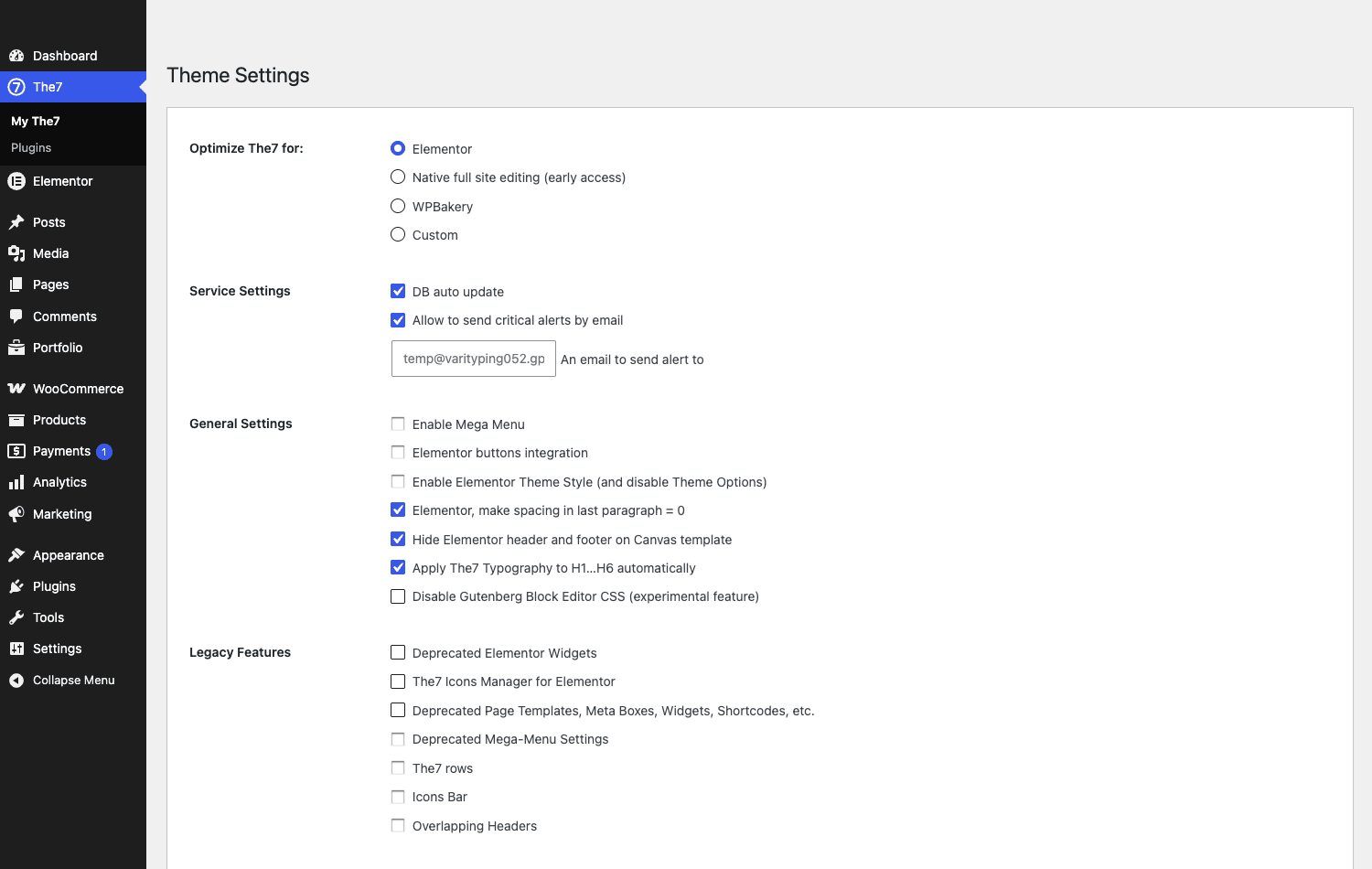
- Elementor. The modern default, and the one I’d pick for almost any new site. The7 loads its Elementor widget set, its Elementor-based header and footer builder, and integrates with Elementor’s Theme Style. This is where The7 development is most active.
- Native full site editing (early access). The7’s bet on the block editor and full site editing. It’s labelled early access for a reason, it’s not as complete as the Elementor path, but it signals where the theme is heading.
- WPBakery. The legacy mode. If you inherited an older The7 site built on Visual Composer, this keeps the classic Theme Options panel and the
dt_shortcodes working. New sites probably shouldn’t start here. - Custom. A stripped mode for developers who want The7’s framework but their own front-end approach.
The catch: these modes aren’t fully interchangeable after you’ve built pages. A page laid out with Elementor won’t magically convert to WPBakery, and the design control surface moves depending on the mode (in Elementor mode much of the styling lives in Elementor and the Theme Style, while WPBakery mode keeps the big classic Theme Options panel). Decide this on day one. If you’re not sure, pick Elementor and don’t look back. You can pair it with Elementor Pro for the full Theme Builder experience, though The7 brings a lot of that to the table on its own.
What you actually get: the toolkit
Calling The7 a theme undersells it. Here’s what’s actually in the box once you activate it and The7 Elements.
| Layer | What it gives you |
|---|---|
| The7 Elements widgets | A large library of design widgets for Elementor: Posts Masonry & Grid, Posts Carousel, Photo Scroller, Multipurpose Carousel, Testimonials Carousel, Icon Box Grid, Image Box Grid, and more |
| Custom post types | Portfolio, Gallery, Team, Testimonials, Clients/Logos, and Albums, with their own taxonomies, out of the box |
| Header & footer | A visual header builder, sticky/overlapping/transparent header options, and a built-in mega menu |
| Bundled plugins | WPBakery and Slider Revolution included, plus one-click installs for Contact Form 7, WooCommerce, Give, Go Pricing, ConvertPlus, and others |
| WooCommerce | Full shop styling, product layouts, and a WooCommerce panel in the theme options |
| Design control | Global typography, colors, spacing, and a dynamic CSS engine that compiles your option choices into a stylesheet |
The widget library is the part that surprised me. Open a page in Elementor with The7 active and search the widget panel, and you’ll find The7’s own widgets marked with a little "7" badge sitting right alongside Elementor’s:
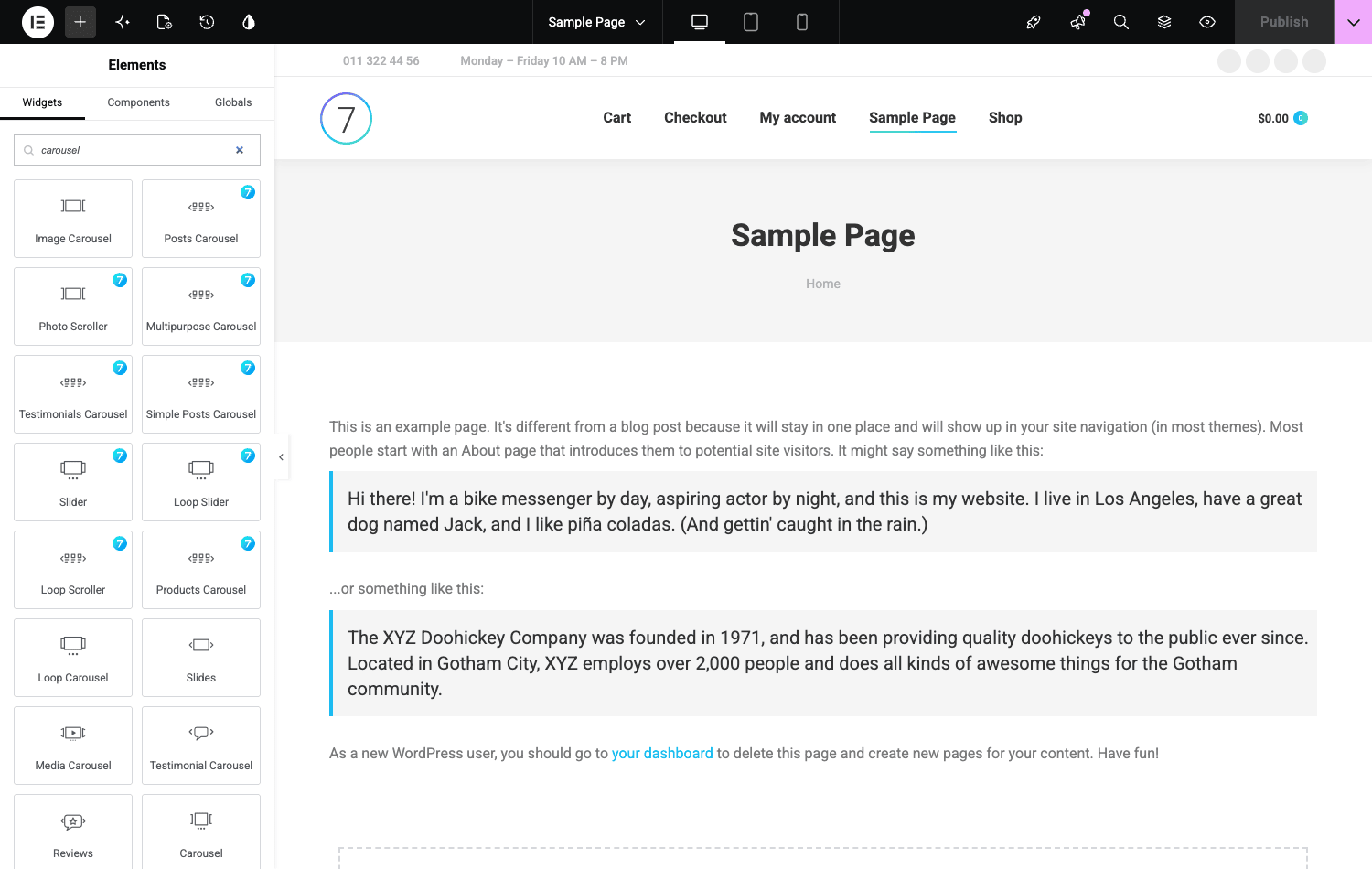
Those carousels and grid widgets are genuinely useful, the Posts Masonry & Grid and the various carousels do things Elementor’s free widgets don’t, and they inherit The7’s global styling automatically. Where this shines: you build with familiar Elementor mechanics but get design components tuned for portfolios, galleries, and content grids without buying a separate addon pack.
The bundled plugins are the other half of the toolkit story. The7 ships Slider Revolution and WPBakery (each sold separately for real money elsewhere) and offers a curated list of recommended plugins from its Recommended Plugins screen. That alone offsets a chunk of the theme’s price.
Global styling is where the "most customisable" claim earns it
The7 markets itself as the most customisable theme around, and the part that actually backs that up is its global design control. You set your typography (font families, sizes, line heights, and responsive scaling for desktop, tablet, and mobile separately), your color palette, your spacing, and your button styles once, in one place, and the entire site, including The7’s widgets and WooCommerce pages, inherits them. Change the brand color or the body font later and it cascades everywhere instead of forcing you to hunt through individual pages.
This is more powerful than it sounds, and it’s also the source of The7’s learning curve. There are a lot of global controls, far more than a focused theme, and a beginner who starts overriding things per-element instead of setting the globals will fight the theme constantly. Used the right way (globals first, overrides only when truly needed), it’s one of the cleaner global-styling systems in the multipurpose category. Used the wrong way, it’s the reason people call The7 fiddly. The depth is a feature; the discipline is on you.
A tour of the admin
The7’s admin lives under a single The7 menu, with the work split between Theme Settings, the builder you chose, and a Recommended Plugins screen.
The Recommended Plugins screen
This screen is where the "toolkit" claim becomes concrete. It lists around twenty plugins, some from The7’s own repository and some from WordPress.org, that you can install with one click:
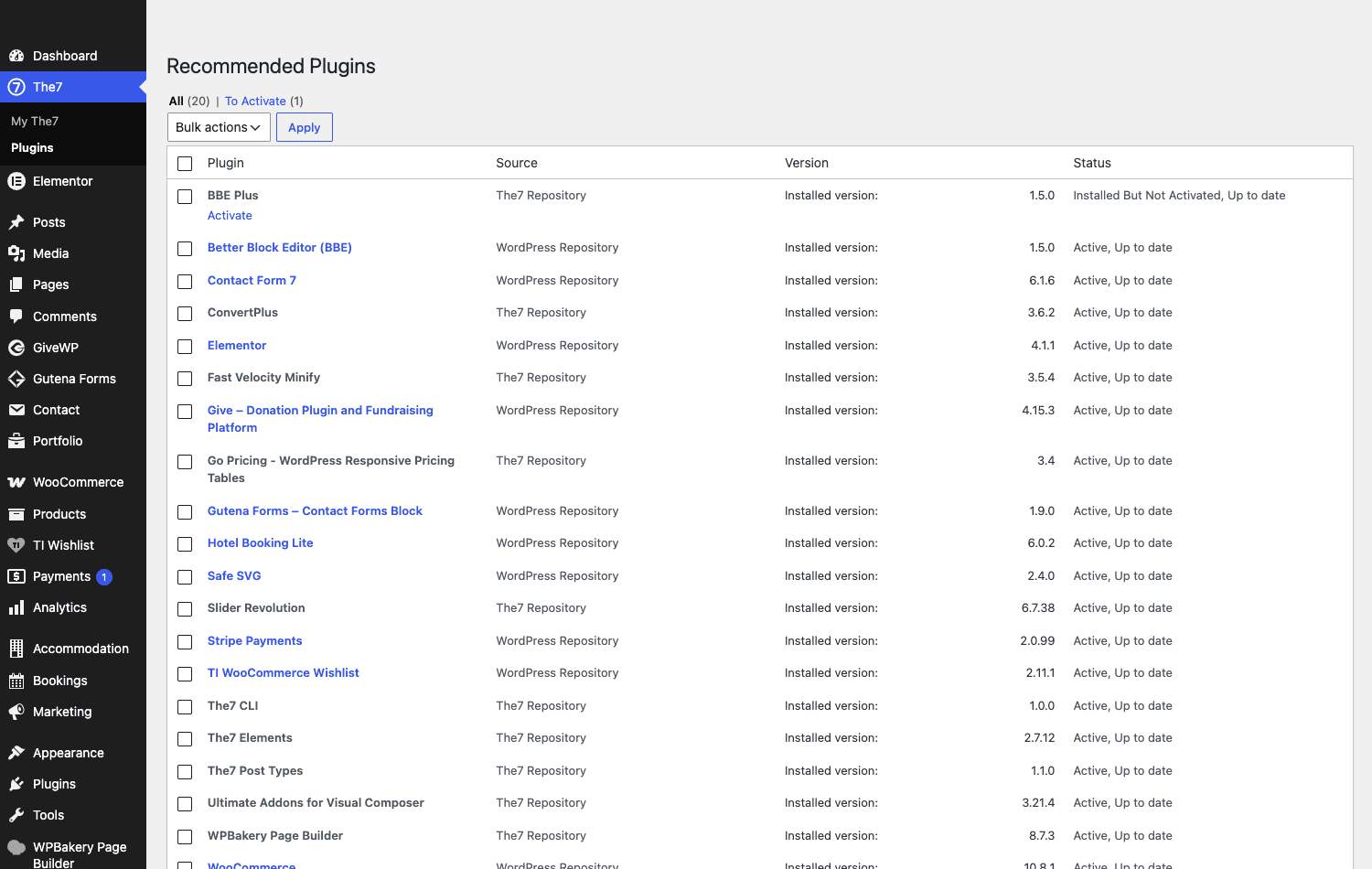
You’ll see Slider Revolution, ConvertPlus, Go Pricing tables, Give (donations), Contact Form 7, WooCommerce, a Better Block Editor add-on, Safe SVG, and more. You do not need all of these. Install only the ones a given project actually uses. Every active plugin is more code on every page load, and The7 already carries weight (more on that in the performance section). Treat this screen as a menu, not a shopping list.
Theme Settings and the builder
In Elementor mode, The7’s day-to-day design happens inside Elementor: the header and footer are built with The7’s header/footer system or Elementor’s Theme Builder, and global typography and colors are set once and inherited everywhere. The Theme Settings page itself stays focused: the builder choice, mega menu toggle, Elementor integration switches, and a set of legacy toggles for sites migrating from older versions.
The front end
Out of the box, before you import anything, The7 styles the whole site, header with a top bar, logo, clean navigation, and a footer:
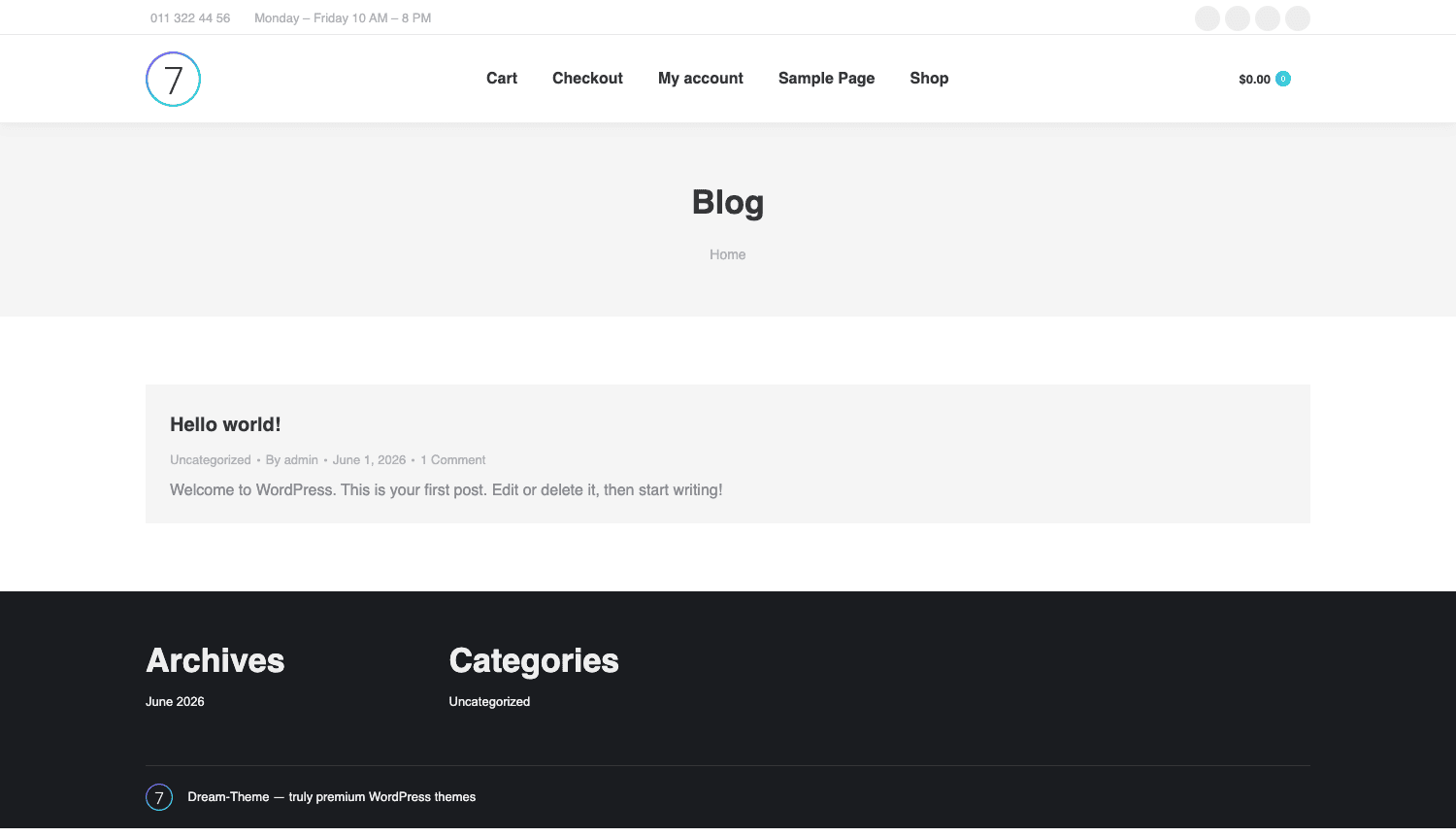
That’s the baseline. The real designs come from the pre-built websites (more on those next), but even the default styling is clean and modern rather than the dated look a lot of older multipurpose themes ship with.
Headers, footers, and the mega menu
The header is where a lot of multipurpose themes either give you three rigid presets or nothing at all. The7 takes the header seriously, and it’s worth its own section because it’s one of the features you’ll touch on every single build.
Out of the box you get a real header builder with a long list of layouts: classic left logo with a horizontal menu, centered logo, split menu, a side/vertical header, and overlay headers that sit transparently on top of a hero image and turn solid on scroll. Each layout has its own controls for height, sticky behavior, the top bar (that thin strip above the menu where you put a phone number, opening hours, or social icons), and a separate mobile header so the desktop and phone experiences don’t have to share one compromise. In Elementor mode you can also build the header as an Elementor template through the Theme Builder, which is the route I’d take when a client wants something genuinely custom.
The built-in mega menu is the other piece people underrate. You enable it from Theme Settings, then any top-level menu item can become a multi-column dropdown that holds widgets, images, and sub-menus rather than a plain list of links. For a shop or a content-heavy site, that’s the difference between a usable navigation and a wall of nested links. You don’t need a separate mega-menu plugin, which is one less thing to buy, update, and debug.
Footers follow the same pattern: a widgetized footer with column layouts, an optional "bottom bar" for copyright and secondary links, and the option to build the whole thing as an Elementor template instead. Note: if you switch to building your header or footer as an Elementor Theme Builder template, disable the theme’s built-in version for that slot so you don’t end up rendering two headers stacked on top of each other.
The reason all of this matters: header, footer, and navigation are the parts of a site that have to be consistent on every page, and they’re the parts clients ask to tweak most often. Having them as first-class, no-code controls (with a developer escape hatch into Elementor templates) is a genuine time-saver, not a checkbox feature.
Setting up The7 without drowning in options
The7 has a reputation for being overwhelming, and honestly, it can be if you open every panel at once. Here’s the order I’d actually do it in, which keeps you out of the weeds.
- Pick your builder first (Theme Settings » Optimize The7 for). Everything downstream depends on this. The7 » My The7 » Theme Settings.
- Install only the plugins you need from the Recommended Plugins screen. WooCommerce if you’re selling, Slider Revolution only if you’ll use sliders, Contact Form 7 if you want forms. Skip the rest.
- Or run the Design Wizard for a guided start. The7 includes a Design Wizard that walks you through the basics (colors, fonts, layout, header style) in a short guided flow instead of dropping you straight into the full options panel. If you find the depth intimidating, start here, it sets sane global defaults you can refine later, and it’s the most beginner-friendly on-ramp the theme offers.
- Import a pre-built website if you want a head start. The7 ships a library of pre-built sites you can import as a starting point. This is the fastest way to a finished-looking site, you import, then swap content and colors. (Heads-up: the pre-built site importer needs the theme registered with a valid purchase token, so on some builds you’ll be building from blank instead. That’s a licensing gate, not a missing feature.)
- Set global typography and colors once. In Elementor mode this lives in the Elementor Theme Style and The7’s global settings. Get your fonts and brand colors right here and every widget inherits them.
- Build your header and footer with the header builder or Elementor Theme Builder, then your pages.
Tip: resist the urge to tweak individual page styling before you’ve set the globals. Ninety percent of "The7 is so fiddly" frustration comes from people overriding things per-element that should have been set once globally.
Five sites I’d happily build on The7
Generic feature lists don’t help you decide if a theme fits your project. Here are five real site types and how The7 handles each, so you can find the one closest to yours.
A photography or design portfolio. This is The7’s home turf. The Portfolio custom post type, the Photo Scroller and gallery widgets, and the masonry grids are built for exactly this. You can have a filterable portfolio grid running in an afternoon, and the image handling (lazy load, retina) is solid.
A small business or corporate site. Import a corporate pre-built site, swap the copy and brand colors, wire up Contact Form 7, and you’ve got a professional five-pager fast. The mega menu handles a deeper site structure when the business grows.
A WooCommerce shop. The7 styles WooCommerce thoroughly and gives you product layout controls in the theme options. It’s not a dedicated shop theme the way WoodMart is, but for a shop that’s part of a larger content site, The7 covers it well without a second theme.
A one-page site or microsite. The7’s one-page mode, anchored navigation, and section-based layouts make landing pages and microsites straightforward, especially in Elementor mode where you’re dropping sections onto a canvas.
A blog or magazine. The Posts widgets (masonry, grid, carousel) plus The7’s typography control make for a genuinely good reading layout. If you mostly write, another multipurpose theme like Enfold is lighter, but The7 holds its own here.
The thread running through all five: The7 is a kit, not a single look. The same install becomes five very different sites depending on which widgets, pre-built site, and builder you lean on.
Don’t run two page builders at once
Here’s the mistake I see on inherited The7 sites more than any other, and it costs real performance and real sanity.
The7 supports Elementor and WPBakery. Some site owners, often after following two different tutorials, end up with both active, plus Slider Revolution, plus a couple of the recommended plugins they installed "to try." Now every front-end page request is loading the Elementor framework, the WPBakery framework, Slider Revolution’s assets, and The7’s own scripts, on top of WordPress and WooCommerce. The page weight balloons, the CSS and JS pile up, and your Core Web Vitals tank. I’ve seen The7 sites shipping well over a megabyte of CSS and JavaScript before a single image loads, almost all of it from running two builders that do the same job.
Pick one builder and commit. If you build in Elementor, you do not need WPBakery active, deactivate it. If you inherited a WPBakery site and you’re migrating, migrate fully rather than running both indefinitely. The same discipline applies to the bundled plugins: Slider Revolution is wonderful and also heavy, so only load it on the templates that actually use a slider, and lean on a caching and asset-optimization setup to defer what you can.
The fix costs you nothing but a decision. The cost of not deciding is a slow site, a confusing editing experience where the same page might open in two different builders, and a maintenance headache for whoever inherits the site after you. A multipurpose theme gives you options; running all the options at once is how you turn a flexible theme into a bloated one.
The7 theme vs Avada vs Divi
If you are comparing multipurpose themes, the Salient theme is worth a look too, another WPBakery-based flagship that leans hard into motion and portfolio design.
If you’re choosing a flagship multipurpose theme, you’re almost certainly weighing The7 against Avada and Divi. Here’s where they genuinely differ, with numbers instead of adjectives.
| The7 | Avada | Divi | |
|---|---|---|---|
| Page builder | Your choice: Elementor, WPBakery, or FSE | Fusion Builder (its own) | Divi Builder (its own) |
| Pricing model | Around $39 one-time (ThemeForest) | Around $69 one-time (ThemeForest) | $89/year or $249 lifetime (membership) |
| Pre-built sites | 40+ pre-built websites | 100+ prebuilt websites | 2,000+ premade layouts |
| Lock-in | Low (standard Elementor markup) | High (Fusion shortcodes) | High (Divi shortcodes) |
| Bundled premium plugins | WPBakery + Slider Revolution | Slider Revolution + others | None (Divi is self-contained) |
The honest read: Avada and Divi lock you into their own builders. (If avoiding that lock-in is your priority, BeTheme is another multipurpose theme worth comparing, since it lets you build with Elementor or WPBakery instead of a proprietary editor.) Build a site on Divi and your content is wrapped in Divi shortcodes; switch themes later and you inherit a mess of [et_pb_*] tags. The7’s biggest structural advantage is that in Elementor mode your content is standard Elementor markup, so you’re tied to Elementor (a separate, portable plugin) rather than to the theme. That matters for long-term flexibility.
On price, The7’s one-time ThemeForest license (around $39, roughly $30 less than Avada and far cheaper over time than Divi’s annual membership) is the cheapest entry of the three, and it includes WPBakery and Slider Revolution, which would cost real money bought separately. Divi wins on sheer layout count (thousands of premade layouts) and on its all-access membership if you run many sites. Avada is the most "all-in-one" feeling but also the most locked-in. If portability and price matter most, The7. If you want the biggest layout library and run a portfolio of sites, Divi. If you want one vendor for everything and don’t mind the lock-in, Avada.
Developer reference: hooks, CPTs, shortcodes
The7 is more developer-friendly than its ThemeForest pedigree suggests. The presscore framework exposes a couple hundred actions and filters, registers clean custom post types, and compiles a dynamic stylesheet you can hook into. If you’re new to extending themes, the WordPress theme developer handbook is the right companion to the hooks below. Here are the parts worth knowing.
Custom post types
The7 Elements registers these post types, so you can query and template them like any other content:
// Pull the 6 most recent portfolio items
$work = new WP_Query( array(
    'post_type'      => 'dt_portfolio',
    'posts_per_page' => 6,
) );

// Other The7 post types: dt_gallery, dt_team,
// dt_testimonials, dt_logos, dt_albums
Useful filters
The7 puts most of its template decisions behind presscore_* filters. A few I’ve actually reached for:
// Change which post types appear on author archive pages
add_filter( 'presscore_author_archive_post_types', function ( $types ) {
    $types[] = 'dt_portfolio';
    return $types;
} );

// Turn off the related-posts block on single posts
add_filter( 'presscore_display_related_posts', '__return_false' );
The breadcrumbs are filterable too, both the assembled parts and the final markup, which is handy when you want to inject a custom crumb or change the separator:
add_filter( 'presscore_breadcrumbs_parts', function ( $parts ) {
    // $parts is an ordered array of breadcrumb segments
    return $parts;
} );
The header and sidebar systems are filterable in the same spirit. presscore_get_header_elements_list controls which elements The7 assembles into the header, and the default sidebar (and footer sidebar) for a given context can be swapped programmatically, which is useful when a custom post type needs its own widget area:
// Force a specific sidebar on portfolio single views
add_filter( 'presscore_default_sidebar', function ( $sidebar ) {
    if ( is_singular( 'dt_portfolio' ) ) {
        return 'my-portfolio-sidebar';
    }
    return $sidebar;
} );

// Add a CSS class to the footer wrapper
add_filter( 'presscore_footer_html_class', function ( $classes ) {
    $classes[] = 'has-cta-band';
    return $classes;
} );
Even The7’s button markup is filterable through presscore_get_button_html, so a design system that needs every theme button to carry a tracking attribute or a specific class can do it in one place rather than hunting through templates.
The dynamic CSS engine
This is the one most developers miss. The7 compiles your theme-option choices (colors, spacing, typography) into a generated stylesheet rather than hardcoding them, and it exposes the variables through a filter before compilation:
add_filter( 'presscore_compiled_less_vars', function ( $vars ) {
    // Inject or override a design variable used in the compiled CSS
    $vars['accent-color'] = '#1a8fc4';
    return $vars;
} );
That means a child theme or a small snippet can change a global design token without touching the option panel, which is exactly what you want for version-controlled, repeatable builds.
Shortcodes
In WPBakery and legacy modes, The7 registers a set of dt_ shortcodes you can drop into content or templates: dt_fancy_title, dt_button, dt_fancy_separator, dt_accordion, dt_tabs / dt_tab, dt_toggle, dt_list / dt_list_item, dt_progress_bars, dt_social_icons, dt_quote, dt_highlight, and dt_contact_form, among others. In Elementor mode these mostly exist as widgets instead, but the shortcodes remain available for legacy content.
[dt_fancy_title title="Our Work" title_size="big" title_align="center"]
Meta box fields
If you’re extending The7’s per-post options, the meta box field rendering is filterable via the7_mb_field_before_html and the7_mb_field_after_html, so you can wrap or augment fields without editing core.
Performance, and where The7 gets heavy
No honest theme review skips this, and with The7 it’s the thing to watch most closely.
The7 is feature-dense, and features cost bytes. A clean Elementor-mode build with only the plugins you need performs fine on decent hosting. The trouble starts when the theme is used the way it’s marketed, everything on at once. Each builder, each bundled plugin, and Slider Revolution all add CSS and JavaScript to the front end. The single biggest lever you control is the "don’t run two builders" rule from earlier.
Here’s how to keep a The7 site fast:
- One builder only. This is worth repeating. It’s the difference between a reasonable page weight and a bloated one.
- Only the plugins you use. Audit the active plugin list. Deactivate Slider Revolution, WPBakery, and any recommended plugins you installed "to try" and aren’t using.
- A real caching and optimization setup. The7 plays nicely with caching plugins; page caching, plus CSS/JS minification and deferring unused assets, recovers a lot of the weight. Pair it with image optimization since portfolio sites are image-heavy by nature.
- Lean on The7’s own asset controls. The theme has options to disable features you’re not using, which stops their assets from loading.
Compatibility notes. The7 is WPML-compatible (genuinely useful if you’re going multilingual), works with WooCommerce, and supports the block editor with its FSE early-access mode. Its dual-builder support is the headline, but it also means more surface area for conflicts, so test your specific builder-plus-plugins combination on staging before launch. The theme is translation-ready and, per Dream-Theme, built to be mobile and SEO friendly.
Common problems and fixes:
- The site looks unstyled after activation. Usually The7 Elements isn’t active yet, or you haven’t picked a builder mode. Activate the companion plugin and set the builder in Theme Settings.
- Pre-built website import is greyed out or fails. The importer needs the theme registered with a valid purchase token. Without registration you build from blank, the theme still works fully, you just don’t get one-click demos.
- Pages open in the wrong builder. This is the two-builders problem. Standardize on one and deactivate the other.
- Slow back-end editing in Elementor. The7 plus Elementor plus a big page can be heavy in the editor on low-memory hosting. Raise the PHP memory limit and disable unused widgets.
Pricing and licensing
The7 is sold on ThemeForest under Envato’s standard model: a one-time Regular License (around $39) that includes the theme, The7 Elements, the bundled WPBakery and Slider Revolution, and six months of support (extendable). There’s no recurring theme subscription the way Divi has, which is part of why The7’s lifetime cost is low compared to membership-based competitors.
The catch with the Envato model is that pre-built demo imports and automatic theme updates are tied to registering your purchase token. That’s where the GPL distinction matters: a GPL copy gives you the full, functional theme and The7 Elements, but the pre-built website importer and the official auto-updater expect a registered Envato purchase.
The The7 package on GPL Times is the complete theme with The7 Elements, so you can install it, choose your builder, and try the widget library and theme options on a real site to see whether its approach fits how you work before committing.
FAQ
Do I need Elementor or WPBakery to use The7?
You need one of them (or the early-access FSE mode) to build pages the way the theme intends. The7 in Elementor mode is the modern, recommended path; Elementor’s free version is enough to start, and Elementor Pro adds the full Theme Builder. WPBakery (bundled) is the legacy path for older sites. You pick the builder in Theme Settings, and that choice drives everything else.
Is The7 good for beginners, or is it too complex?
Both can be true. If you open every panel at once, it’s overwhelming. If you follow a sane order, pick a builder, import a pre-built site, set global colors and fonts, then edit content, it’s very approachable. The complexity is opt-in: the depth is there when you need it and ignorable when you don’t.
Will The7 slow down my site?
It can if you run two builders and load every bundled plugin. A disciplined build (one builder, only the plugins you use, a caching and optimization setup) performs fine. The theme’s flexibility is the same thing that lets people accidentally bloat it, so the speed outcome is mostly in how you configure it.
Can I switch from WPBakery to Elementor later?
Not automatically. Content built in one builder doesn’t convert to the other, and the design control surface differs between modes. If you’re starting fresh, choose Elementor so you’re not migrating later. If you inherited a WPBakery site, plan a real migration rather than running both.
Does The7 work with WooCommerce?
Yes, thoroughly. It styles the shop, product, cart, and checkout pages and adds WooCommerce layout controls to the theme options. For a shop that’s part of a broader content site, The7 handles it well. For a store-first project, a dedicated shop theme may give you more commerce-specific features out of the box.
Is The7 compatible with the block editor and full site editing?
There’s a Native Full Site Editing mode, labelled early access. It’s The7’s direction of travel for the block era, but it’s less mature than the Elementor path today. If FSE is a hard requirement, test it carefully; if not, Elementor mode is the safer choice right now.
What custom post types does The7 add?
Through The7 Elements it registers Portfolio, Gallery, Team, Testimonials, Clients/Logos, and Albums, each with its own taxonomies. These are real post types you can query and template, not just shortcodes, which is good news for developers.
Is the GPL version fully functional?
The theme and The7 Elements are fully functional, you get every widget, post type, and option. What’s tied to Envato registration is the one-click pre-built website importer and the official auto-updater. You can still build any layout by hand; you just don’t get the demo-import shortcut without a registered purchase token.
How does The7 handle multilingual sites?
The7 is WPML-compatible, so you can run it with WPML for a fully translated site, including translated theme-option strings. That makes it a reasonable choice for agencies building multi-language sites.
Is The7 still worth it, or is it dated?
It’s actively developed, the Elementor integration and FSE early-access mode are recent directions, not a theme coasting on old sales. The dual-builder approach and the low one-time price keep it relevant. The main reason to look elsewhere is if you want a lighter, more focused theme and don’t need the toolkit breadth.
Final thoughts
I came into The7 expecting bloat and left respecting it. The thing it gets right, that most multipurpose themes get wrong, is that it doesn’t trap you in a proprietary builder. In Elementor mode your content stays portable, your design components are tuned for real layouts (portfolios, grids, carousels), and the one-time price quietly includes premium plugins that cost real money elsewhere.
It is not a lightweight theme, and it never will be. The same flexibility that lets you build any layout is what lets a careless setup balloon into a slow, two-builder mess. But that’s a configuration problem, not a theme problem, and it’s entirely avoidable: pick one builder, install only what you use, set your globals once, and lean on caching.
If you want a focused, minimal theme, The7 is overkill. If you build varied sites, value not being locked into one builder, and want a deep toolkit for a small one-time price, The7 earns its place near the top of the multipurpose pile. Years of dismissing it, and it turned out to be one of the more sensible big themes I’ve worked in.