

A vendor logs into your site at 7am, uploads three new products, sets a sale price on one, and ships an order that came in overnight. They never touch your WordPress admin. They never email you. At the end of the month their balance shows what they earned, minus your cut, and they request a payout to PayPal. You approve it with one click.
That whole loop, where other people run their own little shops inside your store and you take a commission, is what Dokan Pro is for. It sits on top of WooCommerce and the free Dokan plugin and turns a normal one-seller shop into a multivendor marketplace, the Amazon or Etsy shape, where the products, the orders, and most of the support are handled by sellers you never have to babysit.
I spent a good while inside a real Dokan install for this review, clicking through the admin, the 42 feature modules, the commission engine, and the front-end vendor dashboard that sellers actually live in. This is the honest version: what Dokan Pro does well, where it gets heavy, the parts that cost real money if you set them up wrong, and a full developer reference for the hooks and REST routes worth knowing.
Table of Contents
- What is Dokan Pro?
- How a multivendor marketplace actually works
- The 42 Dokan Pro modules, and which ones you actually turn on
- A tour of the admin and the vendor dashboard
- Commissions, withdrawals, and getting vendors paid
- Four marketplaces, four very different Dokan setups
- Don’t launch with auto-approve and a zero commission
- Dokan vs WC Vendors vs WCFM
- Developer reference: hooks, filters, REST, shortcodes
- Where Dokan gets heavy, and how to keep it fast
- Pricing and licensing
- FAQ
- Final thoughts
What is Dokan Pro?
Dokan Pro is a multivendor marketplace plugin for WordPress, built by weDevs (the same team behind WP User Frontend and a long list of other WordPress products). It does one big thing: it lets many independent sellers run storefronts on a single WooCommerce site, each with their own products, orders, earnings, and payout details, while you, the marketplace owner, take a commission and set the rules.
Here’s the part that trips people up on day one. Dokan comes in two pieces. There’s a free plugin on the WordPress.org repository, just called "Dokan," which gives you vendor registration, store pages, the front-end vendor dashboard, and basic commission and withdrawal. Then there’s Dokan Pro, the paid add-on, which layers on the 42 modules, advanced commission types, more payout gateways, reports, returns, vendor subscriptions, and the split-payment gateways that make a real marketplace work. Pro will not even activate without the free Dokan and WooCommerce installed first. Its plugin header literally lists woocommerce, dokan-lite as required plugins.
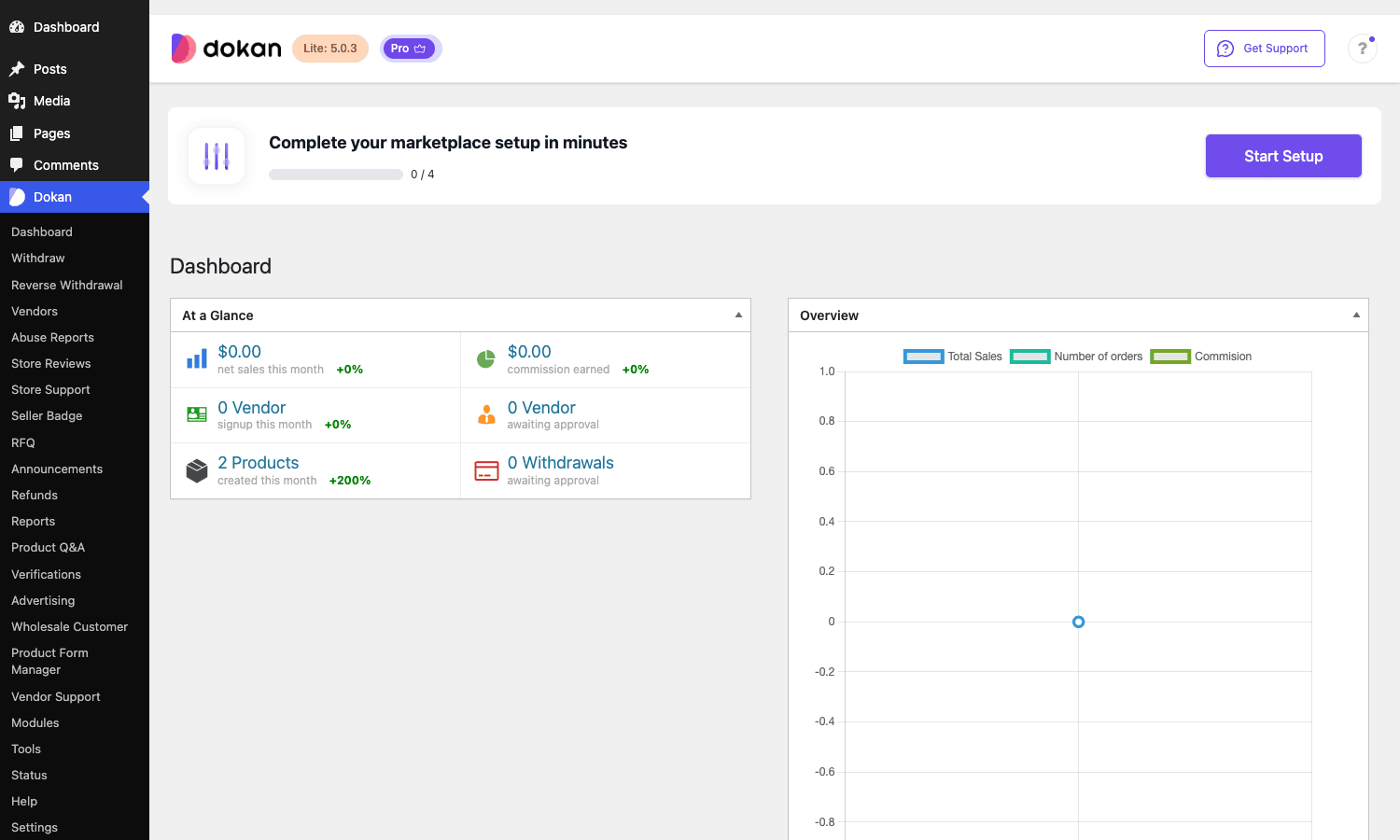
So the mental model is three layers stacked: WooCommerce handles the cart, checkout, and products. Free Dokan handles the "many vendors" structure. Dokan Pro handles everything that makes the marketplace profitable and pleasant to run. You’ll see this in the admin too, where the Dokan header shows a "Lite" badge next to a "Pro" badge. Both are doing work at the same time.
If you want to put it on a real site and click through every module yourself, Dokan Pro is available on GPL Times as the full download, which is what I used for this walkthrough. It pairs with the free Dokan from the repository and a working WooCommerce install.
How a multivendor marketplace actually works
Skip this section if you’ve run a marketplace before. If you haven’t, the next few hundred words will save you from a lot of confused settings later, because a marketplace is not just "a shop with extra users."
A single-vendor WooCommerce store has one owner. Every product belongs to that owner, every order pays that owner, and there’s one set of shipping and tax rules. A marketplace breaks every one of those assumptions:
- Products belong to vendors, not to you. When a vendor adds a product, it’s tagged with their seller ID. Your job shifts from "writing product pages" to "approving products and keeping the catalog clean."
- A single customer order can contain items from several vendors. Dokan splits that order into sub-orders behind the scenes, one per vendor, so each seller only sees and fulfils their own line items. The customer still checks out once.
- The money has to be divided. Each sub-order’s revenue is split between the vendor and you (the commission). That split can happen after the fact (the vendor’s balance grows, they request a payout) or at the moment of payment (the gateway sends each party their share instantly).
- Vendors need their own back office. They can’t have your WordPress admin. So Dokan gives every seller a front-end dashboard, a page on your site that looks nothing like wp-admin, where they manage products, orders, coupons, reports, and payout settings.
That fourth point is the heart of the whole product. The vendor dashboard is the surface most of your users will spend their time in, and it’s the thing you should judge a marketplace plugin on first. We’ll spend real time there below.
The money flow is worth saying out loud, because it drives half the settings in Dokan. By default, vendors collect the full order amount through your store’s gateway, and Dokan tracks what each vendor owes you (your commission) or what you owe them (their earnings). At payout time, the balance is settled. The alternative, which Dokan also supports through modules like Stripe Connect and PayPal Marketplace, is to split the payment at checkout so each party is paid instantly and you never hold anyone else’s money. Which one you pick has tax and liability consequences, and it’s not a decision to make casually. More on that in the anti-pattern section.
The 42 Dokan Pro modules, and which ones you actually turn on
The first thing that hits you in the Dokan Pro admin is the Modules page. It’s a grid of 42 toggles, each one a self-contained feature you can switch on or off. This is genuinely the best way the plugin could have been built, because nobody needs all 42. A handmade-crafts marketplace and a digital-downloads marketplace want completely different sets.
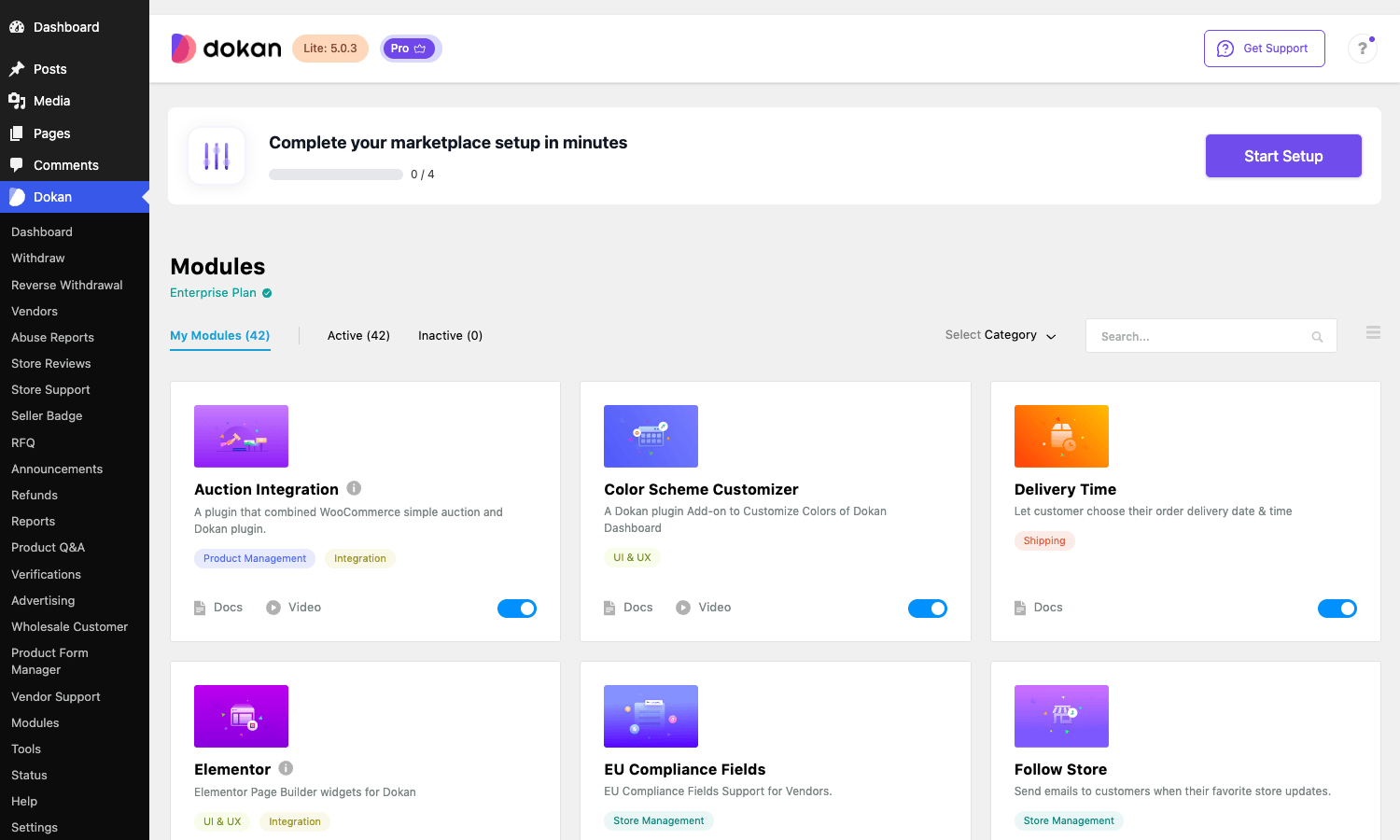
Switching a module off doesn’t just hide a menu. It stops that code from loading, which matters for performance on a busy site. So the right instinct is to turn on only what you’ll use. Here’s how I’d group the 42, with the ones I reach for first in bold.
| Group | Modules | When you turn them on |
|---|---|---|
| Split payments | Stripe Express, Stripe, PayPal Marketplace, MangoPay, Razorpay, Paystack | When you want vendors paid at checkout instead of holding their money |
| Vendor monetization | Vendor Subscription, Vendor Verification | When you charge sellers to list, or want verified-badge trust |
| Shipping and fulfilment | Table Rate Shipping, ShipStation, Printful, Delivery Time | When vendors ship physical goods with real shipping math |
| Selling models | Simple Auctions, Booking, Wholesale, Request for Quotation, Single Product Multiple Vendor | When the marketplace sells more than fixed-price products |
| Trust and support | Store Reviews, Store Support, Product Q&A, RMA (returns), Seller Badge, Follow Store, Report Abuse, Seller Vacation | When buyers need a reason to trust strangers’ shops |
| Discovery and store | Geolocation, Live Search, Vendor Analytics, Rank Math (store SEO), Color Scheme Customizer, Elementor | When you want shoppers to find the right vendor fast |
| Catalog power | Product Add-on, Product Advertising, Product Editor, Order Min/Max, Vendor Staff, Export/Import | When vendors need richer products or sub-accounts |
A few that deserve a callout because people miss them:
- Vendor Subscription is how you turn the marketplace itself into a recurring-revenue business. Instead of (or alongside) a per-sale commission, you sell vendors a "product pack," a subscription that lets them list up to N products for a monthly or yearly fee. The module exposes a
[dps_product_pack]shortcode for the pricing page. - RMA (Return Merchandise Authorization) gives vendors a real returns and warranty workflow, with its own conversation thread, refund handling, and coupon-as-refund option. If you sell physical goods, this is the difference between professional and amateur.
- Single Product Multiple Vendor (SPMV) lets several vendors sell the same catalog product (think a book or a branded item), with an "Other Available Vendor" box and a "Sell This Item" button on the product page. This is the Amazon "other sellers" pattern, and it’s a module a lot of people don’t realize Dokan has.
- Wholesale adds a B2B layer where approved customers see wholesale pricing. It pairs naturally with a WooCommerce wholesale plugin approach if you’ve read about that pattern before, except here it’s per-vendor.
Tip: turn modules on in small batches and look at your front-end after each one. A few modules add their own vendor-dashboard tabs and shortcodes, and it’s easier to spot a layout clash when you’ve only changed one thing.
A tour of the admin and the vendor dashboard
There are two completely separate interfaces in Dokan, and it’s worth understanding both because you’ll support both.
What you see: the admin side
Your Dokan admin lives under a single Dokan menu in wp-admin. The dashboard view (above) gives you the marketplace pulse: net sales this month, commission earned, vendor signups, vendors awaiting approval, and withdrawals awaiting approval, plus a sales/commission overview chart. The "Vendors awaiting approval" and "Withdrawals awaiting approval" counters are the two you’ll actually act on day to day.
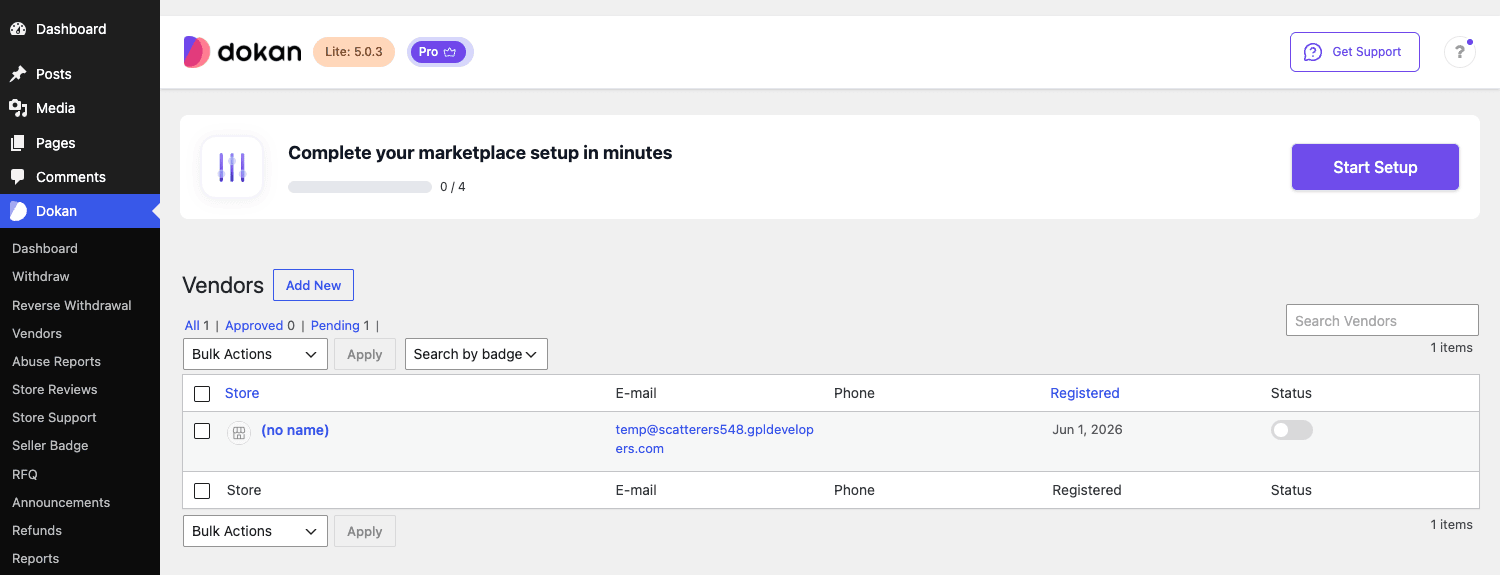
The Vendors screen is your roster. You can filter by All, Approved, or Pending, search by badge, bulk-action sellers, and toggle each vendor’s selling status on or off from the Status column. New vendors land here as Pending until you approve them, which is exactly where you want that gate to be.
The rest of the Dokan menu is the marketplace control panel: Withdraw and Reverse Withdrawal for payouts, Refunds for vendor refund requests, Reports for sales and commission breakdowns, Modules for the toggles, and then the per-module screens that appear once you enable them (RFQ, Store Reviews, Seller Badge, Product Q&A, Verifications, Advertising, Wholesale Customer, Vendor Support). Settings is where commission, withdrawal, page assignments, and store appearance get configured.
What vendors see: the front-end dashboard
Now the important half. Vendors get a front-end dashboard at a normal page on your site (Dokan creates it for you on install, usually at /dashboard/). It looks like a proper seller back office, not WordPress.
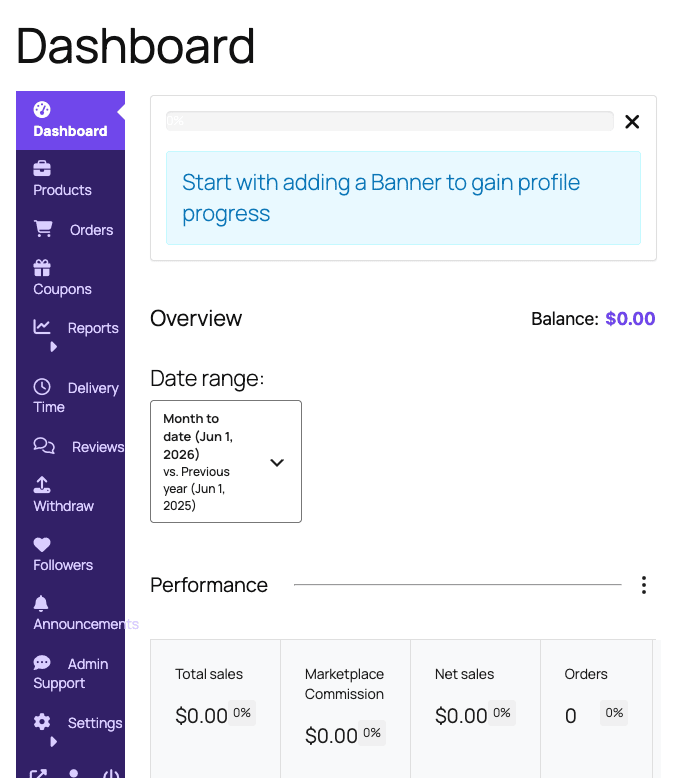
That left-hand navigation is the vendor’s whole world: Products, Orders, Coupons, Reports, Reviews, Withdraw, Followers, Settings, and then a stack of extra tabs that appear as you enable modules, Delivery Time, RMA, Store SEO, Verification, Shipping, Social Profile, Staff. The overview shows balance, a date-range comparison, and performance cards for total sales, marketplace commission, net sales, and order count.
This is the screen to obsess over, because a clunky vendor dashboard is the number one reason sellers abandon a marketplace. Dokan’s is one of the better ones in the WooCommerce world: it’s reasonably fast, it’s mobile-usable, and it doesn’t expose anything a vendor shouldn’t see. Heads-up: the vendor dashboard inherits some styling from your active theme, so test it against your real theme early. Dokan ships dedicated theme-support classes for popular themes including Flatsome and Enfold, which smooths out the dashboard layout on those builds, but a heavily customized theme can still need a few CSS nudges.
Commissions, withdrawals, and getting vendors paid
This is where a marketplace makes or loses money, so it gets its own section. Dokan’s commission engine is more flexible than most people expect, and the settings live under Dokan » Settings » Selling Options.
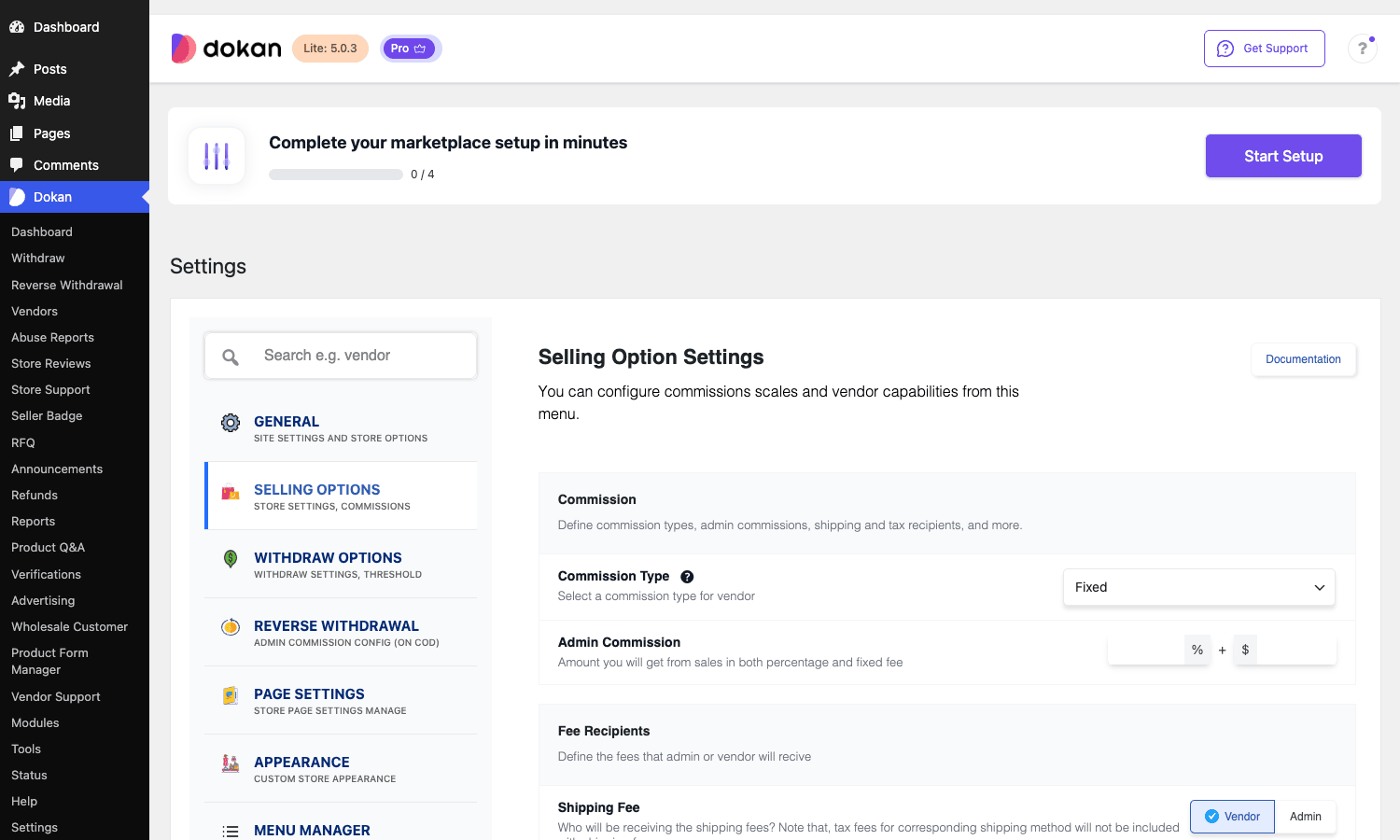
There are four commission types, and picking the right one is the single most consequential decision you’ll make:
- Percentage. You take a flat percent of each sale. Simple, scales with order value, the default most marketplaces use.
- Flat. A fixed amount per order regardless of value. Rare on its own, but useful for fixed-listing-fee models.
- Combine (fixed + percentage). You take a fixed amount plus a percentage. This is the one you want when small orders would otherwise leave you with pennies. The commission screen shows both a
%field and a$field side by side for exactly this. - Category-based. Different commission per product category. Electronics at 8%, handmade goods at 15%, that kind of thing. Set globally, then override per vendor or per product if you need to.
Commission can be set at four levels of increasing priority: global default, per-category, per-vendor, and per-product. The most specific one wins. That layering is powerful and also a place people confuse themselves, so write down your scheme before you start clicking.
The catch with fee recipients: the same Selling Options screen decides who receives the shipping fee and who receives the tax. Get this wrong and you’ll either eat shipping costs on every order or hand vendors money that should have covered tax. By default Dokan assigns shipping and tax to the vendor, which is usually right, but check it against your accountant’s expectations before launch.
Withdrawals: how vendors get their money out
Payouts are configured under Settings » Withdraw Options. You choose which methods vendors can use and set a minimum withdrawal threshold.
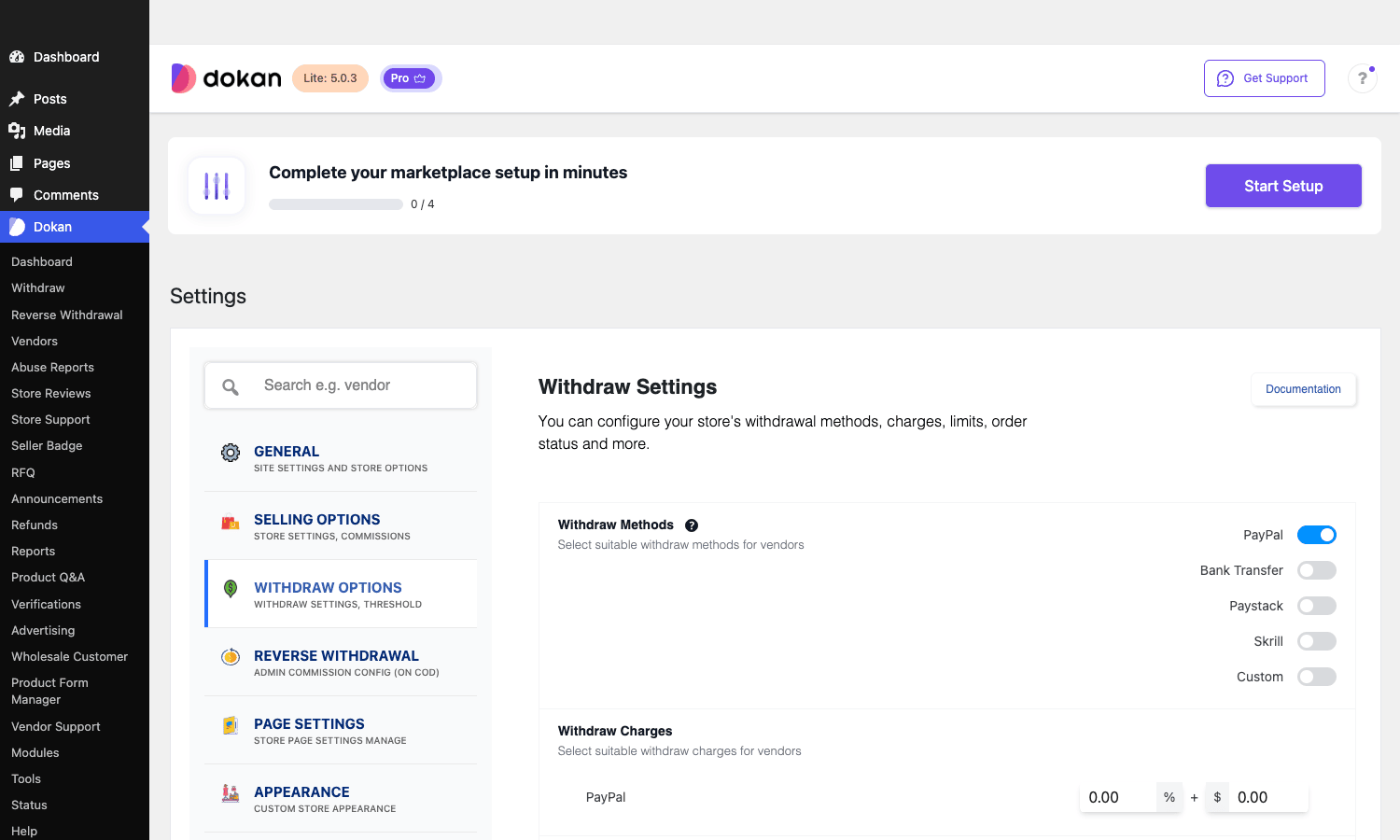
The core methods are PayPal, Bank Transfer, Skrill, and a Custom method, with more (Paystack, Stripe Express instant payout) appearing once you enable their modules. You can attach a withdrawal charge (a percentage and/or fixed fee) per method to cover transaction costs. Vendors request a withdrawal from their dashboard once they hit the threshold, and the request lands in your "Withdrawals awaiting approval" queue.
There’s also a feature people often overlook: Reverse Withdrawal. When a vendor collects payment directly (for example through their own gateway or cash on delivery), they owe you the commission rather than the other way around. Reverse Withdrawal tracks that debt and can suspend a vendor’s selling ability if their unpaid commission balance gets too high. If you allow vendor-side gateways or COD, turn this on, or you’ll be chasing commissions by email.
The cleaner model for most new marketplaces is split payments. Enable the Stripe Express or PayPal Marketplace module and each party is paid their share at checkout, so balances and manual payouts mostly disappear. The trade-off is that those gateways require vendor onboarding (each seller connects their own Stripe or PayPal account) and they’re not available in every country.
Four marketplaces, four very different Dokan setups
Generic feature lists don’t help you decide. So here are four marketplaces I’d actually build with Dokan, and the specific modules and settings each one needs. Find the one closest to yours.
If you run a local handmade-goods marketplace. Your sellers are individuals, not companies, and trust is everything. Turn on Store Reviews, Seller Badge, Vendor Verification, and Geolocation so shoppers can filter by "near me." Use percentage commission around 12 to 18 percent, manual product approval at first, and PayPal plus bank transfer for payouts. Skip the split-payment gateways early; you’ll want to hold funds until each new seller has proven they ship.
If you build a B2B / wholesale marketplace. Distributors selling to retailers. Enable Wholesale, Request for Quotation, and Order Min/Max so buyers can request quotes and meet minimum order quantities. Vendor Subscription makes sense here because B2B sellers will happily pay a monthly listing fee. Commission can be lower (5 to 8 percent) because order values are high. This is also where the per-category commission shines.
If you launch a digital-products marketplace. Templates, plugins, audio, courses. No shipping, so leave Table Rate Shipping and ShipStation off. Turn on Store Support and Product Q&A (digital buyers ask a lot of pre-sale questions) and lean on Stripe Express for instant split payouts, since there’s no fulfilment delay to justify holding funds. Vendor Verification still matters to keep pirated uploads out.
If you run a services / booking marketplace. Tutors, photographers, cleaners. The Booking module turns vendor products into bookable time slots, Delivery Time handles scheduling, and Store Support gives clients a channel before they book. Here the vendor dashboard’s calendar matters more than the catalog, so test the booking flow end to end on mobile before you let real vendors in.
The point of walking through these is that Dokan is not one product, it’s a kit. The same install becomes four very different businesses depending on which of the 42 modules you switch on. That flexibility is the reason it’s the default multivendor choice for so many sites, and also the reason a fresh install can feel overwhelming until you’ve decided what you’re actually building.
Don’t launch with auto-approve and a zero commission
Here’s the mistake I see most often, and it costs real money and real trust.
A new marketplace owner, eager to get sellers in, flips two settings without thinking. First, they auto-approve new vendors so anyone can register and sell instantly. Second, they set commission to zero to attract sellers.
Both are traps. Auto-approve means anyone, including bots and resellers of counterfeit goods, gets a live storefront on your domain the moment they register, and every vendor’s behaviour reflects on your brand and your payment processor. One vendor running card-testing fraud through your checkout can get your entire Stripe or PayPal account frozen, taking every honest vendor down with it. The "Vendors awaiting approval" queue exists precisely so you can eyeball each new seller. Use it, at least until you have automated verification in place.
The zero-commission trap is slower but just as damaging. Launch at 0% and you’ve trained your whole vendor base to expect free. Raising it later feels like a price increase, and vendors leave. Worse, with the wrong fee-recipient settings, a 0% commission combined with vendor-assigned shipping can mean you’re actually losing money on payment-processing fees for every order, because the gateway takes its cut from a transaction you earn nothing on. Decide your commission with a spreadsheet: model your average order value, subtract the gateway’s roughly 2.9% plus 30 cents, and make sure your percentage clears that with margin. Start at a sustainable number and offer time-limited promotions to early sellers instead of a permanent zero.
The fix for both is the same: treat your first fifty vendors as a curated group you approve by hand, and set a commission you can live with for years. You can automate and discount later; you can’t easily un-freeze a payment processor or claw back a reputation.
Dokan vs WC Vendors vs WCFM
On the theme side, the REHub theme is built to pair with Dokan and WCFM, layering affiliate offers, comparison tables, and a review system on top of the marketplace.
The three names you’ll compare are Dokan, WC Vendors Pro, and WCFM Marketplace. All three sit on WooCommerce. Here’s where they genuinely differ, with numbers rather than adjectives.
| Dokan Pro | WC Vendors Pro | WCFM (Ultimate) | |
|---|---|---|---|
| Add-on modules | 42 toggleable modules | ~10 add-ons (sold separately) | Many features bundled, fewer toggles |
| Commission types | 4 (percentage, flat, combine, category) | 3 (global, per-vendor, per-product) | Several, including per-store and gateway-fee modes |
| Split-payment gateways | 6 (Stripe, Stripe Express, PayPal Marketplace, MangoPay, Razorpay, Paystack) | Stripe Connect (add-on) | Stripe / PayPal (in higher tiers) |
| Entry price | around $149/year | around $199/year | free core, paid add-ons stack up |
| Vendor dashboard | Polished front-end, modern SPA admin | Functional, lighter | Very feature-dense, busier UI |
The honest summary: WCFM packs the most into its free core and feels like the "power user" option, but its vendor dashboard is busy and can overwhelm non-technical sellers. WC Vendors is the leanest and cheapest to start, with a clean codebase, but you’ll buy add-ons for things Dokan includes, and its split-payment story is thinner. Dokan sits in the middle on price and ahead on polish: the module system means you only load what you need, the vendor dashboard is the most approachable of the three, and the six split-payment gateways are the widest spread. If your sellers are non-technical and your marketplace is your main business, Dokan’s extra cost over WC Vendors (roughly $50 a year at entry) buys a dashboard your vendors won’t hate. If you’re a developer who wants everything bundled and doesn’t mind a denser UI, WCFM is worth a serious look.
Developer reference: hooks, filters, REST, shortcodes
Dokan is one of the more extensible WordPress products out there. The Pro plugin alone fires over 540 distinct actions and exposes over 590 filters, on top of everything free Dokan and WooCommerce give you. You will not run out of extension points. Here are the ones worth knowing, with realistic examples.
Adjust commission programmatically
The dokan_get_seller_percentage filter lets you change a vendor’s commission on the fly, which is how you’d build "new vendors pay 20% for their first 90 days, then drop to 12%."
add_filter( 'dokan_get_seller_percentage', 'mp_new_vendor_intro_commission', 20, 3 );

function mp_new_vendor_intro_commission( $percentage, $vendor_id, $product_id ) {
    $joined = strtotime( get_the_author_meta( 'user_registered', $vendor_id ) );

    // First 90 days: keep more commission.
    if ( $joined && ( time() - $joined ) < ( 90 * DAY_IN_SECONDS ) ) {
        return 20;
    }

    return $percentage;
}
Register a custom payout method
The dokan_withdraw_methods filter is how modules like Stripe Express add themselves to the withdrawal screen. You can register your own (a local payment rail, say) the same way.
add_filter( 'dokan_withdraw_methods', 'mp_register_payoneer_method' );

function mp_register_payoneer_method( $methods ) {
    $methods['payoneer'] = array(
        'title'    => __( 'Payoneer', 'my-marketplace' ),
        'callback' => 'mp_render_payoneer_fields',
    );

    return $methods;
}
Gate who can add products
dokan_can_add_product gates product creation. Note the contract: the filter receives an $errors array, not a boolean. You block a product by appending a message to that array and returning it, which is how the Vendor Subscription module enforces "you’ve hit your plan’s product limit."
add_filter( 'dokan_can_add_product', 'mp_limit_free_tier_products' );

function mp_limit_free_tier_products( $errors ) {
    $vendor_id     = dokan_get_current_user_id();
    $product_count = count_user_posts( $vendor_id, 'product', true );

    if ( ! mp_vendor_has_paid_plan( $vendor_id ) && $product_count >= 10 ) {
        $errors[] = __( 'Free vendors are limited to 10 products. Upgrade to add more.', 'my-marketplace' );
    }

    return $errors; // A non-empty array stops the product from being created.
}
Add a custom tab to the vendor dashboard
dokan_get_dashboard_nav controls the front-end vendor navigation. Adding a tab is a two-step pattern: register the nav item, then hook content onto its endpoint.
add_filter( 'dokan_get_dashboard_nav', 'mp_add_payouts_tab' );

function mp_add_payouts_tab( $urls ) {
    $urls['mp-payouts'] = array(
        'title' => __( 'Payout history', 'my-marketplace' ),
        'icon'  => '<i class="fas fa-receipt"></i>',
        'url'   => dokan_get_navigation_url( 'mp-payouts' ),
        'pos'   => 75,
    );

    return $urls;
}
React to vendor and product lifecycle events
A few actions are worth wiring into your CRM or moderation flow:
// New seller registered: push to your onboarding sequence.
add_action( 'dokan_new_seller_created', function ( $vendor_id, $data ) {
    mp_send_to_crm( $vendor_id, 'vendor_signup' );
}, 10, 2 );

// New product submitted: queue pending products for human review.
// Signature is ( $product_id, $data ), where $data is the posted product array.
add_action( 'dokan_new_product_added', function ( $product_id, $data ) {
    if ( 'pending' === get_post_status( $product_id ) ) {
        mp_notify_moderators( $product_id );
    }
}, 10, 2 );
For pricing across regions, dokan_adjust_non_base_location_prices lets you control whether vendor prices are adjusted for non-base store locations, which matters if you run a multi-region marketplace.
The REST API
Dokan ships a full REST API under the dokan/v1 and dokan/v2 namespaces (the modern admin dashboard itself is a JavaScript single-page app built on it). You get endpoints for stores, products, orders, withdrawals, reviews, and more, which is exactly what a custom mobile app or an external inventory sync would talk to.
# List all approved stores
curl https://example.com/wp-json/dokan/v1/stores

# A single store's products
curl https://example.com/wp-json/dokan/v1/stores/42/products
Authenticated write operations use the same WooCommerce-style authentication (cookie + nonce for logged-in dashboard calls, or API keys / OAuth for external clients).
Shortcodes
Free Dokan registers the structural shortcodes you build pages with: [dokan-dashboard] renders the entire vendor dashboard, [dokan-stores] outputs the store-listing grid, and [dokan-my-orders], [dokan-best-selling-product], and [dokan-top-rated-product] cover the customer-facing widgets. Pro modules add their own, including [dokan-request-quote] for the RFQ form, [dokan-live-chat] for the chat widget, [dps_product_pack] for the vendor subscription pricing page, and [dokan-geolocation-filter-form] for the location filter. You rarely need to place these by hand (Dokan creates the core pages on install), but they’re there when you build a custom layout.
Where Dokan gets heavy, and how to keep it fast
No review is honest without the rough edges. Dokan is a big plugin doing a lot, and on a busy marketplace that shows up in a few specific places. Here’s what to watch and how to fix it.
The vendor count is what scales, not the product count. WooCommerce handles tens of thousands of products fine. The thing that gets heavy in Dokan is concurrent vendor dashboard activity, because each dashboard load runs report queries scoped to that seller. If you expect hundreds of vendors logged in at once, put the database on something that can take it and add object caching (Redis) early. This is not a "throw a cache plugin at it" fix; vendor dashboards are logged-in pages and won’t be page-cached.
Turn off modules you don’t use. I said it above, it bears repeating. Every active module loads code on every request. A digital marketplace running with Booking, Table Rate Shipping, and ShipStation enabled "just in case" is paying a tax for nothing. Audit the Modules page quarterly.
Email volume sneaks up on you. Dokan sends a lot of transactional email: new order to vendor, new order to admin, vendor registration, withdrawal status, RMA updates, product status changes. On a marketplace with real volume, the default PHP mail will get you marked as spam fast. Set up a proper SMTP or transactional email service from day one.
Common problems and their fixes:
- The vendor dashboard 404s or shows a blank page. Almost always a permalink or page-assignment issue. Go to Settings » Permalinks and re-save, then check Dokan » Settings » Page Settings to confirm the Dashboard, Store Listing, and My Orders pages are assigned.
- "Your account is not enabled for selling." The user isn’t an approved vendor. Approve them in Dokan » Vendors, or check that their selling status toggle is on.
- Vendor products don’t show on the storefront. Check whether new products require admin approval (Selling Options) and whether the vendor’s store is approved. A pending vendor’s products stay hidden.
- Split-payment gateway won’t connect. Stripe Express and PayPal Marketplace need the vendor to complete onboarding and require your platform account to be approved for marketplace payouts in that country. This is a gateway-side requirement, not a Dokan bug.
- Fatal error on activation. Almost always the load order: WooCommerce and free Dokan must be active before Dokan Pro. If you see a white screen after activating Pro, deactivate it, confirm the other two are live, then reactivate.
Compatibility notes. Dokan supports WooCommerce’s High-Performance Order Storage (HPOS), works on multisite, and plays well with most page builders for the storefront (the vendor dashboard is template-driven, not builder-driven). It does not love being run alongside a second multivendor plugin, for obvious reasons, and heavy checkout-customization plugins can clash with order splitting, so test your checkout flow after adding anything that touches the cart.
Pricing and licensing
Dokan Pro is sold as an annual subscription with tiers that unlock more modules as you go up:
- Starter (around $149/year): the core marketplace plus a basic module set. Fine for a small, single-model marketplace.
- Professional (around $249/year): adds more modules, including several payment gateways and selling models. This is where most real marketplaces start.
- Business (around $499/year): the full module set including the advanced gateways, vendor staff, and the selling-model modules (auctions, booking, wholesale). More site activations.
- Enterprise (around $999/year): everything, with the highest activation count and priority support, aimed at agencies and large operators.
Prices shift over time and most tiers are billed annually with a renewal discount. The free Dokan plugin on WordPress.org is genuinely usable for a hobby marketplace, but the moment you want real commission control, more than basic payouts, or any of the selling-model modules, you’re into Pro.
The Dokan Pro download on GPL Times bundles the full Pro module set, so you can switch on auction selling or vendor subscriptions and see exactly how they behave on a real WordPress install before you commit to a marketplace model. It pairs with the free Dokan from the repository and your existing WooCommerce store.
FAQ
Do I need WooCommerce and the free Dokan plugin, or just Dokan Pro?
You need all three. Dokan Pro is an add-on that won’t activate without WooCommerce and the free Dokan installed and active first. Install WooCommerce, then free Dokan, then Dokan Pro, in that order. Activating Pro on its own throws a fatal error.
How do vendors actually get paid?
Two models. In the default model, the order is paid through your store’s gateway, Dokan tracks each vendor’s earnings minus commission, and vendors request a payout (PayPal, bank transfer, Skrill, Paystack) once they hit your minimum threshold. In the split-payment model (Stripe Express or PayPal Marketplace module), each party is paid their share automatically at checkout. Split payments are cleaner for liability but require per-vendor gateway onboarding and aren’t available everywhere.
Can a single customer order contain products from multiple vendors?
Yes, and this is core to how Dokan works. The customer checks out once, and Dokan splits the order into sub-orders behind the scenes, one per vendor, so each seller sees and ships only their own items. Each sub-order is commissioned separately.
How many vendors and products can Dokan handle?
Product count is rarely the bottleneck; WooCommerce scales to tens of thousands of products. The thing that scales is concurrent vendor dashboard activity, because each dashboard runs seller-scoped report queries that can’t be page-cached. Hundreds of vendors is fine on decent hosting with object caching (Redis); thousands of simultaneously active sellers means you should plan your database and caching seriously.
Does Dokan support recurring vendor fees instead of per-sale commission?
Yes, through the Vendor Subscription module. You sell vendors a "product pack," a subscription that grants listing rights (often with a product-count limit) for a monthly or yearly fee. You can run subscription-only, commission-only, or both together.
Can vendors offer their own shipping rates?
Yes. With the Table Rate Shipping module, each vendor sets their own shipping zones and rates, and Dokan calculates the correct shipping per vendor in a mixed-vendor cart. The ShipStation module adds label printing and tracking for vendors who fulfil at volume.
What happens to a vendor’s products if they leave or get suspended?
Suspending a vendor (toggling their selling status off, or via Reverse Withdrawal if they owe too much commission) hides their products from the storefront but doesn’t delete them. You decide whether to reassign, hide, or remove the catalog. There’s no automatic transfer of one vendor’s products to another.
Does Dokan work with my theme and page builder?
The storefront and store pages work with most themes and builders. The vendor dashboard is template-driven rather than builder-driven, and it inherits some styling from your theme, so test it against your real theme early. Dokan ships dedicated support for several popular themes (Flatsome, Enfold, Storefront among them), which reduces the CSS tweaking you’ll need. If you’d rather start from a theme built around a Dokan marketplace instead of adapting a general one, the Martfury theme ships dedicated Dokan store-header and vendor templates out of the box.
Is the free Dokan enough to launch a marketplace?
For a hobby or proof-of-concept, yes: it gives you vendor registration, the dashboard, store pages, and basic commission and payout. For a real business you’ll quickly want Pro, specifically for commission flexibility, more payout methods, returns (RMA), reports, and any of the selling-model modules. The free version is a genuine trial, not crippleware, which is rarer than it sounds.
Can I take a different commission for different product categories?
Yes. Set the commission type to Category-based and assign a percentage per category. You can layer per-vendor and per-product overrides on top, with the most specific setting winning.
Final thoughts
Dokan Pro is the multivendor plugin I’d reach for first if a client asked me to build a marketplace tomorrow, and it’s not a close call for most situations. The 42-module system means you only carry the weight you actually use, the commission engine is flexible enough for almost any business model, the six split-payment gateways cover more of the world than the competition, and the vendor dashboard, the thing your sellers live in, is the most approachable in the WooCommerce world.
It’s not the cheapest, and it’s not the lightest. A small marketplace with simple needs and a developer on hand might be perfectly happy on WC Vendors. A power user who wants everything bundled into the free core might prefer WCFM. But for the common case, a non-technical marketplace owner who needs sellers to manage themselves and wants the option to grow into auctions, bookings, wholesale, or subscriptions later, Dokan hits the sweet spot.
The biggest risk with Dokan isn’t the plugin, it’s the operator. Turn on too many modules, auto-approve every vendor, or set a commission you can’t sustain, and you’ll have a slow, fraud-prone marketplace that loses money. Treat it like the kit it is, switch on only what you need, curate your first vendors by hand, and model your commission before you launch, and Dokan gives you a marketplace that can genuinely run itself.