


Conventional wisdom says multipurpose WooCommerce themes are bloated. Hundreds of options, a dozen sliders you’ll never use, a page builder bolted onto another page builder, and a PageSpeed score that makes Google wince. For most "do everything" themes, that reputation is earned.
WoodMart is the one I keep coming back to anyway, because it spent real engineering effort on the thing that usually gets ignored: it only loads the CSS and JavaScript for the elements a page actually uses. So you get the kitchen-sink feature set (a visual Header Builder, 80-plus prebuilt stores, AJAX everything) without automatically paying the kitchen-sink performance tax. I spent a day living in the WoodMart theme on a sandbox, poking every panel, and this is the honest, thorough review: what it does brilliantly, where it’ll trip you up, the one dependency nobody warns you about, and whether it’s the right foundation for your store.
Table of Contents
- What is the WoodMart theme?
- Setting up your first WoodMart store
- Why a theme this big doesn’t have to be slow
- The dashboard and Theme Settings
- The Header Builder
- Prebuilt websites: 80+ one-click stores
- Page builder freedom: Elementor and WPBakery
- The WooCommerce features that matter
- Beyond the shop: the WoodMart Core toolkit
- Who WoodMart is for
- Don’t do this: WoodMart setup mistakes
- WoodMart vs the alternatives
- Developer reference: hooks, child theme, options API
- Troubleshooting common WoodMart issues
- Performance, compatibility, and gotchas
- Pricing and licensing
- FAQ
- Final thoughts
What is the WoodMart theme?
WoodMart is a premium multipurpose WooCommerce theme by XTemos, and one of the best-selling WordPress themes of its kind. It’s built specifically for online stores: catalogs, single-product pages, cart and checkout, filters, and the dozens of small shop interactions that turn a browser into a buyer. But it’s grown well past "a theme" into something closer to a full site-building toolkit.
Out of the box you get a visual drag-and-drop Header Builder, more than 80 one-click prebuilt websites, native support for both Elementor and WPBakery page builders with 80-plus of WoodMart’s own elements, and a deep WooCommerce feature set (AJAX shop, product filters, wishlist, compare, quick view, swatches, size guides). It pairs the theme with a companion plugin, WoodMart Core, that supplies the custom content types, page-builder elements, and the demo importer.
That companion plugin is the first thing to understand, because it’s also the first thing that catches people out. WoodMart needs WoodMart Core installed and active to do most of what it advertises; the theme alone gives you styling, but the elements, prebuilt sites, sliders, and HTML blocks all live in Core. We’ll come back to that.
The short version: WoodMart is aimed at anyone who wants to build a polished, fast WooCommerce store without hiring a developer, while still leaving the door wide open for one. You can get the WoodMart theme from GPL Times and have it running on a staging site in a few minutes.
Setting up your first WoodMart store
Before the deep dive, here’s the realistic first hour, because the order you do things in matters with WoodMart.
- Upload and activate the theme. Go to Appearance » Themes » Add New » Upload Theme, upload the WoodMart zip, and activate. (Upload the child theme too, but keep the parent active for now if you’re following the standard flow.)
- Install WoodMart Core when prompted. The theme immediately shows a notice to install plugins through its setup wizard. Only two are truly required, WoodMart Core and your page builder (Elementor or WPBakery); WooCommerce, Contact Form 7, and a few helpers are recommended rather than forced (the theme can run as a non-shop site). Install WoodMart Core first, nothing else works without it, then WooCommerce if you’re building a store, then your page builder.
- Run the setup wizard or pick a prebuilt site. On a fresh install, head to WoodMart » Prebuilt websites, choose the demo closest to your niche, and import it. This pulls in pages, the homepage, theme options, menus, widgets, and sample products so you start from a designed store, not a blank one.
- Swap in your branding. Replace the logo (the dashboard even links you straight to the logo setting in the Header Builder), set your colors and fonts under Styles and colors and Typography, and adjust the header layout.
- Replace the demo content with yours. Delete the sample products and pages you don’t need, add your real catalog, and rewrite the copy. The demo is scaffolding, not your final site.
- Tune the shop. Visit Theme Settings » Shop and » Single product to set your product grid, enable the interactions you want (quick view, wishlist, swatches), and pick a product-page layout.
Note: the whole sequence assumes a fresh or staging install. If you’re adding WoodMart to an existing store with real products, skip the demo import (it overwrites options and adds content) and build your pages manually instead. More on that in the mistakes section.
That’s genuinely it for a basic store, an afternoon, no code. The rest of this review is what you reach for as you grow past the basics.
Why a theme this big doesn’t have to be slow
This is the section that changed my mind about WoodMart, so let’s start here rather than burying it.
Most multipurpose themes load one giant stylesheet and one giant script bundle on every page, because they don’t know in advance which of their hundred elements you’ll use. That’s the source of the "bloated theme" reputation: a simple blog post drags in the CSS for a product carousel it never shows.
WoodMart takes a different approach with what it calls modular, per-element CSS. The theme splits its styles into many small files and only enqueues the ones for elements that actually appear on the page being viewed. A product page loads product styles; a blog post doesn’t. It pairs that with native lazy loading for images and background images, a dedicated mobile-optimization layer, font optimization, and first-class integration with caching plugins like WP Rocket.
Where this matters: it means you can use WoodMart’s big feature set without the usual penalty. You still have to be sensible (a homepage stuffed with twelve carousels will be heavy no matter what), but the theme isn’t fighting you on performance the way many of its rivals do. After years of "multipurpose equals slow," that’s a genuine shift, and it’s the strongest single argument for picking WoodMart over a lighter theme you’d have to extend yourself.
The dashboard and Theme Settings
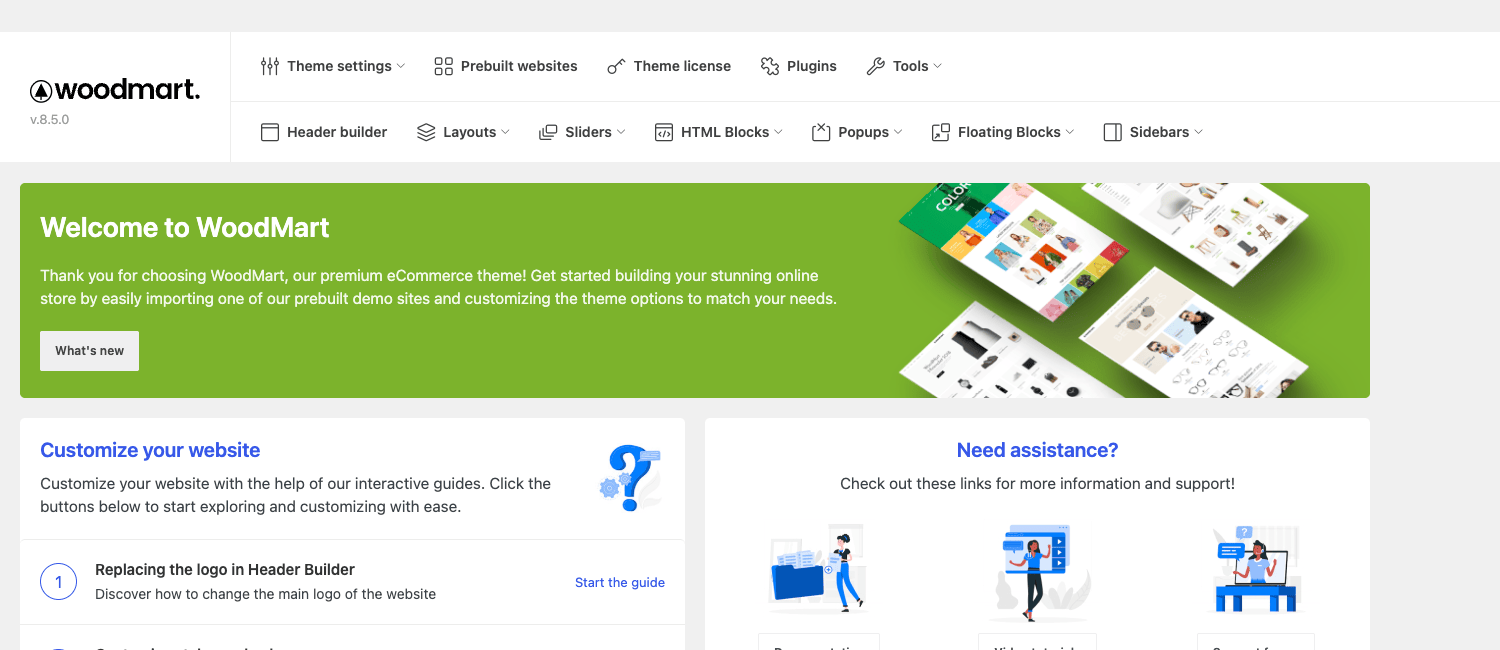
Everything starts at the WoodMart dashboard, the control center that XTemos drops into your admin. It’s where you reach Theme Settings, the Header Builder, prebuilt websites, presets, the license, the patcher (theme updates), and the status panel.
The real depth is in Theme Settings, a single panel with a searchable options box and a sidebar of grouped settings. There are a lot of them, and that’s the point: nearly everything is controllable without code.
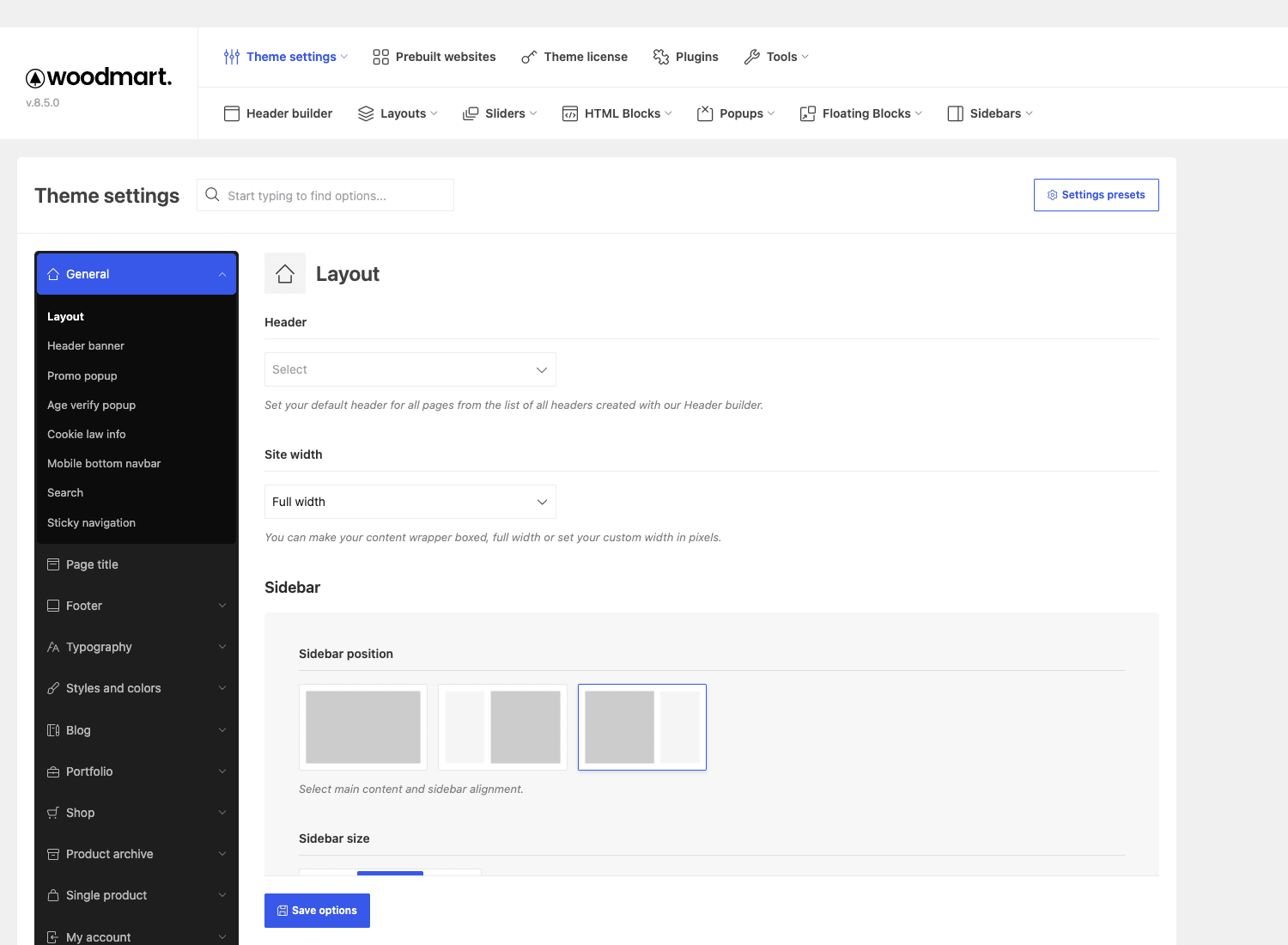
The groups worth knowing:
- General covers layout (boxed/full-width), the header banner, promo and age-verification popups, cookie-law notice, the mobile bottom navbar, search behaviour, and sticky navigation.
- Typography and Styles and colors drive the whole site’s fonts and palette from one place, with presets so you can save and switch entire looks.
- Shop and Product archive control the catalog: grid vs list, products per row, the AJAX behaviour, hover effects, and the filter widgets.
- Single product controls the product-page layout and design, the gallery, sticky add-to-cart, and the extra tabs.
- Blog, Portfolio, Page title, Footer, and a heavy Mobile group round it out, the mobile section alone has dozens of options, which tells you how seriously the theme takes phone shoppers.
A couple of these groups punch above their weight. The Mobile group is unusually deep, you can set an entirely different layout, a mobile bottom navigation bar (the app-style tab bar shoppers expect on phones), and mobile-specific header behaviour, rather than just hoping the desktop design squashes down gracefully. The Page title group controls the breadcrumb bar at the top of every page type independently, so your shop archive and your blog can have different title areas. And the Promo popup, Age verify popup, and Cookie law info options under General mean three things you’d normally bolt on with plugins are already in the theme.
The presets system deserves a mention too: you can save a complete set of styles and colors as a named preset and switch the whole site’s look in one click, which is how agencies keep a house style across builds.
Tip: use the search box at the top of Theme Settings. With this many options, hunting through the sidebar is slow; typing "sticky" or "swatch" jumps you straight there. And before you experiment, note that WoodMart keeps automatic backups of your settings (under the Backup tab), so you can roll back a bad change.
The Header Builder
If one feature sells WoodMart, it’s the Header Builder. Instead of picking from a handful of preset header styles, you assemble your header from elements on a visual grid, the way you’d build a page.
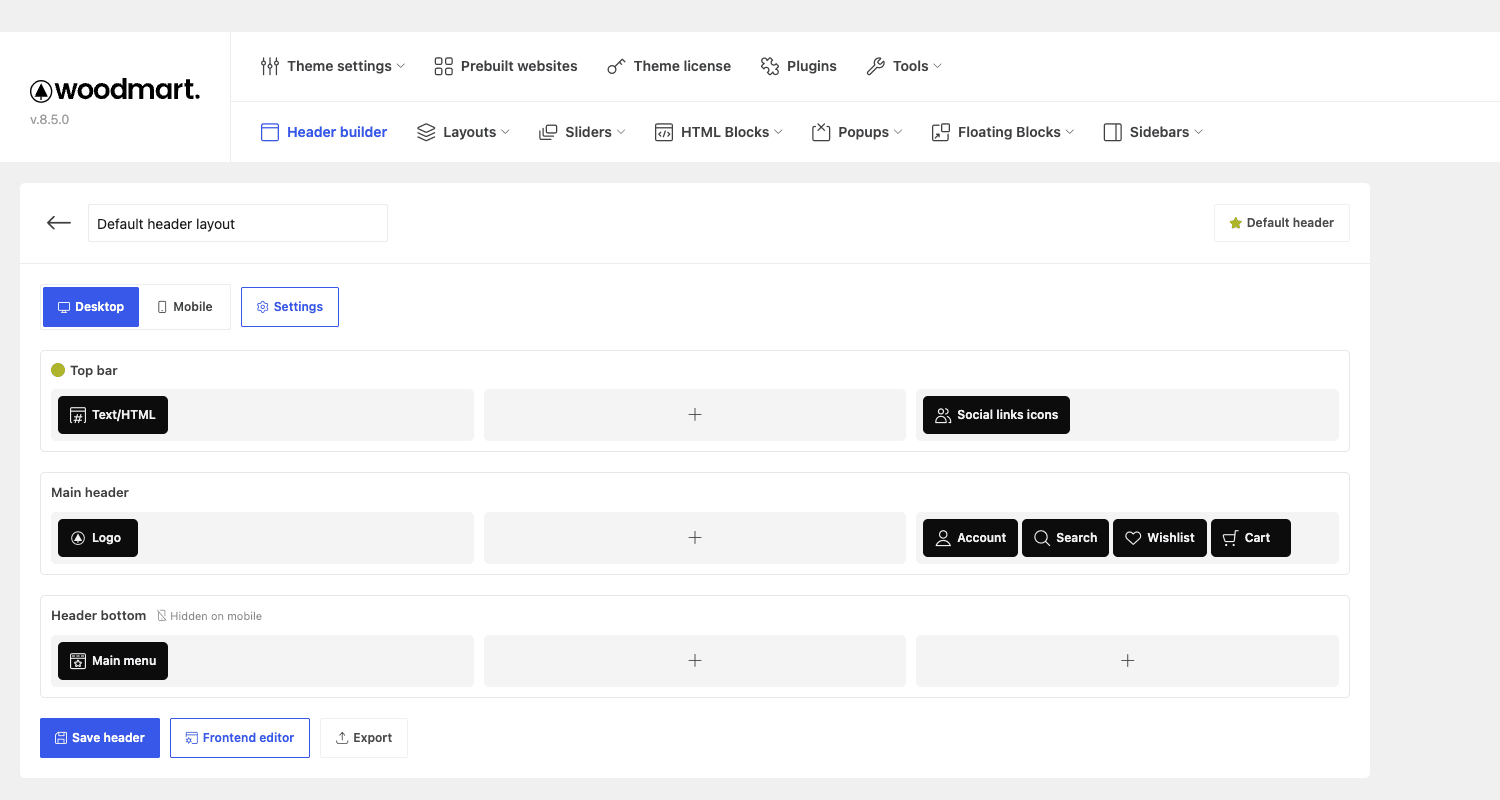
The header is organized into three rows, Top bar, Main header, and Header bottom, each split into left, center, and right columns. You drop elements into the cells: logo, main menu, an AJAX search box, account, wishlist, compare, cart, social icons, a Text/HTML block, and more. A Desktop/Mobile toggle lets you build a different layout for phones (you can hide the bottom row on mobile, for instance), and there’s a live frontend editor plus an export button to move a header between sites.
Why this is a big deal: the header is the single most-touched piece of a store’s design, and most themes lock you into their idea of it. WoodMart hands you a blank grid and a box of parts. Want the search bar centered, the cart on the right, and a promo bar up top with social links? Drag, drop, save. No code, no child-theme template overrides.
The element list is broad enough to cover real stores: alongside logo, menu, and the WooCommerce trio (account, wishlist, cart), there’s an AJAX search with a category dropdown, a "my account" panel, social icons, a vertical categories menu (the Amazon-style "shop by department" dropdown), buttons, and free-form Text/HTML cells you can fill with a WoodMart HTML block. Each row has its own settings for background, sticky behaviour, and visibility, so you can make the main header sticky-on-scroll while the top bar disappears.
You can build multiple headers and assign a default in Theme Settings (or per page), so a landing page can wear a stripped-back header while the shop wears the full one. There’s also a transparent-header option for hero sections, where the header sits over a full-width banner until you scroll. It’s the kind of control that normally requires custom CSS, handed to you as toggles.
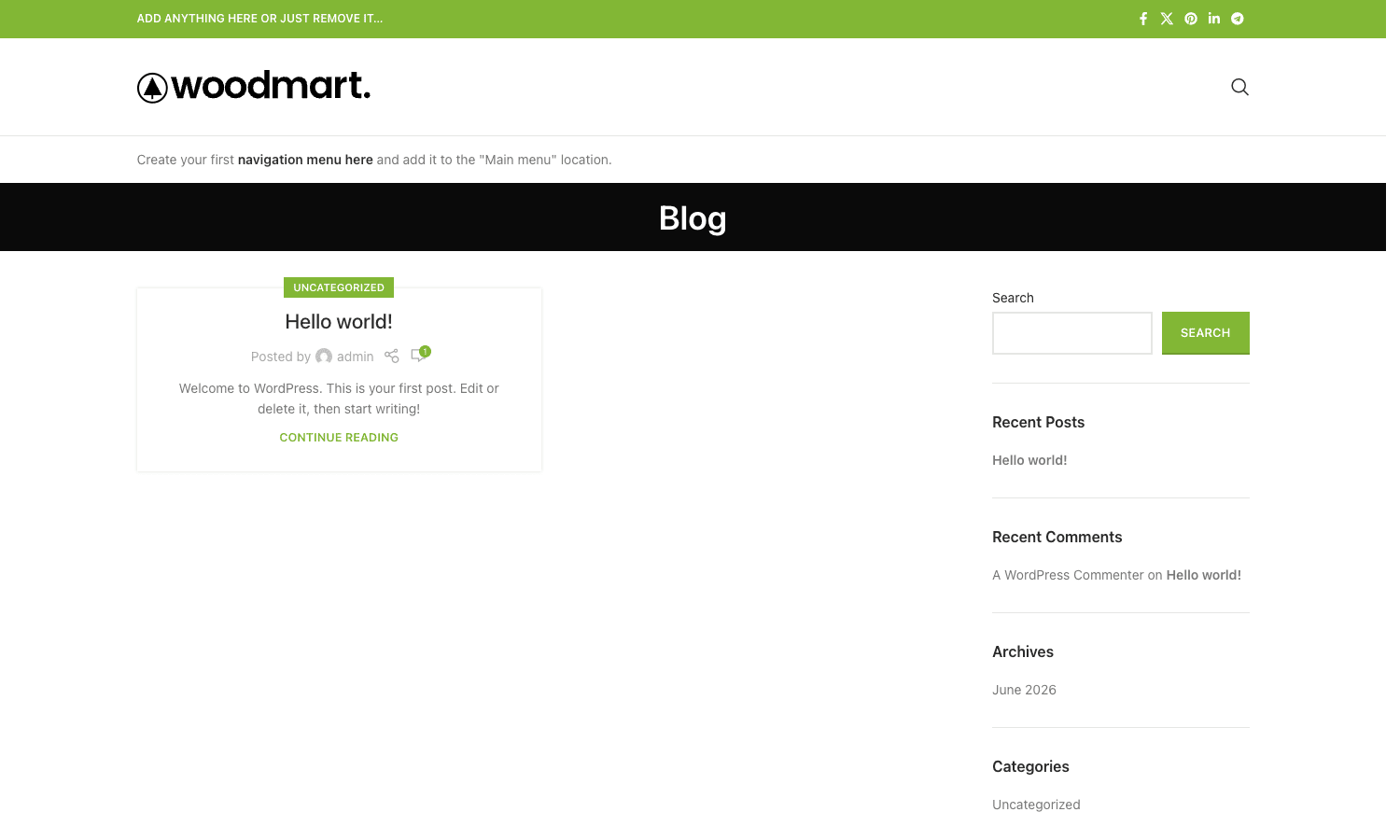
Here’s what the default header looks like once it’s live, the promo top bar with social icons, the logo, and the search, exactly the structure you assemble in the builder:
Prebuilt websites: 80+ one-click stores
You rarely start a store from a blank page, and WoodMart leans into that with a library of more than 80 prebuilt websites, full designs for furniture, fashion, electronics, jewelry, food, cosmetics, and more.
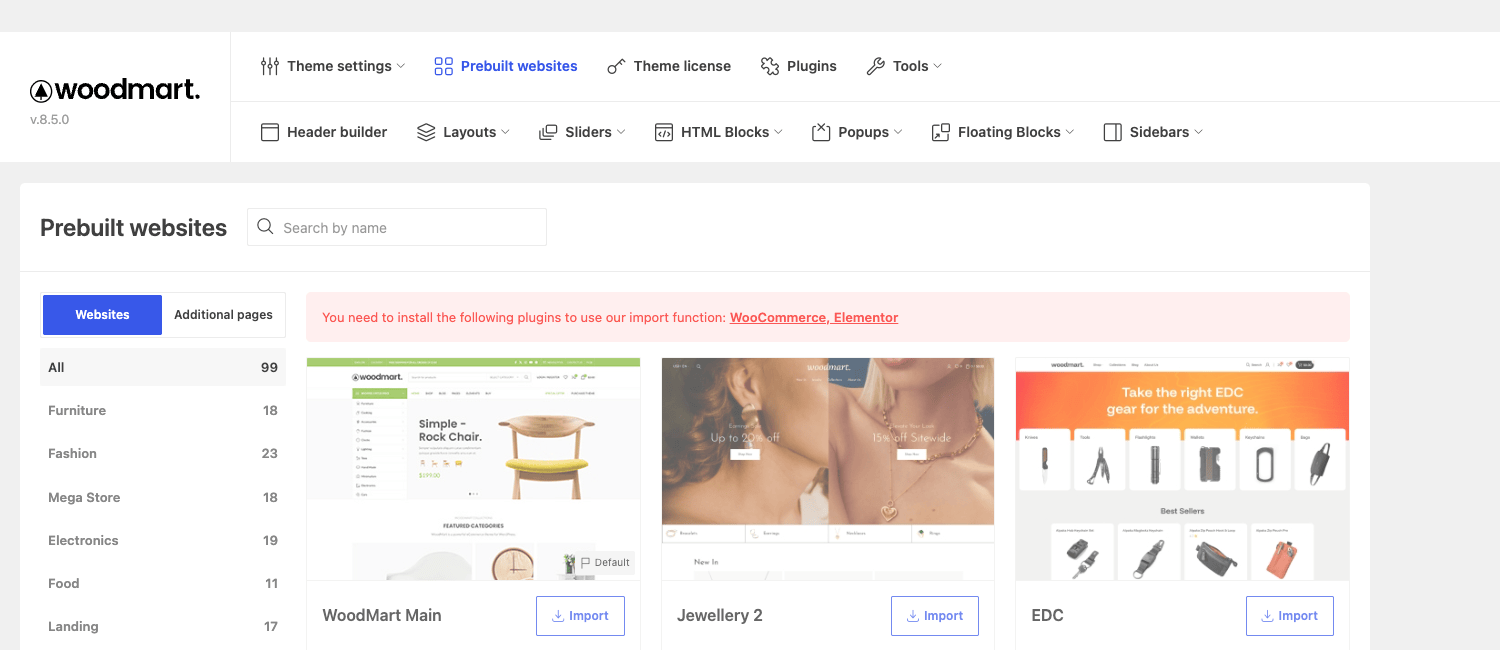
Each one is a complete starter site: pages, the homepage layout, theme options, widgets, menus, and sample content. Pick the one closest to your niche, import it, then swap in your own products and copy. It’s the fastest path from "I bought a theme" to "I have a store that looks designed."
Heads-up: the importer needs the page builder that demo was built with (most are Elementor or WPBakery) plus WooCommerce installed first, and you should only ever run a demo import on a fresh or staging site. We’ll cover why in the mistakes section, but the one-line version: importing dumps content and overwrites options, so it’s a setup step, not something you do to a live store.
The prebuilt sites double as a design reference even if you don’t import one, browsing the library is the quickest way to see the range of looks WoodMart can produce.
Page builder freedom: Elementor and WPBakery
WoodMart doesn’t force a page builder on you, which is rarer than it sounds. It ships native integration for both Elementor and WPBakery Page Builder (formerly Visual Composer), plus Gutenberg support, and it adds more than 80 of its own elements to whichever builder you use.
Those WoodMart elements are the store-specific ones you actually want: product grids and carousels, categories grids, a banner element, countdown timers, a brands carousel, info boxes, a products tabs element, and so on. They read your WooCommerce data, so a "best sellers" carousel just works.
The catalog of elements is genuinely large (80-plus), and it’s the difference between a generic page builder and one that understands a store. A few I lean on: the products element with its filter-by-category, sort, and layout controls (build a "New arrivals in Shoes" grid in seconds); the product categories element for a visual department landing page; the banner and countdown elements for promotions; the info box and icon box for feature strips; the Google map, image gallery, and video elements for richer pages; and a shortcode/HTML block element to drop a reusable WoodMart block into any builder layout. Because they’re native elements rather than a separate add-on plugin, they inherit the theme’s styling and the modular CSS, so adding them doesn’t drag in a third stylesheet.
If you already know and love Elementor Pro, you can keep using it and gain WoodMart’s shop elements on top. If you prefer the lighter WPBakery, that’s fully supported too. The freedom to choose, and to not relearn a builder, is a real advantage over themes that ship their own proprietary editor you’re then locked into.
Note: you don’t have to use a page builder at all for everyday content. The Header Builder, Theme Settings, and WoodMart’s HTML blocks cover a lot, and product/shop pages are largely templated. Reach for the builder when you’re designing custom landing pages, not for routine product management.
The WooCommerce features that matter
This is a WooCommerce theme first, and the shop feature set is where it earns the "powerhouse" label. The highlights, all controllable from Theme Settings:
- AJAX everything. AJAX add-to-cart (no page reload), AJAX product filters with an "active filters" display, and an AJAX shop page with load-more or infinite scroll. The store feels app-like instead of clunky.
- Quick view, wishlist, and compare. The three interactions shoppers expect from a modern store, built in rather than bolted on with extra plugins.
- Product hover effects and galleries. Multiple hover styles (show the second image, quick-shop button, etc.) and several single-product gallery layouts.
- Variation and color swatches. Turn boring variation dropdowns into clickable color, image, or label swatches. (If you need swatch control beyond what the theme offers, a dedicated plugin like Variation Swatches for WooCommerce layers on top, but most stores won’t need to.)
- Size guides and custom product labels. Attach a size-guide table to products, and create your own "Sale," "New," or custom badges rather than the default WooCommerce label.
- Multiple product-page designs and a sticky add-to-cart bar that follows the shopper as they scroll a long product page.
- Catalog mode, age verification, and a built-in abandoned-cart module, the kind of extras you’d normally add with separate plugins.
A few of these deserve a closer look, because they’re the ones that change conversions:
- The product page is genuinely flexible. WoodMart ships several single-product layouts (full-width gallery, sticky info column, accordion or tabbed extra content) and a sticky add-to-cart bar that slides in as the shopper scrolls past the buy button. On a long product page with reviews and a description, that sticky bar keeps the price and the "Add to cart" one tap away, which is exactly where impulse meets convenience.
- Filtering is the make-or-break for big catalogs. The AJAX filters update the grid without a reload and show the shopper their active filters as removable chips, so they never lose track of what they’ve narrowed to. For a 500-SKU electronics or fashion store, that responsiveness is the difference between a browsable catalog and an abandoned one.
- Swatches sell variations. Turning a "Color" dropdown into a row of color or image swatches lifts the perceived quality of the whole store and makes variation selection obvious. WoodMart does this natively, with rounded or square swatches, tooltips, and an out-of-stock style.
- Frequently-bought-together and upsell blocks surface related products on the cart and product pages, the kind of merchandising that raises average order value without a separate plugin.
- Catalog mode lets you hide prices and the add-to-cart button entirely, turning the store into a showcase, useful for wholesale-on-request or "contact us" catalogs.
And then there’s a whole layer of merchandising and urgency tools that most themes make you buy separate plugins for. WoodMart ships, natively, free gifts (auto-add a gift over a spend threshold), dynamic discounts (bulk and role-based pricing rules), a shipping progress bar ("you’re $20 away from free shipping"), estimated delivery dates on the product page, a back-in-stock waitlist, a sold counter and a live-visitor counter for social proof, a price-drop tracker, an out-of-stock manager, quick-buy and quick-shop, custom product tabs, and product-gallery video. You won’t switch all of them on, and you shouldn’t, but having them built in (and sharing the theme’s modular CSS) beats stacking five conversion plugins that each drag in their own scripts.
The practical effect: a default WooCommerce store looks like a default WooCommerce store, plain and a bit dated. A WoodMart store looks like a brand, and behaves like one, without you assembling five plugins to get there.
Beyond the shop: the WoodMart Core toolkit
The WoodMart Core plugin adds a set of custom content types that turn the theme into a small CMS. These show up as menus in the WoodMart admin:
- HTML Blocks (CMS blocks). Reusable content blocks you build once and drop anywhere, into a header cell, a footer, a popup, or a product tab. Change the block, and every place it appears updates.
- Sliders and Slides. A built-in slider with its own slide content type, so you’re not forced to buy a separate slider plugin for a homepage hero.
- Popups. Promo popups, newsletter signups, age gates, built and styled like any other content.
- Floating Blocks. Sticky promo or notice blocks that float over the page.
- Custom Sidebars. Create and assign different sidebars per page or section, instead of one global sidebar.
- Portfolio. A proper portfolio content type with archive and single templates, handy if your store also showcases work.
- Mega menus and nav-menu images. Build rich dropdown menus with columns, images, and embedded blocks straight from the WordPress menu screen.
- Dynamic tags. Pull dynamic data (product fields, post meta) into elements without code.
It’s a lot, and you won’t use all of it. But it means the answer to "can the theme do X?" is usually yes, without a trip to the plugin repository.
Who WoodMart is for
Rather than a generic feature list, here’s where I’d actually reach for WoodMart, framed by the kind of store you’re building:
- If you’re a store owner without a developer: WoodMart is close to ideal. Import a prebuilt site, swap your products and branding, tweak the header, and you have a professional store in a day, no code.
- If you’re a freelancer or agency building client stores: the Header Builder, presets, settings backup, and white-label option (you can rebrand the theme panel for clients) make it a fast, repeatable foundation. Build once, reuse the patterns.
- If you run a large or fashion/electronics catalog: the AJAX shop, filters, swatches, and quick view are exactly what big visual catalogs need to stay browsable.
- If performance is non-negotiable: the modular CSS approach means you can have the features and still chase a good Core Web Vitals score, where most multipurpose themes force a trade-off.
- If you’re a developer who wants a head start: 320-plus filters, a child theme, and a clean options API (more below) mean you can bend it to a custom build instead of fighting it.
It’s a weaker fit if you want the absolute lightest possible theme for a tiny three-product shop, or if you’re committed to a block-only, no-page-builder workflow. For those, a minimal theme is the better call.
Don’t do this: WoodMart setup mistakes
Here’s the section I wish every new WoodMart user read first, because these mistakes cost hours and sometimes data.
Don’t run a demo import on a live site. This is the big one. Importing a prebuilt website dumps in pages and sample content and overwrites your theme options. On a fresh install that’s exactly what you want; on a live store it can bury your real products under demo content and reset settings you’d carefully tuned. Always import on a fresh install or a staging copy, then migrate, never directly onto production.
Don’t ignore the WoodMart Core dependency. The theme without its companion plugin is half a theme, no elements, no prebuilt sites, no sliders or blocks. If features are mysteriously missing, check that WoodMart Core is installed and active before anything else. It is the single most common "WoodMart is broken" cause.
Don’t enable every feature because it’s there. The performance win comes from loading only what you use. Switch on quick view, compare, wishlist, age verification, and a sticky bar you don’t need, and you’ve quietly rebuilt the bloat you bought WoodMart to avoid. Turn on what your store actually uses.
Don’t edit the parent theme for custom code. WoodMart ships a child theme for a reason. Put your snippets and template overrides there, or the next theme update wipes them. This one bites people on every theme, and WoodMart updates often.
Five minutes of restraint at setup, a staging import, Core active, only the features you need, and the child theme for code, saves a weekend of cleanup later.
WoodMart vs the alternatives
If your store is really an affiliate or price-comparison site rather than a catalog of your own products, also weigh the REHub theme, which is built around affiliate offers, comparison tables, and reviews.
A few themes compete for the same buyer, so here’s an honest comparison with real numbers.
| Theme | Typical price | Prebuilt sites | Header builder | Page builder |
|---|---|---|---|---|
| WoodMart | ~$59 one-time | 80+ | Visual, drag-drop | Elementor + WPBakery |
| Flatsome | ~$59 one-time | ~20 starter sites | Limited | Own UX Builder |
| Avada | ~$69 one-time | 90+ | Header builder | Own Fusion Builder |
| Astra + builder | Free core + ~$59/yr | Starter templates | Pro add-on | Bring your own |
Flatsome is the long-time WooCommerce favorite and a fair fight; it’s fast and proven, but it locks you into its own UX Builder, where WoodMart lets you use Elementor or WPBakery. If you’re weighing the two, our Flatsome theme review goes deep on that side. And if budget is the deciding factor, the cheaper Porto theme is another WooCommerce-first option worth comparing.
Avada is the all-time best-seller and even more of a Swiss-army knife, but it’s heavier and tied to its Fusion Builder; WoodMart’s modular CSS gives it the performance edge for a pure store.
Astra is the lightweight darling: a tiny free core you extend with a page builder and starter templates. It’ll out-benchmark WoodMart on an empty page, but you assemble the shop features yourself, where WoodMart ships them.
The honest summary: at roughly $59 one-time, with 80-plus prebuilt sites, a true visual Header Builder, dual page-builder support, and modular performance, WoodMart is the most complete WooCommerce-first package of the group. Pick Astra if you want minimal-and-assemble, Flatsome if you’re happy in its builder, Avada if you need the widest general-purpose kit, and WoodMart if you want a fast, full store with builder freedom.
Developer reference: hooks, child theme, options API
WoodMart looks like a no-code theme, but underneath it’s one of the more extensible themes around: roughly 320 woodmart_ filters and 57 woodmart_ actions, plus a child theme and a clean options API. If you build client stores, this is what lets you customize without forking.
Read any theme option in code with the woodmart_get_opt() helper, so your custom code respects what the client set in Theme Settings:
if ( woodmart_get_opt( 'single_ajax_add_to_cart' ) ) {
    // AJAX add-to-cart is enabled; adjust your custom button accordingly.
}
Toggle features programmatically. For example, force-disable AJAX add-to-cart for a specific context with woodmart_ajax_add_to_cart:
add_filter( 'woodmart_ajax_add_to_cart', function ( $enabled ) {
    if ( is_product_category( 'made-to-order' ) ) {
        return false; // these products need the full add-to-cart page
    }
    return $enabled;
} );
Customize the AJAX search query with woodmart_ajax_search_args, which hands you the query args and the post type, useful for excluding out-of-stock products or boosting a category:
add_filter( 'woodmart_ajax_search_args', function ( $args, $post_type ) {
    if ( 'product' === $post_type ) {
        $args['meta_query'][] = array(
            'key'   => '_stock_status',
            'value' => 'instock',
        );
    }
    return $args;
}, 10, 2 );
Alter the product thumbnail markup with woodmart_get_product_thumbnail ( $img, $product, $size, $attach_id ), and hook template points like woodmart_before_wp_footer or woodmart_before_sidebar_area to inject markup without editing templates.
Beyond hooks, WoodMart Core registers several content types you’ll meet when querying or migrating: cms_block (HTML blocks), woodmart_slide (slider slides), wd_popup (popups), wd_floating_block (floating blocks), woodmart_sidebar (custom sidebars), woodmart_size_guide, wd_custom_label (product labels), and portfolio. If you’re writing a migration or an export, those are the post types to target, and the cms_block type in particular is worth knowing since so much reusable content lives there.
The bundled child theme (woodmart-child) follows the WordPress theme developer standard, and it’s the right home for every customization. Override a template by copying it into the child theme’s matching path; add PHP to the child’s functions.php; add CSS to its stylesheet. Because WoodMart updates frequently through its patcher, anything you put in the parent theme is gone on the next update, so the child theme isn’t optional discipline, it’s the only safe way to customize.
One more developer convenience: WoodMart exposes its template parts and layout through actions like woodmart_before_wp_footer and woodmart_before_sidebar_area, plus filters on nearly every visible string and markup fragment. With 320-plus filters, the practical reality is that if you can see it on the front-end, there’s almost certainly a hook to change it without touching a template, which is exactly what you want when a client asks for "just one small tweak" six months after launch.
Troubleshooting common WoodMart issues
The problems people actually hit, with the fixes.
Elements, sliders, or prebuilt sites are missing. The WoodMart Core plugin isn’t installed or active. Go to the WoodMart dashboard (or Appearance » Install Plugins) and install/activate WoodMart Core. This is the cause of the large majority of "WoodMart is broken" reports, the theme bundles Core and it must be active.
The demo import fails or imports nothing. The importer needs WooCommerce and the demo’s page builder (Elementor or WPBakery) installed and active first, and enough server resources. Install those plugins, raise PHP max_execution_time and memory if your host is stingy, and import on a fresh or staging site. A half-finished import usually means a timeout, retry after bumping the limits.
My header disappeared or shows the wrong layout. A header built in the Header Builder has to be assigned. Set your default header under Theme Settings » General » Layout (the Header select), or check the per-page header override. A blank header almost always means none is assigned.
The site looks unstyled after an update or move. WoodMart caches its generated CSS. After a theme/Core update or a site migration, regenerate it from Theme Settings » Tools (clear/regenerate CSS) and clear your caching plugin and any server/CDN cache. The modular CSS that makes WoodMart fast is also what needs regenerating when files change.
The store feels slow despite the performance features. Usually it’s an overloaded homepage (too many carousels and sliders above the fold), an un-optimized image set, or no caching. Trim the homepage elements, enable lazy loading and the performance options, add a caching plugin, and serve properly sized images. The theme gives you a fast baseline; the content is on you.
Updates won’t apply on a GPL copy. The built-in patcher and one-click updates are tied to an Envato/XTemos license. On a GPL copy you update by uploading the new theme and WoodMart Core files manually via FTP or the uploader. It works fine, it’s just a manual step rather than a button.
Performance, compatibility, and gotchas
A few honest notes after living in it.
The Core plugin is mandatory. Worth repeating because it’s the number-one gotcha: the theme needs WoodMart Core active for elements, prebuilt sites, sliders, blocks, and the importer. The theme bundles Core and prompts you to install it; do that first.
Performance is a setting, not a guarantee. The modular CSS and lazy loading give you a fast baseline, but a homepage crammed with sliders and carousels will still be heavy. Use the performance options, pair it with a caching plugin, and be disciplined about how much you put above the fold.
It plays well with the wider WooCommerce stack. WoodMart ships integrations for the SEO plugins (Yoast, Rank Math, AIOSEO), performance plugins (WP Rocket, Imagify, ShortPixel), multilingual (WPML), multicurrency (WOOCS), funnels (CartFlows, FunnelKit), and multivendor (Dokan, WCFM, WC Vendors). If you run a common WooCommerce setup, WoodMart has likely accounted for it; the WoodMart documentation lists the supported plugins and the per-integration notes.
Updates need the license/patcher. WoodMart updates through its built-in patcher tied to your purchase. On a GPL copy, you update by uploading new theme files rather than one-click auto-update, fine, but know it’s a manual step.
It’s a heavy admin. The flip side of "controls everything" is a Theme Settings panel with hundreds of options. Budget an afternoon to get oriented; lean on the search box and the prebuilt sites rather than building from zero.
Requirements are modest. WoodMart needs PHP 7.4 or newer, which any current host runs, and a recent WordPress and WooCommerce. If you’re on an ancient PHP version, update it first; you’ll get a faster store as a bonus.
Pricing and licensing
WoodMart is sold on ThemeForest as a one-time purchase, around $59 for the regular license, which includes six months of support (extendable) and lifetime updates through your Envato account. That one-time model is a genuine advantage over the growing number of themes and page builders that moved to annual subscriptions; over three years, a one-time theme is dramatically cheaper than a renew-every-year alternative.
A regular license covers a single end product (one site). Updates and the patcher run through your Envato/XTemos account on a paid copy.
This is also where the GPL route comes in. The WoodMart theme on GPL Times is the same theme under the GPL, delivered with the WoodMart Core plugin so you get the full toolkit, not just the styling. It’s the quickest way to put it on a staging store, import a prebuilt site, and decide whether the Header Builder and shop features fit how you work before you commit. Test the performance on your real content, that’s where a multipurpose theme either holds up or doesn’t.
FAQ
Do I need the WoodMart Core plugin?
Yes, and this is the most important thing to know. WoodMart Core supplies the page-builder elements, prebuilt-site importer, sliders, HTML blocks, popups, and custom content types. The theme alone gives you styling but not the toolkit. The theme bundles Core and prompts you to install it; do that immediately after activating the theme.
Does WoodMart work with Elementor, or do I have to use a different builder?
WoodMart natively supports both Elementor and WPBakery Page Builder, plus Gutenberg, and adds 80-plus of its own shop elements to whichever you use. You’re not locked into a proprietary builder, which is a real advantage. Use Elementor if that’s your comfort zone; WoodMart’s elements show up inside it.
Is WoodMart actually fast, or just "fast for a multipurpose theme"?
It’s genuinely engineered for speed: it loads CSS and JS per element (only what a page uses), lazy-loads images, and integrates with caching plugins. That gives a fast baseline. But performance still depends on how you build, a homepage with a dozen carousels will be heavy regardless. Used sensibly, it can score well on Core Web Vitals, which is unusual for a theme this feature-rich.
Can I build my whole header without code?
Yes. The Header Builder is a visual drag-and-drop grid with three rows and left/center/right columns. You place elements (logo, menu, search, cart, wishlist, account, social, custom HTML), build a separate mobile layout, and save. No template overrides needed. You can create multiple headers and assign them per page.
How many prebuilt websites are there, and can I import just part of one?
There are 80-plus complete prebuilt sites across niches. You can import a full demo (pages, options, widgets, content) or, in many cases, individual pages. Import only on a fresh or staging site, since it adds content and overwrites theme options.
Will importing a demo erase my existing content?
It won’t delete existing posts/products outright, but it adds demo content and overwrites your theme options, which on a live site is a mess to untangle. Treat demo import as a first-step-on-a-clean-install action. On an existing store, import to staging and migrate the pieces you want.
Is it a one-time purchase or a subscription?
WoodMart is a one-time ThemeForest purchase (around $59 regular license) with lifetime updates and six months of included support. There’s no mandatory annual renewal to keep using or updating it, a meaningful cost advantage over subscription themes and builders.
Does WoodMart support multivendor marketplaces and multilingual stores?
Yes. It ships integrations for Dokan, WCFM, and WC Vendors (multivendor), WPML (multilingual), and WOOCS (multicurrency), among many others. If you’re building a marketplace or a translated store, WoodMart has dedicated compatibility rather than leaving you to fight conflicts.
Is it developer-friendly?
Very. There are roughly 320 woodmart_ filters and 57 actions, a woodmart_get_opt() options helper, custom content types, and a bundled child theme. You can read theme options in code, toggle features per context, alter AJAX queries, and override templates cleanly, all without forking the theme.
What happens when WoodMart updates?
On a licensed copy, updates run through the built-in patcher tied to your Envato account. On a GPL copy you update by uploading the new theme and Core files manually. Either way, keep your customizations in the child theme so updates never overwrite them.
Final thoughts
WoodMart earns the "powerhouse" tag honestly. It gives a store owner a genuinely complete kit, a visual Header Builder, 80-plus prebuilt stores, a deep WooCommerce feature set, and builder freedom, while doing the unglamorous engineering (modular CSS, lazy loading) that keeps a feature-rich theme from being a slow one. That combination is rare.
It isn’t weightless. The Theme Settings panel is vast, the WoodMart Core dependency trips up newcomers, and the demo importer demands respect. But none of those are dealbreakers; they’re the cost of a theme that genuinely does this much, and they’re all avoidable with a little care at setup.
If you’re building a serious WooCommerce store and you want a fast, flexible foundation you won’t outgrow, put WoodMart on a staging site, import a prebuilt store close to your niche, and spend an hour in the Header Builder and Theme Settings. That hour will tell you what no review can: whether this is the foundation your store deserves.