

A student finishes their tenth lesson. A little popup appears: "Badge earned, Dedicated Learner." Their points balance ticks up by 50, which nudges them past the person above them on the course leaderboard, and that bump from "Bronze" to "Silver" rank quietly unlocks a bonus download. None of that was hand-coded. It’s one plugin, reacting to things the user already does on the site.
That plugin is GamiPress, and turning ordinary WordPress actions into points, badges, and ranks is the entire job. It’s a gamification engine: you decide what counts (publish a comment, complete a course, buy a product, log in daily), and GamiPress rewards it automatically, logs it, and shows it off.
I built a points economy, a badge with real earning rules, and a rank ladder in GamiPress for this review, and dug through its 48 Pro add-ons and its developer hooks. This is the honest walk through: what it actually does, the engine that makes it tick, where gamification quietly backfires, the add-ons worth caring about, and a developer reference for wiring it to your own plugin’s events.
Table of Contents
- What is GamiPress?
- Points, achievements, and ranks: the three building blocks
- How users earn things: requirements and triggers
- A tour of the admin
- The 48 Pro add-ons, and which ones matter
- Setting up your first gamification system
- Showing it off on the front end
- Four sites that should gamify
- Don’t gamify the wrong things
- GamiPress vs myCred vs BadgeOS
- Developer reference: triggers, hooks, shortcodes
- Performance, compatibility, and gotchas
- Pricing and licensing
- FAQ
- Final thoughts
What is GamiPress?
GamiPress is a gamification plugin for WordPress, built by the GamiPress team (several of whom came out of the older BadgeOS project, which shows in how mature the engine feels). It lets you award three kinds of things for user activity: points (a running balance, like credits or coins), achievements (badges earned by meeting conditions), and ranks (levels a user climbs as they progress).
It comes in two pieces. The free GamiPress plugin on WordPress.org is a genuinely complete engine, points, achievements, ranks, the trigger system, logs, and the display shortcodes/blocks all ship free. Then GamiPress Pro is the paid layer, and it’s unusual: rather than a handful of features, it’s a single add-on that unlocks the entire library of 48 premium add-ons at once (leaderboards, notifications, emails, daily-login rewards, points economies, commerce integrations, and more). GamiPress Pro requires the free GamiPress to be installed and active, it extends the core, it doesn’t replace it.
Under the hood it registers clean custom post types (points-type, achievement-type, rank-type, plus the requirement "steps" and a log post type), and it listens to WordPress and third-party plugin events to know when someone has earned something. That event-listening is the real product, and it’s worth understanding before anything else.
If you want to build a points economy along with this article, GamiPress Pro is on GPL Times as the full add-on bundle, which is what I used (alongside the free core) for the screenshots here.
Points, achievements, and ranks: the three building blocks
Everything in GamiPress is built from three primitives. Get these straight and the rest of the plugin makes sense.
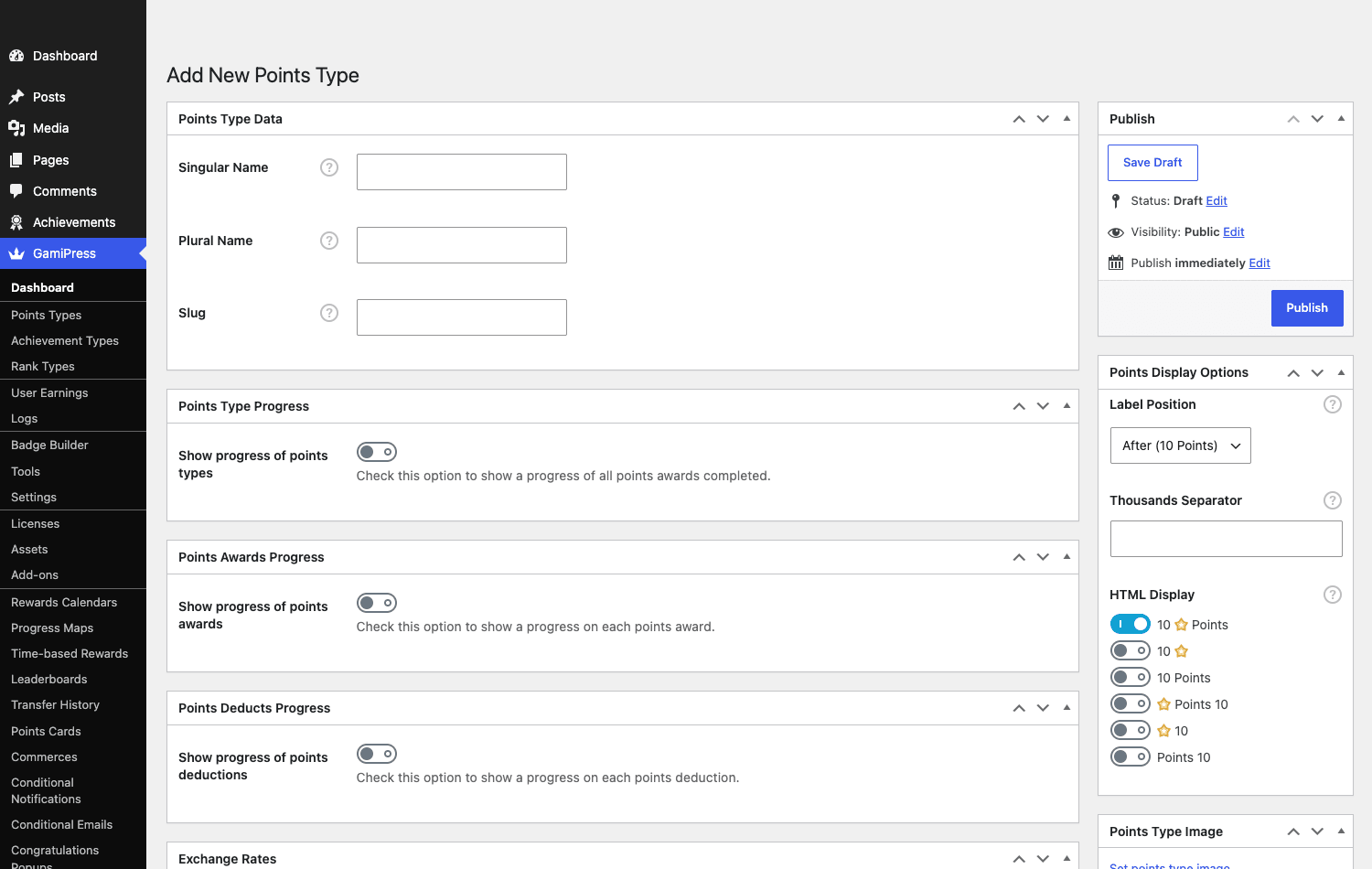
Points are a numeric balance. You can have more than one type, "Credits" for general activity, "Gems" for purchases, whatever your site needs, and each Points Type is configured separately. The Points Type editor controls the singular/plural label, the image, how the balance displays (e.g. "50 Credits" with a star icon), thousands separators, and the awards and deductions that move the balance.
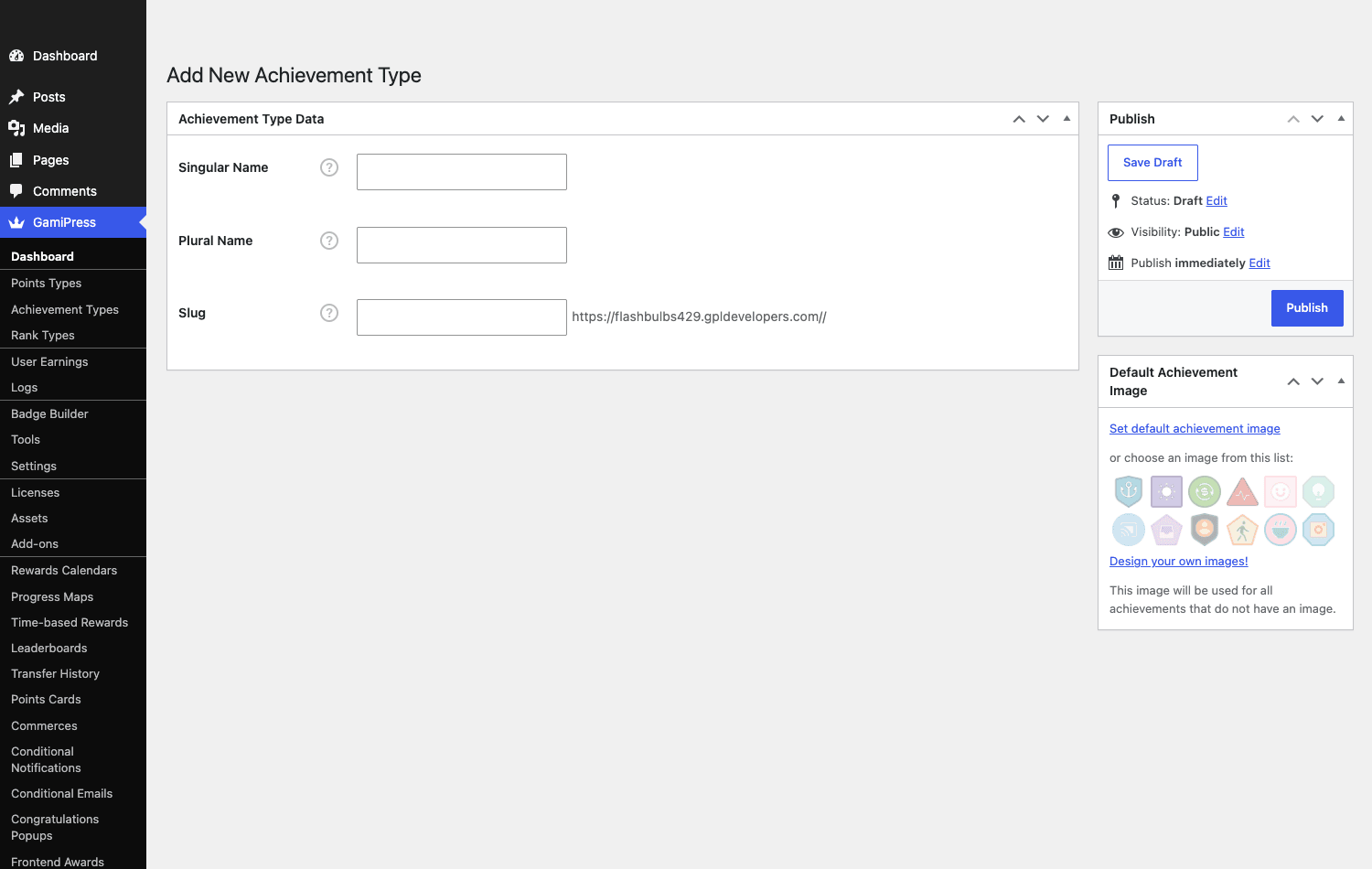
Achievements are badges. You first create an Achievement Type (e.g. "Badge", "Trophy"), which spins up its own content type, then you add individual achievements of that type, each with an image and a set of earning conditions. Achievements can be one-off or repeatable, can award points when earned, and can be hidden until unlocked.
Ranks are levels. You create a Rank Type (e.g. "Level", "Tier"), then define the ranks in order (Bronze, Silver, Gold). A user sits at exactly one rank per type and moves up as they meet each rank’s requirements. Ranks are the progression spine that makes the other two feel like a journey rather than a scoreboard.
The power is in combining them: earn points for activity, hit a points threshold to unlock a badge, collect badges to climb a rank, and have the rank unlock perks. That loop is what keeps people coming back.
How users earn things: requirements and triggers
This is the engine, and it’s the part that separates a real gamification plugin from a manual "give this user a badge" tool.
Every achievement, rank, and points award has requirements (GamiPress calls them "steps" on achievements). A requirement is built from a trigger, an event GamiPress is listening for. When the event fires for a user and they meet the conditions, GamiPress awards the thing and writes a log entry.
Out of the box the trigger list is long, and it grows with every integration you install. Common triggers include:
- Site activity: publish a post, leave a comment, log in, visit a specific page, daily visits.
- Counts and thresholds: do something N times, reach a points balance, earn a specific other achievement first.
- Third-party events: complete a lesson/course (LearnDash, Tutor LMS), purchase a product (WooCommerce/EDD), join a group (BuddyBoss/BuddyPress), submit a form, and dozens more as you add integration add-ons.
You stack multiple steps with AND/OR logic ("comment 5 times AND complete the intro course"), set how many times each can count, and optionally award points per step. Everything a user earns lands in the Logs, which is both your audit trail and the data behind leaderboards and reports.
The key insight: GamiPress doesn’t poll or scan. It hooks WordPress actions, so awards happen in real time the moment the user does the thing. That’s also why it’s extensible, any plugin (or your own code) can register a trigger, which we’ll cover in the developer section.
A tour of the admin
GamiPress lives under a single GamiPress menu, and the menu itself tells you how much is here: Points Types, Achievement Types, Rank Types, User Earnings, Logs, Badge Builder, Tools, Settings, and then a long tail of add-on screens (Leaderboards, Rewards Calendars, Progress Maps, Points Cards, Transfer History, Conditional Notifications/Emails, Congratulations Popups, and more).
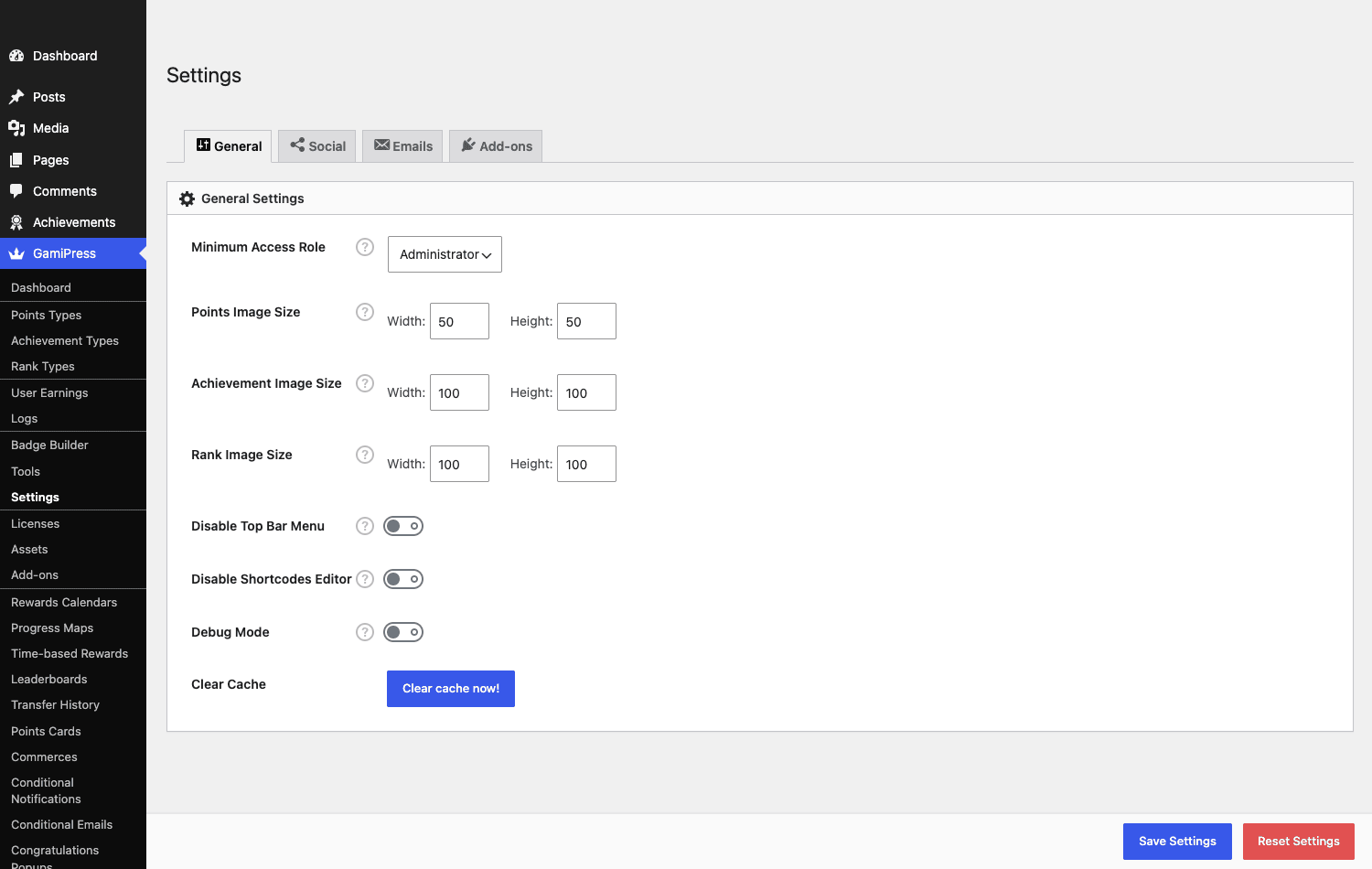
The Settings page keeps the global controls tidy: minimum access role, default image sizes for points/achievements/ranks, the admin top-bar menu toggle, debug mode, and a cache-clear button, with separate tabs for Social, Emails, and Add-ons.
Day to day you’ll spend most time in the type editors (creating points types, badges, and ranks with their requirements) and in Logs (watching what users are earning). The Badge Builder is a nice touch: it lets you design badge images in the admin instead of hunting for graphics, and GamiPress ships a set of default badge images so you’re never staring at a blank achievement.
Tip: turn on only the add-ons you’ll use (more on that next). Each active add-on adds menu items and code; a focused setup is both cleaner to navigate and lighter to run.
The 48 Pro add-ons, and which ones matter
GamiPress Pro’s headline is that one purchase unlocks the whole add-on library in a single install. You don’t buy add-ons à la carte; you flip them on from the Add-ons screen.
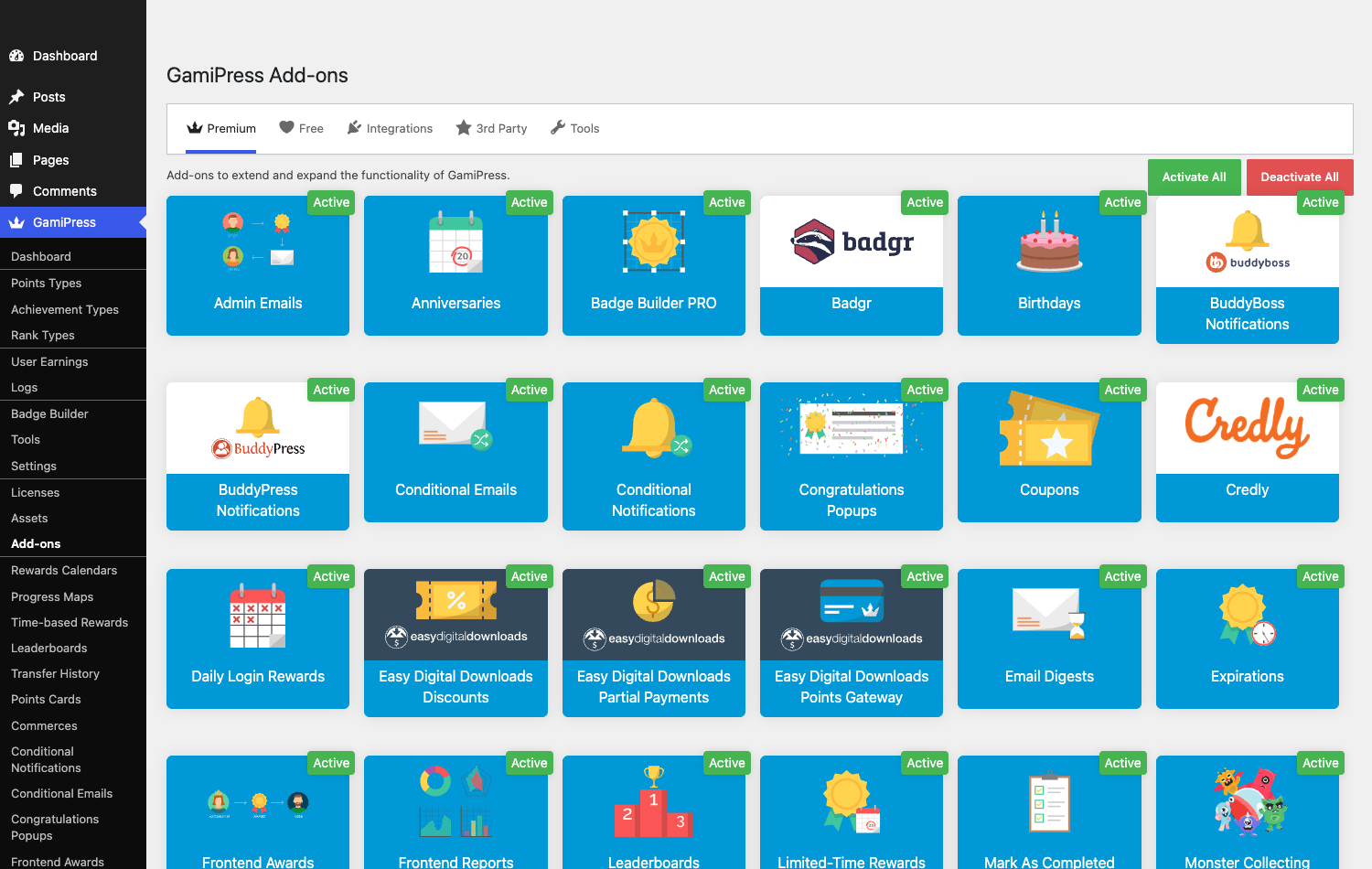
Forty-eight is a lot, and most sites need six or seven. Here’s how I’d group them, with the ones I reach for first in bold.
| Group | Add-ons | When you turn them on |
|---|---|---|
| Engagement | Daily Login Rewards, Time-based / Limited-time Rewards, Points Multiplier, Anniversaries, Birthdays, Mark as Completed, Congratulations Popups | To build streaks and habit loops, and to celebrate wins |
| Social / community | Leaderboards, Referrals, Transfers, Social Share, Nominations, Submissions, Frontend Awards, Monster Collecting Game, BuddyPress / BuddyBoss Notifications | When competition and peer activity drive your site |
| Notifications | Notifications, Email Digests, Conditional Emails / Notifications, Admin Emails | To tell users (and admins) what was earned |
| Points economy | Points Cards, Points Exchanges, Points Limits, Points Payouts, Expirations | When points need a sink, a cap, or a cash-out |
| Commerce | WooCommerce / EDD Points Gateway, Discounts, Partial Payments, Coupons, Purchases | To spend points at checkout or sell points |
| Content gating | Restrict Content, Restrict Unlock | To lock posts behind points, ranks, or badges |
| Badges / credentials | Badge Builder Pro, Credly, Badgr | To design badges and issue verifiable Open Badges |
| Reporting / dev | Reports, Frontend Reports, Requirements Descriptions, REST API Extended, Zapier, Progress / Progress Map | To analyze activity and connect external tools |
A few worth calling out: Leaderboards is the single most-requested add-on (competition is the cheapest engagement you can add), Points Cards turns points into scratch/gift cards, Points Exchanges lets users trade one points type for another or for content, and the WooCommerce/EDD gateways let customers pay with points or earn points for buying, which is how you build a real store loyalty program. Restrict Content is the one that turns gamification into a business model: gate premium posts behind a rank or a points balance.
Setting up your first gamification system
GamiPress has a lot of moving parts, so the order you build things in matters. Here’s the sequence I actually use, which avoids the "I made a badge but nothing happens" confusion that trips up first-timers.
- Create your Points Type(s) first. Go to GamiPress » Points Types » Add New, name it (e.g. "Credits"), set the image and how it displays. Points are the currency everything else references, so they come first. GamiPress » Points Types.
- Create your Achievement Type(s). Add an Achievement Type like "Badge" (singular/plural/slug). This registers a new content type you’ll add individual badges to. Set a default badge image so nothing looks empty.
- Create your Rank Type and ranks. If you want progression, add a Rank Type ("Level") and then the ranks in order (Bronze, Silver, Gold), each with its own requirements.
- Now build the earning rules. Open a badge (or rank, or points award) and add requirements/steps: pick a trigger, set the count, choose AND/OR logic across steps. This is the step people skip, an achievement with no requirements can never be earned automatically.
- Turn on only the add-ons you need. From the Add-ons screen, enable Leaderboards, Notifications, and whatever your site calls for, not all 48. Each adds menu items and code.
- Display it. Drop the points/achievements/rank/leaderboard shortcodes or blocks onto a "My Profile" or "Rewards" page so users can see their progress.
Heads-up: test as a non-admin. Award rules and visibility often behave differently for a regular subscriber than for an admin who can see everything, so create a test user (or use an incognito session with a test account) and actually trigger an action to confirm the badge fires and the log records it.
Showing it off on the front end
Earning things in the background is pointless if users never see their progress, so display is half the job, and GamiPress gives you three ways to do it: shortcodes, Gutenberg blocks, and widgets, all backed by the same data.
The essentials to put on a "Rewards" or profile page:
- A points balance so users always know where they stand (
[gamipress_points], or the block/widget equivalent). - An achievements grid showing earned and unearned badges, optionally filterable, which doubles as a to-do list of what’s left to unlock (
[gamipress_achievements]). - The current rank and progress toward the next one (
[gamipress_user_rank]), the progression hook that keeps people climbing. - A leaderboard (Pro) for competition (
[gamipress_leaderboard]), and a personal log of recent earnings ([gamipress_logs]) so the system feels transparent rather than magic.
GamiPress also surfaces a per-user User Earnings view in the admin, so you (or a support agent) can see and manually adjust any user’s points, achievements, and ranks, handy for comping a customer or fixing a missed award.
Two display features are worth singling out. The Badge Builder lets you design badge artwork in the admin (shapes, colors, icons, text) instead of commissioning graphics, which removes the single biggest friction point for non-designers, and it ships with a set of ready default badges. And Congratulations Popups (Pro) give that immediate "you earned it" dopamine hit the moment an achievement unlocks, which, used sparingly on meaningful wins, is what makes gamification feel rewarding rather than bureaucratic.
Four sites that should gamify
Gamification isn’t for every site. Here are four where it genuinely moves the needle, and how I’d set GamiPress up for each.
An online course / LMS. The classic fit. Award points for completing lessons, badges for finishing modules, and ranks for course milestones. Add a leaderboard for cohort competition and Congratulations Popups for the dopamine hit. Pairs naturally with LearnDash or Tutor LMS via their trigger integrations, course completion becomes an automatic badge.
A community or forum. Reward the behaviors you want more of: helpful replies, daily visits, completing a profile. Ranks give members status, leaderboards drive friendly competition, and BuddyBoss/BuddyPress notifications surface earnings in the activity feed. The trick is rewarding quality, not just volume (see the next section).
A WooCommerce store loyalty program. Earn points per purchase, let customers pay with points at checkout (Points Gateway), and offer rank-based perks (free shipping at Gold). This is a full loyalty scheme without a dedicated loyalty plugin, and it runs on the same engine as the rest.
A membership site. Combine ranks with Restrict Content to gate premium material behind earned status rather than (or alongside) a paywall, a powerful retention mechanic. It complements rather than replaces a membership plugin like Paid Memberships Pro; the membership plugin handles billing, GamiPress handles earned access and engagement.
The common thread: GamiPress shines when you have repeat visitors whose behavior you want to shape. A brochure site has nothing to gamify; a community, course, or store has plenty.
Don’t gamify the wrong things
Here’s where well-intentioned gamification backfires, and it’s a people problem, not a plugin problem.
Don’t reward volume when you want quality. The most common mistake is awarding points for comments or posts by count. Do that and you train your most points-motivated users to flood the site with low-effort comments to farm points. You wanted engagement; you got spam, and now your moderators are cleaning up after the incentive you created. If you reward content, reward outcomes that are hard to fake (a reply marked helpful, a post that gets approved), not raw counts.
Don’t create points with no sink. If users earn points but can never spend them, the balance is just a number that inflates forever and stops meaning anything. Give points a purpose: an exchange for content or discounts, a store gateway to pay with them, expirations so they have to be used, or rank thresholds they unlock. Points without an economy are a leaderboard at best and noise at worst.
Don’t over-notify. A popup and an email for every single point earned is how you get users to mute your site. Celebrate meaningful milestones (a badge, a rank-up), not every micro-action. Use the digest add-on to batch the small stuff.
The cost of getting this wrong isn’t a broken site, it’s worse: a system that actively rewards the behavior you don’t want, annoys the users you do want, and quietly trains your community to game it. Decide what behavior you’re trying to encourage before you wire up a single trigger, and reward that, sparingly and meaningfully.
GamiPress vs myCred vs BadgeOS
Those are gamification engines for rewarding actions across a whole site. If you specifically want a WooCommerce points-for-purchases program, our guide to WooCommerce Points and Rewards is the focused tool for that job.
The three names in WordPress gamification are GamiPress, myCred, and BadgeOS. Here’s where they genuinely differ, with specifics rather than adjectives.
| GamiPress | myCred | BadgeOS | |
|---|---|---|---|
| Core focus | Points + achievements + ranks (all three) | Points-first (a "points management system") | Achievements/badges-first |
| Premium add-ons | 48, bundled in one Pro purchase | 60+, sold individually (~$29-49 each) | ~12, smaller catalog |
| Multiple points types | Unlimited | Yes (extra types via add-on) | None native |
| Ranks | Built in | Via the ranks add-on | No native ranks |
| Pro entry price | around $99/year (all add-ons) | free core; add-ons ~$29-49 each | free core + paid add-ons |
| Active development | Very active | Active | Minimal in recent years |
The honest read: GamiPress is the most balanced and the most actively developed of the three. It treats points, achievements, and ranks as equal first-class citizens, where myCred is points-first (great if your whole site revolves around a credit balance, less so if you want badges and ranks) and BadgeOS was achievements-first and has gone quiet in recent years (GamiPress is effectively its spiritual successor, built by some of the same people). On price the math is stark: GamiPress Pro unlocks all 48 add-ons for one fee around $99/year, whereas assembling the equivalent on myCred, where add-ons run roughly $29-49 each, means you’ve passed the GamiPress price after just two or three extensions. If your site is purely a points/credit economy and nothing else, myCred is worth a look; for anything involving badges and ranks together, GamiPress is the pick.
Developer reference: triggers, hooks, shortcodes
GamiPress is built to be extended, the free core alone exposes dozens of actions and hundreds of filters, and the trigger system is designed for you to plug your own events in. This is what makes it more than a fixed feature set.
Register a custom trigger
The whole point of GamiPress is reacting to events. To gamify an action in your own plugin, register a trigger with the gamipress_activity_triggers filter, then fire it with gamipress_trigger_event() when the action happens.
// 1. Register the custom trigger so it appears in the requirements UI
add_filter( 'gamipress_activity_triggers', function ( $triggers ) {
    $triggers['My Plugin'] = array(
        'myplugin_quote_accepted' => __( 'Customer accepted a quote', 'my-plugin' ),
    );
    return $triggers;
} );

// 2. Fire it when the event actually happens
function myplugin_on_quote_accepted( $quote_id, $user_id ) {
    gamipress_trigger_event( array(
        'event'   => 'myplugin_quote_accepted',
        'user_id' => $user_id,
        'quote_id' => $quote_id,
    ) );
}
add_action( 'myplugin_quote_accepted', 'myplugin_on_quote_accepted', 10, 2 );
Now "Customer accepted a quote" shows up as a trigger any admin can build a badge or points award from, no more code needed.
Award and read points directly
When you need to grant or check points outside the trigger system, use the helper functions.
// Give a user 100 of the "credits" points type
gamipress_award_points_to_user( $user_id, 100, 'credits' );

// Read a user's current balance
$balance = gamipress_get_user_points( $user_id, 'credits' );

// Deduct points (e.g. spending them)
gamipress_deduct_points_to_user( $user_id, 50, 'credits' );
Display anything with shortcodes (and blocks)
GamiPress ships shortcodes, matching Gutenberg blocks, and widgets for every display need:
[gamipress_points type="credits"]
[gamipress_achievements type="badge" columns="4" filter="yes"]
[gamipress_user_rank type="level" current_user="yes"]
[gamipress_logs current_user="yes"]
[gamipress_leaderboard id="123"]
That’s just the common five. The full set is wider: [gamipress_earnings] renders a complete per-user earnings history (every points award, badge, and rank in one feed), [gamipress_points_types] shows balances across all your points types at once, and the inline variants ([gamipress_inline_achievement], [gamipress_inline_rank], [gamipress_inline_user_rank], [gamipress_inline_last_achievement_earned]) drop a single badge or rank into the middle of a sentence rather than as a standalone block, which is perfect for "You’re a [gamipress_inline_user_rank], keep going" copy inside post content.
Award achievements and ranks programmatically
Beyond points, you can grant badges and move ranks from code, useful for migrations, manual overrides, or syncing from an external system.
// Award a specific achievement (badge) to a user
gamipress_award_achievement_to_user( $achievement_id, $user_id );

// Move a user to a specific rank (the rank type is read from the rank post)
gamipress_update_user_rank( $user_id, $rank_id );
There are filters for almost every step of awarding and rendering, the award functions, the requirement checks (so you can add custom "can this user earn this?" logic), the log output, and the trigger labels, so you can bend behavior without touching core. A couple of patterns worth knowing: hook the requirement check to enforce business rules GamiPress can’t express in the UI (e.g. "only award if the user’s account is older than 30 days"), and filter the log query to feed a custom report.
The REST API Extended add-on exposes points, achievements, and ranks over REST when you need to drive a mobile app or external dashboard, and the Zapier add-on lets non-developers connect GamiPress events to thousands of external apps (send a Slack message when someone hits Gold rank, add a row to a Google Sheet on each badge earned) without writing any of the trigger code above.
Performance, compatibility, and gotchas
No honest review skips the rough edges, and with GamiPress they cluster around one table.
The logs table is what grows. Every award, every triggered event, writes a row to the GamiPress logs. On a busy community or store, that table grows fast, and leaderboards and reports query it. It’s not a problem for most sites, but on a high-traffic site you’ll want decent hosting, object caching, and an occasional look at the logs table size. GamiPress itself is reasonably efficient (it hooks events rather than polling), but the data accumulates.
Triggers fire on real actions, so test the load. If you gamify a high-frequency event (every page visit, say), GamiPress runs its award logic on every one of those events. Gamify meaningful actions, not every pageview, both for performance and for the "don’t reward volume" reason above.
Trim the front-end assets if you don’t need them. GamiPress settings include "Disable frontend CSS" and "Disable frontend Javascript" options. If you’re styling GamiPress output yourself (or only using it in places that don’t need its default scripts), checking these stops the plugin from enqueueing its stylesheet and JavaScript site-wide, which is a small but real win on pages that don’t display any gamification. Leave them on while you’re building; flip them once your theme handles the styling.
Common problems and fixes:
- Badges/points aren’t being awarded. Almost always the requirement isn’t matching: check the trigger is the right one, the count is set correctly, and the user actually meets every step. The Logs screen shows exactly what fired (or didn’t).
- An integration trigger is missing. The trigger for LearnDash/WooCommerce/etc. only appears when that integration is active. Most live in add-ons; enable the relevant one.
- Awards fire twice. Usually a duplicated step or two plugins firing the same event. Check the achievement’s steps and the Logs for double entries.
- Leaderboard is empty or wrong. It’s driven by the logs/points data; confirm points are actually being earned and the leaderboard’s points type/date range is set correctly.
Compatibility is broad and is GamiPress’s quiet strength: it has first-party integrations (via add-ons or the free core) for LearnDash, LifterLMS, Tutor LMS, WooCommerce, EDD, BuddyPress/BuddyBoss, the major form plugins, and more, plus the generic trigger system for everything else. It works on multisite and plays well with caching (just don’t cache logged-in pages that show personalized points/ranks).
Pricing and licensing
The free GamiPress core is genuinely usable on its own, points, achievements, ranks, triggers, logs, and display tools all ship free, so you can run a basic gamified site without paying anything. That’s rarer than it sounds and worth respecting.
GamiPress Pro is the paid bundle, and its model is simple: one license unlocks all 48 premium add-ons (no à-la-carte add-on buying). It’s sold as an annual subscription with tiers based mainly on the number of sites and support level, typically a single-site plan, a multi-site plan, and an agency/unlimited plan. Prices shift with promotions, so check current rates, but the value proposition is clear: if you need more than two or three add-ons, the all-in-one Pro bundle is far cheaper than buying extensions individually the way some competitors require.
GamiPress Pro on GPL Times is the full add-on bundle (paired with the free core), so you can switch on leaderboards, a points economy, and the commerce integrations and see how a real gamified site behaves before committing.
FAQ
Do I need GamiPress Pro, or is the free version enough?
The free GamiPress core is a complete engine: points, achievements, ranks, the trigger system, logs, and display shortcodes/blocks. For a basic gamified site, it’s genuinely enough. You need Pro for leaderboards, notifications/emails, daily-login rewards, points economies (cards, exchanges, expirations), commerce integrations, and the other 40-odd add-ons. Start free, upgrade when you hit a wall.
Does GamiPress Pro require the free plugin?
Yes. GamiPress Pro is an add-on bundle that extends the free GamiPress core, it won’t work on its own. Install and activate the free GamiPress first, then GamiPress Pro. (Install order: free core, then Pro.)
How does GamiPress know when to award something?
It listens to WordPress and third-party plugin events ("triggers") in real time. You build requirements from those triggers (publish a post, complete a lesson, buy a product, reach X points), and when a user meets the conditions, GamiPress awards the points/badge/rank automatically and logs it. It hooks events rather than polling, so awards are instant.
Can users spend or exchange points?
Yes, with Pro add-ons. Points Exchanges let users trade points for content or other point types, the WooCommerce/EDD gateways let them pay with points at checkout, and Points Cards turn points into gift/scratch cards. Giving points a "sink" like this is essential, points with nowhere to go become meaningless.
Does it integrate with LearnDash, WooCommerce, and BuddyPress?
Yes. GamiPress has first-party integrations for LearnDash, LifterLMS, Tutor LMS, WooCommerce, Easy Digital Downloads, BuddyPress/BuddyBoss, the major form plugins, and many more. Each adds its own triggers (complete a lesson, place an order, join a group) once the relevant integration is active.
Will it slow down my site?
GamiPress is reasonably light because it reacts to events rather than scanning. The thing to watch is the logs table, which grows with every award, so on a high-traffic site use solid hosting and object caching, and gamify meaningful actions rather than every pageview. For most sites the overhead is small.
How is GamiPress different from myCred?
GamiPress treats points, achievements, and ranks as equal, first-class features; myCred is points-first (a credit-management system) with badges and ranks as secondary. If your site is purely a points/credit economy, myCred fits; if you want badges and ranks working together, GamiPress is the more complete and more actively developed choice. GamiPress Pro’s "all add-ons in one" pricing also tends to beat buying myCred add-ons individually.
Can I gamify my own custom plugin’s actions?
Yes, and it’s straightforward. Register your event with the gamipress_activity_triggers filter and fire it with gamipress_trigger_event() when the action happens. Your event then appears in the requirements UI for admins to build badges and points awards from, no further code required.
Can I show leaderboards and points on the front end?
Yes, via shortcodes, Gutenberg blocks, and widgets: [gamipress_points], [gamipress_achievements], [gamipress_user_rank], [gamipress_logs], and (with the add-on) [gamipress_leaderboard]. Just avoid full-page caching on logged-in views that show personalized balances, or users will see stale numbers.
Final thoughts
GamiPress is the gamification plugin I’d pick for almost any WordPress site that needs one. It’s the most complete of the field, points, achievements, and ranks all treated as first-class, it’s actively developed where its old rivals have stalled, and the Pro model (one purchase, all 48 add-ons) is genuinely good value once you need more than the basics. The free core is no token either; you can run a real gamified site on it before paying a cent.
The caveats are about restraint, not capability. The logs table grows, so keep an eye on it at scale, and gamify deliberately, because the same engine that rewards the behavior you want will just as happily reward behavior you don’t. Decide what you’re encouraging before you build a single trigger.
If you run a course, a community, a store with repeat customers, or a membership site, and you want people to come back, engage, and progress, GamiPress gives you the whole toolkit to make that happen, from a simple points balance to a full loyalty economy, on one engine. Start with the free core, add the handful of Pro add-ons your site actually needs, reward the right things, and it earns its place fast.