

Multipurpose themes have a bad reputation among developers, and most of it is earned. They pile on options nobody uses, ship four sliders you didn’t ask for, and turn a simple site into a tangle of shortcodes you can’t escape. So I want to be honest up front: I came to BeTheme expecting to dislike it, and I left respecting it.
BeTheme is the long-running multipurpose theme from Muffin group, and it has been near the top of the best-seller lists for years. The pitch is simple. Install one theme, pick from hundreds of pre-built websites, import the one closest to your idea, then edit it with whichever builder you already know. That last part is the bit that surprised me, and it’s the reason this theme is worth a serious look even if you usually avoid the category.
This is a full walkthrough: what BeTheme actually gives you, how the pre-built sites and the BeBuilder editor work, the Theme Options panel that runs the whole thing, the developer hooks underneath, and the places where it can bite you. I built and broke a few pages in a clean install while writing this, so the criticisms are real, not borrowed from a spec sheet.
Table of Contents
- What BeTheme actually is
- The three-builder decision (this is the real story)
- 740+ pre-built websites, and how the import works
- Inside BeBuilder: the element library
- The Theme Options panel, section by section
- The Header builder and menus
- What it bundles, and what that costs you
- Setting up a BeTheme site without regrets
- Five sites BeTheme is genuinely good for
- Don’t import a demo onto a live site
- BeTheme vs Avada vs Divi
- Developer reference: hooks, filters, and white-labeling
- Performance, compatibility, and gotchas
- Pricing and licensing
- FAQ
- Final thoughts
What BeTheme actually is
BeTheme is a general-purpose WordPress theme built by Muffin group. Its own description in the theme header reads, with a straight face, "The biggest WordPress Theme ever," which tells you something about the personality of the thing. It needs PHP 7.0 or newer, and it ships with a child theme so you have somewhere safe to put your custom code.
Underneath the marketing, it’s three products fused together: a theme framework (headers, footers, blog and portfolio layouts, WooCommerce styling), a deep options panel that controls almost everything without code, and a page builder called BeBuilder. Around that core, Muffin group has built a library of pre-made websites you can import with a click, plus integrations for the plugins people actually use.
You’ll see BeTheme described as a theme "for any kind of website," and for once that’s close to true. The pre-built sites cover business pages, online stores, portfolios, restaurants, gyms, agencies, one-page sites, and dozens of niches. The theme doesn’t assume you’re building a blog or a shop. It assumes you’ll tell it what you’re building and adapt accordingly.
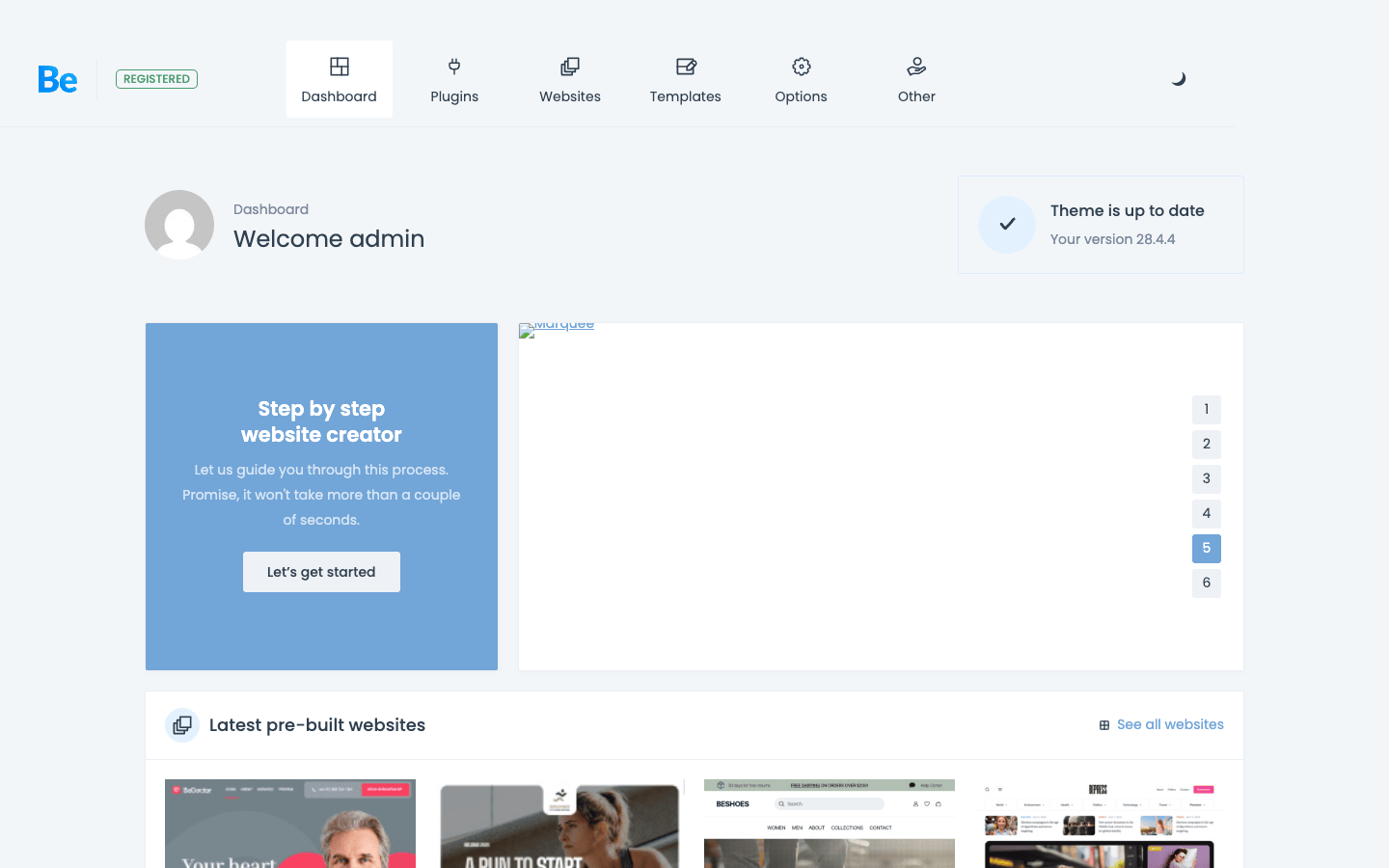
Everything runs from one dashboard at Betheme in the admin menu: a step-by-step website creator for guided setup, the pre-built websites library, your templates, and the full Theme Options panel. It’s a tidy front door to a deep theme.
The short version: if you want a single license that can become almost any kind of site, and you don’t want to be locked into one company’s page builder, BeTheme is built for exactly that.
The three-builder decision (this is the real story)
Here’s the thing most reviews bury, and it’s the most important fact about this theme. BeTheme doesn’t force you onto a proprietary builder. It works with three, and you pick per page:
- BeBuilder, the theme’s own live, front-end editor. This is the headline feature and what most demos are built with.
- WPBakery Page Builder, bundled with the theme as a premium plugin. If you inherited a WPBakery site or your team knows it, you can keep working that way.
- Elementor, supported as a first-class option. Build a page in Elementor and BeTheme gets out of the way.
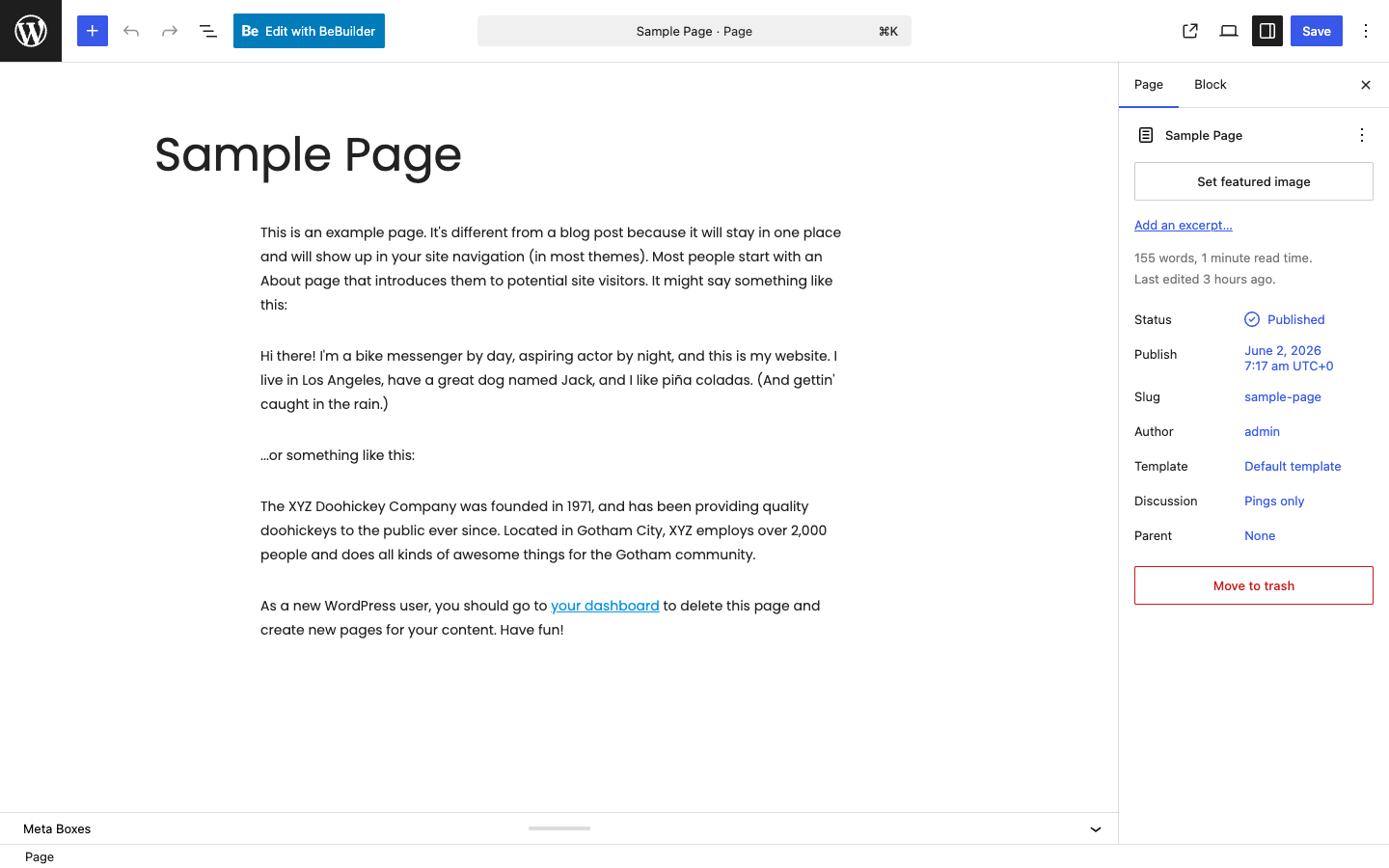
And of course the standard WordPress block editor still works for plain posts and pages. BeTheme adds an "Edit with BeBuilder" button right at the top of the normal editor, so launching the live builder is a single click from any page.
Why does this matter? Because builder lock-in is the single biggest risk with multipurpose themes. Pick a theme whose layouts only exist as its own shortcodes, and the day you switch themes you inherit a page full of [vc_row]-style junk. BeTheme softens that by letting you choose the tool, and by leaning on builders (WPBakery, Elementor) that exist independently of the theme.
I’ll be candid about the trade-off too. Having three builders available is freedom, but it’s also a discipline problem. If one person on your team builds in BeBuilder, another in Elementor, and a third drops in a WPBakery page, you end up loading the CSS and JavaScript for all three, and your "fast multipurpose theme" turns into a slow one. Tip: decide on one builder for the whole site before you start, and stick to it. The flexibility is there for migration and team preference, not for mixing three approaches on one site.
You can even control who is allowed to use BeBuilder at the code level, which I cover in the developer section. That alone tells you the theme expects to be used on real client sites, not just hobby projects.
740+ pre-built websites, and how the import works
The pre-built websites library is the reason a lot of people buy BeTheme, and it’s genuinely large. In the demo I set up, the library screen reads "All 747 pre-built websites," and you can filter that wall of designs down fast.
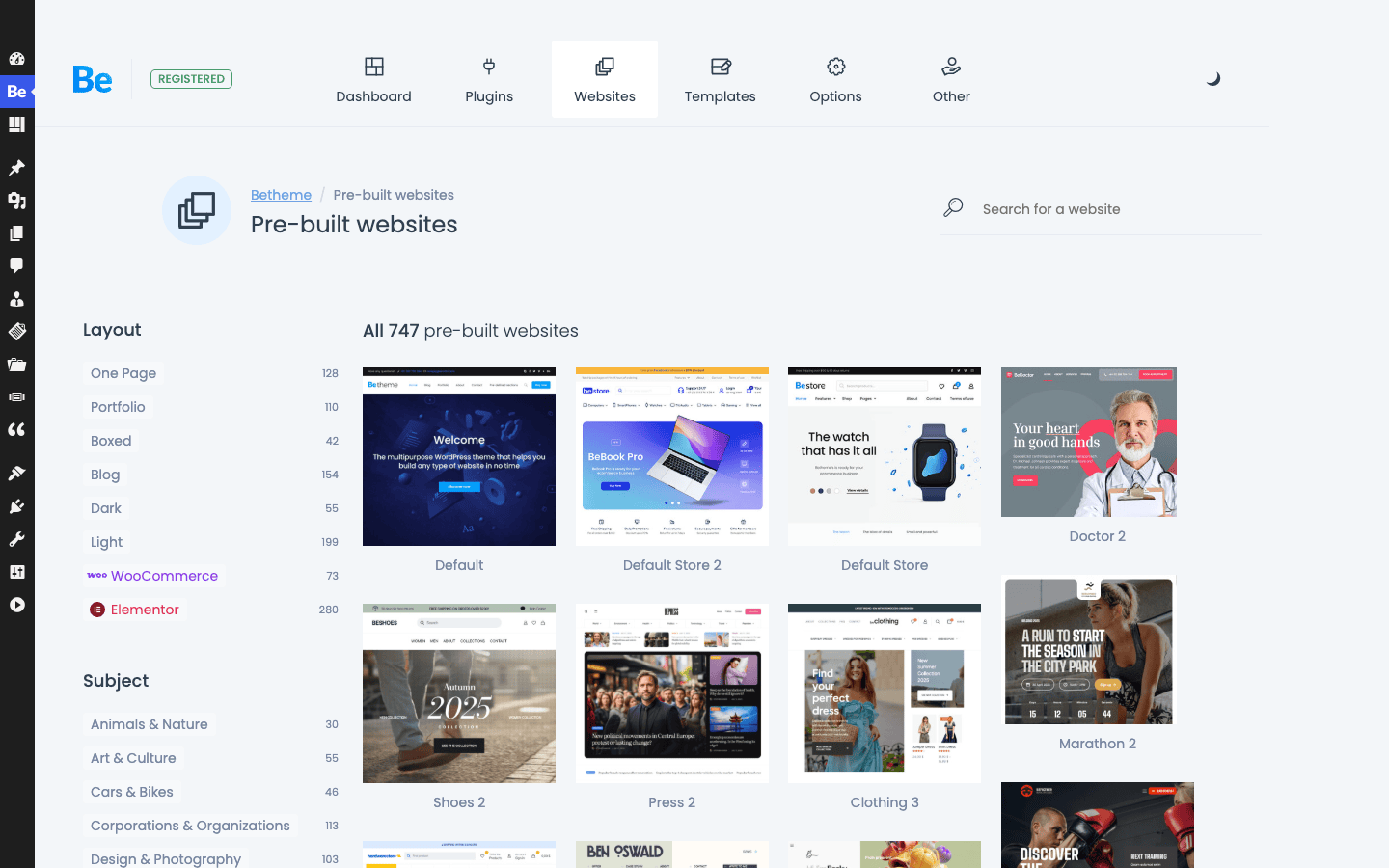
There are two filter columns. Layout narrows by structure: One Page, Portfolio, Boxed, Blog, Dark, WooCommerce, and Elementor (the demos built specifically for Elementor). Subject narrows by industry: Business & Corporate, Art & Design, Books & Literature, Animals & Nature, Cars & Motorcycles, and a long list more. Between the two, finding "a dark one-page portfolio" or "a WooCommerce store for a clothing brand" takes a few seconds, not a scroll through 700 thumbnails.
Importing one is a click. BeTheme pulls in the demo’s pages, menus, theme options, and (where relevant) the WooCommerce or slider content, and you land on a working copy of the design you picked. From there you swap the text and images for yours.
The honest catch: the import depends on Muffin group’s servers to fetch the demo content and any required plugins. On a normal hosting account with outbound internet access that’s fine. In a locked-down environment, or behind a corporate proxy that blocks external fetches, the import can stall, because the assets live on an external server, not inside the theme zip. If your import hangs, that’s almost always why, and it’s worth knowing before you blame your own site.
You don’t have to import a whole site, either. BeTheme also lets you import single pre-built pages and sections into an existing site, which is the safer move once you’re past the initial setup (more on why in the anti-pattern section below).
Inside BeBuilder: the element library
BeBuilder is BeTheme’s own editor, and structurally it works the way most builders do: you build with sections, drop columns inside them, and fill the columns with elements. The column system is granular, with halves, thirds, quarters, fifths, and sixths all available, so you can lay out a 1/3 + 2/3 split or a five-column feature row without fighting the grid.
The element set is where a builder lives or dies, and BeBuilder’s is broad. Beyond the basics (heading, text, image, button, divider, video), you get the kind of pre-styled content blocks that save real time on a marketing site:
- Call to action, promo box, flat box, info box, and story box for conversion sections.
- Feature box, feature list, icon box, and how it works for explaining a product or service.
- Pricing item for pricing tables, counter and quick fact for animated stats, chart and progress bars for data.
- Our team for staff grids, clients and clients slider for logo walls, testimonials for social proof.
- Portfolio, portfolio grid, and portfolio slider that pull from the built-in portfolio post type.
- Blog and blog slider to surface posts, shop slider for WooCommerce products, plus a general slider and gallery.
- Interactive ones like accordion, tabs, FAQ, before/after image comparison, hover box, zoom box, sliding box, opening hours, contact box, and a built-in map.
That’s a real toolkit, not a token list. The presence of a table of contents element and a livesearch element tells you the theme has thought about content-heavy sites, not just landing pages.
Because I couldn’t get a clean screenshot of the live BeBuilder editor in the sandbox (the live preview loads remote fonts that never settled, which is a quirk of the demo environment, not the theme), I’ll describe the experience plainly: BeBuilder edits on the front end, so what you see is close to what visitors get. The left sidebar holds your elements, settings, page options, revisions, and a navigator for jumping around the structure. It supports conditional logic and dynamic data, which is how you build templates that pull in post fields rather than hard-coded text. If you’ve used a modern front-end builder, you’ll be productive in an hour.
The Theme Options panel, section by section
If BeBuilder controls individual pages, Theme Options controls the whole site, and this is where BeTheme earns the "biggest theme ever" boast. You reach it at Betheme » Theme Options, and the left rail is a long list of sections.
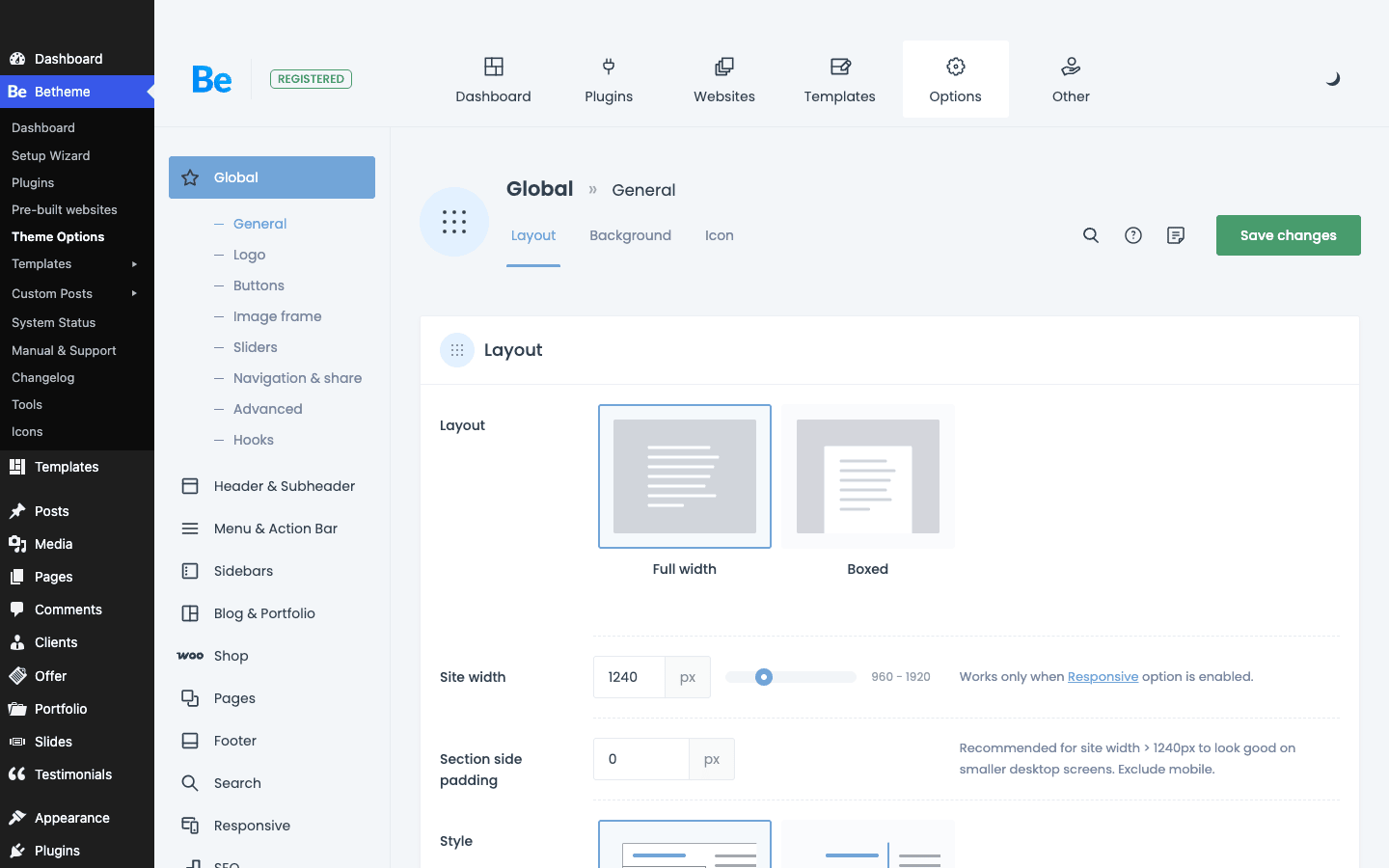
Here’s what each section governs, so you know where to go for what:
| Section | What it controls |
|---|---|
| Global | Layout (full width or boxed), site width, default buttons, image frames, sliders, and a Hooks panel |
| Header & Subheader | Header style, logo, sticky behavior, the subheader (breadcrumb) bar |
| Menu & Action Bar | Main menu styling, the top action bar, and mega menu behavior |
| Sidebars | Register and assign custom sidebars |
| Blog & Portfolio | Archive layouts, single post/portfolio templates, meta display |
| Shop | WooCommerce layouts, product grids, the side cart |
| Pages | Default page header, padding, and layout |
| Footer | Footer columns, widgets, copyright bar |
| Search | What search includes, custom post types, and live search |
| Responsive | Breakpoints and what shows or hides on mobile |
| SEO, Social | Basic meta and social profile links |
| Colors, Fonts | The site-wide palette and typography |
| Translate, GDPR 2.0 | String translation and a cookie/consent layer |
In the Global section alone, the General tab lets you set the layout to Full width or Boxed, drag a Site width slider (it defaults to 1240px and ranges from 960 to 1920), and set section padding and default styles. That’s the level of control that runs through the whole panel: real settings with sensible defaults, each explained in the interface.
Two features in the options framework deserve a callout because they’re the difference between a panel you tolerate and one you trust:
- Backup & Reset with History. BeTheme keeps a revision history of your option changes and lets you save named revisions. If you wreck your settings experimenting, you roll back. I wish more themes did this.
- Export and Import. You can export your entire options set to a file, or copy a link to it, and import it onto another site. That means you can configure one site and clone its setup to the next client project in seconds, without rebuilding the panel by hand.
Note: there’s a built-in search box at the top of Theme Options. With this many settings, you’ll use it. Type "logo" or "padding" and it jumps you to the right control instead of making you remember which of seventeen sections it lives in.
The Header builder and menus
Headers are where most multipurpose themes get fiddly, and BeTheme handles them through the Header & Subheader and Menu & Action Bar option sections rather than a separate drag-and-drop header canvas. You choose a header layout, place your logo, decide whether the header sticks on scroll, and configure the action bar (the thin strip above the menu where a phone number, email, or social icons usually go).
The menu system supports a mega menu, so a single top-level item can open a full-width panel with columns, images, and widgets. That’s table stakes for a business or store site with a lot of categories, and BeTheme builds it in rather than making you buy a separate mega menu plugin.
The subheader is the bar directly under the header that usually shows the page title and breadcrumbs. BeTheme lets you control it globally or override it per page, which matters when you want a tall hero on the home page but a tidy title bar everywhere else.
What it bundles, and what that costs you
BeTheme leans on a set of bundled and recommended plugins, and you install them from Betheme » Install Plugins. It’s worth seeing the actual list, because it tells you what you’re getting for free and what’s just a suggestion.
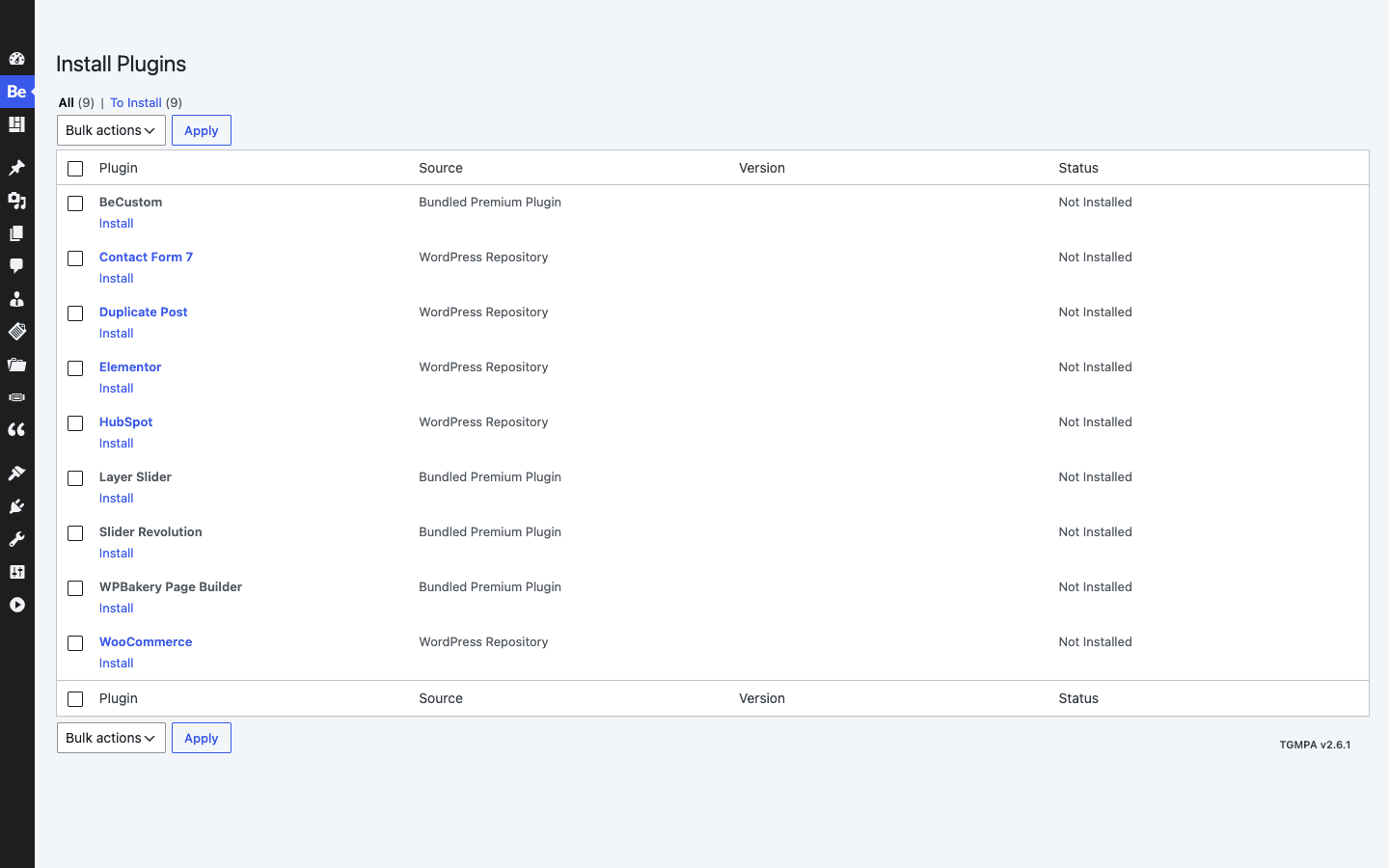
The bundled premium plugins (included with the theme, no extra purchase) are:
- BeCustom, the theme’s own companion plugin that adds extra functionality.
- Slider Revolution and LayerSlider, two premium slider plugins. Bundling Slider Revolution alone is worth real money if you’d otherwise buy it.
- WPBakery Page Builder, the premium builder, in case you want that route.
The recommended plugins, pulled from the WordPress.org repository, are Contact Form 7, Duplicate Post, Elementor, HubSpot, and WooCommerce. These are optional. You install only the ones a given pre-built site needs.
Heads-up: "bundled premium" plugins like Slider Revolution come through the theme, which means they update through the theme, not through the plugin’s own license. That’s normal for theme bundling, but don’t expect a direct Slider Revolution license or its template library just because the slider is included. You get the plugin, not the vendor account.
Setting up a BeTheme site without regrets
BeTheme has a lot of moving parts, so the order you do things in matters. Here’s the sequence I’d follow on a new project, which avoids the most common "now everything’s broken" moments.
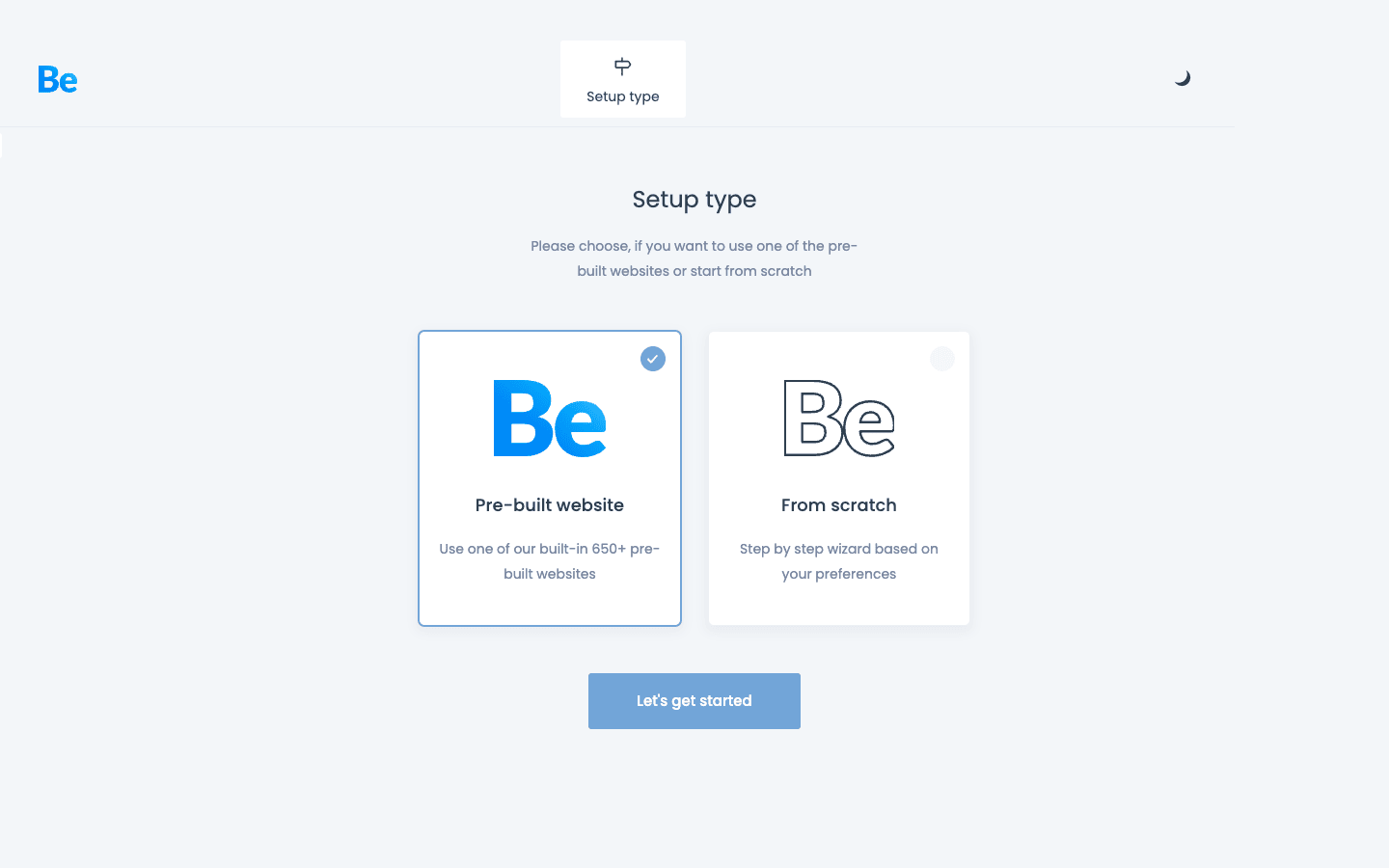
The setup wizard greets you with the first decision: import a pre-built website, or start from scratch with a guided, step-by-step flow. Most people should pick a pre-built site and edit from there.
- Install the theme and activate the child theme. Upload BeTheme, then activate the bundled child theme so any custom CSS or PHP you add survives theme updates. Go to Appearance » Themes to confirm the child theme is active.
- Install only the plugins you need. From Betheme » Install Plugins, add the bundled and recommended plugins the pre-built site you want actually requires. Don’t install all of them by reflex.
- Pick your builder and commit. Decide now: BeBuilder, Elementor, or WPBakery. Filter the pre-built websites library to match (there’s an Elementor layout filter for exactly this).
- Import on a clean install or staging, never on a live site. This is the big one, covered in detail just below. Import the demo closest to your goal, then start swapping content.
- Set your globals before you build pages. In Betheme » Theme Options, set your Colors, Fonts, logo, and header style first. Doing this before you build means every new page inherits the right look instead of you restyling each one.
- Export your options as a backup. Once the site looks right, use the Export feature in Theme Options to save your configuration. If anything breaks later, you can restore it.
Tip: if you only want a piece of a demo, use BeTheme’s single-page and section import instead of importing a whole site. It drops one pre-built page or section into your existing site without touching the rest.
Five sites BeTheme is genuinely good for
Multipurpose doesn’t mean "good at everything," so here’s where I’d actually reach for BeTheme, and how I’d set it up for each.
The agency that builds a lot of small client sites. This is BeTheme’s sweet spot. Import a pre-built site, restyle it with the client’s brand in Theme Options, export the options as a starting template for the next project. The white-label filters (developer section) let you put your agency’s name on the dashboard so clients never see "BeTheme."
The small business that needs a real site this week. A plumber, a dentist, a local gym. Pick a matching pre-built site, swap the photos and copy, wire up Contact Form 7, done. You get a professional layout without paying for a custom build.
The online store on a budget. BeTheme styles WooCommerce out of the box and includes a side cart, product grids, and a shop slider. For a small catalog it’s a complete storefront. If you outgrow it, you can layer on a dedicated WooCommerce theme like WoodMart later, but plenty of stores never need to.
The portfolio or studio site. BeTheme has a real portfolio post type plus portfolio grid and slider elements, so a photographer, designer, or architecture studio can build a proper case-study site without a portfolio plugin.
The one-page launch or event site. The One Page layout filter exists for a reason. A product launch, a conference, a restaurant menu page: pick a one-pager, and the anchor-link navigation is already wired up.
If your project is a complex web app, a membership community, or a custom-designed flagship site, a multipurpose theme is the wrong tool and you should commission something bespoke. BeTheme is for the enormous middle ground of sites that need to look good and ship fast.
Don’t import a demo onto a live site
This is the mistake that costs people their afternoon, sometimes their data, so I’m giving it its own section.
When you import a full pre-built website, BeTheme doesn’t gently add the demo alongside your existing content. It brings in the demo’s pages, menus, widgets, and theme options to recreate that design faithfully. On a fresh install that’s exactly what you want. On a site that already has pages, a configured menu, and tuned theme options, an import can overwrite or bury what you built. I’ve watched people import a demo "just to see it" on a production site and then spend the evening trying to figure out where their real home page went and why their menu is now pointing at demo pages.
The fix is simple and non-negotiable. Import on a fresh WordPress install or a staging copy, never on a live, populated site. Get the design the way you want it there, then either point your domain at it or rebuild the final pages on production using single-page and section imports, which are surgical instead of site-wide.
There’s a money and trust dimension too. If the live site is a client’s store that’s taking orders, a careless demo import that wipes the shop configuration isn’t just an inconvenience, it’s lost sales and a very awkward phone call. The two minutes it takes to spin up a staging site is the cheapest insurance you’ll ever buy. Treat the full-site importer as a "new project only" tool, and you’ll never get bitten by it.
BeTheme vs Avada vs Divi
One more multipurpose flagship belongs on this shortlist: the Salient theme, a WPBakery-based option with a stronger design-led, portfolio-first slant than the three below.
The honest comparison most buyers want is BeTheme against the other two giants of the multipurpose category, Avada and Divi. Here’s how they actually differ, with real numbers.
| BeTheme | Avada | Divi | |
|---|---|---|---|
| Pre-built sites | 740+ | around 90 | 350+ layout packs (2,000+ layouts) |
| Builder | BeBuilder + WPBakery + Elementor | Fusion Builder only | Divi Builder only |
| Regular price | about $59 (ThemeForest, one-time) | about $69 (ThemeForest, one-time) | about $89/year or $249 lifetime |
| Bundled premium plugins | Slider Revolution, LayerSlider | Slider Revolution, LayerSlider | none (Divi includes its own) |
The numbers tell most of the story. BeTheme ships by far the largest pre-built library, roughly 740 sites against Avada’s ~90, though Divi counters with thousands of individual layout blocks rather than full sites. On price, BeTheme and Avada are one-time ThemeForest purchases in the $59 to $69 range, while Divi runs on a yearly or lifetime subscription that starts around $89 a year.
The real philosophical split is the builder. Avada locks you into Fusion Builder and Divi locks you into the Divi Builder. Both are good builders, but they’re proprietary, and leaving the theme means leaving the layouts. BeTheme is the only one of the three that lets you build with Elementor or WPBakery instead of its own tool. If avoiding builder lock-in matters to you, that’s a genuine reason to pick BeTheme over the other two. If you want the single most polished proprietary builder experience, Divi probably still wins on that one axis.
There’s no universally correct answer here. But "I want a huge demo library, a one-time price, and the freedom to use Elementor" describes BeTheme exactly, and neither competitor matches all three.
For a WooCommerce-first store specifically, the Porto theme is a cheaper, store-focused alternative worth a look.
Developer reference: hooks, filters, and white-labeling
BeTheme is more developer-friendly than its all-in-one reputation suggests. The theme exposes around 60 action hooks and 90 filters, and several of them are aimed squarely at agencies. Here’s the practical set.
Content and layout hooks
BeTheme fires actions at the key points in the page so you can inject markup without editing template files. The most useful are the content wrappers and the dedicated hook positions.
// Add a promo bar right before the main content area
add_action( 'mfn_before_content', function () {
    echo '<div class="site-promo">Free shipping over $50</div>';
} );

// Inject something after every page's content
add_action( 'mfn_after_content', function () {
    echo do_shortcode( '[contact-form-7 id="42"]' );
} );
There are also named position hooks (mfn_hook_top, mfn_hook_content_before, mfn_hook_content_after, mfn_hook_bottom) and a mfn_header action, so you can target a spot precisely instead of wrestling with template overrides. For stores, the side cart exposes its own hooks (mfn_get_woo_sidecart_before_content and friends) so you can add notices or upsells inside the slide-out cart.
White-label filters (the agency feature)
This is the part that makes BeTheme a serious client-work theme. A set of betheme_* filters lets you rebrand or strip the theme’s own dashboard so a client never sees the word "BeTheme."
// Replace the theme's dashboard logo and name
add_filter( 'betheme_logo', function () {
    return get_stylesheet_directory_uri() . '/img/agency-logo.svg';
} );

add_filter( 'betheme_label', function () {
    return 'Site Manager';
} );

// Hide the support, survey, changelog, and update notices from clients
add_filter( 'betheme_disable_support', '__return_true' );
add_filter( 'betheme_disable_survey', '__return_true' );
add_filter( 'betheme_disable_changelog', '__return_true' );
add_filter( 'betheme_disable_theme_version', '__return_true' );
There are matching filters for the dashboard content, footer, and subheader (betheme_dashboard_content, betheme_dashboard_footer, betheme_dashboard_subheader), so you can replace the whole control center with your own onboarding text. For an agency handing over sites, this is the difference between a professional handoff and a client googling "what is BeTheme."
Controlling who can use the builder
You can restrict BeBuilder to specific roles, which keeps a client’s editor from accidentally rearranging a page they were only meant to write in.
// Only administrators and editors may open BeBuilder
add_filter( 'mfn_bebuilder_roles', function ( $roles ) {
    return array( 'administrator', 'editor' );
} );
Tuning site search
BeTheme’s search is configurable in code as well as in the options panel. You can include custom post types, toggle whether titles, content, or meta are searched, and limit search to shop products.
// Include the portfolio and a custom CPT in site search results
add_filter( 'mfn_search_custom_post_ids', function ( $types ) {
    $types[] = 'portfolio';
    $types[] = 'event';
    return $types;
} );

// Search titles and content, but skip post meta for speed
add_filter( 'mfn_search_enable_meta', '__return_false' );
Custom post types you can build on
BeTheme registers its own post types: portfolio, testimonial, client, offer, and slide, plus internal template and layout types the builder uses. That means a "Projects" portfolio or a "Team testimonials" section is a real, queryable post type, so you can pull it into custom templates or the REST API like any other content, not a pile of shortcodes.
Performance, compatibility, and gotchas
No honest review skips the rough edges, and with a theme this large there are a few worth naming.
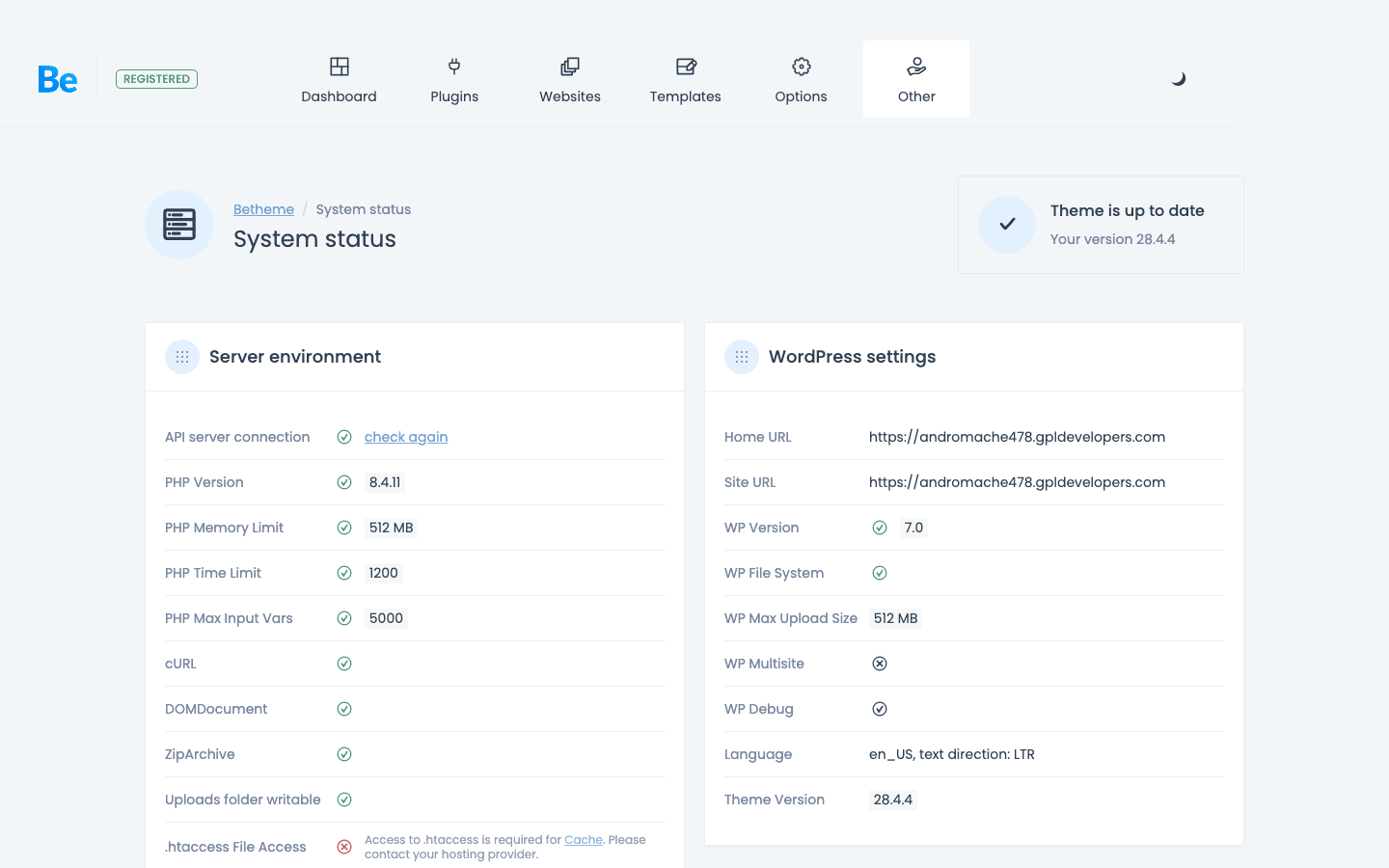
Before you troubleshoot anything, check Betheme » System Status. It runs through your server environment (PHP version, memory limit, time limit, cURL, ZipArchive) and WordPress settings, flagging anything that will cause problems with a red mark. Most import and performance issues trace back to something this screen already told you about.
Weight is the obvious risk. A theme that can be anything carries the code to be anything. Out of the box BeTheme is reasonable, but the moment you activate three builders, two sliders, and a heavy pre-built site, you’re shipping a lot of CSS and JavaScript. The fix is discipline: one builder, only the plugins you need, and a caching plugin. If you’re chasing Core Web Vitals, pair it with a performance plugin and be selective about sliders, which are the usual culprit for slow theme demos.
The import depends on external servers. As covered above, the pre-built content is fetched from Muffin group, not bundled in the theme zip. On restricted hosting the import can fail. That’s a hosting/network issue, not a theme bug, but it surprises people.
Common problems and fixes:
- A pre-built site imports without its images or with broken sliders. The import didn’t finish fetching remote assets. Re-run the import on a host with open outbound access, or import again once.
- The site looks unstyled after switching themes away and back. BeTheme caches generated CSS. Go to Betheme » Theme Options and use the cache/clear tools, or re-save options to regenerate.
- A page built in one builder looks wrong after editing it in another. Don’t mix builders on a single page. Pick one per page and stay there.
- Custom CSS disappears after an update. You edited the parent theme instead of the child theme. Always work in the child theme that ships with BeTheme.
Compatibility is broad. BeTheme styles WooCommerce, integrates with bbPress for forums, supports The Events Calendar, and is compatible with WPML for multilingual sites, with its own Translate panel for simpler string swaps. It works on multisite. The main thing to watch is plugin overlap: if you run Elementor as your builder, you don’t also need BeBuilder loading, so disable what you’re not using.
FAQ
Do I need a separate page builder plugin to use BeTheme?
No. BeBuilder, the theme’s own live editor, is built in and needs nothing extra. The reason WPBakery and Elementor appear in the setup is that BeTheme also supports them if you prefer one of those, but they’re optional. Pick BeBuilder and you have a complete builder with no additional plugin.
Can I switch builders later, or am I locked in?
You can use different builders on different pages, but switching the builder on an existing page is messy: a page built in BeBuilder won’t open cleanly in Elementor and vice versa, because each stores its layout differently. The realistic answer is to choose one builder per site at the start. The genuine flexibility is that you’re not locked into a proprietary tool forever, since Elementor and WPBakery exist independently of the theme.
Will the pre-built websites import on any host?
Usually, but not always. The demo content and required plugins are fetched from Muffin group’s servers during import, so your site needs outbound internet access. On most shared and managed hosts that’s fine. On a locked-down corporate server or behind a strict firewall, the import can stall, and you’ll need to allow the external connections or import on a host that permits them.
Is BeTheme good for WooCommerce stores?
For small to mid-size stores, yes. It styles WooCommerce, includes a side cart, product grids, and a shop slider, and several pre-built sites are full storefronts. For a large catalog or a store that needs advanced merchandising, a dedicated WooCommerce theme may serve you better, but plenty of working shops run happily on BeTheme.
How is BeTheme for performance?
It’s as fast or as slow as you make it. Kept lean (one builder, only necessary plugins, a caching layer) it performs fine. Loaded up with multiple builders and heavy sliders, it slows down like any feature-rich theme would. The weight comes from what you enable, not from the theme sitting idle.
Does BeTheme work with Elementor specifically?
Yes, and it’s a first-class option. There’s an Elementor filter in the pre-built websites library so you can find demos built for Elementor, and the theme stays out of Elementor’s way when you build that route. If your team already lives in Elementor, BeTheme fits that workflow.
Can I reuse my settings across multiple sites?
Yes, and this is one of BeTheme’s best features for agencies. Theme Options has an Export/Import tool that saves your entire configuration to a file or a link, which you can then load onto another site. Configure one project the way you like, and clone that setup to the next in seconds.
Can I white-label BeTheme for clients?
Yes. A set of betheme_* filters lets you replace the dashboard logo and name and hide the support, survey, changelog, and version notices, so a client never sees the BeTheme branding. It’s a code-level feature aimed at agencies, covered in the developer section above.
Does it support multilingual sites?
Yes. BeTheme is compatible with WPML for full multilingual sites, and it includes its own Translate panel in Theme Options for translating the theme’s own strings without a separate plugin.
How much does BeTheme cost, and what about the GPL version?
On ThemeForest it’s a one-time purchase (around $59 for the regular license) with lifetime updates and six months of support, no subscription and no per-site builder fee. On GPL Times, BeTheme is available under the GPL, so you can install it, import a demo, and try all three builders before deciding whether the multipurpose approach fits your project. One thing to know: the bundled premium plugins (Slider Revolution, LayerSlider, WPBakery) come through the theme and update with it, but they don’t include a separate vendor license or that vendor’s own template library.
Final thoughts
I started this skeptical of multipurpose themes, and BeTheme didn’t cure that skepticism so much as earn an exception. The thing it gets right is the thing the category usually gets wrong: it doesn’t trap you. The huge pre-built library gets you to a working design fast, and the option to build with Elementor or WPBakery instead of a proprietary editor means you’re never married to one company’s shortcodes.
It isn’t magic. It’s a large theme, and like any large theme it rewards restraint and punishes the kitchen-sink approach. Pick one builder, import on staging, install only what you need, and keep your custom code in the child theme, and you get a fast, flexible site that can become almost anything. Ignore that discipline, and you get the bloated mess that gives multipurpose themes their bad name.
For agencies cranking out client sites, small businesses that need to launch this week, and anyone who wants maximum design range from a single one-time license, BeTheme is one of the few multipurpose themes I’d actually recommend. Try it on a staging site, import a demo close to your idea, and see how far you get in an afternoon. I think you’ll be surprised, the same way I was.