

The default WordPress comment form has barely changed since 2005. One name field, one email, one textarea, no live updates, no voting, no ratings, no nothing. If you’ve ever stared at your traffic stats wondering why nobody comments anymore, the form is probably part of the answer. wpDiscuz is the plugin most publishers reach for when they want a real, lived-in discussion section without handing the data to Disqus or Jetpack. It keeps every comment in your own database, adds AJAX and live updates, ships with three modern layouts, and lets you build custom comment forms with the same fields you’d expect from a forms plugin.
I spent a few hours poking through the source code, building a couple of custom forms, hooking a few filters, and reading every option screen. This review covers what wpDiscuz actually does, who it’s for, and (in the second half) every hook a developer cares about.
Table of Contents
- What is wpDiscuz?
- Key features
- How it works for readers
- How it works for admins
- Installation and setup
- The 15 settings panels
- Building custom comment forms
- Real-world use cases
- Developer reference: hooks, filters, and shortcodes
- Performance, caching, and compatibility
- Addons worth knowing about
- Pricing and licensing
- FAQ
- Final thoughts
What is wpDiscuz?
wpDiscuz is a comments plugin built by the gVectors Team. The free version on WordPress.org has well over 100,000 active installs, and the premium addons (subscription manager, mentioning, private comments, media uploader, and more) extend it into something that genuinely feels like a forum bolted onto your blog. If you want an actual standalone forum rather than blog comments dressed up as one, the same gVectors team makes wpForo, a full community forum plugin. It’s a drop-in replacement for the WordPress core comment template, not a parallel system. Every comment still lives in wp_comments and wp_commentmeta, so Akismet, Antispam Bee, and any backup plugin you already use keep working.
That last bit is the entire pitch. Disqus and Jetpack Comments are convenient because they handle the form and the storage for you, but they ship third-party JavaScript, third-party tracking, and they hold your comments hostage. wpDiscuz fixes the form without taking the data. If you ever uninstall it, every comment is still there, exactly where WordPress put it.
The plugin reorganises the front-end with its own walker class, its own AJAX endpoints, and its own asset bundle. You opt into the layouts and features you want, and you can extend any of it through more than 200 filters and actions. The admin side is split into a friendly card-based settings screen, a separate phrases page for every translatable string, a forms editor (it’s a custom post type), a tools page for import/export, and an addons gallery.
Key features
- Three comment layouts in light and dark. Layout 1 is the classic flat list. Layout 2 is closer to a chat thread with avatars on the left. Layout 3 puts the reply box up top and uses indented cards. All three can be styled further from the Styles and Colors panel.
- AJAX everything. Posting, replying, voting, editing, loading more, sorting by newest/oldest/most-voted, switching between "comments" and "inline feedback", none of it reloads the page.
- Live updates and bubble notifications. A floating speech-bubble icon in the corner counts new comments since you opened the page. You can have new comments auto-insert into the thread or wait for the reader to click.
- Inline comments. Readers can select any chunk of your article text and leave a comment pinned to that selection. It shows as a tiny inline marker and a side-thread, which is a much better feedback loop than "hey at one point you said X".
- Star ratings on posts and custom fields. Drop the
[wpdrating]shortcode (or let the plugin auto-render the field) and readers rate the post. Aggregate rating gets fed into Schema.org markup automatically. - Comment voting. Up/down votes per comment, tracked by user account when logged in and by cookie when not. You can hide downvotes, swap the icons, or wire votes into a karma system through filters.
- Custom comment forms. Build per-post-type or per-category forms with extra fields. Want a "What’s your role?" select on tutorial posts and a "Star rating" on review posts? Two clicks each.
- Subscription and follow. Readers can subscribe to comment threads, the entire post, replies to their own comment, or follow a specific user. Confirmation emails are configurable and translatable.
- Social login and shares. Native integration with the major social-login plugins, and a row of share buttons on each comment.
- Per-role permissions. Restrict who can see comments, who can post them, and who has to wait for moderation, all from the form editor.
- Built-in caching. Comment author lookups, gravatar fetches, and the comment tree itself all get cached, which is the difference between wpDiscuz feeling instant and wpDiscuz hammering your database on busy posts.
- GDPR-friendly. Consent checkboxes, anonymous commenting, a personal-data export hook, and an "I don’t want my email saved" toggle on the form.
- WPML and Polylang ready. Each form has a language field; you can build one form per language or one universal form with translated phrases.
How it works for readers
The reader-facing experience is what sells wpDiscuz, so it’s worth describing in detail. When a logged-out visitor scrolls to the comments section, here’s what they see and what happens:
- The comment form sits at the top of the section (you can flip it to the bottom). It shows name and email fields, a website URL field (off by default but easy to toggle), and a rich-text editor with bold, italic, underline, strikethrough, lists, blockquote, code, link, and image-via-URL buttons. There’s a quick-tags toolbar above the textarea.
- Below the editor are a few checkboxes: subscribe to follow-up comments, save my data for next time, and (if you’ve enabled it) the GDPR consent box.
- If the reader has commented before from the same browser, name and email are pre-filled from a cookie. The plugin also tries to map the email back to an existing WordPress user, so a long-time commenter shows their real avatar.
- Below the form is the discussion thread. Comments are nested as deep as the admin allows (up to 6 levels), with a "View Replies (3)" toggle that lazy-loads replies on click.
- Each comment has voting arrows, a reply button, share buttons, an edit button (if the reader is the author and the edit window hasn’t expired), and a "report" link if the Report and Flagging addon is active.
- Sort buttons across the top let the reader switch between newest, oldest, and most-voted. There’s also a "Filter" group for "by users I follow", "with images", "with links", etc., which the Front-end Moderation addon extends further.
- The whole thread updates live. If you’ve enabled real-time updates, new comments appear automatically with a soft fade-in. If you’ve enabled the bubble counter, it just shows a "5 new" badge that the reader clicks to reveal the new comments.
Logged-in visitors get a slightly different view: their avatar is shown, the name/email fields disappear, and there’s a "logout" link. Logged-in users can also follow another user, get badges for being post authors or staff, and see private comments if the Private Comments addon is on.
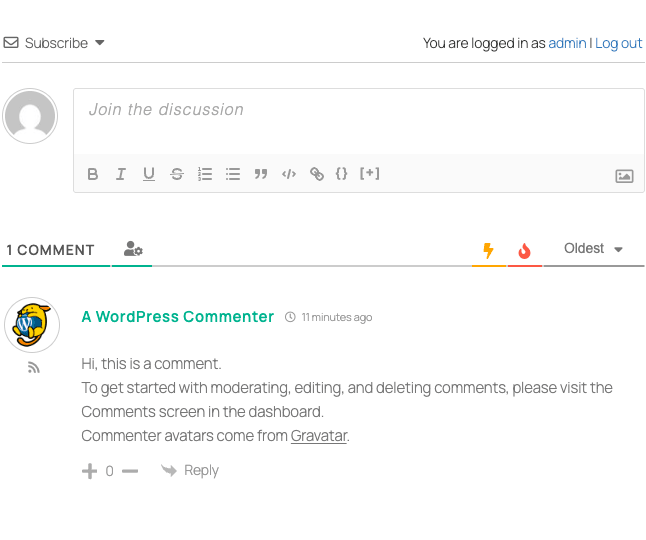
That toolbar with B/I/U/S, lists, blockquote, code, link, code-block, and image attachment? That’s the default editor. Everything you see is configurable from the Comment Form Settings panel.
How it works for admins
The admin experience splits cleanly into five top-level pages under the wpDiscuz menu: Dashboard, Settings, Phrases, Tools, Addons, and the Forms custom post type.
The Dashboard is a true overview: it shows total comments, threads, comment authors, registered users who’ve commented, and a 14-day chart of comment volume. It also pulls the most active commenters and the most active guest commenters, which is genuinely useful for finding people to highlight or reach out to.
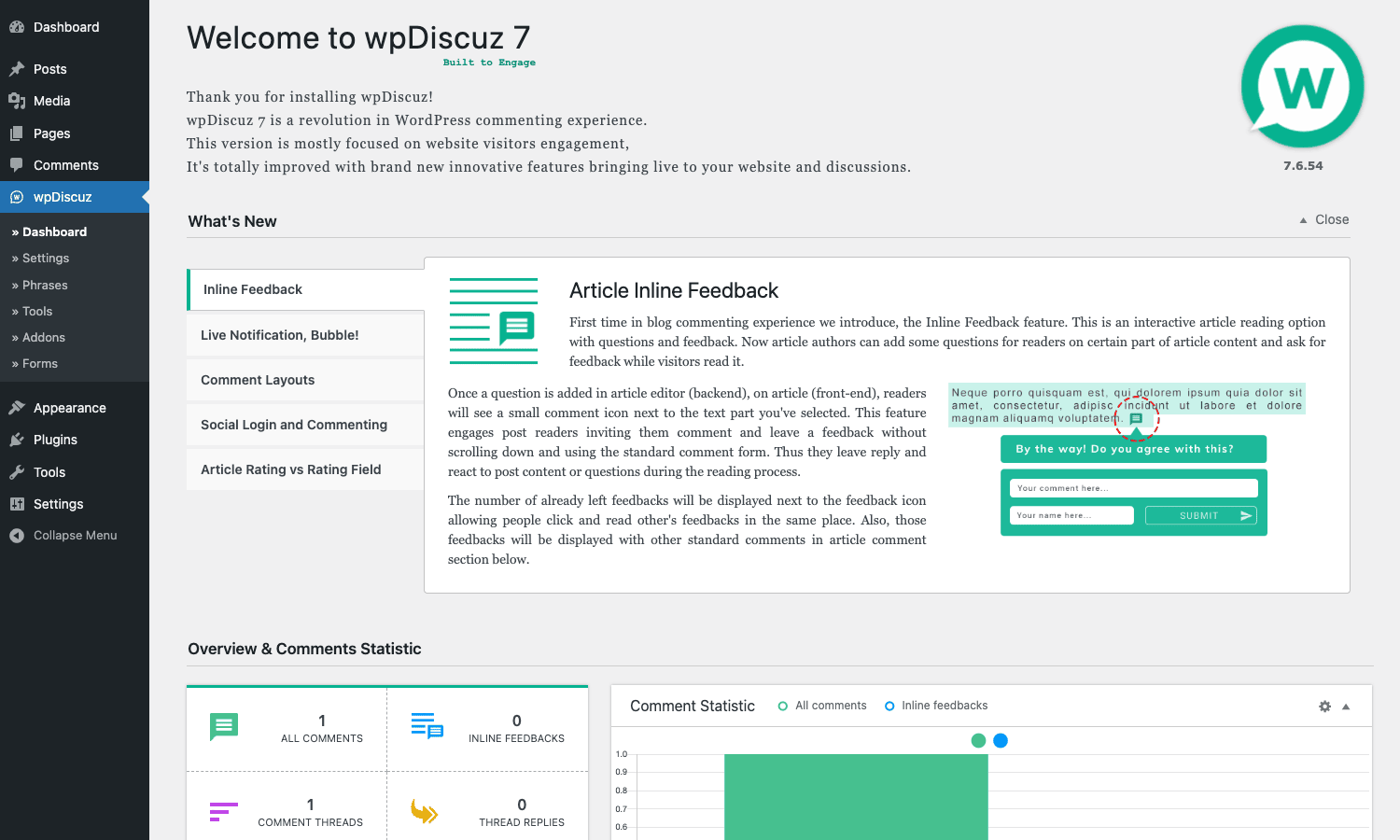
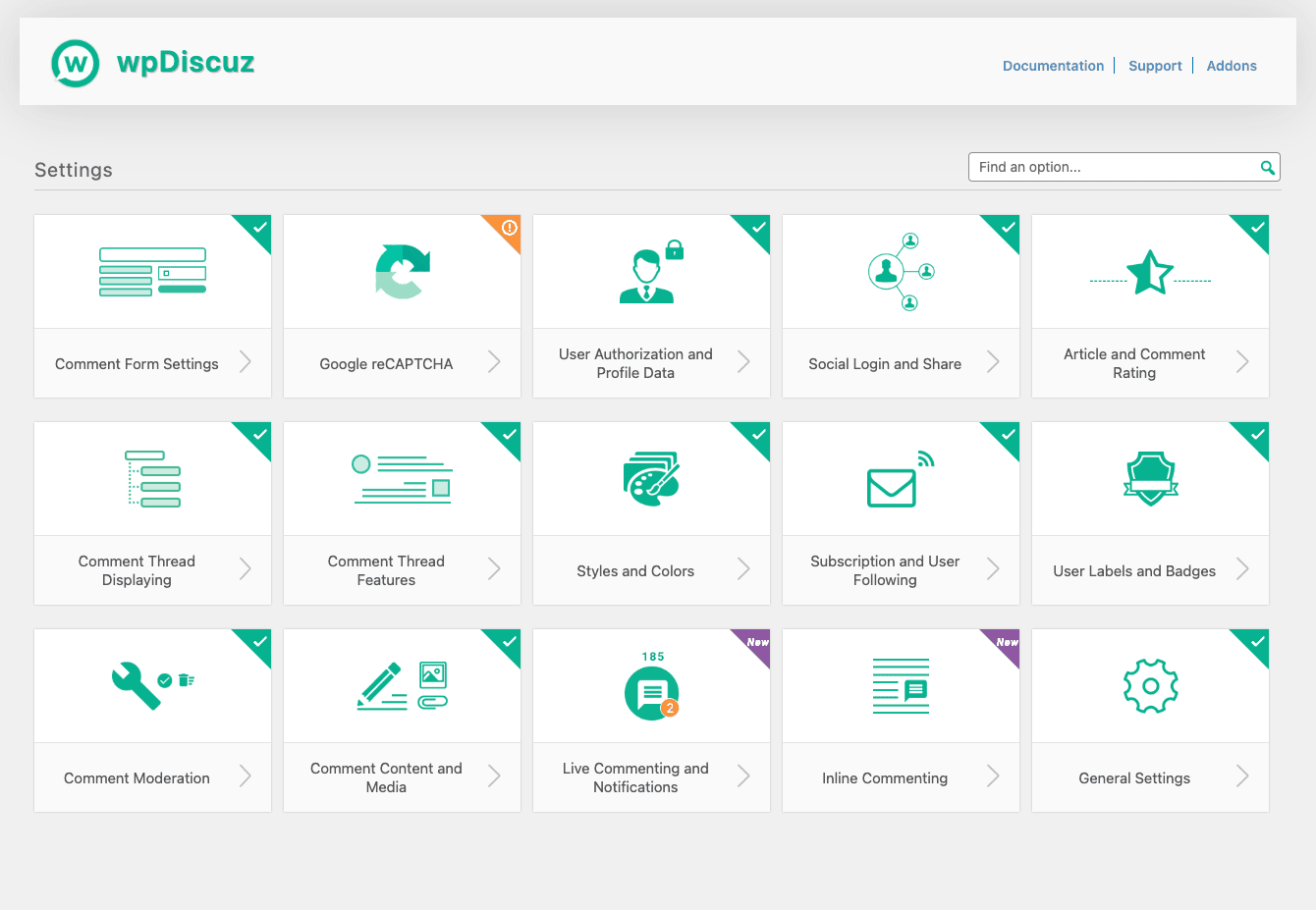
The Settings page is where you spend most of your time. It’s organised as a grid of 15 cards (one per topic), not a wall of fields. Click any card to expand the options below it. Each card has a green checkmark when its features are fully configured and an orange warning when something’s missing (the reCAPTCHA card warns until you paste your site/secret keys).
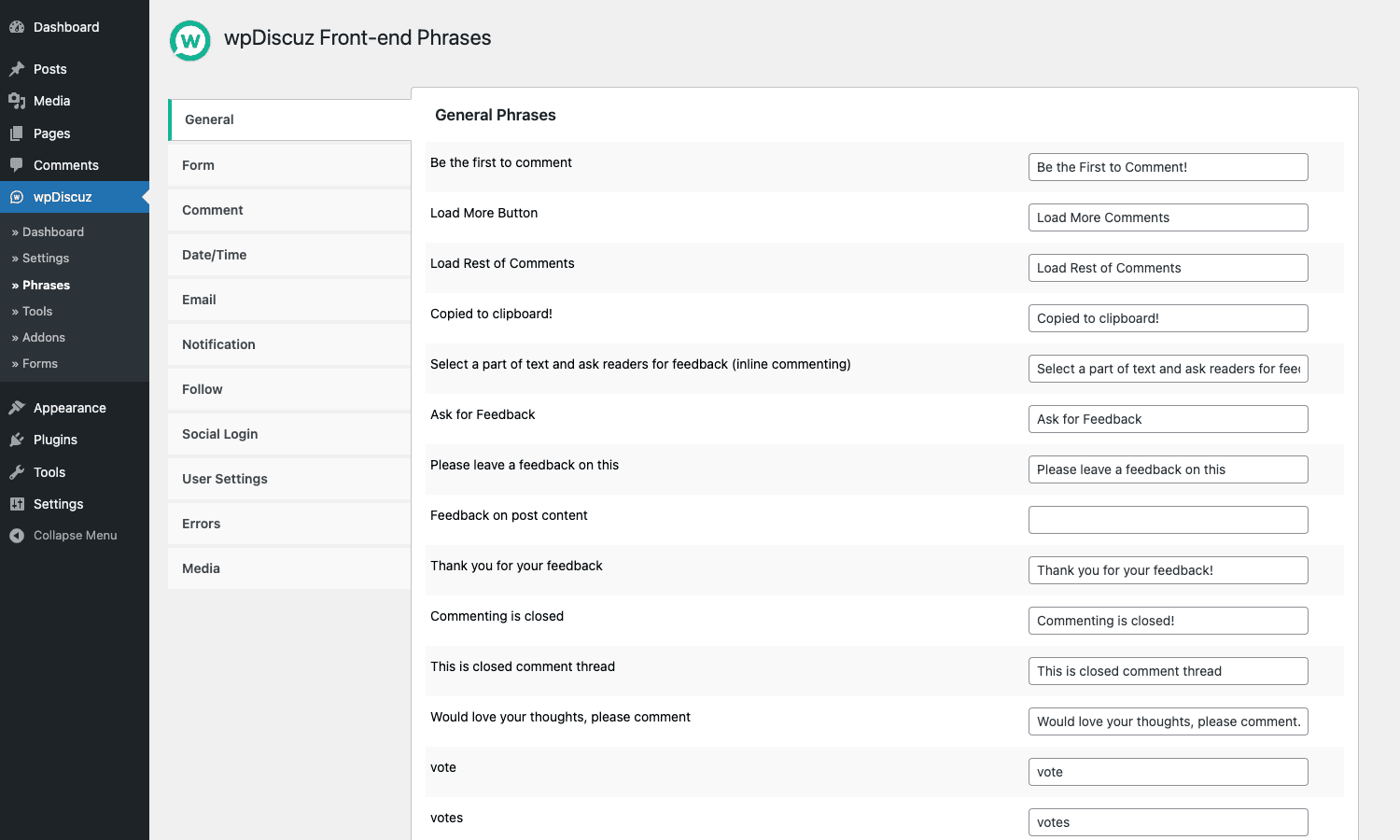
The Phrases page is the localisation kitchen. Every front-end string the plugin can show lives here, grouped into 11 tabs: General, Form, Comment, Date/Time, Email, Notification, Follow, Social Login, User Settings, Errors, and Media. If you want to change "Be the first to comment!" to "Kick off the discussion", you do it here, not in your child theme. Phrases are exportable as JSON via the Tools page so you can carry them across staging and production.
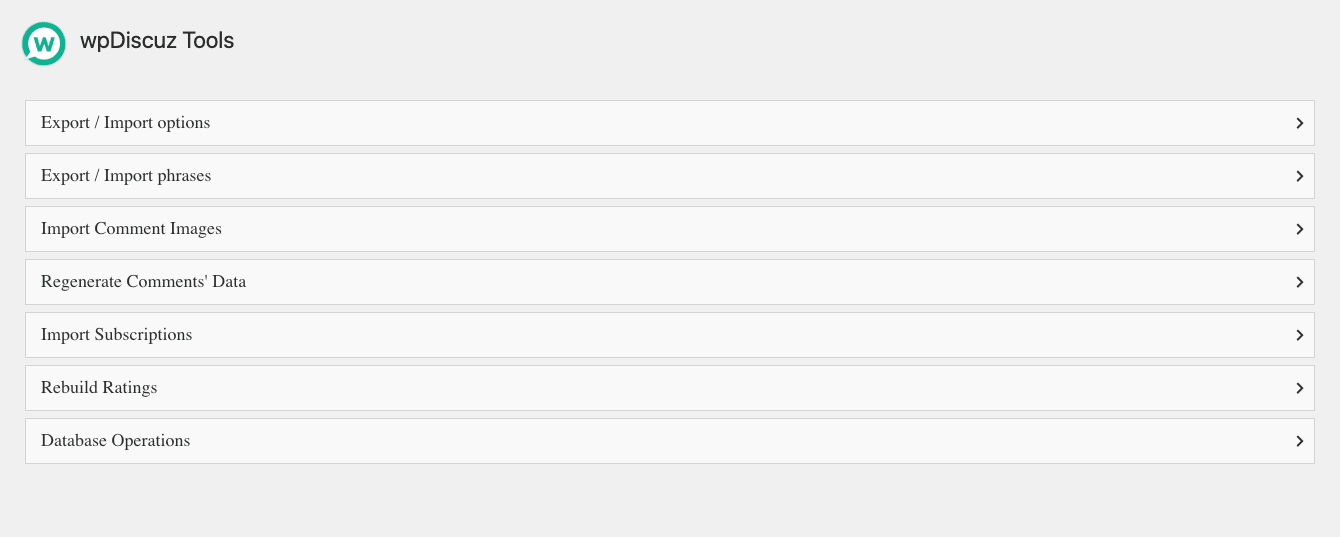
The Tools page handles imports, exports, and maintenance tasks. You can ship your settings JSON between sites, regenerate the indexed comment data that powers sorting/filtering, rebuild aggregate post ratings from scratch, and run a set of database operations (cleanup orphaned commentmeta, reset votes, drop the cache).
The Forms page is a custom post type. Each form has its own field set, its own post-type/category mapping, and its own language code. The Default Form is created automatically on activation.
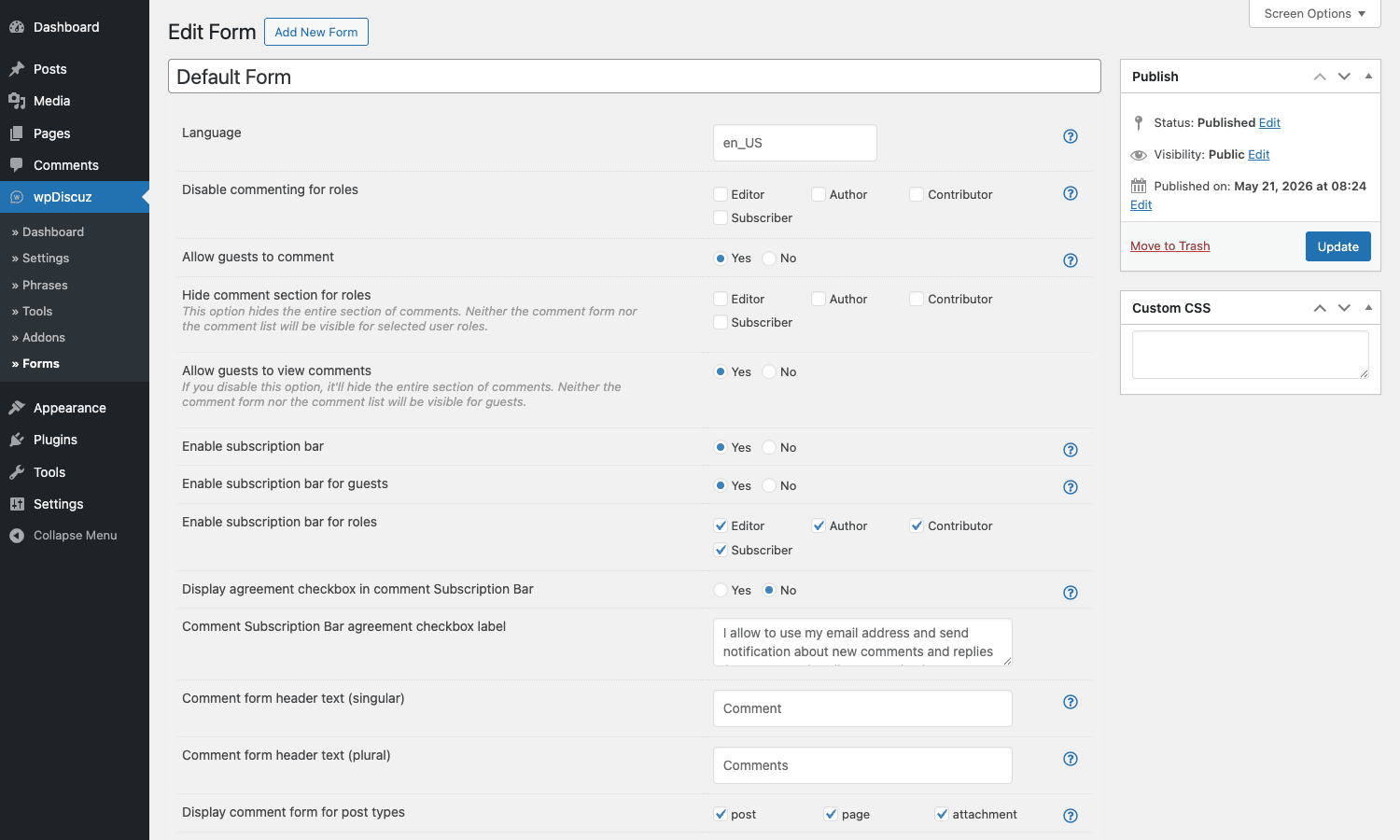
You can have one form attached to every post on the site, or many forms each targeting specific content. wpDiscuz picks the right form by checking, in order: explicit post IDs in the form, the form’s post-type and category mapping, and finally the default form as a fallback.
Installation and setup
The first-run experience is friendly. Most plugins drop you into a wall of options; wpDiscuz runs a three-step wizard that picks the layout, theme (light or dark), and a handful of essentials before you ever see the full settings page.
- Install the plugin via Plugins -> Add New -> Upload Plugin or, if you have it from the GPL Times store, upload the zip and activate. The wpDiscuz menu item appears under the WordPress dashboard’s main nav.
- Visit wpDiscuz -> Settings for the first time. The setup wizard appears. Pick Layout 1, 2, or 3, choose Light or Dark, decide if guests can comment and whether they need to provide an email, and click Finish Installation.
- Open any post and scroll to the comments. The wpDiscuz section should be live with the default form.
- Go back to wpDiscuz -> Settings -> General Settings and double-check that Use WordPress Date/Time Format matches what you want, and that Visible Comments is set to whatever pagination feels right for your site (10 for chatty news sites, 30 for less-active blogs).
- If you’re on a multilingual site, visit wpDiscuz -> Forms, edit the Default Form, set its Language field to the language code of your default locale, and create a second form for each additional language.
- (Optional) Visit wpDiscuz -> Settings -> Google reCAPTCHA, paste your v3 site/secret keys, and pick a score threshold. v3 is invisible to readers and dramatically cuts comment spam without an "I’m not a robot" checkbox.
- (Optional) Visit wpDiscuz -> Phrases -> General and customise the call-to-action text. Default phrases are fine, but a sentence in your own voice helps reader engagement noticeably.
If you’ve never run a WordPress comments plugin before, that’s about it. Power users will want to also enable inline commenting (Settings -> Inline Commenting), set up subscriptions (Settings -> Subscription and User Following), and pick the social login providers they want (Settings -> Social Login and Share).
The 15 settings panels
Here’s what’s actually inside each settings card. I’ll keep this terse because the labels are mostly self-explanatory.
- Comment Form Settings. Form position (top or bottom), guest commenting, email/name required toggles, GDPR consent, custom field types you allow.
- Google reCAPTCHA. v2 or v3, site key, secret key, score threshold, where to show it (guests only, all visitors, never on logged-in).
- User Authorization and Profile Data. WordPress user/role for new commenters, what fields are visible in the public profile, link to author archive yes/no.
- Social Login and Share. Toggles for Facebook, Twitter, Google, LinkedIn, Disqus, WordPress.com, and others; share button row per comment.
- Article and Comment Rating. Enable star rating on posts, enable per-comment rating, custom field rating, schema markup output.
- Comment Thread Displaying. Layout choice, max thread depth (1 to 6), Load More vs pagination, lazy load, default sort order.
- Comment Thread Features. Sticky comments, closed threads, voting, reply count, edit window, comment deletion by author.
- Styles and Colors. Primary brand color, accent color, font tuning, dark mode override.
- Subscription and User Following. Allow subscription to thread / post / replies, double-opt-in, confirmation email content.
- User Labels and Badges. Custom badges per role (e.g. green "Staff" badge for editors, gold "Pro" for paid members).
- Comment Moderation. Auto-approve known commenters, hold guests, profanity filter, role-based pre-moderation rules.
- Comment Content and Media. Allowed HTML tags, image-from-URL conversion, oEmbed conversion, line-break handling.
- Live Commenting and Notifications. Real-time updates, the bubble notification, sound, polling interval.
- Inline Commenting. Enable the feedback shortcode, enable text-selection inline comments, post types that support inline feedback.
- General Settings. Cache, asset minification, date format, comment count format, and the catch-all "everything else" panel.
You don’t have to touch all 15. The defaults are sensible and the wizard nails the most important three on first run.
Building custom comment forms
Forms are where wpDiscuz separates itself from every other comment plugin. They’re a real custom post type (wpdiscuz_form), so you can have as many as you want and assign each one to specific post types, taxonomies, or even individual post IDs.
A form is built from "rows" and "fields". Each row holds one or more fields side-by-side. The defaults are Name, Email, Website, and the comment body in a single row, with the comment text taking a row of its own below. To add a custom field, click Add Row, then drag in a field type from the picker on the right. Available field types out of the box:
- Single-line text
- Textarea
- Select (dropdown)
- Checkbox
- Radio buttons
- URL
- Color picker
- Date picker
- Number
- Rating (star scale)
Each field has its own settings: label, description, required/optional, visibility per role, whether it’s shown on guests only or logged-in only, and whether the value is visible in the public comment after submission. Fields are stored as commentmeta on the comment row.
That’s enough to build, say, a "Product Review" form where the comment also captures a 1-5 rating, a "Would you recommend it?" yes/no radio, and a "Verified buyer?" hidden field that’s populated server-side.
You attach a form to content via the Display comment form for post types field plus optional category restrictions and post IDs. Order of resolution is: explicit post ID -> category -> post type -> default fallback. So if you’ve got one "review" form for the review post type and one default form for everything else, you don’t need to touch each post.
Real-world use cases
Here are five concrete situations where wpDiscuz pulls its weight:
- High-traffic news site replacing Disqus. The pitch: you keep the data, drop the third-party tracking, and stop ceding pageviews to ad-supported iframes. Pair wpDiscuz with a serious page-cache layer like the one we walk through in our WP Rocket review and the load is noticeably lighter than Disqus’s embed bundle. The review also covers how to set the cache exclusions so the wpDiscuz AJAX endpoints stay dynamic.
- Tutorial blog with code reviews. Use the wpDiscuz Syntax Highlighter addon, allow the
<pre>and<code>tags in Comment Content settings, and your commenters can paste working code samples that render with proper highlighting. Combine with the Media Uploader addon and people can attach screenshots too. - Product review site. Build a custom form with a 1-5 star rating, a "Verified buyer" hidden field, and a "Would you recommend?" yes/no. Use
[wpdrating]in the post template to show the aggregate score next to your editorial rating. - Membership / paid community site. Pair wpDiscuz with a membership plugin like Ultimate Member, restrict comments to logged-in members from the Comment Form Settings panel, and give moderators a custom "Mod" badge from the User Labels and Badges panel. Our Ultimate Member guide covers the role setup side.
- Multilingual site with WPML or Polylang Pro. Build one form per language, set the Language field on each, and wpDiscuz auto-picks based on the current locale. We’ve covered the multilingual setup in detail in the Polylang Pro walkthrough if you haven’t done that part yet.
Each one of those scenarios stays inside the free plugin plus one or two addons. None of them requires custom development, though if you want to do something exotic you absolutely can. Which brings us to the dev section.
Developer reference: hooks, filters, and shortcodes
This is where wpDiscuz quietly impresses. There are 60+ actions and 200+ filters available, plus three shortcodes, a Gutenberg block, and a REST endpoint pattern. I’ll cover the ones you’ll actually use, with realistic examples.
Shortcodes
[wpdiscuz_comments]
Drop this anywhere (a custom page, a sidebar widget through a shortcode block) to render the wpDiscuz section for the current post. If there’s no associated post (a standalone landing page), the shortcode no-ops gracefully.
[wpdrating post_id="123" type="bar" mode="ro"]
The rating shortcode. Attributes:
post_iddefaults to the current posttypeisbar(default, horizontal stars),vertical, orcirclemodeisrw(read-write, default on posts) orro(read-only display)sizesets the pixel size for the star icons
[wpdiscuz-feedback id="intro" question="What do you think of this section?"]Selectable text here.[/wpdiscuz-feedback]
The feedback shortcode is the inline-comments engine. Wrap a paragraph or a block and readers can leave comments pinned to that exact block. Showing up in the comment thread under a "feedback" tab.
Gutenberg block
There’s a wpdiscuz/wpdiscuz block registered server-side with a render_callback. Drop it into any page or template via the block editor and it renders the section. Useful if you want comments on a Page (which doesn’t have them by default in many themes).
REST endpoints
wpDiscuz exposes its endpoints via the wpdiscuz_rest_routes filter rather than registering them statically. To add your own:
add_filter( 'wpdiscuz_rest_routes', function( $routes ) {
 $routes[] = [
 'namespace' => 'mysite/v1',
 'resource_name' => 'comment-summary',
 'data' => [
 'methods' => 'GET',
 'callback' => 'mysite_comment_summary',
 'permission_callback' => '__return_true',
 ],
 ];
 return $routes;
} );
Render-side actions you’ll use most
// Inject a custom block above the comments form (sponsored CTA, signup ask, etc).
add_action( 'wpdiscuz_comment_form_before', function() {
 if ( ! is_user_logged_in() ) {
 echo '<div class="my-cta">Want to comment? <a href="/register">Create a free account</a>.</div>';
 }
} );

// Inject under the whole comments section.
add_action( 'wpdiscuz_after_comments', function() {
 echo '<p class="related-discussions">Continue the conversation in our forum.</p>';
} );
Filter the comment query
// Hide comments that contain a flagged word from the public thread.
add_filter( 'wpdiscuz_comments_args', function( $args ) {
 $args['search'] = '';
 $args['meta_query'][] = [
 'key' => 'wpd_is_hidden',
 'value' => '1',
 'compare' => '!=',
 ];
 return $args;
} );
Restrict who can comment by role
add_filter( 'wpdiscuz_user_role_can_comment', function( $can, $user ) {
 // Only subscribers and above can comment, even if guests are allowed globally.
 if ( ! $user || ! $user->exists() ) {
 return false;
 }
 return $can;
}, 10, 2 );
Customise the per-comment email
add_filter( 'wpdiscuz_email_subject', function( $subject, $comment ) {
 return sprintf( '[%s] New comment on %s', get_bloginfo( 'name' ), get_the_title( $comment->comment_post_ID ) );
}, 10, 2 );

add_filter( 'wpdiscuz_email_content', function( $content, $comment ) {
 $content = str_replace( '[COMMENT_CONTENT]', wp_strip_all_tags( $comment->comment_content ), $content );
 return $content;
}, 10, 2 );
Hook into the voting system
// Award karma in a user-meta field every time someone upvotes a user's comment.
add_action( 'wpdiscuz_add_vote', function( $comment_id, $vote_type ) {
 if ( $vote_type !== 'up' ) {
 return;
 }
 $comment = get_comment( $comment_id );
 if ( ! $comment || ! $comment->user_id ) {
 return;
 }
 $karma = (int) get_user_meta( $comment->user_id, 'mysite_karma', true );
 update_user_meta( $comment->user_id, 'mysite_karma', $karma + 1 );
}, 10, 2 );
Read or set custom form-field values
Custom field values are stored as commentmeta keyed by the field name. To read them:
$comment_id = 42;
$user_role = get_comment_meta( $comment_id, 'user_role', true );
$verified = get_comment_meta( $comment_id, 'verified_buyer', true );
To pre-populate one on save:
add_action( 'wpdiscuz_before_save_commentmeta', function( $comment_id, $form ) {
 // If the comment author email matches a paying customer, flag the comment.
 $comment = get_comment( $comment_id );
 if ( wc_customer_bought_product( $comment->comment_author_email, $comment->user_id, get_the_ID() ) ) {
 add_comment_meta( $comment_id, 'verified_buyer', '1' );
 }
}, 10, 2 );
Add a custom form field type
Each built-in field type runs through a wpdiscuz_custom_field_<type> filter, so you can transform the value before save. To add a brand new field type, you register it with the form-builder and supply a render callback. That’s heavier than the snippets above, but the gVectors team’s official documentation covers the full pattern.
Bend the rendering
// Add a custom CSS class to every comment wrapper for analytics.
add_filter( 'wpdiscuz_comment_wrap_classes', function( $classes, $comment ) {
 $classes[] = 'wpd-c-' . $comment->comment_type;
 return $classes;
}, 10, 2 );

// Swap the comment author label.
add_filter( 'wpdiscuz_author_title', function( $title, $author ) {
 if ( user_can( $author->user_id, 'edit_posts' ) ) {
 return $title . ' <span class="staff-badge">Editor</span>';
 }
 return $title;
}, 10, 2 );
Customise the reCAPTCHA
// Use environment variables instead of stored options.
add_filter( 'wpdiscuz_recaptcha_site_key', fn() => getenv( 'RECAPTCHA_SITE_KEY' ) );
add_filter( 'wpdiscuz_recaptcha_secret', fn() => getenv( 'RECAPTCHA_SECRET' ) );
add_filter( 'wpdiscuz_recaptcha_score', fn() => 0.7 );
Wrap the JS options
wpdiscuz_js_options is the one filter you use when you need to ship extra config to the front-end script:
add_filter( 'wpdiscuz_js_options', function( $options ) {
 $options['mysite_extra_phrase'] = __( 'Loading more reactions', 'mysite' );
 return $options;
} );
That gets wp_localize_script-ed into the wpdiscuzUCObj JS global, where your own theme script can read it.
There’s plenty more (mentions, follow events, subscription emails, GDPR export, AJAX nonce validation, cache eviction hooks), but with the patterns above you can shape almost any behaviour without touching the plugin’s own files. Which is exactly the point.
Performance, caching, and compatibility
A comments plugin lives or dies on how it behaves on busy posts. wpDiscuz holds up well, but there are a few knobs worth knowing.
Built-in caching. The plugin caches the comment tree, the comment authors, and the per-user gravatar in transients. That’s the difference between paging through a 500-comment thread in under a second and taking three seconds per page. The cache is keyed per post and invalidated on every new comment via wpdiscuz_clean_post_cache.
Page-cache integration. wpDiscuz is fully compatible with WP Rocket, LiteSpeed Cache, W3 Total Cache, and others. The AJAX endpoints are unique URLs that page caches naturally skip. There’s an explicit litespeed_purge_post action wired in so LiteSpeed clears the post cache when a new comment arrives. WP Rocket users should make sure the page cache excludes any URL containing ?wpdiscuz_ (it does, out of the box).
Lazy loading. The Comment Thread Displaying panel has a "lazy load wpDiscuz" toggle. Flip it on and the entire section only renders when the reader scrolls within ~600 px of it. This is the biggest single performance win on long posts. The savings: no comment HTML in the initial response, no avatar requests, no editor JS loaded until needed.
Asset minification. General Settings has a "Minify wpDiscuz CSS" option that takes the dynamic CSS (the colors and the layout-specific overrides) and outputs it minified. With this on, the wpDiscuz CSS payload drops to under 40 KB.
Bot mitigation. Even with reCAPTCHA off, wpDiscuz checks comment rate per IP, requires a fresh nonce per page load, and supports a "Comments per minute per IP" limit. Combine this with Yoast SEO Premium‘s redirect manager (covered in our Yoast SEO Premium review) and any leftover spam URLs from old plugins can be 410’d cleanly.
Compatibility. wpDiscuz works alongside Jetpack (yes, both can be active. Jetpack Comments will be replaced by the wpDiscuz form). It also coexists with BuddyBoss Platform and PeepSo when you’re running a wider community site. wpDiscuz handles post comments, the community plugin handles forums and groups. If you also need a forms plugin for contact pages, our WPForms Pro guide walks through that part.
Gotchas. Two to watch:
- Custom themes that aggressively override
comments_template()can confuse the form loader. Symptom: form shows up below the comments list instead of where you placed it. Fix: clear the override and let wpDiscuz handle the template, or use thewpdiscuz_comment_form_includefilter to control where the form prints. - Aggressive output cache (object cache + page cache + edge cache) on
wp_die-style AJAX responses can serve stale comment trees to logged-out users. The fix is to addCache-Control: no-storeto admin-ajax responses, which wpDiscuz already sends but some hosts strip.
Addons worth knowing about
The free plugin is enough for 90% of sites. If you need the last 10%, here are the addons worth looking at, all available as part of the wpDiscuz Addons Bundle on GPL Times:
- Media Uploader. Lets readers attach images, video, audio, or arbitrary files to their comments. Most-requested feature for tutorial blogs and forum-ish sites.
- User & Comment Mentioning.
@usernameautocomplete in the editor, with an email-on-mention notification. - Subscription Manager. Front-end UI for readers to manage every subscription they’ve ever made: comment threads, posts, follows. Massively reduces "how do I unsubscribe" tickets.
- Front-end Moderation. Lets specific roles (or post authors) approve, edit, and trash comments from the front-end without ever opening wp-admin.
- Comment Search. Adds a search box and a full-text index over comments, surprisingly useful on big sites.
- Report and Flagging. "Report this comment" button with reason picker; moderators get a flag list in wp-admin.
- Ads Manager. Insert ad slots between comments at configurable intervals.
- Syntax Highlighter. Prism-based code highlighting in the comment editor and renderer.
- Private Comments. Hide individual comments from public view; only the author and admins see them.
- Online Users. Show a live list of "X readers viewing this discussion right now". Pure dopamine for traffic-heavy posts.
- Emoticons. Smiley picker in the editor.
All addons go through the same hook system as the core. Most of them register a settings card that appears alongside the core 15, plus a few new phrases.
Pricing and licensing
The core wpDiscuz plugin is GPLv3 and free on WordPress.org. The premium addons are sold individually on gvectors.com, or as a bundle. Pricing on the official store sits in the standard plugin-bundle range, with one-site, multi-site, and unlimited-site tiers.
Every plugin on the store is shipped under the GPL, which is the same license as the WordPress core, so there’s no awkward "is this allowed?" question. It absolutely is.
We keep the entire wpDiscuz addons bundle in sync on the store, so if you decide you want the Subscription Manager or Media Uploader after you’ve already got the core, you can grab those without buying a fresh license.
FAQ
Does wpDiscuz replace WordPress comments or work alongside them?
It replaces the front-end form and renderer, not the storage. Every comment is still a row in wp_comments, every commenter is still a real WordPress user (or a guest, depending on your settings), and you can still moderate everything from the standard Comments admin screen. If you deactivate wpDiscuz tomorrow, your comments don’t disappear.
Can I migrate from Disqus to wpDiscuz?
Yes. Export your Disqus comments as XML from the Disqus dashboard, then run the standard WordPress importer (Tools -> Import -> Disqus). Once they’re back in wp_comments, wpDiscuz picks them up automatically. There’s nothing wpDiscuz-specific about the import.
Will wpDiscuz slow down my site?
Not noticeably, especially with the lazy-load toggle on. The dynamic CSS is minified, the comment tree is cached in transients, and the AJAX endpoints are tiny. On a 500-comment post with lazy-load on, the initial page weight is essentially unchanged.
Does it work with WPML or Polylang?
Yes. The form has a Language field, so you can either build one form per language or use the Phrases tab to translate strings on a single form. WPML’s String Translation also picks up wpDiscuz strings automatically.
Is Akismet still useful with wpDiscuz?
Absolutely. Because comments still live in wp_comments, Akismet’s normal hooks fire just like they do for native comments. wpDiscuz adds reCAPTCHA and per-IP rate limiting on top, so the combination is genuinely strong.
Can I use wpDiscuz on a WooCommerce product reviews page?
Yes, but the default WooCommerce review system is separate (it uses comment_type = 'review'). You can either: replace the review system entirely by letting wpDiscuz render on the product, or let WooCommerce handle reviews and have wpDiscuz add a separate discussion thread. The wpdiscuz_product_review_replies filter is specifically for the first scenario.
What does the Gutenberg block do?
It renders the wpDiscuz section anywhere a block can go. Useful for landing pages, FSE templates, and posts where you want comments to appear above the related-posts row instead of below it.
How many comments can it handle?
The plugin itself has no upper bound. It just queries wp_comments. The practical limit is your database. On a tuned MySQL/MariaDB setup wpDiscuz happily handles posts with 5,000+ comments because of the per-post cache.
Final thoughts
If you’ve been running native WordPress comments and you’re frustrated that conversations don’t happen there, the form is more of a problem than your audience. wpDiscuz fixes the form without locking you into a third-party silo. You keep ownership of the data, you keep Akismet, you get AJAX and ratings and votes and inline feedback, and you get a hook system deep enough that you can shape almost any behaviour without forking the plugin.
The free version covers everything most blogs need. The addons exist for sites where the comment section is doing real heavy lifting: media uploads, mentions, front-end moderation, private threads.
A modern comment section isn’t just nice-to-have; it’s the difference between a blog that feels alive and one that feels abandoned. wpDiscuz is the most lived-in, least disruptive way to get there.