

Every community you build on someone else’s platform is a community you rent. A Facebook Group, a Discord server, a Circle space: you pour years of questions, answers, and goodwill into it, and you own none of it. This is a hands-on look at wpForo, the self-hosted forum plugin that puts that community back on your own WordPress site, where Google can index it and a policy change can’t delete it.
Table of Contents
- The case for owning your community
- What is wpForo?
- The Settings hub, in one screen
- Key features that actually matter
- Setting up your first forum and boards
- The five forum layouts (and when to use each)
- What members see on the front end
- Usergroups, access, and moderation
- Boards: running more than one community
- The six core modules you don’t pay extra for
- wpForo’s AI features (and the honest caveat)
- SEO, spam protection, and reCAPTCHA
- The premium addon catalog
- Integrations: BuddyPress and Ultimate Member
- Don’t open your forum without spam protection
- wpForo vs bbPress vs BuddyBoss
- Developer reference
- Performance, compatibility, and gotchas
- Troubleshooting common problems
- Pricing and licensing
- FAQ
- Final thoughts
The case for owning your community
Let me make the argument before I show you the plugin, because the plugin only matters if you buy the argument.
A forum on a rented platform is a forum you can lose. Discord can change its terms. A Facebook Group can get flagged by an algorithm that nobody at Facebook will explain to you. Circle and Mighty Networks will keep raising the monthly price, and your only options are to pay or to walk away from every thread your members ever wrote. You don’t have an export that’s worth anything, you don’t have the SEO, and you don’t have a relationship with your members that survives the platform.
Now compare that to a forum that lives at yoursite.com/community/.
Every question your members ask becomes a page Google can crawl. Every answer becomes long-tail search traffic that lands new people on your site for years. The threads compound. I’ve watched a single well-answered support thread pull in more organic traffic than a month of blog posts, because it ranks for the exact words a frustrated person types at 2am. A Facebook Group post is invisible to search. A forum thread is a permanent asset.
The ownership part is the whole point. The data sits in your database. The members are real WordPress users in your wp_users table. If you ever migrate hosts, change themes, or sell the site, the community comes with it. Nobody can switch it off.
That’s the case for self-hosting a forum, and it’s a strong one. The question is which tool to use, and for most WordPress sites the honest answer is wpForo. It’s the most capable WordPress forum plugin that doesn’t cost BuddyBoss money, and it’s a genuine upgrade over bbPress in nearly every direction that counts.
What is wpForo?
wpForo is a self-hosted community forum plugin for WordPress, built by the gVectors Team, the same people who make wpDiscuz (the popular comments plugin). Where wpDiscuz handles the conversation under a post, wpForo gives you a full standalone forum: categories, sub-forums, topics, replies, member profiles, usergroups, moderation, and an admin area deep enough to run a community of any size.
It installs like any plugin and immediately creates a forum page for you, by default at /community/. Activate it and you have a working forum the same minute. From there you spend your time shaping it, not building it.
The vendor describes wpForo as "the only AI powered forum solution for your community," and there’s a real AI layer in there now (semantic search, content indexing, AI moderation). I’ll cover that honestly later, including the part where it needs an API connection to actually do anything. But the foundation underneath the AI marketing is a mature, well-organized forum platform that has been the leading bbPress alternative for years.
Where it fits: if you run a support community, a hobby forum, a course discussion area, a Q&A site, or any place where people ask and answer each other rather than just commenting on your posts, wpForo is the tool. It’s the difference between a comment thread and an actual community with its own front door.
One thing I want to be precise about, because it matters for developers later: wpForo does not store forums and topics as WordPress posts. It uses its own custom database tables. That’s a deliberate design choice and it has real consequences (good for performance, different for querying), which I’ll get into in the developer section.
The Settings hub, in one screen
The first time you open wpForo » Settings, take a breath. This plugin does not believe in three toggles and a save button.
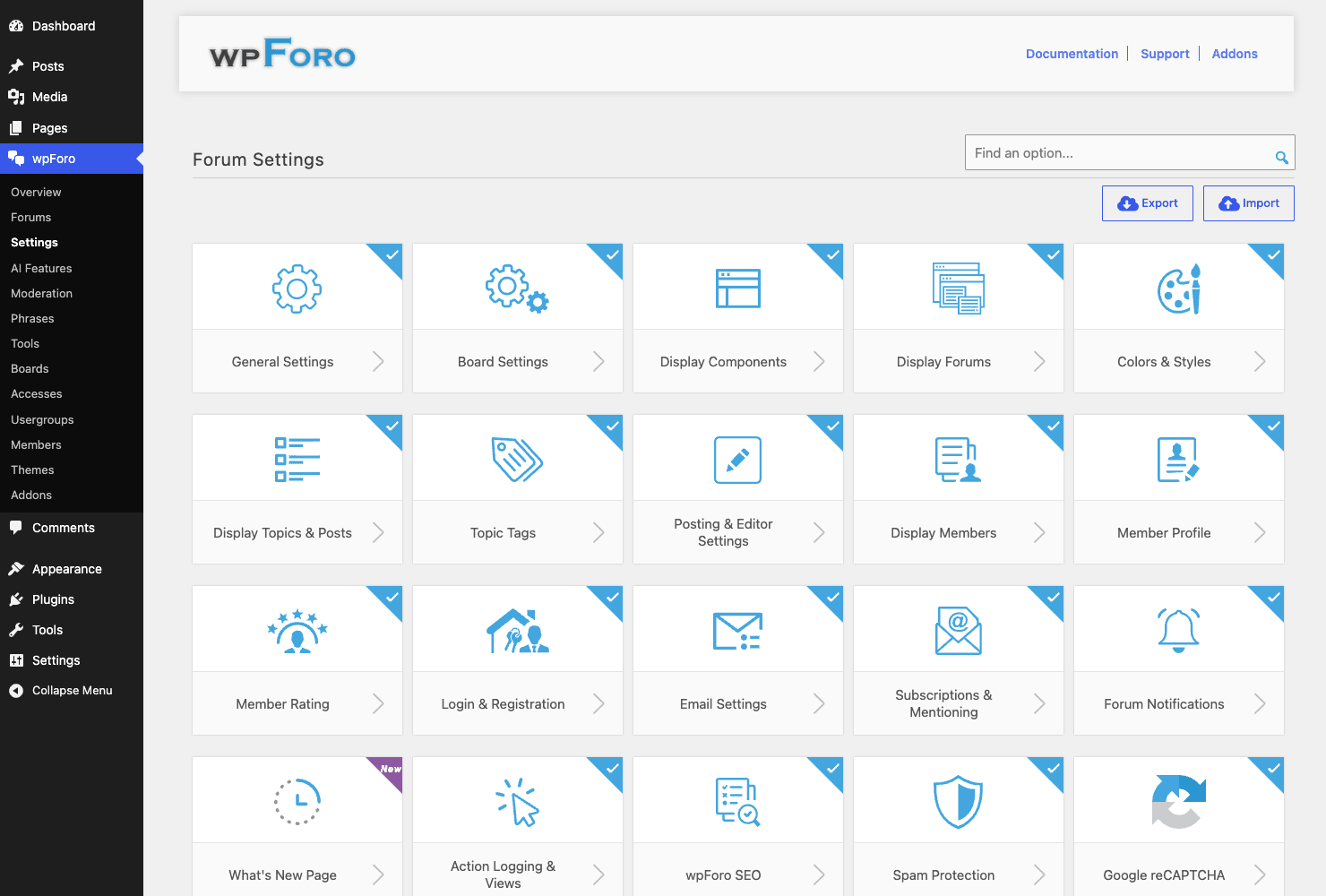
What you’re looking at is a grid of around twenty setting groups, each one its own page of options. General, Board, Display Components, Display Forums, Colors & Styles, Display Topics & Posts, Topic Tags, Posting & Editor, Display Members, Member Profile, Member Rating, Login & Registration, Email, Subscriptions & Mentioning, Forum Notifications, What’s New Page, Action Logging & Views, wpForo SEO, Spam Protection, and Google reCAPTCHA. There’s an Export/Import option too, so you can move a configuration between sites.
That’s a lot. I’ll be honest, it’s more than a first-time forum owner needs to touch, and the breadth is genuinely intimidating on day one. The good news: the defaults are sane. You can run a real forum having changed maybe five of these groups. The depth is there for when you grow into it, not because you have to wrestle every panel before launch.
I’ll walk through the groups that matter most as we go, and cover the rest in prose so you know what each one is for. The short version: almost any behavior you’d want to change about how the forum looks, who can post, how members are rated, what emails go out, and how spam is handled is in one of these groups. You rarely need code to change the forum’s behavior, which is more than I can say for bbPress.
Key features that actually matter
Rather than reprint the feature list off the product page, here’s what genuinely moves the needle when you actually run a forum on wpForo.
- Five forum layouts. Extended, Simplified, Q&A, Threaded, and Boxed. You pick the display style per top-level category, and the layout changes how topics and replies are presented. This alone puts wpForo in a different league from bbPress, which essentially gives you one look.
- A real permission system. Usergroups plus a granular Accesses matrix, mapped to WordPress roles. You decide exactly what guests, registered members, moderators, and admins can do, per forum.
- Categories and sub-forums with drag-and-drop ordering. Build the structure visually in the admin, nest forums under categories, and reorder by dragging.
- Member profiles and a members directory. Every member gets a profile with activity, and the forum has its own Members tab on the front end.
- A moderation queue. Hold posts for review, manage reported content, and keep a lid on a fast-moving community.
- Six bundled core modules. Bookmarks, follows, @-mentions, reactions, post revisions, and subscriptions, all included in the core, not sold as addons.
- Seven Gutenberg blocks. Drop forum widgets (recent topics, online members, search, a profile, and more) onto any block-editor page.
- Multi-board support. Run more than one independent forum (different topics, different rules) on a single WordPress install.
- Phrases editing. Change literally any front-end string without touching code or a translation file, straight from the admin.
- Built-in SEO controls plus spam protection and Google reCAPTCHA, because an open forum without them is a magnet for bots.
- An AI layer for semantic search and content indexing, with AI moderation, if you connect an API.
- A large premium addon catalog for the things the core leaves out: private messages, polls, advanced attachments, custom fields, and more.
That’s the shape of it. Now let’s actually use it.
Setting up your first forum and boards
Installation is the easy part, so I’ll keep it to one breath: install the plugin, activate it, and wpForo auto-creates the forum page at /community/ with a starter structure already in place. That’s the whole install. There’s no wizard you have to survive and no blank canvas staring back at you.
The real work is shaping the structure, and that happens under wpForo » Forums.
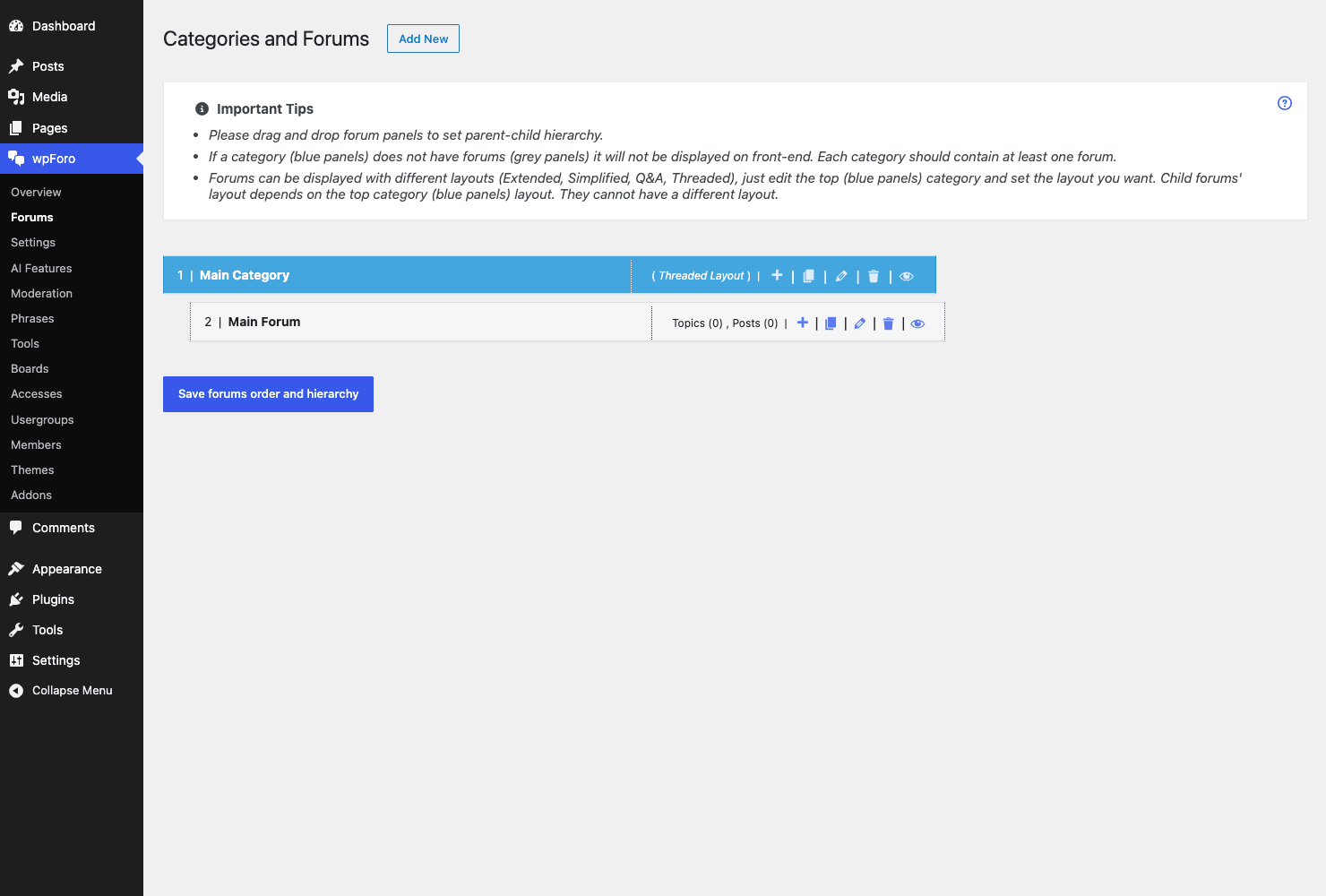
wpForo organizes everything into a two-level tree: categories at the top, forums underneath them. A category is a heading (think "Support" or "General Discussion"). A forum is where topics actually live (think "Billing Questions" or "Feature Requests" under "Support"). You can nest forums inside forums too, for sub-forums.
Here’s the click path for a clean start:
- Plan your top categories first. Go to wpForo » Forums and look at what’s there. Most communities need two or three top categories, not ten. Resist the urge to over-structure on day one; empty forums look dead, and a dead-looking forum kills momentum faster than anything.
- Add a category. Use the add-category control, give it a name and description, and save. The category appears in the tree.
- Add forums under it. Create the forums where conversations will happen, and drag them into the right category. The hierarchy is drag-and-drop, so reordering is a matter of grabbing a row and dropping it where you want.
- Set the layout on the top category. This is the step people miss. The display layout (Extended, Simplified, Q&A, Threaded, Boxed) is set on the top-level category, and child forums inherit it. So if you want a Q&A-style support area, you set Q&A on the category, not on each forum.
- Visit
/community/to see it live. The structure you built in the admin renders immediately on the front end.
Tip: start smaller than feels right. Two categories with three or four forums each is plenty for launch. You can always split a busy forum into sub-forums later; you can’t manufacture activity in twelve empty ones.
If you’re running more than one distinct community on the same site, that’s where Boards come in, and I’ve given them their own section below because the concept trips people up.
The five forum layouts (and when to use each)
This is wpForo’s signature feature and the clearest reason to pick it over bbPress. You’re not stuck with one forum look. You get five, set per top-level category, and they genuinely change how a community behaves.
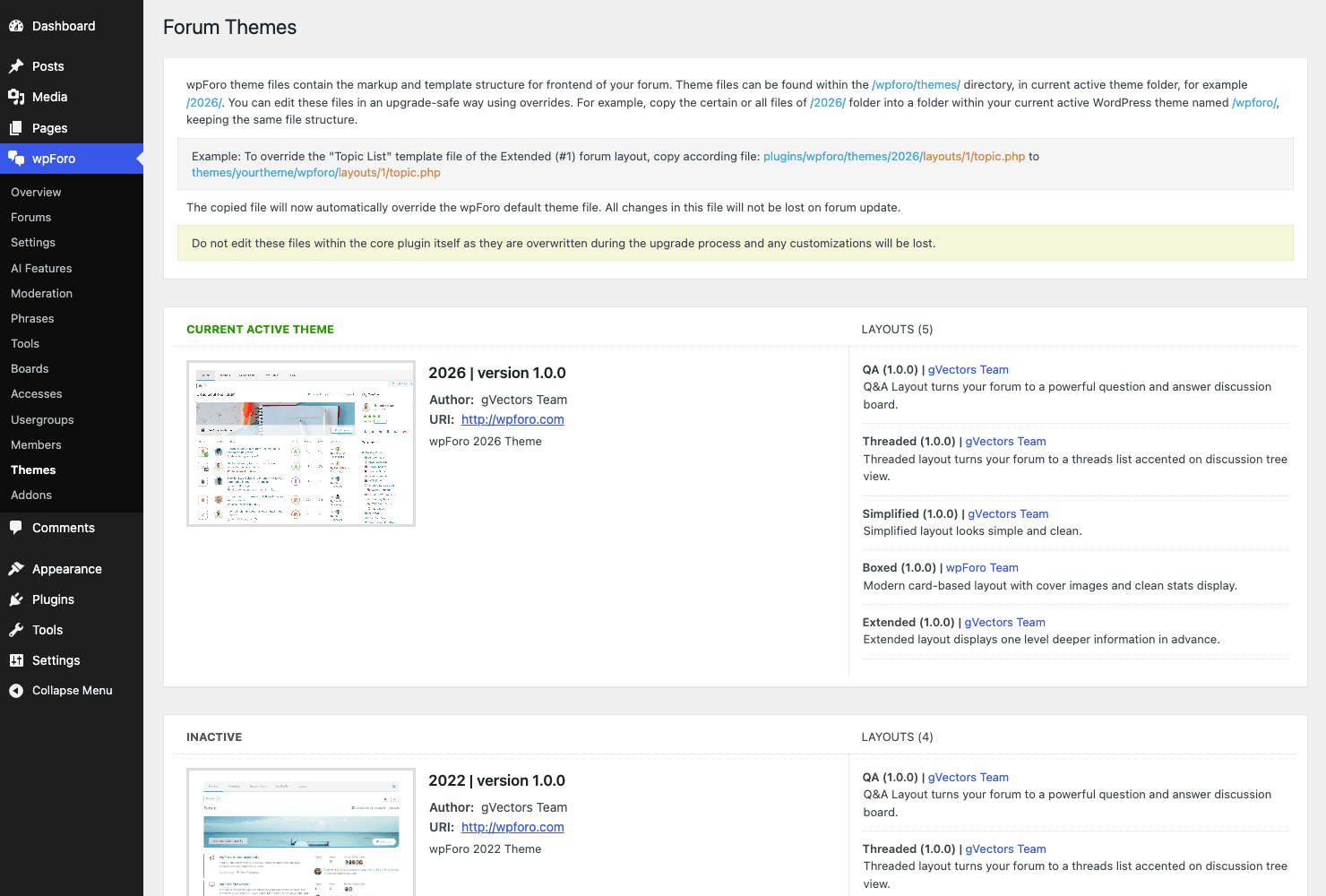
Here’s how I think about which layout fits which kind of community.
| Layout | What it looks like | Best for |
|---|---|---|
| Extended | Classic forum: forum list with topic counts, last-post columns, the full traditional layout | General-purpose communities, the safe default most forums want |
| Simplified | A leaner version of Extended, fewer columns, less visual weight | Smaller communities or sites that want the forum to feel light |
| Q&A | Question-and-answer style with voting and accepted answers front and center | Support sites, knowledge bases, anywhere there’s a "right answer" |
| Threaded | Nested reply trees, like Reddit or old Usenet, replies indent under their parent | Debate-heavy or discussion communities where reply chains matter |
| Boxed | A card/box presentation of the forum content | Communities that want a more modern, visual feel |
Where this matters most: the Q&A layout. If you’re building a support community, Q&A changes the psychology of the whole place. Instead of a chronological thread where the answer might be buried on page three, the question sits at the top, answers can be voted up, and the best answer gets marked as accepted. That’s the format that makes a support forum rank well and actually help people, because Google loves a clearly-marked question-and-answer page and so do your visitors.
The Threaded layout is the one I’d reach for if conversations branch a lot. A flat reply list gets confusing when five people are replying to three different points. Threaded keeps each sub-conversation visually grouped.
The catch: the layout is set at the top-category level, and child forums inherit it. You can’t trivially mix Q&A and Threaded inside the same category. The workaround is to use separate top categories for separate styles, which is fine in practice but worth knowing before you plan your structure. So if you want both a Q&A support area and a Threaded discussion area, make them two categories, not two forums under one category.
What members see on the front end
The admin is where you build the forum; the front end is where your community lives. Let me show you the bones of it.
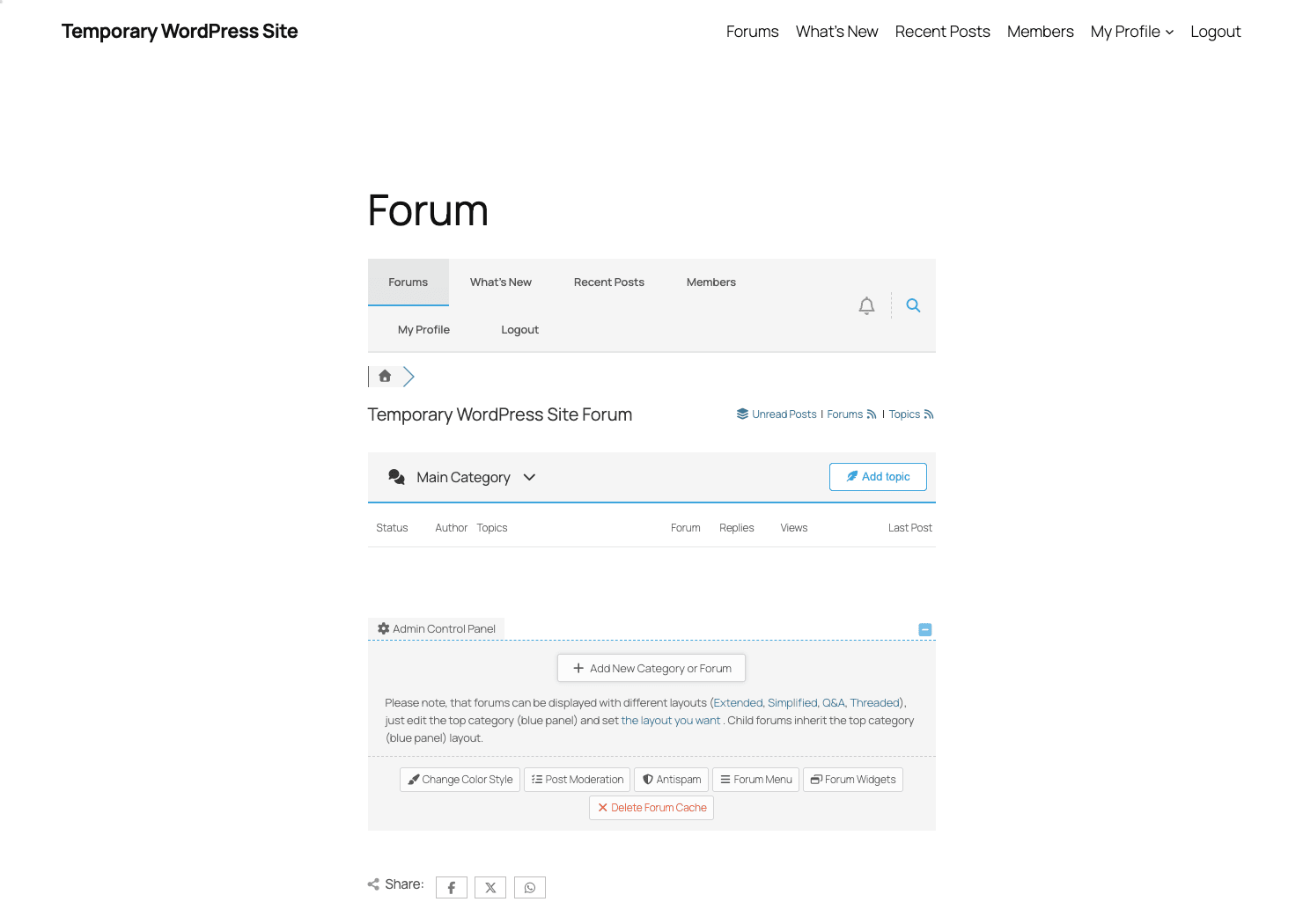
The front-end forum has its own navigation bar across the top: Forums, What’s New, Recent Posts, Members, and My Profile. There’s breadcrumb navigation so members always know where they are in the tree, a search box, RSS feeds (for Forums, Topics, and Unread), and a notifications bell that lights up when someone replies to a member or mentions them.
A quick note on this screenshot, because I won’t pretend it’s something it isn’t: this is the forum structure, not a busy community. The demo sandbox blocked front-end topic creation, so what you see is the skeleton (the navigation, the category and forum list, the columns) without seeded discussions. Let me describe what a populated, active forum looks like in words, since that’s the honest thing to do.
On a live, busy forum, each forum row shows the number of topics and replies it holds, plus a "last post" column with the avatar and timestamp of the most recent activity. Click into a forum and you get the topic list: each topic shows its title, who started it, the reply count, the view count, and the last person to reply. Click a topic and you’re in the thread itself, where the original post sits at the top and replies stack below it (or nest, in the Threaded layout). Each post shows the author’s avatar, their usergroup badge, their post count or rating, and the post body with whatever reactions, bookmarks, and quote tools you’ve enabled.
The point is that members get a real forum experience, not a stripped-down comment feed. It feels like a place, with regulars, badges, and its own rhythm. That sense of "place" is what keeps people coming back, and it’s exactly what a Facebook Group flattens into an undifferentiated stream.
Usergroups, access, and moderation
If layouts are wpForo’s signature feature, permissions are its backbone. This is the system that decides who can read, post, edit, moderate, and manage, and it’s far more granular than bbPress’s handful of capabilities.
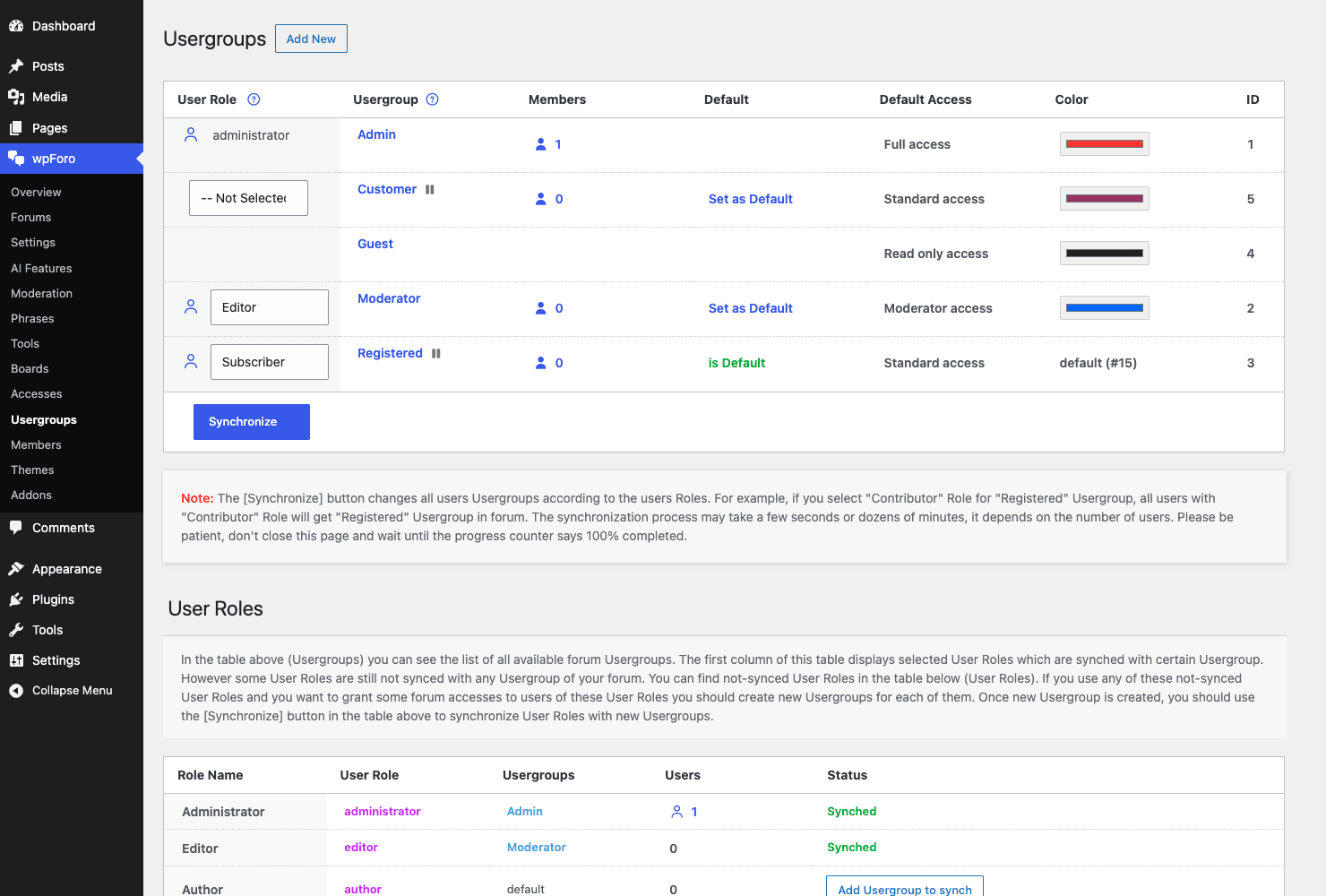
There are three pieces to understand, and they fit together cleanly once you see them.
Usergroups are wpForo’s own membership tiers. Out of the box you get Admin, Guest, Registered, and Moderator (plus any others your setup adds). A usergroup is just a label that a set of permissions hangs off.
Accesses are the permission matrix. Each usergroup gets a Default Access level: Full, Standard, Read, or Moderator. "Read" means they can look but not post. "Standard" means they can post and reply. "Moderator" gives them moderation powers. "Full" is admin-level control. You can go deeper and tune access per forum, so a usergroup might have Standard access in the public forums but Read-only in a staff forum.
The User Roles mapping is the bridge to WordPress. There’s a table that maps each WordPress role (Subscriber, Editor, Administrator, and so on) to a wpForo usergroup, with a Synchronize action. This is the bit that makes wpForo feel native: a new WordPress Subscriber automatically becomes a wpForo Registered member, because you mapped the role to the usergroup. You manage WordPress roles the way you always have, and wpForo keeps the forum permissions in step.
Heads-up: the role-to-usergroup mapping is one of the first things to set, and one of the easiest to forget. If new registrations show up with the wrong permissions, this mapping (and the Synchronize button) is almost always the cause. Set it once, sync it, and registration just works.
On the moderation side, wpForo gives you a Moderation queue under its admin menu. You can require posts to be approved before they appear, which is the single best defense for a brand-new public forum (more on that in the anti-pattern section). Moderators (members in a Moderator usergroup, or with Moderator access on specific forums) get front-end tools to edit, move, merge, close, and delete topics and posts without ever touching the WordPress admin. That last part matters: you can hand moderation to a trusted member without handing them the keys to your whole site.
Boards: running more than one community
Here’s a feature that most forum plugins don’t have, and that I think is genuinely underrated: multi-board support.
A board is a completely separate forum on the same WordPress install. Different categories, different forums, different usergroup permissions, even a different layout. They live side by side but they don’t bleed into each other.
Why would you want that? A few real scenarios.
If you run a product with a free and a paid tier, you might want a public board anyone can read and a private board only paying customers can see. Two boards, different access rules, one site.
If you run an agency or a multi-brand site, you might want a separate community per brand, each with its own structure, without spinning up separate WordPress installs.
If you run a multilingual community, you could give each language its own board so the English speakers and the Spanish speakers aren’t tripping over each other in the same forum list.
The board concept runs deep in the plugin (it’s wired through the permission system, the URL structure, and the data layer), so it’s not a bolt-on. It’s a first-class part of how wpForo organizes content. The trade-off: more boards means more structure to maintain, and most sites genuinely only need one. Don’t reach for boards because you can; reach for them when you have two communities that truly shouldn’t mix.
The six core modules you don’t pay extra for
This is where wpForo quietly wins on value, and where I want to be precise, because the line between "core" and "paid addon" matters when you’re budgeting.
These six modules are bundled in the core. You do not buy them separately.
- Bookmarks. Members can bookmark topics to find them again. Simple, expected, and surprisingly missing from a lot of forum software.
- Follows. Members can follow other members and get notified of their activity. This is the social glue that turns a list of users into a community.
- Mentioning. The @-mention system. Type
@usernamein a post and that member gets notified. It’s the single most effective tool for pulling the right person into a thread. - Reactions. Members can react to posts (likes and similar). Reactions are the low-effort engagement that keeps quiet members participating without making them write a reply.
- Revisions. Post revision history, so edits are tracked. Useful for moderation and for catching someone who edits a post after the fact.
- Subscriptions. Members subscribe to forums or topics and get emailed on new activity. This is the retention engine: it’s what brings people back without you doing anything.
I call this out because if you’ve used other forum plugins, you may expect to pay for follows, mentions, or reactions as separate addons. With wpForo they’re in the box. The paid catalog is for things genuinely beyond a default forum (private messaging, polls, advanced attachments), not for table-stakes engagement features.
wpForo’s AI features (and the honest caveat)
wpForo leans hard on AI in its marketing, so let me tell you exactly what’s there and exactly what you need for it to work, because there’s a gap between the two.
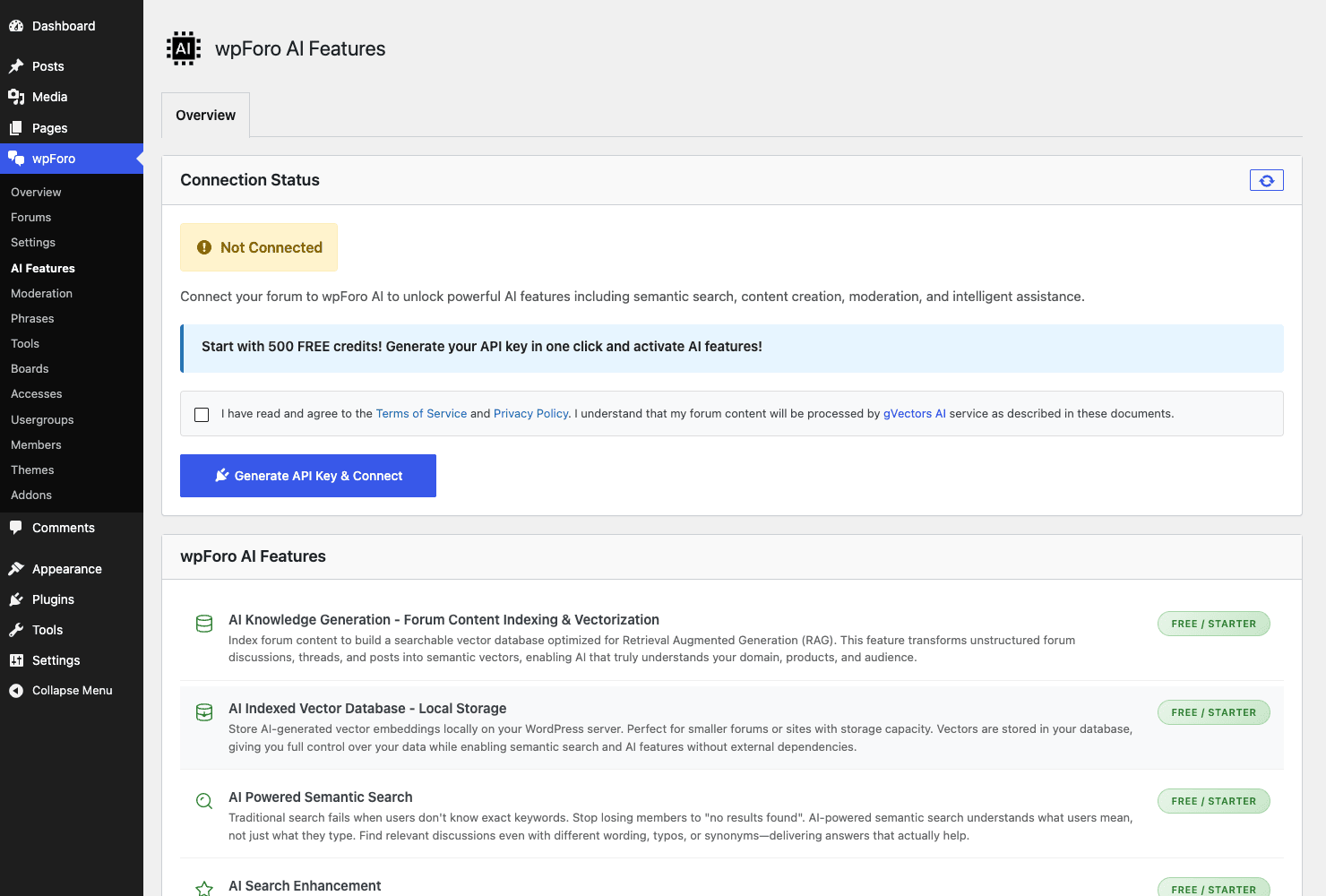
Under wpForo » AI Features, you get a real AI layer, and it’s more thoughtful than a chatbot bolted onto the sidebar:
- AI Knowledge Generation. wpForo indexes and vectorizes your forum content, building a searchable knowledge representation of every topic and reply. In plain terms, it reads your forum and turns it into something an AI can reason over.
- An AI Indexed Vector Database stored locally, so the vectorized content lives on your own site, not on a third-party server.
- AI-Powered Semantic Search. Instead of matching keywords, semantic search understands intent. A member searching "my payment didn’t go through" finds the thread titled "card declined at checkout" even though they share no words. This is the feature with the most real-world value, because forum search is famously bad and this fixes the worst part of it.
- AI Search Enhancement layered on top of the regular search.
- AI moderation, which can evaluate posts and help flag problem content before a human sees it.
That all sounds great, and it genuinely is useful. Here’s the honest caveat: none of it runs on its own. The AI features need an API connection to work, and in the demo I looked at, the AI status showed "Not Connected." wpForo gives you a pot of free credits to start (the in-product offer is in the hundreds of credits), but past that you’re connecting and paying for an AI service. This is not a feature you flip on and forget; it’s a feature you set up, connect, and budget for.
So treat the AI layer as a real capability with a real prerequisite. If you connect it, semantic search alone can be worth the setup for a large forum where people can never find anything. If you don’t connect it, wpForo is still a complete forum platform; you just have the conventional keyword search instead. Don’t pick wpForo for the AI and then be surprised it asks for an API key. Pick it for the forum, and treat the AI as a strong optional upgrade.
SEO, spam protection, and reCAPTCHA
A forum is an SEO machine if you let it and a liability if you don’t, so wpForo gives you a dedicated wpForo SEO settings group and a couple of defenses you should treat as mandatory.
On the SEO side, the wpForo SEO group lets you control how forum pages present to search engines: titles, descriptions, and the metadata that decides how your threads show up in results. Because every topic is its own URL under your forum page, a healthy forum naturally generates hundreds of indexable, long-tail pages. The SEO settings are where you make sure those pages present well rather than as a wall of thin duplicates.
Tip: the single biggest SEO win on a forum is the Q&A layout plus good moderation. A clearly-structured question with an accepted answer is exactly the kind of page Google likes to surface, and it’s the format AI search engines quote from too. Structure helps you rank; spam destroys your ranking.
Which brings us to the defenses. wpForo ships a Spam Protection settings group and a Google reCAPTCHA group, and they’re separate on purpose. Spam Protection covers the behavioral defenses (stopping bot registrations and spammy posts), while reCAPTCHA adds Google’s challenge to your registration and posting forms. The plugin will actively nag you to turn these on, and you should listen, for reasons I’ll spell out in the anti-pattern section below.
The premium addon catalog
The wpForo core is a complete forum. The premium addons are how you take it past "complete" into "exactly what my community needs." gVectors sells a sizable catalog, and on GPL Times the core plus the addon catalog are available as GPL downloads.
The addons worth knowing about:
- Private Messages. Member-to-member direct messaging. The most-requested addon, and the one most communities end up wanting.
- Polls. Add polls to topics so members can vote, not just reply.
- Advanced Attachments. A richer file-upload system than the core allows, with controls over types and sizes.
- Advanced Reactions. Goes beyond the core reactions with a fuller set of emotional responses.
- User Custom Fields and Topic Custom Fields. Add your own fields to member profiles and to topics, which is huge for structured communities (think a "device model" field on a support topic).
- User Mentioning enhancements layered on the core @-mention system.
- Ads Manager. Place ads inside the forum if you’re monetizing with display advertising.
- Syntax Highlighter. Pretty-prints code blocks, essential for a developer community.
- Embeds and Emoticons. Richer media embedding and a fuller emoji set.
- Voice Posting and Blog Cross-Posting for communities that want audio replies or want forum activity to flow into the blog.
- Topic Prefix and Tag Manager for organizing topics with prefixes and managed tags.
- Membership integrations for MemberPress, Paid Memberships Pro, SureMembers, WooCommerce Memberships, and myCRED, plus a BuddyPress Groups integration. These let you gate forums behind a paid membership or tie forum activity to a points system.
My take: the core is genuinely enough to launch with. I’d add Private Messages early because members expect it, Syntax Highlighter immediately if it’s a dev forum, and the membership integration only when you actually have a paid tier to gate. Buying the whole catalog on day one is how you end up with a bloated forum and twenty settings panels you never open. Add addons when a real need shows up, not before.
Integrations: BuddyPress and Ultimate Member
Two integrations ship in the core (separate from the paid integration addons), and they matter if you’re building a social site rather than a standalone forum.
BuddyPress. wpForo integrates with BuddyPress so the forum and the social network coexist instead of fighting. If you’re running BuddyPress for activity streams and member connections, wpForo slots in as the discussion layer rather than duplicating the member system. The integration is wired through dedicated hooks so the two plugins share the member context.
Ultimate Member. If you use Ultimate Member for your front-end profiles and registration, wpForo plays along with it. This is a common pairing: Ultimate Member handles the polished registration and profile pages, wpForo handles the forum, and the two stay in step on who a member is.
There’s also a GDPR/legal integration in the core, which hooks wpForo’s data into WordPress’s privacy tooling so member data is handled correctly for export and erasure requests. For a forum, where members generate a lot of personal data over time, that’s not a nice-to-have, it’s a compliance requirement in a lot of jurisdictions.
If you’re weighing wpForo against a heavier social platform, it’s worth reading our take on BuddyBoss and on PeepSo, because those are full social-network builds where the forum is one feature among many. wpForo is the opposite: a forum-first tool that integrates with a social layer if you want one.
Don’t open your forum without spam protection
This is the mistake I see kill more new forums than any other, so I’m giving it its own section.
Don’t launch a public, open-registration forum without spam protection and reCAPTCHA turned on. It feels like a small thing to skip while you’re excited to launch. It is not a small thing. An open forum with no defenses is a flashing beacon to spam bots, and they find new forums fast, often within days of the site going live.
Here’s the chain of damage, because it’s worse than "some junk posts." First, bots register hundreds of fake accounts that pollute your member list and your stats. Then they post spam: casino links, fake pharma, SEO link drops. Now you have a forum full of garbage pages, and this is where the real cost lands. Google crawls those spam pages, sees thin, link-stuffed content, and decides your whole site is lower quality than it thought. The forum you built to grow your search traffic starts dragging it down, and that SEO hit is slow to recover from.
Then there’s the time. Every spam account is something a human has to clean up. I’ve watched community managers lose entire weekends bulk-deleting bot accounts that a five-minute reCAPTCHA setup would have stopped at the door. And there’s the trust cost: a real member who lands on a forum full of casino spam assumes the place is abandoned and leaves for good.
wpForo hands you the fix and even nags you to use it. Turn on the Spam Protection group, enable Google reCAPTCHA on registration and posting, and set new-member posts to require moderation approval until you trust them. Five minutes of setup, and it’s the cheapest insurance you’ll ever buy.
wpForo vs bbPress vs BuddyBoss
These are the three names you’ll compare, so let me put real numbers on the comparison instead of hand-waving.
wpForo vs bbPress. bbPress is free and it’s lightweight, and that’s the whole pitch. It gives you essentially one forum layout; wpForo gives you five (Extended, Simplified, Q&A, Threaded, Boxed), which is a 5-to-1 difference in how your community can present itself. bbPress’s engagement features are bare; wpForo bundles six core modules (bookmarks, follows, mentions, reactions, revisions, subscriptions) before you add a single addon. bbPress has no built-in Q&A voting, no granular per-forum access matrix, and no AI search; wpForo has all three. bbPress’s developer surface is essentially WordPress core plus a handful of hooks; wpForo exposes its own data API and a large template-hook family. The trade is real: bbPress costs nothing and stays tiny, while wpForo is heavier but does dramatically more. For a forum you actually want people to live in, the extra weight is worth it.
wpForo vs BuddyBoss. This is the closer fight, and it’s mostly about scope and money. BuddyBoss is a full social-network platform (a forum is one piece of it), and it’s priced like one: BuddyBoss Platform Pro lands in the roughly $300 per year range, and that’s before you add the matching theme or the app, which can push the real total past $500. wpForo’s commercial offering is the addon catalog on a subscription, and the forum-focused package typically sits in the low double-digit-to-around-$100 range per year, well under BuddyBoss’s cost. If you need full social networking (activity feeds, member connections, courses, a mobile app), BuddyBoss earns its higher price. If you primarily need a great forum, wpForo gives you the 5 layouts, the 6 core modules, the 7 Gutenberg blocks, multi-board, and AI search for a fraction of that, and it doesn’t lock your forum inside a platform you have to buy wholesale.
The honest summary: bbPress if you want free and minimal, wpForo if you want a serious forum without platform-level pricing, BuddyBoss if you want a whole social network and have the budget for it.
Developer reference
Now for the part developers care about, and where I have to correct a few assumptions up front, because wpForo’s architecture is genuinely different from most WordPress plugins.
Storage: custom tables, not custom post types
This is the single most important thing to understand. wpForo does not use custom post types. It does not register a forum, topic, or post CPT. Forums, topics, replies, member profiles, activity, subscriptions, likes, and visits all live in wpForo’s own custom database tables (wpforo_forums, wpforo_topics, wpforo_posts, wpforo_profiles, and friends).
That means WP_Query is the wrong tool. You don’t query forum data with new WP_Query( array( 'post_type' => 'topic' ) ), because there is no topic post type. (There’s exactly one register_post_type('topic')-looking line in the source, and it’s actually an unregister_post_type call, defensively removing a conflicting CPT that another plugin might register.) Instead, you go through wpForo’s API.
The WPF() API
Everything routes through the WPF() global, which is the main object accessor. The components you’ll reach for:
$forums   = WPF()->forum;          // forum data and operations
$topics   = WPF()->topic;          // topic data and operations
$posts    = WPF()->post;           // posts (replies) data and operations
$members  = WPF()->member;         // member data
$groups   = WPF()->usergroup;      // usergroups
$perms    = WPF()->perm;           // permissions / access checks
$board    = WPF()->board;          // multi-board context
$settings = WPF()->settings;       // settings access
$db       = WPF()->db;             // the database layer + WPF()->tables
There are two helper functions worth committing to memory:
// Get a member object by WordPress user ID
$member = wpforo_member( $userid );

// Read a single setting: wpforo_setting( $group, $name )
$posts_per_page = wpforo_setting( 'topics', 'posts_per_page' );
So if you need the current user’s forum profile, you call wpforo_member( get_current_user_id() ), not a meta query. If you need a setting, you call wpforo_setting() rather than reading an option directly. This is the contract: talk to wpForo through WPF() and the helpers, and you stay on the supported path.
Template action hooks
wpForo’s biggest extension surface is its template hooks. There are hundreds of them scattered through the forum, topic, and post templates, and they’re how you inject your own content into the forum UI without editing template files.
The most-used one by far is the loop hook, which fires inside the forum, topic, and post list loops and passes the current loop index, so you can drop content in at a specific position:
add_action( 'wpforo_loop_hook', function ( $key ) {
    // $key is the current loop index (0-based) in the list being rendered.
    if ( 2 === (int) $key ) {
        // After the third item in the loop.
        echo '<div class="forum-promo">Sponsored: hosting built for busy forums.</div>';
    }
} );
To add something under every post’s body (a signature, a disclaimer, a "was this helpful?" widget), use the post content footer hook. It passes four arguments:
add_action( 'wpforo_post_content_footer', function ( $post, $topic, $forum, $depth ) {
    // $post, $topic, $forum are the data arrays; $depth is the reply nesting depth.
    if ( ! empty( $post['is_first_post'] ) ) {
        echo '<p class="topic-cta">Found this useful? Subscribe to the forum.</p>';
    }
}, 10, 4 );
To add content at the end of the topic info block, there’s a single-argument hook:
add_action( 'wpforo_topic_info_end', function ( $topic ) {
    echo '<span class="topic-badge">Community pick</span>';
}, 10, 1 );
Those three are representative, not exhaustive. The template-hook family is large and follows clear naming: you’ll find wpforo_post_content_top_left, wpforo_topic_head_left, wpforo_topic_head_right, wpforo_profile_account_bottom, wpforo_register_form_end, wpforo_stat_bar_start, wpforo_stat_bar_end, and a wide wpforo_template_* family. The pattern is consistent enough that once you know one, you can guess the position of the others. When in doubt, grep the plugin’s templates for do_action and you’ll find the exact position you want.
Data filters
If hooks are for adding UI, filters are for changing data and behavior. The verified ones:
// Modify a reply's data before it is saved (1 arg).
add_filter( 'wpforo_add_post_data_filter', function ( $post ) {
    $post['body'] = trim( $post['body'] );
    return $post;
} );

// Modify a new topic's data before it is saved; you also get the target forum (2 args).
add_filter( 'wpforo_add_topic_data_filter', function ( $args, $forum ) {
    if ( 5 === (int) $forum['forumid'] ) {
        $args['status'] = 1; // route topics in forum 5 to the moderation queue
    }
    return $args;
}, 10, 2 );

// React after a reply has been added (3 args).
add_filter( 'wpforo_after_add_post_filter', function ( $post, $topic, $forum ) {
    // e.g. ping an external service, award points, log the reply
    return $post;
}, 10, 3 );

// Move the wpForo admin menu position (1 arg).
add_filter( 'wpforo_admin_menu_position', function ( $position ) {
    return 58; // slide the wpForo menu lower in wp-admin
} );

// Adjust the AI features list (1 arg).
add_filter( 'wpforo_ai_features', function ( $features ) {
    return $features;
} );
The AI layer has its own filter family beyond wpforo_ai_features, including ones for the API base URL, which post types are indexable, the moderation decision, and log retention. If you’re integrating the AI features with an external service, those are where you intervene.
Shortcodes and blocks
wpForo gives you four shortcodes. Wrap them exactly as written:
[wpforo]renders the whole forum, and lives on your forum page (the one auto-created at/community/).[wpforo-login-form]renders a login form.[wpforo-lostpassword]renders the lost-password form.[wpforo-resetpassword]renders the reset-password form.
On the block-editor side there are seven Gutenberg blocks, registered from block.json metadata: forums, recent-topics, recent-posts, online-members, profile, search, and tags. These let you drop forum widgets onto any block page (a recent-topics block in your sidebar, an online-members block on the homepage, a forum search on a landing page) without a shortcode in sight.
What wpForo does not have
I’ll state this plainly because it’ll save you searching for something that isn’t there.
wpForo has no REST API. There’s no register_rest_route anywhere in the plugin. If you want programmatic access from another app, you go through the WPF() PHP API server-side, not over REST.
wpForo has no WP-CLI command. There’s no registered wp wpforo ... command. (The one WP_CLI reference in the source is a defined( 'WP_CLI' ) guard around the email-queue cron, not a command registration.)
If that surprises you, it shouldn’t: it’s normal for a forum plugin. The extension model here is template hooks, data filters, the WPF() API, the seven Gutenberg blocks, and wpForo’s own theme system (which works like a child-theme layer for the forum). That’s a full developer surface, just not a REST/CLI one. For the WordPress plugin developer handbook patterns most plugins follow, wpForo trades the standard CPT-plus-REST approach for its own tables-plus-API approach, and once you accept that, extending it is straightforward.
Performance, compatibility, and gotchas
Let’s talk about the question every forum owner eventually asks: does this thing hold up when the forum gets big?
The custom-tables design is a performance asset, not a liability. Because wpForo stores forum data in its own tables rather than cramming millions of replies into wp_posts and wp_postmeta, your forum data doesn’t bloat the tables that the rest of WordPress depends on. On a forum with tens of thousands of topics, that separation genuinely helps. A bbPress forum at the same scale is piling everything into wp_posts alongside your pages and products, and that table gets heavy.
That said, a big forum is still a big database. A busy forum generates a lot of writes (every post, every view, every reaction) and a lot of reads. The usual WordPress performance advice applies, doubled: run a page cache, run object caching (Redis or Memcached) so logged-in member pages aren’t hammering the database, and give the site enough PHP memory. A forum where most traffic is logged-out readers benefits enormously from full-page caching like WP Rocket, because those anonymous topic views can be served from cache. Logged-in member views can’t be page-cached as easily, which is exactly why object caching matters for a community.
Compatibility. wpForo runs on standard modern WordPress hosting and modern PHP. It’s a heavy plugin, so the cheapest shared hosting will feel it under load; if you expect real traffic, a host with proper PHP resources and object caching available is the right call. The plugin coexists with BuddyPress and Ultimate Member by design (it ships integrations for both), and it’s careful enough about CPT conflicts that it actively unregisters a conflicting topic CPT if another plugin defines one.
Gotchas worth knowing:
- The forum page is a real page. wpForo’s content renders inside one WordPress page (the
[wpforo]shortcode page). If you do something odd with that page’s template or builder, the forum can render strangely. Keep the forum page simple. - Caching logged-in views. If you aggressively cache and members report seeing each other’s notification state or the wrong "logged in" header, your page cache is serving member-specific HTML to the wrong person. Exclude the forum from full-page cache for logged-in users, or rely on object caching instead.
- The Themes/layout setting is per top-category. I keep repeating this because it keeps catching people. If a forum isn’t showing the layout you expected, check the layout on its parent category, not the forum.
- Phrases over template edits. If you want to change wording, use the Phrases editor, not a template override. Template overrides survive updates poorly; Phrases changes survive cleanly.
Troubleshooting common problems
Here are the real problems forum owners hit and the exact fix for each.
"New members can’t post" or "everyone is read-only." This is almost always the usergroup mapping. Go to wpForo » Usergroups (and the User Roles table), confirm your WordPress roles map to the right wpForo usergroups, and hit Synchronize. A new Subscriber should map to a usergroup with at least Standard access.
"The forum layout looks wrong." Check the layout setting on the top-level category, not the individual forum. Child forums inherit the category’s layout, so changing a forum directly won’t do what you expect.
"Bot registrations and spam posts are flooding in." Turn on Spam Protection and Google reCAPTCHA under Settings, and set new-member posts to require moderation. If you’re already flooded, the moderation queue and bulk member tools let you clean up, but the defenses stop the bleeding.
"AI search isn’t working." The AI features need an API connection. Open wpForo » AI Features and check the connection status. If it says Not Connected, that’s your answer: connect the API (you get starter credits) before expecting semantic search to do anything.
"The forum page is blank or renders inside a weird layout." The forum lives on one page via the [wpforo] shortcode. If that page uses an aggressive page-builder template, the forum can render badly. Switch the forum page to a plain full-width template.
"My text changes keep disappearing after updates." You’re probably editing template files. Use the Phrases editor for wording changes instead; it stores changes in the database so updates don’t wipe them.
"A fatal error on activation." Usually a memory or PHP-version issue, or a conflict with another plugin that registers a topic post type. Bump PHP memory, confirm a modern PHP version, and deactivate suspect plugins one at a time to find the conflict.
Pricing and licensing
The wpForo core is free on the WordPress.org plugin repository, and it’s a genuinely complete forum on its own: the five layouts, the usergroup and access system, moderation, the six core modules, the seven Gutenberg blocks, multi-board, SEO, and spam protection are all in the free core. You can run a real, serious community without spending a cent, which is more than most "freemium" plugins can claim.
The commercial side is the addon catalog. gVectors sells the premium addons (private messages, polls, advanced attachments, custom fields, the membership integrations, and the rest) on a subscription, and the addons are where the paid value sits. On GPL Times, wpForo and its addon catalog are available as GPL downloads, so you can run the premium addons on as many of your own sites as you need, with the documentation included.
My honest read on the value: the free core is enough to launch. You add paid addons when a specific need appears, not as a blanket upfront purchase. The two I’d budget for early are Private Messages (members expect it) and, for technical communities, the Syntax Highlighter. Everything else, add on demand.
The official wpForo site has the full addon list and documentation if you want to see the complete catalog before deciding what you actually need.
FAQ
Does wpForo slow down my site, and can it handle a big forum?
It can handle a big forum, and the architecture actually helps here. wpForo uses its own custom database tables instead of stuffing everything into wp_posts, so your forum data doesn’t bloat WordPress core tables. That said, a busy forum is database-heavy by nature. Run object caching (Redis or Memcached) so logged-in pages aren’t hammering the database, run a page cache for anonymous topic views, and give the site real PHP resources. On cheap shared hosting a large forum will struggle; on a properly resourced host it’s fine.
Can I migrate from bbPress to wpForo?
Not with a one-click button inside wpForo itself, and I’d rather be straight with you about that. The wpForo core has an XML import for its own export format and a settings export/import for moving configuration between sites, but it does not bundle a bbPress importer. What gVectors offers instead is a separate free migration plugin called Go2wpForo, which imports bbPress (and phpBB, SMF, MyBB, and a few others) into wpForo. You install it alongside wpForo, run the migration, then remove it. Even with it, a forum migration is genuinely fiddly: user mappings, permalinks, and attachments rarely come over perfectly. So do it on a staging copy first, check the imported topics and users carefully, and set up redirects from your old bbPress URLs to the new wpForo ones so you don’t lose search rankings. Budget real time for it; a forum migration is never truly one-click.
Do the AI features work out of the box?
No, and this is the most important thing to know about them. The AI features (semantic search, content indexing, AI moderation) need an API connection to function. wpForo gives you a pot of free starter credits, but you have to connect the AI service first, and past the free credits it’s a paid service. If you install wpForo and expect semantic search to just work, you’ll find it showing "Not Connected." Connect it, and it’s genuinely useful; ignore it, and you still have a complete forum with conventional search.
Is the free core enough, or do I need the paid addons?
For most communities, the free core is enough to launch and run. It includes the five layouts, the full permission system, moderation, the six core modules, and SEO. The paid addons cover specific needs beyond a default forum: private messaging, polls, advanced attachments, custom fields, membership gating. Start on the core, add an addon when a real need shows up. Buying the whole catalog on day one usually means paying for features you never switch on.
How much moderation will a wpForo forum need?
More than you expect if it’s public and open, less than you fear if you set the defenses up first. A brand-new open forum needs active spam defense (reCAPTCHA, Spam Protection, and ideally post-approval for new members) or it gets flooded by bots within days. Once you’re past that and you have a few trusted regulars, you can promote some of them to Moderator usergroups and they’ll carry most of the day-to-day load using the front-end moderation tools. Plan for heavier moderation in the first few months, lighter after.
Can I run more than one forum on a single site?
Yes, that’s what Boards are for. A board is a fully separate forum (its own categories, forums, permissions, and even layout) on the same WordPress install. It’s ideal for a free-versus-paid split, a multi-brand site, or a multilingual community. Most sites only need one board, so don’t reach for it unless you genuinely have two communities that shouldn’t mix.
Does wpForo have a REST API or WP-CLI command?
No to both, and that’s normal for a forum plugin. There’s no REST API and no registered WP-CLI command. For programmatic access you use the WPF() PHP API server-side (WPF()->topic, WPF()->post, WPF()->member, and so on) plus the helper functions wpforo_member() and wpforo_setting(). The extension surface is template hooks, data filters, the WPF() API, and seven Gutenberg blocks rather than REST endpoints.
How is wpForo different from wpDiscuz, since the same team makes both?
They solve different problems. wpDiscuz replaces your WordPress comments under a blog post; it’s for the conversation about your content. wpForo is a standalone forum where members talk to each other across categories and topics, independent of any blog post. You can run both: wpDiscuz for comments on articles, wpForo for the community. If you’ve used wpDiscuz, wpForo’s admin will feel familiar because the design language is shared.
Can I change the wording on the forum without editing code?
Yes, and you should. wpForo has a Phrases editor that exposes every front-end string for editing right from the admin. Change "Topics" to "Threads," rewrite a button label, or translate the whole forum, all without touching a template file or a .po file. Phrases changes are stored in the database, so they survive plugin updates cleanly, which template edits do not.
Will wpForo work with my membership or social plugin?
Often, yes. The core ships integrations for BuddyPress and Ultimate Member, so it coexists with both rather than fighting them. For paid membership gating there are addon integrations for MemberPress, Paid Memberships Pro, SureMembers, WooCommerce Memberships, and myCRED, which let you lock forums behind a membership tier or tie forum activity to points. If you’re already running one of those, wpForo can plug into it.
Final thoughts
A forum is one of the few things on the modern web that gets more valuable with age. Every answered question is a page that keeps earning search traffic, every regular member is someone who’ll answer the next person so you don’t have to, and every thread is something you own outright instead of renting from a platform that can change its mind. That compounding is exactly what you give up when you run your community on a Facebook Group or a Discord server.
wpForo is the most capable way to build that owned community on WordPress without paying platform prices. The five layouts let you shape the forum to how your people actually talk. The usergroup and access system gives you real control over who can do what. The six bundled modules cover the engagement features other plugins charge for. And the custom-table architecture means it scales without choking the rest of your site. It’s heavier than bbPress and cheaper than BuddyBoss, which is precisely the spot most growing communities need.
The two things I’d hold you to before you launch: turn the spam defenses on from day one, and don’t pick it for the AI features expecting them to run without an API key. Get those right, start with a small structure, and let the forum grow into the depth that’s already waiting in those twenty settings groups. If you want to put a real community back under your own roof, wpForo is the forum platform to do it with, and it’s the upgrade your bbPress install has been quietly asking for.