

The original "Facebook for X" pitch, a private social network for your community, customers, or members, has been a recurring WordPress project type for over a decade. BuddyPress was the early option. BuddyBoss is the polished modern descendant. PeepSo is the third major contender, with a different visual philosophy and pricing model that appeals to smaller communities and budget-conscious agency clients.
This article walks through what PeepSo actually is, the activity stream + profile + groups + messages stack, the free Foundation vs paid bundles, the admin dashboard, the developer hook surface, and how it compares to BuddyBoss and BuddyPress.
Table of contents
- What PeepSo is
- Free PeepSo vs paid bundles
- Installation and setup wizard
- The admin dashboard
- Configuration: what’s in Settings
- The activity stream
- User profiles
- Friends system
- Groups
- Direct messages and chat
- Notifications
- Mentions, hashtags, reactions
- Privacy and access control
- The PeepSo mobile app
- Theme compatibility
- Developer reference: hooks and filters
- Real-world community use cases
- PeepSo vs BuddyBoss vs BuddyPress
- Performance, compatibility, gotchas
- Pricing and licensing
- FAQ
- Final thoughts
What PeepSo is
PeepSo is a WordPress plugin that adds full social-network functionality to any WordPress site: user profiles, activity streams (Facebook-style timelines), groups, friends, direct messages, notifications, mentions, reactions, hashtags. After install, your WordPress site becomes a community platform where members create profiles, post updates, follow each other, join groups, and chat in DMs.
The plugin uses its own data tables for the social objects (activities, friendships, messages, likes), separate from WordPress’s standard posts and comments. This means PeepSo’s activity stream doesn’t pollute your blog’s posts table, and your blog content stays clean.
What you get with PeepSo:
- Activity stream with text posts, images, video, polls, links, GIFs.
- User profiles with photos, cover photos, about sections, custom fields.
- Friends system with requests, accept/reject, block.
- Groups (public, private, hidden) with their own activity streams.
- Direct messages (1-on-1 and group chats).
- Real-time notifications with email digest options.
- Mentions with @username autocomplete.
- Hashtags for topic discovery.
- Reactions beyond just Like (Love, Haha, Sad, Angry).
- Privacy controls per user and per content piece.
- Mobile-responsive front-end (separate native app available as add-on).
- Theme-friendly, works with most modern themes.
The combination is what makes PeepSo a real Facebook alternative for WordPress. Not just a forum plugin or a comment system, a full activity-stream community platform.
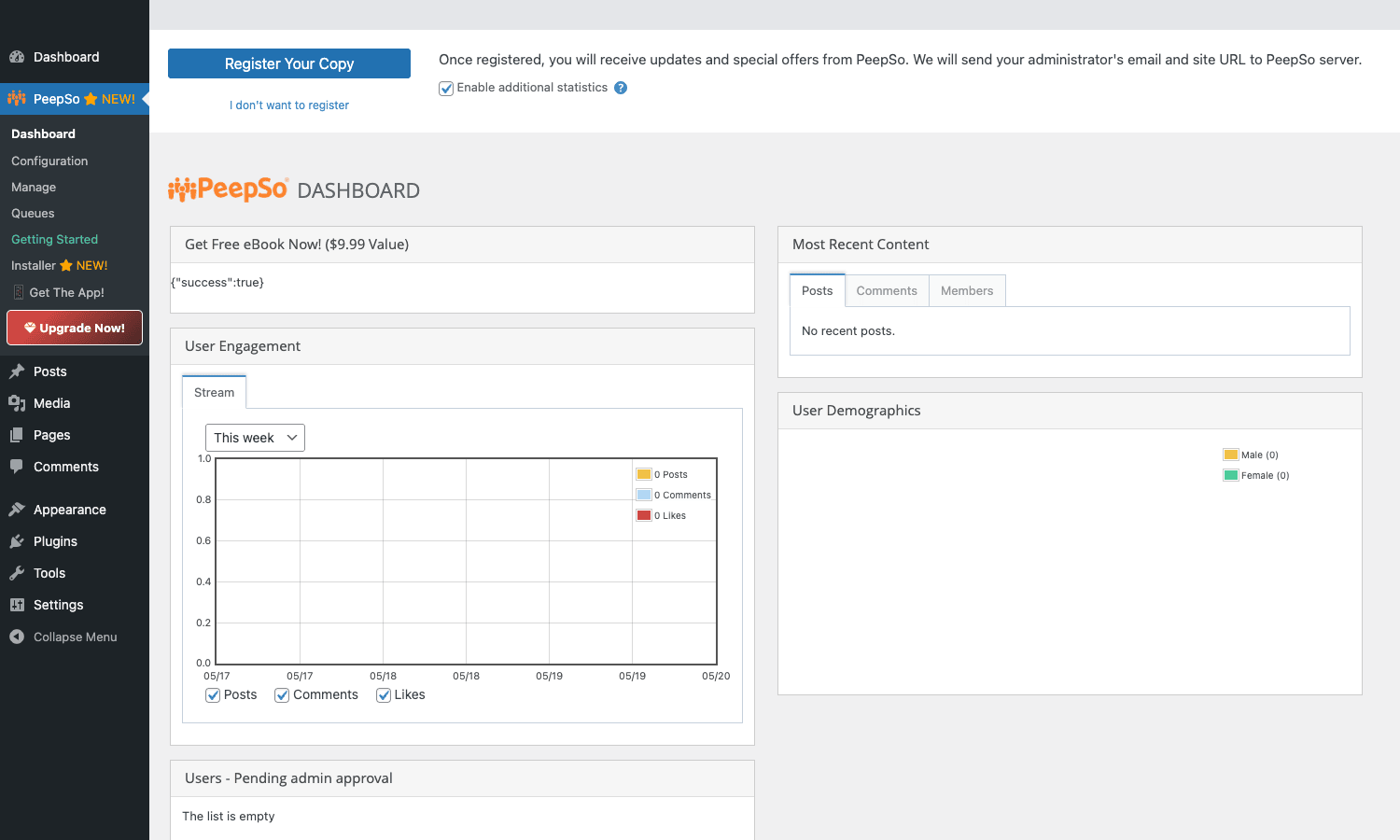
The dashboard above is the central command center. User Engagement chart on the left, Most Recent Content (Posts/Comments/Members tabs) on the right, User Demographics, plus pending admin approvals below.
Free PeepSo vs paid bundles
PeepSo Foundation is free on WordPress.org. Foundation includes:
- Basic activity stream (text posts only).
- User profiles (basic).
- Like system.
- Comments on posts.
- Notifications (basic).
- Front-end registration.
For a tiny community of friends and family, Foundation might be enough. For anything serious, you need the paid bundles.
PeepSo’s paid tier is bundle-based:
- Photos add-on: photo uploads, albums, photo activity posts.
- Videos add-on: video uploads, video posts.
- Polls add-on: in-feed polls.
- GIFs add-on: Giphy integration.
- Chat add-on: real-time chat (1-on-1 and group).
- Friends add-on: the friends system (yes, it’s a paid addon).
- Groups add-on: group functionality.
- Profile Builder add-on: custom profile fields.
- Hashtags add-on: hashtag support.
- Mentions add-on: @username.
- Reactions add-on: emoji reactions beyond Like.
- Pinned Posts add-on: pin important posts in the stream.
- Activity Highlights add-on: trending content.
- Block Users add-on: block + report.
- Profile Completeness add-on: gamify profile filling.
- SuperPro: premium analytics and features.
- Ultimate Bundle: everything bundled.
The unbundled pricing is steep when you add up the individual addons. The Ultimate Bundle is the practical purchase for any real community.
Installation and setup wizard
Plugins -> Add New -> Upload Plugin -> peepso.zip -> Activate.
On first activation, the Getting Started wizard prompts you to:
- Configure pages. PeepSo creates auto-generated pages: Community (activity stream), Profile, Groups, Messages, Notifications, Login, Register. The wizard creates these or lets you assign existing pages.
- Set the default theme integration. PeepSo ships its own minimal theme; alternatively it integrates with the WordPress theme you’re using.
- Configure registration. Open registration, invite-only, or admin approval required.
- Configure permissions. Who can post, who can create groups, who can send messages.
After the wizard, the front-end community is live. Visit the Community page (/community/ by default) to see the activity stream.
The admin dashboard
The PeepSo dashboard is the central admin view, accessed from the PeepSo menu in WP admin.
Key widgets:
- User Engagement chart. Posts, comments, likes over time. Configurable date range.
- Most Recent Content. Recent posts, comments, members in tabs.
- User Demographics. Gender split, age distribution (if collected).
- Users pending admin approval. Queue of registrations awaiting moderation (if enabled).
- System status. Plugin updates, license status, cron health.
For community managers, the dashboard is the daily home screen. Glance at User Engagement to gauge activity, scan Most Recent Content for fresh posts, review pending approvals.
Configuration: what’s in Settings
PeepSo’s Configuration page is dense. Tabs include:
- General. Page assignments, language, timezone, currency.
- Stream. Activity stream behavior, posts per page, sort order, what content types appear.
- Posts. Post types, text, image, video, poll, GIF, and per-type settings.
- Users. Registration mode, default role, login redirects.
- Notifications. Email digest frequency, notification types.
- Privacy. Default privacy settings, content visibility rules.
- Profiles. Profile field configuration, avatar sizes, custom fields.
- Groups. Group creation permissions, default group privacy.
- Messages. Chat behavior, file upload limits, message retention.
- Themes. Visual theming options.
- Mobile App. App connection settings.
- Tools. Import/export, repair tools.
- License. License management.
- Branding. White-label options.
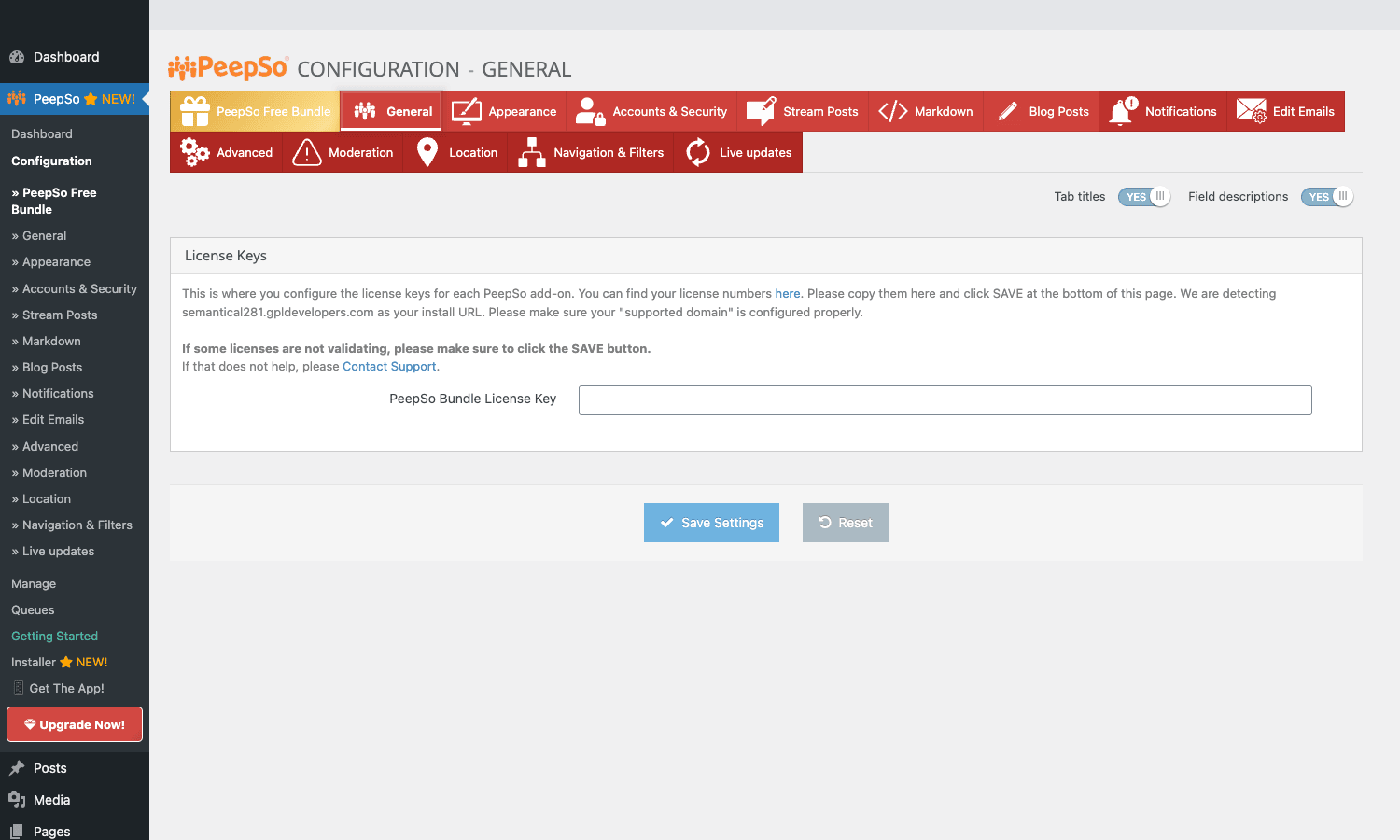
The Configuration page covers most setup work. Spend an hour here on initial deployment; most settings are sane defaults you’ll keep, but a handful (registration mode, default privacy, notification frequency) are worth tuning to your community model.
The activity stream
The activity stream is PeepSo’s central UI element. Visit the Community page; you see a Facebook-style timeline of recent member posts, with the post composer at the top.
Post composer supports:
- Text post, basic status update.
- Photo post, upload photos with the post (Photos addon).
- Video post, upload videos (Videos addon).
- Poll, create a multi-choice poll (Polls addon).
- GIF, search Giphy and insert (GIFs addon).
- Link share, paste a URL, the plugin generates a link preview.
Each post in the stream has:
- Author avatar and name (links to profile).
- Timestamp.
- Content (text + media).
- Reactions (Like, Love, etc).
- Comment thread.
- Privacy indicator (public, friends-only, etc).
- Three-dot menu (edit, delete, report, pin if you’re admin).
Comments support threaded replies, @mentions, reactions, edit/delete.
The stream feels familiar to anyone who’s used Facebook, which is the whole point. New community members don’t need training, the UX is what they already know.
User profiles
Each member has a profile page with:
- Cover photo + avatar.
- About section with bio, location, joined date.
- Custom profile fields (with Profile Builder addon), favorite music, occupation, hobbies, whatever your community needs.
- Activity tab, the member’s own posts.
- Photos tab, uploaded photos.
- Friends tab, friends list.
- Groups tab, groups joined.
- Followers / Following tabs, if you enable a follow system.
- About tab, full bio + custom fields.
Members edit their own profile via a settings page. Admins can edit any profile via WP admin.
The Profile Completeness addon adds a progress bar showing how filled-out a member’s profile is, with a gamification angle ("Complete your profile to unlock the Member badge"). For communities trying to encourage profile filling, this nudges members effectively.
Friends system
Friends is a Pro addon. Members send friend requests, accept/reject incoming requests, and unfriend later. Friends-only privacy options become available once the system is configured.
Configuration options:
- Friend request mode. Auto-accept (anyone can add anyone), manual accept (default), invite-only.
- Visibility of friends list. Public, friends-only, private.
- Friend suggestions. Algorithmic suggestions based on mutual friends.
- Block functionality (with Block Users addon), block a user to prevent contact.
For some communities (open networking), auto-accept makes sense. For most communities (intentional connections), manual is better. The setting affects how the community behaves at the social-graph level.
Groups
Groups are sub-communities within the PeepSo install. Each group has its own:
- Cover image and name.
- Description and tags.
- Membership list.
- Activity stream (group-specific).
- Privacy: Public (anyone can join), Private (request approval), Hidden (invitation-only, not listed).
- Admin/moderator roles within the group.
- Group photo album.
- Group events (with addon).
Groups are how communities scale beyond "one big stream". Members join groups relevant to their interests (Photography, Cooking, Local Events, etc) and the activity stream becomes more targeted. Group admins moderate within their group.
For business communities (customer-only groups, employee groups), private groups are common. The hidden group type is useful for sensitive content (executive discussions, beta testing groups).
Direct messages and chat
The Chat addon adds real-time direct messages. Members can:
- Start a 1-on-1 conversation with any other member.
- Create a group chat with multiple members.
- Send text, images, files (configurable per-message-type permissions).
- See typing indicators and read receipts.
- Receive desktop notifications via the browser Notifications API.
- Get email summaries of missed messages.
The chat uses Server-Sent Events (SSE) for real-time push, with a fallback to polling on hosts that block SSE.
For communities where members interact privately (mentorship programs, networking groups), the chat is essential. For broadcast-style communities (announcements + reactions), it’s less critical.
Notifications
PeepSo has its own notification system, separate from WordPress’s default notifications. Members get notifications for:
- New comment on their post.
- New like/reaction on their post or comment.
- New friend request.
- Friend request accepted.
- @ mention.
- New message.
- Group invitation.
- Group post (in groups they’ve joined, configurable).
- Custom events (extendable via filters).
Notifications appear in:
- Bell icon in the site header (real-time push when SSE works).
- Email digest (configurable: instant, hourly, daily, weekly).
- Mobile app push (with native app).
Members configure their notification preferences in their profile settings.
Mentions, hashtags, reactions
Three addons that add modern social network features:
Mentions: @username autocomplete in posts and comments. Mentioned users get a notification. Useful for tagging community members in relevant discussions.
Hashtags: #topic clickable hashtags. Clicking a hashtag opens a feed of all posts with that tag. Useful for topic-based discovery.
Reactions: Beyond the basic Like button, PeepSo Reactions gives members Love, Haha, Wow, Sad, Angry, and admin-configurable custom reactions. Each reaction has its own count, and reaction patterns feed into engagement analytics.
Combined, these three give PeepSo the "modern social network" feel rather than the "old forum" feel. For communities competing with Facebook for member attention, the parity helps.
Privacy and access control
Per-content privacy options:
- Public: anyone (including non-members) can see.
- Members only: logged-in PeepSo members can see.
- Friends only: only the user’s friends can see.
- Private: only the user can see.
- Custom: specific user list.
Per-user privacy settings:
- Who can see my profile.
- Who can see my activity.
- Who can send me friend requests.
- Who can message me.
Site-wide privacy:
- Open community: anyone can view content without logging in.
- Closed community: members-only, non-members see a login wall.
- Hidden community: even the existence of the community is hidden until invited.
For most public communities, the open model works. For business-internal communities or sensitive groups, closed or hidden is appropriate.
The PeepSo mobile app
PeepSo offers native iOS and Android apps that connect to your WordPress + PeepSo install. The app provides:
- Full activity stream access.
- Profile viewing and editing.
- Direct messages with push notifications.
- Photo upload from device.
- Native UI conventions per platform.
The mobile app is a separate purchase from PeepSo proper, typically a one-time fee for the white-labeled app plus annual maintenance. For communities where mobile engagement matters more than desktop (younger audiences, geographically distributed groups), the app is what unlocks daily-active engagement.
Theme compatibility
PeepSo is designed to work with most modern WordPress themes. It ships its own minimal CSS that adapts to your theme’s color palette and typography where possible.
For best results:
- Use a clean, responsive theme.
- Avoid themes with aggressive CSS overrides.
- PeepSo officially supports Astra, GeneratePress, Kadence, and most StudioPress themes.
The plugin has its own "PeepSo themes" (separate paid product) that are designed specifically for community sites. These give you a polished look without theme conflicts. For sites already on a polished theme like Astra, the stock PeepSo CSS usually integrates well.
If your theme heavily overrides forms or button styles, you may need a few lines of custom CSS to make PeepSo elements match the rest of the site.
Developer reference: hooks and filters
PeepSo exposes a significant hook surface. Patterns developers reach for:
Hooking activity events
// Fires when a like is added to any post or comment.
add_action( 'peepso_action_like_add', function( $like ) {
 // Sync to your analytics system.
 do_action( 'analytics_track_engagement', $like->user_id, 'like' );
} );

// Fires after a new notification is created.
add_action( 'peepso_action_create_notification_after', function( $notification_id ) {
 // Custom notification routing.
 do_action( 'mycustom_notification_handler', $notification_id );
} );
Filtering activity stream content
// Filter which activities show in a user's stream.
add_filter( 'peepso_stream_id_list', function( $ids, $context ) {
 // Add custom filtering, e.g., hide posts from blocked users.
 return array_diff( $ids, my_get_blocked_user_post_ids() );
}, 10, 2 );
Custom profile fields via hooks
For agencies building custom community features, hook into the profile rendering to add custom sections:
add_action( 'peepso_profile_fields_after', function( $user_id ) {
 $custom = get_user_meta( $user_id, 'team_role', true );
 if ( $custom ) {
 echo '<div class="profile-team-role">Role: ' . esc_html( $custom ) . '</div>';
 }
} );
Restricting content access
// Gate specific content on PeepSo membership.
add_filter( 'peepso_access_content', function( $access, $content_id, $user_id ) {
 if ( ! my_user_is_premium( $user_id ) ) {
 return false;
 }
 return $access;
}, 10, 3 );
Customizing email content
add_filter( 'peepso_notification_digest_section_title', function( $title, $section ) {
 if ( $section === 'mentions' ) {
 return 'People who mentioned you on ' . get_bloginfo( 'name' );
 }
 return $title;
}, 10, 2 );
The hook surface is documented at the PeepSo developer site. For most "I want to customize behavior X" questions, a filter or action exists.
Real-world community use cases
A few patterns PeepSo handles well:
-
Niche enthusiast community. A community for photographers, gardeners, hobbyists. Activity stream + groups by sub-topic + friends + messages. Free-tier members get basic access; paid members (via Restrict Content Pro) unlock private groups.
-
Course community. Pair PeepSo with MasterStudy LMS PRO Plus for course-specific discussions. Each course gets a private group; students post questions and successes.
-
Internal company social network. Replace Slack-style chat with a fuller social model. Activity stream, profiles, departments-as-groups, mentions, DMs. Self-hosted, no per-user SaaS fees.
-
Membership site community layer. Pair with a membership plugin to gate access. Paid members get full community access; non-members see the login wall.
-
Local community network. A hyperlocal community (a city, a neighborhood). Activity stream for local events, groups by interest (Restaurants, Schools, Politics), private messaging for direct contact.
-
Customer-only community for a SaaS or product. Customer-only access. Activity stream for product news and discussions, groups for use cases, support team posts updates, customers help each other.
-
Mentor / mentee network. Profiles emphasize expertise; friends become mentorship pairs; direct messages handle private mentoring conversations; groups for shared interest areas.
PeepSo vs BuddyBoss vs BuddyPress
For the full picture on the heavyweight in that comparison, see our hands-on look at BuddyBoss and what it turns WordPress into.
The three major community plugins.
PeepSo has cleaner UI than BuddyPress, more affordable than BuddyBoss, more modular pricing. Best for small-to-medium communities that want a Facebook-like UX without BuddyBoss’s investment.
BuddyBoss is the polished modern option. Tighter integration with LMS plugins (LearnDash, Tutor LMS). Bigger ecosystem of compatible themes. Higher price tier.
BuddyPress is open-source and free. Maturity from years of development. More technical to configure, less polished out-of-the-box. Best for developers building custom community setups who don’t mind the rough edges.
The honest take:
- Polished community for serious business: BuddyBoss.
- Smaller community with budget constraint: PeepSo.
- Community where you want full control and don’t mind dev work: BuddyPress.
PeepSo sits in the "good value" middle ground. The Ultimate Bundle gives you most of what BuddyBoss does at a lower price, with a slightly less polished but still solid UX.
Moderation tools
Running an active community means moderating it. PeepSo provides several moderation hooks:
Pre-publication moderation. Configure new posts to require admin approval before going live. Useful for new members on probation; you can mark members as "trusted" after they’ve earned it, at which point their posts skip review.
Reporting. Members can report posts, comments, or other users for inappropriate behavior. Reports queue in the admin dashboard for moderator review. Actions on a report: dismiss (no issue), warn user (sends a warning notification), delete content, suspend user (temporary), ban user (permanent).
Word filters. Configure a list of banned words. Posts containing the words are either auto-blocked, flagged for review, or have the words asterisked out.
Spam protection. Integrate reCAPTCHA on registration and post submission. Akismet integration for comment-level spam filtering.
Role-based moderation. Assign trusted members as moderators with elevated permissions. Moderators can delete posts, mute users, and resolve reports without admin involvement.
IP banning. Block known bad actors at the IP level. PeepSo tracks IPs per user for forensic context when bans are needed.
For communities with significant traffic, the moderation workload grows fast. The combination of pre-publication moderation (for new members) + reporting (for community-led flagging) + trusted moderators (to distribute the workload) is what makes scale possible. Don’t try to moderate a 10,000-member community as a solo admin; build a small moderator team.
Community engagement patterns
A few patterns successful PeepSo communities use to drive engagement:
Daily prompts. Admin posts a daily question or prompt ("What are you working on today?"). Members respond. The thread becomes the community’s daily activity hub.
Weekly events. A weekly virtual event (livestream, AMA, coworking session) announced via a Group post. Members RSVP via reaction; reminders via PeepSo notifications.
Member spotlights. Weekly post highlighting a community member’s work or contribution. The featured member feels appreciated; others see the recognition pattern and aspire to it.
Group challenges. Time-limited challenges within a group ("Post one photo per day for 30 days"). The activity stream fills with related posts; members engage with each other’s submissions.
Onboarding sequences. New members get a welcome post pinned to their profile, an automated friend request from the admin account, and an invitation to introduce themselves in a Welcome group. The first 48 hours after signup is where retention is won or lost.
Recognition badges. Use the Profile Completeness addon plus custom badges for community contributions ("Top Contributor 2026", "Early Member"). Members display badges on their profile.
These patterns are platform-agnostic but PeepSo’s feature set (pinned posts, groups, profile customization, notifications) supports them directly. Without a deliberate engagement pattern, even a well-built community goes quiet within months.
Performance, compatibility, gotchas
- Activity stream queries. The stream can be heavy on large communities (10k+ active posts). Use object caching (Redis/Memcached) and configure pagination tightly.
- SSE on shared hosting. Real-time features (chat, notifications) use Server-Sent Events. Some shared hosts don’t support SSE well, fall back to polling mode for reliability.
- Email volume. Notification emails can pile up. Pair with WP Mail SMTP Pro and configure digest frequency (hourly/daily) to avoid email fatigue.
- Theme conflicts. Some themes’ aggressive form styling clashes with PeepSo forms. Add custom CSS to harmonize.
- GDPR considerations. Member data is rich and personal. Document collection in your privacy policy. Provide data export/delete options for compliance.
- Caching plugins. Page-cached community pages serve stale data to all users. Configure WP Rocket to exclude PeepSo URLs for logged-in users.
- WP-Cron dependency. Email digests rely on WP-Cron. Switch to OS cron for reliable delivery.
- Spam control. Community sites attract spam. Add reCAPTCHA on registration; use the PeepSo content moderation tools; ban offending IPs aggressively.
- CSS/JS bloat on small communities. PeepSo loads its CSS/JS on all pages by default. If your site is mostly non-community pages, configure conditional asset loading to skip PeepSo on irrelevant pages.
Pricing and licensing
PeepSo’s official pricing on PeepSo.com varies; typical tiers:
- Foundation: free on WordPress.org.
- Standard Annual: ~$99/year (basic addons).
- Ultimate Annual: ~$259/year (all addons).
- Lifetime tiers available at higher one-time price.
For a serious community, the Ultimate annual is what you need (the unbundled addons add up to more than the bundle).
The plugin is GPL-licensed for the PHP code (CSS/JS/images are proprietary per PeepSo’s license terms, note this if redistributing). Reasonable for community sites that want the full feature set.
FAQ
Do I need to install separate PeepSo addons one by one?
You don’t install them separately. On the official PeepSo channel, you’d purchase the Ultimate Bundle to get the same.
Can my community be member-only (login required to view)?
Yes. Configure Closed Community in Settings → Privacy. Non-logged-in visitors get a login wall.
Does PeepSo work with my LMS?
Yes. PeepSo has direct integrations with LearnDash, Tutor LMS, and MasterStudy LMS. Course discussions automatically become PeepSo groups (or activity threads).
Will it slow my site down?
For small communities (< 1k active members), negligible. For large communities, you’ll need proper caching and a serious host. The activity stream is the most expensive component; configure pagination tightly.
Can I have multiple communities on one site?
Not separate communities, but Groups effectively serve as sub-communities. For truly separate communities, use WordPress Multisite with PeepSo on each site.
Can I export the community data?
Yes. PeepSo has standard WP export, plus custom exports for PeepSo-specific data (activities, friendships, messages). Useful for migrations or compliance.
Does the mobile app come with the plugin?
No, the mobile app is sold separately. PeepSo Core handles the web; the app is an additional product with its own pricing.
Can users monetize their content via PeepSo?
Indirectly. Pair with a paywall plugin to gate certain posts or groups. PeepSo doesn’t have built-in payment processing.
Is PeepSo good for a Discord-style chat community?
PeepSo’s Chat addon is decent but not Discord-grade. For chat-heavy communities, Discord or Circle is probably better. For activity-stream + chat communities, PeepSo works.
Final thoughts
The "Facebook for X" community model is harder than it looks. Building a working community requires both the technical platform (PeepSo or similar) AND the social activation work (seeding content, recruiting active members, moderating). The plugin solves the technical half; you have to do the social half.
PeepSo’s strongest argument is the price-to-value ratio for small-to-medium communities. Compared to BuddyBoss (~$228/year minimum), PeepSo Ultimate at ~$259 is similar. Compared to BuddyPress (free but rougher), PeepSo is more polished and faster to deploy. The middle ground is exactly where many community projects live.
The plugin’s weak spots are scale (large communities need significant performance tuning) and visual polish (BuddyBoss is more polished out of the box). For a small or medium community where the budget is tight and you want a working community quickly, PeepSo is a strong choice.
The first time members actually engage without prompting, you’ll know the platform works for your audience.