


I’ve tried to bolt a real loyalty program onto WooCommerce four times in the last three years. The first attempt was Smile.io’s hosted widget, which works but always felt like a different site embedded inside ours. The second was WPLoyalty Pro, which is genuinely good but didn’t quite cover the referral side I wanted. The third was YITH Points and Rewards. The fourth was the dumbest: a hand-rolled add_user_meta('store_credit',...) script and a monthly email blast with coupon codes generated from a Google Sheet. That one lasted about six weeks before a refund unwound the math and I had to spend a Saturday afternoon reconciling user balances by hand.
So when a client asked me to put a points program on their WooCommerce shop last month and named SUMO Reward Points by name, I went in with the kind of suspicion only someone who’s been burned by every alternative can muster. This is what I found after a week of sitting inside the plugin. Not a marketing sheet, not a takedown. A real review of where SUMO is sharp, where it’s clunky, and the things I wish someone had warned me about before I started typing numbers into conversion ratios.
Table of Contents
- What is SUMO Reward Points?
- How a loyalty plugin actually works in WooCommerce
- Key features at a glance
- The points-to-currency math: don’t get it wrong on day one
- Earning vs redemption: the asymmetry most sites forget
- Installation and the first hour
- A guided tour of the admin
- Referrals: the under-used feature that pays for the plugin
- Tiers, multipliers, and the point inflation problem
- Real-world use cases
- Developer reference: hooks, filters, shortcodes, REST
- Performance, compatibility, and the gotchas
- What SUMO doesn’t replace
- Pricing and licensing
- FAQ
- Final thoughts
What is SUMO Reward Points?
SUMO Reward Points is a WooCommerce loyalty plugin from Fantastic Plugins, an outfit that has been quietly shipping WooCommerce add-ons on CodeCanyon for over a decade. SUMO is their flagship. It bundles everything you’d expect from a loyalty system into a single plugin: points for purchases, points for actions (signup, login, review, birthday, social share), redemption at checkout, referrals, tier-based multipliers, gift vouchers, peer-to-peer point transfers, cashback, and a respectable email engine for all the lifecycle messages that come with it.
What makes SUMO unusual in this category is that it tries to do all of it under one roof. There’s no separate referrals add-on, no extra purchase for tiers, no SaaS dashboard living somewhere else on the internet. The data, the UI, and the logic live inside your WordPress install. That has consequences in both directions, and I’ll be honest about both as we go.
The SUMO Reward Points page on GPL Times is where you can grab the plugin and put it on a real WooCommerce store to actually test the earn rules, redemption math, and referral flow against your own catalog. The whole thing runs on top of WooCommerce, so any working WooCommerce store on PHP 7.4+ should be a fine host.
How a loyalty plugin actually works in WooCommerce
Skip this section if you’ve already run a points program before. If you haven’t, the next 300 words save you a lot of pain.
A WooCommerce loyalty plugin is really five things stitched together.
- A balance system. Each customer has a running point balance. The plugin needs to know it at all times: what’s available, what’s pending, what’s been spent.
- An earn engine. Rules that detect "the customer just did X" and credit Y points. X is usually a purchase, but it can also be a signup, a review, a social share, or the customer’s birthday.
- A redemption engine. The cart-level discount that turns N points into $M off the order. Or a product-level "buy this entirely with points" mode. Or a coupon generator that lets the customer cash out a balance into a one-time code.
- A ledger. Every credit and debit must be recorded with a timestamp, a reason, and ideally an order ID, so you can audit what happened, expire points on a schedule, and roll back if a refund comes through.
- A customer surface. A My Account page where the customer sees their balance, their earn history, and their redemption history. Without this, users don’t trust the program and the program dies.
SUMO does all five. The interesting choice is in (1) and (4): SUMO doesn’t keep a single user-meta scalar for "current balance." It computes the balance from the ledger every time. Each earn or redeem fires an INSERT into a custom table called wp_rsrecordpoints, with columns for earnedpoints, redeempoints, userid, earneddate, expirydate, orderid, productid, refuserid, and a free-text reasonindetail. The "current balance" is SUM(earnedpoints) - SUM(redeempoints) for that user, filtered against the point-expiry queue in wp_rspointexpiry.
This matters because it means refunds and adjustments are cleanly reversible: the original earn row stays put, and a corresponding "deduction" row is inserted with the same orderid. The audit trail stays intact. The downside is the SUM-on-read pattern, which we’ll come back to in the performance section.
Key features at a glance
Rather than dump the marketing list, here’s what actually moves the needle when you run this on a store.
- A genuinely deep catalog of earn rules. Points for purchase, signup, referral (referrer and referee), product review approval, social share (Facebook, X, Instagram, VK), site login, payment-gateway use, coupon use, birthday, anniversary, and "purchase this specific product for these specific points." Most loyalty plugins ship maybe four of these. SUMO ships twelve.
- Tier-based multipliers. Customers who hit a total-earned threshold move up an Earn Level (Silver / Gold / Platinum, or whatever you name them) and earn at a higher multiplier from then on. Independently, you can give different redemption-discount rates per tier.
- Point expiry, done properly. Points have an expiry date stored on the same row that recorded them. A cron job sweeps the table and zeroes expired chunks. There’s also an email reminder N days before expiry, which is the kind of small detail that drives a 10 percent uplift in dormant-customer revenue.
- Referrals with a real link generator. Each customer gets a personal share URL. The referrer is credited when the referee signs up, places an order, or both, depending on how you’ve set it. No tracking-cookie fiddling required: SUMO stores the referrer’s user ID against the referee’s user meta at signup.
- Pay-with-points. Set a product’s "Point Price" and customers with enough balance can check out a single product entirely with points, no money involved. Surprisingly handy for digital-product shops.
- Gift voucher generator. Generate coupon-like codes that, when redeemed, drop a fixed number of points into the redeeming user’s balance. Useful for "thanks for the feedback" gifts or recovery scenarios.
- Peer-to-peer point transfers via the
[rssendpoints]shortcode on a logged-in page. Customer A can gift points to customer B. - Cashback mode. Instead of awarding points, SUMO can record post-purchase store credit that gets applied automatically on the customer’s next order. Same plumbing, different UX.
- Multi-currency-aware conversion. Earn and redeem ratios respect the WooCommerce store currency. There’s also an option to scale points by user role (give Wholesale customers fewer points per dollar than Retail, for example).
- Action Scheduler for the slow stuff. SUMO uses WooCommerce’s Action Scheduler to fire expiry sweeps, batched email reminders, and bulk point updates. That’s the right choice; it keeps the front-end fast and the heavy work asynchronous.
- WPML and Polylang aware. Strings the customer sees (My Reward Points labels, referral messages, voucher emails) all run through the translation pipeline.
The points-to-currency math: don’t get it wrong on day one
This is the single biggest screw-up new loyalty-program owners make, so I want to spend some time here. Don’t set the points-to-currency ratio in your head, type it into a spreadsheet first.
SUMO has two separate conversion ratios:
- Earning conversion. "Customer spends $1 on the store, awarded N points." This sets your earn rate.
- Redeeming conversion. "Customer redeems M points, gets $1 off the cart." This sets your redemption rate.
Most beginners think these should be the inverse of each other. They should not. If you set them as inverses, your loyalty program is literally a 100 percent rebate paid out in points. You will lose money.
The classic split is something like "$1 spent earns 5 points; 100 points redeems for $1 off." That’s a 5 percent earn rate and a 1 percent redemption rate. Why the asymmetry? Because not every point gets redeemed. Industry baselines I’ve seen put the redemption rate of issued points somewhere between 15 and 35 percent. So if you issue $5 worth of points (5 percent) and 30 percent get redeemed, your real liability is about 1.5 percent of revenue, which is reasonable.
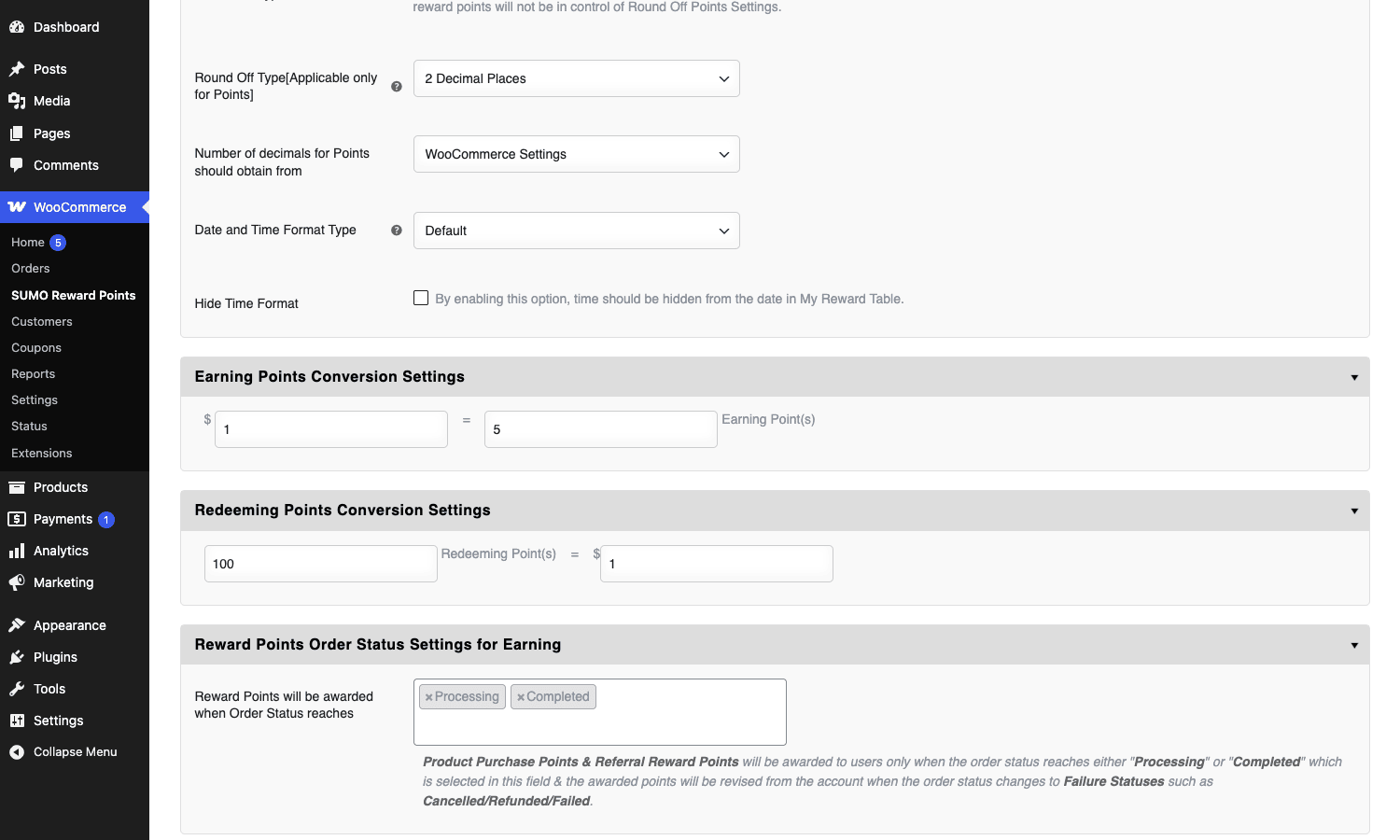
SUMO doesn’t enforce sane defaults, which I’d argue is a small flaw. It ships with both ratios at 1:1, and if you accept the defaults you are running the rebate program I just described. Type real numbers.
A few other math traps SUMO lets you fall into:
- Free-shipping orders. By default purchase points earn on the entire order total, including shipping. If shipping isn’t really a product, you’re paying loyalty on costs you didn’t make margin on. There’s a filter (
rs_points_data_before_insertion) where you can deduct shipping from the earn base before the row gets recorded. - Tax inclusion. Same problem. Decide whether earned points are based on the pre-tax or post-tax subtotal. The setting lives under General > Reward Points Earning Threshold Settings.
- Coupon stacking. If a customer redeems points AND uses a coupon code on the same order, what’s the earn base? SUMO’s default is "post-discount subtotal," which is usually right. But if you let people stack a 20 percent coupon plus 50 redeemed points on top of a $100 order, you’re earning points on roughly $30, not $100.
Earning vs redemption: the asymmetry most sites forget
I touched on this above. Here’s the longer version because it matters.
A useful way to think about it: earning is the marketing budget, redemption is the cash-out. Earning should be generous enough that customers notice it. Redemption should be conservative enough that you can afford for everyone to cash out at once.
SUMO supports tier-based multipliers on the earning side. Set up an "Earn Level" called Gold that requires 5,000 total lifetime points to reach, with a 1.5x multiplier. Once a customer hits that threshold, every future purchase earns 50 percent more points. That’s the right place to be generous, because the customers reaching it are already your top spenders, and the multiplier is what locks them in.
What SUMO is less elegant at: tier-based redemption rates. You can do it, but you have to go to Redeem Levels (a parallel concept to Earn Levels) and configure thresholds and rates separately. I’d love a single grid showing earn-multiplier and redeem-rate side by side per tier. Today they live in different sections and it’s easy to misconfigure one while editing the other.
Installation and the first hour
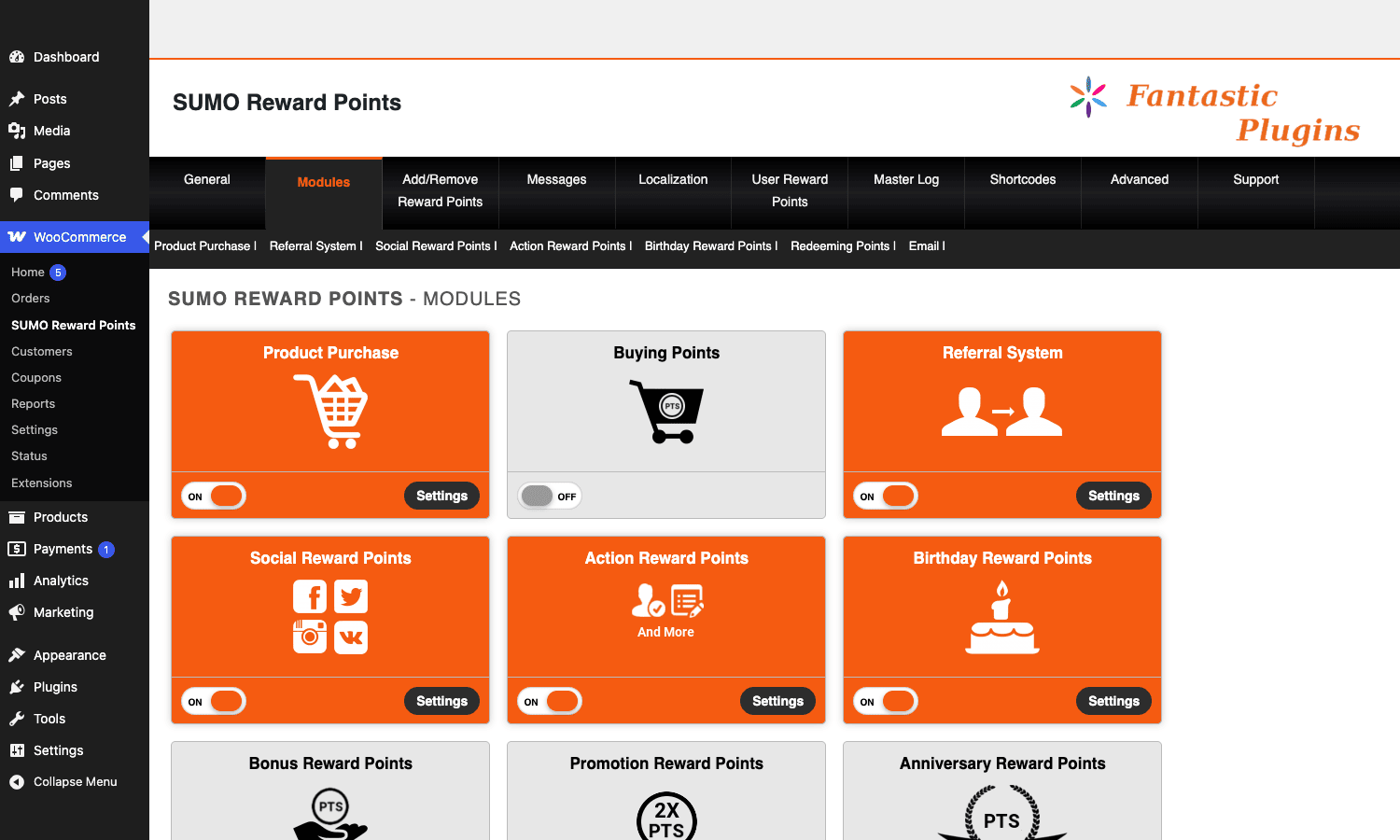
You install SUMO like any other WooCommerce add-on. Upload the zip via Plugins > Add Plugin > Upload, activate it, and a new menu item appears in the admin sidebar called "SUMO Reward Points." Out of the box, every module is OFF.
The first hour should look like this:
- Open SUMO Reward Points > Modules and turn on the modules you actually want. Product Purchase and Redeeming are the bare minimum. Referral System, Action Reward Points (covers signup / login / review), Birthday Reward Points, and Email are the next four worth toggling.
- Open General > Earning Points Conversion Settings and set the earn ratio. Type the real number, not the default.
- Open General > Redeeming Points Conversion Settings and set the redeem ratio. Make sure it’s worse for the customer than the earn ratio. That’s not a typo: redemption rates are supposed to be more conservative than earn rates, because not every point will get redeemed.
- Open General > Reward Points Order Status Settings for Earning and decide which order statuses award points. The default is Processing and Completed. If you run a high-refund category, change this to just Completed and accept that the customer waits until fulfillment to see their points land.
- Open Modules > Action Reward Points (settings) and pick which signup, login, review, and birthday actions earn points. Set sane numbers. A 100-point signup bonus with 1 USD = 5 points is a $20 customer-acquisition cost, which is probably too high. 25 points is fine.
- If you’re going to use referrals, open Modules > Referral System (settings) and pick how the referrer earns. The two most common configs are "referrer gets N points when referee signs up" and "referrer gets N points OR a percentage of the referee’s first order, when that order completes."
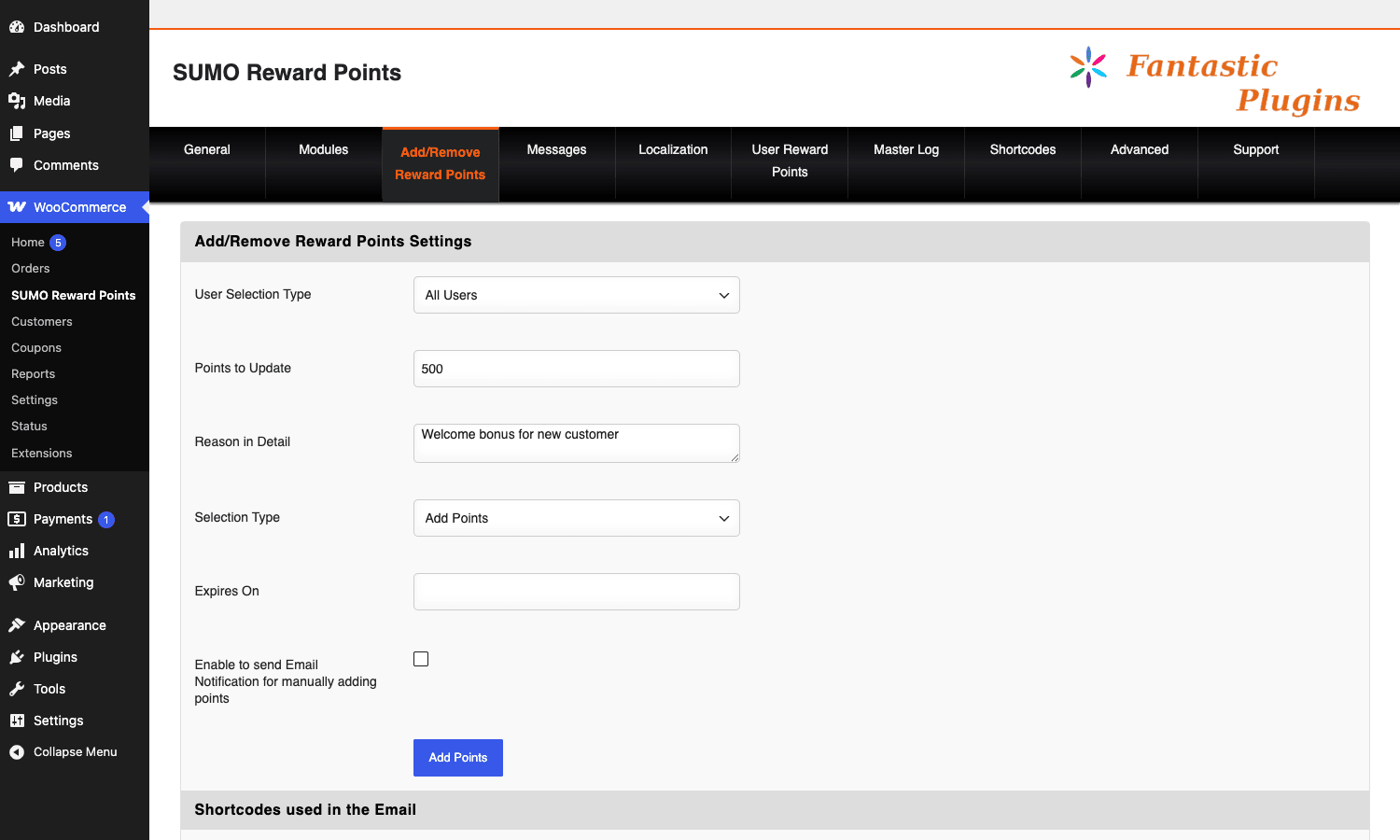
- Open the Add/Remove Reward Points tab, give yourself a manual 500-point credit so you can see the system populate, then watch the Master Log tab fill up.
That’s the first hour. The second hour is figuring out which shortcodes you actually need on your customer-facing pages, which leads us to the next section.
A guided tour of the admin
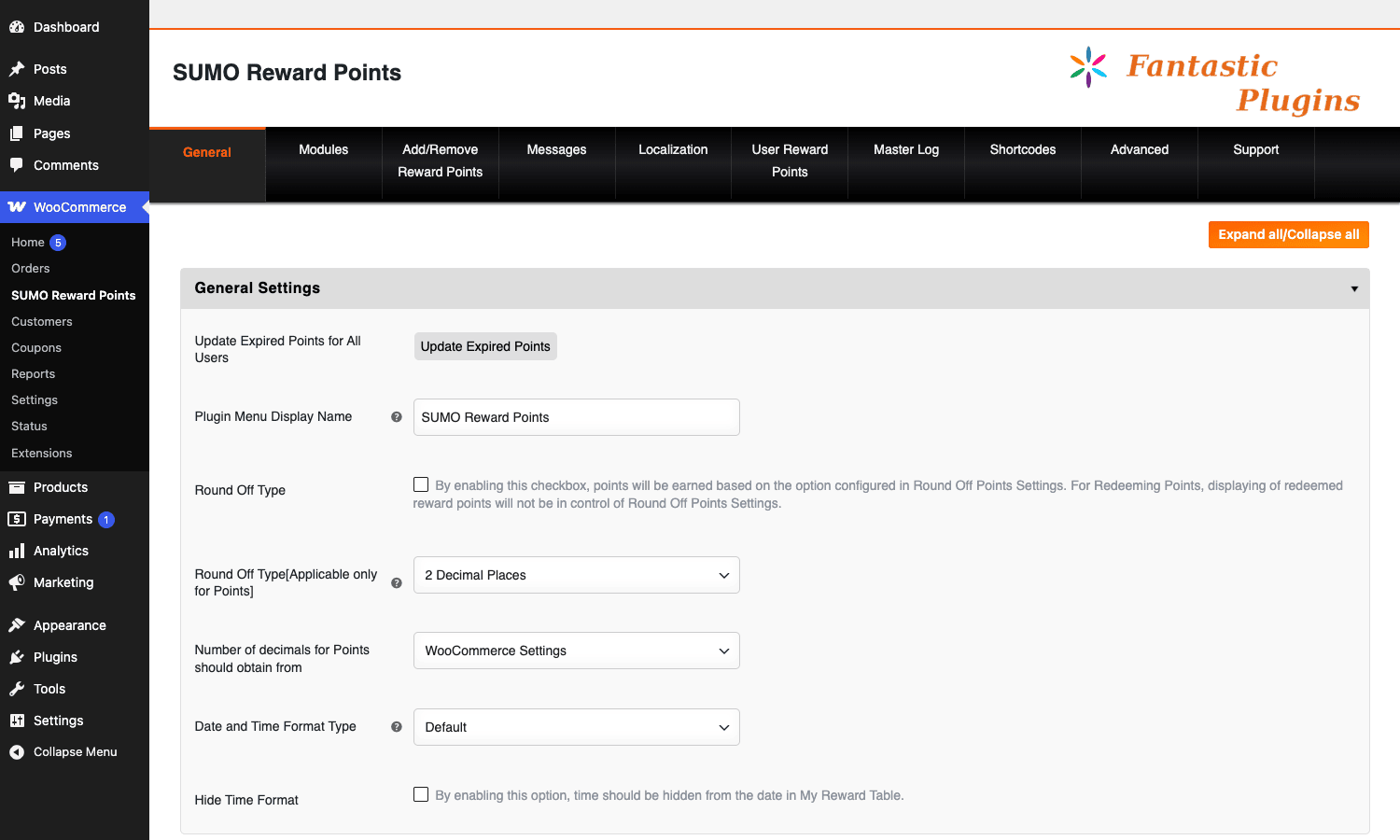
SUMO’s admin lives under one top-level menu item with ten tabs. Each tab is one long page of settings, which is both a strength and a weakness. Strength: the configuration is searchable and exportable. Weakness: the FantasticPlugins admin UI is dated and uses long single-page settings with tabs that scroll forever; you’ll be Ctrl+F’ing to find the option you want more often than you’d like.
General
Twenty or so collapsible sections covering: conversion ratios, order-status triggers, earning thresholds, member-level priority, role-based earning percentages, purchase-history-based earning percentages, email settings, restriction settings, and a stack of "Shortcodes used in this module" references at the bottom of each section. The shortcodes references are surprisingly useful: each one tells you which shortcode renders the relevant front-end UI, with the exact placeholders you can drop into the wording.
Modules
A grid of nine module cards. Each one has an ON/OFF toggle and a Settings link. The modules are: Product Purchase, Buying Points, Referral System, Social Reward Points, Action Reward Points, Birthday Reward Points, Bonus Reward Points, Promotion Reward Points, Anniversary Reward Points. Below the visible grid there are a few more for Point Expiry, Redeeming, Point Price, Email, Email Template Expire, and Gift Voucher.
When a module is OFF, its settings page is hidden and its hooks don’t fire. That’s a clean isolation pattern, and it means you can turn off modules you’re not using to keep the admin manageable.
Add/Remove Reward Points
The manual award screen. Pick a user (or all users, or a role, or include / exclude lists), type a point number, type a reason, choose Add or Remove, and optionally an expiry date. There’s also a checkbox to fire an email notification to the affected users. I use this constantly during testing.
Messages
This is where every customer-facing string lives. "You earned 50 points for this order." "Your balance is X." "Use Y points to get Z off your cart." There are easily forty of these. Every one supports SUMO’s shortcode placeholders ([rspoint], [balancepoint], [currentorderid], etc.). Spend an evening rewriting these to match your brand voice. The defaults are functional, not friendly.
Localization
Translations of admin labels, button text, and email subjects. If you’re running a single-locale store, you can skip this. If you’re multilingual, this is where WPML / Polylang strings appear after WPML picks them up.
User Reward Points
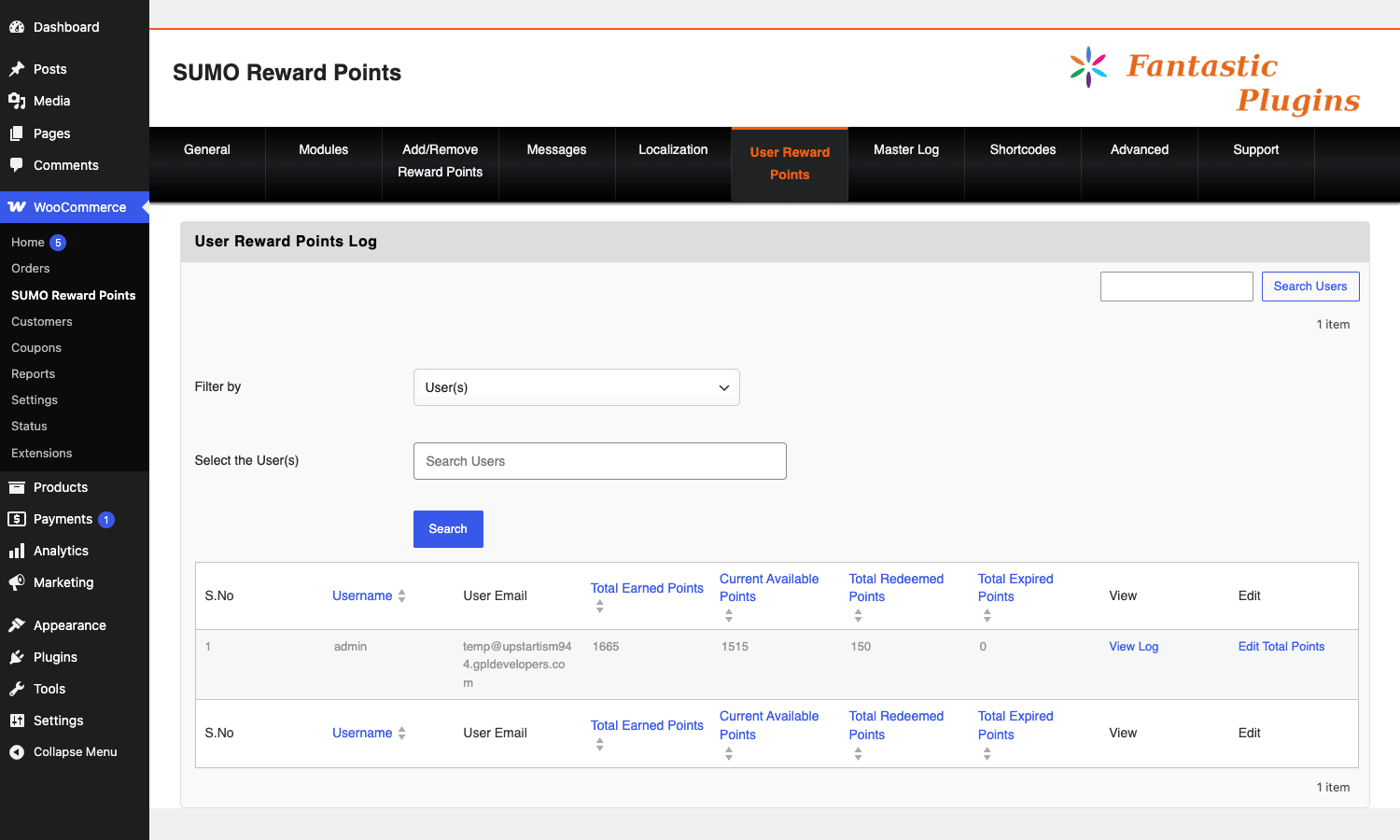
A list table of every customer with a non-zero balance. Each row shows username, email, total earned, current available, total redeemed, total expired, plus links to view the per-user log and edit the user’s balance directly.
Master Log
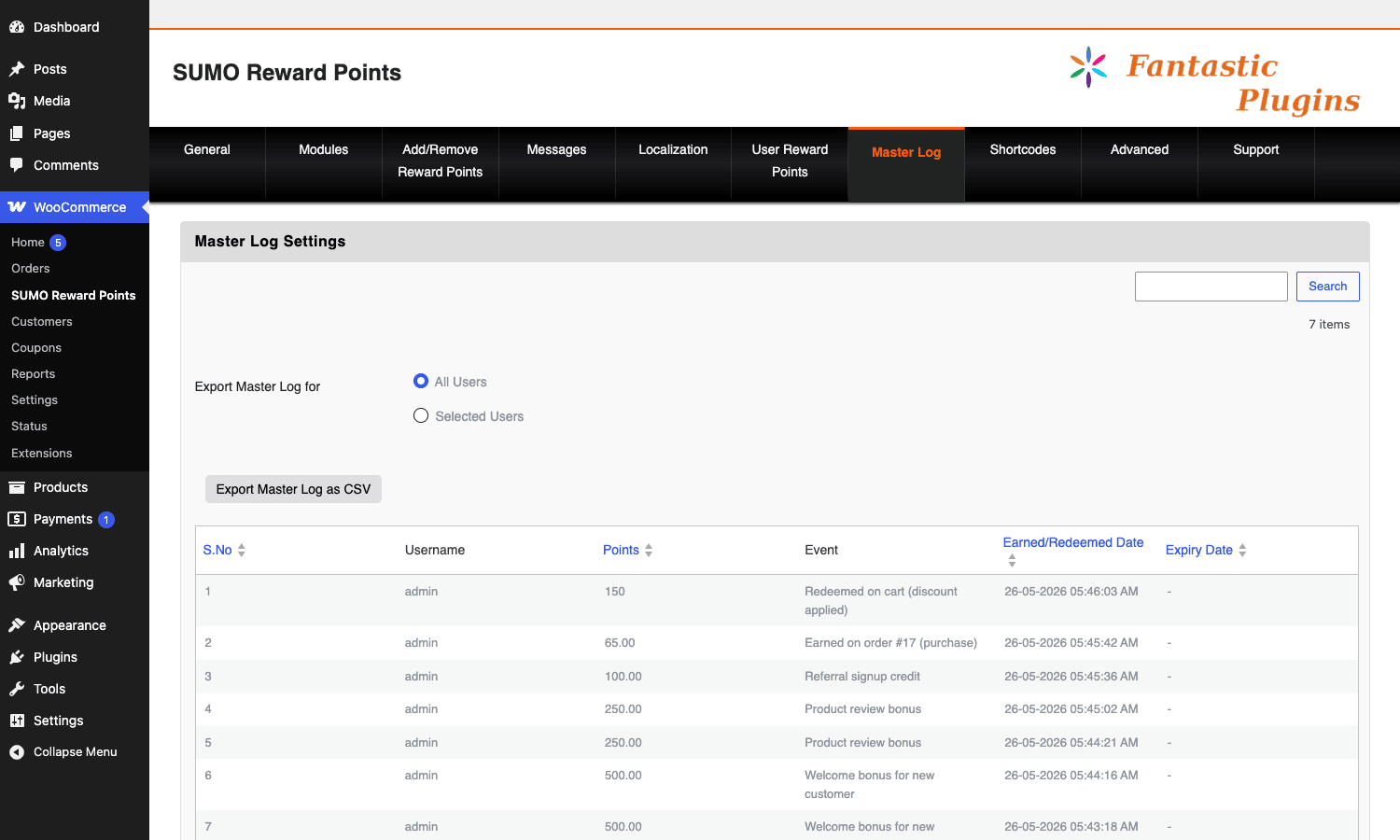
Every earn and redeem event in chronological order. Columns: S.No, Username, Points, Event, Earned/Redeemed Date, Expiry Date. There’s a search box and a CSV export. This is the audit trail.
Shortcodes
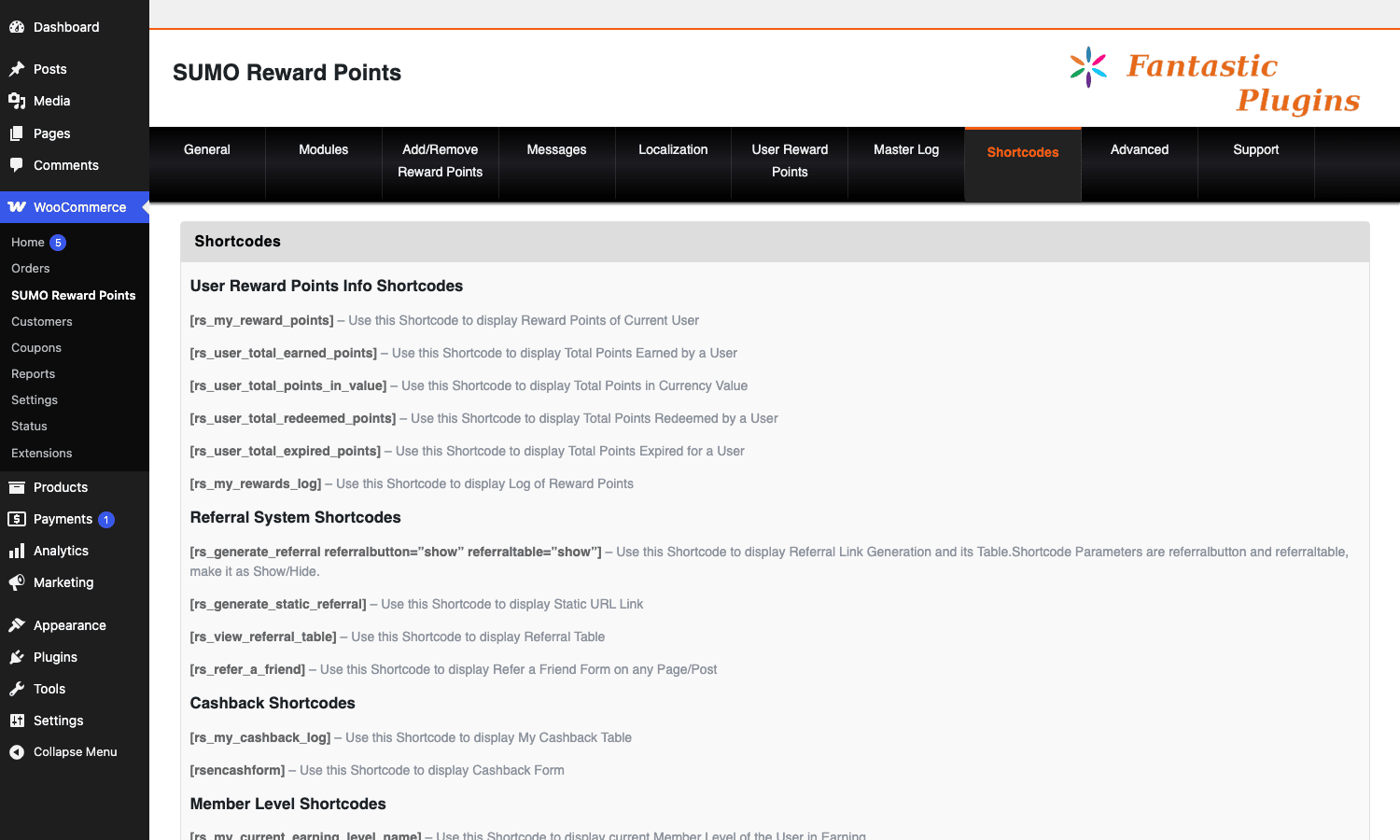
A reference page. Lists every shortcode the plugin ships, organized by module, with a one-line description of what each one does. There are over a hundred. Most you’ll never use; about fifteen are the workhorses.
Advanced
Tools: clean the master log, recompute balances, force-fire the expiry sweep, recompute conversion equivalents for old records. These are the "I broke something, fix it" buttons. Used carefully, they’re life-savers. Used carelessly, they can wipe a customer’s history. Read the inline help before clicking.
Support
A contact form to FantasticPlugins. There’s also an embedded FAQ.
Referrals: the under-used feature that pays for the plugin
The Referral System module is the single feature most store owners under-use, and it’s the one most likely to pay for the plugin twice over.
How it works in SUMO: enable the module, set a referral payout (e.g. "referrer earns 500 points when the referee places an order of $20 or more"), and a referral page is automatically generated. Logged-in customers see their personal share link on the My Account > Refer a Friend tab (or wherever you drop the [rs_refer_a_friend] shortcode). When someone clicks that link and signs up, SUMO writes the referrer’s user ID to the new user’s refuserid meta. From that moment on, any qualifying event fires do_action( 'fp_signup_points_for_referrer', $referrer_id, $referred_id, $points ) and credits the referrer.
The referral flow works without any tracking-cookie weirdness because it’s based on URL parameters plus user meta, not third-party cookies. Modern browsers don’t get in the way. The trade-off is that if the referee doesn’t sign up in the same session, the referrer isn’t credited unless the cookie fallback was enabled.
Three referral configs I’ve seen work in practice:
- One-shot signup bonus. Referrer earns N points the moment the referee creates an account. Easy to game (everyone makes fake friends), so cap it at one per IP and one per email domain.
- First-order percentage. Referrer earns 10 percent of the referee’s first order, paid in points. Aligned with revenue, harder to game. This is the configuration I default to.
- Lifetime percentage. Referrer earns a small percentage of every order the referee ever places. Customers love this. It compounds and turns your best customers into a sales force. The downside is the bookkeeping never stops.
Configure under Modules > Referral System > Settings.
Tiers, multipliers, and the point inflation problem
Loyalty programs have a long-term problem that nobody talks about until it bites them: point inflation.
Year one of the program, customers earn at the default rate and redeem at the default rate. Year two, they have a lot of points sitting in balance. Year three, every front-page promotion you run gives more points "to celebrate," and now your power users have $400 worth of unredeemed points and they’re starting to feel like a liability.
Two things help here, and SUMO supports both.
Expiry. Set a point expiry of 12 or 18 months from the date of earning. Each wp_rsrecordpoints row carries an expirydate column. A daily cron job sweeps it. Customers who don’t engage for 12 months lose their dormant balance. Customers who engage at all reset the clock on their newer earnings. This is the single most important thing you can do to keep a loyalty program healthy.
Tier-based multipliers, not flat rates. Instead of saying "everyone earns 5 points per dollar," say "Silver earns 5, Gold earns 6, Platinum earns 7." Then make the tier thresholds high enough that only your best customers reach them. The headline "earn 5 points per dollar" stays the same in marketing, and the higher rates are a perk tier rather than a fixed cost.
SUMO’s earn-level admin lives under Modules > Product Purchase > Earning Levels (it’s nested, which is annoying). Each level has a name, a points-required threshold, and a multiplier or a flat percentage. You can also do role-based multipliers from the General tab, which is cleaner if your tiers are already represented as WordPress user roles.
Real-world use cases
Here are five configurations I’ve actually run in production or built for clients.
-
Coffee subscription store. Customers earn 5 points per dollar on one-shot purchases, 10 points per dollar on subscription renewals. Birthday bonus of 250 points. Referral: 10 percent of referee’s first order, paid to referrer. Point expiry: 18 months. Tier thresholds: Silver at 1000 lifetime points (1.0x), Gold at 5000 (1.2x), Platinum at 15000 (1.5x). Works beautifully with the recurring-billing logic in WooCommerce Subscriptions (see also the WooCommerce Subscriptions review for setup).
-
Digital-products marketplace. No physical fulfillment, instant points. Sign-up bonus of 100 points (a small store-credit gift on day one drives first-order conversion). 1 point per $1 spent. 100 points = $1 off. Aggressive referral payout because acquisition cost dominates. Pay-with-points enabled on a few clearance items.
-
B2B wholesale shop. Role-based earning: Wholesale customers earn 2 points per dollar, Retail earns 5. Wholesale redemption is more limited too (only on a specific product category). Tier-multiplier disabled, because B2B buyers don’t care about gamification. The referral feature is repurposed as a "referred wholesaler" bonus paid out as a $200 first-month credit, not as points.
-
Beauty / skincare brand. Heavy social-share rewards: 25 points per Facebook share, 50 per Instagram tag. Birthday bonus is the kicker, 500 points (about $5) sent a week before the customer’s birthday with a personalized email. Review-approved earn is also generous: 100 points per approved product review. Drives a measurable lift in user-generated content. Pair with AutomateWoo to trigger custom workflows on point milestones.
-
Membership-style content shop. Customers buy access to premium content with a mix of dollars and points. Pay-with-points is enabled on certain SKUs. Lifetime-percentage referral, because every active member is a marketing asset. Points expire only on inactive accounts (defined as no login in 24 months), which is a kinder version of the standard expiry rule.
Developer reference: hooks, filters, shortcodes, REST
If you’re a developer extending SUMO, this is where the real value of the plugin shows. The Fantastic Plugins team has been pretty generous with extension points.
Custom tables
SUMO creates seven custom tables on activation:
wp_rsrecordpoints. the master ledger. Every earn / redeem / adjustment lands here.wp_rspointexpiry. FIFO queue tracking which chunks of earned points have been used vs are still active. Used by the expiry sweep so the oldest points expire first.wp_rsgiftvoucher. gift voucher codes generated for distribution.wp_rs_templates_email. email template overrides (per-event subject/body).wp_sumo_reward_encashing_submitted_data. cash-out / payout requests submitted by customers.wp_sumo_reward_send_point_submitted_data. peer-to-peer point transfer requests.wp_rs_expiredpoints_email. expiry-reminder email send log.
A current user’s available balance is computed at read time, not stored as a scalar:
SELECT SUM(earnedpoints) - SUM(redeempoints) AS balance
FROM wp_rsrecordpoints
WHERE userid = %d
 AND (expirydate = '' OR expirydate > UNIX_TIMESTAMP());
That’s the conceptual query; SUMO’s actual implementation goes through the expiry queue first so partially-expired earn chunks are honored correctly.
Action hooks worth knowing
// Fires when a customer earns points from a purchase.
do_action( 'fp_reward_point_for_product_purchase', $user_id, $order_id, $points );

// Fires when a referrer is credited for a referral signup or order.
do_action( 'fp_signup_points_for_referrer', $referrer_id, $referred_id, $points );

// Fires when a referee is credited (the new user themselves).
do_action( 'fp_signup_points_for_getting_referred', $referee_id, $referrer_id, $points );

// Fires once a row has landed in wp_rsrecordpoints, after the INSERT succeeded.
do_action( 'fp_reward_points_after_recorded', $row_id, $user_id, $points_delta );

// Fires when a customer applies redemption on the cart.
do_action( 'fp_redeem_reward_points_manually', $user_id, $points_used, $cart_total );

// Fires after the expiry-email cron job sends a reminder successfully.
do_action( 'fp_after_point_expiry_email_sent_successfully', $user_id, $points_expiring );
A simple example: send a Slack notification to your ops channel every time someone redeems more than 1000 points on a single order.
add_action( 'fp_redeem_reward_points_manually', function ( $user_id, $points_used, $cart_total ) {
 if ( $points_used < 1000 ) {
 return;
 }
 $user = get_userdata( $user_id );
 $payload = wp_json_encode( array(
 'text' => sprintf(
 'Heads up: %s just redeemed %d points on a $%s cart.',
 $user->user_login,
 $points_used,
 number_format( $cart_total, 2 )
 ),
 ) );
 wp_remote_post( SLACK_WEBHOOK_URL, array(
 'body' => $payload,
 'headers' => array( 'Content-Type' => 'application/json' ),
 'timeout' => 5,
 ) );
}, 10, 3 );
Filter hooks worth knowing
// Change which WC order statuses fire purchase points (default: ['processing','completed']).
apply_filters( 'srp_order_status_to_award_points', array( 'completed' ) );

// Mutate the row data right before it's INSERTed into wp_rsrecordpoints.
// Useful for stripping shipping/tax from the earn base.
apply_filters( 'rs_points_data_before_insertion', $row_data, $context );

// Rename a tier label dynamically (e.g. show "VIP" instead of "Gold" for a specific user).
apply_filters( 'rs_pre_earn_level_name', $level_name, $user_id );

// Modify the points-required threshold to reach the next tier.
apply_filters( 'rs_pre_points_to_reach_next_earn_level', $threshold, $user_id );

// Modify the REST API earning endpoint response.
apply_filters( 'srp_earning_rest_api_response', $response_array, $request );

// Inject extra content above the My Account points-history table.
apply_filters( 'srp_above_reward_table', $content_html, $user_id );

// Limit My Account reward log to recent N days.
apply_filters( 'rs_my_reward_date_filter', 30 ); // last 30 days
A practical example: deduct shipping from the earn base so customers aren’t earning loyalty on shipping costs you didn’t make margin on. The pattern below uses the standard WC_Order shipping_total method and the WordPress filter hook API for safety.
add_filter( 'rs_points_data_before_insertion', function ( $row, $context ) {
 if ( empty( $context['order_id'] ) || $context['event']!== 'product_purchase' ) {
 return $row;
 }
 $order = wc_get_order( $context['order_id'] );
 if (! $order ) {
 return $row;
 }
 $shipping = (float) $order->get_shipping_total();
 $tax = (float) $order->get_total_tax();
 $earn_base = max( 0, (float) $order->get_total() - $shipping - $tax );
 // Recalculate points using the new base. Earn rate is stored in option.
 $rate = (float) get_option( 'rs_earn_point' ); // points per 1 currency unit
 $row['earnedpoints'] = round( $earn_base * $rate, 2 );
 $row['reasonindetail'].= ' (recalculated to exclude shipping/tax)';
 return $row;
}, 10, 2 );
Shortcodes worth knowing
SUMO ships over a hundred shortcodes. These are the ones I actually use:
| Shortcode | What it does |
|---|---|
[userpoints] |
Current user’s available point balance. |
[userpoints_value] |
Same, converted to currency. |
[rs_my_reward_points] |
Full My Account points panel (balance, history, table). |
[rs_my_rewards_log] |
Just the earn/redeem history table. |
[rs_refer_a_friend] |
Refer-a-friend form with personal share link. |
[rs_generate_referral] |
Renders the user’s referral URL inline (no form). |
[rs_view_referral_table] |
Table of users this customer has referred. |
[rssendpoints] |
Peer-to-peer point transfer form. |
[rsencashform] |
Encash points (request a payout) form. |
[rs_redeem_vouchercode] |
Voucher-code redemption input. |
[rs_promotion_message] |
Active promotional-points banner. |
[rs_my_current_earning_level_name] |
Customer’s current tier name. |
[rs_next_earning_level_points] |
Points needed to reach the next tier. |
Drop these into a custom My Account endpoint or a dedicated rewards landing page. SUMO doesn’t force you to use its default page templates if you’d rather hand-craft your own.
REST API
SUMO exposes two REST resources under the wc-srp/v1 namespace:
GET /wp-json/wc-srp/v1/earning. list earning events.POST /wp-json/wc-srp/v1/earning. create an earning event programmatically.GET /wp-json/wc-srp/v1/earning/<id>. fetch one event.GET /wp-json/wc-srp/v1/redeeming. same shape, for redemption events.
Both require manage_woocommerce capability on the requesting user. So this is for backend integrations, not for customer-facing apps. If you want a customer-facing REST surface, you’ll need to wrap the underlying FPRewardSystemUserPoints class yourself.
Example: programmatically award 500 points to a user when they complete a specific Gravity Forms entry.
add_action( 'gform_after_submission_42', function ( $entry, $form ) {
 $user_id = (int) $entry['created_by'];
 if (! $user_id ) {
 return;
 }
 $body = array(
 'user_id' => $user_id,
 'points' => 500,
 'reasonindetail' => 'Survey completion bonus (Form #42)',
 'event' => 'manual_admin_award',
 );
 wp_remote_post( rest_url( 'wc-srp/v1/earning' ), array(
 'headers' => array(
 'Content-Type' => 'application/json',
 'Authorization' => 'Basic '. base64_encode( 'admin_user:application_password' ),
 ),
 'body' => wp_json_encode( $body ),
 ) );
}, 10, 2 );
In practice I’d skip the HTTP roundtrip and call the underlying PHP method directly, but the REST surface is handy for cross-site integrations.
Performance, compatibility, and the gotchas
This is where the honesty bit comes in.
Performance. The SUM-on-read balance pattern I described earlier is correct but not infinitely scalable. On a store with one million ledger rows, SUM(earnedpoints) - SUM(redeempoints) WHERE userid =? is going to chew CPU on every cart page. SUMO mitigates this by indexing userid on wp_rsrecordpoints (good) and by caching the balance in a transient between writes (also good). But if you’re at six-figure-plus customers and millions of events, expect to throw object cache at it, and possibly to denormalize the balance into user meta on a cron job.
My Account integration. SUMO’s My Account integration depends on standard WooCommerce account endpoints. Some heavily-customized themes break those endpoints (Flatsome’s old My Account override was famously brittle), and when that happens SUMO’s panels render as empty pages. If you’re using a custom theme, smoke-test the points tab early.
Reporting is thin. Compared to a dedicated loyalty SaaS like Smile.io or LoyaltyLion, SUMO’s reporting is bare-bones. You get a Master Log and a CSV export. No cohort analysis, no redemption-rate charts, no tier-distribution histograms. If you want that, pipe the CSV into Looker Studio or Metabase yourself.
The admin UI is dated. I said this above and I’ll say it again. The FantasticPlugins admin UI uses long single-page settings with collapsible sections, no in-admin search, and a layout that hasn’t been re-skinned for the modern WP-Admin design language. It works, but it shows its age. You’ll Ctrl+F a lot.
Coupon stacking is configurable but not always intuitive. The setting "Allow combination of coupons with points redemption" exists. Read the inline help twice before flipping it. The interaction with Smart Coupons is mostly clean, but with auto-applied URL coupons there are edge cases worth testing on staging.
Refund handling. When an order is refunded, SUMO inserts a reversal row into wp_rsrecordpoints matching the original earn (and removes the earn from the available balance). For full refunds this works perfectly. For partial refunds you need to make sure the option "Revoke proportional points on partial refund" is enabled. It’s off by default, which is a footgun. The WooCommerce refund documentation has a good primer on the underlying flow if you’re unfamiliar with how partial vs full refunds differ.
Subscriptions interaction. SUMO works with WooCommerce Subscriptions, but the earn event fires on each renewal order (treated as a separate purchase). Setup-fee handling and free trials are sometimes treated as $0 purchases that still earn signup-level points; if that’s not what you want, filter srp_buying_points_in_cart to skip subscription parent orders.
What SUMO doesn’t replace
SUMO is good. It is not, on its own, a substitute for a dedicated loyalty SaaS in three specific scenarios.
- You want cohort and redemption analytics. SUMO logs events. It doesn’t analyze them. If your CFO wants a chart of "points-issued vs points-redeemed by month, segmented by tier," you’ll be building that yourself in a BI tool. Smile.io or LoyaltyLion ship those charts out of the box.
- You need a true mobile app for the program. SUMO has a REST API, but no off-the-shelf mobile-app SDK. A SaaS loyalty platform usually has one. If your customers expect "open the app, see my points, scan a barcode," SUMO is not the right tool.
- You’re running a multi-store chain across multiple WordPress sites that should share a balance. SUMO data lives in one WordPress install’s database. You can’t share balances across stores without writing a sync layer yourself.
For the 95 percent case (single store, one to a few hundred thousand customers, basic-to-medium analytics needs, no mobile app), SUMO does the job.
Pricing and licensing
SUMO Reward Points is sold by Fantastic Plugins on CodeCanyon as a regular WordPress plugin with one-site licensing. The license includes a year of updates and support and the plugin keeps working forever after that (you just stop getting new releases). All the features I’ve described in this article are in the base plugin, with no separate add-ons to buy.
If you want the GPL-licensed version to test on a staging environment without committing to the CodeCanyon purchase, the SUMO Reward Points page on GPL Times carries the same zip. Install it on a sandbox WordPress, set up two test customers, run a few earn/redeem cycles, and see whether the math and the admin work for your store before committing to a license.
FAQ
Why are points not deducting on a refund?
Check that the order’s status is actually changing to Refunded (a manual wp post update --post_status=refunded from WP-CLI doesn’t fire the WooCommerce hook SUMO listens to). Also check that the "Revoke proportional points on partial refund" option is enabled under General > Reward Points Order Status Settings. The default is off, which catches a lot of stores out.
Can a customer use a coupon AND points in the same order?
Yes, but you have to enable it explicitly under General > SUMO Coupons Compatibility Settings. Pay attention to the earn-base setting too: by default the customer earns points on the post-coupon, post-redemption subtotal, which is usually what you want.
Why is the points balance wrong after a partial refund?
Two causes. Either "Revoke proportional points on partial refund" is off and SUMO is treating the partial refund as no-refund, or the refund didn’t trigger the WooCommerce action because it was performed through a gateway-side flow (e.g. a Stripe Dashboard refund) that didn’t sync back to WC. Force-sync with wp wc tool run regenerate_order_action_status_callbacks, then run the Advanced > Recompute Balances tool.
Does SUMO work with WooCommerce Subscriptions?
Yes. The renewal order is treated as a new purchase and earns points at the configured rate. If you want renewals to earn at a different (usually higher) rate than one-time purchases, filter rs_points_for_additional_fee or check the per-product point override on the subscription product.
Why didn’t the referrer get credit?
Either the referee didn’t sign up through the referrer’s personal link (always check the URL has the referral query parameter on it), or the configured trigger hasn’t fired yet. If your referral payout is "on first order completion" and the referee hasn’t placed an order, the referrer won’t see points until that order completes. Check the user’s refuserid meta to confirm SUMO recorded the relationship.
Can I prevent points from being earned on certain product categories?
Yes. Under Modules > Product Purchase > Settings, there’s a Reward Points Restriction subsection where you can exclude categories, products, or specific SKUs from earning. Useful for gift cards (you don’t want customers earning points for buying their own store credit) and clearance items.
How does SUMO handle GDPR / right-to-erasure requests?
SUMO hooks into WordPress’s personal-data export and erasure flows. When you trigger an export for a user, SUMO bundles their wp_rsrecordpoints rows into the export. When you trigger erasure, the rows are anonymized (the userid column is cleared, the row stays for ledger integrity).
Can I use SUMO without WooCommerce?
No. SUMO is built on top of WooCommerce. The earn engine, the redemption engine, and the My Account integration all depend on WooCommerce APIs. If you don’t have WooCommerce, look at a non-commerce point system or build something custom.
Final thoughts
SUMO Reward Points is the kind of plugin that doesn’t get talked about as much as the SaaS alternatives but quietly does what most WordPress shops actually need. It bundles earn rules, redemption, referrals, tiers, expiry, and a respectable email layer into one plugin that lives entirely inside your WordPress install. No third-party widget, no embedded iframe, no monthly fee scaling with your customer count.
The admin UI is dated. The reporting is thin. The defaults are dangerous (1:1 conversion ratios out of the box, partial-refund revocation off by default). All of those are real complaints and I want you to know about them before you install. But if you can tolerate them, and if you take an hour at the start to configure the conversion ratios with real numbers, what you get is a complete, fully owned, hook-rich loyalty program that you can extend with PHP and that won’t ever lock you out by changing its pricing.
The first day on a SUMO install is the most important day. Type the conversion ratios into a spreadsheet, not your head. Set expiry. Pick one referral configuration and stick with it for three months before you tune it. Watch the Master Log for a week. After that, the plugin mostly disappears and your customers see a loyalty program that works.
That’s the bar for any plugin like this. SUMO clears it.