

I’ve tried to bolt a gift-card feature onto four WooCommerce stores so far. The first time I used the free PW Gift Cards plugin, which worked until a customer wanted to spend half the balance now and the rest in three months. The second time I reached for hand-rolled coupon codes, which were promptly scraped by a couponing extension somebody installed and shared on Honey within a week. The third store paid for the official WooCommerce Smart Gift Cards extension and we still had to write our own logic for "send this card on Dec 22 at 6am". The fourth was a Square-integrated store where the WooCommerce side only knew about physical cards and the digital gift-card balance lived in a separate dashboard that staff forgot to check.
So when a client asked me to wire up gift cards for a yoga studio, "code or PDF, schedulable, partial spends allowed, sender and recipient both get an email", I sat down with YITH WooCommerce Gift Cards and built the whole thing on a sandbox in an afternoon. This is what I found. Not a sponsored love letter, not a hatchet job. A real walkthrough of where the plugin is sharp, where it’s clunky, and the bits I wish someone had warned me about before I started clicking.
Table of Contents
- What is YITH WooCommerce Gift Cards?
- How a gift-card plugin actually works inside WooCommerce
- Key features at a glance
- Installation and the first hour
- A guided tour of the admin
- Creating a gift card product
- The recipient and delivery flow
- Redeeming a gift card at checkout
- Email templates and the PDF voucher
- Real-world use cases
- Developer reference: hooks, filters, shortcodes, classes
- Performance, compatibility, and the gotchas
- Pricing and licensing
- FAQ
- Final thoughts
What is YITH WooCommerce Gift Cards?
YITH WooCommerce Gift Cards is a WooCommerce extension built by YITH (the Italian dev shop also known as Your Inspiration Themes) that adds a dedicated gift-card product type to your store. Customers buy a gift card the way they’d buy any other product. The plugin then generates a unique code, attaches it to the buyer’s order, optionally emails it to a recipient (now or on a scheduled date), and lets that recipient redeem the code at checkout for cash off the cart total.
That’s the elevator pitch. What makes it different from the free options on WordPress.org is the bundle of small features that add up when you actually run a store: variable preset amounts ($25 / $50 / $100 / $200) AND a custom-amount field with min/max, balance tracking with partial redemption, a customizable PDF voucher attached to the delivery email, design presets so the gift card has a chosen background image, multiple recipients per single purchase, and a per-card expiration date.
It’s been on the market for years and YITH ships near-monthly updates. The plugin sits in the slightly awkward middle ground between "free with no recipient flow at all" and "Smart Gift Cards plus a paid extension for every nice-to-have feature". For most stores I’d estimate it’s the cheapest path to gift cards that don’t feel like a hack.
Worth noting: gift cards in YITH are stored as a WordPress custom post type, gift_card, registered by the constant YWGC_CUSTOM_POST_TYPE_NAME. The card code is the post title. The amount, balance, recipient email, sender name, delivery date and expiration are all post meta under the _ywgc_* keys. There is no custom database table. That’s a design choice with real implications, and we’ll come back to it in the developer section.
How a gift-card plugin actually works inside WooCommerce
Skip this section if you’ve sold physical gift cards before. If you haven’t, here’s what’s happening under the hood, because the rest of the article makes a lot more sense once you’ve got this picture in your head.
A gift-card workflow on WooCommerce is really four moving parts stitched together.
- A new product type. Standard WooCommerce ships with Simple, Variable, Grouped, External products. The plugin registers a fifth,
gift-card, with its own pricing logic (fixed presets + optional custom amount instead of a single regular price) and its own product-edit panel. - A purchase + generation step. When the order completes, the plugin runs on
woocommerce_order_status_completed(and a few others), creates agift_cardpost for each gift-card line item in the order, assigns it a unique code, stamps it with the buyer’s order ID and the recipient’s email, and either emails the code immediately or schedules it for the future. - A redemption layer. At checkout, a "Got a gift card?" field accepts a code, validates it against the
gift_cardposts table, and applies the balance as a negative line item against the cart total. If the order total is less than the gift card balance, the difference stays on the card and the balance is decremented in_ywgc_balance_totalpost meta. - A messaging layer. Three transactional emails ship with the plugin: the delivery email (with the code), a notification when the gift card is used, and a "balance remaining" email after partial use.
The recipient never has to register for an account, and the buyer doesn’t have to be logged in either. The plugin is designed around the assumption that gift cards get sent to strangers (well, friends of the buyer) who land cold on your site with a code in their inbox.
Key features at a glance
Rather than dump the marketing list, here’s what actually moves the needle on a real store.
- A real product type, not a shortcode. Gift cards have their own
gift-cardproduct type with a custom data panel in the WooCommerce product editor. They behave like products: searchable, categorizable, reportable in WC analytics. - Preset amounts and custom amount, side by side. Set a list of fixed prices ($25 / $50 / $100), AND let the customer enter a custom number between a min and a max. Both work on the same product.
- Code or downloadable PDF voucher. The delivery email includes the gift-card code and, optionally, a PDF attachment with a designed voucher (background image, code, recipient name, sender name, message). The PDF is rendered with mPDF on the server.
- Scheduled delivery. The buyer can pick a future send date and the plugin holds the email until then. Useful for "send this on Mom’s birthday".
- Multiple recipients in a single purchase. Enable the option and the buyer can buy one $50 card and split it as $10/$15/$25 across three different recipients, with three different messages. Each becomes its own gift card.
- Partial redemption and balance tracking. If a $100 card is used to pay for a $32 cart, the remaining $68 stays on the card. The plugin shows the customer the remaining balance after use, and the same code keeps working until it hits zero or expires.
- Per-card expiration date. Set a global default (e.g. "all gift cards expire 12 months after purchase") and override per individual card.
- Customer "My Account" gift-cards tab. Logged-in users see all their issued or received gift cards in a dedicated WooCommerce account endpoint.
- "Gift this product" mode. Lets the buyer turn any simple, variable, or bundle product into a gift, with the recipient form attached. Optional add-on, off by default.
- Sender + recipient information. Both ends are captured: sender’s name, recipient’s name + email, personal message. The recipient sees who it’s from.
- Design presets. Upload a library of background images (snowflake card for December, balloons for birthdays) and let the buyer pick one before purchase.
- Categorize gift cards. A custom
giftcard-categorytaxonomy lets you build "Birthday" and "Holiday" and "Sympathy" collections. - Coupon-field redemption fallback. A toggle lets gift-card codes be entered into the regular WooCommerce coupon field, useful for themes whose checkout templates only render the coupon field.
- Export and import. CSV import/export of gift-card codes, balances, and recipients. Useful when you migrate, audit, or batch-issue.
- HPOS-compatible. The plugin declares compatibility with WooCommerce’s high-performance order tables and works with the new block-based cart and checkout.
Most of these are on out of the box. A few (multiple recipients, "Gift this product", custom amount, scheduled delivery) need to be flipped on in YITH → Gift Cards → Settings.
Installation and the first hour
Standard plugin upload. Plugins → Add New → Upload Plugin, pick the zip, activate. You’ll need WooCommerce active first (the plugin declares it as a Requires Plugins: dependency, so WordPress refuses to activate without it).
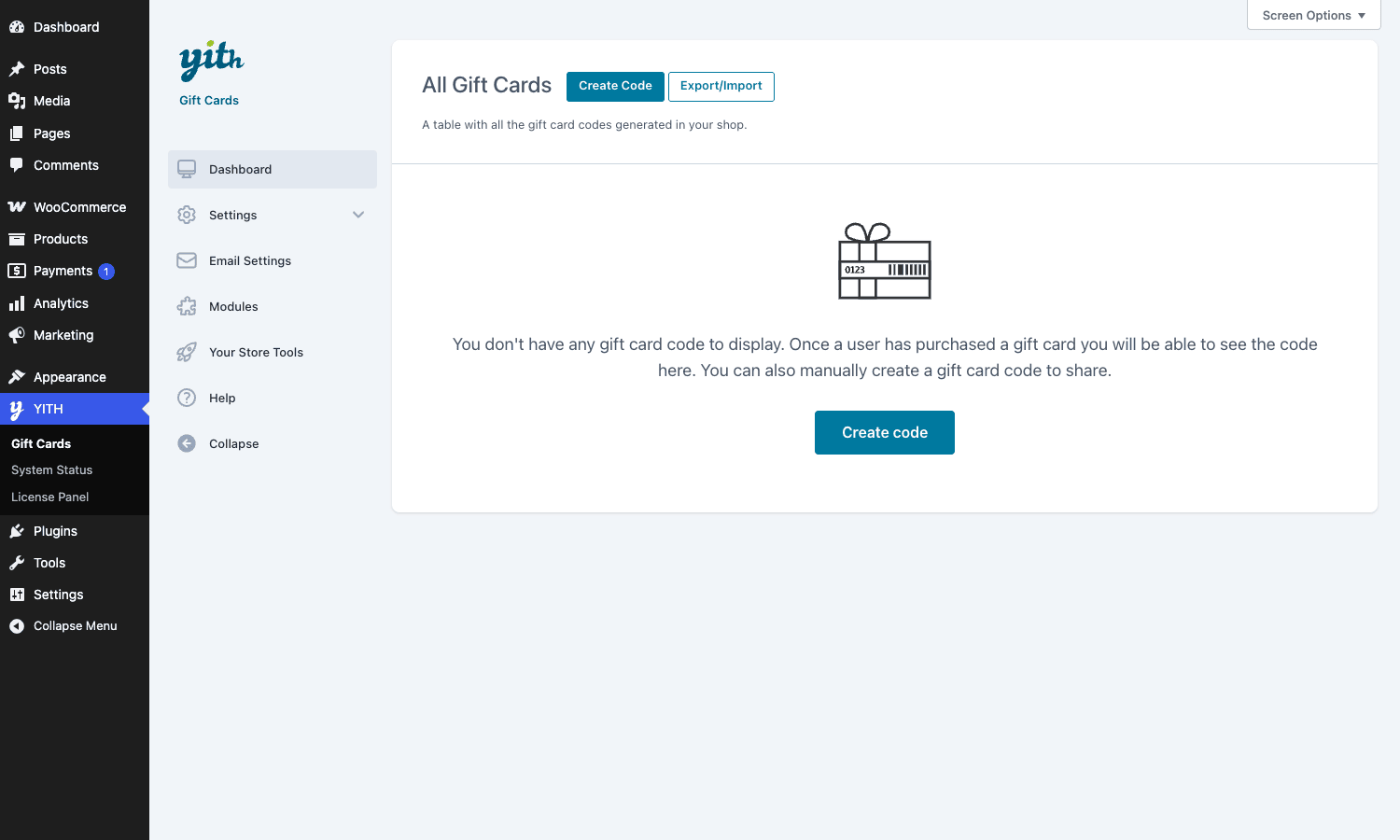
After activation a new top-level menu item appears in the WP admin sidebar: YITH → Gift Cards, with a sub-menu of Dashboard, System Status, License Panel. The plugin also adds YITH → Gift Cards → Settings, Email Settings, Modules, Your Store Tools, and Help as second-level pages.
The first time you open the dashboard, YITH shows a "Thank you for using our plugin" welcome modal that I’ve now seen on every YITH plugin install. Close it. Don’t bother with the onboarding wizard; the defaults are fine and the wizard mostly nags you about cross-selling YITH’s other extensions.
What you actually need to do in the first hour:
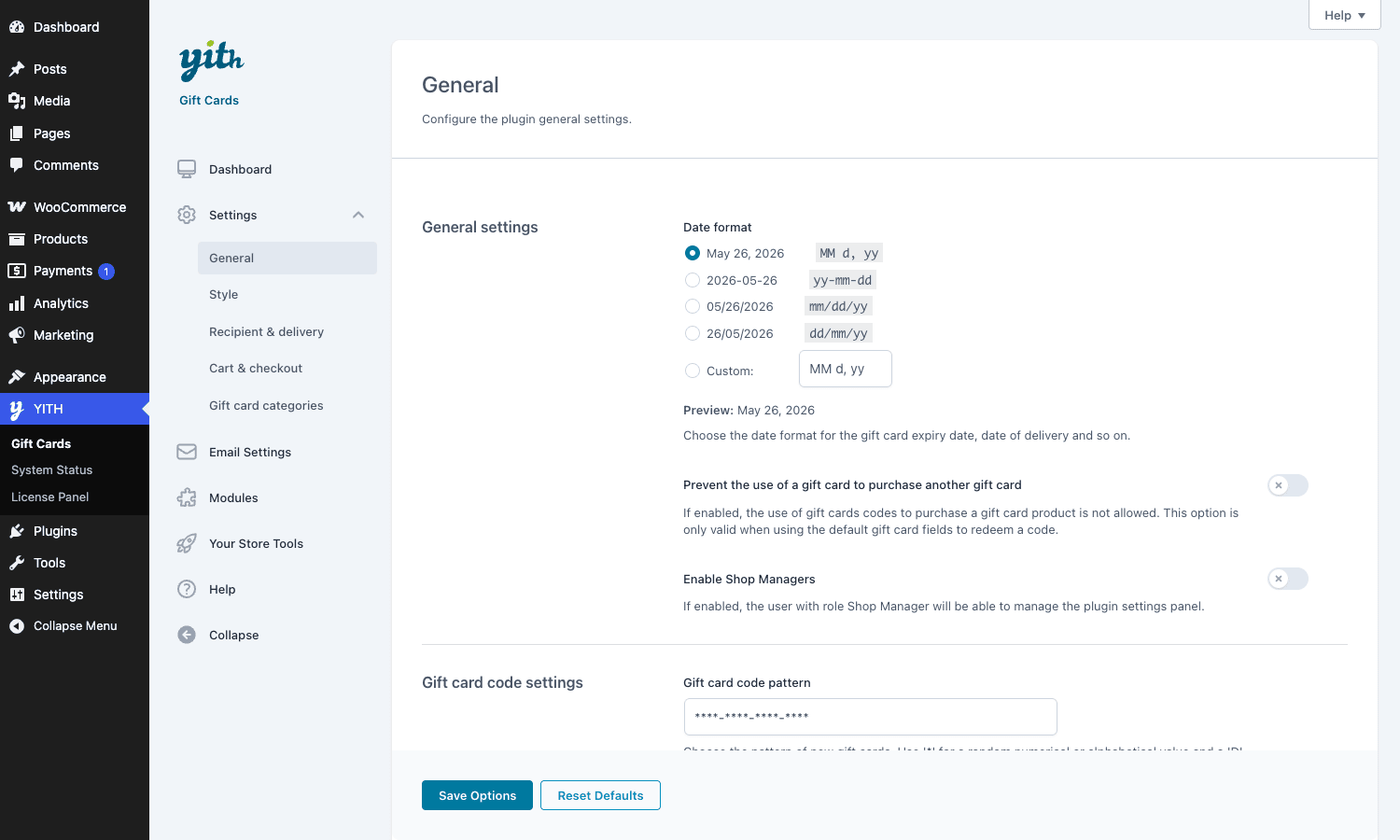
- Pick a date format. YITH → Gift Cards → Settings → General → Date format. This is the format that shows up on the email, the PDF voucher, and the admin gift-card list. Pick whichever your customers will read.
- Set the gift-card code pattern. Same screen, Gift card code pattern. Default is
****-****-****-****where each*is a random alphanumeric. Numbers-only is more readable on a printed voucher but easier to brute force. I’d recommend leaving the default. - Decide if cards expire. Settings → General → Gift card expiration date. Set a number of months (0 = never expire). 12 months is industry standard. Note: US federal law (CARD Act, 2009) requires gift cards to be valid for at least 5 years. Your jurisdiction may have stricter rules; check before you set "expires in 6 months".
- Decide on minimum-cart-value at redemption. Settings → Cart & checkout → Minimum amount in cart. If left off, a customer can use a gift card to buy a $1 item and pay nothing. Some stores want that. Some don’t. Decide deliberately.
- Enable recipient mandatory. Settings → Recipient & delivery → Make recipient’s info mandatory. Default is OFF, which means buyers can skip the recipient form and end up with a gift card no one knows about. Turn this ON unless you specifically want gift cards that the buyer holds onto themselves.
- Test the redemption flow. Buy a $25 card on the front end using one of your test payment gateways, copy the code from the delivery email, then add a product to the cart and paste the code in the gift-card field. The cart should drop by $25. Until you’ve done that test on your staging site, you don’t know the plugin is working.
That’s it. The rest of the configuration screens can wait.
A guided tour of the admin
The admin is split into the dashboard (the table of issued codes) and a Settings section with four sub-tabs. Plus Email Settings, Modules, and Your Store Tools as siblings. Let’s walk through each.
Dashboard
The dashboard at YITH → Gift Cards is just one thing: a table of every gift-card code ever generated on your store, with columns for code, amount, balance, recipient, status (active / disabled / used up / expired), and the order it came from. There’s a search box, a status filter, and a bulk-action dropdown.
Two buttons live at the top: Create Code (manually create a gift card outside any order, useful for compensating a customer or running a giveaway) and Export/Import (CSV).
The dashboard is intentionally simple. There’s no chart, no "revenue from gift cards last month", no leaderboard. If you want analytics on gift card redemption you’ll need to look at WooCommerce’s own reports (the orders that used the gift-card field carry a _ywgc_used_codes order item meta).
Settings → General
The first sub-tab covers the boring-but-important global controls:
- Date format for displaying expiration, delivery date, and similar.
- Prevent the use of a gift card to purchase another gift card. Off by default. Turn it on if you don’t want pyramid schemes.
- Enable Shop Managers. Off by default. WooCommerce’s "Shop Manager" role does NOT include the capability to manage gift cards out of the box; toggle this on to grant it.
- Gift card code pattern. The mask for newly generated codes.
- Enable / disable gift card generation for physical gift cards and for virtual gift cards. Separate toggles, useful if you only want to issue codes for digital sales and ship physical cards with a hand-written code.
- Global settings. Allow custom amount globally (you can also override per product), default minimum custom amount, default maximum, default expiration in months.
- Gift card orders settings. What to do when a gift-card-issuing order is refunded or cancelled. Options are "do nothing", "disable the gift card", or "delete the gift card". You almost always want "disable", not "delete", so you keep an audit trail.
- Autocomplete gift card orders. Auto-completes orders that ONLY contain virtual gift cards so the buyer gets the code instantly. On by default. Off if you want manual order review.
Don’t let me oversell the General tab: it’s a wall of toggles. But every one of them matters.
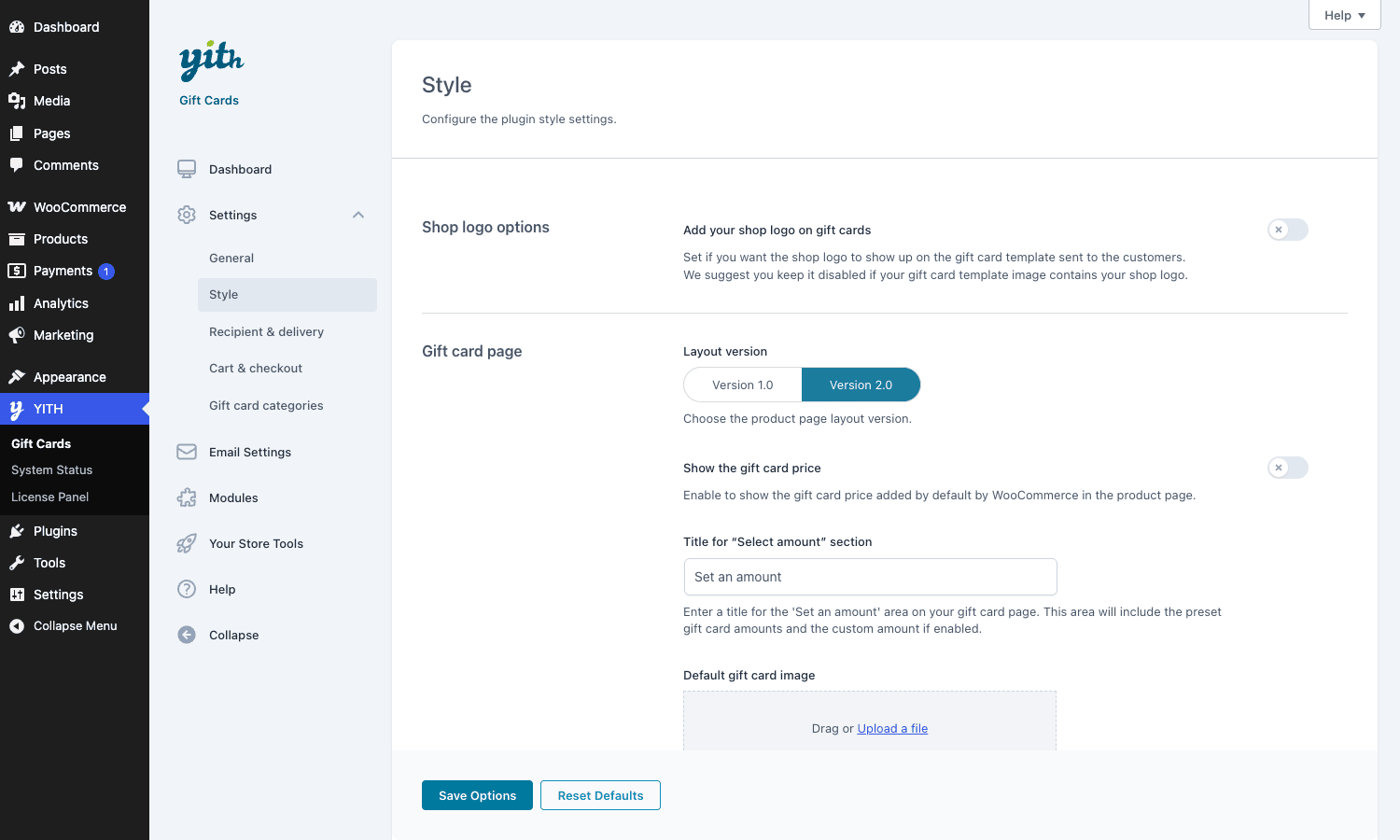
Settings → Style
Controls the visual presentation of the gift card on the front end and inside the PDF voucher.
- Add shop logo on gift cards. Stamps your store logo on the PDF voucher.
- Layout version. 1.0 (classic) or 2.0 (newer card-style picker). Use 2.0 on new installs; it’s more compact and looks closer to what customers expect from a gift card product page.
- Default gift card image. The fallback background for vouchers when no design preset is picked.
- Image gallery with thumbnails and Choose button text customization.
- Colors for the gift card price block on the product page.
There’s also a separate "Custom designs" page under Modules → Custom designs (if enabled) where you upload background images and tag them with the giftcard-category taxonomy. Customers see a thumbnail picker on the product page and pick a design before adding to cart.
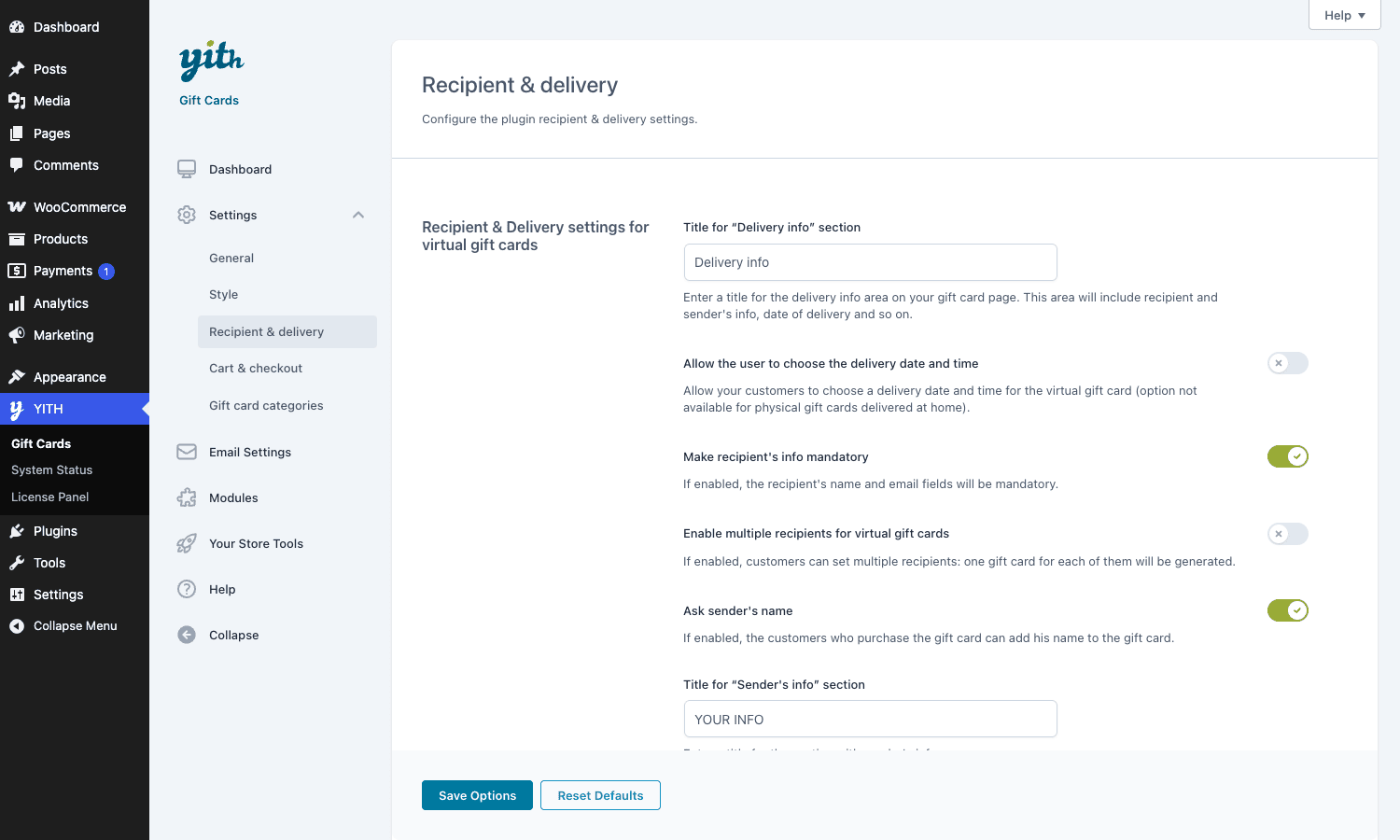
Settings → Recipient & delivery
This is the tab that controls the most user-visible behavior, so spend time on it.
- Title for "Delivery info" section. Label that shows above the recipient-info block on the product page.
- Allow the user to choose the delivery date and time. Turn this ON if you want "send on Dec 22 at 9am" support. If OFF, gift cards are emailed immediately after order completion.
- Make recipient’s info mandatory. Already mentioned; this is the most important toggle on this screen. Default OFF means you’ll get gift cards floating around with no recipient set, which is a support nightmare.
- Enable multiple recipients for virtual gift cards. Splits one purchase into N cards, one per recipient.
- Ask sender’s name. Includes the buyer’s name in the delivery email.
- Title for "Sender’s info" section and Title for personal message. Cosmetic.
Pro tip: if your customers are repeat senders (corporate gifting, school programs), turn ON the multi-recipient option AND the personal-message field. The cost is more form fields on the product page; the benefit is that one order replaces what used to be three separate orders.
Settings → Cart & checkout
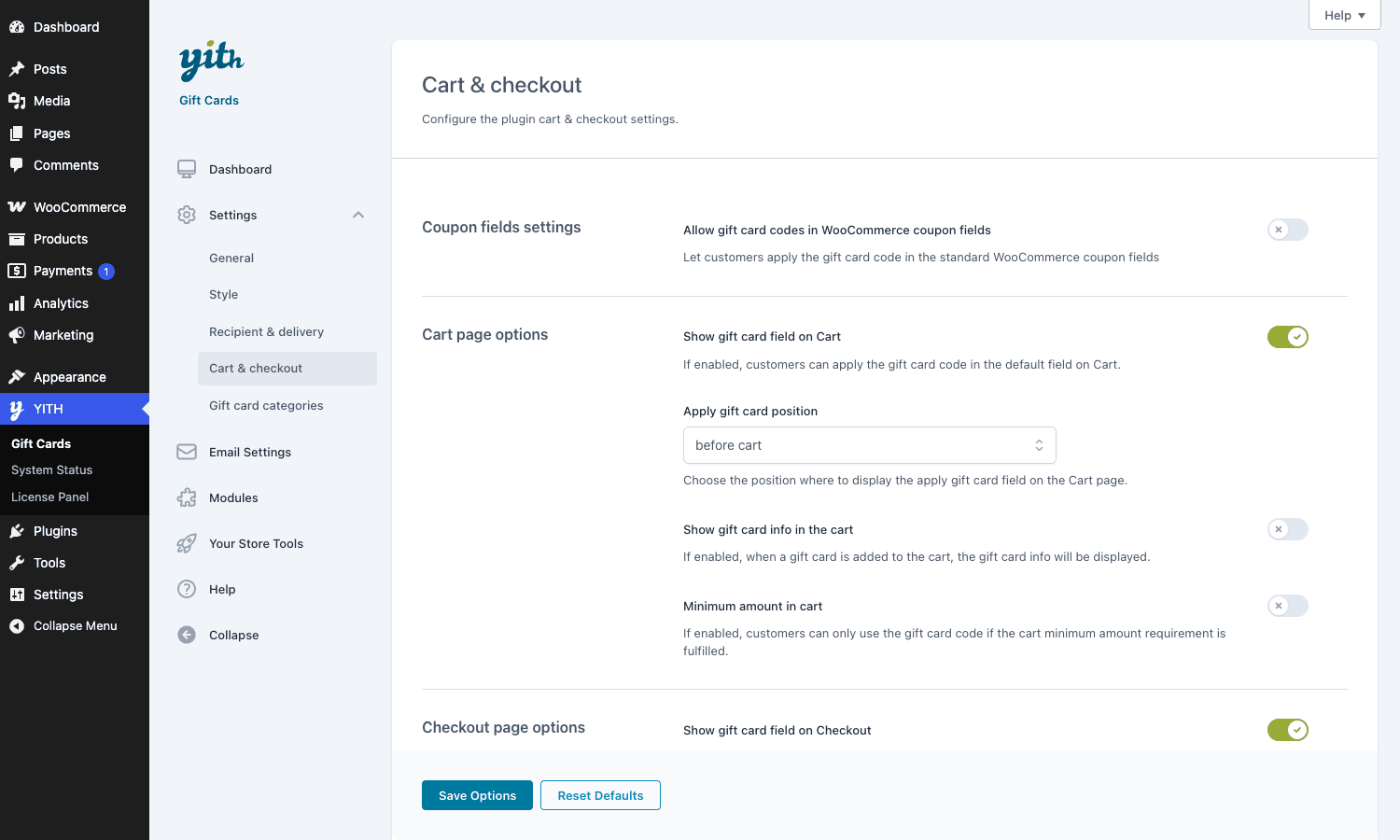
Where the gift-card redemption field shows up and how it behaves.
- Allow gift card codes in WooCommerce coupon fields. Off by default. If your theme only renders the standard coupon field and not the dedicated gift-card field, turn this on.
- Show gift card field on Cart and Show gift card field on Checkout. Two separate toggles. The cart field is the only way for guests to apply codes if your checkout doesn’t render extras.
- Apply gift card position. Before or after the cart total. Cosmetic but UX matters.
- Show gift card info in the cart. Renders the code and remaining balance as a cart notice.
- Minimum amount in cart. Critical anti-abuse: gates redemption behind a minimum cart subtotal. Without this, customers can buy $1 items and zero out the card on each tiny purchase.
- Show gift card field on Checkout. Same field, but at checkout instead of cart.
Email Settings
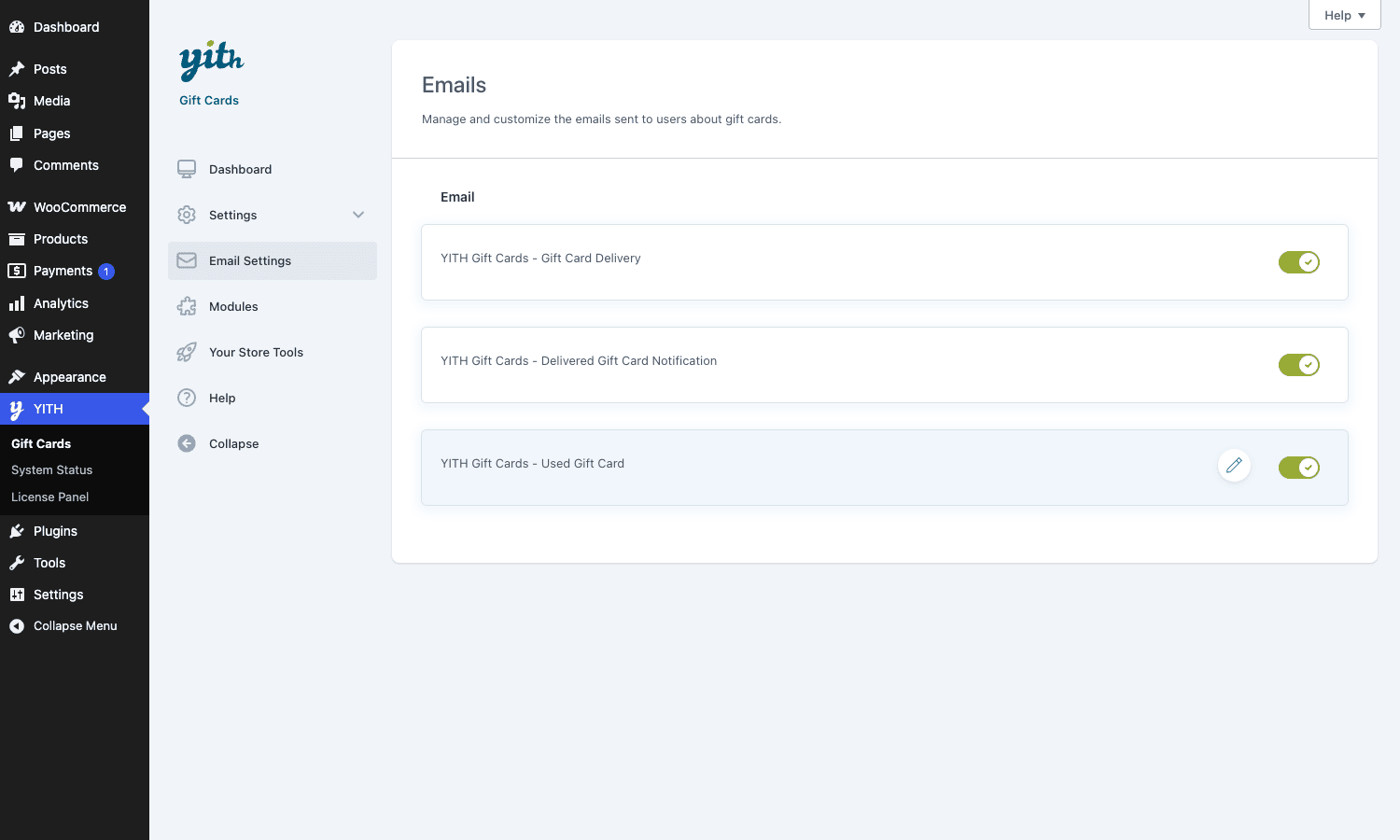
A list of three transactional emails: Gift Card Delivery (sent to the recipient with the code), Delivered Gift Card Notification (sent to the buyer when their scheduled card actually goes out), and Used Gift Card (sent to the buyer when the recipient redeems the card).
Each one has its own subject line, "from name", "from email", header image (you upload one in WP media), and the standard WooCommerce email template colors. The default templates are decent. If you want a totally custom HTML email you can override the template files under wp-content/themes/your-theme/yith-woocommerce-gift-cards/emails/, which the plugin loads from in preference to its own templates.
The thing I always forget: the "Used Gift Card" notification goes to the buyer, not the recipient. That’s the right behavior (you want the original purchaser to know their gift was received) but it’s surprising the first time you see it.
Modules
A grid of optional modules. The main one is Gift this product, which lets your shop page render a "Send as a gift" link on regular products (not just gift-card products). Enabling it turns any in-stock simple, variable, or bundle product into a giftable item with a recipient form.
Useful for stores where the average order is a tangible item and you’d rather offer "send this scarf as a gift" than "buy a gift card and let them spend it on a scarf".
Your Store Tools
Cross-sell page for other YITH extensions. Skip.
Help
Links to docs and a contact form. Skip unless you’re stuck.
Creating a gift card product
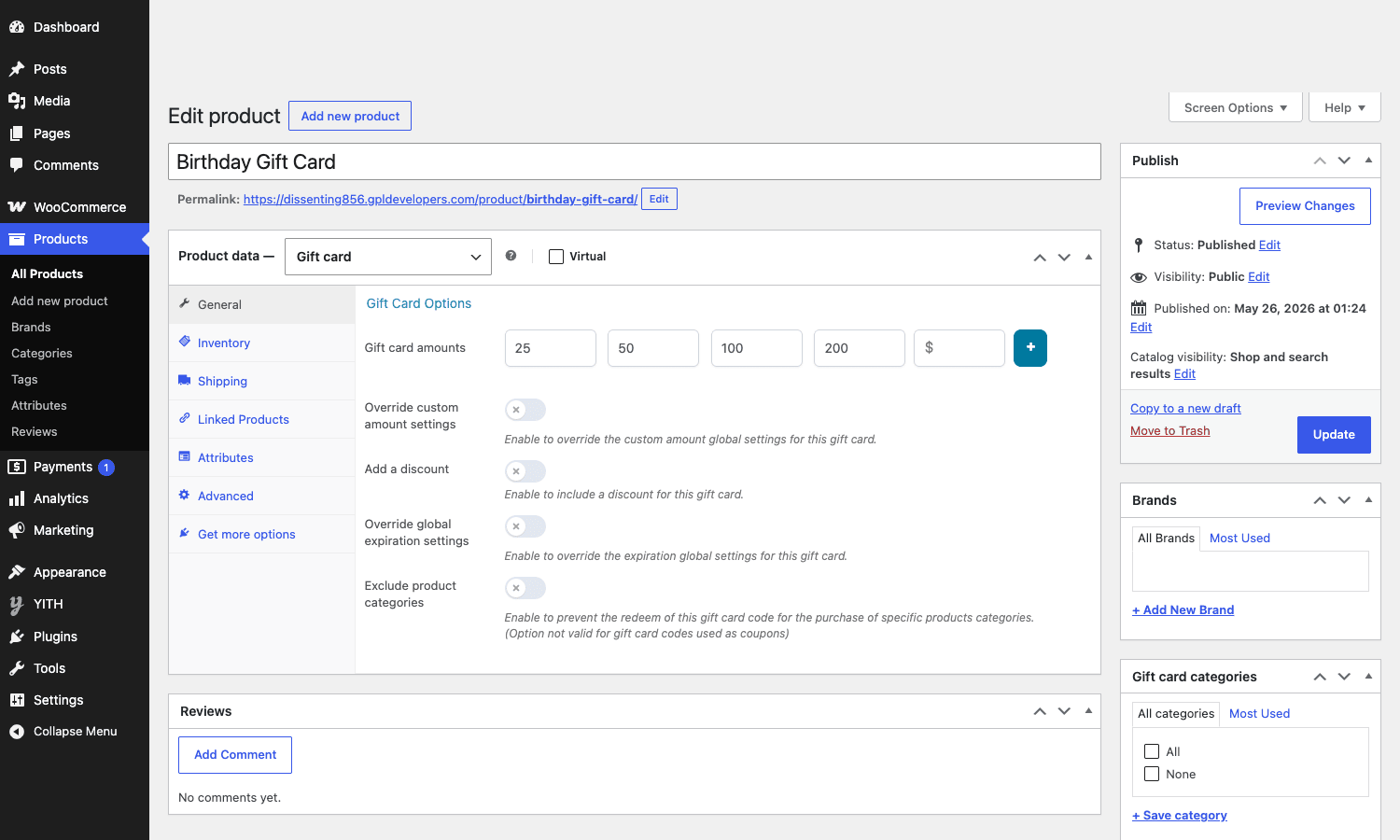
This is where most of the daily work happens. Go to Products → Add new, give the product a title (Birthday Gift Card, Studio Gift Card, etc.), then in the Product data dropdown pick Gift card instead of Simple product.
The right side of the data panel changes. You now have a Gift Card Options tab with these fields:
- Gift card amounts. A repeater of preset price points. Click the
+button to add as many as you want. The customer sees these as clickable amount tiles on the product page. - Minimum custom amount and Maximum custom amount. If you want to ALSO let the buyer enter their own number, set these. Leave both blank to lock customers to the presets only.
- Sale discount (%). Apply a discount on the card purchase. Set this to 15% and a $100 card costs $85 at checkout but still carries $100 of balance. Common in holiday promos.
- Expiration date. Overrides the global default for this specific product.
- Override custom amount settings. Per-product override of the global min/max.
- Add a discount and Override global expiration settings. Same per-product overrides.
Hit Publish. The product appears in your shop with the gift-card layout.
Tip: if you sell physical gift cards (mailed in an envelope) alongside virtual cards, you have two choices. Either create two separate products ("Studio Gift Card – Email" and "Studio Gift Card – Mailed"), OR add Shipping settings on a single gift-card product and treat the physical card as a shippable item. The plugin tracks physical vs virtual via a checkbox on the product data, and uses that to decide whether to email the code at order completion or wait for the order to be marked "shipped".
The recipient and delivery flow
This is the part of the plugin most other gift-card tools get wrong. Here’s how YITH does it.
On the front-end product page, after the customer picks an amount, they see a "Delivery info" block with these fields:
- Recipient’s email
- Recipient’s name
- Sender’s name (pre-filled if the buyer is logged in)
- Personal message
- Delivery date (if scheduled delivery is enabled in settings; opens a calendar + time picker)
If multi-recipient mode is on, there’s a "Add another recipient" button that duplicates the block. The buyer can split a $200 purchase across four $50 cards going to four different inboxes.
When the order completes, the plugin:
- Creates a new
gift_cardpost for each recipient, with_ywgc_amount_total,_ywgc_balance_total,_ywgc_recipient,_ywgc_sender_name,_ywgc_message, and (if scheduled)_ywgc_delivery_datepost meta. - Triggers the
ywgc_email_send_gift_card_notificationaction, which fires the Gift Card Delivery email to the recipient if no schedule was set. - If a schedule was set, the plugin queues the email via WP-Cron. There’s a daily cron event
ywgc_send_delayed_gift_cards_eventthat processes pending sends.
The recipient gets an email with the code (and the PDF voucher if attached). They click the apply-discount link, which lands them on the shop with the code pre-filled in a session variable. They add anything to the cart, and the cart total drops by the gift-card balance.
The "scheduled delivery" feature deserves a callout. It’s the feature I most often quote when explaining why this plugin is worth it. Most competitors either send the email immediately (no schedule support) OR build their own custom queue that breaks the first time a site moves to a new host. YITH uses WP-Cron, which works on every standard WP host without configuration. If your host has WP-Cron disabled and replaced with a real system cron, the scheduled sends still work, because they’re triggered by wp cron event run.
The catch: if your store goes down on the day of a scheduled send, the email is missed. There’s no retry logic that catches up old missed events on the next cron tick. So if you take your store offline for maintenance on the day a card is supposed to go out, that card is stuck. The fix is to manually re-trigger the send from the admin gift-card edit page, where there’s a "Resend" button.
Redeeming a gift card at checkout
Once the recipient has the code, redemption is two steps.
- They visit the store, add a product to the cart.
- On the cart or checkout page (depending on which has the gift-card field enabled in settings), they paste the code into the gift-card box and click Apply.
The plugin runs three validations on the code:
- Does the code exist? Looks up a
gift_cardpost with that title. - Is the card enabled? Checks the post status and the
_ywgc_disabledmeta. - Has the card expired? Checks
_ywgc_expirationagainst the current timestamp.
If all three pass, the card balance is applied to the cart as a discount line item. The order completes, and the plugin updates _ywgc_balance_total on the gift-card post by subtracting the amount used. If the balance is now zero, the card status becomes "used".
A partially-used card stays valid. The recipient gets the Used Gift Card email showing the amount applied AND the remaining balance.
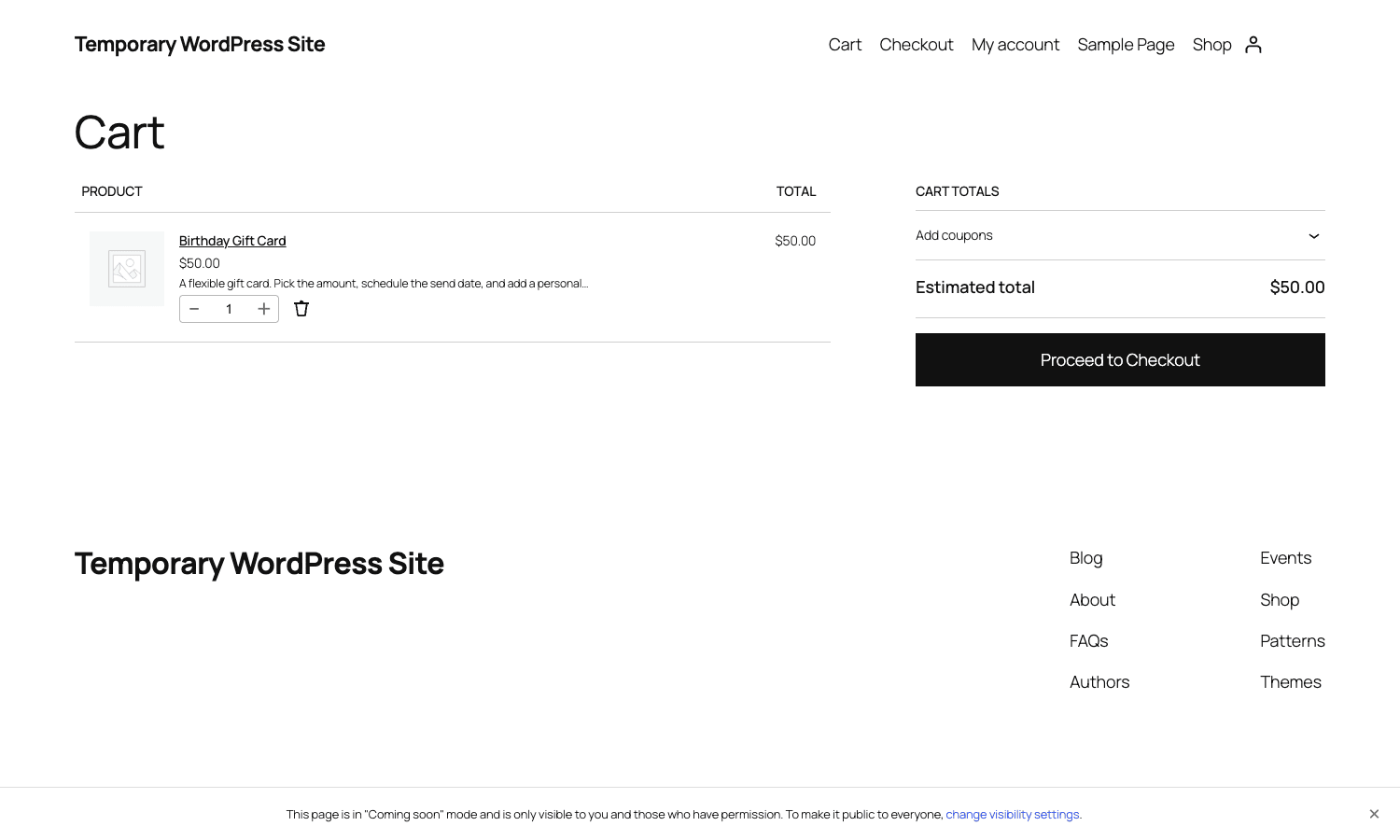
One gotcha worth flagging: the default behavior allows multiple gift cards on the same cart. If a customer has a $25 card and a $50 card, both can be applied to a $60 order. The plugin handles this by tracking each code separately in _ywgc_used_codes on the cart session. If you want to restrict to one card per order, there’s no setting for it; you’ll need a custom filter on yith_ywgc_apply_gift_card_discount_before_cart_total. Not a huge deal, but I expected a checkbox for it and was surprised when there wasn’t one.
Email templates and the PDF voucher
The three transactional emails all use WooCommerce’s standard email template, so they inherit your "From name", "From email", header image, and footer text from WC’s main Email settings. Each has its own subject line and body content, editable in the YITH admin.
The PDF voucher is generated on the fly when the delivery email goes out. It’s rendered with mPDF (a PHP library that converts HTML to PDF) and pulls from a template file the plugin ships in templates/emails/gift-card-pdf.php. You can override the template in your child theme. The default has the gift-card design image as a background, the code overlaid in large text, the recipient name, sender name, message, and the expiration date if set.
Honest opinion: the PDF is fine for what it is, but it’s not designer-grade. If your brand cares about the printed voucher matching a Figma spec, mPDF’s text rendering will probably annoy you. Fonts are anti-aliased differently than what you see in a browser, kerning is approximate, and complex CSS layouts (flexbox, grid) don’t render. The trick is to keep the template simple: a background image, big code text, three or four lines of recipient/sender/message text, and stop. If you need a multi-page voucher with QR codes, custom typography, and exact brand colors, write a separate PDF generator (Dompdf, TCPDF, or a print-on-demand integration) and hook it in via the yith_ywgc_after_write_mpdf_html_template_pdf action.
A small detail I appreciate: the delivery email is sent FROM the store, not from the buyer. The recipient sees "Studio Gift Card" in their inbox, not "Priya". The buyer’s name appears in the body (Sender: Priya) but the From header is the store. This is the right behavior for spam-filter reasons (you want SPF/DKIM to validate against your domain), but I’ve seen other plugins get it wrong and impersonate the buyer.
Real-world use cases
Here’s what I’ve actually shipped using this plugin.
A yoga studio that sells class packs. Customers buy a gift card, the recipient gets an email with a code, and they can apply it to any class pack on the site. Partial redemption matters here because a $100 card might cover one 5-pack ($85) with $15 left over. The studio wanted a simple "send on this date" calendar because most gift cards were birthday presents bought a week ahead.
A specialty coffee roaster selling $25 / $50 / $100 cards alongside their subscription boxes. They use the "Allow gift card codes in WooCommerce coupon fields" toggle because their checkout theme is a heavily-modified Storefront template that doesn’t render the YITH gift-card field, only the standard WC coupon field. Quick fix, works fine.
A WordPress agency selling productized services uses gift cards as referral rewards. When a client refers another client, they get a $250 store credit issued manually from YITH → Gift Cards → Create Code. The credit lives on the recipient’s account forever (no expiration) and applies against future projects.
An online course store that sells one-off courses and a yearly membership. The store owner uses gift cards as compensation when something goes wrong (a download link breaks, a student’s enrollment is delayed). She issues a $20 store-credit code from the admin, emails it to the affected customer, and it’s applied to their next purchase. Easier than refunds and keeps the customer in the funnel.
A boutique that sells physical product AND gift cards. They turn ON the "Gift this product" module, which lets customers buy a regular scarf or candle "as a gift". The recipient gets a digital voucher card with the product included; when they redeem it, the product ships to them. No physical gift card is mailed. Half the orders are now "send as gift" rather than "ship to me".
The pattern in all five is that gift cards are not a separate business; they’re a feature your existing customers want and the integration into the rest of WooCommerce matters more than the gift-card specifics. YITH gets this right.
A nonprofit selling branded merch. They sell gift cards for supporters to share, and pair them with YITH Donations for WooCommerce so the same checkout can also take a straight donation, turning one store into both a shop and a giving page.
Developer reference: hooks, filters, shortcodes, classes
OK, this is the section a lot of you scrolled down to. The plugin exposes a lot, and what follows is the parts I’ve actually used in production.
Custom post type
defined( 'YWGC_CUSTOM_POST_TYPE_NAME' ) || define( 'YWGC_CUSTOM_POST_TYPE_NAME', 'gift_card' );
defined( 'YWGC_GIFT_CARD_PRODUCT_TYPE' ) || define( 'YWGC_GIFT_CARD_PRODUCT_TYPE', 'gift-card' );
defined( 'YWGC_CATEGORY_TAXONOMY' ) || define( 'YWGC_CATEGORY_TAXONOMY', 'giftcard-category' );
A gift card is a gift_card post. Its post_title is the code. All amounts and recipients live in post meta:
// Get a gift card by code
$cards = get_posts( array(
 'post_type' => 'gift_card',
 'title' => $code, // exact-title query, see plugin's helper functions.yith-ywgc.php
 'numberposts' => 1,
) );

if ( $cards ) {
 $card_id = $cards[0]->ID;
 $balance = (float) get_post_meta( $card_id, '_ywgc_balance_total', true );
 $amount = (float) get_post_meta( $card_id, '_ywgc_amount_total', true );
 $email = get_post_meta( $card_id, '_ywgc_recipient', true );
}
The plugin’s own helper, YITH_YWGC_Gift_Card_Premium::get_gift_card_by_code( $code ), does the lookup and returns an object. Use it in preference to a raw WP_Query.
Actions
These are the action hooks worth knowing.
// Fires after a gift card is saved from the admin edit screen
add_action( 'yith_ywgc_after_gift_card_generation_save', function( $gift_card ) {
 // $gift_card is a YITH_YWGC_Gift_Card_Premium instance
 // Useful for syncing to a CRM, an analytics event, etc.
}, 10, 1 );

// Fires just before the delivery email is dispatched
add_action( 'ywgc_before_sent_email_gift_card_notification', function( $gift_card ) {
 // Last chance to mutate the gift card object before the email renders
}, 10, 1 );

// Fires after the email is sent
add_action( 'yith_ywgc_gift_card_email_sent', function( $gift_card ) {
 // Log to your audit table, increment a counter, push to Slack, etc.
}, 10, 1 );

// Fires when a gift card is applied to the cart
add_action( 'yith_ywgc_apply_gift_card_discount_after_cart_total', function( $cart, $discount ) {
 // $cart is WC()->cart, $discount is the float applied
}, 10, 2 );

// Fires when a card's status changes (enabled / disabled)
add_action( 'yith_gift_cards_status_changed', function( $gift_card, $enabled ) {
 // $enabled is bool
}, 10, 2 );

// Fires after the PDF voucher is written
add_action( 'yith_ywgc_after_write_mpdf_html_template_pdf', function( $mpdf ) {
 // $mpdf is the mPDF instance, you can add pages, watermarks, etc.
}, 10, 1 );
Filters
The filters you’ll use most are the ones that change UI labels and gating behavior.
// Change the "Buy gift card" button text
add_filter( 'yith_gift_card_layout_add_gift_button_text', function( $text ) {
 return __( 'Purchase this gift card', 'my-theme' );
} );

// Skip auto-completing virtual gift-card orders (override default)
add_filter( 'yith_ywgc_skip_orders_autocomplete', function( $skip, $order_id ) {
 $order = wc_get_order( $order_id );
 if ( $order->get_total() > 500 ) {
 return true; // require manual review for big orders
 }
 return $skip;
}, 10, 2 );

// Block delivery email for cards under a certain amount (e.g. testing)
add_filter( 'yith_wcgc_deny_gift_card_email', function( $deny, $gift_card ) {
 if ( $gift_card->total_amount < 5 ) {
 return true; // don't email "test" cards
 }
 return $deny;
}, 10, 2 );

// Custom error message when an invalid custom amount is entered
add_filter( 'ywgc_minimal_amount_error_text', function( $text, $min ) {
 return sprintf( 'Sorry, our smallest gift card is %s.', wc_price( $min ) );
}, 10, 2 );

// Limit one gift card per cart (the missing setting from earlier in the article)
add_filter( 'yith_ywgc_apply_gift_card_discount_before_cart_total', function( $cart, $discount ) {
 $codes = WC()->session->get( 'ywgc_used_codes', array() );
 if ( count( $codes ) >= 2 ) {
 wc_add_notice( 'Only one gift card can be used per order.', 'error' );
 // The plugin doesn't natively short-circuit here, so use the
 // ywgc_used_codes session key in your custom validation hook.
 }
 return $cart;
}, 10, 2 );

// Set a per-product custom default date format on the delivery PDF
add_filter( 'yith_wcgc_date_format', function( $fmt ) {
 return 'F j, Y';
} );

// Disable the front-end "Send as gift" link for specific products
add_filter( 'yith_ywgc_give_product_as_present', function( $allow, $product ) {
 if ( in_array( 'no-gifting', wp_get_post_terms( $product->get_id(), 'product_tag', array( 'fields' => 'slugs' ) ), true ) ) {
 return false;
 }
 return $allow;
}, 10, 2 );

// Customize the recipient email field label
add_filter( 'ywgc_recipient_email_label', function( $label ) {
 return __( 'Where should we send this?', 'my-theme' );
} );

// Modify the delivery URL embedded in the recipient email
add_filter( 'yith_ywgc_email_automatic_cart_discount_url', function( $url, $args, $gift_card ) {
 return add_query_arg( array( 'utm_source' => 'gift_card', 'utm_medium' => 'email', 'utm_campaign' => 'redeem' ), $url );
}, 10, 3 );
Shortcodes
The plugin registers a handful of front-end shortcodes. Encode them as entity references if you need to display the syntax in code:
[yith_ywgc_display_gift_card_form]renders the "Apply gift card" field anywhere on the site. Useful in a footer or a sidebar widget.[yith_wcgc_show_gift_card_list]lists the gift cards belonging to the current logged-in user. Used on a custom My Account page.[yith_wcgc_apply_gift_card_field_form]an alias of the apply-form shortcode for backward compatibility.[yith_ywgc_display_gift_this_product_form]renders the "Gift this product" form on any page, attached to a specific product ID.[yith_gift_card_check_balance_form]a standalone form that takes a code and returns the remaining balance, useful as a "Check your balance" page link.[yith_redeem_gift_card_form]lets a logged-in user add a code to their account credit balance (if you enable the account-credit mode).[yith_gift_cards_user_table]table of the user’s gift cards, used on the My Account → Gift Cards tab.
REST and admin endpoints
YITH Gift Cards does not register its own REST API namespace. There are no yith/v1/gift-cards endpoints. If you need a REST API, you build it yourself on top of register_rest_route() and the post-meta lookups above. For most stores that’s fine, because WooCommerce’s own REST API exposes orders, which include the _ywgc_used_codes meta after redemption.
For admin-side actions, the plugin uses standard WordPress admin-ajax handlers under the yith_ywgc_* action names. Inspect them with grep -rn "wp_ajax_yith_ywgc_" plugin-cache/. The two most useful are yith_ywgc_resend_gift_card_email (manually re-trigger a delivery) and yith_ywgc_check_balance (used by the front-end balance-check shortcode).
My-account endpoint
The plugin registers a gift-cards endpoint on the WooCommerce account page. The URL is /my-account/gift-cards/ (with permalinks enabled). It uses the woocommerce_account_gift-cards_endpoint action, which you can hook into:
add_action( 'woocommerce_account_gift-cards_endpoint', function() {
 echo '<h2>Your gift cards</h2>';
 // Override the default render
} );
Important: data store assumptions
A gift card is a gift_card post. Codes are unique by post_title. If you do a search-replace migration that touches post_title columns, you can break gift cards. Backup before you migrate.
Balances are floats in post meta. Floating-point arithmetic on PHP is not safe for money calculations beyond about 7 decimal digits. The plugin uses wc_format_decimal() to round amounts to the store’s currency precision, but if you write your own discount-application code, use bcmath or integers (cents) rather than raw floats. I’ve seen one production bug where a gift card balance was 49.99999999 after a partial use and the customer couldn’t apply the last penny.
Performance, compatibility, and the gotchas
A few honest observations after running this on a few stores.
HPOS compatibility. The plugin declares itself compatible with WooCommerce’s high-performance order storage. I’ve tested it on HPOS-enabled stores and it works without warnings. The plugin reads order meta via the abstraction layer rather than direct wp_postmeta queries, so it doesn’t break when WC switches storage.
Block-based cart and checkout. Partial. The plugin renders the gift-card field on the classic (shortcode-based) cart and checkout pages. On the new block-based checkout (the default in fresh WC installs), the field doesn’t render automatically. There’s a workaround: turn ON "Allow gift card codes in WooCommerce coupon fields" in Settings → Cart & checkout, which routes gift-card codes through the standard coupon field that the block checkout DOES render. Not elegant, but it works. This is a common pain point across all gift-card plugins right now; the block-checkout API for custom fields is still evolving.
Conflict with checkout-replacement plugins. Plugins like CheckoutWC and FunnelKit Funnels replace the standard checkout template entirely. If you’re using one, the YITH gift-card field may not render. Most checkout-builder plugins have a config option to "add custom block here"; you’ll need to find that and drop in the YITH shortcode manually.
Conflict with caching of cart pages. Don’t cache /cart/ or /checkout/ with page-cache plugins. This applies to all WooCommerce sites and isn’t a YITH-specific issue, but it’s worth flagging. The gift-card balance display reads from session state, and a cached version of /cart/ will show stale data.
Translations. YITH ships a .pot file under languages/. The plugin uses the yith-woocommerce-gift-cards text domain. WPML and Polylang both support the plugin via YITH’s wpml-config.xml (which ships in the plugin root). Multi-currency support: if you’re using a multi-currency plugin like CURCY or the YITH multi-currency plugin, the gift-card amount fields respect the currency, but the balance is stored in the store’s base currency. A gift card bought in EUR and redeemed in USD will be converted by the multi-currency plugin’s exchange rate at the time of redemption, which can lead to small rounding discrepancies.
Webhooks / external integrations. None out of the box. If you want a Zapier or Make.com integration, you’d typically hook yith_ywgc_gift_card_email_sent (or a similar event) and call your webhook handler. There are no native webhook events.
Caching the recipient form. If you have an aggressive cache plugin that caches product pages, the recipient form might get cached without the nonce, leading to "Invalid nonce" errors at submit. Add /product/your-gift-card-slug/ to your cache plugin’s exclusion list. We’ve covered this kind of cache-busting pattern before in our WP Rocket review, and the same principle applies.
Stripe and PayPal. Works with both. If you use the WooCommerce Stripe Payment Gateway, gift-card-only orders complete instantly via Stripe and the recipient gets the email within seconds.
Subscriptions. If you sell recurring subscriptions via WooCommerce Subscriptions, gift cards CAN be applied to the initial payment but generally NOT to the recurring renewals. That’s a WooCommerce platform limitation, not a YITH-specific one: WC Subscriptions deducts the recurring amount from the saved card-on-file at renewal, and the gift-card balance check doesn’t happen in that flow. If you need gift cards to apply to renewals, you’ll have to write custom logic.
Memberships. Gift cards work fine for buying WooCommerce Memberships plans. A $50 gift card can be applied to a $50/year membership purchase. The renewal year will still require a payment method, same as subscriptions above.
Refunds. Refunding a WooCommerce order that issued a gift card has a configurable behavior (Settings → General → "Gift card orders settings"). I’d recommend "disable the gift card", which preserves the record for audit purposes while preventing future redemption. "Delete the gift card" is destructive and not recommended.
Tax handling. Whether to charge tax on gift-card sales is a jurisdictional question, not a plugin question. In the US, gift-card purchases are generally NOT taxable (the tax is paid when the card is REDEEMED for goods). In the EU, VAT may apply to gift cards depending on whether they’re "single-purpose" or "multi-purpose" vouchers. YITH gift cards are multi-purpose by design. Configure your WC tax classes accordingly: mark the gift-card product as tax-exempt, and tax will be calculated on the underlying product when the card is redeemed.
Coupons and stacking. Gift cards stack with WooCommerce coupons by default. If you sell with both, decide if you want stacking. Common pattern: "first-time customer 10% off" + "$25 gift card from a friend" both applied = customer feels great. Restrictive pattern: "either a gift card or a coupon, not both" = use the woocommerce_coupon_is_valid filter to short-circuit. The plugin doesn’t enforce either policy out of the box.
Pricing and licensing
YITH WooCommerce Gift Cards is sold from yithemes.com as an annual subscription. The "Premium" version (the one this article covers) includes the full feature set: variable amounts, PDF voucher, scheduled delivery, multi-recipient, "Gift this product" module, design presets, balance-check shortcode, customer account integration.
There’s a free version on the WordPress.org repo called "YITH WooCommerce Gift Cards" (no Premium). It does the basics: a single fixed-amount gift card product, manual code entry at checkout, an email with the code. No scheduled delivery, no PDF, no custom amounts, no multi-recipient. Fine for testing, not enough for a real store.
The plugin is licensed GPLv3 (same as WordPress and WooCommerce). That means the source code can be freely redistributed under the same license. This is what enables the GPL-licensed version. The Premium zip is on the YITH WooCommerce Gift Cards product page and you get the same source you’d download from YITH directly, GPL’d as the license dictates. License-server activation isn’t required for the plugin to do its job; the YITH license check gates only the auto-update feature.
Worth comparing to alternatives:
- Smart Coupons for WooCommerce, the WooCommerce.com extension, includes gift-card functionality as one feature among many (coupons, store credit, BOGO). If you already need the coupon system, Smart Coupons might be a better single-purchase decision.
- Advanced Coupons has store-credit functionality and a separate gift-card addon. More of a coupon engine with gift cards bolted on.
- PW Gift Cards (free on WordPress.org). Solid for basic use. No PDF, no schedule, no multi-recipient. Their pro version is also a good option if you want a non-YITH alternative.
- YITH’s own Subscription plugin or YITH Wishlist stack well with this one if you’re already running other YITH plugins.
For most stores I’d default to YITH for gift cards specifically because the recipient flow is the best of the lot. If you want a Swiss-army-knife coupon-and-credit system, look at Smart Coupons.
FAQ
Can I use this without WooCommerce?
No. The plugin requires WooCommerce active. It declares the dependency in its plugin header (Requires Plugins: woocommerce) and won’t activate without WC.
Will gift cards work with the new block-based WooCommerce cart and checkout?
Partially. The YITH-specific gift-card field doesn’t render on the block checkout. The workaround is to enable "Allow gift card codes in WooCommerce coupon fields", which routes gift-card codes through the standard coupon field that the block checkout does render. Functional, not pretty.
Can a single gift card be used across multiple orders?
Yes, as long as it has a balance. A $100 card can pay for a $20 order, a $30 order, and a $25 order, leaving $25 on it for next time. The plugin tracks the running balance in _ywgc_balance_total and decrements it on each use.
Can I issue store credit (not tied to a purchase)?
Yes. Go to YITH → Gift Cards → Create Code and manually generate a gift card with the amount, recipient, and expiration of your choice. The code goes straight to the recipient’s email. Useful for compensation, giveaways, referral rewards.
What happens if a customer tries to use a gift card on a gift-card purchase?
By default the plugin allows it (you can buy a $100 gift card with a $50 gift card and $50 cash). Toggle Settings → General → "Prevent the use of a gift card to purchase another gift card" to block this.
Are gift cards tax-exempt?
Configure the product as tax-exempt at the WC product level. In the US, sales tax is generally applied when the card is REDEEMED, not when it’s purchased, so the gift-card purchase should be untaxed. In the EU, "multi-purpose vouchers" (where the goods aren’t predetermined at purchase) are generally also untaxed at issuance. Check your local rules.
Can I let customers split a payment between a gift card and a credit card?
Yes, automatically. If the gift-card balance is less than the cart total, the remainder is paid via whatever payment method the customer picks at checkout. The plugin handles the split at the WC payment level.
Does it support QR codes on the PDF voucher?
Not natively. The PDF voucher shows the code as text. You’d need to extend the PDF template with a QR-code library (qrcode-generator, endroid/qrcode) and add an <img> tag with a data URL in the template override.
Can I migrate from PW Gift Cards or Smart Gift Cards?
The CSV import accepts code, amount, balance, recipient email columns. Export from your old plugin, normalize the CSV to YITH’s column layout (the format is documented inside the export tool), and import. Test with a small subset first.
What’s the difference between "expiration" and "delivery date"?
Delivery date = when the email goes out to the recipient. Expiration = when the code stops working. They’re independent. A card can be scheduled to deliver next week and expire two years later.
Final thoughts
YITH WooCommerce Gift Cards is the gift-card plugin I keep coming back to when a WooCommerce client asks for "sell gift cards" without a long list of requirements. The recipient flow is the best in this category, scheduled delivery actually works on stock hosting, partial redemption is unsurprising, and the developer hooks cover the common customizations.
The two real weaknesses are the dense YITH admin (you’ll need a settings cheatsheet for the first week) and the PDF voucher being mPDF-rendered rather than print-shop-grade. Neither is a dealbreaker for most stores.
If you want to wire this up on a store today, the YITH WooCommerce Gift Cards download on GPL Times ships the full Premium zip under its GPL license. Drop it on a staging WordPress install, walk through the six "first hour" settings in this article, run a test purchase through your test gateway, and you’ll know within an afternoon whether it fits your store’s flow. That’s the only honest way to evaluate any commerce plugin: actually move a fake dollar through it end to end.