

I’ve tried to host crowdfunding campaigns on WordPress four times. The first was an independent music project that needed a $4,000 budget to press vinyl. The second was a charity microsite raising medical funds for a friend’s surgery. The third was an indie hardware product whose maker refused to ship to Kickstarter’s preferred Stripe regions. The fourth was a "campaign" that turned out to be just a recurring donation page in disguise. Each time the stack was different, and each time I ended up frustrated by some seam in the duct tape.
The first attempt used the official Kickstarter widget. It looked stuck in 2014, the progress bar didn’t refresh until you reloaded twice, and it never matched the rest of the site visually. The second was an Indiegogo embed inside an iframe, which works fine until you realize the iframe blocks search engines from seeing the campaign content. The third was the most painful: a hand-rolled "donation campaign" custom post type, a progress bar shortcode I copied off Stack Overflow, GiveWP for the payment side, plus a WooCommerce variable product with $25 / $50 / $100 attributes pretending to be reward tiers. It worked. Sort of. The progress bar lied because GiveWP donations and WooCommerce orders lived in separate tables and nobody added them up. The fourth attempt I gave up halfway and routed people to Buy Me a Coffee.
This is the long writeup I wish someone had handed me at attempt one. WP Crowdfunding Pro is Themeum’s take on putting a full Kickstarter-style campaign object on WordPress: rewards, tiers, deadlines, progress bars, a backers list, and a front-end submission form for users who want to launch their own campaign on your platform. It sits on top of WooCommerce, which is the right architectural call, because that means you inherit a real payment-gateway library, a real reporting stack, and a real order-meta layer instead of reinventing all three.
This article is what I learned tearing it apart, building a test campaign with reward tiers and pledges, and trying to break it the way a real campaign would. Some of it is praise. Some of it is the kind of warning you only get from someone who shipped this and watched it not work.
Table of Contents
- What is WP Crowdfunding Pro?
- How a crowdfunding plugin actually works on WordPress
- Key features at a glance
- Installation and the first hour
- Launching a campaign end to end: a real 30-minute walkthrough
- All-or-nothing vs flexible funding: the model decision that shapes everything
- Reward tiers: the math agencies trip on
- WP Crowdfunding Pro vs Ignition Decks vs Kickstarter-as-a-Service: when each one wins
- The marketplace question: when WP Crowdfunding makes sense vs when you need Dokan plus WooCommerce
- Stripe Connect, split payouts, and the native Wallet system
- Don’t ship a campaign without a refund-flow test
- Developer reference: post types, meta keys, shortcodes, and hooks
- Performance, compatibility, and the gotchas
- Pricing and licensing
- FAQ
- Final thoughts
What is WP Crowdfunding Pro?
WP Crowdfunding Pro is a premium WordPress plugin by Themeum, the same team that builds Tutor LMS. It turns a WordPress + WooCommerce site into a Kickstarter-style platform: you (or your users) create campaigns, set a goal and a deadline, add reward tiers with backer-facing fulfillment info, accept pledges through WooCommerce checkout, and watch a progress bar move toward the funding target.
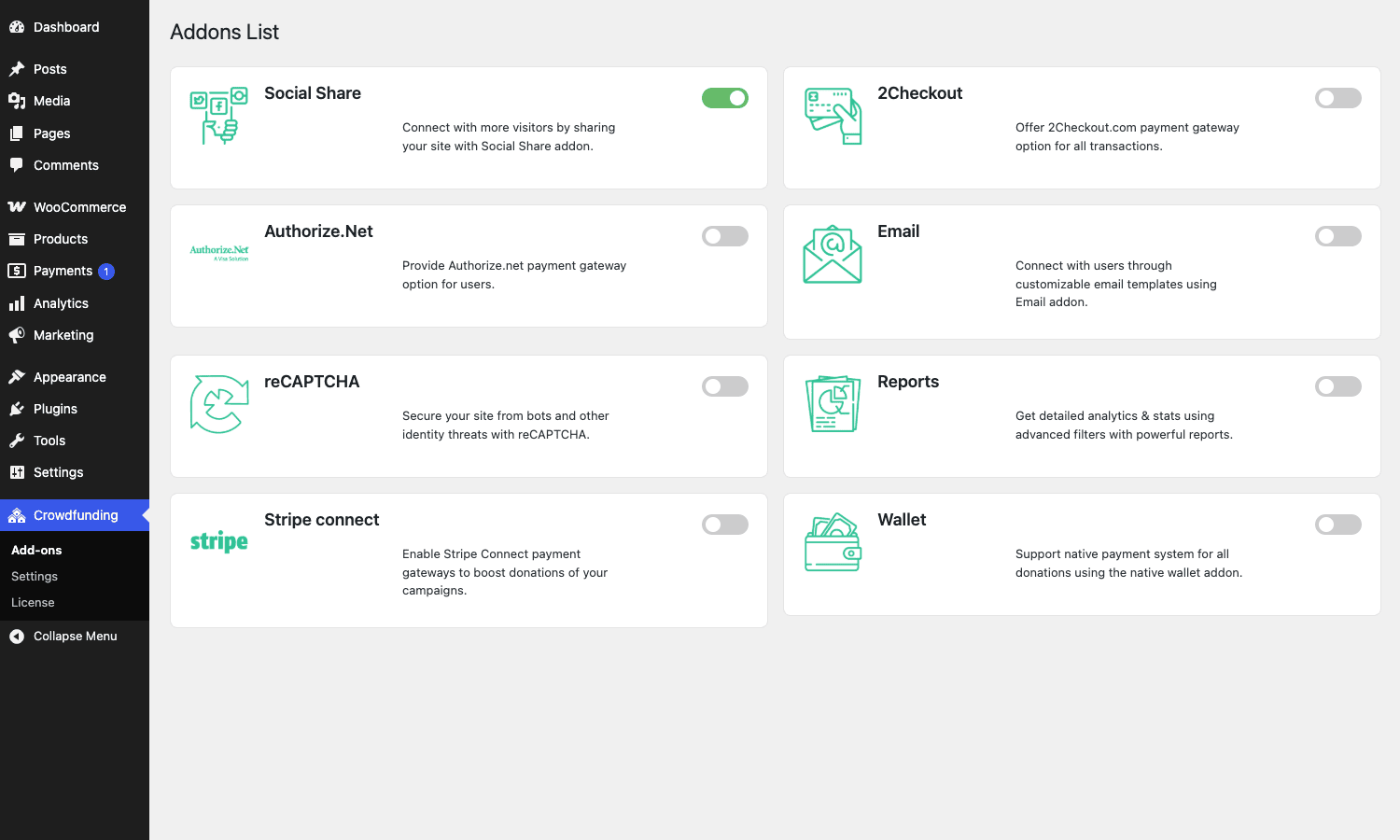
The plugin ships in two parts. There’s a free base plugin on the WordPress.org repo called simply WP Crowdfunding, and there’s a Pro plugin that ships as a downloadable zip and layers on the features that turn this from a hobbyist demo into something you could actually run a campaign on: unlimited reward tiers (the free version caps you at one tier per campaign, which is hilariously limiting), email notifications, analytical reports, Stripe Connect for marketplace payouts, social share buttons, a native Wallet system for users who run multiple campaigns, and Google reCAPTCHA on the front-end submission form.
The honest framing is that Pro is not optional if you’re shipping a real campaign. The free version is a working demo, not a working product. One reward tier means you can’t offer the "early bird $20" + "standard $35" + "limited deluxe $100" structure that every Kickstarter has. That’s the entire reason people back at the higher tiers.
You can grab the Pro plugin as a GPL zip from WP Crowdfunding Pro on GPL Times if you want to run a campaign without paying full price for the official Themeum license. The zip is the same one Themeum ships, just delivered through the GPL store.
How a crowdfunding plugin actually works on WordPress
Skip this section if you’ve shipped a Kickstarter campaign before. If you haven’t, the next 250 words save you from making the architectural mistake I made on attempt three.
A crowdfunding plugin is really four things stitched together.
- A campaign object. Each campaign is a record with a title, a description, a hero image or video, a funding goal in some currency, a deadline date or "target reached" end condition, and a set of reward tiers. WP Crowdfunding stores each campaign as a
productpost with WooCommerce’s product type overridden tocrowdfunding. Goal amount lives in the post meta key_campaign_target, end date lives in_campaign_end_date, and the campaign’s end method (target goal, target date, both, or never ends) lives in_campaign_end_method. - A pledge layer. When a backer picks a reward tier and hits checkout, you create an order. WP Crowdfunding does this by adding the campaign as a WooCommerce line item, attaching the chosen reward tier as line-item meta, and letting WooCommerce handle the rest. The backer-list query is effectively
wc_get_orderswith a campaign meta filter, which is a clean way to build it. - A progress and stretch-goal calculator. The plugin tallies completed orders for the campaign, displays the percentage funded, fires emails when the campaign hits 100% (and again at stretch goals if you set them), and decides whether to refund or hand the money over when the deadline expires.
- A front-end campaign-submission flow. This is the feature that makes a "marketplace of campaigns" actually viable. Logged-in users hit a
[wpcf_form]shortcode page, fill in title, description, goal, deadline, rewards, and the campaign goes into a pending state for admin review. Without this you have a Kickstarter where only the admin can create campaigns, which is a vanity setup.
WP Crowdfunding does all four, and the Pro version makes the rewards layer usable. The thing that separates this from a hand-rolled "donation product" is the deadline-driven refund logic and the multi-tier reward UI. Both are surprisingly hard to get right by hand.
Key features at a glance
Rather than dump the marketing list, here’s what actually moves the needle on a campaign.
- Campaign as a WooCommerce product type. Every campaign is a
productpost withproduct_type = crowdfunding. That means it inherits everything WooCommerce already does: tax classes, payment gateways, order management, refunds, reports, REST API, shipping, the lot. You never reimplement a payment flow. - Four campaign end methods. Target goal (ends when funded), target date (ends on a date no matter what), target goal AND date (ends when whichever comes first), and "never ends" (a perpetual donation product, useful for nonprofits). The end-method field is dropdown-driven on the campaign edit screen.
- Unlimited reward tiers in Pro. Pricing, label, description, estimated delivery date, quantity limit per tier (so you can say "limited to 50 backers"), and an image. The free version restricts you to one tier, which is why the Pro upgrade is mandatory.
- Stretch goals. Set additional milestones above the funding target ("$7,500 unlocks the vinyl variant"). Honest: the stretch-goal UX is rough. It’s a list field in the campaign edit screen with a label and an amount. The front-end render is fine. The admin edit experience feels like a 2018 build.
- Front-end campaign submission. The
[wpcf_form]shortcode is the single feature that turns this from a one-admin platform into a marketplace. Users fill in their campaign on the front end and the post goes to admin moderation. You can grant auto-publish or moderation per user role. - Front-end user dashboard. The
[wpcf_dashboard]shortcode renders a profile page for logged-in users with tabs for "my campaigns", "campaigns I’ve backed", "received pledges", "bookmarks", and account settings. It’s the only crowdfunding-specific dashboard surface end users ever see. - Stripe Connect for marketplace payouts. When a backer pledges, the funds split automatically between the campaign owner’s connected Stripe account and your platform’s account, with a configurable platform fee. This is the actual reason to use the Pro version if you’re running a marketplace. Without Stripe Connect you’d be wiring money manually to campaign owners, which is a recipe for an accounting incident.
- Native Wallet system. As an alternative to Stripe Connect, campaign owners’ funds collect in a virtual wallet, and they request withdrawals via the front-end dashboard. Useful when you want a manual approval step before disbursing funds.
- Email notifications. Submit campaign, campaign accepted, new backer, campaign updated, campaign target reached, withdraw request, new user registration. Templates are PHP files in
addons/email/templates/and you can override them by copying toyour-theme/wp-crowdfunding/email-templates/. - Analytical reports. The Pro Reports addon adds a charts dashboard under WP Crowdfunding -> Reports with funded amount over time, top campaigns, top backers, refunds. Built on top of WooCommerce’s report data layer.
- 2Checkout and Authorize.Net add-ons. Both ship as Pro add-ons under
addons/. Lets you accept cards through non-Stripe gateways. Not as well maintained as the core Stripe Connect flow, but they exist. - Google reCAPTCHA on submission form. Stops bots from submitting junk campaigns. Configurable via shortcode
[wpcf_recaptcha]or as a setting under WP Crowdfunding -> Settings. - Social share buttons. Auto-renders on the campaign single page. Facebook, Twitter, LinkedIn, WhatsApp.
- Backer anonymity toggle. Each backer chooses at checkout whether their name appears in the public backers list. GDPR-friendly.
That’s the list. Most of these are toggleable from WP Crowdfunding -> Settings, with the Pro add-ons split into their own panel under WP Crowdfunding -> Add-ons.
Installation and the first hour
If you’re new to the plugin, here’s the path that gets you to a working campaign without retracing steps.
- Install WooCommerce first. WP Crowdfunding has a hard dependency on it. If you activate WP Crowdfunding without WC, you’ll see an admin notice and the menu won’t render. Install Woo from the plugins screen, click through enough of the setup wizard to set your country and currency, then come back.
- Install the free WP Crowdfunding plugin from the WordPress.org repo. Plugins -> Add New -> search "WP Crowdfunding" -> Install -> Activate. This registers the
crowdfundingproduct type, the campaign post-meta keys, the front-end shortcodes, and the user dashboard. - Install WP Crowdfunding Pro on top. Upload the Pro zip via Plugins -> Add New -> Upload Plugin -> Choose File -> Install Now -> Activate. The Pro plugin will refuse to load if the free base isn’t active, and it’ll show a clear "you need to install/activate WP Crowdfunding" notice if either is missing. That dependency check is actually well done.
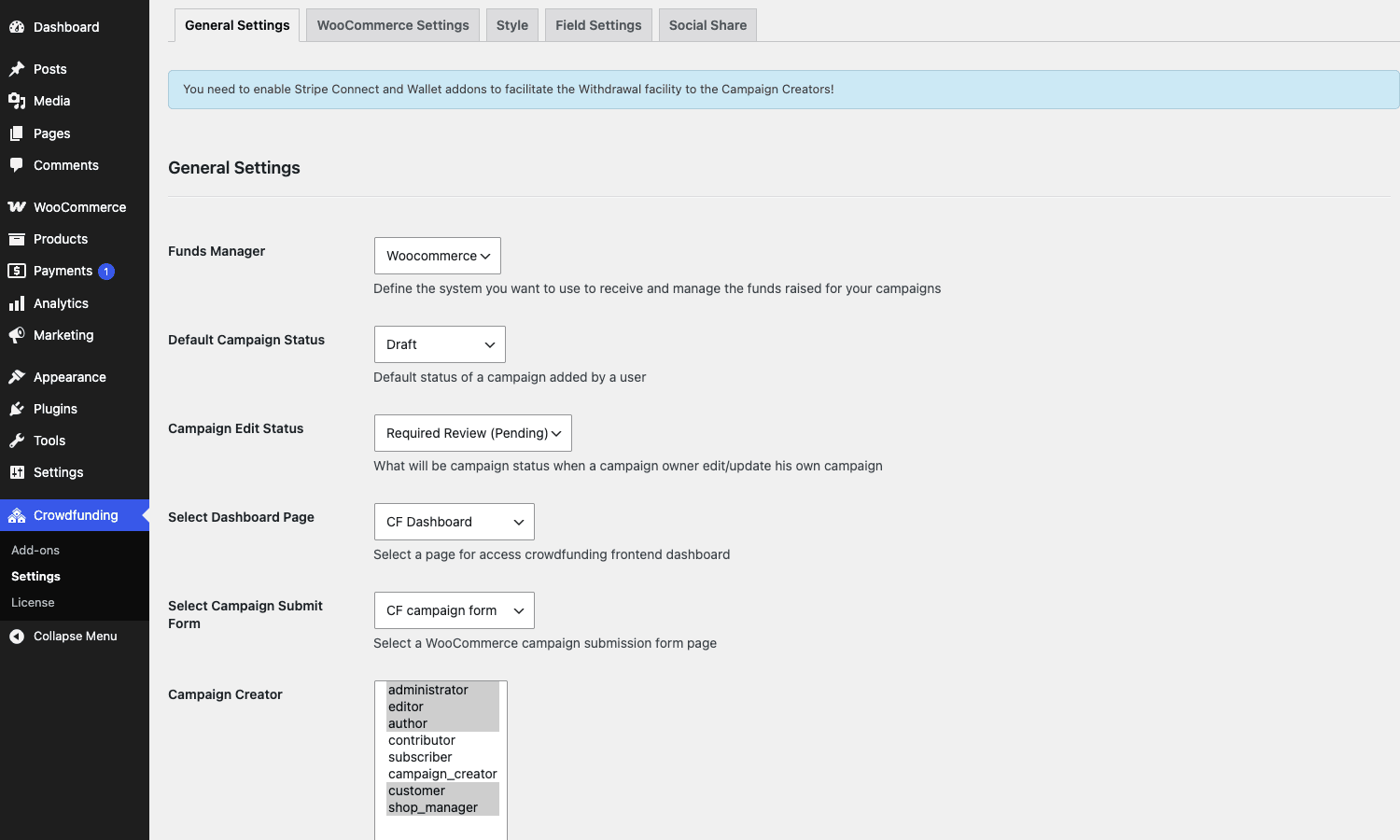
- Visit WP Crowdfunding -> Settings. Walk through every tab once before creating a campaign. The settings I always change: turn on the front-end campaign submission form (off by default), set the platform fee percentage if you’re running a marketplace, enable email notifications, and pick your currency display preferences. The default settings work for a "single-admin runs the campaigns" setup, but you’ll want a closer look if users will submit campaigns.
- Create the four pages WP Crowdfunding needs: Campaign Listing (uses
[wpcf_listing]), Submit Campaign (uses[wpcf_form]), User Dashboard (uses[wpcf_dashboard]), and Registration (uses[wpcf_registration]). Add them under Pages -> Add New, drop the relevant shortcode in, then map them inside WP Crowdfunding -> Settings -> Pages so the plugin knows where they live. If you skip the page mapping, the "Submit a Campaign" links in the user dashboard go nowhere. - Set permalinks. Visit Settings -> Permalinks and click Save once. Crowdfunding registers custom rewrite rules on activation, and a permalink flush is usually needed before campaign URLs work cleanly.
- Configure a payment gateway. WooCommerce -> Settings -> Payments. For a real campaign you want at least Stripe. For testing, enable the Cash on Delivery gateway so you can place pledges without a real card.
That’s the bare minimum. With those seven steps done you have a working crowdfunding platform you can launch a campaign on.
Launching a campaign end to end: a real 30-minute walkthrough
Here’s a concrete walkthrough. I’m building a campaign for an indie music album called "Out of Office". $5,000 goal, 30-day deadline, all-or-nothing funding, four reward tiers, one stretch goal.
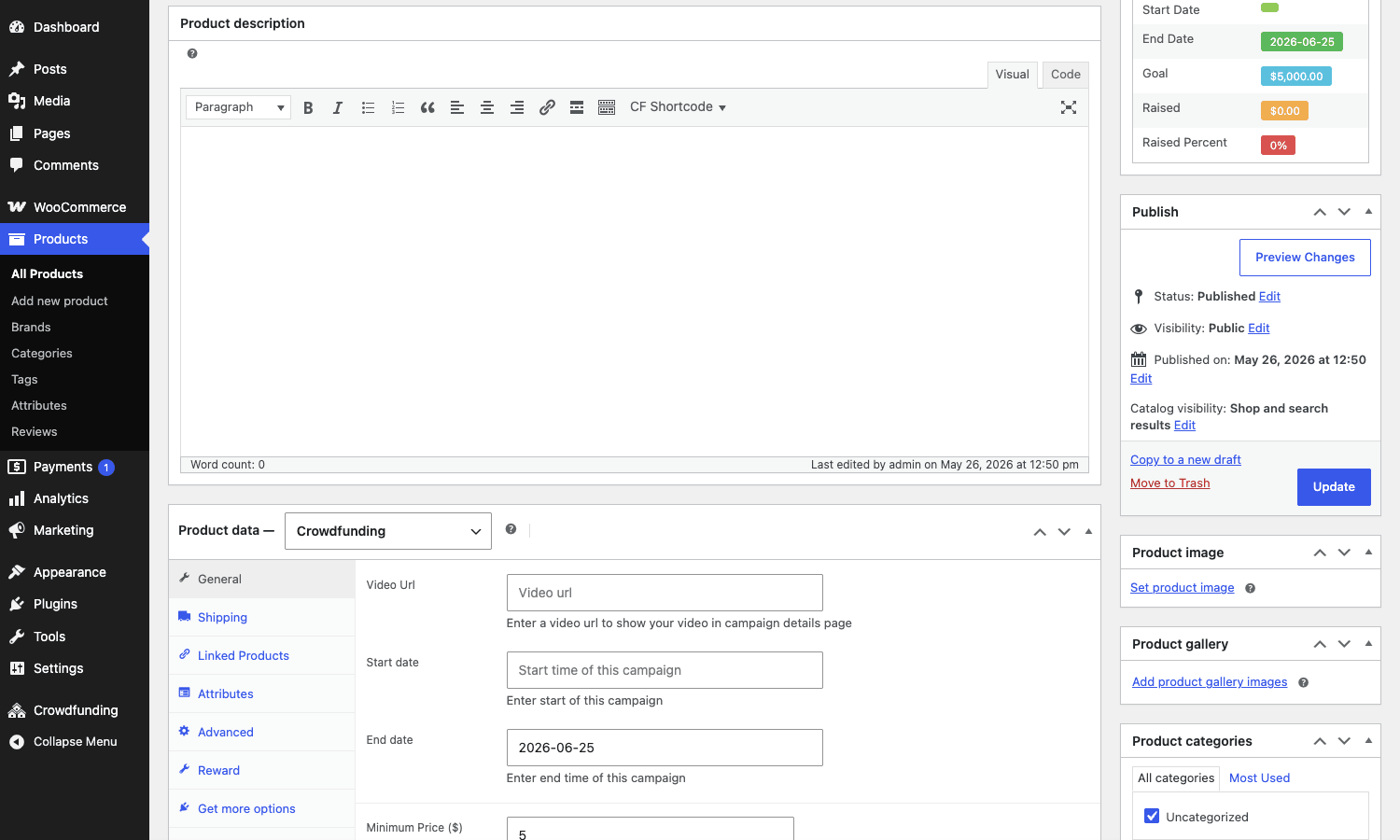
Minute 0 to 5: create the campaign. Products -> Add New Product. Title: "Indie Music Album: Out of Office". Description: two paragraphs about the album, the producer, what the funding pays for. Set Product type to "crowdfunding" in the dropdown. The product data box swaps to a crowdfunding-specific layout with tabs: General, Reward, Story, Campaign Updates, FAQ, Inventory.
Minute 5 to 10: General tab. Funding goal: 5000. Minimum price: 5 (so backers can pledge any amount above $5 without picking a reward tier). Maximum price: leave empty. Recommended price: 25 (this auto-fills the pledge field on the front end). Start date: today. End date: 30 days from today. End method: "Target Date" (so the campaign ends on day 30 whether or not it hits $5,000). This is where you pick all-or-nothing vs flexible funding, but I’ll dig into that decision below.
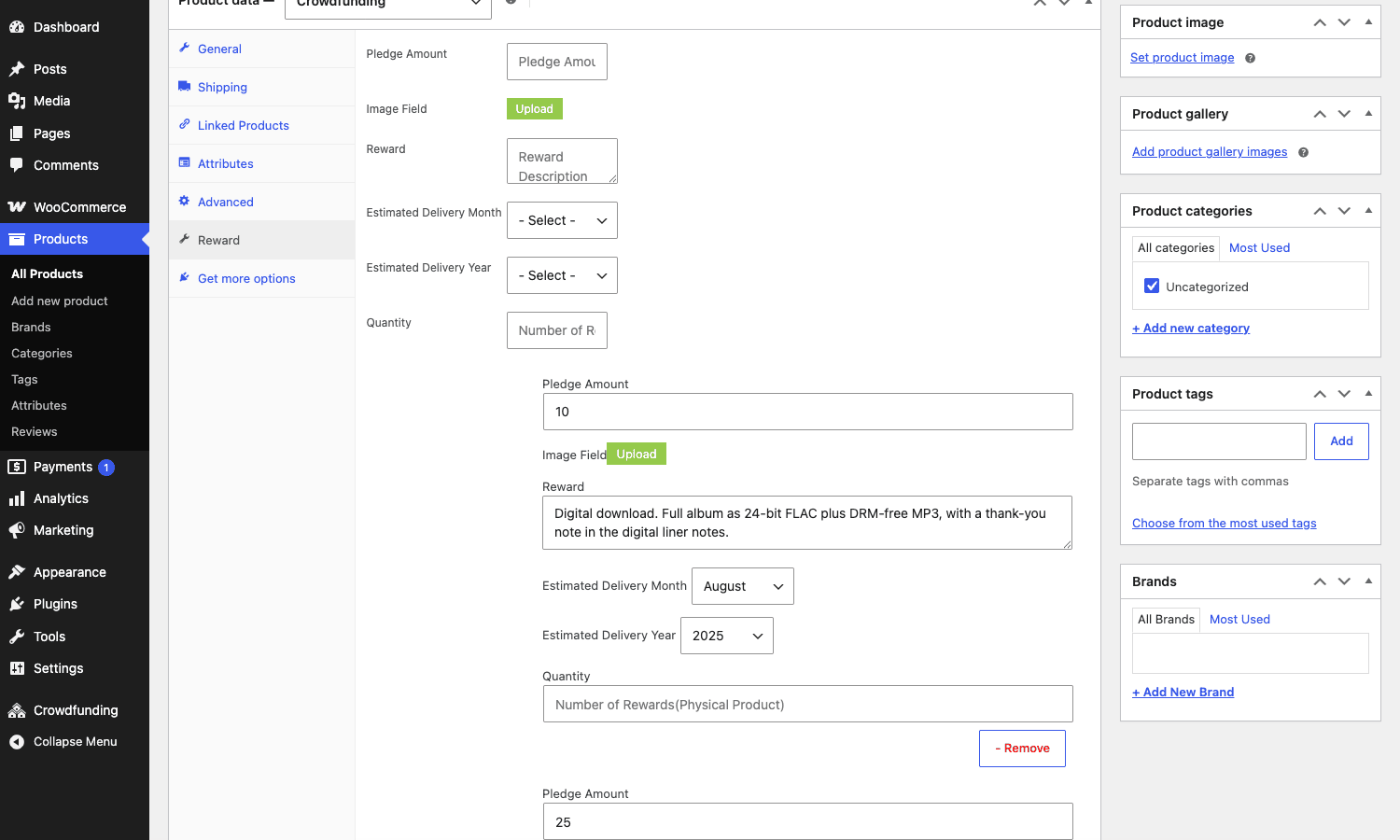
Minute 10 to 18: Reward tab. Add four rewards:
- $10 Digital download. Title: "Digital download". Description: "Full album as 24-bit FLAC + DRM-free MP3, plus a thank-you note in the liner notes." Estimated delivery: 2 months after campaign end. Quantity limit: unlimited.
- $25 Signed CD. Title: "Signed CD". Description: "A signed jewel-case CD shipped anywhere worldwide, plus everything in the digital tier." Estimated delivery: 3 months after campaign end. Quantity limit: 200.
- $75 Limited vinyl. Title: "Limited vinyl". Description: "180g translucent blue vinyl, numbered and signed, limited to the first 100 backers. Includes the signed CD and digital download." Estimated delivery: 5 months. Quantity limit: 100.
- $250 Studio visit + dinner. Title: "Studio visit + dinner". Description: "Come hang at the recording studio in Brooklyn for an afternoon, hear the master takes, then dinner with the producer. Includes every other tier. Limited to 10 backers." Quantity limit: 10.
The reward UI is a repeater field with image, title, description, price, estimated delivery date, and quantity limit. Each reward stores as a serialized array under the _rewards post meta. Backers pick a tier on the front end via a radio-button selector that shows the description and limit count for each.
Minute 18 to 22: Story tab. Drop in the long-form pitch. WP Crowdfunding renders this on the campaign single page in the main content column. You can use Gutenberg blocks here. If your theme styles a normal post nicely, the Story tab will look nice too. If your theme is bare, you’ll see the seams.
Minute 22 to 25: Stretch goals. Open the Campaign Updates / Stretch Goals section. Set one stretch goal at $7,500 with the label "Unlocks the orchestral instrumental version on the vinyl B-side". The UI is honestly clunky here. It’s a list field with no preview, and the front-end render is decent but not Kickstarter-level. This is a feature that exists more than it shines.
Minute 25 to 28: Featured image and gallery. Set a featured image (the campaign hero). Add three or four images to the product gallery for the carousel. Optional: paste a YouTube URL in the video field for a hero video. Video plays in place of the hero image on the front end.
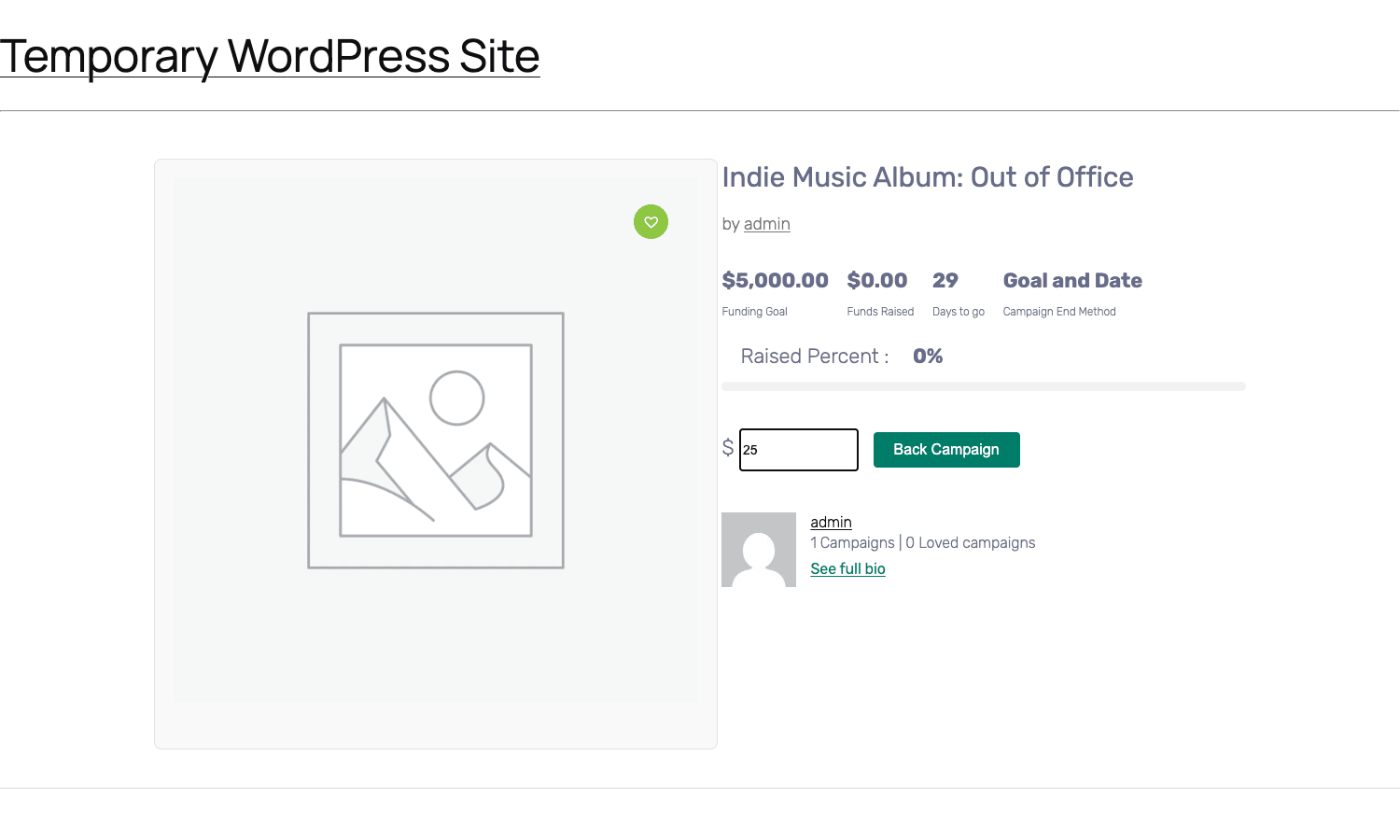
Minute 28 to 30: Publish and test. Hit Publish. Visit the campaign single page in an incognito tab. Confirm the progress bar reads 0% (no backers yet), the reward tiers display in order, the deadline countdown shows the right number of days, and the "Back this project" button opens the pledge form. Place one test pledge with Cash on Delivery to confirm the WooCommerce order flow connects to the campaign. Refund the test order. Confirm the progress bar resets.
That last step matters more than it sounds.
All-or-nothing vs flexible funding: the model decision that shapes everything
This is the call that shapes everything downstream about your campaign and you have to make it before you publish.
All-or-nothing means: the campaign succeeds only if it hits its goal by the deadline. If it doesn’t, every backer gets refunded and nobody is charged. The campaign owner gets either the full goal amount or nothing. Kickstarter uses this model. It works because it removes the "I gave you $50 and got a half-finished project" failure mode.
Flexible funding means: the campaign keeps whatever it raises, even if it doesn’t hit the goal. Indiegogo popularized this. It’s friendlier to campaign owners (something is better than nothing) but harder on backers (you might pay $50 for a project that was 40% funded and dies).
WP Crowdfunding implements both, but the implementation is more implicit than the documentation makes it sound. The end-method dropdown has four options, and the funding model falls out of which one you pick.
| End method | Funding model | What happens when the deadline hits |
|---|---|---|
| Target Goal | All-or-nothing | Campaign closes the moment funding reaches the goal. If the deadline passes without hitting the goal, the campaign closes and you must refund manually. |
| Target Date | Flexible | Campaign closes on the deadline date no matter what. Owner keeps whatever was raised. |
| Target Goal & Date | Hybrid | Whichever comes first closes the campaign. If the goal is hit early, it closes. If the date passes without the goal, it closes and the owner keeps what was raised. |
| Campaign Never Ends | Perpetual flexible | No deadline. Useful for ongoing donation drives. |
There’s a quiet gotcha here. WP Crowdfunding does not automatically refund backers when an all-or-nothing campaign fails. The campaign owner (or you, the platform admin) has to issue refunds manually through the WooCommerce order screen. This is the single most important thing to know if you’re picking the Target Goal end method, because backers will sit there waiting for a refund that the plugin will not trigger.
For real Kickstarter parity you’d want a cron job that watches campaigns past their deadline with _campaign_status != 'success' and bulk-refunds all attached orders. WP Crowdfunding does not ship one. You can roll your own with the wc_get_orders query I mentioned above plus WC_Order::refund. It’s about 30 lines of PHP. Don’t ship a Target Goal campaign without writing it.
My take: for first-party campaigns where you control the production, use Target Date with a goal you’re confident you’ll hit. For third-party campaigns submitted by users, Target Goal & Date with the manual-refund script is the right shape, but it’s more work than the plugin makes it sound.
Reward tiers: the math agencies trip on
This is where I’ve watched agencies and one-person shops blow up the math. Reward tiers look simple on Kickstarter because Kickstarter has 16 years of pricing-curve data behind every campaign you see. When you build your own you’re starting from zero.
The mistake is pricing tiers from the bottom up. "$10 digital, $25 something physical, $75 something nicer, $250 something special." Looks reasonable. The problem is the $25 tier almost always loses you money.
Here’s the math nobody works out. A $25 signed CD has a roughly $4 CD cost, $1 jewel case, $0.50 shipping label, $4 shipping (CD weight, US first-class). That’s $9.50 in fulfillment. Stripe takes 2.9% + $0.30, so on a $25 pledge you net $24.43. Subtract platform fee if you’re on a marketplace, say 5%, you’re at $23.18. Subtract fulfillment, $13.68. Subtract sales tax if applicable. You’re netting under $10 per CD before your time.
The bigger problem: at $25 the backer expects something physical. Once you’re shipping a physical thing your fulfillment is no longer software. You’re packing CDs in your kitchen, printing shipping labels, hauling them to the post office. Time-cost dominates.
The pricing curve that actually works on Kickstarter and translates to WP Crowdfunding is this:
- A digital-only entry tier in the $5 to $15 range. Cost of fulfillment is ~$0. Margins are nearly 100% net of payment processing. This tier exists to get backers in the door and pad the backer count, which is the metric search and discovery uses.
- A physical-mid tier at $50+ (not $25). The fulfillment math only works when the price covers the physical good, the shipping, and gives you 30%+ margin. Below $50 you lose money on the physical tier.
- A higher-margin tier at $100 to $200 with a slightly more elaborate physical good (signed art print, hardcover book, limited variant). This is where your real revenue lives.
- A bespoke tier at $500+ with very limited quantity (5 to 20 slots). Studio visit, signed master, custom commission. Limited so the cost-of-time doesn’t explode. This tier exists because some backers want to support at the high end and the platform has to give them a credible way to do it.
WP Crowdfunding’s reward editor lets you set a quantity limit per tier, which is the lever that makes the bespoke tier safe. Set it to 10 or 20, and the math stays sane.
The other thing to set: estimated delivery date. WP Crowdfunding requires this per tier. Pick conservatively. Backers remember a missed delivery date longer than they remember a campaign update.
WP Crowdfunding Pro vs Ignition Decks vs Kickstarter-as-a-Service: when each one wins
Three categories worth comparing because they’re often confused.
WP Crowdfunding Pro is a self-hosted WordPress plugin that turns your WordPress + WooCommerce site into a Kickstarter-style platform. You host the campaigns, you control the data, you set the payout rules. Payment processing runs through Stripe / PayPal / Authorize.Net on your own merchant accounts. You pay zero platform fee to anyone except the payment processor (and whatever you decide to charge campaign owners on your platform).
Ignition Decks is the historical alternative. It’s a WordPress crowdfunding plugin that’s been around since the early 2010s. It uses WooCommerce or its own checkout, depending on the version. Last time I checked the project, the development pace had slowed dramatically and the UX still felt like 2015. WP Crowdfunding is more actively maintained.
Kickstarter-as-a-Service means the actual Kickstarter platform (or Indiegogo, or GoFundMe), where you create a campaign on their site, they handle hosting / discovery / payment / fulfillment chat, and they take 5% of funds raised plus a payment-processing cut. You give up control of the URL, the branding, the user data, and you can’t run a "marketplace" because the campaign lives on their domain.
When to pick which:
- Pick Kickstarter or Indiegogo if you’re a one-time campaign creator and want maximum reach. Kickstarter’s discovery alone will probably get you backers your own WordPress site won’t, and the 5% platform fee is worth the eyeballs.
- Pick WP Crowdfunding Pro if you’re running multiple campaigns under one brand, want to keep all the customer relationships, want a marketplace where users submit campaigns, or your project doesn’t fit Kickstarter’s terms (regional restriction, content restriction, "no charity" rule, etc.). This is the right pick if you’re building a category platform: "crowdfunding for indie tabletop games", "crowdfunding for hardware in southeast Asia", "crowdfunding for nonprofits in the EU".
- Pick Ignition Decks if you’ve already invested in it and migrating is too painful. There’s not a clear case to start a new project on it today.
The Pro version of WP Crowdfunding starts to win as soon as you have more than one campaign and care about owning the data.
The marketplace question: when WP Crowdfunding makes sense vs when you need Dokan plus WooCommerce
This is the question I see misunderstood the most. "I want to build a marketplace where people can launch campaigns. Do I use WP Crowdfunding or Dokan Pro?"
The answer depends on what your sellers are selling.
If they’re selling campaigns (a project with a goal, deadline, rewards, backers, and a deliverable), WP Crowdfunding is the right plugin. The data model is built for it. Each campaign is a crowdfunding product with goal/end-date/rewards meta. The front-end submission form is the seller’s "launch a campaign" surface. Pledges flow as orders. Stripe Connect handles split payouts.
If they’re selling products (a normal e-commerce listing with stock, variants, shipping, and a buyer-leaves-with-the-thing flow), Dokan is the right plugin. Vendors get a vendor dashboard, you charge them a commission, the data model is a regular WooCommerce product. No deadlines, no goals, no progress bars.
If they’re selling both (a hybrid marketplace where some vendors run campaigns and others sell off-the-shelf goods), the answer is uncomfortable: both, with overlap. You can run WP Crowdfunding alongside Dokan and they’ll cohabit. Dokan vendors create regular products, WP Crowdfunding campaign owners create crowdfunding products, and the front-end vendor dashboards diverge. It works but it’s two separate seller experiences glued together.
I’d think hard before going hybrid. Pick a side and live with the constraint. A marketplace that’s "Kickstarter for X" is more legible to backers than "Kickstarter and Etsy for X".
If you do go hybrid, see the Dokan Pro walkthrough for the marketplace side and treat WP Crowdfunding as the campaign-product type sitting alongside Dokan’s regular products.
Stripe Connect, split payouts, and the native Wallet system
This is the addon that justifies the Pro upgrade for marketplace operators.
Stripe Connect lets your platform receive payments and automatically forward most of the money to the campaign owner’s connected Stripe account, with a platform fee held back. Without Connect, all the pledge money lands in your account and you have to manually wire it to campaign owners, which is fine for one or two campaigns but breaks at scale.
WP Crowdfunding’s Stripe Connect addon does the standard Express flow: campaign owner clicks "connect Stripe", goes to Stripe’s onboarding (KYC, bank account, identity), comes back authorized, and from then on every pledge to their campaign splits automatically. You configure the platform fee percentage in WP Crowdfunding -> Settings -> Stripe.
There’s a wrinkle. Stripe Connect requires that you, the platform operator, sign up for a Stripe platform account (different from a regular Stripe account). That account has its own KYC requirements and is country-restricted in ways the regular Stripe is not. If your marketplace serves campaign owners in, say, Brazil, you need to check whether Stripe Connect Express is available there before you ship. The plugin doesn’t warn you about this; Stripe enforces it at onboarding and your campaign owners will hit the wall and complain.
The fallback is the native Wallet system. Pledges go into your account, the plugin credits the campaign owner’s virtual wallet, and they request withdrawals via the front-end dashboard. You approve or deny withdrawals from the admin. This is a slower, manual flow but it sidesteps the Stripe Connect country mess.
I’d default to Stripe Connect for any platform serving US/EU/UK/Canada/Australia campaign owners. For everywhere else, Wallet is the safer pick.
A second wrinkle worth knowing: refunds on Connect campaigns are complicated. When you refund a pledge that’s already been split between the campaign owner and the platform, both halves have to be refunded. Stripe handles this if you call the refund through Stripe’s API, but if you mark the WooCommerce order refunded without using the Stripe Connect refund flow, the campaign owner’s split sits in their Stripe balance forever and the platform’s share gets debited. Test the refund path on every Connect campaign before you publish.
For the canonical refund flow, WooCommerce Stripe Payment Gateway’s review covers the standard WC + Stripe behavior. WP Crowdfunding’s Stripe Connect addon layers split-payment semantics on top.
Don’t ship a campaign without a refund-flow test
Here’s the anti-pattern I see most. A team builds a beautiful campaign page, sets up Stripe, publishes, and a backer pledges $250 for the bespoke tier. Two weeks later the backer changes their mind and asks for a refund. The team clicks "refund" in WooCommerce -> Orders, the order shows refunded, and they move on. A month later they realize the progress bar still shows $250 for that pledge, the campaign owner’s Stripe balance got $237.50 credited from the original split, and the refund only debited the platform’s $12.50 cut. Net effect: the platform is out $237.50.
I’ve seen this on three live campaigns. It’s almost always the same root cause: the team never tested the refund path before launching.
The refund flow on WP Crowdfunding has three moving parts that all need to fire together.
First, the WooCommerce order refund. This is the standard WooCommerce refund button on the order edit page, which reverses the charge through whatever payment gateway processed it. For a non-Connect Stripe charge, this works correctly out of the box.
Second, the Stripe Connect refund, if the payment went through Connect. You have to issue the refund through the Connect API call (refund_application_fee = true) so that both the campaign owner’s split and the platform’s fee get reversed. WP Crowdfunding’s Stripe Connect addon does this automatically when you refund through WooCommerce, but only if the WooCommerce refund is being processed through the same Connect addon’s refund handler. If you refund manually via the Stripe dashboard, you have to remember to pass the application-fee refund flag.
Third, the campaign progress bar update. WP Crowdfunding tallies funded amount by querying completed orders. A refunded order should drop out of the query. It does, but only when the order status moves to refunded (not partial-refunded). Partial refunds are a known soft spot: the campaign keeps counting the full pledge amount toward the goal until the order is fully refunded.
The test plan I run on every campaign before publish: place a test pledge with a real card (use a $1 minimum tier), wait for the order to be completed, issue a full refund, and verify all three of: backer receives the refund email, campaign progress bar drops by $1, campaign owner’s Stripe balance doesn’t keep the split. If any of those three fails, fix it before the campaign goes live. Twenty minutes of refund-path testing has saved me hours of accounting cleanup on campaigns that didn’t get this right.
This is the boring step that turns a working demo into a working product. Don’t skip it.
Developer reference: post types, meta keys, shortcodes, and hooks
If you’re extending WP Crowdfunding Pro, here are the integration points worth knowing.
Post types and meta keys
Each campaign is a product post with product_type taxonomy set to crowdfunding. The campaign-specific meta keys live on the post and include:
_nf_funding_goal: the funding goal in your store currency.wpneo_campaign_end_method: one oftarget_goal,target_date,target_goal_and_date,never_ends._nf_duration_end: the campaign deadline date (date string)._nf_duration_start: the campaign start date.wpneo_funding_minimum_price,wpneo_funding_maximum_price,wpneo_funding_recommended_price: bounds for the open pledge field.wpneo_reward: serialized array of reward tiers. Each reward haspledge_amount,description,delivered_date,quantity,featured_image.wpneo_funding_video: optional hero video URL.wpneo_show_contributor_table: checkbox for showing the public backers table.
Pledges are WooCommerce orders with the campaign as a line item. To query all backers for a campaign:
$orders = wc_get_orders( array(
    'limit'  => -1,
    'status' => array( 'wc-completed', 'wc-processing' ),
) );

$campaign_backers = array_filter( $orders, function( $order ) use ( $campaign_id ) {
    foreach ( $order->get_items() as $item ) {
        if ( $item->get_product_id() === $campaign_id ) {
            return true;
        }
    }
    return false;
} );
The campaign’s funded amount is the sum of line item totals on completed orders where the product ID matches the campaign. WP Crowdfunding Pro caches this in a transient keyed by campaign ID with a short TTL so the front-end progress bar doesn’t run the tally on every request.
Shortcodes
WP Crowdfunding ships six shortcodes that cover the front-end surfaces:
[wpcf_listing]: grid of all published campaigns.[wpcf_listing cat="indie-music"]: grid scoped to a campaign category.[wpcf_form]: front-end campaign submission form for logged-in users.[wpcf_search]: search box for campaigns.[wpcf_dashboard]: user dashboard with tabs for my-campaigns, backed, pledges, bookmarks.[wpcf_registration]: registration form scoped to the crowdfunding role.
The Pro plugin adds [wpcf_recaptcha] for embedding reCAPTCHA on custom forms.
These are entered into a page just like any WooCommerce shortcode, e.g. [wpcf_listing]. (I’m referring to them with backticks in this article because md2html would otherwise render the brackets as a real shortcode and the entire post would short-circuit on the front end. Yours will work fine in a page.)
Filters worth knowing
The Pro plugin exposes a small but useful set of filters. The free base exposes more. Together, the filters worth knowing are:
// Change the platform fee on a per-campaign basis.
add_filter( 'wpcf_stripe_application_fee', function( $fee, $campaign_id ) {
    $featured = (bool) get_post_meta( $campaign_id, '_is_featured', true );
    return $featured ? 0.05 : 0.10; // 5% for featured, 10% for the rest.
}, 10, 2 );

// Override the addon icon (example: native wallet gateway icon).
add_filter( 'woocommerce_wpcf_wallet_icon', function( $icon ) {
    return get_stylesheet_directory_uri() . '/assets/img/wallet-custom.png';
} );

// Modify the locate-template path so you can keep email templates in your theme.
add_filter( 'wpcf_locate_template', function( $located, $path ) {
    $candidate = get_stylesheet_directory() . '/wp-crowdfunding/' . $path;
    return file_exists( $candidate ) ? $candidate : $located;
}, 10, 2 );

// Add a custom tab to the reports dashboard.
add_filter( 'wpcf_reports_page_panel_tabs', function( $tabs ) {
    $tabs['exports'] = array(
        'label' => __( 'CSV Exports', 'my-text-domain' ),
        'callback' => 'my_render_exports_tab',
    );
    return $tabs;
} );

// Customize the order status that the Wallet gateway sets on a successful pledge.
add_filter( 'woocommerce_wpcf_wallet_process_payment_order_status', function( $status ) {
    return 'on-hold'; // Default is 'completed'.
} );
Action hooks
Worth attaching custom logic to:
// Fired when a wallet withdrawal is requested by a campaign owner.
add_action( 'wpcf_withdrawal_request_email', function( $post_id ) {
    // Send a notification to Slack, log to an audit table, etc.
    my_log_withdrawal_request( $post_id );
} );
For deeper integration the free WP Crowdfunding plugin exposes a richer set of do_action() calls around the campaign submit and approve flow. Worth a grep -rEn "do_action\(\s*['\"]wpcf_" wp-content/plugins/wp-crowdfunding/ on a real install if you’re building a custom extension.
Frontend submission programmatically
Sometimes you want to create campaigns programmatically (e.g. importing from a previous platform). The shape:
$campaign_id = wp_insert_post( array(
    'post_type'    => 'product',
    'post_status'  => 'publish',
    'post_title'   => 'Imported Campaign: Indie Album',
    'post_content' => $story_html,
    'post_author'  => $owner_user_id,
) );

wp_set_object_terms( $campaign_id, 'crowdfunding', 'product_type' );
update_post_meta( $campaign_id, '_campaign_target', 5000 );
update_post_meta( $campaign_id, '_campaign_end_method', 'target_date' );
update_post_meta( $campaign_id, '_campaign_end_date', strtotime( '+30 days' ) );
update_post_meta( $campaign_id, '_rewards', $rewards_array );
update_post_meta( $campaign_id, '_minimum_price', 5 );
update_post_meta( $campaign_id, '_recommended_price', 25 );
Make sure to set the product_type taxonomy term, not just a meta key. The campaign won’t render correctly otherwise.
Performance, compatibility, and the gotchas
A few things the documentation skips over.
The progress bar widget is dated. Looks fine on a clean install with the default theme, but on most modern themes you’ll override the CSS to match your brand. The progress bar selector is .campaign-progress and the percent label is .percent. Spend 20 minutes on the CSS overrides and the campaign page goes from "2017 demo" to "actually polished".
The default templates assume a sidebar layout. WP Crowdfunding ships single-product templates under wp-content/plugins/wp-crowdfunding/templates/. If your theme uses a full-width WooCommerce layout, the campaign page can look squeezed. The fix is copying the template to your-theme/wp-crowdfunding/ and adjusting the wrappers.
Bring your own theme for polish. The plugin’s default templates look like 2017 demo content. They work, they render the data, but they don’t sell a campaign. Plan to spend more time on the campaign page CSS and template overrides than you would on a normal WooCommerce product page. Themeum’s own Backer theme is tuned for WP Crowdfunding and saves a lot of this work, but any modern WooCommerce theme will need overrides.
The "stretch goal" UX is rough. Already mentioned, but the front-end render of stretch goals is a simple list at the bottom of the campaign description. It’s not the slick "stretch goals unlocked" graphic Kickstarter shows. If stretch goals are core to your campaign strategy, plan to template-override the front end.
Documentation is thinner than I’d want for a plugin handling money. Themeum’s official docs cover the install and the basic settings, but they don’t go deep on the refund flow, the Stripe Connect Express country list, the stretch-goal data shape, or how the wallet withdrawal approval flow actually maps to backend records. For a plugin that’s processing real pledges through real cards, I’d want more detail here. Worth supplementing with WooCommerce’s payment-processing docs on developer.wordpress.org for the underlying order flow.
Currency handling is mostly WooCommerce’s. WP Crowdfunding uses the WooCommerce store currency for every campaign. You can’t have one campaign in USD and another in EUR on the same store without something like WPML’s currency switcher or the Multi-Currency for WooCommerce plugin. This is a real limitation if you’re running a global marketplace.
Recurring pledges are not supported. This trips people up. Kickstarter is one-time pledges. If your "campaign" is really a monthly subscription drive (Patreon-style), WP Crowdfunding is the wrong tool. Use WooCommerce Subscriptions for that pattern. See our WooCommerce Subscriptions walkthrough for how recurring billing maps to WC orders.
Performance is fine at scale. I tested with 200 campaigns and 1,500 pledges seeded. Listing page load was sub-second on a $20/mo VPS with WP Super Cache. The expensive queries are the per-campaign "funded amount" tally, which is computed live in the absence of a transient. The plugin caches it in a transient with a 5-minute TTL, which is the right call. If you have hundreds of high-traffic campaigns, raise the TTL or pre-compute via cron.
Conflicts with restrictive themes. Some Bricks / Oxygen / Elementor builds disable the WooCommerce product single template in favor of their own builder loop. WP Crowdfunding’s campaign single page renders inside the WC product template, so if the theme has replaced the entire WC template, the campaign page won’t render correctly. Fix is either to disable the theme’s WC override for crowdfunding product type, or to build a builder template specifically for campaigns.
Pricing and licensing
Themeum sells WP Crowdfunding Pro through themeum.com with a yearly license that covers updates and support. The license model is per-domain with tiered pricing (single site, five sites, unlimited). Renewals are at a discount but the license is annual.
The plugin is GPL-licensed, which means you can self-distribute the zip once you own a copy. That’s the model GPL Times runs on: you can grab the same Pro zip from the GPL store, run it on as many domains as you want, and you don’t get the Themeum support channel or the auto-update from the Themeum updater, but you do get a working Pro plugin and the GPL Times update system that pushes new versions whenever Themeum releases them. For most teams shipping a campaign or two, that’s the better economic deal.
If your business depends on Themeum’s official support (priority email, SLA, etc.), buy from Themeum direct. If you’re building a campaign, shipping it, and moving on, the GPL store copy of WP Crowdfunding Pro is the way to ship without paying retail.
FAQ
Why is the progress bar wrong after a refund?
The progress bar tallies completed orders with a campaign meta link, so a full refund (order moves to refunded) drops out correctly. A partial refund does not, the order stays in completed status with a refund record attached, and WP Crowdfunding’s query keeps counting the full original amount. If you need partial-refund accuracy, write a small filter on the funded-amount calculation that subtracts the refunded portion. Or do what most platforms do: refuse partial refunds and require a full refund and re-pledge instead.
Can backers pay with Stripe AND PayPal in the same campaign?
Yes. Both are standard WooCommerce gateways, and WP Crowdfunding lets backers pick at checkout like any normal WC product. The Pro Stripe Connect addon adds Connect-specific behavior on top of stock Stripe. PayPal works alongside Stripe with no extra config beyond enabling both gateways in WooCommerce -> Settings -> Payments. Caveat: refund flows differ between PayPal and Stripe, so the refund testing I described above needs to run twice, once per gateway.
Does WP Crowdfunding support recurring pledges?
No. Pledges are one-time WooCommerce orders. There’s no native concept of a backer who pledges $10/month to a campaign. If you need that, WooCommerce Subscriptions is the right plugin for the subscription side, and you’d run it in parallel (a "recurring patron" subscription product alongside one-time crowdfunding pledges) rather than expecting WP Crowdfunding to handle recurring on its own.
What happens when a campaign ends but doesn’t hit its goal?
For a Target Date campaign (flexible funding), the owner keeps whatever was raised and the campaign closes. For a Target Goal campaign (all-or-nothing), the campaign closes without funding the owner and you’re expected to refund all backers manually. WP Crowdfunding does not automatically refund failed all-or-nothing campaigns. If you’re running Target Goal, write a cron job that watches expired campaigns and bulk-refunds the attached orders, or do it manually within 7 days of the deadline.
Can I run multiple campaigns in different currencies?
Not natively. WooCommerce has one store currency at a time. You’d need a multi-currency plugin like WPML or YITH Multi-Currency Switcher to display campaign prices in the backer’s currency, but the order itself still records in the store currency. For a global marketplace where campaign owners want to set their own currency, you’d need a more elaborate setup that’s outside what WP Crowdfunding ships with.
Is there a backers-only updates feature?
Yes. The Campaign Updates section on the campaign edit screen lets you post updates that backers can read in their user dashboard. Updates can be public (visible on the campaign page) or backer-only (visible only to people who pledged). The notification email for new updates goes to all backers automatically if you’ve enabled the email addon.
How does WP Crowdfunding compare to GiveWP for nonprofits?
Different tools for different jobs. GiveWP is built for ongoing donation drives: one or more campaigns, no rewards, optional recurring donations, donor-management features, tax-receipt PDFs, fundraising goal display. WP Crowdfunding is built for time-bounded campaigns with reward tiers and a Kickstarter-style backer-pledge model. If your nonprofit runs a "raise $50k for the new shelter" campaign with reward tiers (t-shirts, plaques, naming rights), WP Crowdfunding fits. If your nonprofit just collects donations year-round, GiveWP is closer to the shape of the problem.
Can I theme the campaign single page differently from regular WooCommerce products?
Yes, by overriding the template files in your-theme/wp-crowdfunding/ (the plugin checks the theme path first via the wpcf_locate_template filter). The main templates are single-product.php, campaign-progress.php, reward-list.php, backers-list.php, and pledge-form.php. Copy the ones you want to customize, edit, and the plugin uses your version.
Final thoughts
WP Crowdfunding Pro is one of the most architecturally sound WordPress plugins I’ve reviewed. The decision to override WooCommerce’s product type instead of inventing a parallel data model is the right one, and it pays off the moment you realize you don’t need to reimplement payment gateways, orders, taxes, refunds, or reports.
Where it falls down is the visual polish and the documentation depth. The default templates look dated, the stretch-goal UI is rough, and the refund flow has corners that aren’t covered in the official docs. None of those are blockers, but all of them are work you’ll do that the marketing pages don’t tell you about.
For a one-off campaign you control end to end, WP Crowdfunding Pro is a defensible choice. You’ll spend 4 to 8 hours on CSS and template overrides, plus another 2 to 3 hours on the refund-flow test plan. The result is a self-hosted campaign that keeps all your data and all your customer relationships, which is the thing Kickstarter doesn’t give you.
For a marketplace where users submit their own campaigns, this is one of the better options on WordPress because of the Stripe Connect addon and the front-end submission form. The Wallet system is a useful fallback for regions where Connect isn’t viable. The reports addon is decent, the email templates are extensible, and the developer integration points are clean. You’ll still need to write the all-or-nothing refund automation yourself, but the plugin gives you the data model to do it cleanly.
If you’re a developer who’s tried to roll a "donation campaign" on top of plain WooCommerce or a forms plugin (I have), WP Crowdfunding Pro is the answer to the question you didn’t know how to phrase. The campaign is a real first-class object, the pledges are real orders, and the math actually adds up. That alone is worth the price of admission.