

If you’ve been on WordPress for a while, SEO has meant Yoast. The newer kid on the block is Rank Math, and over the last few years it’s gone from "interesting alternative" to "serious challenger". Pro is the paid tier that unlocks the modules most agencies and growing sites actually want.
This is an honest walk through Rank Math SEO Pro. We’ll cover what it does, how it differs from Yoast, the module-based architecture that makes it feel different from every other SEO plugin, every important settings page, the in-editor experience, what Pro adds, the dev surface, and where it makes sense (and doesn’t) to switch from another SEO plugin.
Table of Contents
- What is Rank Math SEO Pro?
- Free vs Pro: what you actually pay for
- Rank Math vs Yoast: the honest comparison
- Key features at a glance
- Installation and the setup wizard
- The dashboard and module system
- General Settings
- Titles & Meta
- Sitemap Settings
- The SEO Analyzer
- Using Rank Math in the post editor
- Pro-only modules in depth
- Recommended settings for most sites
- Performance and Core Web Vitals
- Real-world use cases
- Developer reference: hooks, filters, and the schema API
- Migrating from Yoast or another SEO plugin
- Pricing and licensing
- FAQ
- Final thoughts
What is Rank Math SEO Pro?
Rank Math is a WordPress SEO plugin built by MyThemeShop. It writes the same kind of metadata Yoast does (titles, descriptions, JSON-LD schema, sitemaps, Open Graph, robots), but the way it organises its features is genuinely different. Instead of one monolithic plugin with every feature switched on, Rank Math splits its capabilities into modules: small toggleable units you turn on as you need them.
Pro is the paid tier. It unlocks the heavier modules: the built-in Analytics dashboard (with Google Search Console integration that pipes keyword and position data into your WordPress admin), Schema Templates, News and Video Sitemaps, AI Content tools, advanced redirection features, role-based access controls, custom CSV import/export, and the rest of the "agency-grade" feature set.
The plugin team has been aggressive about shipping features that other SEO plugins charge separately for. Free Rank Math already does what Yoast Premium charges for in some areas (multiple focus keywords, automatic image SEO, internal linking suggestions). Pro pushes it further.
Under the hood, Rank Math is more JavaScript-heavy than Yoast. The admin UI uses a single-page-app feel with React. The editor integration is tight on both Gutenberg and Classic Editor. The indexable / database model is simpler than Yoast’s: Rank Math doesn’t maintain a separate indexable table, which has pros (less DB overhead) and cons (slightly slower at very large scale).
Free vs Pro: what you actually pay for
Free Rank Math is unusually generous. You get:
- All 60+ ranking factor checks in the editor
- Up to five focus keywords per post (Yoast free is one)
- Title and meta description templates per content type
- Open Graph and Twitter Card output
- 18 schema types with the Schema Generator
- XML sitemaps split by post type, taxonomy, and author
- Built-in 404 monitor
- Built-in basic redirections
- Local SEO with single-location LocalBusiness schema
- Role manager (basic)
- AMP-ready output
- Image SEO automation (alt text, title, captions)
- Internal linking suggestions
- The setup wizard
- Google Search Console connect (read-only stats)
Pro adds:
- Advanced Analytics dashboard with rank tracking, position graphs, traffic comparisons, top winning/losing keywords
- Site Analytics integration with Google Analytics 4 and Search Console (the data is shown inside WordPress)
- Keyword Tracker with daily position tracking
- Schema Templates for bulk schema application across post types
- News, Video, and Local sitemaps with rich snippet support
- Multi-location Local SEO (free is single location)
- AI Content tools (Content AI for ranking factor research, AI Link Genius for internal linking suggestions)
- Advanced Redirection features (CSV import/export, regex, advanced rules)
- Advanced Role Manager with per-feature permissions
- Bulk Editing of titles, descriptions, schema, focus keywords
- Custom Schema Builder for any Schema.org type
- WooCommerce SEO add-on with product schema fields
- Premium support and updates
The pattern is: Rank Math gives away in free what Yoast charges for in Premium, then puts the agency/data-heavy features in Pro. If you’re a single-site blogger, you might not need Pro at all. If you run multiple sites or care about rank tracking, Pro is genuinely useful.
Rank Math vs Yoast: the honest comparison
Both plugins do the same job. The differences are in style, philosophy, and the bits each one is willing to give away for free.
Where Rank Math wins:
- More features in the free version, including multiple focus keywords, image SEO automation, and a 404 monitor.
- Better-looking admin UI (Yoast’s just got a redesign too, but Rank Math has been on a cleaner React-based UI longer).
- Module system means you can disable features you don’t use, reducing admin clutter.
- The built-in Analytics + Search Console integration in Pro is genuinely useful and doesn’t have a Yoast equivalent at the same price point.
- More schema types out of the box.
Where Yoast wins:
- More mature codebase. Yoast has been at this since 2010 and has shipped through many WordPress changes.
- Better developer documentation and a larger third-party ecosystem.
- The indexable architecture is faster at scale (sites with 100k+ posts).
- Yoast Premium’s redirect manager is more polished than Rank Math’s (matter of taste).
- More integrations with translation plugins (WPML/Polylang/TranslatePress).
Where they’re a tie:
- Final SEO output. Both produce solid title tags, meta descriptions, schema, sitemaps, and OG tags. Google doesn’t care which plugin generated the metadata.
- Pricing for similar feature sets (Yoast Premium and Rank Math Pro are within range of each other).
- Reliability. Both are stable, well-maintained, and update with WordPress core.
If you’re already on Yoast SEO Premium and happy, there’s no urgent reason to switch. If you’re starting a new site or unhappy with Yoast’s UI, Rank Math is the clean modern alternative (if you want the lean, privacy-first option instead, SEOPress PRO is the other plugin to look at). If you specifically want built-in rank tracking and analytics inside the WordPress admin, Rank Math Pro is the only major option.
Key features at a glance
The features that actually move the needle:
- Modules system. Toggle 25+ features individually. Off by default for what you don’t need.
- Setup Wizard. A step-by-step onboarding that imports settings from Yoast, All in One SEO, SEOPress, or starts fresh.
- Multiple focus keywords (free). Up to 5 keywords per post, each with its own analysis tab.
- Image SEO automation. Auto-fill alt text, title, captions, descriptions from the post title or filename. No more "untitled" alt tags.
- Built-in 404 monitor. See which URLs are 404’ing without installing a separate plugin.
- Built-in Redirections. 301, 302, 307, 410, 451, with a UI that’s friendlier than Yoast Premium’s.
- Schema Builder. Generate JSON-LD for 18+ schema types from the editor, including Recipe, HowTo, FAQ, Course, Job Posting, Local Business, Article, Product, etc.
- Schema Templates (Pro). Apply a schema template to all posts of a type without manually setting each.
- Built-in Analytics + Search Console (Pro). Connect once, see traffic, top keywords, position changes, click-through rates inside WordPress.
- Keyword Tracker (Pro). Track up to 1000+ keywords with daily position checks.
- News, Video, Local Sitemaps (Pro). For publishers, video sites, and multi-location businesses.
- AI Content tools (Pro). Research keywords and generate optimised content suggestions.
- AI Link Genius (Pro). Suggest internal links based on actual semantic relationships.
- Role Manager. Control who can edit what SEO field.
- Instant Indexing. IndexNow + Google Indexing API integration for fast indexing of new content.
The Module + Setup Wizard combination is what makes Rank Math feel different. You’re not configuring everything; you’re turning on what you need.
Installation and the setup wizard
Installation is standard.
- Install free Rank Math SEO from the WordPress.org repo first (it’s the engine).
- Download Rank Math Pro from the GPL Times Rank Math Pro page.
- Plugins → Add New → Upload Plugin, install the zip, activate.
- Go to Rank Math SEO in the WordPress sidebar. The Setup Wizard runs automatically.
The Setup Wizard is one of the best things Rank Math has shipped. It walks you through:
- Compatibility check. PHP, WordPress, memory limit, common plugin conflicts.
- Site information. Site type (Personal blog, Community blog, News site, eCommerce, Business website, Webshop, Portfolio, Local business). Site name, logo, alternate site name.
- Search Console connection. Optional but recommended. One-click OAuth.
- Sitemap settings. What gets included in the sitemap (post types, taxonomies, image entries).
- Optimise. Auto-noindex empty archives, redirect attachments, common bot exclusions.
- Ready to rock. Pick advanced modules to enable: redirections, local SEO, role manager, etc.
If you’re migrating from Yoast, AIOSEO, SEOPress, or another plugin, there’s a separate Import data from existing plugins step. It imports titles, descriptions, focus keywords, redirects, and noindex settings. Run this before the regular setup wizard so the wizard skips steps you’ve already configured.
The dashboard and module system
The Rank Math dashboard is the launching pad for everything.
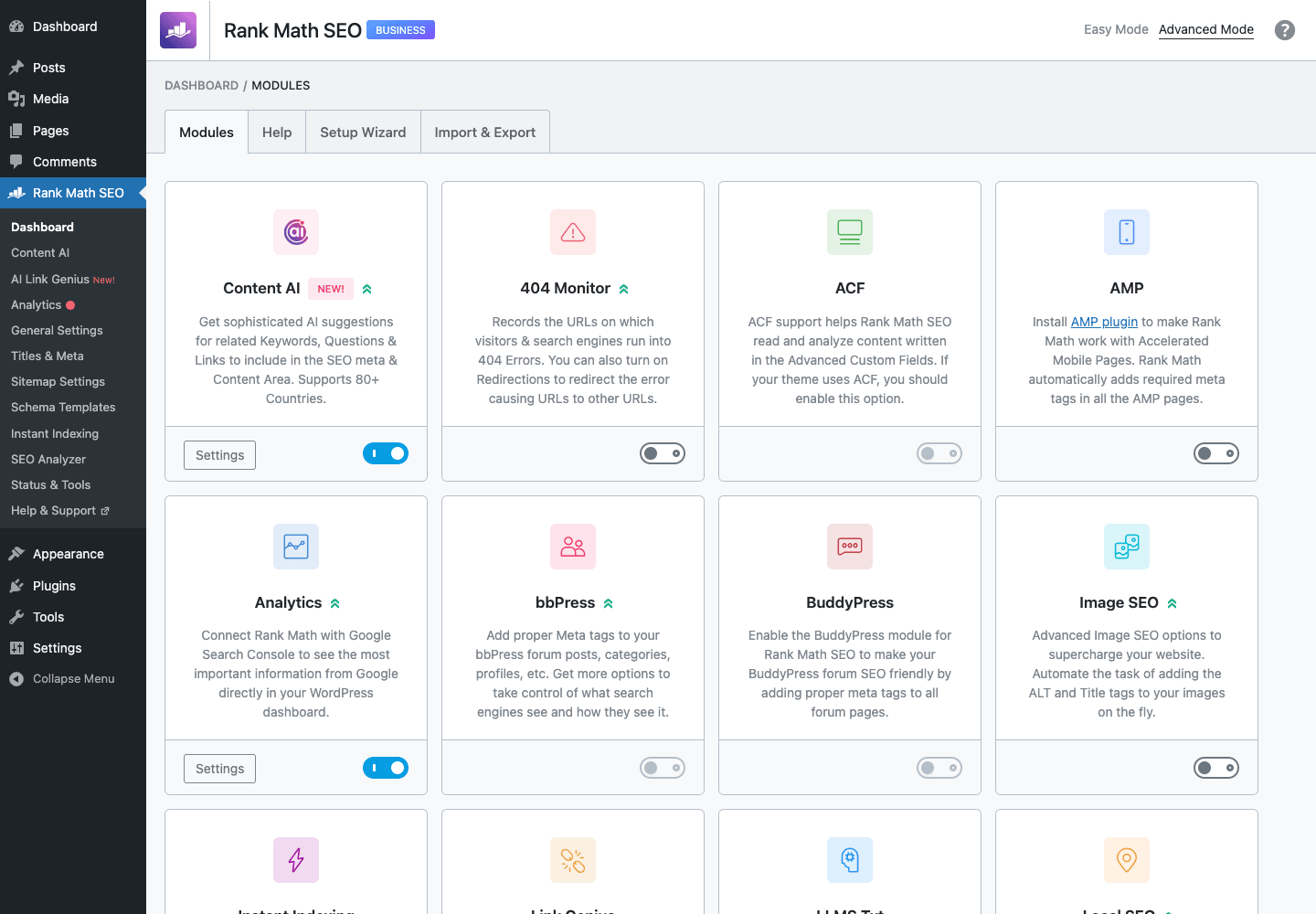
The dashboard has two tabs:
- Modules. Every feature is a tile with a description and a toggle. Click to enable/disable. The list includes: Content AI, 404 Monitor, ACF, AMP, Analytics, bbPress, BuddyPress, Image SEO, Instant Indexing, Link Counter, Local SEO, Podcast, Redirections, Role Manager, Rich Snippets / Schema, Search Console, SEO Analysis, Sitemap, Status & Tools, Web Stories, WooCommerce SEO, and several Pro additions.
- Setup Wizard. Re-run the wizard if you change site type or want to redo the onboarding.
The point of the module system is opinionated minimalism. Yoast loads everything always; Rank Math expects you to disable Analytics if you don’t use it, Redirections if you have a server-level redirect setup, Schema if you have another schema plugin, etc. The admin clutter drops noticeably when you turn off six or seven modules you don’t need.
What I usually leave on:
- Sitemap
- Rich Snippets (Schema)
- 404 Monitor
- Redirections
- SEO Analysis
- Image SEO
- Search Console
- Status & Tools
What I turn off unless I need it:
- bbPress, BuddyPress (if I don’t use those plugins)
- Podcast, Web Stories (niche)
- ACF (only if I use ACF and want Rank Math to read field values for SEO)
General Settings
The General Settings page covers everything that isn’t titles, sitemap, or analytics: links, breadcrumbs, image SEO, redirections, webmaster tools, Google Maps, etc.
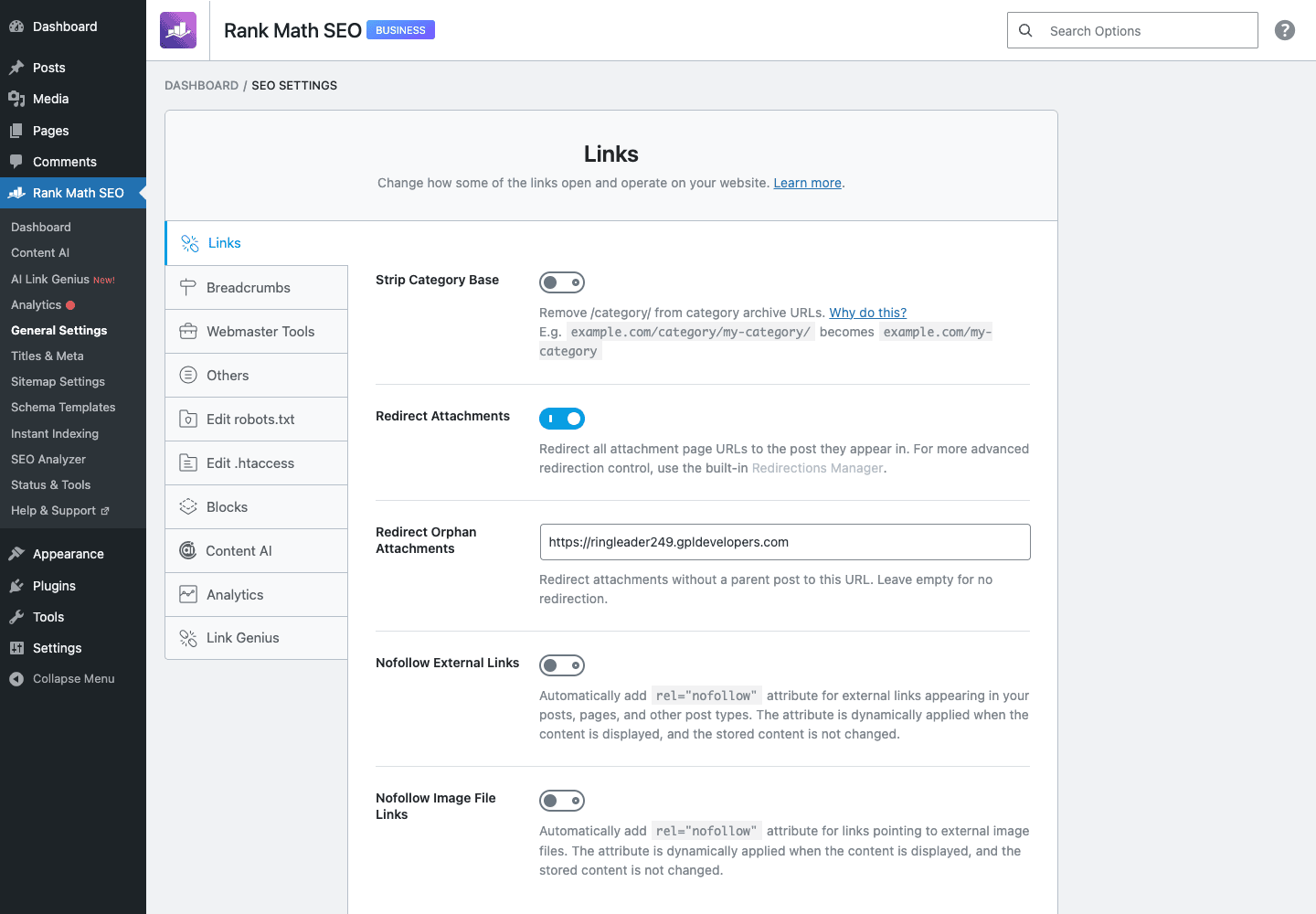
The sections worth knowing:
- Links. Strip category base, redirect attachments to parent (this matters), nofollow on external links, open external in new tab, internal link suggestions count.
- Images. Auto-set image title, alt, caption, description from the post title or filename. The killer setting here is Add missing alt attributes which prevents missing-alt errors on Lighthouse / accessibility audits.
- Breadcrumbs. Enable the
shortcode, set the separator, prefix, taxonomy. - Webmaster Tools. Verification codes for Google, Bing, Baidu, Yandex, Pinterest, Norton SafeWeb.
- Edit robots.txt. Inline editor for the robots.txt file (similar to Yoast’s File Editor).
- Edit.htaccess. Same for
.htaccess. Use carefully. - Analytics (Pro). Connect Google Analytics 4 and Search Console.
The default that matters most: redirect attachment URLs to parent. WordPress generates a separate "attachment page" for every image you upload. Google indexes them as thin pages. Turn this on; thank yourself later.
Titles & Meta
This is where the meat of your SEO configuration lives.
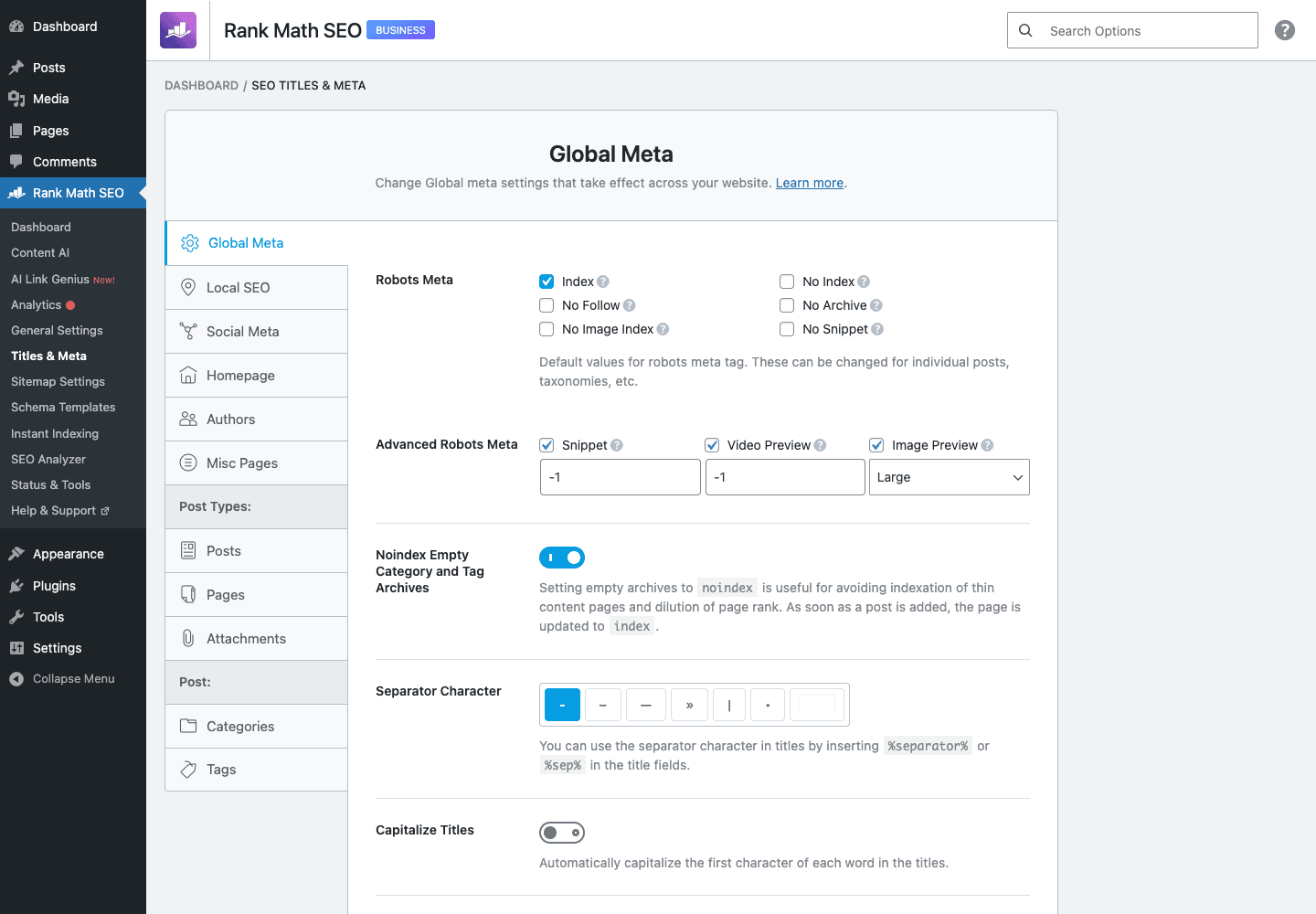
The left rail organises by what you’re configuring:
- Global Meta. Defaults for robots meta, title separator, capitalisation, Open Graph image fallback.
- Local SEO. Single LocalBusiness in free; multi-location in Pro.
- Posts / Pages / each custom post type. Title template (with variables like
%title%,%sep%,%sitename%,%page%), description template, schema type (Article, WebPage, Product, etc.), robots meta, custom robots. - Categories / Tags / each taxonomy. Same idea for taxonomy archives.
- Misc Pages. Search, 404, Author, Date archives, Static homepage.
The schema-per-content-type setting is a Rank Math strength: you can default every post to BlogPosting, every page to WebPage, and every "Event" custom post type to Event schema. With Pro’s Schema Templates you can build a custom JSON-LD template and apply it to all posts in a taxonomy.
Sitemap Settings
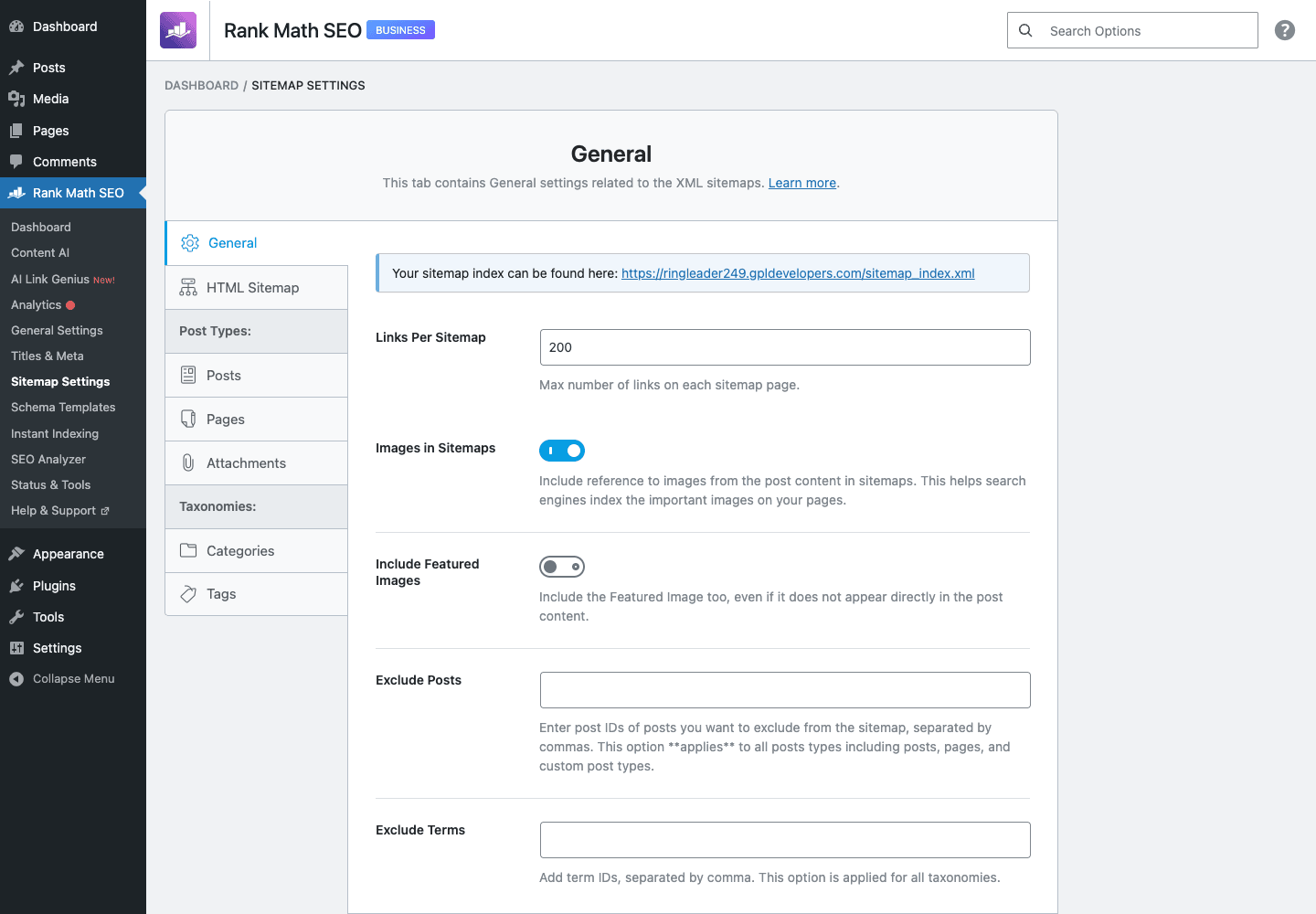
Sitemaps in Rank Math are flexible.
The sections:
- General. Posts per sitemap (default 200), include images, include featured image, ping Google/Bing on update.
- HTML Sitemap. Generate a human-readable sitemap as a shortcode or block.
- Post Types. Per post type, choose whether to include in sitemap and what image source to use.
- Taxonomies. Same for category, tag, custom taxonomies.
- Authors. Author archives sitemap on/off.
Pro adds News Sitemap, Video Sitemap, Local Sitemap as additional sections. The News Sitemap is what you need for Google News inclusion. Video Sitemap helps with Google Video search if your site embeds a lot of video.
The sitemap index is at /sitemap_index.xml. Submit that one URL to Search Console and Google discovers everything underneath.
The SEO Analyzer
The SEO Analyzer is a one-click site audit.
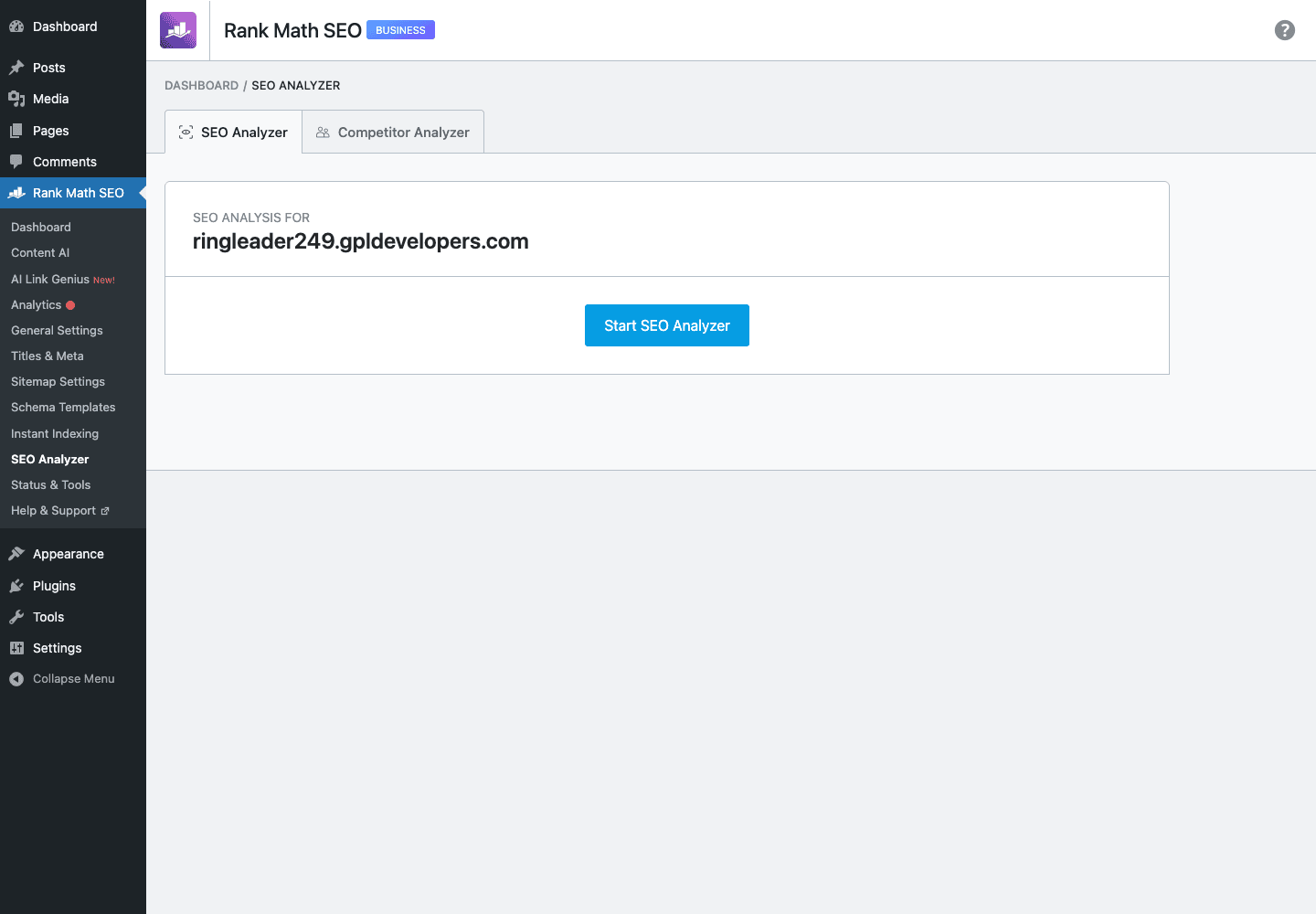
Click "Start Site-Wide Analysis" and Rank Math checks:
- Basic SEO. Common issues like missing title tags, missing meta descriptions, h1 problems, image alt text, broken links.
- Advanced SEO. Schema implementation, robots.txt, sitemap, mobile-friendliness, canonical tags.
- Performance. Page speed, image weight, CSS/JS optimisation hints.
- Security. SSL, vulnerable plugin versions, X-Frame-Options, Content Security Policy.
The output is a checklist of pass/warning/fail items with explanations. It’s not a substitute for a tool like Ahrefs or Screaming Frog, but for a quick "is this site SEO-ready?" check it does the job in 30 seconds.
You can also run Analyze Competitor URL to get the same analysis on someone else’s page. Useful for benchmarking.
Using Rank Math in the post editor
The editor experience differs slightly between Classic Editor and Gutenberg.
In Gutenberg, Rank Math adds:
- A score widget in the top-right toolbar showing the current post’s SEO score (out of 100), readability score, and a clickable badge to open the full panel.
- A sidebar plugin (icon in the top-right, click to open). The sidebar has tabs for General (focus keyword, snippet preview, basic SEO), Advanced (robots, canonical, redirect), Schema (pick a schema type and edit fields visually), Social (per-post Facebook/Twitter overrides), and (Pro) AI Content / Link Genius.
- A block at the bottom of the content area with the rich-text editor for the meta description (with character count and live snippet preview).
In Classic Editor, you get the same things rendered as a meta box below the editor with tabs.
What you set per post:
- Focus keyword(s). Up to 5. Each gets its own analysis tab.
- Snippet preview. Live preview of how the page will look in Google. Click to edit title, slug, description.
- Schema. Pick from the catalogue, fill the required fields. Pro adds Custom Schema Templates.
- Advanced. Robots meta (noindex/nofollow/noarchive/etc.), canonical URL, breadcrumb title override, redirect-on-publish.
- Social. Per-post Facebook and Twitter title, description, image overrides.
The real-time analysis on the right side checks 60+ ranking factor signals. The list is more granular than Yoast’s. It includes things like "keyword in URL", "keyword in introduction", "keyword density", "internal link with focus keyword anchor", "image alt text", "schema attached", "Flesch reading ease", "content length vs keyword volume". Each generates a green/orange/red dot.
A practical note: don’t chase 100/100. A post that scores 85 with natural language reads better than a stuffed 95. Use the dots as a checklist of things to think about, not rules to obey.
Pro-only modules in depth
The modules Pro unlocks are where the upgrade earns its money.
Analytics. Once you connect Google Search Console and Google Analytics, the Analytics module ingests your data and surfaces it inside WordPress. You get rank-tracking by keyword, position changes over time, top-winning and top-losing pages, impressions, clicks, CTR, top countries, top devices, all without leaving the WP admin. For sites where you spend more time in WP than in GSC, this is a real productivity boost.
Keyword Tracker. Add up to 1000+ keywords; Rank Math checks your position daily. Combined with the Analytics data, this is essentially a built-in lightweight Ahrefs/Semrush for the keywords you actually care about.
Schema Templates. Build a custom Schema.org JSON-LD template visually, save it, then apply it to all posts of a content type or taxonomy. Useful for sites with recurring schema needs (event series, recipe blog, product catalog) where editing every post by hand is impractical.
News / Video / Local Sitemaps. Specialised sitemaps for publishers, video sites, multi-location businesses. The News Sitemap is the only way to get listed in Google News.
AI Content / AI Link Genius. Rank Math’s answer to the AI-assisted SEO trend. Content AI generates keyword research and content suggestions; Link Genius proposes internal links based on semantic similarity. Both use external AI providers; the data is processed at Rank Math’s API.
Advanced Redirections. Bulk import/export redirections via CSV. Regex support. Useful for migrations or repeated URL restructures.
Role Manager (advanced). Free Rank Math has basic role permissions; Pro adds per-module permissions. Limit your editorial team to changing titles and descriptions; lock down schema and redirects to admins.
Bulk Editor. Edit titles, descriptions, focus keywords, schema, robots for many posts on one page. Big productivity boost for migrations and rebrands.
WooCommerce SEO. Product schema, brand support, GTIN, MPN, additional product meta fields, dynamic OG image per product.
Recommended settings for most sites
Run the setup wizard with site-appropriate answers, then tweak:
Modules to enable (typical content site):
- Sitemap
- Rich Snippets (Schema)
- 404 Monitor
- Redirections
- SEO Analysis
- Image SEO
- Search Console / Analytics (Pro)
- Status & Tools
Disable: bbPress, BuddyPress, Podcast, Web Stories (unless you actually use them).
General → Links: Redirect attachment URLs to parent: yes. Strip category base: usually yes.
General → Images: Add missing alt attributes: yes. Auto-add image titles: yes.
Titles & Meta → Posts: Title template %title% %sep% %sitename%. Description template %excerpt%. Schema type: BlogPosting (for a blog) or Article. Robots: index, follow.
Titles & Meta → Categories / Tags: Tags usually noindex (they create duplicate content). Categories noindex unless you have well-curated categories with unique descriptions.
Sitemap → Posts per sitemap: 200 default is fine.
Analytics (Pro): Connect both GA4 and GSC. The data inside WP is one of the strongest reasons to use Pro.
Performance and Core Web Vitals
Rank Math’s effect on Core Web Vitals is similar to Yoast’s: minimal direct impact, both good and bad.
- The plugin runs mostly in the admin. Front-end output is metadata (title, description, OG, JSON-LD, link tags), all in
<head>. None of this affects LCP or CLS in any way that matters. - The admin UI is React-heavy. On slow servers the editor sidebar can feel slightly laggy when you have lots of widgets/sidebars open. Not a deal-breaker.
- Schema output is complete. If you have a lot of schema enabled across many post types, the page
<head>can get long. Use Rank Math’s filters to trim what you don’t need. - Front-end resources: a small JS file for breadcrumb behaviour and a few inline scripts. Nothing render-blocking.
Pair Rank Math with WP Rocket for caching and you get the standard performance stack.
Real-world use cases
Small blog / portfolio. Free Rank Math is enough. Pro is overkill until you’re publishing regularly and care about rank tracking.
Multi-author publication. Pro. The bulk editor saves hours on title rewrites.
Agency managing multiple client sites. Pro is the default. Role Manager + Bulk Editor + Schema Templates are agency-grade time savers.
WooCommerce store. Pro + the WooCommerce SEO module gives product schema, GTIN/MPN, brand, and dynamic product OG images. Pair with Elementor Pro for product page design.
News / publication site. Pro’s News Sitemap is the entry ticket for Google News. Combined with Schema Templates for Article schema, this is the strongest news-SEO stack on WordPress.
Multi-location business. Pro’s multi-location LocalBusiness schema is the obvious choice.
SaaS or membership site. Pair with WooCommerce Subscriptions for the billing and Rank Math for the SEO. Use Pro’s Role Manager to give marketing access to SEO fields without touching subscription pricing.
Developer reference: hooks, filters, and the schema API
Rank Math’s hook surface is large and well-documented. Below are the ones I reach for most.
Modifying the front-end SEO title and description
add_filter( 'rank_math/frontend/title', function ( $title ) {
 if ( is_singular( 'event' ) ) {
 $date = get_post_meta( get_the_ID(), 'event_date', true );
 if ( $date ) {
 return sprintf( '%s (%s) - %s', get_the_title(), $date, get_bloginfo( 'name' ) );
 }
 }
 return $title;
} );

add_filter( 'rank_math/frontend/description', function ( $desc ) {
 if ( is_search() ) {
 return sprintf( 'Search results for "%s" on %s.', get_search_query(), get_bloginfo( 'name' ) );
 }
 return $desc;
} );
Robots meta
add_filter( 'rank_math/frontend/robots', function ( $robots ) {
 if ( is_singular( 'post' ) && get_post_meta( get_the_ID(), '_unlisted', true ) ) {
 $robots['index'] = 'noindex';
 $robots['follow'] = 'nofollow';
 }
 return $robots;
} );
Open Graph and Twitter Card
add_filter( 'rank_math/opengraph/facebook/image', function ( $image, $context ) {
 if ( is_singular( 'product' ) && function_exists( 'wc_get_product' ) ) {
 $product = wc_get_product( get_the_ID() );
 $image_id = $product->get_image_id();
 if ( $image_id ) {
 return wp_get_attachment_image_url( $image_id, 'full' );
 }
 }
 return $image;
}, 10, 2 );

add_filter( 'rank_math/opengraph/twitter/title', function ( $title ) {
 return $title. ' | @yourbrand';
} );
Schema modifications
This is where Rank Math is genuinely good. The schema output is a single @graph you can hook.
add_filter( 'rank_math/json_ld', function ( $data, $jsonld ) {
 if ( is_singular( 'event' ) ) {
 $data['Event'] = [
 '@type' => 'Event',
 '@id' => get_permalink(). '#event',
 'name' => get_the_title(),
 'startDate' => get_post_meta( get_the_ID(), 'event_start', true ),
 'endDate' => get_post_meta( get_the_ID(), 'event_end', true ),
 'eventStatus' => 'https://schema.org/EventScheduled',
 'location' => [
 '@type' => 'Place',
 'name' => get_post_meta( get_the_ID(), 'event_venue', true ),
 'address' => get_post_meta( get_the_ID(), 'event_address', true ),
 ],
 ];
 }
 return $data;
}, 10, 2 );
For per-schema-type filters:
add_filter( 'rank_math/snippet/rich_snippet_article_entity', function ( $entity ) {
 $entity['articleSection'] = wp_strip_all_tags( get_the_category_list( ', ' ) );
 return $entity;
} );

add_filter( 'rank_math/snippet/rich_snippet_organization_entity', function ( $entity ) {
 $entity['founder'] = [
 '@type' => 'Person',
 'name' => 'Jane Doe',
 ];
 return $entity;
} );
Sitemap modifications
add_filter( 'rank_math/sitemap/exclude_post_types', function ( $excluded ) {
 $excluded[] = 'private-events';
 return $excluded;
} );

add_filter( 'rank_math/sitemap/entry', function ( $entry, $post_type, $post ) {
 if ( $post_type === 'product' && get_post_meta( $post->ID, '_hide_from_sitemap', true ) ) {
 return false; // exclude this one entry
 }
 return $entry;
}, 10, 3 );

add_filter( 'rank_math/sitemap/items_limit', function () {
 return 500; // up from default 200 if you want larger sitemap chunks
} );
Breadcrumb customisation
add_filter( 'rank_math/frontend/breadcrumb/items', function ( $crumbs, $class ) {
if ( is_singular( 'event' ) ) {
array_splice( $crumbs, 1, 0, [
[ 'Events', home_url( '/events/' ) ],
] );
}
return $crumbs;
}, 10, 2 );
add_filter( 'rank_math/frontend/breadcrumb/separator', function () {
return '<span class="bc-sep">→</span>';
} );
Redirection programmatic
add_action( 'rank_math/redirection/redirected', function ( $source_url, $target_url, $code ) {
 // Log the redirect, send to analytics, etc.
 error_log( "Redirected $source_url to $target_url ($code)" );
}, 10, 3 );

// Programmatically add a redirect
add_action( 'init', function () {
 if (! class_exists( '\RankMath\Redirections\DB' ) ) {
 return;
 }
 $sources = [ [ 'pattern' => '/old-url', 'comparison' => 'exact' ] ];
 \RankMath\Redirections\DB::update_iff( [
 'sources' => $sources,
 'url_to' => home_url( '/new-url/' ),
 'header_code' => 301,
 'status' => 'active',
 ] );
} );
Disabling Rank Math on specific endpoints
add_filter( 'rank_math/frontend/disable_integration', function ( $disable ) {
 if ( strpos( $_SERVER['REQUEST_URI']?? '', '/api/v1/' ) === 0 ) {
 return true;
 }
 return $disable;
} );
Adding a Pro-specific component disabled
add_filter( 'rank_math/admin/pro_components', function ( $components ) {
 unset( $components['analytics'] ); // hide Analytics module entirely
 return $components;
} );
WP-CLI
# Recreate sitemap files
wp rank-math sitemap regenerate

# Recount redirect hits
wp rank-math redirections clean
Migrating from Yoast or another SEO plugin
Rank Math has a built-in importer for Yoast, AIOSEO, SEOPress, The SEO Framework, and Squirrly. Run it from Status & Tools → Import & Export → Import.
What gets imported:
- Titles and meta descriptions per content type
- Focus keywords (mapped 1:1, with Yoast’s first focus keyword mapping to Rank Math’s primary)
- Robots meta settings
- Open Graph and Twitter Card data
- Redirects (Yoast Premium redirect manager → Rank Math redirections)
- Sitemap settings
- Schema settings where the source plugin had them
What does NOT migrate cleanly:
- Custom Yoast snippet variables (
%%cf_xyz%%,%%my_var%%) need to be re-mapped to Rank Math’s variable system. - Complex Yoast schema graph customisation (via the
wpseo_schema_*filters) doesn’t have a 1:1 equivalent and will need to be rewritten using Rank Math’srank_math/json_ldfilter. - Yoast Local SEO data (multi-location) maps to Rank Math Pro’s multi-location, but addresses sometimes need cleanup.
Pro tip. Run the import on a staging copy first. Open the live site post-import and check the homepage, a typical blog post, a category, and a tag for correct titles, descriptions, OG images. If everything looks good, mirror to production.
After import, disable the old plugin to avoid duplicate meta tags. Don’t leave both running.
Pricing and licensing
Rank Math SEO Pro is sold as an annual license per site, with multi-site upgrades. The license unlocks Pro features, updates, and support.
The version on GPL Times is GPL-licensed, redistributable under the GPL. You’ll save real money over time, especially if you run more than one site. Support comes from the Rank Math community + your own knowledge rather than direct vendor support. The plugin is stable enough that most installs never need vendor support.
A note on the AI features in Pro: they use Rank Math’s external AI service. the GPL-licensed version includes the code but you’d need a paid subscription to use the AI endpoints. If AI features aren’t a priority, the GPL-licensed version still gives you Analytics, Keyword Tracker, Schema Templates, advanced redirections, role manager, bulk editor, and the rest.
The Membership option on GPL Times bundles Rank Math Pro with WP Rocket, Yoast SEO Premium, Elementor Pro, and WooCommerce Subscriptions. If you want both Yoast and Rank Math for comparison, the bundle is the cheapest way.
FAQ
Is Rank Math better than Yoast?
Different rather than better. Free Rank Math has more features than free Yoast. Pro is roughly comparable to Yoast Premium at a similar price, with the standout advantage being built-in Analytics + Keyword Tracker. Pick whichever UI you prefer.
Can I run both Rank Math and Yoast at the same time?
No. They both write meta tags to the page <head>; you’ll get duplicates and Google will be confused. Pick one.
Does Rank Math support WooCommerce?
Yes. The free version handles basic product titles and descriptions. Pro adds the WooCommerce SEO module with Product schema, GTIN/MPN, brand, and dynamic product OG images.
Does Rank Math slow down my site?
Negligibly. The plugin runs mostly in the admin. Front-end output is metadata in <head>. No noticeable LCP or CLS impact.
Can I import from Yoast?
Yes. Status & Tools → Import & Export → Import. Imports titles, descriptions, focus keywords, redirects, Open Graph, and schema where mappable.
Does it work with Gutenberg?
Yes, with a dedicated sidebar plugin. Also works with Classic Editor, Elementor, and Divi.
Does it support multilingual sites?
Yes, with WPML and Polylang. Each translated post has its own SEO data.
What about Core Web Vitals?
Rank Math’s effect on Core Web Vitals is minimal. The plugin runs in admin; front-end output is in-head metadata. Pair with WP Rocket for caching and you’ll have a fast SEO setup.
Is the AI Content feature good?
It’s useful for keyword research and rough content outlines. Not a replacement for editorial judgement. Treat output as a draft.
Can I roll back Rank Math?
Yes, from Status & Tools → Version Control. Available for both free and Pro.
What happens if my Pro license expires?
Pro features keep working; you stop receiving updates and lose access to the AI services. Renew or fall back to free Rank Math.
Final thoughts
Rank Math SEO Pro is the most credible alternative to Yoast Premium on WordPress today. The free version is unusually generous, Pro adds built-in Analytics that’s genuinely useful for solo operators and small teams, and the agency features (Bulk Editor, Schema Templates, Role Manager) earn their money on multi-site setups.
The plugin’s biggest advantage is the module system: turn on what you need, hide what you don’t. You’re not buying a single monolithic tool; you’re buying a kit. The downside is that if you’re new to SEO, more options can be paralysing. The setup wizard helps; spend the 10 minutes to run it.
For developers, the hook and filter surface is large and well-documented. Schema customisation is genuinely easier than Yoast’s (single rank_math/json_ld filter vs Yoast’s per-piece filters). Sitemap and breadcrumb filters give you full control.
If you’re standing up a content site today, the safe stack is: Rank Math SEO Pro + WP Rocket + Elementor Pro for design + WooCommerce Subscriptions if you sell anything recurring. That stack handles SEO, performance, design, and recurring billing for most modern WordPress sites.
For deeper reading, the Rank Math Knowledge Base and Google’s Search Central documentation are the best free references. Pair either with this plugin and you’re set for a long while.