

I’ve turned three vanilla WooCommerce stores into B2B portals in the last eighteen months. One sold packaging supplies to small bakeries, one sold safety gear to construction subcontractors, and one was a long-running cosmetics brand whose distributor network kept emailing for a "wholesale price list" because the checkout was retail-only. Each project had the same outline. Hide the public catalog from guests, show tiered prices to logged-in buyers, support quote requests instead of immediate checkout for big-ticket items, hand approved buyers a net-30 invoice option, and exempt resellers from VAT after a quick number check.
I tried a lot of things first. Catalog Mode with hand-rolled coupons. The official WooCommerce Memberships approach. A patchwork of Wholesale Suite and Conditional Discounts. B2B for WooCommerce by Addify. Most of them solved one or two layers of the problem and left a gap somewhere else, usually around quotes, VAT, or per-group shipping methods.
B2BKing is the one that consistently covers the whole stack from a single admin. This is a long review of what it does, where it shines, the rough edges, and the developer hooks worth knowing if you’re going to extend it. By the end you’ll know exactly when B2BKing is the right pick and when it isn’t.
Table of Contents
- What is B2BKing?
- B2BKing vs Wholesale Suite: the eternal WooCommerce B2B argument
- User groups, tiers, and the "who sees what" problem
- Key features at a glance
- Installation and first hour
- A guided tour of the admin
- The quote-to-order flow, end to end
- Tax handling for B2B: where most B2B plugins fall down
- Migration: moving from a coupon-codes wholesale setup to B2BKing
- Real-world use cases
- Developer reference: hooks, filters, shortcodes, post types
- Performance, compatibility, and gotchas
- What B2BKing doesn’t replace (and what to use instead)
- Pricing and licensing
- FAQ
- Final thoughts
What is B2BKing?
B2BKing is a WooCommerce extension by WebWizards, a small Romanian dev studio, that turns a regular WooCommerce store into a wholesale or B2B-capable one without you having to glue four plugins together. The plugin header literally says "the complete solution for turning WooCommerce into an enterprise-level B2B e-commerce platform", and that marketing line is closer to the truth than most plugin descriptions.
Out of the box it handles user groups with their own prices and product visibility, multi-step B2B registration with admin approval, a built-in quote request system with conversation threads, sales offers from a sales rep to a specific customer, sub-accounts under a parent company, EU VAT validation through the VIES service, purchase order and invoice (net-30) payment gateways, a bulk-order form for repeat buyers, and a long list of smaller things you’d otherwise hand-build.
The plugin’s been around for several years. It ships through CodeCanyon and through the vendor’s own site, and the copy on GPL Times is the same Pro zip with the license auto-activated so you don’t see the activation nag screen.
If you’re new to the wholesale problem on WooCommerce, here’s the short version of why this is a category of plugin at all. Vanilla WooCommerce shows one price per product to everybody. There’s no concept of "this customer pays 20% less", "this customer can see this product but the guest can’t", or "this customer pays after 30 days". B2BKing bolts all of that on top of the existing WooCommerce data model without forking it.
B2BKing vs Wholesale Suite: the eternal WooCommerce B2B argument
If you’ve spent any time in the WooCommerce subreddit, you’ve watched this argument play out. WooCommerce Wholesale Suite (and the newer Barn2 WooCommerce Wholesale Pro) take a different design approach: they bolt wholesale on top of WordPress user roles. Each tier is a WP role, you assign users to the role, and the plugin’s pricing rules check the role.
B2BKing uses user groups, stored as a b2bking_group custom post type, that exist independently of WP roles. The same WP role can belong to multiple groups, and you can move a user between groups by changing one bit of user meta, which then triggers a recalculation. The role approach feels intuitive at first, but it breaks the moment you want a customer who is both "Tier 2 wholesale on cosmetics" and "Tier 1 wholesale on packaging", or when you need to use roles for something else entirely (subscription tier, member level, multi-vendor seller).
Practical differences I keep running into:
- Per-group payment methods. B2BKing lets you enable or disable any installed payment gateway per group from the group editor. Wholesale Suite needs a separate add-on. If you want net-30 only for Tier 2 and credit-card-only for Tier 1, B2BKing handles it in two clicks.
- Per-group shipping methods. Both can do this with limits. B2BKing’s UI is the same group editor as payments, which feels obvious. Wholesale Suite makes you configure shipping zones first, which is more flexible at the cost of being noisier.
- Quote workflow. B2BKing has a built-in quote system with admin/customer conversations stored as a
b2bking_conversationCPT. Wholesale Suite handed me off to a separate request-a-quote add-on. If quotes are even slightly important, B2BKing wins on integration. If quoting is the only B2B feature you need, without the wider wholesale pricing system, a dedicated plugin like YITH WooCommerce Request a Quote covers that one job on its own. - Bulk order form. Both have it. B2BKing’s is a Gutenberg-friendly shortcode, Wholesale Suite’s is shipped as a standalone product (Wholesale Order Form).
- Tax handling. B2BKing has built-in EU VIES validation. Wholesale Suite punts to the WC tax engine without extras.
- Price visibility for guests. Both can hide the price and replace it with "Login to view price" or "Request a quote". B2BKing has more granular control over what guests see (hide price only / hide product / hide entire shop / force login). Useful if you sell a mix of public-facing and trade-only SKUs.
Where Wholesale Suite is ahead: its bulk-edit interface for product-level prices is faster for very large catalogs, and its docs are better.
I default to B2BKing when the project has more than three of these requirements at once. For a single-tier "give logged-in buyers 15% off" job, Wholesale Suite is the simpler tool.
User groups, tiers, and the "who sees what" problem
The single biggest reason WooCommerce stores struggle with B2B is the visibility matrix. A grocery wholesaler wants the catering customers to see cleaning supplies but not retail snacks. The retail walk-ins shouldn’t see prices for the case-of-24 SKUs. Logged-out visitors shouldn’t see anything at all. Approved-but-unverified accounts can browse but can’t check out.
That matrix is the problem B2BKing solves first.
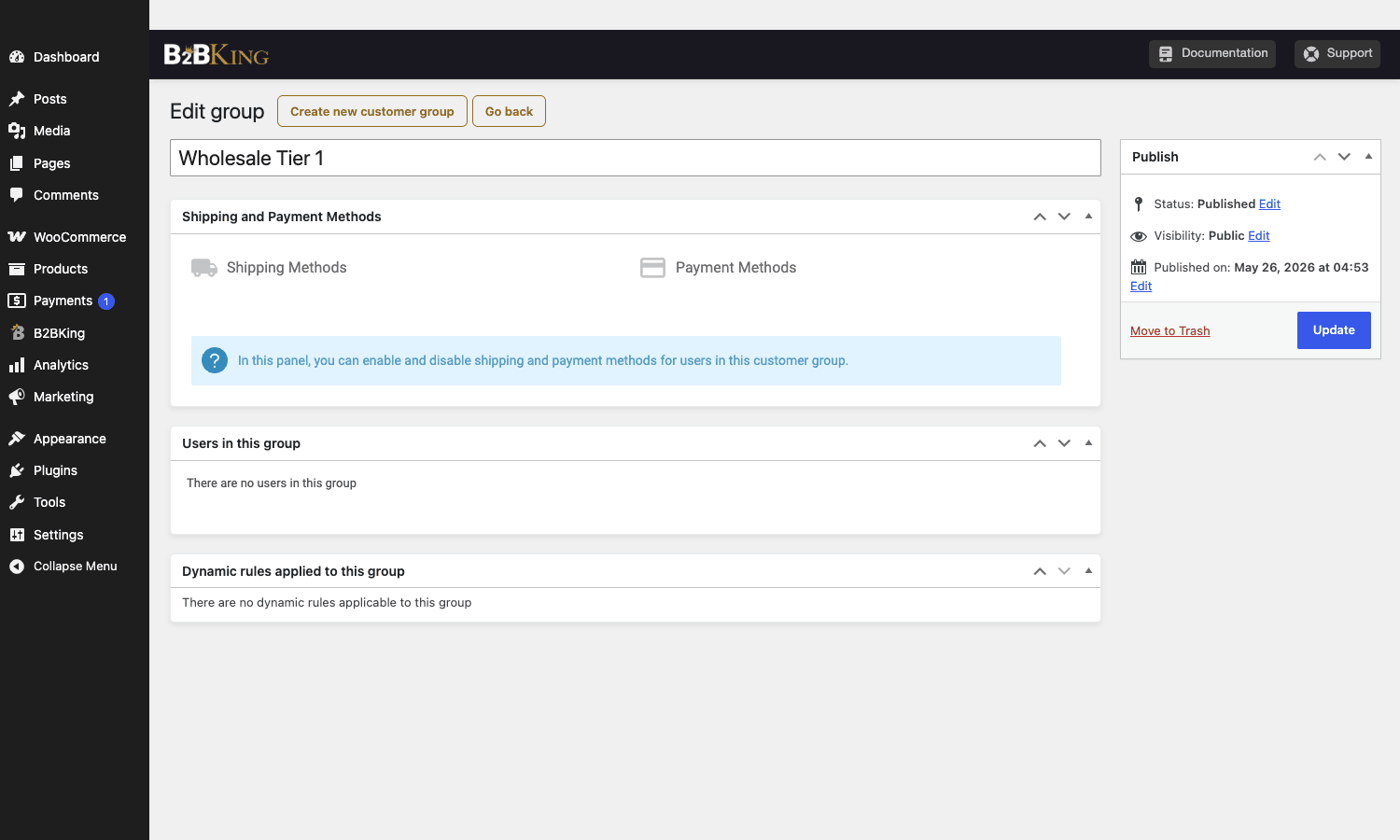
The whole plugin revolves around groups. Each group is a row in the b2bking_group custom post type. Open one and you get a panel with the controls that matter: which payment methods this group sees, which shipping methods it sees, which users belong to it, and which dynamic rules apply.
A user gets attached to a group via the b2bking_customergroup user meta key. You can change that meta in code, in the user editor, or in the group editor itself, and the plugin recalculates everything via the b2bking_finish_apply_group_rules action.
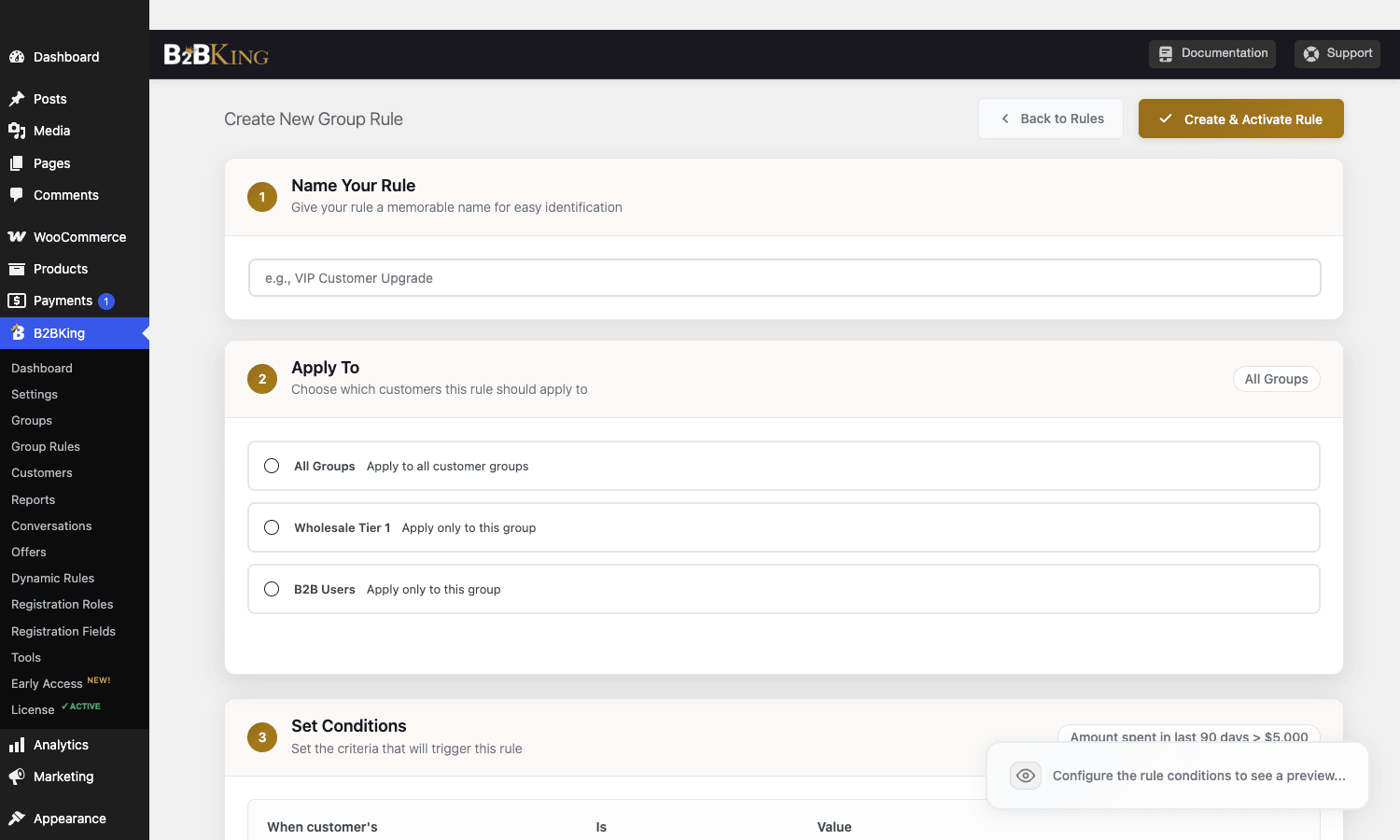
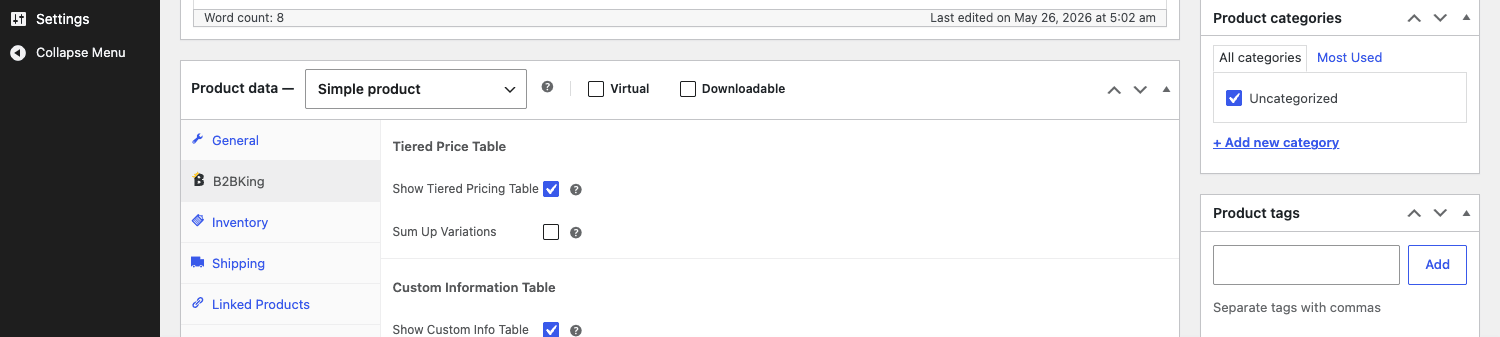
Prices come from two places. Per-product manual entries (where you set a group’s price on the product itself, in the B2BKing tab of the product editor), and global Group Rules, which are matrix-style rules like "Wholesale Tier 2 gets 25% off everything in the Cleaning category". Group Rules are stored as a b2bking_grule CPT and the editor for them is a step-by-step wizard. It’s the cleanest implementation of B2B pricing rules I’ve worked with.
There’s a real, practical implication here. Because pricing rules live on the group (not on each product), you can move a hundred customers between tiers by changing one foreign-key user meta value, instead of recalculating every product’s price for every user. That’s why the plugin scales well past a few hundred SKUs. The per-product manual matrix doesn’t scale past a few hundred SKUs without the bulk-edit add-on, and I’ll come back to that as a real complaint later.
Key features at a glance
I won’t dump the whole marketing list. Here’s what actually moves the needle.
- Customer groups with their own prices, visibility, payment, and shipping methods. Stored as a CPT, so you can have as many as you want without bloating WP roles.
- Group Rules and Dynamic Rules. Group Rules are simple ("Tier 1 sees 20% off"). Dynamic Rules are more flexible ("everyone gets 10% off if cart total is over $500", "Tier 2 gets free shipping on this category").
- Tiered Pricing tables. Buy 1-9 at $50, 10-49 at $45, 50+ at $40. The table appears on the product page and is fully configurable per product or per group.
- Multi-step B2B Registration form with custom fields, file uploads, and admin approval. Built-in approval queue on the dashboard.
- Hybrid B2B / B2C mode so a single store can serve retail walk-ins and approved wholesale buyers without two separate sites.
- Quote requests with full conversation threads. Customers add products to a quote basket, send it as a message, the admin replies with a custom offer, the customer accepts and the offer becomes a real WooCommerce order.
- Sales rep offers. A staff member with a sales role can create offers for specific customers with their own price/quantity, send them as an emailed link, and have the customer accept and check out.
- Purchase Order and Invoice (net-30) gateways built in. Order goes to a special "Awaiting invoice payment" status that you can then mark paid manually after wire/bank transfer.
- Company subaccounts. A parent company gets one master user, then adds sub-users with restricted permissions. Useful for procurement teams where one person approves and another places orders.
- Bulk Order Form with autocomplete and SKU-first input, so a buyer reordering 80 SKUs doesn’t browse the shop one at a time.
- CSV Upload Order. Same idea, paste a CSV of SKU + quantity and the cart fills itself.
- Saved purchase lists so repeat buyers can save a cart and reorder later.
- EU VAT (VIES) validation at registration and at checkout, with built-in tax-exemption for valid B2B VAT numbers.
- Conditional pricing display (incl/excl VAT toggle on the front-end for B2B users).
- Custom registration fields as a CPT, so you can collect company size, business type, tax ID, license document upload, etc., without a separate form plugin.
- Per-product custom information tables. Useful for spec sheets and "minimum order quantity" callouts.
- Min/max/step quantity rules. Force a product to be ordered in multiples of 12, with a minimum of 24 and a maximum of 480 per order.
- Multilingual and multi-currency aware. Plays with WPML and the popular currency switchers.
That list is long because the plugin is doing a lot. Most of it is opt-in, gated by toggles on the Main Settings screen.
Installation and first hour
You install B2BKing the same way you’d install any premium WordPress plugin: upload the zip in Plugins > Add New > Upload, activate, dismiss the welcome notice. The first hour is mostly about choosing your mode and creating one group to test against.
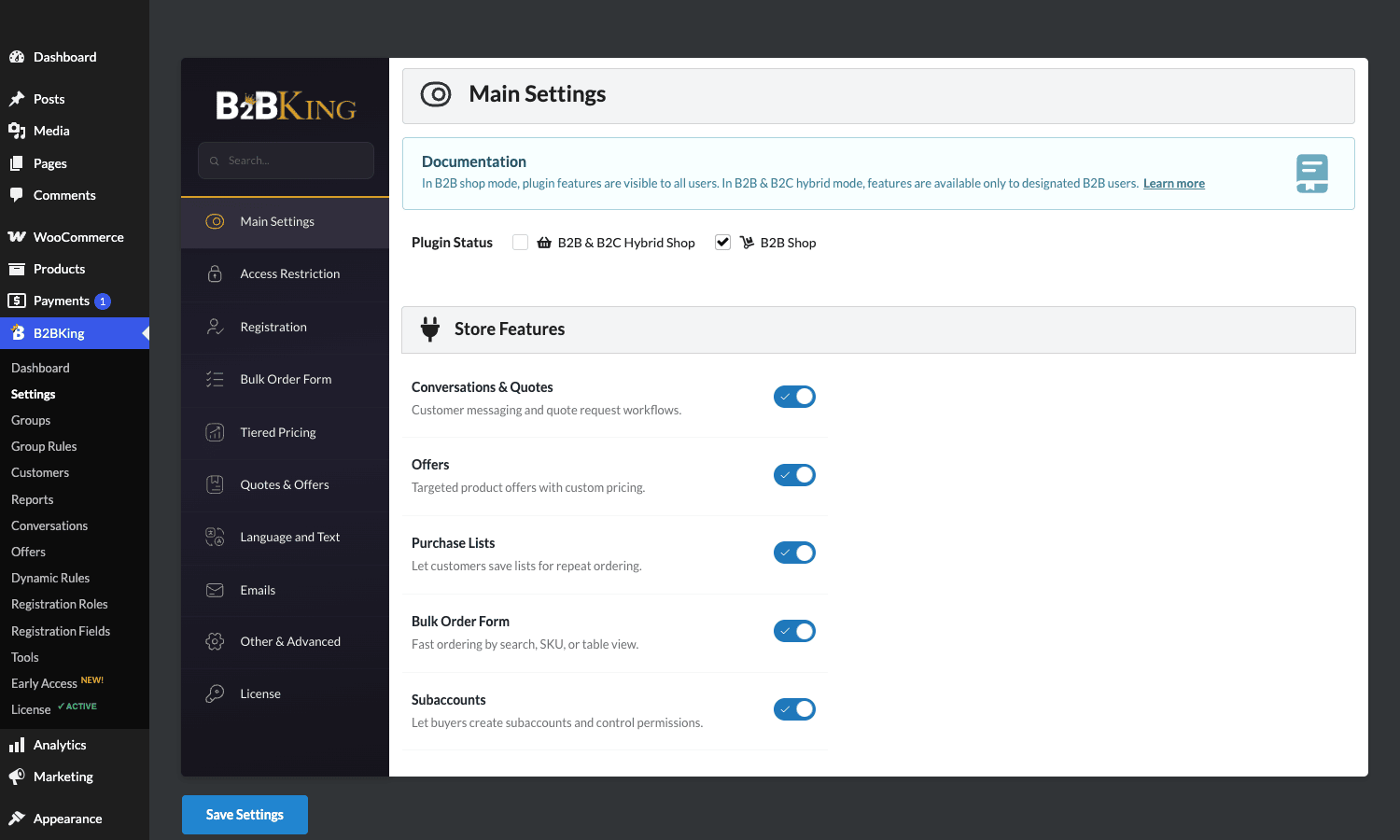
- Pick your mode. Go to B2BKing > Settings > Main Settings and set the Plugin Status. You’ll see two main options: "B2B Shop" (everyone is treated as a B2B buyer, registration is gated, no retail prices anywhere) and "B2B & B2C Hybrid Shop" (the default, where logged-out and B2C users see regular WooCommerce behavior, and only B2B users see the group rules).
- Create your first group. Go to B2BKing > Groups > Add new customer group. Give it a name (something specific like "Wholesale Tier 1" rather than "Customers"). Hit publish. Now you can attach pricing rules to it.
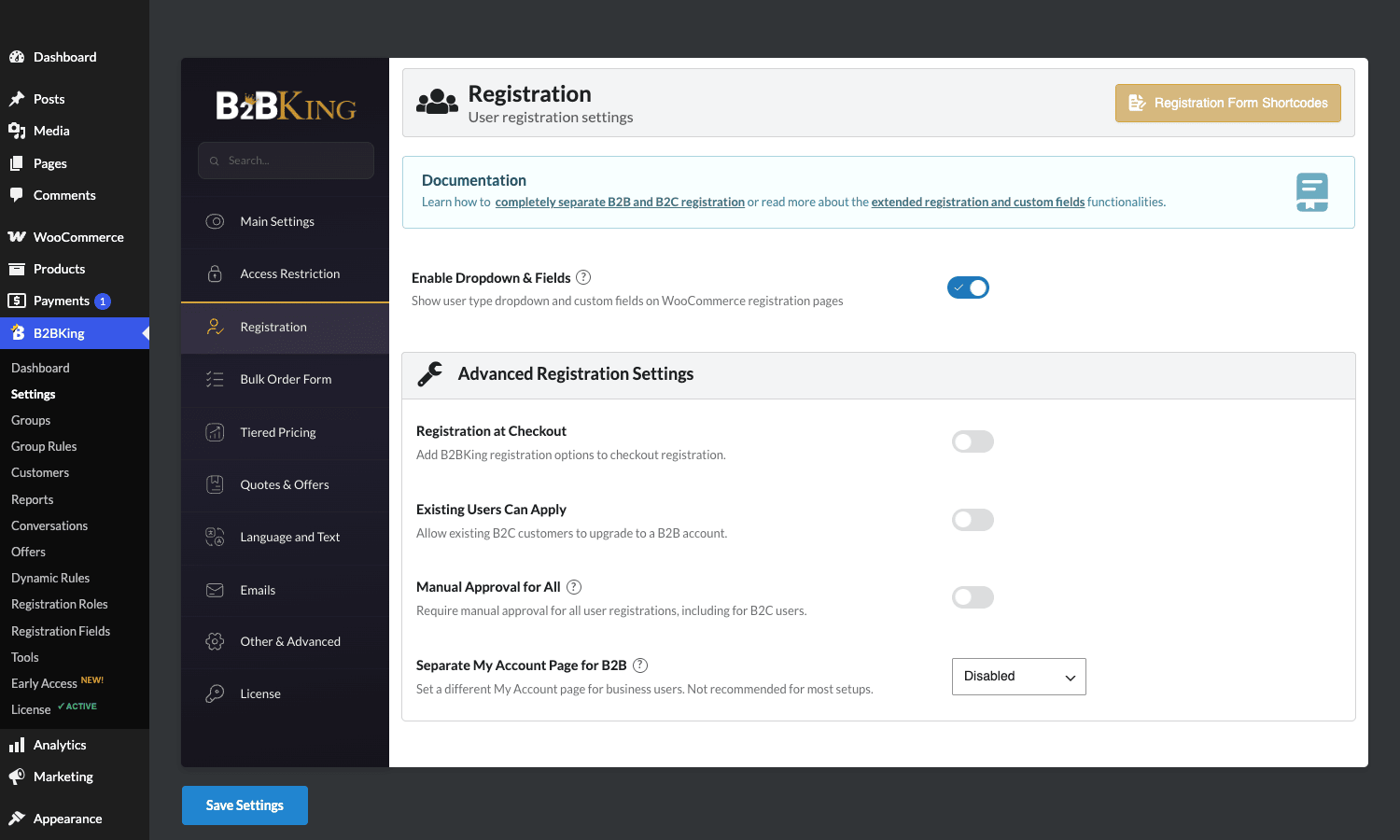
- Decide if you want manual approval. B2BKing > Settings > Registration > Manual Approval for All. If on, new signups land in a queue on your dashboard until you approve them. For a real B2B store this is almost always the right answer.
- Build a Group Rule. B2BKing > Group Rules > Add New Rule. Pick a group, set the condition (e.g. "All products"), and the action ("Discount: 20%"). Save.
- Create a B2B Registration page. New page, paste the shortcode
[b2bking_b2b_registration](or[b2bking_b2b_registration_only]to skip the login UI). Publish. That’s your B2B onboarding URL. - Test the front-end. Open the registration page in a private window, sign up as a fake B2B customer, then approve yourself from the admin. Reload the shop. You should see tier prices.
If you set up everything correctly, your B2B users now see different prices, can’t accidentally check out as retail, and get a chance to register through a proper form rather than the bare WordPress signup.
A couple of things to do before launch:
- Configure email notifications under Settings > Emails. There are 8 different B2B-specific emails (registration submitted, approved, rejected, new quote, new offer, etc.). Each one has its own subject and body.
- Set the Plugin Status mode correctly. Switching mid-launch will not blow up the data but it will surprise visitors.
- Decide on guest behavior under Settings > Access Restriction. The four options are None, Hide prices, Hide shop & products, and Hide entire website (force login).
A guided tour of the admin
Once you click into B2BKing, the admin is a tabbed mini-app inside WP admin. The Settings screen has its own internal nav with ten tabs. I’ll walk through the ones you’ll actually touch.
Main Settings. Plugin mode toggle, Store Features on/off (Conversations & Quotes, Offers, Purchase Lists, Bulk Order Form, Subaccounts). Turn off any feature you’re not using. The admin gets noticeably cleaner when you do.
Access Restriction. Controls what guests see. The four options are None, Hide prices, Hide shop & products, Hide entire website. You can also toggle "Replace prices with Request a Quote" which converts every Add-to-Cart button into a quote-add button for guests. Useful for trade-only suppliers.
Registration. This is where the multi-step registration behavior lives. Enable Dropdown & Fields makes the form show a user-type selector ("Are you B2C or B2B?"). The Advanced section gates Registration-at-Checkout (so a guest can opt into B2B during their first checkout), Existing Users Can Apply (so a B2C user can upgrade their account to B2B), Manual Approval for All, and Separate My Account Page for B2B (lets you have a totally different My Account experience for B2B buyers).
Bulk Order Form. Configures the bulk order endpoint (the URL slug under My Account where the bulk form lives) and the form’s section visibility (search, SKU table, CSV upload).
Tiered Pricing. Whether to show a tier table on the product page, whether to show a price range under the title, color choices, and whether clicking a row pre-fills the quantity field.
Quotes & Offers. Quote audience (which admin email gets new quote notifications), default offer expiry, conversation cache time. Cache time is interesting: B2BKing builds the conversation thread inline on My Account and caches the HTML for X seconds. Bump it up if you have a busy B2B store with lots of active threads.
Language and Text. Every front-end string is in here. Useful for non-English stores, or for tone tweaks (e.g. changing "Quote" to "RFQ").
Emails. Templates and subjects for each B2B email. The body editor is plain text with merge tags like [recipient], [link], and [site].
Other & Advanced. The catch-all. Captcha provider, default credit limit (for invoice/net-30), purchase-order required-fields, hide-prices behavior overrides, performance options.
Groups. A list of your customer groups. Click a group to edit. This is where you configure per-group payment and shipping methods.
Group Rules. The matrix-style pricing rules. The wizard editor walks you through Naming the rule, choosing who it applies to, setting conditions, and choosing an action. The conditions support custom triggers like "amount spent in last 90 days > $5000" which is the basis for automatic tier promotion.
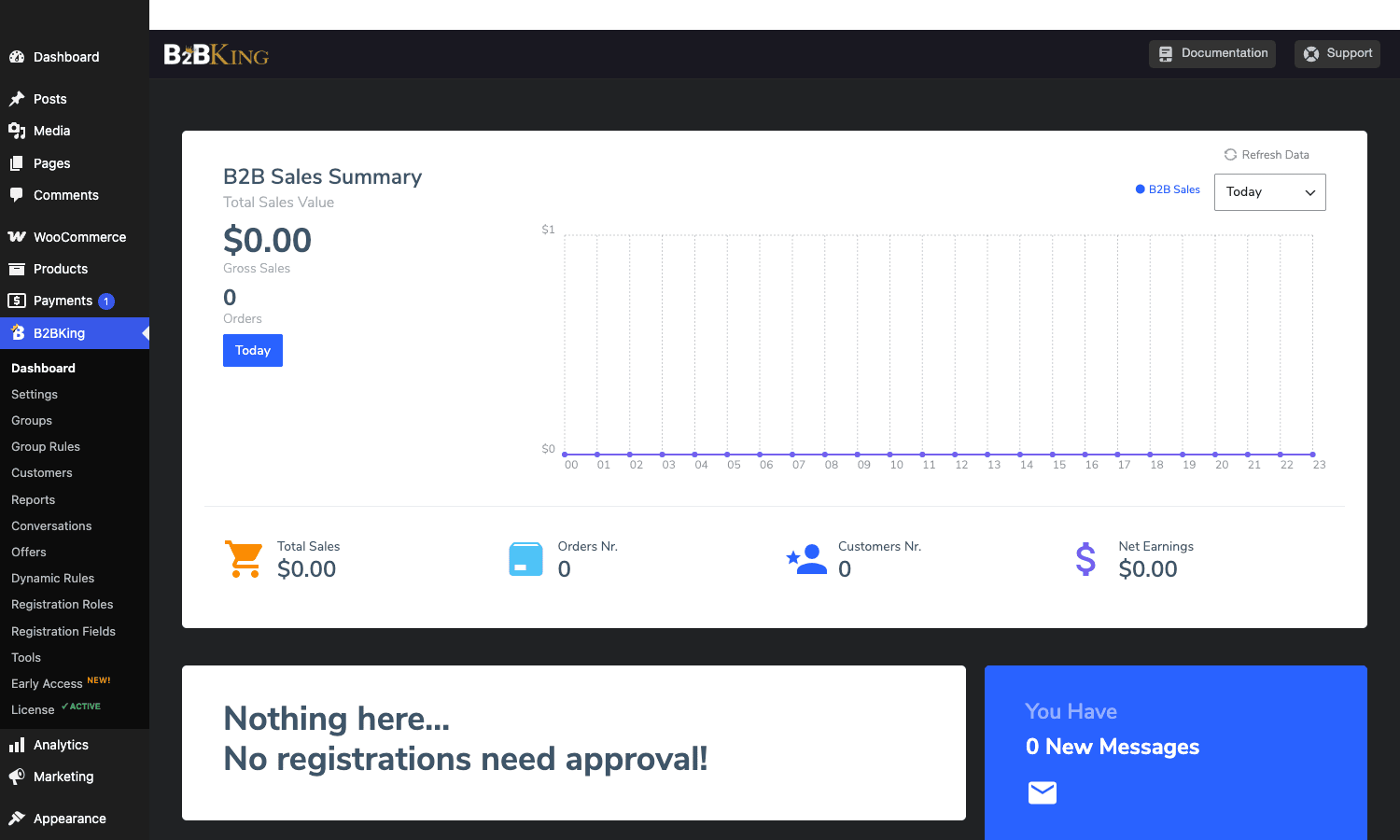
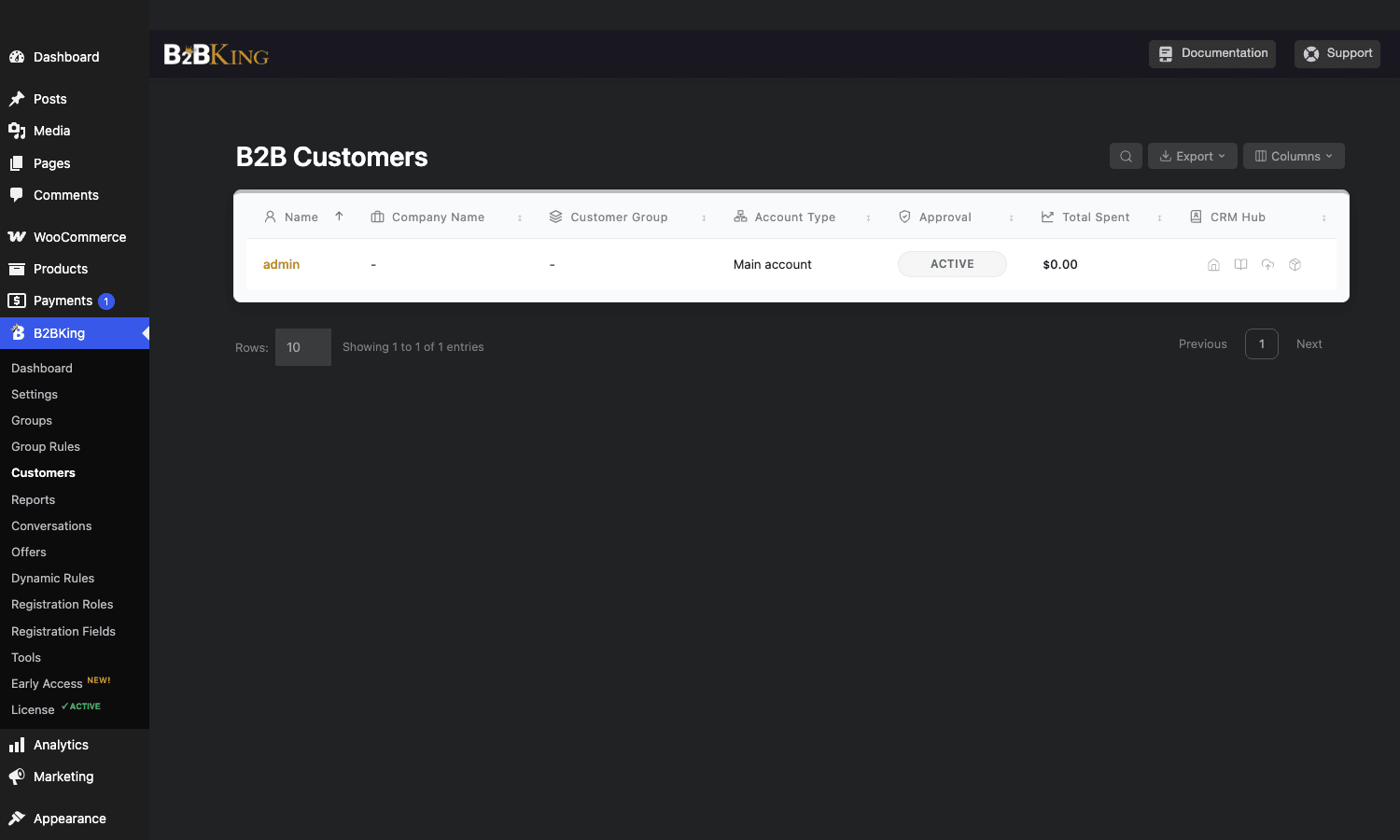
Customers. A dedicated B2B customer table with columns for Name, Company Name, Customer Group, Account Type, Approval, Total Spent, and CRM Hub. Export to CSV is one click. This is the screen you’ll actually use to manage your B2B base.
Reports. Per-group sales reports. Not as rich as WooCommerce Analytics, but it answers the one question that matters: which tier is making money.
Conversations. The list of quote-request threads. Each row is one B2B buyer’s quote basket plus your reply history.
Offers. The list of sales offers (admin-to-customer, with custom prices and expiry). One offer becomes one cart-ready link the customer clicks to check out.
Dynamic Rules. The advanced pricing rules. Conditional, cart-total-based, category-based.
Registration Fields. A CPT for custom fields you want on the B2B registration form. File upload supported, which is what you use to collect business license PDFs.
Tools. Maintenance utilities. Recalculate cached prices, regenerate group caches, reset settings.
Outside the B2BKing menu, the plugin also adds:
- A new tab in the WooCommerce product editor called B2BKing with per-product pricing, custom info table, and quantity rules.
- A B2BKing column in the WP Users table showing each user’s group.
- A B2BKing tab in the WooCommerce order detail screen showing whether the order was placed by a B2B user, with what tier, and which payment terms applied.
The quote-to-order flow, end to end
The quote system is the feature that pushes a lot of buyers from "we’ll think about it" to "we’ll buy now". Here’s the actual sequence end to end.
A buyer lands on the shop. Maybe they’re a logged-in B2B user with a "Request a Quote" button next to Add-to-Cart, or maybe they’re a guest with the entire catalog converted to quote-only via Access Restriction. They browse, add a few products to their quote basket (which is a separate basket from the cart), maybe adjust quantities. They click "Send Quote" and either auth or fill in their contact info if you’ve allowed guest quotes.
That submission creates a b2bking_conversation post in the database, fires the b2bking_quote_received_notification action, and emails the admin. The admin opens B2BKing > Conversations, sees the new quote thread, reviews the products and proposed totals.
Now the admin either replies with a message (negotiation), or directly creates an Offer with custom per-line prices. The Offer is a b2bking_offer post and the customer gets an email with a magic link.
The customer clicks the magic link, reviews the offer, accepts. Accepting fires the b2bking_after_add_offer_to_cart action, which adds the offer’s products to a fresh WooCommerce cart at the negotiated price. The customer then goes through the normal WooCommerce checkout (with any payment gateways their group permits, which often includes the built-in Invoice or Purchase Order gateways).
The order is now a real WooCommerce order with a wc-on-hold or wc-pending status (depending on whether you’ve configured the gateway to default to On Hold). You process it like any other order. The conversation stays threaded against the customer’s account so future quotes happen in the same UI.
Two practical notes from running this in production:
- The conversation cache (default 60 seconds) made me nuts on a busy store where the admin replied and the customer hit refresh and saw a stale thread. Bump it down to 10 or 0 during heavy negotiation, then back up after.
- The customer-side quote basket lives in browser storage by default for guests. If a guest clears cookies mid-basket, the basket is gone. Tell them to register before they start adding if the quote is going to be big.
Tax handling for B2B: where most B2B plugins fall down
Selling B2B across EU borders means you handle VAT correctly or you collect it incorrectly and find out at audit. The rule (simplified): if your business customer is in another EU country and provides a valid VAT number that’s registered for cross-border transactions, you charge zero VAT. If they don’t or can’t, you charge their country’s VAT under OSS rules.
Most B2B WooCommerce plugins say "we support EU VAT" and what they mean is "we have a field for VAT number". They don’t actually verify the number against the European Commission’s VIES service, and they don’t automatically zero out the tax line.
B2BKing does both. It has a built-in VIES client (the filter b2bking_country_list_vies lists which countries get checked), and when a valid number is entered, the user gets a meta flag (b2bking_b2bkingtaxexemption) that hooks into WooCommerce’s tax calculation. The order’s tax line drops to zero automatically.
There are still a few things to handle yourself:
- Show prices excluding VAT to B2B users, including VAT to B2C users. WooCommerce can’t do this on a single store out of the box. B2BKing’s solution is the front-end
[b2bking_tax_toggle]shortcode that lets the user flip between displays, plus a per-group config that sets the default display mode. It works, but it’s not invisible. Your store templates will need a small CSS pass to make the toggle blend in. - VAT-number format prefill. Use the
b2bking_set_default_prefix_vatfilter to prepend the user’s country code (e.g.DE) to the VAT field. Saves a small amount of customer confusion. - What happens if VIES is down? The
b2bking_allow_vat_timeouts_unavailable_errorsfilter (defaults totrue) lets you decide whether to fall through and accept the number anyway or block the registration. I keep it on, because VIES has occasional 30-minute outages and you don’t want every signup blocked.
For non-EU stores: the same VAT-exemption flag is also used to skip US sales tax for resellers with a valid resale certificate. You don’t get the auto-validation (no equivalent of VIES exists in the US), but you can manually flip the exemption flag per user and B2BKing respects it everywhere.
Setting up taxes in WooCommerce is the foundation; B2BKing is the layer on top.
Migration: moving from a coupon-codes wholesale setup to B2BKing
If you’re like most stores I’ve helped migrate, your current "wholesale" setup is a coupon called WHOLESALE15 that you email to approved buyers. It’s a sane MVP and it’s also fragile. Buyers share the code. Tax math gets weird because WooCommerce applies coupons before tax. Reporting on "what’s our actual wholesale revenue" is hard because the discount is invisible after the fact.
Migrating to B2BKing isn’t scary. Here’s what I usually do.
- Install B2BKing. Pick Hybrid mode so retail keeps working.
- Create a Wholesale group. Set the discount as a Group Rule (e.g. "Wholesale gets 15% off"). Don’t enable any manual per-product prices yet.
- Tag your existing wholesale users. Pull a CSV of users who’ve used
WHOLESALE15in the last year. Bulk-assign them to the Wholesale group via the user editor or a one-off script that setsb2bking_customergroupuser meta. - Disable the coupon. Edit it to "no longer in use" or restrict it to admins so you have a backup.
- Test on staging with two real accounts: one in the group, one not. Confirm both see the right prices and that orders flow into the right gateway.
- Send a launch email to your wholesale list explaining the change. Most B2B buyers will appreciate that there’s now a dedicated registration form, a quote system, and net-30 invoicing instead of "remember the coupon code".
The biggest gotcha is open orders mid-migration. If a customer has an unpaid invoice from the coupon era, leave the coupon active for completion. Don’t try to be clever and remap the order to a Group Rule discount.
Real-world use cases
Trade-only supplier. Industrial parts shop selling only to verified businesses. Set Plugin Status to B2B Shop, Access Restriction to "Hide entire website / force login", enable Manual Approval for All. Customers can’t even see the homepage without an approved B2B account. This is the cleanest use case for B2BKing and where it shines hardest.
Hybrid retail and wholesale. A coffee roaster that sells retail bags to consumers but also sells 5kg case packs to cafes. Hybrid mode, public catalog stays visible, wholesale SKUs are hidden from retail customers via product visibility on the Wholesale group, and cafes register through a separate B2B form. Cafes get net-30 invoicing. Retail customers see Stripe. The store stays one site, one product catalog, one admin.
Distributor with regional pricing. A cosmetics brand that sells to distributors in three regions, each with their own price list. Three groups: NA Distributors, EU Distributors, APAC Distributors. Each group has its own Group Rule (different discount percentages), each has its own enabled shipping methods (no APAC shipping for NA Distributors), and each has its own payment terms.
Buying co-op with sub-accounts. A restaurant group that shares a procurement function. One master account at the holding company level, each restaurant location has a sub-account that can place orders against the shared credit limit but can’t change the company info. The Subaccounts feature handles this with the b2bking_allow_multiple_subaccount_levels filter for setups with more than one level of hierarchy.
Manufacturer with quote-only pricing. A custom-fabrication shop where every order is sized and priced individually. Access Restriction set to "Replace prices with Request a Quote", every Add-to-Cart button becomes Add-to-Quote. Customers add products with notes and quantities, admin replies with a custom offer that becomes a real order on acceptance.
These are five different patterns, all served by the same plugin, all configurable through admin without code. That’s the actual value B2BKing brings. It doesn’t force you into one shape of B2B store.
Developer reference: hooks, filters, shortcodes, post types
If you’re a developer extending B2BKing, you’ll spend time in these.
Custom post types
| Post type | Purpose |
|---|---|
b2bking_group |
Customer groups (the core abstraction) |
b2bking_grule |
Group Rules (one-condition pricing rules) |
b2bking_rule |
Dynamic Rules (advanced multi-condition rules) |
b2bking_conversation |
Quote conversation threads |
b2bking_offer |
Sales-rep offers to specific customers |
b2bking_custom_role |
Sub-account permission roles |
b2bking_custom_field |
Custom registration form fields |
b2bking_quote_field |
Custom quote form fields |
Key user meta keys
// Which group does this user belong to (the post ID of a b2bking_group)
get_user_meta( $user_id, 'b2bking_customergroup', true );

// Has the admin approved this user's B2B registration?
get_user_meta( $user_id, 'b2bking_account_approved', true ); // 'yes' or 'no'

// Is this user tax-exempt (B2B VAT validation passed)?
get_user_meta( $user_id, 'b2bking_b2bkingtaxexemption', true ); // 'yes' or 'no'
Shortcodes
[b2bking_b2b_registration] // login + register tabs combined
[b2bking_b2b_registration_only] // register form only
[b2bking_b2b_registration_separate] // separate registration page
[b2bking_login_only] // login form (no register)
[b2bking_quote_form] // standalone quote request form
[b2bking_offers] // current user's offers list
[b2bking_purchaselists] // saved purchase lists / quick reorder
[b2bking_bulkorder] // SKU-based bulk order form
[b2bking_csvorder] // CSV upload order
[b2bking_product_information_table] // per-product spec table
[b2bking_tiered_pricing_table] // tier-price table for the current product
[b2bking_variations_table] // variations as a table
[b2bking_content target_groups="X"] // conditional content for a group
[b2bking_tax_toggle] // front-end tax incl/excl toggle
Most-used filters
// Change which order status pending-company-approval orders use.
add_filter( 'b2bking_company_approval_order_status', function( $status, $order ) {
 return 'wc-on-hold';
}, 10, 2 );

// Make purchase-order orders go to Processing instead of On Hold.
add_filter( 'b2bking_purchase_order_status', function( $status, $order ) {
 return 'wc-processing';
}, 10, 2 );

// Make invoice/net-30 orders go to Processing too.
add_filter( 'b2bking_invoice_payment_order_status', function( $status, $order ) {
 return 'wc-processing';
}, 10, 2 );

// Clear the cart when a user's group changes (recommended for clean state).
add_filter( 'b2bking_empty_cart_on_switch', '__return_true' );

// Restrict the B2BKing admin to a custom capability.
add_filter( 'b2bking_backend_capability_needed', function() {
 return 'manage_b2bking';
} );

// Add countries to the VIES validation list.
add_filter( 'b2bking_country_list_vies', function( $countries ) {
 $countries[] = 'GB'; // post-Brexit, UK does its own check
 return $countries;
} );

// Allow extra file types in the registration document upload field.
add_filter( 'b2bking_allowed_file_types', function( $types ) {
 $types[] = 'application/x-tax-form'; // make-believe MIME
 return $types;
} );

// Send quote notification only to admin (not the customer) by default.
add_filter( 'b2bking_send_quote_email_logged_in_users', '__return_false' );
Most-used actions
// Fire something when a user's group changes (sync to your CRM).
add_action( 'b2bking_user_group_updated', function( $user_id, $new_group_id ) {
 // call your CRM API here
}, 10, 2 );

// Fire when an admin approves a pending B2B registration.
add_action( 'b2bking_account_approved_finish', function( $email_address ) {
 // welcome them to your Slack community, etc.
} );

// Fire when a sales-rep offer is accepted by the customer.
add_action( 'b2bking_after_add_offer_to_cart', function( $offer_id ) {
 // notify the sales rep
} );

// Fire on every new message in a quote conversation.
add_action( 'b2bking_new_message', function( $recipient, $body, $sender, $convo ) {
 // mirror to your support system
}, 10, 4 );

// Fire after a Group Rule recalculation finishes.
add_action( 'b2bking_finish_apply_group_rules', function( $group_id ) {
 // bust your CDN cache for product pages
} );

// Fire after a purchase list is created.
add_action( 'b2bking_purchase_list_created', function( $list_id, $user_id ) {
 // analytics event
}, 10, 2 );
For a deep dive on how WordPress hooks work, the official references on apply_filters and do_action are still the best primer.
Payment gateway IDs
If you’re filtering payment methods per group or programmatically setting one as the default:
b2bking_purchaseorder: Purchase Orderb2bking_invoicepayment: Invoice (net-30 / net-60)b2bking_companyapproval: Pending Company Approval (special status, blocks fulfillment until the back office approves)
Custom order statuses
B2BKing registers wc-pcompany for the Pending Company Approval flow. If you have order-export logic, make sure it includes this status. The same goes for any reporting plugin that filters on order status.
Performance, compatibility, and gotchas
Database overhead. B2BKing’s CPTs (groups, rules, conversations, offers) live in the standard wp_posts and wp_postmeta tables. On a store with thousands of pricing rules and a busy quote workflow, wp_postmeta can grow fast. The plugin includes its own caching layer (the b2bking_cache_time_setting) for conversation rendering, but per-product price lookups still hit meta on each request. Combine with a page cache for B2B users (which is harder because B2B prices differ per user, so the cache key needs the user group).
Variable products. B2BKing supports tiered pricing on variable products but the front-end UX gets cluttered if a variable product has 12 attributes. Use the [b2bking_variations_table] shortcode to render variations as a flat table instead of the default WooCommerce variation dropdown. Much cleaner for B2B buyers who know what SKU they want.
Block-based checkout. WooCommerce’s newer Blocks-based checkout is partially supported. The b2bking_blocks_use_legacy_fields filter and b2bking_blocks_vat_disable_required filter exist precisely because the plugin had to retrofit support. If you’re on the new checkout and seeing missing fields, those filters are the first place to look.
HPOS (high-performance order storage). The plugin’s been updated for WooCommerce HPOS but read the upgrade notes if you migrate after enabling B2BKing. Test on staging.
Multisite. Works per-site. License activation is per-site (and on the GPL-licensed version, the license is pre-applied so this doesn’t matter for you).
WPML and Polylang. Both are supported. Group names and rule labels can be translated. The bigger consideration is that registration fields and email templates need translating per language, and there’s no bulk import for translations.
Mailing list integration. No native Mailchimp/Klaviyo. Use the b2bking_account_approved_finish action to forward approved B2B users to your mailing list. Some folks use WP Fusion or AutomateWP for this.
Conflicting plugins to watch for. Other "wholesale" plugins (Wholesale Suite, Addify B2B, ELEX wholesale) conflict on the My Account endpoints and on the cart pricing filter chain. Pick one. Conditional Discounts and B2BKing usually play nicely but watch the order of filter execution if you’re stacking promotions.
Search. The Customers admin search is fast but the documentation site search is, well, mediocre. I usually search via Google with site:webwizards.dev/documentation to find the answer faster than navigating the docs site itself.
Admin density. The B2BKing settings admin is dense. Ten tabs, each with a dozen toggles, and a few areas where the tabs overlap with WooCommerce’s own settings (specifically tax display, email notifications, account endpoints). The plugin is mostly aware of this and the in-admin Documentation panels are short and useful, but a first-timer can spend 30 minutes hunting for which screen controls which thing. Bookmark the screens you change often.
What B2BKing doesn’t replace (and what to use instead)
It’s worth being explicit about the boundaries.
Subscriptions. B2BKing doesn’t handle recurring billing or subscription products. For that you still want WooCommerce Subscriptions. The two work together fine. A B2B user can be on a recurring subscription with the wholesale discount applied through B2BKing’s pricing rules.
Accounting / ERP sync. B2BKing doesn’t push orders to QuickBooks, Xero, or NetSuite. You’ll need a dedicated integration (the WooCommerce.com store has several) or a custom integration via the woocommerce_order_status_changed hook.
PDF invoices. B2BKing’s Invoice gateway generates a status, not a PDF. For actual printable invoices use WooCommerce PDF Invoices or the WooCommerce PDF Invoices & Packing Slips plugin.
Payment processing for B2B card payments. B2BKing’s Purchase Order and Invoice gateways are about the workflow, not the actual money movement. You’ll still want WooCommerce Stripe or PayPal for the cards-and-wallets path that retail and small B2B buyers still use.
True multi-vendor marketplace. If you need each vendor to manage their own product catalog and payouts, you want WC Vendors, Dokan, or WCFM, not B2BKing. B2BKing is single-vendor.
Page builder for the B2B portal UI. B2BKing renders forms via shortcodes that look like WooCommerce. If you want a fully designed B2B portal landing page, drop the shortcodes into Elementor or Bricks templates. The plugin doesn’t ship Gutenberg blocks for everything, which is a known gap.
Heavy cart-rules engine. For very rich cart-level promotions (BOGO across categories, dynamic gift adders, complex stacking rules), WooCommerce Dynamic Pricing is more focused. B2BKing’s Dynamic Rules cover the common cases but they’re not as deep on promo-engine semantics.
Pricing and licensing
The official vendor-direct license starts around $129/year for a single site and goes up to $399/year for unlimited sites. CodeCanyon sells a single-license version for around $99 with 6 months of support. Both include the same plugin features.
The GPL Times copy of B2BKing is the full Pro plugin under the GPL license, with the license already applied so it activates on install with no nag screen. You get the same plugin, the same shortcodes, and the same hooks for your developers. Updates ship on the same cadence as the upstream releases.
If you’re running B2BKing on a single client site, the direct license is fine. If you’re an agency installing on multiple client sites, or you need staging copies every other week, the GPL distribution makes back its cost in five minutes.
FAQ
Why don’t my user-group prices show on the cart sometimes?
Almost always a caching issue. WooCommerce caches the cart totals server-side, and any object cache (Redis, Memcached) or page cache (WP Rocket, LiteSpeed) can serve a cached version that was generated for a different user. Configure the cache to vary by user role or by the b2bking_customergroup cookie. On a managed host like WP Engine or Kinsta, the platform caches are smart about logged-in users but you may still need to add B2BKing’s cookie to the cache key.
Does B2BKing work with WooCommerce Subscriptions?
Yes. A B2B user can be subscribed to a product, and B2BKing’s pricing rules apply on each renewal. The combination tested clean for me on a 50-user trial. The one thing to watch is renewal failures: if a B2B user is moved to a different group between renewals, the next renewal uses the new tier price. That’s almost always what you want but it’s worth documenting for your billing team.
How do I let approved B2B users skip the checkout payment step entirely?
Add the built-in Purchase Order or Invoice gateway as a per-group payment method, and use the b2bking_invoice_payment_order_status filter to send the order straight to Processing (so your warehouse can ship before payment lands). The actual collection happens out-of-band (wire, ACH, paper check). Most enterprise B2B works this way.
Can I show different tax displays to B2B vs B2C visitors on the same site?
Partially. WooCommerce’s tax-display setting is global (one for the shop, one for the cart). B2BKing’s workaround is the [b2bking_tax_toggle] shortcode that gives the user a button to switch between Incl-VAT and Excl-VAT display, plus a per-group default. It works, but it’s a button on the page rather than an invisible default. For a fully invisible experience you’d need to template-override woocommerce_get_price_html, which is more work than most stores want to do.
Why does the registration form skip the WooCommerce billing fields?
By design. The B2BKing registration is for creating the account; billing/shipping addresses get collected at first checkout. If you want billing fields on registration too, enable the Show custom mapping fields option and map B2BKing custom fields to WooCommerce billing fields. The b2bking_show_custom_mapping_fields_billing filter is the developer-side switch.
What happens to existing orders when I change a user’s group?
Nothing. Past orders keep their original prices and statuses. The group change only affects future cart calculations and future invoices. This is the correct behavior and aligns with how every other discount/pricing system in WooCommerce works.
Can a single user belong to multiple groups?
Officially the answer is one group per user (because b2bking_customergroup is a single meta value). Practically, you simulate multi-group by using Dynamic Rules with multiple OR conditions (e.g. "if user is in Group A OR has bought from Category X"). For more granular "this person is Tier 2 on cosmetics but Tier 1 on packaging" setups, you’ll need to write a small filter on b2bking_get_user_group and key it off the current product’s category.
Is there a REST API for managing groups and customers programmatically?
There’s no dedicated B2BKing REST namespace. You manage groups via the regular WP REST API for the b2bking_group post type (which works because they’re a CPT). You manage user-group assignment via the standard WP user meta endpoint. There are 557 filters across the plugin, so most extension points are inside the existing PHP hooks rather than a clean REST surface.
Final thoughts
B2BKing covers more of the B2B WooCommerce feature stack than any other single plugin I’ve used, and the design choices (groups as CPTs, pricing rules separated from products, gateways for PO/invoice baked in) are the right ones for stores that will outgrow a coupon-and-prayer wholesale setup. The admin gets dense, the documentation search is mediocre, and the per-product manual price matrix doesn’t scale past a few hundred SKUs without the bulk-edit add-on. But those are all things you can work around or absorb with a bit of dev time, and none of them invalidate the plugin’s core value.
If you’re picking a B2B WooCommerce plugin in 2026 and you have more than two of: tiered pricing, quote requests, net-30 invoicing, EU VAT validation, sub-accounts, per-group payment methods, or admin-approved registration, B2BKing should be on your shortlist. It’s the one I keep reaching for after trying the alternatives.
When you’re ready to install, B2BKing on GPL Times is the same Pro zip with the license already applied, so you can create your first customer group, write a Group Rule, and have a working B2B registration page running in the first hour without buying a test license.