

I’ve shipped seven Elementor sites in the last three years and every single one of them outgrew Elementor Pro’s stock widget set somewhere around the second sprint. The hero looked fine. The pricing table looked fine. Then the client asked for a "small carousel of testimonials that loops on mobile and has those nice card hover things", or "the team grid but with the photos doing that fade-in stagger you see on landing pages", and we were back in the addon-pack market.
I’ve used Essential Addons (workhorse, but the widget library has gotten so big the inserter is a chore). Happy Addons (lean, but you outgrow it). Premium Addons Pro (great cross-browser handling). Element Pack Pro from BdThemes (huge feature list, heavy bundle). Crocoblock JetElements (powerful inside the Croco family of plugins, awkward outside it). Ultimate Addons by Brainstorm (now part of Astra, still solid). The Plus Addons from POSIMYTH kept landing in my "try it on the next project" pile and I never got around to it.
So I sat down for a week, ran it through a real client build, and actually shipped pages with it. This is a long, honest walk through the widgets, the dashboard, the developer surface, the gotchas, and where The Plus Addons actually wins versus the four or five other Elementor packs I’ve used.
Table of Contents
- What The Plus Addons is, exactly
- The 6 widgets I actually use on every Elementor site
- Smart Animator and Magic Scroll: the differentiators
- The Plus Addons vs Essential Addons vs Element Pack vs Premium Addons
- The widget catalog, organized
- Installation and the first hour
- Selective module loading: how to keep your JS bundle from ballooning
- Template Kits, Posimyth Studio, and the Figma-to-Elementor pipe
- WooCommerce widgets and Theme Builder
- Developer reference: hooks, filters, and the option schema
- What The Plus Addons does not replace
- Pricing and licensing
- FAQ
- Final thoughts
What The Plus Addons is, exactly
The Plus Addons for Elementor is an extension plugin for the Elementor page builder, built by POSIMYTH in Surat, India. The free version sits on the WordPress.org repository and gives you a starter pack of widgets. The Pro zip we’re walking through unlocks the full set, which the vendor markets as "120+ widgets and extensions", when you actually count the PHP files in modules/widgets/ you get 86 widget classes, with another ~15 grouped under modules/widget-manager/ (the listing widgets, search filter, login form, WooCommerce extras), and then a stack of page-level extensions in modules/extensions/. Add it up and yes, you cross 120.
POSIMYTH also makes ThePlus theme (a free Elementor-native theme on WP.org), WDesignKit (their template-kit platform), and Posimyth Studio (the GenAI layer that ties templates to your brand). Knowing that matters, because The Plus Addons is the deepest plugin in their product family, and several of its widgets quietly assume you’ll be using ThePlus theme or pulling templates from WDesignKit. They work standalone, but the experience is smoother inside the POSIMYTH stack.
Header from the main plugin file, verbatim:
Plugin Name: The Plus Addons for Elementor - Pro
Plugin URI: https://theplusaddons.com/
Description: Highly Customisable 120+ Advanced Elementor Widgets & Extensions
 for Performance Driven Website. Keep the free version active
 to access all of its features.
Author: POSIMYTH
Author URI: https://posimyth.com/
Text Domain: theplus
That "keep the free version active" line is real. The Pro zip is an extension to the WP.org free plugin, not a standalone replacement. If you deactivate the free one, the Pro file throws a notice and refuses to load most widgets.
The 6 widgets I actually use on every Elementor site
Out of 100-plus widgets, six are in my muscle memory now. Skip the rest of this section if you’ve already shipped Plus Addons sites, but if you’re new, these are the ones that justify installing it in the first place.
1. Heading (Plus Heading Title). Elementor’s stock heading is a <h2> with a colored highlight option. The Plus heading splits the line into a kicker / main / sub, supports SVG underlines, gradient text, mask reveal animations, and per-word color. I use it on every hero. The settings panel is one of the longest in the whole plugin and that’s exactly what you want for a hero element.
2. Carousel Anything. The most undersold widget in the pack. You feed it any Elementor template (saved section, page, or container), tell it how many columns at each breakpoint, and it wraps the lot in a Swiper.js carousel with touch swipe, true infinite loop (no half-frame jump at the seam), autoplay, and arrow / dot navigation. I’ve used it for logo strips, testimonial card carousels, mixed-content "what we do" rows, and even a mini-product showcase on a Woo store. It beats Essential Addons’ carousel in two real ways: (a) you build the slide as a normal Elementor template instead of typing fields into a repeater, and (b) the loop math actually works on edge cases like "3 slides, 4 visible".
3. Pricing Table and Pricing List. Standard, but the styling options are extensive enough that you don’t need to drop to custom CSS. I used to use Essential Addons pricing because it was the first one I learned. Now I default to Plus because the toggle switch (monthly / yearly) is built in.
4. Tabs and Switcher. The Plus Tabs widget handles nested content, includes the "show on hover instead of click" mode, and supports vertical-tab layouts with a left rail. Switcher is the same logic with a pricing-page UX. Pair them and you replace four widgets you’d otherwise hand-roll.
5. Info Box. Generic name, but the implementation is the polished one in the pack. Six layouts, optional hover-flip, badge ribbons, and the icon library hands off to FontAwesome / SVG / Lottie. I use it as the "feature card" on basically every services-page client build.
6. Off Canvas. Drop an off-canvas drawer that any element on the page can trigger. Mobile menus, filter side-panels, "add to cart" mini-cart fly-outs, login forms. Other packs ship this too, but Plus’s version lets you put a full Elementor template inside the drawer, including other widgets, including forms, without breaking the build.
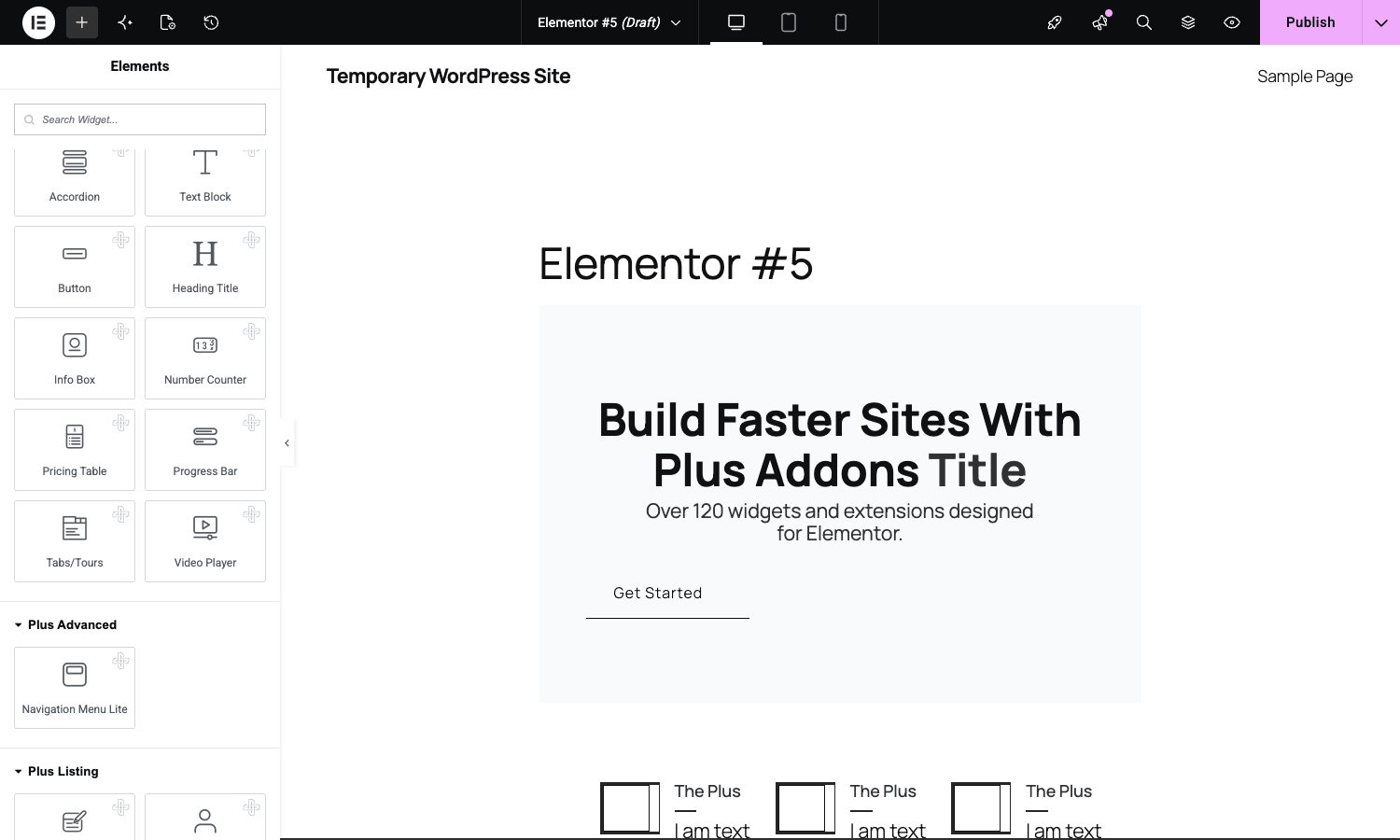
The rest of the catalog is useful but situational. The six above are the ones I drop into the page on day one.
Smart Animator and Magic Scroll: the differentiators
Here’s the part that surprised me.
Most Elementor addon packs ship "entrance animations", fade-in on scroll-into-view, slide-from-left, that sort of thing. They’re CSS keyframes triggered by an intersection observer. They look fine, they’re identical across plugins, and they’re the closest thing the addon market has to a commodity feature.
The Plus Addons has those. It also has Smart Animator, which is a different category. It’s a timeline-based animation builder that runs inside Elementor. You pick an element on the page, add keyframes for transform, opacity, filter, custom properties, and tie those keyframes either to a scroll progress range or to an IntersectionObserver event. The result is the kind of animation you see on Awwwards-shortlisted landing pages: a section that progressively reveals as the user scrolls through it, with rotation and scale happening on individual sub-elements at different stages.
Magic Scroll is the sibling: an extension (not a widget) that you toggle on, then configure per-section to do horizontal scroll, parallax depth, sticky-overlap reveal, or pinned narrative scrolling. Once it’s on, every Elementor section in the editor gets a Magic Scroll tab and you compose the effect there.
Nobody else in the addon-pack market ships this. Element Pack Pro from BdThemes has scroll animations, but they’re closer to entrance animations than a real timeline tool. Premium Addons Pro has parallax. Smart Animator + Magic Scroll is the one feature where Plus Addons is the answer if you want it, and nothing else in the pack market really competes.
The honest caveat: this is power-user territory. The settings panel is dense and the learning curve is real. You’ll spend an evening figuring out how scroll-progress ranges actually map to your section’s height before you ship anything with it. But if you bill clients for landing pages where the animation is the deliverable, Smart Animator alone justifies the license.
The Plus Addons vs Essential Addons vs Element Pack vs Premium Addons
I’ve shipped sites with all four. Here’s the honest take.
Use Essential Addons if: you want the lowest learning curve and the largest user community. It’s the most widely-installed pack on the WordPress.org repo by a long way (its free version sits at over a million active installs). The widget set is generic but reliable, the docs are extensive, and almost every freelancer you’ll work with has already used it. The downside is that the catalog is so wide it’s started to feel cluttered, and several widgets duplicate Elementor Pro’s own widgets.
Use Element Pack Pro if: you want the absolute longest widget list and don’t mind a heavier JS footprint. BdThemes ships 280-plus widgets and extensions, more than any competitor, including some weird specialist ones (TradingView chart, advanced gallery filter, Bodymovin Lottie). The catalog is a "we have everything" play and it shows on bundle size if you don’t trim aggressively.
Use Premium Addons Pro if: you care about clean cross-browser behavior and conservative defaults. The Leap13 team has a reputation for testing on actual mobile devices and the widgets show it. The catalog is smaller (around 60 widgets and extensions) which is a feature, not a bug.
Use ElementsKit Pro if: you want a header / footer builder bundled with the widget set. ElementsKit’s Wpmet origins show, it’s tightly integrated with their other plugins (ShopEngine, GetGenie) and the header builder is one of the better ones outside Max Mega Menu.
Use The Plus Addons if: you want the deepest animation tooling in the pack market (Smart Animator, Magic Scroll), you do design-driven client work where the carousel widgets matter, or you’re already inside the POSIMYTH stack with ThePlus theme + WDesignKit templates. The catalog is also one of the better-curated ones, POSIMYTH ships fewer "demo widgets" than the larger packs and the ones they include feel intentional.
For what it’s worth, I keep two packs installed on most builds these days: Essential Addons for breadth, The Plus Addons for the carousel widgets and Smart Animator. They coexist fine, though you’ll want to disable overlapping widgets in one of them to keep the inserter clean. More on that below.
The widget catalog, organized
The Pro plugin’s widgets land in the Elementor inserter under a "The Plus Pro Addons" group. The dashboard organizes them by category, and after a week of clicking around, here’s how I’d actually group them in my head:
Layout and structure widgets. Row Background (gradient mesh, particle effect, video, slideshow row backgrounds), Shape Divider (top and bottom dividers with custom SVG support), Section Scroll Navigation (vertical dot nav for one-page sites), Cascading Image (overlap two images with a parallax offset).
Hero and headline widgets. Heading Title, Advanced Typography (split-text reveal, character / word stagger animations), Animated Service Boxes, Pre Loader (full-screen loader with custom animation).
Content layout widgets. Tabs / Tours, Switcher, Flip Box, Info Box, Process Steps, Style List, Unfold (read more / read less truncation with smooth height transition).
Image and media widgets. Image Factory (image with overlay text, click-to-fullscreen, hover styles), Hotspot, Before / After comparison slider, Gallery Listout, Cascading Image, Draw SVG (animated SVG-path drawing on scroll), Mouse Cursor (custom cursor with magnetic hover and trailing animation).
Carousel and slider widgets. Carousel Anything (the headliner), Carousel Remote (control one carousel from another), Testimonial Listout (with carousel mode), Clients Listout, Logo Slider, Team Member Listout.
Data and form widgets. Plus Form (form builder with multi-step, file upload, conditional logic), Mailchimp, Caldera Forms widget (legacy compatibility), Countdown, Number Counter, Chart (Chart.js wrapper for bar / line / pie / radar / doughnut), Table, Table of Contents.
Navigation widgets. Navigation Menu (mega menu builder), Mobile Menu, Off Canvas, Circle Menu, Header Extras (search, login, cart icons for theme-builder headers), Site Logo, Breadcrumbs Bar.
Dynamic listing widgets. Blog Listout, Dynamic Listing (the big one, custom-post-type loop with a saved-template card design), Dynamic Categories, Dynamic Device showcase, Dynamic Smart Showcase, Custom Field, Protected Content.
Social widgets. Social Feed (Instagram / Facebook / Twitter), Social Reviews (Google / Yelp / Trustpilot card pulls), Social Sharing, Social Icon.
WooCommerce widgets (theme-builder territory). Woo Cart, Woo Checkout, Woo My Account, Woo Order Track, Woo Multi Step (checkout split into steps), Woo Thank You, Product Listout, Woo Single Image / Basic / Pricing / Tabs (theme-builder product page parts), Coupon Code, Quick View, Compare, Wishlist.
Specialist widgets. Horizontal Scroll Advance (horizontal-scroll section), Morphing Layouts (CSS-morph layout transitions), Page Scroll (track scroll progress as a UI bar), Scroll Sequence (frame-by-frame image-sequence animation tied to scroll, like Apple product pages), Audio Player, Google Map, Advertisement Banner, Login / Register, Bodymovin (Lottie JSON), WhatsApp / WeChat / Telegram chat buttons via the chat-button extensions.
Don’t enable every widget on day one. Your JS bundle will balloon, the inserter will become unusable, and you’ll spend more time scrolling than building. Pick the 15 to 20 you actually need and disable the rest in the dashboard. There’s a whole section below on doing that correctly.
Installation and the first hour
Installation is the usual two-zip dance for Elementor addon packs:
- From the GPL Times product page, download the Pro zip. You’ll get
theplus_elementor_addon.zip. - Install the free version first from
Plugins -> Add New -> Search "The Plus Addons for Elementor"(it’s on the WP.org repo). Activate it. - Upload the Pro zip via
Plugins -> Add New -> Upload Plugin. Activate it. - WordPress will deactivate the free version if it’s not active, then re-prompt you. Make sure both stay active.
Once the Pro plugin lands, you’ll see the POSIMYTH menu item in the left sidebar (with a dashicons plus-settings icon) and an "Activate License" notice at the top. If you ever migrate to a self-licensed copy from POSIMYTH directly, you’ll paste your purchase code into POSIMYTH -> Activate.
First thing to do: walk through the onboarding wizard. It asks "Import Ready-Made Website" or "Use Elementor Widgets", choose whichever fits. If you don’t want either, click Skip Setup in the top-right corner. The dashboard lands you on the Widgets tab by default.
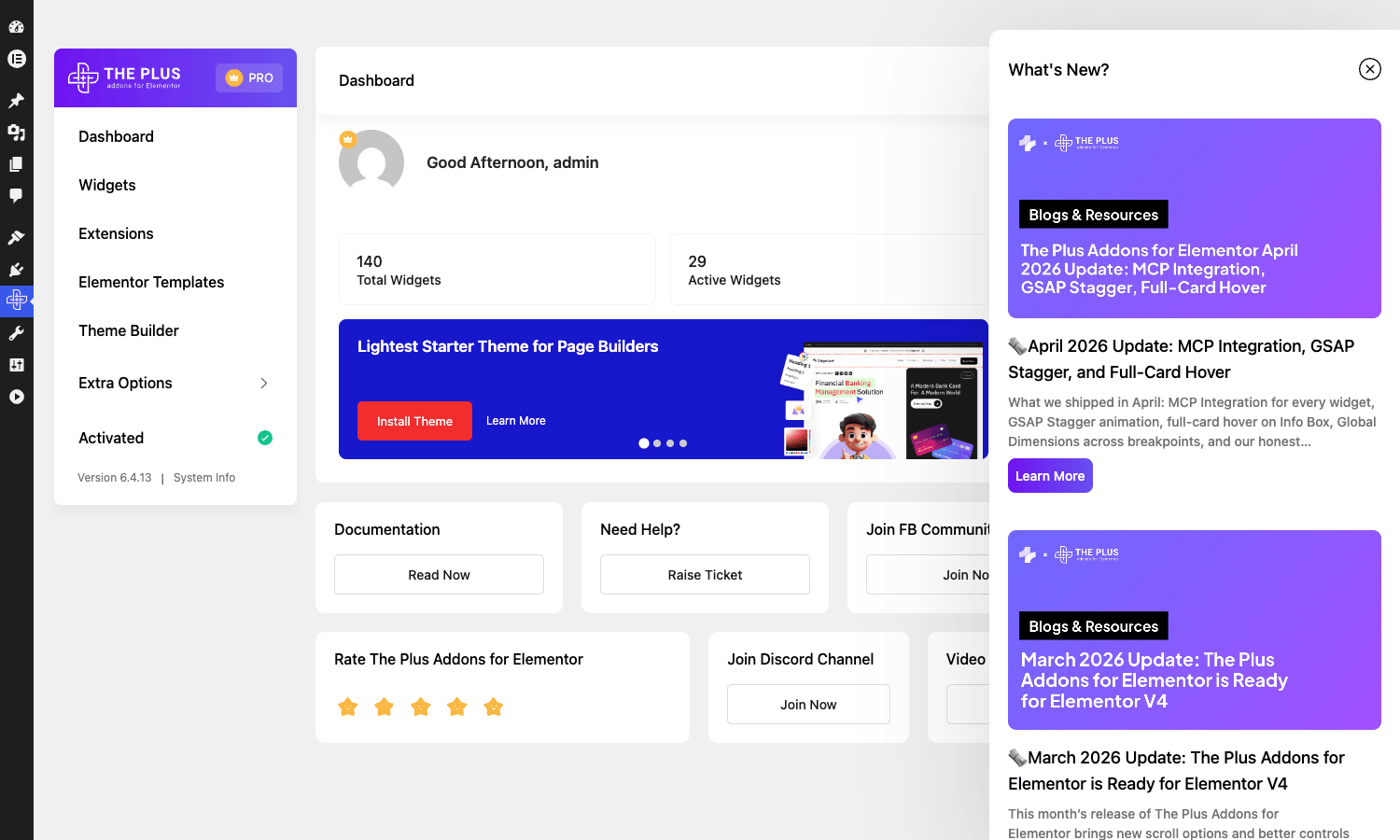
Second thing: go to POSIMYTH -> Performance and disable any widget you know you’ll never use. I’ll explain why in detail below, but the short version is that every enabled widget loads its own CSS / JS file on the front-end, and the difference between "all on" and "the 20 I actually use" is real on a Lighthouse audit.
Selective module loading: how to keep your JS bundle from ballooning
Here’s where The Plus Addons earns back some of the goodwill it could lose on bundle size.
Every widget is registered as its own PHP class file under modules/widgets/tp_<name>.php. When the plugin boots, it reads an option called theplus_options from wp_options, which contains two arrays:
check_elements, the slugs of widgets the admin has enabled.extras_elements, the slugs of extensions (Smart Animator, Magic Scroll, Mouse Cursor, etc.) the admin has enabled.
If a widget’s slug isn’t in check_elements, the plugin does not include its PHP file. That means it doesn’t register the Elementor widget class, doesn’t enqueue its CSS, and doesn’t enqueue its JS. The selective module loader respects that array on every Elementor render so disabled widgets don’t ship anything.
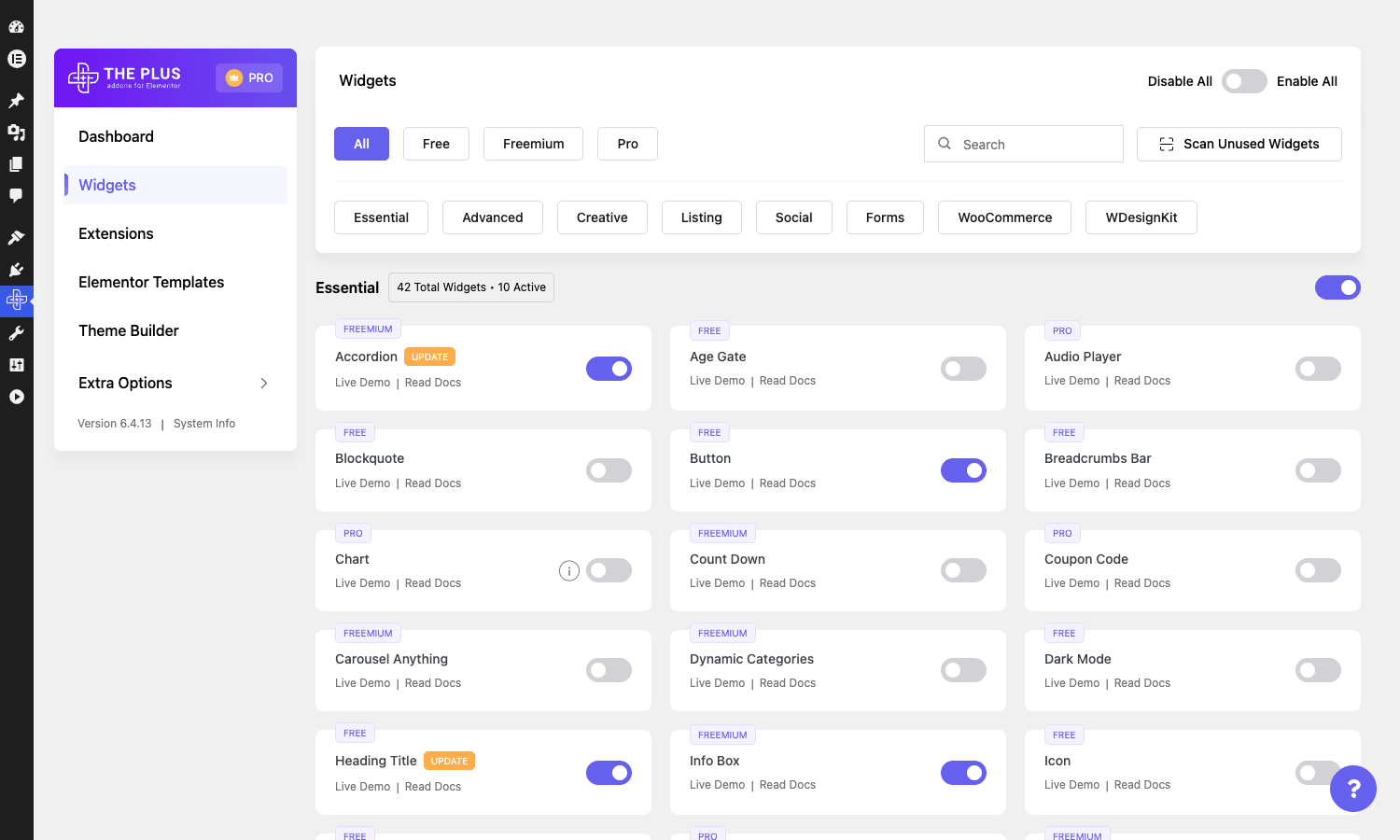
To use it: open POSIMYTH -> Widgets. You’ll see widgets grouped by category (Essential, Advanced, Creative, Listing, Social, Forms, WooCommerce) with a toggle next to each. Flip off the ones you’ll never use. Hit Save. Next page load, those widgets vanish from the Elementor inserter AND their asset files stop being enqueued.
There’s a parallel POSIMYTH -> Extensions page for the page-level extensions. Same drill.
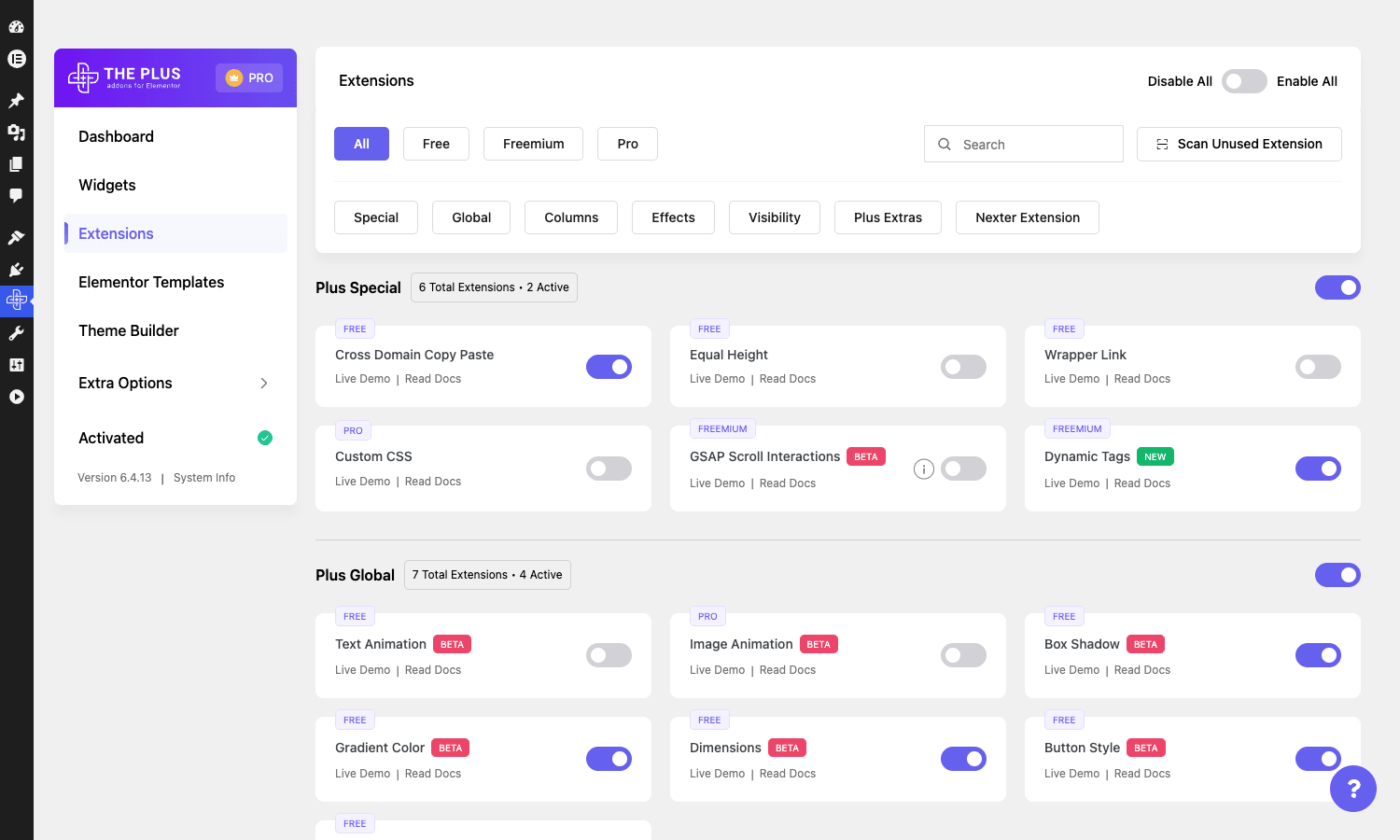
The honest number: on a fresh demo with everything enabled, a Plus-Addons-heavy page loaded around 280 KB of plugin-specific JS and 140 KB of CSS (the carousel library, the animation library, every widget’s stylesheet). After I disabled 70 widgets I never use (Bodymovin, Caldera, WeChat, the niche social-feed widgets, half the Woo theme-builder widgets), the same page dropped to 95 KB JS and 48 KB CSS. That’s not a marginal improvement, that’s a Core Web Vitals win.
If you’re running a caching plugin, do the trim on Plus Addons BEFORE you turn on Remove Unused CSS. Otherwise the cache plugin spends cycles processing CSS files you didn’t need in the first place.
Template Kits, Posimyth Studio, and the Figma-to-Elementor pipe
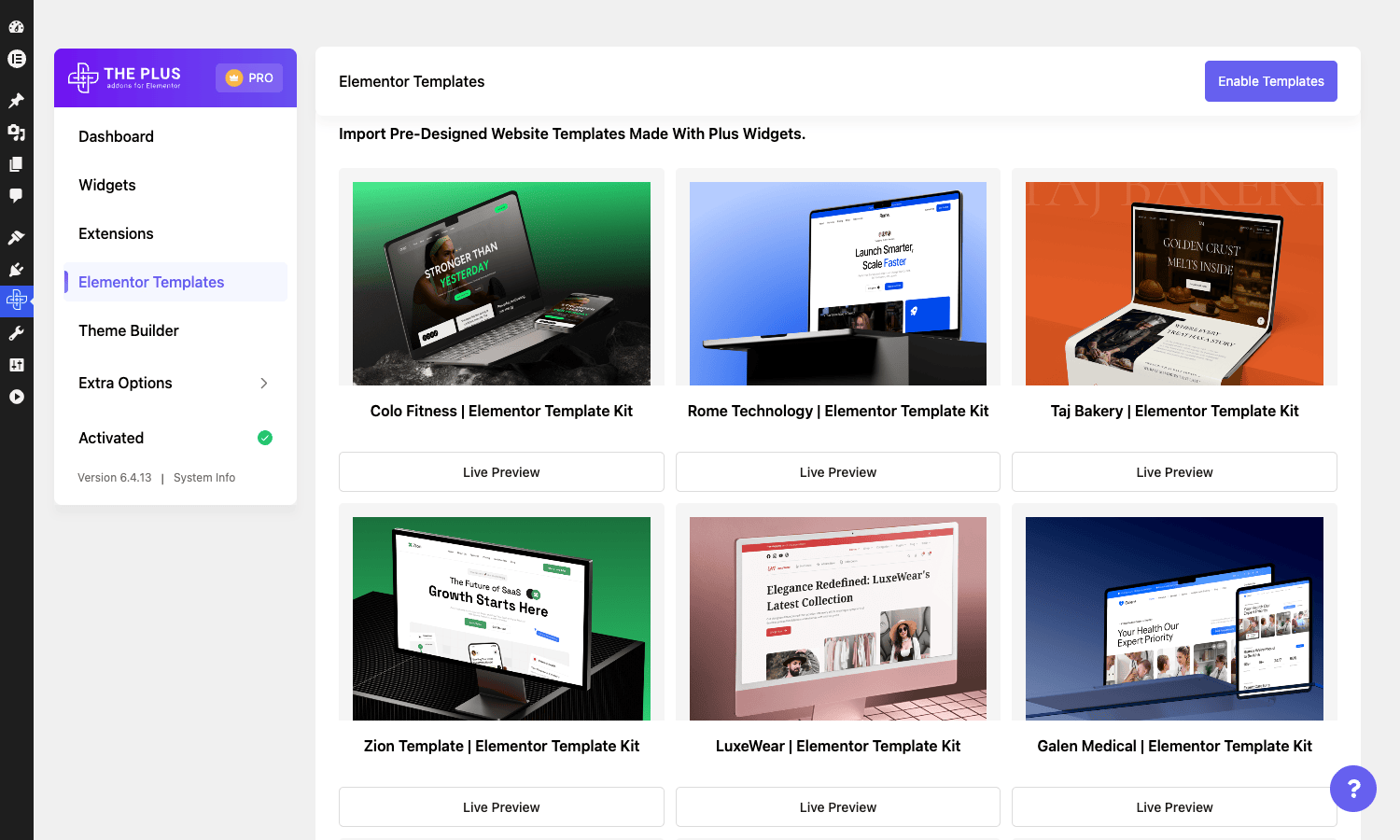
The Plus Addons doesn’t just ship widgets, it ships templates that use those widgets. The catalog sits under POSIMYTH -> Starter Templates and pulls from POSIMYTH’s WDesignKit service. You see template kits organized by industry (SaaS, agency, restaurant, portfolio, ecommerce), each kit is a multi-page set with a coordinated style.
Importing a kit is one-click. The plugin checks which Plus widgets the kit needs, enables them in check_elements automatically, imports the templates, creates the pages, sets the menu, and copies the theme colors / typography. If you’re starting a project from cold, this is the fastest "from zero to a usable site" path I’ve seen in the Elementor world.
 Probably the closest competitor is the Astra Starter Templates, which is a different shape (it’s tied to the Astra theme rather than the addon pack).
Posimyth Studio is the newer feature. It’s POSIMYTH’s GenAI layer, accessed from the dashboard. The pitch is "describe your brand and we’ll generate a template kit tailored to it". Feed it your business description, color preferences, and tone, and you get back a Plus-Addons template kit that’s already customized. The current state in 2026 is that it works, but I’d describe the output as "a strong starting point", not "a finished design". You’ll edit the generated pages before they’re client-ready. It’s still useful if you bill on time, because the starting point already has the right plus-widgets in the right places.
The Figma-to-Elementor integration is the third piece. POSIMYTH ships a Figma plugin that exports a Figma frame into an Elementor template using Plus Addons widgets. I tested it on three Figma files I had lying around. It works for landing-page-style layouts (hero + features + testimonials + CTA), it struggles with anything custom or off-grid. Honest take: it’s a "starting frame" tool, not a complete handoff pipe.
The bilingual documentation is the one thing I’ll grumble about. Posimyth’s docs site is excellent in English for the core widget articles, but the deeper "tutorials" section sometimes lags the English release behind the Hindi / source-language version. If you hit a "this widget has a new feature I can’t find docs for" moment, check the YouTube channel, POSIMYTH ships video walkthroughs of new features faster than they update the written docs.
WooCommerce widgets and Theme Builder
If you’re using Elementor Pro’s Theme Builder for a WooCommerce site, The Plus Addons doubles as a Woo-store-builder layer. The widgets in the WooCommerce category replace Elementor Pro’s stock product widgets with more configurable versions:
- Woo Single Image / Single Basic / Single Pricing / Single Tabs, granular product-page parts that you compose into a custom product template.
- Woo Cart, Checkout, My Account, Order Track, Thank You, full Elementor-built checkout flow with the design control you don’t get from WooCommerce’s default templates.
- Woo Multi Step, splits checkout into wizard steps (cart -> billing -> shipping -> review). Real conversion lever on long-form checkout flows.
- Product Listout is the shop loop with carousel, isotope filter, masonry, or grid layouts. The "Filter" version supports AJAX filtering by attribute, category, and price range.
- Quick View, Compare, Wishlist, the three "store essentials" most WooCommerce sites end up bolting on with separate plugins. Plus Addons ships them as widgets, which means no extra plugin install and you control the layout from Elementor.
- Recently Viewed, shows visitors what they looked at earlier in the session. Useful on category pages and the cart-empty state.
The Woo widgets all play nice with WooCommerce Subscriptions and other Woo extensions, but you’ll want to test variation swatches with whatever swatches plugin you already use, the Plus Addons swatches use their own term-meta layer (filterable via tp_woo_html_swatches and tp_term_meta_fields, see the dev section below), and you can wire them up to existing color / image swatch data without too much pain.
Developer reference: hooks, filters, and the option schema
If you’re shipping client builds, the surface that actually matters is what you can extend from a child theme or a snippets plugin. Here’s what The Plus Addons exposes.
All examples below assume you’re working in a child theme or a snippets plugin and you’re familiar with the WordPress action / filter API.
Widget templates (overridable)
// Override the Dynamic Listing widget's loop template
add_filter( 'Dynamic_Listing_template', function( $template, $args ) {
 if ( $args['layout'] === 'masonry' ) {
 return get_stylesheet_directory(). '/theplus/dynamic-listing-masonry.php';
 }
 return $template;
}, 10, 2 );

// Same idea for Product Listout and Dynamic Categories
add_filter( 'Product_Listing_template', 'my_theme_product_template', 10, 2 );
add_filter( 'Dynamic_Categories_template', 'my_theme_categories_template', 10, 2 );
Table data sources
The Table widget can ingest data from posts, users, CSV, Google Sheets, or whatever else you wire in:
add_filter( 'theplus_table_sources_options', function( $sources ) {
 $sources['my_custom_source'] = [
 'label' => 'Inventory API',
 'callback' => 'my_inventory_table_data',
 ];
 return $sources;
} );

function my_inventory_table_data( $widget_settings ) {
 $rows = wp_remote_get( 'https://api.example.com/inventory' );
 return [
 'headers' => [ 'SKU', 'Name', 'Stock', 'Price' ],
 'rows' => json_decode( wp_remote_retrieve_body( $rows ), true ),
 ];
}
Mega menu walker
The Navigation Menu widget passes through apply_filters( 'theplus_nav_menu_start_lvl',... ) so you can inject classes or attributes onto each dropdown <ul>:
add_filter( 'theplus_nav_menu_start_lvl', function( $output, $depth, $args ) {
 if ( $depth === 0 ) {
 $output = str_replace( '<ul', '<ul data-mega-depth="0"', $output );
 }
 return $output;
}, 10, 3 );
Product card badges
Three product-card styles all fire a theplus_product_badge action where the badge HTML lives. Use it to bolt on your own SALE / NEW / LIMITED labels:
add_action( 'theplus_product_badge', function( $out_of_stock ) {
 global $product;
 if ( $product && $product->is_on_sale() ) {
 echo '<span class="my-badge my-badge--sale">Hot deal</span>';
 }
} );
WooCommerce variation swatches
The swatches term-meta UI is extensible. Add a new field per attribute term (e.g. a "secondary color" or "label sticker"):
add_filter( 'tp_term_meta_fields', function( $fields, $term ) {
 $fields[] = [
 'id' => 'secondary_color',
 'label' => 'Secondary swatch color',
 'type' => 'color',
 ];
 return $fields;
}, 10, 2 );

add_action( 'tp_save_term_meta', function( $term_id, $field, $value, $taxonomy ) {
 if ( $field['id'] === 'secondary_color' ) {
 update_term_meta( $term_id, 'secondary_color', sanitize_hex_color( $value ) );
 }
}, 10, 4 );
Filter the swatch HTML directly:
add_filter( 'tp_woo_html_swatches', function( $html, $term, $type, $args ) {
 $secondary = get_term_meta( $term->term_id, 'secondary_color', true );
 if ( $secondary && $type === 'color' ) {
 $html = str_replace( 'style="', 'style="--swatch-secondary:'. esc_attr( $secondary ). ';', $html );
 }
 return $html;
}, 10, 4 );
Thank-you page hook
add_action( 'theplus_thankyou_content', function() {
 echo '<p>Tracking pixel and discount-code-for-next-order rendered here.</p>';
} );
The option schema
All widget enable/disable flags live in a single wp_options row called theplus_options. It’s a serialized array with this shape:
[
 'check_elements' => [ 'tp_carousel_anything', 'tp_heading_title', 'tp_info_box',... ],
 'extras_elements' => [ 'plus_continuous_animation', 'plus_magic_scroll', 'plus_tooltip',... ],
]
To enable a widget programmatically (useful in CI or when seeding a staging environment):
$theplus = get_option( 'theplus_options', [] );
$theplus['check_elements'] = array_unique( array_merge(
 $theplus['check_elements']?? [],
 [ 'tp_carousel_anything', 'tp_pricing_table' ]
) );
update_option( 'theplus_options', $theplus, false );
The false argument turns off autoload, which I recommend if the array grows past ~50 entries, there’s no reason to load it on every page request when only Elementor-rendered pages care about it.
Other useful constants
The plugin defines a stack of constants you can reference in custom code:
THEPLUS_VERSION, plugin version string.THEPLUS_PATH, absolute filesystem path with trailing slash.THEPLUS_URL, public URL with trailing slash.THEPLUS_ASSETS_URL,THEPLUS_URL. 'assets/'.THEPLUS_ASSET_PATH, writable upload directory used for generated assets (wp_upload_dir(). '/theplus-addons').THEPLUS_INCLUDES_URL,THEPLUS_PATH. 'includes/'.
Don’t hard-code wp-content/plugins/the-plus-addons-for-elementor-page-builder/ anywhere. Use the constants.
What The Plus Addons does not replace
This is an addon pack, not a kitchen-sink "do everything" plugin. Some things you still need to bolt on alongside it.
A page builder. The Plus Addons doesn’t ship Elementor or Elementor Pro. You need at least the free Elementor for the widgets to do anything, and you’ll want Pro for the Theme Builder if you’re using Plus Addons’ WooCommerce widgets meaningfully.
A header / footer builder if you don’t have Elementor Pro. Elementor Pro’s Theme Builder handles headers and footers. If you’re on free Elementor, you’ll either need Elementor Pro, or a header-builder plugin like Max Mega Menu Pro, or you’ll use ThePlus theme’s header support. The Plus Addons’ Navigation Menu and Header Extras widgets live inside Elementor, they don’t paint the header on a non-Elementor theme.
A caching plugin. The Plus Addons does selective module loading, which is great, but it doesn’t cache pages. You still need WP Rocket, W3 Total Cache, LiteSpeed Cache, or a host-level cache layer.
Form submissions storage that’s audit-grade. The Plus Form widget stores submissions in its own table and emails them. If your client needs GDPR-grade audit trails, exports, signed receipts, or third-party CRM sync, you’ll want a dedicated form plugin like Fluent Forms or Gravity Forms alongside it.
An SEO plugin. Plus Addons widgets don’t do anything bad for SEO, the heading widget outputs real <h1> / <h2> / <h3> tags, the listing widgets paginate properly, and the Table of Contents widget outputs sensible HTML. But none of that is a substitute for a proper SEO plugin like Rank Math or Yoast.
Pricing and licensing
POSIMYTH sells The Plus Addons direct from theplusaddons.com. The standard tiers (current at time of writing) are a 1-site license, a 5-site license, and a 25-site / lifetime license. Pricing changes often, check the site for current numbers.
The license is per-site and enforces with a remote API call on activation. The activation modal is one of the more aggressive ones in the addon-pack market, it interrupts you on the dashboard until you’ve entered a key. the GPL-licensed version sidesteps that by stubbing the activation response at the plugin level (see the top of theplus_elementor_addon.php, where pre_http_request is filtered to return a valid-license payload for any store.posimyth.com activate call). That means you don’t see the activation nag, you get plugin updates from your site’s update queue, and the widgets work without intermittent "your license has expired" warnings.
If you want the official paid license (for direct vendor support, the official Posimyth Studio quota, or because your client requires invoiced licensing), buy from theplusaddons.com. If you’re running a portfolio site, an internal client demo, or a build you’ll hand off to a self-hosting client later, the GPL Times zip is the easier path: drop it in, activate, build.
FAQ
Does The Plus Addons require ThePlus theme?
No. It works with any Elementor-compatible theme: Hello Elementor, Astra, GeneratePress, OceanWP, Kadence, or your own custom theme. ThePlus theme has tighter integration (its header / footer fields know about Plus Addons widgets) but the plugin is theme-agnostic. The marketing copy can give the impression you need both, you don’t.
Why are some widgets greyed out in the inserter?
You probably haven’t enabled them under POSIMYTH -> Widgets. The plugin ships with a curated default-on set (around 50 widgets) and the rest are disabled by default to keep the asset bundle small. Go to the dashboard, find the widget you want, flip its toggle on, save. It’ll appear in the Elementor inserter on the next refresh.
Can I use Plus Addons on the same site as Essential Addons (or Element Pack, or Premium Addons Pro)?
Yes, multiple addon packs coexist fine. The widgets register under different prefixes (tp_* for Plus, eael-* for Essential Addons, bdt-* for Element Pack) so they don’t collide. The cost is bundle size and inserter clutter. I run two packs side-by-side on most builds and trim disabled widgets aggressively in both.
Why is my page slow with The Plus Addons enabled?
Most often: too many widgets enabled. The plugin loads each widget’s CSS / JS file when the widget is enabled at the option level, regardless of whether the current page uses it. Go to POSIMYTH -> Widgets and turn off everything you’re not using. A page with 90 widgets enabled but only 6 in use still ships 90 stylesheets. After trimming, run a Lighthouse audit and you should see the JS bundle drop substantially.
Does The Plus Addons work with Elementor’s Loop Builder?
Yes. The Plus dynamic listing widgets actually pre-date Elementor Pro’s Loop Builder by a couple of years, and they still ship with a more configurable card-template editor (you build the card as a saved Elementor template, then the Dynamic Listing widget renders it). If you’re already on Elementor Pro’s Loop Builder, you can use both; they don’t conflict. Plus Addons’ Smart Showcase and Dynamic Listing widgets handle some layouts (masonry with isotope filter, isometric grid) that Loop Builder doesn’t.
Is there an export / import for widget settings?
You can export the theplus_options row from wp_options and re-import on another site to clone the enabled-widget configuration. The plugin doesn’t ship a UI for it, but a wp option get theplus_options --format=json > theplus.json and wp option update theplus_options --format=json < theplus.json on the target site is enough. Useful when you’re cloning a multi-site setup.
Does Posimyth Studio work without an internet connection?
No. The GenAI templates are generated server-side at POSIMYTH and streamed back. If you’re working offline, you can still use the pre-imported template kits but new Studio generations require the API. The Figma-to-Elementor pipe is also a server-side call.
Will it break when Elementor updates?
POSIMYTH usually ships a Plus Addons patch within a week of major Elementor releases. The plugin header lists "Elementor tested up to", check that against the Elementor version you’re on. I’ve had two minor regressions on Plus Addons in three years of using it, both fixed within a release cycle. That’s a better track record than most other packs.
Final thoughts
If you’re shipping client sites on Elementor, you almost certainly need an addon pack, the question is which one. The Plus Addons is the one I’d reach for if (a) I cared about the carousel widgets specifically because the client’s design uses scrolling card rails, (b) I needed Smart Animator for scroll-driven storytelling on a landing page, or (c) I was already inside the POSIMYTH stack with ThePlus theme and WDesignKit templates feeding the workflow.
For pure breadth, Element Pack Pro is bigger. For the lowest learning curve, Essential Addons wins. For tight cross-browser testing, Premium Addons Pro is the play. For a header builder bundled in, ElementsKit Pro is the bundle. The Plus Addons sits in the middle of all of those, with one or two standout widgets (Smart Animator, Carousel Anything) that nobody else really matches.
What’s worth doing is installing it once and spending a serious afternoon with Smart Animator. The widget that justifies the upgrade isn’t the one that wins on a feature list, it’s the one that does something the other packs don’t. For The Plus Addons, that widget is the scroll-driven timeline animator, and it’s the reason I keep this pack on the install list for design-led builds.