

Elementor is great for building pages, but the moment you need a sticky header, a footer with widgets, a mega menu, or any of the 30+ "extra widgets every site eventually wants", you start hunting for add-ons. ElementsKit Pro for Elementor is one of the all-in-one packs that tries to be the only add-on you install. It bundles 90+ widgets, a header and footer builder, a mega menu module, conditional display rules, parallax, particle backgrounds, glass-morphism effects, a starter-template library, and a handful of WooCommerce widgets.
This post is a walk-through of what’s actually inside the plugin (not the marketing-page headline list), how the admin works, what the developer extension surface looks like, and where it sits next to its biggest competitors.
Table of contents
- What is ElementsKit Pro?
- Key features
- How it works (for users)
- Installation and setup
- The widget library, category by category
- The Header Footer Builder
- The Mega Menu module
- Conditional display, parallax, and the visual-effect modules
- Templates and the layout library
- Real-world use cases
- Developer reference: hooks, filters, REST routes, and shortcodes
- Performance, compatibility, and gotchas
- Pricing and licensing
- How it compares to other Elementor addon packs
- Frequently asked questions
- Final thoughts
What is ElementsKit Pro?
ElementsKit Pro is an Elementor add-on plugin made by Wpmet, the same team behind MetForm Pro, ShopEngine, GetGenie, and a stack of other Elementor extensions. It pairs with the free elementskit-lite plugin from the WordPress.org repository. Lite gives you the basic widgets and the dashboard; Pro turns on the Header Footer Builder, the advanced widgets, the Mega Menu, the visual-effect modules, the starter-template library, and a couple of WooCommerce widgets.
The pitch is that it covers three jobs people often install separate plugins for:
- Extra Elementor widgets you wish Elementor itself had (pricing tables, FAQ, testimonials, image accordion, fancy animated text, hotspot maps, social feeds, etc.).
- A header/footer builder so you can stop fighting your theme’s customizer.
- A mega menu so a 60-link nav doesn’t have to be a janky dropdown.
If you already use Elementor Pro, ElementsKit slots in next to it as a widget pack. If you’re on free Elementor, ElementsKit gives you most of what Pro charges for (Theme Builder, popup builder, more widgets), with a couple of differences in scope I’ll get into below.
It targets agencies and freelancers building client sites, but it works fine on a single hobby site too. Nothing in it requires "developer mode" thinking, although the developer hooks are there if you want them.
Key features
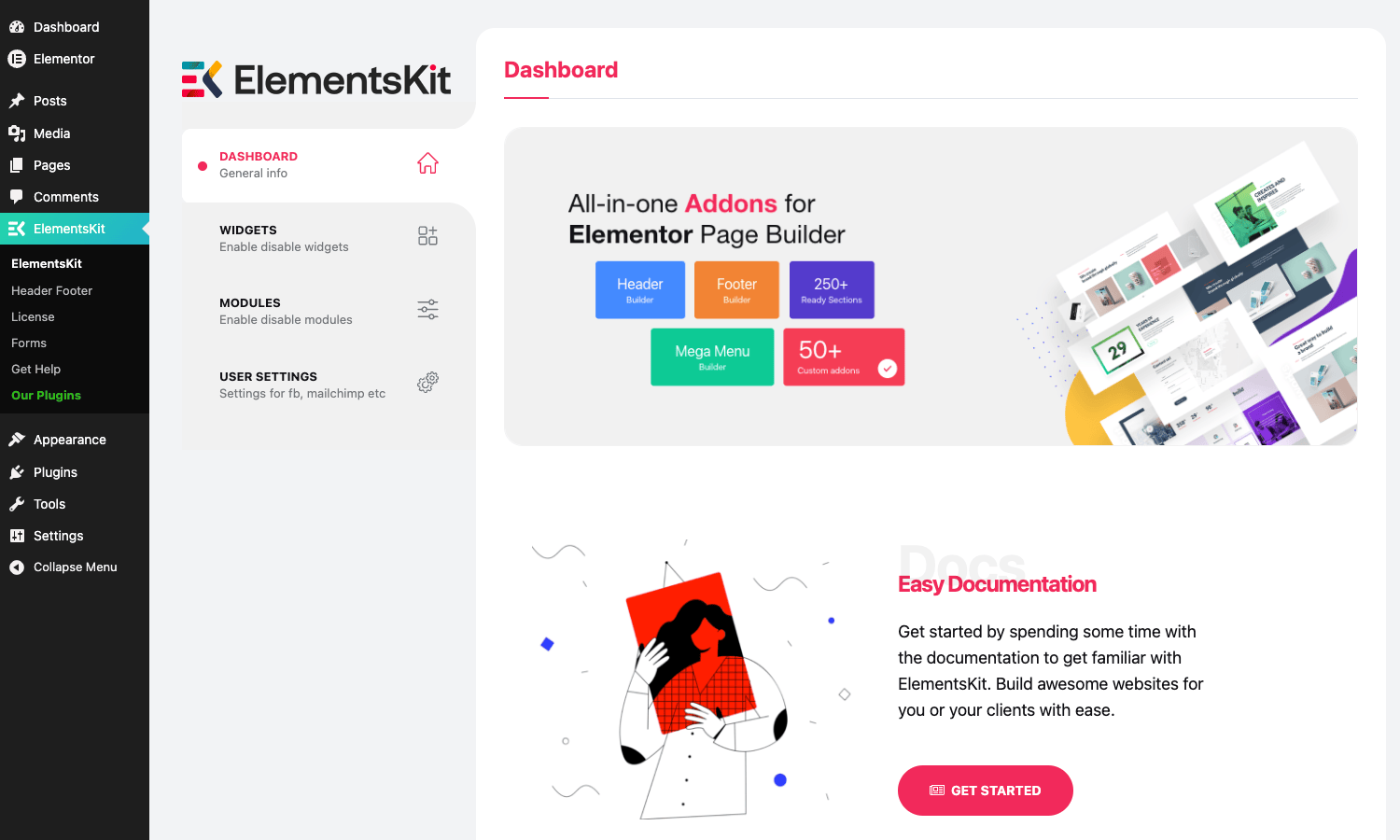
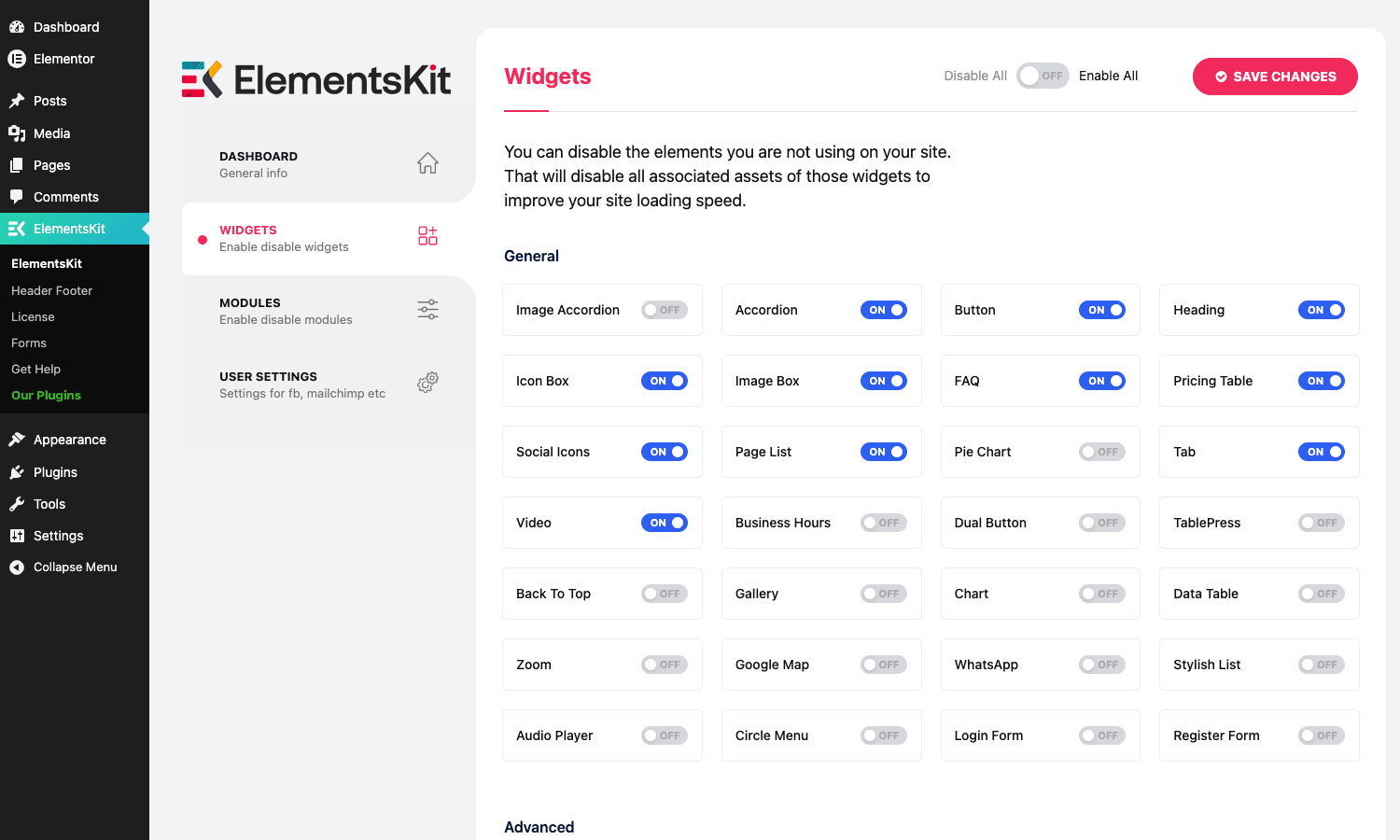
- 90+ Elementor widgets across general, advanced, marketing, social, and WooCommerce categories. You can turn individual widgets on and off so the editor sidebar isn’t a wall of stuff you’ll never use.
- Header Footer Builder. A real Theme Builder (lite) layer inside Elementor. Build a header, a footer, or a 404 template once, then assign it to any condition (entire site, single page, category, archive, etc.).
- Mega Menu builder. Plug into any registered WordPress nav menu and turn a top-level link into a full-width or column-based mega panel with Elementor inside it. Per-link icons, badges, and labels.
- Starter-template library. Hundreds of pre-built blocks, sections, and full-page layouts categorized by industry (Agency, SaaS, Restaurant, Photography, Real Estate, etc.). Inserted into the canvas with one click.
- Conditional display rules. Hide or show any Elementor element based on user role, logged-in state, device, date range, post type, or custom field value. Works per-widget, not just per-section.
- Parallax and scroll effects. Apply parallax, scroll-reveal, mouse-cursor tracking, or sticky-element behavior on any container or widget.
- Visual-effect modules. Particles backgrounds, glass-morphism (frosted) backgrounds, the newer Liquid Glass refractive effect, image masking with SVG shapes, and animated tooltips.
- Custom Widget Builder. Define your own Elementor widget in the WP admin (give it a name, paste HTML/PHP, add controls). Useful for repeating site-specific blocks without writing a real widget class.
- WooCommerce widgets. Product carousels, product lists, category lists, and a mini-cart that you can drop into headers built with the Header Footer Builder.
- Developer hooks. Action and filter hooks on the template render lifecycle, login/register form widgets, license-banner state, social-icon styles, and the Liquid Glass module. More on these later.
How it works (for users)
The mental model is simple. ElementsKit adds three things to your WordPress admin:
- An
ElementsKittop-level menu where you globally turn widgets and modules on or off, and where you configure third-party API credentials (Mailchimp list, Facebook page IDs, Instagram tokens, etc.) so the social-feed widgets have something to display. - A
Header Footersubmenu where you create header, footer, and other theme-part templates as posts of a custom type. - A new chunk of widgets and a "Mega Menu" toggle inside the Elementor editor itself.
You don’t really configure the plugin globally beyond the API-credentials tab. The real work happens inside the Elementor editor: you drag in widgets, you open the Header Footer Builder when you need a global template, and you go to Appearance -> Menus to enable Mega Menu on a specific nav item.
There’s an onboarding wizard that runs the first time you open the ElementsKit dashboard. It asks if you want the "Basic" (lightweight) widget preset or "Advanced" (everything on), then walks you through enabling a couple of recommended modules. Skip it if you’d rather pick widgets one by one later; nothing in the wizard is permanent.
Installation and setup
You’ll install two plugins. Wpmet split ElementsKit into Lite (free, on WordPress.org) and Pro (this product). Lite is the engine; Pro is a thin extension that unlocks the Pro widgets, the Header Footer Builder, the Mega Menu, and the Pro modules.
- In WP admin go to
Plugins -> Add New -> Search. TypeElementsKit Lite, install, activate. This is the official free plugin from Wpmet. - Upload the ElementsKit Pro zip via
Plugins -> Add New -> Upload Plugin. Pick the file you got, install, activate. - Go to
ElementsKit -> Dashboard. The Pro module toggles should now show up alongside the Lite ones. - Optionally, walk through the onboarding wizard and pick "Advanced" if you want every widget on by default. Otherwise, hit Skip and turn widgets on individually under
ElementsKit -> Widgets.
Note that ElementsKit Pro will not run without ElementsKit Lite active. If you deactivate Lite, Pro will sit there but contribute nothing. There’s no warning notice for this; it just goes quiet.
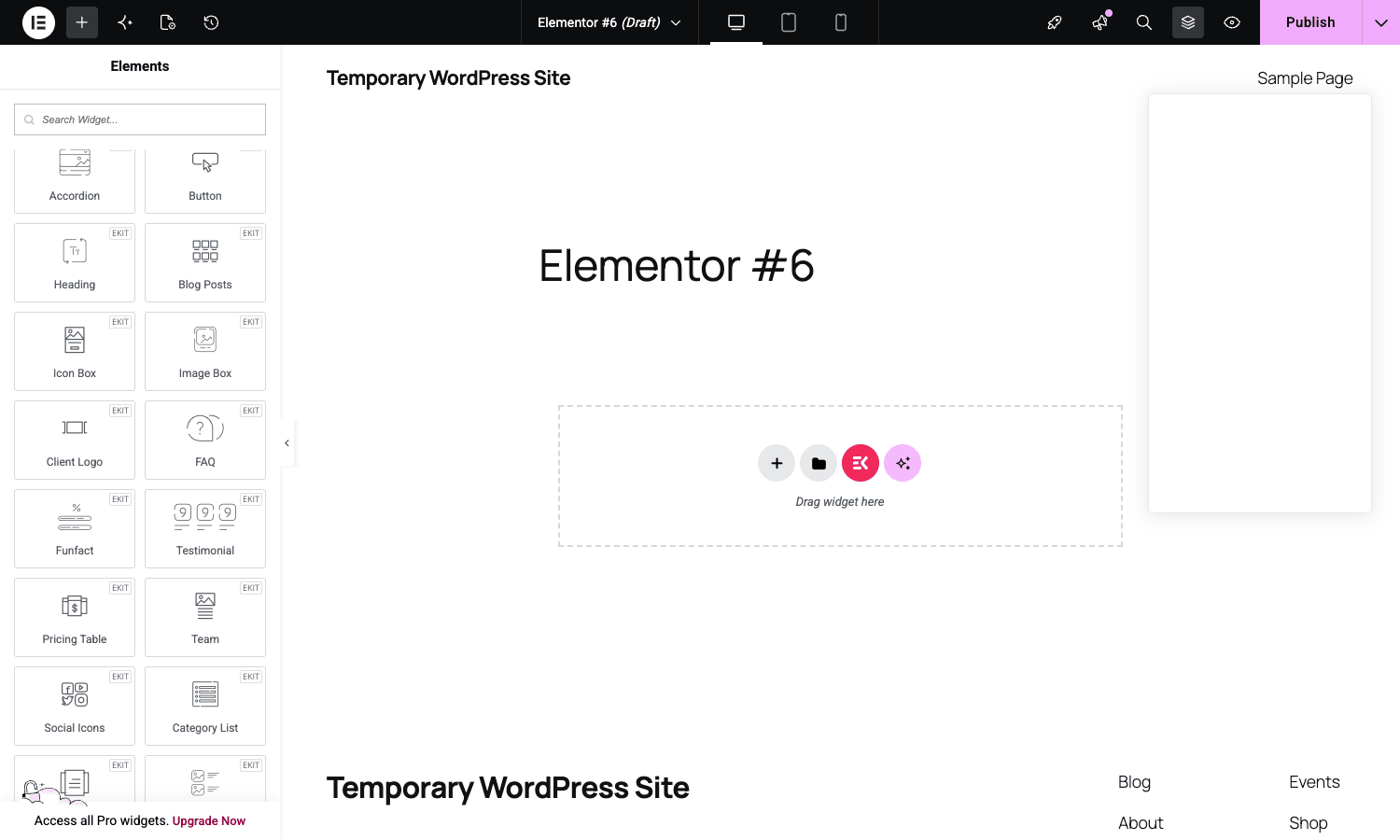
Once both are active, open any page in Elementor. Search the widget panel for "ek" or scroll to the ElementsKit category in the panel sidebar. Every widget in this category came from the addon pack.
The widget library, category by category
Going through all 90+ widgets would be exhausting, so here’s a tour by category with the ones that actually pull weight.
General widgets (the bread and butter)
These are the widgets you’ll use on almost every page. Pricing Table, FAQ, Image Box, Icon Box, Heading (with multi-color span styling), Button (with hover effects you don’t have to write CSS for), Funfact (animated number counter), Testimonial, Team Member, Tab, Accordion, Pricing Table, Client Logo carousel, Page List, Pie Chart, Video, Audio Player, and Gallery. Most of them ship with 3-6 layout presets so you don’t start from a blank widget.
The Pricing Table widget is a good example of how layered the controls are. You get a header section (title, subtitle, ribbon, featured-state toggle), a price section with currency / amount / period / suffix and per-element typography, a feature-list with per-row icon and tooltip, a button row, and a footer note. Every section has its own typography, spacing, color, hover, and animation controls. Compare that to writing the same pricing table in CSS by hand and you understand why people buy widget packs.
Advanced widgets (the "I would have installed a separate plugin for this" group)
This is where ElementsKit Pro starts justifying its license. Comparison Table (side-by-side product comparison with check/cross icons), Image Comparison (before/after slider), Image Accordion (collapsible image strip), Fancy Animated Text (typewriter, fade-in, slide-up effects), Hotspot (clickable pins on an image with tooltips, useful for product spec sheets and floor plans), Flip Box (two-sided card with hover flip), Image Hover Effect (10+ CSS-only hover overlays), Popup Modal (light alternative to the dedicated popup plugins), Protected Content (gate a block behind a password or login), Stacked Cards (Instagram-feed style stacked cards on scroll), Timeline, Vertical Menu, Unfold (read-more collapsible content).
The Advanced Search widget deserves its own callout: it gives you a live-AJAX product/post search box that you can place anywhere, with per-post-type filters and a custom result template. It registers its own REST endpoint at elementskit/v1/advanced-search so the AJAX is namespaced cleanly.
Marketing widgets
Countdown timers, coupon-code boxes, creative-button styles, motion text, popup modals. The Coupon Code widget specifically is a nice touch: it generates a one-click copy-to-clipboard coupon box, useful for affiliate sites and SaaS landing pages.
Social and feed widgets
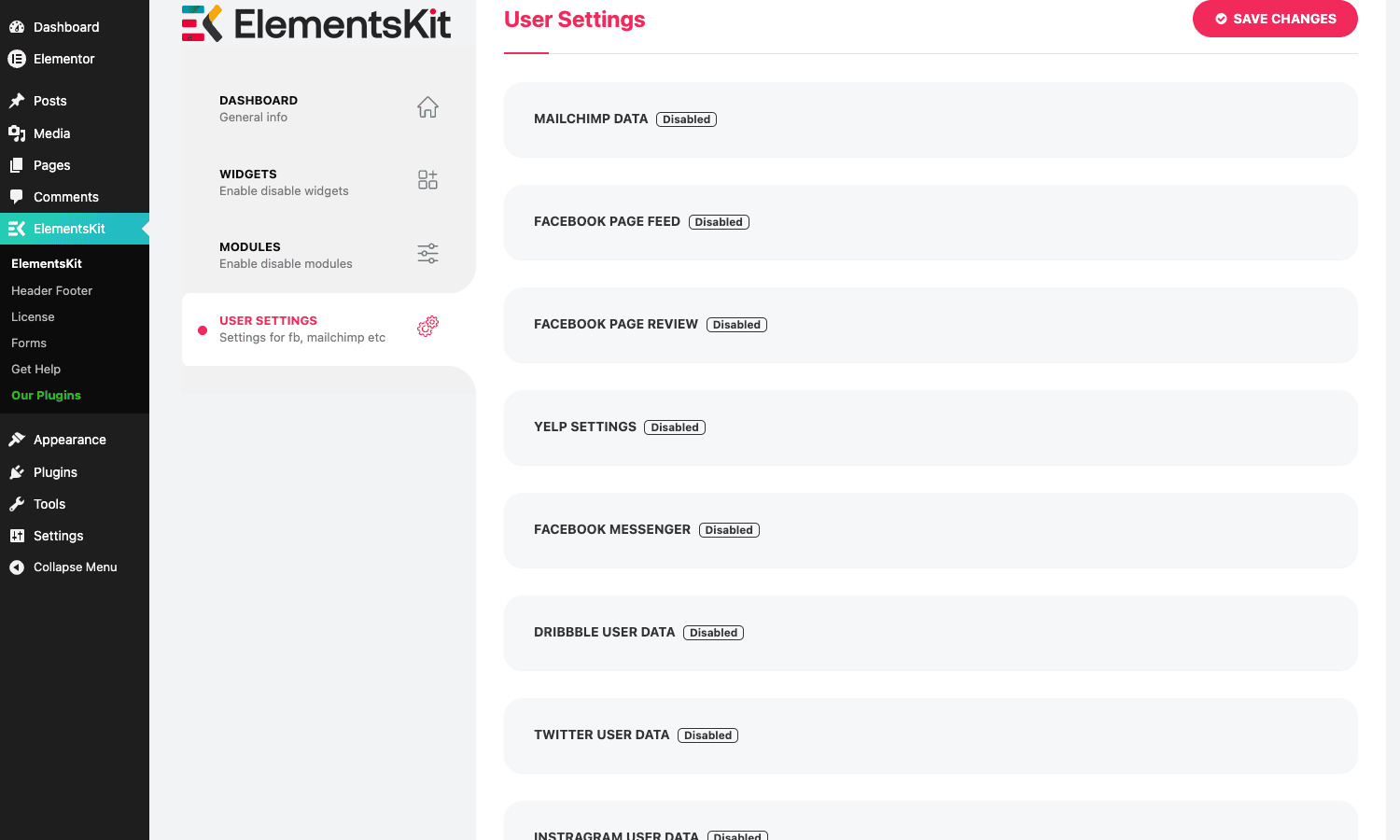
Instagram Feed, Facebook Feed, Facebook Page, Facebook Review, Pinterest Feed, Twitter Feed, Dribbble Feed, Behance Feed, Yelp reviews. These need API tokens or page IDs set under ElementsKit -> User Settings. Each social platform’s quirks (Instagram’s Graph API token expiry, Facebook page tokens, etc.) still apply, so don’t expect a magic bypass of platform limitations; ElementsKit just gives you the rendering layer once you have credentials.
eCommerce widgets
Woo Product Carousel, Woo Product List, Woo Category List, and Woo Mini Cart. These are not a full WooCommerce-shop builder (for that you’d want something like JetWooBuilder, which does single-product templates, archive templates, and cart/checkout layouts in Elementor). What ElementsKit gives you are the building blocks for the marketing parts of a WooCommerce site: featured-product carousels on the home page, category grids in the sidebar, and a header mini-cart.
Forms, login, and registration
ElementsKit ships its own Login Form and Register Form widgets that you can style fully inside Elementor and assign hooks to. They’re not a full form builder; if you need conditional logic, multi-step, payments, or webhook integrations, look at the MetForm Pro from the same vendor (Wpmet ships both), or a dedicated form plugin.
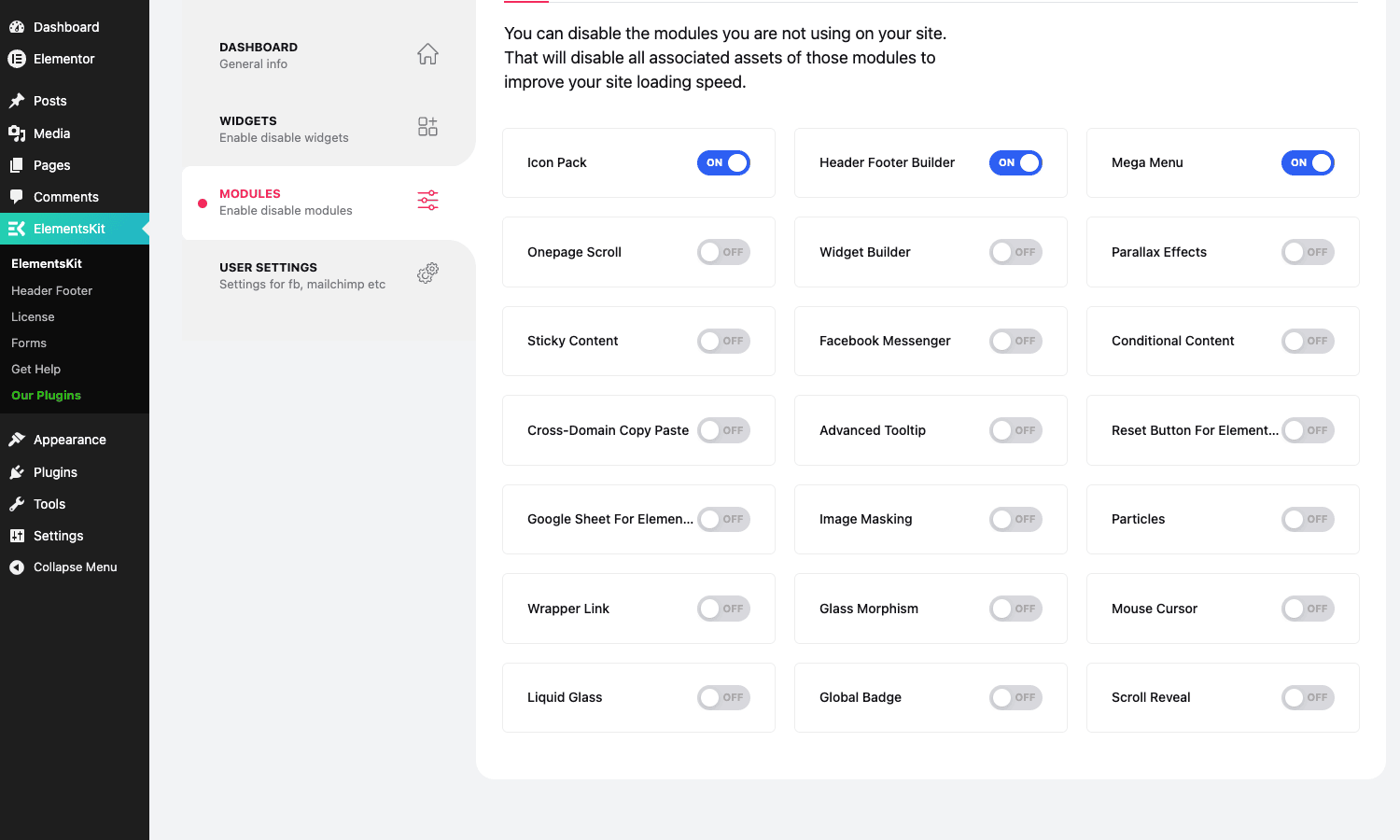
You can see every available widget and toggle individual ones off in the Widgets tab. Turning a widget off doesn’t just hide it from the panel, it also stops loading the widget’s CSS and JS files on the front end, which is the right way to keep page weight under control.
The Header Footer Builder
This is the most-used Pro feature in my experience. It registers a custom post type called elementskit_template that you build with Elementor and then assign to a display condition.
Workflow:
- Go to
ElementsKit -> Header Footer -> Add New Template. - Set the template type (Header, Footer, 404, etc.).
- Set the display condition. The conditions are: entire site, front page, single page, single post, category archive, tag archive, search results, 404, or a specific post by ID. You can stack multiple conditions per template (e.g. "this header on every page except the front page").
- Click "Edit with Elementor" and design the header / footer in the canvas. ElementsKit gives you Header-Footer-specific widgets too: Site Logo, Site Title, Site Tagline, Nav Menu (with the optional Mega Menu inside it), Search Form.
- Save. The template is now rendered automatically on every page matching the condition, hooked in via
wp_body_openfor headers andwp_footerfor footers.
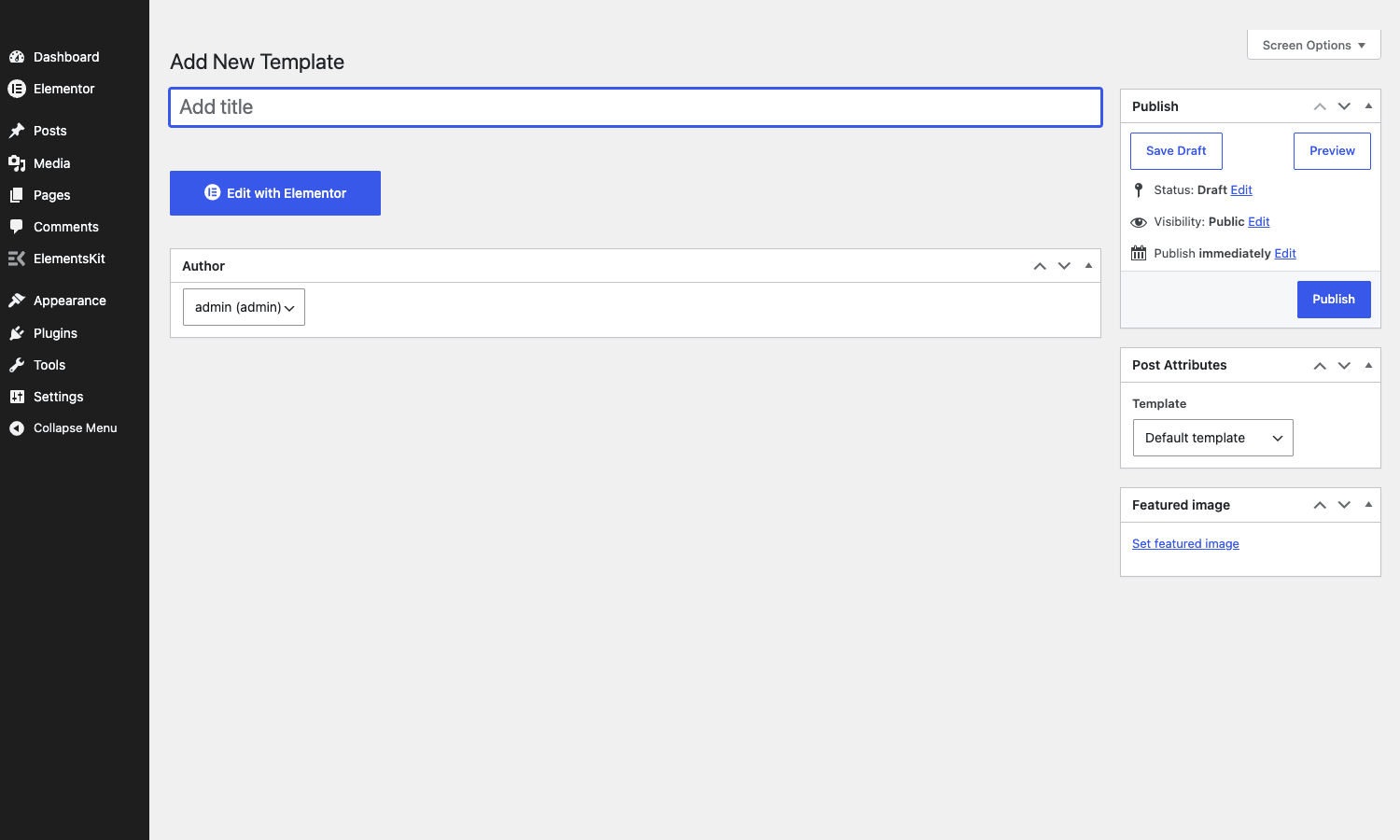
The bit that makes this practical is the assignment UI. You’re not editing your theme’s header.php. You’re not writing template conditionals. You’re picking from a dropdown. If you’ve ever rebuilt a theme’s header for a client just because they wanted a phone number in the top bar, you’ll understand why this is worth installing.
A few catches:
- The template assignment runs through a
apply_filters('elementskit/template/condition_match', ...)filter, so devs can plug in custom conditions (e.g. "show on URLs starting with/landing/"). The default conditions cover most cases. - If your theme prints its own header in
get_header(), ElementsKit will still render its template ON TOP of it. You need to make sure your theme either supports "hide theme header" (Astra, GeneratePress, Kadence, Hello Elementor all do) or you use a blank-slate theme like Hello Elementor. - The Pro Header Footer Builder is the only realistic free alternative to Elementor Pro’s Theme Builder for headers and footers. It doesn’t replace Pro’s Theme Builder for single-post / single-product templates, although Wpmet’s other plugin [ShopEngine] picks up the WooCommerce side and there are addons like AnyWhere Elementor Pro that handle generic single-template injection.
The Mega Menu module
Mega menus are one of those features that look easy until you try to build one. ElementsKit’s mega menu module sits on top of WordPress’s native nav-menu system. You go to Appearance -> Menus, hover over a top-level item, click ElementsKit Mega Menu, toggle it on, then open the editor and build the dropdown panel as an Elementor canvas.
What you can put in a Mega Menu panel:
- Multiple columns (full-width or contained).
- Any ElementsKit widget (Pricing Table, Icon Boxes, even Product Carousels).
- An Elementor template from the library.
- Icons, badges ("NEW", "SALE"), and label colors per menu item.
The panel respects the rest of your menu’s hierarchy, so you can mix mega-menu items with normal dropdown items in the same nav. On mobile, the mega panel collapses to a stacked vertical list automatically, but you can also build a separate mobile-only mega panel if you want different content.
A common pattern: build one Mega Menu for the "Shop" nav item containing the top product categories with thumbnails, then a normal dropdown for "About". This is closer to what a real e-commerce site needs than a single uniform dropdown.
If you’ve used JetMenu before, ElementsKit’s mega menu is roughly comparable in capability. JetMenu is a bit more polished UX-wise and has more transition effects out of the box; ElementsKit’s wins on price because it’s bundled in the Pro license alongside everything else.
Conditional display, parallax, and the visual-effect modules
Each Pro module is a separate togglable feature. Turning them off avoids loading any of their CSS/JS, which matters for performance.
Conditional Display
Every widget gets a new "ElementsKit Conditional" tab in its advanced settings. Rules include: logged-in state, user role, specific user, date range (with start/end), specific weekday, time of day, device (desktop / tablet / mobile), specific URL, post type, taxonomy term, custom field key/value, and a custom PHP-callable hook for the truly custom cases.
You can combine rules with AND / OR. Use cases: show one CTA to logged-out users and a different one to subscribers; only show a "Black Friday" banner block between two dates; show a tablet-specific version of a hero on tablets only; gate a "Pro tip" block to users with the editor role.
Parallax Effects
Add a parallax transform on any container, image, or widget. Choose vertical scroll, horizontal scroll, scale-on-scroll, opacity-on-scroll, rotate-on-scroll, or blur-on-scroll. The math is done with requestAnimationFrame against the scroll position, not the older background-attachment trick, so it works on mobile (background-attachment: fixed is broken on iOS Safari for performance reasons).
Particles
Add a particles.js background to any section. Configure particle count, color, shape, speed, line-link, hover-to-repulse. Heavier than it sounds (particles.js is not tiny), so use sparingly and only on landing-page hero sections.
Glass Morphism / Liquid Glass
CSS backdrop-filter-based frosted glass effect on any element. The newer Liquid Glass module simulates a refractive lens, which is the design trend that’s been doing the rounds since Apple started using it in their UI. Both are CSS-only so they’re cheap on the CPU but require modern browsers.
Sticky Content
Make any element stick to the top (or bottom) of the viewport on scroll. Configurable offset, breakpoint (sticky on desktop only, etc.), and "stop scrolling at element X" anchor. Useful for sidebars on long articles.
Onepage Scroll, Wrapper Link, Mouse Cursor, Image Masking, Cross-Domain Copy Paste
The grab-bag. Onepage Scroll turns a page into a fullpage.js-style snap-scroll experience. Wrapper Link makes an entire container clickable (you wrap a card in a single link without needing nested anchors). Mouse Cursor swaps the cursor for a custom shape. Image Masking applies SVG mask shapes to images. Cross-Domain Copy Paste lets you copy an Elementor section from site A and paste it directly into site B (without exporting JSON), which is a quality-of-life win for agencies running multiple client sites.
Custom Widget Builder
This one’s underrated. Toggle on Widget Builder, then go to ElementsKit -> Widget Builder -> Add New. Give your widget a name, paste an HTML template, and define the controls (text, image, color, repeater, etc.). Save. It now shows up in the Elementor panel like a built-in widget. No PHP class to write, no autoloader to register.
It’s not as flexible as writing a real Elementor widget class (you can’t, for instance, define a fully custom control type), but for "I need to drop this same hero card on 12 pages", it’s faster than copying the section every time.
Templates and the layout library
ElementsKit ships with hundreds of pre-built layouts in the editor. Click the ElementsKit icon inside the Elementor canvas’s section-add area and you’ll see a modal with:
- Pages – full-page layouts, organized by industry (Agency, Photography, App, SaaS, Restaurant, Real Estate, Education, Medical, Construction, etc.).
- Blocks – reusable sections (hero, pricing, team, contact, FAQ, testimonials).
- Sections – smaller building blocks.
- My Saved – your own saved layouts.
Importing a layout fills your canvas with the design. You then edit copy and swap images. The starter quality is decent (not as design-led as some of the newer template marketplaces, but not generic either).
If you’re not into the bundled layouts, you can use ElementsKit alongside the Astra Pro starter-template ecosystem; the two don’t conflict because ElementsKit imports through Elementor’s native template system.
Real-world use cases
A few situations where ElementsKit Pro pulls its weight:
Agency building 10+ small-business sites a year
You have one Pro license you can install on every client site. You build their header and footer once in the Header Footer Builder, plug in their brand colors via Elementor’s global colors, and ship. The Mega Menu handles the bigger sites. The starter templates speed up the first draft.
Saving an Elementor-Free site from the Elementor Pro upsell
If you can’t or won’t pay for Elementor Pro, ElementsKit covers the two biggest things you’d buy Pro for: a Theme Builder for headers/footers and a popup modal. You don’t get Pro’s WooCommerce product templates or its full custom-CSS-per-widget control, but for content sites you’re fine.
Marketing site for a SaaS or app
The Pricing Table, FAQ, Comparison Table, Testimonial Carousel, Fancy Animated Text, and Particles widgets together cover about 80% of what a SaaS landing page needs. The Conditional Display module is great for things like "show the iOS download button to iOS visitors, the Android one to Android visitors".
Photographer / portfolio site
Image Gallery, Image Hover Effect, Image Comparison (great for before/after edits), Image Accordion, Stacked Cards, and the masking module give you a lot of photo-presentation styles without needing a separate gallery plugin.
Restaurant / menu site
Price Menu widget for the food menu. Business Hours widget for opening times. Google Map widget for the location. Pricing Table for catering packages. Header Footer Builder for a consistent reservation-button-in-the-header treatment across every page.
Multi-language Elementor site
ElementsKit respects WPML and Polylang for both the widgets and the Header Footer templates. You can build a header per language and assign each via the condition rules. It registers itself with WPML via apply_filters('wpml_element_type', ...).
Developer reference: hooks, filters, REST routes, and shortcodes
If you’re customizing ElementsKit on a real site, here’s the public extension surface. All hooks live in the elementskit/ and ekit/ namespaces.
Action: respond to the plugin being loaded
Fires once after the plugin has registered all its widgets and modules. Use it to hook your own additions.
add_action( 'elementskit/loaded', function () {
    // Now safe to register your own ElementsKit-aware extension.
    do_my_custom_init();
} );
Actions: hook into header / footer template rendering
The Header Footer Builder fires four actions around each template’s render. Use them to inject custom HTML or to enqueue scripts only when an EK header / footer is in play.
add_action( 'elementskit/template/before_header', function ( $template_id ) {
    echo '<!-- ElementsKit header start, template ID ' . esc_attr( $template_id ) . ' -->';
} );

add_action( 'elementskit/template/after_footer', function ( $template_id ) {
    wp_enqueue_script( 'my-footer-tracking', plugin_dir_url( __FILE__ ) . 'tracking.js', [], '1.0', true );
} );
Filter: customize the template display condition
The decisive filter for "should this template render on this request?". Return true to force render, false to skip, or modify the array of conditions.
add_filter( 'elementskit/template/condition_match', function ( $match, $template_id, $conditions, $request ) {
    // Only render a specific header on URLs starting with /promo/.
    if ( 42 === (int) $template_id && strpos( $_SERVER['REQUEST_URI'], '/promo/' ) === 0 ) {
        return true;
    }
    return $match;
}, 10, 4 );
Filter: control the Register Form fields
Use this to add or remove fields from the front-end Register Form widget without forking the plugin.
add_filter( 'elementskit/register_form_fields', function ( $fields ) {
    $fields['phone'] = [
        'label'    => 'Phone Number',
        'type'     => 'tel',
        'required' => true,
    ];
    return $fields;
} );
Filter: disable the Register Form widget entirely
Returns a boolean. Useful if your site doesn’t allow self-registration and you want to make sure the widget is inert even if a template accidentally includes it.
add_filter( 'elementskit/register-form/is-disabled', '__return_true' );
Filter: hide the in-admin license banner
Returns a boolean. Mostly used by hosting providers and managed-WordPress configs.
add_filter( 'elementskit/license/hide_banner', '__return_true' );
Filter: customize the social icon style
The social/style filter receives the icon set name. Useful to standardize icons across multiple widgets at once.
add_filter( 'elementskit/social/style', function ( $style ) {
    return 'square-flat'; // force-flat icons everywhere
} );
Filter: skip-link control
Two filters control the accessibility skip-link that ElementsKit injects.
add_filter( 'elementskit_enable_skip_link', '__return_false' ); // disable entirely
add_filter( 'elementskit_skip_link_url', function () {
    return '#site-content'; // change the anchor
} );
Action and filter: Liquid Glass module
Two hooks let you extend the Liquid Glass effect. The action fires when the module is registering its controls; the filter lets you modify the inline attributes on any rendered Liquid Glass element.
add_action( 'ekit/liquid/glass/controls', function ( $controls_manager, $widget ) {
    $widget->add_control( 'my_glass_extra', [
        'label' => 'Extra blur',
        'type'  => \Elementor\Controls_Manager::SLIDER,
    ] );
}, 10, 2 );

add_filter( 'ekit/liquid/glass/attr', function ( $attr, $settings ) {
    $attr['data-track'] = 'glass';
    return $attr;
}, 10, 2 );
REST route: Advanced Search
The Advanced Search widget registers a namespaced REST endpoint for its AJAX backend.
GET https://example.com/wp-json/elementskit/v1/advanced-search
    ?keyword=foo
    &post_type=post,product
If you’re building a headless storefront or want to call ElementsKit search from elsewhere, this endpoint is reusable.
Shortcodes
Two shortcodes are registered by the Copyright widget but are usable anywhere shortcodes are processed.
[ekit_current_year]outputs the current 4-digit year. Drop into footer copyright text.[ekit_site_title]outputs the site title (equivalent toget_bloginfo('name')).
Useful pairing in a footer template:
Copyright [ekit_current_year] [ekit_site_title]. All rights reserved.
The custom post type
register_post_type( 'elementskit_template', [
    'labels'              => [ 'name' => 'Templates', /* ... */ ],
    'public'              => true,
    'rewrite'             => false,
    'show_ui'             => true,
    'show_in_menu'        => false,
    'exclude_from_search' => true,
    'capability_type'     => 'page',
    'show_in_rest'        => true,
    'rest_base'           => 'elementskit-template',
    'supports'            => [ 'title', 'thumbnail', 'elementor' ],
] );
This is straight from the plugin source (see modules/header-footer/cpt.php). The post type is REST-exposed at /wp-json/wp/v2/elementskit-template, which means you can read your header/footer templates via the WP REST API if you’re building a headless variant. Standard register_post_type behavior applies.
Third-party API integration: User Settings
The User Settings tab in ElementsKit -> User Settings is where you store API tokens and keys for the social feed widgets. Behind the scenes these are saved as serialized options under the elementskit_options option name. If you want to programmatically set them (e.g. via a deployment script), do it through update_option('elementskit_options', $array).
Performance, compatibility, and gotchas
Performance: widgets and modules add up if you leave them all on
The per-widget on/off toggle at ElementsKit -> Widgets is not a vanity feature. Each widget has its own CSS and JS file that gets enqueued whenever Elementor detects the widget is used on a page. If you have 60 widgets enabled but only use 20, you’re not loading the unused widget assets (Elementor is lazy here), but you ARE still loading the registration code and the editor-side scripts. Turning off widgets you’ll never use is the right hygiene.
Same applies to modules. The Particles module pulls in the particles.js library; if you’ve turned it on but you only use particles on one page, you’re loading the library globally. The Onepage Scroll module similarly loads fullpage.js logic everywhere. Toggle modules off if you’re not using them.
Compatibility with themes
Works great with Hello Elementor, GeneratePress, Astra, Kadence, OceanWP, and most other lean themes. Be careful with heavy multipurpose themes (Avada, BeTheme, Total) that ship their own page builders and template systems; you can get conflicts where the theme’s header insists on rendering even when ElementsKit’s header is assigned. The fix is usually a theme setting like "Hide site header" toggled on for pages using an EK header.
Compatibility with other Elementor addon packs
You CAN run ElementsKit alongside Essential Addons for Elementor Pro, Premium Addons Pro, or PowerPack for Elementor, but I’d recommend against it. You’ll have duplicate widgets for everything (3x Pricing Table widgets), more CSS bloat, and longer editor load times. Pick one pack and stick with it.
The exception is JetEngine (Crocoblock’s dynamic-content engine) and JetWooBuilder (their WooCommerce template builder). Those don’t overlap with ElementsKit and they cover different jobs (dynamic content vs. widget pack). They coexist cleanly.
Compatibility with WPML and Polylang
Both supported. The Header Footer Builder respects the language and lets you assign a header per language. Widget strings get registered with WPML’s string translation. The plugin calls apply_filters('wpml_element_type', ...) so its custom post type is picked up by WPML.
Compatibility with caching plugins
Works with WP Rocket, W3 Total Cache, LiteSpeed Cache, and others. No special config needed. The Header Footer Builder templates ARE cached as part of the page they’re rendered on, which is what you want.
A specific note for sites with the Conditional Display module: if you’re hiding/showing content based on user role or logged-in state, you need to either exclude those pages from page cache or use a cache that supports per-user caching. Standard page cache will serve the same cached HTML to logged-in and logged-out users; the conditional rules run on the server side, not in the browser.
Gotchas
- You need ElementsKit Lite installed for Pro to do anything. Pro is an extension, not a standalone.
- The starter-template library calls home. The free Lite plugin fetches layouts from Wpmet’s API; the redistribution from this site reroutes that to a CDN that mirrors the layout JSON, so it keeps working without a Wpmet account.
- Onboarding wizard auto-activates the Wpmet plugin recommendations. If you’d rather not have MetForm or ShopEngine installed, hit Skip on the wizard.
- The Liquid Glass effect is heavy on older mobile GPUs. Test on a real low-end Android before shipping it on a critical landing page.
- Mega Menu does not work with all themes’ nav-menu locations. Some themes use a custom walker class for menu rendering, which prevents ElementsKit from injecting its mega-menu container. The fix is to use a theme that uses standard
wp_nav_menu()output, or to use the ElementsKit Nav Menu widget inside a Header template instead of relying on the theme’s nav location.
Pricing and licensing
ElementsKit Pro is sold on the Wpmet site as a standalone license (single site, 5 sites, unlimited sites) and as part of the Wpmet Bundle that throws in MetForm Pro, ShopEngine, GetGenie, WP Social, and WP Fundraising. Annual renewal is the default; lifetime is offered during sales.
The plugin is GPLv3, which means once you have a copy you’re allowed to use it on as many sites as you want. The license you buy from Wpmet covers automatic updates and official support, not the right to use the code. That distinction is the entire reason GPL redistribution sites like this one exist: you get the same plugin code under the same GPL license, you just don’t get Wpmet’s update server.
ElementsKit Pro is available on the GPL Times store at the ElementsKit Pro product page. Same code as Wpmet’s, redistributed under the GPL.
How it compares to other Elementor addon packs
The Elementor addon space is crowded. Here’s where ElementsKit sits relative to the main competitors.
vs Essential Addons for Elementor Pro
Essential Addons is the biggest player in this space by install count. EA has 100+ widgets vs ElementsKit’s 90+, plus a Theme Builder, popups, and a templates library. ElementsKit’s edge is that its Mega Menu and Header Footer Builder feel a little more polished, and the visual-effects modules (Liquid Glass, Particles, Glass Morphism) feel newer. Essential Addons feels slightly heavier in the editor on a large page. Both are very good; if I were starting fresh I’d try both and pick whichever editor experience I liked more.
vs Premium Addons Pro
Premium Addons is closer to a design-focused pack with strong attention to widget quality (the carousels and image-effects widgets specifically are excellent). It doesn’t bundle a Header Footer Builder; you’d need to combine it with another solution. So if you already have Elementor Pro and just want polished widgets, Premium Addons is great. If you want widgets + theme parts in one license, ElementsKit wins.
vs Royal Elementor Addons Pro
Royal is the newer entrant and feels the most "designer-led". Beautiful default styling, fewer total widgets, no Header Footer Builder in the base pack. Good if you care about widget aesthetic out of the box; less good if you want one plugin to do everything.
vs JetElements (and the wider Crocoblock suite)
JetElements is part of Crocoblock’s modular ecosystem. Crocoblock splits things by job: JetElements is widgets, JetMenu is mega menus, JetEngine is dynamic content, JetWooBuilder is WooCommerce templates. You buy what you need, or the whole bundle. ElementsKit’s all-in-one packaging is simpler but less powerful per-piece. If you build dynamic-content sites (CPTs, custom listings, query loops) Crocoblock is still the more capable stack.
vs The Plus Addons / PowerPack Pro
The Plus Addons and PowerPack are both solid all-in-one widget packs that have been around for years. They overlap heavily with ElementsKit in widget count. Differences are mostly stylistic at this point. PowerPack has slightly better WooCommerce widgets; The Plus has a larger template library; ElementsKit has the better Header Footer Builder and the newer effect modules.
If you want to cross-reference, the older PowerPack for Beaver Builder review goes into the same vendor’s Beaver Builder pack, which is a useful comparison if you’re choosing between page builders too. The Premium Addons Pro for Elementor walkthrough and the Essential Addons for Elementor write-up both go deeper on those specific competitors.
Frequently asked questions
Do I need Elementor Pro to use ElementsKit Pro?
No. ElementsKit Pro works on top of free Elementor. If you already have Elementor Pro, ElementsKit complements it by adding more widgets and a different Header Footer Builder. If you don’t have Pro, ElementsKit covers most of what Pro adds for the kind of marketing/content sites it’s typically used on.
Will it slow down my site?
Not if you use it sensibly. Turn off the widgets and modules you don’t use under ElementsKit -> Widgets and -> Modules. Each toggle prevents the corresponding CSS/JS from being registered. On a properly configured site with a good cache plugin, ElementsKit’s overhead is comparable to other widget packs, which is to say: noticeable in the editor, modest on the front end.
Can I use ElementsKit’s Header Footer Builder alongside my theme’s customizer?
You can, but you shouldn’t try to. Pick one. If you’re using ElementsKit’s header, disable your theme’s header (most modern themes have a per-page or per-site toggle for this). Otherwise you’ll get two headers stacked.
Does it work with WooCommerce?
Yes. It ships four Woo widgets (Product Carousel, Product List, Category List, Mini Cart) and the Header Footer Builder works on WooCommerce pages. For full WooCommerce template control (single-product templates, shop archive templates), you’d add either JetWooBuilder or Elementor Pro’s WooCommerce builder on top.
Can I build a Mega Menu without using Appearance > Menus?
Yes. Use the ElementsKit Nav Menu widget inside a Header template you built with the Header Footer Builder. Configure the mega-menu panels directly inside the widget settings. This bypasses the WP-Admin menus screen entirely.
What happens if I deactivate ElementsKit Pro?
The Pro widgets disappear from your pages (they render as placeholders or empty space), the Pro modules stop working, and the Header Footer Builder admin page goes away. Your Pro-built templates are still in the database but won’t render until Pro is reactivated. Lite-only widgets keep working.
Does the GPL Times version receive updates?
Yes. The store updates the plugin to match new Wpmet releases. You won’t get a one-click "update available" prompt from Wpmet’s API (because this build isn’t tied to a Wpmet account), but you can re-download from the GPL Times product page whenever a new version drops and overwrite the plugin folder.
Is there a free trial?
ElementsKit Lite (the free plugin from WordPress.org) gives you a lot of the basic widgets and a few of the modules. It’s a real free version, not a 14-day trial. You can test the editor experience and see whether you like ElementsKit’s controls before deciding on Pro.
Final thoughts
ElementsKit Pro is one of the safer choices if you want a single Elementor addon pack that covers most jobs. The Header Footer Builder alone is worth the install for anyone who has spent an afternoon fighting their theme’s customizer. The Mega Menu module saves you the cost of a separate menu plugin. The widget library is large enough that you’ll rarely need to write CSS from scratch for a marketing site, and the per-widget toggle keeps the bundle from becoming a performance disaster.
It’s not a universal "best" answer. If you want the most polished single widgets (Premium Addons), the most dynamic-content power (Crocoblock), or the largest install base for community support (Essential Addons), or the deepest widget bench at 200+ widgets (Element Pack Pro), other choices are defensible. But for the freelancer or agency who wants one plugin to install on every client site and have everything they need, ElementsKit Pro is hard to beat. The fact that it pairs with a real free Lite version means you can try most of it before you spend money.
If you want to go deeper on the surrounding ecosystem, the MetForm Pro walkthrough covers the same vendor’s form plugin, the Elementor Pro review goes into what Pro adds vs free Elementor, and the JetMenu review compares against an alternative mega-menu approach.
ElementsKit Pro is sold on the GPL Times store at the ElementsKit Pro listing under the standard GPL terms. Pair it with the free elementskit-lite plugin from WordPress.org and you have the full Pro experience without an annual subscription.