

I’ve shipped roughly two dozen Elementor sites in the last few years, and at some point on every single one of them I’ve hit the same wall. The default Elementor widget list is fine for a hero, a few columns, and a button. The moment a client asks for "can we have a Twitter feed here, and a pricing menu like this, and a timeline of our company history, and an Instagram grid on the about page", you start hunting for an addon pack.
I’ve tried most of them. Essential Addons, Happy Addons, Premium Addons, Crocoblock’s JetElements, Ultimate Addons for Elementor, and The Plus Addons. They all do roughly the same job with roughly the same widget set. Element Pack Pro is the one I keep coming back to when the widget list matters more than anything else, because BdThemes has been collecting widgets in this thing for years and the count is now on the wrong side of 200.
This is a long, honest walk through Element Pack Pro. What it does well. Where I think it’s overbuilt. The widgets I actually use, and the ones I’d disable to keep the page weight down. A full developer reference with the hooks and filters that matter. If you’ve never installed an Elementor addon pack before, the first 20 minutes are confusing, so I’m starting from there.
Table of Contents
- What is Element Pack Pro?
- How an Elementor addon pack actually fits in
- The 200+ widget claim, audited
- Key features at a glance
- Installation and the first hour
- A guided tour of the admin
- The widget panel in the editor
- The widgets I reach for most
- Theme Builder, Header Builder, and Mega Menu
- Module manager and bundle size
- Real-world use cases
- Developer reference
- Performance, compatibility, and the gotchas
- Pricing and licensing
- FAQ
- Final thoughts
What is Element Pack Pro?
Element Pack Pro is an Elementor addon plugin built by BdThemes. The author header in the main plugin file says exactly that: Author: BdThemes, Plugin URI: https://elementpack.pro/. BdThemes is a Bangladesh-based WordPress shop that’s been releasing Elementor extensions since the very early days of the page builder, so this isn’t a new product trying to find its feet. It’s a mature codebase with a lot of accumulated decisions in it, for better and for worse.
What it does, in one sentence: it adds about 200 widgets, a theme builder, a mega menu builder, and a pile of utility features (smooth scroller, live copy/paste, custom fonts, custom icons, context menu) to the Elementor page builder. The widgets cover the obvious territory (carousels, accordions, modals, tabs) and then keep going into surprisingly specific areas (Twitter feed, Instagram feed, Calendly embed, crypto-currency ticker, bbPress forum index, BuddyPress group card, weather, barcode generator).
Yes, a barcode generator. I told you the widget count was on the wrong side of 200.
Element Pack Pro works on top of Elementor free. You do not need Elementor Pro for any of its widgets to function. That’s important, because most "addon" plugins are sold as a companion to Elementor Pro and silently degrade if you don’t have it. Element Pack Pro is the opposite of that. It’s a Pro-ish feature set, sold separately from Elementor’s own Pro plugin, and it competes with Elementor Pro on a lot of overlapping ground (forms, post grids, popups, theme builder).
That overlap is something to think about before you install both. More on that later.
How an Elementor addon pack actually fits in
Skip this section if you’ve already used one or two Elementor addon plugins. If you haven’t, the next 200 words save a lot of confusion.
Elementor’s free version registers a handful of widget categories in the editor (Basic, General, Site, Single, WooCommerce, WordPress). When you activate an addon plugin like Element Pack Pro, it hooks into elementor/init and adds its own category. From the user’s perspective, that means new widgets show up in the same left-hand panel where the default ones live, under their own header. You drag them into the canvas the same way. You configure them with the same Style and Advanced tabs.
Under the hood, every widget is a PHP class that extends Elementor’s Widget_Base. The addon plugin just registers more of those classes. There’s no separate "Element Pack" editor. There’s no separate canvas. It’s all the same Elementor.
That’s also why two addon packs can fight each other if they’re both installed. They share the same registration hooks, the same widget categories, and sometimes the same widget IDs (every pack has its own "advanced button"). Most of the time it’s fine. Once in a while two packs both try to register the same JS handler and the second one wins. Don’t run three addon packs at once unless you enjoy console errors.
The 200+ widget claim, audited
I’ll be honest. I rolled my eyes when I first saw the "200+ widgets" line on the BdThemes marketing page. Most addon plugins inflate their widget counts by listing every option of every widget as a separate item, or by including dozens of nearly-identical variants.
So I counted. Inside the plugin’s modules/ directory there are 302 folders, each one a module. Not every module is a widget you’d drag onto a page. Some are utility modules. But when you crack open Elementor’s editor and look at the Element Pack Pro category, I counted 81 widgets in the free-tier category alone, with the "(Single)" extension category bringing it to the full advertised set when Elementor’s free version is detected.
So: the 200+ widget claim is real, though "200 widgets you’ll actually drag onto a page" is more like 50. The rest are specialty bits (crypto ticker, weather, barcode, business hours, bbPress shortcodes) that exist for the one site that needs them.
The honest version of the pitch is: Element Pack Pro is the widget pack you reach for when you can’t predict what your client will ask for. Most projects use 25-30 of the widgets. The other 170 are there in case.
Key features at a glance
Rather than dump the full marketing list, here’s what actually pulls weight on a real Elementor site.
- 80+ widgets in the main category in the Elementor editor, plus a Single-element extension category for things you’d normally need Elementor Pro for (post grid, post tabs, related posts).
- Theme Builder under WP admin -> Theme Builder. Lets you build header, footer, single post, single page, archive, search, and 404 templates as standard Elementor templates. This is the biggest reason to consider Element Pack Pro instead of Elementor Pro for theme work.
- Mega Menu integration with
wp_nav_menuitems. Attach any Elementor template to a menu item as its dropdown panel. - Header Builder for sticky / transparent / off-canvas headers without touching theme PHP.
- Custom Fonts and Custom Icons uploaders. Upload a
.woff2file or a Fontello icon ZIP and they show up everywhere a typography or icon control appears. - Live Copy Paste between sites. Copy a section on site A, paste it on site B. Works even cross-domain.
- Context Menu in the editor. Right-click on a section to copy, paste, save, lock, or jump to a parent container. Tiny feature, huge time-saver.
- Smooth Scroller for anchor-link scrolling site-wide, with offset handling for sticky headers.
- Asset Manager that lets you selectively disable widget CSS/JS on a per-page basis. This is the lever you pull when the bundle size gets out of hand.
- SVG Support built in. No need for a separate SVG plugin.
- Variation Swatches for WooCommerce. Replaces the default dropdown selectors with color, image, and label swatches.
- Dynamic Content tags for any field, ACF, WP user meta, current date, page URL. Hooks into Elementor’s dynamic-tags system, so it works on every widget’s color, text, link, and image controls.
- Built-in Rollback Version. Roll back to a previous Element Pack release from inside the admin if something breaks on update.
- White-label option for agencies. Renames "Element Pack" to your agency name across the admin.
- Setup Wizard that walks first-time users through enabling categories of widgets.
Most of those are switched on by default. The Theme Builder and Mega Menu are gated behind toggles in Element Pack Pro -> Special Features, which I’ll cover when I walk through the admin.
Installation and the first hour
Standard WordPress plugin. Upload the zip via Plugins -> Add New -> Upload Plugin, activate it. Element Pack Pro requires Elementor (free is enough), so install Elementor first if you haven’t. The plugin detects Elementor’s presence and goes dormant if it’s missing.
On first activation the setup wizard fires. You can click through it in 60 seconds. It asks you to enable widget categories you care about (form widgets, social widgets, post widgets, WooCommerce widgets) and to point it at a Google Maps API key if you plan to use the Advanced Google Map widget. Skip the API key field for now. You can add it later under Element Pack Pro -> API Settings.
The wizard does NOT install Elementor for you. If Elementor isn’t active when you activate Element Pack, you’ll see a prompt at the top of the dashboard with a button to install it from WordPress.org. Click it before doing anything else.
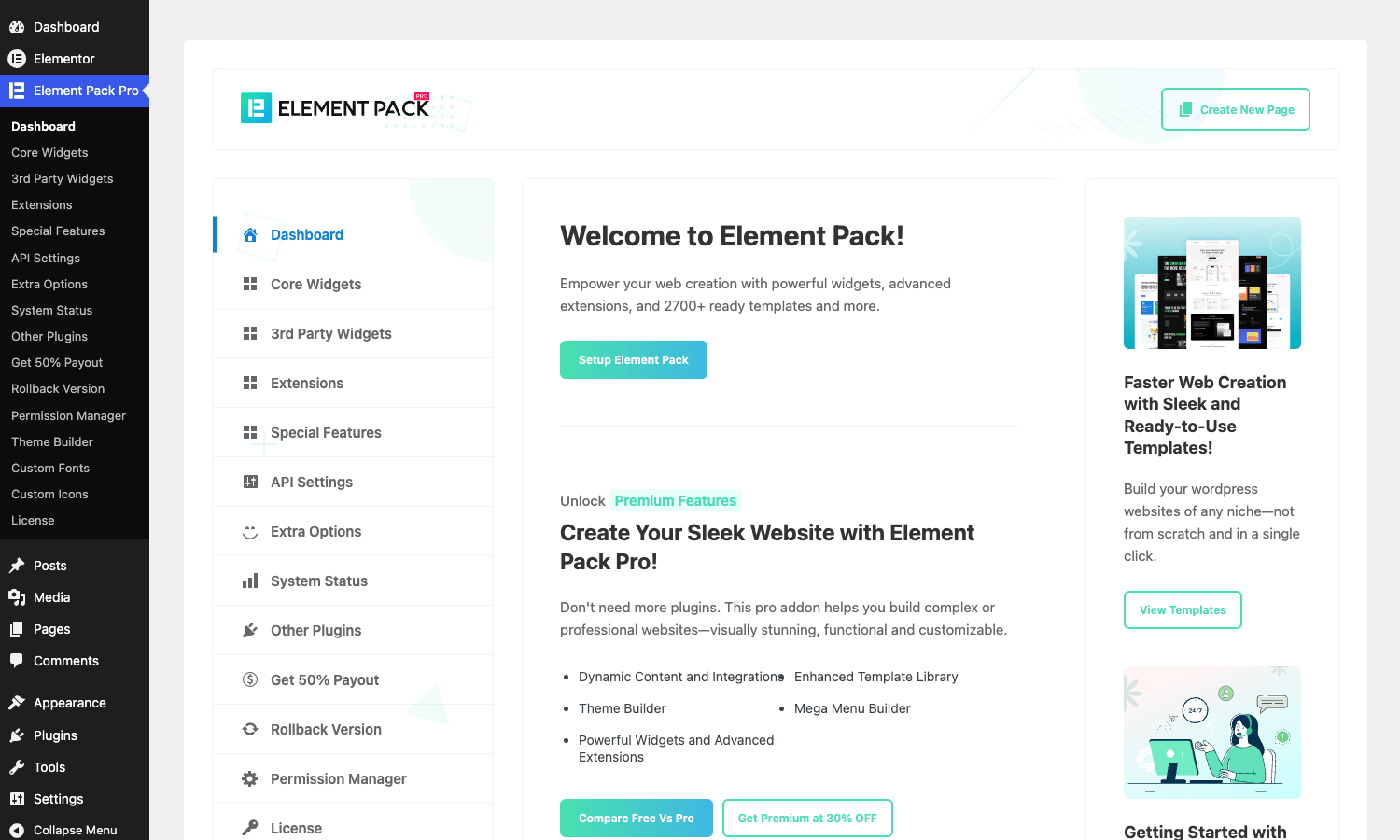
Once the wizard is done you’ll see a new top-level admin menu: Element Pack Pro. There’s also a new submenu under WordPress -> Templates -> Theme Builder, which is BdThemes’ own theme-builder UI. (Yes, Elementor free now also ships a basic theme-template area. The two coexist, but the Element Pack one is more capable on the free tier.)
In the Elementor editor itself, you’ll notice the widget panel has new categories: "Element Pack (Single)" and "Element Pack Pro". Scroll past the default Basic and General widgets and they’re right there.
A few opinions, since the prompt was honest reactions, not a marketing brochure:
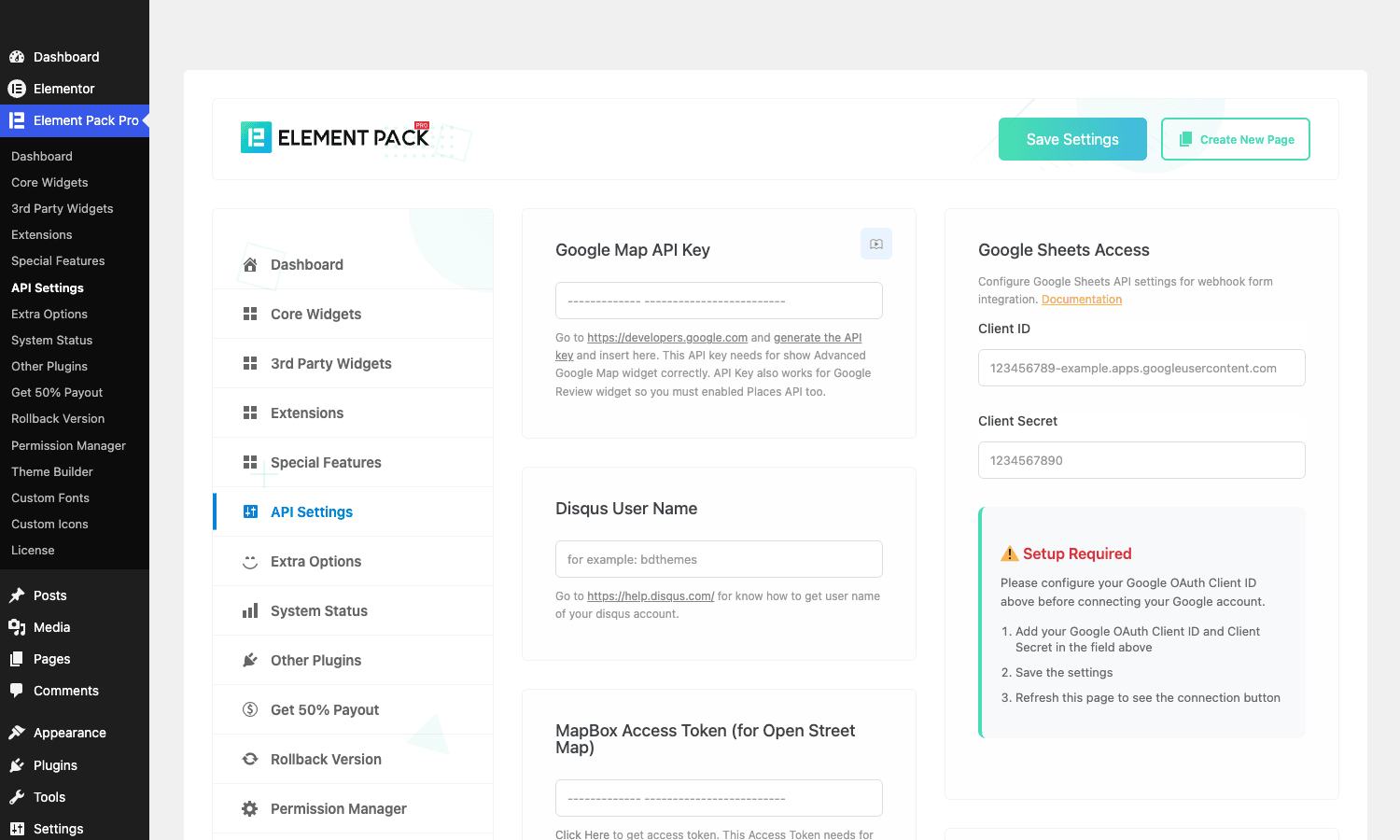
- The admin UI is dense. There’s a Dashboard, Core Widgets, 3rd Party Widgets, Extensions, Special Features, API Settings, Extra Options, System Status, Other Plugins, Get 50% Payout, Rollback Version, Permission Manager, Theme Builder, Custom Fonts, Custom Icons, License. That’s fifteen tabs in the left rail. Most users will touch four of them.
- The "Get 50% Payout" tab is BdThemes’ affiliate referral page. Mildly annoying that it lives in the same nav as the actual settings.
- The setup wizard runs once. If you skip it and want to re-run it you’ll have to delete a database option (
element_pack_setup_wizard_completed) by hand.
A guided tour of the admin
Element Pack Pro’s settings live at WP admin -> Element Pack Pro. Here’s what each tab actually does, in plain language.
Dashboard. A welcome screen with a link to the BdThemes site, a link to the docs, and a couple of CTAs to "Create New Page" or open the BdThemes template library. There’s nothing actionable here. You won’t see this screen twice after the first day.
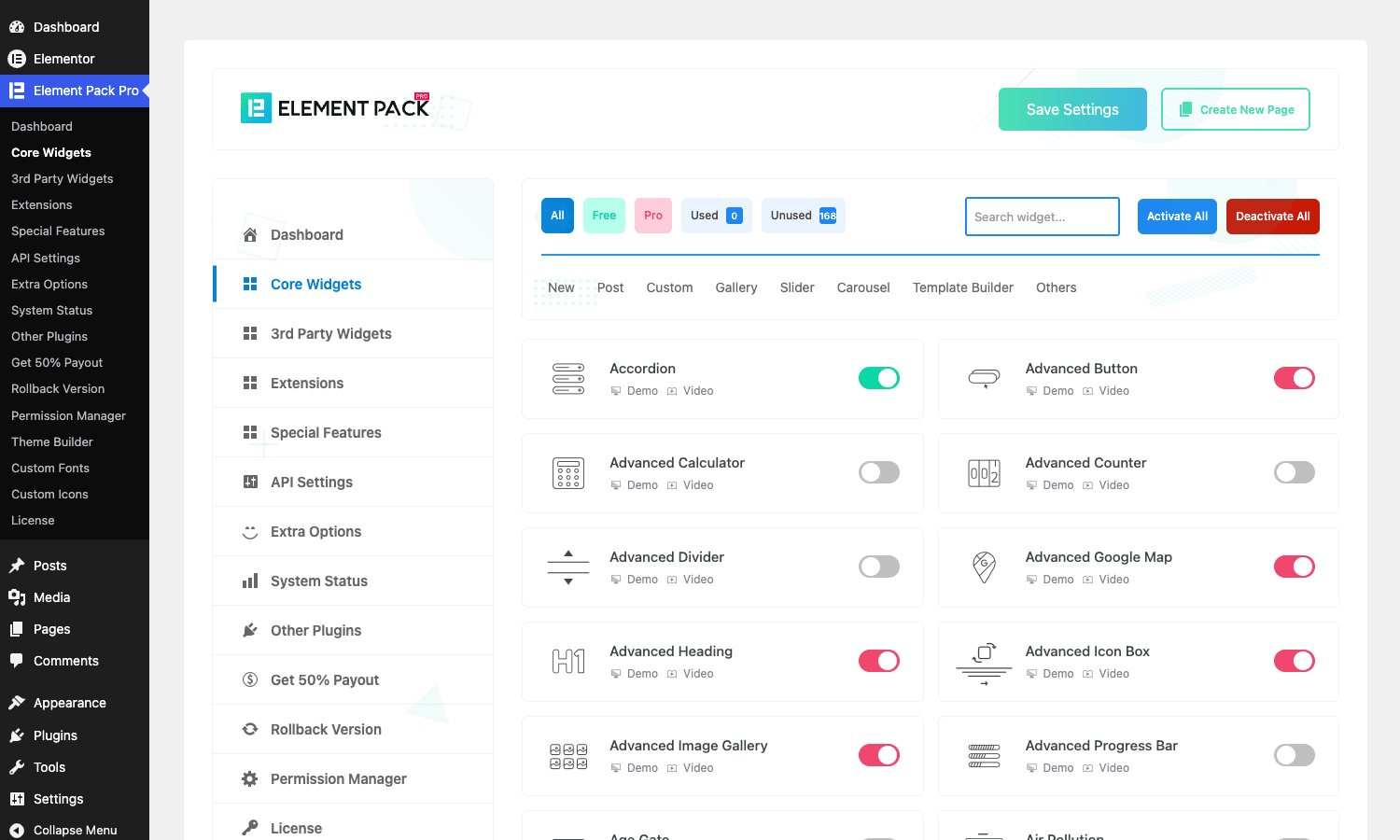
Core Widgets. This is the important tab. It lists every widget in the pack with an enable/disable toggle next to it. Switch off the widgets you don’t use and Element Pack stops registering them. The widget files don’t get loaded, the JS doesn’t get enqueued. This is your bundle-size lever. Don’t enable every widget. I’ll come back to this in the Module Manager section.
3rd Party Widgets. Widgets that integrate with other plugins: WooCommerce extras, bbPress, BuddyPress, Easy Digital Downloads, Tutor LMS, LearnDash, WPML, ACF. Toggleable individually. The widget shows up only if the corresponding plugin is active, so leaving a few of them on costs nothing if their target plugin isn’t installed.
Extensions. Site-wide behaviors rather than individual widgets. Things like Scroll Animation, Particles, Floating Effects, Tooltip, Custom CSS per-widget. These are all toggleable Elementor extensions, similar to Elementor’s own built-in "Motion Effects". I leave them on.
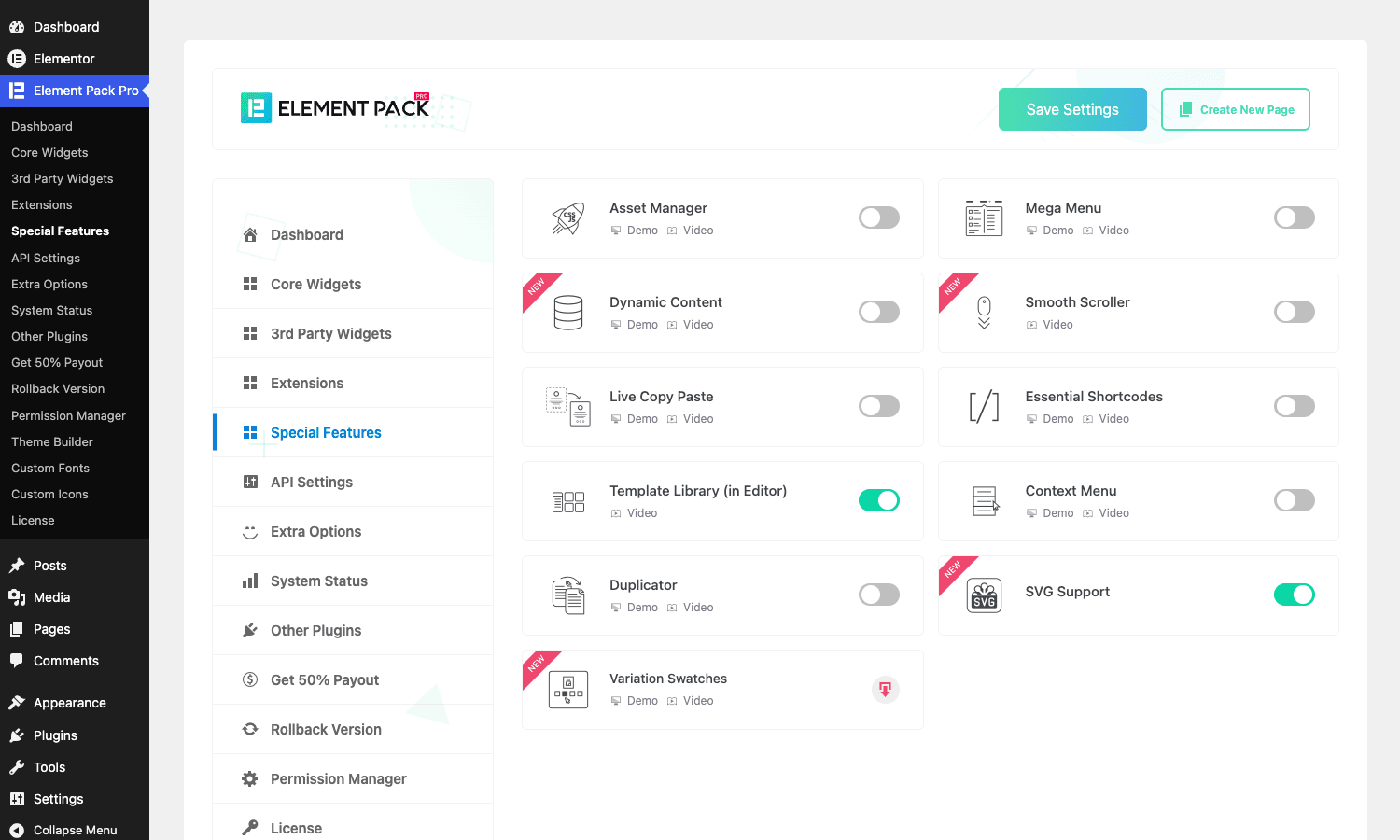
Special Features. The big features that aren’t widgets. Mega Menu, Theme Builder, Asset Manager, Smooth Scroller, Live Copy Paste, Template Library, Context Menu, Duplicator, SVG Support, Variation Swatches, Dynamic Content. Each is a toggle. Enable Mega Menu and Theme Builder here before you can use them. This catches people out. The Theme Builder menu item only appears in the WP admin after you flip the Special Features toggle.
API Settings. Where you paste API keys for the widgets that need them. Google Maps (Advanced Google Map widget, Google Reviews widget), Disqus, Instagram, Twitter, Facebook, MailChimp, Mapbox, Spotify, Vimeo, Calendly, Google Sheets OAuth credentials. Half the social widgets are useless without an API key, and the API key flow is the most-asked question in the BdThemes support forum. It’s not terribly designed, it’s just that real OAuth flows are painful and there’s no way around that. Plan to spend 30 minutes here if you want the Instagram or Twitter feed widgets to work.
Extra Options. Miscellaneous toggles: enable Google Fonts cache, default page builder for new posts, post type support, animation library, recaptcha v3 keys. Most are fine on defaults.
System Status. Server compatibility check (PHP version, memory limit, WP version, Elementor version, mod_rewrite). Useful for support tickets. Useless day to day.
Other Plugins, Get 50% Payout, Rollback Version. Self-explanatory.
Permission Manager. Lets you restrict which user roles can see Element Pack widgets in the editor. Useful for agency setups where you give a client an Editor role but don’t want them dragging in a crypto ticker by accident.
Theme Builder. The CPT list page for bdt-template-builder. New, Edit, Delete templates. The actual building happens inside Elementor.
Custom Fonts and Custom Icons. Upload .woff, .woff2, .ttf, .otf, or .svg font files. Element Pack registers them as font-family options everywhere Elementor exposes a typography control. The Custom Icons uploader takes a Fontello ZIP and does the same for icon controls.
License. Where you’d plug in your BdThemes license key if you bought directly from them. Skip on the GPL-licensed version (the license is pre-activated in the plugin file).
The widget panel in the editor
Open any page in the Elementor editor. The widget panel on the left has a search input and a vertical list of categories. Scroll past Basic, General, Site, WooCommerce, and you’ll see two Element Pack categories: Element Pack (Single) and Element Pack Pro.
The "(Single)" category holds the widgets that you’d normally need Elementor Pro for: Posts, Post Grid Tab, Portfolio Grid, related posts, archive widgets. These work with Elementor free because BdThemes built their own implementations.
The "Element Pack Pro" category is the main event. 80+ widgets in there. Type any term into the search box ("twitter", "pricing", "timeline") and the list filters live.
A small thing I appreciate: when you hover a widget in the panel, BdThemes shows a "Demo" and "Video" link below the widget name. Click Demo and a new tab opens with a live working example of that widget on elementpack.pro. Click Video and you get a short YouTube walkthrough. Both are real and current, not stock demo pages. If you’ve never used a widget before, the Demo link saves you from dragging it onto your canvas just to see what it does.
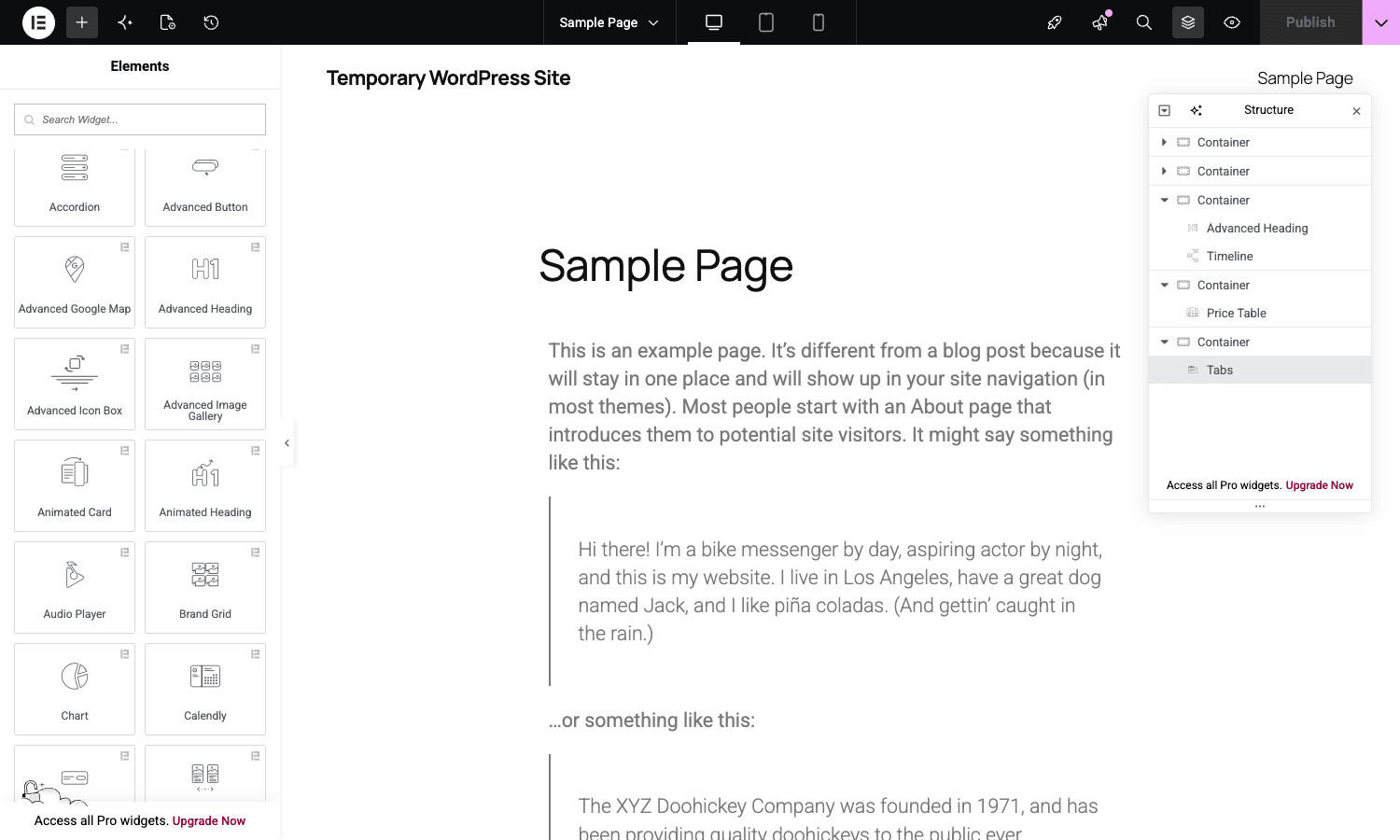
The widget panel’s biggest weakness is that it gets long. If you’ve enabled most of the Core Widgets, scrolling through the EP category to find the one you want is slower than typing in the search. Train yourself to use the search input from day one.
The widgets I reach for most
There are 80+ Element Pack widgets. I’ve used maybe 30 of them on real projects. Here’s the actual short list of widgets I drop in on almost every site, with what each one solves.
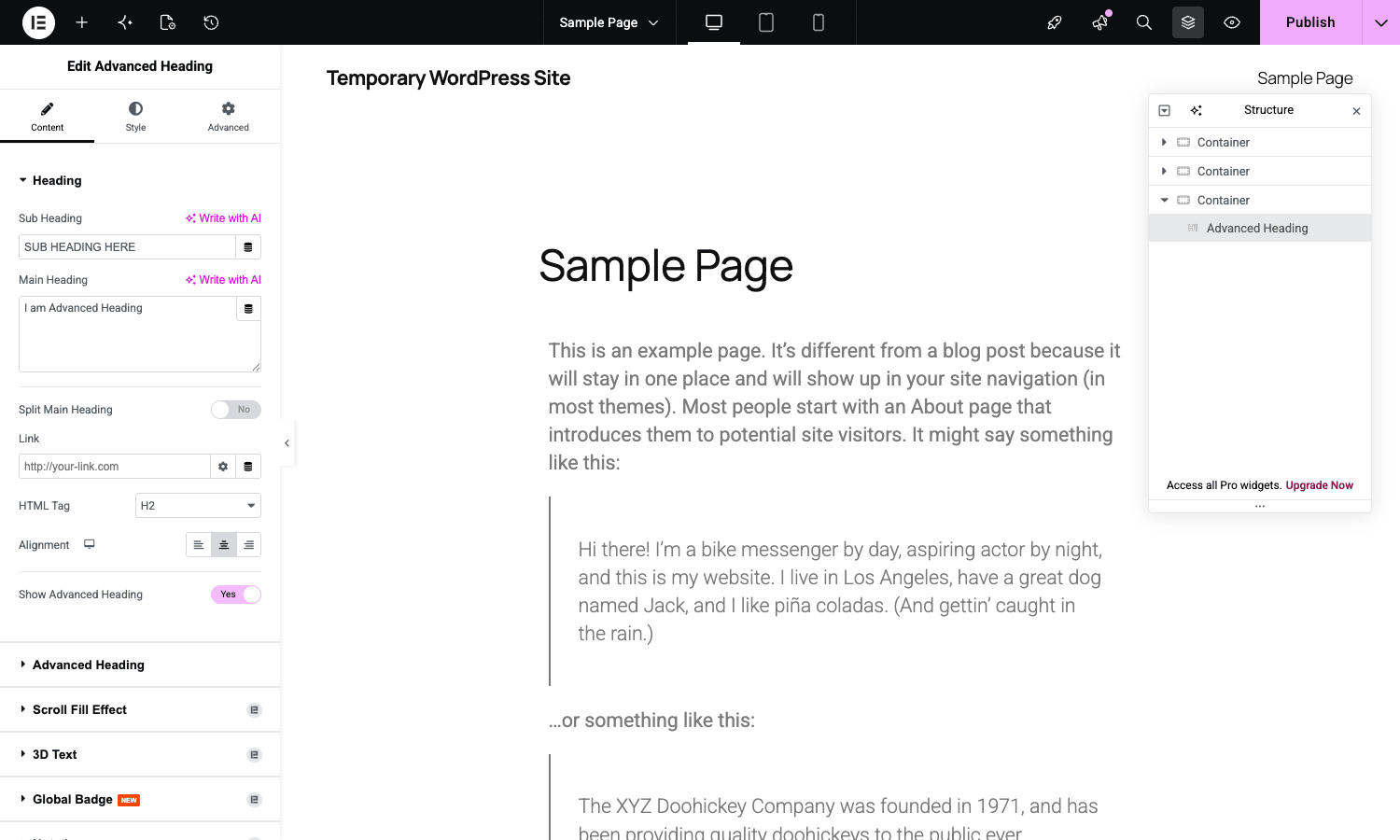
- Advanced Heading. A heading with sub-heading, decorative shape behind, badge in the corner, scroll-fill effect (text fills with color as you scroll past), and a split-line variant. I use this instead of the default Heading widget 90% of the time.
- Advanced Button. Eight hover styles (slide, fade, push, expand), icon support, badge support. The default Elementor Button widget is fine. This one is more interesting when you want a CTA to feel deliberate.
- Timeline. Vertical or horizontal timeline with media on alternating sides. Perfect for "Our Journey" sections, company history, or step-by-step tutorial pages. Pulls from WordPress posts so it ties into your CMS instead of being hand-edited.
- Pricing Menu and Price Table. Two distinct widgets. Pricing Menu is the "restaurant menu" pattern with prices floating right of each item. Price Table is the classic three-column pricing card. I’ve used both.
- Tabs and Accordion. Both default Elementor widgets, but the Element Pack versions support icons, custom badges, vertical/horizontal layout, and content via Elementor templates (so you can drop a full nested page inside a tab panel).
- Modal. Trigger-on-click, trigger-on-scroll, trigger-on-exit, or trigger-on-time-delay. Content is any Elementor template. Saves you from installing a separate popup plugin for one-off modals.
- Carousel and Slider. Two different widgets. Carousel is the multi-item slider (3 testimonials at once, scrollable). Slider is the one-at-a-time hero slider. The library underneath is Swiper, which is the same one Elementor Pro uses, so behavior is identical.
- Twitter Feed and Instagram Feed. Live feeds, requires API keys. Setting them up is the painful part. Once set up they auto-refresh on a configurable cache interval.
- Tablepress. Wraps the TablePress plugin if you have it active. Pulls a table by ID and renders it inside an Elementor section with custom styling controls.
- Lottie Animation. Drop in a
.jsonLottie file and configure trigger (on load, on hover, on scroll). I use this for hero animations more than I’d care to admit. - Table of Contents. Auto-builds a TOC from the headings on the current page. Sticky, smooth-scroll, anchor offset for fixed headers, customizable hierarchy.
- Particles. Background particle effect on any section. The same library powering all those one-page agency sites you saw in 2019. Still occasionally the right choice.
- Form Builder. Form widget with conditional logic, multi-step, file upload, integrations (Mailchimp, Slack, Twilio, Zapier, webhook). I usually still reach for MetForm Pro or Gravity Forms for serious form work, but for a contact form on a landing page, Element Pack’s Form widget gets the job done.
The widget I most-often disable is the Crypto Currency family (eight different crypto widgets), the bbPress / BuddyPress modules unless those plugins are active, and the speciality widgets like Barcode, Weather, Air Pollution, Business Hours. Disabling cuts JS and CSS weight noticeably.
Theme Builder, Header Builder, and Mega Menu
This is the section where Element Pack Pro stops being "yet another widget pack" and starts competing with Elementor Pro head-on. If your only reason to consider Elementor Pro was the theme builder, Element Pack Pro covers most of that ground on top of Elementor free.
Theme Builder. Enable it under Special Features. A new menu item appears at WP admin -> Theme Builder. Click Add New, pick a template type (Header, Footer, Single Post, Single Page, Archive, Search Results, Error 404, WooCommerce Product, WooCommerce Archive), and you’re in the Elementor editor with a blank canvas. Drop in widgets. Save. Open the Display Conditions panel and pick where the template applies (entire site, specific post type, specific page, all archives, taxonomy). Save again and the template takes over rendering on the matching frontend pages.
I’ve shipped two sites where this worked perfectly. One where it didn’t. The one that didn’t was a site running a heavily customized parent theme (Astra Pro with a hundred customizer overrides), and Astra’s default header.php kept fighting Element Pack’s header template for control. The fix was to set the Astra layout to "Disable Header" on the templates where Element Pack should render, which is documented in BdThemes’ support docs.
Header Builder. Technically just a special case of Theme Builder where the template type is Header. But it ships with extra widgets specifically for headers: Site Logo, Site Title, Site Tagline, Search Form, Login Form, Cart Icon, Wishlist Icon, Off-Canvas Menu. The off-canvas widget alone is worth the install. Slide-in menus that work on mobile and desktop without any custom JS.
Mega Menu. Enable under Special Features, then go to Appearance -> Menus. Each menu item now has an "Enable Mega Menu" checkbox. Check it, pick an Elementor template, save. When a user hovers (or clicks, configurable) that menu item, the dropdown that appears is the full Elementor template, not a list. Useful for ecommerce category menus or content-rich nav.
A practical note: the Mega Menu uses the theme’s own menu rendering, which means it works with whatever menu system the theme exposes. On most popular themes (Astra, GeneratePress, Blocksy, Hello Elementor) it works without any extra config. On themes that have aggressive menu overrides (some Avada / Divi setups, custom builds) you might need to disable the theme’s "advanced menu" feature first.
Module manager and bundle size
This is the section everyone skips, and then complains about page speed.
Out of the box, Element Pack registers around 80 widgets, each with its own JS and CSS. Even with Element Pack’s selective loading (it only enqueues a widget’s JS if that widget is actually on the current page), there’s still per-widget initialization overhead. On a homepage with 12 different EP widgets, you’re looking at an extra ~150KB of JS and ~80KB of CSS gzipped.
Don’t enable every widget. Your bundle will balloon.
Go to Element Pack Pro -> Core Widgets. The header has a search box and filter tabs: All / Free / Pro / Used / Unused. Click Unused. It shows you every widget that isn’t currently used anywhere on your site. Disable all of them. The "Used" detection scans your Elementor post-meta for widget IDs so it knows which ones are in actual content.
The other lever is Asset Manager under Special Features. It lets you toggle Element Pack’s CSS/JS loading on a per-page basis (load on this page, don’t load on that one). Useful if you have a blog where the posts don’t use any Element Pack widgets and you don’t want EP’s runtime to load on those pages.
A real number from a site I migrated last year: by disabling 60% of the widgets and turning on Asset Manager’s "only load on pages using EP" mode, I dropped the homepage CSS bundle from 142KB to 38KB and the JS from 218KB to 71KB. Lighthouse score went from 64 to 89.
That’s not a free lunch. It’s a "spend 15 minutes auditing the module manager" lunch. Worth it.
Real-world use cases
Here are five concrete scenarios where Element Pack Pro pulled its weight on actual projects.
1. Agency portfolio site. A creative agency wanted a "Selected Work" page with a filterable grid, hover overlays, and a modal preview on click. Default Elementor doesn’t ship a portfolio widget on the free tier. Element Pack’s Post Grid with the Portfolio category, plus the Modal widget triggered by the grid items, did the whole thing without writing a line of custom code.
2. Local restaurant. Menu page, hours of operation, reservation form, Instagram feed of food photos. Element Pack’s Pricing Menu widget for the menu, Business Hours widget for the hours (formats the open/closed status based on current time automatically), Form widget for the reservation, Instagram Feed for the photos. Site shipped in two days.
3. Online course landing page. A pricing table comparing Basic / Pro / Team plans, a countdown timer for the launch discount, a sticky table of contents on the side, and an FAQ accordion at the bottom. Price Table, Countdown, Table of Contents, Accordion. Four EP widgets, no custom dev.
4. SaaS marketing site. Comparison table of the SaaS vs three competitors, an animated stats counter ("10,000+ users, 99.9% uptime"), a slider testimonial section, and a Calendly embed for demo bookings. Comparison Table, Advanced Counter, Carousel, Calendly. Done.
5. WordPress.com competitor. Yes, really. A client building a managed-hosting service used Element Pack’s Theme Builder for the entire site (header, footer, single post, archive, 404), the Mega Menu for the docs nav, and about 18 different Element Pack widgets across the marketing pages. They saved the cost of Elementor Pro and a separate theme by leaning on Element Pack Pro for everything.
Developer reference
This is the section that addon-plugin reviews usually skip. Element Pack Pro is more hook-friendly than most addon packs, so it deserves a careful walk through.
I counted the hooks in the plugin source. 206 unique do_action() call sites and 114 unique apply_filters() sites across the codebase. Not all of them are public-facing extension points (many are internal), but the ones below are the ones I’ve actually used or that BdThemes documents in their developer guide.
The init action
When Element Pack finishes bootstrapping, it fires:
do_action( 'bdthemes_element_pack/init' );
This is the right place to hook in your own widget registrations or to swap a built-in widget for a custom one. Run before this and Element Pack’s classes aren’t loaded yet. Run after and you’ve missed the registration window for some integrations.
add_action( 'bdthemes_element_pack/init', function() {
 // Register your own widget that extends an EP widget here.
 require_once __DIR__. '/widgets/my-custom-button.php';
} );
Query modification on loop widgets
Element Pack’s loop widgets (Post Grid, Post Tab, Timeline, Carousel-of-posts) all build a WP_Query. The args are filterable:
add_filter( 'element_pack/query/get_query_args/current_query', function( $args, $widget ) {
 // Force a specific post type on every EP loop widget on a specific page.
 if ( is_page( 'company-blog' ) ) {
 $args['post_type'] = 'team_post';
 }
 return $args;
}, 10, 2 );
There’s also a per-widget hook with the widget’s query_id setting in the name:
do_action( "element_pack/query/{$query_id}", $query, $widget );
So you can give one widget on one page a custom query_id="featured_team" in its settings, and only target that widget:
add_action( 'element_pack/query/featured_team', function( $query, $widget ) {
 $query->set( 'meta_key', 'team_priority' );
 $query->set( 'orderby', 'meta_value_num' );
}, 10, 2 );
Same pattern Elementor Pro uses for its Posts widget. If you’ve used elementor/query/{query_id} before, this is the EP twin.
Frontend localize settings
The JS settings object that Element Pack’s runtime reads on the frontend is filterable:
add_filter( 'element_pack/frontend/localize_settings', function( $settings ) {
 $settings['scroll_offset'] = 100; // Override the smooth-scroller anchor offset.
 return $settings;
} );
I use this to tweak the smooth-scroller offset when a project has a sticky header that doesn’t match Element Pack’s default offset calculation.
Theme builder card filters
If you’re building a custom integration that should add its own card type to the Theme Builder’s new-template modal:
add_filter( 'bdt_ep_theme_builder_add_new_cards', function( $cards ) {
 $cards['my_landing_page'] = [
 'title' => 'Landing Page',
 'description' => 'Single-page promo template.',
 'icon' => 'dashicons-megaphone',
 ];
 return $cards;
} );
Combined with bdt_ep_theme_builder_location_options (where the template can apply) you can ship a fully custom template type as a child plugin.
Live API widget cache
The Twitter Feed, Facebook Feed, Weather, Crypto, and Bitcoin widgets all cache their API responses for performance. The cache duration is filterable per widget:
add_filter( 'element-pack/weather/cached-time', function() {
 return 30 * MINUTE_IN_SECONDS; // Cache weather for 30 minutes, not the default 1 hour.
} );

add_filter( 'element-pack/facebook-feed/cached-time', function() {
 return 4 * HOUR_IN_SECONDS;
} );
Useful in development when you want to see your feed update without waiting an hour. Useful in production when you want to be nicer to the API.
User-register widget hooks
Element Pack’s User Login / User Register widgets fire when users sign up via Elementor pages instead of the default wp-login.php:
do_action( 'edit_user_created_user', $user_id, 'both' );

add_filter( 'elementor_pack_user_register_insert_data', function( $userdata ) {
 $userdata['role'] = 'subscriber'; // Force role regardless of widget setting.
 return $userdata;
} );

add_filter( 'elementor_pack_send_mail_create_user', function( $args, $user_id ) {
 $args['subject'] = 'Welcome to our community';
 return $args;
}, 10, 2 );
Useful for sites that want a custom welcome email or want to override the role the widget assigns.
WooCommerce variation swatches
Element Pack ships a Variation Swatches replacement for WooCommerce that overrides the variable-product dropdowns. The whole family is filterable:
add_filter( 'ep_variation_swatches_field_html', function( $html, $attribute_name, $value, $product ) {
 // Wrap each swatch with a tooltip.
 return '<div class="swatch-with-tooltip" title="'. esc_attr( $value ). '">'. $html. '</div>';
}, 10, 4 );

add_filter( 'ep_variation_swatches_attribute_swatches_data', function( $data, $product ) {
 // Inject custom swatch data (color hex, image URL) per attribute.
 return $data;
}, 10, 2 );
If you’re doing anything serious with WooCommerce variations, these hooks let you customize the swatch output without forking the plugin.
Advanced Section before/after
The Advanced Section widget (Element Pack’s enhanced section/container) wraps its output with:
do_action( "element_pack/advanced_section/{$tag_name}/before", $widget );
echo $content;
do_action( "element_pack/advanced_section/{$tag_name}/after", $widget );
Where $tag_name is the HTML tag the section renders as (section, div, article, etc.). Lets you inject schema markup, tracking pixels, or anchor elements above or below specific section types.
REST endpoints
Element Pack registers a small number of REST routes for its template-builder live preview. They’re in includes/builder/loading-builder.php and base/handler-api.php. Most aren’t useful for general extension (they’re for the template-builder UI itself). If you’re integrating headlessly, look at the Elementor REST API instead.
Dynamic shortcodes
Element Pack adds a registry of dynamic shortcodes via its own ep_add_shortcode() helper (a wrapper around add_shortcode). Examples that ship with the plugin: [page-url], [page-title], [current-date], [animated-link], [clipboard], [tag-list]. Useful as content tokens in widget text controls.
You can register your own with the same helper:
ep_add_shortcode( [
 'id' => 'user-display-name',
 'callback' => function() {
 $user = wp_get_current_user();
 return $user->display_name?: 'Guest';
 },
] );
Then use [ep-user-display-name] (note the ep- prefix EP adds automatically) inside any text-area widget control.
Performance, compatibility, and the gotchas
Honest list. I’ve hit each of these.
The widget panel can feel slow. If you’ve left all 80+ widgets enabled, the Elementor editor’s widget panel takes about half a second longer to render. Not catastrophic, but noticeable if you’re flipping between pages a lot. Disable widgets you don’t use.
Setup wizard is hard to re-trigger. If you skip the wizard or close it midway, getting it back requires deleting the element_pack_setup_wizard_completed option from the database. BdThemes’ docs don’t mention this.
Some widgets are duplicates of Elementor Pro widgets. Form, Post Grid, Carousel, Slider, Lightbox, Posts. If you have both Element Pack Pro and Elementor Pro active, you’ll have two versions of each in the widget panel and have to pick which to use. Not broken, just confusing for clients. I usually disable Element Pack’s versions on sites that have Elementor Pro.
Theme Builder + child themes need attention. If your active theme has its own header.php and footer.php, Element Pack’s Theme Builder header won’t replace them unless the theme calls wp_body_open() and wp_footer() correctly. Most modern themes (Astra, GeneratePress, Blocksy, Hello Elementor) do. Older or heavily customized themes may not. Test on a staging site first.
The Twitter Feed widget has been on shaky ground since X changed its API access tiers. Element Pack updated it in early 2024 to support the new endpoints, but you need a paid Twitter API tier (Basic, $100/mo) to get useful feed data. The widget itself still works. The API behind it is just expensive now. Not BdThemes’ fault, but worth knowing.
Mega Menu CSS specificity can fight a theme that aggressively styles .menu-item >.sub-menu. The fix is either a !important rule (ugly but works) or override the theme’s submenu styles for items with the EP mega-menu class. BdThemes’ docs cover this.
WPML works, but the Twitter / Facebook / Instagram feed widgets cache API responses on a per-language basis only if you set the cache filters to include the current language in the cache key. Default behavior caches globally, which means switching languages doesn’t refetch.
The "Demo" links in the widget panel sometimes 404 when BdThemes redesigns their site. Annoying but cosmetic.
Upsell modals on the free version are aggressive. If you’re running the free Element Pack Lite from WordPress.org, the admin shows modal prompts to upgrade. The Pro/GPL-licensed version doesn’t have these.
Pricing and licensing
Element Pack Pro is sold from BdThemes’ own site (elementpack.pro) on a per-site or unlimited-sites annual subscription. Pricing as of writing: roughly $39/year for one site, $89/year for five sites, $179/year for unlimited sites. License renews on autopay.
Element Pack Pro is GPL licensed. If you’re using it on a personal site or a small project, the BdThemes-side license gives you direct support and automatic updates. If you’re an agency running it across dozens of client sites, Element Pack Pro on GPL Times is the same plugin zip, delivered through the GPL store, ready to install without dealing with per-site activation. Updates flow through the same multi-plugin updater system used by every other plugin in the GPL Times catalog.
There’s a free version called Element Pack Lite on the WordPress.org repo. It has about 40 of the widgets and none of the special features (no Theme Builder, no Mega Menu, no Header Builder, no API integrations). Useful for testing whether the basic widget set covers what you need before you decide on Pro.
FAQ
Do I need Elementor Pro to use Element Pack Pro?
No. Element Pack Pro works on top of Elementor free. The Theme Builder, Mega Menu, dynamic content, popups, and form builder are all implemented inside Element Pack, so you don’t need Elementor Pro for any of them. If you do have Elementor Pro active, both will work side by side but you’ll have duplicate widgets in some categories.
Does Element Pack Pro work with the Bricks builder or other page builders?
No. It’s Elementor-only. Every widget extends Elementor’s Widget_Base class, so it’s tightly coupled to Elementor. If you’re on Bricks, look at Bricks-specific extensions instead.
Is Element Pack Pro a heavy plugin? Will it slow my site down?
The plugin file itself is around 8 MB extracted, which is normal for an addon pack of this scope. The runtime impact depends on which widgets you enable. By default Element Pack only enqueues a widget’s CSS/JS if that widget is on the current page (selective loading). For best performance: disable widgets you don’t use under Core Widgets, and enable the Asset Manager under Special Features to keep EP’s runtime off pages that don’t need it.
Can I use Element Pack Pro on multiple sites with one license?
If you bought from BdThemes directly, the license tier you bought caps the number of sites (1, 5, or unlimited). If you bought through GPL Times, the plugin zip is pre-activated and the per-site activation check is bypassed, so you can install it on as many sites as you want.
Does Element Pack Pro have a popup/modal feature like Elementor Pro Popups?
Yes. The Modal widget triggers on click, scroll, exit-intent, or time delay. Content is any Elementor template. It’s not as feature-deep as a dedicated popup plugin, but for one-off modals on a marketing page, it’s sufficient.
How does Element Pack Pro compare to Essential Addons for Elementor?
Essential Addons is more conservative (around 100 widgets, polished but less specialty coverage). Element Pack Pro is wider (200+ widgets, including niche territory like crypto and weather). If you need a specific widget that EA doesn’t have, EP probably does. If you want a leaner pack with everything well-designed, EA is the safer pick. I’ve used both. On a site that knows exactly what it needs, EA wins on bundle size. On a site that might need something weird later, EP wins on coverage.
Does Element Pack Pro support WPML and Polylang?
Yes. There’s a WPML compatibility class (includes/class-elements-wpml-compatibility.php) and Polylang works through standard WordPress filters. Most widgets translate cleanly. The live-API widgets (Twitter, Instagram, Weather) need extra work to cache per-language, as noted in the gotchas section.
Can I white-label Element Pack Pro for client sites?
Yes. There’s a white-label option (ep_white_label_enabled) that renames "Element Pack Pro" to your agency name across the admin menu, settings tabs, and widget category names. Useful for agencies that don’t want to show the BdThemes branding to clients.
Final thoughts
Element Pack Pro is the addon pack I reach for when I don’t know what the client is going to ask for. The 200+ widget claim is real, even if you’ll only use 30 of them on any given site. The Theme Builder and Mega Menu are the features that lift it from "yet another widget pack" to "I might not need Elementor Pro on this site". The hook surface is wide enough that you can extend or override anything without forking the plugin.
It’s not perfect. The admin UI is dense, some widgets are duplicates of Elementor Pro widgets if you have both, and the API-key flow for the social feed widgets is tedious. Disable the widgets you don’t use, audit your bundle, and you’ll get most of the benefit without the page-weight penalty.
If you’re an agency or a freelancer who builds Elementor sites week after week, Element Pack Pro. Element Pack Pro on GPL Times gets you that same zip without the per-site activation dance. Drop it on a sandbox, audit the widgets you’d actually use, and you’ll know within an hour whether it’s the right pack for your stack.
For wider reading: BdThemes publishes the plugin at elementpack.pro and the Elementor developer documentation is the canonical reference for the underlying widget system. The Elementor widgets help center covers the base editor concepts that Element Pack builds on. And if you’re new to Elementor itself, the Elementor Pro walkthrough on this blog covers the base builder in more depth.