


You decide to sell courses online, so you buy a generic multipurpose theme, bolt on an LMS plugin, add a forum plugin, wire in a payment gateway, and stack a membership plugin on top for the "all-access" tier. Then you spend a fortnight making five plugins that have never met agree on what a course page should look like. The archive ignores your theme’s spacing, the login popup clashes with the membership form, and the forum looks like a different decade. The Eduma theme exists to skip that fight, and anyone who has tried to assemble an online-course site from loose parts knows the exact headache it solves.
The Eduma theme is a ThimPress education theme that ships pre-fitted to LearnPress (the free LMS plugin that actually runs your courses), plus matching skins for forums, member profiles, memberships, and a shop. You activate it, install the engine and the bits you need, and the classroom, the storefront, and the community all already look like they belong together.
This is a long, honest review of what the Eduma theme is, where the theme ends and the LMS engine begins (that line is the whole story), how setup really goes, a full developer reference of its hooks and filters, and where I think it shines or stumbles. Whether you are a yoga instructor selling on-demand classes or a developer wiring up a cohort platform, by the end you will know exactly what you are buying.
Table of Contents
- What is Eduma?
- Eduma and LearnPress: the theme-plus-engine split
- What you actually get with the Eduma theme
- A tour of the Customizer
- Inside the LearnPress engine
- Beyond courses: forums, profiles, and memberships
- The Elementor template kit
- Don’t mistake the theme for the LMS
- Who Eduma is for (and who should look elsewhere)
- Eduma vs MasterStudy vs the DIY route
- Developer reference
- Speed, and the weight of an all-in-one academy
- Troubleshooting
- FAQ
- Final thoughts
What is Eduma?
The Eduma theme is a premium education theme built by ThimPress, the same studio that makes the LearnPress LMS plugin. ThemeForest lists it as a "Premium Online LMS & Education WordPress Theme," and it has been one of the best-selling education themes on that marketplace for years. Its job is design and structure: the course page layout, the homepage sections, the header, the Customizer options, the typography, and the integration templates that make LearnPress and a handful of community plugins look like one coherent site.
Here is the part most reviews fumble, so I will put it up front. The Eduma theme is not the LMS. It does not run your courses. It does not process enrollments. It does not take payments. It is the skin. The actual learning engine is LearnPress, a separate free plugin you install alongside it. I will spend the next section on this split because misunderstanding it is the single most expensive mistake you can make with this theme.
A quick note on the theme itself. It is standalone (no parent theme), it requires PHP 7.0 or newer, and its text domain is eduma. It ships five header layouts, a stack of Customizer panels, and template overrides for LearnPress, bbPress, BuddyPress, Paid Memberships Pro, WooCommerce, and Elementor. That last list is what turns a course catalog into a full education site, and it is also why the theme weighs what it weighs. More on that later.
You can get the Eduma theme through the GPL Times store if you want to install it and click through every panel as we go. It is the same ThemeForest package, delivered with documentation intact.
Eduma and LearnPress: the theme-plus-engine split
Think of an Eduma site as three pieces that each own a different job.
The Eduma theme owns the look. Templates, the Customizer, the thim_ hooks, the header layouts, the homepage sections, and the override files that re-style LearnPress, forums, profiles, memberships, and WooCommerce.
LearnPress owns the learning. It is a free plugin, also from ThimPress. It registers the course, lesson, quiz, and question post types. It handles enrollment, the order records, the gradebook, the instructor dashboard, and the entire LearnPress admin menu. Without LearnPress active, an Eduma site is a nice-looking theme with no courses in it.
Thim Core owns the plumbing. It is a companion plugin the theme prompts you to install through a "Thim Core Installer." Thim Core registers the extra post types you see in Eduma demos (portfolio, team, testimonials, events), the Elementor widgets, a set of shortcodes, dashboard widgets, and the demo importer. The theme has template folders for portfolio, team, and testimonials, but it does not register those post types itself. Thim Core does.
So the honest framing is this: Eduma is the storefront-and-classroom skin, LearnPress is the engine, and Thim Core is the plumbing that connects them. You install all three. The theme walks you through it.
The actual setup order
Here is how a fresh setup goes, step by step, with what to expect at each one.
- Activate the Eduma theme. Go to Appearance » Themes, activate Eduma, and you immediately get an admin notice prompting you to run the "Thim Core Installer." Don’t dismiss it. Thim Core is required for the wizard and the demo content.
- Install Thim Core. Click the installer link. Once Thim Core activates, it launches the Eduma "Getting Started" wizard, a 7-step flow: Welcome, Setup, Plugins, Import, Customize, Support, Ready.
- Work through the Plugins step. This is the important one. The Plugins step lists 48 plugins you can install with one click each. That includes LearnPress (required), the WooCommerce add-on for LearnPress, and the add-ons that map to features (Certificates, Gradebook, Stripe, Content Drip, Live Course, Random Quiz), plus recommended companions. Install LearnPress for sure. Install only the add-ons your model actually needs.
- Optionally import a demo. The Import step offers the Thim Core demo importer, which fetches the glossy multi-demo homepage content from ThimPress servers.
Heads-up: that demo import needs a host that can reach out to thimpress.com. In a locked-down sandbox the importer comes back empty, because the external fetch is blocked. So the marketed multi-demo homepage you see in the ThemeForest preview is a demo import plus the full plugin stack, not something you get from theme activation alone. If your host blocks outbound requests, you will be building pages by hand with Elementor and Thim widgets instead. That is worth knowing before you promise a stakeholder the demo site by Friday.
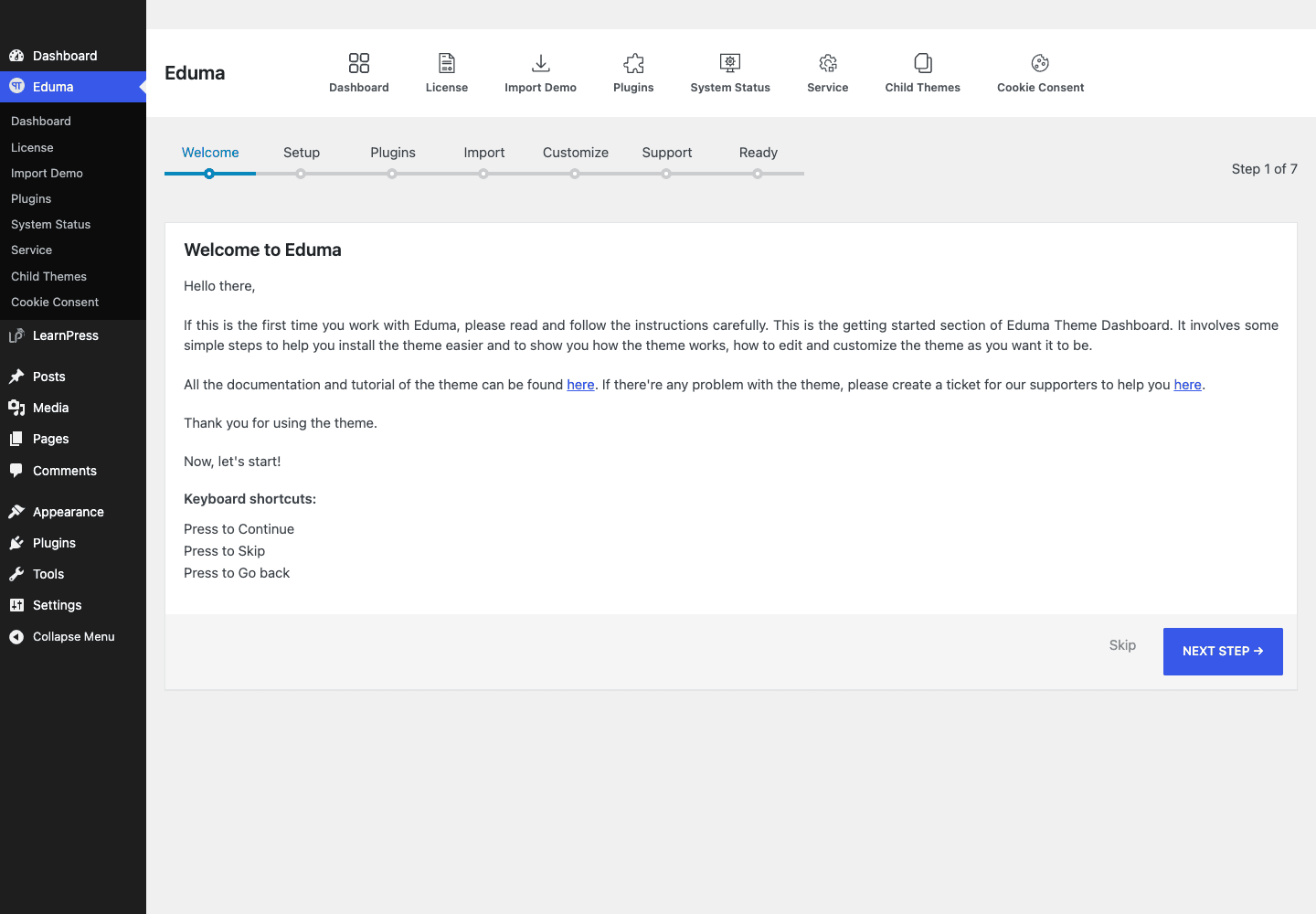
The dashboard above is the hub for all of this. It is where the Getting Started wizard lives, where you re-open the plugin installer, and where you trigger a demo import. I like that ThimPress put the whole setup behind one screen instead of scattering it across five menu items. The wizard is linear and hard to get lost in, which matters when your client is the one doing the install.
Tip: install LearnPress before you go looking for course settings. Until LearnPress is active, there is no Courses menu, no LearnPress settings, and the Eduma "Courses" Customizer panel has nothing to control. A surprising number of "Eduma is broken, there are no course options" support threads are just this.
What you actually get with the Eduma theme
Rather than reprint the marketing bullet list, here is what materially changes about your site the moment the theme and its stack are running.
- Five header layouts. The theme ships five distinct header designs (
header_v1throughheader_v5), switchable in the Customizer. They differ in logo placement, menu alignment, and the top bar. You are not stuck hand-coding a header. - A themed course experience. Eduma’s LearnPress template overrides give you a course hero, Overview / Curriculum / Instructor tabs, a "Course Features" block, and a sidebar enrollment box. This is the part that makes a LearnPress course look like a paid product instead of a default WordPress page.
- A real course archive. The
/courses/archive ships with a grid and list toggle, sorting, and a course search, all styled. Default is 8 courses per page (a LearnPress setting the theme respects). - A login popup. Eduma renders login and registration in a modal with its own
thim_before_login_formandthim_after_login_formhooks. Students never leave the page to sign in. - Forum, profile, and membership skins. Template overrides for bbPress, BuddyPress, and Paid Memberships Pro mean discussions, member profiles, and membership pages all match the theme. This is the difference between a course catalog and a learning community.
- WooCommerce support. The theme declares WooCommerce support, so you can sell physical or digital products alongside courses, or route course payments through Woo using the LearnPress WooCommerce add-on.
- An Elementor template kit. A 35-file Thim Elementor kit gives you pre-built page sections so you can compose homepages and landing pages without writing markup.
- Gutenberg-aware. The theme declares
align-wide,editor-styles,responsive-embeds, andwp-block-stylessupport, so the block editor behaves and wide blocks render correctly.
Notice what is missing from that list: enrollment logic, payment processing, certificates, drip. Those are not theme features. Hold that thought, it comes back in the anti-pattern section.
A tour of the Customizer
Eduma builds its options into the native WordPress Customizer rather than a separate options framework, which I prefer because you get a live preview of every change. The panels you will actually use, in roughly the order you will touch them:
- General. The catch-all. Logo upload, global layout (boxed or full width), the page-title layout, styling and the global color, social share toggles, typography, plus "Extra Features" and "Utilities" sub-sections. This is where you set your brand color and your fonts.
- Header. Pick one of the five header layouts and configure the top bar, sticky behavior, and menu.
- Site Identity. Standard WordPress: site title, tagline, site icon.
- Blog. Layout options for your posts list and single posts (separate from the course templates).
- Courses. The LMS-specific theme options. This panel only does something once LearnPress is active. It controls the course archive layout and the single-course presentation that the theme layers over LearnPress.
- Footer. Footer columns, widgets, and the copyright area (which is also hookable via
thim_copyright_area). - Mobile Footer Navbar and dark-mode settings round out the list.
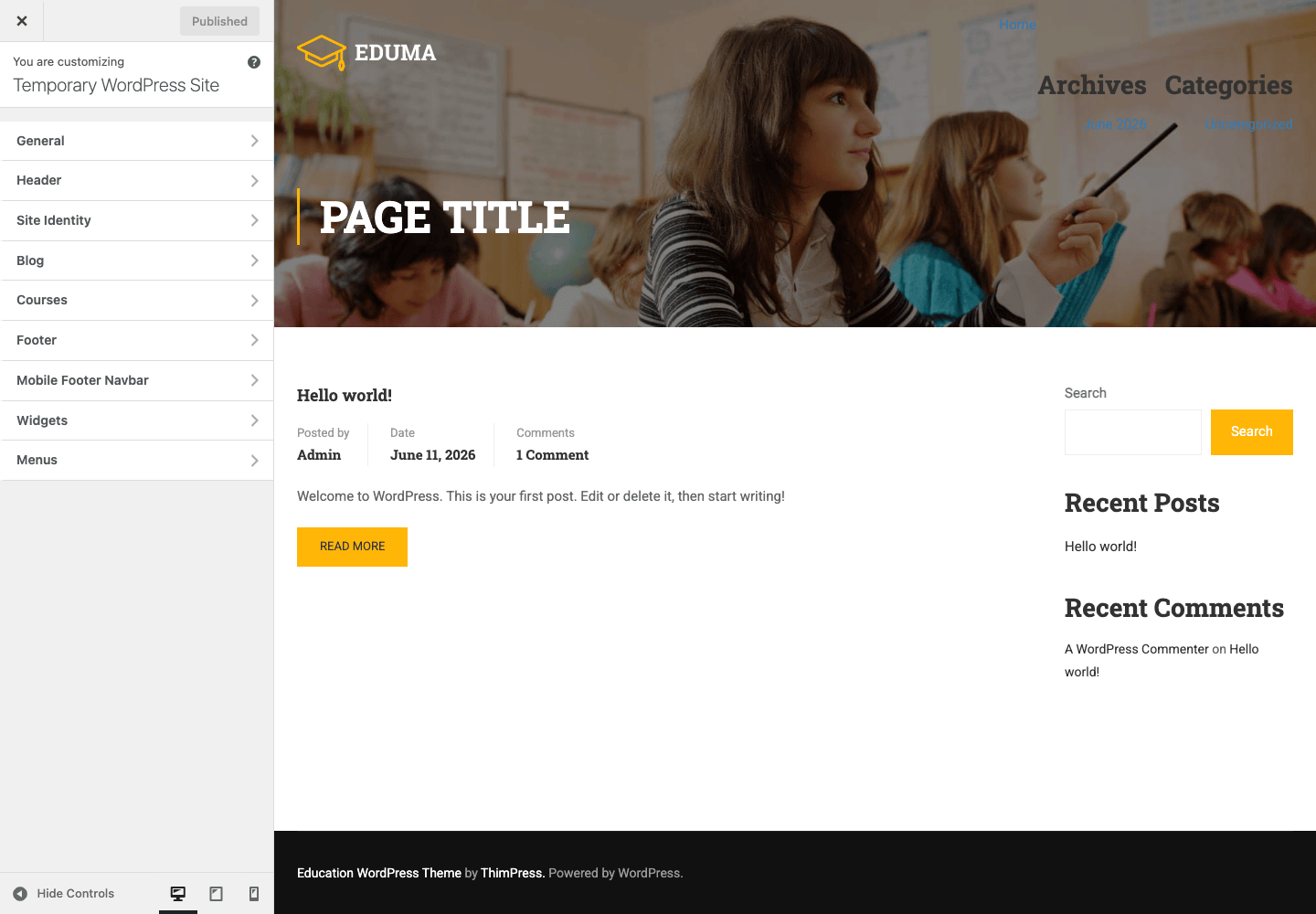
A small thing I appreciate: the Courses panel sits in the Customizer right next to General and Footer, so a non-developer can change how courses display without ever opening the LearnPress settings screen. The line between "theme presentation" and "LMS behavior" is mostly respected in the UI, which is more than I can say for some all-in-one themes that bury LMS toggles inside theme options.
Behind the scenes, every one of these options is stored as a WordPress theme mod with a thim_ prefix, and the whole Customizer tree is assembled by an internal thim_create_customize_options() function. That detail matters for the developer section, because it tells you exactly how to read any setting in your own code.
Inside the LearnPress engine
Once LearnPress is active, a new top-level menu appears, and this is where your academy actually lives. The menu items are Courses, Lessons, Quizzes, Questions, Orders, Categories, Tags, Statistics, Enrolled Students, Add-ons, Themes, Settings, and Tools. None of these belong to the Eduma theme. They are LearnPress, and they would look identical (if uglier) under any theme.
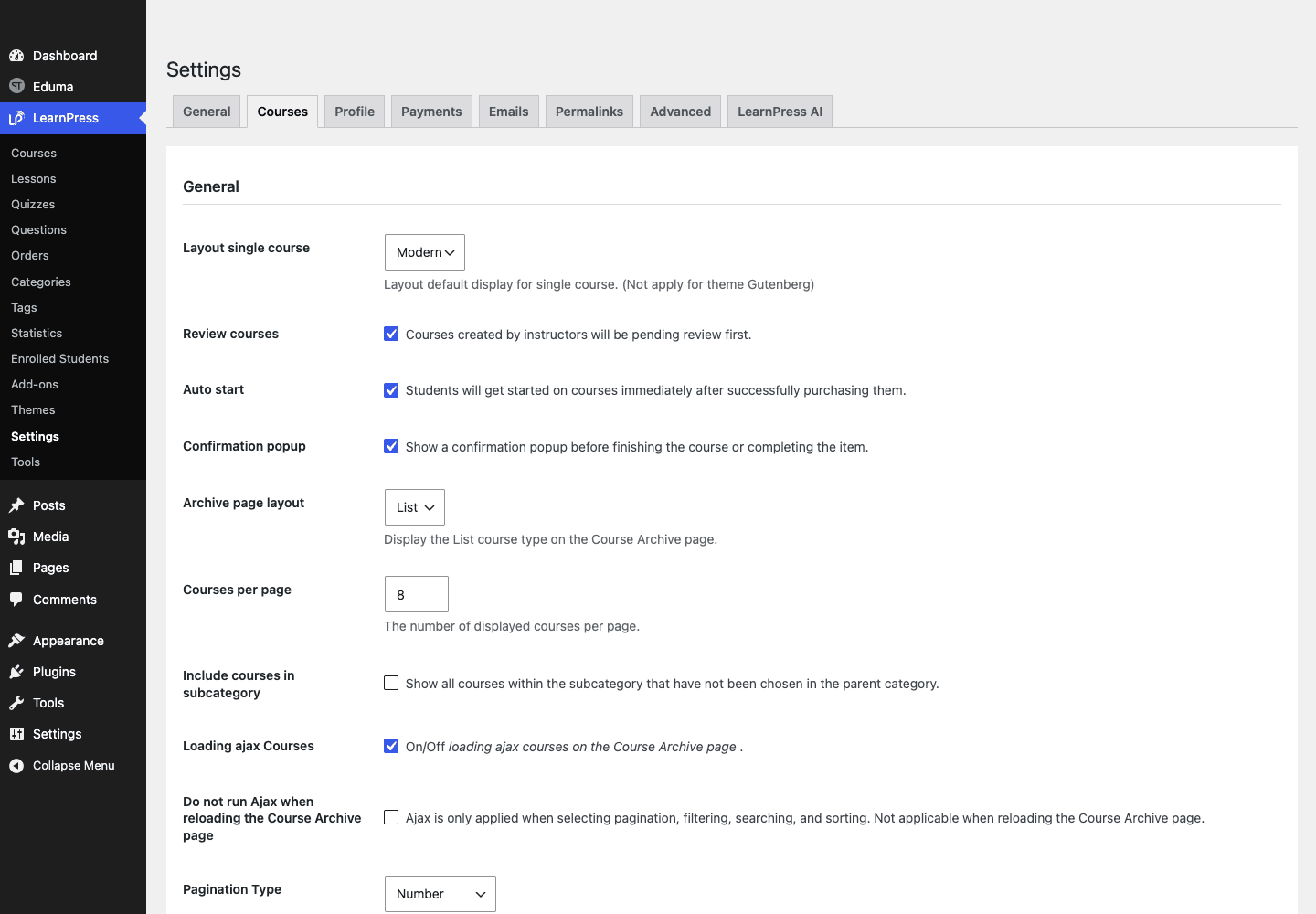
LearnPress Settings is organized into tabs: General, Courses, Profile, Payments, Emails, Permalinks, Advanced, and a LearnPress AI tab. A quick read on each:
- General. Site-wide LMS defaults, like the courses and profile pages, and currency.
- Courses. The big one. This is where "Courses per page" (default 8) and the single-course layout live. The seeded course in my testing used the "Modern" single-course layout, which is the option Eduma’s template is designed around.
- Profile. Maps the student profile page and what tabs students see (their courses, orders, settings).
- Payments. The gateway list. Out of the box LearnPress gives you a couple of basics, and the rest (Stripe, for instance) arrive as add-ons. This tab being thin on a fresh install is by design, not a bug.
- Emails. Transactional email templates for enrollment, completion, and order events.
- Permalinks. The slugs for courses, lessons, and quizzes. Set these before you publish, because changing them later breaks links.
- Advanced and LearnPress AI cover debugging, profile endpoints, and the newer AI-assisted course building.
A course in LearnPress is a container of sections, and each section holds items: lessons (the content), quizzes (the assessment), and questions (the quiz building blocks, managed centrally so you can reuse them). You build the curriculum on the course edit screen, drag items into sections, and set whether each is free or locked. Enrolled Students and Statistics give you the reporting side: who is in, how far they got, and how the orders are tracking.
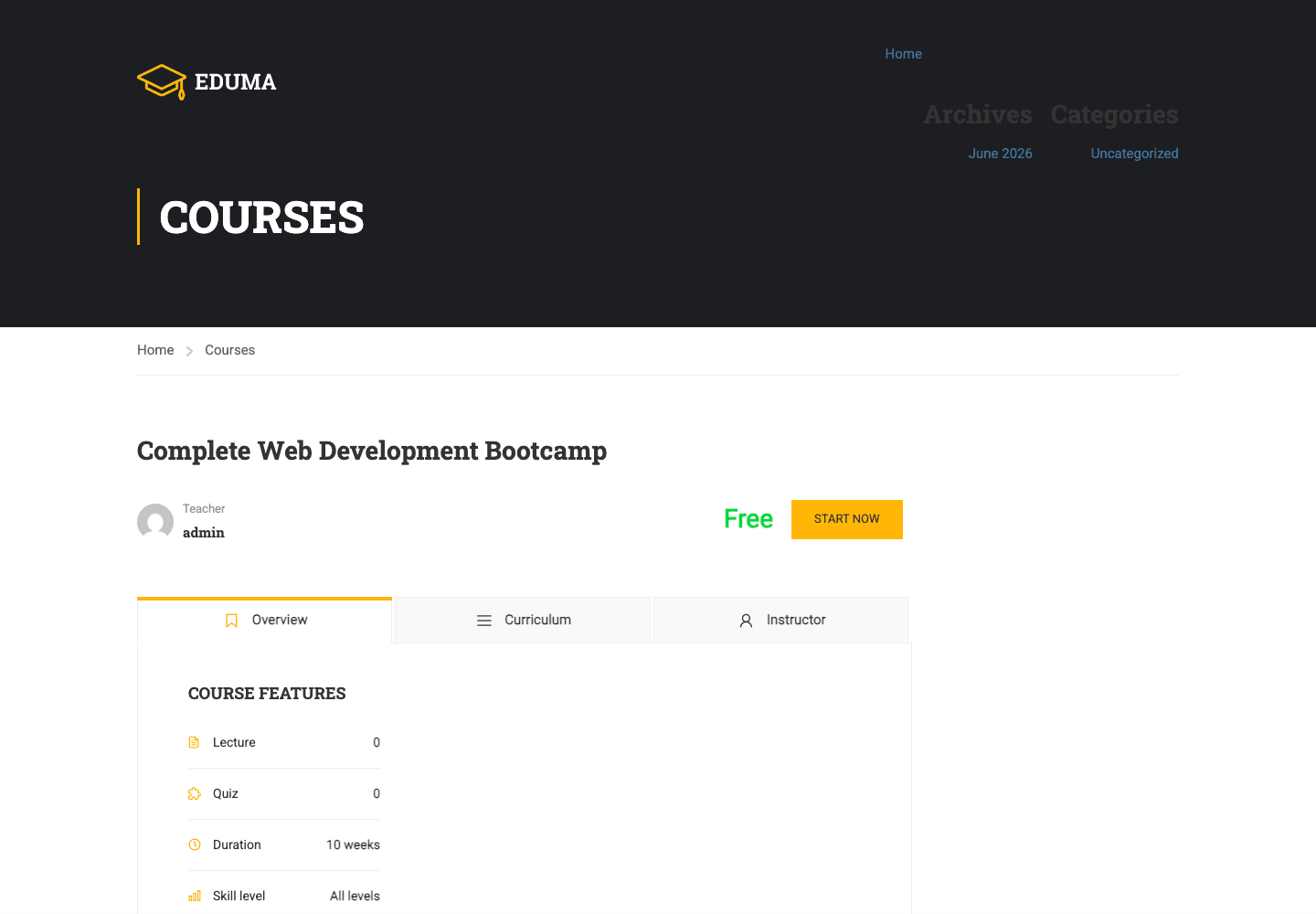
The screenshot above is a seeded course rendered through Eduma’s LearnPress override. You can see the hero, the Overview / Curriculum / Instructor tab strip, the "Course Features" block, and a free course showing a "START NOW" call to action where a paid one would show a price and an enroll button. This is the payoff of the theme-plus-engine split done right: LearnPress decides the course is free and enrollable, and Eduma decides it should look like this.
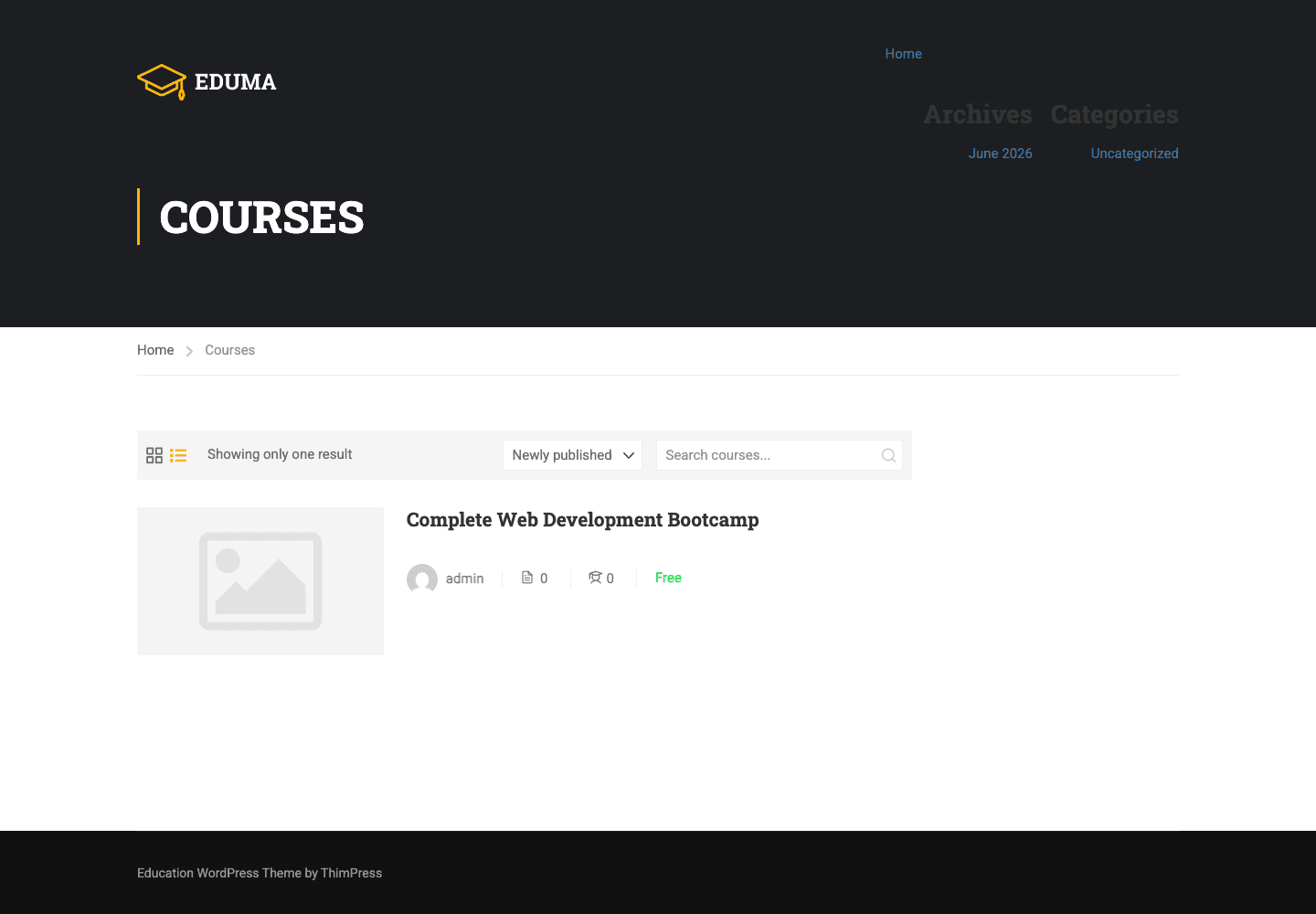
The courses archive is the other front-end view that matters. It is the page students browse before they ever open a course. Eduma styles it with a grid and list toggle, a sort control, and a course search, all driven by the LearnPress archive but skinned by the theme’s learnpress-v4/archive-course and loop templates. If your catalog is your storefront, this page is your shop window, and it is one of the strongest reasons to buy a dedicated education theme rather than bend a generic one.
The LearnPress add-on library
The reason ThimPress can keep LearnPress free is the add-on library. The Eduma plugin installer surfaces 48 plugins (17 recommended companions plus 31 add-ons), and the add-ons are where the heavyweight LMS features live. The ones you will reach for most:
- WooCommerce Add-On for LearnPress. Route course payments through WooCommerce so you reuse Woo’s gateways and order management.
- Stripe Add-On. Card payments directly, without WooCommerce.
- Certificates Add-On. Issues completion certificates. There is a certificate builder behind this.
- Gradebook Add-On. A proper gradebook for instructors.
- Content Drip Add-On. Schedules lesson release so students cannot binge an entire course on day one.
- Live Course Add-On. Live, scheduled sessions rather than only on-demand content.
- Random Quiz Add-On. Pulls quiz questions from a pool so no two attempts are identical.
- Plus Co-Instructor and Commission, Assignments, and a Paid Memberships Pro add-on, among others.
The catch, and read this twice: these are LearnPress add-ons, not Eduma theme features, and several of them are paid. Eduma’s installer simply makes installing them one click each. The theme gives you a tidy front door to the LearnPress add-on library; it does not give you the add-ons. If your business plan depends on certificates and drip, you are budgeting for LearnPress add-ons on top of the theme. Plan accordingly.
Beyond courses: forums, profiles, and memberships
If Eduma only skinned LearnPress, it would still be a good course theme. What makes it an "academy" theme is the rest of the stack it dresses up. The theme ships dedicated template-override folders for several community and commerce plugins, and that is the difference between a course list and a place students actually hang around.
- bbPress forums. Eduma includes 14 bbPress template overrides. That is a serious amount of forum re-styling, enough to make discussion boards feel native rather than bolted on. A cohort that can argue about lesson three in a themed forum is a cohort that sticks. You can read what bbPress does at bbpress.org.
- BuddyPress profiles and activity. Eight BuddyPress template overrides cover member profiles and the activity stream. This is what turns "people who bought a course" into "members of a community."
- Paid Memberships Pro. Two PMPro template overrides mean you can sell an all-access membership tier with themed pricing and checkout pages. If you would rather sell a subscription to the whole library than individual courses, this is your path. We have a full Paid Memberships Pro review if you want the deep version of how that plugin works.
- WooCommerce. Theme support is declared, so you can sell merchandise, books, or physical kits next to courses, or use Woo as the checkout for course payments.
Put together, an Eduma site can be a learning management system, a discussion forum, a member directory, a membership-gated library, and a shop, all wearing the same skin. That is a genuinely different proposition from "a course theme." If your goal is a social learning site rather than a static catalog, this combination is the strongest argument for picking Eduma over a thinner education theme.
Note: every one of those community pieces is a separate plugin you install and configure. Eduma styles them beautifully, but it does not run them. Same rule as LearnPress: the theme is the skin, the plugin is the engine.
The Elementor template kit
Eduma builds pages with Elementor plus Thim’s own widgets, and it ships a Thim Elementor kit of 35 template files. In practice that means the homepage, the about page, the instructor pages, and the landing pages in the demo are Elementor layouts you can edit visually, not hardcoded PHP templates you would have to fork.
This is good and slightly annoying in equal measure. Good, because you get drag-and-drop control over the marketing pages without touching code, and you can pull in Elementor Pro for its Theme Builder and form widgets if you want more. Annoying, because it means Eduma is yet another theme whose richest pages are tied to Elementor, and if you dislike page builders you will find the demo pages harder to take apart than a clean PHP template would be.
The course templates themselves are not Elementor; they are PHP overrides in the theme. So your courses render fast and consistently regardless of the page builder, and only your marketing pages lean on Elementor. That is the right split, and it means a course page is not waiting on builder JavaScript to show its enroll button.
Don’t mistake the theme for the LMS
This is the failure I see sink more Eduma launches than any technical bug, so it gets its own section.
The trap is simple. You buy the Eduma theme, you see the gorgeous demo full of courses and prices and certificates, you activate the theme, and you assume you now have an online school. You do not. You have the skin. Activate only the theme and you have a beautiful site that cannot enroll a single student, because LearnPress is not installed. Install LearnPress but not the Stripe or WooCommerce add-on, and your "Buy Course" button has nowhere to send a payment. Promise certificates in your sales copy without installing the Certificates add-on, and you have sold something you cannot deliver.
The money and trust cost is real. A student who clicks "Enroll" and hits a dead checkout does not email you for help. They leave, and they do not come back. Sell a course that promises a completion certificate you never wired up, and you are looking at refund requests, chargebacks, and a one-star review that says you took the money and shipped nothing. None of that is the theme’s fault. It is the predictable result of treating a skin like an engine.
The fix is a checklist, not a mindset. Treat Eduma as the design layer. Install and configure LearnPress, then install the specific add-ons your model needs (payments at minimum; certificates, drip, and gradebook only if you use them). Then do the thing almost nobody does before launch: create a test course, set a real price, open an incognito window, and run enrollment and payment end to end with a test card. If any step dead-ends, you found it before a paying customer did. That dry run is the cheapest insurance you will buy all year.
Who Eduma is for (and who should look elsewhere)
The honest way to judge a theme this broad is by persona, because "is Eduma good" depends entirely on what you are building.
The coding bootcamp selling cohorts. A strong fit. You need course content, scheduled live sessions (the Live Course add-on), a forum for the cohort (bbPress), and member profiles (BuddyPress). Eduma skins all four, so your cohort feels like one product instead of four logins.
The yoga instructor selling on-demand classes. Also a fit, but lighter than the theme is built for. You need LearnPress plus a payment add-on and not much else. Eduma will work beautifully, though you will be using a fraction of what you paid for. That is fine if you want room to grow, wasteful if you never will.
The university department. A good fit, with a caveat. You get a polished catalog, instructor pages, and the gradebook add-on. The caveat is governance: a department usually needs SSO, accessibility sign-off, and IT approval, and the Split License (more on that in Final thoughts) plus the add-on costs need to clear procurement first.
The corporate-training portal. Workable. Content drip and the gradebook cover the compliance-training pattern (release modules on a schedule, track completion). You will likely want the membership layer (PMPro) to gate the library by employee tier. Just confirm your intranet host can reach outbound for the demo importer, or budget time to build pages by hand.
The membership academy. This is arguably Eduma’s sweet spot. Sell an all-access membership through Paid Memberships Pro, drip the library, run a community forum, and let the same skin cover all of it.
Who should look elsewhere? If you want to sell exactly one course and never build a community, a heavyweight academy theme is more than you need, and a lean single-purpose setup will be faster to launch. If you are committed to a different LMS like Tutor LMS Pro or Sensei, Eduma’s value drops sharply, because its template overrides are built for LearnPress, not those engines. And if you want a pure community platform first with courses as an afterthought, the BuddyBoss theme and its platform are built community-first in a way Eduma is not.
Eduma vs MasterStudy vs the DIY route
The closest rival to Eduma is the MasterStudy education theme, and the third real option is rolling your own with a paid LMS and a generic theme. Here is how they actually differ, with numbers where I can verify them.
| Decision factor | Eduma theme | MasterStudy theme | DIY (paid LMS + generic theme) |
|---|---|---|---|
| LMS engine | LearnPress, $0 (free plugin) | Ships its own MasterStudy LMS plugin | LearnDash or Tutor LMS, a paid subscription |
| Header layouts | 5 built-in | Multiple, varies | Whatever the generic theme ships |
| Theme dev hooks | 51 action hooks + 40 filters | Varies by build | Generic theme’s own hooks, not LMS-aware |
| Integration skins out of the box | 4 (LearnPress + bbPress + BuddyPress + PMPro) | Its own LMS + community add-ons | You wire each one yourself |
| LearnPress template overrides | 27 files (LearnPress v4) | N/A (different engine) | None, you style by hand |
| Elementor kit | 35-file Thim kit | Its own builder kit | None |
A few things stand out. First, the $0 LearnPress engine is a genuine cost difference. With Eduma the LMS itself is free and carries $0/yr in recurring license fees, and you only pay for the add-ons you use. With a DIY LearnDash or Tutor setup, you are paying a yearly LMS subscription on top of your theme before you sell a single course. (We have full reviews of LearnDash LMS and Tutor LMS if you want the LMS-side comparison.)
Second, Eduma’s value is in the integration count. Skinning 4 separate frameworks (LearnPress, bbPress, BuddyPress, PMPro) with 27 dedicated LearnPress-v4 template files is work you would otherwise do template by template on a generic theme, which arrives with 0% of these integration skins. That is the difference between a launch in days and a launch in weeks.
Third, MasterStudy is the real apples-to-apples competitor because it is also a one-purchase education theme, but it ships its own LMS plugin rather than skinning the free LearnPress. That is a strategic fork: with MasterStudy you are tied to the MasterStudy LMS and its add-ons; with Eduma you are tied to the larger, free LearnPress one. Neither is wrong. If you want to compare LMS engines directly, read our MasterStudy LMS review and Sensei LMS review for the alternatives.
The one comparison I will not pretend to give you is exact competitor pricing, because subscription tiers change often and dating this article with stale numbers helps nobody. The structural point holds regardless: Eduma rides a free engine, the DIY route rides a paid one.
Developer reference
Here is where the Eduma theme gets interesting for engineers, and also where I have to keep correcting the marketing. The theme exposes its own surface (more than 50 action hooks and 40 filters), and it explicitly does NOT expose an LMS API, because that is LearnPress’s job.
State these as facts, because they are grep-verified against the theme source: the Eduma theme registers no custom post types, no REST routes, no WP-CLI commands, and no shortcodes of its own. Courses, lessons, quizzes, and questions are LearnPress post types. Portfolio, team, testimonials, and events are Thim Core post types. Shortcodes are Thim Core and Elementor widgets. If you need to hook a course event, you hook LearnPress. If you need to hook the page layout, you hook the theme. Knowing which is which saves hours.
Reading theme options
Every Eduma option is a theme mod with a thim_ prefix. Read any of them with the standard WordPress get_theme_mod(), passing a sensible default. This is exactly what the theme’s own CSS-variable code does.
// Read an Eduma theme option with a fallback default.
$menu_weight = get_theme_mod( 'thim_main_menu_font_weight', 600 );

add_action( 'wp_head', function () {
    $weight = get_theme_mod( 'thim_main_menu_font_weight', 600 );
    printf( '<style>.main-menu a{font-weight:%d;}</style>', (int) $weight );
} );
A caution from the source: the theme has an internal thim_get_theme_option() helper, but it is a class method, not a global function. Do not call it at the top level in your own code. Use get_theme_mod( 'thim_<name>', $default ) and you will always be on solid ground.
Injecting markup on the single-course page
The two cleanest hooks for adding content to a course page are thim_lp_before_single_course_summary and thim_lp_after_single_course_summary. Both fire (with zero arguments) inside the theme’s LearnPress single-course template, so they are theme hooks that sit exactly where the course content renders. Here is a money-back-guarantee badge added right under the course summary.
add_action( 'thim_lp_after_single_course_summary', function () {
    echo '<div class="course-guarantee">';
    echo '<strong>30-day money-back guarantee.</strong> ';
    echo 'Not the right fit? Email us within 30 days for a full refund.';
    echo '</div>';
} );
Adding a sitewide notice
For markup that should appear on every page just inside the content wrapper, use thim_before_site_content (also zero-argument). This is the right place for an announcement bar, a cohort-enrollment countdown, or a maintenance notice.
add_action( 'thim_before_site_content', function () {
    if ( ! is_user_logged_in() ) {
        echo '<div class="enroll-bar">New cohort starts Monday. ';
        echo '<a href="/courses/">Browse open courses</a>.</div>';
    }
} );
Other zero-argument output actions worth knowing, all in the same family: thim_after_site_content, thim_logo, thim_breadcrumbs, thim_before_login_form and thim_after_login_form (the login popup), thim_copyright_area, thim_above_footer_area, thim_course_info_right, thim_begin_curriculum_button, thim_end_curriculum_button, thim_after_course_info, and the pair thim_before_sidebar_course / thim_after_sidebar_course.
Redirecting students after login
On the filter side, thim_default_login_redirect lets you decide where a user lands after they sign in through the popup. Sending students straight to their course dashboard instead of the homepage is a small touch that makes a learning site feel purpose-built.
add_filter( 'thim_default_login_redirect', function ( $url ) {
    // Send students to their LearnPress profile/courses page after login.
    return home_url( '/profile/' );
} );
Resizing course thumbnails
If your course images look soft or wrongly cropped, the theme exposes thim_course_thumbnail_width and thim_course_thumbnail_height so you can change the dimensions the theme requests without editing templates.
add_filter( 'thim_course_thumbnail_width',  fn() => 800 );
add_filter( 'thim_course_thumbnail_height', fn() => 480 );
Other useful filters in the 40-filter set include thim_default_logout_redirect (the logout counterpart), thim_get_var_css_customizer (touch the CSS variables the Customizer generates), thim_filter_course_field_choises, the thim_carousel_post_thumbnail_width / height pair, and thim_core_installer_redirect (where the Thim Core installer sends you afterward).
Where the LMS hooks live
When you need a course-completion or enrollment hook, you do not look in the theme. You look in LearnPress, because LearnPress owns those events. The theme hooks change presentation; the LearnPress hooks change behavior. The official LearnPress documentation is where that engine surface is documented, and the standard WordPress theme and hook references live at developer.wordpress.org. Keep those two sources separate in your head and you will stop attributing the wrong capability to the wrong layer.
Speed, and the weight of an all-in-one academy
Here is the trade-off nobody puts on the sales page. An education theme that skins five frameworks is, by definition, a heavier theme than one that skins none. Eduma is not bloated for the sake of it, but it carries the cost of its ambition: LearnPress templates, bbPress templates, BuddyPress templates, PMPro templates, an Elementor kit, and the styling for all of it. On a fresh install with only LearnPress active, that weight is reasonable. Turn on bbPress, BuddyPress, PMPro, WooCommerce, and a page builder, and you are now running a genuinely large WordPress site, with the front-end payload to match.
Where this matters most: the course archive and any Elementor page. The archive is querying LearnPress and rendering cards; an Elementor homepage is loading the builder’s CSS and JS. Both benefit enormously from caching and asset optimization. This is exactly the workload a caching plugin like WP Rocket was built for: cache the course archive, defer the builder JavaScript, and lazy-load the course thumbnails. I would not launch a busy Eduma site without page caching in front of it.
A few specific things to watch:
- Plugin sprawl is the real cost, not the theme. Each LearnPress add-on, each community plugin, adds queries and assets. Install only what you use. An academy with certificates, drip, gradebook, forums, profiles, memberships, and Woo all active is carrying a lot, and every one of those is justified only if you actually use it.
- PHP 7.0 is the floor, but go higher. The theme requires PHP 7.0, yet you should be on a current PHP release for both speed and security. LearnPress and the community plugins all run better on modern PHP.
- The demo importer is an outbound dependency. If your host blocks outbound HTTP, the Thim Core demo importer cannot fetch from thimpress.com, and you will build pages manually. Confirm this before you commit to a host.
- Image sizing. Use the
thim_course_thumbnail_width/heightfilters (above) to stop the theme from requesting oversized images, and let your CDN or WP Rocket handle the rest.
Troubleshooting
The recurring problems I have seen, and the exact fix for each.
"There is no Courses menu / no course options." LearnPress is not active. The Courses Customizer panel and the entire LMS admin only appear once LearnPress is installed and activated. Run the plugin installer from the Eduma dashboard and activate LearnPress.
"The Import Demo grid is empty." Your host is blocking the outbound request to ThimPress servers, or the request is timing out. The Thim Core demo importer fetches content externally. Either whitelist the outbound request, move to a host that allows it, or build pages by hand with Elementor and the Thim widgets.
"Students can’t pay." No payment method is configured in LearnPress. Out of the box, LearnPress ships only basic gateways; Stripe arrives as an add-on, and card-via-WooCommerce needs the WooCommerce add-on for LearnPress. Install the right payment add-on under the Eduma plugin installer, configure it in LearnPress » Settings » Payments, and run a test transaction.
"I promised certificates and they don’t exist." The Certificates feature is a separate LearnPress add-on. Install it from the installer, then build a certificate template. The theme does not generate certificates.
"The course page looks unstyled or like default WordPress." Either you are not on a single-course layout the theme supports, or a caching plugin is serving a stale template. Set the single-course layout to "Modern" in LearnPress » Settings » Courses, then clear your cache.
"After updating, my homepage broke." Eduma homepages are usually Elementor layouts. A theme or LearnPress update rarely touches Elementor content, but a builder or PHP version mismatch can. Re-save the page in Elementor, confirm your PHP version meets the requirement, and check the Elementor and Thim widgets are active.
"Login redirect goes to the wrong place." Use the thim_default_login_redirect filter shown in the developer section to control where students land after signing in.
FAQ
Is the Eduma theme an LMS by itself?
No, and this is the most important answer on the page. Eduma is the theme: the design, templates, and Customizer. The LMS is LearnPress, a separate free plugin you install alongside it. Activate only the theme and you have a good-looking site with no courses in it. You need LearnPress for any course, enrollment, or quiz functionality.
Do I have to pay for LearnPress?
The core LearnPress engine is free, which is one of Eduma’s biggest advantages over a paid-LMS route. But several capabilities (Stripe payments, certificates, content drip, gradebook, live courses) are separate LearnPress add-ons, and some of those are paid. So "the engine is free" is true, while "everything is free" is not. Budget for the specific add-ons your model needs.
Can I use Eduma with Tutor LMS or LearnDash instead of LearnPress?
Technically the themes will coexist, but you lose most of the value. Eduma’s course styling comes from its LearnPress template overrides, which only apply to LearnPress. Run it with another LMS and your course pages fall back to that LMS’s own templates, so you are paying for a LearnPress theme to skin something it cannot skin. If you are set on Tutor or LearnDash, pick a theme built for them.
Does Eduma support payments and checkout?
Not on its own. Payments are handled by LearnPress and its payment add-ons (Stripe, or card via the WooCommerce add-on). The theme styles the checkout and account pages; LearnPress and the gateway add-on process the money. Always run a real test transaction before launch.
Will the marketed multi-demo homepage import on any host?
Not always. The Thim Core demo importer fetches demo content from ThimPress servers, so it needs a host that allows outbound HTTP requests. On locked-down or heavily firewalled hosting the import can come back empty, and you will build pages manually with Elementor. Confirm outbound access before you promise a stakeholder the demo site.
Is Eduma good for a community, or just courses?
It is genuinely good for community, which is the point of buying it over a lighter theme. It ships skins for bbPress forums, BuddyPress profiles and activity, and Paid Memberships Pro, so you can run a social learning site with discussion and member tiers, not just a course catalog. You install and configure each of those plugins; Eduma styles them to match.
How heavy is the theme, and will it slow my site down?
Eduma is heavier than a single-purpose theme because it skins five frameworks, and the front-end weight grows with every plugin you activate. On its own with LearnPress it is reasonable. The honest answer is that any all-in-one academy site needs page caching and asset optimization to stay fast, so plan for a caching plugin from day one rather than treating it as an afterthought.
Is the Eduma theme GPL-licensed?
This is a common misconception. Eduma ships under the ThemeForest Split License, which means the PHP is GPL while the CSS, JavaScript, and images are proprietary. It is not pure GPL v2 or v3 the way a wordpress.org theme is. That is normal for ThemeForest products and worth understanding before you assume you can redistribute the whole package.
Does Eduma work with Elementor?
Yes, and it leans on it. The demo pages are built with Elementor plus Thim’s own widgets, and the theme ships a 35-file Elementor template kit. The course templates themselves are PHP, not Elementor, so courses render without waiting on the builder. If you want more building power, Elementor Pro adds Theme Builder and form widgets on top.
Can I sell physical products alongside courses?
Yes. The theme declares WooCommerce support, so you can run a WooCommerce shop for merchandise, books, or kits next to your courses, and even route course payments through WooCommerce using the LearnPress WooCommerce add-on. One site, two revenue streams, one skin.
Final thoughts
After clicking through every panel, the Eduma theme is exactly what it claims to be and nothing more, which I mean as a compliment. It is a polished, well-organized skin for a free LMS, with thoughtful integration templates that let you grow from a single course into a full learning community without re-platforming. The course archive and single-course templates alone are worth the price for most people, because matching that polish by hand on a generic theme is a real chunk of work. My one persistent gripe is the same one I have with the whole category: a lot of the "academy" you saw in the demo is plugins and add-ons you assemble and pay for separately, and the theme’s marketing does not make that line as bright as it should. Go in knowing Eduma is the design layer, and you will be happy. Go in thinking it is the LMS, and you will be confused and possibly out of pocket.
On licensing and where to get it: Eduma ships under the ThemeForest Split License (GPL PHP, proprietary CSS/JS/images), it is available through GPL Times as the same ThemeForest package with documentation intact, and the LearnPress engine that powers it is free while the specific LearnPress add-ons your model needs (payments, certificates, drip, gradebook) cost extra. Price that whole picture, not just the theme, and decide with your eyes open.