

Here’s a thing every community builder learns the hard way: you don’t own your audience on Facebook. You rent it. The group you spent two years growing can have its reach throttled overnight, its members funneled into ads, or the whole thing shut down by a moderation bot that doesn’t answer email. You did the work; the platform keeps the asset.
BuddyBoss exists to flip that. It turns a WordPress site into a full social network you actually own: member profiles, activity feeds, groups, forums, private messaging, and a member directory, all running on your domain, in your database, under your rules. If you’ve ever wished your Facebook group lived on a site you controlled, this is the software that does it.
This is a long, honest walkthrough of what BuddyBoss is, the components a community is built from, how to set it up without ending up with a sprawling ghost town, the app-like theme and the native mobile app, where it beats free BuddyPress and the other community plugins, and a developer reference with the real functions, hooks, and REST API. It’s a big platform, so this runs long. And because the most common way people get hurt with community software is skipping moderation, there’s a whole section on that.
Table of Contents
- What is BuddyBoss?
- The components: what a BuddyBoss community is made of
- Setting up BuddyBoss without a ghost town
- Profiles, registration, and member types
- The social core: activity feeds, groups, and forums
- Notifications and the email system
- The app-like theme and the native mobile app
- What Platform Pro adds
- Who BuddyBoss is really for
- Don’t open the doors without moderation
- Is BuddyBoss heavy? The honest answer
- BuddyBoss vs BuddyPress vs PeepSo vs Ultimate Member
- Developer reference: functions, hooks, and the REST API
- FAQ
- Final thoughts
What is BuddyBoss?
BuddyBoss is a community platform for WordPress, made by the company of the same name. It comes in a few pieces that work together, and understanding them up front saves a lot of confusion.
The BuddyBoss Platform is the free engine. It’s actually a fork of BuddyPress (the long-running open-source community plugin) and bbPress (forums), rebuilt with a modern interface and a lot of extra features. It adds the community components: profiles, activity feeds, connections, messaging, groups, forums, and media.
The BuddyBoss Platform Pro is the premium add-on that layers on the features the free engine leaves out: real-time messaging and notifications, web conferencing in groups, web push, and tighter integrations. Pro needs the free Platform installed; it extends it rather than replacing it.
The BuddyBoss Theme is the front-end. It’s an app-like theme that makes your community look like a modern social network rather than a blog with comments. And there’s a BuddyBoss App, a native iOS and Android app that turns your community into a real mobile app, powered by the platform’s REST API.
For this walkthrough I’m focused on the Platform and Platform Pro, the engine that does the work, with the theme alongside it. You can get BuddyBoss Platform Pro on GPL Times, and the demo I worked from had the Platform, Pro, and the theme all active, so everything in this article is something you can click through on a real install.
One honest framing before we go deeper: BuddyBoss is not a small plugin you bolt on and forget. It’s a platform you build a product on. That’s its strength and the source of most of its pitfalls.
The components: what a BuddyBoss community is made of
A BuddyBoss community is assembled from components, each of which you turn on or off. The control center is the Community Settings screen, a grid of feature cards with a toggle and a settings panel on each.
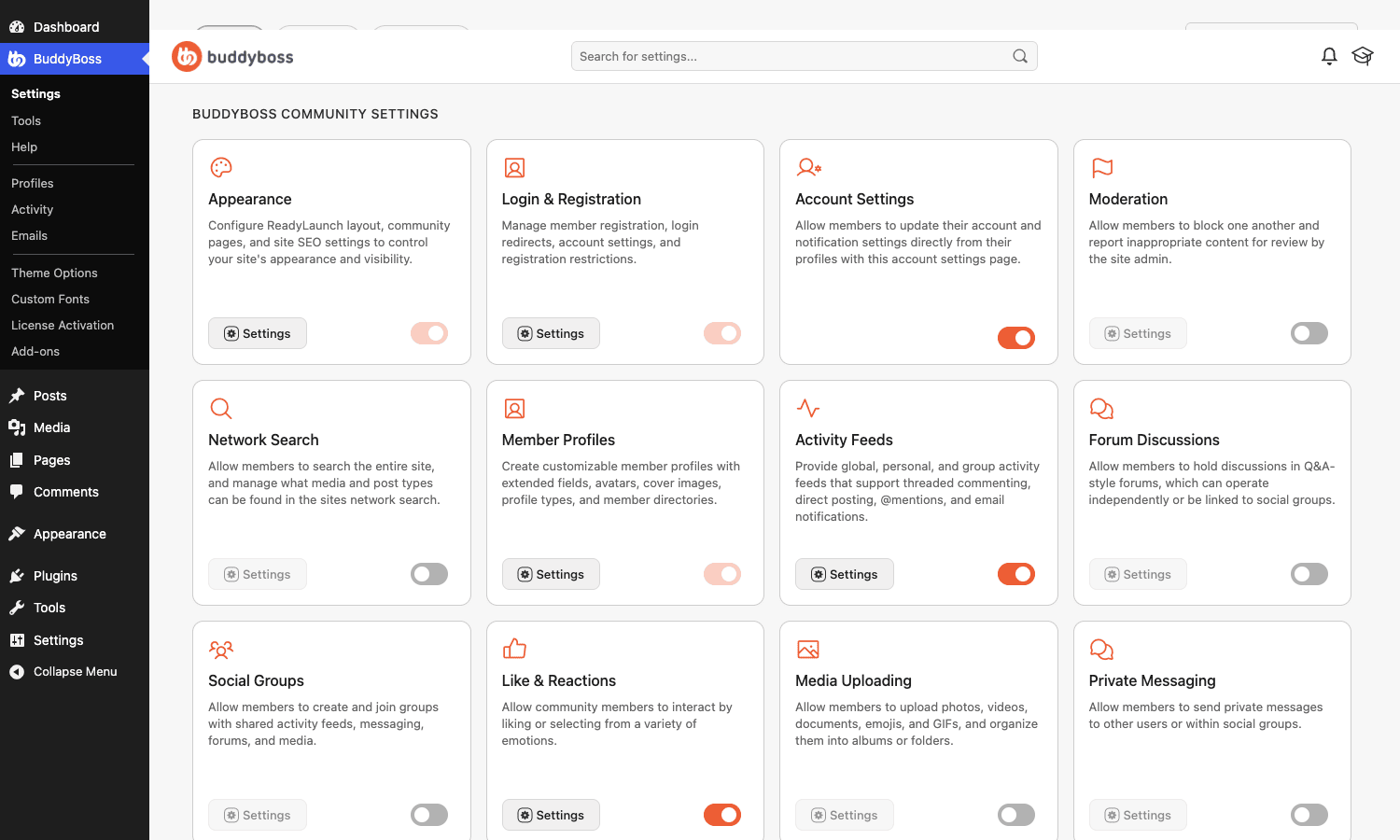
Here’s what each component does, in plain terms:
- Member Profiles. Every member gets a profile with a cover photo, avatar, custom fields, and a timeline. This is the heart of the network.
- Activity Feeds. The social feed, where members post updates, photos, and videos, like, comment, and @mention each other. It’s the Facebook-wall equivalent.
- Social Groups. Members create or join groups (public, private, or hidden), each with its own feed, members, forum, and photos. The backbone of any sizable community.
- Forum Discussions. Threaded forums, powered by an integrated version of bbPress, attached to groups or standing alone. For long-form, searchable discussion that a feed can’t hold.
- Private Messaging. One-to-one and group direct messages between members.
- Connections. The friend or follow system, so members build their own network inside yours.
- Media Uploading. Photos, documents, and videos members can attach to posts, messages, and albums.
- Like & Reactions. Emotion-based reactions on activity, not just a single like.
- Network Search. A unified search across members, groups, forums, and activity.
- Moderation. Report, block, and auto-hide tools. The component you must not skip, covered in its own section.
- Notifications, Account Settings, Login & Registration. The plumbing: in-app and email notifications, member account controls, and the registration flow.
The short version: you don’t get a fixed "community feature" you switch on. You assemble the exact network you want from these parts, and turn off the ones you don’t.
Setting up BuddyBoss without a ghost town
Setup is more involved than a normal plugin, and the order and restraint both matter.
Step 1: Install the free Platform first. BuddyBoss Platform Pro extends the free BuddyBoss Platform, so the free engine has to be active before Pro will do anything. Install BuddyBoss Platform, then Platform Pro, then activate the BuddyBoss Theme if you’re using it.
Step 2: Turn on only the components you need today. This is the single most important decision, and most people get it wrong. It’s tempting to enable profiles, activity, groups, forums, messaging, connections, media, and reactions all at once because they’re all there. Don’t. A brand-new community with every feature on and nobody using them looks abandoned, and abandoned kills momentum faster than missing features. Start with profiles and an activity feed. Add groups when you have enough members to fill them. Add forums when discussions outgrow the feed.
Heads-up: components aren’t just front-end features, they each load assets and add navigation. Turning on all of them on day one makes the site heavier and the navigation more cluttered for no benefit while your member count is in single digits.
Step 3: Set up registration and moderation before you open the doors. Decide how people join (open, request, or invite-only), configure the profile fields you actually need, and turn on the Moderation component. Opening registration on an unmoderated community is how you wake up to spam and worse. More on this below.
Step 4: Build the key pages. BuddyBoss creates the community pages (members, groups, activity) during setup. Make sure they exist and are linked from your menu, and set a sensible front page, often the activity feed for logged-in members and a marketing page for guests.
That’s the foundation. Engine, restraint, registration, moderation, pages. The temptation to flip every switch is the thing to resist.
Profiles, registration, and member types
Profiles are where BuddyBoss earns its "social network, not a blog" claim, and the profile-field builder is genuinely good.
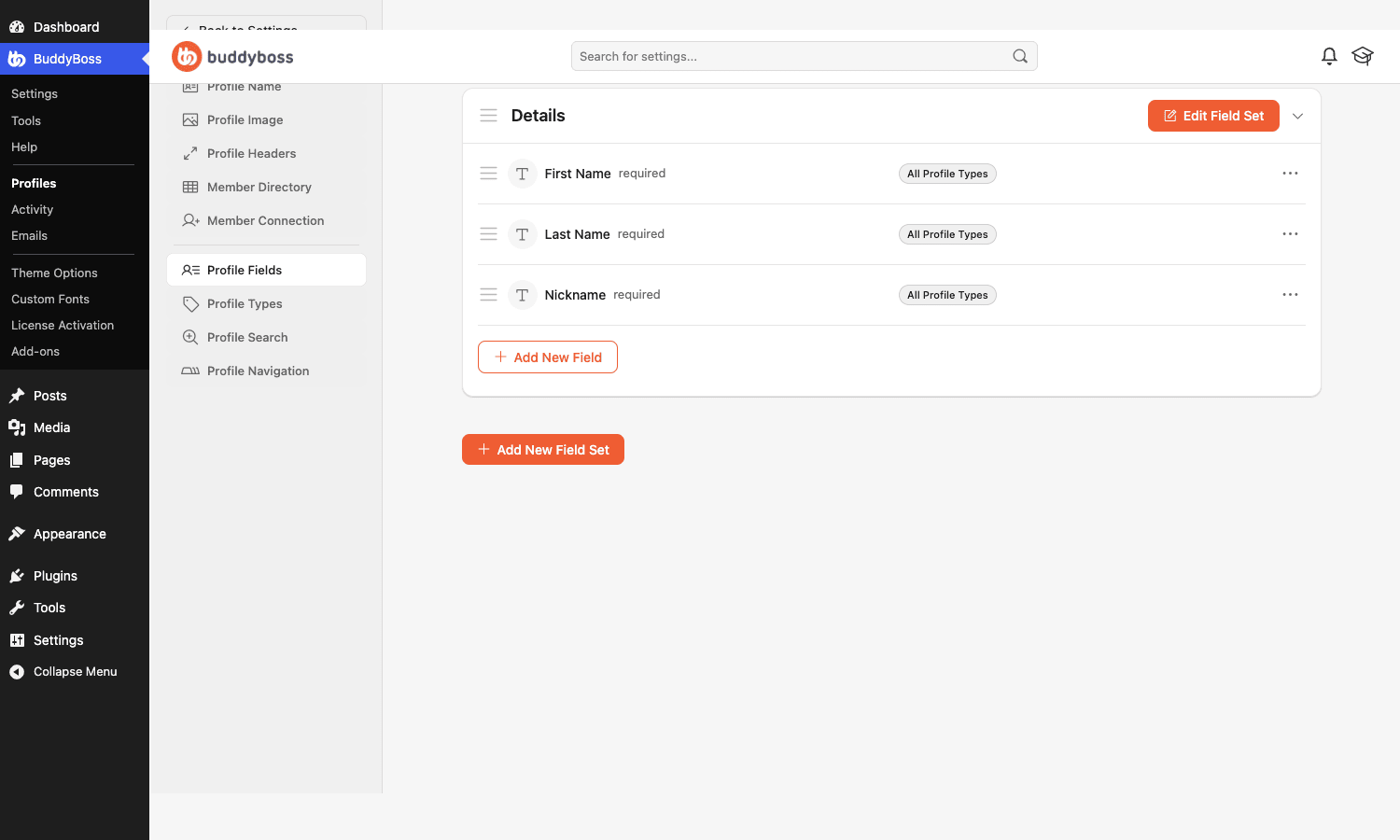
Under the Profiles area you build field sets and fields. Out of the box you get First Name, Last Name, and Nickname; you add your own fields (text, dropdowns, checkboxes, dates, and more), group them into sets, and mark them required or optional. Those fields drive registration, the profile display, and member directory filtering.
The feature that makes BuddyBoss flexible for real products is Profile Types (and the matching Group Types). A profile type lets you treat different members differently: students versus instructors, free members versus paid, customers versus vendors. You can show different profile fields to each type, restrict what each can do, and filter the directory by type. For a course community with teachers and learners, or a membership site with tiers, this is the structural feature that makes it work.
Tip: plan your profile fields and types before you open registration. Adding a required field after a thousand people have signed up means a thousand incomplete profiles, and changing types later is fiddly. Get the structure right while the member count is small.
The social core: activity feeds, groups, and forums
Three components carry most of the day-to-day life of a community, and they’re designed to work together.
The activity feed is the stream. Members post text, photos, videos, documents, and links; others react, comment, and @mention. You can scope feeds globally (the whole network), to a group, or to a member’s own timeline. It behaves the way anyone who has used a social network expects, which matters, because a community only thrives if posting feels natural.
Groups are sub-communities. A member creates or joins a group, which has its own activity feed, member list, optional forum, photos, and privacy level (public, private, or hidden). Groups are how a large community stays organized: a 5,000-member network is unusable as one feed, but it works as fifty groups each with its own focus. Group Types let you template groups (a "cohort" type, a "club" type) with preset settings.
Forums handle the discussions a feed can’t. A feed is great for "what’s happening now" and terrible for "the canonical answer to this question." BuddyBoss integrates a version of bbPress so forums attach to groups or stand alone, giving you threaded, searchable, long-lived discussion alongside the fast-moving feed. For support communities and knowledge bases, the forum is where the lasting value accumulates.
The point of having all three from one platform is that they share members, notifications, search, and design. A member posts in the feed, asks a question in a forum, and chats in a group without ever feeling like they’ve crossed into a different tool.
Notifications and the email system
A community lives or dies on whether people come back, and notifications are what bring them back. BuddyBoss handles this on two fronts.
In-app notifications surface mentions, replies, friend requests, group invites, and messages in a notification center. Email notifications do the same by email, and this is where BuddyBoss is more thorough than most.
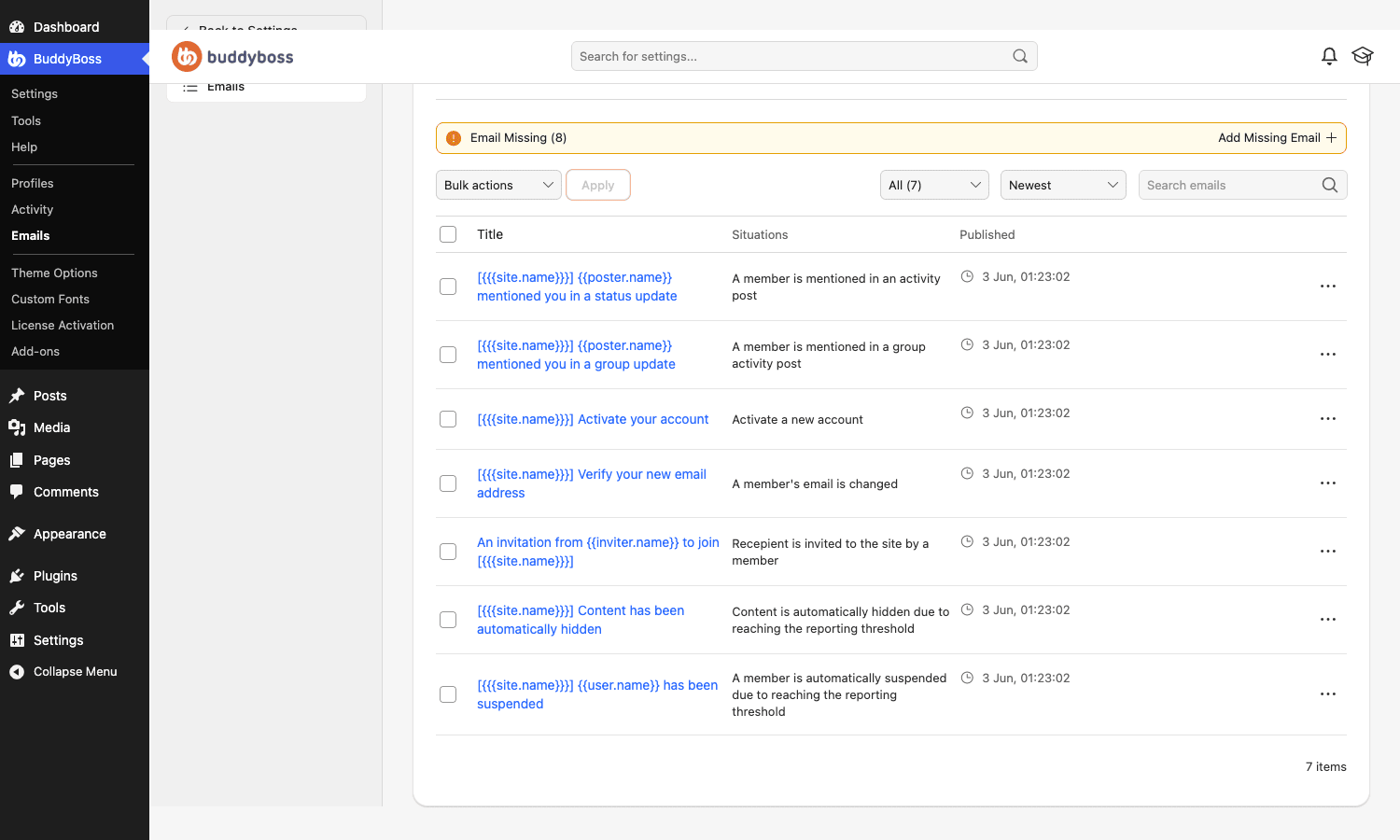
Every community email is a template you can edit, and each one is tied to a situation, the event that triggers it. A member is mentioned in an activity post, a member is invited to the site, an account needs activating, content is auto-hidden by moderation: each has its own editable email with tokens like the site name and the poster’s name. You can rebrand them, rewrite the copy, and control which notifications members receive.
Note: notification settings are a balance. Too few and members forget the community exists; too many and they mute everything or unsubscribe. BuddyBoss lets members tune their own notification preferences, which is the right default, give people control rather than blasting everyone with everything.
The app-like theme and the native mobile app
You can run BuddyBoss with any theme, because the platform is theme-independent. If your goal is a private company intranet rather than a public social network, an intranet-first theme like the Woffice theme brings the same polish to projects, a wiki, and a member directory. But the BuddyBoss Theme is what makes a community look like a modern social network instead of a blog that happens to have profiles.
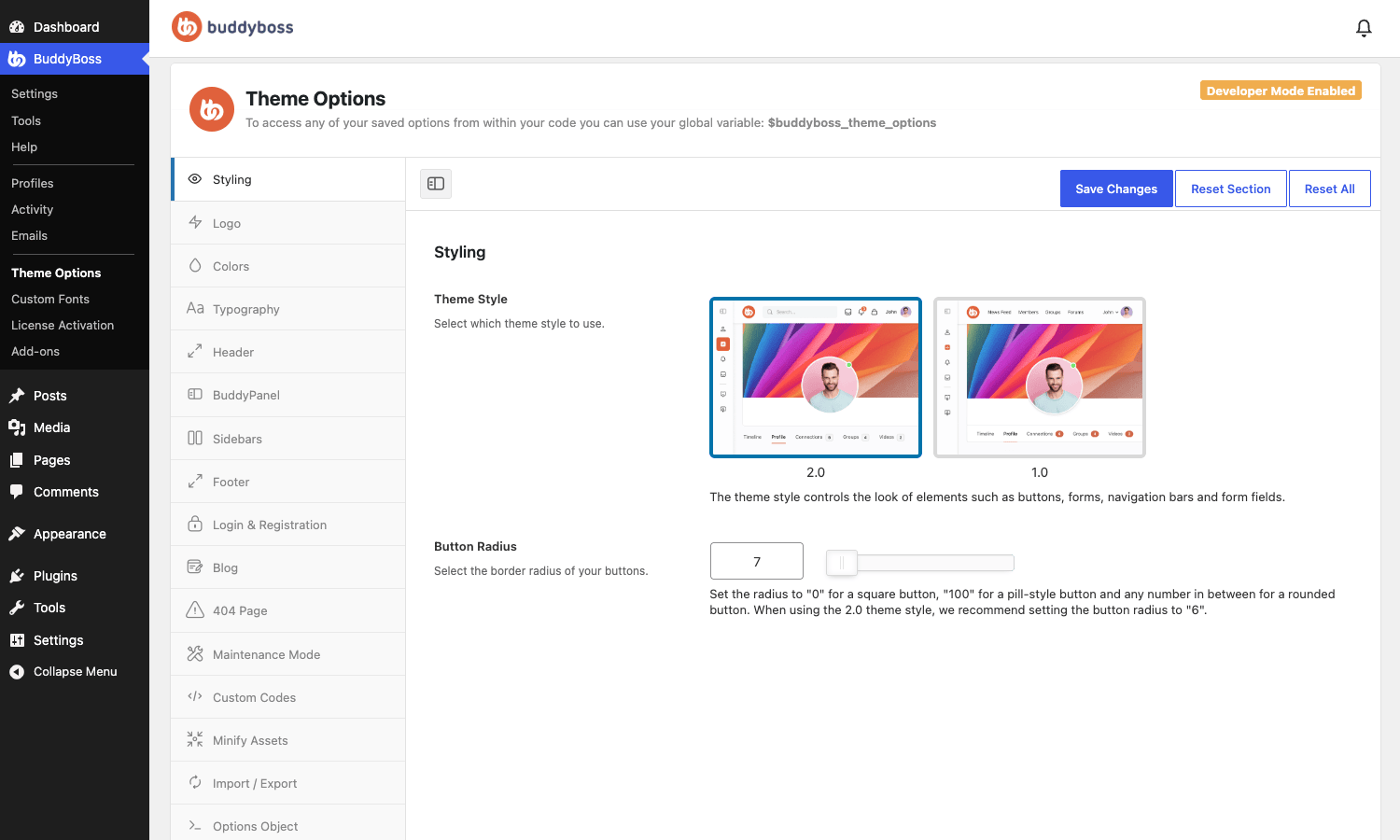
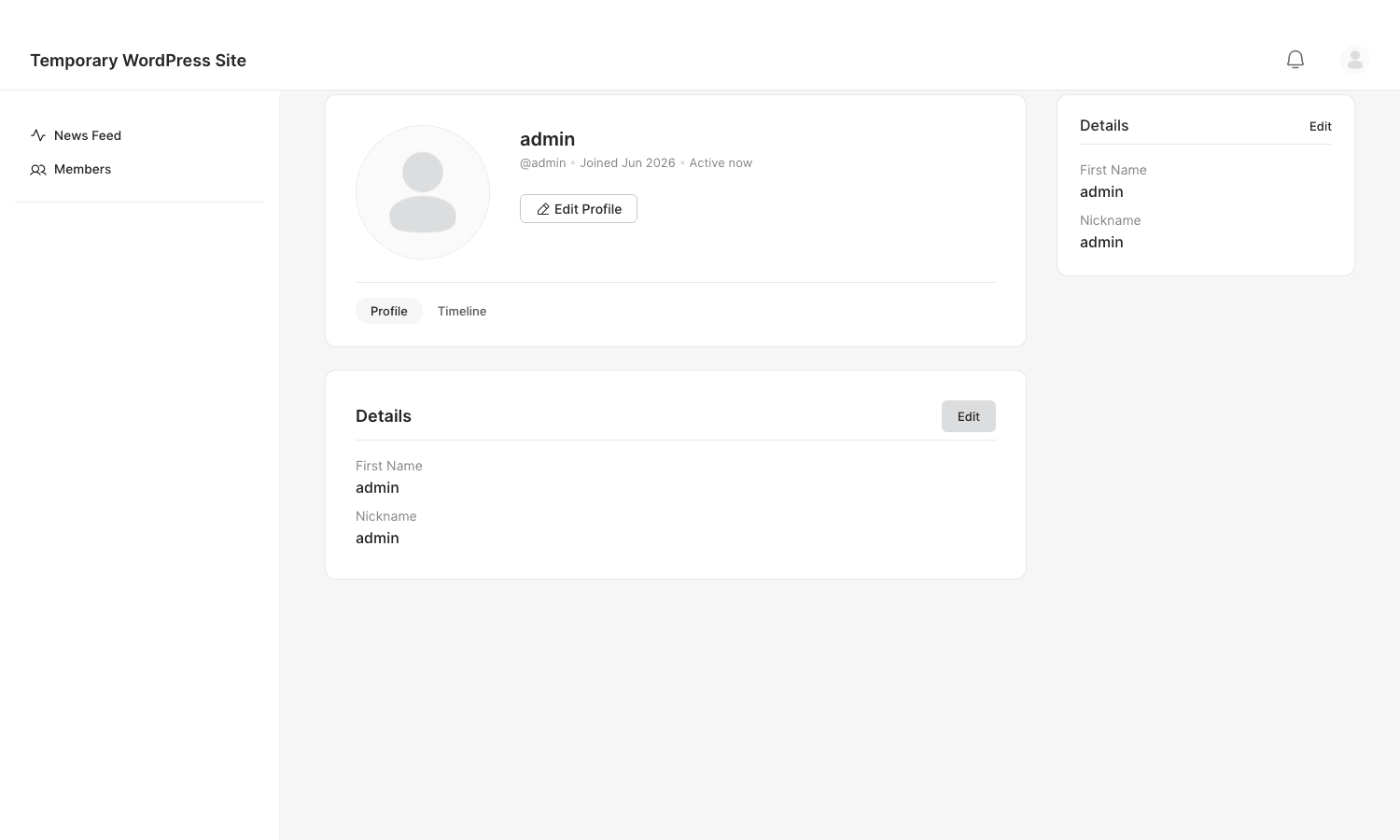
The theme gives you the app-like layout: a left "BuddyPanel" navigation rail, clean cards, a focused reading column, and a styling panel that controls colors, typography, the header, login and registration screens, and more. It ships two theme styles, a flatter modern "2.0" and a "1.0" classic, and a deep set of options so you can match it to your brand without code. The result, on the front end, is a community that feels like a product.
Then there’s the BuddyBoss App, a separate product that turns your community into a real native iOS and Android app, submitted to the App Store and Google Play under your brand. It’s powered by the platform’s REST API, so members get push notifications, feeds, groups, and messaging in a genuine mobile app. For a course business or a membership community, an owned app is a serious differentiator, and almost no other WordPress community solution offers one.
The catch: the app is a separate purchase and a separate commitment (app-store accounts, review, updates). It’s powerful, but it’s a project of its own, not a checkbox. Plan for it deliberately if it’s part of your pitch.
What Platform Pro adds
The free BuddyBoss Platform is genuinely capable on its own. Platform Pro is the upgrade that adds the features a serious community eventually wants:
- Real-time messaging and notifications (via Pusher), so messages and alerts arrive live without a page refresh, the difference between "a forum" and "a chat."
- Web conferencing in groups and activity (via Zoom), so a group can run a meeting or a class without leaving the community.
- Web push notifications, to re-engage members in their browser even when they’re not on the site.
- Advanced moderation and other refinements on top of the free moderation tools.
If you’re building a community as a hobby or a small free group, the free Platform may be all you need. If you’re building a paid community, a course platform, or a membership product, Pro’s real-time and conferencing features are usually the point at which it starts to feel like a real product rather than a message board.
Who BuddyBoss is really for
BuddyBoss is a platform, not a widget, so "who it’s for" has clear answers, including a clear "not you."
If you run an online course business, BuddyBoss plus an LMS is one of the strongest combinations in WordPress. Pair it with LearnDash or another LMS and you get courses with a real community around them: cohorts as groups, discussion in forums, and progress shared in the feed. The course-plus-community model is exactly what BuddyBoss was built for.
If you run a paid membership community, BuddyBoss plus a membership plugin like MemberPress gives you gated access to an owned social network, the "Facebook group but I control it and charge for it" model that a lot of creators want.
If you’re a brand or nonprofit building an owned audience, BuddyBoss is the alternative to renting that audience on a social platform. Your members, their data, and the relationship live on your site.
If you just want comments and a few user profiles on an otherwise normal site, BuddyBoss is far too much. A lighter profiles-and-registration plugin like Ultimate Member will serve you better with a fraction of the weight and complexity. Be honest about whether you’re building a community or just adding a login.
| Your goal | BuddyBoss fit | Pair it with |
|---|---|---|
| Course + community | Excellent | An LMS (LearnDash, Tutor, LifterLMS) |
| Paid membership community | Excellent | A membership plugin + the App |
| Brand / nonprofit owned audience | Strong | Email + the BuddyBoss Theme |
| Just profiles and a login | Skip it | A lightweight profiles plugin |
Don’t open the doors without moderation
This is the section I’d make mandatory reading, because skipping it is how community projects turn into liabilities.
The moment you enable open registration plus activity feeds plus media uploads, you’ve created a place where strangers can post text, images, and files to your domain, in public, instantly. Without moderation, that is an open invitation to spam, harassment, and at the extreme, illegal content that you, as the site owner, are now hosting. "I didn’t post it" is not the comfort you’d hope when the content is on your server under your brand.
BuddyBoss ships a Moderation component precisely for this, and you should turn it on before you open registration, not after the first incident. It gives members the ability to report content and block other members, and it gives you automatic hiding of content once it crosses a report threshold, plus the tools to review and act. Combined with a sensible registration mode (request or invite-only rather than wide-open for a new community), it’s the difference between a community and a problem.
A few hard-won guardrails. Don’t start fully open; a new community with request-based or invite-only registration grows more slowly but stays clean while you build moderation habits. Don’t enable anonymous or guest posting on an unmoderated feed. Do write community guidelines and link them at registration, because moderation is far easier to enforce when the rules were stated up front. And do assign real human moderators as you grow, automatic hiding catches volume, but judgment calls need people.
The cost of getting this wrong isn’t abstract: spam that drives members away, abuse that damages your brand, and at worst, legal exposure. The Moderation component is free, built in, and takes minutes to enable. There’s no good reason to run an open community without it.
Is BuddyBoss heavy? The honest answer
BuddyBoss is a substantial platform, and the honest answer is that it carries real weight, more than a typical plugin, because it’s running an entire social network. How heavy depends on how you configure and host it.
The biggest lever is the same restraint from setup: turn off components you don’t use. Each active component loads its own scripts, styles, and queries. A community running profiles and activity is dramatically lighter than one running profiles, activity, groups, forums, messaging, media, connections, and reactions all at once. Enable features as your community grows into them, not before.
Beyond that, the realities of running a community apply:
- Hosting matters more than usual. A busy community generates a lot of logged-in, uncacheable traffic (every member sees a personalized feed), which is the opposite of a static blog. Budget for hosting that can handle concurrent logged-in users, not the cheapest shared plan.
- Caching helps, but differently. Page caching does less for logged-in community pages, so object caching (Redis or Memcached) and a capable database matter more than a front-end page cache.
- Media adds up. If members upload photos and videos, plan storage and consider offloading media to object storage as you scale.
- The activity feed is the hot path. It’s queried constantly; a well-tuned database and object cache keep it responsive.
Compatibility is broad: BuddyBoss integrates with the major LMS plugins, membership plugins, WooCommerce, gamification tools like GamiPress, and Elementor. Because it’s a BuddyPress fork, many BuddyPress add-ons work too. The main thing to plan for isn’t a plugin conflict; it’s that a real community needs real hosting.
BuddyBoss vs BuddyPress vs PeepSo vs Ultimate Member
The community-software field has a few real options, and they solve overlapping but different problems. Here’s how BuddyBoss sits among them.
Versus free BuddyPress: this is the most direct comparison, because BuddyBoss is a fork of BuddyPress. BuddyPress is free and open-source and does the core job, profiles, activity, groups, messaging, but its default interface is dated and barebones, and media, modern design, real-time, and a mobile app are not part of it. BuddyBoss is the polished, productized version: the app-like UI, media and video, the moderation tools, the REST API that powers a native app, and a far nicer admin. You pay for that, where BuddyPress is free. If budget is everything and you can live with a plain UI (or build your own), BuddyPress is the free path; if you want a product your members enjoy using, BuddyBoss is the upgrade.
Versus PeepSo: PeepSo is the other "social network plugin," with a modular, buy-the-pieces model. It’s lighter to start and you pay for the features you add. BuddyBoss is the broader, more integrated suite, especially once you factor in the LMS integrations and the mobile app, where BuddyBoss’s integrations run deeper.
Versus Ultimate Member: this isn’t really a head-to-head, because Ultimate Member is a profiles-and-registration plugin, not a full social network. It’s excellent and lightweight for member directories, front-end profiles, and gated content, and it’s the right pick when you don’t need feeds, groups, and forums. BuddyBoss is what you choose when you genuinely need the social layer.
On price, the models differ enough that a single number misleads, but here are the rough figures. BuddyBoss is a subscription: the paid tiers (Platform Pro plus the theme) start around $228 a year, and adding the native app pushes that into the several-hundred-a-year range. BuddyPress is $0, fully free and open-source. PeepSo has a free core with paid modules from roughly $49 each, or about $294 a year for the full bundle. Ultimate Member also has a free core, with its Pro bundle around $249 a year. So the real spread runs from $0 to a few hundred dollars a year, across four products that do meaningfully different amounts. The right framing isn’t "which is cheapest," it’s "which scope matches the community I’m actually building."
| Option | Scope | Cost (approx) | Best when |
|---|---|---|---|
| BuddyBoss | Full network + app + LMS ties | ~$228+/yr subscription | A serious, owned community or course product |
| BuddyPress | Core network, plain UI | $0 (open-source) | Budget-first, fine with a basic interface |
| PeepSo | Modular network | Free core + modules from ~$49 | Lighter start, pay as you grow |
| Ultimate Member | Profiles + registration | Free core + ~$249/yr bundle | Profiles and gating, not a full network |
Developer reference: functions, hooks, and the REST API
Because BuddyBoss is built on BuddyPress, it inherits a large, well-documented developer API, and it adds a modern REST layer on top. If you’re building on it for a client, these are the tools that keep your work in a child theme or a small custom plugin instead of in core files.
Check whether a component is active before you touch it, so your code degrades gracefully if a feature is turned off:
if ( function_exists( 'bp_is_active' ) && bp_is_active( 'groups' ) ) {
    // Safe to use group functions here.
}
Run setup code at the right moment. The platform fires boot actions you can hook, with bp_loaded and bp_init being the safe places to register your own additions:
add_action( 'bp_init', function () {
    // Register custom profile field types, nav items, or integrations here.
} );
Work with members and their data using the inherited helper functions, all confirmed in the platform source:
$user_id = bp_loggedin_user_id();
$name    = bp_core_get_user_displayname( $user_id );
$link    = bp_core_get_userlink( $user_id );           // profile URL markup
$city    = xprofile_get_field_data( 'City', $user_id ); // a custom profile field
Create community content programmatically. This is how you wire BuddyBoss into other systems, for example creating a group when a course is published, or posting to the feed when a member earns a badge:
// Create a group from another plugin (e.g. one group per LMS cohort).
$group_id = groups_create_group( array(
    'name'        => 'Spring Cohort',
    'description' => 'Discussion for the spring intake.',
    'status'      => 'private',
) );

// Post to the activity feed.
bp_activity_add( array(
    'user_id' => $user_id,
    'action'  => 'Completed the onboarding course',
    'component' => 'activity',
    'type'    => 'activity_update',
) );
React to community events with action hooks. The platform fires actions when members interact, so you can sync to a CRM, award points, or send a webhook:
// Do something when a member posts an update.
add_action( 'bp_activity_posted_update', function ( $content, $user_id, $activity_id ) {
    // e.g. award gamification points for posting.
}, 10, 3 );

// React when a member joins a group, or a friendship is accepted.
add_action( 'groups_join_group', 'my_on_group_join', 10, 2 );
add_action( 'friends_friendship_accepted', 'my_on_friendship', 10, 4 );
Other functions worth knowing include friends_add_friend() to create a connection and messages_new_message() to send a direct message from code, both useful for onboarding flows that auto-connect new members or send a welcome DM.
The REST API is where BuddyBoss goes beyond classic BuddyPress. It exposes a full community API under the buddyboss/v1 namespace, covering members, activity, groups, forums, messages, and media. That API is what powers the native mobile app, and it’s what you’d build a custom front end or a headless integration against. If you want a member’s activity from an external app, you’re calling buddyboss/v1 endpoints, not scraping pages.
On the data side, the platform registers custom post types for its structures (member types use the bp-member-type post type, forums run on the integrated bbPress forum types, and emails are editable as posts), so you can query and extend them like any other WordPress content. Between the inherited BuddyPress functions, the action hooks, and the REST API, you can extend a BuddyBoss community about as far as you can extend WordPress itself.
FAQ
Do I need BuddyPress installed to use BuddyBoss?
No, and you shouldn’t run both. BuddyBoss Platform is a fork of BuddyPress, so it replaces it; installing BuddyPress alongside it causes conflicts. BuddyBoss Platform Pro, on the other hand, does need the free BuddyBoss Platform installed, because Pro extends it.
Is BuddyBoss free?
The BuddyBoss Platform (the engine) is free. BuddyBoss Platform Pro, the BuddyBoss Theme, and the BuddyBoss App are paid. You can run a real community on the free Platform plus any theme; the paid pieces add the app-like theme, real-time features, conferencing, and the native mobile app.
Can I build an online course community with BuddyBoss?
Yes, that’s one of its primary use cases. BuddyBoss integrates with the major LMS plugins, so you can run courses with a community wrapped around them: cohorts as groups, discussion in forums, and progress and wins shared in the activity feed. The course-plus-community model is exactly what it’s designed for.
Will BuddyBoss slow down my site?
A community is heavier than a blog by nature, because every logged-in member sees a personalized, uncacheable feed. The two levers in your control are turning off components you don’t use and hosting on a server built for concurrent logged-in users with object caching. Do both and a real BuddyBoss community performs well; skimp on hosting and it will struggle.
How is BuddyBoss different from free BuddyPress?
BuddyBoss is the productized fork of BuddyPress: a modern app-like interface, media and video, a moderation system, a full REST API, a native mobile app, and a much nicer admin. BuddyPress is free and does the core job but looks dated out of the box and lacks the modern features. You’re paying BuddyBoss for the polish, the app, and the real-time layer.
Can I monetize a BuddyBoss community?
Yes. Pair it with a membership plugin to gate access and charge for it, or with WooCommerce, or run it as the community layer around a paid course. BuddyBoss provides the social network; the membership or commerce plugin handles the payments and access control.
Does BuddyBoss really come with a mobile app?
There’s a native iOS and Android app available as a separate product, powered by the platform’s REST API. It’s not automatic, it’s a separate purchase and involves app-store submission, but it’s a genuine native app under your brand, which is rare in the WordPress community space.
Is the moderation good enough for an open public community?
The Moderation component gives you member reporting, blocking, and automatic content hiding past a report threshold, which is a solid foundation. For a large open community you’ll still want human moderators and clear guidelines on top of it. What you should never do is run an open, unmoderated community, the tools are there for a reason.
Can developers extend BuddyBoss?
Extensively. It inherits BuddyPress’s large function and hook API (confirmed functions like bp_is_active(), groups_create_group(), and bp_activity_add(), and actions like bp_activity_posted_update and groups_join_group), and adds a REST API under the buddyboss/v1 namespace. You can integrate it with other plugins, build custom flows, or even drive a headless front end.
Final thoughts
BuddyBoss answers a real question: how do you build a community you actually own, instead of renting an audience on someone else’s platform? Its answer is so complete it’s a product in its own right, profiles, feeds, groups, forums, messaging, media, a polished app-like theme, a native mobile app, and a REST API to tie it all together. For course businesses, membership communities, and brands building an owned audience, very little else in WordPress comes close.
It asks a lot in return. It’s a platform, not a plugin, so there’s a learning curve, real hosting requirements, and decisions (which components, how to moderate, whether to commit to the app) that a simple plugin never forces on you. The two ways people get hurt are turning on everything at once and ending up with a ghost town, and opening the doors without moderation and ending up with a mess. Both are avoidable, and both are on you, not the software.
But if you’re serious about owning your community, BuddyBoss is one of the few tools that can actually carry the weight. You can pick up BuddyBoss Platform Pro on GPL Times, pair it with the BuddyBoss Theme for the app-like front end, and build the network you’ve been renting from someone else. If you’re comparing community plugins, the PeepSo review makes a useful side-by-side read.