

Most WordPress page builders sit on top of your theme. Elementor, Beaver Builder, Brizy, they all work alongside whatever theme you’ve installed, layering their UI over the theme’s CSS and HTML structure. Oxygen Site Builder takes the opposite approach: it disables your theme entirely and provides its own template system. The page builder is the theme. The result is dramatically cleaner HTML output, full design control without theme conflicts, and a workflow that appeals strongly to developers who want absolute precision.
This article walks through what Oxygen Site Builder actually is (formally "Oxygen Classic" now that the team has moved on to Breakdance), the editor experience, the template system, the design library, dynamic data and conditional logic, the developer hook surface, and the honest tradeoffs you accept by adopting Oxygen vs Elementor.
Table of contents
- What Oxygen Site Builder is
- Oxygen Classic vs Breakdance
- Installation and dashboard
- The visual editor
- The template system
- The element library
- Reusable parts
- Design Library: starter sites and sets
- Dynamic data
- Stylesheets and global classes
- WooCommerce builder
- Conditional display
- Code blocks: PHP, CSS, JavaScript
- Settings: the global controls
- Developer reference: hooks and filters
- Real-world use cases
- Oxygen vs Elementor vs Bricks vs Divi
- Performance: clean HTML output
- Compatibility, gotchas
- Pricing and licensing
- FAQ
- Final thoughts
What Oxygen Site Builder is
Oxygen Site Builder is a visual WordPress page builder by Soflyy (the same team behind WP All Import). Unlike most page builders that work alongside your theme, Oxygen replaces the theme entirely. When you activate Oxygen, your current theme stops controlling the front-end; Oxygen’s template system takes over.
This sounds dramatic, and it is. The tradeoff makes sense once you understand the motivation: themes add a lot of bloat. Even minimal themes load functions, hooks, options, customizer settings, fallback templates, and CSS variables that the page builder then has to override. Oxygen sidesteps all of that, the theme isn’t loaded, so its bloat isn’t in the page.
What you get:
- Visual editor with element-based design (sections, columns, headings, images, buttons).
- Template system for global headers, footers, archives, single-post layouts.
- Reusable parts, design once, use anywhere; updates propagate.
- Design Library of pre-built starter sites and design sets.
- Dynamic data from custom fields (ACF, Meta Box, Toolset), post meta, user data.
- Stylesheets for organizing CSS globally with classes that auto-complete.
- WooCommerce Builder for designing every WooCommerce template.
- Code blocks for inline PHP, CSS, JavaScript.
- Clean HTML output, no theme cruft, no shortcode wrappers, no inline
<style>blocks. - Selectors panel for advanced CSS targeting.
- Conditional display, show elements only on specific pages, user roles, or conditions.
The combination is what developers love about Oxygen. You can build a site that loads as fast as a hand-coded HTML site while still using WordPress as the CMS.
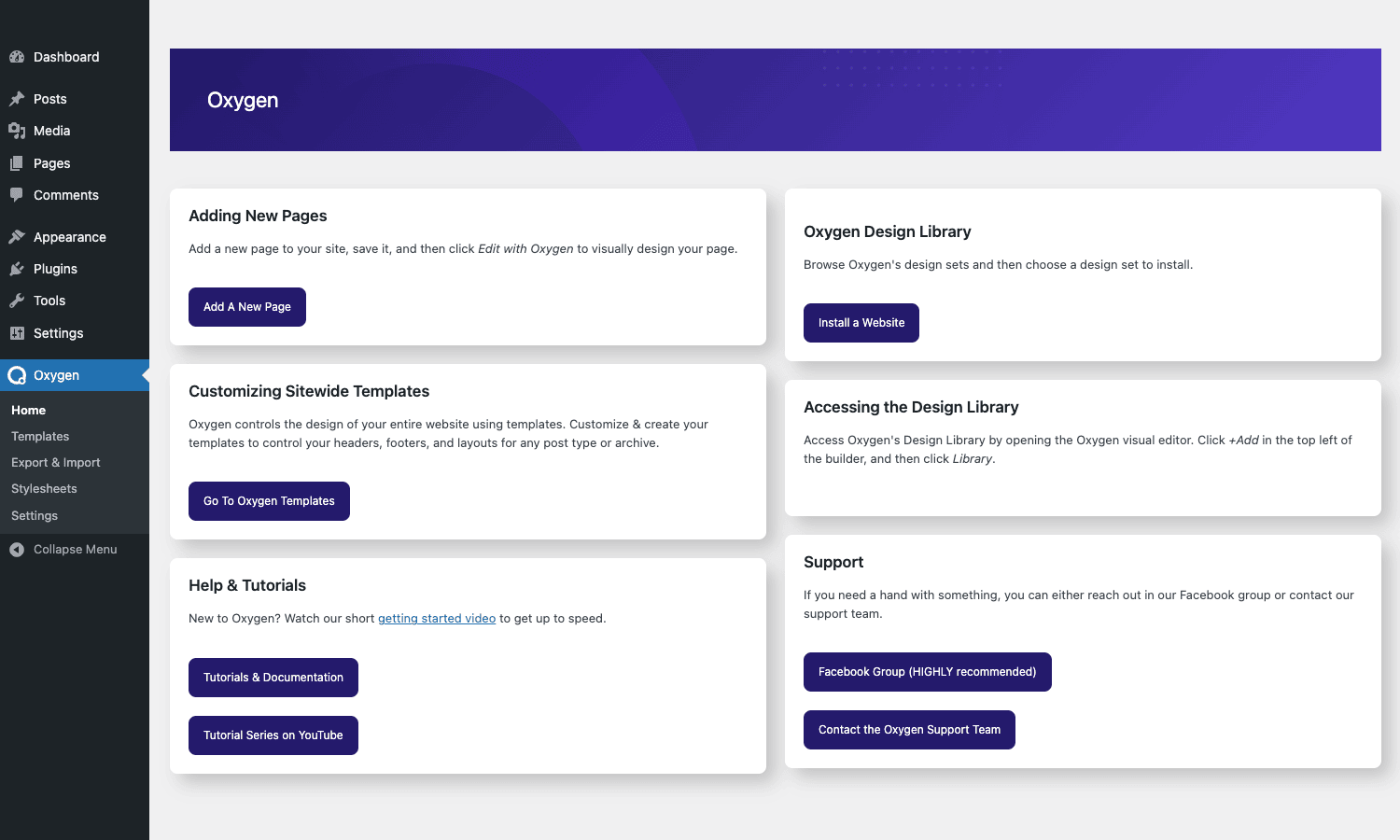
The Oxygen dashboard above is the central hub for navigating the plugin’s features: add pages, browse the Design Library, manage sitewide templates, access tutorials.
Oxygen Classic vs Breakdance
Important context: Oxygen has been rebranded as "Oxygen Classic" because Soflyy has shipped a successor called Breakdance. Both are still by Soflyy. The team’s primary development focus is now on Breakdance; Oxygen Classic remains supported but isn’t getting new features at the same pace.
If you’re starting a new project in 2026, the rational choice is Breakdance (modern, actively developed) or to stick with Elementor / Bricks (different ecosystem). If you have existing Oxygen sites or specifically want Oxygen’s HTML output philosophy with a long-stable codebase, Oxygen Classic is still a reasonable choice.
This review covers Oxygen Classic, the existing, stable product. Most of the patterns and design philosophy carry over to Breakdance, but the specifics (UI, hook names, feature availability) differ.
Installation and dashboard
Oxygen installs as a single plugin: Plugins -> Add New -> Upload Plugin -> oxygen.zip -> Activate. On activation, an Oxygen menu appears in the WordPress admin.
The dashboard offers four primary actions:
- Adding New Pages. Standard WordPress page creation, then click "Edit with Oxygen" to switch from Gutenberg into the Oxygen editor.
- Oxygen Design Library. Browse pre-built design sets and starter sites.
- Customizing Sitewide Templates. Configure headers, footers, archive layouts.
- Help & Tutorials. Links to documentation and video tutorials.
Submenus under Oxygen include Templates, Export & Import, Stylesheets, Settings.
The first thing you’ll notice: Oxygen has its own menu structure, separate from the WordPress theme system. Themes -> Customize doesn’t drive anything when Oxygen is active. Your control surface for site-wide design is the Oxygen templates section, not the standard customizer.
The visual editor
Click "Edit with Oxygen" on any page or post. The browser loads a new view: the Oxygen visual editor.
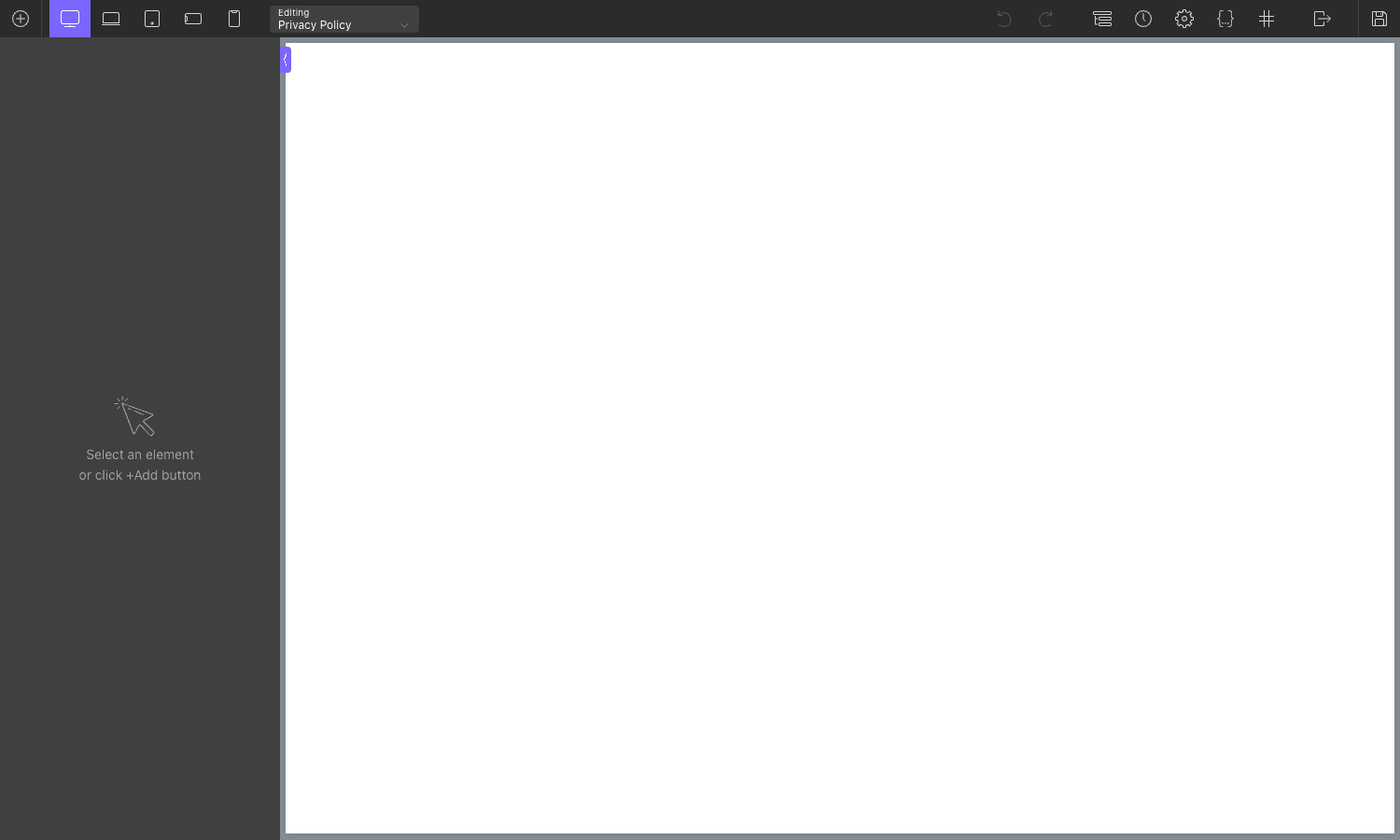
The editor layout:
- Top toolbar. Add element (+), responsive device toggle (desktop / laptop / tablet / phone / mobile), page title, undo/redo, page settings, devices, selectors, structure, exit-to-WordPress button, save.
- Left panel. Element panel, shows the structure of the current page (sections, columns, components) and the available elements to drag in.
- Center canvas. Live preview of the page as you build it.
- Right panel. Properties of the currently selected element (style, CSS classes, conditions, etc).
- Bottom toolbar. Custom CSS, classes, code, advanced selectors.
The editor is more developer-oriented than Elementor’s. There’s less "drag a beautiful preset" and more "configure each property explicitly". For designers who want precise control, this is a feature; for content creators who want fast assembly, it’s friction.
Responsive design controls are explicit: pick a device size at the top, the editor switches to that breakpoint, you adjust styles for that size specifically. Oxygen has 5 default breakpoints (desktop, laptop, tablet portrait/landscape, mobile portrait/landscape), configurable per project.
The template system
Templates in Oxygen are reusable layouts that apply to multiple URLs. Examples:
- Header template, the top navigation that appears on every page.
- Footer template, the bottom footer that appears on every page.
- Single Post template, the layout that wraps every single blog post.
- Single Page template, the layout for pages.
- Archive template, the layout for category, tag, custom taxonomy archives.
- 404 template, what visitors see on a 404 error.
- Search Results template, the layout for search results.
- Custom post type templates, separate Single and Archive templates per CPT.

Each template has rules: which pages/posts it applies to (post type, taxonomy, specific page, etc.), priority (when multiple templates match), and an "inherit from" relationship (so a Single Post template can inherit from a generic Single Article template).
For developers, this is the right abstraction: templates as data, with explicit rules instead of theme file naming conventions. You don’t need to remember single-post-name.php vs single.php vs index.php; you create templates with named conditions.
The element library
Oxygen’s element library is large but organized by purpose:
- Structure: Section, Column, Inner-Section, Div.
- Headings & Text: Heading, Text Block, Rich Text.
- Media: Image, Icon, SVG, Video.
- Buttons: Button, Buttons Group.
- Layout: Tabs, Toggles (accordion), Modal, Slider, Counter, Progress Bar.
- Forms: Custom forms or shortcode-driven (with WPForms, Gravity Forms, etc.).
- WordPress: Search, Comments, Comment Form, Comments Number.
- Posts: Easy Posts (post grid), Repeater (loop builder).
- Code: Code Block (PHP / HTML / CSS / JS).
- Custom: Reusable Parts (insert a Reusable Part inline).
- WooCommerce: Cart, Checkout, Single Product, Product Grid (with WooCommerce Builder).
Each element has its own properties panel: style (typography, colors, spacing, borders), advanced (CSS classes, IDs, custom attributes), conditions (when to display), and element-specific options.
Reusable parts
Reusable Parts are the "build once, use everywhere" mechanism. Design a section once (e.g., a CTA block, a testimonial layout, a contact section), save it as a Reusable Part, and insert it on any page. Changes to the Reusable Part propagate to every instance.

Common reusable parts:
- Header (often used as the main site header, then inserted into all templates).
- Footer.
- CTA blocks.
- Newsletter signup sections.
- Pricing tables.
- FAQ accordion sections.
The mechanism is similar to Gutenberg’s Reusable Blocks or Elementor’s Templates, design once, reuse everywhere, update centrally.
Design Library: starter sites and sets
The Design Library is Oxygen’s collection of pre-built designs you can install with one click. Two types:
- Starter Sites. Full multi-page designs. Pick one, install, the plugin imports the templates, reusable parts, and sample content. Customize from there.
- Design Sets. Single pages or component collections (heroes, pricing tables, contact sections) you can insert into existing pages.
The starter sites are organized by industry (Agency, SaaS, Portfolio, Blog, Restaurant, Service Business). Each one is a complete site you can adapt for client work. The bundled tier of Oxygen (the "Composite Elements Agency Bundle") includes the full Design Library; the basic tier has a smaller selection.
For agencies serving clients, the Design Library is what makes Oxygen practical for fast turnaround. Pick a starter site, install, edit text and images, ship in a day.
Dynamic data
Dynamic data is what lets Oxygen build templates that work for any post, not just one. Instead of typing a specific title in a heading element, you bind the heading to "post title", and every post that uses this template displays its own title in that heading.
Sources of dynamic data:
- Post fields: title, excerpt, content, featured image, author, date, comment count.
- Custom fields (post meta): any meta key.
- ACF fields (with Advanced Custom Fields installed): each ACF field type.
- Meta Box fields (with Meta Box installed).
- Toolset fields (with Toolset Types).
- Pods fields.
- WooCommerce fields: price, SKU, stock, dimensions, etc.
- User fields: display name, email, avatar, custom user meta.
- Site fields: site title, tagline, admin email.
- Query parameters: URL parameters, search terms.
- Custom callback: PHP function returning a value.
For each text element, image element, link element, you can bind to a dynamic source instead of typing a static value. The visual editor shows the dynamic value pulled from the current post (in the editor) or from a sample post.
This is what makes Oxygen suitable for building real templates: every page can use the same layout while displaying its own content.
Stylesheets and global classes
CSS in Oxygen is organized by Stylesheets, files of CSS rules that apply globally. You create Stylesheets for different purposes (site-wide colors, blog-specific styles, WooCommerce overrides) and Oxygen loads them in order.
Within Stylesheets, you define CSS classes that elements can use. Type .btn-primary once in a Stylesheet; type btn-primary in any element’s class field, the class applies. Refactoring is centralized: change the Stylesheet rule, every element using the class updates.
This is the developer-friendly way to manage CSS. Inline styles (Elementor’s default approach) are convenient for one-offs but become unmaintainable at scale. Oxygen’s stylesheet approach is more like writing CSS in a real codebase: classes, organization, separation of concerns.
The Stylesheets editor has Monaco-style autocomplete for CSS properties, syntax highlighting, and class-name autocomplete (it knows what classes you’ve already defined).
WooCommerce builder
The WooCommerce Builder (separate addon, included in higher Oxygen tiers) lets you design WooCommerce templates with Oxygen elements:
- Single Product template, replace the default WC product page entirely.
- Shop template, the products grid page.
- Category template, product category archives.
- Cart template, the cart page.
- Checkout template, checkout layout.
- My Account template, the account dashboard.
- Thank You template, post-order success page.
- Email templates, order confirmation email design.
Each template uses Oxygen elements (Product Title, Product Image, Add to Cart Button, Product Price, etc.) bound to dynamic WooCommerce data. The visual editor shows a sample product in preview; the live front-end shows the actual product’s data.
For WooCommerce stores wanting full design control beyond what the theme provides, this is the differentiator. You can rebuild the entire WooCommerce front-end without writing template overrides in PHP.
Conditional display
Every element in Oxygen has a Conditions tab. You can show or hide the element based on:
- Page conditions: front page, archive, single post, specific page.
- URL parameter: specific GET parameters.
- User conditions: logged in/out, specific roles, specific user IDs.
- Post meta: custom field has specific value.
- WooCommerce: product in cart, cart total above threshold.
- Date/time: show only between specific dates.
- Cookie: specific cookie present.
- Custom PHP: callback returning true/false.
Multiple conditions combine with AND/OR. Common patterns:
- Show "Buy Now" button only on product pages.
- Show "Welcome back, {name}" hero only to logged-in users.
- Show holiday banner only between Nov 25 and Dec 25.
- Show member-only content only to users with the "Member" role.
The conditional logic is more polished than most page builders. For sites with member-only content, time-sensitive promotions, or A/B test variants, this saves a lot of conditional <?php if() ?> in template files.
Code blocks: PHP, CSS, JavaScript
For cases where the visual editor can’t express your intent, Oxygen has a Code Block element. Three types:
- PHP Code Block. Run PHP at the element’s position. Output is escaped or unescaped per your choice. Useful for custom WP_Query loops, ACF logic, conditional rendering.
- CSS Code Block. Inline CSS for the page. Scoped to this page only (vs Stylesheets which are global).
- JavaScript Code Block. Inline JS for the page. Loads in head or footer per configuration.
The Code Block element has a Monaco-grade editor (autocomplete, syntax highlighting). For developers, this is the "escape hatch", anything the visual editor can’t express, you can write inline as code.
This is rare in page builders. Elementor has a similar HTML widget but it’s clunky. Oxygen’s Code Block treats inline code as a first-class element.
Settings: the global controls
The Settings page covers plugin-wide configuration.
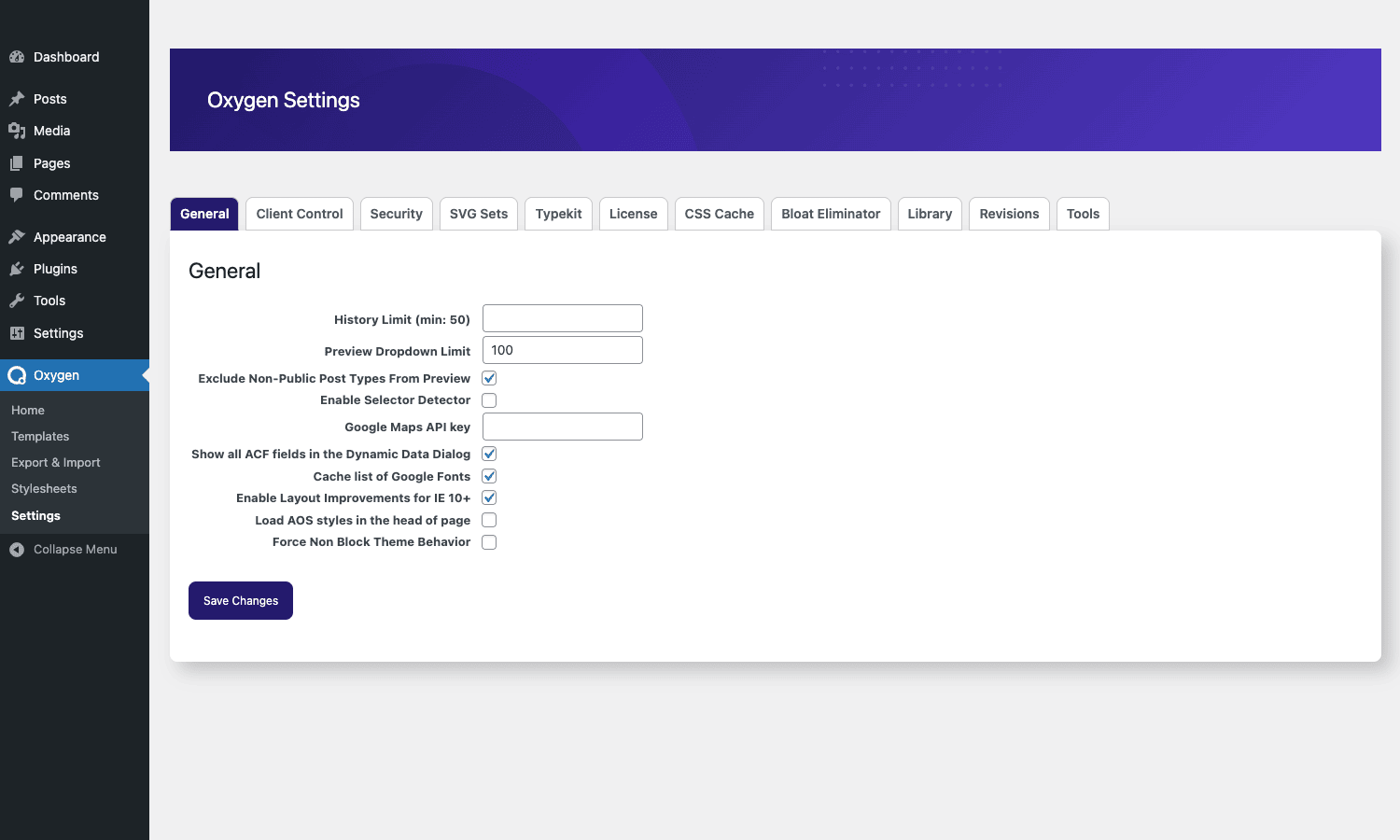
Sections include:
- General. Default page templates, post types Oxygen edits, builder access control.
- Bloat Eliminator. Aggressively remove WordPress emoji scripts, default styles, jQuery (cautiously). Reduces page weight significantly.
- Selectors. Configure how the Selectors panel behaves.
- Devices. Custom breakpoints beyond the defaults.
- Editor. Editor preferences, autosave intervals.
- CSS Cache. Manage generated CSS files.
- Permissions. Which roles can use the Oxygen builder.
The Bloat Eliminator is interesting: it disables WordPress features you don’t need (emoji scripts, embed scripts, gutenberg block library CSS) to shave kilobytes off every page. Useful when your stack doesn’t use those features.
Developer reference: hooks and filters
Oxygen exposes a moderate hook surface. Patterns developers reach for:
Hooking before builder loads
add_action( 'ct_before_builder', function() {
 // Custom code before Oxygen builder UI renders.
 do_action( 'myteam_oxygen_init' );
} );

add_action( 'ct_builder_end', function() {
 // Custom code after Oxygen builder UI renders.
} );
Adding custom dynamic data
add_filter( 'oxygen_custom_dynamic_data', function( $data ) {
 $data['my_custom_source'] = array(
 'name' => 'My Custom Source',
 'callback' => 'my_custom_dynamic_resolver',
 );
 return $data;
} );

function my_custom_dynamic_resolver( $args ) {
 return 'Resolved value for ' . esc_html( $args['key'] );
}
Filtering navigator post types
add_filter( 'oxygen_vsb_navigator_post_types', function( $types ) {
 $types[] = 'my_custom_post_type';
 return $types;
} );
Customizing component output
add_filter( 'oxygen_vsb_component_filter_content', function( $content, $component ) {
 if ( $component['name'] === 'heading' ) {
 $content = '<span class="my-wrapper">' . $content . '</span>';
 }
 return $content;
}, 10, 2 );
Default values for components
add_filter( 'ct_component_default_values', function( $defaults, $component_name ) {
 if ( $component_name === 'ct_heading' ) {
 $defaults['heading-text'] = 'Default heading';
 }
 return $defaults;
}, 10, 2 );
The hook surface is documented at the Oxygen knowledge base. For most "I want to extend behavior X" questions, a filter exists.
Real-world use cases
A few patterns Oxygen handles uniquely well:
-
Custom client sites. Agency builds a unique design for each client without theme constraints. Use Reusable Parts for shared sections, templates for content types, dynamic data for content binding. Result: custom-feeling sites with WordPress’s content management power underneath.
-
WooCommerce stores with custom design. Build the entire WooCommerce front-end with Oxygen’s WooCommerce Builder. Get a store that doesn’t look like every other WooCommerce site.
-
Custom post type sites (real estate, job board, directory). Use Oxygen’s template system + dynamic data to design Single and Archive templates for the CPT. Pair with WP Job Manager for job boards or your own CPT plugin for other directories.
-
Membership site front-ends. Conditional display lets you show/hide entire sections based on member status. Pair with Restrict Content Pro for the gating; Oxygen for the visible UI.
-
Performance-critical sites. Oxygen’s clean HTML + Bloat Eliminator + lazy-loaded resources means PageSpeed scores in the 90+ range out of the box. Pair with WP Rocket for caching.
-
Pixel-perfect design implementations. Designers who hand off Figma comps to developers love Oxygen because they can match the design exactly without theme-imposed constraints.
-
High-traffic sites. Combined with object caching and a fast host, Oxygen sites handle traffic well because the rendered HTML is minimal.
Oxygen vs Elementor vs Bricks vs Divi
The four major WordPress page builders.
Oxygen Classic has the cleanest HTML output and the most theme-replacement-oriented approach. Best for developers who want absolute control and don’t mind the steeper learning curve. Lifetime pricing. Maintenance-mode while Breakdance gets new features.
Elementor Pro has the largest user base, the most addons, and the easiest learning curve. Best for designers and marketers who want fast assembly with pre-designed widgets.
Bricks Builder is the modern Oxygen successor (philosophy-wise). Clean output, active development, polished UI. Best for new projects in the "theme-replacement" camp.
Divi is owned by Elegant Themes. Massive user base, lifetime pricing, included theme + builder. Best for solopreneurs and small agencies who want one purchase for everything.
The honest take:
- New project, "I want the cleanest output": Bricks Builder (or Breakdance, Oxygen’s successor).
- New project, "I want the easiest learning curve": Elementor Pro.
- Solopreneur, "I want lifetime pricing": Divi (or Oxygen if you already use it).
- Existing Oxygen site: stick with Oxygen Classic; migration to Breakdance is partial work but doable.
For a new agency project in 2026, Bricks or Breakdance is the more defensible choice. Oxygen Classic is fine for maintenance and for teams already invested in the workflow.
Performance: clean HTML output
Oxygen’s headline feature is the clean HTML. Compare what a typical Elementor page outputs vs what an Oxygen page outputs for the same visual result:
Elementor: ~50KB of HTML for a simple landing page, mostly because of widget wrappers (every Heading widget wraps in <div class="elementor-widget-container">, every section has multiple <div> levels). Plus 15+ separate <style> blocks from per-widget inline CSS.
Oxygen: ~10KB of HTML for the same page. Section -> Column -> Content directly, no extra wrappers. Single combined <style> block from your Stylesheets.
This translates to:
- Faster initial parse. Smaller HTML = browser starts rendering sooner.
- Smaller transfer. Smaller HTML + smaller CSS = faster to download.
- Better PageSpeed scores. All else equal, Oxygen sites score higher on PageSpeed Insights and Core Web Vitals.
- Easier debugging. Inspecting the DOM in browser dev tools shows your structure, not a maze of wrappers.
For sites where performance matters (eCommerce conversion, SEO competitiveness, mobile users on slow networks), the HTML difference adds up. For sites where the difference of 200ms doesn’t matter, it’s a less important factor.
Compatibility, gotchas
A few things to know:
- Theme replacement is total. When Oxygen is active, your theme isn’t loaded. If you deactivate Oxygen, the front-end reverts to your theme, which might be ugly if you haven’t maintained the theme. Always keep a backup theme configured even while using Oxygen.
- Migration to/from Oxygen. Migrating from Elementor/Divi to Oxygen is a rebuild, the formats are incompatible. Migrating from Oxygen to Breakdance is partially automated but still requires manual review.
- Limited addon ecosystem. Compared to Elementor’s massive addon library, Oxygen has fewer third-party extensions. The trade-off is that core covers more.
- WPML / multilingual. WPML works with Oxygen. Configure templates per language; bind dynamic data to translated fields.
- Caching plugins. WP Rocket is fully compatible. Page caching, CSS minification, and asset deferring all work.
- PHP errors in Code Blocks crash the page. Unlike WPCodeBox, Oxygen’s PHP Code Block doesn’t auto-disable on error. A bad code block breaks the page. Test on staging.
- Editor performance on large pages. Complex pages with many elements can slow the editor (especially on slow machines). Soflyy has optimized this over the years but a 200-element page is still slower than a 20-element page.
- Search engine indexing. Use Yoast SEO Premium or Rank Math on Oxygen pages. Configure schema markup explicitly (Oxygen doesn’t auto-generate JSON-LD).
- Builder access permissions. Restrict the Oxygen builder to specific user roles. Editors typically shouldn’t have builder access, only admins or designers should.
- Lifetime license uncertainty. Oxygen Classic licenses are lifetime, but Soflyy’s focus has moved to Breakdance. If you have an existing license, it continues to work; new purchases get less long-term innovation.
Pricing and licensing
Oxygen Site Builder pricing (one-time, lifetime):
- Basic: $129 (1 site).
- 5 Sites: $169.
- Unlimited + WooCommerce Builder: $229.
- Agency Bundle (Unlimited + Composite Elements + Cloud Library): $329.
The plugin is GPL-licensed. Reasonable if you want Oxygen with the WooCommerce Builder and Design Library bundled with other GPL Times products.
FAQ
Should I learn Oxygen Classic or Breakdance in 2026?
Breakdance. It’s the actively developed product, the team’s primary focus, and has the modern UI. Oxygen Classic is the safe bet for sites already using it, but new learners should pick Breakdance.
Does Oxygen work with my theme?
It replaces your theme entirely. No theme means no theme conflicts but also no theme features. Keep a theme installed (even if not used) for fallback purposes.
Can I edit my header from outside Oxygen?
The header is an Oxygen Template. Edit it within the Oxygen visual editor. The WordPress menu admin (Appearance -> Menus) still works for menu content, but the visual appearance of the menu is controlled by Oxygen.
Will it work with my page builder addons?
Oxygen has its own addon ecosystem (smaller than Elementor’s). Page builder addons designed for Elementor or Beaver Builder won’t work with Oxygen. Look for Oxygen-specific addons.
Can I use Gutenberg blocks inside Oxygen?
Yes, via the "Gutenberg Builder" mode or the Reusable Block element. Most teams stop using Gutenberg once they have Oxygen for the page-building work.
Does Oxygen support WPML / Polylang?
Yes. Configure translations at the WPML/Polylang level; Oxygen templates render in the appropriate language via dynamic data binding.
Will my site break if Oxygen support stops?
The plugin’s code is GPL-licensed. Even if Soflyy stops supporting it entirely, you have the source and can self-maintain (or fork). Sites built on Oxygen don’t suddenly break because development stopped, they just don’t get new features.
Is Oxygen good for SEO?
The clean HTML output is good for SEO. Combine with Rank Math or Yoast SEO Premium for structured data, sitemaps, and meta management.
Can I export and import templates between sites?
Yes. The Export & Import admin lets you export all Oxygen templates, stylesheets, reusable parts as JSON, and import on another site. Useful for agencies setting up multiple client sites with similar designs.
Final thoughts
Oxygen Site Builder is the WordPress page builder for developers who value control over convenience. The "replace your theme" approach is unusual but defensible: it produces the cleanest HTML in the page builder space, eliminates entire categories of theme-related bugs, and gives you a single coherent system for everything that’s visible on the site.
The honest tradeoff is the learning curve. Elementor’s draggy-droppy UI is friendlier; you can be productive in Elementor on day one. Oxygen’s editor is more like a real design tool, there’s a steeper ramp but a higher ceiling. Designers and developers who climb the ramp report that Oxygen feels like the "right" tool for serious work in a way that Elementor doesn’t.
The complication in 2026 is the Oxygen Classic / Breakdance split. Soflyy’s energy is on Breakdance. For new projects starting fresh, Breakdance is the more defensible choice. For existing Oxygen sites and teams already trained on it, Oxygen Classic is still a solid plugin, just one that’s in maintenance mode rather than active growth.
Spin up a staging install, build a simple page, see how the editor feels, decide whether the "replace your theme" model fits your workflow. If it does, you’ll never want to go back to layered-on-top page builders.