

A good quiz on a blog is one of the few content formats that still gets shared without bribery. Readers like finding out what they got, friends want to compete, and the result page is a natural spot to ask for an email before showing the punchline. Quiz Cat Elite is the WordPress plugin that turns that whole pattern into a five-minute setup, with three quiz types, nine email integrations, and a small but useful analytics dashboard.
This is a long walkthrough. I’ll cover what Quiz Cat Elite is, what kind of quizzes it makes sense for, the actual editor (not the marketing screenshots), how the lead-capture step works, the integrations that ship, what the developer hooks look like, and the things you should know before you commit a year of content to it.
Table of contents
- What Quiz Cat Elite is
- Core features
- The three quiz types, explained
- Building your first quiz: the user walkthrough
- Installation and setup
- Lead capture and email-provider integrations
- The Stats dashboard
- Real-world use cases
- Developer reference: hooks, shortcodes, and AJAX
- Performance, compatibility, and gotchas
- Pricing and licensing
- Frequently asked questions
- Final thoughts
What Quiz Cat Elite is
Quiz Cat Elite is the top-tier license of the Quiz Cat plugin from Fatcat Apps. The free Quiz Cat plugin on the WordPress.org repository handles simple multiple-choice tests. The Elite license unlocks the two more interesting quiz types (personality and weighted), the email-capture gate before results, the nine email-provider integrations, and the built-in analytics page.
It registers a single custom post type (fca_qc_quiz) and a single shortcode ([quiz-cat id="X"]). The whole quiz, including every question, every answer, every result page, the social-share toggles, and the optin settings, lives in one serialized post meta on that CPT. This is unusual but it has a nice side effect: duplicating a quiz duplicates everything in one click, and exporting/importing quizzes between sites is a single row.
There is also a Gutenberg block (quiz-cat/gutenblock) and an Elementor-compatible shortcode, so you can drop a quiz into any post, page, or builder layout.
The plugin is intentionally focused. It is not a survey platform, it does not collect arbitrary form data, and it does not pretend to be Typeform. If you need a quiz that determines a personality, scores knowledge, or measures preference, and you want to put an email gate on the result, this is what it does. If you need a long-form survey with branching logic and 40 question types, you are looking at the wrong category of plugin and should consider Forminator Pro or Gravity Forms instead.
Core features
Here is what you actually get when you activate Elite, grouped by what you’ll touch most often.
- Three real quiz types. Multiple Choice (test mode, one correct answer per question), Personality Type ("Which X are you?"), and Weighted Answers (point-scored, banding into result tiers). Marketing copy sometimes says "four quiz types" but the editor only exposes these three. There is no separate "Survey" mode.
- Unlimited quizzes and unlimited questions per quiz. Each quiz is one CPT entry. Question and answer count is bounded only by what readers will sit through (8 to 12 questions is the sweet spot in our experience).
- Text answers, image answers, or both. Each answer can have its own image, useful for "pick your favorite" visual quizzes. Each question can also have a header image.
- Email capture before results. The lead-capture screen sits between the last question and the result, optionally with a "Skip this step" link if you want a softer ask.
- Nine direct email integrations: MailChimp, ConvertKit, ActiveCampaign, AWeber, GetResponse, Drip, CampaignMonitor, MadMimi, plus Zapier (which then bridges to anything else). A "Store Locally" option drops responses into the WordPress database and supports CSV export.
- Per-result redirect. Each result tier can either show a Results Screen or 301 the visitor to a custom URL. Handy for sending personality matches into a product-tagged landing page.
- Social sharing on the result page. Facebook, Twitter, Pinterest, and Email share buttons that prefill "I got [Result] – [Quiz Name]" with your branding.
- Analytics funnel per quiz. Impressions, Starts, Completions, Optins, Shares, plus a Responses view that shows which answer each question gets most.
- Question and answer shuffling. Toggle "Shuffle Question Order" so repeat takers see the quiz in a different sequence.
- Quiz timer. Disable, per-question timer, or whole-quiz timer.
- Restart Quiz button. Toggle whether the result page offers a "take it again" CTA. Useful for sales-funnel quizzes where you want a second chance to convert.
- Custom Default Text per quiz. Every UI string ("Start Quiz", "Next", "Question", "I got", "Retake", etc.) is overridable from the editor, no PHP needed, which makes localisation a five-minute job.
- Appearance controls. Primary and accent color, border radius, hover styles, all from the Appearance tab.
- Custom post type with
publish_postscapability. Authors and Editors can build quizzes, not just admins.
The three quiz types, explained
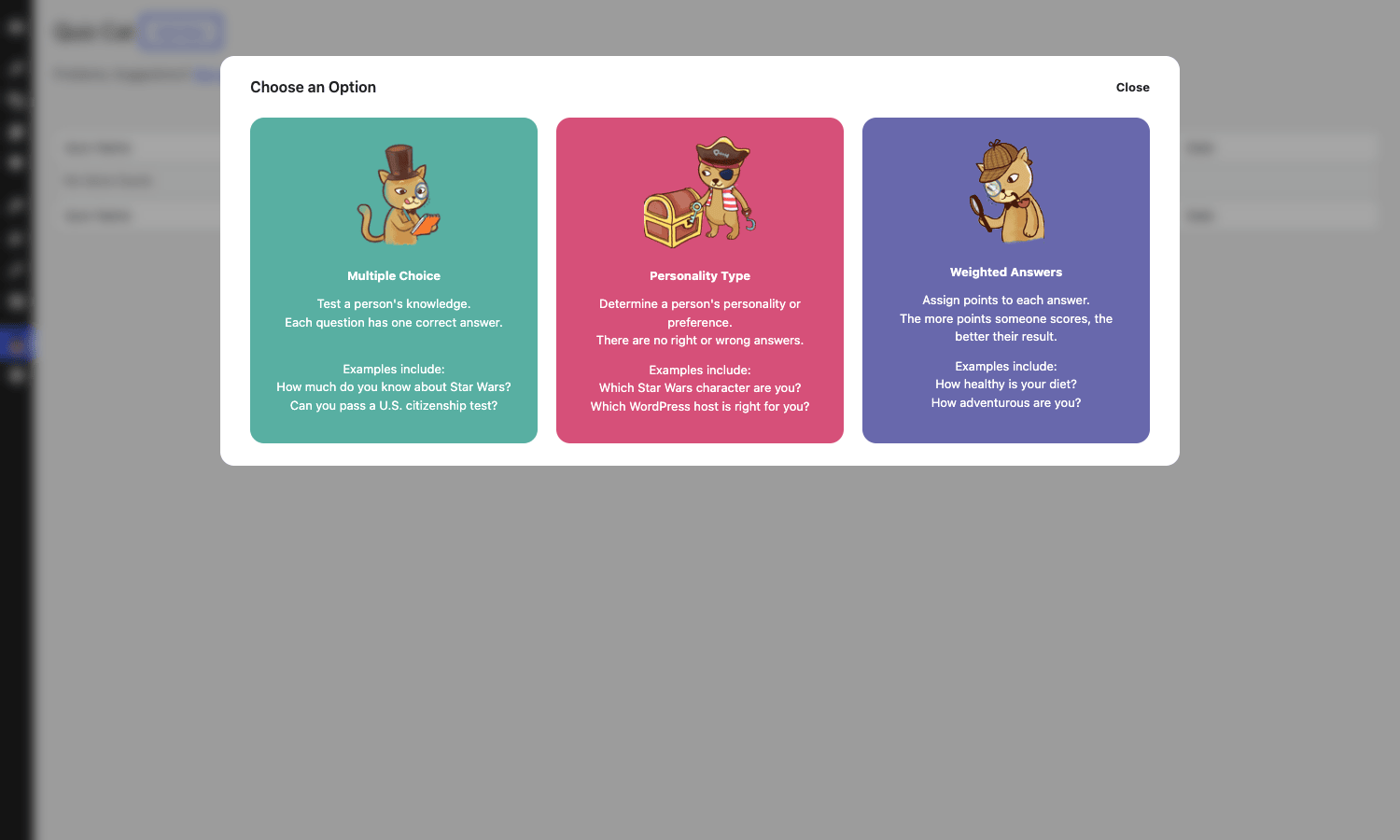
When you click Add New, the plugin opens a modal asking which type of quiz you want. This is the most important decision in the whole tool because each type has a different scoring mechanic.
Multiple Choice
The classic test format. Each question has one correct answer. At the end the quiz tells the reader "you got 7 out of 10". You can show or hide a "right/wrong" indicator after each answer, and you can attach a custom result page per score band (so "10/10" sees a different page than "6/10").
This is the right type for trivia, knowledge tests, certification practice, and any quiz where there is a single defensible correct answer.
Personality Type
There are no right or wrong answers. Each answer instead maps to one of your result personalities. The plugin tallies the most-matched personality at the end and shows that result page.
This is the "Which X are you?" format that drives most of the social shares on a lifestyle blog. If you build a "Which WordPress page builder suits your project?" quiz with four result personalities (Elementor, Beaver Builder, Bricks, Block Editor), each answer increments one of those tallies, and the winning tally wins the result page.
Personality is also where the email gate works hardest. The reader has invested 60 seconds and genuinely wants the answer. Asking for an email there has a much higher conversion rate than asking on a sidebar form.
Weighted Answers
Each answer carries a numeric point value. The plugin sums the points and matches the total to a result tier you define ("0-10 points: Beginner", "11-25 points: Intermediate", "26-40 points: Advanced").
Weighted is the right pick for self-assessment quizzes ("How healthy is your diet?", "How ready are you for a freelance career?") and for lead-scoring quizzes where the result page should reflect the visitor’s qualification level. A B2B agency can run a "Is your site ready for a redesign?" quiz, score each answer 1-5, and route high-scorers to a discovery-call page while low-scorers see a download.
The math is straightforward but it is easy to misjudge the bands. I usually build a spreadsheet with min and max scores and check that no tier is unreachable.
Building your first quiz: the user walkthrough
Pick Personality for the example below, because it shows off the lead-capture gate, which is the headline Elite feature. Multiple Choice and Weighted have nearly identical editors, just with different per-answer fields.
The Setup tab
The first tab is where you give the quiz a title, optional description, and configure the global quiz settings.
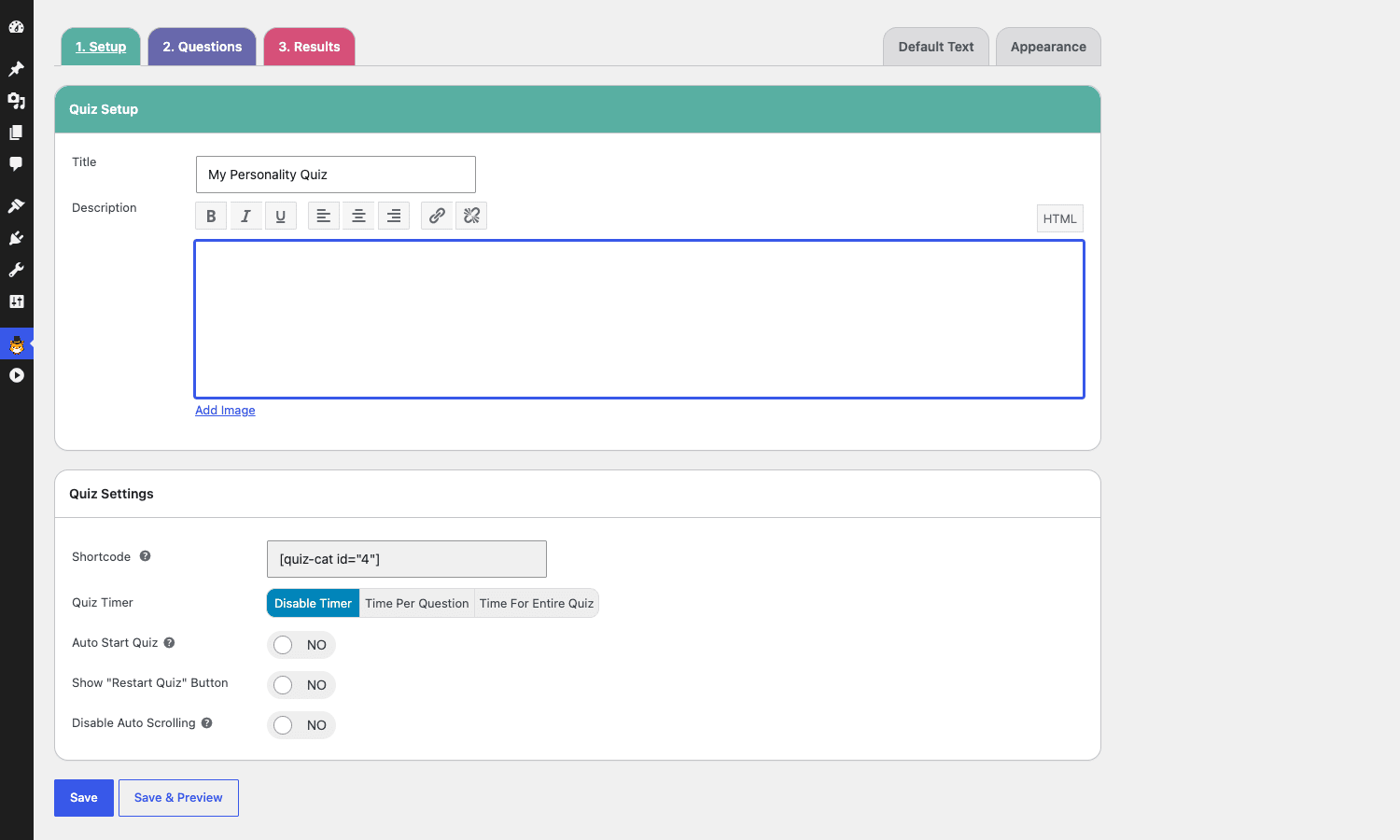
The shortcode appears as soon as you save ([quiz-cat id="4"] for example). Copy it into any post, page, custom post type, or builder layout. The Gutenberg block does the same thing but lets you preview the embed in the editor.
The Quiz Settings panel has four toggles worth knowing:
- Quiz Timer. Disabled by default. Per-question or whole-quiz options give you a "time pressure" feeling that works well for trivia.
- Auto Start Quiz. Skips the Start Quiz button entirely and drops the reader into Question 1. Useful for quizzes embedded inside long blog posts where the start button would feel redundant.
- Show "Restart Quiz" Button. A second CTA on the result page. Recommended on personality quizzes where readers like to retry to see other outcomes.
- Disable Auto Scrolling. Stops the page from auto-scrolling to the next question. Off by default, which is the right call for most layouts.
The Questions tab
This is where you add your questions. The editor uses a clean modal-per-question interface, not an accordion stack.
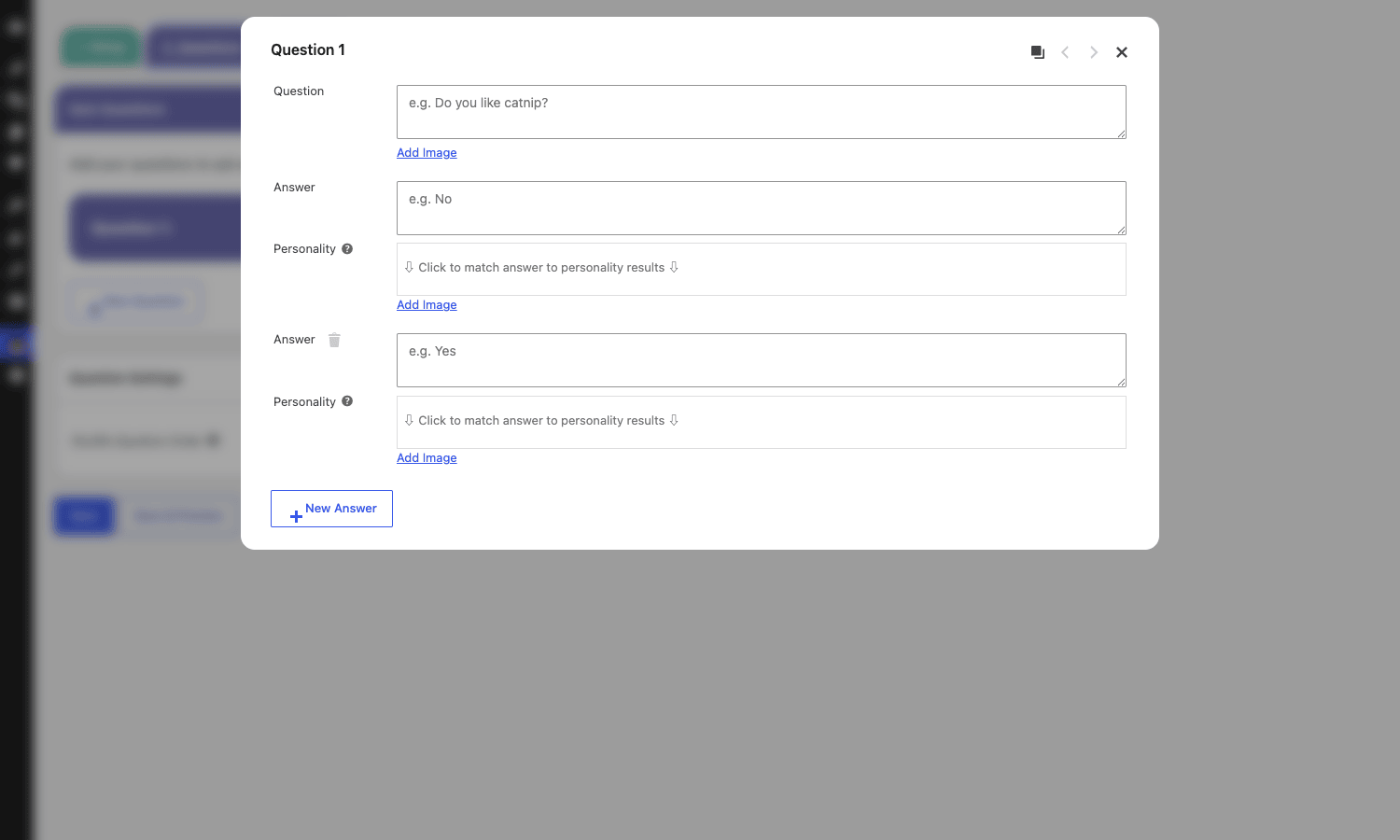
For each question:
- Type the question text.
- Optionally click Add Image to attach a header image (good for visual prompts like "Which of these living rooms is yours?").
- Add answers with the New Answer button. Each answer has its own text field, optional Add Image, and (for Personality quizzes) a "click to match answer to personality results" dropdown.
The matcher dropdown is the key bit. It only populates after you have added at least one result on the Results tab, so the workflow is usually: rough out your results first, then write your questions, then map each answer to a result. I’d say budget 10 to 15 minutes to write a real 10-question personality quiz once you’ve got the result set defined.
You can also turn on "Shuffle Question Order" in the Question Settings panel. It does what it says.
The Results tab
Results are where your quiz personality lives. Each result is a separate block you can title, describe with rich HTML, attach an image to, and (in Personality mode) match to a set of answers via the inverse of the question editor.
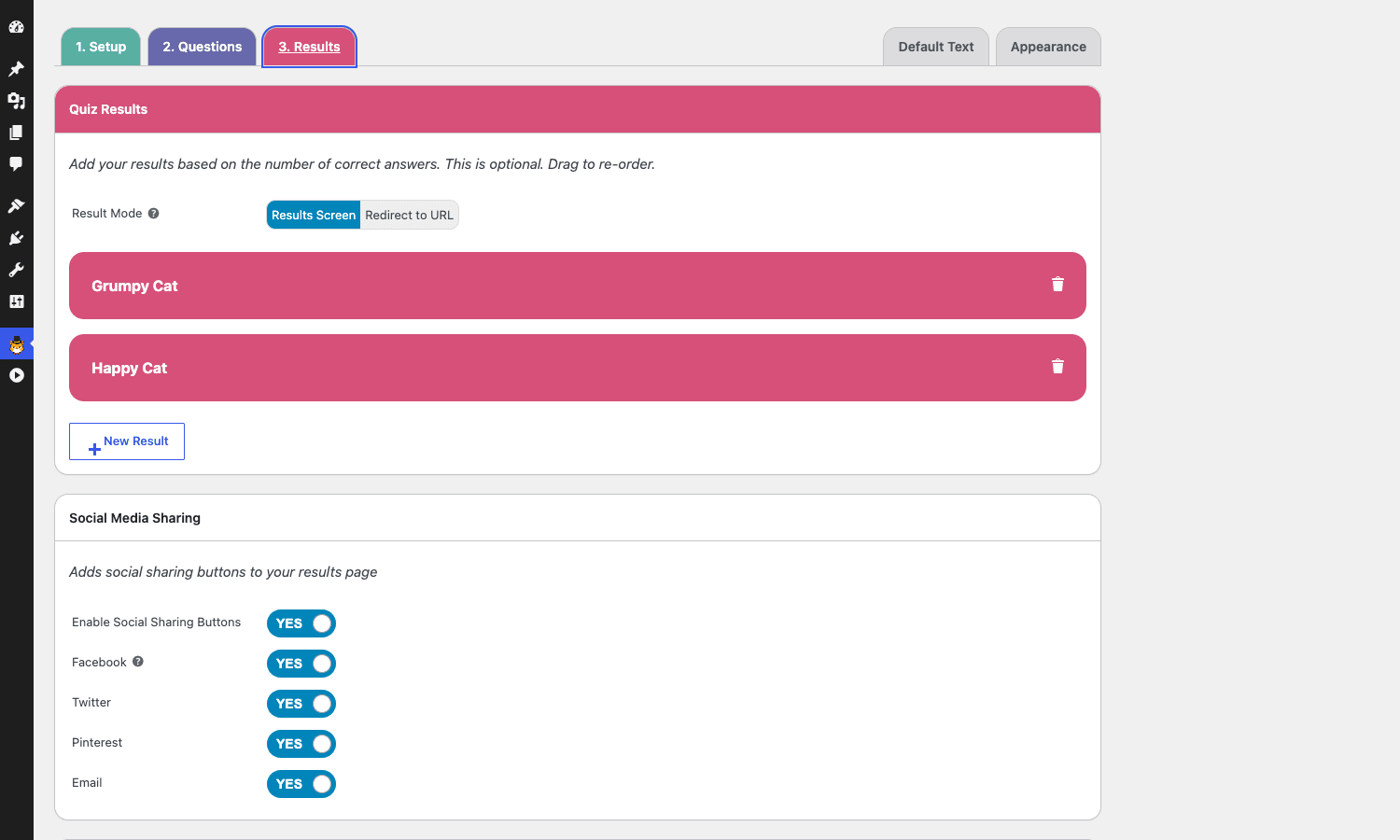
At the top of the tab, Result Mode lets you flip the whole quiz from "show a Results Screen" to "redirect to a URL." Redirect mode replaces the entire quiz output with a 302 to a URL you specify per-result, which is how you can route a personality result straight to a tagged product page (think: "Pisces" -> /shop/pisces-collection/).
Below the results list, the Social Media Sharing panel has on/off toggles for Facebook, Twitter, Pinterest, and Email share buttons. The share text auto-fills with "I got [Result Name] – [Quiz Name]" but you can override it with a developer filter (more on that further down).
Pinterest in particular benefits from a per-result image, because Pinterest’s share dialog pulls the image you specify, which gives each personality outcome its own pin-friendly visual.
Installation and setup
Three steps, none of them complicated.
- Install. From WP admin, go to Plugins -> Add New -> Upload Plugin, drop in the
quiz-cat-premium.zip, and Activate. - First quiz. A new "Quiz Cat" menu appears at WP admin position 117 (just under Comments). Click it, click Add New, pick a quiz type.
- Embed. Either copy the shortcode (
[quiz-cat id="X"]) into a post, or insert the Quiz Cat Gutenberg block and pick the quiz from the dropdown.
The plugin does not run a setup wizard, does not push you toward an account, and does not enable telemetry. After activation it is ready to use. The only post-install task worth doing is opening Quiz Cat -> License (if your build needs it), pasting the key, and saving. The build sold here is pre-activated already, so you can skip that.
If you are migrating quizzes between sites, export the fca_qc_quiz posts via Tools -> Export, then import on the destination. Because every quiz setting lives on the post meta of that one CPT entry, the export-import round-trip is clean.
Lead capture and email-provider integrations
The Elite-tier feature you actually paid for. The Lead Capture panel sits at the bottom of the Results tab.
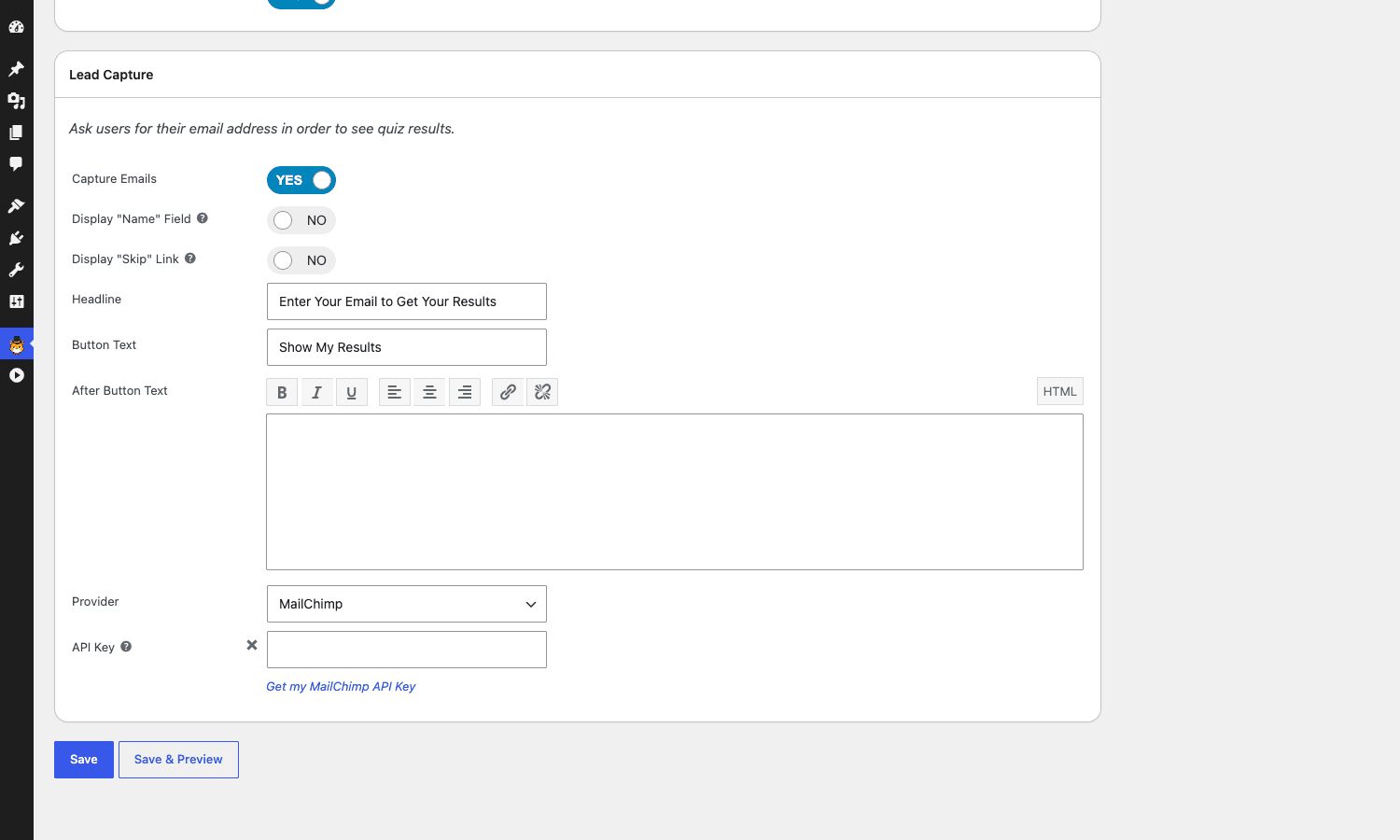
The basic options are obvious. Display "Name" Field adds a name input alongside the email input. Display "Skip" Link adds a small "Skip this step" link below the form (more on whether to enable this in a second). Headline and Button Text override the defaults ("Enter Your Email to Get Your Results" / "Show My Results"). After Button Text is a rich-text block that appears below the button, useful for GDPR consent language or a privacy-policy link.
The Provider dropdown is the meat. The shipping integrations are:
- MailChimp (API key, plus list selector and optional Interest Groups)
- ConvertKit (API key, plus form/sequence selector and tag selector)
- ActiveCampaign (URL + API key, list selector, optional tag list)
- AWeber (OAuth, list selector)
- GetResponse (API key, list selector)
- Drip (API key, account ID, list, tags)
- CampaignMonitor (API key, list selector)
- MadMimi (API key, list selector)
- Zapier (just a webhook URL: paste your Catch Hook URL, you’re done)
- Store Locally (writes responses into the WordPress database and lets you CSV-export from the Stats page)
The fact that Zapier is supported is what makes the integration list effectively infinite. Anything Zapier reaches (HubSpot, Klaviyo, Brevo, Sendinblue, Mailerlite, customer.io, Pipedrive, Salesforce, Slack, Google Sheets), Quiz Cat can hit by posting to a Zapier Catch Hook and letting Zapier do the routing. The payload includes email, optional name, the result title, and the quiz title.
If you run your email list on a WordPress-native CRM like FluentCRM Pro, it is not in the native dropdown, but FluentCRM accepts webhooks natively too. Same story for MailPoet Premium, Newsletter, and Mailster: the Zapier route works for all of them, and the plugin documentation has examples for the major ones.
Lead-tag segmentation deserves a paragraph. When you configure the MailChimp, ConvertKit, ActiveCampaign, or Drip provider, you can attach tags per result. So a personality quiz with four results can drop the lead into four different segments based on the answer, which then powers four different follow-up sequences. This is the engine behind most of the "tell us your goal, we’ll send the right onboarding" sequences you see in B2B content marketing.
Here is what the lead-capture screen actually looks like to the visitor:

Clean, minimal, no distraction, takes whatever the surrounding theme’s input style is. A trade-off: there is no built-in option for a single-step "result + email field together" layout. The reader sees the form, types the email, then sees the result. If your conversion data says the gate hurts more than it helps, turn it off and add a separate post-result optin via your CRM.
About the Skip link. Enabling it gives the lead a polite escape hatch and is the GDPR-friendlier default. Disabling it raises completion-to-optin conversion by a meaningful amount (some Fatcat Apps customer data on their site claims 30 to 40 percent). I’d default to enabled and turn it off only on quizzes where the result has obviously high perceived value (a salary calculator, a tax estimator). For a "Which dog breed are you?" quiz, leave the skip link on.
The Stats dashboard
Every quiz has its own Stats page under Quiz Cat -> All Quizzes -> the quiz’s title link.
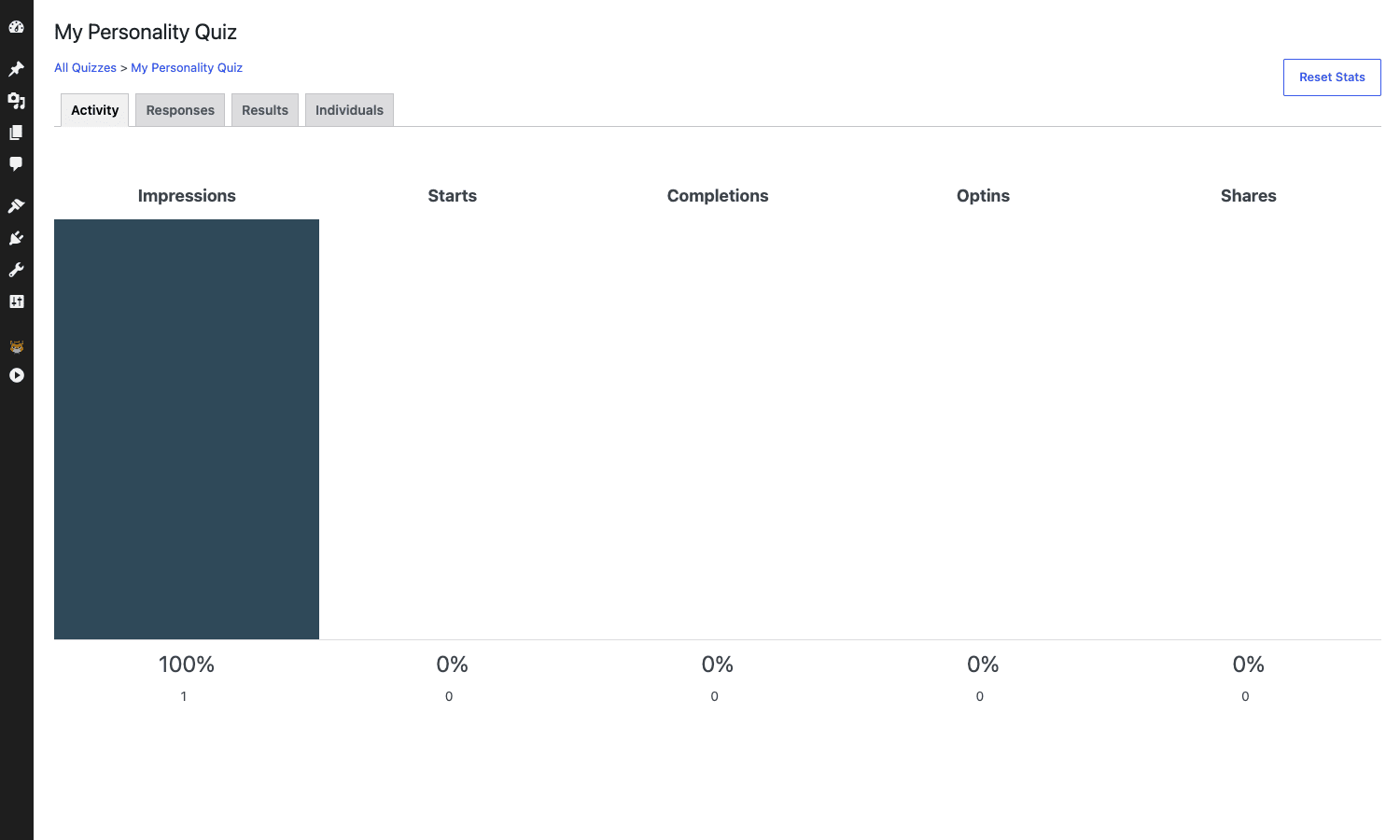
The dashboard has four tabs:
- Activity is the funnel: Impressions -> Starts -> Completions -> Optins -> Shares. The percentages let you spot drop-off cliffs (high Impressions but low Starts means your quiz title and CTA need work; high Starts but low Completions means questions 5 through 8 are losing people).
- Responses breaks out each question and shows the answer distribution. A question where 95 percent pick the same answer is a question worth rewriting (it’s not differentiating anything).
- Results shows how often each result tier was returned. If "Result D" never returns, the personality matching is broken.
- Individuals is the raw email-and-answer log for everyone who completed the quiz with optin enabled. Export to CSV with the button at the top right.
The data lives in a custom DB table the plugin creates on activation. It is local to the site, no third-party analytics calls. If you also run MonsterInsights Pro you can fire a custom event on quiz completion via the fca_qc_result_filter hook (example in the developer section below) and treat the quiz as a goal in GA4.
Reset Stats wipes the table for that quiz only. There is no soft-delete or archive, so think twice before clicking it on a quiz with real production data. Run a CSV export first.
Real-world use cases
A handful of patterns I’ve seen this plugin do well.
Lead magnet on a content blog
A nutrition blog runs a "What’s your real diet personality?" personality quiz with five outcomes (Athlete, Snacker, Comfort Eater, Mindful, Inconsistent). Each result tags the lead in ConvertKit with a different tag. A five-email follow-up sequence per tag pushes the right meal-plan PDF. Conversion from "visited the quiz page" to "joined the list" tends to run 18 to 25 percent on this pattern, which is multiples of a sidebar optin.
Product recommendation for an ecommerce store
A skincare brand runs "Find your perfect routine" as a weighted quiz. Each answer carries 1-3 points across four product-line categories (Hydration, Anti-Age, Acne, Sensitive). The highest-scoring line wins, and the Result Mode is set to "Redirect to URL" with the URL pointing at a /collections/<line>/ page. The result is essentially a personalised product-recommendation page reached via a 90-second quiz, which converts dramatically better than a flat catalog browse.
Self-assessment for a service business
A digital-marketing agency runs "How ready is your site for paid ads?" as a weighted quiz. Each answer scores 1-5 on technical, content, and tracking readiness. The high-score result page books a free strategy call. The mid-score result page offers a downloadable checklist (which captures the email). The low-score page links to a beginner guide. Three different outcomes from one quiz, three different lead-quality tiers feeding the right next step.
Knowledge test for an online course
A coding bootcamp uses a Multiple Choice quiz as a pre-enrollment check. Score above 70 percent and you see "you’re ready, here’s the link to enroll." Score below 70 percent and you see "we recommend our free fundamentals series first." Quiz Cat handles the score-banding via the Multiple Choice quiz type’s per-band result pages.
Engagement on a publisher site
A celebrity-news site runs "Which celebrity are you most like?" as a low-effort engagement quiz embedded at the end of every long-form article. The goal is not email capture (the optin is disabled) but Time on Site and social shares. The Activity dashboard tracks shares per quiz, which the editorial team uses to decide which celebrity profiles to write about next.
Developer reference: hooks, shortcodes, and AJAX
This is the part developers will want to skim before deciding whether the plugin is extensible enough for a custom project. The honest answer: the hook surface is small. Fatcat Apps deliberately keeps the API minimal because most customization is layout (CSS) and routing (redirect URLs), neither of which needs a filter.
That said, here is what exists.
The custom post type and shortcode
The plugin registers one CPT and one shortcode:
register_post_type( 'fca_qc_quiz', array(
 'labels' => array( 'menu_name' => 'Quiz Cat', /*... */ ),
 'public' => false,
 'show_ui' => true,
 'capability_type' => 'post',
 'supports' => array( 'title' ),
 'menu_position' => 117,
) );

add_shortcode( 'quiz-cat', 'fca_qc_do_quiz' );
Because capability_type is 'post' and the submenu pages require publish_posts, any Author or Editor can build and publish quizzes. That makes it safer to hand the plugin to non-admin content people. The CPT is public: false and exclude_from_search: true, so quizzes are not crawlable on their own URL, which is the right default (you embed them, you don’t list them).
Filter: localise the front-end strings
The most useful filter. Every front-end UI string is exposed through one array:
add_filter( 'fca_qc_quiz_text', function( $strings ) {
 $strings['start_quiz'] = 'Take the quiz';
 $strings['next'] = 'Continue';
 $strings['retake_quiz'] = 'Try again';
 $strings['i_got'] = 'My result:';
 $strings['skip_this_step'] = 'No thanks, just show me';
 $strings['your_email'] = 'Email address';
 return $strings;
} );
This is what you use to translate the quiz into a language WordPress doesn’t natively serve, or to bend the voice ("Continue" instead of "Next" on a buttoned-up B2B site). The full list of overridable strings lives in the plugin readme and in the Default Text tab in the editor.
Filter: customise the social share text
add_filter( 'fca_qc_share_text', function( $default ) {
 return 'I scored as '. $default. ' on our quiz, what about you?';
} );
$default already contains "I got [Result] – [Quiz Title]". Use this filter to add a brand handle, a hashtag, or to drop the quiz title.
Filter: customise the results HTML
The escape hatch when you want to add something below every result (a related-products block, an in-house newsletter form, a "share with a coworker" CTA, a custom event ping).
add_filter( 'fca_qc_result_filter', function( $html, $post_id, $strings ) {
 $extra = '<div class="my-quiz-cta">';
 $extra.= '<a class="button" href="/book-a-call/">Book a strategy call</a>';
 $extra.= '</div>';
 return $html. $extra;
}, 10, 3 );
This is also how you fire a GA4 event for completion. Drop a tiny inline script into the returned HTML and use gtag('event', 'quiz_complete', { quiz_id: <id> }). If you would rather not inline scripts, hook into the same filter and call wp_enqueue_script with a per-completion JS file.
Public AJAX endpoints (for the live quiz)
These are the endpoints the front-end JavaScript talks to. You usually do not touch them, but they’re useful to know if you are debugging:
wp_ajax_fca_qc_activity/wp_ajax_nopriv_fca_qc_activity– logs impression, start, and share events.wp_ajax_fca_qc_add_response_ajax/..._nopriv_...– records a single answer.wp_ajax_fca_qc_send_responses_ajax/..._nopriv_...– posts the completed answer set.wp_ajax_fca_qc_add_to_mailing_list/..._nopriv_...– the lead-capture handler that calls the configured provider.
All five are nonce-protected. The nonces are localised into the quiz JavaScript via wp_localize_script. If you are caching aggressively, exclude pages with [quiz-cat] shortcodes from full-page cache, or use fragment caching so the localised nonces stay fresh. (This applies whether you use WP Rocket or any other cache plugin.)
Admin AJAX endpoints (for the editor)
When you pick MailChimp from the Provider dropdown and the list of MailChimp lists populates in the second dropdown, that’s wp_ajax_fca_qc_get_mailchimp_lists firing. Each provider has its own equivalent:
wp_ajax_fca_qc_get_mailchimp_lists
wp_ajax_fca_qc_get_mailchimp_groups
wp_ajax_fca_qc_get_convertkit_lists
wp_ajax_fca_qc_get_activecampaign_lists
wp_ajax_fca_qc_get_aweber_lists
wp_ajax_fca_qc_get_getresponse_lists
wp_ajax_fca_qc_get_campaignmonitor_lists
wp_ajax_fca_qc_get_drip_lists
wp_ajax_fca_qc_get_madmimi_lists
Each requires manage_options. If a provider’s list-fetch fails, your API key is the first thing to check. The error responses are returned as JSON; open DevTools Network and look at the response body to read the upstream API error verbatim.
The Gutenberg block
register_block_type( 'quiz-cat/gutenblock', /*... */ );
The block is a thin wrapper around the same shortcode. It does an iframe-style preview in the editor and outputs [quiz-cat id="X"] on save. There is no React-side render filter, but you can target the block’s saved markup with PHP via render_block_data or render_block filters if you need to wrap or rewrite it.
Reading and writing quiz settings programmatically
If you want to generate quizzes from data (a CMS sync, an import from another quiz tool), every quiz is one wp_insert_post plus one update_post_meta('quiz_cat_settings', $settings_array). The structure of $settings_array is documented inside /includes/editor/editor.php and includes keys like quiz_type, questions, results, provider, social_sharing, and appearance. The serialized array is the same shape on import as it is on save.
$quiz_id = wp_insert_post( array(
 'post_type' => 'fca_qc_quiz',
 'post_status' => 'publish',
 'post_title' => 'Programmatic quiz',
) );

$settings = array(
 'quiz_type' => 'pt',
 'questions' => array( /*... */ ),
 'results' => array( /*... */ ),
 'provider' => 'zapier',
 'zapier_url'=> 'https://hooks.zapier.com/hooks/catch/.../...',
);
update_post_meta( $quiz_id, 'quiz_cat_settings', $settings );
This is the same data shape the Tools -> Export XML produces, which is what makes site-to-site migration painless.
Performance, compatibility, and gotchas
A few practical notes from running Quiz Cat in production for a while.
Asset footprint is small. The plugin enqueues one CSS file and one JS file on pages with the shortcode, plus jQuery (already loaded by WordPress), plus a single image-wait helper. On a page with no quiz, nothing loads. The plugin honors is_singular() checks and does not pollute the global frontend.
Caching is fine, but exclude the cache for the optin nonce. Full-page caching of a quiz page is safe because the nonce is regenerated per session, but if your cache plugin strips inline wp_localize_script data (some do, in extreme minification modes), the optin will silently fail. The fix is to allow fca_qc_ inline scripts through your minifier’s exclusion list.
Theme conflicts are rare but real. The front-end CSS is well-scoped under .fca-qc-quiz, but some themes apply global button {... } overrides that leak in. The plugin’s Appearance tab covers the common cases (primary color, hover color, border radius) but if you see a button render with the theme color instead of your quiz color, add a .fca-qc-quiz button {...!important } rule.
Email deliverability is on you. Quiz Cat hands the email off to your provider. If the lead is created in MailChimp but they never get the welcome email, that’s MailChimp’s automation, not Quiz Cat. Check the audience’s automation rules first.
The "Restart Quiz" button reloads the page. It does not animate-reset the quiz in place. On long pages with the quiz embedded mid-article, a full reload can be jarring. Consider linking the quiz from its own dedicated page if you expect a lot of retakes.
There is no native A/B testing. Some marketing copy implies Elite includes split-testing of result pages. The current build does not. If you want to A/B test, duplicate the quiz, change the result copy on the duplicate, and serve each variant from a different post URL with a 50/50 split via your A/B plugin.
There is no conditional question logic. You can’t say "if the reader answered A on question 3, skip question 4." All quiz takers see all questions in the same order (or in a shuffled order). For branching logic you’d want a more form-shaped tool like Fluent Forms Pro or WPForms with the Surveys add-on.
WPML and Polylang work, but per-quiz. Each quiz is a separate post; translate it like any other CPT. There is no shared question library that translates once and propagates.
The DB table grows. Every response from every quiz logs a row. On a high-traffic personality quiz, that table can hit hundreds of thousands of rows in a year. The plugin doesn’t expose a "trim older than N days" setting. If you need it, write a small WP-Cron job that deletes from wp_fca_qc_responses where the timestamp is older than X.
Multi-quiz pages work. You can have two Quiz Cat shortcodes on the same page. The plugin scopes the JavaScript per quiz ID so they don’t fight.
Pricing and licensing
Fatcat Apps sells Quiz Cat on a tiered annual license model. Personal is around $79 per year for one site. Plus, around $99 for three sites. Elite, around $199 for ten sites and the full feature set (Personality, Weighted, all integrations, analytics, social sharing, redirect mode). The license is what unlocks updates and the priority support inbox. Once your year is up, the plugin keeps working but stops receiving updates.
The Elite of Quiz Cat Elite is available on GPL Times under the GPL, with the same Elite-tier code as the direct purchase. That’s the version covered in this walkthrough.
If you compare against the SaaS alternatives (Interact starts around $39/month, Typeform’s "Plus" plan is $50/month, Outgrow starts at $115/month), the math on a one-time-per-year WordPress plugin is hard to argue with for any site already on WordPress. The trade-off is that SaaS quiz tools usually have stronger A/B testing, prettier templates out of the box, and direct integrations with more email providers. If you need those, look at Interact or Thrive Quiz Builder. If you want a WordPress-native quiz plugin with deeper page-builder integration, the Thrive Quiz Builder review covers the closest commercial alternative.
Frequently asked questions
How is Quiz Cat Elite different from the free Quiz Cat plugin?
The free version only has Multiple Choice quizzes. Elite adds Personality and Weighted quiz types, the lead-capture screen, all nine email provider integrations, the analytics dashboard, redirect-to-URL mode, and the per-result social-share customisation. If your goal is lead capture or product recommendation, the free plugin won’t get you there.
Will Quiz Cat slow down my site?
On pages without a quiz, no. The plugin scopes asset enqueues to pages that actually contain the shortcode or the Gutenberg block. On pages with a quiz, you pay for one small CSS file, one small JS file, and jQuery (which most themes already load). It’s the lightest of the lead-quiz plugins I’ve benchmarked.
Can I sell access to a quiz (paid quiz)?
Not natively. Quiz Cat doesn’t ship a Stripe or PayPal integration for gating quiz access. If you need a paid quiz, put the quiz behind a Restrict Content Pro, MemberPress, or WooCommerce members-only page, and use that membership plugin to handle payment.
Does it work with FluentCRM, MailerLite, Brevo, or Klaviyo?
Not as a direct integration. Use the Zapier provider with a Catch Hook, then let Zapier route the email + result to whichever CRM you use. FluentCRM Pro accepts webhooks natively, so you can also point Zapier (or any HTTP POST) directly into a FluentCRM webhook URL.
Can I add custom CSS to the quiz?
Yes, the front-end markup is well-classed (.fca-qc-quiz, .fca-qc-question, .fca-qc-answer, .fca-qc-results) and the Appearance tab covers most cases without custom CSS. For deeper visual changes, add CSS to your child theme.
Does the optin form support GDPR consent?
There is no dedicated consent checkbox, but the "After Button Text" rich-text field lets you add a consent paragraph with a link to your privacy policy. For an explicit checkbox, you’d need to filter the optin HTML through fca_qc_result_filter and inject one yourself.
Can I export quiz responses?
Yes. The Stats page has an Individuals tab with a CSV export button. The export includes email, optional name, the result they got, the quiz title, and the timestamp.
Does the plugin store data outside my site?
No. Quiz responses are stored in a local database table on your WordPress install. The only external calls are to the email provider you configure (MailChimp, Zapier webhook, etc.) when a lead opts in. There is no telemetry or analytics call home.
Final thoughts
Quiz Cat Elite is a focused tool. It does three quiz types well, hands the lead to one of nine email tools (or anything via Zapier), and gives you enough analytics to optimize what you build. It’s not a survey platform, it’s not a sales-funnel orchestration suite, and it doesn’t try to be either. That focus is the reason it is fast and the reason the editor is learnable in 15 minutes.
What it does best is the lead-capture quiz: build a personality or weighted quiz, gate the result behind an email, drop the lead into the right segment of your list, then keep them moving with a tagged follow-up sequence. That single workflow is responsible for the bulk of the email lists I’ve seen grow past 10,000 subscribers from a blog or a small ecommerce site.
The two things to be honest about: the developer hook surface is small (three filters, two AJAX endpoint families), and there is no built-in branching or A/B testing. If you need either, this isn’t the right tool. For everything else, the trade-off of "minimal but reliable" beats "complex but flaky" every time, and Quiz Cat sits on the minimal-but-reliable side of that line.
A nice side benefit: because every quiz is one CPT entry with one settings blob, the data model is one of the most portable I’ve seen in the quiz plugin space. Moving quizzes between sites, between staging and prod, or into a brand new WordPress install is a one-step XML export-import, with no fragile inter-table references to repair.
If your blog or store doesn’t have a quiz yet and you are looking at lead capture as a project, Quiz Cat Elite is a quick way to ship one this week.