


Most WordPress themes are built to show content. The REHub theme is built to sell it.
That sounds like a marketing line, so let me be concrete. If you run an affiliate site, a price-comparison site, a deals-and-coupons site, a product-review site, or a niche store, you’ve probably tried to bolt those features onto a normal theme with a stack of plugins: one for affiliate buttons, one for comparison tables, one for star-rating reviews, one for deal pages. Then you spend a weekend making them not clash. REHub, by Wpsoul, is the theme that ships all of that as one coherent system, with a shared design and a single source of review schema.
This is an honest, long walkthrough of what REHub actually does, the affiliate and comparison and review systems that are the whole reason to pick it, how to set it up without inheriting a mess, where it’s genuinely strong and where it asks a lot of you, and a developer reference with the real hooks, filters, and shortcodes. It’s a feature-dense theme, so this runs long. If you only build simple blogs, this isn’t your theme, and I’ll say so plainly below.
Table of Contents
- What is the REHub theme?
- What REHub does that a normal theme can’t
- Setting up REHub without the usual mess
- A tour of the Theme Options
- The affiliate engine: offer buttons and Content Egg
- Price comparison and top-list tables
- The review system that search engines understand
- Deals, coupons, and cashback
- The demo library: niche starting points
- Who REHub is really for
- Don’t run an affiliate site on a generic theme plus ten plugins
- Is REHub heavy? The honest performance answer
- REHub vs a multipurpose theme plus plugins
- Developer reference: hooks, filters, and shortcodes
- FAQ
- Final thoughts
What is the REHub theme?
The REHub theme is a WordPress theme by Wpsoul, and its own header sums it up well: "a hybrid magazine / shop / review / news theme." On ThemeForest it’s listed as a directory, multi-vendor shop, coupon, and affiliate theme, which tells you the real story. REHub isn’t trying to be a blank multipurpose canvas. It’s purpose-built for sites that monetize through affiliate links, comparisons, reviews, deals, or a marketplace.
That focus is what separates it from the big multipurpose themes. A theme like WoodMart or Porto is a brilliant store theme, but it expects you to sell your own products. REHub expects you to be sending visitors to Amazon, AliExpress, or a hundred merchants, and it gives you the offer buttons, comparison tables, and review boxes to do it well.
Under the hood, REHub leans on a small set of companion pieces: the REHub Framework plugin (which adds its blocks, shortcodes, and the theme options panel), Content Egg (the engine that pulls live prices and offers from affiliate networks), and your choice of block builder. It supports WooCommerce fully, including the product gallery zoom and slider, and it integrates with the big multi-vendor plugins (WCFM and Dokan) and with BuddyPress for community features.
You can get the REHub theme on GPL Times, with the framework and demo importer included, so every panel in this walkthrough is something you can click through on a real install.
What REHub does that a normal theme can’t
Strip away the styling options that every theme has, and here’s what’s actually unique to REHub. These are the reasons you’d choose it over a generic theme plus plugins.
- Affiliate offer buttons. Buttons that point at affiliate URLs, show a price, and can pull that price live from a merchant. Built into the theme, not a separate plugin.
- Content Egg integration. Content Egg fetches live prices and offers from affiliate networks (Amazon, AliExpress, eBay, and dozens more) and REHub displays them in offer lists and comparison tables. This is the heart of a price-comparison site.
- Dynamic comparison tables. Build a "best X for Y" comparison from your product categories, with a top-chart constructor, and let visitors compare items side by side.
- A full review system. Editor reviews and user reviews, simple scores or multi-criteria, with proper review schema for rich snippets, all from the theme.
- Deal and coupon features. A deal-store taxonomy, deal popups, and coupon layouts for running a deals site.
- Cashback and points. A cashback system (via myCred) with sub-ID tracking on affiliate links, for building a rewards community.
- Multi-vendor support. Native styling and hooks for WCFM and Dokan, so you can run a marketplace where vendors list their own products.
- Community features. BuddyPress integration, user profiles, and a likes/wishlist system.
The short version: REHub is five or six niche plugins’ worth of monetization features, designed together, sharing one look and one schema source. That coherence is the pitch.
Setting up REHub without the usual mess
REHub has more moving parts than a normal theme, so the setup order matters. Here’s the path that avoids trouble.
Step 1: Install the theme, then install the REHub Framework. After you activate REHub, it shows a notice that it needs the REHub Framework plugin. Install and activate it from the prompt (Appearance » Install Plugins). The framework is what adds the Theme Options panel, the Re blocks, and the wpsm_ shortcodes. Without it, REHub is just a skin.
Step 2: Install Content Egg if you’re doing affiliate or comparison work. Content Egg is the plugin that pulls live prices and offers. If your site is purely a review or magazine site, you can skip it. If it’s a price-comparison or affiliate site, it’s essential, and it’s part of the package.
Heads-up: install the companion plugins one at a time, not all at once. On a modest server, trying to install several heavy plugins in one bulk action can time out. Install the framework, let it finish, then install Content Egg.
Step 3: Pick your block builder. REHub works with the standard block editor plus its own Re blocks, and it also supports Elementor and the Greenshift block builder. For most affiliate and review content you won’t need a heavy page builder at all, because the wpsm_ shortcodes and Re blocks cover the affiliate-specific pieces.
Step 4: Set your layout defaults in Theme Options. Open Theme Options » General Options and choose your archive layout, post layout, and site width before you build pages. REHub has a lot of layout choices (the General tab alone lets you pick archive style, search style, pagination, and width), so setting them globally first saves you overriding them per page.
Step 5 (optional): Import a demo. REHub ships a demo library you can pull from. Read the demo-library section and the anti-pattern section before you do, because importing several demos onto a live site is a classic way to bloat it.
A tour of the Theme Options
REHub’s control room is the Theme Options panel, and it’s deep. There’s a left rail of tabs covering everything from logos to the affiliate and review systems. I won’t pretend every tab is equally interesting, so here’s the guided version.
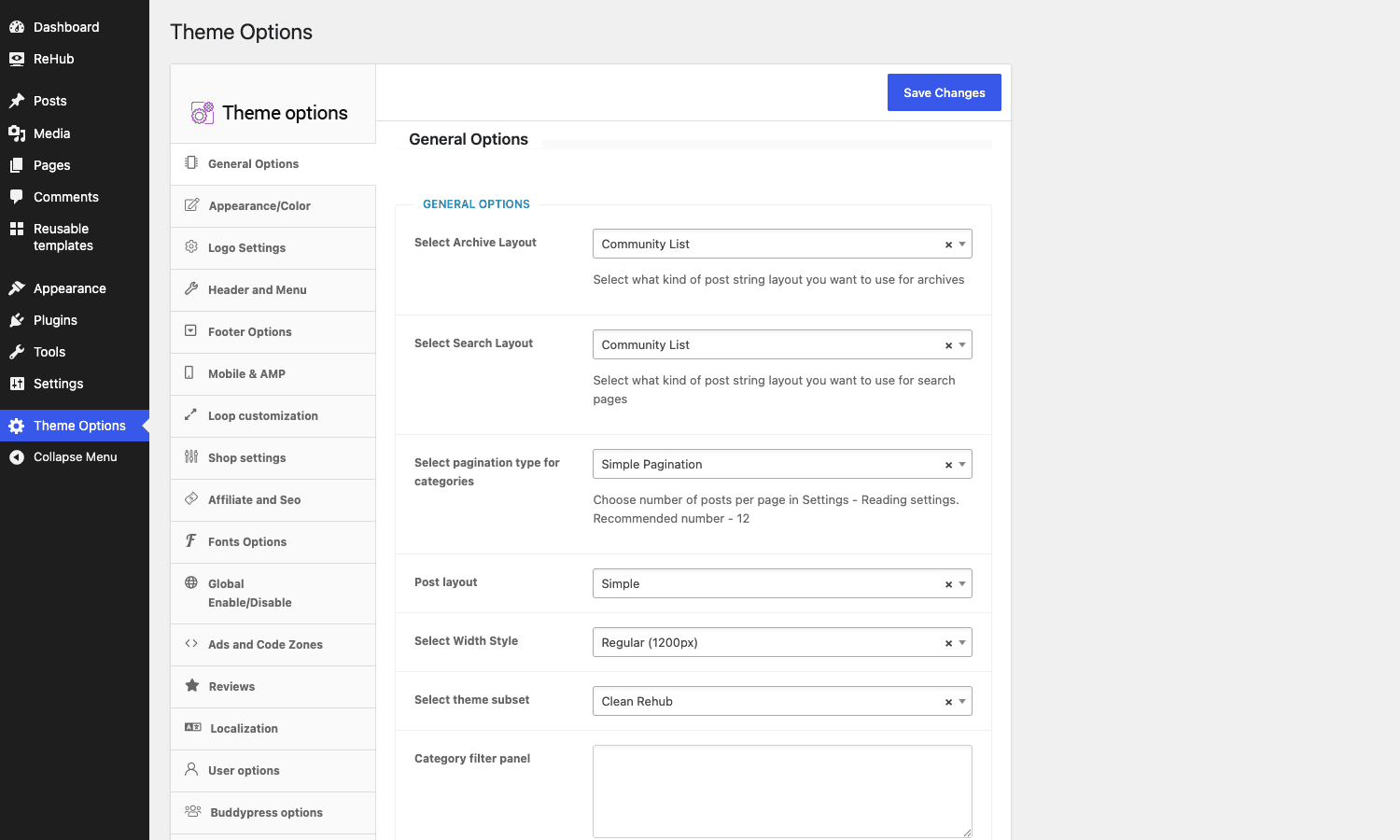
The tabs you’ll actually live in:
- General Options. Archive layout (REHub has many: community list, grid, masonry, and more), search layout, pagination type, post layout, site width, and the overall "theme subset" style. This sets the skeleton of the site.
- Appearance/Color, Logo Settings, Header and Menu, Footer Options, Fonts Options. The standard styling tabs. REHub’s header builder is flexible, with several header layouts and a mobile-specific header.
- Loop customization. How post and product lists render, which is central to a content-heavy affiliate or magazine site.
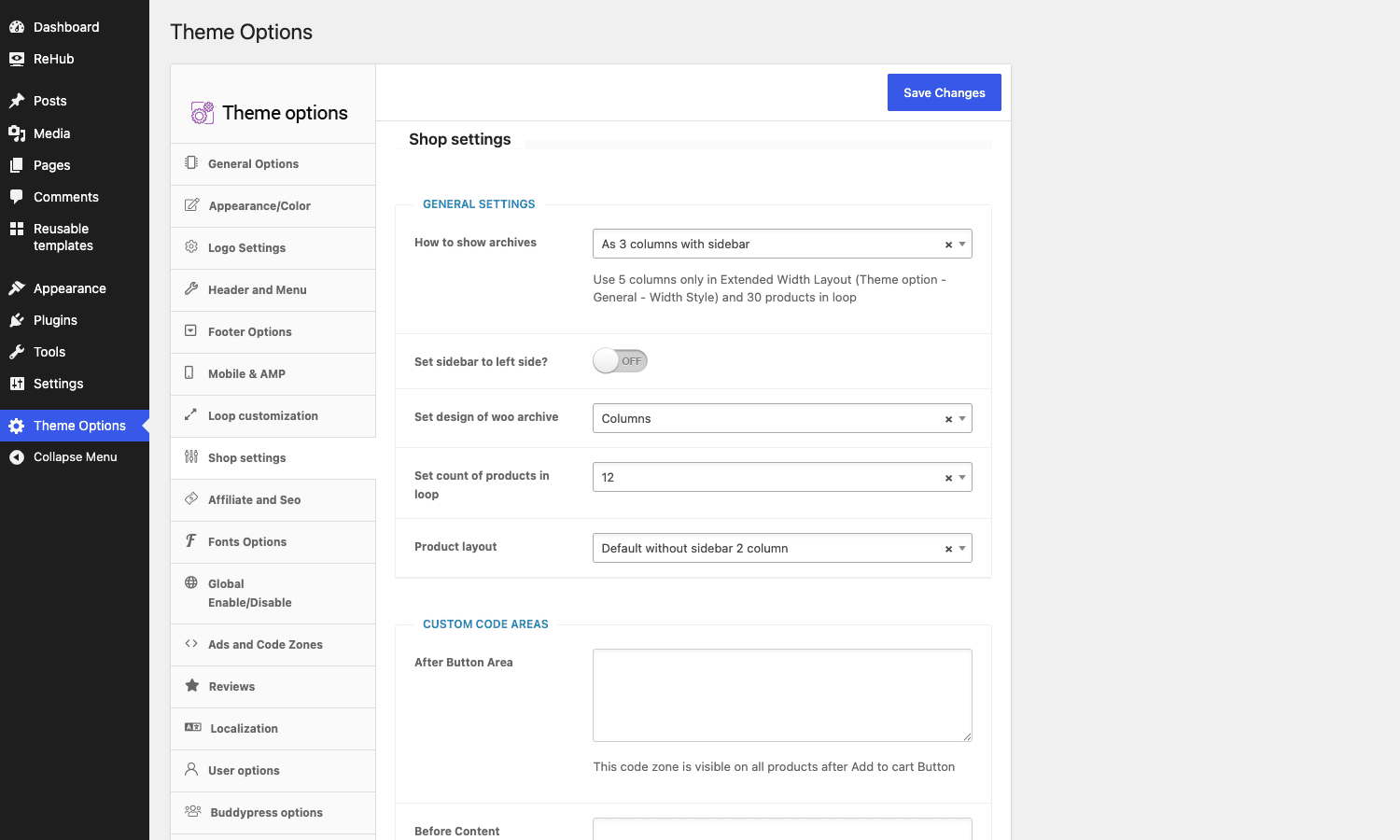
- Shop settings. The WooCommerce side. Archive design, products per row, products in loop, product page layout, and "custom code areas" where you can inject markup after the add-to-cart button or before content.
- Affiliate and Seo, Reviews, Dynamic comparison. The three that make REHub what it is. Each gets its own section below.
- Ads and Code Zones. Define ad or code blocks once and drop them into positions across the site, which is how monetized content sites manage their ad placements without editing templates.
- Global Enable/Disable. Turn off features (and their assets) you don’t use. This is your main performance lever, and I’ll come back to it.
Tip: REHub’s panel has a lot of options because it does a lot. Don’t try to read every tab on day one. Set General, Appearance, Header, and Footer to get a working site, then visit the Affiliate, Reviews, or Comparison tab only when you’re building that specific feature.
The affiliate engine: offer buttons and Content Egg
This is REHub’s signature, so it gets the detail it deserves.
At the simplest level, REHub gives you affiliate buttons: a button that shows a price and links out to a merchant with your affiliate tag. You can place one with the [wpsm_button] shortcode or an offer box with [wpsm_offerbox], and style them globally from Theme Options.
The serious version is the Content Egg integration. Content Egg connects to affiliate networks and merchants (Amazon, AliExpress, eBay, and many others) and fetches live product data: price, image, availability, and the affiliate link. REHub then displays that data as offer lists, single offers, or comparison tables, and keeps the prices updated. That’s what powers a real price-comparison site, where the page shows "currently $39 at three stores" and stays current.
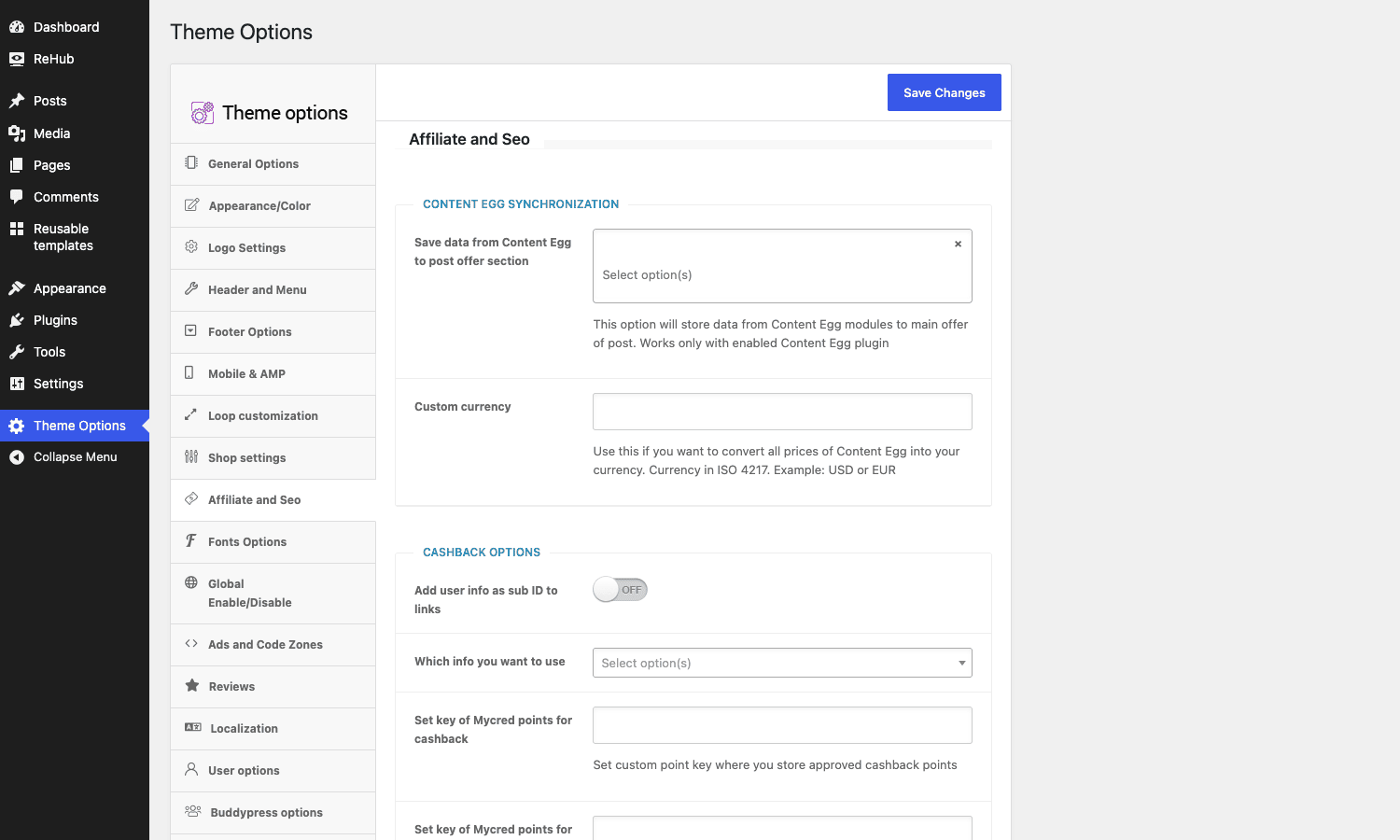
The Affiliate and Seo tab is where this lives. You’ll find a "save data from Content Egg to post offer section" option that stores the fetched offers on the post, a custom-currency setting to convert all Content Egg prices into your currency, and a cashback section that can append user info as a sub-ID to affiliate links and tie into a myCred points system for cashback rewards.
Where this shines: a "best budget headphones" post where each recommendation has a live price button, and a comparison table at the top, all updating automatically. Doing that without REHub means stitching Content Egg (or a similar plugin) to a theme that has no idea how to display its data. REHub speaks Content Egg natively. If you want the affiliate engine on its own, Content Egg Pro is available separately, but REHub is built to pair with it.
The catch: live pricing is a responsibility, not just a feature. A stale cached price that’s lower than the real one frustrates buyers and can breach a merchant’s terms. Set a sensible refresh schedule, and don’t promise a price you’re not refreshing.
Price comparison and top-list tables
REHub’s comparison features are the second pillar, and they come in a few flavors.
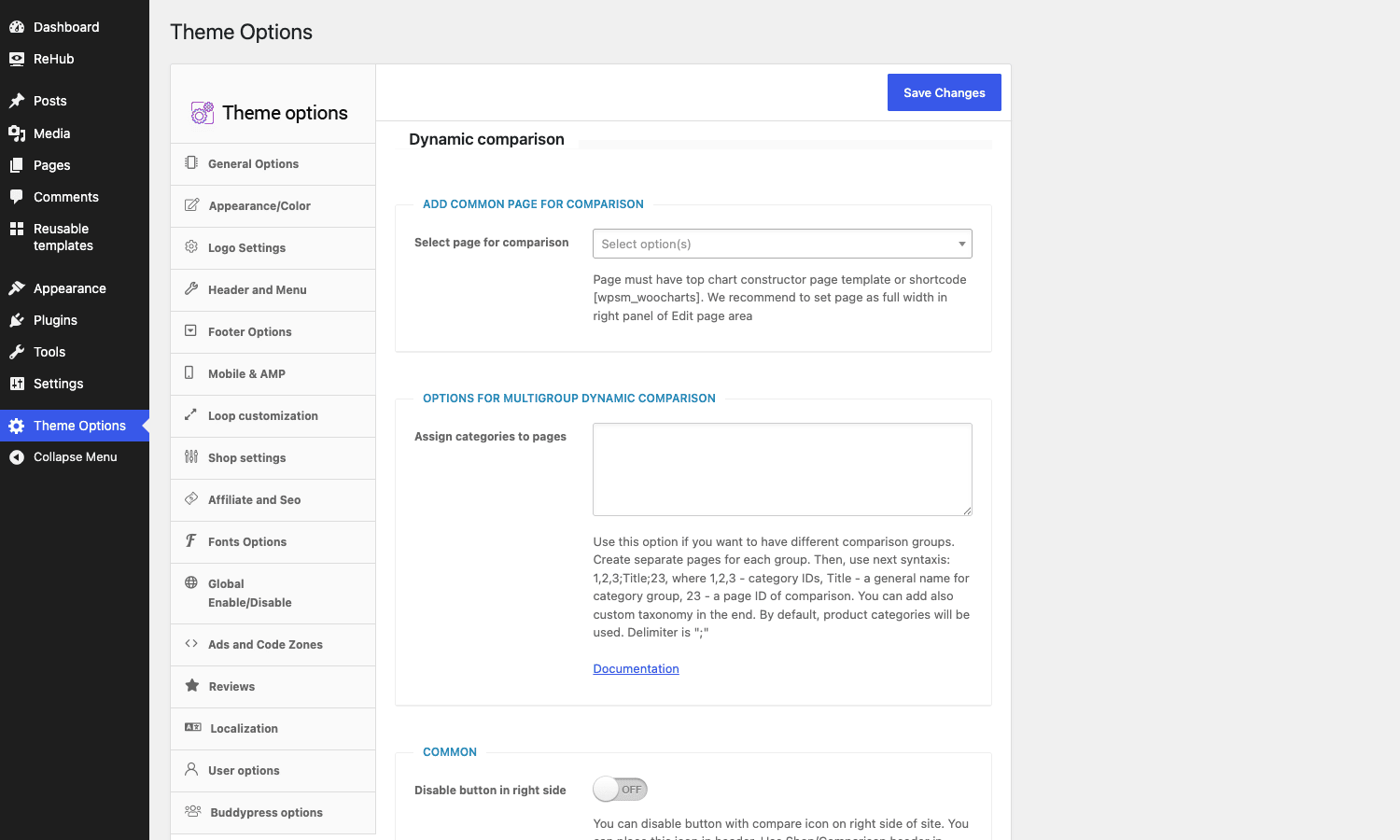
For a structured "compare these products" experience, there’s a Dynamic comparison system. In Theme Options you point it at a page that uses the top-chart constructor (or the [wpsm_charts] shortcode), and you can build multi-group comparisons that pull from your product categories. The "best laptops under $1000" style page, where visitors filter and compare, is exactly this.
For inline comparisons inside an article, you have shortcodes: [wpsm_compare_button] and [wpsm_compare_bar] add a compare control, and [wpsm_toptable] and [wpsm_toplist] build ranked comparison tables right in your content. A [wpsm_colortable] gives you a styled spec table for "this model versus that model" breakdowns.
The reason this matters: comparison content converts. A reader deciding between three products wants them side by side, with prices and a clear winner. REHub gives you the table widgets to do that without a separate comparison plugin that styles nothing like the rest of your site.
The review system that search engines understand
The third pillar is reviews, and REHub’s is more thorough than most.
In the Reviews tab you choose how ratings work: a simple single score, or multi-criteria (rate a product on design, value, and performance separately). You decide whether the total score is the editor’s, the users’, or an average of both, and whether guests can rate or only logged-in users.
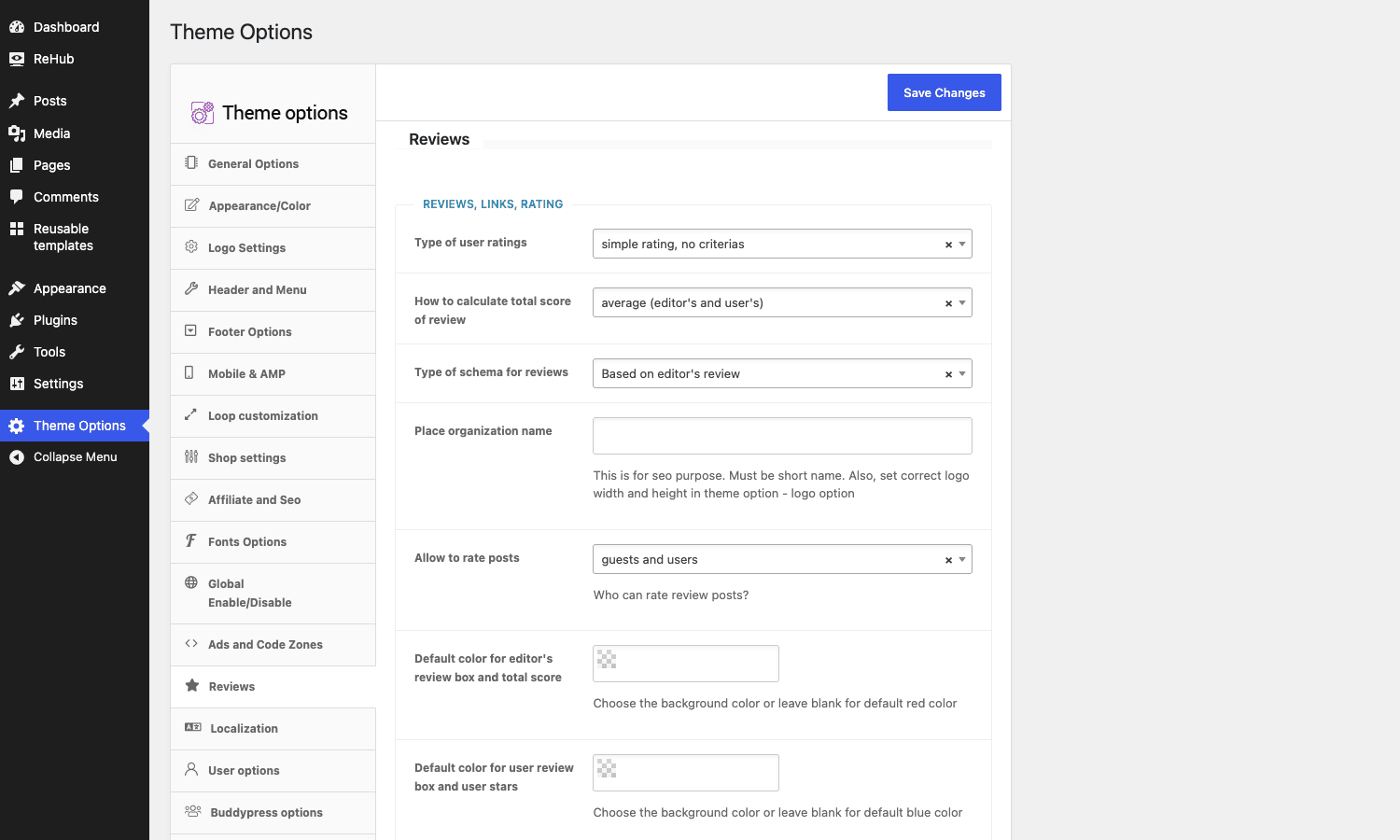
The part that matters for traffic is the schema. REHub can output proper review structured data, so your review posts become eligible for Google’s star-rating rich snippets in search results. Those stars lift click-through rates, and they’re the whole reason a review site invests in a review system instead of just typing a number into a paragraph.
You build the visible review with shortcodes or blocks: [wpsm_reviewbox] for the scored review box, [wpsm_pros] and [wpsm_cons] for the pros-and-cons lists that every good review needs. Because it’s one system, you get one source of review schema, which avoids the trap I describe in the anti-pattern section: two plugins both emitting Review schema and confusing Google into ignoring both.
Deals, coupons, and cashback
The fourth thing REHub does, and the reason a whole genre of sites pick it, is run a deals-and-cashback community. This is the most niche of its pillars and the one almost no other theme targets.
The deal store. REHub registers a deal-store taxonomy, so you can organize deals and coupons by merchant (Amazon, Best Buy, a local retailer) and build a landing page per store. Visitors browse "all the deals at this store," which is exactly how the big coupon sites are structured.
Coupon popups. A coupon can use the click-to-reveal pattern, where the visitor clicks and a popup shows the code while opening the merchant in a new tab. REHub builds this in (the deal popup), so you’re not gluing a popup plugin to a coupon plugin and hoping the affiliate link still fires.
Cashback. This is the ambitious one. REHub’s cashback system ties into a points plugin (myCred) and the affiliate sub-ID feature so that registered users earn points or cashback on purchases made through your affiliate links. The sub-ID is what lets you attribute a conversion back to a specific user, and the cashback display is formatted through a filter you can customize.
Heads-up: cashback and click-to-reveal both depend on affiliate tracking actually working end to end, sub-IDs being passed, and your affiliate networks sending conversion postbacks. REHub gives you the front-end and the user-facing plumbing, but the network-side tracking is configuration you do with each affiliate program, not something a theme can do for you. Get that wrong and your users won’t get credited, which for a cashback community is the one thing you cannot fumble.
The demo library: niche starting points
If you don’t want to start from a blank install, REHub ships a demo library, reachable from the ReHub menu’s import screens. It’s a grid of complete starter sites, each with a preview thumbnail and an import button.
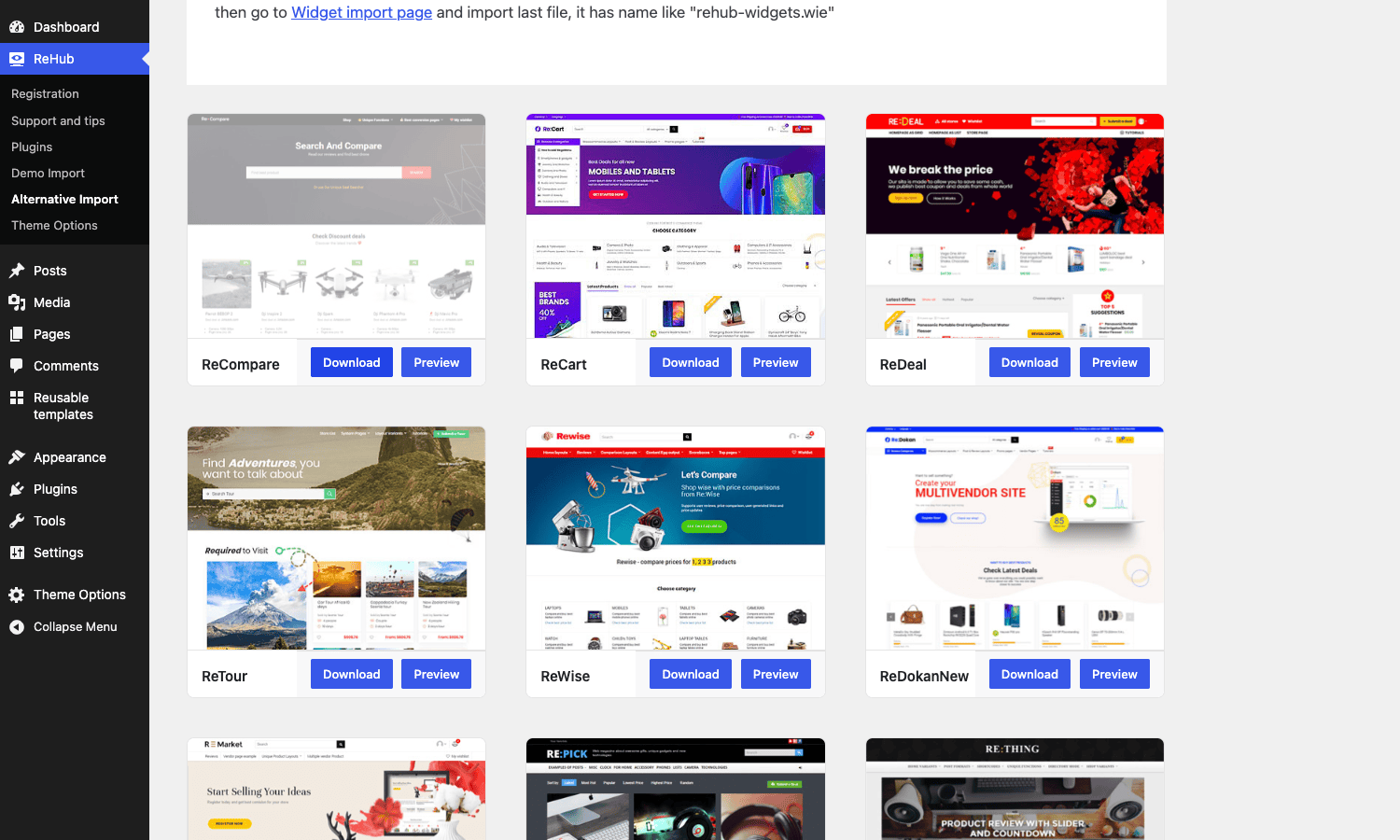
What’s notable is how niche-specific the demos are. Instead of generic "business" and "portfolio" layouts, you get demos aimed at REHub’s actual jobs: a price-comparison layout, a coupon and deals site, a cashback community, a product-review magazine, a niche store. The names tell you the purpose at a glance. For someone who knows they’re building, say, a deals site, importing the matching demo gets you a working structure to customize rather than a blank page and a decision paralysis.
As with any theme, treat a demo as a starting point, not a finished site. Import the one closest to your goal, onto a staging site, then prune what you don’t use.
Who REHub is really for
REHub is a specialist, so the "who it’s for" question has clear answers, including a clear "not you."
If you run an affiliate or price-comparison site, REHub is close to purpose-built. The offer buttons, Content Egg integration, and comparison tables are the exact tools the job needs, and having them in one theme beats assembling them from plugins.
If you run a product-review site, the editor-plus-user review system with schema is the draw. Star snippets in search are worth real traffic, and REHub’s review setup is more flexible than most dedicated review plugins.
If you run a deals, coupons, or cashback community, the deal-store features, deal popups, cashback system, and BuddyPress integration cover a niche almost no other theme targets.
If you run a niche store or a marketplace, REHub’s WooCommerce support plus WCFM or Dokan integration lets you mix your own products with affiliate offers, or run a multi-vendor marketplace with a content layer on top.
If you run a simple blog, a brochure site, or a standard shop, REHub is the wrong tool. It’s overkill, you’ll use a fraction of it, and a focused blog theme or a store theme like WoodMart will be lighter and simpler. Be honest about whether you actually need the monetization machinery.
| Site type | REHub fit | The features you’ll live in |
|---|---|---|
| Affiliate / price comparison | Excellent | Offer buttons, Content Egg, comparison tables |
| Product review site | Excellent | Review system, schema, pros/cons |
| Deals / coupons / cashback | Excellent | Deal store, popups, cashback, BuddyPress |
| Niche store or marketplace | Strong | WooCommerce + WCFM/Dokan + affiliate mix |
| Simple blog or standard shop | Skip it | A focused theme is lighter |
Don’t run an affiliate site on a generic theme plus ten plugins
Here’s the mistake REHub exists to prevent, and the one I’ve watched cost people the most time.
You want an affiliate-comparison-review site, so you grab a multipurpose theme you like and start adding plugins: an affiliate-link plugin for the buttons, a comparison-table plugin, a star-rating review plugin, a deals plugin, maybe a cashback plugin. Each one styles itself differently, so your offer buttons look nothing like your comparison table, which looks nothing like your review box. Worse, two of those plugins both output Review schema for the same page, and Google, seeing conflicting structured data, ignores the rich snippet entirely. The thing you installed the review plugin for, the stars in search, never appears.
Then there’s maintenance. Five plugins from five vendors, each with its own update cycle and its own way of breaking. When a WordPress update lands, you’re testing five integrations instead of one theme.
REHub’s whole argument is coherence. The buttons, tables, reviews, and deals are one system, with one design and one source of review schema. That doesn’t make REHub automatically better than every plugin individually, some dedicated plugins are deeper, but it makes the whole site hang together and emit clean schema, which for a monetized content site is worth more than any single feature.
Two more guardrails specific to this kind of site. First, affiliate disclosure is a legal requirement, not a nice-to-have; REHub gives you the buttons, but the FTC-style disclosure is your job, so add it. Second, if you use Content Egg’s live pricing, set a sane refresh schedule. A stale price that undercuts the real one erodes trust the moment a reader clicks through and sees a higher number, and it can violate a merchant’s terms. The feature is powerful; treat it with care.
Is REHub heavy? The honest performance answer
REHub does a lot, and a theme that does a lot can ship a lot. So the honest answer is: it can be heavy, and how heavy is mostly your call.
The single biggest lever is the Global Enable/Disable tab in Theme Options. REHub lets you switch off whole feature groups you don’t use, and disabling a feature stops it from loading its assets. Running a pure review site with no marketplace? Turn off the vendor and BuddyPress pieces. No deals? Disable them. This is the same principle as pruning a widget pack: load what you use, drop what you don’t.
Beyond that, REHub includes its own image-handling and lazy-loading helpers (there are filters like rh_thumb_url and rh_lazy_load for developers to hook into), and the usual hygiene applies and matters more than the theme:
- Run a caching plugin for page caching and CSS/JavaScript optimization.
- Serve correctly sized images. A comparison page with twenty product thumbnails is heavy if each is a full-resolution upload.
- Be careful with Content Egg refresh frequency. Fetching live prices is a network operation; refreshing too aggressively adds load, so schedule it sensibly.
- Don’t import three demos and leave the leftovers.
Compatibility is generally solid. REHub supports WooCommerce and the major multi-vendor plugins (WCFM, Dokan), BuddyPress, and AMP, and it works with the standard block editor as well as Elementor and Greenshift. It wants a current PHP version and a reasonable memory limit, like any feature-rich theme; 256MB is comfortable. The most common friction is trying to bulk-install all its companion plugins at once on a small server, which can time out, so install them one at a time.
REHub vs a multipurpose theme plus plugins
The real comparison for REHub isn’t another affiliate theme, there are few direct equivalents. It’s the do-it-yourself stack: a generic theme plus a pile of plugins. Here’s how that math works out.
On cost, REHub is a one-time ThemeForest purchase around $59 (with six months of support), and the REHub Framework and Content Egg integration come with it. The DIY route is a multipurpose theme around $60 plus recurring plugin subscriptions: an affiliate-table plugin (often $49 to $79 a year), a review plugin ($30 to $60 a year), and a comparison plugin on top. That’s $150 to $200-plus per year, recurring, versus REHub’s one-time cost. Over two or three years the gap is large.
On coherence, REHub gives you one design system and one source of review schema. The DIY stack gives you mismatched styling and a real risk of conflicting schema, which I covered above.
On depth, the DIY route can win in spots. A dedicated comparison plugin might offer more table layouts than REHub; a specialized review plugin might have features REHub lacks. If one specific feature is the entire point of your site, evaluate whether REHub’s version is deep enough before committing.
Against pure store themes like WoodMart and Porto, it’s not really a contest because they’re solving a different problem: those themes are excellent for selling your own products and have no affiliate, comparison, or review machinery at all. REHub trades some of their shop polish for monetization features they don’t attempt.
| Approach | Cost | Coherence | Best when |
|---|---|---|---|
| REHub | ~$59 one-time, Content Egg included | One design, one schema source | Affiliate / comparison / review / deals |
| Multipurpose theme + plugins | ~$60 + $150-200/yr recurring | Mismatched styles, schema risk | You need one plugin’s specific depth |
| Pure store theme (WoodMart/Porto) | ~$59 one-time | Excellent for own products | Selling your own catalog, no affiliate |
The takeaway: if your site’s job is monetizing through affiliates, comparisons, reviews, or deals, REHub’s one-time cost and built-in coherence are hard to beat. If your site just sells your own products, a store theme is the better fit.
Developer reference: hooks, filters, and shortcodes
REHub looks like a configure-it-in-the-panel theme, but it exposes a solid developer surface under the rehub_, rh_, and wpsm_ prefixes. If you build on it for a client, these keep your changes in a child theme instead of in core files.
Always use a child theme. REHub ships one in the package. Activate it and put your code in its functions.php, so a theme update never wipes your work. The WordPress child theme guide is the canonical reference if you’re new to it.
Run setup code at the right moment. The framework fires an action when it finishes loading, which is the safe place to hook your own setup:
add_action( 'rehub_framework_loaded', function () {
    // Register your custom layouts, badges, or integrations here.
} );
Filter the affiliate button URL. REHub builds offer-button links through a filter, so you can append parameters, swap a domain, or run links through a cloaker:
// Append a custom tracking parameter to every REHub affiliate button URL.
add_filter( 'rehub_create_btn_url', function ( $url, $tag_slug ) {
    return add_query_arg( 'utm_source', 'mysite', $url );
}, 10, 2 );
Modify category and module queries. REHub’s archive and module loops run through query filters, so you can change what shows without editing templates:
// Exclude a category from REHub archive queries.
add_filter( 'rh_category_args_query', function ( $args ) {
    $args['category__not_in'] = array( 42 );
    return $args;
} );
Redirect users after login or registration, useful on a cashback or membership community:
add_filter( 'rh_custom_redirect_for_login', function ( $redirect_to, $user ) {
    return home_url( '/dashboard/' );
}, 10, 2 );
Inject markup into the loops and product pages with actions. REHub places action hooks throughout its layouts, so you can add content without overriding templates. The WooCommerce single-product hooks fire with no arguments:
// Add a custom note right after the price on single product pages.
add_action( 'rh_woo_single_product_price', function () {
    echo '<p class="ships-note">Ships in 2 business days.</p>';
} );
There’s a large family of these: the grid and list loops expose hooks like rehub_after_compact_grid_price, rehub_after_grid_column_title, and rehub_after_masonry_grid_meta; the product pages expose rh_woo_single_product_title, rh_woo_single_product_vendor, and rh_woo_button_loop; the user pages expose rh_user_page_tabpanel_before and rh_user_page_tabpanel_after. For images and thumbnails there are filters like rh_thumb_url and rh_thumb_resized_url, and for the cashback display there’s rh_cashback_point_format_filter.
The shortcodes are where a lot of REHub’s content power lives, supplied by the REHub Framework. The affiliate and comparison set includes [wpsm_button] and [wpsm_offerbox] for offers, [wpsm_compare_button] and [wpsm_compare_bar] for comparisons, [wpsm_toptable] and [wpsm_toplist] for ranked tables, and [wpsm_charts] for the comparison chart. The review and content set includes [wpsm_reviewbox], [wpsm_pros] and [wpsm_cons], [wpsm_price_table] and [wpsm_price_column], plus the usual building blocks: [wpsm_accordion], [wpsm_tabgroup] with [wpsm_tab], [wpsm_toggle], [wpsm_countdown], [wpsm_box], and [wpsm_promobox]. Between the actions, the filters, and the shortcodes, you can extend REHub deeply without touching its core, which is exactly what you want from a theme you don’t control the release schedule of.
FAQ
Is REHub good for a beginner?
With a caveat. REHub is approachable in that the demos and the options panel mean you don’t need to code, but it’s a feature-dense theme, and the sheer number of options can overwhelm someone new. If you’re a beginner building an affiliate or review site, import the closest demo, learn the Affiliate, Reviews, and Comparison tabs one at a time, and ignore the rest until you need it. Beginners get stuck when they try to absorb every tab at once.
Do I need Content Egg to use REHub?
Only for live affiliate pricing and price comparison. Content Egg is the plugin that pulls prices and offers from merchants, so a price-comparison or affiliate-deals site needs it. A pure review site or magazine doesn’t. The integration is built in, and the plugin comes with the package, so it’s there when you want it.
Will REHub’s review system give me star snippets in Google?
It can. REHub outputs review structured data, which makes your review posts eligible for star-rating rich snippets. Eligibility isn’t a guarantee, Google decides whether to show them, but having clean, single-source review schema is the prerequisite, and that’s exactly what REHub provides. Just don’t also run a second review plugin that emits its own schema, or you risk both being ignored.
Can I build a multi-vendor marketplace with REHub?
Yes. REHub integrates with the major multi-vendor plugins, WCFM and Dokan, with native styling and hooks for vendor stores. You can run a marketplace where vendors list products, and mix in affiliate offers and reviews on top, which is a combination most marketplace themes don’t attempt.
Is REHub heavy or slow?
It can be, because it does a lot, but you control it. The Global Enable/Disable tab lets you switch off feature groups you don’t use so they stop loading assets. Combine that with a caching plugin, sensibly sized images, and a reasonable Content Egg refresh schedule, and a real REHub site performs fine. The complaints usually come from leaving every feature on or over-importing demos.
Does REHub work with the block editor, or do I need a page builder?
It works with the standard block editor plus REHub’s own Re blocks, and it also supports Elementor and the Greenshift builder. For most affiliate and review content you won’t need a heavy page builder, because the wpsm_ shortcodes and Re blocks handle the affiliate-specific pieces directly.
How is REHub different from a store theme like WoodMart or Porto?
WoodMart and Porto are built to sell your own products and are excellent at it, but they have no affiliate, comparison, or review machinery. REHub is built for sending visitors to other merchants and monetizing through affiliate links, comparisons, reviews, and deals. If you sell your own catalog, pick a store theme; if you’re an affiliate or review publisher, pick REHub.
Is the GPL version of REHub fully functional?
The package on GPL Times is the full theme with the REHub Framework and the demo importer, so you can install it and use the affiliate, comparison, review, and store features in this article. Updates flow through the license, and the practical thing to remember is to install the framework first so the options panel and shortcodes appear.
Does REHub support affiliate networks other than Amazon?
Yes, through Content Egg, which connects to a wide range of affiliate networks and merchants beyond Amazon (AliExpress, eBay, and many others). REHub displays whatever Content Egg fetches, so your offer lists and comparison tables aren’t limited to a single network.
Final thoughts
REHub is a specialist tool, and I mean that as a compliment. It doesn’t try to be the theme for everyone. It tries to be the theme for people who make money from affiliate links, comparisons, reviews, deals, and marketplaces, and on that goal it’s one of the most complete options out there. The affiliate buttons, the Content Egg integration, the comparison tables, and the schema-aware review system are features you’d otherwise assemble from a stack of plugins that never quite match.
It asks something of you in return. There’s a learning curve, because a theme with this many features has a lot of settings. You have to be disciplined about turning off what you don’t use, about disclosure, and about live-price refreshes. And if your site doesn’t actually monetize through these mechanisms, REHub is more theme than you need.
But for the sites it’s built for, it’s hard to beat the combination of one-time cost, built-in coherence, and clean single-source schema. If you’re building an affiliate, comparison, review, or deals site, the REHub theme is available on GPL Times and worth a serious look. If you’re weighing it against pure store themes, the WoodMart review makes a useful side-by-side read.