

Most stores spend their whole marketing budget on the hardest, most expensive sale: the first one. Ads, SEO, a discount to win over a stranger. Then the buyer disappears and the store goes hunting for the next stranger. It’s an expensive way to grow, because the person who already bought from you is the cheapest one to sell to again, and a points program is one of the cheapest ways to bring them back.
WooCommerce Points and Rewards is that program for a WooCommerce store. Customers earn points when they buy (and, if you want, when they sign up or leave a review), and they spend those points for a discount on a future order. The whole thing runs inside your own WordPress install, on your own data, with no per-order fee to a third party.
Here’s the honest version of what this plugin is and isn’t. It’s a well-built, official piece of plumbing that handles the mechanics of a points program cleanly. It is not a growth strategy in a box. The single thing that decides whether your program makes money or quietly bleeds margin is the points economy you set up, and that math is on you, not the plugin. So this guide spends most of its time on the economics, because that’s where a points program is won or lost. By the end you’ll know how to run one that actually pays off instead of one that just feels generous.
Table of Contents
- What WooCommerce Points and Rewards does
- The points economy: the setting that actually matters
- Setting it up
- Earning: global, per-product, and per-category
- What the customer sees
- Redemption: turning points into discounts
- Who should run a points program (and who shouldn’t)
- Don’t make a point worth more than your margin
- How to tell if the program is working
- Points vs coupons vs a loyalty app
- Developer reference: hooks and filters
- FAQ
- Final thoughts
What WooCommerce Points and Rewards does
WooCommerce Points and Rewards is an official extension from WooCommerce itself. Its job, in the plugin’s own words, is to "reward customers for purchases and other actions with points which can be redeemed for discounts." That’s the entire promise, and it does it without fuss.
In practice it adds three things to a store. Customers earn points, mostly from buying but optionally from signing up or writing a product review. Those points sit in a balance attached to each customer account. And at the cart or checkout, a customer can redeem points for a discount on what they’re buying.
Everything is managed from one screen at WooCommerce » Points & Rewards, which has three tabs: Settings (where the economy lives), Manage Points (to adjust a customer’s balance by hand), and Points Log (a running record of every points event in the store). It needs WooCommerce, naturally, and almost nothing else. There’s no cloud service, no monthly fee, and no data leaving your site. You can pick up WooCommerce Points and Rewards on GPL Times and have a working program on a test store in about ten minutes.
The reason it stays simple is that it’s deliberately narrow. This is not a tiered-VIP, referral, gamified, birthday-reward loyalty suite. It’s a points-for-purchases engine. Whether that’s enough depends entirely on what you’re trying to do, and I’ll be blunt about where it runs out of road later on.
The points economy: the setting that actually matters
If you read nothing else, read this. A points program is a tiny currency you invent, and like any currency it has an exchange rate in both directions. Get the two rates right and the program funds itself out of repeat purchases. Get them wrong and you’re either too stingy to motivate anyone or so generous you’re paying people to shop.
Two settings define the economy, and they live in the Settings tab.
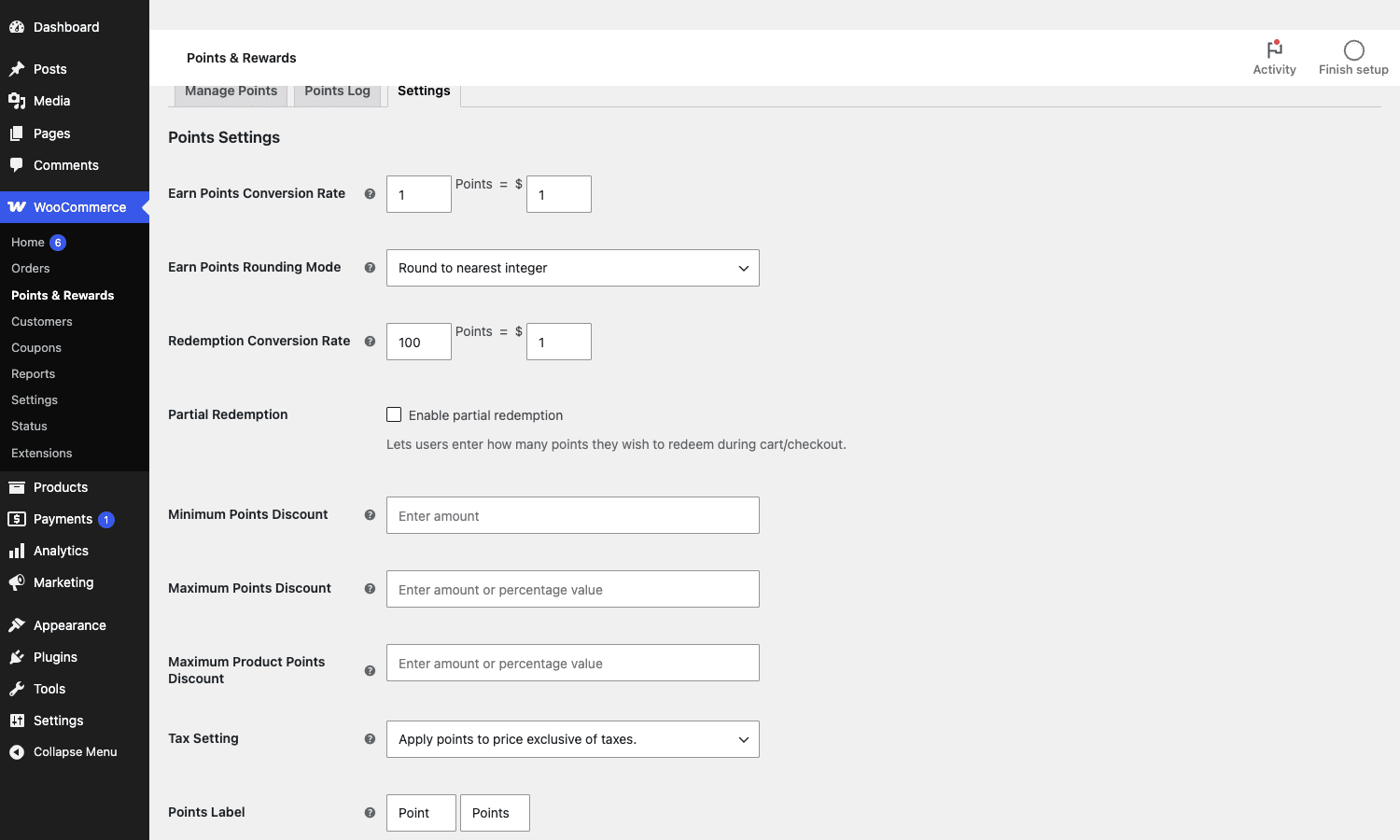
The Earn Points Conversion Rate sets how many points a customer earns per dollar (or whatever your currency is). The default is 1 point for every $1 spent. That number on its own means nothing, because a "point" has no value until you set the other rate.
The Redemption Conversion Rate sets how many points are needed to get $1 of discount. The default is 100 points = $1.
Now do the arithmetic, because this is the whole game. With the defaults, a customer spending $100 earns 100 points, and 100 points is worth $1 off. So the program hands back 1% of spend as a future discount. That’s a sane, sustainable starting point for most stores. If you instead set 50 points = $1 redemption, the same 100 points becomes worth $2, and you’re now giving back 2%. Change the earn rate to 2 points per dollar and you double it again. Your effective reward rate is simply the earn rate divided by the redemption rate, expressed as a percentage, and it should map to a discount you can actually afford on repeat business.
The Earn Points Rounding Mode decides what happens to fractional points (round to nearest, up, or down). Rounding up is friendlier to customers; rounding down protects your margin on odd amounts. It’s a small lever, but on a store with thousands of orders it adds up.
Tip: before you touch anything else, write down your target reward rate as a percentage, then set the two conversion rates to produce it. Most stores land between 1% and 5%. Decide the number first, configure second. Doing it the other way around (picking rates that "feel" right) is how programs end up accidentally generous.
Setting it up
Setup is genuinely quick, and the order is forgiving, but a couple of choices are worth making deliberately.
Step 1: Install and set your two rates. Activate the plugin (WooCommerce must be active first), open WooCommerce » Points & Rewards » Settings, and set the Earn and Redemption conversion rates to hit the reward percentage you decided on above. This is the only step that really matters.
Step 2: Decide on partial redemption. There’s a Partial Redemption toggle. With it off, a customer redeems their entire available balance at once (capped by your maximum). With it on, they get a field to enter exactly how many points to spend on this order. Partial redemption is friendlier and is what most shoppers expect, so I turn it on unless there’s a reason not to.
Step 3: Set your discount caps. Three fields guard your margin: Minimum Points Discount (a floor, so tiny redemptions aren’t worth the friction), Maximum Points Discount (a ceiling on the whole-cart discount, as an amount or a percentage), and Maximum Product Points Discount (a per-product ceiling). The maximum is the important one. Without it, a customer who has hoarded a big balance could wipe out most of an order. Capping the points discount at, say, 50% of the cart keeps the program from cannibalizing full-price sales.
Step 4: Handle tax and labels. The Tax Setting controls whether points apply to the price before or after tax, which matters for accounting in some regions. And the Points Label lets you rename "Points" to whatever fits your brand ("Stars", "Coins", "Miles"). A named currency feels more like a program and less like a spreadsheet.
Heads-up: this plugin needs WooCommerce and a recent PHP version, and that’s about it. It’s a light plugin with no real front-end overhead. The compatibility question worth checking isn’t performance; it’s how points interact with your other discount logic (coupons, sale prices), which the redemption and anti-pattern sections cover.
Earning: global, per-product, and per-category
The global earn rate is the baseline, but you’ll often want exceptions, and the plugin gives you three levels of control.
At the global level, every product earns at your store-wide rate. Good enough for a lot of shops.
At the per-product level, you can override the rate. Open any product, and in the Product data box you’ll find a Points Earned field (and a Maximum Discount field that caps how much of that product’s price can be paid with points).
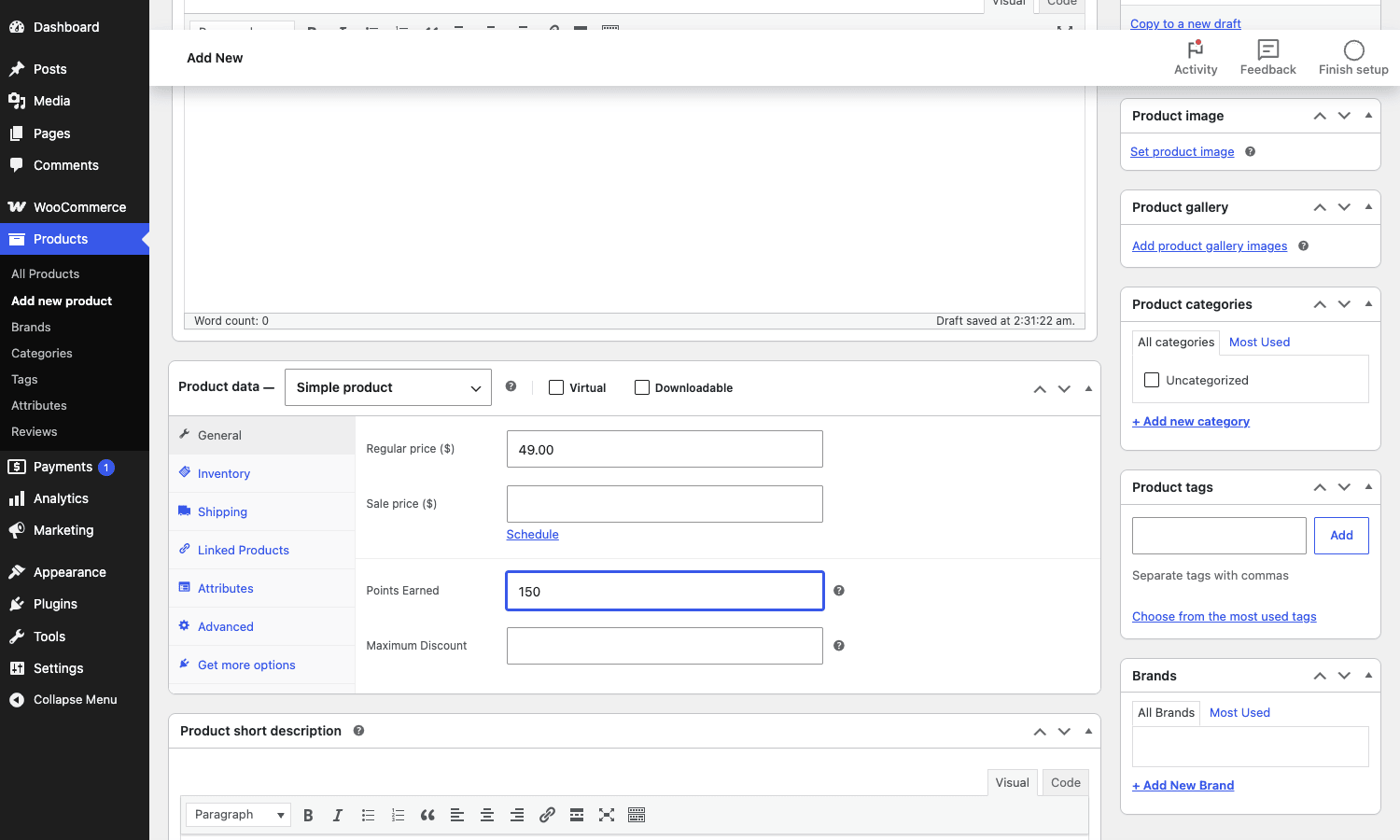
This is more useful than it first looks. Where this shines: you can award fixed points on a specific product regardless of price (great for a flagship item you want to push), or set high-margin products to earn generously and thin-margin products to earn little or nothing. You can also award zero points on already-discounted or loss-leader items so you’re not stacking a reward on top of a sale.
At the per-category level, you can set points for a whole category at once, which saves you editing products one by one. Use it to run "double points on the new collection" without a coupon.
Beyond purchases, the plugin can also award points for creating an account and for writing a product review. The review reward is a quietly powerful one: reviews are social proof that earns you sales, and paying a few points for them is cheap. Just be aware of the obvious abuse vector and moderate reviews so you’re not rewarding spam.
What the customer sees
A points program only works if customers know it exists, and the plugin surfaces it at exactly the right moments without you adding a thing.
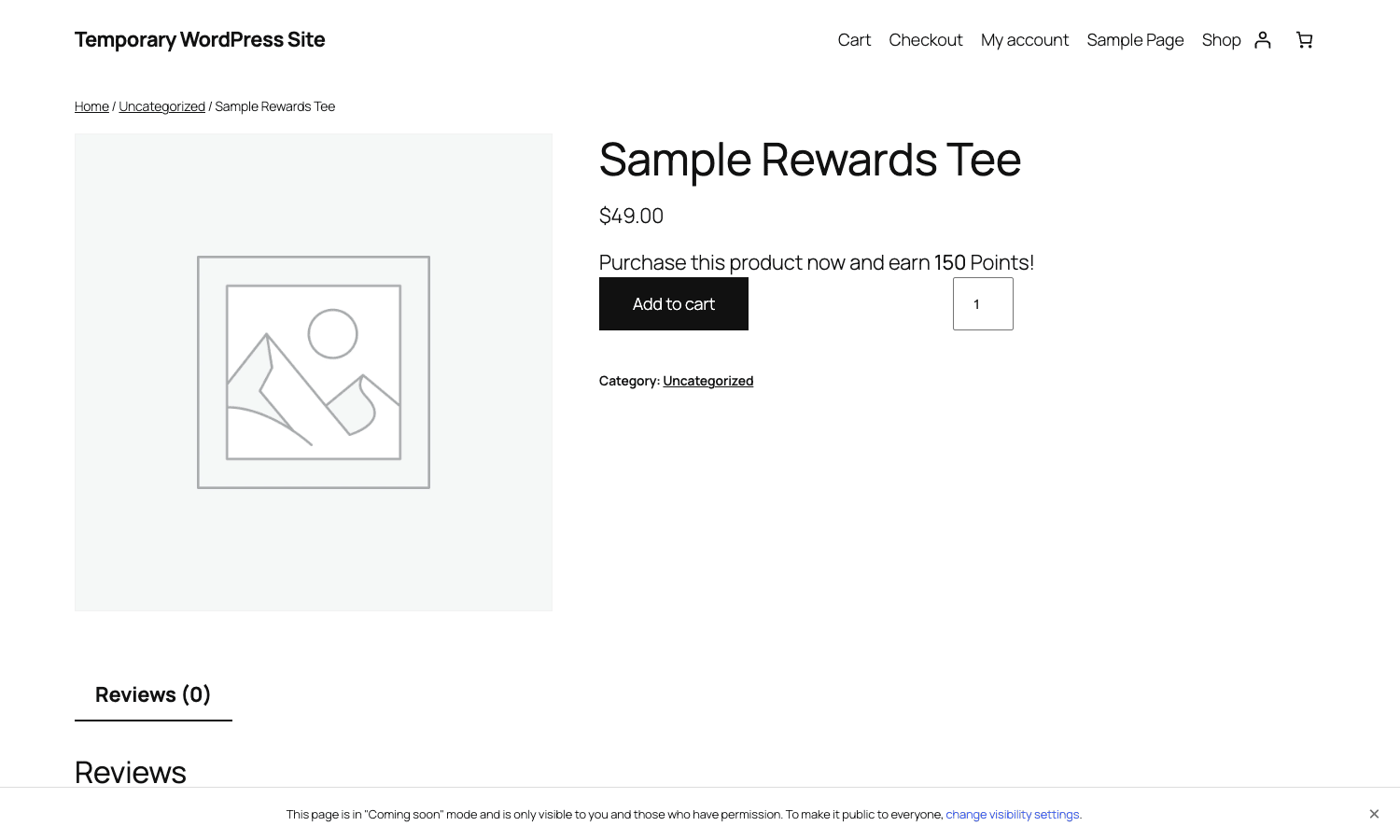
On the product page, a shopper sees a message telling them what they’ll earn: "Purchase this product now and earn 150 Points!" It sits right by the price and the add-to-cart button, where it can nudge the decision.
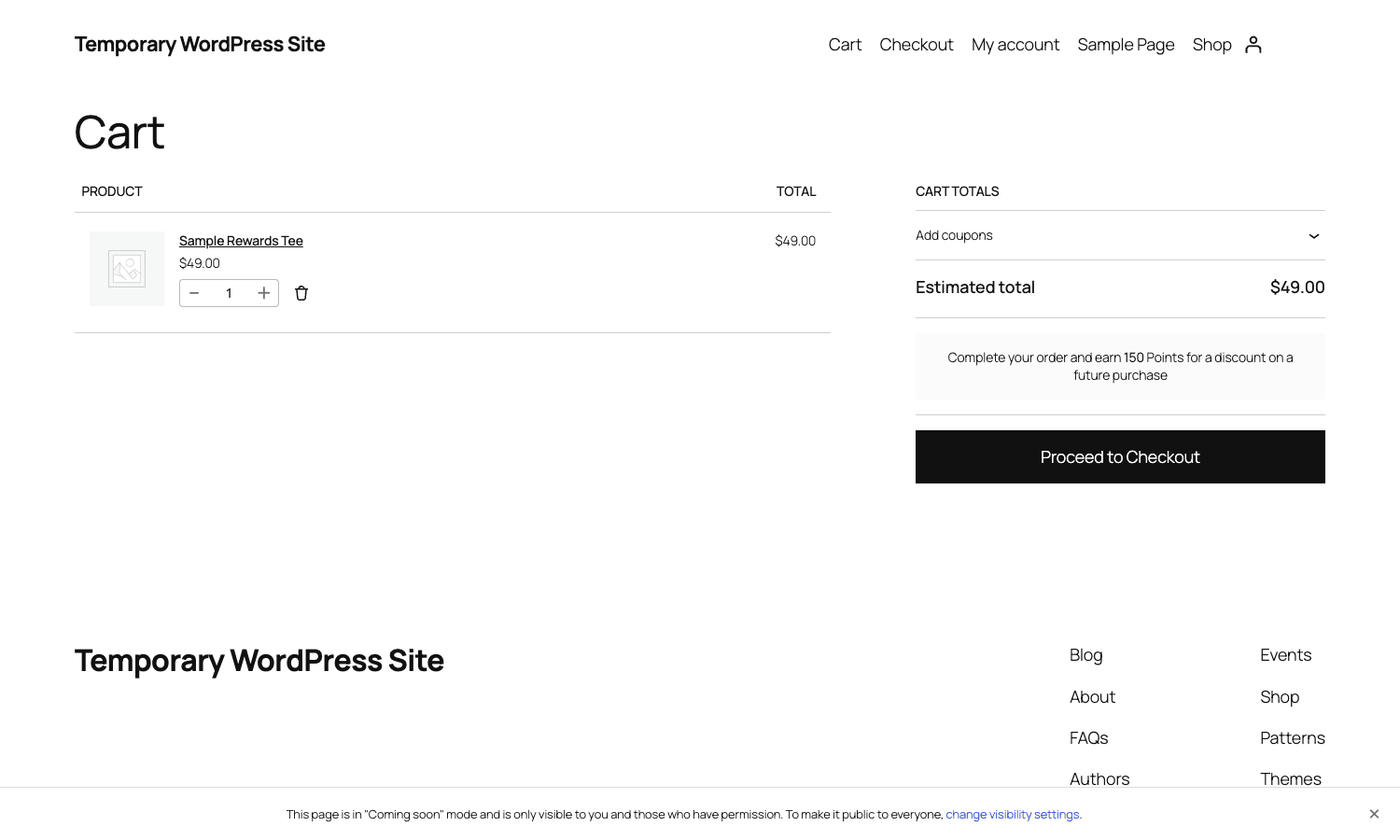
In the cart and at checkout, the message reframes as motivation to finish: "Complete your order and earn 150 Points for a discount on a future purchase." It appears in the cart totals, right where the customer is deciding whether to commit.
And in My Account, a "Points" tab shows the customer their current balance and history, so the program feels real and trackable rather than invisible.
Note: the earning messages are the program’s free advertising. The default copy is fine, but it’s worth customizing (there’s a filter for it, shown later) to match your voice. "Earn 150 Points" is abstract; "Earn 150 Points, worth $1.50 off your next order" tells the customer what the points are actually worth, which is far more motivating.
Redemption: turning points into discounts
Earning is half the program. Redemption is where the customer feels the payoff, and where you protect your margin.
When a customer with a points balance reaches the cart or checkout, they’re offered the chance to apply points for a discount. If you enabled partial redemption, they choose how many points to spend; otherwise it’s all-or-nothing up to your cap. The discount is calculated from your Redemption Conversion Rate and then constrained by the Minimum and Maximum discount settings.
That cap is the guardrail that matters most. Picture a loyal customer who has earned 5,000 points (worth $50 at the default rate) and is buying a $60 item. Without a maximum, they pay $10. That might be exactly what you want, or it might mean you just sold a $60 product for $10 and funded it entirely from past goodwill. The Maximum Points Discount lets you say "points can cover at most 50% of any order," so the program rewards loyalty without giving the store away.
A second subtlety is which order statuses award and reverse points. Points are granted when an order reaches a paid state and reversed if it’s refunded or cancelled. This is correct behavior, but it interacts with your fulfillment flow, and getting it wrong is how value leaks. There’s a developer filter to control exactly which statuses count, which I’ll come back to in the anti-pattern section because it’s a genuine trap.
Who should run a points program (and who shouldn’t)
This is a focused tool, so the "who it’s for" answer is sharp, including a clear "not you."
If you sell consumables or anything with natural repeat purchase (coffee, supplements, pet food, cosmetics, print supplies), a points program is close to a no-brainer. Your customers are coming back anyway; points give them a reason to come back to you instead of comparison-shopping. This is the textbook fit.
If you run a mid-volume store with healthy margins, points are a cheap retention lever that costs you nothing until a customer actually returns and redeems, at which point you’re "paying" with a margin you only have because they came back. The economics are self-funding when the rates are sane.
If you’re a high-consideration, one-time-purchase store (you sell mattresses, or wedding dresses, or a single course), a points program mostly doesn’t fit. People don’t buy a mattress to earn points toward their next mattress. Your retention play is referrals or accessories, not a points balance they’ll never spend.
If your margins are razor-thin, be careful. A points program is a discount with extra steps, and if you can’t afford even a 1% future discount, you can’t afford this, no matter how you set the rates. Be honest about the math before you launch.
| Store type | Points program fit | Why |
|---|---|---|
| Consumables / repeat purchase | Excellent | Customers return anyway; points anchor them to you |
| Mid-volume, healthy margin | Strong | Self-funding retention; you pay only on return |
| High-ticket one-time purchase | Poor | No natural repeat to reward |
| Razor-thin margin | Risky | Points are a discount you may not afford |
Don’t make a point worth more than your margin
Here’s the failure mode that turns a points program into a slow leak, and it catches more stores than any bug could.
The trap is treating the earn rate as a marketing dial you crank for a promo without touching the redemption rate. Say your program is 1 point per dollar, 100 points per dollar redeemed: a clean 1% reward. For a holiday push, marketing runs "5x points" and nobody changes the redemption rate. You’re now handing back 5% of spend as future discounts. If your net margin is 20%, you’ve committed a quarter of your profit to a discount that lands later, after you’ve forgotten it. The effective reward rate is the earn rate divided by the redemption rate; if that number passes what your margin can carry, the program loses money on every sale. Do that one division before you change either rate.
Then there’s refund clawback. Points are awarded when an order is paid and reversed when it’s refunded, which is correct. But if a customer earns points, redeems them on a second order, and then refunds the first, value can leak. The plugin handles the common cases and exposes a filter to set which statuses count, but you have to think it through for your own fulfillment flow.
Two more guardrails. Outstanding points are a liability that grows every order, so most programs expire them after a window (twelve months is common) to stop it compounding. And a points discount plus a coupon plus a sale price can over-discount fast, so use the Maximum Points Discount cap and test the combinations before launch, not after a customer buys a $60 product for $4. None of this is the plugin’s fault; it’s the economics of any rewards currency. The mistake is launching without doing the math.
How to tell if the program is working
A points program is easy to launch and easy to forget, so decide up front how you’ll know whether it’s earning its place. Three numbers tell the story, and the Points Log plus WooCommerce’s own reports give you all of them.
- Redemption rate. Of the points you’ve handed out, what share actually get redeemed? Very low redemption (under 10%, say) means the program isn’t motivating anyone or the rewards are too far out of reach, and the points are just sitting there as unloved liability. Very high redemption with no lift in repeat orders means you’re discounting people who would have bought anyway. The healthy pattern is redemption that rises in step with customers coming back.
- Repeat-purchase rate. This is the one that actually matters. Compare the share of customers who place a second order before and after launch. The program is working only if that number moves. WooCommerce’s Analytics, under the Customers report, shows you returning versus new buyers over time.
- Breakage. Points earned but never redeemed, especially expired ones, are a cost you booked but never had to pay. A little breakage is healthy; it’s the slack that keeps the program affordable. A lot of it usually means the rewards are unreachable and the program is decorative rather than persuasive.
Tip: check these a quarter after launch, not a week. Loyalty is a slow signal, and the second-order behavior you’re trying to change takes a purchase cycle or two to appear. Judging the program after seven days tells you nothing except that you’re impatient.
Points vs coupons vs a loyalty app
Is a points plugin even the right tool? Here’s how it stacks up against the obvious alternatives, with real numbers.
Versus plain coupons: coupons are free and built into WooCommerce, and for a one-off "10% off your next order" email they’re simpler. But a coupon is a single event with no memory. Points are a running balance that accumulates, which is the entire psychological point: a balance the customer doesn’t want to waste pulls them back. If your goal is a standing loyalty program rather than a one-time nudge, coupons can’t do it and points can. (If you want store credit instead of points, Smart Coupons and Advanced Coupons both do credit-style rewards, which is a different model worth comparing.)
Versus a SaaS loyalty app (the Smile.io-style hosted services): those add tiers, referrals, gamification, and slick widgets, but they bill monthly and the cost often scales with your order volume, commonly from around $50 a month into the hundreds, recurring, forever, with your customer data living on their servers. WooCommerce Points and Rewards is a self-hosted extension at roughly $129 a year for a single site, with the data in your own database and no per-order tax. For a points-only program, the self-hosted plugin is dramatically cheaper at any real volume, and you own the data. You give up the fancy tiers and referrals to get that.
Versus other points plugins like YITH WooCommerce Points and Rewards (around $100 a year): the feature sets are close for core points-and-redemption, and the official WooCommerce plugin’s advantage is first-party reliability and clean integration with the rest of the WooCommerce stack. YITH’s tends to bundle a few more bells (badges, more granular rules) at a similar price.
| Option | Cost (approx) | Owns data | Best for |
|---|---|---|---|
| WooCommerce Points and Rewards | ~$129/yr, self-hosted | You | A self-funding points program, data in your store |
| Plain WooCommerce coupons | Free | You | One-off discounts, no standing balance |
| SaaS loyalty app | ~$50-300+/mo, recurring | The vendor | Tiers, referrals, gamification, if you’ll pay monthly |
| YITH Points and Rewards | ~$100/yr, self-hosted | You | Similar to this, a few more rule options |
The honest takeaway: if you want a straightforward, self-funding points program that lives in your own store and costs the same whether you do 100 orders or 100,000, this plugin is the efficient choice. If you need tiers and referrals and you’ll pay monthly for polish, a SaaS app does more. And if you only want a one-time discount, save your money and use a coupon.
Developer reference: hooks and filters
Under the simple admin sits a clean set of filters and actions, all prefixed wc_points_rewards_ (with a couple under woocommerce_points_). If you’re building anything custom on top, these keep your code in a small plugin or child theme instead of hacked into the extension. Use a child theme or a tiny custom plugin so updates don’t wipe your work.
Adjust how many points an order earns. This is the hook for bonus-points logic that the global and per-product rates can’t express, for example double points for members or a one-time signup bonus:
// Give VIP-role customers double points on every purchase.
add_filter( 'wc_points_rewards_points_earned_for_purchase', function ( $points_earned, $order ) {
    $user = $order->get_user();
    if ( $user && in_array( 'vip', (array) $user->roles, true ) ) {
        $points_earned *= 2;
    }
    return $points_earned;
}, 10, 2 );
Tweak points per cart item. When you need item-level rules (say, triple points on one category during a campaign), filter the per-item calculation:
add_filter( 'woocommerce_points_earned_for_cart_item', function ( $points, $item_key, $item ) {
    if ( has_term( 'new-arrivals', 'product_cat', $item['product_id'] ) ) {
        $points *= 3;
    }
    return $points;
}, 10, 3 );
Rewrite the customer-facing messages so they show real value, not abstract points:
add_filter( 'wc_points_rewards_earn_points_message', function ( $message, $points_earned ) {
    return sprintf( 'Earn %d Points on this order, redeemable for a future discount.', $points_earned );
}, 10, 2 );
There are matching filters for the single-product message, the redemption message, and the thank-you message, so you can control the copy everywhere it appears.
React when a customer’s balance changes. This action fires every time points are added, which is your hook for syncing a balance to a CRM, awarding a badge, or sending a "you’ve earned a reward" email:
// Do something whenever a customer earns points.
add_action( 'wc_points_rewards_after_increase_points', function ( $user_id, $points, $event_type, $data, $order_id ) {
    // e.g. push the new balance to your email platform, or trigger a milestone reward.
}, 10, 5 );
There’s a parallel wc_points_rewards_after_reduce_points for redemptions and refunds. And the filter worth knowing for the clawback problem from earlier is wc_points_rewards_redeem_points_order_statuses, which controls exactly which order statuses award and reverse points, so you can align the program with your own fulfillment flow. Between the earning filters, the message filters, and the balance-change actions, you can shape the program well beyond what the settings screen exposes.
FAQ
Is WooCommerce Points and Rewards free?
No, it’s a paid official WooCommerce extension. There’s no free tier of this specific plugin. WooCommerce itself is free, and basic coupons are built in, but the points-and-redemption system is the paid add-on. The upside of the paid, self-hosted model is that there’s no recurring per-order fee the way SaaS loyalty apps charge.
How do I decide the points conversion rates?
Work backward from a reward percentage you can afford, usually 1% to 5% of spend. Your effective reward rate is the earn rate divided by the redemption rate. With 1 point per dollar earned and 100 points per dollar redeemed, that’s 1%. Pick the percentage first, then set the two rates to produce it, rather than guessing rates that feel about right.
Can customers redeem points for only part of an order?
Yes, if you turn on Partial Redemption in the settings. Then customers enter how many points to spend at the cart or checkout, rather than redeeming their whole balance at once. It’s the more flexible, customer-friendly option, and it’s what most shoppers expect.
What stops a customer from wiping out an order with points?
The Maximum Points Discount setting. It caps how much of a cart (as an amount or a percentage) can be paid with points, and there’s a per-product cap too. Set it to something like 50% so loyal customers get a meaningful reward without being able to buy full-price products for almost nothing.
Do points get reversed if an order is refunded?
Yes. Points are awarded when an order reaches a paid status and reversed when it’s refunded or cancelled, based on the order statuses the plugin watches. If your fulfillment flow is unusual, use the wc_points_rewards_redeem_points_order_statuses filter to control exactly which statuses count, so you don’t leak value on edge cases like refund-after-redemption.
Can customers earn points for things other than buying?
Yes, to a degree. Beyond purchases, the plugin can award points for creating an account and for writing a product review. It is not a full action-based gamification system, though. If you want to reward a wide range of actions (visiting, sharing, completing a profile), pair it with a gamification plugin like GamiPress, which is built for exactly that.
Does it work with WooCommerce Subscriptions?
Yes. Points are earned on subscription orders like any other order, which makes it a natural fit for a subscription store where you want to reward ongoing loyalty. Just mind the economics: recurring orders earn points every cycle, so factor that into your reward-rate math.
Should points expire?
For most stores, yes. Outstanding points are a liability that grows with every order, and points that never expire mean that liability compounds forever and can be redeemed in a sudden wave. A common policy is to expire points after twelve months of inactivity. It keeps the liability bounded and nudges customers to come back and spend before they lapse.
Is the GPL version fully functional?
The package on GPL Times is the complete official extension, so every feature in this guide, the conversion rates, per-product points, partial redemption, the caps, and the developer hooks, works as described. It installs on top of WooCommerce like any extension, and updates flow through the usual license mechanism.
Final thoughts
WooCommerce Points and Rewards does one job and does it cleanly. It’s official, it’s light, it keeps your loyalty data in your own store, and it costs the same whether you process a hundred orders or a hundred thousand. For a store with natural repeat purchases and a margin that can carry a small future discount, it’s one of the most cost-effective retention tools you can add.
But I want to be clear about where the work actually is. The plugin is plumbing. It will faithfully hand out and redeem whatever currency you design, including a badly designed one that loses money on every sale. The value isn’t in installing it; it’s in setting the two conversion rates against your real margin, capping the discount so loyalty doesn’t become a giveaway, and deciding whether points even fit your kind of store. Do that thinking, and the program quietly covers its own cost out of customers who were going to leave and came back instead.
If you sell the kind of products people buy more than once, it’s an easy recommendation. You can get WooCommerce Points and Rewards on GPL Times and have a working program on a staging store this afternoon. If you’d rather reward customers with store credit than points, the Smart Coupons walkthrough covers that model and makes a useful comparison.