

I’ve helped a handful of stores launch products that had buyers lined up before there was any stock to sell them. A vinyl reissue. A small-batch coffee roast. A piece of hardware waiting on a shipment. Every one of them had the same problem: demand showed up weeks before the product did, and a plain WooCommerce store has only two answers to "can I buy this now?", a greyed-out "out of stock" button or nothing at all. Both turn an eager buyer away.
WooCommerce Pre-Orders fixes that. It lets customers order a product before it’s available, shows a release date on the product page, and either charges them now or waits until the product ships. Done right, it turns "come back later" into committed revenue and a clean signal of exactly how much demand (and stock) you’re dealing with. I set it up on a sandbox store and ran the full flow, and this is the honest guide: the one setting that decides everything, the gateway gotcha nobody warns you about, and the mistakes that turn a launch into a refund queue.
Table of Contents
- What is WooCommerce Pre-Orders?
- Why pre-orders are worth setting up
- Upfront vs upon-release: the decision that matters most
- Setting up a pre-order product
- What the customer sees
- Managing and fulfilling pre-orders
- Who should use pre-orders: real scenarios
- Don’t do this: pre-order mistakes that cost trust
- WooCommerce Pre-Orders vs the alternatives
- Developer reference: hooks, statuses, and the countdown
- Troubleshooting
- Performance, compatibility, and gotchas
- Pricing and licensing
- FAQ
- Final thoughts
What is WooCommerce Pre-Orders?
WooCommerce Pre-Orders is an official WooCommerce extension that lets customers buy a product before it’s available for delivery. Instead of an "out of stock" dead end, the product page shows a release date and a "Pre-order now" button, and the customer commits to the purchase ahead of time.
It’s built and maintained by WooCommerce, so it hooks into the cart, checkout, order statuses, and emails the way a first-party plugin should. The only thing it needs is WooCommerce itself, so there’s no separate base plugin to install alongside it.
The core idea is simple: you mark a product as a pre-order, set an availability (release) date, and decide whether to charge the customer now or when the product ships. From there the plugin handles the rest, the modified checkout, a dedicated order status, the management screen, and the emails that keep buyers informed while they wait.
What makes it worth buying is the timing of the money and the fulfilment workflow around it. Anyone can slap a "coming soon" label on a product. Collecting the order, tracking it through to release, and charging at the right moment without manual spreadsheet-wrangling is the hard part, and that’s the part this plugin owns. You can grab WooCommerce Pre-Orders from GPL Times and have a pre-order product live on a staging store in about ten minutes.
Why pre-orders are worth setting up
Skip this if you already sell launches. If you don’t, here’s why a pre-order button is one of the higher-impact things you can add to a store that sells anything new.
Pre-orders do four useful things at once:
- They capture demand you’d otherwise lose. The buyer who’s excited today often won’t come back on launch day. A pre-order locks in that intent while it’s hot.
- They validate the launch before you commit. Soft-launch a product as a pre-order and the order count tells you, in real money, whether to make 50 units or 500.
- They smooth cash flow (if you charge upfront). Money in before stock out helps fund the very inventory you’re selling.
- They build momentum. "Pre-order now, ships September 15" reads as confident and intentional, where "out of stock" reads as a dead store.
The catch, and the reason most of this guide is about doing it carefully, is that a pre-order is a promise. You’re asking someone to pay (or commit to pay) for something that doesn’t exist yet. Get the date, the charging, and the communication right and pre-orders are a quiet growth lever. Get them wrong and you’ve built a refund queue and a trust problem. So the setup decisions matter more than the button itself.
Upfront vs upon-release: the decision that matters most
If you read one section, read this one. The single most important choice when you enable pre-orders is when the customer is charged, and it shapes everything downstream, from which payment gateways work to how your order statuses flow.
There are two modes:
| Charge mode | When money is taken | Best for | Gateway requirement |
|---|---|---|---|
| Upfront (pay now) | At checkout, in full | Funding inventory, guaranteed commitment | Any gateway |
| Upon release (pay later) | When the product becomes available | Lowering the barrier to commit | A gateway that supports delayed/tokenized payment |
Upfront (pay now) behaves like a normal order. The customer pays the full amount at checkout, the order sits in a "Pre-ordered" status until the release date, then moves to Completed (for virtual or downloadable items) or Processing (for physical ones) so you can ship. It works with every payment gateway, and it’s the simplest, safest option. The trade-off: asking for full payment up front is a bigger commitment, so fewer people convert than with pay-later.
Upon release (pay later) is the clever one and the risky one. The customer commits now but isn’t charged at checkout. The order stays "Pre-ordered" until release, then moves to Pending and the plugin tries to charge, automatically if there’s a saved payment method, or by emailing the customer a payment link. The catch is right there in the requirement column: upon-release charging only works with payment gateways that support taking a payment later (tokenized or delayed capture). The plugin filters unsupported gateways out of checkout for pay-later pre-orders, and it ships a "Pay Later" gateway for the no-charge-now case.
Heads-up: the upon-release gateway requirement is the gotcha that derails launches. If your only gateway can’t charge later, customers either can’t choose pay-later at all, or you end up chasing payment links manually on release day. Decide your charge mode against your actual gateway before you announce anything.
Setting up a pre-order product
Setup is quick once the charge decision is made. After you upload and activate the plugin (Plugins » Add New » Upload Plugin, then activate, there’s no wizard), every product gains a Pre-orders tab in the Product Data box.
Here’s that panel, which also spells out the two charge modes in plain language:
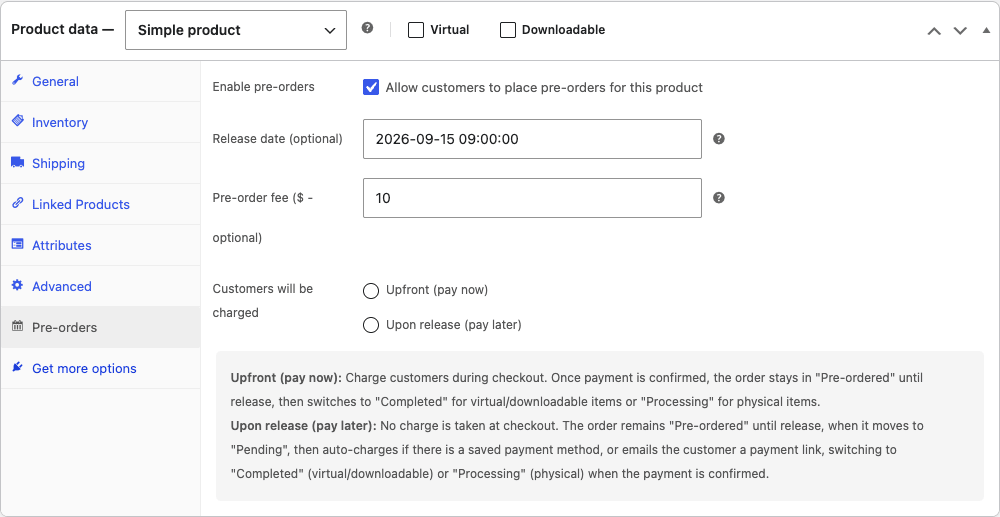
The steps:
- Edit the product and open the Pre-orders tab in Product Data.
- Tick "Enable pre-orders" to allow customers to place pre-orders for this product.
- Set the release date (the "Available on" date shown to customers). You can leave it open-ended if you genuinely don’t know yet, but a date converts better.
- Add a pre-order fee if you want, an optional surcharge for the privilege of reserving early, or leave it blank.
- Choose the charge mode, Upfront (pay now) or Upon release (pay later), per the section above.
- Publish. The product now shows "Pre-order now" and the release date on the front-end.
Tip: set the release date a little later than your true target. Buyers forgive "it arrived early" every time and forgive "it’s late" never. A small buffer protects the one thing a pre-order runs on, trust.
There’s also a global Settings tab under WooCommerce » Pre-Orders worth a one-time look. It lets you reword the pre-order button and the messages shown on the product, shop, and cart pages (with {availability_date} and {order_total} tokens), and it has two switches worth knowing. Automatically enable pre-orders for out-of-stock products flips any sold-out item with a future date into a pre-order, which is how you bridge the gap between "out of stock" and a true restock. And Disable automatic pre-order processing is the one to turn on for a staging site, so test pre-orders never auto-charge a real card while you’re experimenting.
What the customer sees
All of that admin produces something clean and reassuring on the storefront. Instead of an "Add to cart" button, a pre-order product shows the release date and a "Pre-order now" button:
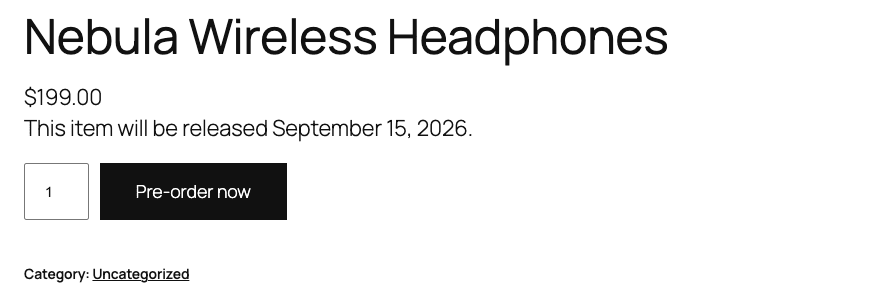
"This item will be released September 15, 2026" plus "Pre-order now" tells the buyer exactly what they’re committing to. If you chose pay-later, they aren’t charged at checkout; if you chose upfront, they pay now. Either way the expectation is set on the page, not buried in fine print.
You can lean into the launch energy with the built-in countdown shortcode, [woocommerce_pre_order_countdown], which renders a live timer ticking down to the availability date. Drop it on the product description or a campaign landing page and "3 days, 14 hours left to pre-order" does real work on urgency.
One behaviour to know up front, because it surprises people: a pre-order has to be bought on its own. If a customer adds a pre-order product, WooCommerce empties any regular items from their cart, and they can’t add a second pre-order alongside the first. The plugin shows a notice explaining that pre-orders must be purchased separately. It’s deliberate (a pay-later pre-order and an in-stock item can’t share one payment flow), but it’s worth knowing so it doesn’t blindside you or your customers.
Managing and fulfilling pre-orders
This is the operational half, and it’s where the plugin quietly saves you from a spreadsheet. Every pre-order is tracked under WooCommerce » Pre-Orders, on a Manage screen:

From here you can filter pre-orders by customer or product (availability date is a sortable column), and act on them in bulk. The bulk actions are Cancel, Complete, and Customer message (to email an update to everyone waiting). Each pre-order moves through a simple lifecycle, active (placed, waiting for release), completed (released and, for pay-later, charged), or cancelled. There’s also a dedicated "Pre-ordered" order status so these never get lost among your regular orders.
The part that matters most: completion is automatic. When a product’s availability date arrives, a scheduled task completes the pre-orders for it in batches, and for pay-later orders it runs the charge (or emails the payment link). You don’t have to sit there on release day clicking "complete" on every order.
Six emails keep everyone informed, more than people expect. Customers get a confirmation when they pre-order, a notice when the product is released, and one when a pre-order is cancelled. You (the admin) get a new-pre-order notification and a cancellation notice. The one worth calling out: if you change a release date, WooCommerce automatically emails affected customers a date-changed notice. That single email is your insurance against the "promised date slipped" problem in the anti-pattern section below, the customers find out before they complain.
Customers also get a self-service surface. The plugin adds a Pre-orders tab to the My Account area where a buyer can see their open pre-orders and cancel one themselves, which cuts down the "please cancel my pre-order" support tickets you’d otherwise field by hand.
That said, "automatic" is only as reliable as your store’s scheduled tasks and, for pay-later, your gateway. Which is exactly what the troubleshooting and anti-pattern sections below are about.
Who should use pre-orders: real scenarios
Pre-orders shine in specific situations. Here’s where I’d reach for them, framed as the stores that keep needing it:
- If you launch creative products (books, music, games, art): a release date plus a countdown turns anticipation into committed sales before launch day, and the order count tells you how big to print or press.
- If you sell limited drops or small batches: pre-orders gauge demand precisely so you make the right quantity, and they let true fans lock in before stock exists.
- If you sell hardware or anything import-dependent: take pre-orders while the shipment is in transit instead of losing the buyer to "out of stock".
- If you’re a maker doing made-to-order goods: charge upfront to fund materials, set an honest lead-time as the release date, and fulfil when it’s made. (If you’d rather take a partial deposit than the full amount, that’s a job for WooCommerce Deposits instead.)
- For a restock you can date: if a popular product is coming back on a known day, a pre-order captures the sale now rather than hoping the customer returns.
A quick boundary: pre-orders are for products with a future availability date. If you just want to notify people when an out-of-stock item returns (no date, no commitment), that’s a back-in-stock/waitlist tool, a different job. And if you want ongoing recurring billing rather than a one-time future purchase, that’s WooCommerce Subscriptions. The two even combine: you can pre-order a subscription product, and Pre-Orders sets the subscription’s start date to the release date, so "subscribe now, billing starts at launch" is a supported flow rather than a hack.
Don’t do this: pre-order mistakes that cost trust
Here’s the section I wish every store owner read first, because a pre-order is a promise and broken promises are expensive.
Don’t offer pay-later without a gateway that supports it. This is the big one. If you set "charge upon release" but your gateway can’t take a delayed or tokenized payment, release day becomes a manual scramble of payment-link emails, and a chunk of those never get paid. Test a full pay-later pre-order through your actual gateway before you launch, and if it can’t charge later, use upfront instead.
Don’t promise a date you can’t hit. The release date is the whole deal. Miss it and you get cancellations, chargebacks, and angry email. If your timeline is uncertain, pad the date or leave it open-ended rather than committing to a day you’ll blow past. Buyers forgive early; they punish late.
Don’t oversell stock you can’t deliver. Pre-orders make it easy to take 500 orders for 200 units. Decide your cap, and either close pre-orders at the limit or be upfront that quantities are limited. Taking money for goods you can’t ship is the fastest way to refunds and reputation damage.
Don’t ignore the auto-charge failures. For pay-later, some cards will decline on release day (expired, insufficient funds). Check your pre-order list after a release, chase the failures promptly, and don’t ship until payment clears on physical goods.
Don’t surprise customers with the "separately" rule. Because a pre-order must be purchased on its own, a customer with items already in their cart will see those cleared. Mention it on the product page so it reads as intentional, not as a bug.
Five minutes of testing and one honest date will save you a launch’s worth of cleanup.
WooCommerce Pre-Orders vs the alternatives
A couple of tools overlap here, so an honest comparison with real numbers.
WooCommerce Pre-Orders (official) costs around $129 a year. It’s the first-party choice, with both charge modes, automatic completion, a real management screen, and pre-order emails. Its strengths are reliability and that pay-later flow; its limits are the gateway requirement for pay-later and the one-pre-order-per-cart rule.
YITH WooCommerce Pre-Order runs about €100 a year (roughly $110). It covers similar ground, pre-order products, dates, deposits-style options, and fits naturally if you already run other YITH plugins. The practical difference is which plugins you already run and the specifics of its pay-later handling; on a stock WooCommerce stack the official extension is the lower-friction choice.
WooCommerce Deposits (around $79 a year) solves a related but different problem: paying for an available product in parts. You can blur the line, take a deposit on a future product, but if your real need is "buy before launch", Pre-Orders is the purpose-built tool, and if it’s "pay this off in instalments", Deposits is.
The short version: for genuine "sell before it’s available" with automatic completion and two charge modes, the official WooCommerce Pre-Orders is the purpose-built option at around $129 a year, versus roughly $110 for YITH or $79 for Deposits (which solves the partial-payment problem, not the pre-launch one). Choose by the job: future-availability product (Pre-Orders), pay-in-parts (Deposits), or recurring (Subscriptions).
Developer reference: hooks, statuses, and the countdown
WooCommerce Pre-Orders has a focused but useful developer surface, around 20 filters and a handful of actions, almost all prefixed wc_pre_orders_. Here are the ones that come up on a real store, with accurate signatures from the source.
Customize the product-page pre-order message. wc_pre_orders_product_message hands you the "Available on…" string and the product:
add_filter( 'wc_pre_orders_product_message', function ( $message, $product ) {
    return 'Ships ' . date_i18n( 'F j', WC_Pre_Orders_Product::get_localized_availability_datetime_timestamp( $product ) )
        . ', reserve yours now.';
}, 10, 2 );
Control which products can be pre-ordered. wc_pre_orders_product_can_be_pre_ordered lets you allow or deny pre-orders programmatically (for example, only for a specific category):
add_filter( 'wc_pre_orders_product_can_be_pre_ordered', function ( $can, $product, $variant ) {
    if ( ! has_term( 'launches', 'product_cat', $product->get_id() ) ) {
        return false;
    }
    return $can;
}, 10, 3 );
React when a pre-order completes. The wc_pre_orders_pre_order_completed action fires when a pre-order is released (and, for pay-later, charged), a clean place to trigger fulfilment or a custom notification:
add_action( 'wc_pre_orders_pre_order_completed', function ( $order, $message ) {
    // e.g. notify your warehouse system that this order is ready to ship
    my_warehouse_push( $order->get_id() );
}, 10, 2 );
Hook every status transition. wc_pre_order_status_changed runs on each change with the order id, old and new status, and a message:
add_action( 'wc_pre_order_status_changed', function ( $order_id, $old, $new, $message ) {
    error_log( "Pre-order $order_id: $old -> $new" );
}, 10, 4 );
Adjust which gateways are allowed. wc_pre_orders_remove_unsupported_gateways receives the available gateways and whether the cart is a charge-upon-release pre-order, so you can force a specific gateway for pay-later, and wc_pre_orders_supported_product_types controls which product types can be pre-ordered.
On top of the hooks, the lifecycle uses three pre-order statuses (active, completed, cancelled) plus a dedicated wc-pre-ordered order status, and the cron that completes pre-orders is tunable via wc_pre_orders_completion_check_interval and wc_pre_orders_complete_pre_orders_batch_size. For more control over the wider order flow, the WooCommerce developer docs cover the order and scheduled-action APIs these sit on. And the front-end countdown is the [woocommerce_pre_order_countdown] shortcode, drop it anywhere you want a timer to the release date.
Troubleshooting
The issues that actually come up, with fixes.
Customers can’t choose "pay later" at checkout. Your payment gateway doesn’t support charging later, so the plugin removes it from the checkout for upon-release pre-orders. Either switch that product to upfront charging, or use a gateway that supports tokenized/delayed payment. This is the single most common pre-order support ticket.
A customer’s cart emptied when they added a pre-order. That’s by design, pre-orders must be purchased separately, so adding one clears regular items (and you can’t stack two pre-orders). Set expectations on the product page rather than treating it as a bug.
The release date passed but orders weren’t completed or charged. Completion runs on a scheduled task (WP-Cron / Action Scheduler). On low-traffic stores cron can stall; set up a real server cron, and check WooCommerce » Status » Scheduled Actions. For pay-later, also confirm the gateway actually captured, declined cards show up as failed and need chasing.
The "Pre-order now" button isn’t showing. Confirm pre-orders are enabled on the product and the availability date is in the future. If you’re on the block checkout, test the full flow, the pay-later/gateway behaviour is the variable to verify there.
Pre-order emails aren’t sending. These ride WooCommerce’s email system, so if transactional email is broken generally (a deliverability issue), pre-order emails fail too. Fix email delivery at the WooCommerce/SMTP level first, then retest.
Performance, compatibility, and gotchas
A few honest notes after running the flow.
Block checkout is supported. Unlike some older order extensions, Pre-Orders ships a dedicated block-checkout integration (a Store API extension plus a blocks payment method), so it works on the new block-based checkout, not just the classic shortcode one. Still run one real pre-order through your actual checkout to confirm the pay-later/gateway behaviour, but you aren’t forced back to the legacy checkout to use it.
Modern WooCommerce ready. It’s an HPOS-era extension (the high-performance order storage). As with any order-adjacent plugin, run one full test pre-order, place it, then trigger completion, after a major WooCommerce update.
Mind the stock interaction. Pre-orders and stock management can interact in ways worth testing: a pre-order shouldn’t decrement stock you don’t physically have yet. Decide whether your pre-order products are stock-managed and confirm the behaviour before a launch.
Completion leans on cron. Auto-completion runs as a scheduled task in hourly batches (200 at a time by default). On a low-traffic store, WordPress’s pseudo-cron can stall, so a real server cron is worth setting up so release-day charging fires on time.
Pricing and licensing
WooCommerce Pre-Orders is sold as an official WooCommerce extension on an annual licence, around $129 a year, which includes updates and support for the term (the official documentation walks through every setting in detail). It sits at the upper-mid range for a WooCommerce extension, which reflects that it owns a whole workflow (commit, track, auto-complete, charge) rather than a single setting.
A licence covers a single site and unlocks automatic updates from your WooCommerce.com account. The plugin keeps working if the licence lapses; you just stop getting updates and support, which for a payment-adjacent plugin you’ll want to keep current.
This is where the GPL route helps. The WooCommerce Pre-Orders download on GPL Times is the same official extension under the GPL, which is the fastest way to put it on a staging store and run a real pre-order from button to completion through your own gateway. Test the part that decides everything, pay-later against your actual payment setup, before a single customer relies on it.
FAQ
What’s the difference between charging upfront and upon release?
Upfront takes full payment at checkout, like a normal order, and works with any gateway. Upon release takes no payment at checkout; the customer commits, and the plugin charges (or emails a payment link) when the product becomes available. Upon-release only works with gateways that support delayed/tokenized payment, so it’s the more powerful and the more fragile of the two. If in doubt, start with upfront.
Do customers get charged automatically on the release date?
For upfront, they’re already paid. For upon-release, the plugin attempts the charge automatically on release if there’s a saved payment method, and otherwise emails the customer a payment link. Completion runs on a scheduled task, so make sure your store’s cron is firing reliably.
Can a customer pre-order a product and buy in-stock items in the same order?
No. A pre-order must be purchased separately, adding a pre-order clears regular items from the cart, and you can’t add two pre-orders at once. It’s deliberate (a pay-later pre-order can’t share a payment flow with an in-stock item), but mention it on the product page so it doesn’t surprise people.
Does it work with my payment gateway?
For upfront charging, yes, any gateway works. For upon-release, only gateways that support charging later do, and the plugin hides the ones that don’t from the pre-order checkout. Test a pay-later pre-order through your gateway before launch; this is the most common thing that trips stores up.
Can I add a fee for pre-ordering?
Yes, there’s an optional pre-order fee per product, a surcharge added for reserving early. Leave it blank if you don’t want one. Some stores use a small fee to filter out non-serious buyers on high-demand drops.
What happens to the order status?
A pre-order sits in a dedicated "Pre-ordered" status until release. On completion it moves to Completed for virtual/downloadable products or Processing for physical ones (so you can ship). The plugin tracks each pre-order as active, completed, or cancelled on its Manage screen.
Is there a countdown timer?
Yes, the [woocommerce_pre_order_countdown] shortcode renders a live countdown to a product’s availability date. Drop it on the product description or a landing page to add urgency to a launch.
Can I set a release date I’m not sure about?
Yes, the release date is optional, you can run an open-ended pre-order. But a concrete date converts better and sets clearer expectations, so use one if you can, padded slightly to protect against slipping.
How is this different from a back-in-stock/waitlist plugin?
Pre-orders are for products with a known future availability date, where the customer commits (and often pays). A waitlist just notifies people when an out-of-stock item returns, no date, no commitment. Different jobs; pick by whether you’re selling a launch or just collecting "tell me when it’s back" sign-ups.
Do I have to renew every year?
It’s an annual WooCommerce extension licence (around $129 a year) for updates and support. The plugin keeps working after the term, but for anything touching payments and order flow you’ll want to keep updates current as WooCommerce evolves.
Final thoughts
WooCommerce Pre-Orders solves a specific, money-shaped problem: demand that shows up before the product does. Instead of turning that buyer away with an "out of stock" button, you capture the order, set a clear release date, and either take payment now or on launch, all tracked and auto-completed so you’re not running a launch off a spreadsheet.
It’s honest about its constraints, and so should you be. The charge mode is the decision that matters: upfront is bulletproof and works everywhere, while upon-release is more inviting but leans entirely on a gateway that can charge later. Get that right, set a date you can actually hit, and pre-orders become one of the most reliable ways to turn anticipation into revenue.
If you’re launching anything, put it on a staging store, build one pre-order product, and run an order all the way through to completion, pay-later flow included. That single test will tell you everything about whether pre-orders fit your store and your gateway, before a real customer is the one finding out.