

WordPress SEO is dominated by three plugins: Yoast SEO, Rank Math, and All in One SEO. They share roughly the same feature set (title and meta editor, XML sitemap, schema markup, social previews) and roughly the same audience. SmartCrawl Pro is the fourth-place contender most people overlook because WPMU DEV’s brand sits in the agency/Smush/Hummingbird corner rather than the SEO corner. That’s a shame, because SmartCrawl is genuinely lighter than Yoast, the admin UI is the cleanest in the category, and the Lighthouse + IndexNow integrations are unique to the WPMU DEV stack.
This article walks through what SmartCrawl Pro is, what its free version covers, how it compares to Yoast / Rank Math / AIOSEO, every module the plugin ships (title and meta, sitemap, schema, social, SEO health, Lighthouse, IndexNow), the developer hook surface, and the gotchas to know.
Table of contents
- What SmartCrawl Pro actually is
- Free SmartCrawl versus SmartCrawl Pro
- SmartCrawl vs Yoast vs Rank Math vs AIOSEO
- Who SmartCrawl is the right pick for
- Installing SmartCrawl
- The SmartCrawl dashboard
- Title and meta module
- SEO Health audit
- XML sitemaps
- Schema markup
- Social previews and OpenGraph
- Instant Indexing via IndexNow
- Settings and Advanced Tools
- Developer reference
- Performance impact
- Common gotchas
- Pricing
- FAQ
- Final thoughts
What SmartCrawl Pro actually is
SmartCrawl is a WordPress SEO plugin from WPMU DEV (Incsub). It covers all the standard SEO bases: title and meta tag editor per-post and per-post-type, XML sitemap generator, Schema.org JSON-LD markup for posts/pages/products, OpenGraph + Twitter Card social meta, SEO health audit (a checklist of common issues), Lighthouse PageSpeed audits inside WP admin, and IndexNow integration for instant indexing in Bing and Yandex.
The plugin is multisite-aware (network-active) and works on both single-site and multisite WP installs. It’s the WPMU DEV stack’s answer to Yoast, same job, slightly different opinion on what matters.
Free SmartCrawl versus SmartCrawl Pro
Knowing the split prevents you from paying for features the free version already gives you.
Free SmartCrawl includes
- Title and meta tag editor (per-post, per-post-type, per-taxonomy)
- XML sitemap generator with custom CPT support
- Schema markup for posts, pages, custom types
- OpenGraph + Twitter Card social previews
- Robots.txt editor
- Breadcrumbs widget + shortcode
- SEO Health audit (basic checks)
- Per-post SEO + readability analysis
SmartCrawl Pro adds
- Lighthouse integration. Run PageSpeed Insights audits directly inside WP admin, get the same scores Chrome users see.
- Instant Indexing (IndexNow). Push new posts to Bing and Yandex via the IndexNow protocol the moment they’re published. Reduces indexing lag from days to minutes.
- Advanced Schema. More schema types (Recipe, HowTo, FAQ, Local Business) with per-post configuration.
- 301 / 302 Redirects manager.
- WooCommerce schema (Product schema with offers, ratings, availability).
- Schedule SEO audits. Run health checks on a schedule, get email reports.
- Premium support.
If you have a small blog and just need title/meta + sitemap + basic schema, the free version is enough. If you want Lighthouse audits and IndexNow inside WP admin, Pro is the unlock.
SmartCrawl vs Yoast vs Rank Math vs AIOSEO
The four big WordPress SEO plugins. Honest comparison.
SmartCrawl
- Pros. Lightest of the four. Cleanest UI. Lighthouse + IndexNow built in (rare). Bundled if you already pay for WPMU DEV.
- Cons. Smallest community. Fewer YouTube tutorials.
Yoast SEO
- Pros. Industry leader. Largest tutorial library. Mature content analysis. Strong Local SEO add-on.
- Cons. Heavier than the alternatives. UI feels older. Aggressive upsell prompts.
Rank Math
- Pros. Largest free-tier feature set. Modern UI. Bundles many features as free (sitemap, schema, redirects).
- Cons. Smaller agency reputation than Yoast.
AIOSEO (All in One SEO)
- Pros. Long history. Strong for non-technical users. complete tutorials.
- Cons. Mid-tier in terms of polish. Most features paywalled.
We cover Yoast SEO Premium, Rank Math Pro, and All in One SEO elsewhere on the blog.
If you’re already on WPMU DEV’s plugin stack (Smush, Defender, Hummingbird, Forminator), SmartCrawl is the obvious pick because everything plugs into the same WPMU DEV Hub. Otherwise pick by ecosystem familiarity.
Who SmartCrawl is the right pick for
Three audiences.
Sites already running WPMU DEV plugins
If you have Smush, Defender, Hummingbird, or Forminator active, SmartCrawl slots into the same admin stack. The "WPMU DEV" sidebar already exists; SmartCrawl just adds another submenu. The unified Hub manages all of them together.
Agencies running many client sites
WPMU DEV’s licensing covers unlimited sites once you’re on the membership. For an agency running 50 client sites, SmartCrawl on every site is cheaper than 50 Yoast Premium licenses (or one Yoast Premium agency license, which costs even more).
Sites that want Lighthouse audits in WP admin
Most SEO plugins don’t run Lighthouse natively. They link out to PageSpeed Insights. SmartCrawl runs the audit inside WP admin and shows results inline. For non-technical clients who don’t know what PageSpeed Insights is, having the audit "just appear" in the SmartCrawl dashboard is a real UX win.
Installing SmartCrawl
Standard WordPress plugin install.
Plugins -> Add New -> Upload Plugin -> smartcrawl-pro.zip -> Install Now -> Activate. After activation, a "SmartCrawl Pro" menu appears in the WP admin sidebar (free version shows just "SmartCrawl").
First-run setup
SmartCrawl shows a "Quick setup" modal on first launch with toggles for the main features: SEO & Readability Analysis, Sitemaps, Robots.txt, OpenGraph & X Cards. All on by default. Click the X to dismiss, or accept the defaults and the modal closes.
The defaults are sensible, title and meta on, sitemap on, OpenGraph on, robots.txt managed by SmartCrawl. Most sites don’t need to change anything from this baseline.
The SmartCrawl dashboard
SmartCrawl Pro -> Dashboard is the central overview.
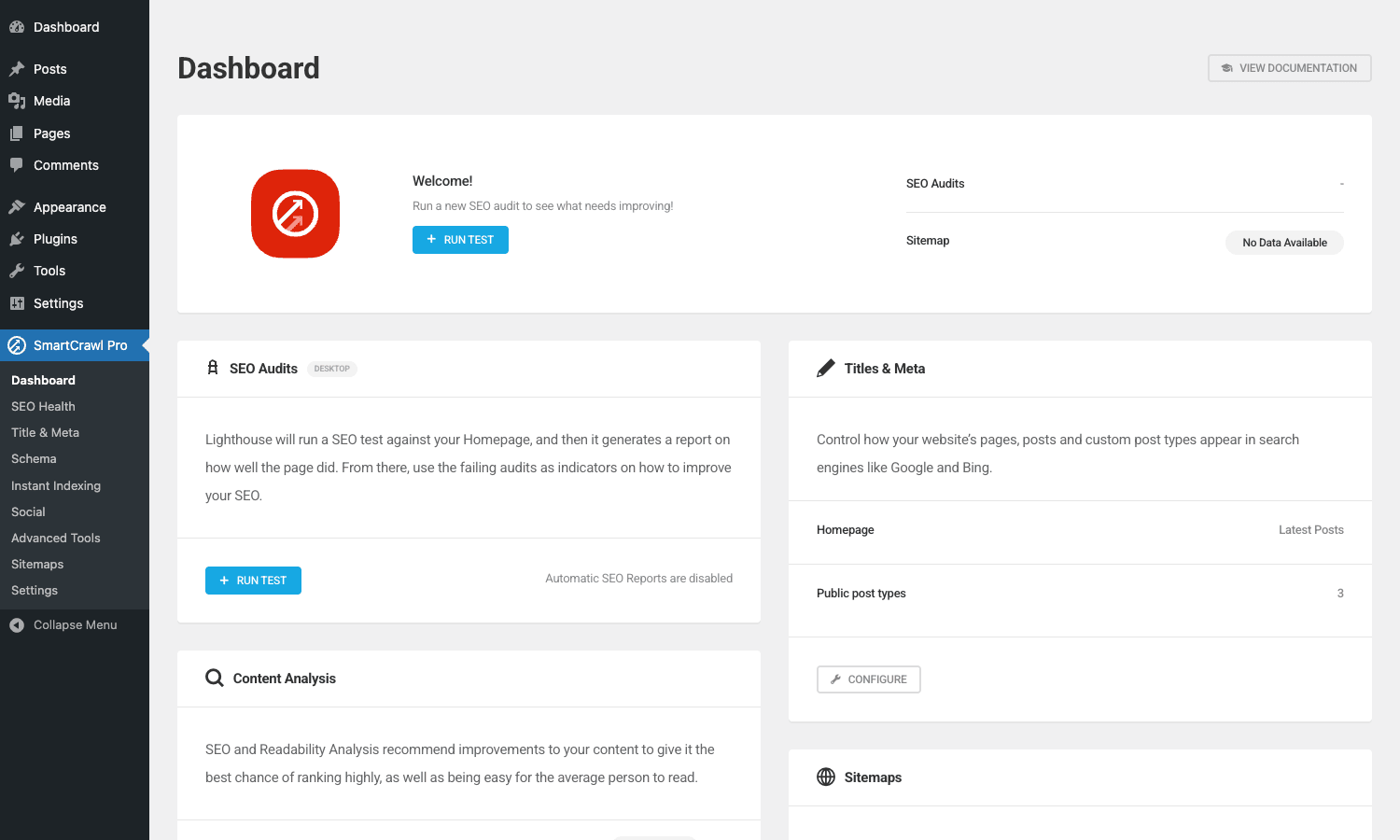
The cards on the dashboard:
- Welcome / SEO Audits. Run a Lighthouse SEO audit against your homepage. Results show below.
- SEO Audits status. Latest audit timestamp and the audit count.
- Sitemap. Status of your XML sitemap.
- Titles & Meta. Whether title/meta templates are configured per post type. Quick link to configure.
- Content Analysis. Whether SEO + readability analysis runs on each post edit. Quick link to settings.
- Sitemaps detailed view.
The dashboard is read-only. Each card has a Configure button that opens the relevant module.
The sidebar:
- Dashboard
- SEO Health
- Title & Meta
- Schema
- Instant Indexing
- Social
- Advanced Tools
- Sitemaps
- Settings
That’s the full SmartCrawl admin in one screen.
Title and meta module
SmartCrawl Pro -> Title & Meta is the per-post-type configuration.
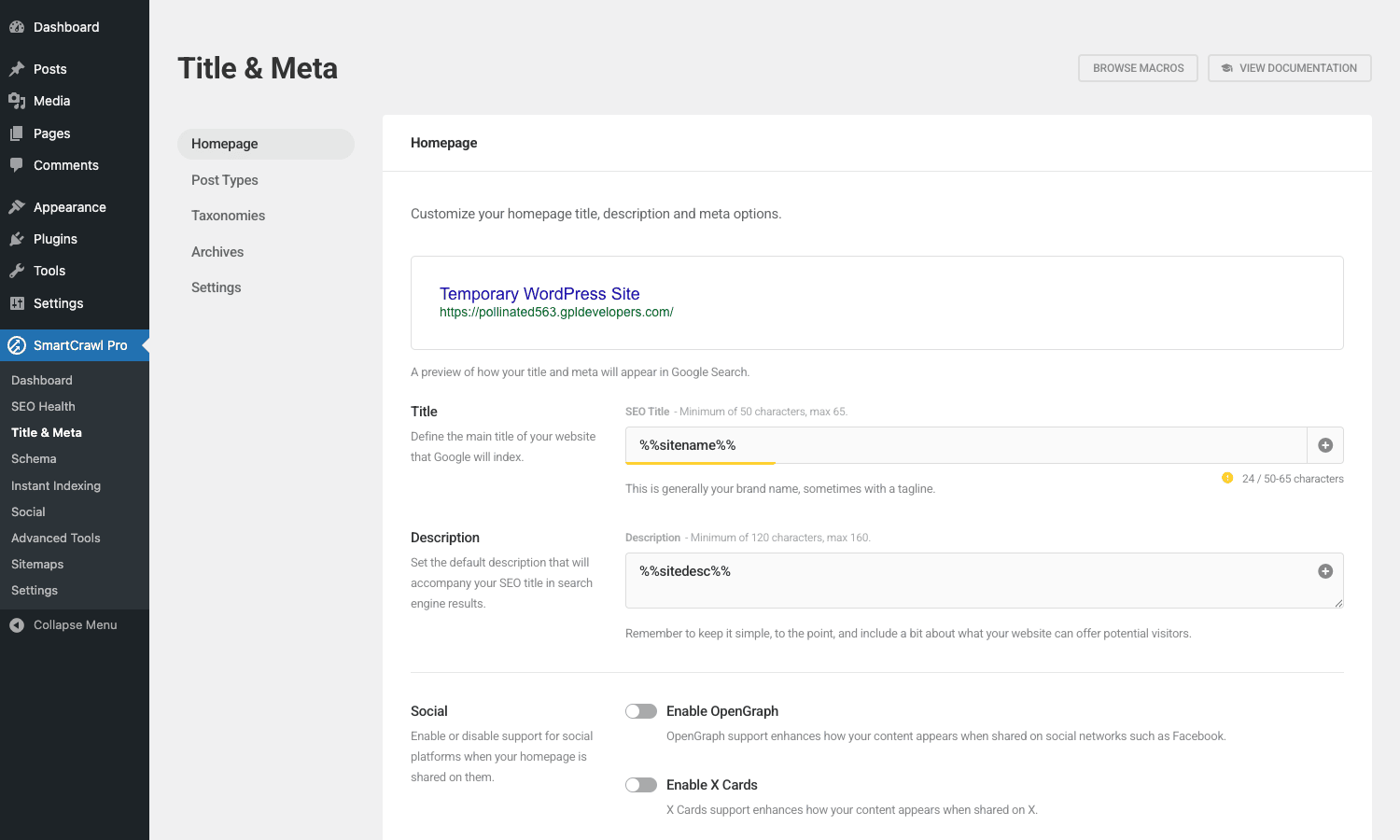
Per post type (posts, pages, custom CPTs), you set:
- Title template.
%title% - %sitename%is the default. Replace with whatever pattern fits your SEO strategy. - Meta description template. Inherits from the post excerpt by default, or you can set a custom pattern.
- Default robots meta. Index/noindex, follow/nofollow.
- Canonical URL handling. Whether to emit a canonical tag pointing to the post permalink.
Per-post overrides are available in the post editor (a "SmartCrawl" meta box appears below the content editor). For each individual post, you can override the title, description, and robots meta, useful for the homepage or a flagship landing page where you want bespoke values.
The merge tag system supports %title%, %sitename%, %sep% (separator), %category%, %tag%, %date%, %author%, %excerpt%, and several others. Combine them into the template and SmartCrawl resolves at output time.
For taxonomies (categories, tags, custom taxonomies), there’s a separate sub-tab with the same template-based approach.
SEO Health audit
SmartCrawl Pro -> SEO Health runs an audit against your site.
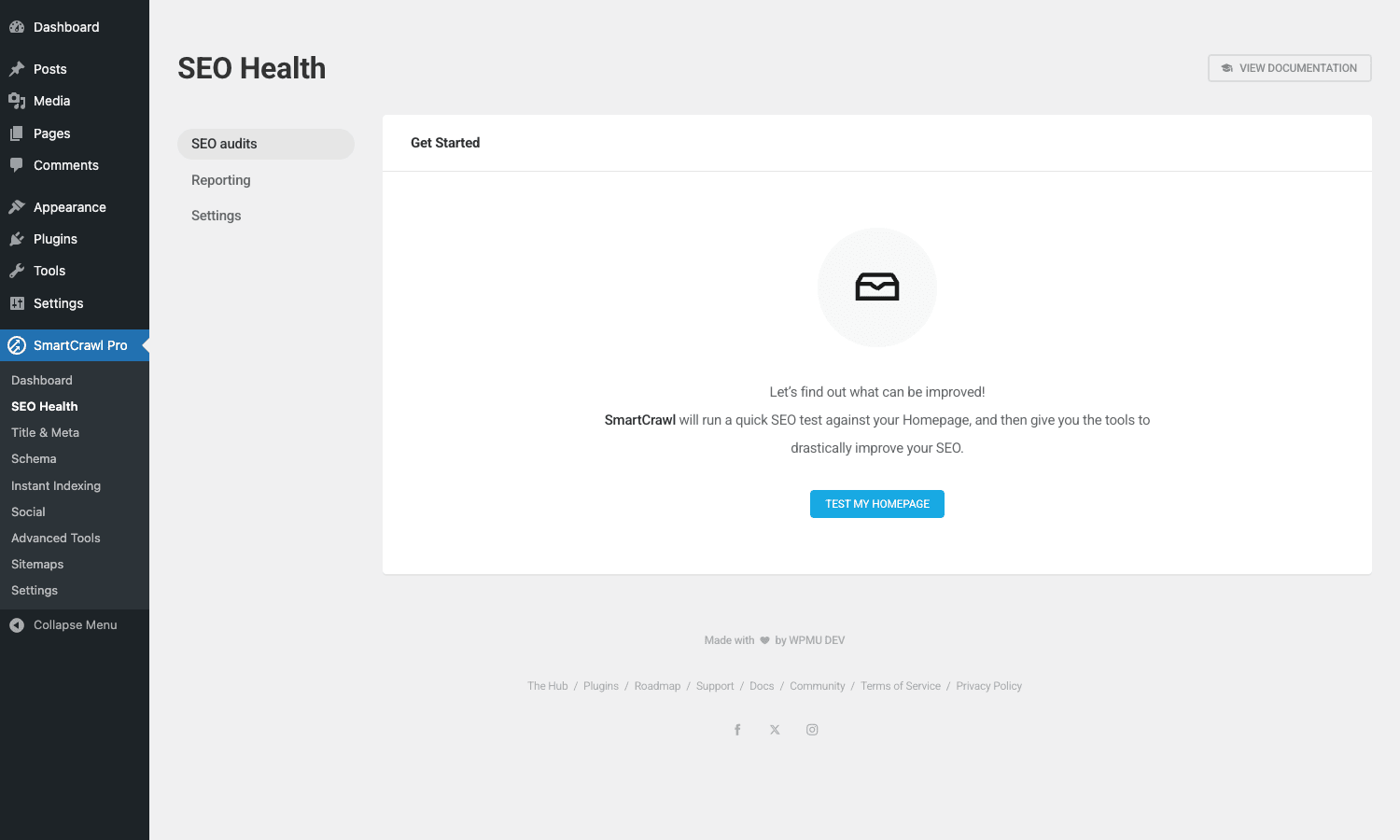
The audit checks for common SEO problems:
- Missing title tags
- Missing meta descriptions
- Duplicate titles or descriptions
- Pages excluded from sitemap unintentionally
- Slow page load times (Lighthouse score < threshold)
- Broken internal links
- Missing alt text on featured images
- Posts noindex’d by accident
- Missing schema on key pages
- Robots.txt blocking important paths
Each issue has a severity level and a "Fix it" link that opens the relevant settings page. The audit is rerun on demand or on a schedule (Pro feature).
The list of checks is fixed (not user-extensible), but each check has settings for thresholds, e.g., the "title too long" check defaults to 60 characters, configurable in Settings.
For agencies running monthly SEO reports, the audit’s CSV export gives you a starting point. Combine with Google Search Console data for a complete picture.
XML sitemaps
SmartCrawl Pro -> Sitemaps configures the XML sitemap generator.
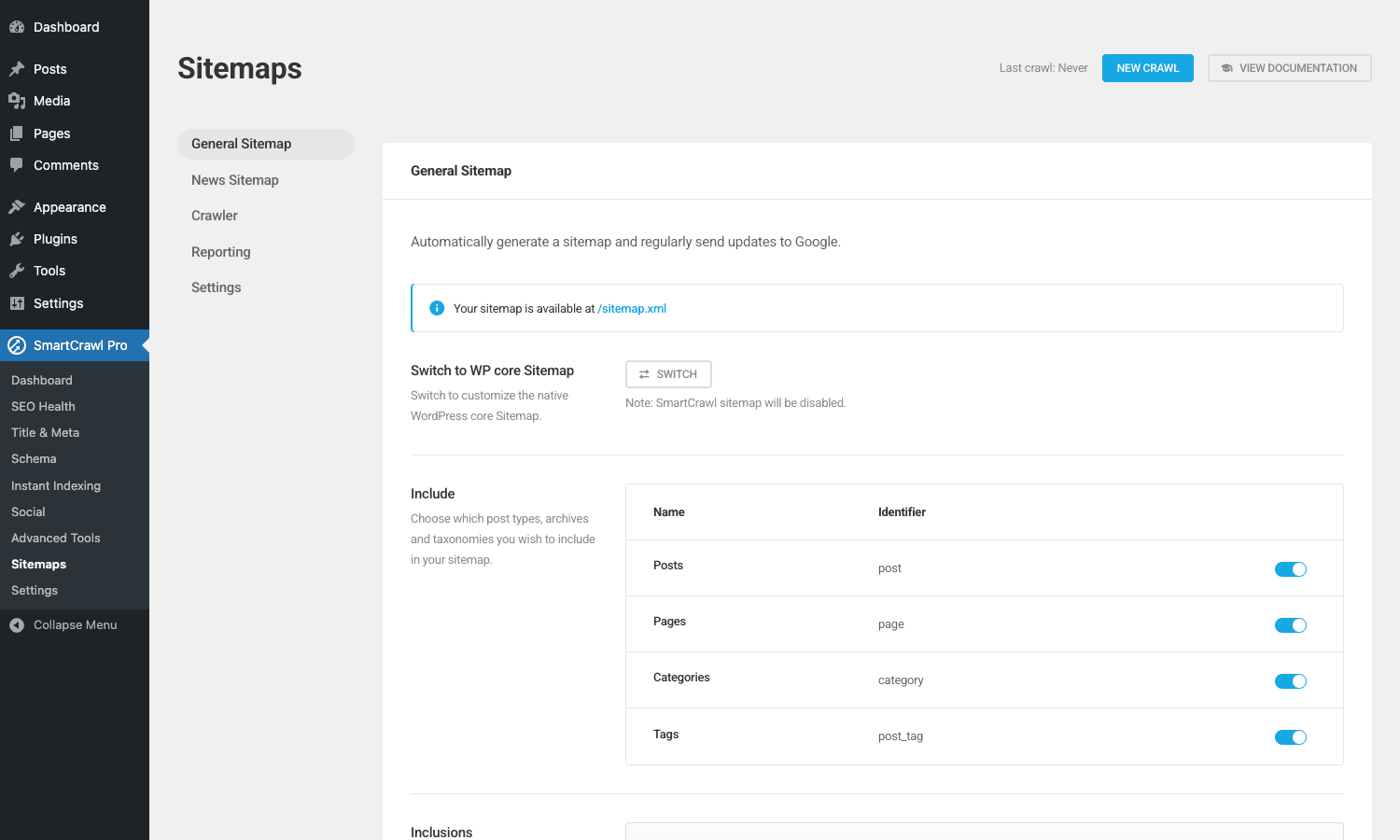
The sitemap is auto-generated at /sitemap.xml. SmartCrawl’s sitemap features:
- Per-post-type inclusion. Include or exclude any post type from the sitemap.
- Per-taxonomy inclusion. Include category/tag archives.
- Author archives toggle.
- Excluded URLs. List specific URLs to exclude (e.g., your privacy policy or a thank-you page).
- Image inclusion. Whether to include image URLs alongside page URLs.
- News sitemap (Pro). For Google News-eligible sites.
- Video sitemap (Pro). For sites with significant video content.
Submit /sitemap.xml to Google Search Console once. SmartCrawl pings Google whenever you publish new content, so you don’t need to resubmit per post.
For very large sites (10,000+ URLs), SmartCrawl splits the sitemap into multiple files automatically (Google’s limit is 50,000 URLs per file).
Schema markup
SmartCrawl Pro -> Schema is the structured data engine.
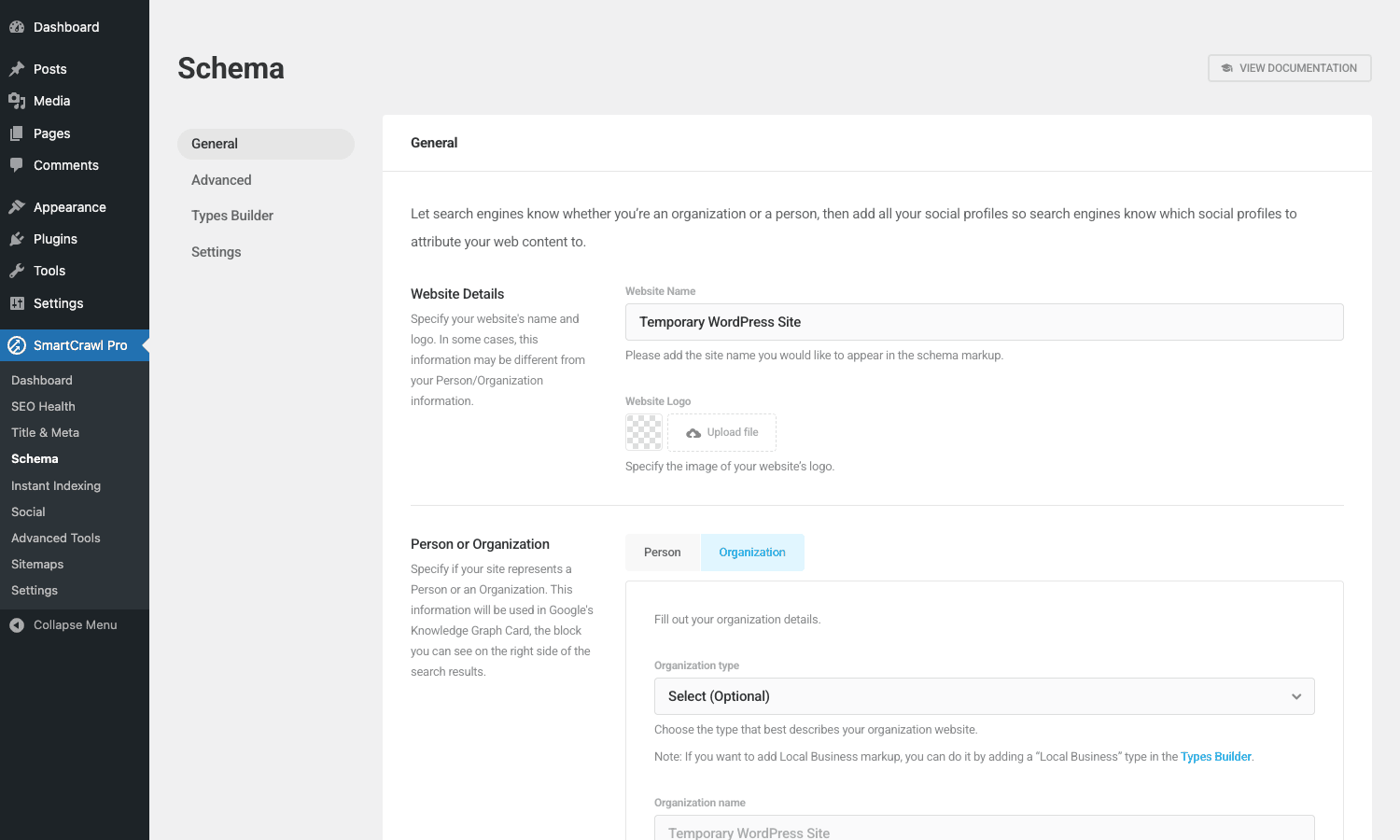
SmartCrawl emits JSON-LD schema for:
- Organization (or Person, for personal sites). Sitewide schema on every page.
- WebSite with search action (enables the Google search box for your domain).
- Article schema on individual posts.
- BlogPosting schema (subtype of Article) on blog posts.
- Product schema on WooCommerce products (Pro adds offers, ratings, availability).
- LocalBusiness schema (for businesses with a physical location).
- Recipe / HowTo / FAQ schema (Pro).
- Event schema (if you also run an events plugin).
Per-post schema override is in the post editor, pick a schema type from the dropdown to specify how this specific post should be marked up.
Validate output via Google’s Rich Results Test. SmartCrawl’s defaults pass without modification for ~95% of cases.
Social previews and OpenGraph
SmartCrawl Pro -> Social configures how your pages appear when shared on social networks.
For each post type, you configure:
- OpenGraph image. Default fallback if a post doesn’t have a featured image.
- OpenGraph title and description templates.
- Twitter / X Card type. Summary (small image) or Summary with Large Image (recommended for most sites).
- Default Twitter / X handle for
og:twitter:site. - Facebook App ID if you have one.
The per-post override (in the post editor) lets you customize the OG image, title, and description per post, important for top-performing content where you want a hand-tuned share preview.
Pinterest Rich Pins, LinkedIn previews, and Slack unfurls all use OpenGraph data, so configuring OG once helps every platform.
Instant Indexing via IndexNow
SmartCrawl Pro -> Instant Indexing is a Pro feature that connects your site to the IndexNow protocol.
IndexNow is an open protocol (Bing + Yandex + a few others) that lets your site push new URLs to search engines the moment they’re published, instead of waiting for the crawler to discover them. Google doesn’t support IndexNow (yet); Bing and Yandex do.
To enable:
- Get an IndexNow API key from
https://www.bing.com/indexnow. - Paste it in SmartCrawl’s Instant Indexing tab.
- Save.
After enabling, every new published post or page is pushed to Bing/Yandex within seconds. For news sites or sites where time-to-index matters (breaking news, e-commerce flash sales), this reduces indexing lag from hours/days to seconds.
For Google, the closest equivalent is the Google Indexing API (separate, harder to set up, requires service account auth, and only officially supports JobPosting + BroadcastEvent schemas).
Settings and Advanced Tools
SmartCrawl Pro -> Settings and Advanced Tools cover the global and edge-case configurations.
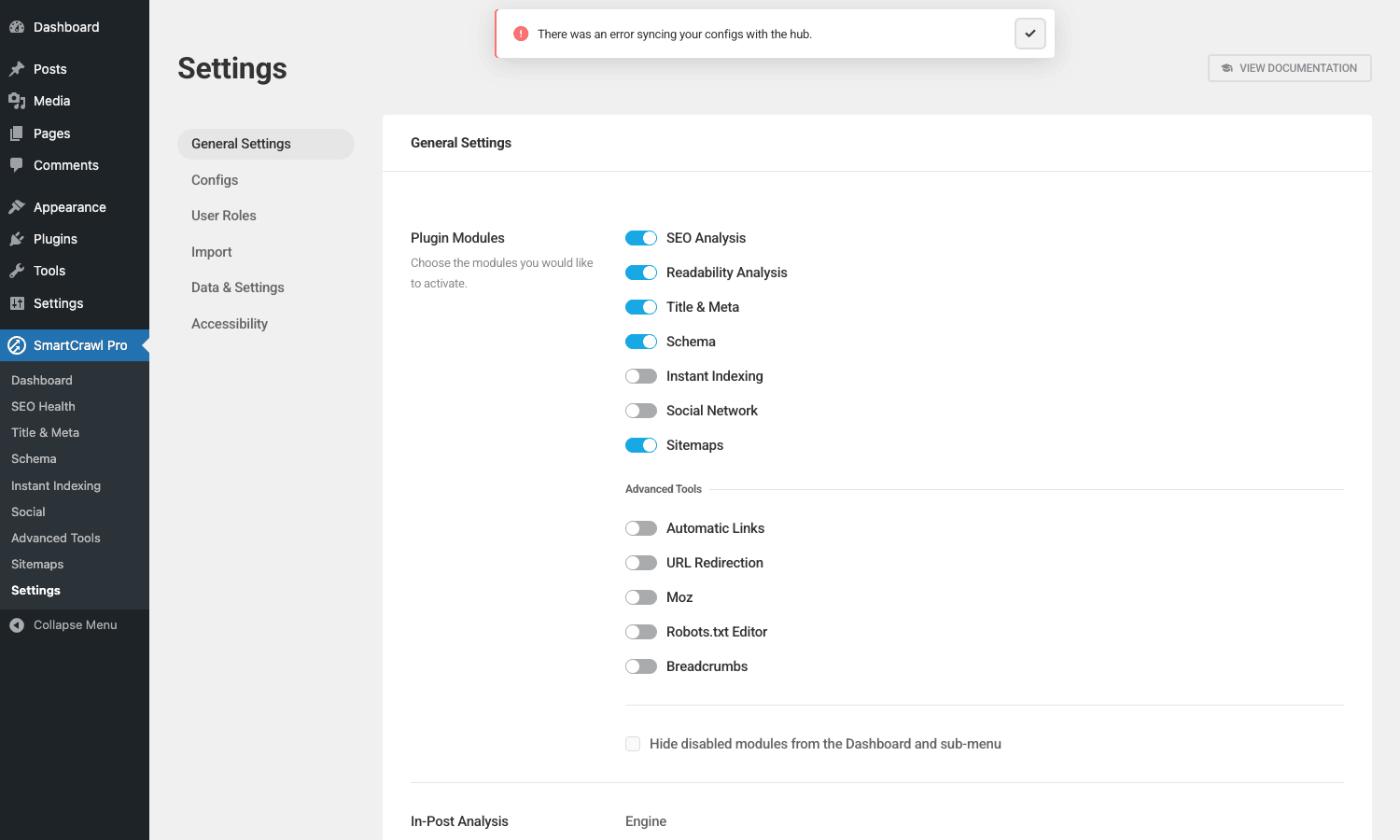
Settings tab covers:
- Plugin behavior toggles (whether to load JS on frontend, whether to show in admin bar)
- Permissions (which user roles can see SmartCrawl in the admin)
- Data preservation (whether to keep settings on uninstall)
- Notifications (where to email audit results)
Advanced Tools covers:
- Robots.txt editor (override the auto-generated default)
- Redirects manager (basic 301/302 redirects with logging)
- Trailing slash behavior
- Force www / non-www / no preference
For most sites, Settings is set-once and Advanced Tools is rarely touched.
SEO + Readability analysis on each post
A meta box below the post editor runs two analyses every time you save: SEO Analysis and Readability.
The SEO Analysis checks:
- Focus keyphrase in the title, slug, first paragraph, image alt text, content.
- Keyphrase density (target 0.5%-2.5%).
- Internal and outbound link count.
- Meta description length and keyphrase inclusion.
- Subheading distribution.
- Image count vs content length.
The Readability Analysis checks:
- Sentence length (under 20 words preferred).
- Paragraph length (under 150 words preferred).
- Passive voice usage (under 10% target).
- Transition words.
- Subheading distribution (one subheading per 300 words).
- Flesch Reading Ease score.
Each check shows a green/orange/red indicator with specific guidance ("Your meta description is too short," "Add the focus keyphrase to your first paragraph"). The recommendations are non-blocking, you can publish anyway. Most professional writers ignore the readability score and trust their own judgment; the SEO score is genuinely useful as a sanity check.
The focus keyphrase field lets you set a primary keyword per post. SmartCrawl then optimizes the analysis around that keyword. Without a focus keyphrase, the analysis runs against the post title.
Developer reference
The hook surface is reasonable. Here are the hooks worth knowing.
Customize the admin menu title
smartcrawl_admin_settings_menu_title filters the title shown in the WP admin sidebar.
add_filter( 'smartcrawl_admin_settings_menu_title', function() {
 return 'SEO Tools';
} );
Useful when you white-label SmartCrawl for clients who shouldn’t see the WPMU DEV branding.
Hook into sitemap generation
smartcrawl_sitemap_extra_links lets you inject custom URLs into the sitemap that SmartCrawl doesn’t discover automatically (e.g., a headless frontend URL that maps to a WP post).
add_filter( 'smartcrawl_sitemap_extra_links', function( $links ) {
 $links[] = [
 'url' => 'https://example.com/static-page',
 'priority' => 0.8,
 'changefreq' => 'monthly',
 ];
 return $links;
} );
Customize schema output
smartcrawl_schema_data filters the JSON-LD output before it’s emitted. Use to inject custom fields or override SmartCrawl’s defaults.
add_filter( 'smartcrawl_schema_data', function( $schema, $post_id ) {
 if ( get_post_type( $post_id ) === 'product' ) {
 // Add custom property to product schema
 $schema['gtin'] = get_post_meta( $post_id, '_gtin', true );
 }
 return $schema;
}, 10, 2 );
Hook into the SEO Health audit
smartcrawl_seo_health_checks lets you add custom checks to the SEO audit.
add_filter( 'smartcrawl_seo_health_checks', function( $checks ) {
 $checks['my_custom_check'] = [
 'title' => 'Custom check: posts have featured images',
 'callback' => 'my_check_featured_images_callback',
 'severity' => 'warning',
 ];
 return $checks;
} );

function my_check_featured_images_callback() {
 $posts_without_image = get_posts( [
 'post_type' => 'post',
 'meta_query' => [
 [ 'key' => '_thumbnail_id', 'compare' => 'NOT EXISTS' ],
 ],
 'fields' => 'ids',
 'numberposts' => -1,
 ] );
 return [
 'passed' => count( $posts_without_image ) === 0,
 'message' => sprintf( '%d posts missing featured image.', count( $posts_without_image ) ),
 ];
}
Modify title and meta templates
smartcrawl_title_template and smartcrawl_description_template let you override the rendered title/meta per post programmatically.
add_filter( 'smartcrawl_title_template', function( $title, $post ) {
 if ( $post && $post->post_type === 'product' ) {
 $price = get_post_meta( $post->ID, '_price', true );
 return $title. ' from $'. $price;
 }
 return $title;
}, 10, 2 );
Push to IndexNow programmatically
do_action( 'smartcrawl_indexnow_submit', $url );
Trigger an IndexNow push for a specific URL outside of the auto-submit flow.
Performance impact
SmartCrawl is the lightest of the four major WP SEO plugins.
- Frontend payload. ~10KB JS + ~5KB CSS. Loads only on pages with SmartCrawl-rendered breadcrumbs or analysis widgets.
- Admin payload. SmartCrawl’s admin loads its own React app (~100KB JS). Only on SmartCrawl admin pages.
- Database. SmartCrawl uses
wp_optionsfor global settings andwp_postmetafor per-post overrides. Light footprint. - Sitemap generation. Computed on-demand from the database. For sites with 10,000+ posts, the sitemap regeneration takes 1-2 seconds; cacheable in Object Cache.
For comparison, Yoast’s full Premium bundle is ~3x heavier in admin JS payload.
If you also run WP Rocket, the SmartCrawl-emitted JSON-LD and meta tags are cached in your page HTML so there’s no per-request cost.
Common gotchas
Five things to know.
Conflicting SEO plugins
Don’t run SmartCrawl + Yoast + Rank Math simultaneously. They compete for the title tag, the meta description, the OpenGraph image, the sitemap URL. Pick one, deactivate the others.
For migrating from Yoast/Rank Math to SmartCrawl, you’d export per-post SEO meta from the old plugin and import into SmartCrawl via a custom script (no one-click migrator exists).
Sitemap URL
SmartCrawl’s sitemap is at /sitemap.xml (not /sitemap_index.xml like Yoast). Update Google Search Console with the new URL if you migrate.
Schema duplication
If you have both SmartCrawl and a separate schema plugin like Schema Pro, both emit Product/Article schema and Google sees duplicates. Pick one provider.
Lighthouse audit accuracy
SmartCrawl’s Lighthouse audit runs against your live site URL from a WPMU DEV cloud server. Results may differ from your own Chrome’s PageSpeed Insights because of different network conditions / location. Treat the score as a relative measure (improving over time) rather than an absolute number.
IndexNow doesn’t equal Google ranking
IndexNow pushes new URLs to Bing/Yandex. Google doesn’t use IndexNow. For Google indexing, you still rely on the standard crawl mechanism (sitemap submission + organic discovery via internal links).
Breadcrumbs
SmartCrawl includes a breadcrumbs feature that most SEO plugins also offer. It generates <nav> markup showing the visitor’s position in the site hierarchy (Home > Category > Post Title) with proper schema.org BreadcrumbList JSON-LD attached.
Configure breadcrumbs in Advanced Tools -> Breadcrumbs:
- Separator character (>, /, or custom).
- Whether to show the homepage link first.
- Whether to truncate long titles.
- Custom prefix text ("You are here:").
Display breadcrumbs via the [smartcrawl_breadcrumb] shortcode, a Gutenberg block, a sidebar widget, or programmatically by calling the breadcrumb function in your theme template. The schema is emitted whether or not the visible breadcrumb is shown, so Google sees the structure even without the visual breadcrumb.
For SEO, breadcrumbs help Google understand site structure and can appear in search results as the breadcrumb trail under the page title (instead of the bare URL). This improves click-through rate by 5-10% on average for sites with deep hierarchies.
Pricing
Free SmartCrawl on WordPress.org. Genuinely useful for basic-to-mid SEO needs.
SmartCrawl Pro is sold by WPMU DEV at a starting price around $7-10/month for a single site, with tiered multi-site pricing and a full WPMU DEV membership bundle that includes Smush, Hummingbird, Defender, Forminator, and Branda.
Lifetime updates via re-download.
FAQ
Can I migrate from Yoast SEO to SmartCrawl?
Yes, with effort. There’s no one-click migration tool. You’d export your per-post Yoast meta (title, description, canonical, robots) and import into SmartCrawl via WP All Import or a custom script. Sitewide settings need to be recreated manually.
Does SmartCrawl work with WooCommerce?
Yes. Product schema is auto-generated. Shop page title/meta templates configurable. WC categories/tags included in the sitemap.
Does it work with the block editor (Gutenberg)?
Yes. The SmartCrawl meta box appears in the block editor sidebar, same as Yoast’s. Per-post overrides edit inline.
Will SmartCrawl break my existing SEO if I install it?
No, assuming you deactivate the previous SEO plugin first. SmartCrawl doesn’t change permalinks or post URLs. The first 1-2 weeks of having a new plugin emitting different schema may cause Google to re-crawl, but rankings shouldn’t drop materially if your content quality stays consistent.
Does it support multisite?
Yes. SmartCrawl is network-active by default. Network admins can set sitewide defaults; subsite admins can override per-site.
Does it support multilingual sites?
Yes for WPML, Polylang, and TranslatePress. Per-language title/meta/schema. Sitemap includes hreflang annotations.
Can I edit the sitemap manually?
The XML sitemap is auto-generated from the database. You don’t edit the XML file directly; you change the source data (post types, taxonomies) via SmartCrawl settings, and the sitemap regenerates.
Does it integrate with Google Search Console?
Indirectly. SmartCrawl pings GSC’s sitemap-ping endpoint when new content publishes. For the full GSC API integration (impressions, clicks, indexation status), you’d combine SmartCrawl with Site Kit by Google or MonsterInsights.
How does IndexNow compare to Google’s Indexing API?
IndexNow is open, supported by Bing/Yandex/Seznam.cz, free, easy to set up. Google’s Indexing API is Google-only, free, but only officially supports JobPosting and BroadcastEvent schemas. For everything else, IndexNow + organic Google discovery is the typical flow.
Can I noindex specific posts?
Yes. Per-post meta box has a Robots Meta dropdown with index/noindex options. SmartCrawl emits the correct meta robots tag.
Will it work on shared hosting?
Yes. SmartCrawl is light enough to run on the cheapest shared hosting. No special PHP extensions required beyond what WordPress itself needs.
Does it support custom post types from other plugins?
Yes. Any CPT registered with show_in_rest = true or even without REST exposure is picked up by SmartCrawl. You can configure title templates, schema types, and sitemap inclusion per CPT.
Can I disable specific schema types?
Yes. Each schema type has an on/off toggle in the Schema module. Disable Product schema if you’ve configured it elsewhere; disable Article schema if your theme already emits it.
Does the SEO Health audit slow down my site?
No measurable impact. The audit runs in the WP admin context, not on frontend. It reads existing data; doesn’t crawl your own site externally.
What happens if I deactivate SmartCrawl?
Settings stay in the database. Title/meta/sitemap output stops. WordPress core’s default title and the theme’s title-tag handling take over. Reactivating restores everything.
Can I run SmartCrawl alongside Yoast or Rank Math?
Don’t. Both plugins try to emit the same tags and your output will have duplicate or conflicting OpenGraph/title tags. Pick one.
Will SmartCrawl Pro auto-update?
Through the WPMU DEV Hub yes.
Final thoughts
SmartCrawl Pro is a credible alternative to Yoast and Rank Math, particularly if you’re already invested in the WPMU DEV plugin stack. The Lighthouse integration and IndexNow support are unique enough to justify a look even if you currently run another SEO plugin. The free version covers most small-site needs; Pro is for sites needing the audit scheduling, the cloud Lighthouse runs, and the extended schema types.
The main argument against SmartCrawl is the smaller community and tutorial library, when you Google "how to do X in SmartCrawl" you get fewer answers than for Yoast. If you’re someone who reads documentation, that’s fine. If you’re someone who Googles solutions, you may prefer the more popular alternatives.
For most sites, install SmartCrawl Pro from GPL Times, run through the Quick Setup wizard, configure title/meta templates per post type, submit the sitemap to Google Search Console, and the SEO foundation is set. Most of the day-to-day work is then in writing content, which is where SEO actually gets won, regardless of which plugin you use.