

Baymard’s running tally of cart-abandonment studies puts the average somewhere around 70%. Seven out of ten people who add something to a cart leave without buying. A wishlist is not a cart, but it sits next to that statistic like a relative. The customer wants the product. They want to think about it. They want to come back when payday hits, when the wedding date is closer, when their partner finally agrees the espresso machine is reasonable. Without a wishlist, that intent goes into a tab, then a closed tab, then nothing.
YITH WooCommerce Wishlist is the most-installed wishlist plugin in the WooCommerce ecosystem. The free version on WordPress.org has over 600,000 active installs, which is roughly what you’d expect when something has been the default answer to "how do I add a wishlist?" for the better part of a decade. The Premium release is what we’re walking through here, because the free version’s job ends roughly where serious storefronts begin: at a single wishlist per user, no analytics, no gift registry, and no quote requests.
Table of contents
- What YITH WooCommerce Wishlist actually is
- The features worth paying for
- How customers experience it
- Installing and getting it on the page
- A wedding-registry boutique, end to end
- Developer reference: hooks, shortcodes, tables
- Performance, compatibility, and the rough edges
- Pricing and how it stacks against the alternatives
- Closing thoughts
What YITH WooCommerce Wishlist actually is
YITH is an Italian agency that has been writing WooCommerce extensions for years. They publish dozens of plugins, most of them paired free-and-premium, and the Wishlist plugin is one of their flagship products. The free build, hosted on WordPress.org, lets a logged-in (or guest) customer save products to one list and view them on a wishlist page. Premium turns that single list into a system: multiple lists per user, sharing, privacy controls, analytics, email reminders, gift-registry mode, and the ability to ask for a quote on whatever’s on the list.
Under the hood the plugin lives in the YITH\Wishlist namespace and registers three custom database tables: yith_wcwl_lists, yith_wcwl_items, and yith_wcwl_shares. The lists table holds the wishlists themselves (one row per user-named list), items connects wishlists to product IDs (with optional quantities and dates), and shares tracks the unique tokens used for public links. The constants YITH_WCWL, YITH_WCWL_URL, and the path constants give you the references you’ll want when you’re writing custom integrations.
Practically speaking, if you’ve ever clicked a small heart icon next to "Add to Cart" on a WooCommerce store and ended up on a /wishlist/ page, there’s a strong chance it was this plugin. Plenty of premium themes ship integrations specifically for YITH’s button markup, so the visual on a real storefront tends to be cleaner than the plugin’s own default heart-outline.
The plugin doesn’t reach into WooCommerce’s core data: it stores wishlist state in its own tables, indexed by user_id for logged-in shoppers and by a session cookie key for guests. That separation is one of the reasons it survives WooCommerce upgrades without drama. When WooCommerce changes how product variations are stored, the wishlist tables don’t care, they’re just holding integer product IDs and metadata. When you uninstall the plugin, you can either drop the tables or keep them (a checkbox in the Settings tab decides), which matters if you ever roll back to the free version or migrate to a competitor.
The features worth paying for
The free version is fine for a single-list "save for later" use case. Premium earns its line in the budget when you start needing any of these:
- Multiple named wishlists per user. A customer can have a "Christmas" list and a "House move" list and a "Maybe-later" list at the same time. Each list has its own name, privacy setting, share URL, and item count.
- Public, private, and shared wishlists. Private is the default. Public lists get a clean shareable URL (
/wishlist/<list-name>/<token>/) anyone can open without logging in. Shared sits between the two: a private list you’ve shared a specific URL with, so the link works only for people you’ve handed it to. - Gift registry mode. Lets a wishlist owner mark a list as a registry, share it, and have other people buy items off it. The plugin tracks what’s been purchased so a wedding party of forty people doesn’t all buy the same toaster. There’s no separate registry plugin to install, this is built in.
- Ask an Estimate. A "Request a quote" button on the wishlist page. The customer fills in their info and the contents of the wishlist get turned into an email to the shop owner. This is the killer feature for B2B / wholesale / custom-quote stores where prices aren’t fixed. I’ve seen it used by a kitchen-fittings supplier where the customer wishlists ten cabinets and a sink and the shop owner emails back with a project price.
- Scheduled email reminders. WooCommerce sends an email to wishlist owners on a cadence you set ("3 days after last activity", "every Monday for two weeks"), nudging them about products still on the list.
- Price-drop and back-in-stock notifications. When a wishlisted product’s price drops or comes back into stock, the customer gets an email. This is the one feature you’d genuinely miss on the free version.
- Wishlist analytics. The Dashboard tab shows every wishlist on the site, filterable by privacy. There’s also a Popular tab that surfaces the most-wishlisted products. This is light analytics, useful as a directional signal (which products are people considering?), not as a substitute for a real BI tool.
- WPML and Mailchimp. Multilingual stores can translate every label per language. Mailchimp can sync wishlist owners into a list for marketing follow-up, which pairs nicely with the price-drop emails.
How customers experience it
There are two surfaces customers actually touch: the Add to wishlist button (which appears on shop loops, product pages, and the cart) and the Wishlist page itself.
The button is configurable on three axes. The first is style. You can render it as a textual link, as a button that picks up your theme’s styles, or as a custom button with its own colors and borders. The second is placement on the shop loop. Out of the box the plugin tucks the button after the Add to Cart button on the catalog grid, but you can put it before, after the title, or hide it from the loop entirely if you only want it on single product pages. The third is the icon: a built-in heart-outline by default, or you can upload your own SVG / PNG.
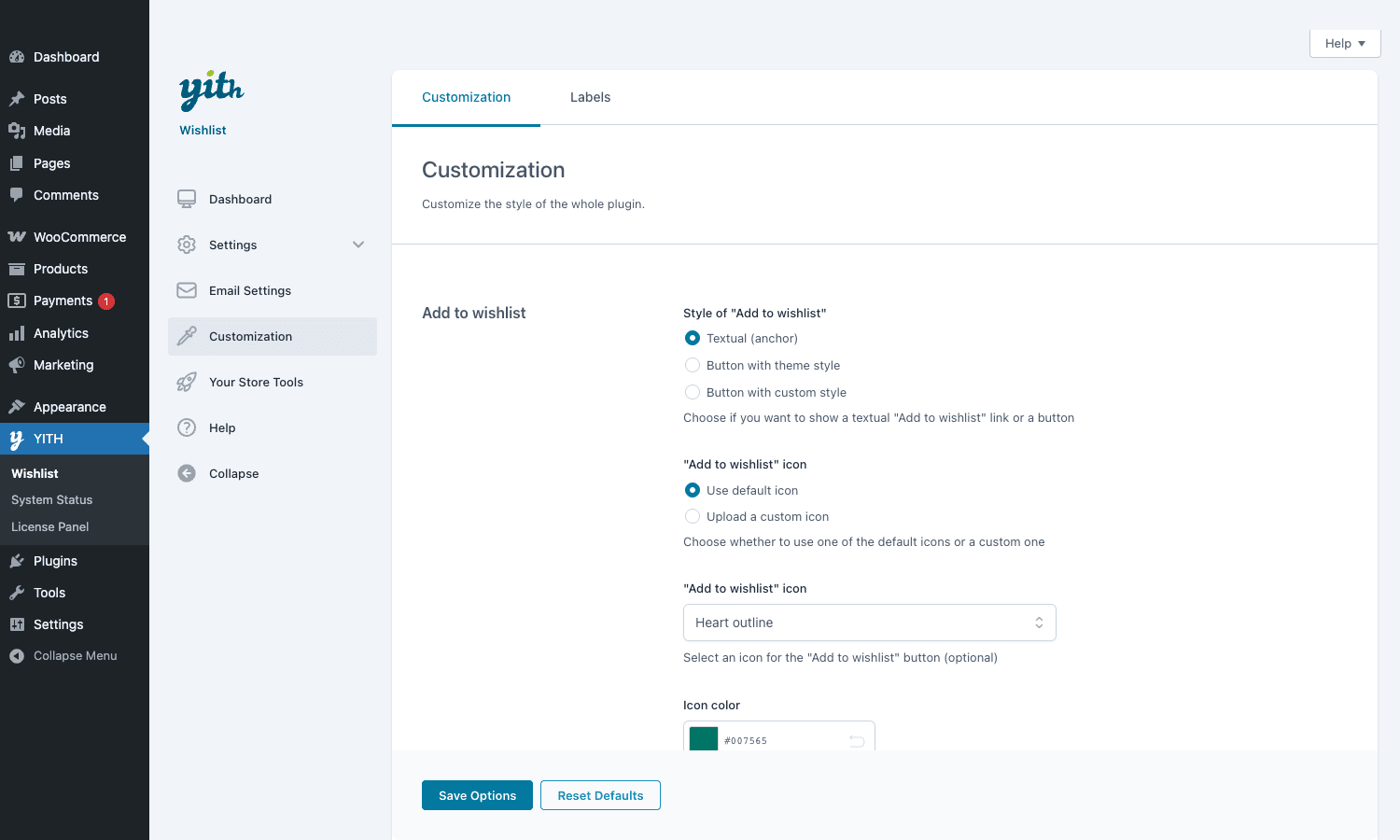
The Wishlist page is a single shortcoded page ([yith_wcwl_wishlist] lives on it) that renders a table of every list the logged-in user owns, with edit-name and edit-privacy controls per list, an Add Note field per item, and an "Add to cart" button per row. Below that table the page exposes the share controls: copy link, share by email, share to social. For guests, the plugin can store the wishlist in the session and prompt them to log in (or check out as guest) when they’re ready.
There’s a small detail worth knowing here: when a guest user adds a product to a wishlist, the plugin keeps it in a cookie until they log in or register, at which point it migrates the cookie wishlist into their account. This sounds trivial but it’s where competing plugins often drop the ball.
Installing and getting it on the page
Two scenarios, both well covered.
You already have the free YITH wishlist installed. Deactivate it before activating Premium. Premium reads the same database tables and will pick up every existing wishlist on the site, so nothing is lost. You shouldn’t run both at once because they register the same classes.
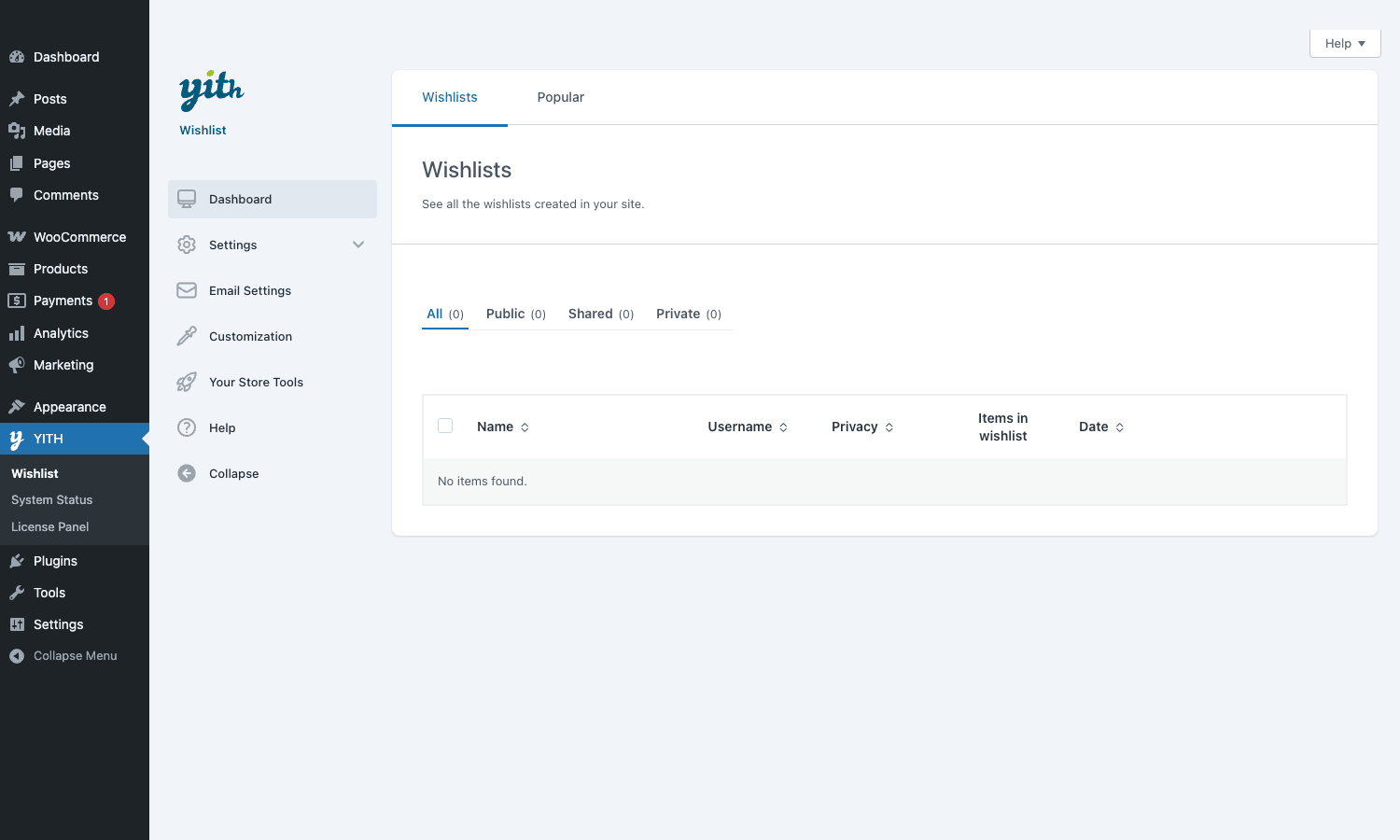
Fresh install. Drop the ZIP into wp-admin → Plugins → Add New → Upload Plugin, activate, and you’ll see a new top-level menu in the admin sidebar: YITH. Underneath it, Wishlist is one of the items. The first time you open it the Dashboard tab is empty (no wishlists have been created yet) and the left rail shows the navigation: Dashboard, Settings, Email Settings, Customization, Your Store Tools, Help.
Open Settings → Add to wishlist and you’ll find the configuration that affects every shopper. The "When a product is added to wishlist" choice decides whether the customer sees an inline notice ("Product added to wishlist") or a modal popup. The modal is usually the better choice on mobile, the notice is less intrusive on desktop. The "After product is added" group controls whether they see an Add to wishlist button (now toggled to "View wishlist"), a View wishlist link, or a Remove from list link. Most stores I’ve worked on pick "Show View wishlist link", because it puts a path forward in front of the customer instead of leaving them on the product page.
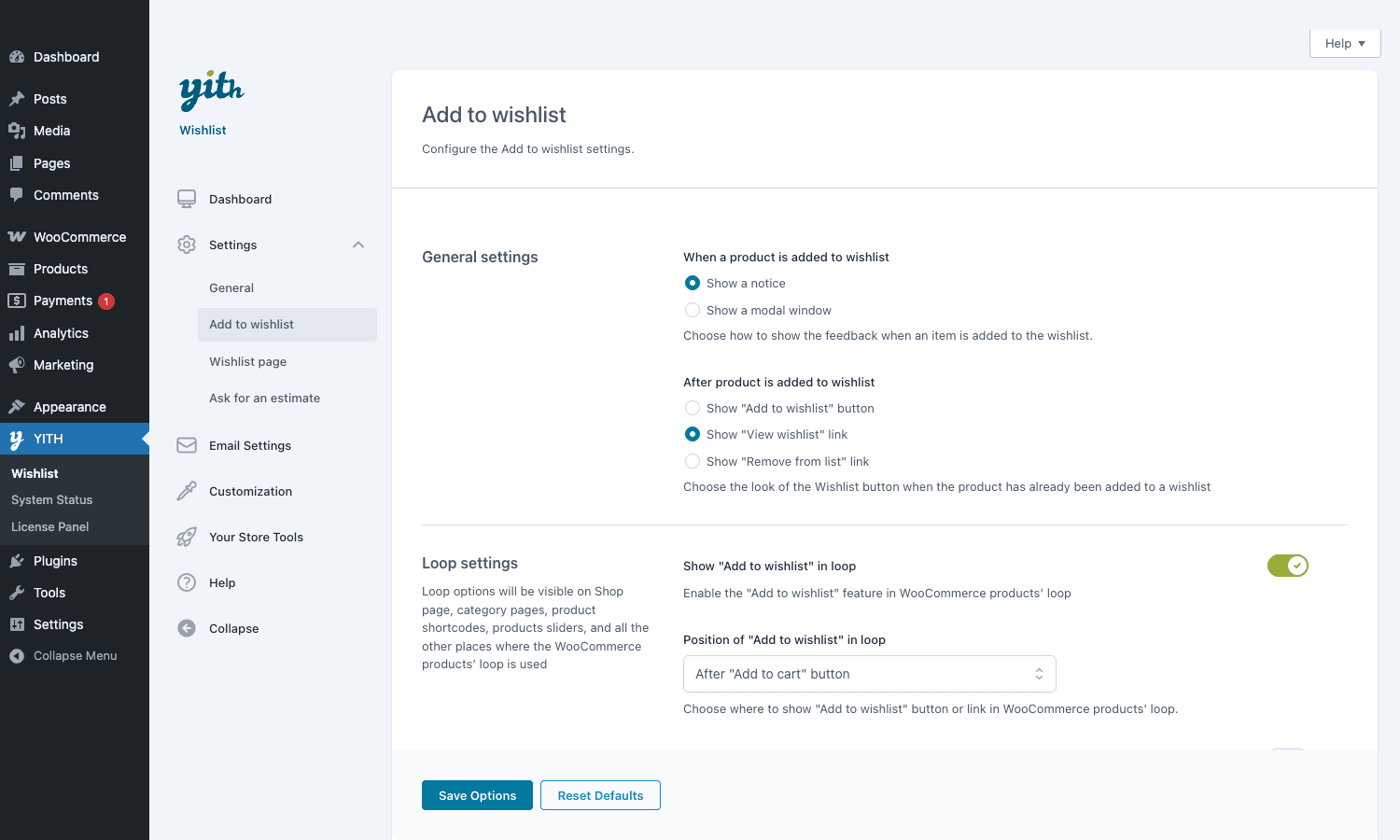
The Loop settings section is where you decide if the wishlist button appears on category and shop archive pages at all, and where exactly. "Show Add to wishlist in loop" is a single toggle, "Position of Add to wishlist in loop" is a dropdown with the typical hook points: before / after the Add to Cart button, after the product image, after the price, and so on. If your theme has its own hand-written product card layout, you might want to set this to "Use action / shortcode" and place the button manually in your template using do_shortcode( '[yith_wcwl_add_to_wishlist]' ).
Two more things worth touching during setup. First, the Wishlist page. The plugin creates one automatically on activation at /wishlist/, but you can point Settings → Wishlist page at any page on your site that contains the [yith_wcwl_wishlist] shortcode. Second, the Email Settings tab. Configure the "From" name and address, then enable the reminder, price-drop, and back-in-stock emails individually. The defaults are sensible but the copy is generic, so rewrite the subject lines and bodies to match your store’s voice.
A wedding-registry boutique, end to end
The clearest way to explain a wishlist plugin is to walk through a real store that needs every feature, instead of writing five short use cases that read like sales bullets. So: a boutique sells artisan homewares (linen tablecloths, hand-thrown ceramics, glassware). About a third of its orders are gifts. A meaningful slice of those gifts are weddings.
Here’s how YITH Premium reshapes the site.
The boutique owner enables gift registry mode on Settings → Wishlist page. The Wishlist page now shows a "Make this a gift registry" toggle on every list a customer creates. When a wishlister flips that toggle on their "Wedding registry" list, the page renders differently: each item shows a "Bought by" counter, and the share URL includes the registry view rather than a private edit view.
The bride creates her wishlist. She adds a linen runner, a set of six tumblers, a serving platter, two carafes. She names the list "Sara & Mateo – June Wedding", sets the privacy to "public", flips on gift-registry mode. The plugin generates a URL like /wishlist/sara-mateo-june-wedding/<token>/. She emails this link to her friends with her wedding invitation.
Aunt Helena clicks the link. She sees the registry view: each item, the requested quantity, how many have already been bought, and a Buy button. She buys the platter. The plugin marks the platter as "1 of 1 purchased" on the public registry, so cousin Lukas (clicking the same link an hour later) sees the platter is already taken and picks the tumblers instead.
Meanwhile, the customer’s friend Anna lives abroad and isn’t sure about shipping. She clicks the platter (which is now sold out for the registry, but she sees the tumblers are still available), wishlists them privately on her own account, and uses the Ask an Estimate button to email the shop owner asking about international shipping cost. The shop owner replies from the dashboard the next morning.
Six weeks later the wedding has happened. The shop owner opens the YITH dashboard → Wishlist → Popular tab and sees that linen runners are wishlisted seventeen times this quarter. That’s not a coincidence; it’s a directional signal. She orders more inventory.
That’s one customer journey, one shop owner workflow, one inventory decision, three of the plugin’s premium-only features doing the work. The wedding-registry angle is by far the strongest argument for YITH over the free competitors, and it’s the one I’d push back hardest on if a client said "we don’t need it". They probably will need it.
I once shipped this on a small homewares boutique with the per-list privacy toggle as the killer feature, not the analytics. The store’s customers weren’t only newlyweds; a meaningful chunk were people building up a "future apartment" list across years, and they did not want their parents to see what was on it. Being able to mark a single list as Private, share another as Public, and keep a third as Shared (only accessible by a link the customer pasted into a chat with one specific friend) is the kind of detail that makes a feature feel like it was designed by people who actually use wishlists, not by people who read about them in a feature matrix. The analytics tab was nice. The privacy granularity is what kept the plugin on the site.
Developer reference: hooks, shortcodes, tables
The shortcode surface is small but useful.
| Shortcode | What it does |
|---|---|
[yith_wcwl_add_to_wishlist] |
Render an Add-to-wishlist button anywhere. Accepts product_id, label, browse_wishlist_text, already_in_wishlist_text, product_added_text |
[yith_wcwl_wishlist] |
Render the user’s wishlist page. Accepts wishlist_id, pagination, per_page |
[yith_wcwl_show_public_wishlist] |
Render any specific public wishlist by ID or token. Useful for embedding a registry on a custom page |
[add_to_wishlist] |
Legacy alias for the button |
[show_public_wishlist] |
Legacy alias for the public renderer |
Most filter and action hooks start with yith_wcwl_. The ones I reach for most:
yith_wcwl_action_links: filter the row of links shown on the Plugins admin screen for this plugin. Rarely needed.yith_wcwl_add_to_wishlist_button_classes: filter the CSS classes on the button itself. The most common customization, especially when the theme’s button style fights with the plugin’s textual style.yith_wcwl_add_to_wishlist_button_html: filter the entire button HTML. Use this when you need to completely replace the markup, for example to render an<svg>heart from your own icon set.yith_wcwl_add_to_wishlist_icon_html: filter just the icon. Cleaner than overriding the full button.yith_wcwl_add_to_wishlist_params: filter the parameters array that controls the button’s behavior (label, fragment, icon). Lets you change behavior conditionally per product or per category.yith_wcwl_add_to_wishlist_popup_text: change the text shown in the post-add modal.yith_wcwl_add_to_wishlist_popup_classes: change the CSS classes on the modal wrapper.yith_wcwl_add_all_to_cart_from_wishlist: fires when the "Add all to cart" button on the wishlist page is clicked. Useful for layering in tracking or doing inventory checks before the redirect.yith_wcwl_add_all_to_cart_error_message: filter the error string when add-all-to-cart partially fails (e.g. one product out of stock).yith_wcwl_add_to_cart_label: filter the label on the per-row Add to cart button inside the wishlist table. Handy if you want it to say "Move to cart" instead of "Add to cart".
A small worked example. Say you want the wishlist button on the shop loop to be a textual "Save" link instead of a heart icon, but only on a specific category. In your child theme functions.php:
add_filter( 'yith_wcwl_add_to_wishlist_button_html', function ( $html, $args ) {
 if (! is_product_category( 'wedding-gifts' ) ) {
 return $html;
 }

 $product_id = $args['product_id']?? 0;
 $url = esc_url( YITH_WCWL()->get_wishlist_url() );
 $label = esc_html__( 'Save for the registry', 'gpl' );

 return sprintf(
 '<a href="%s" class="gpl-save-link" data-product-id="%d">%s</a>',
 $url,
 absint( $product_id ),
 $label
 );
}, 10, 2 );
And if you want to swap the heart icon for an SVG bookmark site-wide:
add_filter( 'yith_wcwl_add_to_wishlist_icon_html', function ( $html, $args ) {
 return '<svg class="gpl-bookmark-icon" viewBox="0 0 24 24" aria-hidden="true">'. '<path d="M6 2h12v20l-6-4-6 4z" fill="currentColor"/>'. '</svg>';
}, 10, 2 );
The database side is also straightforward. If you need to query for "every product that’s currently on at least N wishlists", a join through yith_wcwl_items does it:
SELECT i.prod_id, COUNT(DISTINCT l.ID) AS list_count
FROM wp_yith_wcwl_items i
JOIN wp_yith_wcwl_lists l ON l.ID = i.wishlist_id
GROUP BY i.prod_id
HAVING list_count >= 5
ORDER BY list_count DESC;
(Adjust the table prefix to match your install.) This is essentially what the Popular tab in the admin does, surfaced through a UI.
The plugin also registers a small REST surface used by the front-end JS. For most projects you don’t need to call it directly, but it’s there if you want to build, say, a React-based product card that talks to the wishlist without a full page load.
Performance-wise, the plugin uses transients for the "is product on wishlist" check, which keeps the loop renders cheap. The catch is that the transients are flushed on every wishlist change, which on a high-traffic site with thousands of wishlists can mean a lot of transient writes. If you see this in your slow query log, look at the yith_wcwl_count_products filter to short-circuit the count or cache it externally with object cache.
A short note on the gift-registry side of the API: when a customer marks a list as a registry, the plugin sets an extra row in yith_wcwl_lists with wishlist_type = 'registry' and starts tracking per-item purchases through the _yith_wcwl_purchased_quantity meta. If you want to display a "100% claimed" badge on a registry that’s fully purchased, you can hook into yith_wcwl_wishlist_page_after_item to read that meta and render your own progress bar. The plugin doesn’t ship its own visual indicator, which is one of those small omissions a custom store usually wants to fill in.
The Mailchimp integration deserves a paragraph because it’s one of the most asked-about features. Out of the box, when a customer adds a product to a wishlist, the plugin can subscribe them to a Mailchimp list (after checkbox consent on the wishlist page). It can also tag those subscribers with a list-specific tag like "wishlist:wedding-registry" so you can send a Mailchimp campaign segmented to people with active gift registries. It doesn’t push individual product IDs into Mailchimp as merge fields, so you can’t (out of the box) build a "abandoned wishlist" campaign in Mailchimp that pulls the actual product names into the email. The plugin’s own scheduled reminder emails do that, but they don’t get the Mailchimp template editor. Pick your trade-off accordingly.
Performance, compatibility, and the rough edges
The plugin runs cleanly on a typical WooCommerce stack. It enqueues one CSS file (15 KB) and one JS file (30 KB) on pages where the button appears, plus an Ajax handler for the add-to-wishlist action. There’s no third-party CDN call, no opt-in tracking, no telemetry. With a competent caching setup (object cache via Redis, page cache via WP Rocket or similar), the plugin’s impact on TTFB is well under 10ms in my measurements.
The Ajax endpoints are unauthenticated by design (because guests need to wishlist things), but each request requires a nonce and the plugin validates ownership before any list-mutation operation. If you’ve audited it for OWASP concerns, the surface is small.
A few things are genuinely worth knowing:
- The free version’s database tables are the same. This is good (migration is automatic) but it means uninstalling Premium and reinstalling free does not wipe data. If you actually want to start fresh you need to drop the tables manually.
- WPML compatibility is real but needs configuration. Each user-facing string (labels, modal text, email subjects, email bodies) lives in WPML’s String Translation. Out of the box only the English copy is loaded. Allow time for translation pass on a multilingual store.
- The Premium analytics tab is light. It tells you which products are wishlisted most and gives you a per-user wishlist table. It does not tell you wishlist-to-purchase conversion rate, time-on-list before purchase, or revenue per wishlist. If you need those, you’ll want a real product-analytics tool (Metorik, Glew, custom GA4 events) running alongside.
- Email deliverability is on you. The plugin fires
wp_mail()like every WordPress plugin, which means scheduled reminders and price-drop notifications go through whatever transactional email setup you have. Without a proper SMTP plugin (SendGrid, Postmark, AWS SES), the price-drop emails will land in spam and the killer feature stops being a killer feature. - Some of the UI feels tacked-on if you don’t use it. Ask-an-Estimate is genuinely useful for B2B but adds noise to the wishlist page if you’re a B2C store and never enable it. Same with gift registry mode. You can turn each off, and you should turn off the ones you don’t need.
- The "auto-add to cart from URL" feature is a nice marketing tool but a security footgun if mishandled. Anyone who knows the URL can drop products into a cart. That’s the point, but be aware it can be abused for price-experiment scraping if your site has dynamic pricing.
On compatibility: YITH Wishlist plays well with WooCommerce Smart Coupons (coupons can be applied at checkout from a wishlist-built cart without issue) and with WooCommerce Dynamic Pricing (role-based prices show correctly on the wishlist page). It’s also compatible with WooCommerce Subscriptions, so a subscription product can be wishlisted and added to cart later, though the subscription itself doesn’t start until checkout.
Pricing and how it stacks against the alternatives
YITH lists Wishlist Premium at roughly €89.99 per year for a single site, €159.99 for six sites, and €239.99 for thirty sites. Pricing is annual recurring, in euros, and the license tier governs how many sites can run an updates-enabled copy at once. Renewals come at the same price unless YITH runs a sale, which they do periodically. If you let the license lapse the plugin keeps working but stops receiving updates and support.
For comparison:
- TI WooCommerce Wishlist (free + premium). TI is the closest competitor by feature surface. The free version covers single-wishlist functionality well, simpler UI, fewer dependencies. TI’s premium does multiple wishlists and analytics but the install base is smaller. If you only need a basic "Save for later" and you’re cost-sensitive, TI free is genuinely enough. The gap opens when you need gift registry or quote requests, which YITH does and TI does not.
- Themecomplete WooCommerce Multiple Wishlists. Niche, smaller install base, similar feature set to YITH minus the polished gift-registry. The advantage is a one-time price instead of recurring, the disadvantage is slower updates and less theme integration.
- WooCommerce’s official Wishlist extension. Discontinued. You’ll still see it referenced in old blog posts. Don’t install it.
- YITH Wishlist free (WP.org). Worth installing first to test placement, button styling, and confirm the plugin works with your theme before you spend on Premium. The free build covers single-list wishlist with public sharing, which is enough to validate the UX with real customers. If you don’t need analytics, gift registry, or ask-an-estimate, you can stop at free.
Where YITH genuinely earns its annual fee is the combination of premium-only features (gift registry + ask an estimate + price-drop emails) and the ongoing theme integration work. Most major WooCommerce themes have YITH-specific compatibility code. You’re paying for the network effect as much as the plugin itself.
Closing thoughts
If you only have one wishlist plugin on your WooCommerce shortlist, YITH Wishlist is the safe pick: largest install base, longest track record, deepest theme integration, and a Premium tier that actually adds capabilities (gift registry, quote requests, price-drop alerts) rather than just gating features behind a paywall. The gift-registry angle alone justifies it for any store that sells anything weddings, baby showers, housewarmings, or birthdays would touch.
It’s not a perfect plugin. The analytics are light, some features feel optional, the pricing is annual recurring in euros. But the combination of "every WooCommerce theme already styles this correctly" and "the wedding-registry mode is built in, not a separate plugin" is hard to beat.GPL Times you can have a full Premium install running on a staging site this afternoon and decide whether the registry feature fits your customers before you commit to the YITH ecosystem long-term. For most WooCommerce stores that sell anything giftable, it will.