


A founder I was helping last spring had thirty vendors lined up in a spreadsheet, a launch date booked, and a WooCommerce store that knew how to sell exactly one merchant’s products: hers. She wanted Etsy, basically, but on her own domain, with her own rules. So we sat down and asked the hard questions nobody asks early enough. Who gets paid when an order spans four sellers? Who issues the refund? By the end of the week she had a working marketplace, and the plugin doing the heavy work was MarketKing Pro, a WooCommerce multivendor marketplace plugin.
MarketKing Pro is a WooCommerce multivendor marketplace plugin that turns a single-seller store into a platform where many vendors register, list products, take orders, and get paid a commission split. This review walks through what it actually does, how the moving parts fit together, where it shines, where it bites, and a full developer reference with the hooks I confirmed by reading the source.
Table of Contents
- What MarketKing turns WooCommerce into
- The one dependency that trips everyone up
- Vendor registration and the approval flow
- The vendor dashboard: where sellers actually live
- Commissions in depth: flat, percentage, and complex rules
- Payouts: manual cheques vs Stripe split-pay
- Vendor memberships and subscriptions: charging the sellers
- SPMV: many vendors on one product listing
- Talking to people: messages and pre-sale inquiries
- Trust and safety: verification, docs, reviews, abuse reports
- Per-vendor shipping and tracking
- The long tail of modules you’ll actually use
- Vendor teams and staff accounts
- Developer reference: hooks, filters, and code
- Don’t launch without deciding your payout and tax model
- Troubleshooting the problems you will hit
- Compatibility: WooCommerce, PHP, Bookings, multisite
- MarketKing vs Dokan vs WCFM vs WC Vendors
- Pricing and what the tiers include
- FAQ
- Is MarketKing Pro the right marketplace plugin for you?
What MarketKing turns WooCommerce into
Out of the box, WooCommerce is a single-merchant store. There is one shop, one owner, one payout, and every product belongs to the site. A marketplace inverts that. You stop being the seller and become the operator. Vendors do the selling, you take a cut, and the platform’s job is to keep all of that straight: whose product is whose, who earned what on each order, and how the money gets from the customer’s card to the right seller’s bank account.
MarketKing Pro, made by WebWizards, layers that operator model on top of WooCommerce. Three concepts carry most of the weight, and if you understand these three you understand the plugin.
Vendors. Every vendor is a real WordPress user, tagged into a vendor group and given a frontend dashboard. Their products are normal WooCommerce products with the vendor recorded as the author, so all of WooCommerce’s product machinery (variations, stock, tax classes, galleries) still applies.
Commissions. When an order completes, MarketKing calculates how much of each line item the vendor keeps and how much the platform takes. That calculation can be a flat fee, a percentage, or a stack of conditional rules. The result is stored as an earning record per vendor.
Payouts. Earnings sit as a balance until you pay them out, either manually in batches or automatically through Stripe at the moment of purchase. This is the part people underestimate, and it is where half the support questions come from.
Everything else (registration, messaging, reviews, verification, shipping, vacation mode, badges) hangs off those three pillars. MarketKing exposes the lot as a grid of toggleable modules, so you can run a lean two-vendor marketplace or a sprawling thousand-seller platform from the same plugin.
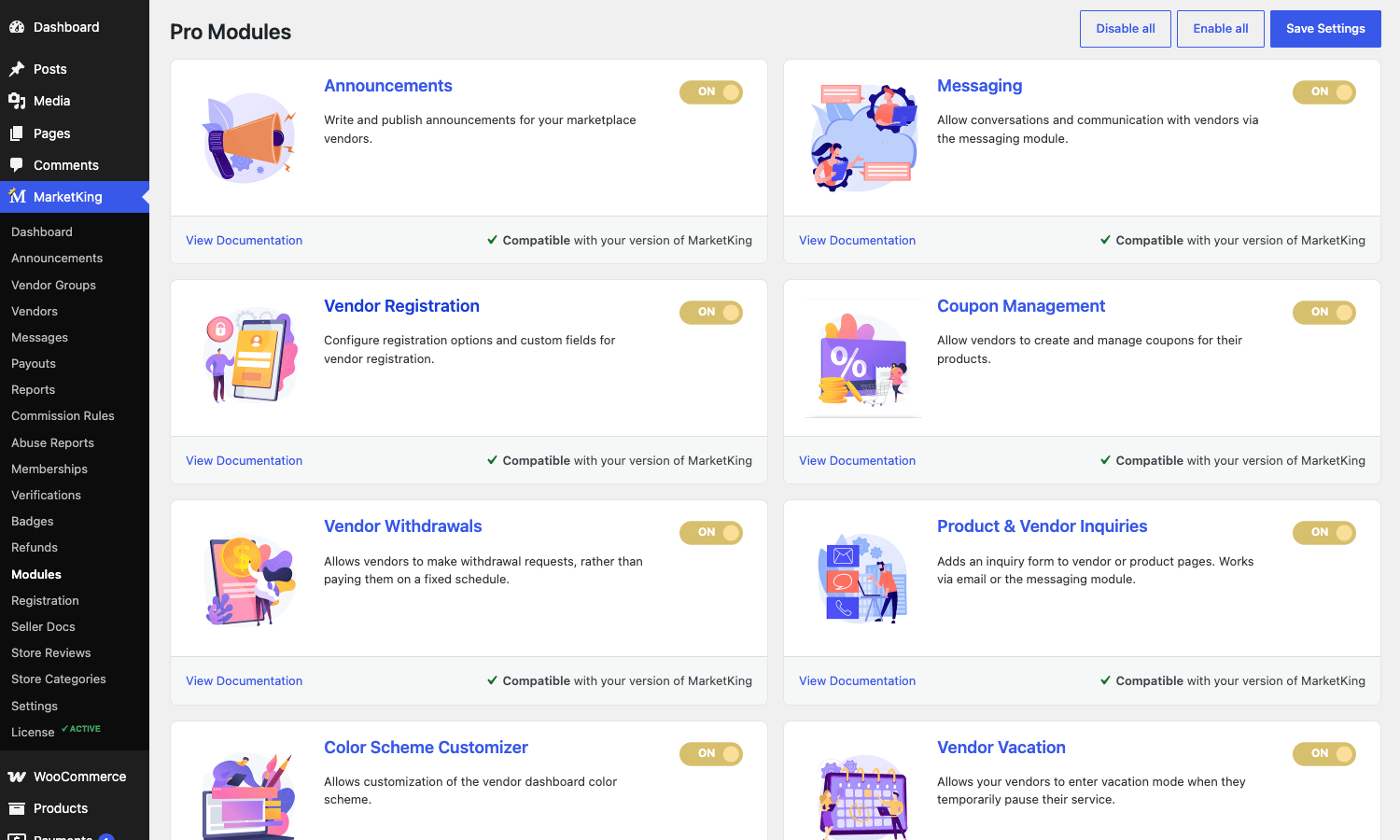
I counted thirty-five of those module switches in the source, each stored as a marketking_enable_<module>_setting option. That is a lot of surface. You will not use all of them, but you should know what is there so you do not reinvent something the plugin already ships.
The one dependency that trips everyone up
Here is the thing nobody tells you, and I learned it the hard way while setting up a sandbox for this review. MarketKing Pro does not run on its own. It requires the free MarketKing Core plugin (marketking-multivendor-marketplace-for-woocommerce) from WordPress.org. The Pro plugin adds the premium modules; Core provides the foundation, including the helper functions that the whole frontend leans on, like marketking()->is_vendor() and marketking()->get_order_vendor().
If you activate Pro without Core, you do not get the marketplace admin. You get a polite notice that says "MarketKing is almost ready" and a placeholder menu nudging you to install Core. The full MarketKing menu (Vendors, Payouts, Commission Rules, Memberships, and the rest) only appears once Core is active alongside Pro and WooCommerce.
So the install order is: WooCommerce first, then MarketKing Core (free, from the repo), then MarketKing Pro. Once all three are active, the admin lights up. It is a five-minute thing if you know it is coming, and a confusing afternoon if you do not.
This matters for the GPL crowd too. If you grab MarketKing Pro from GPL Times, remember to also install the free Core from WordPress.org. The Pro plugin is the paid half; Core is the open base that anyone can download.
Vendor registration and the approval flow
A marketplace is only as good as its onboarding. If becoming a vendor is painful, nobody becomes a vendor.
MarketKing handles registration through a dedicated form. On activation it creates a "Become a Vendor" page automatically, and you point would-be sellers there. The Registration settings give you three modes: disable registration entirely, fold vendor signup into the standard WooCommerce "My Account" page, or run a separate dedicated registration page. Most marketplaces I have built use the separate page, because it lets you write copy that sells the opportunity instead of burying the form under "Login / Register."
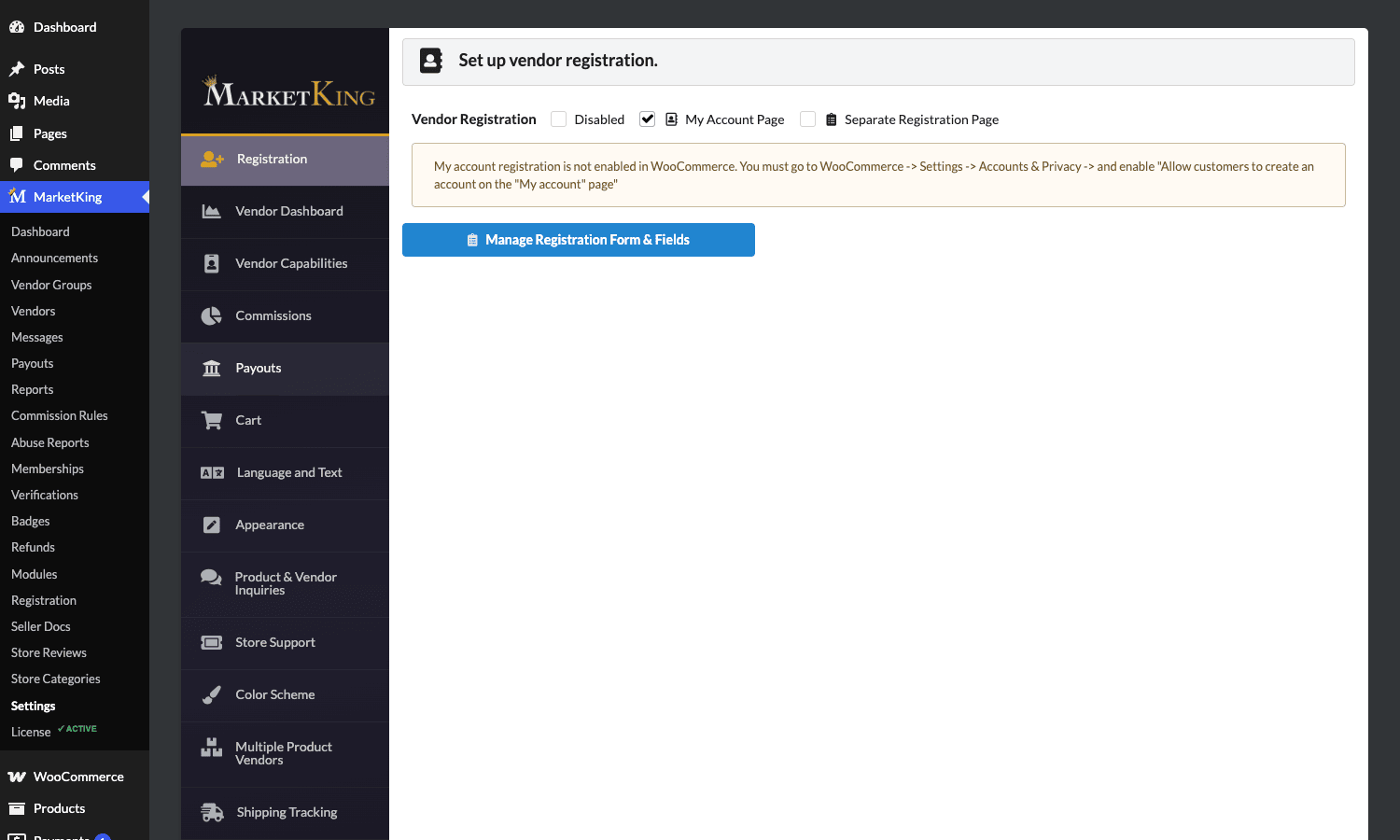
The form itself is configurable. You decide which fields a new vendor must fill in, and you can add custom fields for whatever your niche needs (a tax ID, a portfolio URL, a phone number). One thing to flag: the registration form only works if WooCommerce account creation is enabled. There is a notice in the panel reminding you to go to WooCommerce, Settings, Accounts and Privacy, and tick "Allow customers to create an account on the My account page." Miss that and the form silently does nothing, which is a classic head-scratcher.
Approval is where you set your gatekeeping. You can auto-approve new vendors (good for low-stakes marketplaces where you want frictionless onboarding) or hold every application for manual review (good when vendors need vetting, like a handmade-goods marketplace or anything regulated). New vendors land in a pending state and you approve them from the Vendors admin. There is a hook, marketking_after_member_created, that fires the moment a vendor account is created, which is the right place to send a custom welcome email or push the new seller into your CRM.
A subtle design choice worth praising: vendors are organized into Vendor Groups, registered internally as the marketking_group post type. A group is a tier with its own permissions and, importantly, its own commission and membership settings. So you can have a "New Sellers" group on a 30 percent commission with limited capabilities, and a "Trusted Sellers" group on 15 percent with the ability to run their own coupons. Promoting a vendor between groups fires marketking_moved_user_group_membership, which you can hook to celebrate the upgrade or adjust their payout terms.
The vendor dashboard: where sellers actually live
Your vendors will spend almost no time in the WordPress admin. They live in the frontend vendor dashboard, served at /vendor-dashboard/ on a page MarketKing creates for you. This is the single most important surface in the plugin, because it is the thing your sellers judge you on.
I read through the dashboard source (the public/dashboard/ directory is a file per panel) so I could describe it accurately even though the demo sandbox would not let me spin up a vendor account to screenshot it. The panels a vendor sees include:
- Products. Add, edit, and manage their own products. Vendors get a frontend product editor, and depending on your capability settings they can publish immediately or submit for admin review. The editor supports the product types you would expect, including simple, variable, and (with the right add-ons active) bundles and bookable products.
- Orders. Only the orders containing their items. A vendor never sees another seller’s customers or order data, which is enforced server-side, not just hidden in the UI.
- Earnings. A running ledger of commission earned, paid, and outstanding, with date filtering. This is built from the same earning records the admin Reports screen reads.
- Messages. Conversations with customers and with the admin (more on messaging below).
- Coupons. If you let them, vendors create and manage their own discount coupons scoped to their products.
- Refunds. Vendors can review and process refund requests on their own orders.
- Settings. Store name, logo, banner, social links, store policies, shipping, vacation mode, and SEO for their storefront.
The dashboard panels themselves are filterable. marketking_vendor_dashboard_panels lets a developer add, remove, or reorder the tabs a vendor sees, and marketking_dashboard_template lets you swap the template file for a panel entirely. That is how you would white-label the seller experience or bolt on a custom panel for, say, a vendor’s payout history from an external system.
Each vendor also gets a public storefront, a "Stores List" directory page, and a store URL you can fetch with marketking()->get_store_link(). Customers can follow stores they like through the favorites module, which is a nice retention lever most marketplace plugins skip.
Commissions in depth: flat, percentage, and complex rules
Commissions are the business model, so MarketKing gives them room to breathe.
At the simplest level you set one global commission. That can be a flat amount per order or a percentage of each sale. For a lot of marketplaces, "platform keeps 15 percent" is the whole policy and you are done.
But real marketplaces are messier than one number. Electronics carry thin margins and you cannot take 20 percent without scaring sellers off; handmade jewelry can sustain 30 percent. Your anchor vendor who drives half your traffic deserves a better rate than a brand-new seller. MarketKing’s answer is the complex commissions module (toggle marketking_enable_complexcommissions_setting), which turns commission rules into their own post type, marketking_rule.
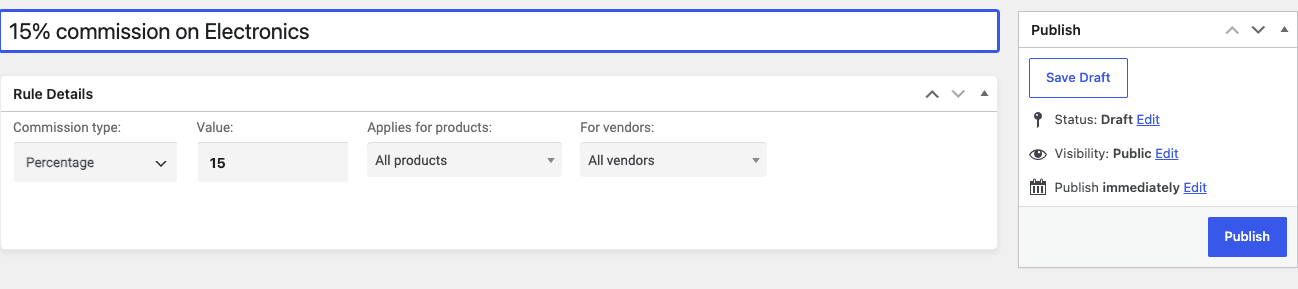
Each rule has four dimensions, which you can see in the screenshot above:
- Commission type: flat (a fixed amount) or percentage.
- Value: the number, for example 15.
- Applies for products: all products, specific categories and tags, specific product or variation IDs, or "once per order" for a per-order platform fee.
- For vendors: all vendors, specific selected vendors, or whole vendor groups.
Because rules target products and vendors independently, you can build genuinely sophisticated setups. "15 percent on everything, but 8 percent on the Electronics category, except for the vendor group called Premium Partners who pay 5 percent across the board, plus a flat $0.50 platform fee once per order." Each of those is a separate rule, and MarketKing resolves them in priority order. The commission amount that lands in the vendor’s earnings is the result.
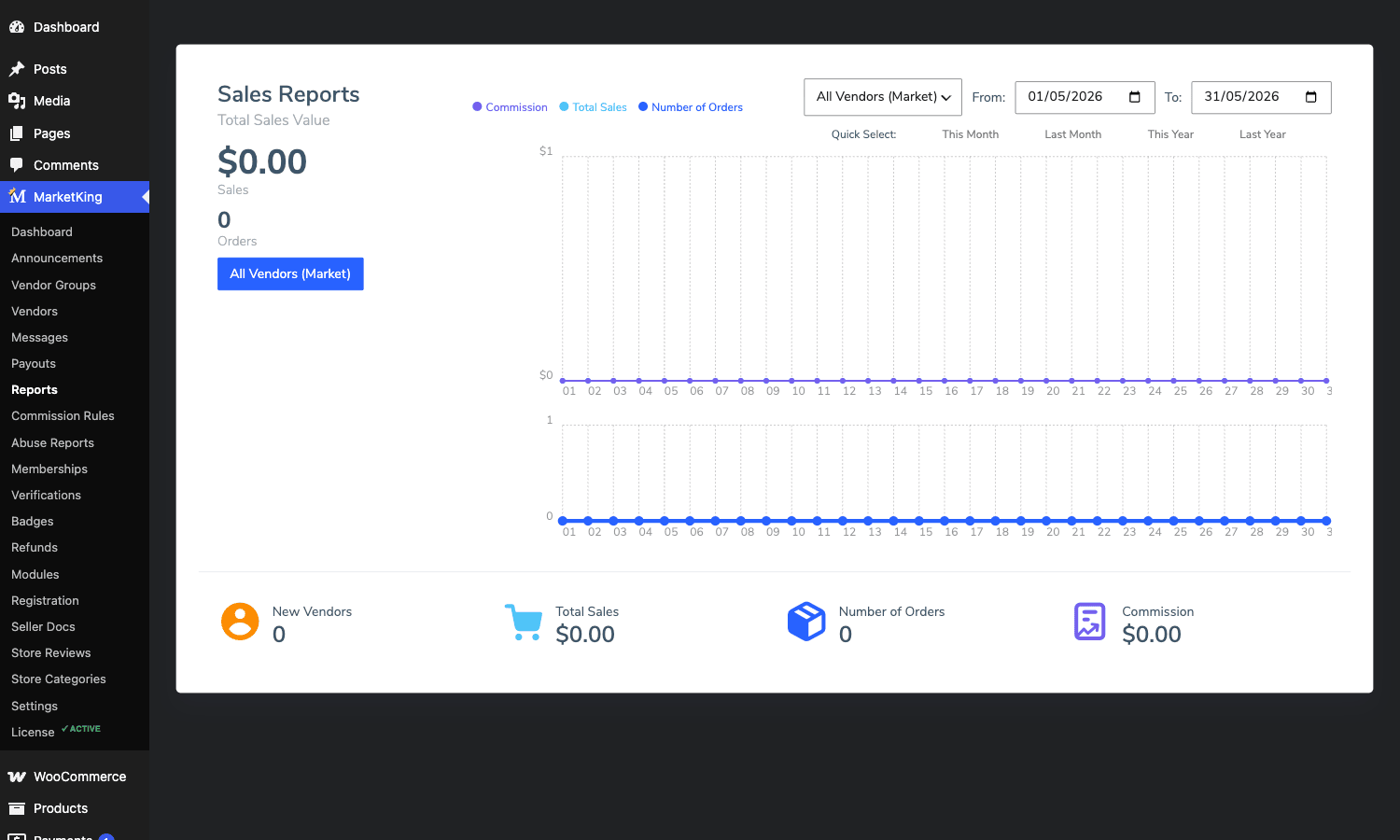
Whatever rules you settle on, the admin Reports screen is where you watch the money flow. It totals sales value, commission earned, and order count across the whole marketplace (or filtered to a single vendor), with date-range pickers and a sales chart, so you can see at a glance what the platform is actually keeping.
A word of caution that I will expand on later: rules are powerful enough to contradict each other if you are sloppy. Keep them few and deliberate. I have seen a marketplace where overlapping category and vendor rules meant nobody could explain why a particular sale earned the number it did. Write the rules down in plain English before you build them.
Payouts: manual cheques vs Stripe split-pay
Earning a commission and actually paying it out are two different problems, and MarketKing supports two fundamentally different philosophies here.
Manual payouts. The platform collects all the money (you are the merchant of record), commissions accrue as balances, and you pay vendors out in batches whenever you choose: weekly, monthly, on request. The Payouts admin screen lists every vendor with their outstanding balance, last payment, and withdrawal requests, and exports to CSV or PDF for your accountant. You record payments however you settle them in real life: bank transfer, PayPal, store credit. This is the simplest model legally because the platform handles one settlement and then distributes. It is also the model where the platform carries the cash-flow and the chargeback risk.
Stripe split-pay. This is the headline feature for serious marketplaces, and it uses Stripe Connect under the hood (toggle marketking_enable_stripe_setting). When a customer pays, Stripe splits the payment at the moment of the transaction: the vendor’s share goes to the vendor’s connected Stripe account, the platform’s commission stays with you, and Stripe takes its processing fee. No accruing balance, no manual batch, no platform sitting on other people’s money.
The MarketKing Stripe gateway supports Stripe Express accounts (the source explicitly checks for $account_type === 'express'), which means vendors onboard through Stripe’s hosted flow and Stripe handles their KYC and identity verification for you. The gateway can create destination charges, direct charges, or transfers depending on your configuration. There is a sensible fallback baked in: "If a seller did not connect their Stripe account, funds will go to the admin account," so an unconnected vendor does not break checkout.
One real constraint you must plan around: SCA and 3D Secure only work cleanly when your platform and the connected account are in the same region (both in Europe, or both in the US). Cross-region marketplaces hit friction here, and that is a Stripe limitation, not a MarketKing bug. If you are running a global marketplace, read Stripe’s Connect destination charges documentation and Express accounts guide before you commit to split-pay, because the region rules will shape your whole architecture.
If you have wired up WooCommerce’s own card processing before, the mental model is similar to the WooCommerce Stripe gateway, except MarketKing layers the marketplace split on top of it. The trade-off between the two payout models is real and I will come back to it in the anti-pattern section, because choosing wrong here is expensive.
Vendor memberships and subscriptions: charging the sellers
Commissions monetize sales. Memberships monetize the vendors themselves, and it is a smart second revenue line that a lot of marketplace operators leave on the table.
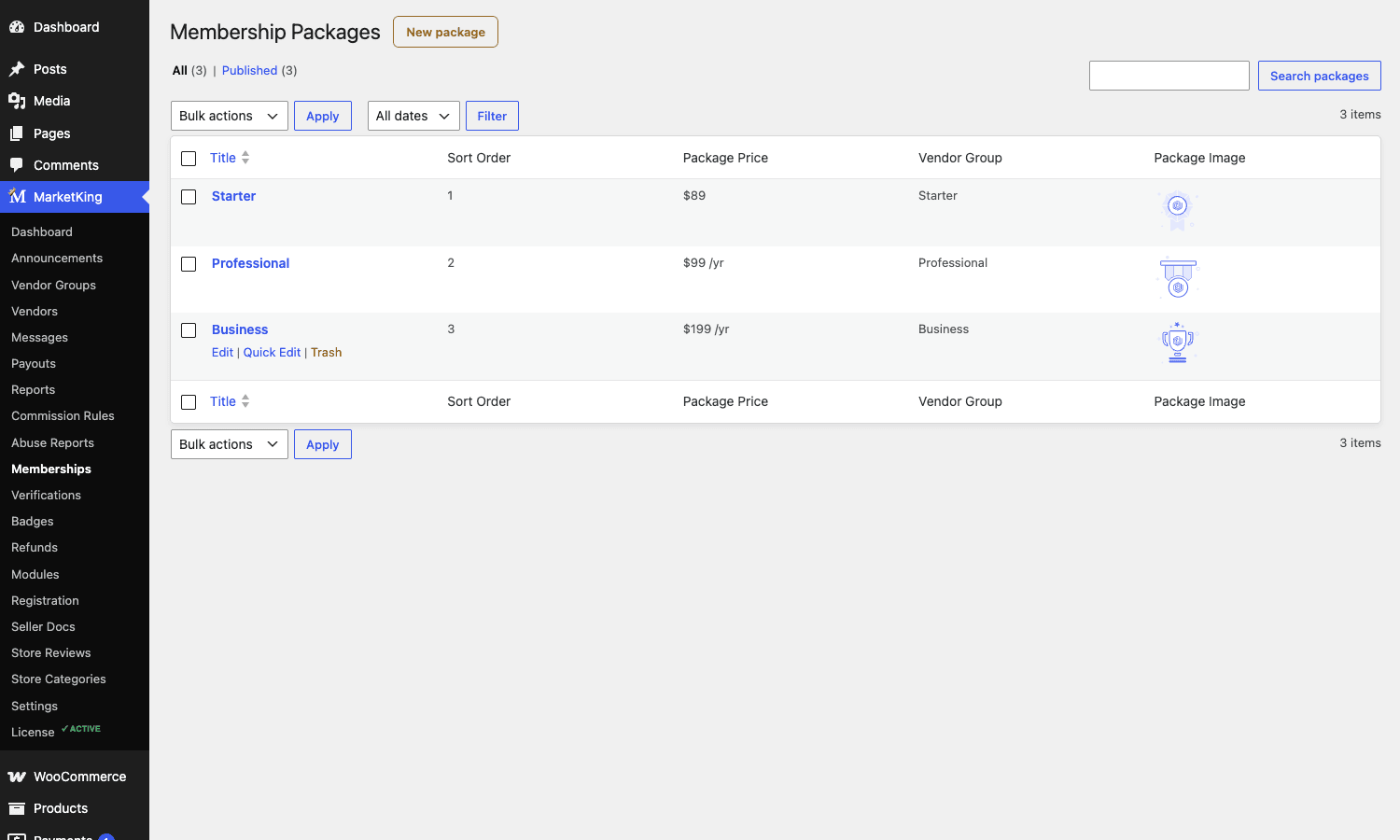
The memberships module (marketking_enable_memberships_setting) lets you sell vendor plans. A plan is a marketking_mpack post with a price, a vendor group it assigns the buyer to, and a set of perks. When a vendor buys a plan, they get dropped into that group, which inherits the group’s commission rate, capabilities, and limits. So your free tier might be "30 percent commission, max 10 products," and your paid "Pro Seller" plan at a monthly fee might be "10 percent commission, unlimited products, can run coupons."
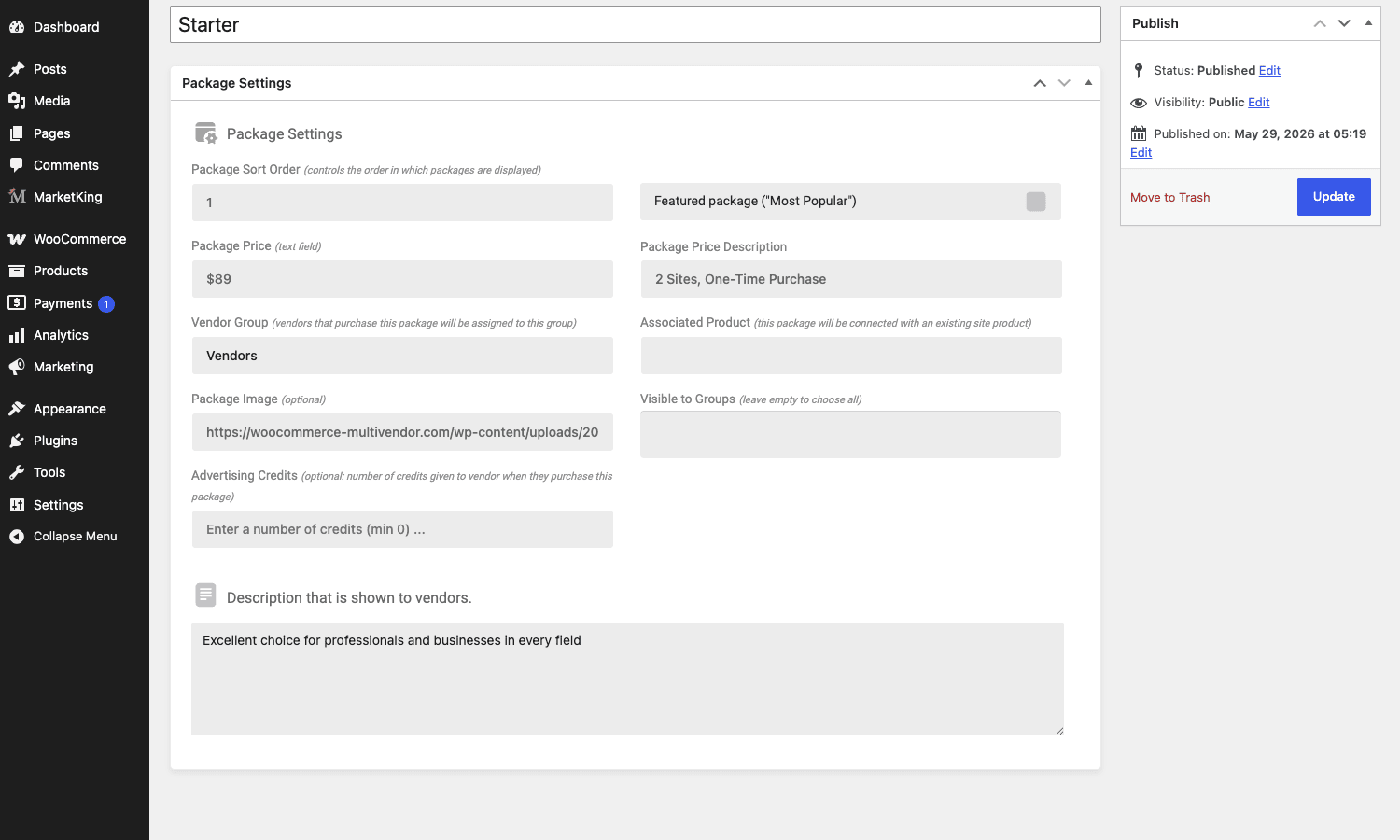
The package editor is more detailed than the list suggests. Opening one up, you set the price, the vendor group it assigns, an optional package image, a "Most Popular" featured flag for the pricing table, a price description ("2 Sites, One-Time Purchase"), advertising credits to grant on purchase, and the vendor-facing description copy. You can also connect a package to an existing WooCommerce product so the purchase flows through normal WooCommerce checkout and gateways.
For recurring plans, the subscriptions module (marketking_enable_subscriptions_setting) handles billing vendors on a schedule. Combined with memberships, you can run a proper SaaS-style "sellers pay monthly to be on the platform" business. The checkout for a membership fires marketking_process_membership_checkout, which is your hook for any custom provisioning. If your marketplace also sells customer-facing recurring products, MarketKing coexists with WooCommerce Subscriptions, and I cover the interaction in the FAQ.
SPMV: many vendors on one product listing
SPMV stands for Single Product, Multiple Vendors, and it is the feature that separates a "marketplace" from a "directory of separate shops." It is also the one most likely to surprise you if you do not plan for it.
With the SPMV module on (marketking_enable_spmv_setting), the same product can be sold by multiple vendors. Think of it like Amazon’s "Other Sellers on this listing." A customer searching for a specific paperback sees one product page with a list of vendors offering it at their own prices and stock levels, rather than fifteen near-duplicate product pages cluttering search.
Under the hood this changes how product visibility works. MarketKing filters which vendor’s version of a shared product shows in the shop, category, and archive pages, so customers see one canonical listing instead of duplicates. That filtering runs through marketking_product_is_visible, which receives the visibility boolean and the product ID. It also maintains a visibility cache, rebuilt via marketking()->rebuild_visibility_cache(), because recalculating which of N vendors’ listings to surface on every page load would be brutal for performance.
SPMV is fantastic for marketplaces selling fungible goods (books, electronics, commodity parts) where buyers want to compare sellers. It is pointless, and even confusing, for marketplaces selling unique items (handmade, art, custom services), where every product genuinely belongs to one seller. Decide which kind of marketplace you are before you flip this on, because turning it on changes the shopping experience meaningfully.
Talking to people: messages and pre-sale inquiries
Marketplaces generate questions. Customers ask vendors about shipping, vendors ask the admin about payouts, and somebody always wants to know about a product before they buy.
MarketKing splits this into two modules. Messaging (marketking_enable_messages_setting) is a full conversation system, stored as the marketking_message post type, supporting customer-to-vendor and vendor-to-admin threads. When a message is sent, marketking_new_message fires with the recipient email, the message body, the sender ID, and the message ID, so you can route notifications wherever you like (Slack, a help desk, SMS). The marketking_allow_vendors_message_customers filter gates whether vendors can initiate contact with customers, which you may want to lock down to prevent off-platform poaching.
Inquiries (marketking_enable_inquiries_setting) is the pre-sale question box that appears on product pages. A shopper asks a question about a specific product before buying, and it routes to the vendor. This is the kind of small feature that quietly lifts conversion, because an answered question is often the difference between an abandoned cart and a sale. The inquiry form is itself filterable through marketking_get_inquiries_form, and you can toggle whether it collects a phone number.
Both modules feed the vendor dashboard’s Messages panel, so sellers manage every conversation in one place rather than scattered across email.
Trust and safety: verification, docs, reviews, abuse reports
Open up a marketplace and you inherit a content-moderation problem. MarketKing ships several tools for it, and using them is the difference between a credible platform and a flea market.
Vendor verification (marketking_enable_verification_setting) lets you define verification items (an ID document, a business license, a tax certificate) and require vendors to submit them. Submissions arrive as marketking_vreq posts in the Verifications admin, where you approve or reject each one. Submitting a request fires marketking_submitted_verification_request, handy for alerting your moderation team. Verified vendors can be shown a badge, which builds buyer confidence.
Vendor documents (marketking_enable_vendordocs_setting) is the related "required paperwork" system, stored as marketking_docs, for the documents you need on file even if they are not a public verification badge.
Reviews and ratings (marketking_enable_reviews_setting) cover both product reviews and store-level ratings, so a vendor accumulates a reputation across all their products, not just per-item. When a new rating posts, marketking_new_rating fires.
Abuse reports (marketking_enable_abusereports_setting) give customers a way to flag a problematic product or vendor through the [marketking_report_abuse] shortcode, with reports landing as marketking_abuse posts for you to action.
Badges (marketking_enable_badges_setting) are awards you attach to vendors, "Top Seller," "Verified," "Fast Shipper," rendered through marketking()->display_vendor_badges(). They are cosmetic but effective at steering buyers toward your best sellers.
Together these turn a raw list of strangers into something a customer can trust enough to hand over a card.
Per-vendor shipping and tracking
Shipping in a multivendor order is genuinely hard, because one cart can contain items from three vendors in three cities with three different shipping costs. MarketKing’s shipping module (marketking_enable_shipping_setting) gives each vendor their own shipping configuration, and at checkout it splits the cart into per-vendor packages so each seller’s items are rated independently.
The shipping rate calculation is filterable. marketking_vendor_shipping_rate_cost receives the cost, the full rate array, and the vendor ID, and marketking_vendor_shipping_rate_label lets you rewrite the label a customer sees. There is also marketking_free_shipping_available to control when a vendor’s free shipping kicks in. That granularity matters: without per-vendor packages, you would either overcharge the customer (summing every vendor’s full shipping) or undercharge (applying one vendor’s rate to the whole cart).
The shipping tracking module (marketking_enable_shippingtracking_setting) lets vendors add tracking numbers and carriers to their orders, which then surface to the customer. The list of carriers is filterable through marketking_shipping_status_tracking_providers_list, so you can add regional couriers that are not in the default list.
The long tail of modules you’ll actually use
Beyond the headline features, MarketKing ships a long tail of smaller modules. None of them are big enough for their own section, but skipping them would misrepresent how complete the plugin is, so here is the grouped tour.
Storefront control. Vendors get a vacation mode (marketking_enable_vacation_setting) to close their shop temporarily, which fires marketking_vacation_close_shop and marketking_vacation_open_shop and can hide their products while they are away. They can post a store notice (storenotice), publish a store policy (storepolicy) covering shipping and returns, set store SEO (storeseo) metadata for their storefront, organize products into store categories (storecategories), and add social links (social) rendered via marketking()->display_social_links().
Marketing and promotions. Vendors can issue their own coupons (marketking_enable_coupons_setting) scoped to their products. The advertising module (marketking_enable_advertising_setting) lets vendors spend credits to promote products into featured slots, which is a third revenue line for the operator, since you sell those credits (often bundled into membership packages, as we saw in the package editor).
Operations. Refunds (marketking_enable_refunds_setting) route refund requests to vendors as marketking_refund posts, with the request firing marketking_process_refund; the valid order statuses for a refund request are filterable via marketking_valid_statuses_refunds. Vendor invoices (marketking_enable_vendorinvoices_setting) make the customer invoice show the individual vendor’s identity instead of the platform’s. It works by filtering a PDF-invoice plugin’s output, hooking wpo_wcpdf_shop_name_settings_text, wpo_wcpdf_shop_address, and wpo_wcpdf_header_logo_img_element for PDF Invoices & Packing Slips (plus the equivalent WebToffee hooks), so each invoice carries that vendor’s store name, address, and logo. It depends on having a supported PDF-invoice plugin installed; without one there is nothing to rewrite. Import/export (marketking_enable_importexport_setting) gives vendors CSV product import and export. Announcements (marketking_enable_announcements_setting) let the admin broadcast messages to vendors as marketking_announce posts, firing marketking_new_announcement so you can also push them by email.
Customer-facing extras. The favorites module (marketking_enable_favorite_setting) lets shoppers follow stores, surfaced through [marketking_favorite_stores] and [marketking_favorite_stores_products]. Store support (marketking_enable_support_setting) offers email, external link, or in-platform messaging support channels per vendor. A color scheme customizer (marketking_enable_colorscheme_setting) lets you rebrand the dashboard’s look without touching CSS.
B2B, wholesale, and returns. With the B2BKing integration on (marketking_enable_b2bkingintegration_setting), vendors get an Offers panel to send custom-priced quotes to business buyers and a B2B Messaging panel for the back-and-forth that wholesale deals need, so a marketplace can run negotiated B2B sales next to fixed-price retail. It pairs with the B2BKing wholesale plugin. Separately, an RMA / returns panel (the rma dashboard page) hooks into the WooCommerce Warranty/Returns extension so customers file return and warranty requests and the owning vendor handles them per store. That is distinct from the refunds module: refunds move money back, RMA manages the return and warranty workflow itself, and it needs the WooCommerce Warranty extension installed to show anything.
That is most of the thirty-five modules. The point is not that you will use every one, it is that when a stakeholder asks "can vendors take a holiday without deleting their products?" or "can we let sellers pay to feature listings?", the answer is usually "yes, there’s a module," not "we need to build it."
Vendor teams and staff accounts
One feature deserves its own mention because growing marketplaces always end up needing it: teams (marketking_enable_teams_setting).
A vendor is rarely one person once they are doing real volume. The teams module lets a vendor invite staff accounts with scoped roles and permissions, so a shop owner can have someone who only manages orders and someone else who only edits products, without sharing the master login. Internally, a team member is linked to their parent vendor, resolved with marketking()->get_team_member_parent() and checked with marketking()->is_vendor_team_member(). The dashboard panels a team member can see are filtered separately through the team dashboard panels logic, and marketking_allow_team_new_password controls whether staff can set their own passwords. If you have ever managed a store where the owner’s spouse, warehouse hand, and bookkeeper all logged in as the same user, you will appreciate why this exists.
Developer reference: hooks, filters, and code
This is the section developers skip to, so let me be precise. Every hook below I confirmed by grepping the actual plugin source. Signatures are accurate to what the plugin passes.
Reacting to marketplace events
The most useful actions fire at the moments you want to extend: a message sent, a vendor created, a refund requested, a verification submitted.
// Mirror every marketplace message into Slack.
add_action( 'marketking_new_message', function ( $recipient_email, $message, $sender_id, $message_id ) {
    wp_remote_post( 'https://hooks.slack.com/services/XXX/YYY/ZZZ', array(
        'body' => wp_json_encode( array(
            'text' => sprintf( 'New message to %s from user #%d: %s', $recipient_email, $sender_id, wp_trim_words( $message, 20 ) ),
        ) ),
    ) );
}, 10, 4 );
// Push a brand-new vendor into your CRM the moment their account is created.
add_action( 'marketking_after_member_created', function ( $user_id ) {
    $user = get_userdata( $user_id );
    my_crm_create_contact( array(
        'email' => $user->user_email,
        'tag'   => 'marketplace-vendor',
        'stage' => 'pending-approval',
    ) );
} );
// Run extra checks when a vendor submits a verification request.
add_action( 'marketking_submitted_verification_request', function () {
    wp_mail( get_option( 'admin_email' ), 'New vendor verification to review', 'A vendor just submitted documents for verification.' );
} );
Controlling commissions and earnings
The earnings calculation keys off order status. By default an earning is only recorded once an order reaches completed. If your fulfilment flow treats processing as the point of no return, you must tell MarketKing, or vendors will wonder why their earnings never appear.
// Count earnings on processing as well as completed (e.g. digital/virtual products).
add_filter( 'marketking_earning_completed_statuses', function ( $statuses ) {
    $statuses[] = 'processing';
    return $statuses;
} );
// Skip recording an earning for a specific order (e.g. an internal test order).
// The filter passes the earning ID as arg 2 and the resolved WC_Order as arg 3.
add_filter( 'marketking_skip_earning', function ( $skip, $earning_id, $order ) {
    if ( $order && $order->get_meta( '_internal_test' ) === 'yes' ) {
        return true;
    }
    return $skip;
}, 10, 3 );
Shaping the vendor dashboard
// Remove the Coupons panel for vendors in a starter group, and add a custom panel.
add_filter( 'marketking_vendor_dashboard_panels', function ( $panels ) {
    if ( my_vendor_is_starter_tier() ) {
        unset( $panels['coupons'] );
    }
    $panels['payout-history'] = array(
        'title' => __( 'Payout history', 'my-textdomain' ),
        'icon'  => 'dashicons-money-alt',
    );
    return $panels;
} );
// Swap the template file used for a dashboard panel (white-labelling).
add_filter( 'marketking_dashboard_template', function ( $template, $panel ) {
    if ( 'earnings' === $panel && file_exists( get_stylesheet_directory() . '/marketking/earnings.php' ) ) {
        return get_stylesheet_directory() . '/marketking/earnings.php';
    }
    return $template;
}, 10, 2 );
Per-vendor shipping
// Add a 5% handling surcharge to every vendor shipping rate.
add_filter( 'marketking_vendor_shipping_rate_cost', function ( $cost, $rate, $vendor_id ) {
    return (float) $cost * 1.05;
}, 10, 3 );
Stripe split-pay customization
The Stripe destination-charge payload is filterable right before it is sent, which is where you would add a statement descriptor, metadata, or an application-fee tweak.
// Tag every split-pay charge with the marketplace order ID for reconciliation.
// The second argument is the raw $_POST checkout request, not a WP_Post.
add_filter( 'marketking_stripe_split_pay_create_destination_charges', function ( $charge_data, $request ) {
    $charge_data['metadata']['marketplace'] = 'my-marketplace';
    $charge_data['statement_descriptor_suffix'] = 'MKTPLC';
    return $charge_data;
}, 10, 2 );
Product visibility and SPMV
// Hide products from vendors who are on vacation, on top of MarketKing's own logic.
add_filter( 'marketking_product_is_visible', function ( $visible, $product_id ) {
    $vendor_id = marketking()->get_product_vendor( $product_id );
    if ( $vendor_id && marketking()->is_on_vacation( $vendor_id ) ) {
        return false;
    }
    return $visible;
}, 10, 2 );
Capabilities and refunds
// Stop a particular vendor group from publishing products without review.
add_filter( 'marketking_vendors_can_add_products', function ( $can_add ) {
    return my_current_vendor_is_trusted() ? $can_add : false;
} );

// Allow refund requests on a wider set of statuses.
add_filter( 'marketking_valid_statuses_refunds', function ( $statuses ) {
    $statuses[] = 'pending';
    return $statuses;
} );
Useful helper functions (from MarketKing Core)
The global marketking() accessor exposes the helpers the frontend relies on. The ones you will reach for most:
marketking()->is_vendor( $user_id ): is this user a vendor?marketking()->is_multivendor_order( $order_id ): does this order span multiple vendors?marketking()->get_order_vendor( $order_id )/get_product_vendor( $product_id ): ownership lookups.marketking()->get_earnings( $vendor_id ): a vendor’s earning ledger.marketking()->is_connected_stripe( $vendor_id ): has the vendor finished Stripe Connect onboarding?marketking()->is_on_vacation( $vendor_id ): vacation-mode check.marketking()->get_store_link( $vendor_id )/get_store_name_display( $vendor_id ): storefront URL and display name.
One housekeeping note for anyone building on top: the admin user ID MarketKing treats as the platform owner is filterable via marketking_admin_user_id (default 1), and there is a marketking_flush_permalinks filter tied to the dashboard endpoints. If you customize the dashboard slug, you will need to flush rewrite rules, which is the cause of the most common "dashboard 404" support ticket.
Don’t launch without deciding your payout and tax model
Here is the failure mode I have watched sink a marketplace, and it has nothing to do with MarketKing’s code. Before you take a single real order, decide: are you the merchant of record, or are your vendors? Those are two different businesses, legally and financially, and MarketKing’s two payout models map directly onto them.
With manual payouts, you (the platform) are the merchant of record. Every card is charged to your account, you carry the chargeback liability, and in most jurisdictions you owe the sales tax or VAT on the full transaction. In the US, paying vendors over the threshold means 1099 forms. That is a real tax burden, and you want an accountant who knows it before launch, not after your first quarter.
With Stripe split-pay, the split happens at payment and each vendor’s Stripe Connect account receives their share directly. The vendor is now closer to being the merchant of record for their slice, Stripe handles their KYC during Express onboarding, and the chargeback on a vendor’s item lands on the vendor. The catch: every vendor must complete Stripe onboarding before getting paid, Stripe can reject some sellers, and you inherit the same-region SCA constraint.
The expensive mistake is launching on manual payouts because it is easier, taking a few thousand dollars across forty vendors, then discovering at tax time that you are personally on the hook for sales tax on the full gross. Migrating models afterward means re-onboarding every vendor to Stripe and reconciling accrued balances.
So decide first. Talk to an accountant who understands marketplace facilitator laws where you operate, pick the matching model, and only then open registration. The plugin does either happily. It cannot make the legal call for you, and it will not warn you when you get it wrong.
Troubleshooting the problems you will hit
Every marketplace launch hits a predictable set of snags. Here are the ones I have seen most, with the fix.
The MarketKing menu never appears. You activated Pro but not Core. Install the free MarketKing Core from WordPress.org and activate it. The full admin menu only renders with WooCommerce, Core, and Pro all active.
Commissions are not calculating. Almost always a status mismatch. Earnings record only when an order reaches a status in the marketking_earning_completed_statuses list, which defaults to completed only. If your store fulfils on processing (common for virtual or auto-complete products), vendors will see no earnings until you add processing to that filter (code above). Check this before suspecting anything more exotic.
The vendor dashboard 404s. The dashboard lives on a page using rewrite endpoints. After changing the dashboard page, the slug, or migrating the site, the rewrite rules go stale. Go to Settings, Permalinks, and click Save (no changes needed) to flush them. There is a marketking_flush_permalinks hook tied to this; if you script deployments, flush rewrite rules as part of the deploy.
Products are stuck pending. That is your capability setting working as intended. If you set vendors to "submit for review," everything they publish queues for admin approval. Either approve them in the Products admin or change the capability so trusted groups publish directly. The marketking_vendors_can_add_products filter lets you make this conditional per group.
Stripe Connect onboarding fails for a vendor. Usually Stripe’s KYC, not MarketKing. Stripe rejects or pends accounts in unsupported countries or restricted business categories. Check the vendor’s Stripe Express dashboard for the actual rejection reason. Remember the same-region requirement for SCA. Until a vendor completes onboarding, MarketKing’s fallback routes their funds to the admin account, so checkout still works but the vendor will not be paid until they connect.
Payout amounts look off by a cent. Rounding. When a percentage commission lands on an odd total, the platform and vendor halves can each round and the sum drifts by a cent. Decide your rounding policy, test it with awkward numbers (try a $9.99 item at 15 percent), and reconcile against Stripe’s actual transfer amounts rather than your own arithmetic, because Stripe rounds in its own way.
Performance sags with many vendors. SPMV visibility filtering and per-vendor packaging add query overhead. MarketKing caches the visibility map and rebuilds it via marketking()->rebuild_visibility_cache() rather than recomputing per request, but a large catalog still benefits from object caching (Redis) and a properly tuned host. Pair it with a good page cache; if you are already running something like WP Rocket, make sure the vendor dashboard and cart pages are excluded from the page cache, since they are user-specific.
Compatibility: WooCommerce, PHP, Bookings, multisite
MarketKing Pro declares it requires WooCommerce 5.0 or newer and is tested up to the current WooCommerce 10.x line. In practice, keep WooCommerce reasonably current, because the plugin hooks deep into WooCommerce’s order and product systems and an ancient WooCommerce will fight it. Run PHP 7.4 at the absolute minimum; 8.1 or newer is the sane choice for a new build, both for performance and because Stripe’s libraries expect a modern PHP.
It supports WooCommerce’s High-Performance Order Storage (HPOS). If you are setting up a fresh store, enable HPOS, since MarketKing reads orders through WooCommerce’s order abstraction rather than poking wp_posts directly. WooCommerce’s HPOS upgrade guide is worth a read regardless.
For product types, MarketKing integrates with WooCommerce Bookings (there is a whole wcbookings integration directory in the source) so vendors can sell bookable services with availability and resources, and each vendor can sync their bookings to their own Google Calendar through the bundled Google Calendar integration, which matters for service and appointment marketplaces where sellers manage their day outside WordPress. It also supports product bundles. If you want bookings in your marketplace, you will need WooCommerce Bookings alongside it, and we have a separate walkthrough on accepting bookings with WooCommerce Bookings if that is your use case. It also coexists with WooCommerce Subscriptions for recurring customer products.
Theme compatibility is the usual WooCommerce story: a well-built WooCommerce theme will render the vendor dashboard and storefronts fine, but a theme that aggressively overrides WooCommerce templates can fight MarketKing’s dashboard. Test the dashboard, cart, and checkout on your actual theme early. Multisite works, but treat each marketplace as its own site rather than trying to share vendors across a network; the vendor-to-user mapping is per-site.
MarketKing vs Dokan vs WCFM vs WC Vendors
You are not choosing in a vacuum. There are four serious WooCommerce marketplace plugins, and they make genuinely different bets. Here is how MarketKing stacks up, with real numbers.
MarketKing. The newest of the four and the most feature-dense for the money, with roughly thirty-five toggleable modules in the Pro plugin. Single-site licensing sits at the lower end of this group, under Dokan’s $149 entry tier, and its standout is commission flexibility (the rule system targets product, category, vendor, and group independently) plus the fact that almost everything is a built-in module rather than a paid add-on. Where WCFM charges $20 to $80 per add-on to match features MarketKing includes, the math favors MarketKing for a feature-heavy build. Payout methods: manual plus Stripe Connect split-pay with Express accounts.
Dokan. The market leader by install base, with the largest set of third-party add-ons and the most theme and integration coverage. Dokan Pro pricing ranges from around $149/yr for the entry tier to roughly $499/yr for the top tier, and crucially many features (subscriptions, advanced shipping, some payout gateways) live in higher tiers or separate modules, so the sticker price understates the full cost. If you want maximum integrations and do not mind paying for tiers, Dokan Pro is the safe default, and we have a full Dokan marketplace build guide.
WCFM (WooCommerce Frontend Manager). Known for the deepest vendor frontend (its dashboard is arguably the most powerful of the four) and an aggressive free tier. Its add-ons (WCFM Marketplace, Ultimate, Analytics) are priced individually, often $20 to $80 each, so a full stack adds up but you only pay for what you use. The WCFM Ultimate feature surface is large but the admin can feel busy.
WC Vendors. The lean, lightweight option. WC Vendors Pro is the smallest install of the four and the least opinionated, which makes it fast and easy to extend but means you build more yourself. Pricing is competitive, often around $199/yr, and the page weight on storefronts is noticeably lighter than the kitchen-sink plugins.
The honest summary: if you want the most marketplace features per dollar in one plugin, MarketKing is hard to beat. If you want the biggest add-on library and most battle-tested integrations, Dokan. If your vendors demand the richest frontend, WCFM. If you want lean and you have developers, WC Vendors. All four do commissions and Stripe split-pay; the differences are in how much is bundled, how the admin feels, and how the pricing tiers slice the features.
Pricing and what the tiers include
MarketKing Pro is sold as a premium plugin on an annual license, with tiers separated mostly by the number of sites you can activate on (single site, a handful of sites, unlimited) rather than by feature gating. That is a meaningful difference from Dokan’s model: with MarketKing, the Pro plugin generally includes the full module set, so you are not discovering that subscriptions or advanced shipping live behind a higher tier. You pick a tier based on how many marketplaces you are running, not on which features you need.
Remember the free MarketKing Core is, well, free, from WordPress.org. So the real cost picture is: free Core plus paid Pro for the premium modules, plus WooCommerce (free) and whatever payment processing Stripe charges per transaction.
MarketKing Pro is available on GPL Times if you want to put a full marketplace stack on a staging install and exercise every module before you commit to the licensing terms direct. It is the same Pro plugin, delivered through the GPL store, and you pair it with the free Core from the repo exactly as you would with a direct purchase.
FAQ
Does MarketKing Pro work without the free MarketKing Core plugin?
No. Pro is the premium add-on layer; Core is the required foundation that provides the helper functions and base marketplace logic. Without Core active, Pro shows an "almost ready, install Core" notice and the full admin menu never appears. Install WooCommerce, then free Core from WordPress.org, then Pro.
Do I need Stripe to use MarketKing?
No, and this surprises people. You can run the whole marketplace on manual payouts, where the platform collects all money and you pay vendors out in batches by any method you like. Stripe Connect split-pay is optional; it is the automated route where money splits at checkout. Many smaller marketplaces never enable Stripe and settle with vendors manually each month.
Who handles refunds, the platform or the vendor?
Either, depending on how you configure the refunds module. Vendors can process refund requests on their own orders from the dashboard, or you can keep refunds centralized with the admin. Be deliberate: if you use Stripe split-pay, a refund has to claw back the vendor’s already-transferred share, which is fiddlier than refunding from a pooled balance under manual payouts. Decide and document your refund policy before launch.
Who is responsible for sales tax and VAT?
That depends on your payout model and your jurisdiction, and it is a question for an accountant, not a plugin. Under manual payouts you (the platform) collect the full payment and are typically the party with the tax obligation. Under Stripe split-pay, vendors are closer to being the merchant of record for their share. Marketplace facilitator laws vary widely by country and US state. Sort this out first; it is the single most consequential decision you will make.
What happens to vendor data if I uninstall MarketKing?
By default, nothing is deleted. The uninstall routine respects a "keep data and settings on uninstall" option (marketkingpro_keepdata_setting) which is on by default, so vendor users, groups, earnings, and settings survive a deactivation or uninstall. Only if you explicitly turn that option off does uninstall purge the plugin’s options. That is the safe default, but verify the setting before any major change so you do not lose data you wanted to keep, or keep data you wanted gone.
How does it perform with hundreds or thousands of vendors?
The architecture anticipates scale: SPMV visibility is cached and rebuilt rather than recomputed per request, and orders are read through WooCommerce’s abstraction so HPOS helps. That said, a big marketplace needs real infrastructure: object caching (Redis), a tuned database, and a host that is not a $5 shared plan. Exclude the vendor dashboard, cart, and checkout from full-page caching since they are user-specific. With that in place, large catalogs run fine.
What are the gotchas with SPMV (multiple vendors on one listing)?
SPMV changes the shopping experience: instead of duplicate product pages, customers see one listing with several sellers. The catch is that it only makes sense for fungible goods (books, electronics, commodities) where buyers compare sellers. For unique items (handmade, art, services) it is confusing, because every product genuinely belongs to one seller. Also, the visibility filtering adds query overhead, so lean on object caching. Decide whether you are a "compare sellers" marketplace or a "unique shops" marketplace before flipping SPMV on.
Does it support WooCommerce Bookings and Subscriptions?
Yes to both, with caveats. There is a dedicated WooCommerce Bookings integration so vendors can sell bookable services with their own availability and resources; you need the Bookings extension installed. For recurring billing, MarketKing’s own subscriptions module bills vendors for memberships, and it coexists with WooCommerce Subscriptions for customer-facing recurring products. If your marketplace mixes one-time, bookable, and subscription products, test the cart and split-payout behavior thoroughly, because multi-type carts are where edge cases hide.
Can I charge vendors to be on my marketplace?
Yes, that is exactly what the memberships and subscriptions modules do. You sell vendor plans (one-time or recurring) that assign the buyer to a vendor group with its own commission rate, product limits, and capabilities. It is a clean second revenue line on top of commissions, and you can bundle advertising credits into plans to add a third.
Can a vendor have staff with limited access?
Yes, through the teams module. A vendor invites staff accounts with scoped permissions, so one person manages orders and another edits products without sharing the owner login. Team members are linked to their parent vendor and see a filtered set of dashboard panels. One caveat: revoking a staff member’s access does not reassign whatever orders they were mid-way through handling, so a busy shop still wants a hand-off process rather than treating the permission toggle as the whole answer.
Is MarketKing Pro the right marketplace plugin for you?
After living in the source and the admin for this review, my take is that MarketKing Pro is the most feature-complete WooCommerce marketplace plugin you can buy as a single product, and the commission rule system is the best of the four leaders. The fact that nearly everything is a bundled module, rather than a paid add-on, is a real advantage when you are budgeting a launch.
It is not the right pick if you want the largest third-party add-on library (that is Dokan) or if you have developers who would rather build on something lean (that is WC Vendors). And the Core dependency, while harmless once you know about it, is a genuine first-hour stumble that the marketing does not lead with.
But for an operator who wants to open registration, set sensible commission rules, wire up Stripe split-pay, and have memberships, verification, reviews, per-vendor shipping, and messaging all working without buying six add-ons, MarketKing earns the look. Just promise me one thing before you flip that registration page live: decide your payout and tax model first. The plugin is ready. Make sure your business is too. If you want to pressure-test it against your own catalog, put MarketKing Pro from GPL Times on a staging site, install the free Core, and spend an afternoon clicking through every module before you onboard a single real vendor.