

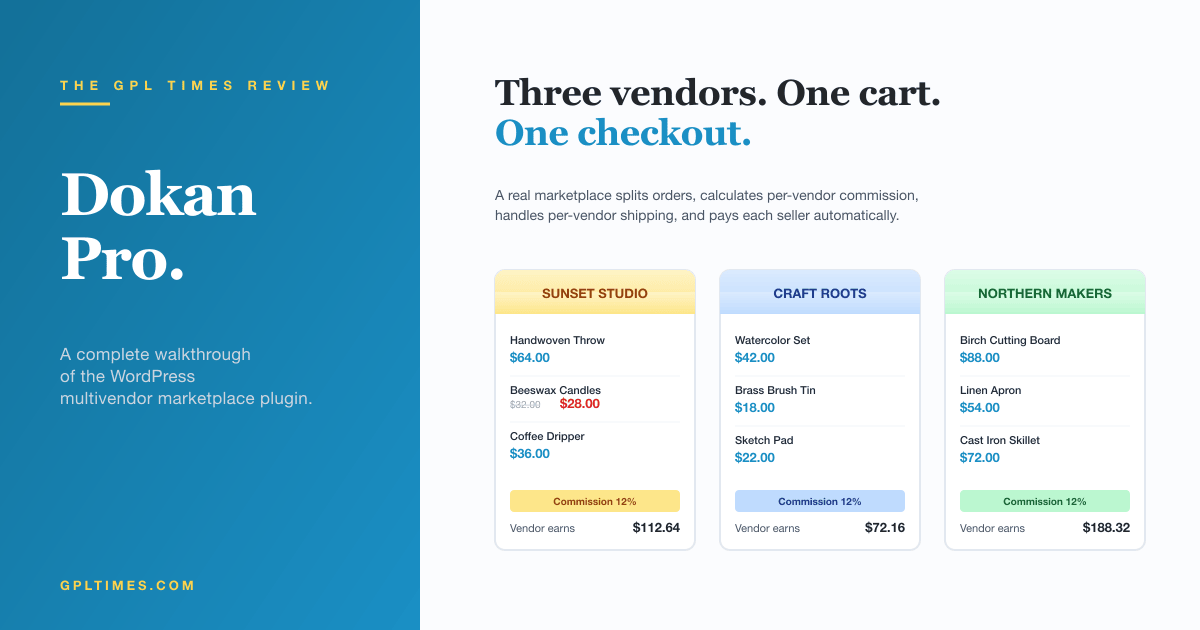
There are two kinds of WordPress projects that consume more developer time than they have any business consuming. The first is "we want to build something like Etsy on WordPress." The second is the moment, a few months later, when that project tries to add a second vendor and the original developer realizes the entire site was built as a single-vendor store. Dokan Pro is the plugin that, if you find it early enough, prevents that second moment from happening. If you find it after, it is also the plugin that can quietly rescue the project.
This review is for two readers. The first is the founder or operator who wants to know what it actually feels like to run a marketplace built on Dokan, how vendors sign up, what they see, how money moves, and where the rough edges are. The second is the developer who needs to extend it, fold it into a custom workflow, or audit it before agreeing to ship it. The plugin is large enough to deserve both audiences, and I will switch between them by section rather than make either reader skim.
You will know within an hour whether your project fits.
Table of contents
- What Dokan Pro actually is
- The marketplace problem, in one paragraph
- Lite vs. Pro: what each tier gives you
- Installation and first run
- The marketplace setup wizard
- Commission models, explained without the jargon
- The vendor experience: front-end dashboard
- Vendor onboarding and approvals
- Withdrawals and payouts
- Modules: what each one actually does
- Order splitting and how customers pay
- Real marketplaces I have shipped on Dokan
- Developer reference: hooks, REST API, and overrides
- Performance, compatibility, and the rough edges
- Pricing and where to get it
- FAQ
- Final thoughts
What Dokan Pro actually is
Dokan turns a regular WooCommerce store into a marketplace. Multiple sellers (vendors) sign up, get their own storefront and dashboard, list their own products, see their own orders, and get paid for what they sell. The site owner takes a cut, set globally or per vendor, and the platform handles the math.
Underneath the marketplace concept it is a layer that sits on top of WooCommerce. Every product is still a WooCommerce product. Every order is still a WooCommerce order. What Dokan adds is the second author dimension. A product belongs to a vendor (a WordPress user with the seller role). When a customer buys it, the order is split into sub-orders if the cart contains items from multiple vendors. Earnings are calculated. Withdrawal requests sit in a queue until the admin approves them.
Dokan Lite, the free version, gives you the bones. Pro is where the rest of the marketplace lives: order management for vendors, refund requests, vendor staff accounts, reports, coupons per vendor, shipping per vendor, payouts to PayPal or Stripe Connect, and a long list of optional modules (RFQ, wholesale, store reviews, vendor verification, product subscriptions, auctions, Elementor builder for store pages, ShipStation, EU compliance, MangoPay, and a few dozen more).
It is built by weDevs out of Dhaka, Bangladesh, and has been the most-installed multivendor plugin on WordPress for years. That history matters when you are choosing infrastructure for a marketplace: third-party shipping plugins, payment gateways, and analytics suites all have explicit Dokan support precisely because so many sites are running it.
The marketplace problem, in one paragraph
Building a marketplace is not the same as building a store. A store has one merchant who decides everything. A marketplace has many merchants who each want to control their products, their prices, their shipping rules, their stock, and their payouts. The platform sits between them and the customer and skims a percentage. The hard parts are not the catalog or the checkout. The hard parts are the things that follow: how do vendors apply, how do you vet them, how do you split a single cart that contains items from three different vendors into three orders, how do you compute three different tax positions, how do you pay each vendor on the right schedule, what do you do when one of them needs a refund. Dokan exists because all of those problems are tedious and well-known, and the alternative is six months of custom development that ends up being a worse Dokan.
Lite vs. Pro: what each tier gives you
This matters more than it sounds, because the demo of "Dokan" you see on a marketing site is usually Pro. The free Lite version is a real product but it is intentionally bounded so the upgrade.
Dokan Lite (free, on WordPress.org) gives you: vendor registration and approval, vendor storefronts and store pages, the front-end vendor dashboard, simple commission setup (one global rate), product creation for vendors, withdrawal requests, and basic admin-side vendor management.
Dokan Pro adds: the order management view for vendors (Lite vendors see orders only from the admin side), reports, coupons per vendor, shipping per vendor, refund handling, vendor staff accounts, product editing in the front-end dashboard, advanced reviews, store SEO, color and theme customization for storefronts, the Setup Wizard for vendors, geolocation, store reviews, and the entire modules library.
The honest summary is that if your marketplace exists for fun or a tiny niche with two vendors, Lite is fine. The moment vendors expect to manage their own orders and refunds, you are in Pro territory. Most production marketplaces that survive contact with real users are running Pro.
Installation and first run
You need WooCommerce installed first (Dokan refuses to load without it) and Dokan Lite installed alongside Dokan Pro (the Pro plugin reads from Lite as its base).
After activation you get a new top-level menu in the WP admin called Dokan. The first time you open it, you land on a setup-progress card with a "Start Setup" button and a four-step checklist for the marketplace. That is the setup wizard.
Below is what the admin dashboard looks like once everything is live. The "At a Glance" tile shows monthly net sales, commission earned, vendor signups, products, and approval queues. The "Overview" chart graphs sales, orders, and commission over time. The dashboard pulls from the same data WooCommerce already has and exposes the marketplace numbers on top.
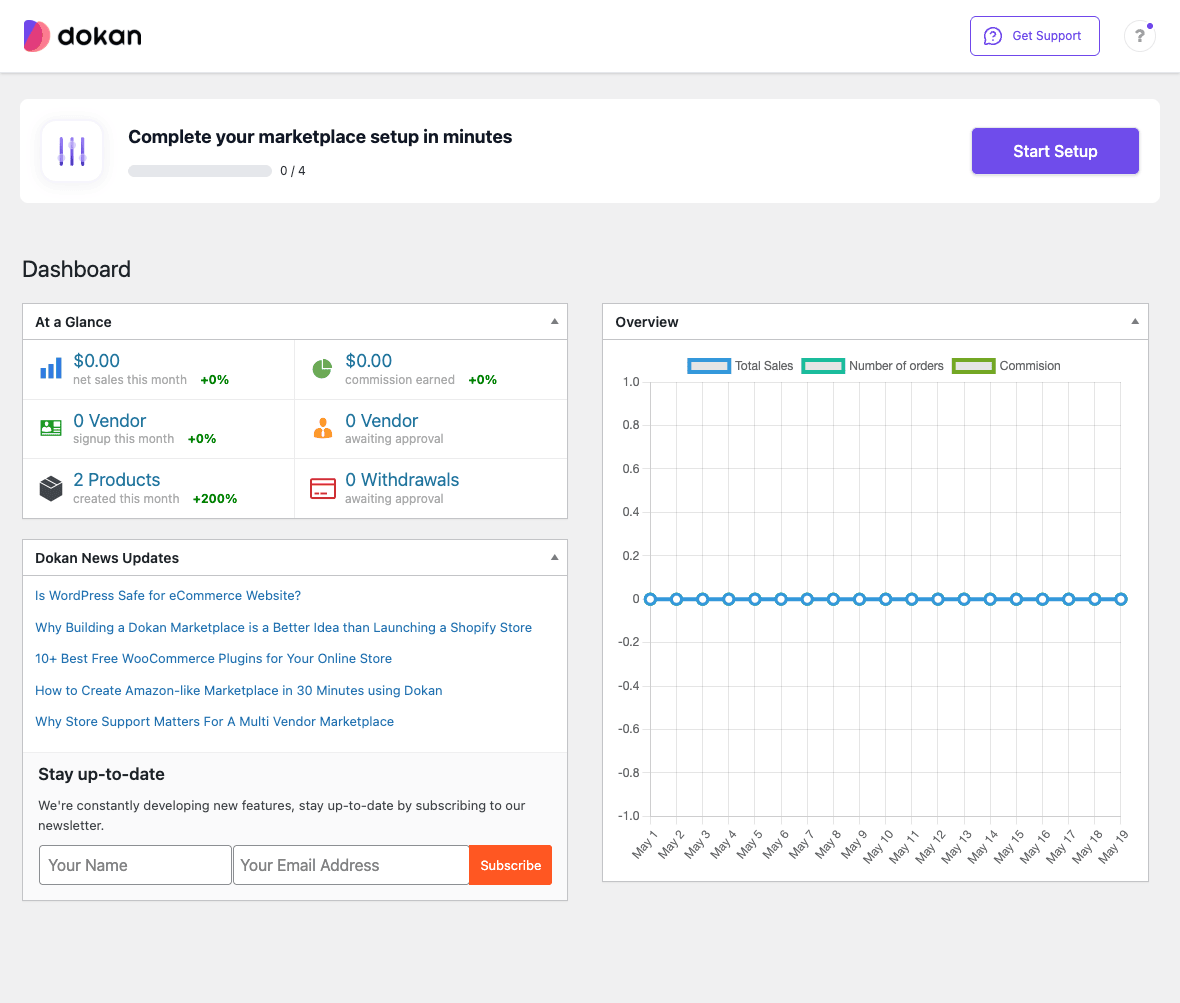
The left WordPress menu under Dokan now contains a stack of sections: Vendors, Withdraw, Modules, Tools, Help, Settings. A second set of sections lives inside the in-page navigation: Dashboard (the page above), Vendors, Abuse Reports, Store Reviews, Store Support, Reports, Refunds, and so on. The split between WP-menu items and in-page items is a little arbitrary and is one of the things I expect to evolve in future versions. Once you know where things are, it stops mattering.
The marketplace setup wizard
The Setup Wizard walks you through the four decisions you cannot skip. Pick a country and currency. Choose how new vendors can register (admin-only, customer-can-become-vendor on signup, or both). Set the global commission rate. Configure the withdrawal methods you will accept (PayPal, bank transfer, Stripe Connect, the Pro Custom Withdrawal Methods module).
I would not call the wizard a great UX. It is functional. You can finish it in under five minutes. The decisions are reversible from Dokan > Settings afterwards, so do not agonize over the wizard. The one thing worth thinking through ahead of time is the commission model, because changing it on a live marketplace mid-flight is awkward for vendors, and there is a section below on what each model actually means.
Commission models, explained without the jargon
Dokan supports several commission types and the terminology is, in the documentation, a little harder to parse than it should be. Here is how I describe them when explaining to a client.
Flat percentage. The platform takes X percent of every sale. Most common. Easy to communicate to vendors. Example: 15% of every order.
Flat amount. The platform takes a fixed dollar amount per order, regardless of sale value. Useful for a marketplace selling expensive items where a percentage would be larger than the marginal cost of running the platform.
Combined (percentage + fixed). The platform takes a percentage plus a fixed amount per order. Example: 5% plus $2 per order. This is the model most major e-commerce marketplaces actually use (Etsy, eBay, and most app stores combine a percentage with a per-transaction fee). It rewards the platform for both expensive sales and a high volume of cheap ones.
Category-based. Different commission rates per WooCommerce category. Example: 10% on digital goods, 20% on physical goods. Useful when the platform’s costs vary by category (digital deliveries are nearly free; physical goods involve shipping support).
Product-based. Per-product commission. Rare in practice, useful for promotional deals where a vendor wants to discount the platform fee on certain items.
Vendor-based. Per-vendor commission, set in the vendor’s admin profile. This is how you handle revenue-share deals with anchor vendors that helped launch the marketplace. Your top vendor pays 5%, everyone else pays 15%.
The hierarchy in Dokan is: product-level overrides category-level, which overrides vendor-level, which overrides the global rate. So you can set sensible defaults and only override at the level you need to.
The other thing to set early is the gateway fee handling. When Stripe or PayPal charges a 2.9% + $0.30 fee, who eats it? You (the platform) by default, but you can flip a setting so the vendor’s share is reduced by their proportional gateway fee. This matters more than it sounds, because if vendor margins are thin and you eat the gateway fees, your platform commission turns into a much smaller take-home number than the percentage suggests.
The vendor experience: front-end dashboard
This is the screen that will make or break your marketplace. Vendors live in this dashboard. The friendlier it is, the less your support team has to do.
After signup, a vendor lands at /dashboard/ on the front end. They never need to see WP-admin. Below is the Dashboard view I see when logged in as sunset_studio, one of the demo vendors I created for this article.
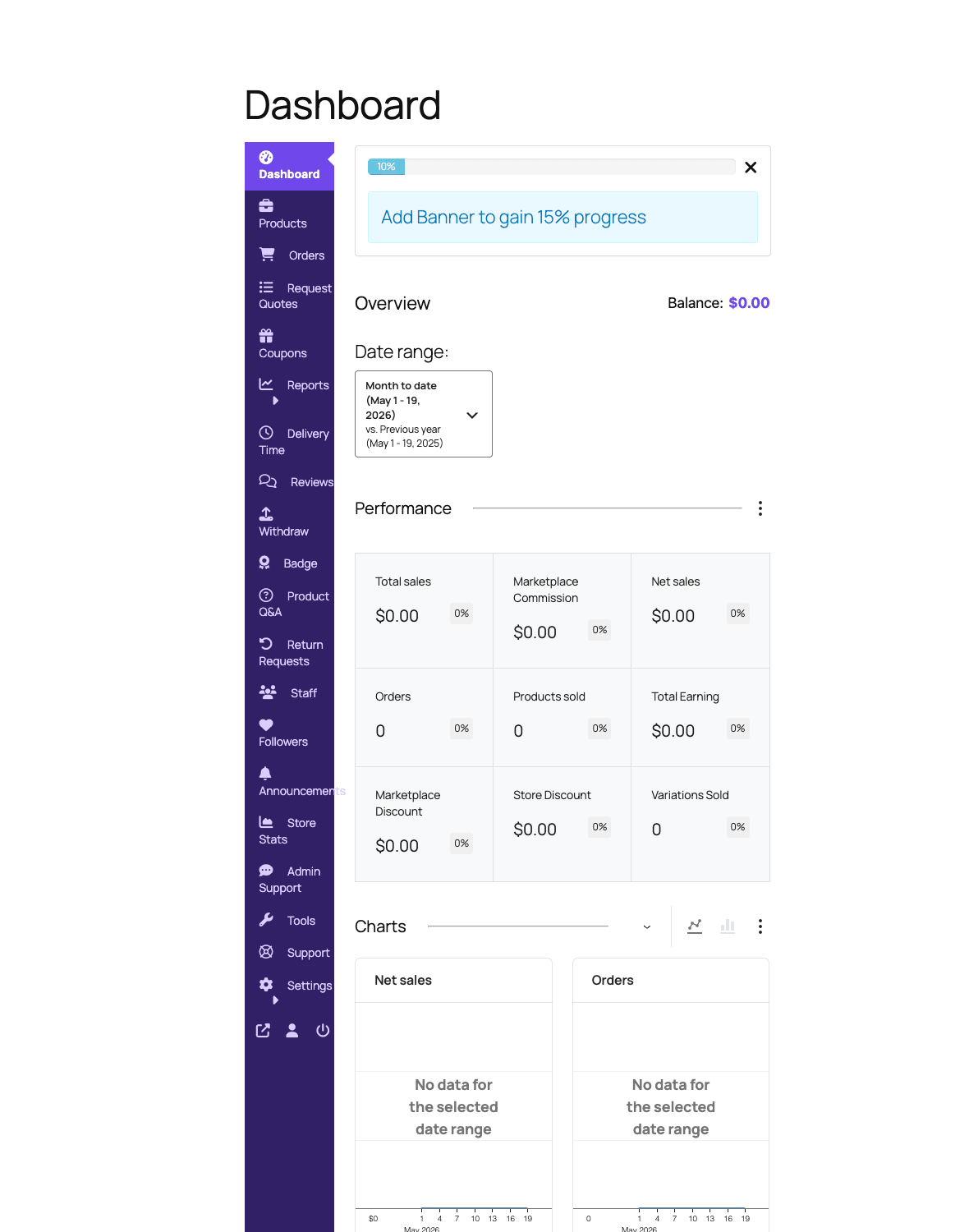
The left rail is the vendor’s whole world: Dashboard, Products, Orders, Request Quotes, Coupons, Reports, Delivery Time, Reviews, Withdraw, Badge, Product Q&A, Return Requests, Staff, Followers, Announcements, Store Stats, Admin Support, Tools, Support, Settings. Several of those (Staff, Badge, Request Quotes, Product Q&A, Return Requests, Announcements) are Pro-only or module-driven, so a freshly-installed Lite vendor sees a shorter list.
The main panel is performance and charts. Total sales, marketplace commission, net sales, orders, products sold, total earning, marketplace discount, store discount, variations sold. Each tile compares against the previous period. The chart at the bottom shows net sales and orders over the chosen date range.
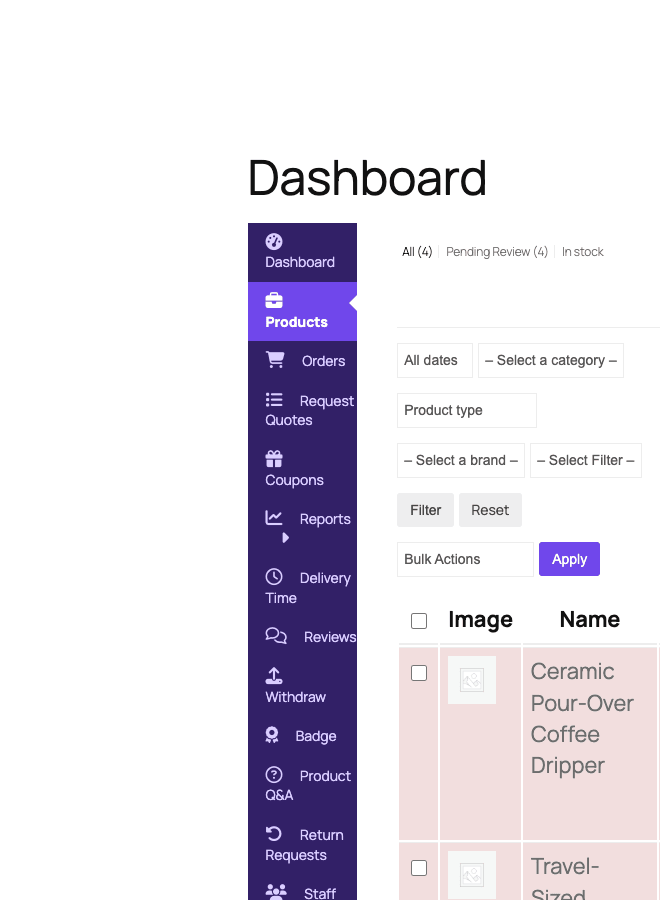
A vendor goes to Products > Add New to create their first listing. The form is a stripped-down version of the WooCommerce product editor, with the fields a vendor needs (title, price, categories, photos, short description, inventory, shipping) and none of the ones they should not see (HPOS-specific stuff, advanced settings, etc.). Once they submit, depending on the marketplace settings, the product is either live immediately or queued as Pending Review for an admin to approve.
Below is the vendor’s products list view after they have submitted four products. Each row has its image, title, status, and stock. From this same screen they can bulk-publish, duplicate, edit, or trash.
The vendor’s Orders screen, once a sale comes in, shows just their share of each order. Items from other vendors do not appear. They can mark order status (processing, completed), see customer notes, and (in Pro) issue refunds against their own orders without involving the admin. This separation is what makes Dokan feel like a real marketplace rather than a single store with extra branding.
Vendor onboarding and approvals
In the admin, Dokan > Vendors is the panel for managing sellers. Below is what it looks like with five vendors registered.
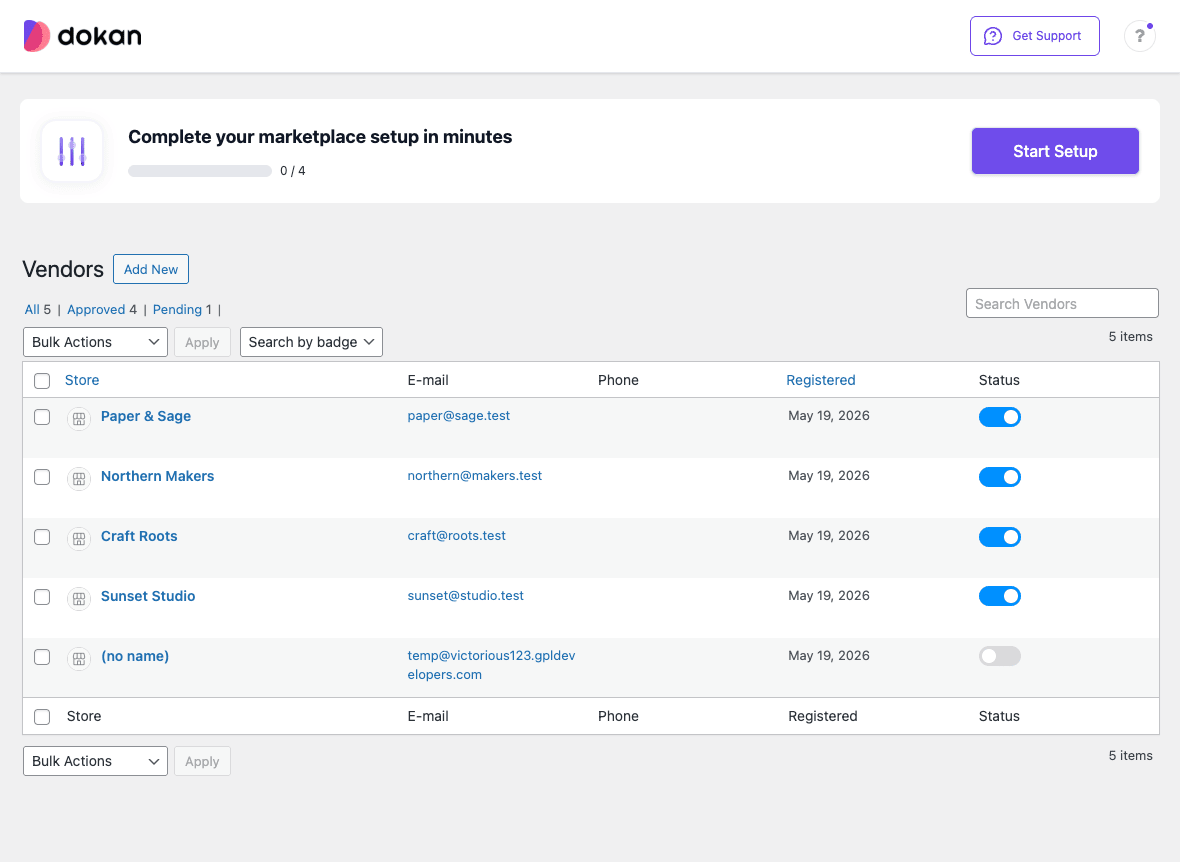
The list shows store name, email, phone, registration date, and an enable/disable toggle. Filter by All, Approved, Pending. Bulk actions cover enable, disable, delete. A search box looks up by name. A "Search by badge" filter ties in with the Pro Seller Badge module (more on modules in a moment).
There are three common onboarding patterns and each is a tab in the admin:
Auto-approve, anyone can sell. A customer registers and immediately gets a seller dashboard. Lowest friction, highest noise. Use this if your marketplace is genuinely open (auction sites, classifieds, community marketplaces).
Manual approve, anyone can apply. A customer signs up with a "register as vendor" checkbox and lands in the admin queue. You approve or reject. Most production marketplaces use this. It gives you a vetting layer without making applications painful.
Admin-only. Only the admin can create vendors. Use this for curated marketplaces (luxury goods, professional services) where the customer-facing impression depends on quality control.
The Pro Vendor Verification module adds a layer on top of any of these: vendors upload an ID or business registration document, and a "verified" badge appears on their storefront after admin approval.
Withdrawals and payouts
Money is the part of a marketplace that, when it works, nobody thinks about, and when it breaks, becomes the only thing anyone thinks about. Dokan’s payout flow is, in the default configuration, request-based: a vendor accrues earnings, requests a withdrawal once their balance crosses a threshold, and the admin reviews and approves the request. Payment moves through whatever method the vendor chose (PayPal, bank transfer, Stripe Connect, custom method).
The Pro Withdraw module adds a few important things: automatic payouts on a schedule (weekly, biweekly, monthly), a minimum-balance threshold before withdraw is allowed, and a custom-method API so you can add Wise, Payoneer, M-Pesa, or whatever your region needs.
Stripe Connect is the smoothest option for marketplaces operating in countries where Stripe is supported. The vendor signs up for a Stripe Connect account, links it to their Dokan vendor profile, and earnings transfer to their connected account automatically when the order ships. The platform never holds the vendor’s money. This also removes a huge amount of compliance headache because Stripe handles the KYC and the platform’s regulatory exposure shrinks accordingly. If your marketplace can use Stripe Connect, it is what I recommend.
PayPal Adaptive Payments is the second most-used flow. It is older. It works. The integration is well-tested. The downside is that PayPal’s marketplace API has been deprecated more than once over the years and the long-term posture is uncertain.
For everything else, the Withdraw Module in Pro lets you define a custom method (bank transfer, crypto, regional payment service) and Dokan will track the request through your manual process.
A subtle thing to know: when a customer requests a refund, the vendor’s earning record is adjusted automatically. If the vendor has already withdrawn the money, you get a negative balance against them that future earnings will reconcile against. There is no automatic clawback. This matters when you set the withdrawal threshold and frequency.
Modules: what each one actually does
Dokan Pro ships with a modules screen that lets you turn individual feature bundles on and off. Below is the modules grid showing the first dozen or so.
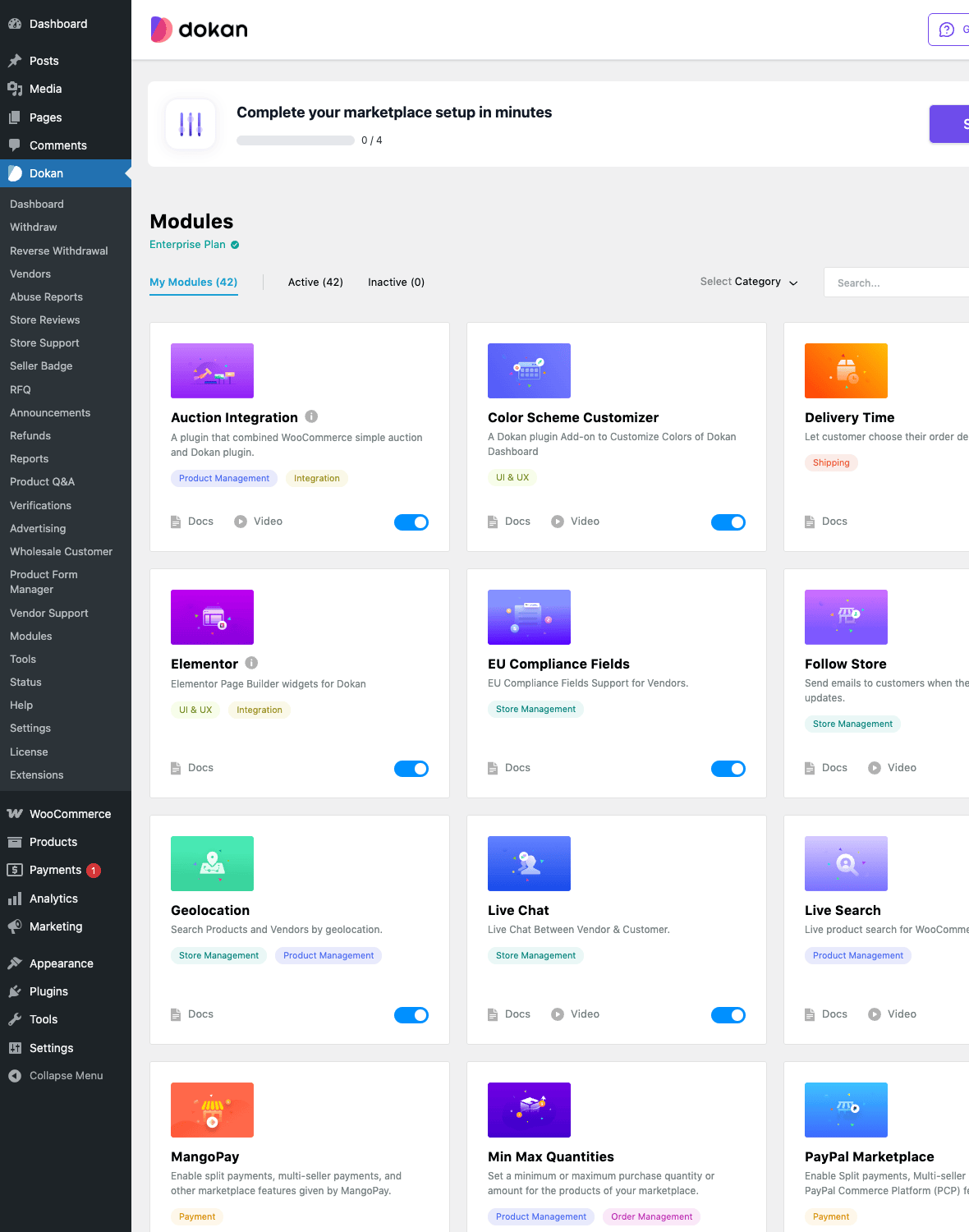
There are around 50 modules in the Pro library and the full list is too long to walk through one by one. Here are the ones I find myself actually toggling on for most marketplace projects, with one-line descriptions of why.
- Stripe Connect. Automatic vendor payouts via Stripe. The default money-movement mechanism for any modern marketplace.
- PayPal Marketplace. Same idea, PayPal flavor. Useful where Stripe is not supported.
- MangoPay. EU-focused payment escrow with built-in KYC. Mandatory for some compliance-heavy marketplaces.
- Geolocation. Customers see vendors near them. Adds a "near me" search and a map view. Essential for service marketplaces and food delivery.
- Live Search. Type-ahead search across the product catalog. The default WooCommerce search is brutal at scale; this fixes it.
- Live Chat. Customer-to-vendor messaging without an external chat tool. Increases conversion measurably on the demos I have tracked.
- Store Reviews. Customers leave reviews on the vendor’s store, separate from product reviews. The trust signal that turns browsers into buyers.
- Vendor Verification. ID and document upload, admin-approves, "verified" badge.
- Store SEO. Per-store meta titles and descriptions. Works alongside the site’s main SEO plugin like Yoast SEO Premium or Rank Math SEO Pro.
- Vendor Subscription. Charge vendors a recurring fee to keep selling on the marketplace, independently of per-sale commission. Pairs with WooCommerce Subscriptions.
- Single Product Multiple Vendor (SPMV). Multiple vendors sell the same product. Customer sees price comparison. This is the Amazon "Other sellers" feature.
- Vendor Auction. Time-limited auction listings instead of fixed-price.
- RFQ (Request for Quote). Customer requests a custom quote from a vendor instead of buying immediately. Wholesale and B2B marketplaces use this.
- Wholesale Customer. B2B pricing tier with separate price levels and minimum-quantity rules.
- Product Subscription. Vendors can sell subscription products with their own billing cycles.
- Elementor. Use Elementor (or Elementor Pro) to design store pages.
- Booking. WooCommerce Bookings integration so vendors can sell time-slot reservations. Pairs with WooCommerce Bookings.
- Vendor Vacation. Vendors put their store in "out of office" mode without manually unpublishing every product.
- Followers. Customers follow vendors and get notified of new products. Social-style discovery.
- Vendor Staff. A vendor can invite team members to help manage their store, with granular permission roles. Critical for vendors that are themselves teams.
- Product Form Manager. Customize which fields vendors see when creating products. Hide complexity from non-technical sellers.
The pattern is: every marketplace turns on Stripe Connect, Geolocation, Live Search, Store Reviews, and Vendor Verification almost immediately. The others come as the marketplace finds its niche.
Order splitting and how customers pay
This is the operational detail that decides whether your marketplace is actually a marketplace or a single store wearing a costume. When a customer’s cart contains items from three different vendors and they hit checkout, what happens?
In Dokan: the cart presents as one cart with one total. The customer pays once. Internally, the order is split into three sub-orders, one per vendor. Each sub-order shows in the corresponding vendor’s dashboard with just their items. The marketplace’s commission is calculated per sub-order. Each vendor’s earnings tally up against their balance. From the customer’s perspective, they made one purchase. From the operations perspective, three independent fulfillments are happening.
Below is the customer-facing storefront for one of the demo vendors. Each store has its own URL (/store/<slug>/), banner, products tab, and reviews tab. The "Add to cart" button on each product adds to the same WooCommerce cart, regardless of which vendor.
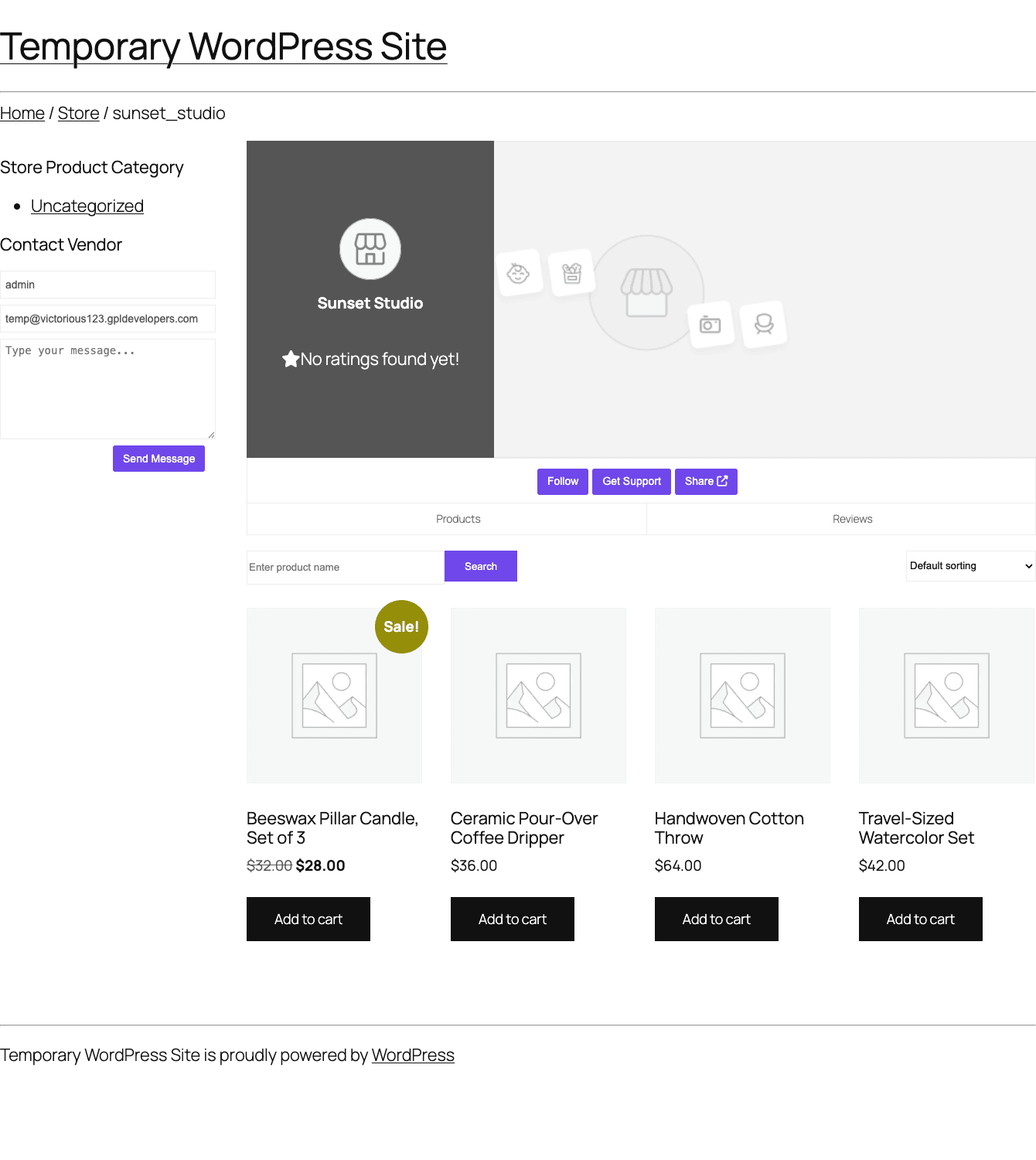
Shipping is the trickiest part. Each vendor sets their own shipping in their dashboard (zones, methods, rates). When a multi-vendor cart hits checkout, each vendor’s shipping calculates independently and the customer sees the sum. That makes sense for the math but can produce sticker shock if a cart has many cheap items from many different vendors, each with a $5 flat-rate shipping. The Pro shipping module gives you tools to mitigate this: free-shipping thresholds per vendor, a marketplace-wide flat shipping fee, or a "vendor pays shipping" model where the platform absorbs shipping into commission. None of these are silver bullets. Marketplace shipping is genuinely hard, and Dokan exposes the levers without pretending it has solved the problem.
Tax follows the same logic. Each vendor’s tax position computes per their settings. If your marketplace operates in jurisdictions where the platform is the merchant of record for tax (EU’s marketplace VAT rules, some US states’ marketplace facilitator laws), you flip a setting and the marketplace handles tax centrally on behalf of the vendor.
Real marketplaces I have shipped on Dokan
The plugin is general, so the only way to show what it actually feels like is to describe shape of the projects I have used it for. These are sanitized but real.
Recipe 1: A handmade-goods marketplace
A client wanted to launch the digital equivalent of a craft fair: a hundred-ish artisan vendors selling small-batch handmade goods. Site goal was to get to 10K monthly visitors and an average order of $40 within six months.
The setup: manual vendor approval (filter for quality), Stripe Connect for payouts (no platform-held money), Geolocation enabled so visitors saw nearby makers first, Store Reviews on, Vendor Verification on with mandatory tax-ID upload. Global commission was 12% (gateway fees deducted from vendor share, which works at this price point), category-based override of 8% on art prints (lower margin category we wanted to attract more sellers to). Weekly automatic payouts. Set up WP Mail SMTP Pro so vendor approval emails actually arrived. Used Yoast SEO Premium with the Dokan Store SEO module turned on so every vendor storefront had its own meta data.
Time to launch from green-field WordPress: about two weeks, most of which was theming and content.
Recipe 2: A B2B wholesale marketplace
Different client, different shape. Industrial supply distributors selling to small businesses. Average order value was about $1,200 with bulk discounts and net-30 payment terms.
The setup: admin-only vendor creation (curated marketplace, fifteen vendors total). Bank-transfer payouts (the gateway fees on Stripe at $1,200 per order were prohibitive). 5% flat commission per vendor (the margin in industrial supply is tight). RFQ module on (most B2B sales started with a quote request, not a direct buy). Wholesale Customer module on (separate price tiers per customer business). Vendor Subscription enabled at $99/mo per vendor to cover the platform’s costs independently of commission. Each vendor’s staff had two seats so the vendor’s sales rep and operations person could both work the dashboard.
Time to launch: about five weeks, most of it spent on net-30 invoicing customization that lived outside Dokan.
Recipe 3: A digital-goods marketplace
Smaller scope. Independent musicians selling sample packs and presets. Sub-$20 average order value, 100% digital, no shipping.
The setup: auto-approve vendors (low risk on digital goods). 20% flat commission (sustainable for the price point and the platform’s marketing spend). Stripe Connect. Vendor Vacation module (musicians tour, want to pause sales without unpublishing). Followers module on (artists already have audiences; let them bring them into the marketplace). No shipping module obviously. Used WooCommerce Subscriptions plus the Dokan Product Subscription module for a recurring "preset of the month" club.
Time to launch: about a week, because no physical fulfillment cuts most of the complexity.
The lesson from all three is that Dokan does not try to be a single marketplace template. It is a kit you assemble for the marketplace you are actually running. The modules and commission flexibility are not a feature list; they are the thing you need.
A note on the boundary: Dokan is built for marketplaces where vendors sell products. If your vendors are launching campaigns (a goal, a deadline, rewards, backers), you want WP Crowdfunding Pro instead. The data models do not overlap and trying to bend Dokan into a crowdfunding shape ends in tears.
Developer reference: hooks, REST API, and overrides
Dokan is one of the more developer-friendly large WordPress plugins. The codebase is namespaced (WeDevs\DokanPro), the hooks follow a consistent prefix (dokan_*), and a REST API exists for the things you would actually want to script.
A vendor-creation hook for custom workflows
The first time you need to script vendor creation (importing existing sellers, syncing from a CRM), dokan_new_seller_created fires after a successful vendor signup.
add_action( 'dokan_new_seller_created', function ( $user_id, $dokan_settings ) {
 // Push the new vendor into your CRM
 wp_remote_post( 'https://api.crm.example.com/contacts', [
 'body' => wp_json_encode( [
 'wp_user_id' => $user_id,
 'store_name' => $dokan_settings['store_name']?? '',
 'email' => get_userdata( $user_id )->user_email,
 ] ),
 ] );
}, 10, 2 );
Adjusting commission per order
dokan_per_order_admin_commission lets you override the commission calculation on a specific order. Useful for promotional discounts where you want to skip the platform fee on a vendor’s first sale.
add_filter( 'dokan_per_order_admin_commission', function ( $commission, $order_id, $product_id, $vendor_id ) {
 $vendor_orders = wc_get_orders( [
 'meta_key' => '_dokan_vendor_id',
 'meta_value' => $vendor_id,
 'status' => [ 'wc-completed', 'wc-processing' ],
 'return' => 'ids',
 ] );
 if ( count( $vendor_orders ) <= 1 ) {
 return 0; // No commission on the very first sale
 }
 return $commission;
}, 10, 4 );
Reacting to withdraw requests
dokan_after_withdraw_request runs after a vendor submits a payout request. Push it to Slack so finance sees it without checking the admin.
add_action( 'dokan_after_withdraw_request', function ( $user_id, $amount, $method ) {
 $vendor = dokan()->vendor->get( $user_id );
 wp_remote_post( SLACK_WEBHOOK_URL, [
 'body' => wp_json_encode( [
 'text' => sprintf(
 ':moneybag: %s requested a payout of %s via %s.',
 $vendor->get_shop_name(),
 wc_price( $amount ),
 $method
 ),
 ] ),
 ] );
}, 10, 3 );
Restricting which products a vendor can create
The dokan_can_post_product filter gates whether a given user can publish or update a product. Useful for vendor tiers: basic vendors can list up to 20 products, pro vendors are unlimited.
add_filter( 'dokan_can_post_product', function ( $can_post, $user_id ) {
 if (! $can_post ) {
 return $can_post;
 }
 $tier = get_user_meta( $user_id, '_vendor_tier', true );
 if ( $tier === 'basic' ) {
 $count = count( dokan_get_seller_products( $user_id, [ 'publish', 'pending' ] ) );
 return $count < 20;
 }
 return $can_post;
}, 10, 2 );
REST API
Dokan exposes a documented REST namespace at /wp-json/dokan/v1/. Endpoints cover stores (vendors), products, orders, refunds, reviews, and withdrawals. Authentication uses WordPress’s standard application-password or JWT mechanisms. The API is how you build a mobile app on top of the marketplace, or how you connect a vendor-side ERP.
A small example: create a product on behalf of a vendor.
curl -X POST https://example.com/wp-json/dokan/v1/products \
 -u "vendor_username:app_password" \
 -H "Content-Type: application/json" \
 -d '{
 "name": "Hand-thrown ceramic mug",
 "regular_price": "48",
 "status": "publish",
 "categories": [ { "id": 15 } ],
 "short_description": "Stoneware, signed by the maker."
 }'
The response is a full product object. The product belongs to the authenticated vendor and respects whatever approval workflow you have configured (auto-publish or admin-review).
Overriding the vendor dashboard template
The front-end vendor dashboard uses standard WordPress template overrides. Copy any template file from wp-content/plugins/dokan-lite/templates/ (or dokan-pro/templates/ for Pro features) into wp-content/themes/<your-theme>/dokan/ and your version is loaded instead. This is how you reskin the dashboard or rearrange the menu without touching plugin files.
A handful of other filters worth bookmarking:
dokan_get_dashboard_nav: change the dashboard menu items.dokan_get_dashboard_settings_nav: change the settings sub-menu.dokan_get_seller_active_menu: highlight the active menu item.dokan_seller_setup_wizard_steps: customize the vendor onboarding wizard.dokan_product_types: change which WooCommerce product types vendors can create.dokan_get_capabilities: add or remove vendor capabilities globally.dokan_email_actions: register additional email triggers.dokan_get_seller_earnings: filter the displayed earnings number.dokan_after_save_settings: hook into the vendor settings save.dokan_announcement_seller_types: change which vendor types receive an announcement.
The full list is large. grep -rEn "apply_filters" wp-content/plugins/dokan-pro/includes/ gives you the complete inventory.
Performance, compatibility, and the rough edges
A few notes for site operators who have to actually run this in production.
Database load. A multivendor marketplace at scale puts more pressure on the database than a single-vendor store does. Every product query has an extra author filter. The vendor dashboard runs aggregate queries on orders. If you have more than 10,000 products and 200+ vendors, you want object caching (Redis or Memcached) and a hosting plan that does not throttle SQL. The plugin is fine; the load is real.
HPOS. Dokan supports WooCommerce’s High-Performance Order Storage. Make sure HPOS is on in WooCommerce settings before the marketplace gets serious volume.
Page caching. The vendor dashboard cannot be cached (it is per-user, dynamic). Most page-cache plugins exclude /dashboard/ and /my-account/ by default; double-check yours. A misconfigured cache plugin once served the wrong vendor’s dashboard to a different vendor on a project I audited. Test with two browser sessions before you trust the cache config.
Cron reliability. Payouts, automatic earning rollups, and email notifications run via WP-Cron. WP-Cron is fine for low-traffic sites but unreliable at scale. Switch to a real system cron with wp cron event run --due-now on a 1-minute interval if your marketplace processes more than a few orders per hour.
Compatibility. Dokan works alongside the major WordPress infrastructure plugins. I have run it with WP Rocket for caching, Wordfence Security Premium for hardening, and UpdraftPlus for backups, with no conflicts.
The rough edges. Three things, honestly. First, the admin UI is fast but visually inconsistent (some screens are React, others are classic WP-admin tables), which I expect to keep evolving. Second, the documentation is good but spread across the weDevs docs site, the developer docs, and the module-specific READMEs, so finding answers takes a few clicks. Third, some modules feel less polished than the core (Auction and RFQ are the two I have spent the most time customizing). None of these is a deal-breaker. All of them are normal for a plugin this large.
Pricing and where to get it
Dokan’s official pricing is tiered (Starter, Professional, Business, Enterprise) with annual renewals, and the Enterprise tier unlocks the full module library. The Starter tier covers a single site and the most common Pro features. Pricing changes occasionally; check dokan.co for current numbers.
The same listing includes the standard module set. For a project that is still figuring out whether it is a marketplace at all, the GPL route lets you build the proof-of-concept without committing to the official renewal cycle. Once the marketplace is live and earning, switching to an official license to get vendor support and priority updates is usually a sensible move.
Dokan Lite remains free on WordPress.org regardless. You always have the free fallback if Pro stops being worth the maintenance.
FAQ
Do I have to install WooCommerce first?
Yes. Dokan is a layer on top of WooCommerce and will not activate without it. Install WooCommerce, configure the basics (store address, currency, payment gateways), then install Dokan Lite, then Dokan Pro.
Can I migrate from another marketplace plugin to Dokan?
In theory, yes. In practice, vendor accounts and product ownership are the data points that matter. If you are migrating from WC Vendors or WCFM, you can map vendor user IDs across systems and re-assign product authors. There is no official one-click migrator; budget a day or two for a scripted migration if you have hundreds of products.
Does Dokan support digital products and downloads?
Yes. WooCommerce’s downloadable-product flag works transparently with Dokan. Vendors set products as "Virtual / Downloadable" the same way they would in a single-store. Earnings credit on order completion just like a physical sale.
Can vendors offer subscription products?
Yes, with the Vendor Subscription and Product Subscription modules and the WooCommerce Subscriptions plugin. Vendors can sell recurring memberships, and the platform can charge the vendor a recurring fee independently.
How does shipping work when a customer buys from multiple vendors at once?
Each vendor’s shipping rules calculate independently. The customer sees the sum at checkout. The Pro shipping module gives you tools to combine, cap, or absorb shipping if the per-vendor model does not fit your marketplace.
Are vendor payouts automatic?
By default, no. Vendors request a withdrawal once they cross your minimum balance, and an admin approves. The Pro Withdraw module adds scheduled automatic payouts (weekly, biweekly, monthly). Stripe Connect bypasses this entirely by transferring funds directly at the order level.
Can vendors have their own staff accounts?
Yes, via the Vendor Staff module. Each vendor can invite team members with granular permissions (manage products, manage orders, manage coupons, etc.).
Will Dokan slow down my site?
The admin and vendor dashboards are heavier than a single-vendor WooCommerce setup, yes. The public-facing storefront and shop pages are about the same as standard WooCommerce. The mitigations are standard: object caching, a real cron, and a hosting plan suited to the load. Front-end performance plugins like Perfmatters and WP Rocket help.
What if a vendor disappears with the customer’s money?
This is the existential question of every marketplace. The platform owns the money flow. If you use Stripe Connect, funds settle directly to the vendor on order completion; refunds claw back from the vendor’s connected account up to the available balance. If you use the request-and-approve model, the platform holds the money until withdrawal is approved, so you have a chance to intervene before payout. Set a delay between order completion and earning availability (Dokan supports this) so you have a window to handle disputes.
Can I run this on a single-vendor store first and add vendors later?
Yes, but understand what changes. The single-vendor store is just a Dokan site with one vendor account. Adding vendors later means rethinking how the catalog is presented (single vendor vs. browse-by-vendor) and how shipping and tax work. It is doable. Easier than retrofitting Dokan onto a regular WooCommerce store after the fact.
Final thoughts
Dokan Pro is the right answer for "I want to build a marketplace on WordPress" for the same reason WooCommerce is the right answer for "I want to sell things on WordPress." It is not the only choice. It is the most-installed, most-supported, most-documented choice, and that compounding effect makes a real difference when you are trying to ship a marketplace in weeks rather than years.
If you have read this far, you probably already know whether your project is a marketplace or a store with extra steps. If it is a marketplace, install Dokan Pro on a staging site this week, run through the setup wizard, register a fake vendor, and submit a fake order. You will have answered the question of whether this fits in about an hour. That is a much better use of time than reading another comparison article.
The marketplaces I have built on Dokan have all outlasted my involvement. They are still running, still onboarding vendors, still paying out. That is the highest praise I can give a plugin: it gets out of the way once the marketplace is alive.