

Privacy compliance used to be the thing every WordPress owner promised themselves they would "look at next month". Then GDPR enforcement got real, California passed CCPA, Brazil passed LGPD, the UK split off into UK-GDPR with PECR on top, and suddenly a generic cookie banner from 2019 was not enough. Complianz Privacy Suite Premium is the plugin that converts that messy legal landscape into a setup wizard, an automatic cookie scan, a banner you can style without writing CSS, and a folder of generated legal documents that match the regions you actually serve. This is a long walkthrough of what is in the box, who it is for, how it works on a real WordPress install, and what the developer-facing hooks look like under the hood.
Table of contents
- What Complianz Premium actually is
- Why a consent plugin in the first place
- What the Premium upgrade unlocks
- Installing Complianz on WordPress
- Walking through the wizard
- The dashboard and the compliance score
- The cookie banner: shape, copy, and behaviour
- Cookie scanning with the website scan
- Generated legal documents
- Data subject requests and the Do Not Sell page
- Proof of consent, records, and statistics
- Real-world scenarios
- Developer reference: hooks, filters, REST routes
- Compatibility, performance, and gotchas
- Pricing and where to get it
- FAQ
- Final thoughts
What Complianz Premium actually is
Complianz Privacy Suite (GDPR/CCPA) Premium is a consent and privacy management plugin for WordPress. It is built by Complianz B.V., a Netherlands-based company that focuses entirely on privacy tooling for WordPress and now ships as part of the wider Lubenda group of brands. The free version on the WordPress.org repository covers the basics. The Premium build adds the automatic website scan, a deeper document generator (cookie policy, privacy statement, processing record, dataleak procedure, processing agreements), proof-of-consent records, consent statistics, the IAB TCF integration, A/B testing, and the full multi-region wizard.
Reading the plugin header tells you the scope in one line:
Plugin Name: Complianz Privacy Suite (GDPR/CCPA) premium
Plugin URI: https://complianz.io/pricing/
Author: Complianz
Description: Plugin to help you make your website GDPR/CCPa compliant
What that line undersells is the spread of laws it actually maps to. Out of the box, Premium ships region configurations for the European Union (GDPR), the United Kingdom (UK-GDPR, PECR, Data Protection Act), the United States (CCPA, CPRA, VCDPA, CPA, CTDPA, UCPA and the newer state laws), Canada (PIPEDA plus Quebec’s Law 25), Australia (Privacy Act 1988), South Africa (POPIA), and Brazil (LGPD). The plugin reshapes the banner, the consent type, the wording, and even which documents are generated based on which of those regions you target.
Why a consent plugin in the first place
A lot of WordPress owners come to consent management thinking "I’ll just drop a cookie notice at the bottom of the page and tick a box". That worked in 2017. It does not work today for three reasons.
First, the laws have teeth. GDPR fines are calculated as percentages of global turnover, CCPA gives California residents a private right of action for certain breaches, and regulators have started fining specifically because of the cookie banner itself, not the underlying data processing.
Second, opt-in is not the same as opt-out. GDPR requires opt-in, which means no marketing, statistics, or third-party scripts may fire before the user clicks accept. Most legacy banners load Google Analytics and the Meta pixel on first page view and then put a banner over the top. That is technically a breach.
Third, the documents are not optional. Every law on the list above expects a cookie policy and a privacy statement that names the controller, lists the processed data categories, names sub-processors, lists data-retention periods, and explains user rights. Writing those by hand from a template is a long Friday afternoon every time you change an analytics tool.
A plugin like Complianz is essentially saying: tell me which regions you target, let me scan your site for cookies, and I will generate the banner, the script-blocking, the documents, and the records of consent that go with it. It is privacy as compiled output rather than something you hand-craft.
What the Premium upgrade unlocks
The free Complianz plugin handles the basics: a single-region wizard, an opt-in or opt-out banner, a cookie policy generated from your wizard answers, and basic script blocking. That is genuinely enough for a small EU-only blog.
Premium adds the features that matter once your site grows past that:
- Automatic website scan. A scheduled scan crawls your site, identifies third-party scripts and cookies, classifies them via the Cookiedatabase.org sync, and adds them to your cookie inventory. You stop maintaining the cookie list by hand.
- Multi-region wizard. You can target EU, UK, US, Canada, Australia, South Africa, and Brazil at the same time and Complianz will switch the banner per visitor’s geolocation. Free is single-region.
- Document generator. Beyond a basic cookie policy, Premium generates a privacy statement, a Do Not Sell My Personal Information page (CCPA), a children’s privacy policy, a dataleak notification procedure, and a record of processing activities (the GDPR Article 30 record).
- Data subject request inbox. A built-in CRUD interface in the admin for handling GDPR access, rectification, and erasure requests, plus the CCPA "right to know" and "right to delete" flow.
- Proof of consent. Stored, exportable records of which user accepted what, when, from which IP, with a hashed reference you can produce if a regulator asks.
- Consent statistics. Aggregate dashboards showing accept-rate, opt-in-rate per category, and how many visitors revoke.
- A/B testing for banners. Run two banner variants and measure consent rate.
- IAB TCF v2 integration. For sites that sell programmatic advertising through Google AdManager and the wider ad-tech ecosystem.
- Premium support. Direct ticket support from the Complianz team.
If your site only collects a contact form and runs Google Analytics, free is fine. The moment you add advertising, a CRM like FluentCRM, a marketing tag manager, or anything that processes data from US states, the Premium feature set starts paying off.
Installing Complianz on WordPress
Installation is the standard WordPress flow.
- Download the Complianz Privacy Suite Premium zip from your GPL Times account.
- In WordPress admin, go to Plugins -> Add New -> Upload Plugin, pick the zip, and click Install Now, then Activate.
- You will see a new Complianz entry in the left admin menu with a small "1" badge. That badge is the plugin telling you the wizard has not been completed yet.
The PHP requirements are modest: WordPress 5.9 or newer, PHP 7.4 or newer. The plugin works on multisite. There is no separate license key step on the GPL-licensed version; the activation is already wired in so the Premium features unlock as soon as you activate.
If you are running on a tightly cached stack (Cloudflare in front of WP Rocket or LiteSpeed), set Complianz to load on the front-end before any caching plugin minifies or defers the rest of your JS. There is more on this in the gotchas section.
Walking through the wizard
The single most useful feature in Complianz is the wizard. You open Complianz -> Wizard and the plugin asks a long but well-grouped list of questions: which regions you serve, what kinds of personal data you process, whether you have a Data Protection Officer, whether you target children, what cookies you set, who your processors are, and which documents you want generated.
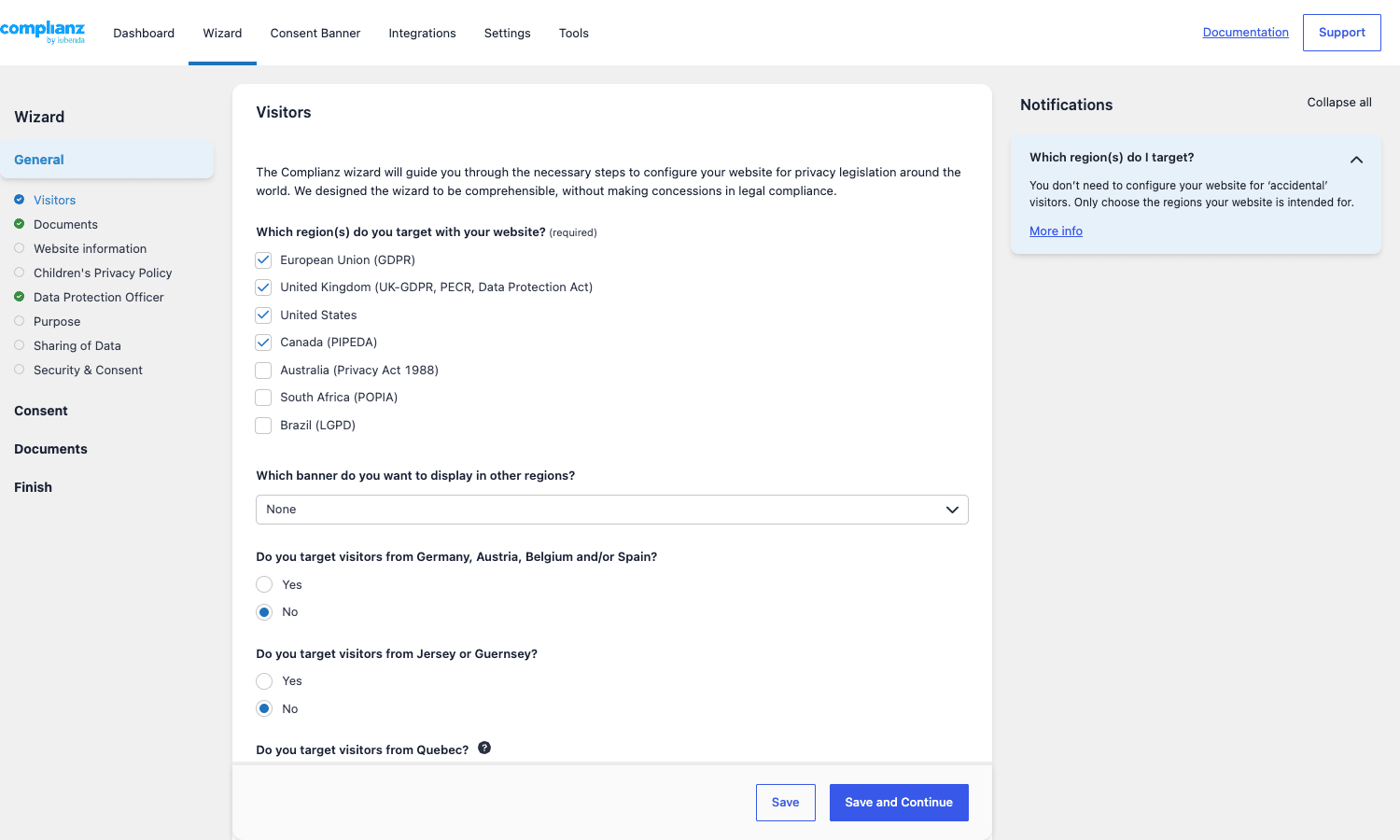
The screenshot above shows the very first step. I have ticked European Union (GDPR), United Kingdom (UK-GDPR, PECR, Data Protection Act), United States, and Canada (PIPEDA) as the regions this fictional site serves. As soon as you tick US, the wizard reveals an additional question about which individual US states you specifically target (California, Colorado, Connecticut, Delaware, Indiana, Iowa, Kentucky, Maryland, Minnesota, Montana, and so on), because each state’s law has slightly different requirements around the Do Not Sell page, sensitive data, and the opt-out mechanism.
The wizard is split into four top sections in the left menu:
- General -> Visitors, Documents, Website information, Children’s privacy policy, Data Protection Officer, Purpose, Sharing of Data, Security & Consent. The plumbing.
- Consent. Configures the consent type per region (opt-in for EU/UK, opt-out for US legacy laws, "do-not-sell" for CCPA, optinstats for the UK statistics carve-out), and the banner categories you want.
- Documents. Picks which documents to generate, where to publish them, and whether to use Complianz CSS or your theme styles.
- Finish. A final confirmation that flips the banner to active.
You answer everything once, click Save and Continue at the bottom of each step, and at the end Complianz writes the configuration to wp_options, generates the documents as actual WordPress pages, and activates the cookie banner. From this point forward, the answers in the wizard are the source of truth for the banner copy, the cookie policy, and the script-blocking rules.
You can re-open the wizard later and adjust any answer. The change propagates immediately, and if it affects the cookie policy text, the cookie policy page updates the next time it is rendered.
The dashboard and the compliance score
The Complianz dashboard is the page you land on most often after the initial setup. It shows a Progress percentage, a list of urgent and open tasks, the documents that have been generated, and quick links into the Tools section.
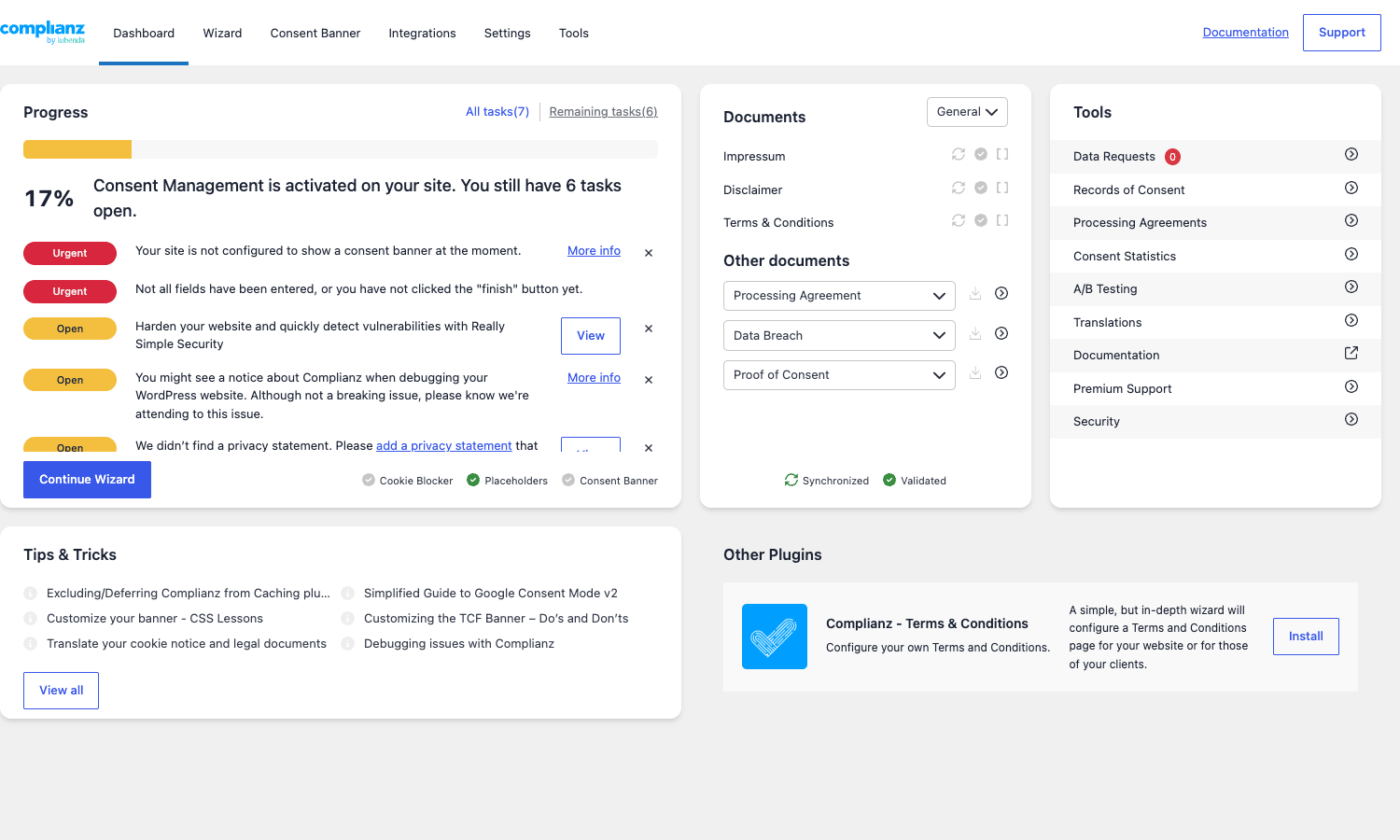
A few things to read off this view. The big number on the left (17% in the demo) is the compliance progress score. The "Urgent" rows below it are the things that block the banner from going live: in this case "Your site is not configured to show a consent banner at the moment" and "Not all fields have been entered, or you have not clicked the Finish button yet". The middle column lists the generated documents (Impressum, Disclaimer, Terms & Conditions, Processing Agreement, Data Breach, Proof of Consent). The right column gives one-click access into the Tools surfaces: Data Requests, Records of Consent, Processing Agreements, Consent Statistics, A/B Testing, Translations, Documentation, Premium Support, and Security.
The "Tips & Tricks" panel along the bottom rotates short articles from the Complianz knowledge base. They are surprisingly useful for things like excluding the consent script from a caching plugin or customising the TCF banner.
For a working site, this dashboard is where you would check in once a week to see if the website scan found new third-party services since your last visit, and to triage any open Data Requests.
The cookie banner: shape, copy, and behaviour
The banner is what your visitors actually see. Everything else is admin chrome. Complianz gives you a deep set of controls without making you write CSS.
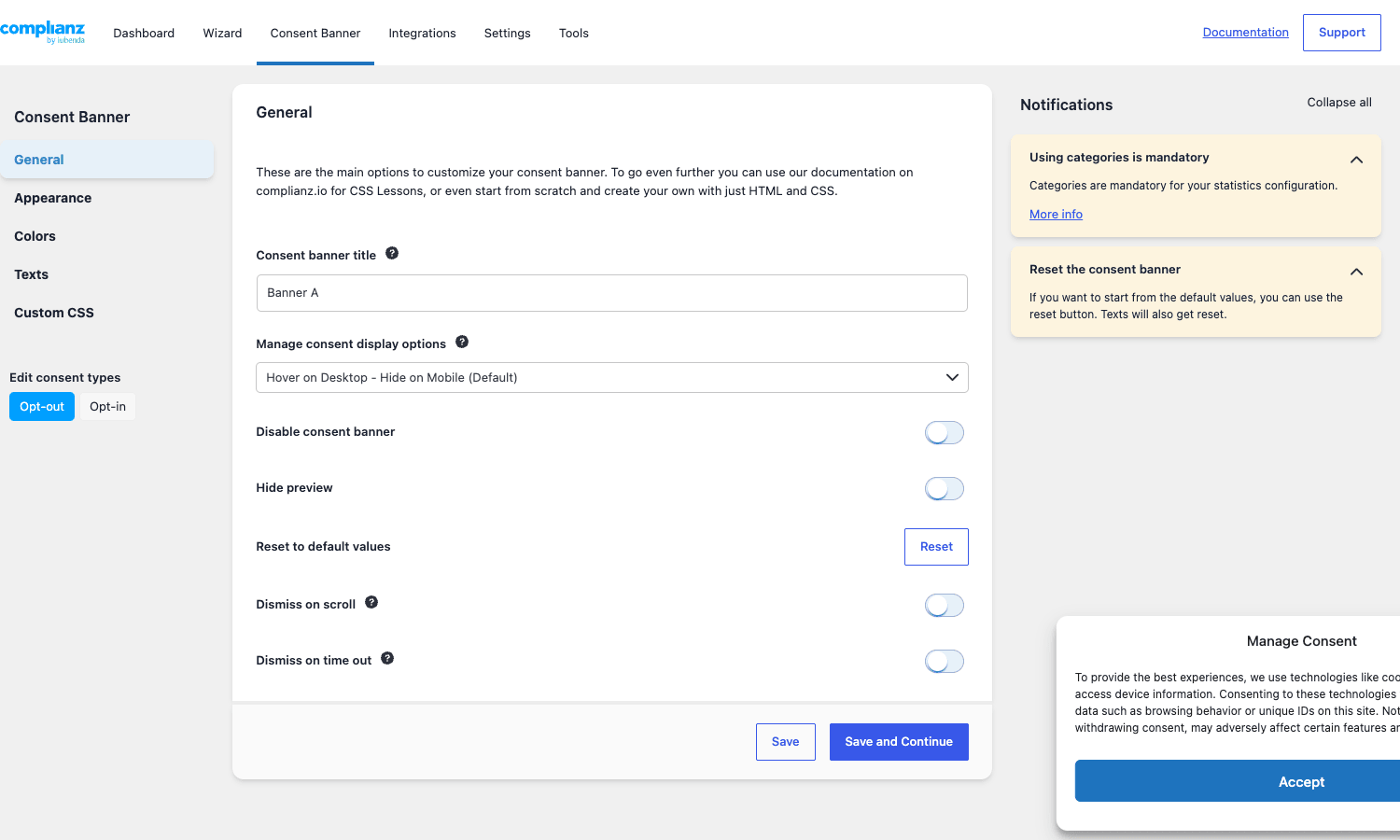
The Consent Banner section sits in its own top-level tab and is split into General, Appearance, Colors, Texts, and Custom CSS. The General tab covers the boring but important toggles: a banner title used internally, the manage-consent display mode (the small floating button that lets a returning visitor re-open the banner), and dismiss-on-scroll / dismiss-on-time-out behaviour. Both dismiss toggles are off by default and you should think hard before enabling them in an opt-in jurisdiction. Inferring consent from scrolling has been struck down by several EU regulators.
The "Edit consent types" buttons at the bottom of the left rail are a Premium convenience: you can have a totally different banner for opt-out regions (US legacy laws) than for opt-in regions (EU, UK), and switch which one you are editing without leaving the page.
The Appearance tab is where the visual personality lives:
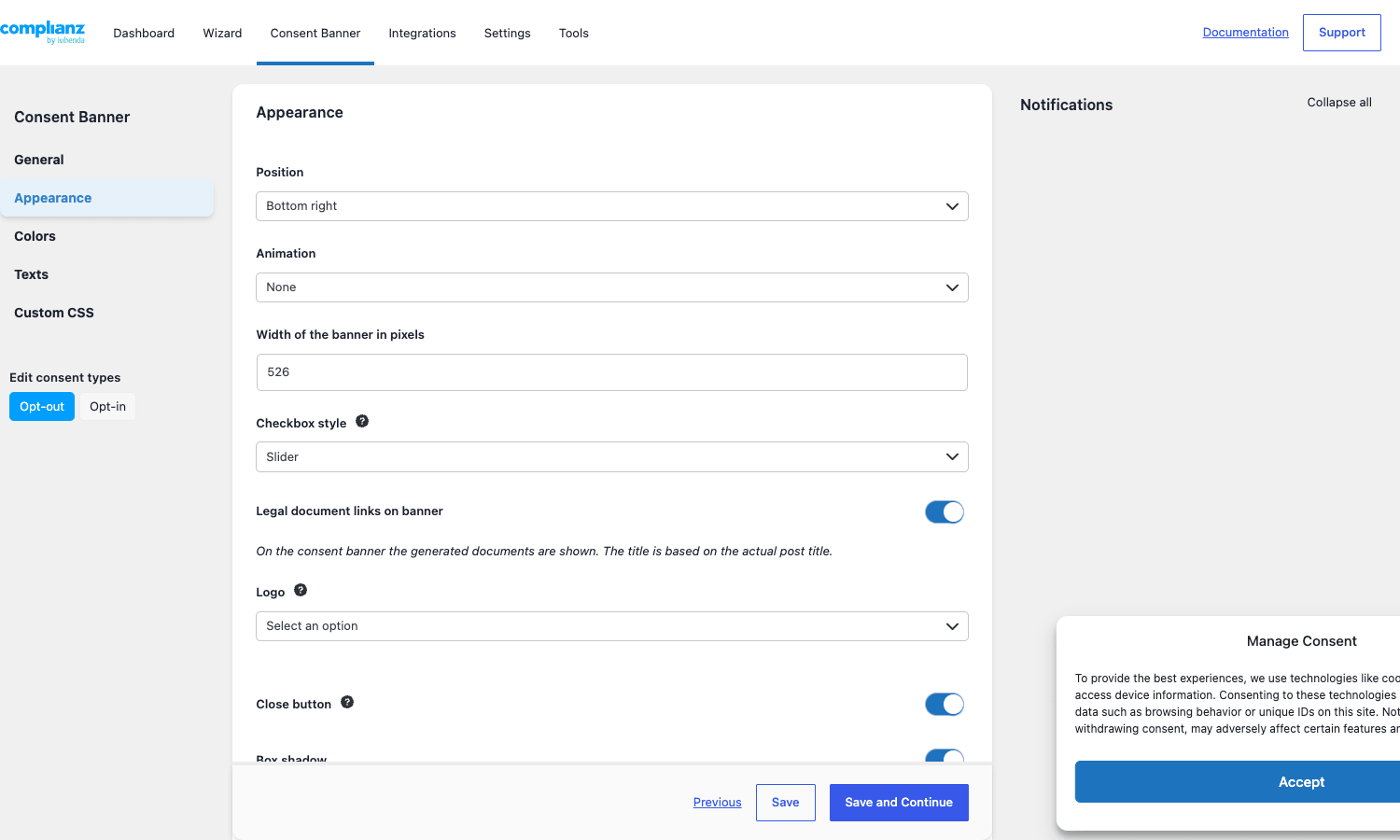
You pick a Position (Bottom Right, Bottom Left, Top, Center modal, and so on), an Animation, the pixel width, a checkbox style (Classic, Slider, or Hidden), whether to surface the generated document links right on the banner, an optional logo, and a Close button toggle. The live preview in the bottom-right of the screen updates with every change so you can iterate without flipping to the front-end every time.
A subtle Premium-only nicety is the A/B testing in the Tools section. You can clone the current banner, change the wording or the colour or the position, and Complianz will alternate the two for incoming traffic and show you which one converts to "accept" at a higher rate. For ad-supported sites that depends on consent rate for analytics, this is the kind of thing that pays for the plugin in a quarter.
Underneath the styling, the banner is also doing the real compliance work. Every script tag and iframe Complianz recognises is delayed until the user grants consent for its category (functional, preferences, statistics, or marketing). Embedded YouTube, Vimeo, Google Maps, Twitter, and Facebook get a placeholder image with an "Accept marketing cookies to view this content" call to action instead of loading directly.
Cookie scanning with the website scan
The website scan is the Premium feature most people don’t realise they need until they try to keep a cookie list current by hand. The scan crawls your site, sees which third-party scripts actually load, looks up each one against the Cookiedatabase.org community-maintained inventory, and writes the result into your local cookie list.
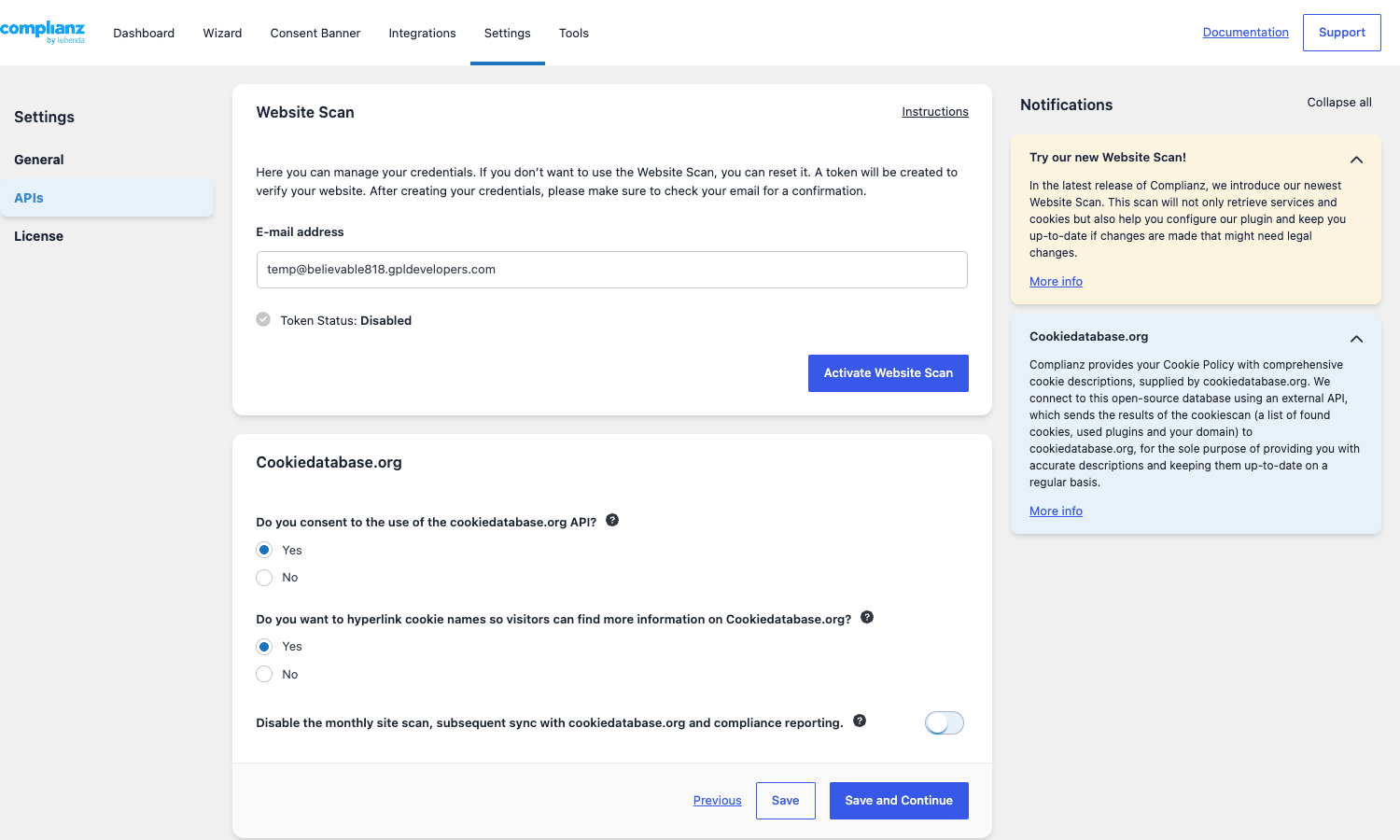
To enable the scan you open Complianz -> Settings -> APIs, confirm the email Complianz should use, and click Activate Website Scan. The plugin emails a verification link, you click it, and from then on the scan runs on a monthly schedule (or you can trigger it manually from the same screen).
Two things worth knowing. First, the Cookiedatabase.org sync is opt-in and you can refuse it. The notification panel on the right of the screen explains exactly what is sent (a list of cookies, used plugins, and your domain) and why. Most people accept it because the alternative is writing the cookie purpose strings by hand. Second, the monthly cadence is appropriate for most sites but if you ship a lot of front-end changes (a marketing site that adds and removes pixels for campaigns), trigger the scan manually after each release.
The scan output flows into a cookie list under Complianz -> Settings -> Cookies. Each detected cookie has a service, a category, a retention period, and a description, and you can override any of them. If a cookie is mis-categorised (e.g. a session cookie classified as marketing), one click moves it to the right bucket and the next page-load of the banner reflects the change.
Generated legal documents
The document generator is the second feature most teams underestimate. Out of the box, Complianz Premium generates:
- Cookie Policy (one per region, or a combined version)
- Privacy Statement (controller, processors, data categories, retention, user rights, with the right wording for each targeted law)
- Disclaimer
- Impressum (legally required in Germany, Austria, Switzerland)
- Terms & Conditions (a sensible default; check with a lawyer for your specific commerce setup)
- Processing Agreement (Article 28 DPA template)
- Data Breach Procedure (internal document, not published, that walks your team through Article 33 notification)
- Proof of Consent (the on-demand evidence file you generate when a regulator asks)
- Do Not Sell My Personal Information page (CCPA/CPRA)
- Children’s Privacy Policy (if you ticked "Yes, my site is aimed at children under 16")
You can attach each document to a WordPress page (Complianz creates the page for you and inserts the right shortcode), or render the document inline anywhere with [cmplz-document id="cookie-policy-eu"]. Updates to the wizard answers re-render the documents automatically.
These documents are templates and not personalised legal advice. Complianz says this clearly in the admin. For most small and medium WordPress sites the generated text is good enough; for a regulated industry or a US public company, run them past counsel before publishing.
Data subject requests and the Do Not Sell page
GDPR Articles 15-22 and the equivalent CCPA "right to know" / "right to delete" sections require you to handle individual requests within a fixed time window (a month under GDPR, 45 days under CCPA, with extensions). Premium ships a built-in inbox for these.
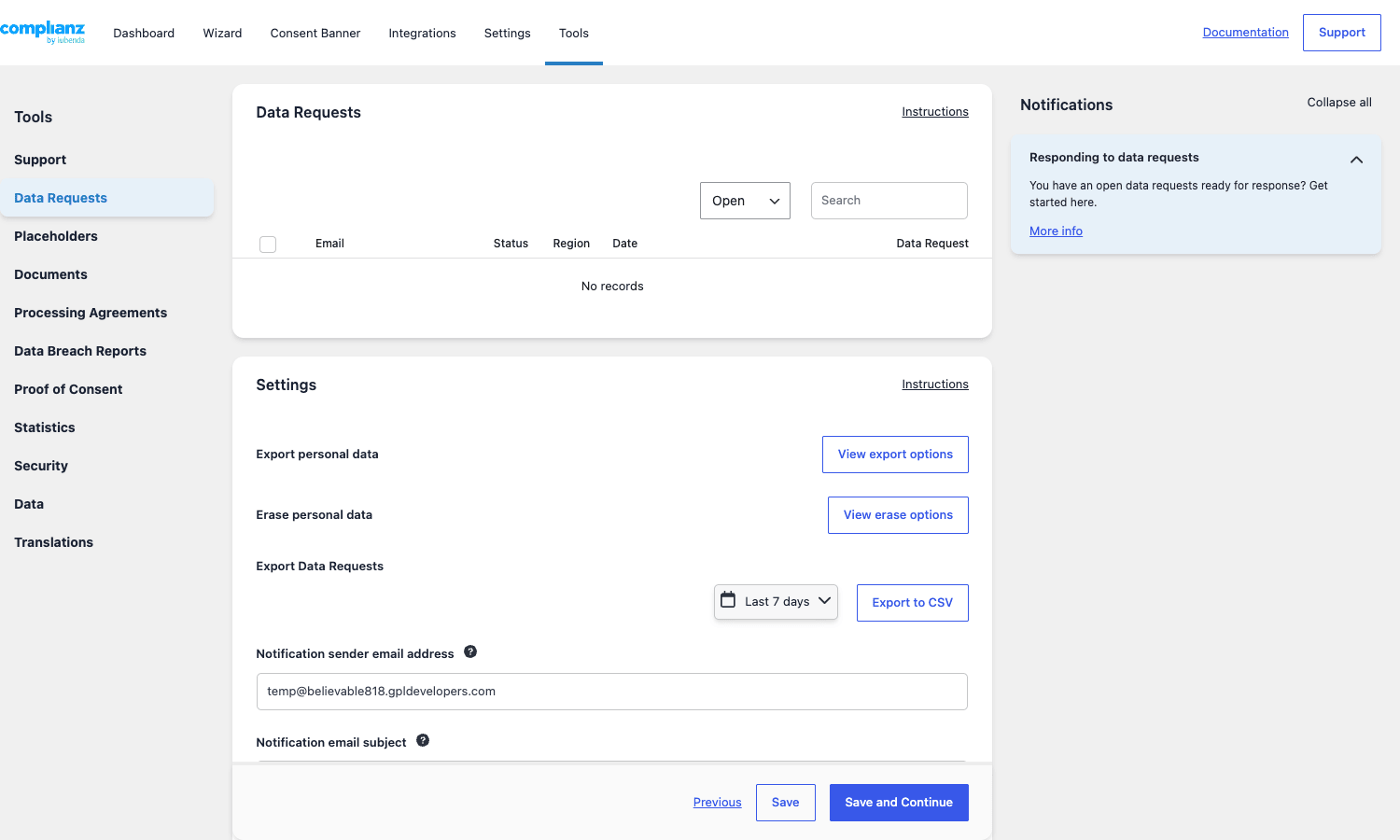
The Data Requests page lives under Complianz -> Tools -> Data Requests. Submitted requests appear in the table at the top, filterable by status (Open, In Progress, Closed) and searchable by email. Each row links to a detail view where you can change status, attach notes, and trigger the WordPress core Export Personal Data / Erase Personal Data flows. The "View export options" and "View erase options" buttons surface those settings without making you dig through Settings -> Privacy.
Below the inbox is the settings panel: you choose how Complianz uses the WordPress core export/erase pipeline, set the date range for CSV exports, and edit the email template that is sent back to the requester. The default template uses placeholders like {name} and {blogname} so a single template covers every request without manual editing.
To collect requests, embed the shortcode on a public page:
[cmplz-data-request]
For CCPA’s specific "Do Not Sell My Personal Information" requirement, embed the dedicated shortcode on a page named exactly that:
[cmplz-dnsmpi-request]
The CCPA shortcode is required because the law mandates that the link be discoverable at "Do Not Sell or Share My Personal Information" in the site footer. Complianz handles the footer link automatically once the page is published.
Proof of consent, records, and statistics
When a regulator audits you, "we have a consent banner" is not an answer. The actual question is "show me proof that user X consented to category Y on date Z from country W". Complianz Premium stores that.
Every time a visitor interacts with the banner, the plugin fires the cmplz_store_consent action and writes an entry to a custom table (wp_cmplz_statistics and related). The entry includes a hashed user identifier (not the raw IP by default; the IP recorded with consent is filtered through cmplz_records_of_consent_user_ip), the categories accepted, the banner version, the region, and the timestamp. If you ever need to demonstrate consent for a specific user, you go to Tools -> Proof of Consent, click Generate, and Complianz produces a downloadable file with all the records that match. Free shows you the inbox but not the generator.
The Consent Statistics view under Tools aggregates the same data into dashboards: total impressions, accept rate, opt-in rate per category, opt-out rate, and revoke count. For a sales-driven team that runs paid ads, the accept rate dashboard is what tells you whether you are leaving money on the table because too many visitors are bouncing off the banner without consenting. That is also where the A/B test results land.
Real-world scenarios
A few concrete shapes of site and how Complianz Premium fits them.
Single-country WordPress blog. A UK-based food blog that runs Google Analytics, has a Mailchimp embed, and a couple of YouTube videos in posts. Wizard set to UK + EU, opt-in consent. Statistics, marketing, and preferences categories enabled. Generated cookie policy and privacy statement. Banner positioned bottom-right, slider checkbox style. Total setup time about 25 minutes including reading the wizard tooltips.
SaaS landing page with a US-first audience. A marketing site that targets all 50 US states, runs the Meta pixel, Google Ads conversion tag, HubSpot, and Intercom. Wizard set to US (with California, Colorado, Connecticut, Virginia individually ticked), Canada (PIPEDA), EU (because some traffic from European visitors does land), opt-out consent type for US, opt-in for the others. CCPA Do Not Sell page published. Cookie scan run after every major release. Consent statistics monitored weekly because the marketing team is sensitive to lost attribution from rejected analytics.
WooCommerce store selling globally. A WordPress-based shop running WP Rocket as the cache layer, plus Stripe, ShipStation, MailerLite, and Google Tag Manager. Wizard set to EU, UK, US, Canada, Australia, Brazil. Processing Agreement generated for each sub-processor and stored in Tools -> Processing Agreements. Banner is opt-in everywhere except the US, which gets a separate opt-out variant via the Edit consent types switch. The cookie banner is excluded from full-page cache (Complianz documents the exact cache rules to add).
Multilingual non-profit. A site using Polylang Pro for English, French, and German. Complianz exposes the cmplz_register_translation() helper so every wizard string and banner string is available to the translation plugin. The German site gets the Impressum, the French site does not. The cookie policy is generated three times.
Publisher with ad-tech. A news site that runs Google AdManager, Prebid, and Amazon TAM. The IAB TCF v2 integration is enabled, the TCF banner replaces the default banner, and the [cmplz-tcf-vendors] shortcode renders the vendor list on the privacy page. This is a configuration that only Premium supports; the free version cannot do TCF.
Developer reference: hooks, filters, REST routes
Complianz exposes a generous set of hooks. The naming convention is cmplz_<thing> for both actions and filters, which makes them easy to grep for in your own code.
Public helper functions
The two you will use most:
// Has the current visitor consented to a category?
if ( function_exists( 'cmplz_has_consent' ) && cmplz_has_consent( 'marketing' ) ) {
 // Safe to load a marketing pixel here.
 wp_enqueue_script( 'meta-pixel', 'https://connect.facebook.net/.../fbevents.js', [], null, true );
}

// Has the visitor consented to a specific service?
if ( function_exists( 'cmplz_has_service_consent' ) && cmplz_has_service_consent( 'google-maps' ) ) {
 echo do_shortcode( '[google-maps-embed]' );
}

// Register a string for translation (Polylang / WPML).
cmplz_register_translation( $banner_title, 'banner_title_de' );
cmplz_has_consent() takes one of four category strings: functional, preferences, statistics, or marketing. It returns true when the current visitor has accepted that category, when the region is opt-out and the visitor has not refused, or when the region is "other" (a fallback for non-targeted countries) with no cookies present.
cmplz_has_service_consent() is finer-grained and takes the service slug from the Services list (google-analytics, facebook-pixel, google-maps, youtube, and so on).
Useful filters
A representative slice from the codebase:
| Filter | What it does |
|---|---|
cmplz_banner_html |
Filter the entire banner markup before it is sent to the browser. |
cmplz_banner_fields |
Add or remove fields rendered inside the banner. |
cmplz_cookiebanner_settings |
Alter the runtime settings the front-end JS receives. |
cmplz_document_html |
Filter the generated document HTML before output. |
cmplz_detected_cookies |
Modify the cookie list after a scan. Useful to seed a cookie the scan can’t reach. |
cmplz_detected_services |
Same idea, for third-party services. |
cmplz_exclude_from_scan |
Return an array of URLs to skip during the scan. |
cmplz_consenttype |
Override the consent type (optin, optout, optinstats) per region. |
cmplz_iframe_html |
Replace the placeholder used for blocked iframes. |
cmplz_placeholder |
Replace the placeholder image for blocked images. |
cmplz_image_class |
Add CSS classes to blocked images. |
cmplz_geoip_enabled |
Toggle the bundled MaxMind GeoLite2 lookup. |
cmplz_records_of_consent_user_ip |
Filter or anonymise the IP stored with each consent record. |
cmplz_integrations |
Add a custom integration (a plugin/service Complianz should be aware of). |
cmplz_revoke_button_text |
Change the label of the revoke-consent button. |
One concrete example. By default Complianz stores the visitor’s IPv4 with each consent record. In Germany, regulators have asked for the IP to be truncated to two octets. The fix is one filter:
add_filter( 'cmplz_records_of_consent_user_ip', function ( $ip ) {
 // Truncate IPv4 to /16.
 $parts = explode( '.', $ip );
 if ( count( $parts ) === 4 ) {
 $parts[2] = '0';
 $parts[3] = '0';
 return implode( '.', $parts );
 }
 return $ip;
} );
Another. Suppose you load Google Analytics through a custom helper and Complianz’s auto-detection missed it. Force it into the cookie inventory:
add_filter( 'cmplz_detected_cookies', function ( $cookies ) {
 $cookies['google-analytics'] = [
 'name' => '_ga',
 'service' => 'google-analytics',
 'purpose' => 'Statistics',
 'retention' => '2 years',
 ];
 return $cookies;
} );
Useful actions
| Action | Fires when |
|---|---|
cmplz_finish_wizard |
The user clicks Finish on the wizard’s final step. |
cmplz_store_consent |
A consent record has been written to the database. |
cmplz_after_proof_of_consent_generation |
A Proof of Consent file has been built. |
cmplz_after_css_generation |
The banner CSS has been re-generated (after settings change). |
cmplz_remote_cookie_scan |
The remote website scan endpoint has been hit. |
cmplz_after_save_field |
A single settings field has been saved. |
cmplz_admin_menu |
The Complianz admin menu has been registered. Hook into this to add a custom sub-page. |
A typical use of cmplz_finish_wizard is to wire a notification when a non-technical site editor completes setup:
add_action( 'cmplz_finish_wizard', function () {
 wp_mail(
 get_option( 'admin_email' ),
 'Complianz wizard completed',
 'The privacy wizard was just completed on '. home_url()
 );
} );
REST routes
Complianz registers several REST routes under the complianz/v1 namespace. The most relevant for integrations:
POST /complianz/v1/wsc-scan– trigger the website scan from a CI job.GET /complianz/v1/cookie_data/– data the cookie blocker uses to know which scripts to defer.GET /complianz/v1/datarequests/– submit a data subject request from a headless form.GET|POST /complianz/v1/fields/getand/fields/set– admin-only, used by the React settings UI.POST /complianz/v1/do_action/{action}– admin-only, used to trigger generation tasks.
The shortcode list (Premium adds the bolded ones):
| Shortcode | Purpose |
|---|---|
[cmplz-document] |
Render a generated document inline. |
[cmplz-consent-area] |
Wrap content; only display after consent for the named category. |
[cmplz-cookies] |
Render the cookie inventory table. |
[cmplz-manage-consent] |
Render a "Manage cookie preferences" link/button. |
[cmplz-revoke-link] |
One-click revoke. |
[cmplz-accept-link] |
One-click accept. |
[cmplz-data-request] |
GDPR data subject request form. |
[cmplz-dnsmpi-request] |
CCPA Do Not Sell request form. |
[cmplz-tcf-vendors] |
IAB TCF vendor list (EU). |
[cmplz-tcf-us-vendors] |
IAB TCF US vendor list. |
There are also two Gutenberg blocks (complianz/document and complianz/banner) so a content editor can drop a document or a revoke link into a post without copy-pasting a shortcode.
Compatibility, performance, and gotchas
A few things worth flagging from a year of running this on real sites.
Caching plugins. Complianz’s banner and script blocker rely on a small front-end JS that needs to run before any third-party tag. If your caching plugin defers all JS aggressively, the banner can appear after analytics has already fired. Both WP Rocket and W3 Total Cache have documented exclusion rules for complianz; add them. LiteSpeed Cache has a built-in toggle for Complianz under its tuning options.
Cloudflare and other CDNs. The cookie banner itself can be cached, but the consent-state JSON the JS fetches must not be. Cloudflare’s default rules are friendly here, but if you have a custom cache rule on *.js or *.json, exclude the cmplz paths.
Multi-language sites. Complianz integrates cleanly with WPML, Polylang Pro, and TranslatePress out of the box. Every wizard string is registered for translation. The cookie policy is generated per language. If you use a less common multilingual plugin, register strings yourself via cmplz_register_translation().
Page builders. Elementor, Beaver Builder, Bricks, Breakdance, and Divi all play nicely with the document shortcodes. Embed the policy with [cmplz-document] inside a builder text widget. The cookie banner sits above all builder UI by default; if you have a sticky header that overlaps, adjust the banner z-index in Custom CSS.
Google Consent Mode v2. Required since March 2024 for ads to function in the EEA. Complianz Premium supports it natively. Enable it under Integrations -> Services -> Google Tag Manager and Complianz will write the consent state to dataLayer before any Google tag fires. If you also run MonsterInsights, make sure both plugins are not setting Consent Mode independently or you will see double signals.
Performance. The front-end JS bundle is under 30 KB gzipped, the CSS is small and inlined, and the script blocker is a single regex pass on rendered HTML. On a 4 vCPU server with WP Rocket caching, I have not been able to measure a Time-To-First-Byte regression after installing Complianz. The single thing that costs is the placeholder image for embedded YouTube videos: it briefly delays the visual until consent is granted.
Security. The Complianz REST routes that mutate state require the manage_complianz capability. Public routes are read-only. If you run a security plugin like Wordfence with strict learning mode, whitelist the complianz/v1 namespace so the firewall does not throttle legitimate consent submissions.
Headless WordPress. If you serve a Next.js or SvelteKit front-end from WP as a headless CMS, the cookie banner does not auto-load (it ships only with the PHP-rendered template). Use the REST routes (cookie_data, datarequests) and render your own banner that posts to them. Complianz’s docs cover this case under their "developers and custom implementations" page.
Pricing and where to get it
Complianz Premium is sold per-site on a yearly licence direct from Complianz with tiered pricing (1 site, 5 sites, 100 sites). The licence covers updates and Premium support.
The copy distributed through GPL Times is the same source. Because Complianz is GPL-licensed, redistributing the binary is permitted, and the download from your GPL Times account already has the Premium features activated so you can use it across staging, dev, and production without juggling keys. Get it from the Complianz Privacy Suite Premium product page.
If you are building privacy compliance for a client, the GPL Times bundle works out well because you can demonstrate the full feature set on staging, walk the client through every Premium screen, and then choose whether to point them at the official Complianz licence for support or keep the GPL-licensed version long-term.
FAQ
Do I really need Complianz if I only run a small WordPress blog? If you serve EU/UK/California visitors and run any kind of analytics or marketing pixel, yes. The free version is enough for a single-region blog with a contact form. The Premium features start mattering as soon as you add a CRM, a tag manager, or paid advertising.
Will it slow down my site? Front-end weight is well under 30 KB gzipped and the cookie blocker runs once per page load. On a properly cached WordPress install, the performance impact is not measurable in a Lighthouse run. The visible cost is the placeholder image for embedded video / map content, which is the point.
Does Complianz handle Google Consent Mode v2? Yes, natively. Enable it under Integrations and Complianz will write the four consent flags to dataLayer before any Google tag fires.
Can I use the free version and upgrade later? Yes. The settings and the cookie inventory carry over. The wizard answers stay where they are. The Premium activation simply unlocks the features you could not access before.
Does Complianz work with multilingual plugins? Yes. It integrates with WPML, Polylang, and TranslatePress out of the box via cmplz_register_translation(). Every wizard string and banner string is exposed to the active translation plugin.
Can it generate a Do Not Sell My Personal Information page for CCPA? Yes. Tick the United States region in the wizard, specifically tick the California (CPRA) box when prompted, and Complianz generates the page and adds the footer link automatically.
Does it record consent in a way I can show a regulator? Yes. Premium stores per-consent records (hashed user ID, region, category, banner version, timestamp) and the Proof of Consent generator in Tools produces a downloadable file with the records that match a query.
Can I run two banner variants and A/B test them? Yes, Premium ships A/B testing under Tools. Run two variants concurrently and measure accept rate.
Will it slow down conversion if my visitors decline analytics? That is the trade-off of compliance. The accept-rate dashboard tells you exactly what percentage of visitors are bouncing. A well-designed opt-in banner typically lands between 50% and 80% accept. A passive-aggressive "Accept" / "Reject everything" pair (which is what GDPR requires) is harder to push higher than that.
Final thoughts
Complianz Privacy Suite Premium is the plugin I reach for any time a WordPress site needs to actually handle cookie consent and not just paste a notice. The wizard turns a multi-day legal-research exercise into about 30 minutes of clicking. The website scan keeps the cookie list current without anyone having to remember to update it. The document generator produces a privacy statement that, while not a substitute for a lawyer, is good enough for a small or medium site to defend in front of a regulator.
What I appreciate most is that the plugin treats privacy as engineering, not as marketing copy. The hooks are well named, the REST routes are documented, the consent-state JSON is consistent across page loads, and the integrations folder has a file for every plugin you would reasonably expect to see (Contact Form 7, WPForms, Gravity Forms, Fluent Forms, Elementor, WP Rocket, Yoast, Rank Math, MonsterInsights, and so on). When something does not work, you can read the source and fix it; you are not stuck behind a black box.
If you serve more than one region, run any kind of advertising, or have someone in marketing who needs the accept-rate dashboard, Premium. Pick it up from the Complianz product page on GPL Times, run the wizard once, click Finish, and move on with whatever you were actually trying to build.
Further reading on the legal side: the GDPR.eu portal for the European law, the UK ICO’s UK-GDPR guidance hub for the British equivalent, the California Attorney General’s CCPA page for the US version, and Complianz’s own getting-started manual for plugin-specific docs. If you need to support Google Consent Mode v2 properly, Google’s consent mode developer guide is the authoritative reference.