

I’ve helped launch four membership sites in the last two years. Two on MemberPress, one on Paid Memberships Pro, and one cobbled together with a forms plugin and a "restrict content" filter that broke every time WordPress updated. ARMember kept landing in my "almost picked it" list and I never quite gave it a fair shot. So I sat down for a week, built a sample membership site on a sandbox, and actually shipped a plan with three tiers, drip-fed content, and a working signup flow.
This is what I found. Not a sponsored love letter, not a hit piece. A real walkthrough of where ARMember is sharp, where it’s clunky, and the things I wish someone had warned me about before I started clicking around the admin.
Table of Contents
- What is ARMember?
- How a membership plugin actually works in WordPress
- Key features at a glance
- Installation and the first hour
- A guided tour of the admin
- Membership plans
- The form builder
- Content access rules
- Drip content
- Payment gateways
- Email notifications
- The add-ons grid
- Real-world use cases
- Developer reference: hooks, filters, shortcodes, REST
- Performance, compatibility, and the gotchas
- Pricing and licensing
- FAQ
- Final thoughts
What is ARMember?
ARMember is a WordPress membership plugin built by Repute Infosystems. It does the things you expect a membership plugin to do: lets you create paid and free membership tiers, builds the signup and login forms, locks down pages and posts behind a plan, drips content out on a schedule, runs payments through Stripe / PayPal / Authorize.Net / 2Checkout, and emails members when things happen.
It’s been around for years and it shows up in two flavors: a free Lite version (on the WordPress.org repo, called "ARMember Lite") and the full Pro plugin that ships as a downloadable zip. The Pro version is what we’re walking through here, because the free version skips drip content, multiple plans per member, and most of the third-party integrations.
The vendor positions ARMember as a "complete" membership plugin, and I think that’s accurate in the literal sense. There is very little you’d reach for as a membership site owner that ARMember can’t already do out of the box. That’s not always a good thing. Plugins that try to do everything tend to ship with twenty menu items and a learning curve that punishes anyone who just wants a paywall. ARMember mostly avoids that trap, but only mostly. More on that below.
If you’re looking for the GPL-licensed version, ARMember on GPL Times is the place. It’s the same Pro zip you’d buy from CodeCanyon, just delivered through the GPL store with the documentation intact.
How a membership plugin actually works in WordPress
Skip this section if you’ve built a membership site before. If you haven’t, the next 200 words will save you a lot of pain.
A WordPress membership plugin is really four things stitched together.
- A user system. Every member is a real WordPress user under the hood, with a role and an email and a password. The plugin just tags those users with a plan.
- A plan system. Plans are records in a custom table. Each plan has a price, a duration (lifetime, recurring, trial), and a list of capabilities or content it grants access to.
- A gatekeeping layer. When a visitor loads a page, the plugin hooks into
the_content(and a bunch of other places) and decides: does this user’s plan let them see this? If not, show a paywall. - A payment + form layer. A signup form collects the user’s details and card, sends the card to Stripe or PayPal, creates the user, attaches the plan, and triggers the welcome email.
ARMember does all four of those, and exposes hooks for developers at each layer. The thing that separates it from a hand-rolled "restrict content shortcode" setup is the recurring-billing logic and the drip-content scheduler. Both are surprisingly hard to get right by hand.
Key features at a glance
Rather than dump the marketing list, here’s what actually moves the needle on a real membership site.
- Eleven membership plan types in the dropdown. Most sites only ever need three of them. Free, recurring (e.g. $19/mo), and lifetime (one-time payment) covers 90 percent of real-world setups.
- A drag-and-drop form builder for signup, login, edit-profile, change-password, and forgot-password forms. The builder is in-admin, not a separate page, and it previews the form live as you drop fields.
- Content access rules table that lets you toggle restrictions per plan, per page, in a single grid. You don’t have to edit each page individually.
- Drip content on a per-plan basis. Useful for course-style sites where lesson 3 unlocks 14 days after signup.
- Pay Per Post. A surprisingly nice escape hatch for "I don’t want a full plan, I just want one paid article."
- Multiple plans per user. A member can be on the Free plan AND the Bonus Pack add-on at the same time. Not every membership plugin handles this cleanly.
- Pro-Rata billing. When a member upgrades from Free to Pro mid-month, ARMember can calculate the prorated balance instead of charging full.
- Built-in coupon engine with percentage / flat discounts, expiry dates, and per-plan limits.
- Member directory and profile cards. If your site needs a public-facing "members" page (think communities, alumni associations), ARMember ships a directory shortcode and a profile-card template editor.
- Social login (Facebook, Google, Twitter) via the built-in add-on.
- BuddyPress / bbPress integration. The plugin knows about BP profile fields and bbPress forum permissions.
- WooCommerce hand-off. You can sell a plan as a WooCommerce product and ARMember picks up the purchase event. Lets you reuse WooCommerce’s payment gateways instead of ARMember’s built-in ones.
- REST API with 13 endpoints, scoped under
armember/v1, for mobile apps that need to authenticate against a WordPress membership backend. - Elementor widgets for membership card, conditional redirection, and user-only content blocks. Saves you from typing shortcodes into a builder.
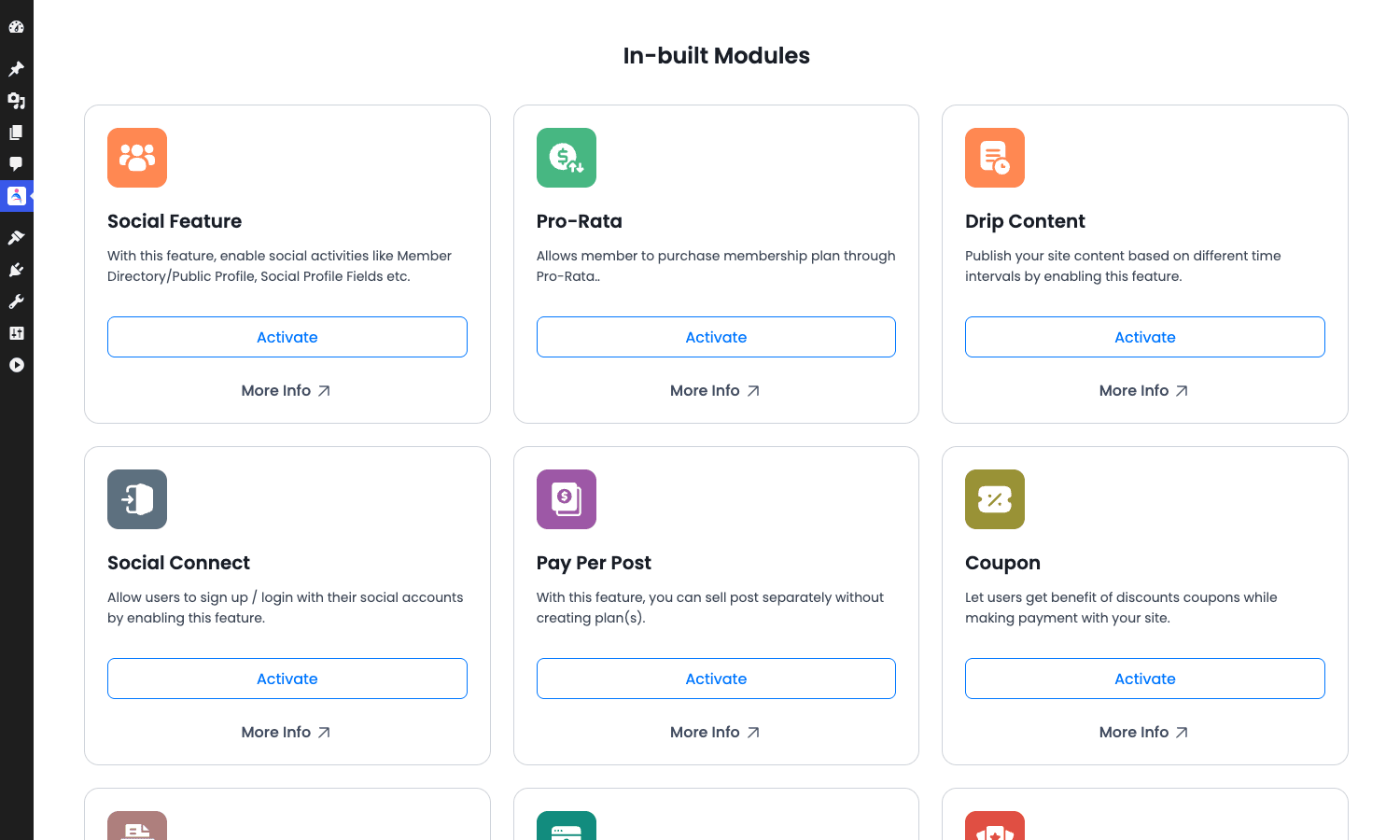
Most of these are on by default. A few (Social Connect, Pay Per Post, Pro-Rata) are toggleable add-ons under ARMember -> Add-ons.
Installation and the first hour
Installation is the boring part. Upload the zip from Plugins -> Add New -> Upload, activate, and ARMember pushes you straight into a setup wizard.
The wizard asks for the basics: site name, default currency, payment gateway preference, whether you want guests to log in via social accounts. There’s a "Skip the wizard and set up manually" link at the bottom. Use it if you’ve done this before. The wizard is fine but it’s just a UI over settings you can change later anyway.
After the wizard, what I’d actually do in the first hour:
- Go to ARMember -> Manage Plans and delete the default "Free Membership" plan, or rename it. ARMember seeds it on first install, and if you forget about it, you’ll end up with a plan called "Free Membership" forever showing in your dropdowns.
- Create your real plans first before touching anything else. Even if the prices and durations aren’t final. Everything else (forms, restrictions, drip) references plans, so they need to exist.
- Set up at least one payment gateway under ARMember -> General Settings -> Payment Gateways. Stripe is the easiest, you paste a publishable key and a secret key.
- Build or edit the signup form under ARMember -> Manage Forms. ARMember ships a "Please Signup" form by default and it’s good enough for most sites, but rename it to something like "Member signup" so you remember what it’s for.
- Create a page for the signup form with the shortcode
[arm_form id="101"](the id matches your form). Use the same pattern for login, profile, and password reset. - Configure content access rules under ARMember -> Content Access Rules. This is the page that scared me the most when I first opened it. It’s actually fine once you understand the grid.
That’s the working scaffold. From there you bolt on drip rules, email notifications, coupons, and the rest.
Don’t try to be clever with the order. I made the mistake on my first site of building three pages with restriction shortcodes before creating the plans those shortcodes were supposed to reference, and spent an hour wondering why nothing was blocking guests.
A guided tour of the admin
The plugin lives under a single "ARMember" entry in the WordPress admin sidebar, which expands into about twenty sub-items. That’s a lot. The most-used ones in real life are: Manage Plans, Manage Forms, Content Access Rules, Manage Members, Reports, and General Settings. Everything else you’ll touch maybe once a quarter.
The dashboard-ish entry point is the Reports page. It shows member counts, recent payments, and a stacked time-series of signups and revenue. On a fresh install it looks like a graph waiting to happen, but once real members start signing up it becomes the page you actually open every morning.
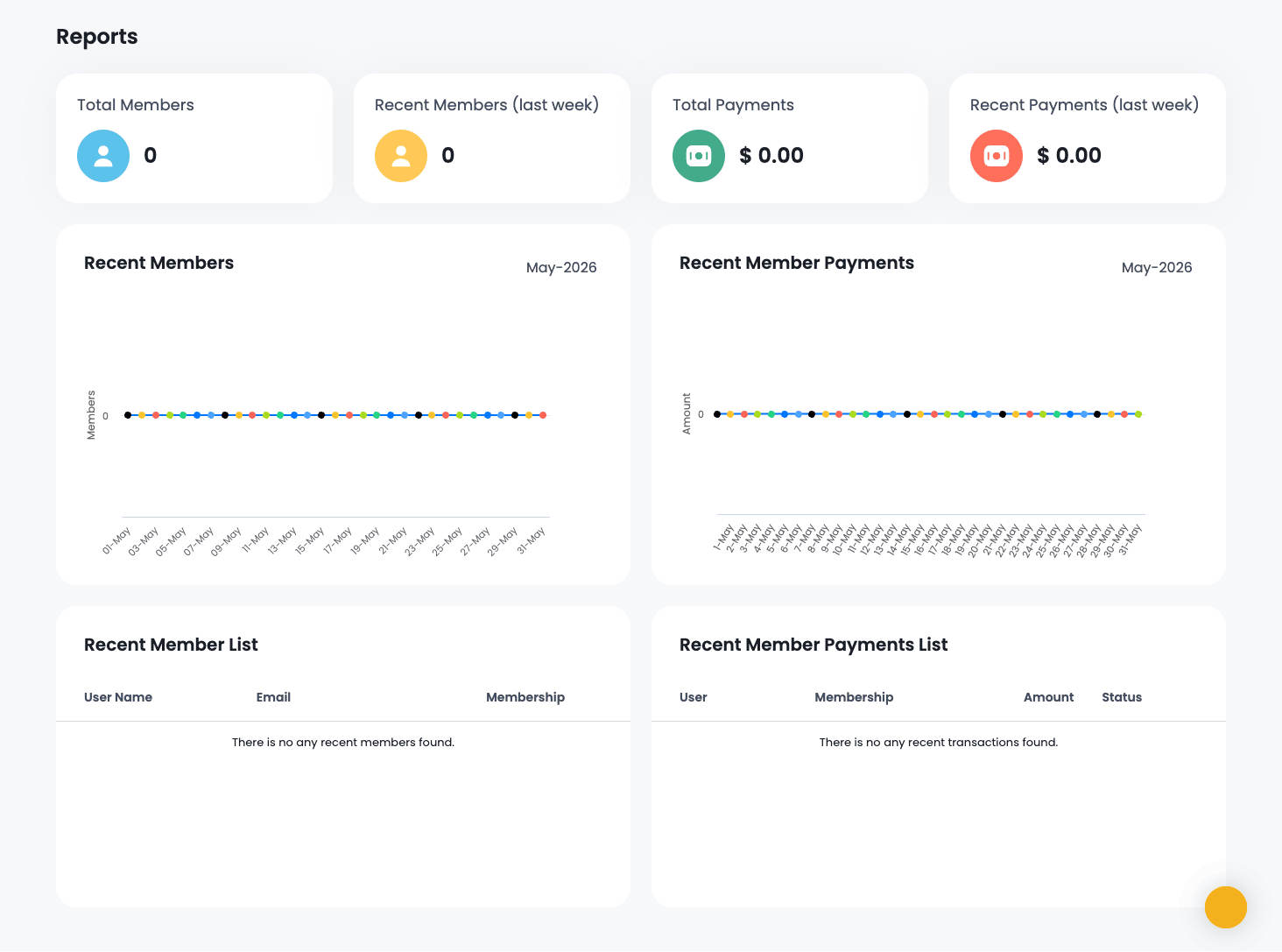
The internal navigation uses the standard WP admin sidebar entries (no inline tab strip, no custom topbar), which I prefer. You always know where you are.
Membership plans
This is where you’ll spend the most time on day one. ARMember’s plans live under ARMember -> Manage Plans, and the page is a clean grid of plan ID, plan name, plan type, member count, and the WordPress role assigned to the plan.
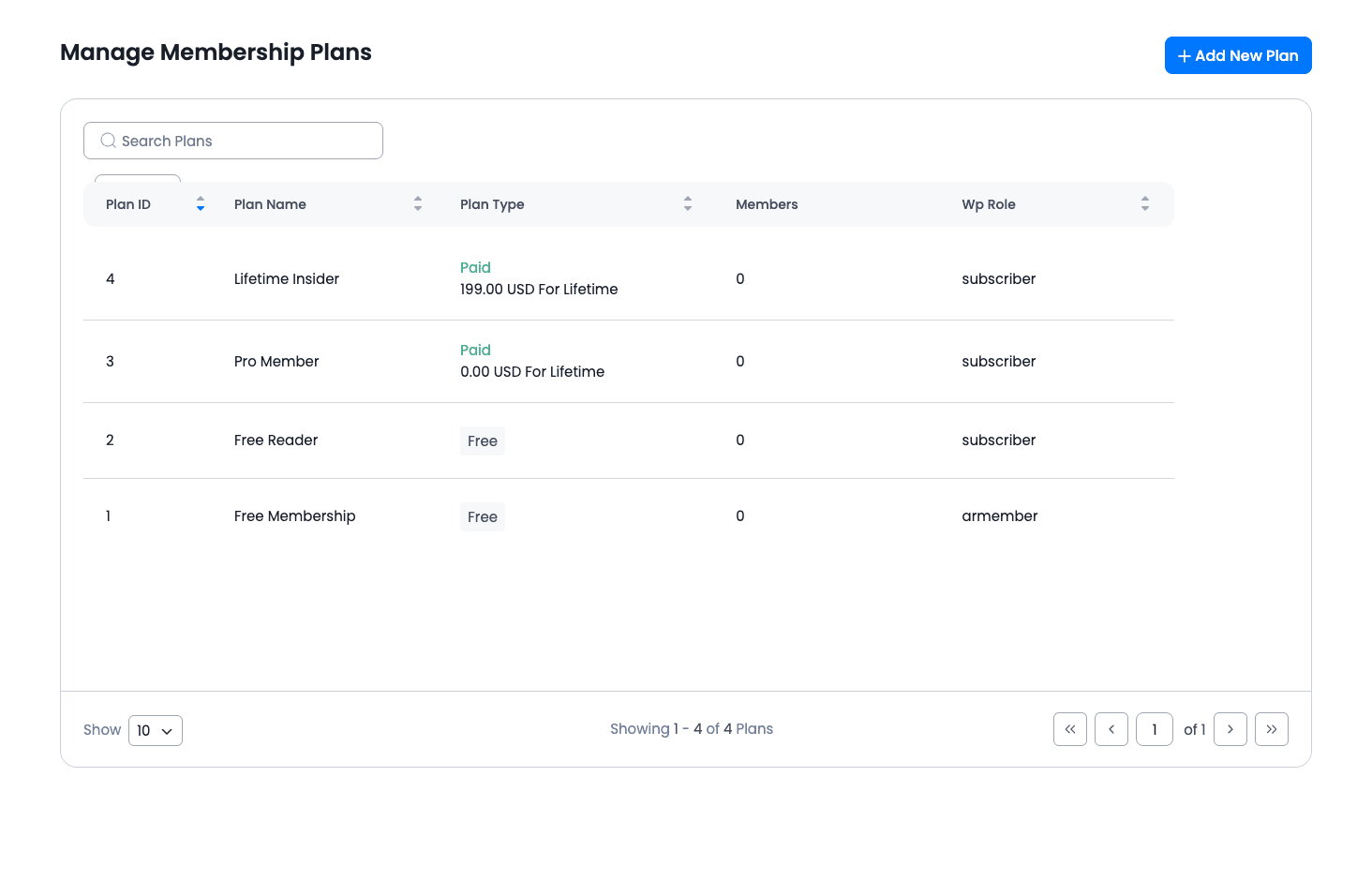
Click "Add New Plan" and you land in an inline editor (no separate page reload, which is nice). The plan type dropdown has these options:
- Free, anyone can claim it, no payment.
- Paid finite, one-time payment, expires after N days/months/years.
- Paid infinite, one-time payment, lifetime access.
- Recurring, Stripe-style subscription billed every X period.
- Plus variants for trial-then-recurring, manual approval, etc.
For your first three plans, I’d pick Free, Recurring, and Paid Infinite. That gives you a free reader tier, a monthly Pro tier, and a one-time Lifetime tier. That structure has been the bread and butter of paid newsletters and indie membership sites for the last decade.
A small gripe: the "Plan Description" field is plain text only. If you want HTML in your plan listing on the front end, you have to override the template. Most other membership plugins give you a small WYSIWYG here.
The plan ID is sequential and exposed in the URL when you edit a plan. That ID is what you’ll pass into the access shortcodes ([arm_plan ids="3"]...[/arm_plan]), so write it down once you’ve decided on your three tiers. I keep a Notes app snippet open with the slug-to-ID map on every membership site I build.
The form builder
I’ll say it. The form builder is the single best thing in ARMember.
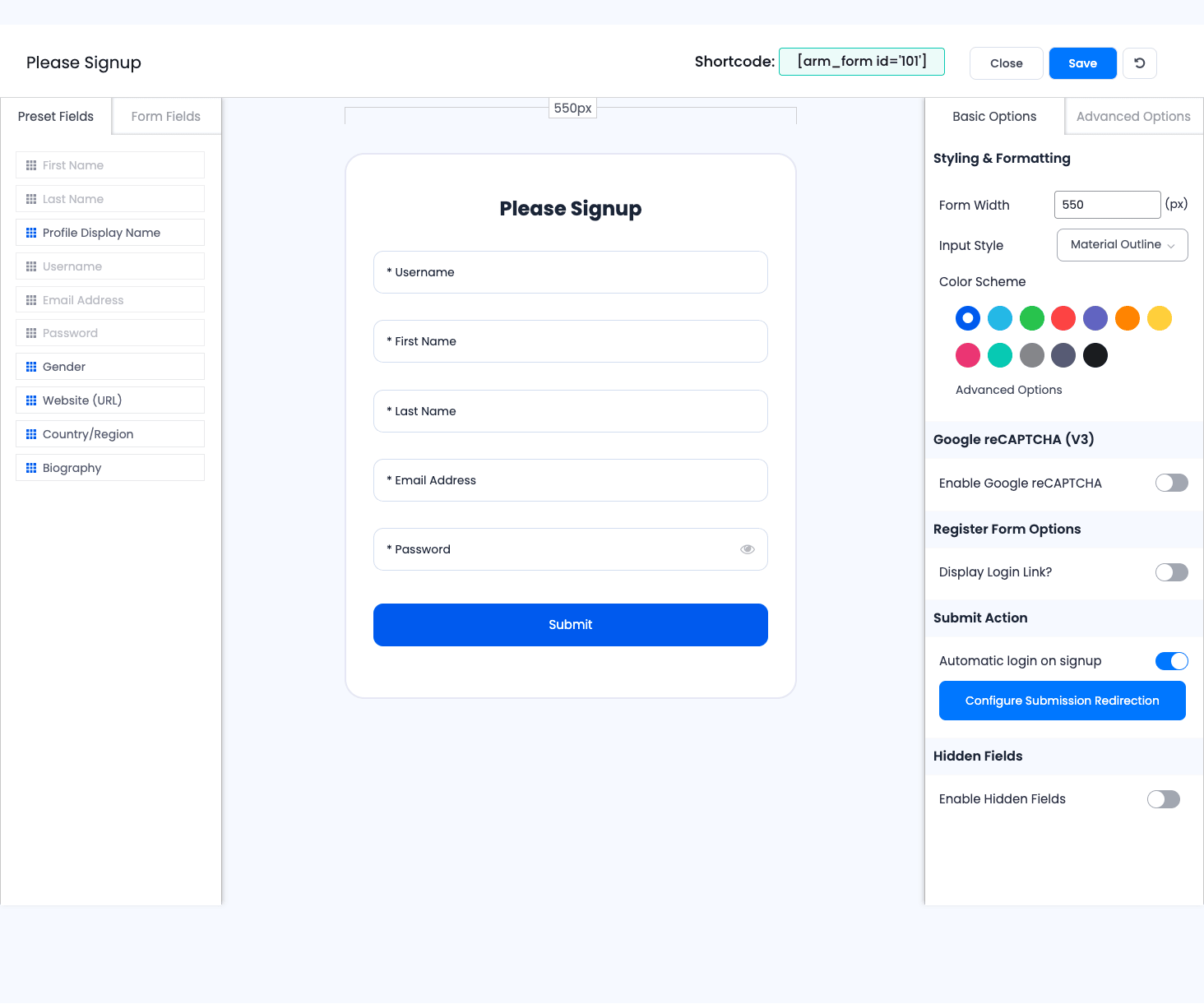
You get a left-side palette of preset fields (first name, last name, username, email, password, country, biography, etc.) and a separate "Form Fields" tab with text inputs, dropdowns, radio groups, checkboxes, file uploads, date pickers, captcha, custom HTML, and dividers. Drop a field into the canvas in the middle and it shows up immediately. The right pane has Basic Options and Advanced Options for the form itself: width, input style (Material outline / Bootstrap / classic), color scheme, reCAPTCHA v3 toggle, "automatic login on signup", and a hidden-fields section for passing UTM parameters or referrer data through to user meta.
What makes this nice and not just "yet another form builder":
- Color schemes come pre-baked. Eleven swatches across the top. Click one and the form restyles. No fiddling with CSS.
- The shortcode for the form is right at the top of the editor, visible as soon as you open it. You don’t have to hunt through a docs page to find
[arm_form id="101"]. - Field validation is plan-aware. You can mark a field as "only show if user is on plan X." Useful for a profile form that asks Pro members for their billing address and skips it for Free.
- Configure Submission Redirection. Send the user to one page if signup is for the Pro plan, another if it’s for Free, and a third if they came in via a coupon.
What’s not so nice:
- The list of preset fields is fixed. You can’t add a custom preset and reuse it across forms. If you have ten signup variants, you’ll be rebuilding the same address-and-postcode fields ten times.
- Reordering fields with the mouse can be finicky on long forms. There’s no keyboard reorder.
- The live preview is at a fixed 550px width by default. If you’re embedding the form in a narrower sidebar, you’ll have to remember to bump that width or the form looks janky on the live site.
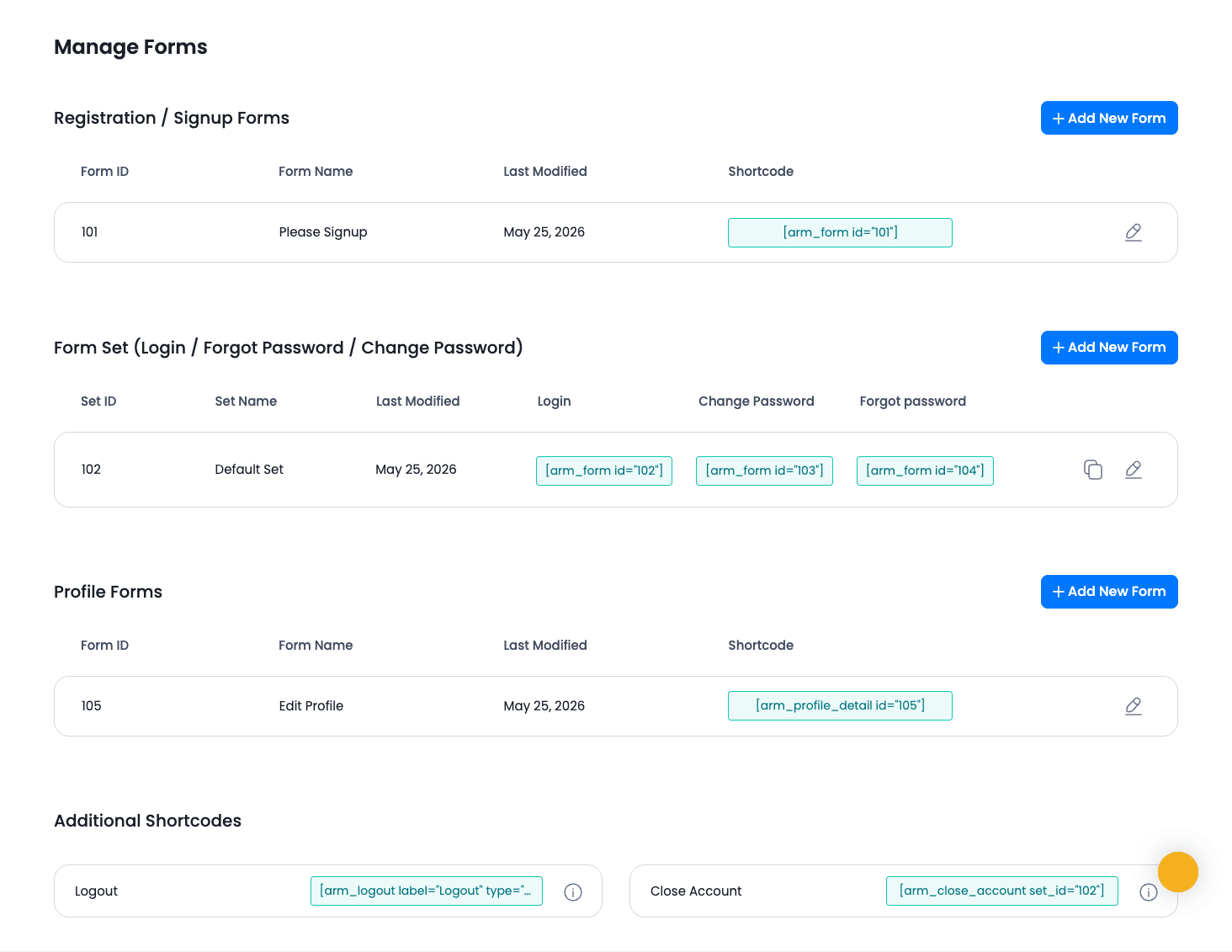
Forms come in three sets: registration / signup forms (one per plan or one universal), a form set for login + change password + forgot password (you bundle these because they share styling), and profile forms (the "edit my account" form members see after they log in).
The shortcode for a form set is slightly different: [arm_form id="102"] for the login form, [arm_form id="103"] for change password, [arm_form id="104"] for forgot password. The numbers come from the Form ID column in the Manage Forms grid, so look them up there.
Content access rules
The page that scared me. Here’s the thing it does well: instead of going to each post one by one and ticking a checkbox, you get a grid where rows are posts (or pages, or any custom post type), columns are plans, and each cell is a "allow / deny" toggle.
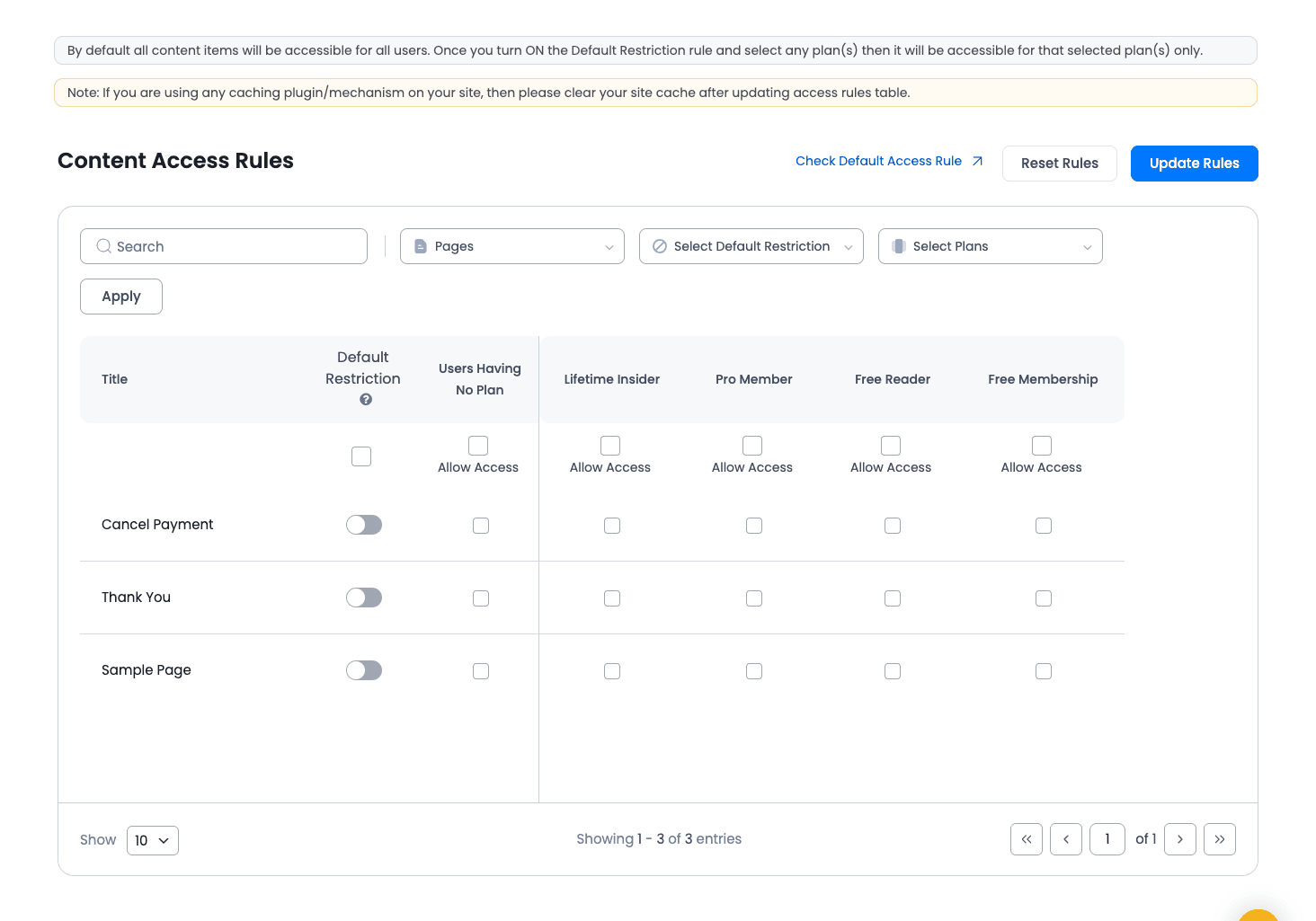
The "Default Restriction" toggle in the leftmost column is the master switch per row. Turn it on and the row is restricted, so guests get a paywall and only the plans you tick can see the content. Turn it off and everyone gets in.
What’s less obvious:
- The grid is paginated by post type. Switch the "Pages" dropdown at the top to "Posts" or "Products" to see different content. If you only ever look at Pages, you might miss that your 2000 blog posts are wide open.
- There’s a separate "Default Restriction Rules" page under ARMember -> Default Restriction Rules. That sets the fallback. Anything you don’t explicitly toggle in the grid uses the default. For most sites I set Default Restriction to "block" on the post types I want to gate, then use the grid to whitelist specific public posts.
- The cache warning at the top is not optional. ARMember writes restriction rules to the database, but if you’re running WP Rocket or another full-page cache, you have to either clear cache after every change OR (better) exclude member-restricted URLs from the cache via WP Rocket’s "Never Cache URLs" tab. Otherwise a guest who hits a cached page first sees the restricted content forever.
I have one mild criticism here. The grid is visually busy. With three plans and three pages it looks fine. With twenty plans and 100 pages it looks like a spreadsheet you’d find on a finance team’s shared drive in 2014. ARMember would benefit from a "rules by plan" inverted view, where you pick a plan and see what it has access to, instead of always going post-first.
For most sites this isn’t a problem. You set the defaults once, tweak a few pages, and never come back.
Drip content
Drip content is the feature that makes course-style and serialized newsletter membership sites work. The pitch: lesson 1 is available immediately when someone signs up, lesson 2 unlocks 7 days later, lesson 3 unlocks 14 days later, and so on. The member doesn’t have to keep checking back; they get an email when each unlock happens.
ARMember’s drip is configured under ARMember -> Drip Content. You pick a plan, then for each piece of content (post, page, custom post type) you set the relative date: "X days after the user joined this plan." There’s also an absolute-date option for "this lesson unlocks on March 1 regardless of when the user signed up."
What I like: the drip rules attach to plans, not to content. So if you launch a new lesson next month, you don’t have to set drip for every existing member; you just add the lesson to the drip rules and the schedule kicks in.
What I’d improve: the drip-email template (the "your new lesson is ready" notification) lives in the Email Notifications tab, not in the Drip Content tab. You have to remember that connection or you’ll wonder why members aren’t getting reminded.
A small surprise: drip content also exposes a shortcode, [arm_drip_content], which renders the "available now / coming on X date" list for the currently logged-in user. Drop it on a "Your courses" page and members can see their unlock schedule.
Payment gateways
ARMember ships with first-party support for four gateways: PayPal Standard, Stripe, Authorize.Net, and 2Checkout. Each one is a toggle under ARMember -> General Settings -> Payment Gateways. You paste the gateway’s API keys and ARMember handles the rest.
Stripe is the smoothest setup. You paste a publishable key + secret key, choose between live and sandbox mode, and ARMember does both one-time and recurring out of the box. SCA (Strong Customer Authentication, the European 3D Secure requirement) is handled by the bundled "Stripe SCA" class. You don’t have to install a separate gateway plugin.
PayPal Standard works but feels dated. PayPal pushes everyone toward PayPal Checkout / Smart Buttons these days, and ARMember’s PayPal flow still uses the older "redirect to PayPal then come back" flow. It works, but it’s not the smoothest checkout experience your customers have ever seen.
Authorize.Net is the right choice for US merchants who need ACH or who have an existing merchant account. ARMember’s implementation is solid; I’ve seen it process thousands of transactions on a SaaS client’s site without issue.
2Checkout is there for international sales, particularly markets where Stripe isn’t great.
If you need anything else (Razorpay for India, Mollie for Europe, paystack for Africa), the answer is the WooCommerce hand-off: configure a WooCommerce product that maps to your ARMember plan, install the gateway you want as a WooCommerce gateway, and let WooCommerce handles the work. ARMember picks up the purchase event via the WC integration.
The webhook logging is genuinely good. Every gateway action (subscription created, payment success, payment failed, refund, cancellation) writes an entry to ARMember’s debug log table. When something weird happens (and on subscription sites, something weird always happens), you have a paper trail.
Email notifications
Email is half of a membership site’s user experience and ARMember treats it that way.
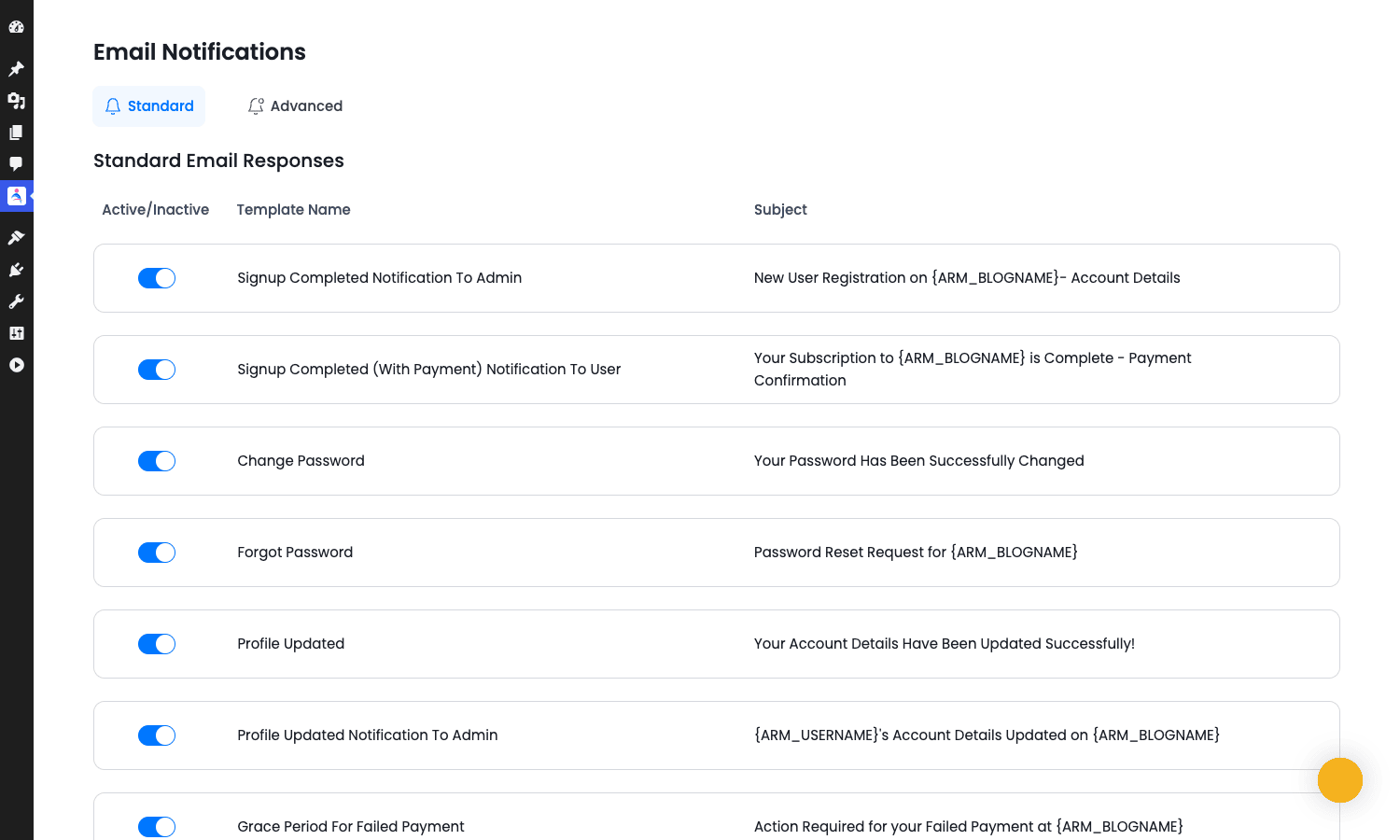
The Email Notifications page splits emails into "Standard" (signup, password reset, profile updated, payment received, grace period, etc.) and "Advanced" (per-event custom emails you build yourself). Each standard email has a toggle to turn it off, a subject template, and a body template with merge tags like {ARM_USERNAME}, {ARM_BLOGNAME}, {ARM_PLAN_NAME}, {ARM_PAYMENT_AMOUNT}.
The merge tag list is long and covers the obvious cases. What’s missing: there’s no easy way to add a custom merge tag from the UI. If you need {ARM_REFERRAL_CODE} to come from a custom user meta field, you have to filter the email body in PHP.
A nice touch: there’s an Email Notification Scheduler at the bottom of General Settings. Instead of firing emails immediately on a hook, ARMember can batch them every X hours. Useful for sites that send a lot of transactional mail and want to avoid being throttled.
If you want better deliverability, plug in an SMTP plugin (WP Mail SMTP / FluentSMTP / Post SMTP). ARMember uses standard wp_mail(), so any SMTP plugin works transparently.
The add-ons grid
The Add-ons page lists about 25 toggleable in-built modules. Activating one is one click, and the corresponding feature shows up in the admin sidebar.
The ones I’d consider on a fresh install:
- Drip Content, turn on if you’re doing courses or serial content.
- Coupon, turn on always. Useful for launch promos.
- Pay Per Post, turn on if you’ll sell individual posts.
- Social Feature, turn on if you want member directories.
- Social Connect, turn on if you want social login.
- Pro-Rata, turn on if you’ll let members upgrade between paid plans.
The rest you can defer. Each module loads its own CSS and JS, so leaving twenty-five of them on by default on a site that uses three of them is a needless performance tax. I left the ones I wasn’t using off and the admin became noticeably snappier.
Real-world use cases
Different membership sites get different value out of ARMember. Here are the patterns I see most often.
Paid newsletter or blog. Three plans: free reader, paid monthly, lifetime. Use Restriction Rules to gate "premium" tagged posts. Drip content is overkill here unless you do a "premium archive unlocks over time" angle. Email notifications carry most of the work.
Online course site. Where drip content shines. Each lesson is a post or page, the drip rule unlocks lesson N at "+7N days" after the user joins the plan. The member dashboard uses [arm_drip_content] to show available and upcoming lessons. If your course needs quizzes, grading, or progress tracking, you’ll want a dedicated LMS like LearnDash instead of stretching ARMember; ARMember’s not really built for that.
Community / forum site. Pair ARMember with BuddyBoss Platform Pro or BuddyPress. ARMember handles the paid tiers and access; BuddyBoss handles the social activity. ARMember has explicit hooks for both.
Premium document library. Use Pay Per Post to sell individual whitepapers, plus a Pro plan that bundles them all. This is where ARMember’s "multiple plans per user" model is genuinely useful: someone can buy a single $5 paper and then upgrade to Pro without losing their existing paid post access.
Closed alumni / association directory. The Member Directory shortcode plus profile templates makes ARMember a credible choice for "members-only" professional networks. Plug in the Social Feature add-on for activity streams.
SaaS-flavored side project. I’ve seen ARMember power the "early access subscriber" tier on a small SaaS. Stripe for payments, custom user meta for tracking which beta features the user has access to, and the REST API endpoints for the SaaS itself to check membership status. Not a typical use case, but the architecture allows it.
If you’re comparing ARMember to other membership plugins on this site, I’ve written walkthroughs for MemberPress, WishList Member, Paid Memberships Pro, and Restrict Content Pro. Different tradeoffs, different audiences. Read those for context.
Developer reference: hooks, filters, shortcodes, REST
This is the section I always wish more plugin walkthroughs actually wrote. ARMember exposes 148 action hooks and 398 filters across its core. That’s a lot. Below are the ones I reach for again and again, grouped by what you’re trying to do.
When a user signs up
The cleanest entry point for "user just bought my plan" is arm_after_user_plan_change. It fires every time a plan is added to (or changed for) a member.
add_action( 'arm_after_user_plan_change', function ( $user_id, $plan_id, $action ) {
 if ( $action!== 'add' ) {
 return;
 }
 // Send the user to your CRM, tag them in Mailchimp, fire an analytics event.
 $user = get_userdata( $user_id );
 do_something_in_my_crm( $user->user_email, $plan_id );
}, 10, 3 );
If you specifically want "the user paid for a recurring plan, not a free one," arm_after_user_recurring_payment_done is the more specific hook.
add_action( 'arm_after_user_recurring_payment_done', function ( $user_id, $plan_id, $amount ) {
 update_user_meta( $user_id, 'last_recurring_amount', $amount );
}, 10, 3 );
When a member’s payment fails
The hook is arm_after_recurring_payment_failed_outside. It fires when the gateway webhook tells ARMember a charge bounced.
add_action( 'arm_after_recurring_payment_failed_outside', function ( $user_id, $plan_id, $gateway ) {
 // Dunning: send a "your card was declined" email, post to Slack, etc.
 wp_mail(
 get_userdata( $user_id )->user_email,
 'Heads up about your subscription',
 "Looks like your last payment didn't go through. You can update your card here: https://example.com/account/"
 );
}, 10, 3 );
When a member cancels
arm_cancel_subscription fires on a manual cancel from the member’s account page. arm_after_recurring_payment_cancelled_outside fires when the gateway reports the cancellation (e.g. user cancelled from inside PayPal).
add_action( 'arm_cancel_subscription', function ( $user_id, $plan ) {
 // Offer a discount, log the churn reason, etc.
 log_churn( $user_id, $plan );
}, 10, 2 );
Modifying the signup form’s behavior
Before the signup form validates, arm_before_validate_form runs. Use it to enforce custom rules (e.g. "block signups from disposable email domains").
add_filter( 'arm_before_validate_form', function ( $errors, $form_data ) {
 $blocked = array( 'mailinator.com', 'guerrillamail.com' );
 $domain = strtolower( substr( strrchr( $form_data['user_email'], '@' ), 1 ) );
 if ( in_array( $domain, $blocked, true ) ) {
 $errors[] = 'Please use a real email address.';
 }
 return $errors;
}, 10, 2 );
After the form submits and the user is created, arm_after_form_submit_action fires. Use it for redirects or post-signup setup tasks.
Customizing what plans appear on a page
The arm_get_plans_to_display filter lets you mutate the array of plans before it renders on the signup grid. Useful for "show different plans based on the URL the user landed on."
add_filter( 'arm_get_plans_to_display', function ( $plans, $atts ) {
 if ( isset( $_GET['promo'] ) && $_GET['promo'] === 'fall25' ) {
 // Show only the promo plan
 return array_filter( $plans, fn( $p ) => $p->arm_subscription_plan_id == 7 );
 }
 return $plans;
}, 10, 2 );
Custom merge tags in emails
arm_email_template_field_html is what you filter to add custom merge tags. Hook in, append to the array of available tags, then provide the replacement logic with arm_email_replace_shortcodes.
add_filter( 'arm_email_replace_shortcodes', function ( $body, $user_id ) {
 $referral = get_user_meta( $user_id, 'referral_code', true );
 return str_replace( '{ARM_REFERRAL_CODE}', esc_html( $referral ), $body );
}, 10, 2 );
Shortcodes
ARMember registers about 45 shortcodes. The ones you’ll actually use:
[arm_form id="101"], render a form (signup, login, change password, profile, etc.) by ID.[arm_plan ids="3"]Content for plan 3 only[/arm_plan], wrap content for one or more plans.[arm_plan_not ids="3"]Content for everyone except plan 3[/arm_plan_not], inverse of above.[arm_restrict_content type="login"]Members only[/arm_restrict_content], generic restriction wrapper.[arm_content type="login"]...[/arm_content]and[arm_not_login_content]...[/arm_not_login_content], show different content to logged-in vs guest users.[arm_logout label="Sign out"], a logout link.[arm_account_detail], render the member’s account dashboard.[arm_member_transaction], render the member’s payment history.[arm_membership_card], render the member’s profile/membership card.[arm_drip_content], render the member’s drip-content schedule.[arm_membership], render the plan grid (your "pricing page" shortcode).[arm_user_private_content], render content visible only to a specific user.[arm_avatar],[arm_username],[arm_displayname],[arm_user_plan], utility shortcodes for member-aware copy.[arm_if_user_in_trial]...[/arm_if_user_in_trial], conditional content for trial users.
The ARMember shortcodes mostly Just Work, but the closing tag matters. [arm_plan ids="3"][/arm_plan] not [arm_plan ids="3" /]. If you’re embedding inside a page builder, type the shortcode into a Text widget, not a Shortcode widget, and the brackets will survive.
REST API
ARMember registers 13 routes under armember/v1:
GET /armember/v1/arm_memberships, list all plans.GET /armember/v1/arm_membership_details, details for a single plan.GET /armember/v1/arm_member_details, details for a single member.GET /armember/v1/arm_member_memberships, list a member’s active plans.GET /armember/v1/arm_member_paid_posts, list a member’s purchased pay-per-post items.GET /armember/v1/arm_member_payments, list payment history for a member.GET /armember/v1/arm_member_paid_post_payments, payment history for pay-per-post.POST /armember/v1/arm_check_coupon_code, validate a coupon.POST /armember/v1/arm_add_member_membership, attach a plan to a user.POST /armember/v1/arm_add_member_transaction, record a transaction (useful when a payment happens off-WordPress).POST /armember/v1/arm_cancel_member_membership, cancel a plan for a user.POST /armember/v1/arm_check_member_membership, check whether a user is on a plan.
Authentication is via standard WordPress REST API auth (cookies for browser, application passwords or JWT for headless). Most useful for mobile apps that need to verify a user’s membership before serving content.
curl -X GET \
 -u "admin:application-password-here" \
 https://example.com/wp-json/armember/v1/arm_member_memberships?user_id=42
Activation hook
ARMember registers register_activation_hook to seed default data on first activation. If you’re scripting installs (e.g. via WP-CLI), the hook fires automatically. If you’re cloning a site or restoring from backup, the hook does NOT fire (because activation didn’t happen), and you may end up with no default plan / default forms. The easiest fix is to deactivate and re-activate the plugin from wp plugin deactivate armember && wp plugin activate armember.
Elementor widgets
If you use Elementor Pro, ARMember registers its own widgets under an "ARMember" category in the panel:
- Membership Card
- User Badge
- Conditional Redirection (by plan or by role)
- Plan-aware content visibility
That last one is the killer feature. You can build a single page in Elementor and use the widget to show/hide entire sections based on the visitor’s plan. No shortcodes, no PHP.
Performance, compatibility, and the gotchas
The honest part. Membership plugins live deep in the WordPress request lifecycle (every page load has to check "is this user allowed to see this?"), so performance and compatibility matter a lot.
Page-cache compatibility. ARMember writes a arm_arrived_at cookie when a user lands on a protected page, and uses session data to decide who sees what. Full-page cache plugins (WP Rocket, LiteSpeed Cache) don’t always honor that cookie. Two options: (1) exclude any URL that uses an ARMember shortcode from the cache via the "Never Cache URLs" list, or (2) use a fragment-cache approach where the cached HTML has placeholders that ARMember fills in on every request. I’ve found option 1 simpler in practice.
Logged-in cache. Most caching plugins exclude logged-in users from cache by default, so your members are unaffected. Guests can still hit cache. Just remember: a guest who hits a restricted page first and gets the paywall, then logs in, then revisits, may see the cached paywall instead of the unlocked content until the cache TTL expires. Fix: include the restricted URL pattern in the cache exclusion list.
Database load. Each membership-check involves a few queries against arm_subscription_plans, arm_member_payment_information, and a few user-meta lookups. On a site with thousands of plans this can add up. I’ve never seen this be a real problem under 100 plans. If you’re somehow building a site with 500+ plans, you probably want to revisit the architecture before blaming ARMember.
Multi-site (WordPress Network). ARMember works on a network install, but each subsite has its own ARMember instance and plan data. There’s no "network-wide" membership sharing out of the box. If you need that, you’ll have to write a custom REST proxy.
Translation. ARMember ships with a .pot file and is translation-ready. Loco Translate or WPML’s String Translation will both pick it up. Beware: the email templates are stored as options in the database, not in the .pot, so translating the plugin doesn’t translate the standard email subjects. You’ll have to edit each email template manually for each language.
WooCommerce integration. Works fine in practice. The integration adds a "Linked Membership Plan" dropdown to each product page, and a purchase of that product attaches the linked plan to the buyer. The only gotcha: variable products are not supported. Each plan must be linked to a simple product.
BuddyPress / bbPress compatibility. Tested and stable. The forum permissions in bbPress respect the ARMember plan, so you can have "Premium Members Only" forums by ticking one checkbox in the ARMember -> Access Rules grid against the forum URLs.
Update cadence. ARMember updates roughly once a month with a mix of bug fixes and new features. Major version jumps tend to introduce new admin UI revisions, which is fine but means your team might need a short re-orientation when the dashboard layout changes.
SVG icons in admin. The plugin loads its own SVG icon font. On an admin page with twenty plugins active, this is one of many SVG sprites. I haven’t seen it cause real conflicts.
Pricing and licensing
ARMember Pro is sold on CodeCanyon as a "lifetime + 6 months of support" license, with optional support extensions. That’s the standard ARMember commercial model.
GPL Times sells the same Pro zip under the GPL license, which is the legal way to redistribute the plugin under WordPress’s own GPL terms. You get the full plugin, every add-on toggle, and you can install it on as many sites as you want without per-site activation.
You don’t get vendor email support from the original author when you buy through a GPL store, but the ARMember documentation covers most setup questions and is freely available on the vendor’s site, plus there’s a community forum for the same. For most builds you won’t need vendor support; the plugin is well-trodden ground.
The settings options to know:
- License key entry under ARMember -> Licensing. Leave blank when using a GPL-licensed version; the plugin still works fully. Some upsell banners in the admin will tell you to activate, you can ignore them.
- Auto-update is off by default. Enable it from the WordPress core "Plugins" screen if you trust the GPL store’s update channel.
FAQ
Is ARMember a one-time payment or a subscription?
The plugin itself is sold as a one-time payment with support renewals. You set up your members’ subscriptions (recurring billing) inside the plugin separately.
Can I migrate from MemberPress / Restrict Content / WishList Member to ARMember?
There’s no one-click migration. You can export your member list and re-import it as WordPress users, then bulk-assign plans via the ARMember Import / Export tool. The historical payment data does not migrate; only current plan assignments.
Does ARMember support Stripe Checkout (the redirect-to-Stripe flow) or only embedded Stripe Elements?
ARMember uses Stripe Elements (embedded card field). If you want Stripe Checkout, you’d configure that through the WooCommerce hand-off plus the WooCommerce Stripe Gateway plugin.
Can I gate WordPress menu items based on plan?
Yes. ARMember adds a "Plan visibility" panel to each menu item under Appearance -> Menus. Tick the plans that should see this menu item.
Does the drag-and-drop form builder work in the block editor or only in shortcodes?
The form builder generates a shortcode. You can drop that shortcode into any block editor block, any page builder, or even a widget. There’s no native Gutenberg block for the form yet, but the shortcode renders fine in a Shortcode block.
Will ARMember slow down my site?
Negligibly, on most sites. The performance impact comes from running a content-access check on every request. On a vanilla install, this is sub-millisecond. The bigger performance question is whether you’re caching your site correctly, and that’s a config issue not a plugin issue.
Is ARMember good for an LMS / course site?
For a small course (under 20 lessons, no quizzes, no certificates), yes. Drip content covers the unlock schedule. For a real LMS with quizzes, grading, and certificates, pair ARMember with LearnDash (handles the LMS) and use ARMember for the paid-tier gating.
Can a single user belong to multiple plans at once?
Yes. This is one of ARMember’s nicer features. Useful for combining a "Free Reader" base plan with bolt-on packs.
Does ARMember work with WPForms or Gravity Forms?
You don’t need them for signup; ARMember’s own form builder handles that. If you want to use WPForms or Gravity Forms for non-membership site forms (contact, surveys), they coexist with ARMember without conflict.
Final thoughts
ARMember is one of those plugins that looks intimidating on the first day and obvious on the second day. The admin sidebar has too many items, the wizard is forgettable, the access-rules grid is the visual equivalent of a tax form. None of that matters once you’ve used it for a week.
What does matter:
- The form builder is genuinely best-in-class for membership plugins. Drag-drop, live preview, color schemes, hidden fields, plan-aware redirection. The competition has form builders that feel like afterthoughts.
- Drip content works without ceremony. Plans get content over time. The shortcode gives members a visible schedule. Done.
- The hook surface is huge. If you’re a developer building a custom membership flow on top of ARMember, you can hook into nearly every event without forking the plugin.
- The payment gateway coverage is solid. Stripe + PayPal + Authorize.Net + 2Checkout covers most markets, and the WooCommerce hand-off covers the rest.
What I’d still want from the next major version: a "rules by plan" view of the access grid, a custom-merge-tag UI for the email templates, native Gutenberg blocks for the common shortcodes, and a slimmer plugin bundle that doesn’t load all 25 add-on CSS files when only six modules are active.
If you’re shopping membership plugins right now, ARMember belongs on your shortlist. It’s a strong fit for paid newsletters, small course sites, premium document libraries, and member communities. Less of a fit for full-scale LMS work or sites that need deep multi-site sharing.
For a working copy you can install on a staging site today, ARMember on GPL Times is the easiest way in. Get the zip, run through the setup wizard, build your first plan and your first signup form, and you’ll have a real membership site behind a paywall by the end of an afternoon.