


A store owner I helped last year had done everything the tutorials told her to. She picked a popular multipurpose theme, then bolted on a wishlist plugin, a compare plugin, a mega-menu plugin, a sticky add-to-cart plugin, a countdown-popup plugin, and an AJAX search plugin. The shop worked. It was also slow, the plugins fought over the same hooks, and every WordPress update was a small heart attack because she never knew which of the seven moving parts would break.
XStore is the theme built to end that pile. It’s 8theme’s flagship multipurpose WooCommerce theme, one of ThemeForest’s long-running best sellers, and the pitch is simple: most of what you’d normally stack on top of a theme is already in the box. Wishlist, compare, waitlist, a header builder, a product-page builder, a conversion toolkit, AJAX everything. One theme instead of a theme plus six plugins.
This is a long, honest walkthrough of what XStore actually includes, where it shines, where it gets in its own way, and a full developer reference with the template hooks worth knowing. Whether you’re a shop owner who wants fewer moving parts or a developer who has to maintain the thing, by the end you’ll know exactly what you’re signing up for.
Table of Contents
- What is XStore?
- Picking and importing one of XStore’s demos
- What XStore replaces (the plugin pile)
- The Theme Options panel, section by section
- The XStore Builders: headers, footers, and product pages
- Wishlist, compare, and waitlist with no extra plugins
- Sales Booster: XStore’s built-in conversion toolkit
- AJAX search, AJAX cart, and Buy Now
- The built-in Email Builder
- How to install and set up XStore
- Who XStore is for (real scenarios)
- Don’t import a demo onto a live store
- XStore vs WoodMart, Flatsome, and Porto
- Developer reference: hooks, filters, CPTs, and the child theme
- Performance, compatibility, and gotchas
- Troubleshooting the common XStore problems
- FAQ
- Final thoughts
What is XStore?
XStore is a multipurpose WooCommerce theme built by 8theme. The vendor describes it as an all-in-one solution for WordPress and WooCommerce, and that "all-in-one" framing is the whole point: it ships with a companion plugin called XStore Core that adds the builders, the Elementor widgets, the custom post types, and the Sales Booster conversion tools. A child theme (xstore-child) comes along too, which is what you should be editing when you want to customize anything safely.
It’s sold mainly on ThemeForest as a one-time purchase and through 8theme’s own membership. It needs PHP 7.4 or newer and works with current WooCommerce. On gpltimes.com it’s available as a GPL download with the theme, XStore Core, and the child theme all included.
The headline number people quote is the demo count. XStore advertises 150+ importable demo sites, and the import panel really does render a wall of finished designs covering electronics, groceries, fashion, handmade goods, corporate sites, and more. We’ll get to that grid in a second, because it’s the part most buyers care about first.
Here’s the thing I want to be upfront about. A theme that does this much is a double-edged sword. When everything you need is in one place, you get fewer plugin conflicts and one support contact. When you only need a fraction of it, you’re carrying a lot of features you’ll never touch. XStore tries to soften that with toggles that let you switch modules off, and I’ll point out where that works and where it doesn’t as we go.
Picking and importing one of XStore’s demos
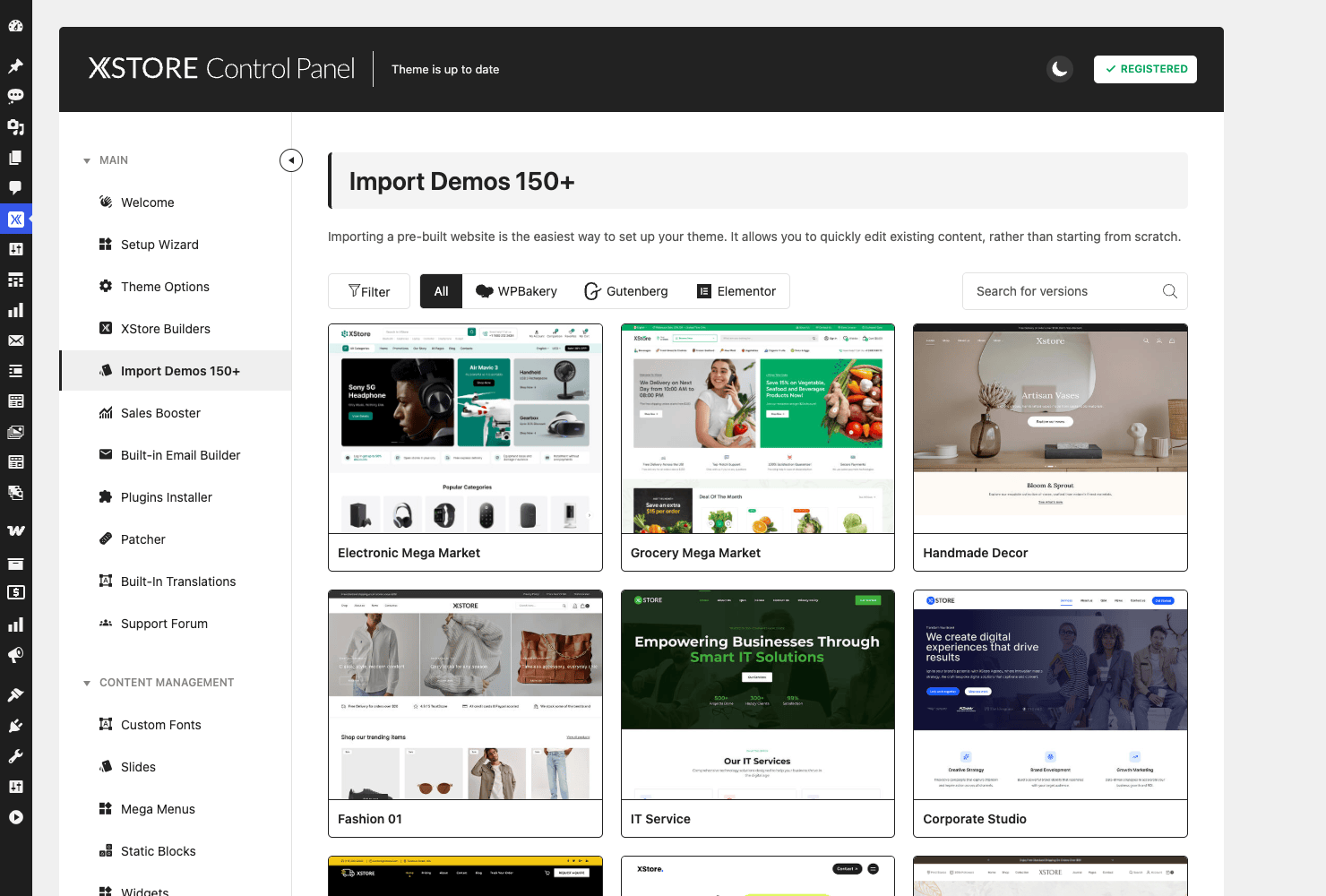
The demo library is where almost everyone starts, and honestly it’s the best argument for the theme. Go to XStore » Import Demos in the admin and you land on a grid of real, finished store designs. The panel is labeled "Import Demos 150+" and the live grid renders well over a hundred thumbnails pulled from 8theme’s servers, each one a complete site you can preview and import.
What I like is that the grid is filterable by page builder. There are tabs for All, WPBakery, Gutenberg, and Elementor, so if you’ve already decided you’re an Elementor shop, you can hide every demo that was built with something else. That filter saves you from importing a beautiful demo only to discover it was assembled in a builder you don’t use.
The designs themselves are not generic. You get focused starting points like Electronic Mega Market, Grocery Mega Market, Handmade Decor, a few Fashion variants, IT Service, and Corporate Studio. Each is tuned for a different kind of shop, so the typography, the product-card style, the header layout, and the color palette already match the vertical instead of being a beige blank you have to dress yourself.
How an import actually works. You hover a demo, hit import, and XStore pulls in the demo’s pages, menus, widgets, theme options, and sample products. It also offers to install the companion plugins that demo relies on. On a clean WordPress install, this is genuinely the fastest way to get from "empty site" to "store that looks like the screenshot."
Heads-up: a full demo import reaches out to external servers to fetch the content and any required plugins. On a locked-down or offline environment that outbound fetch can stall, which is also why we’re showing you the demo grid here rather than a fully imported front-end. On a normal host with outbound access, the import completes fine. And there’s a partial-import option, which matters a lot. More on that in the anti-pattern section below, because importing a demo the wrong way is one of the most common ways people wreck an existing store.
What XStore replaces (the plugin pile)
Before we go feature by feature, here’s the part that justifies the whole "one theme instead of seven plugins" idea. This table maps the plugins a typical store owner installs against what XStore already bundles.
| The need | A plugin you’d normally add | What XStore includes |
|---|---|---|
| Save items for later | A wishlist plugin | Built-in wishlist (list page via [xstore_wishlist_page]) |
| Compare products side by side | A compare plugin | Built-in compare (table via [xstore_compare_page]) |
| Back-in-stock alerts | A waitlist plugin | Built-in waitlist (page via [xstore_waitlist_page]) |
| Custom header / mega menu | A header builder plugin | Header Builder, 113 prebuilt templates |
| Custom product page layout | A single-product builder plugin | Single Product Builder, 23 widgets |
| Urgency popups, countdowns | A FOMO / conversion plugin | Sales Booster module |
| Live AJAX search | A search plugin | Built-in AJAX search with query filters |
| Branded order emails | An email-customizer plugin | Built-in Email Builder (toggle) |
| One-click checkout | A "buy now" plugin | Buy Now button (toggle) |
That’s nine common add-ons folded into the theme. Every row removes a plugin you’d otherwise have to vet, update, and pray plays nicely with the others. The catch is that bundling isn’t free, and we’ll come back to the weight question honestly in the performance section. But on the maintenance side alone, collapsing nine plugins into one theme is a real win for anyone who’s spent a Saturday debugging a hook collision.
The Theme Options panel, section by section
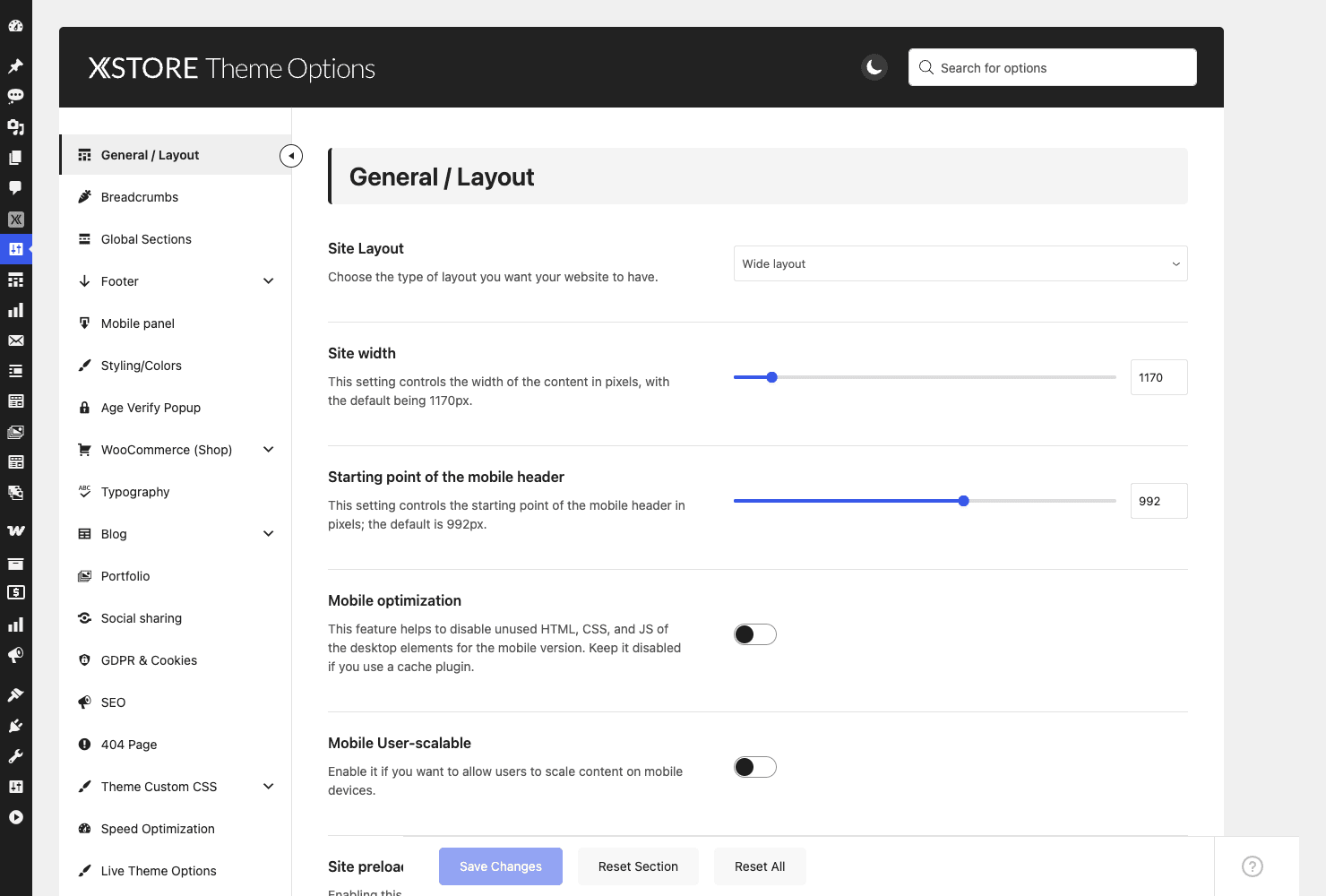
Almost everything that isn’t a page layout lives under XStore » Theme Options. It’s a single settings panel with a long left-hand section list, and it’s the control room for the whole theme. You can see the section nav and the layout controls below.
Rather than list every toggle, here’s what each major section actually controls and when you’d touch it.
- General / Layout. Sets the site layout (wide or boxed), the site content width (the default is 1170px), the breakpoint where the mobile header kicks in (around 992px), mobile optimization toggles, and the site preloader. This is the first stop on any new build.
- Breadcrumbs. Turn breadcrumbs on or off and choose where they sit. Small thing, but good for SEO and navigation, so don’t skip it.
- Global Sections. Define reusable blocks (a promo bar, an announcement) that appear across the site without re-adding them per page.
- Footer. Pick a footer layout, set columns, and choose what goes in each. If you’re not using the Elementor footer builder, you configure the footer here.
- Mobile panel. Controls the slide-out mobile menu and the bottom mobile navigation bar, which is the kind of thing you’d normally reach for a separate plugin to get.
- Styling / Colors. The global color and styling controls. Set your brand color once here and it propagates.
- Age Verify Popup. A built-in age gate for stores that need one (vape, alcohol, certain supplements). It’s a real compliance feature, not a gimmick.
- WooCommerce (Shop). The big one for a store. Product-grid columns, products per page, the catalog layout, quick view, the AJAX shop filters, and a stack of single-product display options.
- Typography. Font family, sizes, and weights for headings and body. XStore also has a Custom Fonts area so you can upload your own.
- Blog and Portfolio. Layout controls for posts and for the portfolio custom post type (yes, there’s a built-in portfolio, which is unusual for a shop theme).
- Social sharing. Share buttons on products and posts.
- GDPR & Cookies. A built-in cookie consent bar and GDPR helpers.
- SEO. Basic SEO toggles. You’ll still want a dedicated SEO plugin for the serious work; this covers the theme-level basics.
- 404 Page. Customize the not-found page instead of leaving the default.
- Theme Custom CSS and Speed Optimization. Custom CSS goes here, and the Speed Optimization section is where you switch on the performance features (more in the performance section).
- Live Theme Options. A live-preview mode for editing options with the front-end visible.
Tip: resist the urge to flip every toggle on day one. Set the layout, your brand color, typography, and the WooCommerce shop options, then come back for the rest as you actually need them.
The XStore Builders: headers, footers, and product pages
This is the section that separates XStore from a plain WooCommerce theme. Under XStore » Builders you get a panel of layout builders for the parts of a store you normally can’t touch without code or a separate plugin.
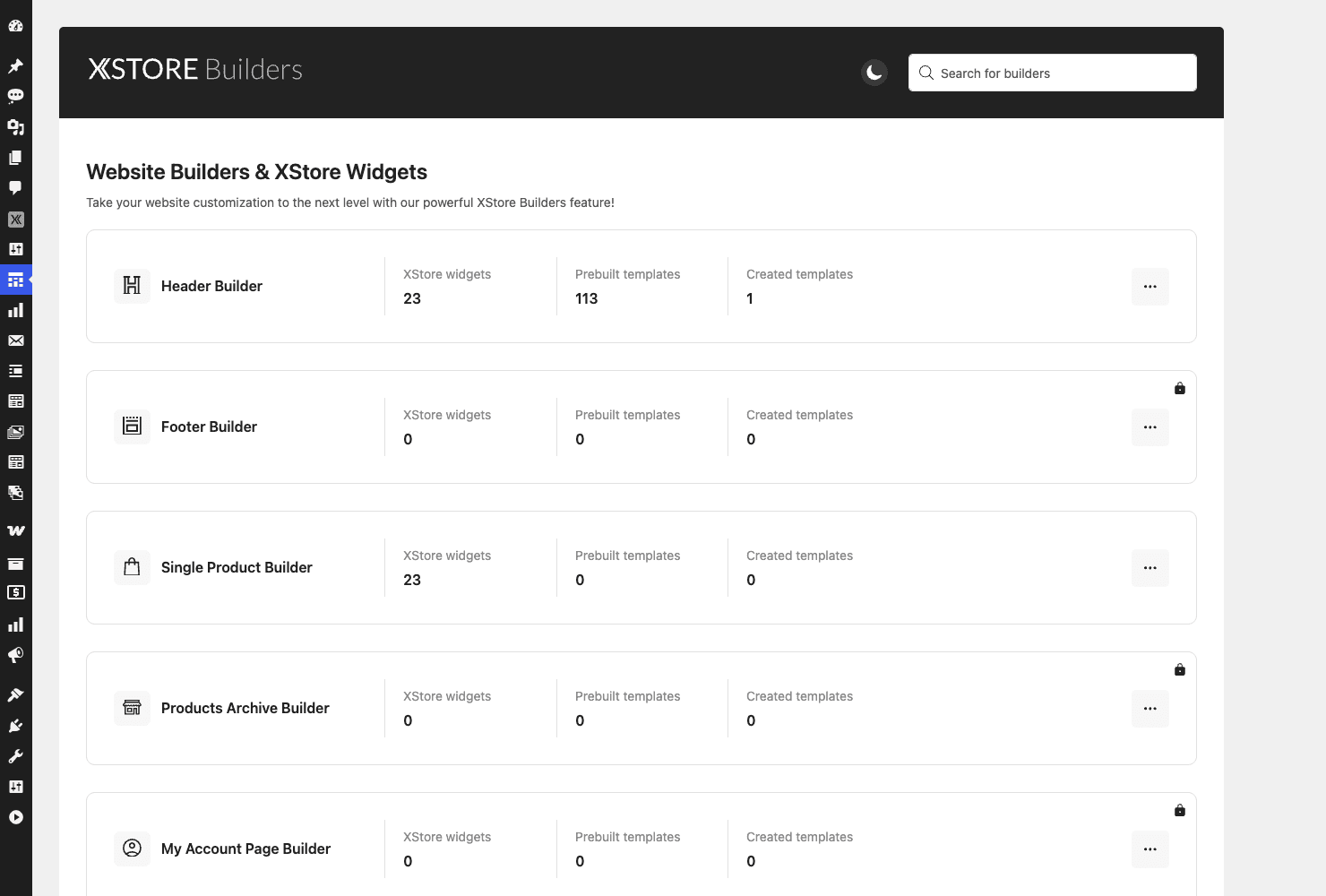
There are builders listed for the Header, Footer, Single Product, Products Archive, and My Account page. Here’s the honest reality of how they behave, because the marketing makes it sound like all five are one-click and they’re not.
The Header Builder is the star, and it runs natively in the WordPress Customizer. It ships with 23 XStore widgets and a library of 113 prebuilt header templates. You don’t need Elementor for it. You build with drag-and-drop zones (Top Header, Main Header, Bottom Header, plus a separate Header Sticky state), and the available blocks are exactly the e-commerce parts you want up top: Logo, Main Menu, Secondary menu, All Departments, Mobile Menu, Cart, Wishlist, Compare, Account, and Search. It also handles overlap, transparent, and vertical header variants, which usually need a plugin.
The Single Product Builder also gives you 23 widgets to rearrange the product page, so you can move the gallery, the price, the add-to-cart, the tabs, and the related products into whatever order converts best for your catalog.
Be aware that some builders are gated. In the GPL demo I poked through, the Footer, Products Archive, and My Account builder cards showed a lock icon. The newer versions of those builders are Elementor-based and expect Elementor to be installed (or sit behind a higher tier). The Header and Single Product builders worked natively without it. So if a "build your own footer visually" feature is the reason you’re buying, install Elementor first, or configure the footer through Theme Options instead. I’d rather you know that now than discover it mid-build.
Here’s the Header Builder open in the Customizer, with the drag-drop zones on the left and the live store preview on the right.
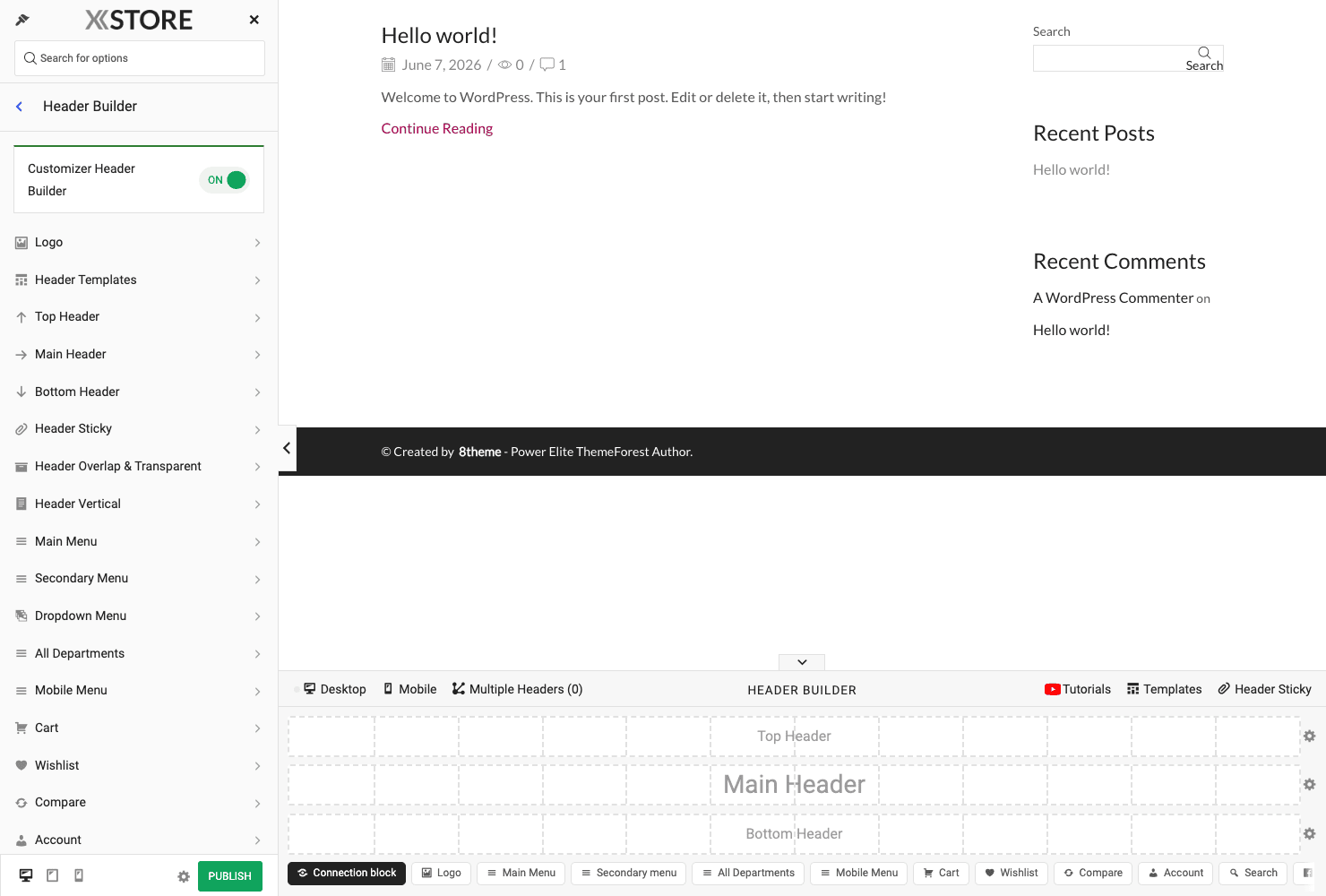
Why the Customizer matters here. Because the Header Builder lives in the native Customizer, you get the real-time preview and the standard WordPress save flow instead of a bolted-on iframe. You edit a zone, the preview updates, you publish. For something as fiddly as a header, that live feedback loop is worth a lot.
Wishlist, compare, and waitlist with no extra plugins
These three features are the clearest example of XStore folding plugins into the theme, and they’re all built in.
Wishlist lets shoppers save products to a list they can come back to. The wishlist button is injected straight into product cards and is one of the available header blocks, so most stores just put the wishlist icon up top and the heart on every card without touching code. You render the full saved-items page with the [xstore_wishlist_page] shortcode.
Compare does the side-by-side product comparison table that shoppers use when they’re torn between two items. Same idea: the compare toggle sits on product cards and in the header automatically, and [xstore_compare_page] renders the comparison page. It’s the feature people most often install a dedicated plugin for, so having it native is a genuine convenience.
Waitlist is the back-in-stock one, and it’s my favorite of the three because it quietly recovers lost sales. When a product is out of stock, shoppers can request a notification, and XStore fires do_action('xstore_waitlist_new_customer_request', $product, $email, $options) when someone signs up. That hook hands you the product, the customer’s email, and the waitlist options, so it’s the natural place to push the demand into your CRM or a spreadsheet. The management page renders with [xstore_waitlist_page].
You might be wondering whether you have to wire any of this up by hand. You don’t. The wishlist, compare, and waitlist controls are built into product cards and the header out of the box, so the only shortcodes you’d ever place yourself are the _page ones, and only when you want the list, comparison, or waitlist page somewhere custom.
There’s a real trade-off worth naming, though. These features come from XStore Core, the theme’s own companion plugin, rather than from standalone plugins you chose yourself. XStore Core is tied to the theme in practice, so if you ever move to a different theme and drop Core, the buttons and the saved data go with it. I’ll come back to that in the FAQ, because it’s the kind of thing nobody mentions until it bites.
Sales Booster: XStore’s built-in conversion toolkit
Sales Booster is the module that most clearly says "we’re trying to replace your FOMO plugin." You find it at XStore » Sales Booster, and it’s a collection of independent conversion features you toggle on as needed.
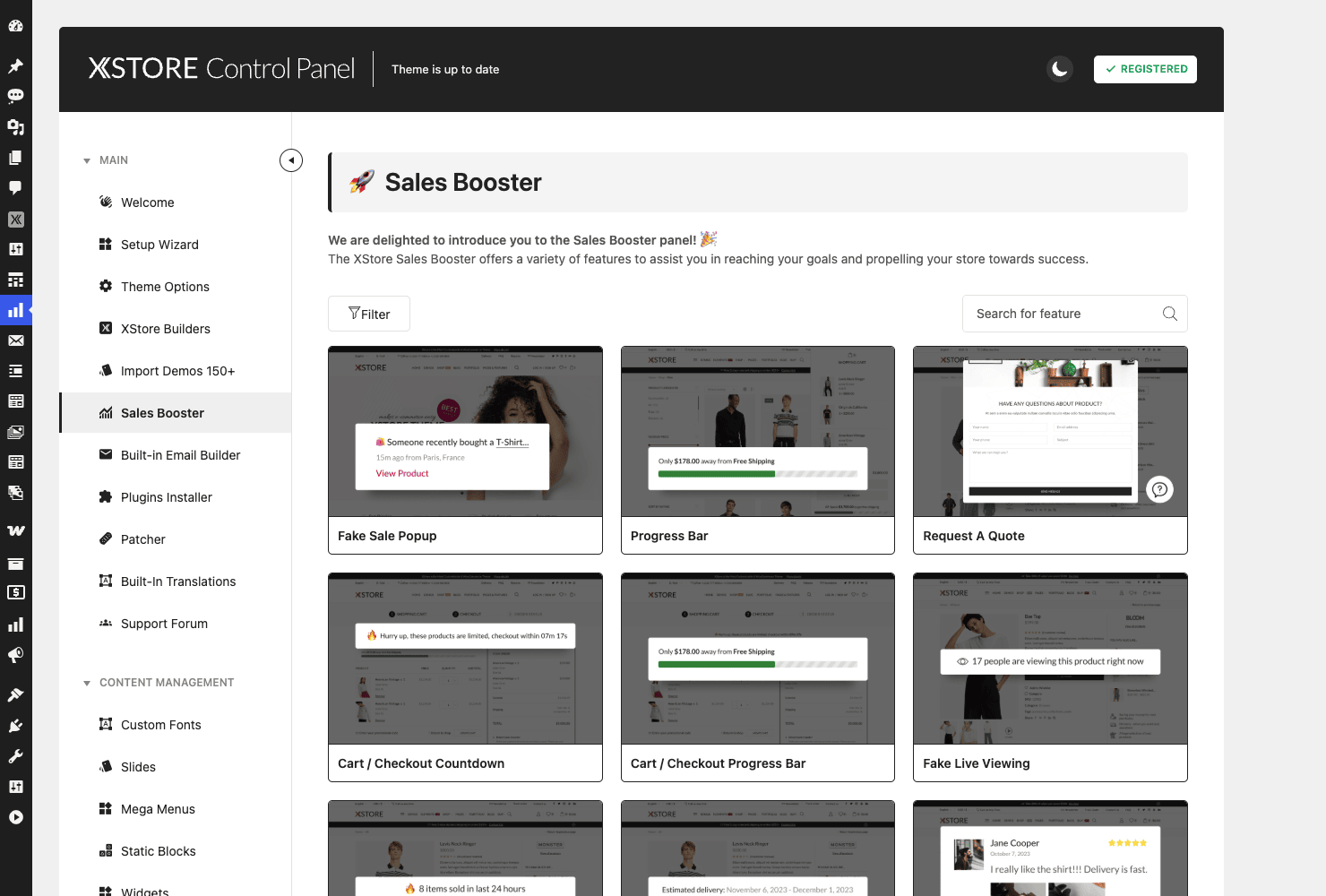
Here’s what’s in the toolkit:
- Fake Sale Popup. A "someone just bought X" style social-proof notification. Use it carefully and honestly; more on that below.
- Progress Bar. A free-shipping or goal progress bar, rendered with
[etheme_sales_booster_progress_bar]. - Cart / Checkout Progress Bar. A steps indicator for the checkout flow, via
[etheme_sales_booster_cart_checkout_progress_bar]. - Request a Quote. Turns the shop into a quote-request flow, which is gold for B2B and wholesale stores that don’t want public prices.
- Cart / Checkout Countdown. A "your cart is reserved for 10 minutes" timer to nudge hesitant buyers.
- Page Live Viewing. A "23 people are viewing this" counter for social proof.
- Estimated Delivery. Shows a delivery-date estimate on the product page, via
[etheme_sales_booster_estimated_delivery]. Buyers want this and most stores forget it. - Quantity Discounts. Tiered "buy more, save more" pricing rendered with
[etheme_sales_booster_quantity_discounts]. - Safe Checkout badges. Trust badges near the buy button, via
[etheme_sales_booster_safe_checkout].
My honest take: the Estimated Delivery, Quantity Discounts, Safe Checkout, and free-shipping Progress Bar are the genuinely useful ones, because they give shoppers real information that reduces hesitation. The Fake Sale Popup and Live Viewing counter can work, but they’re the features most likely to backfire if a savvy shopper realizes the numbers aren’t real. I’d lean on the honest ones and treat the FOMO ones with a light hand.
AJAX search, AJAX cart, and Buy Now
XStore leans hard on AJAX, which is the thing that makes a store feel quick even before you touch a caching plugin. Add-to-cart, search, pagination, and shop filtering all happen without a full page reload.
Live AJAX search shows product results in a dropdown as the shopper types, including product images and prices. Developers get real control over it: apply_filters('etheme_ajax_search_products_query', $args) lets you modify the search query, and there are sibling filters for searching posts and product categories too. If you’ve ever wanted live search to ignore out-of-stock items or weight certain categories, that’s the hook.
AJAX add-to-cart means the cart count updates in the header without a reload. There’s a filter, apply_filters('etheme_cart_redirect_after_add', $bool), to control whether adding to cart redirects to the cart page, which is exactly the behavior most stores want to disable so shoppers keep browsing.
Buy Now is the skip-the-cart button that sends a shopper straight to checkout for a single item. It’s a toggle in Theme Options (the buy_now_btn option), and it’s fully filterable. You can rename the button with apply_filters('etheme_buy_now_button_text', 'Buy now'), force it on or off with apply_filters('etheme_buy_now_enabled', $bool), and adjust its CSS classes. For impulse-buy products, a Buy Now button next to Add to Cart measurably shortens the path to purchase.
The built-in Email Builder
WooCommerce’s default emails are famously plain, and most stores eventually install a plugin to make order emails look like the brand. XStore bundles that too. Under XStore » Email Builder you get a visual editor (it runs on a bundled email-template engine, registering a viwec_template post type under the hood) that replaces the default WooCommerce email templates with custom designs.
The catch: it’s an ON/OFF toggle and it ships off by default. That’s actually the right call. Custom email templates are the kind of thing that can break order confirmations if you get them wrong, so XStore makes you opt in deliberately rather than silently overriding WooCommerce’s emails the moment you activate the theme.
If you do switch it on, treat your order emails like production code. Send yourself a few test orders and confirm the receipt, the shipping details, and the order table all render before you let real customers receive them. A pretty email that’s missing the order number is worse than the plain default.
How to install and set up XStore
Setting XStore up on a fresh site is straightforward. Here’s the path I’d take.
- Upload the theme. Go to Appearance » Themes » Add New » Upload Theme, choose the XStore zip, install, and activate. If you also have the child theme, upload it too but activate the child, not the parent.
- Install XStore Core. XStore will prompt you to install its companion plugin via the standard activation notice. Do it. Without XStore Core you lose the builders, the Sales Booster, the CPTs, and the Elementor widgets. Expect the notice at the top of the dashboard right after activation.
- Run the Setup Wizard. XStore opens a setup wizard (at the
xstore-setuppage) that walks you through installing the recommended companion plugins and getting oriented. On a fresh install, this is the smoothest way to start. - Install the bundled companion plugins. From the wizard or the XStore » Plugins installer, add the bundled plugins the theme recommends. These are the ones your chosen demo expects.
- Import a demo, carefully. Go to XStore » Import Demos, filter by the page builder you use, preview a few, and import one. On a brand-new site, a full import is fine. On a site with existing content, read the next section first, because this is where people lose work.
- Set your brand basics in Theme Options. Logo, brand color, typography, and the WooCommerce shop layout. Twenty minutes here saves a lot of fiddling later.
Note: XStore Core has a minimum-version gate against the theme, so keep the theme and the core plugin updated together. Updating one but not the other is a common source of "a feature disappeared" reports.
Who XStore is for (real scenarios)
Abstract feature lists are hard to map onto your own situation, so here are a few concrete ones.
If you run an electronics or grocery store, the Electronic Mega Market and Grocery Mega Market demos give you the dense, category-heavy mega-menu layout those verticals need, plus the All Departments header block. You’re not rebuilding a marketplace header from scratch.
If you sell handmade or fashion goods, the Handmade Decor and Fashion demos lean into big imagery and clean product cards. The wishlist and compare features matter more here, because these shoppers browse and save before they buy.
If you run a B2B or wholesale shop, the Sales Booster’s Request a Quote turns the catalog into a quote flow, and you can hide prices behind a login. That’s a setup that normally takes two or three plugins to assemble.
If you’re a developer building for a client, the appeal is consolidation. One theme to support means one update path, one set of hooks, and one vendor to ask when something breaks, instead of reconciling six plugins’ release cycles. The child theme gives you a clean place to put overrides.
If you’re a freelancer who builds a lot of small shops, the demo library is the time-saver. Starting from a finished, vertical-specific design and editing down beats starting from a blank theme every single time.
Don’t import a demo onto a live store
This is the mistake that costs people real time and real content, so I’m giving it its own section.
Don’t run a full demo import on a store that already has products, pages, and orders. A full import is designed to make a fresh install look like the demo, which means it brings in the demo’s pages, menus, widget configurations, theme options, and sample products. On an empty site, that’s perfect. On a live store, that same import can overwrite your carefully built pages, replace your menus, reset theme options you’d already tuned, and bury your real catalog under dozens of dummy products. I’ve seen someone import a demo "just to see it" on a production site and spend the next two days untangling which pages were theirs and which were the demo’s, while live shoppers hit a half-broken homepage.
The stakes are concrete. You can lose hours of layout work, confuse customers with placeholder content during business hours, and in the worst case bury real orders’ related pages under demo clutter. None of it is unrecoverable if you have a backup, but "if you have a backup" is doing a lot of work in that sentence.
Do this instead. Import demos only on a fresh install or a staging copy of your site. If you must bring demo elements into a live store, use XStore’s partial-import option to pull in just the specific piece you want (one page template, the theme options, or the widgets) rather than the whole thing. And take a full backup before any import, every time, no exceptions. Two minutes of backup beats two days of cleanup.
XStore vs WoodMart, Flatsome, and Porto
If you’re shopping for a WooCommerce theme, XStore is competing with a short list of heavyweights, and the honest answer is they’re all good. Here’s where XStore stands on the numbers that actually differ.
On demo count, XStore is at the top. XStore advertises 150+ importable demos with around 141 rendering live in the import grid. WoodMart ships roughly 80 prebuilt sites, and Porto is often quoted in the 100+ range, while Flatsome keeps a smaller, tighter set of starter sites. If "import a finished design and edit it down" is your workflow, XStore’s library is the deepest of the four.
On the header builder, XStore’s 113 prebuilt header templates and 23 header widgets are a standout, and the fact that the core header builder runs natively in the Customizer (no Elementor required) is a real difference. WoodMart and Flatsome have strong header tools too, but XStore’s prebuilt-header count is unusually high, and starting from a finished header beats assembling one block by block.
On price, the math favors the one-time ThemeForest themes. XStore, WoodMart, and Flatsome are all sold as one-time ThemeForest purchases in the roughly $39 to $59 range with no forced annual renewal, whereas some competing premium themes run on a subscription that you pay every year to keep updates and support. Over three years, a one-time $59 license against a roughly $59-a-year subscription is the difference between paying once and paying around $177. For a single store, that gap alone can decide it.
Where the competitors push back: Flatsome’s UX Builder is famously fast and lightweight, and WoodMart’s design polish out of the box is hard to beat. XStore’s counter is breadth. It bundles more of the conversion and product-page tooling (Sales Booster, waitlist, the email builder) that you’d otherwise add as plugins on top of the others. Pick XStore when you want the most in one box; pick a leaner rival when you only need a fast builder and a clean design and you’ll add the rest yourself.
Developer reference: hooks, filters, CPTs, and the child theme
Time for the part developers came for. XStore’s developer surface is template action and filter hooks plus Elementor widgets plus a child theme. To set expectations honestly: there’s no public, storefront REST API and no WP-CLI command. XStore Core does register an internal REST namespace (xstore-options/v1) that its own options panel uses to read and save settings, fonts, and imports, plus the routes the bundled CMB2 field library adds, but those are admin plumbing, not an API you’d build a headless front-end against. The extension model for store behavior is "hook into the template lifecycle," not "call an endpoint," so if you were hoping to drive the storefront through XStore’s own API, you’d reach for WooCommerce’s REST API instead.
All customization should go in the xstore-child child theme so an update doesn’t wipe your work. Post meta uses the _et_ prefix, and you read theme options with the accessor etheme_get_option($key, $default).
// Read an XStore theme option with a sensible fallback.
$buy_now_enabled = etheme_get_option( 'buy_now_btn', 0 );
Layout and header hooks
XStore fires its own template actions around the major page regions. do_action('etheme_header') outputs the header, and do_action('etheme_page_heading') renders the page-title area. There’s also do_action('et_after_body', true) right after the opening body tag, which takes one argument.
// Inject a site-wide announcement bar right below the header.
add_action( 'etheme_header', function () {
    echo '<div class="store-notice">Free shipping on orders over $50</div>';
} );
Product loop hooks
On shop and archive pages, XStore wraps the product loop with its own actions. The most useful is do_action('etheme_before_product_loop_start', $total), which passes one argument: the total product count for the current loop.
// Show a result count above the product grid.
add_action( 'etheme_before_product_loop_start', function ( $total ) {
    printf( '<p class="loop-count">%d products found</p>', (int) $total );
}, 10, 1 );
There are matching do_action('etheme_after_product_loop_start') and etheme_after_product_loop_end actions (both with no arguments) for closing wrappers.
Single product hooks
The product page is where most store customizations land. do_action('etheme_single_product_after_add_to_cart') fires right after the add-to-cart button (no arguments), which is the natural place for trust badges, shipping notes, or a custom upsell.
// Add a reassurance line under the add-to-cart button.
add_action( 'etheme_single_product_after_add_to_cart', function () {
    echo '<p class="ship-note">Ships in 1 to 2 business days.</p>';
} );
XStore also has a sticky add-to-cart bar with its own hooks. do_action('etheme_sticky_add_to_cart_before') and etheme_sticky_add_to_cart_after (both no arguments) let you add content to that floating bar.
// Drop a stock badge into the sticky add-to-cart bar.
add_action( 'etheme_sticky_add_to_cart_before', function () {
    echo '<span class="sticky-badge">In stock</span>';
} );
The single-product gallery is wrapped by do_action('etheme_before_single_product_image') and etheme_after_single_product_image if you need to surround it.
XStore Core template render hooks
XStore Core loads its own view templates (admin panels, brand fields, and Elementor view partials) through a single render helper, and fires actions around it. Both do_action('xstore_core_before_template_render', $template_name, $located, $args) and xstore_core_after_template_render pass three arguments: the template name (a .php path like elementor/advanced-tabs.php or admin/product-video-box.php), its located path on disk, and the args array. It’s a narrow hook (it covers Core’s internal view templates, not the customizer header builder), but handy when you need to swap or wrap one of those partials.
// Wrap a specific XStore Core view template when it renders.
add_action( 'xstore_core_before_template_render', function ( $template_name, $located, $args ) {
    if ( false !== strpos( $template_name, 'elementor/advanced-tabs' ) ) {
        // Runs just before XStore Core renders its advanced-tabs view.
    }
}, 10, 3 );
The most useful filters
A handful of filters cover the customizations stores actually ask for. The Buy Now button text, the AJAX search query, and the checkout billing fields are the three I reach for most.
// Rename the Buy Now button.
add_filter( 'etheme_buy_now_button_text', function ( $text ) {
    return 'Express checkout';
} );

// Exclude out-of-stock products from live AJAX search.
add_filter( 'etheme_ajax_search_products_query', function ( $args ) {
    $args['meta_query'][] = array(
        'key'     => '_stock_status',
        'value'   => 'instock',
    );
    return $args;
} );

// Reorder or tweak the checkout billing fields.
add_filter( 'etheme_billing_details_fields', function ( $fields ) {
    if ( isset( $fields['billing_company'] ) ) {
        $fields['billing_company']['priority'] = 5;
    }
    return $fields;
} );
Other handy filters include apply_filters('etheme_buy_now_enabled', $bool) to force the Buy Now button on or off in code, apply_filters('etheme_cart_redirect_after_add', $bool) to control the post-add redirect, and the brand and category widget count filters (etheme_brands_widget_count, etheme_cats_widget_count).
Custom post types and shortcodes
XStore Core registers several custom post types you can query like any other content. They’re registered from a config array rather than literal strings, so don’t be surprised if a naive grep only finds one of them; the registered types are real.
etheme_portfolio(portfolio items, taxonomyportfolio_category, with a[project_links]shortcode)testimonials(taxonomytestimonial-category, rendered with[testimonials])etheme_slides(slides for the theme’s slider)etheme_mega_menus(mega-menu content blocks)staticblocks(reusable static content blocks)brand(WooCommerce product brands)etheme_linked_var(linked variations, for selling variations as separate products)viwec_template(the email-builder templates)
The shortcodes worth knowing beyond the wishlist/compare/waitlist page shortcodes ([xstore_wishlist_page], [xstore_compare_page], [xstore_waitlist_page]) are [project_links], [testimonials], and the Sales Booster shortcodes ([etheme_sales_booster_progress_bar], [etheme_sales_booster_estimated_delivery], [etheme_sales_booster_quantity_discounts], [etheme_sales_booster_safe_checkout], and [etheme_sales_booster_cart_checkout_progress_bar]).
Builder-agnostic page content
For page content, XStore doesn’t lock you into one editor. It registers theme support for the WooCommerce product-gallery zoom (it ships its own gallery slider and lightbox JS rather than leaning on WooCommerce’s), title-tag, post thumbnails, post formats, selective-refresh widgets, and notably header-footer-elementor, which means it cooperates with Elementor’s own header and footer system. You can build pages with Elementor, WPBakery, or the native Gutenberg editor, and the demo library is filtered by exactly those three so you can pick demos that match your editor.
Performance, compatibility, and gotchas
The obvious worry with an all-in-one theme is weight, so let’s deal with it head-on. You might be wondering whether a theme that does this much is bloated. The honest answer is: it can be, if you switch everything on, and it doesn’t have to be, because most modules are toggles.
XStore has a dedicated Speed Optimization section in Theme Options. From there you can control how assets are loaded and switch off features you aren’t using, which is the right lever to pull. The principle is simple: every Sales Booster module, every AJAX feature, and the email builder you don’t enable is weight you don’t ship. A store that turns on the wishlist, AJAX search, and a free-shipping bar and leaves the rest off is lean. A store that flips on all nine Sales Booster modules, the live viewing counter, and the fake-sale popup is going to feel it.
Pair XStore with a real caching plugin and the difference is night and day. I’d run a page cache and asset optimization on top regardless of theme; if you want the deep version of that, our WP Rocket review walks through the settings, but any solid cache plus XStore’s own Speed Optimization section gets you most of the way.
On compatibility: XStore needs PHP 7.4 or newer (don’t run it on an ancient PHP and then file a bug report), and it expects a reasonably current WooCommerce. It integrates specifically with bbPress for forums, and with both Dokan and DC Product Vendor for multi-vendor marketplaces, so if you’re building a marketplace you have two vendor systems supported out of the box. It also plays with Elementor (including the header-footer-elementor support), WPBakery, and Gutenberg.
The gotchas I’d flag:
- Theme and core version drift. XStore Core has a minimum-version requirement against the theme. Update them together or features can quietly stop working.
- Builder lock icons. As noted, the Footer, Products Archive, and My Account builders’ newer versions lean on Elementor. Don’t assume all five builders are one-click without it.
- Feature overlap with plugins you already have. If you keep your old wishlist or compare plugin installed alongside XStore’s built-in versions, you’ll get duplicate buttons and conflicting behavior. Pick one. The whole point is to remove the plugins XStore replaces.
Troubleshooting the common XStore problems
Here are the issues that actually come up, and the fix for each.
"A builder or Sales Booster feature is missing." Almost always XStore Core isn’t installed or is out of date. Go to Appearance » Themes, confirm the core-plugin activation notice is handled, and update XStore Core to match the theme.
"The demo import stalls or fails." Imports fetch content and plugins from external servers, so a host that blocks outbound requests, a low PHP max_execution_time, or a small memory limit will choke it. Raise PHP memory and execution time, confirm your host allows outbound HTTP, and retry. If it still won’t complete, use partial import to pull pieces in one at a time.
"My homepage looks broken after import." Set the imported front page under Settings » Reading, and make sure all the companion plugins the demo expected actually installed. A demo built for Elementor won’t render right if Elementor isn’t active.
"Duplicate wishlist or compare buttons." You’ve got a standalone wishlist/compare plugin running alongside XStore’s built-in one. Deactivate the old plugin.
"Custom changes vanished after a theme update." You edited the parent theme instead of the child. Move your changes into xstore-child and they’ll survive updates.
"AJAX search or add-to-cart isn’t working." This is usually a JavaScript conflict with another plugin or an aggressive optimization plugin that’s deferring XStore’s scripts. Temporarily disable JS combine/defer in your caching plugin and re-test; if it comes back, exclude XStore’s scripts from that optimization.
"Custom email templates broke my order emails." Turn the Email Builder off (it’s a toggle) to fall back to WooCommerce’s defaults, fix the template, and send test orders before re-enabling.
FAQ
Is XStore bloated because it does so much?
It can be, and that’s the honest answer. The weight depends entirely on how many modules you switch on. XStore is built so most features (Sales Booster modules, the email builder, AJAX extras) are toggles, and the Speed Optimization section lets you trim asset loading. A store that enables only what it uses stays light; a store that turns on every Sales Booster feature and every popup will be heavier. Treat the toggles as the dial they are.
Do I get locked into XStore’s page builder?
No. XStore is builder-agnostic for page content. It supports Elementor, WPBakery, and Gutenberg, and the demo library is filterable by all three. The one nuance is that some of the newer layout builders (footer, archive, my-account) are Elementor-based, while the Header and Single Product builders run natively in the Customizer.
What happens to my wishlist and compare data if I switch themes later?
This is the real lock-in to know about. The wishlist, compare, and waitlist features live in XStore Core, the companion plugin that ships with the theme, and Core is tied to XStore in practice. The same goes for the portfolio and testimonials custom post types. If you move to a different theme and drop XStore Core, you’ll lose those buttons and the saved data and need a replacement plugin, and the CPT content will need a migration plan. It’s the trade-off for not running separate plugins, and it’s worth weighing before you commit.
Does XStore include Elementor Pro or other premium plugins?
XStore bundles its own builders and Elementor widgets through XStore Core, and demos may rely on bundled companion plugins. Historically XStore-class themes have bundled premium add-ons, but treat the exact bundle as something to confirm against the current package rather than assume. For the deepest page-building you may still want Elementor Pro.
Can I build a multi-vendor marketplace with XStore?
Yes. XStore has built-in integration for both Dokan and DC Product Vendor, so you can pick either vendor platform and get theme-level styling for vendor stores and dashboards. That’s two marketplace systems supported out of the box, which is more than most themes offer.
Does XStore have a REST API or WP-CLI commands for developers?
There’s no WP-CLI command, and no public content REST API. XStore Core does register an internal REST namespace (xstore-options/v1) that its own options panel calls to read and save theme settings, fonts, and import/export, plus the bundled CMB2 field library’s routes, but those are admin plumbing rather than a storefront API. The developer surface you actually build against is template action and filter hooks, Elementor widgets, custom post types, and a child theme. For programmatic or headless control of products and orders, use WooCommerce’s own REST API, which XStore’s WooCommerce integration sits on top of.
Is the demo import safe to run on my existing store?
Not a full import, no. A full demo import is meant for fresh installs and can overwrite your pages, menus, widgets, and theme options. On a live site, take a full backup first, then use the partial-import option to bring in only the specific element you want. Better yet, test on staging.
How many demos does XStore actually have, and are they real?
The library is advertised as 150+, and the live import grid renders well over a hundred real, finished designs (around 141 thumbnails) across electronics, grocery, fashion, handmade, corporate, and service verticals. They’re complete starting points, not color swatches, and you can preview each before importing.
Where can I get XStore and how much does it cost?
XStore is sold on ThemeForest as a one-time purchase (no forced annual renewal) and via 8theme’s membership. On gpltimes.com it’s available as a GPL download that includes the theme, XStore Core, and the child theme, with the documentation intact. If you want to put the builders, Sales Booster, and the demo library through their paces on a real install, XStore on GPL Times is the most direct way to get the full package in one download.
Does XStore work with bbPress and forums?
Yes. XStore ships specific bbPress styling, so if you want a community forum alongside your store, the forum pages inherit the theme’s look instead of falling back to bbPress’s default styling.
Final thoughts
XStore is the theme I’d point a store owner to when their real problem is plugin sprawl. The wishlist, compare, waitlist, header builder, product-page builder, AJAX search, and Sales Booster being native means fewer plugins to vet, fewer update conflicts, and one vendor to ask when something breaks. The 150+ demo library and the 113 prebuilt header templates make the "get to a finished-looking store fast" part genuinely quick, and the developer hooks are clean and well-named once you know the etheme_ and xstore_core_ prefixes.
It isn’t magic. An all-in-one theme is only as lean as the modules you leave off, some of the newer builders want Elementor, and the built-in wishlist and compare data lives in XStore Core, so switching away later has a cost. Go in with eyes open on those three points and you’ll be fine.
If you want to test the demo library, build a header in the Customizer, and wire up the Sales Booster on a real WordPress install, you can download the full XStore package from GPL Times, theme and core plugin and child theme together, and try every panel as we walked through it. For the official side, 8theme’s own XStore documentation and the 8theme site are the reference, and if you’re new to child themes, the WordPress theme handbook is the place to start. Build your store on one foundation instead of seven, and your future self will thank you the next time WordPress updates.