

I’ve run a food blog that lived and died on big, mouth-watering grid thumbnails. I’ve helped a tiny local news site that needed three breaking-news slots above the fold and nothing fancy below. I’ve built a podcast page where the play button mattered more than the byline, and a review site where the only thing readers cared about was the score and a comparison table. Four sites, four completely different shapes, and not one of them wanted a generic "business" theme with a hero banner and three feature boxes.
The Soledad theme is built for exactly those sites. It’s a publishing theme first, by PenciDesign, and it has been one of the longest-running bestsellers on ThemeForest for years. Where most "multipurpose" themes start from a corporate homepage and bolt a blog on the side, Soledad starts from the blog and gives you twenty-plus ways to lay it out.
That’s the pitch. The reality is more interesting, and a little more complicated.
This is a long, honest walkthrough. What Soledad actually does, how the options panel and the per-post controls work, how the header builder and reusable blocks turn it into a small theme builder, the deep family of Penci companion plugins that turn the same theme into a podcast site or a paywalled magazine, a full developer reference with the real hooks and filters, and the parts I’d tell you to slow down on before you switch your live site. Whether you’re a content creator who just wants a beautiful magazine front page or a developer who needs to bend a theme without forking it, you’ll know exactly what you’re getting by the end.
Table of Contents
- What Soledad is, and who it’s really for
- Inside the Soledad Theme Options panel
- Picking a blog layout: Soledad’s 20+ post styles
- Building the front page (Customizer + per-post options)
- The header builder and reusable blocks
- The Penci companion plugins
- Who each Soledad concept is for
- Developer reference
- Don’t bloat a magazine theme
- Soledad vs lightweight and multipurpose themes
- Keeping Soledad fast and compatible
- Pricing and licensing
- FAQ: Soledad theme
- Final thoughts
What Soledad is, and who it’s really for
Soledad is a WordPress theme by PenciDesign, and its own description sums it up plainly: a multipurpose newspaper, blog, and WooCommerce theme. The keyword that matters there is publishing. This is a theme that assumes the most important thing on your site is an article, a recipe, a podcast episode, or a product review, and it builds the entire layout system around showing those off. You can find the Soledad theme on GPL Times if you want to put it on a real install and click through every layout as we go.
Here’s the part that separates it from the pack. Most themes give you one blog layout, maybe two. Soledad ships more than twenty distinct post-listing styles (classic, grid, list, magazine, masonry, mixed, overlay, photography, and a pile of variations on each). You pick the look you want for your homepage and your category pages, and the theme renders the loop that way. For a magazine or news site, that breadth is the whole reason to use it.
It’s also genuinely self-contained. The core layouts don’t need an external page builder to work. Soledad ships its own options framework and its own element library, so a clean install gives you a working magazine without installing a single extra plugin. Elementor is recommended, not required, and that distinction matters more than it sounds (I’ll come back to it).
Who it’s for: bloggers and content creators who want a polished magazine look without hiring a designer, niche publishers (food, travel, tech, sports, finance) who need a layout that suits their content type, review and affiliate sites that want comparison tables and rating widgets baked in, and small newsrooms that want breaking-news slots and a liveblog option. It’s also a real WooCommerce theme, so a magazine with a small shop attached is a natural fit.
Who it’s not for: if you want a brochure site for a plumbing company, this is overkill. A lightweight starter theme will serve you better and load faster. Soledad’s value is in publishing density, and if you’re not publishing much, you’re carrying weight you won’t use.
You might be wondering whether a theme this feature-heavy is a nightmare to set up. It isn’t, mostly, because almost everything lives in one options panel and a per-post meta box. That’s where we’ll start.
Inside the Soledad Theme Options panel
Soledad’s settings live in a single large admin panel built on a Codestar-style options framework. If you’ve used any modern premium theme, the shape is familiar: a left-hand list of sections, a search box at the top, tabbed sub-screens, and an "import/export" backup tab so you can move your whole configuration between sites. Under the hood every value you set here is read back through one function (penci_get_option()), which is also the hook developers use, and we’ll get to that later.
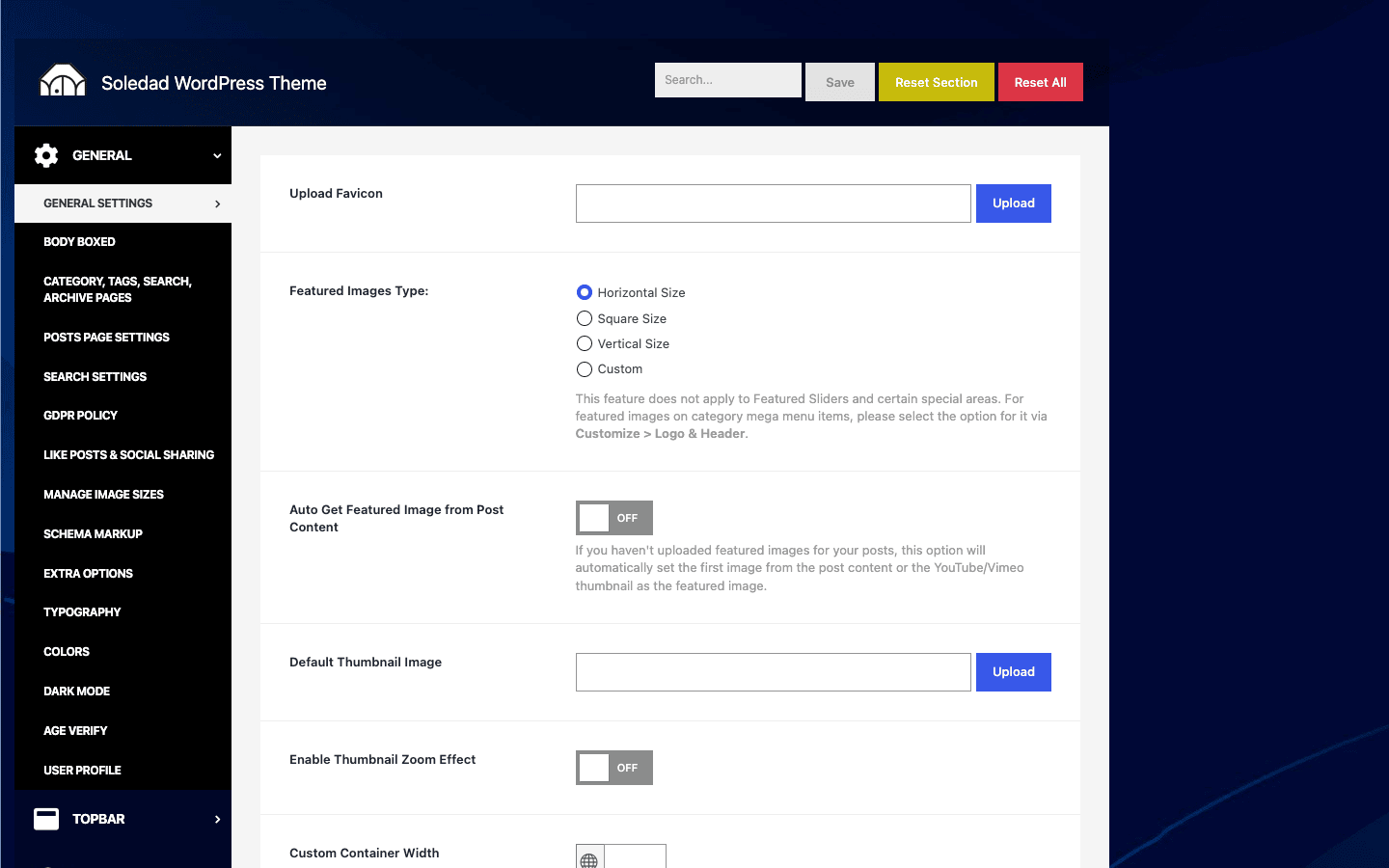
Let me walk the areas you’ll actually touch, what each one controls, and the sane default.
General / layout. This is where you set the site-wide content width, choose your default sidebar position (left, right, or none), and pick the global blog layout. The default is a boxed-ish content column with a right sidebar, which is the safe magazine default. If you want a full-width, edge-to-edge look for a photography blog, this is the switch.
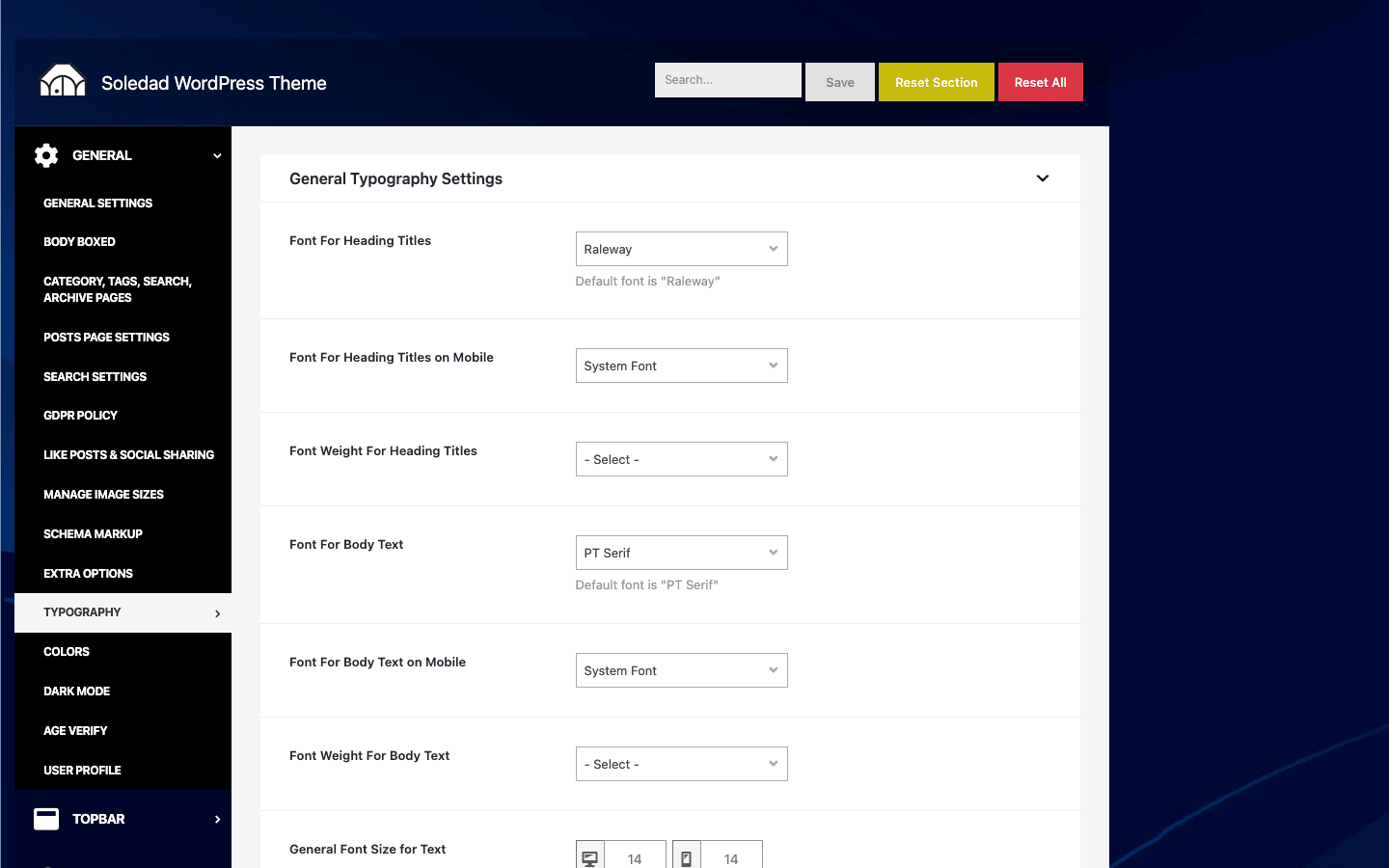
Typography. Soledad gives you per-element font controls: site title, headings (H1 through H6), body text, post titles in the loop, widget titles, and more. You set the font family, size, weight, line height, and letter spacing for each. Google Fonts are available, and (this is the nice part) you can self-host fonts through the custom-fonts uploader instead of pulling from Google’s servers on every page load. The default body font is a clean sans-serif sized for readability. My advice: set the body and the post-title fonts deliberately and leave the rest on defaults. Over-tuning typography is where a lot of people lose an afternoon.
Colors. The accent color, link colors, header background, and the general palette all live here. There’s a primary brand color that ripples through buttons, links, and category labels, so set that one first and a lot of the rest falls into place.
Dark mode. Soledad has a built-in dark-mode option with a front-end toggle, so readers can flip the whole site to a dark palette. You can set it to respect the visitor’s system preference, default to light, or default to dark. Tip: if your audience reads long-form at night (tech, fiction, news), turning the dark-mode toggle on is a small touch that readers genuinely appreciate, and it costs you nothing in setup time.
Schema / SEO structured data. The theme can output structured data (article schema, breadcrumb schema) so search engines understand your posts as articles. If you run a dedicated SEO plugin that also outputs article schema, be careful not to double up. Pick one source of truth for schema and turn the other off, or you’ll ship two competing JSON-LD blocks on every post.
Image sizes. Soledad registers its own set of thumbnail crops for all those layouts (the grid thumb, the magazine featured thumb, the small-list thumb, and so on). This section lets you adjust those crop dimensions. Heads-up: if you change image sizes after you already have hundreds of posts, the existing thumbnails won’t regenerate themselves. You’ll need a regenerate-thumbnails routine to recrop the back catalogue, otherwise old posts keep the old crops. New uploads will use the new sizes immediately.
There are more tabs than this (header, footer, single post, social, post views, AJAX search, and so on), and I’ll cover the ones that need a walkthrough in the sections below rather than listing every toggle here. The thing to take away is that the panel is broad but logically grouped, and the search box at the top is your friend when you can’t remember which tab a setting lives in.
Picking a blog layout: Soledad’s 20+ post styles
This is the feature that earns Soledad its "magazine theme" label, so it deserves its own section rather than a bullet in a feature list.
When I say twenty-plus layouts, I mean the theme genuinely ships that many distinct loop templates. You’ll see them grouped into families, and each family answers a different editorial question.
- Classic family (classic, classic-grid, classic-list, classic-boxed). The traditional blog look: a stacked column of posts with a big featured image, a title, an excerpt, and meta. This is what most readers picture when they think "blog." The boxed variant wraps each post in a card.
- Grid family (grid, grid-2, grid-boxed). Two, three, or more columns of cards. The default magazine workhorse. Great for sites where the image sells the click (food, travel, design).
- List family (list, list-boxed, small-list). Image on one side, text on the other. Denser, better for news and reference content where you want more headlines above the fold.
- Magazine family (magazine-1, magazine-2). The classic "newspaper" mixed layout: a big lead story, a few secondary stories, and a column of headlines. This is the layout people buy a magazine theme for.
- Masonry family (masonry, masonry-2). Pinterest-style staggered columns where each card sizes to its image. Beautiful for photo-heavy blogs, slightly harder on consistent visual rhythm.
- Mixed family (mixed, mixed-2, mixed-3, mixed-4). A first post styled one way (big and bold), the rest styled another (compact). Good when you always want the latest story to dominate.
- Overlay family (overlay, overlay-grid, overlay-list). Title and meta sit on top of the featured image, with a dark gradient for legibility. Modern, magazine-cover energy.
- Photography. A minimal, image-forward layout that gets out of the way of the picture.
- Featured / boxed (featured, boxed-1, boxed-2). Additional carded and feature-led variations.
Where this shines: you can set one layout for your main blog and a different layout per category. Your news category can run the dense list style while your photo-essay category runs masonry, all in the same theme, no code. That per-category flexibility is something you simply don’t get from a single-layout theme, and it’s the practical reason Soledad keeps showing up on real magazine sites.
The catch: with this much choice, decision paralysis is real. My honest advice is to pick one layout that fits your most common post type and live with it for a week before you start mixing. A site that uses six different layouts across six categories can feel incoherent to a reader who’s just browsing. Restraint reads as design.
Building the front page (Customizer + per-post options)
Setting up a Soledad front page happens in two places: the WordPress Customizer for the global structure, and a per-post meta box for the fine-grained, page-by-page control. Let me show you the flow I use on a new install.
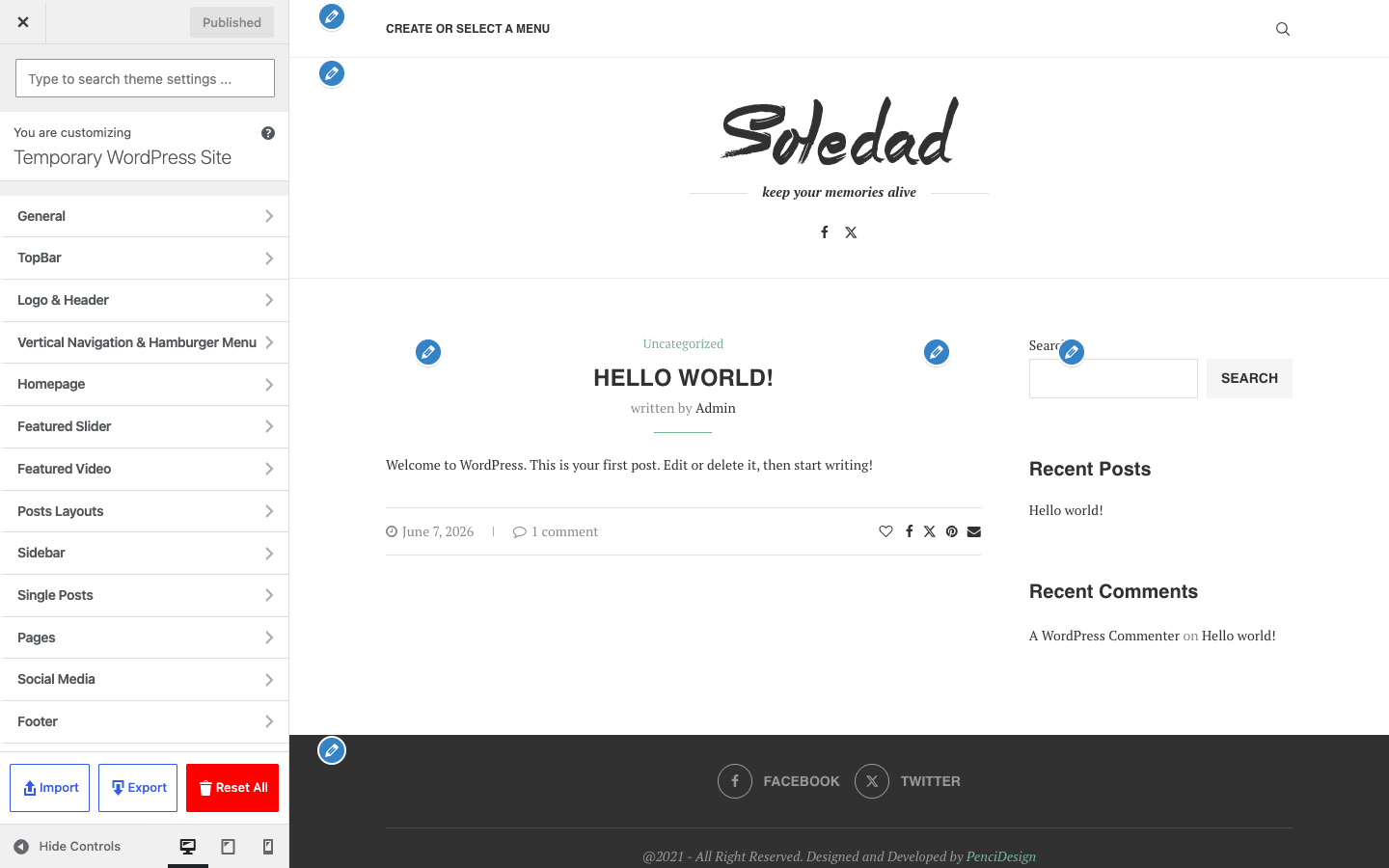
Start in the Customizer. Go to Appearance » Customize and you’ll get a live preview with Soledad’s panels down the left. The Customizer is where you confirm the global layout, the header style, the sidebar position, the colors you set in the options panel, and the homepage content. As you change a setting, the preview on the right updates so you can see the magazine take shape before you commit. For a first setup, your job here is small: confirm the header looks right, confirm the blog layout is the one you picked, and set what the front page shows (your latest posts, or a static page you’ll build out).
Then handle individual posts and pages. This is the part people miss. Every post and page in Soledad gets an "Options for This Post/Page" meta box in the editor, and it’s where the real per-content control lives. You don’t have to accept the global defaults for every single article. On a given post you can override:
- Sidebar layout. Show the right sidebar, the left sidebar, or go full width, just for this one post. A long-form feature often reads better full width even if the rest of the site has a sidebar.
- Single post style. Soledad ships several single-post templates (different placements for the featured image, title, and meta). Pick the one that suits this story.
- Reading time. Toggle the estimated reading time on or off, and the theme calculates it from the word count. Readers like knowing whether they’re in for two minutes or twenty.
- Table of contents. Turn on an auto-generated table of contents for long posts. (There’s also a
[penci-toc]shortcode if you want to place it manually mid-article.) - Per-post header and footer. This is the advanced one. You can assign a different header or footer template to a specific post or page, which is how you give a landing page a stripped-down header while the rest of the site keeps the full navigation.
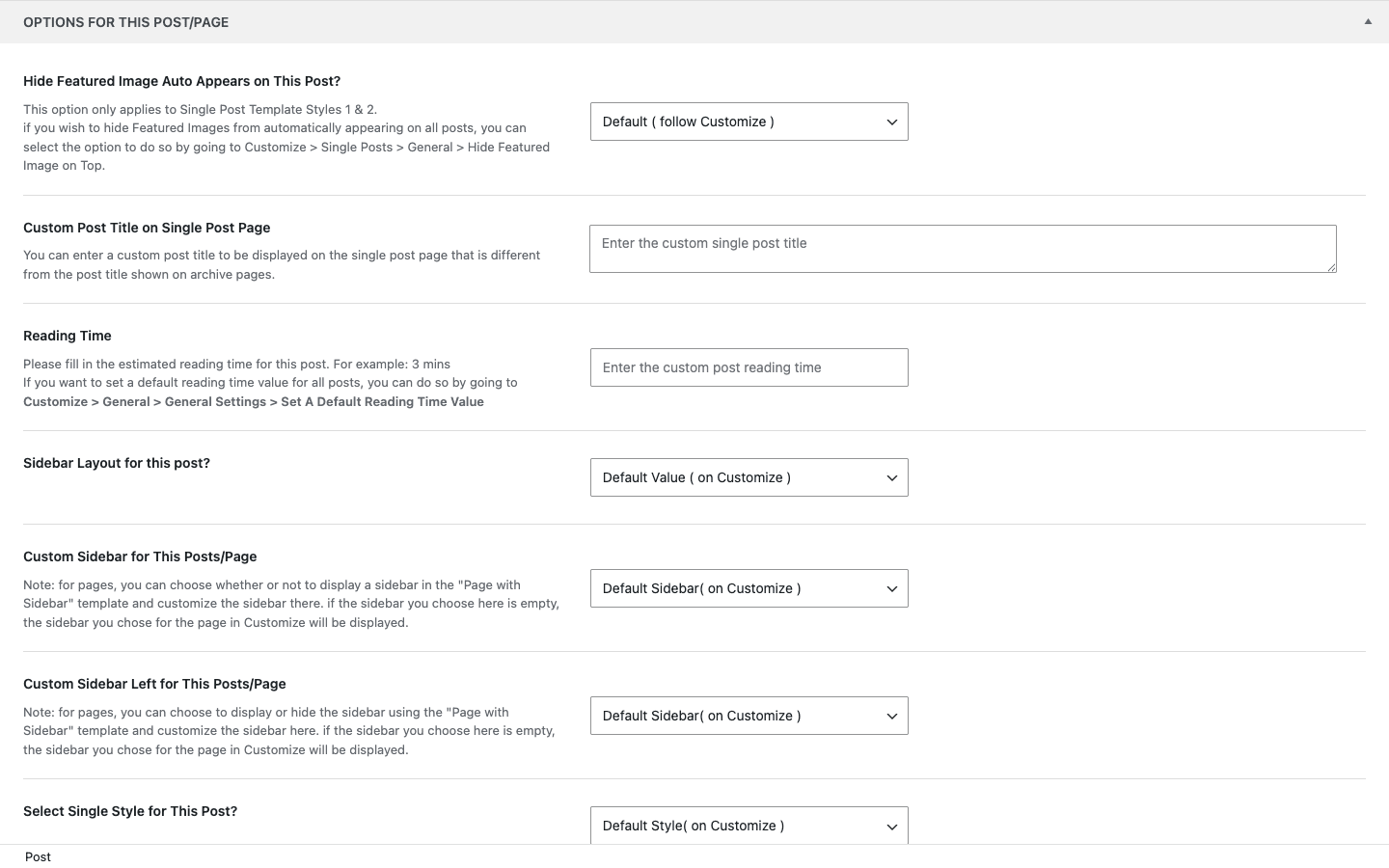
The workflow that works: set your sensible global defaults once in the options panel and the Customizer, then only reach for the per-post meta box when a specific article wants to break the mold. That keeps your site consistent by default and flexible where it counts. If you find yourself overriding the same setting on every post, that’s a signal to change the global default instead.
This sounds fiddly written out. In practice, after the first couple of posts the meta box becomes muscle memory and you barely think about it.
The header builder and reusable blocks
Soledad isn’t just a set of layouts. It quietly includes the bones of a theme builder, and this is where it punches above the typical ThemeForest theme.
The header. Soledad gives you a header builder with multiple header styles, logo placement, a sticky header option, an off-canvas mobile menu, social icons, and a built-in search. It also ships a live AJAX search, so when a reader starts typing, results appear instantly without a full page reload. (Developers can shape what that search queries through the penci_ajax_search_args filter, more on that in the developer section.) For a news site, a fast header search is genuinely useful, because readers often arrive looking for a specific recent story.
Reusable blocks. This is the part I like most. Soledad registers a custom post type for reusable content blocks (internally penci-block, organized by a penci_block_category taxonomy). You build a block once (say, a "Trending This Week" category grid, or a newsletter call-to-action, or an ad slot), and then drop it anywhere with the [block_content] shortcode or a widget. Change the block in one place and it updates everywhere it appears. If you’ve ever managed a magazine where the same "popular posts" module sits in five different spots, you’ll understand why this matters.
Archive and single-post templates. Soledad also registers archive-template and custom-post-template post types. These let you design custom layouts for your category/tag/archive pages and for single posts, then assign them. Combined with the reusable blocks and the header builder, that’s the full template-builder loop: design a header, design an archive, design a single-post template, and assign each where you want it. It’s not Elementor Theme Builder in scope, but for a publishing site it covers the templates that actually matter.
Custom fonts. One more builder-adjacent piece: a penci_cfonts post type for uploading and self-hosting your own fonts. Upload a brand font once and it’s available throughout the typography settings. For anyone who needs to match a brand exactly (or who’d rather not depend on Google Fonts for performance and privacy reasons), this is a quiet but real win.
Note: these block and template builders are powerful, but they’re also a place to overspend time. You do not need a custom archive template on day one. Get the homepage looking right with the built-in layouts first, then reach for custom templates when you hit a real limitation.
The Penci companion plugins
Here’s the "multi-concept" part of the pitch, and it’s the most distinctive thing about Soledad. The theme is the core, and PenciDesign ships a large family of first-party companion plugins that bolt specialized publishing features onto it. Install the ones you need, and the same magazine theme becomes a podcast site, a recipe blog, a sports liveblog, or a paywalled publication.
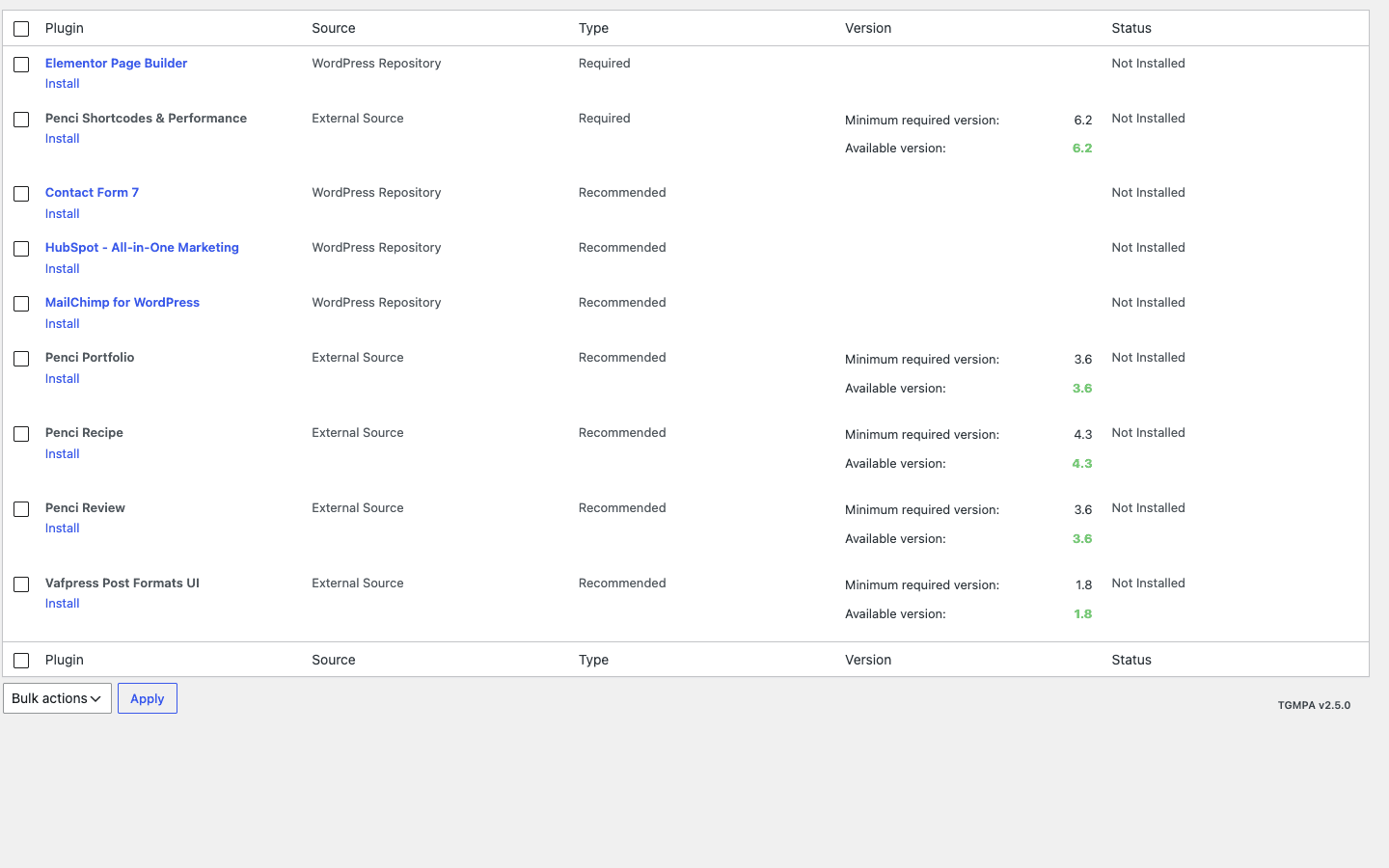
These are recommended through WordPress’s standard bundled-plugin notice, so after activating the theme you’ll see a list and can install only what you want. Here’s what the first-party Penci family covers:
- penci-paywall turns the site into a subscription/paywall publication, gating articles behind membership.
- penci-frontend-submission lets readers or contributors write and submit posts from the front end, without admin access. Useful for guest-author sites and community blogs.
- penci-liveblog adds live blogging: a continuously updating event feed for breaking news, sports matches, or product launches.
- penci-podcast adds podcast episodes with a player, so the same theme can run a proper podcast site.
- penci-recipe adds recipe cards with ingredients, steps, ratings, and recipe schema for food blogs.
- penci-review adds a review system with rating criteria and scores, for review and affiliate sites.
- penci-bookmark-follow lets readers bookmark articles and follow authors.
- penci-text-to-speech reads articles aloud, an accessibility and convenience feature.
- penci-ga-views pulls real view counts from Google Analytics (a complement to the theme’s own built-in post-view counter).
- penci-filter-everything adds front-end filtering so readers can slice content by taxonomy.
- penci-feeds handles RSS and auto feed import.
- penci-soledad-amp adds AMP support for fast mobile pages.
- penci-soledad-slider powers the hero/post slider you see on most magazine demos.
- penci-mobile-templates lets you build separate mobile layouts.
- penci-smart-crop-thumbnails improves how thumbnails are cropped.
- penci-soledad-demo-importer is the one-click demo importer.
There are more in the niche corners (penci-ai for AI content help, penci-sport, penci-finance, penci-player-rankings, penci-portfolio, penci-shortcodes, penci-pay-writer, penci-data-migrator), each aimed at a specific kind of publication.
Third-party recommendations, not requirements. Soledad also suggests a handful of well-known third-party plugins: Elementor for visual page building, Contact Form 7 for forms, Meta Box for custom fields, Mailchimp for WP for newsletter signups, and the HubSpot (leadin) plugin. I want to be clear about this because it trips people up: none of these are dependencies. The core theme and its native layouts work without any of them. You can run a full Soledad magazine and never install Elementor. The recommendations exist because some demo designs use those plugins, not because the theme needs them.
I’ll say it plainly: this companion family is both the best and the riskiest thing about Soledad. Best, because one license gives you features that would normally mean stitching together five separate premium plugins. Riskiest, because the temptation is to install all of them, and that’s exactly how a fast theme turns slow. (There’s a whole section on that below, because it’s the mistake I see most often.)
Who each Soledad concept is for
Soledad markets itself as "multi-concept," which is easy to say and hard to picture. So let me put real people behind it. Here’s how the same theme serves very different publishers, and which companion plugins each one actually needs.
| Concept | Best for | What you turn on |
|---|---|---|
| Food blog | Recipe creators who live on photos and step-by-steps | Grid or masonry layout, penci-recipe, penci-bookmark-follow |
| Local / niche news | Small newsrooms and topic news sites | Magazine layout, penci-soledad-slider, penci-liveblog |
| Review / affiliate | Product reviewers and comparison sites | List layout, penci-review, [penci_compare_table] shortcode |
| Podcast | Show hosts publishing episodes | Classic or photography layout, penci-podcast |
| Membership / paywall | Independent writers monetizing readers | Any layout, penci-paywall, penci-frontend-submission |
If you run a food blog, the draw is obvious: big appetizing thumbnails in a grid or masonry layout, recipe cards with ingredients and ratings from penci-recipe, and a bookmark feature so readers can save recipes for later. Add a newsletter signup and you’ve got the standard food-blog stack without buying three plugins.
If you run a local news site, the magazine layout gives you that newspaper front page with a lead story and a headline column. The slider handles breaking-news rotation up top, and when something is unfolding (an election night, a storm, a live event) penci-liveblog gives you a real-time feed without rebuilding the page. That’s a feature you’d otherwise pay a dedicated plugin for.
If you run a review or affiliate site, penci-review gives you scored reviews with criteria, and the [penci_compare_table] shortcode drops in a comparison table that, frankly, is the single most clicked element on most review pages. A reader scanning "which one should I buy" wants the table, and Soledad ships it.
If you’re a podcaster, penci-podcast turns posts into episodes with a player. The theme’s clean single-post templates keep the focus on the play button and the show notes.
If you’re building a paywall publication, penci-paywall plus penci-frontend-submission is a surprisingly complete setup: gate your best articles, and let contributors submit drafts from the front end. For an independent writer trying to go subscription, that’s most of what you need in one theme license.
The point isn’t that you’ll use all five. It’s that you pick one concept, install only its companions, and ignore the rest. Soledad rewards focus.
Developer reference
Now the part for people who write code. I’ll be honest up front about scope: Soledad is a theme, not a plugin framework, so don’t expect a documented public API. What it exposes is mostly internal plumbing. There’s a private REST namespace (penci/v1) behind the live AJAX search, the mega-menu HTML, and the archive load-more, plus small livevisitor/v1 and article_feedback/v1 endpoints for the live-visitor counter and the article-feedback widget. Treat those as internal, not as a content API you’d build an app against. On the command line it ships exactly one helper, wp penci-avatars migrate wp-user-avatar, a one-off migration from the old WP User Avatar plugin, and leans on WordPress core for the rest. What genuinely surprised me, though, is the depth of its action hooks and filters, far more than most ThemeForest themes expose. That means real child-theme customization is possible without forking parent templates.
Always do this work in a child theme. Soledad updates often, and editing the parent directly means your changes vanish on the next update.
Reading theme settings
Everything you set in the options panel is readable in code through two getters. The option IDs below are illustrative; use the actual ID of the setting you want (the framework stores each panel field under its own ID):
// Read a single option with a fallback default.
$accent = penci_get_option( 'your_accent_color_id', '#1a8fc4' );

// penci_get_setting() is the sibling getter used across the theme.
$layout = penci_get_setting( 'your_blog_layout_id' );

if ( 'magazine-1' === $layout ) {
    // Do something specific for the magazine layout.
}
Use penci_get_option() when you want a default fallback. These are the same functions the theme uses internally, so anything in the panel is fair game to read in a child theme or a custom widget.
Injecting content around posts and archives
This is the bread and butter of customizing Soledad. There are hooks before and after the content on single posts, and around the loop on archives. Here’s a child-theme example that adds a custom notice before every single post’s content and a "support us" block after the archive loop:
add_action( 'penci_action_before_the_content', function () {
    if ( is_single() && has_category( 'sponsored' ) ) {
        echo '<p class="disclosure">This article is sponsored. Here is what that means.</p>';
    }
} );

add_action( 'penci_archive_after_posts', function () {
    echo '<div class="archive-cta">Enjoying the coverage? <a href="/subscribe/">Subscribe</a>.</div>';
} );
You also get penci_action_after_the_content, penci_action_after_post_content, and penci_end_single_content for the single-post side, plus penci_archive_before_posts and penci_featured_archive_posts on the archive side. That’s enough to inject ad slots, disclosures, related-content blocks, or calls to action without touching content-single.php.
Working with the built-in post views
Soledad has its own post-view counter, and it’s filterable. If you’d rather pull view counts from somewhere else (a caching-friendly counter, or an external analytics source), you can override the number:
// Replace the theme's view count with your own source.
add_filter( 'penci_get_post_views', function ( $views ) {
    $external = (int) get_post_meta( get_the_ID(), 'my_cdn_view_count', true );
    return $external > 0 ? $external : $views;
} );

// The count arrives already formatted (e.g. "12K"); tweak the label.
add_filter( 'penci_filter_post_views_number', function ( $label ) {
    return $label . ' reads';
} );
The companion penci_get_postviews_key filter lets you change the meta key the counter stores under, which is handy if you’re migrating from another views plugin and want to reuse its existing data.
Hiding the header or footer per page
Building a distraction-free landing page? Two filters let you strip the header or footer programmatically, which is cleaner than relying only on the per-post meta box when you want it to apply by a rule:
add_filter( 'penci_filter_hide_header', function ( $hide ) {
    if ( is_page_template( 'page-landing.php' ) ) {
        return true;
    }
    return $hide;
} );

add_filter( 'penci_filter_hide_footer', function ( $hide ) {
    return is_page( 'thank-you' ) ? true : $hide;
} );
Shaping AJAX search and widget queries
The live search query is filterable through penci_ajax_search_args, so you can restrict results to certain post types or exclude a category:
add_filter( 'penci_ajax_search_args', function ( $args ) {
    $args['post_type'] = array( 'post', 'podcast' );
    return $args;
} );
The widget queries are filterable too. penci_popular_posts_widget_query, penci_latest_news_widget_query, and penci_posts_slider_widget_query_args each let you tweak the WP_Query that powers the corresponding widget, so a "popular posts" widget can be scoped to the last 30 days, for example.
Custom image sizes and meta boxes
If you’re building a custom layout, penci_image_sizes lets you register or adjust the theme’s thumbnail crops, and the meta-box filters (penci_meta_boxes, penci_page_meta_box_fields, penci_page_meta_box_tabs) let you add your own fields and tabs to the per-post options box. There’s also penci_acf_fields and a Meta Box bridge via the [rwmb_meta] shortcode if you build with custom fields.
Custom post types, taxonomy, and shortcodes you’ll actually use
For reference, the theme registers these post types and taxonomy:
penci-block(reusable content blocks) with thepenci_block_categorytaxonomyarchive-template(custom archive layouts)custom-post-template(custom single-post templates)penci_cfonts(self-hosted custom fonts)
And these are the shortcodes worth knowing:
[penci-toc]            // auto table of contents for long posts
[penci_compare_table]  // comparison table for reviews/affiliate content
[penci_wishlist]       // WooCommerce wishlist
[block_content]        // render a reusable penci-block
[rwmb_meta]            // output a Meta Box field
WooCommerce and engagement hooks
Soledad declares WooCommerce support along with the product-gallery lightbox, slider, and zoom features. It exposes its own hooks around the shop loop (penci_before_product_loop, penci_after_shop_loop, penci_end_product_loop) and engagement points (penci_bookmark_post, penci_current_wishlist, penci_current_compare) so you can extend the store and the bookmark/wishlist/compare features in a child theme. There’s also a small set of account-page hooks (penci_account_main_content, penci_after_account_nav, penci_account_page_on_save) if you customize the front-end account area.
That’s a real developer surface for a theme. You can do meaningful work in a child theme using hooks alone, which is exactly how theme customization should feel.
Don’t bloat a magazine theme
Here’s the failure mode I see again and again with Soledad, and it costs real money and readers.
Don’t install all the companion plugins, plus Elementor, plus a slider, plus live search, plus post-view tracking, on a cheap shared host, and then wonder why the site crawls.
It’s a tempting trap because Soledad makes it easy. The recommended-plugins screen shows two dozen first-party companions, and the "activate all" instinct is strong. So someone installs penci-recipe, penci-podcast, penci-sport, penci-finance, and penci-portfolio on a single travel blog that will never use four of them. Then they add Elementor on top of the theme’s native element library (two builders’ worth of CSS and JS), plus a slider, live search firing on every keystroke, and a view counter writing to the database on every page load. On a shared host with limited PHP workers, that’s a multi-second time to first byte and a Core Web Vitals score that tanks your rankings. Readers leave before the page paints: lost traffic, lost ad revenue, lost trust, all self-inflicted.
The fix is discipline, not a bigger host:
- Install only the companions you use. A recipe blog does not need penci-sport. Each plugin you skip is code that never loads.
- Pick one builder. Use Soledad’s native blocks or Elementor, not both. Two builders means double the front-end weight.
- Let the built-in features replace separate plugins. The native post-view counter can stand in for an analytics-counter plugin, and the native AJAX search replaces a search plugin.
- Customize through a child theme and the
penci_*hooks, never by editing parent templates an update overwrites.
Treat the companion family as a menu, not a checklist. Soledad is fast when you’re disciplined and slow when you’re greedy, and it gives you more rope than most.
Soledad vs lightweight and multipurpose themes
Where does Soledad sit against the other kinds of themes you might be weighing? The honest answer is that it’s a different philosophy, and the right choice depends on what you’re building. Let me put real numbers and contrasts on it.
Against a lightweight starter theme like GeneratePress Premium (or Astra, or Kadence): those start minimal and you build up. A GeneratePress install is a few hundred kilobytes and ships almost no opinions, so you add a layout, a header, and the blocks you need. The trade is that you assemble the magazine yourself. Soledad starts maximal: more than 20 ready blog/index layout templates out of the box, a slider, AJAX search, dark mode, and a view counter, with nothing to assemble. If your goal is a publishing site today, Soledad saves you days. If your goal is the leanest possible page weight and you’re comfortable building, the lightweight route wins on raw performance.
Against a multipurpose page-builder theme like Avada or The7: those are generalists. They’re brilliant at building any kind of site from a blank canvas with a page builder, which is also their weakness for publishing, because you have to design the blog views yourself. Soledad gives you the blog views pre-built and tuned for content. A magazine front page that takes a couple of hours of builder work in Avada is a layout dropdown in Soledad.
Against a WooCommerce-first theme like WoodMart: WoodMart is built shop-first and treats the blog as a side feature. Soledad inverts that, content-first with a competent shop attached (it supports the WooCommerce product-gallery lightbox, slider, and zoom, the three gallery features that matter). If your site is 80% shop and 20% blog, choose the shop theme. If it’s 80% content and 20% shop, Soledad is the better fit.
Here’s the comparison in one view:
| Lightweight starter (e.g. GeneratePress) | Multipurpose (e.g. Avada, The7) | Soledad | |
|---|---|---|---|
| Starting point | Minimal, build up | Blank canvas + builder | Maximal, trim down |
| Blog layouts out of the box | 1, you extend | A few via builder | 20+ templates |
| Best for | Lean custom sites | Any site type | Magazines, news, blogs |
| Page weight | Lightest | Heavy (builder) | Moderate, depends on companions |
| First-party publishing plugins | None | None | ~25 (paywall, podcast, recipe, etc.) |
On price, the usual GPL angle applies and I’ll keep it honest: ThemeForest’s model is a per-item purchase, and several of Soledad’s specialized companions are sold as separate premium add-ons there, so the true cost of "the full magazine setup" stacks up. One GPL license on GPL Times bundles the theme and the companion plugins together on a real install. I’m not going to quote exact dollar figures because they shift, but the structural difference is real: per-item-plus-add-ons versus one bundle.
If your project leans more news portal than personal blog, it is worth weighing Soledad against the Newspaper theme by tagDiv, which bundles its own front-end builder and a large cloud library of prebuilt magazine homepages instead of leaning on the Customizer.
Keeping Soledad fast and compatible
A theme this capable lives or dies on how you run it. Here’s what to watch.
Use a child theme. I’ve said it twice already and I’ll say it once more because it’s the single most important habit. Soledad ships frequent updates. Edit the parent and you lose your work; use a child theme plus the penci_* hooks and you keep it.
Add a caching layer. Soledad’s own job is to render a magazine; it’s not a performance plugin. Pair it with a good page cache so the heavy magazine layouts (with their many thumbnails and widgets) are served as static HTML to most visitors. A cached Soledad page and an uncached one are night and day on a busy site.
Mind your images. Magazine layouts are image-heavy by design. A homepage might show twenty thumbnails, each cropped to a different size. If you upload eight-megabyte camera originals and let the browser scale them, you’ll feel it. Resize and compress before upload, and lean on the theme’s registered image sizes (and a regenerate-thumbnails pass after any size change) so the right crop is served in each slot.
PHP version. Soledad requires PHP 7.4 or newer. On a modern host that’s a given, but if you’re on an old budget plan stuck on an ancient PHP version, upgrade before you install. An out-of-date PHP version is both a security risk and a performance drag, and the theme simply expects a current one.
bbPress and BuddyPress. Soledad ships styled templates for both, so a forum or a community profile area looks like part of your site rather than a bolt-on. If you want a community alongside your magazine, that compatibility is already done for you.
WooCommerce. As covered, it’s a real WooCommerce theme with lightbox, slider, and zoom product galleries, plus the [penci_wishlist] shortcode. A small shop attached to a magazine is a first-class use case, not an afterthought.
Multisite. Soledad should activate on a WordPress multisite network like any standard theme, but I’d test it on a staging network with your specific companion plugins before rolling it across many sites, since each companion behaves a little differently network-wide. Don’t assume; verify on your own setup first.
SEO plugin overlap. If you run a dedicated SEO plugin, double-check the schema settings. Both the plugin and Soledad’s schema option can output article structured data, and you only want one. Pick a single source and disable the other to avoid duplicate JSON-LD.
Pricing and licensing
PenciDesign sells Soledad on ThemeForest with the usual regular and extended license tiers, and several of the specialized Penci companion plugins are sold separately as premium add-ons. That means the real cost of a fully-loaded magazine (theme plus paywall plus liveblog plus recipe, say) adds up beyond the headline theme price.
On GPL Times, you get one GPL license that covers the theme together with the Penci companion plugins, ready to install on a real WordPress site with the documentation intact. If you’ve been pricing out a podcast magazine or a paywalled publication and watching the add-on costs stack, getting the Soledad theme through GPL Times is the most economical way to put the whole publishing kit on a live install and actually try every layout and companion before you decide which concept fits you.
FAQ: Soledad theme
Is Soledad bloated?
It can be, and that’s the honest answer. Out of the box with just the theme, it’s reasonable. The bloat comes from you, when you install a dozen companion plugins you don’t need and add Elementor on top of the native element library. Run it lean (only the companions your concept uses, one builder, a cache plugin) and it performs fine on decent hosting. Run it greedy and it’ll drag. The theme gives you a lot of rope; discipline keeps it fast.
Do I need Elementor to use Soledad?
No. Elementor is recommended, not required. Soledad’s core layouts and its native element/widget library work completely without it. Some specific demo designs use Elementor, but you can build a full magazine using only the theme’s built-in layouts, the Customizer, and the reusable blocks. If you already love Elementor, use it. If you don’t, you’ll never miss it here.
Can I switch layouts later?
Yes, easily. The blog layout is a setting, not a hard-coded template, so you can change your homepage or a category from grid to magazine to masonry whenever you like, with no content migration. The one caveat: different layouts use different thumbnail crops, so after a big switch you may want to regenerate thumbnails so older posts get the right crop for the new layout. Your content itself is untouched.
Does Soledad work with the Gutenberg block editor?
Yes. The theme declares full block-editor support, including wide and full-width alignment, block styles, and the block-based widget editor. It also supports WordPress post formats, so a video, gallery, or quote post can render differently in the loop. You can write posts in Gutenberg normally and use Soledad’s reusable blocks alongside core blocks. So if you’re a writer who lives in the block editor, nothing about Soledad fights you.
How is Soledad for Core Web Vitals?
This depends almost entirely on how you run it. The theme itself isn’t a performance product, so your scores come down to your host, your caching setup, your image discipline, and how many companion plugins and sliders you’ve loaded. A lean install on good hosting with a page cache and compressed images can score well. A kitchen-sink install on a cheap shared host will struggle. There’s no magic here; it’s the same performance math as any feature-rich theme.
Should I use a child theme with Soledad?
Yes, always, if you plan to customize. Soledad updates frequently, and any edit you make to the parent theme’s files gets wiped on the next update. A child theme plus the theme’s penci_* action hooks and filters lets you change templates, inject content, and tweak behavior in a way that survives updates. For one-off CSS tweaks the Customizer’s additional-CSS box is fine, but for anything in PHP, child theme.
Is the demo content importable?
There’s a one-click demo importer (penci-soledad-demo-importer) that pulls in a chosen demo’s content and settings. Two honest caveats. First, importing a heavy demo brings in a lot of placeholder content you’ll then need to delete or replace, so many people prefer to start clean and just borrow the layout choices. Second, demo imports fetch assets from PenciDesign’s servers, so the import needs a working outbound connection and can be slow or blocked on restricted environments. On a normal live host it works; just budget time to clean up afterward.
Does Soledad work with WooCommerce?
Yes, properly. It declares WooCommerce support with the product-gallery lightbox, slider, and zoom, ships a [penci_wishlist] shortcode, and has shop-loop hooks for developers. It’s genuinely a content-first theme with a competent shop attached, which is ideal for a magazine that sells a few products. If your site is shop-first, a dedicated WooCommerce theme will give you more store-specific features, but for a blog-with-a-shop, Soledad handles it well.
Can readers submit their own posts?
Yes, with the penci-frontend-submission companion. It lets contributors write and submit posts from the front end without giving them WordPress admin access, which is exactly what you want for a guest-author or community publication. Pair it with the paywall companion and you have the bones of a contributor-driven, subscription-funded site.
What about a podcast or a recipe site specifically?
Both are first-class. penci-podcast adds episodes with a player, and penci-recipe adds recipe cards with ingredients, steps, ratings, and recipe schema. The "multi-concept" claim is real here: the same theme genuinely becomes a podcast site or a food blog depending on which companion you install, rather than you fighting a generic theme to fake those features.
Final thoughts
Soledad is the rare theme that knows exactly what it’s for. It’s a publishing theme, and it’s one of the strongest I’ve used for building a magazine, a news site, a food blog, a podcast, or a review site without hiring a designer or stitching together half a dozen premium plugins. The twenty-plus layouts are the headline, but the quieter wins (the per-post options, the reusable blocks, the header builder, and a genuinely deep hook surface for a theme) are what make it pleasant to live with over time.
It’s not for everyone. If you want a lean brochure site, this is too much theme. If you want the absolute lightest page weight, a starter theme will beat it. And if you install every companion plugin because you can, you’ll create the very slowness people complain about. The power and the risk are the same lever.
But if you’re a publisher, and you want a theme that treats your content as the main event, give it a real try. Set up one concept, install only the companions that concept needs, pick a single layout, and write a few posts. I think you’ll find it does most of the work you were dreading, and leaves you room to grow into a podcast, a paywall, or a shop whenever you’re ready. For a content-first WordPress site, the Soledad theme is one of the few that earns the word "magazine."