

Recurring revenue keeps eating the rest of e-commerce. Stripe reported that subscription billing on its platform crossed twenty percent of total payment volume a couple of years ago, and almost every WooCommerce store I touch now has at least one product that wants to be a plan: a coffee bag every month, a maintenance retainer, a license that renews, a content site that gates archives behind a fee. The default WooCommerce checkout doesn’t do any of that. You need a plugin that can hold a customer’s payment method, schedule a charge, retry it when the card fails, and let the customer suspend or switch without an email to support.
The default answer in the WooCommerce world is the official WooCommerce Subscriptions plugin from Automattic. It’s the gold standard, and it costs accordingly. YITH WooCommerce Subscription is the most credible alternative I’ve shipped, and it’s the one I reach for when a client wants recurring billing without the official plugin’s annual seat fee. This is a long walk through what it does, how it’s built, where it falls short, and which kinds of stores it fits.
Table of contents
- What YITH WooCommerce Subscription actually is
- Key features at a glance
- The admin: dashboard, settings, modules
- Setting up a recurring product step by step
- Payment gateways that actually do recurring
- One real migration off the official WC Subscriptions plugin
- Developer reference: hooks, CPT, database
- Performance, gotchas, and the honest limits
- Pricing and licensing
- Closing thoughts
What YITH WooCommerce Subscription actually is
The plugin turns any WooCommerce product into a recurring charge. Pick a billing period (day, week, month, year, or a custom interval), set a length (a fixed number of cycles or open-ended), optionally add a sign-up fee and a trial, and the product now behaves like a plan. WooCommerce continues to handle the catalog, cart, taxes, shipping, and orders. YITH adds the renewal scheduler, the subscription record, the customer-facing My Subscriptions page, the analytics dashboard, and the hook surface that lets developers extend it.
There is a free version on WordPress.org that covers the basics. The Premium build, which is what this post is about, adds the bits that decide whether a real store can live on it: switch between plans with proration, renewal coupons, the analytics dashboard with MRR and ARR, the modules for synchronized renewals and subscription boxes, multi-vendor integration, and a wider gateway catalog through YITH’s own payment add-ons.
YITH itself is a long-running WooCommerce vendor based in Italy, best known for its catalog of fifty-plus WooCommerce extensions that share a common admin shell. If you’ve used YITH Wishlist you’ll recognize the look the moment you open the new settings panel.
Key features at a glance
- Any product type becomes a subscription. Simple, variable, virtual, downloadable. You don’t get a separate "subscription product type" to manage. You toggle a checkbox on the regular Product Data tab and the product becomes recurring.
- Per-product schedules. Each product carries its own billing period, billing interval (every N periods), length, trial length, and sign-up fee. You can sell a weekly box and a yearly software license from the same store.
- Multiple subscriptions per customer. A buyer can hold several active plans at once, suspend one, switch another, and pay them through different payment methods if the gateway supports it.
- Customer self-service. A My Subscriptions tab is added to My Account. Suspend, resume, cancel, change the payment method, switch plans, view the full renewal history. Reduces the load on support email significantly.
- Payment failure handling. A retry schedule, automatic suspension after N failed attempts, and configurable email flow at every step.
- Manual renewal mode. For gateways that can’t store the payment method, the plugin emails the customer a renewal invoice and lets them pay it from My Account. Lower conversion, but at least the gateway choice doesn’t kill the model.
- Switch with proration. A customer on a $19/month plan can move to a $49/month plan mid-cycle and the plugin works out the credit/debit for the remaining time.
- Renewal coupons. Discount codes that apply only on renewal orders, not on the first sign-up. Useful for keeping price-sensitive customers past month two.
- Analytics dashboard. Total net sale, new subscriptions, net sales of new vs renewed, cancellations, new trials, trial conversions, MRR, ARR. Each card shows a delta against the previous period.
- Synchronized renewals (module). Move every customer’s billing date to the same day of the month. Helps with shipping logistics on physical-product boxes.
- Subscription box (module). Lets you sell a "box" product with a curated set of items inside that ships on the renewal schedule.
- Multilingual. Works with WPML and Polylang. The renewal emails translate per customer language.
- Webhook delivery. Native WooCommerce webhooks fire on subscription events so you can sync into your CRM, ERP, or fulfillment system.
The admin: dashboard, settings, modules
YITH plugins live under a top-level YITH menu, with each plugin getting its own page. For this one you’ll find it at YITH > Subscription. The screen has a left sub-nav (Dashboard, Subscriptions, General settings, Customization, Modules, Your Store Tools, Help, Collapse) and a yellow banner along the top.
That banner deserves a sentence. On a fresh install, before you’ve enabled a recurring-capable gateway, the plugin shows:
Please note: you don’t have any payment options available for supporting automatic recurring payments. If you want to enable the automatic subscription charges, you must enable a valid payment method.
It’s the kind of warning that saves a launch. I’ve watched stores go live with subscription products and zero recurring gateways enabled, only to discover six weeks in that every renewal had silently failed. The banner stays put until at least one gateway with the subscriptions capability is active.
Dashboard
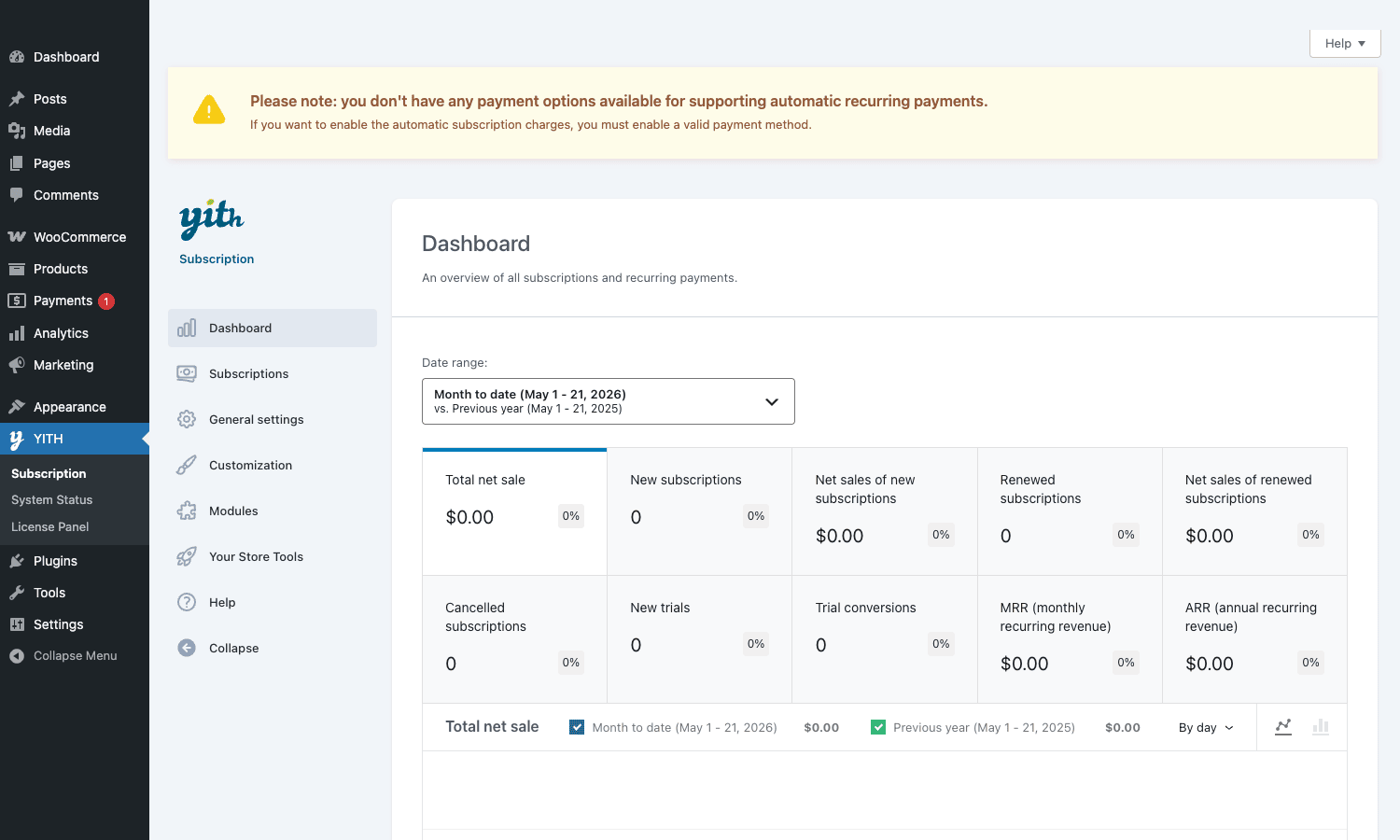
The headline reads "An overview of all subscriptions and recurring payments." A date-range selector at the top right defaults to "Month to date" and compares against the previous year for the same range. Then a grid of cards:
- Total net sale with a percentage delta
- New subscriptions count and delta
- Net sales of new subscriptions
- Renewed subscriptions count and delta
- Net sales of renewed subscriptions
- Cancelled subscriptions
- New trials
- Trial conversions
- MRR (monthly recurring revenue)
- ARR (annual recurring revenue)
Below the cards, a line chart for Total net sale with toggles for current period vs previous year and a "By day" granularity selector.
The numbers look like the real things you want on a Monday morning: how many people started a plan, how many renewed, how many bailed, what’s the run-rate. The dashboard refreshes against live data, so you can use it as the single source of truth rather than reaching for an external analytics tool. For most small stores, this dashboard is enough. For larger stores that need cohort retention, churn waterfalls, and plan-level revenue, you’ll still pipe events into a real BI tool, but at least the day-to-day questions answer themselves here.
General settings
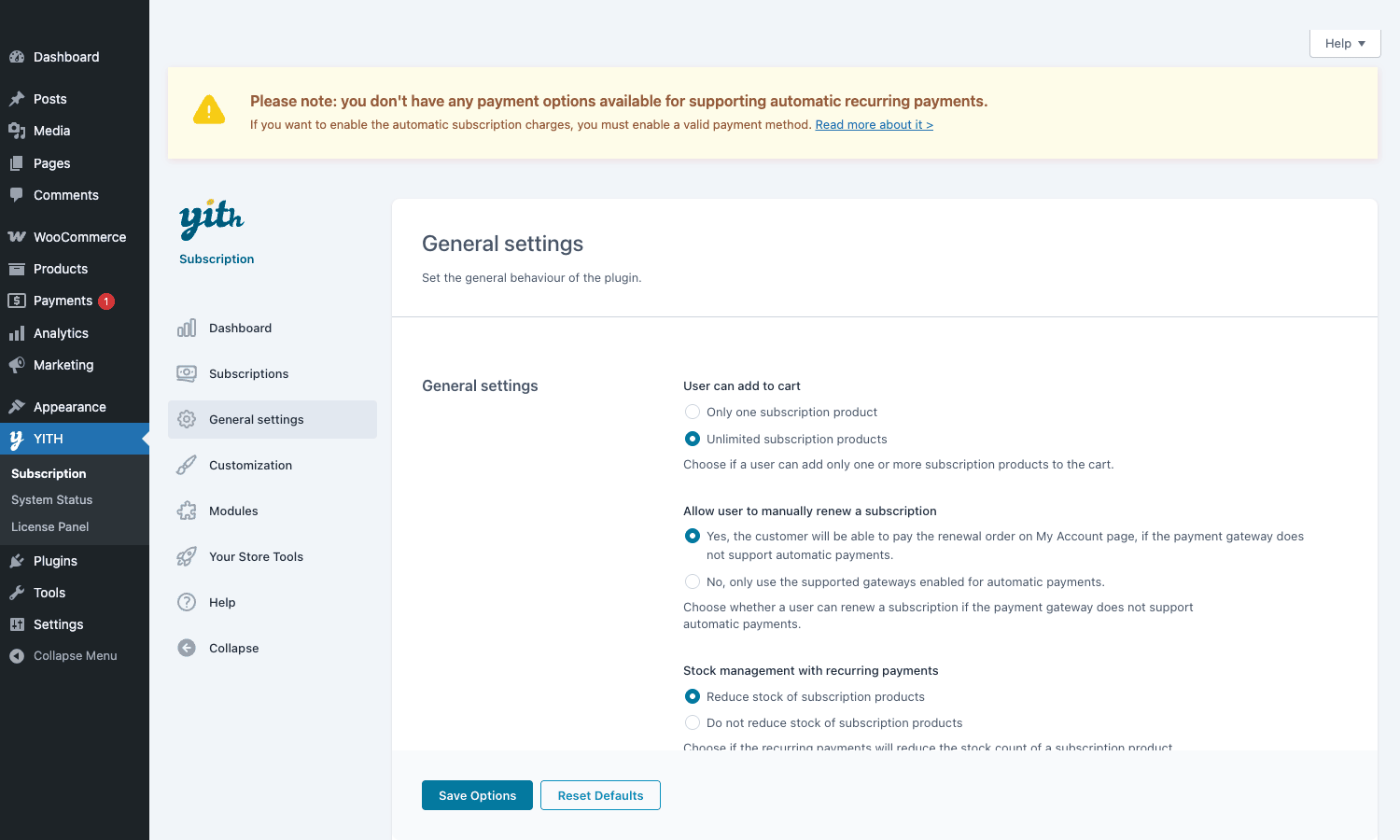
"Set the general behaviour of the plugin." Three settings actually move the needle:
-
User can add to cart. Either Only one subscription product (cart locks to a single recurring item, no mixing) or Unlimited subscription products (customer can stack multiple plans in one checkout). The single-product setting is the safer default. Many gateways struggle with multiple subscriptions in one order, especially around webhook ordering.
-
Allow user to manually renew a subscription. Yes, customer can pay renewal order on My Account if payment gateway doesn’t support automatic opens the door for PayPal Standard, bank transfer, COD, etc. No, only supported gateways hides the recurring product type from any checkout that can’t auto-charge. Pick yes if you don’t mind chasing renewals; pick no if you want clean recurring revenue only.
-
Stock management with recurring payments. Reduce stock of subscription products treats each renewal as a stock decrement, useful for physical subscription boxes where each renewal consumes inventory. Do not reduce stock is right for digital plans (memberships, software licenses) where there’s no real inventory.
Save Options at the bottom-left, Reset Defaults next to it. Compared with the WC Subscriptions settings page, which scatters its choices across multiple tabs and isn’t always self-explanatory, this is one short page that a non-developer admin can actually understand.
Modules
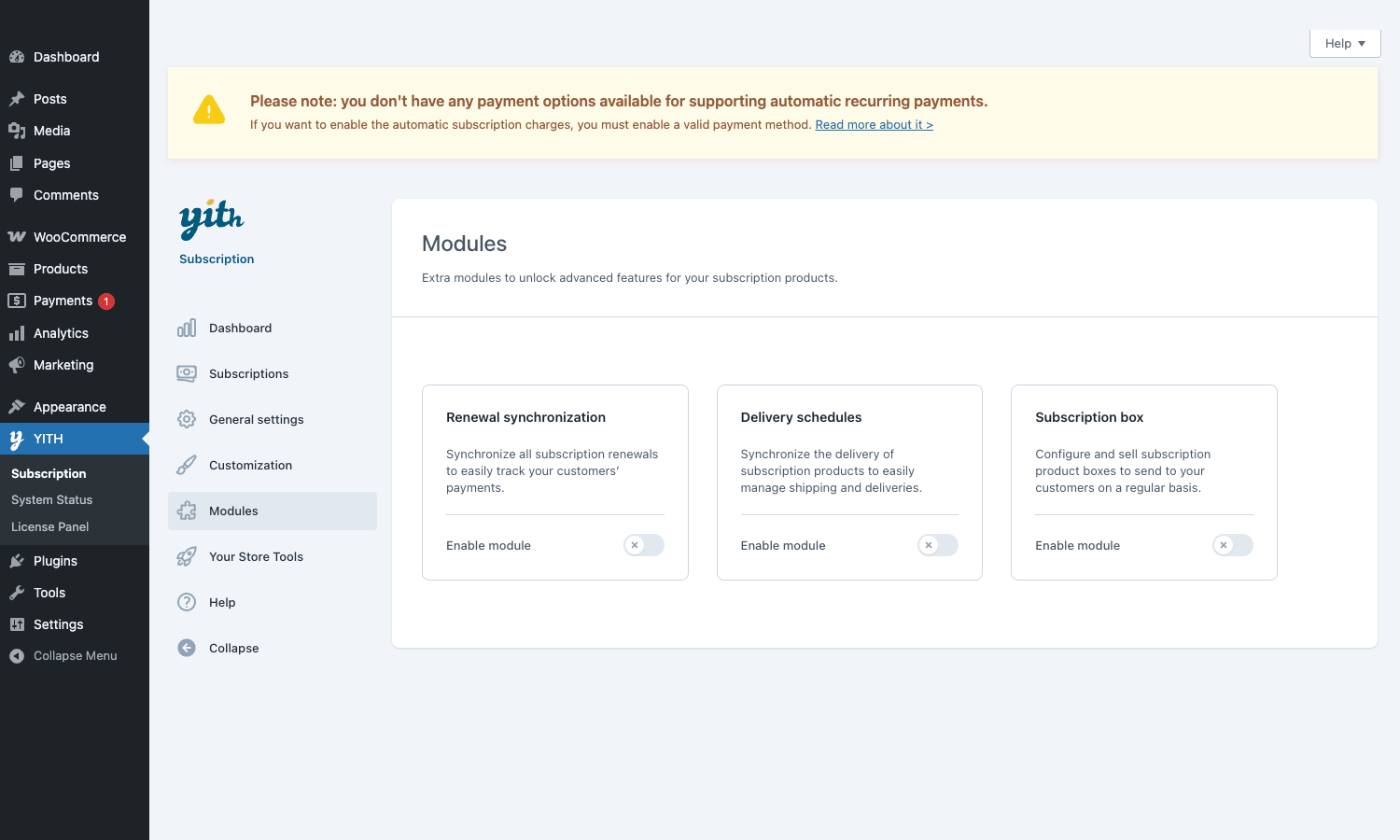
The Modules tab is where the bigger features live behind on/off toggles, so they don’t bloat the experience for stores that don’t need them. Three cards:
- Renewal synchronization. Move every customer’s renewal to a single day (e.g. the 1st of the month). Standard pattern for box subscriptions where you want all shipments to leave on the same date.
- Delivery schedules. Layer a delivery cadence on top of the billing cadence. A customer can be billed monthly but receive shipments every two weeks, or the reverse.
- Subscription box. Build a "box" parent product that contains a configurable set of child products, with rules for what ships at each renewal.
Each card has an Enable module switch that’s off by default. Flip the toggle, save, and the relevant settings appear under their own sub-page. This pattern, where the plugin doesn’t load code for features you’ve not opted into, is one of the reasons it sits relatively lightly in the admin compared with monolithic alternatives.
Setting up a recurring product step by step
Concrete walkthrough for a monthly coffee subscription, $24/month, one-week free trial, no sign-up fee.
-
Install the plugin and activate it. WooCommerce 10.6 or later is required. You’ll see the yellow gateway-warning banner on the YITH Subscription dashboard. Ignore it for the moment; we’ll come back to it.
-
Edit (or create) the product. Go to Products > Add New, name it ("Monthly Coffee Box"), pick a category and an image, and scroll to the Product data metabox.
-
Mark it as a subscription. Inside Product data there’s a new checkbox: Is a subscription. Tick it. A small set of subscription fields appears: Period, Interval, Length, Sign-up fee, Trial period, Trial period unit.
-
Set the schedule. Period:
Month. Interval:1(every 1 month). Length:0(renew indefinitely until cancelled). Sign-up fee: blank. Trial period:7. Trial period unit:Day. -
Set the price. In the General tab, regular price
$24. The plugin reads this as the recurring price. -
Publish. The product page now shows "$24.00 / month with a 7-day free trial" and the Add to Cart button reads "Sign up now".
-
Enable a recurring gateway. Install the WooCommerce Stripe plugin (or the YITH Stripe Connect add-on) and connect your account. Once an automatic-recurring gateway is active, the yellow banner on the YITH Subscription dashboard disappears.
-
Test the flow. Use a test card in Stripe test mode. Place an order. You’ll see a new entry under YITH > Subscription > Subscriptions with status
pending(trial), thenactiveafter the trial ends and the first real renewal succeeds. The customer sees the plan under My Account > My Subscriptions with buttons to suspend, cancel, or change the payment method. -
Configure failure handling. Under General settings, look at the retry schedule and the suspension threshold. Default behavior: retry every few days for three attempts, then suspend. Most stores keep the defaults.
-
Decide on renewal coupons. If you want to give renewing customers an incremental discount (say, ten percent off renewals after month six), create a coupon, mark it as renewal-only in the coupon edit screen, and apply it programmatically through the
ywsbs_apply_coupon_on_renewalfilter.
Total time end-to-end: about twenty minutes for a single-plan store, an hour or two if you also need to configure email branding, the customer-facing My Account text, and the analytics date defaults.
Payment gateways that actually do recurring
A subscriptions plugin is only as good as the gateways behind it. Here are the gateways YITH WooCommerce Subscription works with for fully automatic recurring charges:
- Stripe, via the official WooCommerce Stripe plugin, or via YITH’s own Stripe Connect add-on. This is the path of least resistance. Card vault, SCA/3DS2 handling, off-session renewals via Stripe’s Subscriptions API under the hood.
- PayPal, via the YITH PayPal Subscriptions Gateway add-on. This uses PayPal’s vault and subscription billing-agreement model. Express Checkout is supported; the older Pro flow is not.
- Authorize.Net, via the official AuthNet for WooCommerce gateway. Works through stored profiles for off-session renewals.
- Braintree, via the official Braintree gateway for WooCommerce. Card and PayPal-on-Braintree both support recurring.
- A handful of EU gateways through YITH-specific extensions (SEPA Direct Debit, Mollie, Sofort).
The honest part: if your gateway isn’t on this list, you’ll need to fall back to manual renewals (the customer gets an email, clicks a link, and pays the renewal order from My Account). Conversion drops by twenty to forty percent in my experience. If your default gateway is one of the offline methods (cash on delivery, bank transfer), there’s no automatic story; manual renewals are the only path.
A specific note on Stripe: the official WooCommerce Stripe plugin and the YITH Stripe add-on both work with YITH Subscription, but they handle the underlying Stripe object differently. Official WooCommerce Stripe creates a charge per renewal cycle, using a saved Source. YITH Stripe Connect can be configured to either mirror that pattern or use Stripe’s native Subscription objects directly. The native path gives you richer data inside the Stripe dashboard (subscription objects, invoices, prices) but it makes the WooCommerce subscription a thin proxy over a Stripe subscription, so cancellations and changes need to be replicated in both places. For most stores, the per-charge model is easier to reason about. Pick deliberately.
One real migration off the official WC Subscriptions plugin
A while ago I migrated a subscription-box business off the official WooCommerce Subscriptions plugin to YITH. The store had around 1,200 active monthly subscribers and was paying about $300/year for the seat plus the cost of the recurring-card gateway. The renewal volume was making the official plugin’s seat fee a measurable line item, and the merchant had moved their stack onto Stripe Subscriptions natively and just needed WooCommerce to keep the customer-facing record and the box-fulfillment workflow.
The migration took two days. We installed YITH WooCommerce Subscription on staging, mirrored the product schedules, wrote a one-off PHP script that walked the existing shop_subscription posts (the official plugin’s CPT) and created corresponding ywsbs_subscription records with the same start dates, next-payment dates, status, and Stripe customer/source IDs. Stripe itself didn’t change: the same customer objects, the same payment methods, the same subscription IDs. We just rewrote which WordPress plugin held the local record.
The cutover was a fifteen-minute window. We paused renewals on the official plugin, ran the migration script against production, switched the active subscriptions plugin, and let the next Stripe webhook fire to confirm the new plugin was receiving and acknowledging events. The only thing that broke was the renewal-email subject line, which still referenced the old plugin’s template and needed a one-line theme override. Nobody noticed on the customer side. The dashboard inside the merchant’s WP admin went from "vaguely useful" to "actually used at the start of every week" because of the MRR and ARR cards.
This isn’t an argument that YITH is better. It’s an argument that for some shapes of business, the simpler plugin is the right shape. If you need every advanced extension under the official plugin’s catalog (mixed checkout, sequential subscriptions, the official Stripe SCA integration’s deep features), stay on the official plugin. If you need recurring billing that’s competent and out of the way, YITH does the job.
Developer reference: hooks, CPT, database
The plugin namespace is YITH\Subscription for newer code and the legacy YITH_WC_Subscription_* global classes for older surfaces. The hook prefix is ywsbs_ for action and filter calls inside the subscription engine, and yith_wcsbs_ for admin-side panels.
Custom post type and tables
A subscription is stored as a custom post type, ywsbs_subscription, with the subscription’s metadata in post meta (_ywsbs_status, _ywsbs_user_id, _ywsbs_start_date, _ywsbs_payment_due_date, _ywsbs_product_id, _ywsbs_variation_id, _ywsbs_recurring_amount, etc.). A custom table, wp_yith_wcsbs_subscriptions, mirrors a normalized subset of the metadata for fast querying on the dashboard. There are additional log tables for renewal events and payment retries.
The CPT model means you can query and manipulate subscriptions with standard WordPress APIs:
$subs = get_posts( array(
 'post_type' => 'ywsbs_subscription',
 'meta_query' => array(
 array( 'key' => '_ywsbs_user_id', 'value' => 42 ),
 array( 'key' => '_ywsbs_status', 'value' => 'active' ),
 ),
 'numberposts' => -1,
) );
For most operations you’ll want to use the helper class instead:
$subscription = ywsbs_get_subscription( $subscription_id );
$status = $subscription->get_status();
$next_renewal = $subscription->get_payment_due_date();
$customer_id = $subscription->get_user_id();
Lifecycle hooks
The plugin fires actions at every state transition. These are the ones I reach for most often:
// Fires whenever a subscription's status changes.
do_action( 'ywsbs_subscription_status_changed', $subscription_id, $new_status, $old_status );

// Fires when a brand-new subscription is created (before the first charge).
do_action( 'ywsbs_before_create_subscription', $subscription_args, $order_id );

// Fires when a subscription becomes active (first charge succeeded or trial ended).
do_action( 'ywsbs_active_subscription', $subscription_id );

// Fires after a successful renewal payment.
do_action( 'ywsbs_subscription_renewed', $subscription_id, $renewal_order_id );

// Fires when the customer pauses the subscription from My Account.
do_action( 'ywsbs_subscription_paused', $subscription_id );

// Fires when a subscription is cancelled (by customer, by admin, or by exhausted retries).
do_action( 'ywsbs_subscription_cancelled', $subscription_id );

// Fires when a renewal charge fails.
do_action( 'ywsbs_payment_failed', $subscription_id, $renewal_order_id, $reason );
Practical example: push every renewal into your CRM with the customer’s lifetime value attached.
add_action( 'ywsbs_subscription_renewed', 'mystore_push_renewal_to_crm', 10, 2 );

function mystore_push_renewal_to_crm( $subscription_id, $renewal_order_id ) {
 $subscription = ywsbs_get_subscription( $subscription_id );
 $customer_id = $subscription->get_user_id();
 $order = wc_get_order( $renewal_order_id );

 if ( ! $order ) {
 return;
 }

 $payload = array(
 'subscription_id' => $subscription_id,
 'order_id' => $renewal_order_id,
 'amount' => $order->get_total(),
 'currency' => $order->get_currency(),
 'customer_email' => $order->get_billing_email(),
 'lifetime_value' => wc_get_customer_total_spent( $customer_id ),
 );

 wp_remote_post( 'https://crm.example.com/webhook/woo-renewal', array(
 'body' => wp_json_encode( $payload ),
 'headers' => array( 'Content-Type' => 'application/json' ),
 'timeout' => 5,
 ) );
}
Win-back on cancellation
Trigger a Mailchimp/Klaviyo automation when a subscription is cancelled so the customer goes into a "we’d love you back" sequence:
add_action( 'ywsbs_subscription_cancelled', function ( $subscription_id ) {
 $sub = ywsbs_get_subscription( $subscription_id );
 $user = get_userdata( $sub->get_user_id() );

 if ( ! $user ) {
 return;
 }

 do_action( 'mystore_winback_sequence_start', $user->user_email, array(
 'product_id' => $sub->get_product_id(),
 'cancelled_on' => current_time( 'mysql' ),
 ) );
} );
Suspend after a hard refund
Suspend the linked subscription whenever a renewal order is refunded:
add_action( 'woocommerce_order_status_refunded', function ( $order_id ) {
 $sub_id = get_post_meta( $order_id, '_subscription_id', true );
 if ( ! $sub_id ) {
 return;
 }
 $sub = ywsbs_get_subscription( $sub_id );
 if ( $sub ) {
 $sub->update_status( 'suspended' );
 }
} );
Filter: change the renewal retry schedule
By default the plugin retries failed payments on a fixed schedule. Override it for premium plans:
add_filter( 'ywsbs_payment_retry_intervals', function ( $intervals, $subscription_id ) {
 $sub = ywsbs_get_subscription( $subscription_id );
 $product_id = $sub->get_product_id();

 if ( has_term( 'premium', 'product_cat', $product_id ) ) {
 // Be more patient with premium customers.
 return array( DAY_IN_SECONDS, 3 * DAY_IN_SECONDS, 7 * DAY_IN_SECONDS );
 }

 return $intervals;
}, 10, 2 );
REST API
The plugin extends the standard WooCommerce REST API namespace with subscription endpoints:
GET /wp-json/wc/v3/subscriptionsto list subscriptionsGET /wp-json/wc/v3/subscriptions/<id>for a single subscriptionPOST /wp-json/wc/v3/subscriptions/<id>/pause,/resume,/cancelfor state transitions
Authentication uses standard WooCommerce consumer key/secret pairs. Useful for syncing into an external dashboard or running a daily reconciliation script against your accounting tool.
Multilingual
The renewal emails, cancellation emails, and the My Subscriptions UI all run through __() and _x() calls under the yith-woocommerce-subscription text domain. WPML and Polylang both pick up the right language per customer based on the order’s locale at sign-up time. If you’re using string translation, the strings live under "yith-woocommerce-subscription" in WPML’s String Translation panel.
Performance, gotchas, and the honest limits
What works well, with caveats.
The renewal scheduler runs on WP-Cron. That’s fine for a few hundred subscriptions. Once you cross a few thousand renewals per day, swap WP-Cron out for a real system cron hitting wp-cron.php every five minutes, or use Action Scheduler properly. The plugin already uses Action Scheduler for the heavy renewal jobs, but the wake-up call still depends on traffic-driven cron.
Cart caching can break the recurring price preview. If you’re running aggressive page caching on the product page (which you should), make sure your cache rules exclude the cart and checkout, and that fragment caching doesn’t cache the subscription price string. I’ve debugged a "$24/month displayed but $0/month charged" issue twice; both times it was caching, not the plugin.
Stripe SCA is good, not perfect. The official WC Subscriptions plugin has had more iterations on the Strong Customer Authentication flow than YITH has. EU stores still see slightly higher 3DS2 friction on YITH renewals. The difference is small, and it’s improving.
Subscription-aware extensions are thinner. The official plugin has its own catalog of subscription-specific extensions (Gifting, Sequential, Coupons, etc.). YITH has the equivalents for the common cases (renewal coupons, switch, proration) but the long tail is sparser. If you have an unusual requirement, check before you buy.
Documentation is leaner. The official plugin’s developer docs are exhaustive. YITH’s are good enough for the common hooks but you’ll spend more time reading the plugin’s source for edge cases. The code is well structured, so this isn’t painful, just an extra step.
Multi-currency. YITH integrates with its own Multi Currency Switcher and with WPML’s WCML, but the renewal currency is locked at sign-up time. A customer who paid in EUR on day one renews in EUR forever, even if they switch their store-front currency later. The official WC Subscriptions plugin has the same constraint, so this is a wash.
Variable subscriptions are functional but quirky. If you sell a plan with size or tier variations (Small Box / Medium Box / Large Box), each variation carries its own subscription schedule. Switching the customer from Small to Large mid-cycle works through the switch flow, but the proration math doesn’t always round to the cent on heavily discounted variations. Spot-check the first few switch orders manually before you trust it for higher volumes.
Refund handling at the gateway level is sometimes a one-way mirror. If you issue a refund inside Stripe’s dashboard directly, the WooCommerce order picks it up via webhook, but the linked YITH subscription doesn’t auto-suspend. You either issue refunds from inside WooCommerce (which keeps state in sync) or wire up the woocommerce_order_status_refunded hook from the code earlier in this post.
Performance footprint. On a baseline WooCommerce 10.6 install, enabling YITH Subscription adds about 4-6 ms to the median front-end request and around 25 ms to admin pages that touch subscription queries. Negligible for almost every store. If you’re chasing every millisecond, a dedicated tool like WP Rocket plus a sensible object cache will absorb that overhead and then some.
Pricing and licensing
YITH WooCommerce Subscription Premium is sold from yithemes.com on annual licenses tied to a site cap:
- Single Site at around €89.99/year
- Up to 6 Sites at around €159.99/year
- Up to 30 Sites at around €239.99/year
Compare that with the official WooCommerce Subscriptions plugin at $239/year for a single site, and the math gets pretty stark for smaller stores. For an agency running ten client subscription sites, you’re looking at a ratio of roughly one to four in YITH’s favor. For a single launching store, the difference pays for a year of hosting.
This site, GPL Times, sells YITH WooCommerce Subscription Premium under the GPL terms the plugin is already published under: full code, latest build, no telemetry, unlimited domains. The trade-off is that you don’t get direct YITH support; you get the community plus whatever your own developer team can handle. For shops with a developer on call, that’s a reasonable swap. For shops that need first-party human support on a recurring-revenue product (and there’s nothing wrong with wanting that), buy the official YITH license.
Closing thoughts
The official WC Subscriptions plugin is the default for a reason. It’s been around the longest, it has the deepest gateway support, and Automattic has had years to polish the Stripe and PayPal flows. If money isn’t the constraint, and you want the safest possible recurring-billing foundation, that’s still the right pick.
YITH WooCommerce Subscription is the pragmatic alternative. It’s cheaper, the admin is cleaner for non-developer store managers, the MRR/ARR dashboard is genuinely better than the equivalent on the official plugin, and the YITH ecosystem advantage is real if you’re already running YITH Wishlist, WooCommerce Memberships, or WooCommerce Dynamic Pricing alongside it. The hook surface is wide enough for any custom integration I’ve needed to build, the modules pattern keeps the admin focused, and the migration off the official plugin is a weekend project, not a quarter.
For most small-to-mid stores selling memberships, subscription boxes, or SaaS-style plans on WooCommerce, this is the plugin I’d start with. The official plugin is the one I’d graduate to when you’ve outgrown the YITH-specific limitations and the seat fee no longer matters. Plenty of stores never reach that point.