

A wholesale buyer logs in, the catalog still shows retail. That single moment, where a logged-in user sees the wrong number on a product page, is the reason WooCommerce Dynamic Pricing exists. Not bulk discounts, not BOGO, not Black Friday banners. The boring underlying job is "show this person the price they should actually pay, automatically, everywhere on the site."
WooCommerce Dynamic Pricing is the official Automattic-owned pricing-rule engine for WooCommerce. It started life as a plugin by Lucas Stark, got acquired in 2017, and has been on the WooCommerce.com marketplace ever since. It sits one layer above core WooCommerce pricing and decides, on each request, whether the price displayed on a product page, in a category grid, in the mini cart, in the order email, in the REST API, should be modified.
Table of contents
- What it actually is
- The four tabs that matter
- Per-product pricing rules
- Role-based pricing is the killer feature
- Category pricing and cumulative behaviour
- Order totals and cart-level adjustments
- Installation and first rule
- A worked scenario: a custom-cabinet wholesale shop
- Developer reference: hooks and filters
- How it compares with the alternatives
- Compatibility, gotchas, and where the UI shows its age
- Pricing and licensing
- Final thoughts
What it actually is
A pricing-rule engine. Core WooCommerce has a single regular price and a single sale price per product (or per variation). That is fine for a shop selling t-shirts to one type of buyer. The moment you have:
- A retail customer who pays full price.
- A wholesale customer who pays 30 percent less across the entire catalog.
- A bulk buyer who gets a discount only when they buy 10 or more units of a specific SKU.
- A category-wide promotion ("everything in Accessories, 15 percent off, this weekend only").
- A cart-level rule ("spend over 300 dollars, get free 10 percent off the total").
You need conditional logic on top of the base price. WooCommerce Dynamic Pricing is that logic. It registers rule sets, evaluates them at the right moment (product page render, cart render, checkout calculation), and emits an adjusted price. The native WooCommerce price strikethrough handling is reused, so the marked-down price displays the same way a hand-edited sale price would. You can flip a wc_dynamic_pricing_flag_is_on_sale filter if you want the on-sale badge to appear (or not appear) on dynamically priced items.
A small lived-in note before the tour. I keep forgetting which tab the cumulative-membership-rules setting lives under, because the plugin scattered "things that affect category rules" across three different surfaces (the Category tab description, a per-category meta box on the taxonomy edit screen, and a filter in code). If you have not used it in a year, expect to relearn the geography. The functionality is there, the wayfinding is not.
The four tabs that matter
Open WooCommerce > Dynamic Pricing in the admin and you land on a tabbed screen with four tabs at the top: Order totals, Roles, Category, Brands. Everything global is there. The per-product editor lives separately, inside each product’s edit screen, which we cover further down.
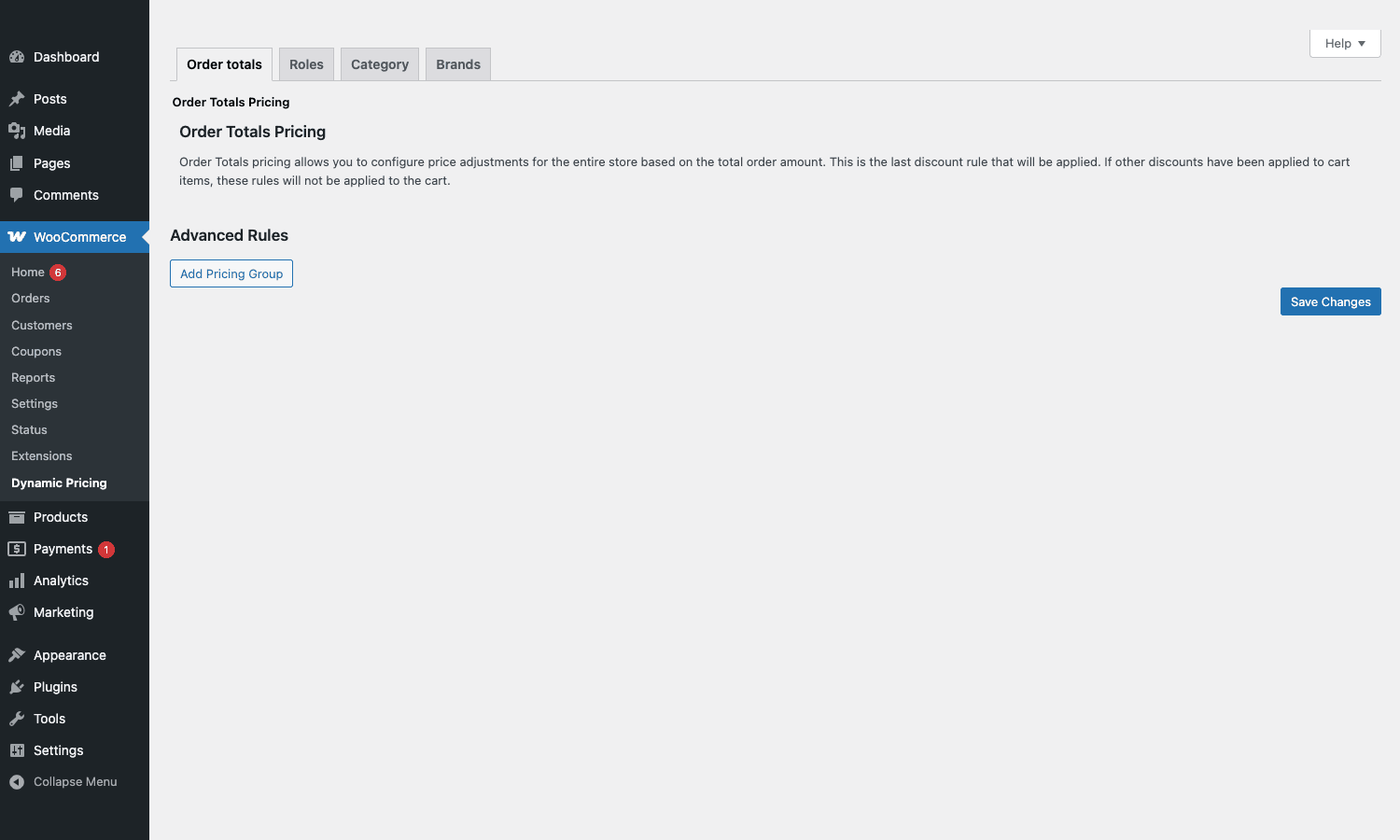
The Order totals tab is the catch-all for cart-amount discounts. Order Totals pricing, the description says, "allows you to configure price adjustments for the entire store based on the total order amount. This is the last discount rule that will be applied." That ordering detail matters: order-totals rules run after per-product, role, and category rules, on the already-adjusted subtotal. It is also explicit about not double-stacking: "if other discounts have been applied to cart items, these rules will not be applied to the cart." So if your store always runs role-based discounts and per-product bulk tiers, your order-total threshold rule will quietly do nothing. Worth knowing before you write a rule that never fires.
Under the description is an Advanced Rules block with one button, Add Pricing Group. Each group is a set of conditions ("cart total greater than 200") plus a result ("apply 5 percent off"). The advanced builder supports multiple conditions per group, which is enough for most "stacked promotion" use cases without dropping to code.
Per-product pricing rules
The per-product editor is where the workhorse quantity-break tiers live. Edit a product, scroll to the Product data meta box, and you will see a new tab, Dynamic Pricing, alongside General, Inventory, Shipping, Linked Products, Attributes, Advanced, and so on. Inside that tab the plugin renders an adjustment-set UI: each set has a name, a set of variations or "all variations" target, an adjustment type, and a rule table.
The four rule types you will run into in practice:
- Simple: one quantity threshold, one adjustment. "Buy more than 5, get 10 percent off."
- Bulk: tiered table. "1-5 at the regular price, 6-10 at $9 each, 11+ at $8 each." This is the most common configuration in B2B catalogs.
- Special offer: BOGO-style. Buy a quantity of X, get Y free or discounted.
- Advanced: lets you combine multiple conditions and stack adjustments. Use when the other three are not enough.
The adjustment types themselves are independent of the rule type. You can express a discount as a percentage off, a fixed amount off, or as a fixed price replacement. Fixed price replacement is the one teams forget about and then remember at 11pm during a sale: "actually we want the SKU to cost exactly $19 when bought in packs of 12, not 19.95 with a discount stack." That is a fixed-price rule, one minute to set up, none of the floating-point rounding that percentages can produce in reports.
If your product is a variable product, the adjustment-set targeting lets you pick which variations the rule applies to. Variation-level granularity is one of the underrated parts of the plugin: in core WooCommerce, a sale price on a variable product is per-variation manual edits, and there is no concept of a tier across variations. Here you can say "any variation of this product, buy 10 or more, 15 percent off" and the cart will respect the rule no matter which variation the customer drops in.
Role-based pricing is the killer feature
If I had to argue for buying this plugin in one paragraph, it would be the Roles tab.
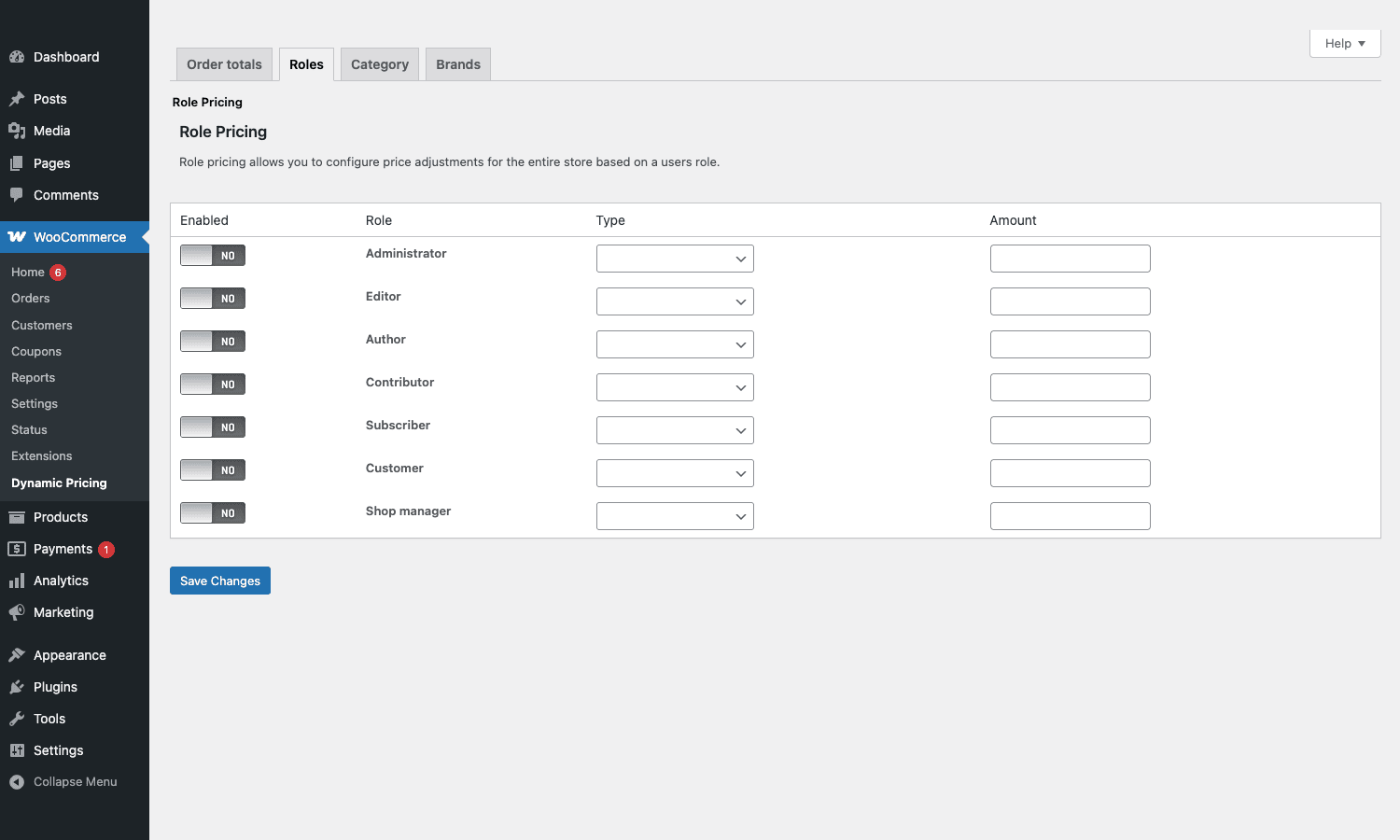
Role Pricing, the page reads, "allows you to configure price adjustments for the entire store based on a user’s role." That is the entire UI. A table with one row per WordPress role, an Enabled toggle, a Type (percentage off, percentage replacement, fixed amount off, fixed price), and an Amount field. The seven default rows are Administrator, Editor, Author, Contributor, Subscriber, Customer, Shop manager. Any custom roles you have registered (via a membership plugin, a wholesale plugin, or a custom snippet) will also appear automatically.
Why is this the killer feature? Because the typical alternative is a separate "wholesale price" custom field per product, applied conditionally via a snippet that hooks into woocommerce_product_get_price. That works until you have 4,000 SKUs and a marketing team that wants to add a new tier. With the Roles tab, a 25 percent across-the-board wholesale discount is one row in one table, applied to every product, every variation, every category, every brand, retroactively and for everything you add in the future. The catalog feed picks it up. Search picks it up. The mini cart picks it up. No per-product configuration needed.
On a wholesale site I helped move from a homegrown discount plugin, the Roles tab took ten minutes to replicate two months of custom code, and the only manual work was registering one extra role (wholesale_tier_2) via a tiny snippet so we had two wholesale brackets instead of one. The plugin picked up the new role automatically and exposed a fresh row in the table. The next morning the dev who maintained the homegrown plugin asked if we still needed his snippet on the staging server. We did not.
There is a related setting most teams miss: a per-product checkbox that suppresses role-based discounts for a specific SKU. Useful when one SKU is already at margin and you do not want the 25 percent wholesale discount to bite into it. Look for it inside the per-product Dynamic Pricing tab.
Category pricing and cumulative behaviour
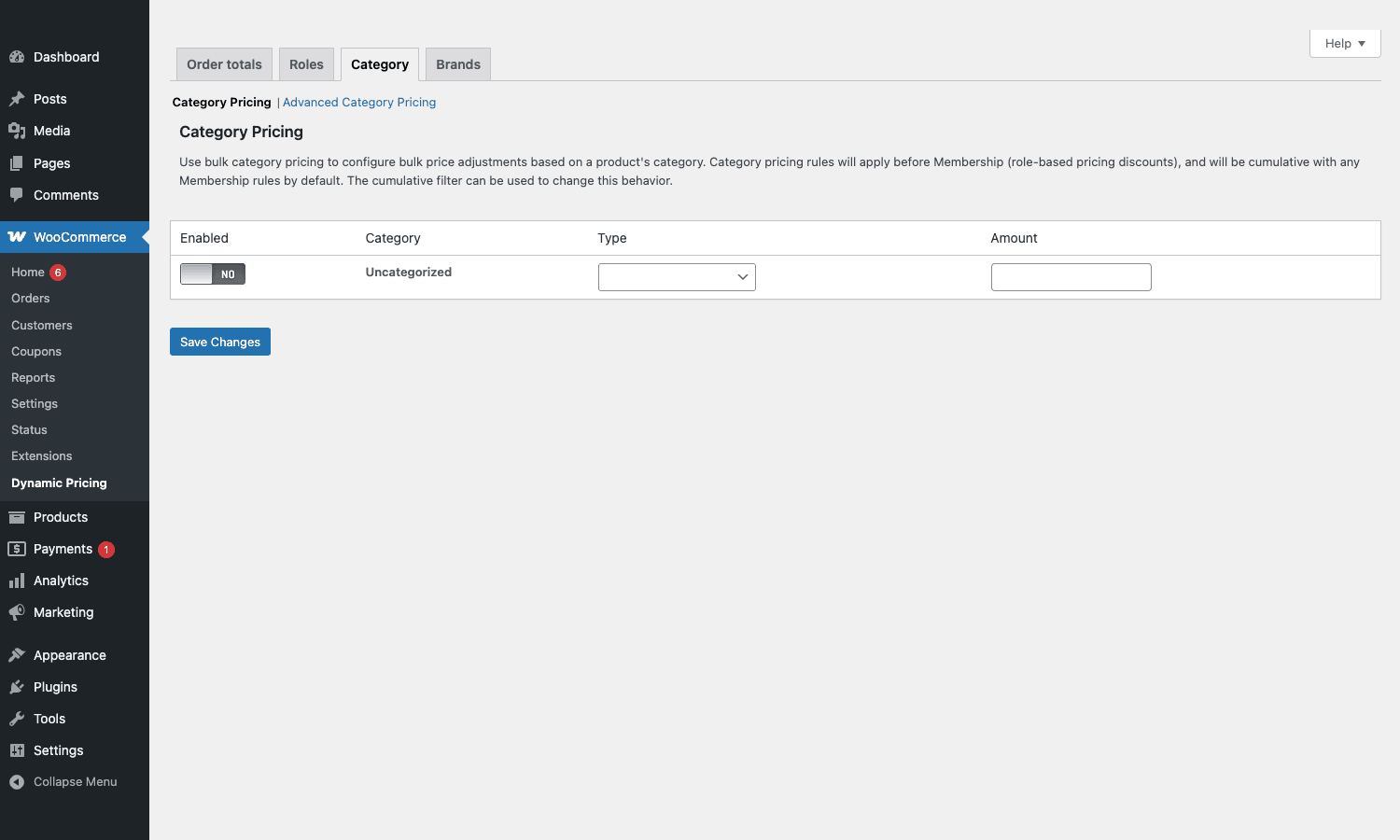
The Category tab is, on its surface, a row per product category. Toggle Enabled, pick Type, set Amount, Save Changes. Done. The description copy at the top is the more important part of this tab: "Use bulk category pricing to configure bulk price adjustments based on a product’s category. Category pricing rules will apply before Membership (role-based pricing discounts), and will be cumulative with any Membership rules by default. The cumulative filter can be used to change this behavior."
Two things to unpack.
One, ordering. Category rules run before role rules. So if you have a 10 percent category sale and a 20 percent wholesale role discount, the customer sees the category rule applied first, then the wholesale discount stacked on the already-discounted price. That is generally what you want for promotional periods. A B2B store running a category sale wants their wholesale buyers to get the wholesale price on the already-discounted item, not the bigger of the two.
Two, cumulative behaviour. The default is cumulative (the two rules stack multiplicatively). The wc_dynamic_pricing_apply_membership_discounts_first filter lets you reverse the ordering, and you can write a small filter on wc_dynamic_pricing_get_cart_item_pricing_rule_sets to disable cumulation entirely for specific products. If you have a category that is intentionally low-margin (clearance, loss-leader), this is how you stop a wholesale customer from compounding the existing markdown into a negative-margin sale.
The link next to "Category Pricing" reads Advanced Category Pricing, and it opens a second editor for category-level rules that themselves have multiple conditions and quantity tiers. Use it when a flat "15 percent off everything in Accessories" is not granular enough.
The Brands tab works the same way, against the WooCommerce Brands taxonomy. If your store uses brands as a taxonomy (which is built in to WooCommerce now, no separate plugin needed), per-brand discounts behave identically to per-category ones.
Order totals and cart-level adjustments
Back on the first tab, Order totals, the rule scope is the entire cart. "Spend over X, get Y off the total" is the canonical example. The Advanced Rules block holds multiple groups, each with its own threshold and adjustment.
The non-stackable nature of this tab is the gotcha I called out earlier. If the cart already has any item that received a per-product, role, or category adjustment, order-total rules are skipped. That is a deliberate design choice, but it bites people who do not read the description carefully. A workaround, if you want order-totals rules to fire alongside item-level discounts, is to hook wc_dynamic_pricing_check_coupons (or write a small filter on the cart subtotal calc) and re-introduce the order-level discount via a fee instead of a price adjustment. It is the kind of thing you only do once you have lived with the default behaviour and decided it is wrong for your store.
Installation and first rule
Setup is a regular WooCommerce extension install. Upload the plugin zip from Plugins > Add New > Upload Plugin, activate, and the WooCommerce > Dynamic Pricing menu item appears. No licence-key dance is required for the GPL-licensed version, and no onboarding wizard runs. The plugin is happy with default WooCommerce settings, no extra database tables, no scheduled cron jobs.
A reasonable first rule, to confirm the install actually works:
- Go to WooCommerce > Dynamic Pricing > Roles.
- Toggle the Customer row to Enabled.
- Set Type to Percentage Discount.
- Set Amount to
5. - Save Changes.
Now log out, log back in as any customer-role user (a normal account, not the admin), and load any product page on the front end. Every product should show a 5 percent discount and the price strikethrough. If it does, the install is working. Turn the rule off before you forget it is there and accidentally undersell your catalog.
For a per-product bulk rule, edit any product, open the Dynamic Pricing tab in the Product data meta box, click New Pricing Set, set the rule type to Bulk and the adjustment type to Percentage Discount, then add tier rows: 1-5 at 0 percent, 6-10 at 10 percent, 11+ at 15 percent. Save the product. The price on the front end now shows a pricing table, and adding 6 or more to the cart drops the price 10 percent per unit.
A worked scenario: a custom-cabinet wholesale shop
Pricing-rule plugins are easier to think about with a specific shop in mind. Imagine a store selling kitchen cabinet doors. They sell to retail homeowners (small orders, one or two doors at a time), to interior designers (mid-size orders, 10 to 30 doors, account-based pricing), and to construction contractors (bulk orders, hundreds of doors, custom invoicing). Three customer types, three pricing realities.
The plain-WooCommerce approach is to publish retail prices, give designers and contractors private coupon codes, and pray that nobody shares the codes. It works for a while, then someone forwards a 35 percent contractor coupon to a forum and the margin on a $40,000 quarter evaporates.
The WooCommerce Dynamic Pricing setup, for the same store, is something like:
- Two new WordPress roles,
designerandcontractor, registered via a small snippet oninit. - The Roles tab gives
designera 20 percent flat discount andcontractora 35 percent flat discount, both as percentage adjustments. - The Category tab gives the "Cabinet Doors" category a tiered category rule: 50+ doors gets 5 percent extra off, 100+ gets 8 percent, 250+ gets 12 percent. This compounds with the role discount, so a contractor buying 300 doors pays the contractor wholesale price further reduced by 12 percent.
- Per-product Bulk rules on a few high-margin SKUs only, where the bulk tier is more aggressive than the category default would allow.
- The Order totals rule is left empty because the per-product and category rules are already firing on every cart, and order-totals rules would not stack anyway.
When a contractor logs in and views the catalog, they see contractor prices. When they add 300 doors to the cart, the category tier kicks in. When they place the order, the email receipt shows the discounted line items and the original prices crossed out. The store owner never has to share a coupon code, never has to maintain a separate Excel sheet of contractor prices, never has to manually edit the SKUs when costs change.
The same plumbing supports a small bookstore selling textbooks to libraries and individuals. Same shape: two roles, one category rule, no coupons. The store owner does not need to think about the rules every day; they fire automatically.
Developer reference: hooks and filters
The plugin exposes a thicket of filters and actions, which is good news if your shop needs a behaviour that the UI does not expose. The names follow the wc_dynamic_pricing_* convention.
A few you will reach for in practice.
Override which adjustment sets apply to a product. Useful for skipping certain SKUs from a global rule, or for custom multi-condition logic that the UI does not cover.
add_filter( 'wc_dynamic_pricing_get_adjustment_sets_for_product', function ( $sets, $product ) {
 // Exclude the gift card SKU from all dynamic pricing rules.
 if ( 'gift-card' === $product->get_sku() ) {
 return array();
 }

 return $sets;
}, 10, 2 );
Control the on-sale flag. By default, dynamically priced products get the WooCommerce on-sale badge. Some shops want the wholesale discount to be invisible (no "Sale!" sticker), which would otherwise tell retail customers something is going on.
add_filter( 'wc_dynamic_pricing_flag_is_on_sale', function ( $is_on_sale, $product ) {
 // Hide the on-sale badge if the discount came purely from role-based pricing.
 if ( is_user_logged_in() && in_array( 'wholesale', wp_get_current_user()->roles, true ) ) {
 return false;
 }

 return $is_on_sale;
}, 10, 2 );
Control whether dynamic prices replace the sale price or the regular price. WooCommerce internally tracks both. If you want the strikethrough to display the regular price (rather than treating the dynamic price as a sale price), this is the lever.
add_filter( 'wc_dynamic_pricing_get_use_sale_price', '__return_false' );
Re-order role rules vs membership rules. The default is category-then-role-then-membership. If you have WooCommerce Memberships installed and want membership pricing to win when both apply, flip this.
add_filter( 'wc_dynamic_pricing_apply_membership_discounts_first', '__return_true' );
Disable coupon stacking on dynamically priced items. When a customer applies a coupon on top of an already-discounted item, the result can be deeper than you want. This filter lets you reject the coupon for items that already have a dynamic price.
add_filter( 'wc_dynamic_pricing_check_coupons', function ( $check, $cart_item, $coupon ) {
 if ( isset( $cart_item['discounts']['applied_discounts'] ) ) {
 return false;
 }

 return $check;
}, 10, 3 );
Hook into the cart-item adjustment moment. Fires after the plugin has decided what to apply, before the cart-item price is mutated. Logging, analytics, or last-mile overrides go here.
add_action( 'wc_dynamic_pricing_apply_cart_item_adjustment', function ( $cart_item_key, $original_price, $new_price, $rule ) {
 error_log( sprintf(
 'WCDP applied rule %s to %s: %s -> %s',
 $rule['name']?? 'unknown',
 $cart_item_key,
 $original_price,
 $new_price
 ) );
}, 10, 4 );
Customise the list of taxonomies that get advanced rule editors. By default the plugin enables product category and brand. If you have a custom taxonomy (say vendor) and you want vendor-level discounts, add it here.
add_filter( 'wc_dynamic_pricing_get_discount_taxonomies', function ( $taxonomies ) {
 $taxonomies[] = 'vendor';

 return $taxonomies;
} );
The full filter list, useful as a grep reference when you are deep in code:
wc_dynamic_pricing_apply_cart_item_adjustmentwc_dynamic_pricing_apply_membership_discounts_firstwc_dynamic_pricing_check_couponswc_dynamic_pricing_counter_updatedwc_dynamic_pricing_flag_is_on_salewc_dynamic_pricing_get_adjustment_set_targetswc_dynamic_pricing_get_adjustment_sets_for_productwc_dynamic_pricing_get_cart_item_pricing_rule_setswc_dynamic_pricing_get_collector_objectwc_dynamic_pricing_get_discount_taxonomieswc_dynamic_pricing_get_product_pricing_rule_setswc_dynamic_pricing_get_use_sale_pricewc_dynamic_pricing_get_valid_adjustment_sets_for_cart_itemwc_dynamic_pricing_legacy_adjust_on_session_loadedwc_dynamic_pricing_load_moduleswc_dynamic_pricing_per_product_match_by_parent
If you need to read the live state of pricing for the current request, the collector object (the one the plugin uses internally to walk the rule sets and apply adjustments) is filterable via wc_dynamic_pricing_get_collector_object. Most projects will not need it; mention it because it is the deepest extension point.
How it compares with the alternatives
WooCommerce Dynamic Pricing is not the only pricing-rule plugin in the WordPress universe. The honest list of alternatives, with what they do better and worse:
YITH WooCommerce Dynamic Pricing and Discounts. Has a more modern visual rule editor. The condition builder feels closer to a no-code automation tool than to a settings table. If your team includes a non-technical marketer who will own pricing rules day-to-day, YITH’s UI is friendlier. The trade-off is that YITH’s hook surface is smaller and the integration with WooCommerce Memberships is not as deep, because Memberships is also a WooCommerce.com product and the two play together natively. We sell YITH’s build, the YITH WooCommerce Dynamic Pricing and Discounts, if you want to compare the UIs side by side on staging.
Discount Rules for WooCommerce by Flycart. Has a free version on WordPress.org, which lowers the cost of evaluation to zero. The rule builder is in the middle (less stark than the official plugin, less flashy than YITH). The pro version unlocks BOGO, role-based pricing, and category rules. If your shop is small and you do not need official WooCommerce support, this is the most pragmatic starting point.
WooCommerce Smart Coupons. Different problem entirely. Smart Coupons is for gift cards, store credit, bulk coupon generation, send-a-coupon flows. There is no condition-based pricing engine; the discount mechanism is always a coupon code. If your "pricing flexibility" need is "generate 500 single-use codes for a launch and email them to a list", Smart Coupons is what you want, not Dynamic Pricing. They are complementary, not competitive. We carry WooCommerce Smart Coupons in the store as well.
Native WooCommerce sale prices. Free. Built in. Good enough if you have one set of customers and one sale a month. Stops being good enough the moment you have two customer types, or a tiered rebate, or any rule that touches more than one product simultaneously.
The case for picking the official Dynamic Pricing plugin specifically is threefold. One, it is maintained by Automattic, the same company that maintains WooCommerce core, which means breaking changes in core do not catch this plugin by surprise. Two, its integration with WooCommerce Memberships and WooCommerce Subscriptions is first-party: member-only prices, subscription-renewal pricing, and the rest work without a glue plugin. Three, the role-based pricing tab is, in my experience, the cleanest implementation of role-based pricing in the WordPress ecosystem. None of the alternatives ship that out of the box without some setup.
That last point is also the reason I would not recommend it for a shop that does not need role-based pricing. If your only need is "buy 3 get one free" promotional pricing, Discount Rules for WooCommerce or YITH will do the job and probably feel less rough around the edges.
Compatibility, gotchas, and where the UI shows its age
The plugin has been around a long time. That is largely a good thing (battle-tested, every WooCommerce update has been ironed out against it), but parts of the admin look like they were drawn in 2014 and have not been redesigned since. The Roles tab, the Category tab, and the Order totals tab are clean enough to make sense of, but the per-product adjustment-set editor inside the product page can get cramped if you have more than two rule sets on a single product, and the styling does not match the modern Gutenberg-aware design language that newer WooCommerce extensions use.
A few specific gotchas I have hit on real stores:
Order-totals rules silently skip when item-level rules already fired. Mentioned above. Read the Order totals description carefully or write a fee-based workaround.
Cumulative defaults can produce surprising deep discounts. Category times role can compound to numbers that look fine on paper but evaporate margin in practice. Always run a few test carts as a wholesale user with the highest-discount category, and confirm the final price is what you actually want.
Tax display. Dynamic prices interact with the WooCommerce tax-inclusive/tax-exclusive display setting. If your shop displays inclusive prices, the dynamic price shown on the product page is inclusive of tax, and the rule percentage applies to the pre-tax price internally. Edge cases in countries with multi-rate tax can produce off-by-a-cent rounding. Run the WooCommerce status report and a few real-world checkouts before going live.
Caching. Page caching plugins (the usual suspects) will happily cache a logged-out version of a product page and serve it to a logged-in wholesale customer who would otherwise see a different price. The fix is to either tell the cache plugin to bypass cache for logged-in users, or to render the price section via an AJAX call. WooCommerce Dynamic Pricing does not solve this for you; it is a generic WooCommerce + page-cache compatibility problem.
The pricing table on the product page. When you set up a per-product bulk rule, the plugin can render a small "Buy 6+ for 10% off, buy 11+ for 15% off" table above the add-to-cart button. Useful, but its styling is unstyled-by-default and will inherit from your theme in unpredictable ways. Be prepared to write 10 lines of CSS to make it look intentional.
Variation interactions. When a product is variable and you have a rule that targets only certain variations, the front-end pricing table renders for all variations and the discount only applies to the selected one. The logic is correct, the display can be confusing for the customer. Some stores hide the pricing table entirely on variable products and rely on the cart to show the discount.
Block-based checkout. The plugin works with the Cart and Checkout blocks introduced in newer WooCommerce versions, but custom hooks that rendered into the shortcode checkout do not always render into the block equivalent. If you have customised the checkout to show "you saved $X" inline, plan a small rewrite when you migrate to block-based checkout.
Pricing and licensing
WooCommerce Dynamic Pricing is sold on WooCommerce.com at around 129 dollars per year for a single site licence, which renews annually for support and updates. The GPL Times store carries the GPL-licensed version at a flat price for unlimited use on as many sites as you want to install it on, with the same plugin files and no licence-key check.
You do not get Automattic’s direct ticket support, which matters for some agencies and not for others; the plugin is mature enough that most questions are already answered in the WooCommerce documentation or a quick code grep.
Final thoughts
The way I think about WooCommerce Dynamic Pricing is not "the best pricing-rule plugin overall." It is "the right pricing-rule plugin for a shop whose pricing problem is fundamentally about who the customer is, not what is in the cart." If your store sells the same prices to everyone and just needs a Black Friday rule, simpler tools work fine. If you sell to wholesalers, members, agencies, contractors, or any audience whose price depends on who they logged in as, this plugin is the closest thing the WooCommerce ecosystem has to a first-party answer.
The Roles tab is the part I keep coming back to. The Category and Order-totals tabs are reasonable but not unique; you can find them in three other plugins. The per-product bulk editor is competent and gets the job done. The role-based pricing surface, combined with the cumulative-with-Memberships behaviour, is the part that no free plugin replicates well, and it is the reason this plugin still earns its place on serious B2B WooCommerce stores. The fact that it is maintained by the same team that maintains WooCommerce itself is the structural reason it will keep working for the next decade, even as block-based checkout, HPOS, and the rest of the WooCommerce roadmap shift the floor under it.
For more documentation on individual rule types and the deeper filter surface, the official WooCommerce Dynamic Pricing documentation is the authoritative reference, and the WooCommerce.com listing shows the version history if you want to track recent maintenance activity. The plugin pairs naturally with the rest of the WooCommerce extension ecosystem, and for the academic side of why role-based pricing works at all, the Wikipedia entry on price discrimination is a surprisingly clear primer on first, second, and third-degree price discrimination, which is roughly what category, bulk, and role-based rules respectively let you implement.