

Here is the math nobody enjoys doing. WPForms Pro runs about two hundred dollars a year. Gravity Forms sits around two hundred and sixty. Renew either of those for five years and you are roughly a thousand dollars deep on a tool whose job, in plain English, is to put a contact form on a page. FormCraft costs around thirty-six dollars once and the updates keep coming for as long as the plugin keeps shipping.
That is the entire reason this plugin still has a following more than a decade after it first landed on CodeCanyon. It is not the prettiest builder. It is not the one with the largest ecosystem. But for an agency that bills hourly and just needs forms, surveys, multi-step intakes, and the occasional Stripe-powered booking on dozens of client sites, the one-time fee changes the math in a way the annual-subscription crowd cannot match.
Table of contents
- What FormCraft actually is
- The features that matter
- Building a form, step by step
- A real scenario: a contractor’s multi-step quote form
- Installation and first run
- The dashboard and analytics panel
- Conditional logic and math fields
- Integrations and payments
- Developer reference: hooks, filters, shortcode
- Performance and compatibility
- What FormCraft does not do well
- Pricing and licensing
- Final thoughts
What FormCraft actually is
FormCraft is a premium WordPress form builder from nCrafts, sold on CodeCanyon since 2014. It is in the same category as WPForms, Gravity Forms, Fluent Forms, Formidable Forms, Ninja Forms, and the venerable Contact Form 7, but it slots into a specific spot none of those occupy as cleanly: visual builder with multi-step and conditional logic, decent design controls baked in, and a one-time license instead of a yearly renewal.
It puts a single top-level FormCraft menu in the WordPress admin and stays out of everything else. From there you get Forms, Entries, Insights, Uploads, and License submenus. The builder itself runs on a per-form canvas, opens in the admin (no separate React app, no full-screen takeover), and uses one shortcode to render forms on the front end. The whole thing is deliberately minimal.
A useful way to think about FormCraft: it is closer in spirit to the original Gravity Forms (the older release, before the addon explosion) than to any of the modern subscription builders. You get one product, one license, every feature included, nothing locked behind a higher tier. If your form needs are bounded and predictable, that simplicity is the point.
The features that matter
Skipping the marketing list and going straight to what you will use:
- Drag-and-drop builder. Pick from the ADD FIELD dropdown, drop the field on the canvas, click it to edit label, placeholder, validation, and conditional rules. No code required for any of the standard cases.
- Twenty-plus field types. Text, textarea, email, number, dropdown, radio, checkbox, file upload, signature, rating, address, date, time, slider, repeater, HTML, and hidden. That covers everything from a five-field contact form to a complex insurance intake.
- Multi-step forms. Split a long form across separate steps with a progress bar. Drop-offs go down measurably when a forty-field form becomes four steps of ten.
- Conditional logic. Show or hide any field based on the value of any earlier field. Combine multiple conditions with AND / OR. The logic builder is in the LOGIC tab in the form toolbar.
- Math operations. Fields can hold formulas that reference other fields. Useful for quote builders ("number of rooms x rate per room") and for any form that needs to total something before the user submits.
- Per-form Styling tab. Pick from prebuilt themes or write custom CSS scoped to one form. Width input lives in the canvas itself (the default is 420px). Each form is theme-isolated, so a sleek dark booking form on one page does not affect a chunky high-contrast survey on another.
- File uploads with restrictions. Whitelist file types, cap file size, and store the uploaded files in a dedicated
fc_filestable referenced from the entry. - Save progress. Long forms can be resumed later. The plugin stores partial submissions in
fc_progressand emails the user a resume link. - Spam protection. Honeypot field by default, Google reCAPTCHA when you want a visible check, both configurable per form.
- Email notifications. Admin notifications, user auto-responders, and per-form HTML email templates. The template editor is a small WYSIWYG that maps
{field_id}style tags to submitted values. - CSV export and analytics. Entries panel has bulk CSV export. The Insights panel tracks form views, submissions, conversion rate, and (if payments are connected) charge totals. Date filters are 1W, 1M, 1Y, and a Custom range.
- Email-service integrations. Mailchimp, AWeber, Campaign Monitor, MailPoet, ActiveCampaign, GetResponse, ConvertKit. Connect once in Addons, then pick the list per form.
- Payments. PayPal and Stripe Payment Element addons for paid forms, donations, and event bookings.
- WPML aware. Form labels and messages are translatable through WPML’s String Translation panel.
That feature list is essentially the same as the paid tiers of the big subscription builders. The difference is that all of it is in the base product. There is no "Elite license required to unlock Stripe."
Building a form, step by step
The builder workflow has not changed much in the last few releases, which is fine because it is one of the things FormCraft got right early.
- Go to FormCraft -> Forms and click + NEW FORM in the blue header. A modal pops up with four create-from options: BLANK, TEMPLATE (a small library of preset forms), DUPLICATE (clone an existing form), or IMPORT (an exported FormCraft JSON from another site).
- Type a form name and click CREATE FORM. The builder opens immediately.
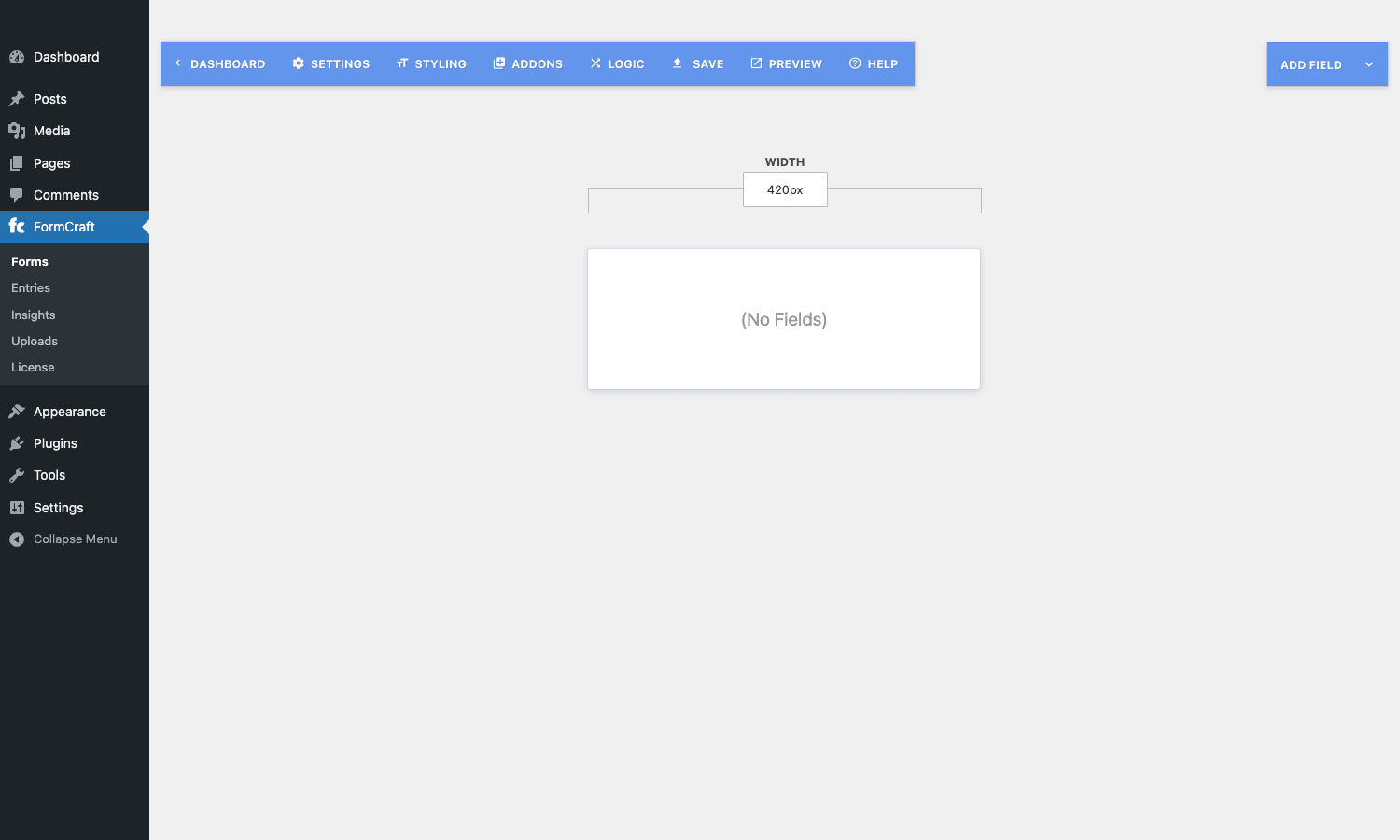
- The builder toolbar runs across the top: DASHBOARD (back arrow) / SETTINGS / STYLING / ADDONS / LOGIC / SAVE / PREVIEW / HELP. The right-hand side has the ADD FIELD dropdown. The center of the canvas shows the form width input and an empty card with "(No Fields)" until you start adding things.
- Click ADD FIELD, pick a field type, drop it onto the canvas, then click the field to open its edit panel: label, name, placeholder, default value, required flag, validation rules, conditional logic toggle. Drag fields to reorder. To make a multi-step form, drop a "Step" divider between fields.
- Switch to STYLING to pick a theme and tweak width, font, colors, button styling, and per-form custom CSS.
- Switch to LOGIC for the visual conditional-logic builder.
- Switch to SETTINGS for the submit action (success message vs redirect), notifications, and submission storage rules.
- SAVE, then PREVIEW in a new tab.
- Copy the shortcode (it looks like
[fc id="1" align="center" type="popup"]or simply[fc id="1"]) and paste it into a page or post.
That is the entire loop. Once you have done it twice it takes about five minutes to spin up a real form.
A real scenario: a contractor’s multi-step quote form
The example that makes FormCraft click for most people is a quote builder for a small services business.
Picture a residential painting contractor who used to take quote requests over the phone. He wants a form that asks the visitor for the type of job (interior vs exterior), the number of rooms or sides of the house, optional trim work, and then spits out a rough price range and books a site-visit slot. The catch: he does not want one wall-of-text form with twenty visible fields.
Built in FormCraft, this becomes a four-step form.
Step 1: Job type. A single radio field. "Interior", "Exterior", "Both". The form’s logic engine uses this answer to set which fields show up in step 2.
Step 2: Scope. If step 1 was Interior, show the "Number of rooms" number field and the "Ceiling height" dropdown. If it was Exterior, show "Number of stories" and "Approximate square footage". If Both, show all of them. This is set up entirely in the LOGIC tab, by adding two conditions per field along the lines of "show if Job Type is Interior" or "show if Job Type is Both".
Step 3: Add-ons. A checkbox field with trim work, baseboards, exterior shutters, and pressure washing. Each option has a number value attached to it for the math step later.
Step 4: Contact + estimate. Name, email, phone, preferred site-visit window. Below the inputs sits a math field that computes the estimate live. The formula references the field IDs from steps 2 and 3, something like (rooms_field * 350) + (stories_field * 800) + addons_field_total. The result is displayed as "Your estimated range: $X to $Y" using a small bit of HTML in a read-only field.
On submit, the contractor gets an admin email with all four steps filled in, the visitor gets an auto-responder confirming the request, and a row lands in the Entries panel with CSV export available later. If you want the visitor to drop a deposit to lock the slot, switch on the Stripe addon and the same form takes a card. None of that requires custom development. It is all toggle and dropdown work inside the builder.
The one piece that does not have a UI is fine-grained styling. On a five-step intake form for a personal-trainer client, FormCraft’s progress bar styling needed about three lines of CSS through the per-form Styling tab to match the rest of the brand. That was the only customization the builder didn’t already have a UI for, and it took less time than reading the documentation about how to do it.
Installation and first run
Installation is the standard WordPress flow.
- Plugins -> Add New -> Upload Plugin. Pick the FormCraft zip, click Install Now, then Activate.
- A new top-level FormCraft menu appears in the admin sidebar.
- Open FormCraft -> License and paste the CodeCanyon license code. The license is tied to a single domain; for a multisite or for a staging copy you generally do not need to relicense as long as the production site is the licensed one, but check the current CodeCanyon terms for your case.
- Go to FormCraft -> Forms to land on the dashboard.
- Click + NEW FORM, build something small, paste the shortcode into a page, view it on the front end. That is the whole onboarding.
There is no setup wizard, no email-collection step, no telemetry consent prompt, no "connect your account" detour. You activate, you build, you ship.
The dashboard and analytics panel
The dashboard is split into two cards.
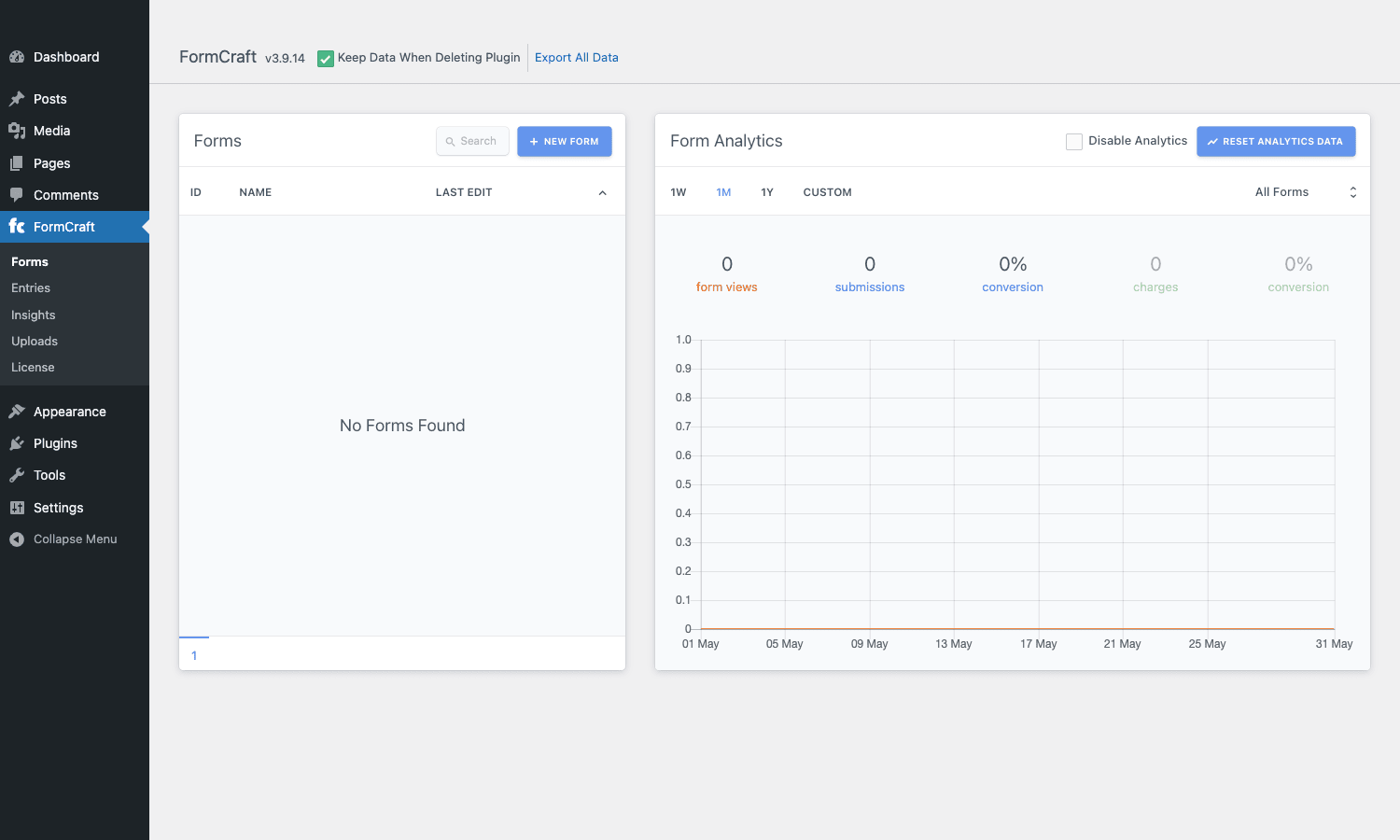
Forms (left). Sortable columns for ID, NAME, and LAST EDIT. A search box in the header, a blue + NEW FORM button next to it. Empty state on a fresh install reads "No Forms Found". Pagination drops in at the bottom once you have more forms than fit on a page. Hovering a row exposes Edit, Duplicate, and Delete actions.
Form Analytics (right). A toggle to disable analytics entirely (useful if you do not need the database overhead), a reset button, and a row of filter pills: 1W, 1M, 1Y, CUSTOM. The default filter is 1M. A dropdown on the right lets you pick a specific form or look at all of them. The summary row shows form views, submissions, conversion percent, charge total, and a second conversion percent for paid forms. Below that, a line chart plots views against time across the selected window.
What this is missing, and worth knowing up front: there is no built-in funnel analytics for multi-step forms. You can see how many people viewed the form and how many submitted. You cannot, out of the box, see how many people made it to step 3 but bailed at step 4. For most small-business use cases that is fine. For optimizing a high-volume lead form it is a real limitation; bolt on a separate analytics tool if you need that.
Conditional logic and math fields
The LOGIC tab in the builder toolbar is where FormCraft. It opens a panel that lists every field in the form and lets you attach show/hide rules with AND / OR composition.
A few patterns it handles cleanly:
- Branching by user type. A "I am a…" dropdown at the top. Show one set of fields if the value is "Customer", a different set if "Vendor", a third if "Partner".
- Optional follow-up questions. A "Have you used our service before?" radio. If "Yes", show "What was your last order number?" If "No", hide it.
- Required-only-when-shown. Fields that are hidden by logic do not validate as required. This sounds obvious but several form plugins still get it wrong and block submission because a hidden field is empty.
Math fields work in tandem with logic. A math field can reference any number, dropdown, radio, or checkbox value by field ID and compute a real-time result. Use it for:
- Quote totals (number of items times unit price plus options).
- Score calculations (assessments, quizzes, qualification scoring).
- Donation forms with "round up to nearest $5" suggestions.
- Subscription pricing with quantity discounts.
The formula syntax is plain arithmetic with operators (+ - * / ( )) and bracketed field IDs. There is no full expression language; you cannot run conditional logic inside the formula itself. If you need that, build it with chained conditional fields that resolve to numeric values before they feed into the math field.
Integrations and payments
FormCraft’s integrations are addons that live in the ADDONS tab inside each form’s builder. You enable an addon, paste an API key, then map form fields to integration fields.
The email-marketing list is the standard set:
- Mailchimp
- AWeber
- Campaign Monitor
- MailPoet
- ActiveCampaign
- GetResponse
- ConvertKit
Each one supports the basic flow: when a form is submitted, push the email and the chosen merge fields to a specific list in that service. Tag-based segmentation is supported where the underlying service supports it (Mailchimp, ActiveCampaign, ConvertKit).
Payments are handled by the PayPal and Stripe addons. The Stripe integration uses the modern Payment Element so cards, Apple Pay, Google Pay, and BNPL options show up automatically when configured on the Stripe side. PayPal is the classic redirect flow. Use cases I see most often:
- A donation form with preset and "Other" amounts.
- A consulting deposit form (pay $X to confirm the slot).
- A simple event registration with one or two ticket tiers.
- Quote acceptance ("review your quote, pay 30% deposit to start").
It is not a full e-commerce engine. For that you want WooCommerce. But for one-shot transactional forms where building a whole product catalog is overkill, the Stripe addon does the job.
For email deliverability, configure an SMTP plugin so the notifications actually land in inboxes. The default wp_mail() path through PHP mail() is unreliable on most shared hosts; an SMTP relay or transactional-email provider fixes that and is a near-universal recommendation regardless of which form plugin you use.
Developer reference: hooks, filters, shortcode
For developers extending FormCraft, the plugin exposes a small but useful set of action hooks and filters. All are prefixed formcraft_.
Action hooks
formcraft_addon_init: fires once when the addons subsystem boots. Use this to register a custom addon.formcraft_addon_scripts: enqueue scripts that should load when the builder is open.formcraft_after_fields: fires inside the rendered form, immediately after all fields. Good spot for an extra hidden field or a tracking pixel.formcraft_after_form_add: runs when a new form is created. Passes the new form ID.formcraft_after_form_delete: runs when a form is deleted. Useful for cleanup of related custom data.formcraft_after_save: fires after a submission has been written to the database. The main hook for posting submissions to external systems.formcraft_before_save: fires before write. Use this to mutate or validate submission data, or to short-circuit save.formcraft_form_content: fires around the form output on the page.formcraft_form_scripts: fires when front-end form scripts are being enqueued.formcraft_new_form: fires when a brand-new form is being created via the builder. Use for default field templates.
Filters
formcraft_filter_email_template: modify the HTML email template before it is sent.formcraft_filter_entry_content: change the rendered entry HTML in the admin Entries panel.formcraft_filter_entry_meta: modify the per-entry metadata shown above the entry.formcraft_filter_raw: touch the raw submission array before any processing.formcraft_theme_custom_css: append or replace the per-form CSS the Styling tab generates.
Shortcode
A single shortcode renders any form by ID:
[fc id="1"]
[fc id="1" align="center" type="popup" button_text="Get a Quote"]
The type parameter accepts inline (default), popup (modal triggered by a button), and slide (slide-in panel). The align and button_text attributes apply when type is popup or slide.
Custom database tables
FormCraft uses its own tables rather than custom post types, which keeps the WordPress posts table clean on sites with high form-submission volume. The tables, with the WordPress prefix, are:
fc_forms: form definitions and per-form settings.fc_submissions: submitted entries.fc_files: uploaded files, with submission references.fc_progress: saved partial submissions for resume-later.fc_views: view tracking for the analytics panel.fc_meta: per-submission metadata.
If you write SQL reports against form data you will be querying these directly. The schema is stable and has not changed in any breaking way in recent releases, but check the current version against your queries before assuming column names.
Example: ping a webhook on submission
add_action( 'formcraft_after_save', 'mysite_formcraft_to_webhook', 10, 2 );

function mysite_formcraft_to_webhook( $submission_id, $form_id ) {
 if ( (int) $form_id!== 7 ) {
 return; // only the lead form
 }

 $payload = array(
 'submission_id' => $submission_id,
 'form_id' => $form_id,
 'site' => home_url(),
 'received_at' => current_time( 'mysql' ),
 );

 wp_remote_post( 'https://example.com/webhooks/leads', array(
 'timeout' => 5,
 'headers' => array( 'Content-Type' => 'application/json' ),
 'body' => wp_json_encode( $payload ),
 ) );
}
Example: mutate submission data before save
add_filter( 'formcraft_filter_raw', 'mysite_formcraft_normalize_phone', 10, 1 );

function mysite_formcraft_normalize_phone( $raw ) {
 if (! is_array( $raw ) ) {
 return $raw;
 }

 foreach ( $raw as $key => $value ) {
 if ( is_string( $value ) && preg_match( '/^phone/i', $key ) ) {
 $raw[ $key ] = preg_replace( '/[^0-9+]/', '', $value );
 }
 }

 return $raw;
}
Example: per-form custom CSS injection
add_filter( 'formcraft_theme_custom_css', 'mysite_formcraft_progress_bar', 10, 2 );

function mysite_formcraft_progress_bar( $css, $form_id ) {
 if ( (int) $form_id!== 12 ) {
 return $css;
 }

 $css.= ".formcraft.step-progress { background: #f7f7f7; }.formcraft.step-progress.bar { background: #1a8fc4; }.formcraft.step-progress.bar.done { background: #2fb886; }
 ";

 return $css;
}
That is the bulk of the developer surface. There is no REST API in the core plugin (submissions happen over admin-ajax.php), and there is no command-line interface. If you need WP-CLI bulk operations on FormCraft data you will be writing them yourself against the fc_* tables.
Performance and compatibility
A FormCraft form is roughly one JavaScript file, one CSS file, plus a small per-form inline <script> block on pages that actually render a form. The plugin does not load its assets on pages that do not include the shortcode, so blog posts and product pages without a form pay no asset cost.
A handful of practical notes:
- Page caching is fine. The form HTML is server-rendered, the submission goes over AJAX, so static-cache plugins (WP Rocket, FlyingPress, LiteSpeed Cache, W3 Total Cache) all work out of the box.
- Conflict-prone area: theme jQuery overrides. A few themes override jQuery globally with a non-standard build. FormCraft expects a standard jQuery; if you see the builder hang on save it is almost always the theme.
- Multisite. Works on multisite. Each site needs its own activation and its own forms; submissions are stored per site, not network-wide.
- PHP compatibility. Runs on modern PHP. If you are still on PHP 7.2 or older you should be upgrading regardless, and FormCraft’s recent releases prefer 7.4+.
- WordPress version. Tracks current WordPress; the plugin is not the kind that goes dormant for six months at a time. Update cadence is steadier than the "abandoned CodeCanyon plugin" stereotype suggests, though slower than the major subscription builders.
- Translation. Text domain is
formcraft. Strings live in the standard/languages/folder. WPML compatible.
The asset payload is reasonable but not micro. If you are obsessed with Core Web Vitals on pages that render a form, you might shave a few kilobytes by disabling unused field types (signature, slider) so their assets do not load. But for most sites this is in the noise.
What FormCraft does not do well
The honest comparison list.
- Ecosystem. WPForms and Gravity Forms each have dozens to hundreds of third-party addons covering CRMs, payment processors, niche integrations, and obscure marketing tools. FormCraft has a curated short list of in-house addons. If your integration is on that list, life is easy. If it is not, you are writing it yourself against the action hooks.
- Documentation depth. The leading subscription builders publish exhaustive documentation with screenshots, tutorial videos, and developer references. FormCraft’s docs are present but thinner; you will sometimes find the answer faster by reading the plugin source than the site.
- Builder look-and-feel. The builder is functional and stable but it feels older than the modern React-based UIs of the top three competitors. Functionality is comparable. Polish is not.
- Support timeline. CodeCanyon’s standard license bundles six months of support and you pay to extend. Subscription builders include support for the life of an active license, which is a real difference if you need hand-holding.
- Release frequency. Updates ship steadily but not on the monthly cadence the big subscription products keep. You are getting fewer "shipped this week" notes in your dashboard. For a mature form builder that is usually fine; new features arrive less often, but so do regressions.
- Multi-step funnel analytics. As noted earlier, the analytics panel shows views and submissions but not per-step drop-off. Plug in a third-party analytics tool if you need that depth.
- No native Zapier or n8n. Webhooks via
formcraft_after_saveare easy to write, but there is no in-product Zapier addon as of this writing. If "click to connect" matters more than the cost savings, this is the one that will push you to a subscription competitor.
Knowing what you are not getting is the entire point of evaluating a tool honestly. None of these are dealbreakers for the contractor-quote-form use case. Some are dealbreakers for an enterprise SaaS rollout. Pick accordingly.
Pricing and licensing
FormCraft is sold on CodeCanyon under the standard Envato license tiers. The regular license is around thirty-six dollars at the time of writing, and it covers one end-product (one site, in plain terms). The extended license costs more and is for cases where the end-product is paid software or a paid service.
The license includes future updates for the life of the plugin. Support is six months by default, with the option to extend. There is no annual subscription that auto-renews and no "fall off a cliff if you stop paying" mechanic; the plugin keeps working even after the support window closes, you just stop getting access to the official support queue.
Final thoughts
The form builder market sorted itself out years ago. WPForms owns the friendly-onboarding crowd. Gravity Forms owns the developer-with-budget crowd. Fluent Forms owns the speed-and-automation crowd. Contact Form 7 owns the "I just need a contact page" crowd. FormCraft owns the "I do not want to think about my form plugin’s renewal in twelve months" crowd, and there are more people in that crowd than the subscription-builder marketing suggests.
The plugin is not chasing parity with the biggest names on every feature. It is competing on a different axis: pay once, own it, build what you need, ship it. The builder is older-feeling but solid. The conditional logic engine is genuinely good. The math fields make quote-builder forms one-afternoon work. Stripe and PayPal are there when the form needs to take money. Honeypot and reCAPTCHA handle the spam baseline.
If you bill by the hour and run a dozen client sites, FormCraft. If you are a single-site business owner who builds one form a year, the math is even simpler: thirty-six dollars beats two hundred. The trade-off is that you are responsible for filling the gaps where the ecosystem is thinner, and you accept a UI that prioritizes function over aesthetic. For a lot of WordPress sites, that is a deal worth taking.