

You build a custom post type for property listings. Fifteen ACF fields per listing: price, bedrooms, square footage, a gallery, a map pin, an agent relationship. Then you open Elementor to design the single-listing template and hit the wall every Elementor user eventually hits. The Posts widget shows the title, the excerpt, and the featured image. That’s it. Your fifteen fields might as well not exist. So you do what everyone does: you drop into a child theme, hand-write a WP_Query, wrap it in a shortcode, and paste the shortcode into a Text widget. Now your "visual" build has invisible PHP holding it together.
That gap is exactly what Dynamic Content for Elementor fills. It is the data layer Elementor never shipped, the bridge between your custom fields and the visual canvas. Instead of widgets that draw prettier buttons, you get widgets and dynamic tags that read ACF, Pods, Meta Box, and Toolset fields, run your own queries, and resolve dynamic tokens inside any control. This review walks through what it actually does, where it earns its place, where it is overkill, and the full developer surface for anyone who needs to extend it.
Table of Contents
- What Dynamic Content for Elementor actually is
- Dynamic Tags and the custom-field bridge
- The Tokens templating system
- Query control and custom loops
- The dynamic widget tour
- WooCommerce widgets
- Theme Builder usage
- Dynamic Visibility: conditional display
- Form Builder extensions
- The PHP and Raw widgets, and the security gate
- Installation and setup
- Developer reference
- DCE vs Essential Addons vs JetEngine vs Crocoblock
- Don’t rebuild your whole theme in Elementor and DCE
- Troubleshooting common problems
- Compatibility specifics
- Pricing and licensing
- FAQ
- Where DCE fits in a real stack
What Dynamic Content for Elementor actually is
Dynamic Content for Elementor (DCE for short) is a premium extension for Elementor built by Dynamic.ooo, the trading name of Ovation S.r.l., an Italian studio that has been shipping this plugin since 2018. The marketing line is "over 150 features," and for once that number is not inflated. The plugin ships 99 widget files and dozens of form actions, dynamic tags, and extensions on top of those.
But the feature count buries the lede. Most Elementor addons are widget packs. Essential Addons, Premium Addons, ShopLentor, Element Pack: their job is to give you more things to draw. A fancier accordion, a nicer pricing table, a testimonial carousel. DCE has some of those too (the Creative and 3D categories are full of them), but they are not the point.
The point is data and logic. DCE’s headline pillars are the ones that let Elementor read from somewhere other than the post title and content:
- It reads custom fields from ACF, Pods, Meta Box, and Toolset and lets you drop them into any widget through Elementor’s native dynamic-tag picker.
- It has its own token language, a small templating syntax you can type into almost any text field to pull values, do math, format dates, and apply conditions.
- It gives the Posts widget real query control, so you can build filtered, sorted, related-post loops without writing
WP_Queryby hand. - It extends Elementor Pro’s Form widget with payment fields, validation, redirects, PDF generation, and more.
- It adds conditional display (Dynamic Visibility) so any element can show or hide based on user role, date, device, or your own logic.
So the honest framing: if you are building a brochure site, a small business homepage, or a landing page, DCE is overkill. Elementor and a widget pack will do everything you need and you will never touch a custom field. But the moment your site has a real data model behind it, a directory, a real-estate portal, a recipe database, a knowledge base, a job board, DCE stops being a luxury and starts removing actual PHP from your project.
That distinction matters when you decide whether to buy it. I have seen people install DCE on a five-page coffee-shop site and then wonder why they paid for it. They paid for a database integration they had no database to integrate.
Dynamic Tags and the custom-field bridge
This is the feature that justifies the purchase for most buyers, so I want to spend real time on it.
Elementor’s free version has no dynamic tags at all. Elementor Pro added them, but its field support is thin and its ACF integration only goes so far. DCE registers its own family of dynamic tags and hooks them into the same picker Elementor uses, the little database-stack icon you see next to a control. Click it on a Heading widget’s text field, and instead of just "Post Title" and "Post Excerpt," you get a list that includes ACF fields, Pods fields, Meta Box fields, Toolset fields, author fields, term data, and DCE’s own tokens.
Walk through the property-listing example. You have an ACF text field called price. With DCE you select a Heading widget, click the dynamic icon on its text control, choose the ACF field tag, and pick price from a dropdown. The widget now renders the field value, live, per post, inside the visual builder. No shortcode, no Text widget, no PHP. You style the heading once and every listing inherits it.
It goes deeper than scalar fields. DCE ships dedicated widgets for the complex ACF field types that are genuinely painful to render by hand:
- ACF Repeater and ACF Flexible Content widgets that loop over sub-fields and let you design the row layout inside Elementor.
- ACF Gallery and ACF Slider for image-array fields.
- ACF Relationship (and a matching dynamic tag) for posts linked through a relationship field, with its own query handling.
- ACF Frontend, which renders an ACF field group as a front-end editable form, so logged-in users can update their own profile fields without the WordPress admin.
The same pattern repeats for the other field frameworks. There are Pods Fields, Pods Gallery, and Pods Relationship widgets. There are Meta Box field and relationship widgets and a Meta Box Google Maps widget. There are Toolset Fields and Toolset Relationship widgets. In the Elementor editor these show up as their own categories, "Dynamic.ooo – Advanced Custom Fields," "Dynamic.ooo – Pods," "Dynamic.ooo – Meta Box," "Dynamic.ooo – Toolset," so you find the right tool for whichever framework your site already uses.
A nice touch for ACF-heavy builds: DCE understands the difference between a field on the current post and a field on a related or looped post. There is an dynamicooo/acf/in-loop filter and a dynamicooo/acf/bypass_loop_check filter (more on those in the developer section) precisely because resolving "whose field is this" inside a custom loop is the bug everyone hits when they roll their own. DCE has already solved it.
If you have read our guide to custom fields with ACF Pro, DCE is the visual layer that makes those fields appear on the page without you writing get_field() in a template.
The Tokens templating system
Dynamic tags cover "put this field here." Tokens cover everything dynamic tags cannot express cleanly: math, conditions, formatting, combining several values into one string. Tokens are DCE’s own little templating language, and they are one of the features long-time users get attached to.
A token is a bracketed expression you type directly into a text control. The plugin parses it at render time and swaps in the resolved value. From the source, DCE registers token families for: form, system, date, author, user, post (which also covers Jet and Meta Box meta), term, option, wp_query, query, acf, product, and expr (expressions).
Some real examples of the syntax you would type:
[post:custom-meta]pulls a post meta value by key.[user:nicename]outputs the current user’s nicename.[acf:my_field]resolves an ACF field.[option:blogname]reads a whitelisted WordPress option.[expr: 19.99 * 1.2 ]evaluates an arithmetic expression, useful for showing a price including tax.
Tokens accept fallbacks and filters too. The syntax supports a ?fallback suffix and a |filter pipe, so you can write something like a meta lookup that falls back to a default string when the field is empty, and pipe the result through a formatter. That turns "show the price, or ‘Contact us’ if there is no price" into a single token instead of a conditional block.
Where I find tokens most useful is inside other DCE widgets and inside the Form Builder. You can build a notification email body that interpolates the submitter’s name, the product they chose, and a calculated total, all with tokens, without touching a template file. There is even a Discover Tokens widget that lists the tokens available in the current context, which is genuinely helpful when you cannot remember a field’s exact key.
One caution worth flagging early: tokens that touch server or session data ([server:...], [session:...]) are whitelisted for security reasons, and the [option:...] token only resolves a fixed list of safe option keys by default. That is deliberate. You do not want a content editor able to print arbitrary server variables onto a public page. There are filters to extend those whitelists when you actually need to, covered below.
Query control and custom loops
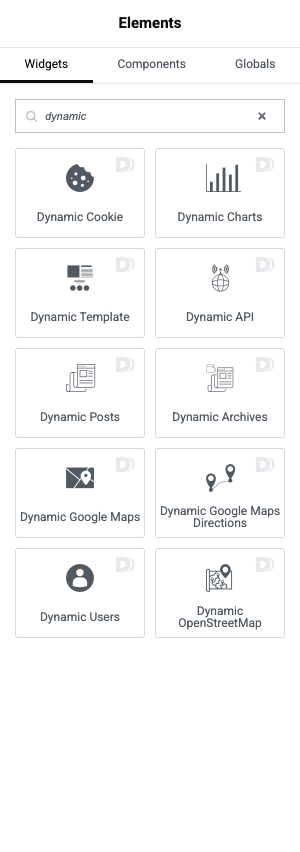
Elementor’s free Posts widget cannot do much. Elementor Pro’s Posts widget is better but still limited when you want a genuinely custom loop. DCE’s Dynamic Posts widget (and its siblings My Posts, Sticky Posts, Single Posts List, Dynamic Archives, and Search Results) give you query control that maps onto WordPress’s actual WP_Query arguments.
You can filter by post type, taxonomy term, meta key and value, author, date range, post status, and relationships. You can order by meta value (numeric or string), set offsets, force sticky posts to the top, and exclude the current post. The widget exposes these as Elementor controls, so the person building the page does not need to know the argument names, but a developer can recognise exactly which WP_Query parameters are being set.
For the cases the UI cannot express, DCE fires a dynamicooo/posts/query_results action after it builds the query, passing you the WP_Query object. That is your hook to log, debug, or post-process the results. And because the widget runs a real query under Elementor’s query system, the standard elementor/query/{$query_id} filters work too, so you can register a custom query callback and select it from the widget’s "Query ID" field. That is the clean way to inject genuinely bespoke query logic without abandoning the visual layout.
The practical win: a "Related properties in the same city, excluding this one, newest first, limit four" loop becomes a Dynamic Posts widget with a meta filter and an order rule, styled once, instead of a hand-coded template part. When the client asks to change it to six items sorted by price, you change two dropdowns instead of editing PHP.
The dynamic widget tour
Beyond the field and query widgets, DCE’s catalogue is large enough that nobody uses all of it. Here is the map of what is actually there, grouped the way the editor groups it, so you know what you are paying for.
Posts and archives. Dynamic Posts, My Posts (the current user’s authored posts), Sticky Posts, Single Posts List, Dynamic Archives, Search Results, Featured Image, Post Meta, Post Type, Read More, Excerpt, Breadcrumbs, and Prev/Next navigation.
Users and terms. Dynamic Users (a directory of WordPress users with query args), User Fields, Taxonomy Terms List, Terms and Taxonomy, and Taxonomy Title. The Dynamic Users widget is the backbone of any "meet the team" or member-directory page that should update itself when users are added.
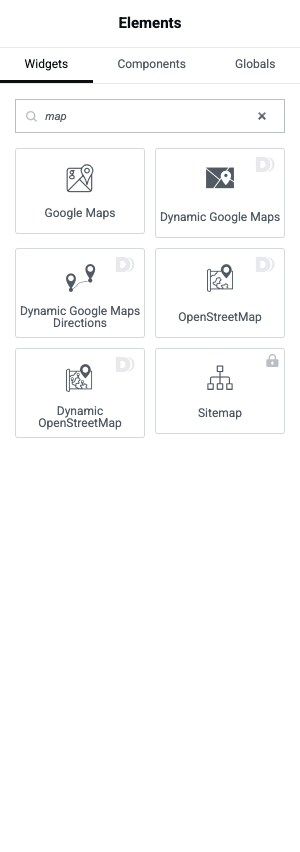
Maps. This is a surprisingly strong area. Dynamic Google Maps renders a map from address or lat/long fields, with markers driven by your post data. Dynamic Google Maps Directions adds a routing layer with turn-by-turn info and instructions exposed as dynamic tags. For projects that cannot or will not pay for a Google Maps API key, there are Dynamic OpenStreetMap and OSM Map widgets that use the free OSM tiles instead. That OSM fallback alone has saved me a billing headache on a low-budget directory.
Documents and data. Dynamic Charts (data visualisation), Document Viewer and PDF Viewer (embed documents inline), PDF Button (generate a PDF from page content), QR and Barcodes, Dynamic API (pull and display data from a REST endpoint), File Browser, File Include, and Web Scraper.
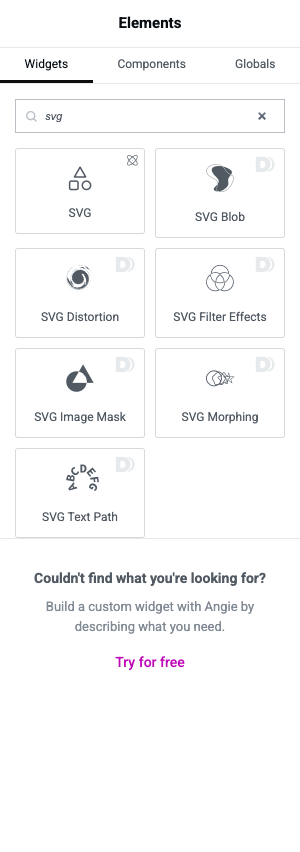
Creative, 3D, and SVG. Animated Text, Before/After image comparison, Panorama, 360 Slider, Tilt, Parallax, Cursor Tracker, Images Distortion Hover, plus a full SVG suite: SVG Blob, SVG Distortion, SVG Morphing, SVG Image Mask, SVG Text Path, and SVG Filter Effects. These are the "widget pack" side of DCE, and they are decent, but they are not why you buy it.
Favorites. Add to Favorites, Favorites, and Clear Favorites widgets implement a wishlist/bookmark system for any post type, with a dynamicooo/favorites/trigger-finish hook for reacting to changes. Pair it with the Favorites visibility trigger and you can show a "your saved listings" section that only appears when the visitor has saved something.
Templates and content. Dynamic Template (insert one Elementor template inside another, with the inner template inheriting the outer loop’s context), Content, Text Editor with Tokens, Text Editor with Timber (Twig templating for the brave), Shortcode with Tokens, Add to Calendar, Copy to Clipboard, Fire Modal Window, Modals, Animated Off-Canvas Menu, and Parent-Child Menu.
You will not touch most of this on any single project. That is fine. The value is that whatever your data-driven requirement turns out to be, the widget for it probably already exists.
WooCommerce widgets
DCE has a WooCommerce category that overlaps a little with WooCommerce-specific builders like ShopLentor, but its angle is the same as the rest of the plugin: dynamic, query-driven product output rather than a fixed set of shop widgets.
The set includes Dynamic Woo Products (a product grid with full query control, the WooCommerce cousin of Dynamic Posts), Dynamic Woo Products on Sale, Product Variations, Product Upsells, Product Cross-sells, and a Products Cart widget. There is also an Add to Woo Wishlist widget and a Woo Wishlist display widget for sites that want a native wishlist without a separate plugin.
There is a product token family too, so inside any text field on a product template you can print [product:price] or other product attributes. If you are building a custom single-product template and you need the SKU, the stock status, and a custom ACF spec sheet all in one layout, DCE lets you assemble that from product tokens and ACF tags side by side, which a Woo-only builder usually cannot do.
The honest limit: DCE is not a checkout or cart-design tool the way a dedicated WooCommerce builder is. It gives you dynamic product display and query control. For a full custom cart and checkout experience you would still reach for ShopLentor or Elementor Pro’s WooCommerce widgets. Use DCE for the data-heavy product listings, not for re-skinning the checkout.
Theme Builder usage
DCE shines inside templates, and that is worth its own section because it is where the field tags and query widgets pay off.
When you build an Elementor template (a single-post layout, an archive layout, a 404, a header, a footer), every DCE widget that reads "the current post" resolves against the post being rendered. So your single-listing template uses ACF tags that show this listing’s fields, your archive template uses a Dynamic Posts loop, and the whole thing is reusable across thousands of posts.
DCE adds two action hooks specifically for its own template system, dce_before_content_inner and dce_after_content_inner, fired in its archive template. Its Template System feature can inject a chosen Elementor template before or after the main content of singular pages, which is how you add a consistent "related items" or "author bio" block to every post of a type without editing each one. The Dynamic Template widget complements this by letting you nest templates and pass loop context down into them.
A practical note: free Elementor does not include the Theme Builder. To build custom single and archive templates you need Elementor Pro, or you build pages individually. DCE works with both, but its template-driven workflow assumes you have a Theme Builder available. That is the single biggest "read the small print" item in the whole plugin, and I will come back to it.
Dynamic Visibility: conditional display
Dynamic Visibility lets any widget, column, or section show or hide based on conditions, without writing a single conditional in PHP. It is one of the most-used features because it is genuinely simple: select an element, open its Dynamic.ooo visibility settings, add a trigger.
From the source, the available triggers are: archive context, page context, custom logic, date and time, device type, dynamic tag value, events, favorites state, geotargeting, post properties, a random toggle (for A/B-style rotation), user (role, login state, capability), and WooCommerce conditions (cart contents, purchase history, and so on).
Real uses: show a "members only" download to logged-in subscribers, hide a promo banner after a date, show a different hero on mobile, display a "you saved this" badge only when the visitor has favorited the item, or geo-target a phone number to a region. Each of those is a trigger, not a template fork.
For developers, the whole subsystem is filterable. There is a dynamicooo/visibility/should-run filter to disable visibility processing entirely on specific requests (handy for REST or sitemap contexts where you do not want the overhead), and a dynamicooo/dynamic-visibility/triggers filter to register your own trigger type. So if your business has a condition nobody else has ("show this only to users on the Enterprise plan from our billing system"), you can add it as a first-class trigger and it appears in the same dropdown as the built-in ones.
Form Builder extensions
If you have Elementor Pro, you have its Form widget. DCE bolts a large set of new actions and fields onto it. These are not separate forms; they extend Elementor Pro’s existing form, which is why this whole category needs Elementor Pro to function.
On the field side, DCE adds: a Stripe payment field, a PayPal field, an Amount and Formatted Number field, Country and International Phone fields, Address Autocomplete (Google), a Signature pad, a Rating field, a Range slider, a WYSIWYG editor field, Select2 enhanced dropdowns, and a Dynamic Select that populates options from a query.
On the action side (the things that run after submit): PDF Generator (build a PDF from the submission), Dynamic Email (with token interpolation and attachments), Dynamic Redirect (send the user to a URL computed from the submission), Telegram notifications, a Woo Cart action (add products to the cart from a form), Save (write the submission to a post or user meta), PHP Action and PHP Validation (run server-side code), Regex validation, Conditional Fields, and more.
The Stripe field is the one people ask about most. DCE registers an AJAX endpoint that creates a Stripe payment intent (nonce-protected), so you can take a real card payment inside an Elementor form without a separate forms-and-payments plugin. There is a dynamicooo/stripe-field/payment-intent filter to adjust the intent before it is created, which you need for things like setting metadata or applying a dynamic amount.
The Save action is quietly powerful for front-end submissions: you can build a "submit your listing" form that creates a draft post, maps form fields to ACF fields, and redirects the author to their new submission, all configured in the form, all extensible through the dynamicooo/save/redirect-url and dynamicooo/form-save/meta-key filters.
One more time, because it bites people: every one of these form extensions requires Elementor Pro, because they hang off the Pro Form widget. If you only have free Elementor, the form category is dark.
The PHP and Raw widgets, and the security gate
DCE ships a PHP Raw widget that executes arbitrary PHP, a Shortcode with Tokens widget, and PHP actions inside forms. These are real escape hatches, and they are also the part of the plugin you have to treat with respect.
Running PHP from inside a page builder is dangerous if the wrong person can do it. DCE knows this and built a guard. The plugin’s SaveGuard maintains a list of "unsafe" widgets and dynamic tags (PHP Raw, the token tag, the various query tags, the user-field tag, and so on). When a page contains one of those, only a user with the full administrator capability is allowed to edit and save it. A non-admin editor who opens such a page is blocked with the message "Only administrators can edit this Elementor Page."
That is the right model. It means a client’s content editor cannot accidentally (or maliciously) inject PHP through a builder they otherwise have access to. But it also means you, the developer, need to understand who has the administrator role on the site before you scatter PHP Raw widgets around. I cover the failure mode in detail in the anti-pattern section below, because "we gave a contractor an editor account and they could not save the homepage" is a support ticket I have actually had to answer.
Installation and setup
Setup is ordinary, with one hard dependency.
- Install and activate Elementor first (the free version from the WordPress.org repository). DCE declares
Requires Plugins: elementor, so WordPress will not let you activate DCE until Elementor is present. - Upload the Dynamic Content for Elementor zip under Plugins, Add New, Upload Plugin, then activate it. The Dynamic Content for Elementor download on GPL Times gives you the full plugin with every widget unlocked, which is the quickest way to put it on a real install and try the field integrations against your own data.
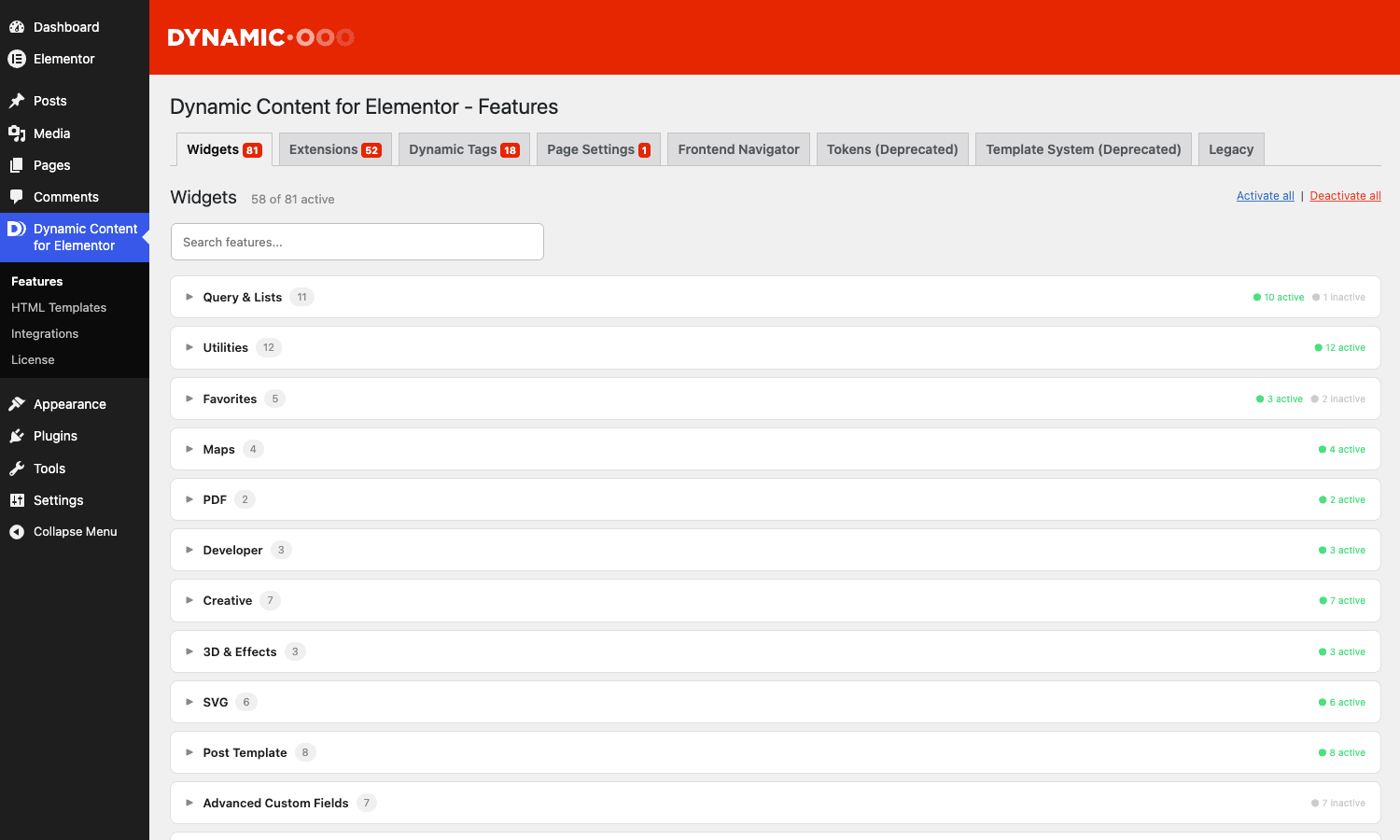
- After activation you get a new Dynamic.ooo menu in the WordPress admin sidebar with Features, HTML Templates, Integrations, and License entries.
- Open Dynamic.ooo, Features. This is the toggle list for all 150-plus features. Everything is on by default, but you can disable any widget or extension you are not using. On a site that only needs the ACF tags and Dynamic Posts, turning off the SVG, 3D, and maps features trims what loads in the editor.
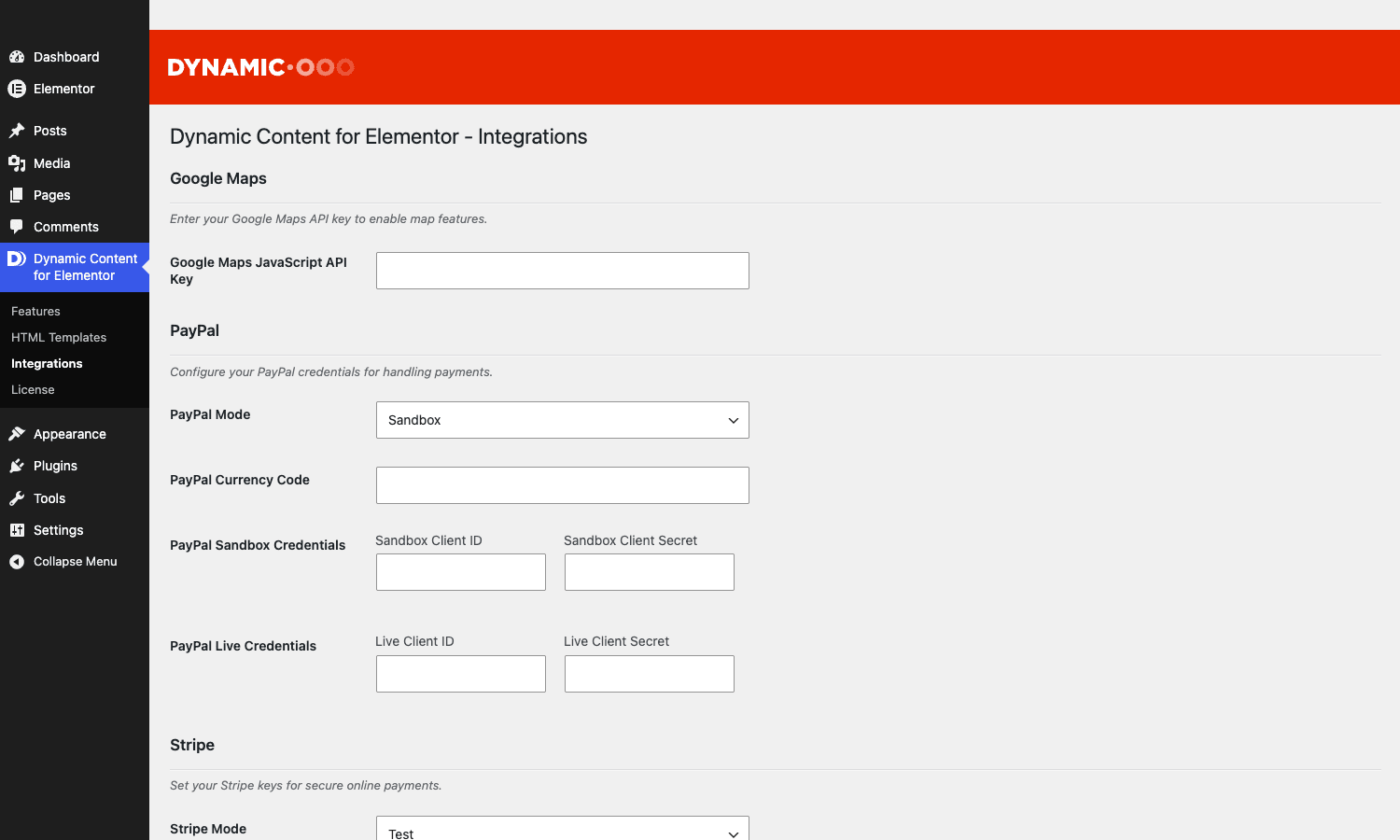
- Open Dynamic.ooo, Integrations to confirm DCE has detected your field frameworks. If ACF, Pods, Meta Box, or Toolset are installed, they show as available here and their widgets and tags become active.
- Edit any page with Elementor. The DCE categories appear in the widget panel, and the dynamic-tag picker (the database icon on text and image controls) now lists the DCE tags.
That is the whole setup. There is no required wizard and no account to connect for the core features. Stripe and Google Maps need their own API keys entered in the relevant feature settings, but you only set those when you use those features.
Developer reference
This is the part that separates DCE from a click-only addon. The plugin exposes a genuinely large hook surface. Everything below was read straight from the plugin source, so the names and signatures are accurate. As always, do not paste these without testing against your own setup.
Lifecycle hooks
DCE fires its own init action once the plugin has booted, and a second action after it has hooked into Elementor:
add_action( 'dynamic_content_for_elementor/init', function () {
    // DCE has finished loading. Safe to register your own DCE extensions here.
} );

add_action( 'dynamic-content-for-elementor/elementor-init', function ( $plugin ) {
    // Fires after DCE integrates with Elementor. $plugin is the DCE instance.
} );
Customising the Dynamic Posts query
After the Dynamic Posts widget builds its query, it passes the resulting WP_Query to an action so you can inspect or log it:
add_action( 'dynamicooo/posts/query_results', function ( $query ) {
    if ( $query->found_posts === 0 ) {
        error_log( 'DCE Dynamic Posts returned no results for query: ' . wp_json_encode( $query->query_vars ) );
    }
} );
For genuinely custom query logic, register an Elementor query callback and select its ID in the widget’s Query ID control:
add_action( 'elementor/query/featured_in_city', function ( $query ) {
    $query->set( 'meta_key', 'city' );
    $query->set( 'meta_value', get_query_var( 'city' ) );
    $query->set( 'orderby', 'date' );
    $query->set( 'order', 'DESC' );
} );
ACF field resolution inside loops
When you render ACF fields inside a custom loop, DCE has to decide whose field to read. Two filters control that:
// Force DCE to treat ACF fields as in-loop (read from the looped post, not the page).
add_filter( 'dynamicooo/acf/in-loop', function ( $in_loop, $settings ) {
    return true;
}, 10, 2 );

// Bypass the loop check entirely for a specific field/page combination.
add_filter( 'dynamicooo/acf/bypass_loop_check', function ( $bypass, $field_id, $page_id ) {
    return $bypass;
}, 10, 3 );
Form save redirect and meta mapping
The form Save action lets you remap where a redirect goes and which meta key a field saves to:
add_filter( 'dynamicooo/save/redirect-url', function ( $redirect_to, $object_id, $form_name ) {
    if ( $form_name === 'submit_listing' ) {
        return get_permalink( $object_id ) . '?submitted=1';
    }
    return $redirect_to;
}, 10, 3 );

add_filter( 'dynamicooo/form-save/meta-key', function ( $meta_key ) {
    return $meta_key;
} );
Extending Dynamic Visibility
Register your own visibility trigger, or disable visibility on a given request:
add_filter( 'dynamicooo/dynamic-visibility/triggers', function ( $triggers ) {
    $triggers['enterprise_plan'] = \My\Plugin\EnterprisePlanTrigger::class;
    return $triggers;
} );

add_filter( 'dynamicooo/visibility/should-run', function ( $should_run ) {
    if ( wp_doing_cron() || ( defined( 'REST_REQUEST' ) && REST_REQUEST ) ) {
        return false;
    }
    return $should_run;
} );
Registering a custom form action
DCE collects form-action extensions on its own action hook, so third-party code can add a new Pro Form action:
add_action( 'dce/register_form_actions', function () {
    // Register your custom DCE form action class here.
} );
Token whitelists
The token system whitelists which options, server values, and session values are allowed, for security. You extend those with filters:
add_filter( 'dynamicooo/tokens/options-whitelist', function ( $whitelist ) {
    $whitelist['my_safe_option'] = true;
    return $whitelist;
} );

add_filter( 'dynamicooo/tokens/server-whitelist', function ( $allowed ) {
    $allowed[] = 'HTTP_X_FORWARDED_FOR';
    return $allowed;
} );

// Hard kill switch for token filters, useful in locked-down multi-author setups.
add_filter( 'dce_tokens_filters_whitelist_force_disable', '__return_true' );
Stripe payment intent
Adjust the Stripe payment intent before it is created (for example, to attach metadata or set a dynamic amount):
add_filter( 'dynamicooo/stripe-field/payment-intent', function ( $intent_args ) {
    $intent_args['metadata']['source'] = 'elementor-form';
    return $intent_args;
} );
Theme template injection points
If you are building a theme that should cooperate with DCE’s archive template, the inner-content actions let you inject markup:
add_action( 'dce_before_content_inner', function () {
    echo '<div class="my-archive-notice">Showing filtered results</div>';
} );

add_action( 'dce_after_content_inner', function () {
    // Append content after the DCE archive loop.
} );
There are more filters than I have room for here (dynamicooo/dynamic-users/query-args, dynamicooo/google-maps/post-link, dynamicooo/html-pdf/html-template, dynamicooo/dynamic-email/attachments, dynamicooo/remote-content/html-element, dynamicooo/views/row-html, and the dynamicooo/favorites/trigger-finish action among them), but the set above covers the integration points you will reach for most. If you need the rest, the plugin is GPL and the hook names are greppable in the source.
DCE vs Essential Addons vs JetEngine vs Crocoblock
This is the comparison that matters, because all four extend Elementor but only two of them play in DCE’s lane. Let me put real numbers on it.
DCE vs Essential Addons (and Premium Addons). This is not really a competition, it is a category mismatch. Essential Addons Pro ships around 100 widgets and extensions whose job is presentation: carousels, post grids, advanced tabs, light boxes. DCE ships 99 widgets whose job is mostly data: field readers, query loops, conditional logic. They overlap on maybe 10 to 15 widgets (both have a fancy post grid, both have some creative effects). If your need is "make this section look nicer," Essential Addons is the lighter, cheaper answer. If your need is "show these 15 ACF fields per listing," Essential Addons cannot do it and DCE can. Many sites run both, and that is fine, they barely step on each other.
DCE vs JetEngine. This is the real fight. JetEngine, from Crocoblock, is the other "turn Elementor into a dynamic site builder" plugin, and it is the one prospective DCE buyers actually cross-shop. Here is the honest split:
- JetEngine builds the data model. It can register custom post types, taxonomies, and its own custom meta fields and custom content types right inside WordPress admin. DCE does not. DCE reads fields from ACF, Pods, Meta Box, and Toolset, but it does not create the field definitions for you. So with JetEngine you can build the whole stack in one plugin; with DCE you pair it with a fields plugin.
- DCE’s token language and
[expr:...]math are more flexible for inline calculation and string building than JetEngine’s macros. - JetEngine’s Listing Grid and Query Builder are roughly equivalent in power to DCE’s Dynamic Posts plus query control. Both can do meta filtering, relationships, and custom queries.
- On price, the gap is concrete. DCE sells a single-site license in the rough region of 49 to 69 dollars per year and a lifetime/agency tier above that. JetEngine alone is about 43 dollars per year, but you usually buy it as part of the Crocoblock all-inclusive subscription, which runs around 199 dollars per year, because JetEngine leans on the wider Jet ecosystem (JetSmartFilters for filtering, JetFormBuilder for forms). DCE bundles its filtering and forms-extension features into the one plugin, so the line items are simpler.
DCE vs Crocoblock (the whole suite). Crocoblock is the maximalist option: a dozen Jet plugins covering data, filtering, forms, popups, menus, reviews, and more. If you are building agency-scale dynamic sites every week, the Crocoblock subscription’s breadth can be worth the roughly 199 dollars a year. DCE is the "one plugin, broad surface" answer at a fraction of that, and it is friendlier if you already standardised on ACF or Meta Box for fields. The page-weight story is similar for both: a dynamic page that loads three or four data widgets will add tens of kilobytes of CSS and JS either way, and both let you disable unused features to keep that down (DCE through its Features toggle list, Crocoblock through per-plugin activation).
My rule of thumb: if you want to build the data model and the front end in one vendor’s ecosystem, JetEngine or full Crocoblock. If you already use ACF, Pods, Meta Box, or Toolset and you want one plugin to surface that data in Elementor with a strong token language and a deep hook layer, DCE.
Don’t rebuild your whole theme in Elementor and DCE
Here is the failure mode I have watched cost real money, and it is the temptation DCE creates precisely because it is so capable.
Once you can read every field, run every query, and add conditional logic from inside the builder, it is tempting to do everything in Elementor and DCE. Build the header, the footer, the single templates, the archives, the 404, all visually, all with stacked DCE widgets and tokens. No child theme, no PHP, "no code." It feels like a win. It is a trap on a site of any real size.
The cost shows up later, in three places. First, performance. Every DCE widget that resolves a field or runs a query adds work at render time, and a template built from twenty stacked dynamic widgets does twenty lookups per post. On a list page rendering twenty posts, that is four hundred lookups. Page caching hides it from anonymous visitors, but logged-in users (members, customers, the WooCommerce account area) hit the uncached path and feel every millisecond. A theme template that runs one tuned WP_Query and a simple loop is dramatically lighter than the same thing assembled from individual widgets.
Second, maintainability. An Elementor layout with deeply nested dynamic widgets and tokens is hard to diff, hard to version control, and hard to hand to the next developer. The logic lives in serialized post meta, not in readable files. When something breaks, you are clicking through panels instead of reading code.
Third, lock-in and migration. A site whose entire presentation is encoded in Elementor plus DCE widgets is extremely hard to move off Elementor later. Everything you built visually has to be rebuilt if you ever switch builders.
The discipline that pays off: use DCE where the visual, per-post, client-editable layout genuinely benefits from being visual (single templates, marketing pages, listing grids the client tweaks). For the structural, performance-critical, or rarely-changing parts (the header logic, a heavy archive query, anything that runs for logged-in users at scale), a small amount of child-theme PHP is faster, cheaper to maintain, and easier to hand off. DCE is a scalpel for the dynamic-display problem. It is not a reason to throw away your theme.
Troubleshooting common problems
These are the issues that generate support tickets, and the actual fix for each.
DCE widgets do not appear in the Elementor panel. Almost always a dependency problem. DCE requires Elementor, and a feature only registers if its dependencies are satisfied and the server’s PHP version meets the widget’s minimum. Confirm Elementor is active, confirm the feature is enabled under Dynamic.ooo, Features, and confirm your host runs a current PHP version. If the panel still looks empty, clear Elementor’s cache from Elementor, Tools, Regenerate CSS & Data, and reload the editor.
The editor hangs on the loading spinner after activating DCE. This is usually an Elementor cache or a preview-URL problem, not DCE itself. Regenerate CSS and data, and make sure the page you are editing actually has a resolvable front-end URL (a brand-new unsaved auto-draft can stall the preview). Saving the page once, then reopening the editor, clears it.
Tokens render as literal text instead of resolving. Three usual causes. The token family might be disabled (check the active-tokens list), the token syntax might be slightly off (a missing closing bracket or a wrong field key), or the token is touching a value behind a whitelist. Server and session tokens, and many options, are whitelisted for security, so [option:some_random_option] returns nothing by design until you extend the whitelist with the filters shown above.
An ACF (or Pods, Meta Box, Toolset) field comes back empty. First, confirm the field key, not the field label, matches what you selected. Second, confirm you are reading the right post. Inside a custom loop, a field can resolve against the page instead of the looped post unless the in-loop handling is correct, which is what the dynamicooo/acf/in-loop filter exists to force. Third, confirm the field actually has a value on that specific post.
A non-administrator cannot save a page. That is the SaveGuard working as designed. The page contains an "unsafe" widget or tag (PHP Raw, a token tag, a query tag), and DCE only lets full administrators edit pages that contain those. Either edit the page as an administrator, or remove the unsafe widget if a lower-privileged user needs to maintain that page.
Stripe payments fail in the form. Check that the Stripe feature has valid publishable and secret keys entered, that the form is served over HTTPS (Stripe requires it), and that no aggressive caching plugin is caching the AJAX nonce that DCE generates for the payment intent. A stale cached nonce is the silent killer here.
The site feels slow on a page with many dynamic widgets. See the anti-pattern section. Reduce the number of per-post lookups, lean on full-page caching for anonymous traffic, and move the heaviest queries into a tuned custom query callback rather than stacking widgets. Disabling unused features in the Features list also trims editor and front-end load.
Compatibility specifics
DCE requires WordPress 6.3 or newer and PHP 7.4 or newer (the plugin will refuse individual widgets if your PHP is below their minimum). It targets a current Elementor version; older Elementor releases will not register the newer widgets.
It works with free Elementor for the data, query, maps, SVG, and visibility features. It needs Elementor Pro for two things specifically: the Theme Builder workflow (to make single and archive templates) and the entire Form Builder extension category (because those hang off Pro’s Form widget). If you only have free Elementor, budget for that limitation.
On field frameworks, it integrates with ACF (free and Pro), Pods, Meta Box, and Toolset. ACF free covers the common field types; ACF Pro is needed for Repeater, Flexible Content, and Gallery fields, and DCE has dedicated widgets for exactly those Pro field types.
It ships full WooCommerce widget support and a product token family. It includes a wpml-config.xml and uses WPML’s object-translation filters, so it is WPML-aware for multilingual sites; translatable strings inside DCE widgets are registered for translation. On multisite, DCE activates per-site like any normal plugin; there is no network-wide configuration, each site manages its own Features list.
Known friction points: heavy template builds can conflict with overly aggressive optimisation plugins that defer or combine the JavaScript DCE’s interactive widgets (maps, charts, sliders) depend on. If a map or chart stops rendering after you turn on JS deferral in a performance plugin, exclude DCE’s scripts from that optimisation. We cover the general performance-plugin balancing act in our WP Rocket review, and the same "exclude the interactive scripts" advice applies here.
Pricing and licensing
Dynamic.ooo sells DCE as an annual subscription with tiers that scale by the number of sites and by whether you want lifetime access. The structure, in general terms:
- A single-site tier, the entry point, for one production install. This is the right tier for a freelancer building one client site or for your own project. It is the cheapest annual option.
- A multi-site / professional tier that covers a handful of sites, aimed at developers who maintain several builds. Better per-site economics than buying single licenses repeatedly.
- An agency / unlimited tier for studios running DCE across many client sites, sometimes offered with a lifetime option so you pay once instead of annually.
Every tier includes the full feature set; the difference is site count and support duration, not features. A license entitles you to updates and support for the term. When it lapses, the plugin keeps working (it is GPL software) but you stop receiving updates from the vendor.
Because DCE is GPL-licensed, you also have the option of the Dynamic Content for Elementor download from GPL Times, which is the complete plugin with every one of the 150-plus features unlocked. It is the fastest way to put the full thing on a real WordPress install and see whether the ACF and query features actually fit your data before you commit to a vendor subscription.
FAQ
Do I need Elementor Pro to use Dynamic Content for Elementor?
For most features, no. The dynamic tags, custom-field widgets, query control, maps, SVG, charts, and Dynamic Visibility all work on free Elementor. You need Elementor Pro for exactly two things: the Theme Builder (to create single-post and archive templates) and the Form Builder extensions (Stripe, PayPal, PDF, validation, and the rest), because those extend Pro’s Form widget. If your project leans on custom templates or advanced forms, factor Pro into the budget.
Will DCE slow down my site?
It can, if you misuse it. Every widget that reads a field or runs a query does work at render time, so a template assembled from twenty stacked dynamic widgets is heavier than a tuned theme template. Full-page caching hides this from anonymous visitors, but logged-in users feel it. The fixes are practical: disable unused features in the Features list, lean on a caching plugin, and push the heaviest queries into a custom query callback rather than stacking widgets. Used sensibly on the parts that genuinely benefit from being visual, the overhead is fine.
Does it work with free ACF, or do I need ACF Pro?
It works with free ACF for the common field types (text, number, image, select, true/false, and so on). You need ACF Pro for Repeater, Flexible Content, and Gallery fields, and DCE ships dedicated widgets for precisely those Pro field types. If your data model uses repeaters, you will want ACF Pro and DCE together.
Where does DCE end and JetEngine begin?
JetEngine creates the data model (custom post types, taxonomies, and its own meta fields) and builds the front end, all in one ecosystem. DCE reads fields from ACF, Pods, Meta Box, or Toolset and surfaces them in Elementor, but it does not register the field definitions for you. So if you want one vendor for the whole stack, JetEngine or Crocoblock. If you already standardised on a fields plugin and want a strong token language plus a deep hook layer to display that data, DCE. Many developers prefer the DCE-plus-ACF combination precisely because ACF’s field management is more mature than building fields inside a builder.
Can I use DCE’s data with the REST API or a headless front end?
DCE renders inside Elementor’s PHP rendering pipeline, so its widgets output HTML on the server; they are not REST endpoints you can query from a headless app. The underlying data (your ACF, Pods, Meta Box, or Toolset fields) is available through WordPress’s own REST API independently of DCE. So for headless you would read the fields directly via REST and render them in your front end; DCE is for the WordPress-rendered, Elementor-driven side of the house.
Is the PHP Raw widget safe?
It is gated, not removed. DCE’s SaveGuard only lets full administrators edit and save pages that contain PHP Raw or other "unsafe" widgets and tags. A content editor cannot inject PHP through it. That said, any feature that runs arbitrary PHP is a risk if administrators are careless, so on a multi-author site you should know exactly who holds the administrator role before relying on it. See the anti-pattern section for the specific failure mode.
Does it support WPML and multilingual sites?
Yes. DCE ships a wpml-config.xml and uses WPML’s object-translation filters, so translatable strings inside its widgets register for translation and field values resolve in the correct language. Polylang users generally fare well too since DCE reads the standard post and meta context. Test your specific field setup, because how a translation plugin stores meta affects how fields resolve per language.
What happens when my license expires?
The plugin keeps working, because it is GPL software; nothing deactivates. You stop receiving official updates and vendor support until you renew. For a production site you should keep a maintenance path for updates (either an active subscription or the GPL Times route), because Elementor and WordPress both move quickly and an unmaintained dynamic plugin eventually drifts out of compatibility.
Can I disable features I do not use?
Yes, and you should. The Dynamic.ooo, Features page is a toggle list for every widget and extension. Turning off the SVG, 3D, maps, or WooCommerce features on a site that does not use them trims what loads in the editor and on the front end. It is the single easiest performance lever the plugin gives you.
How do I uninstall it cleanly?
Deactivate and delete it from the Plugins screen as normal. Pages that used DCE widgets will lose those widgets’ output (the layout slots remain but the dynamic content does not render), so plan a replacement before removing it from a live site. Your field data is untouched, because DCE reads fields, it does not own them; ACF, Pods, Meta Box, and Toolset keep their data regardless.
Where DCE fits in a real stack
After living with it, my take is simple. Dynamic Content for Elementor is the most thorough way to make Elementor read from a real data model without writing template PHP. The custom-field bridge alone, ACF, Pods, Meta Box, and Toolset fields dropped into any widget through the native tag picker, is worth the price for any site built around custom fields. The token language and the deep hook layer are what keep developers happy once the novice phase is over.
It is not for everyone. On a brochure site it is dead weight, and on a giant, performance-critical, logged-in-heavy application a disciplined child theme will outperform a tower of dynamic widgets. The skill is knowing which parts of your build genuinely benefit from being visual and dynamic, and using DCE there, while keeping the structural heavy lifting in code.
If your next project is a directory, a listings site, a member portal, a knowledge base, or anything where the page is really a view onto a database, this is the plugin that lets you design that view in Elementor instead of in a text editor. Grab the Dynamic Content for Elementor download on GPL Times, point it at your custom fields, and you will know within an afternoon whether it fits the way you build.