


Most affiliate programs run on hosted platforms, ShareASale, Impact, PartnerStack, and you pay 20-30% of revenue as platform fees plus a setup cost. AffiliateWP runs the same program on your own WordPress site, with your own database, your own affiliates, and no platform cut. You install it next to WooCommerce or Easy Digital Downloads, flip on the integration, and customers can start signing up as affiliates the same day. Affiliates get referral links, drive sales, the plugin tracks visits and conversions, and you mark payments as sent (or wire money to them via Stripe Payouts).
This review walks through what AffiliateWP actually does, in the order a real shop owner runs into it. We’ll set up a program from scratch, walk every admin screen worth knowing, look at how commissions get calculated, and then drop into the developer surface for custom integrations.
Table of Contents
- What is AffiliateWP?
- How an affiliate program actually works
- Key features
- How it works (for users)
- Installation and setup
- Commission rules in practice
- Paying your affiliates
- Integrations and how they’re wired
- Real-world use cases
- Developer reference
- Performance, compatibility, and gotchas
- Pricing and licensing
- FAQ
- Final thoughts
What is AffiliateWP?
AffiliateWP is a WordPress plugin from Sandhills Development that turns your site into a self-hosted affiliate platform. You define commission rules, your affiliates register through a front-end form, they get a unique referral URL, and the plugin tracks every visit and sale tied to that link. When an order completes, AffiliateWP creates a referral record, calculates the commission, and queues it for payout.
It is not a marketplace. It does not connect you to a pool of affiliates already looking for products. You bring your own affiliates, your customers, your audience, the people who already like your stuff. The plugin handles tracking, attribution, and bookkeeping. Finding affiliates is on you.
It is not a hosted service either. Everything runs on your site. Your database stores the affiliates, the visits, the referrals, and the payouts. If your site goes down, your affiliate program goes with it. If you migrate hosts, the affiliate data migrates with the WordPress export.
The reason people pick AffiliateWP over a hosted service like ShareASale or PartnerStack is the math. Hosted platforms charge 20-30% of affiliate-driven revenue. AffiliateWP charges a flat annual license fee. For a store doing $100k/year in affiliate sales, the difference is $20,000-30,000 of margin staying in your bank account.
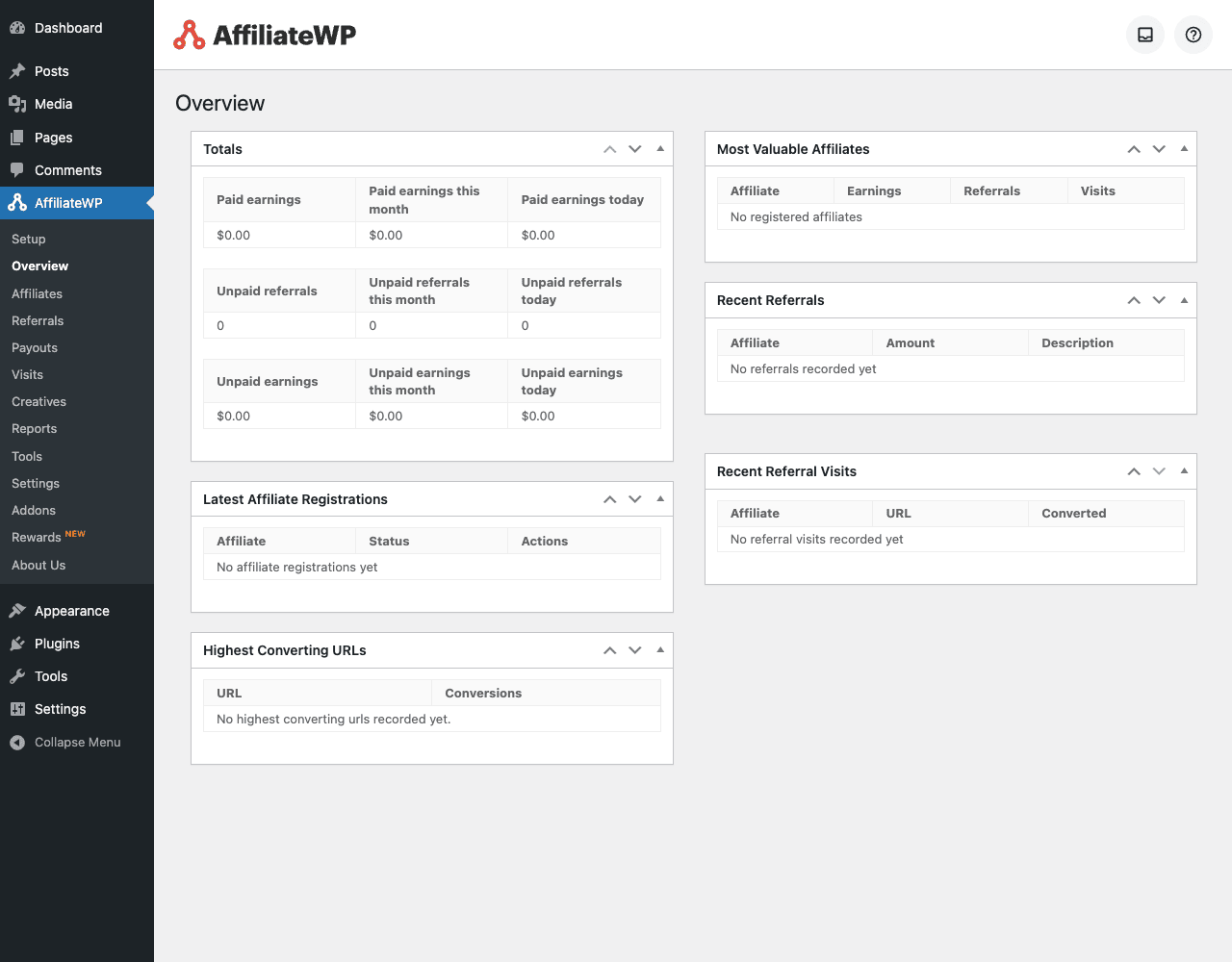
How an affiliate program actually works
Before we touch settings, let’s walk through one real referral end-to-end. The mental model makes the rest of the plugin click.
Maya runs a fashion blog. You sell sustainable handbags on a WooCommerce store. She signs up for your affiliate program at yourstore.com/affiliate-area. She gets her unique referral URL: https://yourstore.com?ref=maya. She writes a blog post about your products and includes that link.
A reader (Jasmine) clicks Maya’s link. AffiliateWP drops a cookie tied to Maya’s affiliate ID on Jasmine’s browser. Jasmine browses your store, adds a $200 handbag to her cart, checks out. The order completes.
AffiliateWP’s WooCommerce integration sees the completed order, reads the cookie, and creates a referral record linked to Maya. Your default commission rate is 15%, so the referral amount is $30. Status: unpaid.
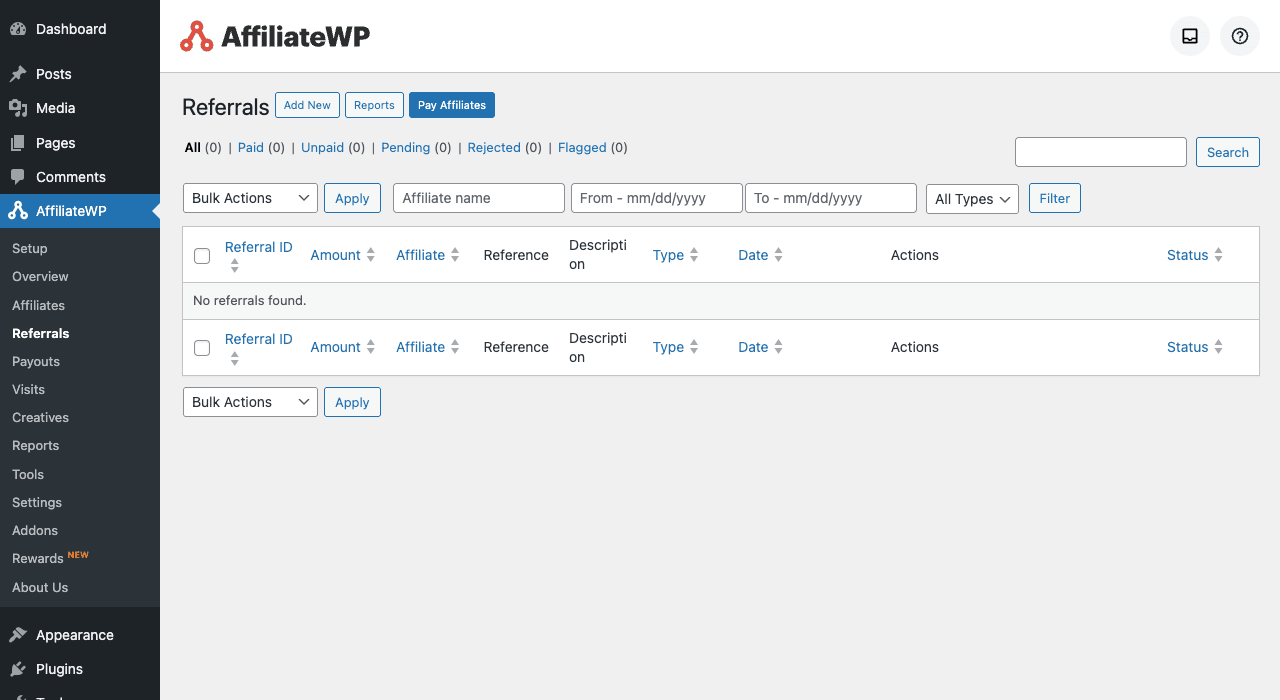
Two weeks later you check the Referrals page. Maya has $30 unpaid. You click Pay Affiliates, pick your payout method (manual, PayPal Mass Pay, or Stripe Payouts), and the $30 transfers to Maya. The referral status flips to paid. Maya gets a notification email.
That’s the whole loop. Sign-up, link, visit, conversion, commission, payout. Every part of the plugin exists to make one of these five steps work cleanly.
Key features
These are the parts of AffiliateWP that actually matter:
- Self-service affiliate registration. Your affiliates sign up themselves via a front-end form on
/affiliate-area. Optional admin approval before they go live. No back-and-forth onboarding emails. - Referral URL generator. Each affiliate gets a unique URL (
?ref=USERNAMEor?ref=ID). The front-end dashboard has a generator that turns any URL on your site into a referral link. - Cookie-based tracking. A 1-day default (configurable up to 365 days) cookie attributes visits and conversions to the right affiliate. Direct link tracking (no cookie) is available via add-on.
- Commission rules. Flat-rate (e.g. $10 per referral), percentage (e.g. 15% of order), per-product overrides, per-affiliate overrides. Each rule layers on top of the defaults.
- 24+ integrations. WooCommerce, Easy Digital Downloads, LearnDash LMS, MemberPress, Paid Memberships Pro, Restrict Content Pro, Paid Member Subscriptions Pro, Gravity Forms, Formidable Pro, Ninja Forms, Contact Form 7, Stripe, PayPal Buttons, Give, Charitable, Elementor, and more.
- Affiliate dashboard. A front-end "Affiliate Area" with seven tabs: Stats, URLs, Coupons, Creatives, Payouts, Visits, Profile. Affiliates self-serve everything.
- Creatives library. Upload banner images and text snippets. Affiliates download them from the dashboard. Each creative gets a tracked URL.
- Coupon tracking. Tie a WooCommerce or EDD coupon code to an affiliate. When a customer uses the code, attribution goes to that affiliate even without clicking a referral link. Powerful for influencer programs.
- Payout methods. Manual (mark as paid in admin), Store Credit, PayPal Payouts (mass payment via PayPal API), Stripe Payouts (direct bank transfer).
- Recurring commissions. If the integrated store supports recurring billing (WooCommerce Subscriptions or Paid Memberships Pro), AffiliateWP can pay the affiliate on every renewal, not just the first sale.
- Anti-fraud. Self-referral blocking (an affiliate can’t refer themselves), affiliate IP blacklist, email blacklist, manual referral approval before payout.
- Per-affiliate rates. Override the default commission rate on individual affiliates. Useful for VIP affiliates or for tier-based programs.
- Reports. Per-affiliate, per-time-range, per-integration, with CSV export.
- REST API. Full read/write access to affiliates, referrals, visits, payouts, campaigns via
/wp-json/affwp/v1/.
How it works (for users)
We’ll go through the full setup of one affiliate program, panel by panel.
Step 1: Decide your commission rules first
Before you touch the plugin, decide on paper:
- Default rate. Most stores start at 10-20% percentage. If you sell low-margin physical goods, drop to 5-10%. If you sell high-margin digital downloads or memberships, bump to 25-40%.
- Cookie duration. Default is 1 day, but most stores extend to 30 days. Longer is better for affiliates (more conversions credited to them), shorter is more conservative for you.
- Per-product overrides. Do you want a different rate on certain products? AffiliateWP lets you set per-product or per-category overrides. Decide which products are commission-eligible at what rates.
- Approval mode. Auto-approve new affiliates or require manual approval? Manual is safer for the first 90 days; switch to auto once you have a feel for the quality of sign-ups.
Without this paper exercise, the plugin’s settings panel feels overwhelming. Five minutes of pre-planning saves an hour of second-guessing later.
Step 2: Set up the affiliate area page
AffiliateWP needs a front-end page where affiliates log in and see their dashboard. The plugin auto-creates an "Affiliate Area" page on first activation, with the [affiliate_area] shortcode. If it didn’t, create a new WordPress page, paste [affiliate_area] in the content, publish.
Visit yoursite.com/affiliate-area in an incognito window. You should see a registration form (or a login form, if you’re already a user). That’s where your affiliates will land.
Step 3: Enable your integration
Go to AffiliateWP → Settings → Integrations in the admin. Tick the platform you sell on:
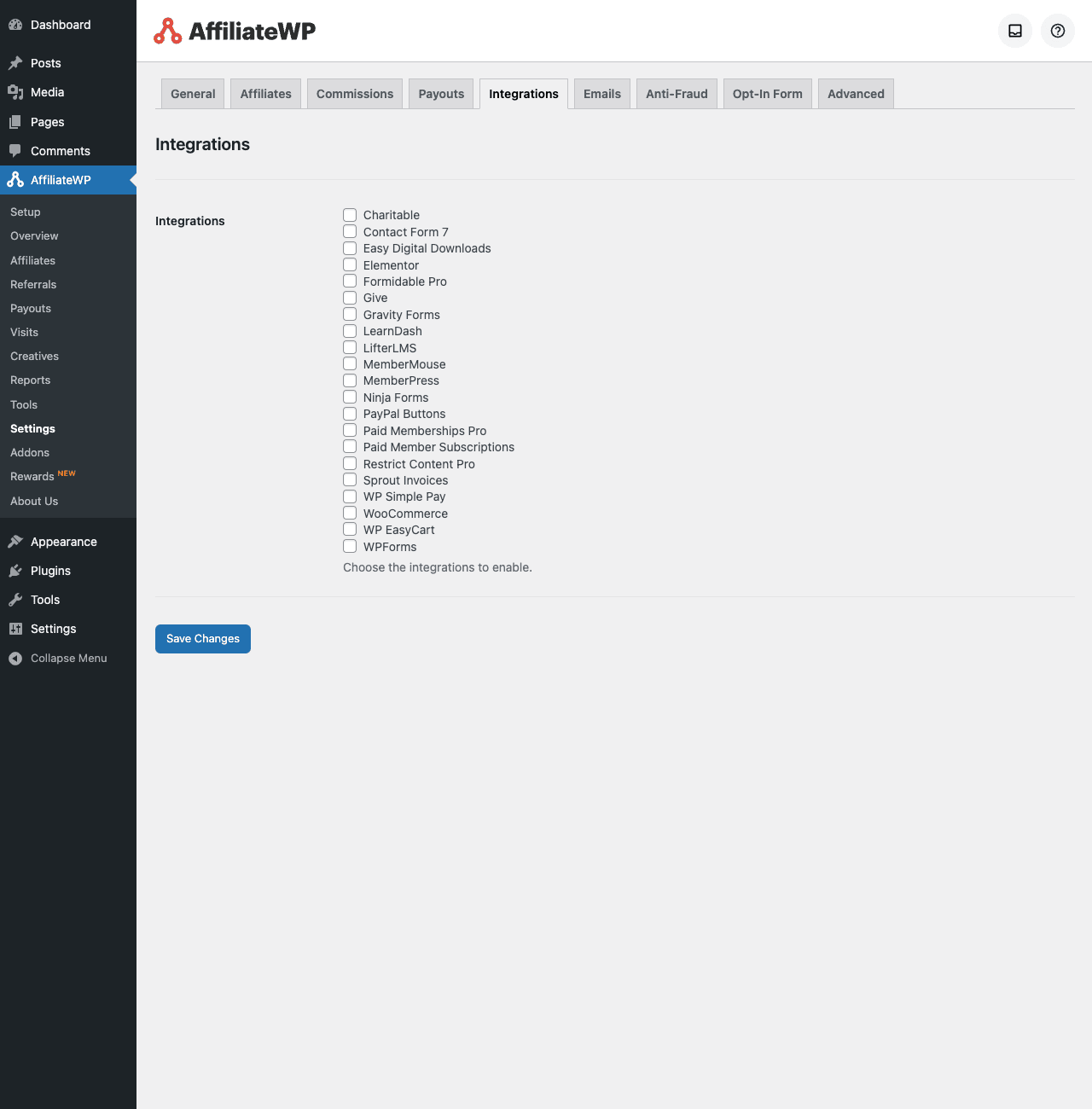
Tick WooCommerce if you’re a Woo shop. Tick Easy Digital Downloads if you sell downloads. Tick MemberPress / LearnDash / Paid Memberships Pro if those are your platforms. You can tick multiple, AffiliateWP tracks across all of them on the same site.
Each ticked integration adds a new column to the per-affiliate commission settings (so you can have different rates per integration) and an "Allow Referrals" toggle on the integration’s own products or courses.
Hit Save Changes.
Step 4: Set your default commission rate
Go to AffiliateWP → Settings → Commissions.
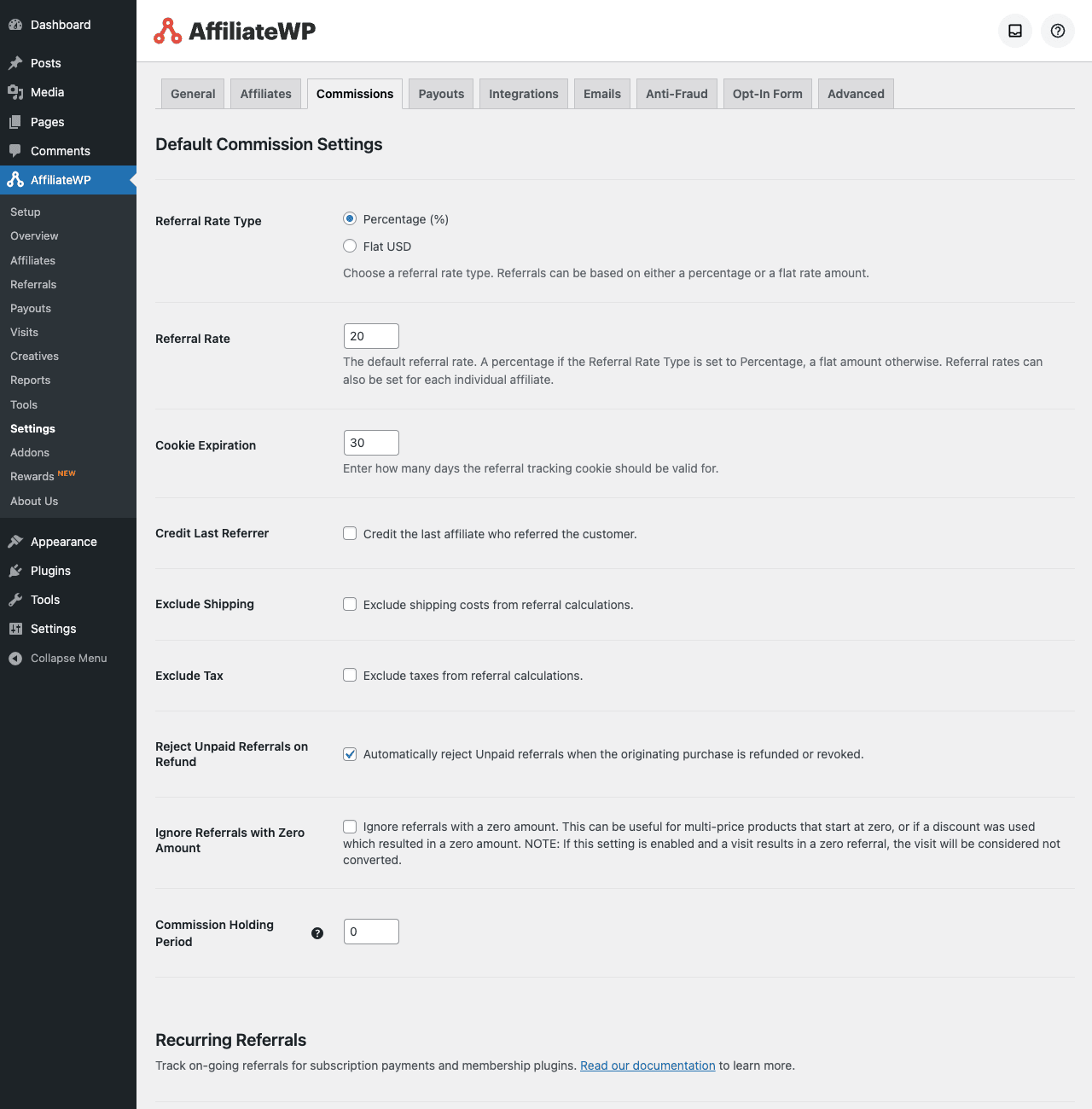
Key decisions:
- Referral Rate Type: Percentage (15%) or Flat ($10). Most stores pick Percentage for goods, Flat for memberships.
- Referral Rate: the number. 20 = 20% if Percentage, $20 if Flat.
- Cookie Expiration: how long the visit cookie lives, in days. Default 1, common production value 30.
- Credit Last Referrer: if the visitor’s cookie shows multiple affiliates over time, which one gets the commission? Default is Last Referrer wins. Change to "First" if you prefer that model.
- Exclude Shipping: don’t include shipping in the commission base. Usually yes for physical goods.
- Exclude Taxes: don’t include tax in the commission base. Usually yes (you don’t want to pay commission on tax you have to remit).
- Reject Unpaid Referrals on Refund: if the order is refunded, mark the referral as rejected. Almost always yes.
- Commission Holding Period: a number of days a referral must "season" before it can be paid. Set this to your refund window (e.g. 14 or 30 days). Stops you from paying commissions on orders that later get refunded.
Hit Save Changes.
Step 5: Tweak the registration form
AffiliateWP → Settings → Affiliates. Set defaults like "Auto-approve new affiliates" (or off, to require approval), terms-of-service URL, minimum payout amount.
AffiliateWP → Settings → Opt-In Form lets you customize the registration form fields. Standard fields: name, email, account URL, social links, payment method, payout email. Add custom fields as needed.
Step 6: Add your first creative
AffiliateWP → Creatives → Add New. Upload a banner image. Title it. Pick the destination URL. Save. Now every affiliate sees this banner in their dashboard and can grab the HTML embed code.
For a typical store, you’d add three to five creatives: a 728×90 leaderboard, a 300×250 medium rectangle, a 160×600 skyscraper, a text-link snippet, and a product-specific banner.
Step 7: Test the full flow
Open yoursite.com/affiliate-area in an incognito window. Register as a test affiliate (use a fake name and a real-but-secondary email). Copy your referral URL. Open another incognito window, paste the URL, browse to a product, add to cart, complete a test order (use Stripe test mode if you’re not doing a real charge).
Back in admin: AffiliateWP → Referrals. You should see a new row with the test order, the referral amount, the affiliate name, and a status of "Unpaid".
If the referral didn’t appear, troubleshooting in this order:
- Check the cookie, open dev tools on the page where you pasted the referral link and look for an
affwp_refcookie. - Check that the integration is ticked under Settings → Integrations.
- Check that the test order’s status is "Completed" (not "Processing", settings can require Completed status).
Once a referral appears, the loop is working.
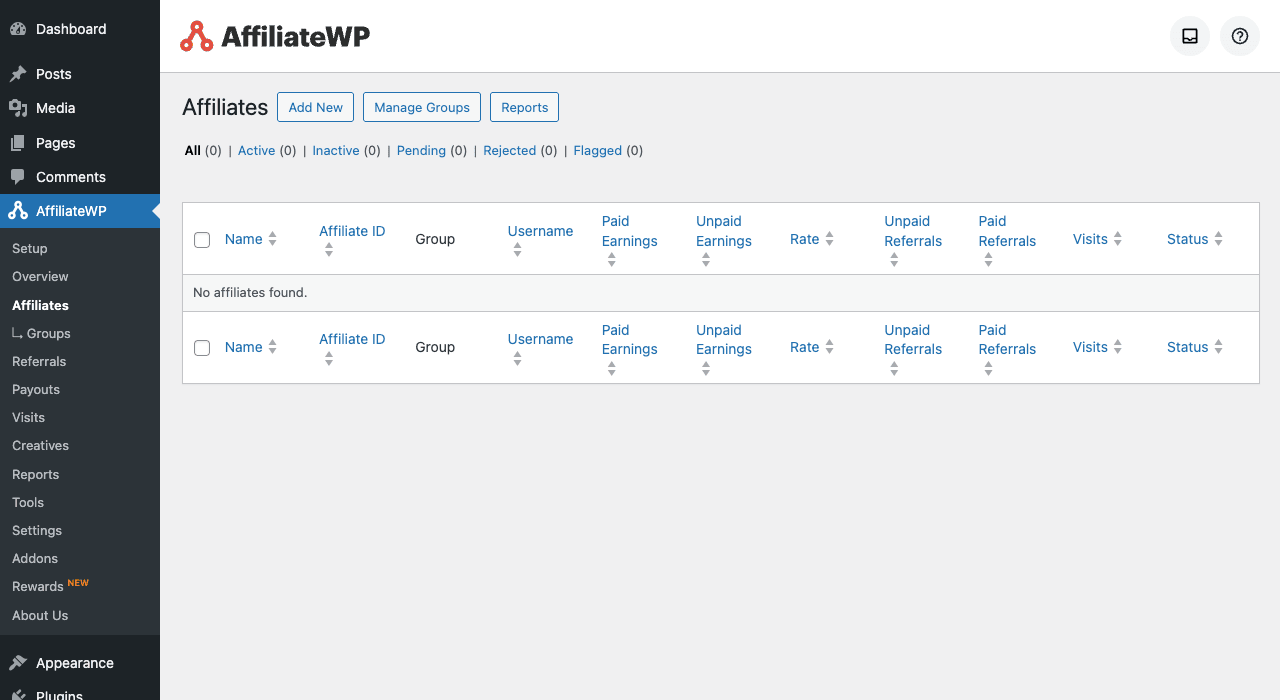
Installation and setup
Setup is fast.
Prerequisites. WordPress 6.0+, PHP 7.4+. Any theme works. For commerce integrations, install your store plugin (WooCommerce, EDD, etc.) first.
Step 1: install AffiliateWP from Plugins → Add New → Upload. Activate.
Step 2: paste your license key in AffiliateWP → Settings → General. On a fresh activation the plugin walks you through an onboarding wizard; pick "Skip Setup" if you’d rather configure manually.
Step 3: visit each settings sub-tab once:
- General: license, setup wizard.
- Affiliates: registration defaults, payout settings.
- Commissions: the most important tab. Default rate, cookie expiration, exclusions, holding period.
- Payouts: choose default payout method (manual / store credit / PayPal / Stripe). Connect Stripe if you’ll use Stripe Payouts.
- Integrations: tick your platforms.
- Emails: customize transactional email templates.
- Anti-Fraud: enable IP/email blacklists, self-referral blocking.
- Opt-In Form: registration form fields.
- Advanced: REST API, debug logging, uninstall.
Step 4: create your Affiliate Area page. The plugin’s setup wizard does this automatically; if it didn’t, create a WordPress page and add [affiliate_area] to the body.
Step 5: test the registration flow in an incognito window before announcing the program.
Real-world setup, including the first commission rule, takes about thirty minutes.
Commission rules in practice
The commission engine has three layers: defaults, per-product overrides, per-affiliate overrides. Higher specificity wins.
Defaults (Settings → Commissions): the rate that applies to every referral unless overridden. Set this for the typical case.
Per-product overrides: each product (in WooCommerce / EDD / LearnDash / etc.) has an "Affiliate Settings" panel where you can set a different rate for that specific product. Common patterns:
- "Higher rate for high-margin products": 15% default, 30% on digital templates.
- "No commission on certain SKUs": set rate to 0 on items where you don’t want to pay out (e.g. gift cards, sale items).
- "Flat rate on subscription products": $20 flat per signup regardless of plan tier.
Per-affiliate overrides: each affiliate (in AffiliateWP → Affiliates → Edit) has a "Rate" field. Common patterns:
- VIP affiliates with a 2x rate.
- Tier upgrade: someone passes $1000 in lifetime referrals, you bump them from 15% to 20%.
- Influencer custom rate: 30% for a single high-traffic partner.
The plugin checks per-affiliate first, then per-product, then defaults. The most specific rule wins.
Recurring commissions (Settings → Commissions → Recurring Referrals): if you sell subscriptions or memberships, this section decides whether the affiliate gets paid only on the first sale or on every renewal. "Every renewal" is what makes affiliate programs profitable on subscription products, your best affiliates effectively get paid forever as long as their referrals stay subscribed.
Paying your affiliates
Four payout methods, picked at the moment of payout (not pre-configured):
Manual: AffiliateWP shows you the total each affiliate is owed. You pay them via whatever method (bank transfer, PayPal, Wise, check), then click "Mark as Paid" in admin. The plugin doesn’t move money, you do.
Store Credit (WooCommerce / EDD only): pay affiliates in store credit that they can spend on your own products. Some stores prefer this since it keeps money in-house. Best for hobby/community brands; serious affiliates expect cash.
PayPal Payouts: AffiliateWP calls PayPal’s Mass Pay API and sends money directly to each affiliate’s PayPal account. Setup requires a PayPal Business account and API credentials. Fees apply.
Stripe Payouts: the modern equivalent. Each affiliate connects their own Stripe Express account (Stripe handles the KYC paperwork). When you click Pay Affiliates, Stripe transfers from your balance to each affiliate’s connected account. Funds arrive in their bank in 2-5 business days. This is the cleanest option for international payouts.
The Referrals page handles batching. Filter to "Unpaid", select all, click Pay Affiliates, pick the method. AffiliateWP processes the batch and updates statuses.
Integrations and how they’re wired
Twenty-plus integrations ship in the base plugin. We won’t list all of them. Here’s how the most-used ones work:
WooCommerce: the gold standard. The integration adds an "Affiliate" tab to every WooCommerce product. Per-product commission rate overrides live there. Referral attribution happens on the woocommerce_order_status_completed hook. Refunds reverse the referral if you ticked "Reject on Refund".
Easy Digital Downloads: same model as Woo, applied to digital download products. Works with both EDD core and EDD Recurring Payments for renewal commissions.
LearnDash LMS: assigns commissions on course purchases. If you sell a $300 course and someone refers a student, the affiliate gets the configured percentage. Works with LearnDash Groups too.
MemberPress / Paid Memberships Pro / Restrict Content Pro / Paid Member Subscriptions Pro: all four memberhip platforms are supported. Commissions on membership signup, optional recurring commissions on renewals.
Gravity Forms / Formidable Pro / Ninja Forms / WPForms / Contact Form 7: form-based commissions. Lead generation programs where the affiliate gets paid for a form submission rather than a purchase. Useful for B2B services.
Stripe Buttons / PayPal Buttons / WP Simple Pay: track referrals on standalone payment buttons without a full e-commerce platform.
Elementor: lets you wrap any Elementor element in an affiliate-content gate (only visible to affiliates, or only to non-affiliates).
Charitable / Give: donation platforms. Pay commissions on donations driven by an affiliate.
Each integration has its own settings panel inside AffiliateWP, surfacing the options specific to that platform.
Real-world use cases
Five patterns where AffiliateWP fits especially well:
The indie SaaS / membership site. Your customers love your product. Give them a 30% recurring commission on every new signup they refer. They become your sales team. Integrate with MemberPress or Paid Memberships Pro, turn on recurring commissions, watch your CAC drop.
The course creator. Sell a $500 course via LearnDash, give past students 20% commission for referring new students. Past students already trust the product and your audience trusts them. Conversion rates are far higher than cold ads.
The physical-goods store. WooCommerce shop selling sustainable goods. Run an influencer affiliate program with custom coupon codes for each influencer (so they don’t even need to push referral links, their followers just type their code at checkout). Per-influencer rates let you negotiate individual deals.
The B2B agency / consultancy. Pay finder’s fees on lead form submissions. Affiliate fills out a form, gets paid $200 when the lead converts to a discovery call. Uses Gravity Forms integration.
The newsletter or content site. Curate products from multiple stores, drive traffic with affiliate links, all in-house. Pair with WooCommerce Subscriptions on a few of your own products. Affiliates can be both external partners and your own readers.
The common thread: AffiliateWP is for stores where you already have an audience. If you don’t have an audience yet, an affiliate program won’t magically produce one, it amplifies an existing one.
Developer reference
AffiliateWP has a clean hook surface. The most-used ones, with examples:
Detect if a user is an affiliate
$user_id = get_current_user_id();
if ( affwp_is_affiliate( $user_id ) ) {
 // they have an active affiliate account
}

// get the affiliate object
$affiliate = affwp_get_affiliate( $user_id );
echo $affiliate->rate; // their commission rate
echo $affiliate->status; // active, inactive, pending, rejected
echo $affiliate->referral_url; // their unique referral URL
Modify the commission calculation
The most common customization request: "we want a different commission formula." Filter affwp_calc_referral_amount:
add_filter( 'affwp_calc_referral_amount', function( $referral_amount, $affiliate_id, $amount, $reference, $product_id ) {
 // Bonus 5% on any product in the "Premium" category
 if ( has_term( 'premium', 'product_cat', $product_id ) ) {
 $bonus = $amount * 0.05;
 $referral_amount += $bonus;
 }
 return $referral_amount;
}, 10, 5 );
The same filter works for tier-based rates, time-limited promotions, "double commission week", etc.
React to a new affiliate signup
add_action( 'affwp_add_new_affiliate', function( $affiliate_id, $status, $args ) {
 // Send to a CRM, kick off an onboarding sequence, etc.
 $affiliate = affwp_get_affiliate( $affiliate_id );
 send_to_crm( array(
 'email' => $affiliate->payment_email,
 'tag' => 'new-affiliate',
 'rate' => $affiliate->rate,
 ) );
}, 10, 3 );
React to a completed referral
add_action( 'affwp_set_referral_status', function( $referral_id, $new_status, $old_status ) {
 if ( $new_status === 'paid' && $old_status!== 'paid' ) {
 // The referral was just paid out
 $referral = affwp_get_referral( $referral_id );
 notify_affiliate( $referral->affiliate_id, "We just paid you $". $referral->amount );
 }
}, 10, 3 );
Add custom fields to the registration form
add_action( 'affwp_register_fields_before_tos', function( $affiliate_id ) {?>
 <p>
 <label>
 <?php esc_html_e( 'Your audience size', 'gpl' );?><br/>
 <select name="audience_size">
 <option value="under_1k">Under 1k</option>
 <option value="1k_10k">1k - 10k</option>
 <option value="10k_100k">10k - 100k</option>
 <option value="over_100k">Over 100k</option>
 </select>
 </label>
 </p>
 <?php
} );

add_action( 'affwp_register_user', function( $affiliate_id, $status, $args ) {
 if ( isset( $_POST['audience_size'] ) ) {
 affwp_update_affiliate_meta( $affiliate_id, 'audience_size', sanitize_text_field( $_POST['audience_size'] ) );
 }
}, 10, 3 );
The captured value lives in wp_affiliate_wp_affiliate_meta and is readable via affwp_get_affiliate_meta(). You can also surface it on the admin affiliate edit screen with a couple more filters.
Use the REST API
AffiliateWP exposes a full REST API under /wp-json/affwp/v1/. Endpoints:
GET /affiliates, list affiliatesPOST /affiliates, create an affiliateGET /affiliates/<id>, get onePUT /affiliates/<id>, updateGET /referrals, list referralsPOST /referrals, create a referral (useful for manual / API-only attribution)GET /visits,/payouts,/campaigns,/creatives
Auth uses consumer key/secret pairs created in Settings → Advanced → REST API.
# List the first 20 affiliates
curl -u "ck_xxx:cs_xxx" "https://example.com/wp-json/affwp/v1/affiliates?per_page=20"

# Create a referral programmatically
curl -u "ck_xxx:cs_xxx" -X POST "https://example.com/wp-json/affwp/v1/referrals" \
 -H "Content-Type: application/json" \
 -d '{"affiliate_id":42,"amount":15.00,"description":"Manual lead bonus","status":"unpaid"}'
Useful for bridging to non-WordPress systems (a separate marketing automation tool, a CRM-driven attribution engine).
Build a custom integration
If you sell through a custom plugin that isn’t in the integrations list, write your own. Subclass Affiliate_WP_Base:
class My_Custom_Integration extends Affiliate_WP_Base {
 public $context = 'my-platform';

 public function init() {
 // Hook into your platform's "order complete" event
 add_action( 'my_platform_purchase_complete', array( $this, 'add_referral' ), 10, 2 );
 }

 public function add_referral( $order_id, $order_total ) {
 if (! $this->was_referred() ) {
 return;
 }

 $affiliate_id = $this->affiliate_id;
 $amount = $this->calculate_referral_amount( $order_total, $order_id );

 $this->insert_pending_referral( $amount, $order_id, "Order #{$order_id}" );
 $this->complete_referral( $order_id );
 }
}

add_action( 'affwp_loaded', function() {
 new My_Custom_Integration;
} );
The base class handles cookie detection, affiliate lookup, commission calc, referral persistence. You provide the platform-specific glue. The official integrations are all written this way.
WP-CLI
# List affiliates
wp affwp affiliate list

# Create an affiliate for an existing user
wp affwp affiliate create --user_id=42 --rate=25 --status=active

# List unpaid referrals
wp affwp referral list --status=unpaid

# Pay a batch of referrals
wp affwp payout create --affiliate_id=42 --amount=150 --payout_method=manual
The CLI mirrors the admin operations and is useful for bulk imports / migrations from another affiliate system.
Database tables
Eight custom tables, all prefixed wp_affiliate_wp_:
affiliates,affiliate_metareferrals,referrals_metavisitspayouts,payouts_metacreativescampaignscustomersconsumer_keys(REST API auth)
Query via the affiliate_wp()->affiliates, affiliate_wp()->referrals, etc. accessors. Don’t write raw SQL, caching and validation live in the accessor methods.
Performance, compatibility, and gotchas
Things worth knowing that aren’t in the marketing:
Cookie domain matters for multi-site. If you run multiple sites under different domains and want to share affiliate attribution across them, you’ll need to configure shared cookie domains manually. Out of the box, attribution is per-domain.
The ?ref= parameter triggers the cookie set. Affiliates need to share URLs that include ?ref=USERNAME. Bare URLs without the parameter won’t track. Direct-Link tracking (no cookie needed) is an official add-on if you want bare-URL attribution.
Page caching plays nice except when you cache the ?ref= URL variant. Most cache plugins handle this correctly (the query parameter creates a new cache key), but verify with your specific cache + theme combo. WP Rocket and similar bypass logged-in users automatically, which is the most important case.
The "Pending → Unpaid → Paid" status flow has a holding period. Set "Commission Holding Period" to match your refund window. Stops you from paying commissions on orders that later get refunded. Common values: 14 days (digital), 30 days (physical with returns).
Anti-fraud features are off by default. Self-referral blocking (an affiliate can’t refer themselves), affiliate IP blacklist, email blacklist. Turn them on under Settings → Anti-Fraud. The default-off behavior is a holdover from older versions; turn them all on.
The Affiliate Area page must be reachable without a login. WordPress has a habit of routing logged-out users to wp-login.php on protected pages. Verify the page is set to "Public" visibility and doesn’t have any membership restrictions blocking unauthenticated visits, otherwise affiliates can’t register.
Recurring commissions require an integration that supports recurring billing. WooCommerce Subscriptions and Paid Memberships Pro and a few others. If your billing happens via Stripe Buttons or a one-off PayPal button, recurring commissions don’t fire, only the first sale generates a referral.
The plugin doesn’t issue 1099s. Tax forms for US affiliates earning over the threshold are not generated. You’ll need a separate tool or accountant for that. AffiliateWP exports a CSV of total earnings per affiliate, which is what you give your accountant.
Migrating from another affiliate platform requires manual work. No automated importer. The path: export your existing affiliates as CSV, write a quick wp eval-file script to affwp_add_affiliate() each one, then write a second script to insert historical referrals. Plan a couple hours for a 500-affiliate migration.
Translation strings live in affiliate-wp/languages/. Text domain is affiliate-wp. Drop your .mo for non-English sites.
Pricing and licensing
The official AffiliateWP pricing is tiered:
- Personal: $199.50/year, 1 site, core only.
- Plus: $299.50/year, 3 sites, plus a few official add-ons.
- Professional: $399.50/year, 10 sites, all official add-ons, REST API.
- Ultimate: $799.50/year, unlimited sites, everything.
All tiers are subscription-based with annual renewal for updates and support.
GPL Times sells the Ultimate-equivalent version of AffiliateWP under GPL. The code is identical to what Sandhills Development ships, same affiliate-wp.php, same integration files. The pricing structure is different: a one-time purchase for indefinite use across unlimited sites with no per-seat counting. Updates come from GPL Times rather than from affiliatewp.com. For an agency running multiple client sites or a brand running staging + production + dev, the savings vs. the Ultimate subscription are dramatic.
The trade-off: official ticket-based support from Sandhills is gated to paying subscribers. If your affiliate program is core to your business and you need a guaranteed 24-hour reply when something breaks, the official subscription buys peace of mind.
FAQ
How is AffiliateWP different from hosted platforms like ShareASale or Impact?
ShareASale and Impact are marketplaces, they connect you to a pool of affiliates and handle tracking/payouts in exchange for 20-30% of revenue. AffiliateWP is self-hosted: you bring your own affiliates and keep all the revenue, in exchange for a flat license fee. For stores doing more than ~$10k/year in affiliate-driven revenue, AffiliateWP.
Can affiliates sign up themselves, or do I have to add them manually?
Either. The default is self-service: an affiliate visits /affiliate-area, registers with name + email + payout details, and is approved automatically (or pending admin approval, your choice). You can also create affiliates manually from the admin.
How does the cookie tracking work?
When a visitor clicks a referral URL (?ref=USERNAME), AffiliateWP drops a cookie tied to the affiliate’s ID. The cookie’s expiration is configurable (default 1 day, common production value 30 days). On a future purchase by that visitor, the integration reads the cookie and attributes the order to the affiliate.
What if the visitor blocks cookies or uses Safari ITP?
Cookie-only attribution will lose those visits. AffiliateWP has a Direct Link Tracking add-on that uses server-side fingerprinting as a fallback. Coupon-based attribution (the affiliate’s coupon code is typed at checkout) also bypasses cookies entirely, best for influencer programs where cookies aren’t reliable.
Does it handle recurring commissions on subscription products?
Yes, if the underlying integration supports recurring billing. WooCommerce Subscriptions, Paid Memberships Pro, MemberPress, and similar all work. Configure under Settings → Commissions → Recurring Referrals.
Can I pay affiliates internationally?
Yes. Stripe Payouts is the easiest path, it handles KYC, multi-currency, and bank transfers in 100+ countries. PayPal Mass Pay works wherever PayPal works. Manual payouts work everywhere (you handle the transfer yourself).
Does the affiliate dashboard look professional?
Out of the box, the dashboard is functional and templated to match your theme’s typography. For a more polished look, the [affiliate_area] template files are overridable in your theme, copy templates/dashboard-tab-*.php from the plugin to your theme’s affiliate-wp/ folder and edit.
Can affiliates have different commission rates?
Yes, via per-affiliate rates (set on the individual affiliate’s edit screen) or via Groups (an add-on that lets you bulk-set rates for a category of affiliates).
What anti-fraud is built in?
Self-referral blocking, IP blacklist, email blacklist, rejection on refund, manual approval before payout, and a commission holding period. Anti-Fraud add-on adds device fingerprinting and duplicate-detection.
Does it integrate with Slack / Zapier / webhooks?
Yes via the Webhooks add-on (Pro tier and above) or via custom code on the affwp_* action hooks. Zapier is available as an official add-on.
Will my affiliate program survive a site migration?
Yes. The data lives in standard WordPress database tables prefixed wp_affiliate_wp_. A standard backup + migration tool (Duplicator, All-in-One WP Migration, manual wp db export) takes the whole program with the site.
Final thoughts
AffiliateWP is the right tool when you have an audience and want them to bring you more customers, without paying a marketplace platform 30% of the revenue for the privilege. It’s not a turn-key "find affiliates for me" service. It’s the infrastructure layer, tracking, attribution, commissions, payouts, that the marketplaces would otherwise charge you 30% for.
Two specific recommendations if you’re picking it up. One: don’t set up the program without a clear answer to "who will my first ten affiliates be?". If you can’t name them, you don’t need the plugin yet, focus on building the audience first. Two: turn on every anti-fraud feature on day one. Self-referral blocking, IP blacklist, commission holding period set to your refund window. The defaults are too lax for production.
If your store is doing serious sales already and you’ve never had an affiliate program, AffiliateWP is the highest-ROI plugin you’ll install all year. If you’re early-stage and looking for distribution, build the audience first; then come back to AffiliateWP.
One more option if your needs run the other way: if you want a heavier, all-in-one platform with ranks, multi-level commissions, nine commission models, and a built-in affiliate area (with one-time pricing instead of a yearly license), Ultimate Affiliate Pro is the maximalist alternative worth comparing against AffiliateWP’s leaner approach.