

You sell something online and a happy customer says, "I’ll tell my friends." That’s free marketing, and right now you have no way to track it, no way to reward it, and no reason for anyone to keep doing it. A referral program fixes that, but most of the off-the-shelf affiliate tools assume you already run a WooCommerce store and just want to bolt commissions onto orders. Ultimate Affiliate Pro takes a wider swing. It hands you a full affiliate platform that lives entirely on your own WordPress site, with registration forms, an affiliate dashboard, gamified ranks, multi-level commissions, and nine different ways to pay people, whether or not you ever sell a single product through a cart.
I’ve set up affiliate programs three different ways over the years: with a SaaS network that took a cut of every payout, with a lean store-only plugin, and with this. This is the long, honest version of what Ultimate Affiliate Pro does well, where it gets fiddly, and the parts I’d want a warning about before I started clicking around. Site owner who just wants referral links that work, or developer who needs to hook into the commission logic, by the end you’ll know exactly what you’re getting.
Table of Contents
- What is Ultimate Affiliate Pro?
- Key features
- How affiliates register and get their link
- Setting commission rates: ranks vs product rates
- The nine commission models (and when to use each)
- Integrations: where the commissions come from
- Creatives, showcases, and the affiliate area
- Paying affiliates: single payouts vs mass payouts
- Real-world use cases
- Developer reference: hooks and shortcodes
- Don’t pay commissions you can’t claw back
- Performance, compatibility, and gotchas
- Ultimate Affiliate Pro vs AffiliateWP
- Pricing and licensing
- FAQ
- Final thoughts
What is Ultimate Affiliate Pro?
Ultimate Affiliate Pro is a self-hosted affiliate-program management platform for WordPress, made by WPIndeed Development (the team behind a stack of CodeCanyon plugins, with the product home at ultimateaffiliate.pro). Install it, and your WordPress site becomes the whole affiliate network: people sign up as affiliates, get a referral link, share it, and earn a commission on whatever action you decide to reward. You manage all of them from a dedicated admin dashboard.
The header description is plain enough about the scope: track referrals and commissions in real time, manage affiliates from a dashboard, configure flexible commission structures, and plug into popular e-commerce, membership, and form plugins. That last part matters. This is not a WooCommerce-only tool.
Here’s the mental model. An affiliate’s link is just your site URL with a ?ref=<id> parameter on the end. The variable is ref by default and you can rename it in settings if you want something prettier. When a visitor clicks that link, the plugin drops a cookie, tracks the visit, and if that visitor later does the thing you reward (buys, signs up, submits a form, clicks an ad), it records a referral and credits the affiliate. None of that lives in a third-party database. It’s all in custom tables on your own site, managed through a class the plugin calls UapDb.
One thing worth flagging early, because it surprised me: there are no custom post types here. A lot of WordPress plugins lean on CPTs for everything, but Ultimate Affiliate Pro stores affiliates, referrals, clicks, and payouts in its own database tables instead. That’s a deliberate choice and it’s the right one for this kind of high-write tracking data. It also means you won’t find your affiliates cluttering up the Posts screen.
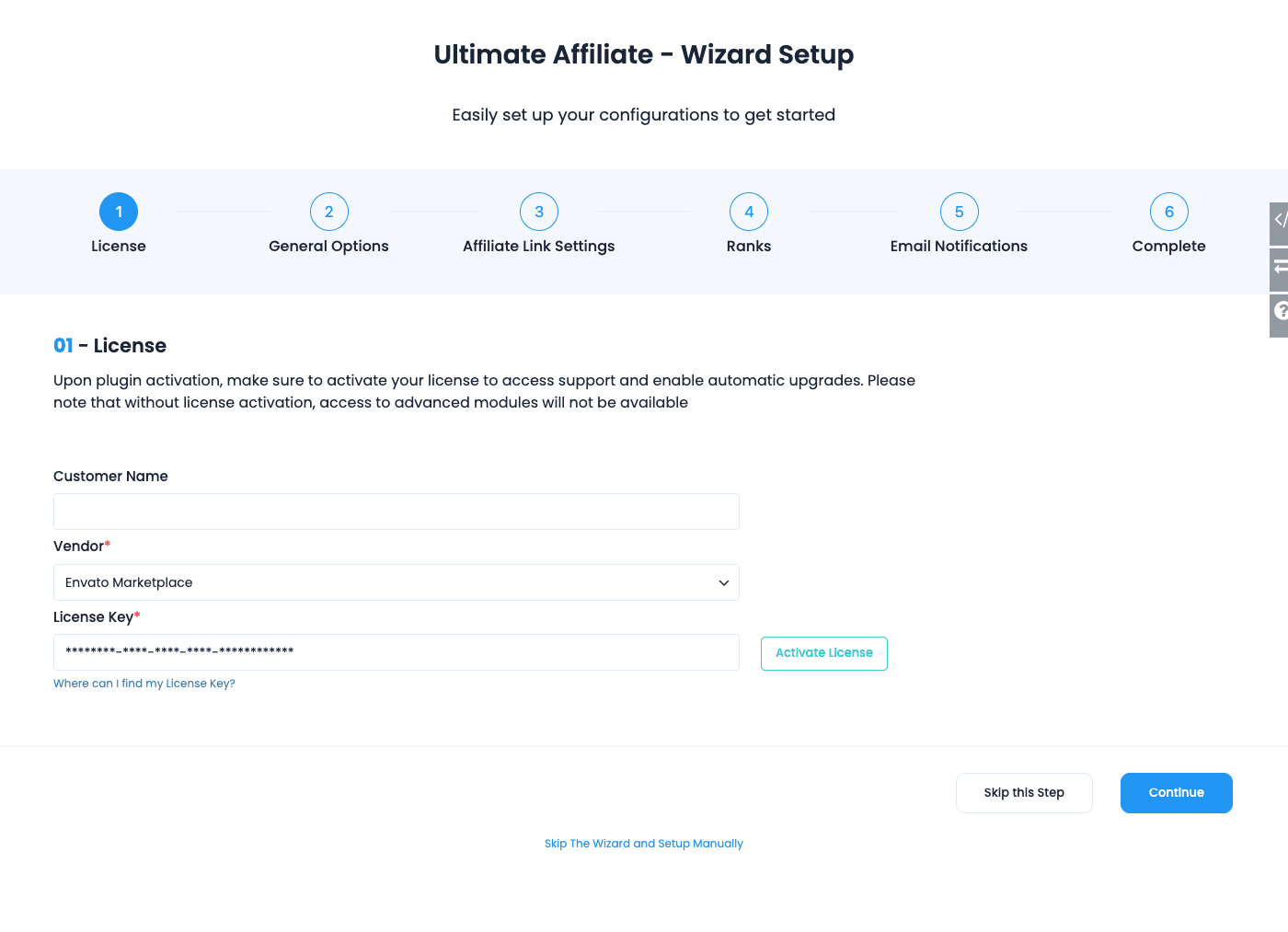
Getting started is a six-step setup wizard (License, General Options, Affiliate Link Settings, Ranks, Email Notifications, Complete) that runs the first time you activate the plugin from Plugins » Add New » Upload, so there’s no separate "installation" chore to write home about. The License step asks for an Envato Marketplace key on a CodeCanyon copy; the GPL copy from GPL Times doesn’t ask for an Envato key. Walk the wizard, pick a default referral rate, and you have a working program before you’ve poured a coffee.
Key features
Rather than dump the marketing sheet, here’s what actually changes how your program runs day to day.
- A complete front-end affiliate area. Registration, login, password reset, and the affiliate dashboard are all built in via shortcodes. You don’t have to wire up a separate forms plugin or a custom user flow.
- Ranks (real gamification). Create tiers like Bronze, Silver, Gold, each with its own commission rate and an achievement condition. Affiliates climb ranks as they perform. This is the lever that keeps top affiliates motivated.
- Product Rates. Override the global rate for specific products or specific affiliates, with start and end dates. Run a higher payout on a launch product for two weeks, then let it expire automatically.
- Nine commission models. Beyond plain "commission on a sale," you get pay-per-click, pay-per-signup, lifetime, recurring, cost-per-mille, and cost-per-action, each as a toggleable module.
- MLM / matrix commissions. Multi-level payouts, so an affiliate earns a slice when the affiliates they recruited make sales. You set the depth and the per-level amounts.
- Single and mass payouts. Pay one affiliate by hand, or run a bulk payout to everyone over a threshold. PayPal and Stripe payout modules push the money for you.
- Integrations with the plugins you already run. WooCommerce, Easy Digital Downloads, Ultimate Membership Pro, Ultimate Learning Pro, WooCommerce Subscriptions, Contact Form 7, and Elementor.
- Creatives. Upload banners and assets affiliates can grab from their dashboard, so they’re not making their own ugly graphics.
- Real-time tracking. Clicks and referrals are recorded as they happen, with their own admin screens.
- Email notifications per action. Fire a templated email when an affiliate registers, earns a commission, gets paid, or hits a rank.
Most of the core surface is on by default. The nine commission models and the payout gateways are opt-in modules you flip on under the Extensions tab, which keeps the program lean if you only need the basics.
How affiliates register and get their link
This is the part store-only affiliate plugins usually punt on, and it’s where Ultimate Affiliate Pro earns its "all-in-one" framing.
You drop the [uap-register] shortcode on a page, and that page becomes your affiliate signup form. Visitors fill it in, and depending on your settings they’re either approved instantly or held for your review. There’s a matching [uap-login-form], [uap-logout], and [uap-reset-password] so the whole account flow lives on your site, in your theme, under your domain.
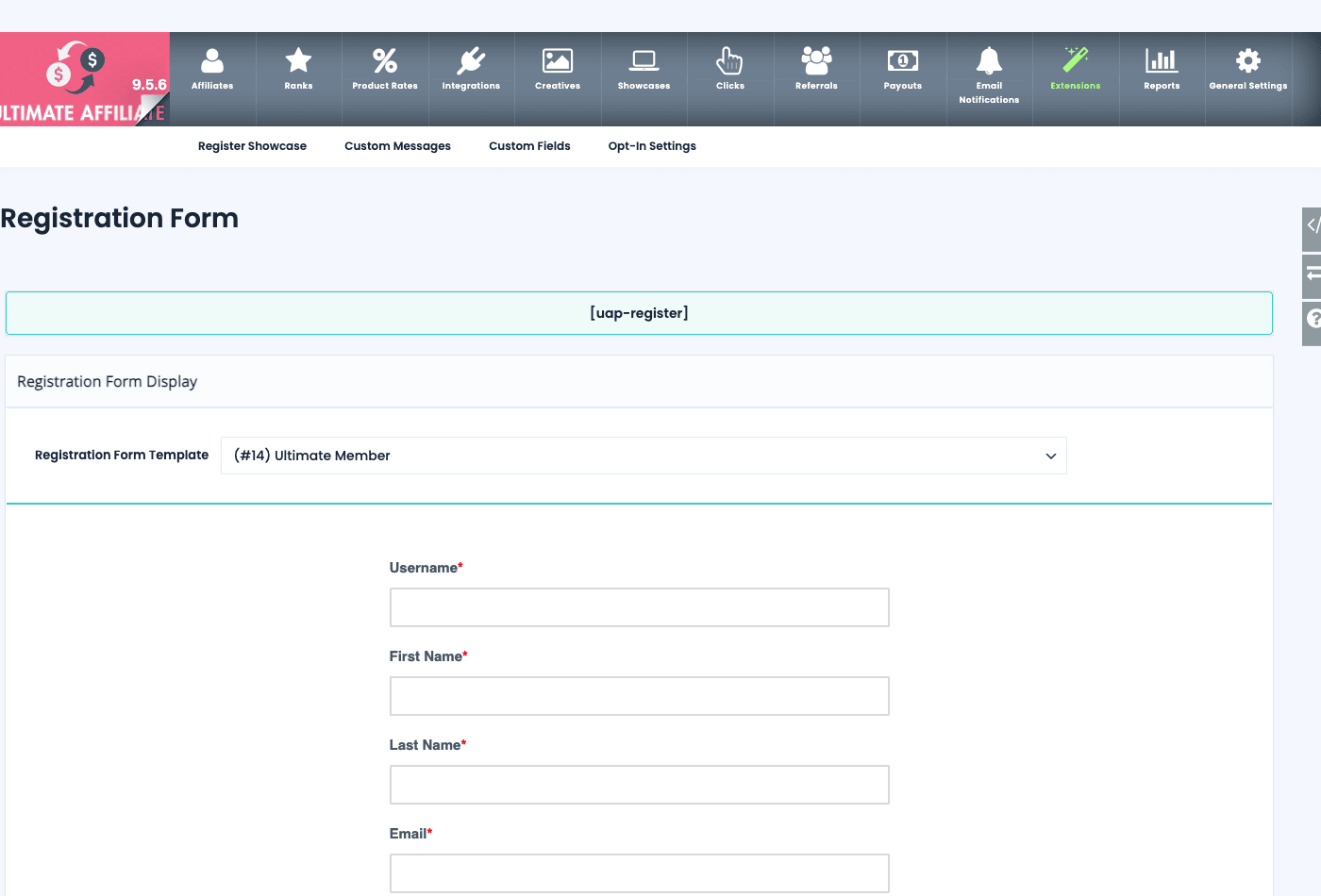
Worth knowing: the Registration Form has a Form Template dropdown, but it’s a set of built-in visual skins (Standard, Basic, Radius, BootStrap, and an Ultimate-Member-styled theme), not a form importer. Pick the one that best matches your site and the signup form inherits that look. The real flexibility sits one level down: the form section carries sub-tabs for Register Showcase, Custom Messages, Custom Fields, and Opt-In Settings, so you add your own custom fields, marketing-consent capture, and messaging without touching code.
For people who are already logged-in users on your site, there’s a softer entry point. The [uap-user-become-affiliate] shortcode renders a "become an affiliate" button, so an existing customer or member can join the program with one click instead of filling out a whole form again. That’s a genuinely good conversion move, because your warmest affiliate prospects are the customers you already have.
Once someone is an affiliate, their referral link is your site URL plus the ?ref=<their-id> parameter. They can grab it from their dashboard. If you’d rather your links not advertise the tracking variable, you can rename ref to anything in Ultimate Affiliate Pro » General Settings, and there’s a "Redirect Same Page Without URL parameters" toggle that strips the parameter from the address bar after the cookie is set, so the URL a visitor sees stays clean.
Tip: decide your approval policy before you launch. Auto-approving everyone is great for volume but invites spam and self-dealing. Holding new affiliates for manual review is safer for a small program. You can control this in code too (more on the uap_save_as_affiliate_filter hook later).
Setting commission rates: ranks vs product rates
Here’s where new admins get confused, so let me untangle it. Ultimate Affiliate Pro has more than one place to set how much an affiliate earns, and they can both apply to the same sale at the same time.
Ranks are tiers. You create a rank, give it a rate, and assign affiliates to it (or let them earn their way up through an achievement condition). A "Gold" rank might pay 30 percent. Ranks are about who the affiliate is.
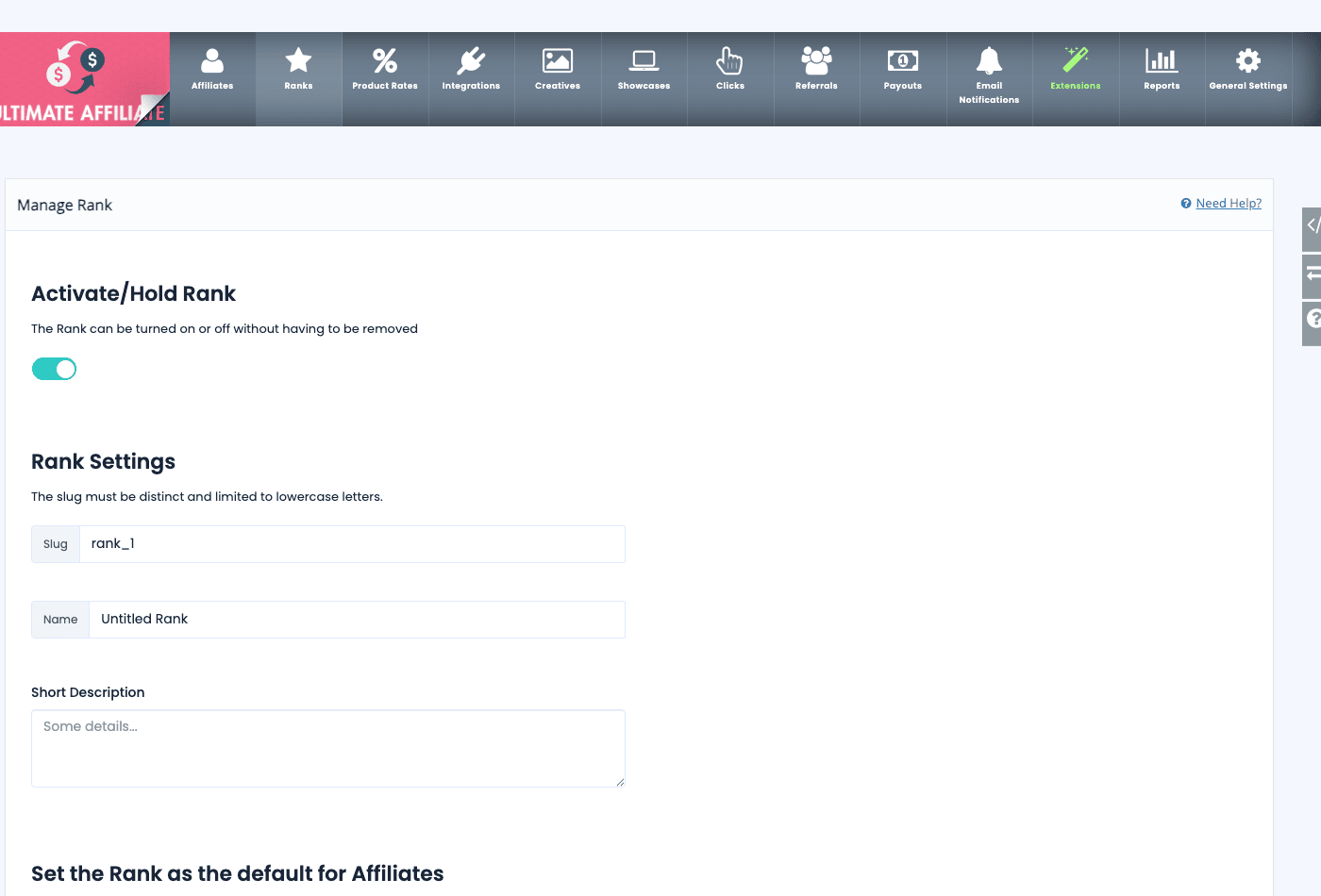
Creating a rank is quick. You give it an Activate/Hold toggle, a slug, a name, a short description, and you can mark one rank as the default that new affiliates land on. Set the rate per rank and you’ve got a tiered program.
Product Rates (the tab is labeled Product Rates, internally offers) are different. They set a rate for a specific product or a specific affiliate, with a Starting and Ending date and a Status. A Product Rate is about what is being sold, or a special deal for one person. The list view shows you Name, Rate, Affiliates, Products, Starting, Ending, and Status at a glance.
So what happens when both apply? Say an affiliate is on the Gold rank (30 percent) and there’s also a Product Rate of 40 percent running on the exact product they sold. Which wins? That’s decided by a dropdown in General Settings: "Which Rate should be used for Referral calculation?" The default option is "Biggest Amount," which means the affiliate gets the higher of the two. You can change that behavior, but you need to know it exists, because if you don’t, your commission math will quietly surprise you.
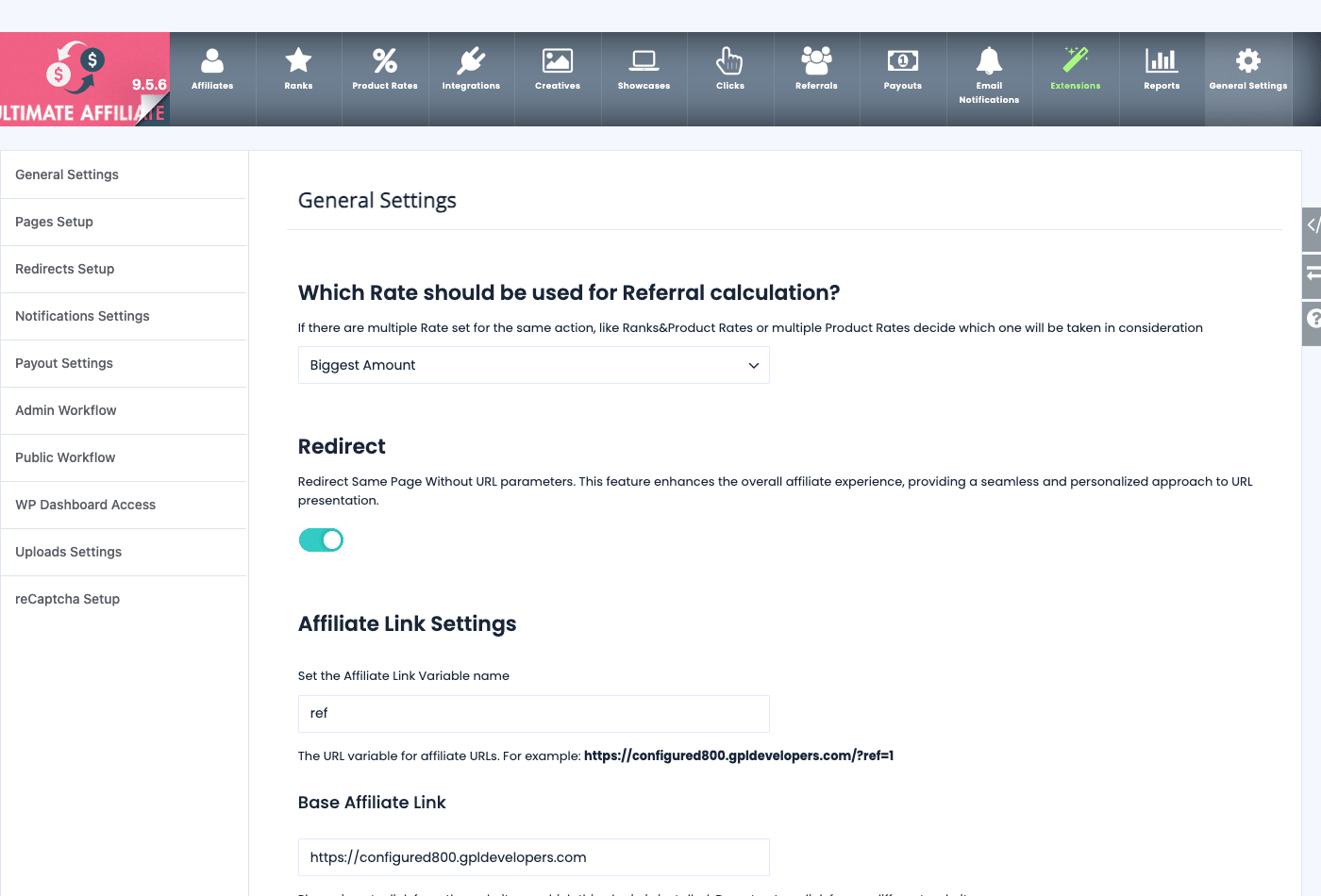
The General Settings screen is the control room for all of this, and it’s deeper than it first looks. The left sub-nav alone covers General Settings, Pages Setup, Redirects Setup, Notifications Settings, Payout Settings, Admin Workflow, Public Workflow, WP Dashboard Access, Uploads Settings, and reCaptcha Setup. You won’t touch most of these often, but it’s worth a slow read-through once, because the defaults here shape your whole program. The Public Workflow and Admin Workflow tabs in particular control what affiliates can see and do versus what stays with you.
The nine commission models (and when to use each)
Most affiliate plugins do one thing: pay a percentage when a sale closes. Ultimate Affiliate Pro ships nine separate commission models as toggleable modules under the Extensions tab (internally magic_features), and picking the right one is the difference between a program that fits your business and one that fights it.
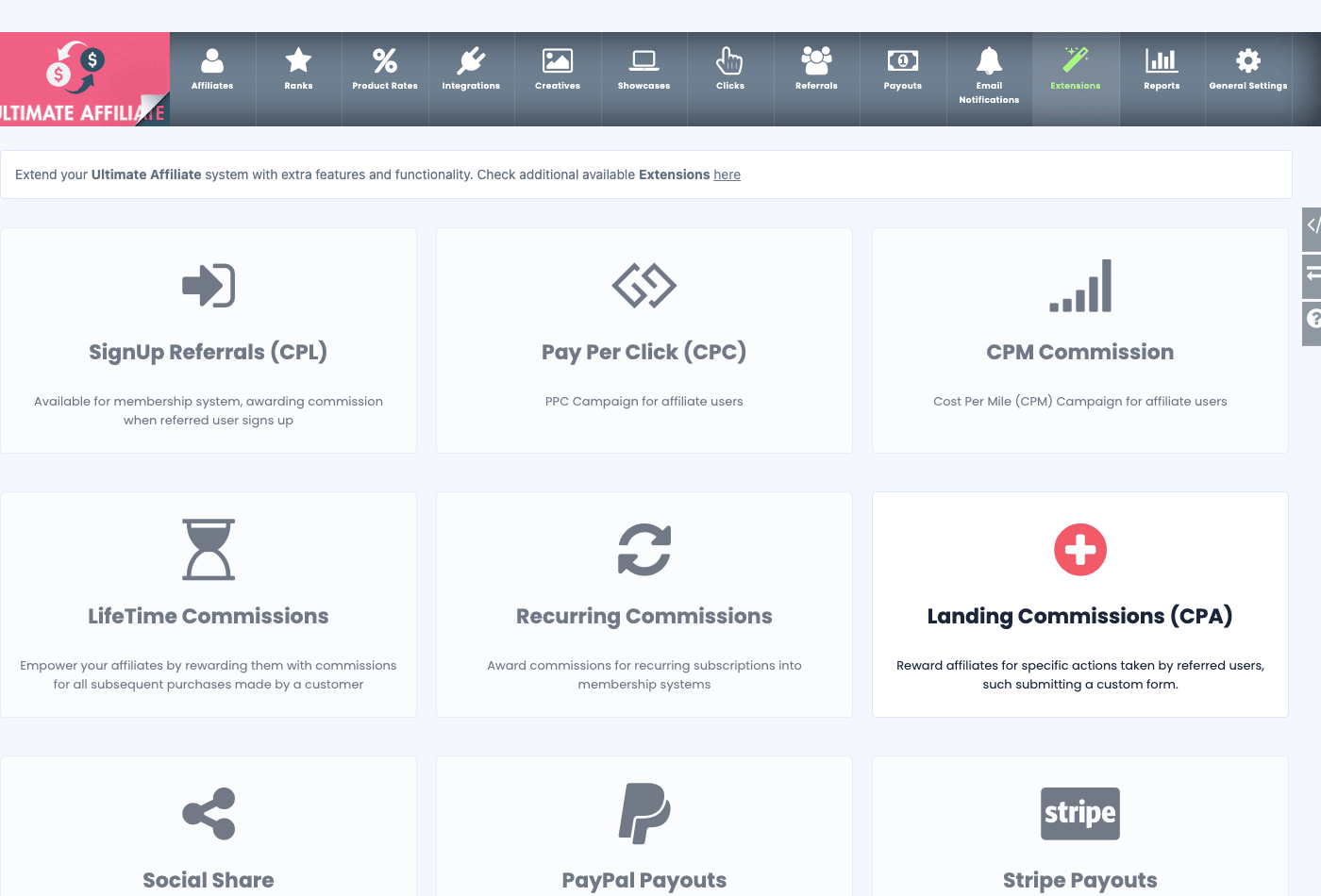
Here’s the lineup and where each one earns its place.
| Model | What it rewards | Best for |
|---|---|---|
| SignUp Referrals (CPL) | A referred user signing up | Membership and SaaS, no purchase needed |
| Pay Per Click (CPC) | Each click on the affiliate link | Traffic-driving campaigns |
| CPM Commission | Per thousand impressions | Banner/display partnerships |
| LifeTime Commissions | All future purchases by that customer | Subscription-style loyalty |
| Recurring Commissions | Each renewal of a subscription | Recurring billing products |
| Landing Commissions (CPA) | A specific action (e.g. form submit) | Lead-gen, event signups |
| Social Share | Sharing on social channels | Reach and awareness pushes |
| PayPal Payouts | (payout module) | Paying affiliates via PayPal |
| Stripe Payouts | (payout module) | Paying affiliates via Stripe |
The two that change the economics most are LifeTime and Recurring. LifeTime Commissions credit the affiliate on every future purchase that referred customer ever makes, not just the first. Recurring Commissions pay the affiliate on each renewal of a subscription. If you sell anything with repeat revenue, these turn your affiliates into long-term partners instead of one-off referrers, and that’s a different relationship entirely.
Landing Commissions (CPA) is the one I’d point a lead-gen business toward. You reward a specific action rather than a sale, and it has its own [uap-landing-commission] shortcode you place on the page that represents the completed action (a thank-you page after a form, say). No store required, which is exactly the no-cart scenario most affiliate plugins can’t handle.
A small gripe: because these are modules you toggle on, it’s easy to switch one on, forget to configure it, and end up with a commission model running on defaults you didn’t choose. Turn on one at a time, test it with a fake referral, then add the next.
There’s also a multi-level layer sitting underneath all of this. The plugin supports MLM and matrix commissions, so an affiliate can earn from the affiliates they recruited, across however many levels you set. That’s powerful and also legally loaded, and I’ll come back to why you should think hard before flipping it on.
Integrations: where the commissions come from
A commission has to be triggered by something. That something is usually a sale or a signup in another plugin, and this is where the Integrations tab does the heavy work.
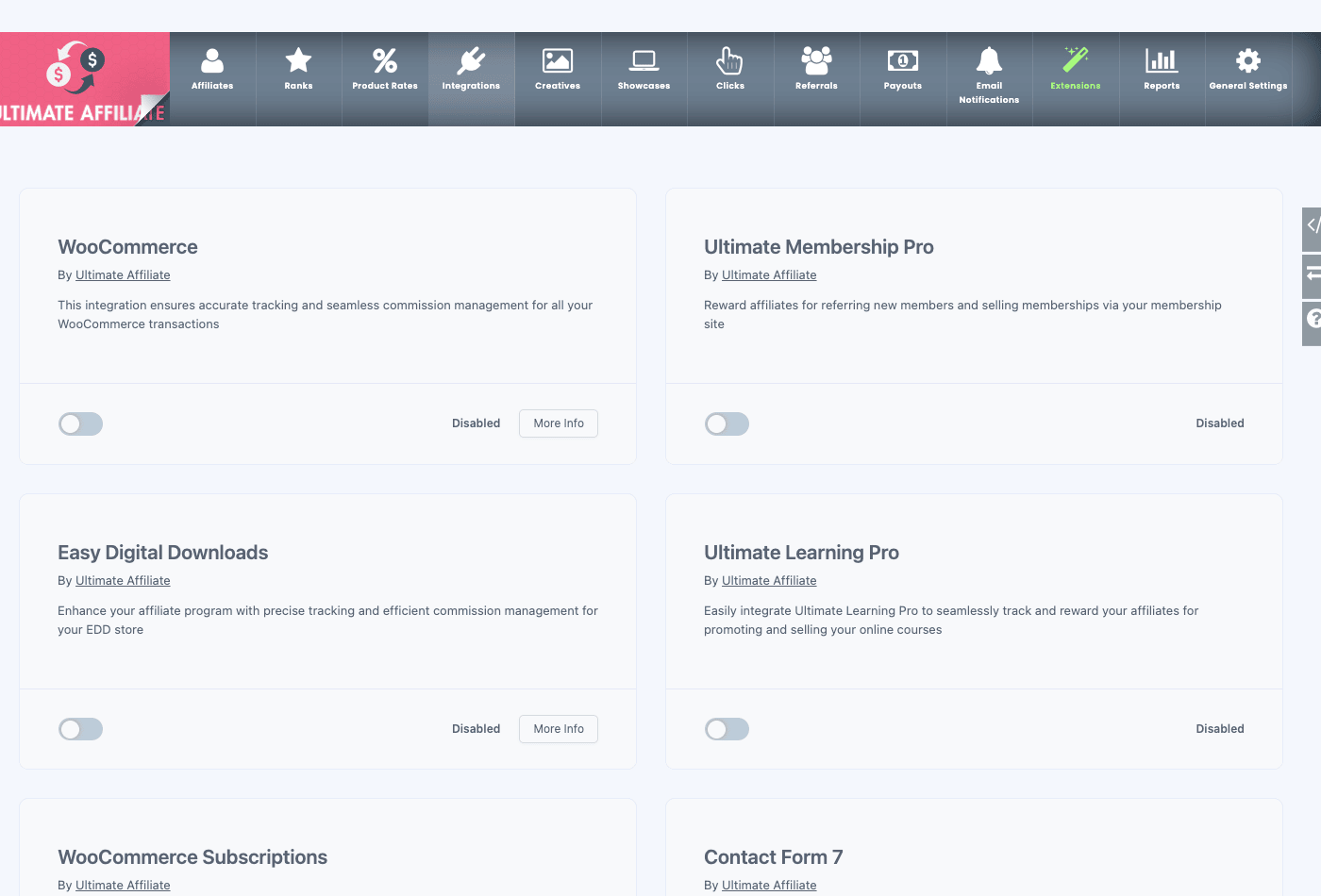
Each integration is a toggle with an Enable switch and a More Info link. The supported set covers the plugins most WordPress businesses actually run:
- WooCommerce. The big one. Turn it on and WooCommerce orders generate referrals automatically. If you run a store, WooCommerce is almost certainly your commission source, and Ultimate Affiliate Pro reads completed orders to credit affiliates. (More on getting the order-status timing right in the anti-pattern section, because this is where people lose money.)
- Easy Digital Downloads. For digital products and downloads, the Easy Digital Downloads integration credits referrals on EDD purchases. Great fit for plugin, theme, and ebook sellers.
- Ultimate Membership Pro. Pay commissions when a referred user buys a membership, and it can surface its own member fields on the affiliate registration form. A natural pairing if you already run a paid-membership site.
- Ultimate Learning Pro. Course sales become affiliate-eligible, which is handy for the "refer a friend to my course" play.
- WooCommerce Subscriptions. This is what powers the Recurring Commissions model for subscription products.
- Contact Form 7. A form submission becomes a trackable action, which feeds the CPA / Landing Commission model. This is the no-store lead-gen path.
- Elementor. Integration support so your affiliate pages and forms play nicely inside an Elementor build.
The spread here is genuinely the selling point. You can run a commission program off a membership signup, a course sale, a digital download, a physical product order, or a plain contact-form submission, all from one plugin. If your "conversion" isn’t a WooCommerce order, most affiliate plugins leave you stuck. This one doesn’t.
Creatives, showcases, and the affiliate area
Good affiliates are lazy in the best way: they’ll promote you more if you make it easy. Two features here are aimed squarely at that.
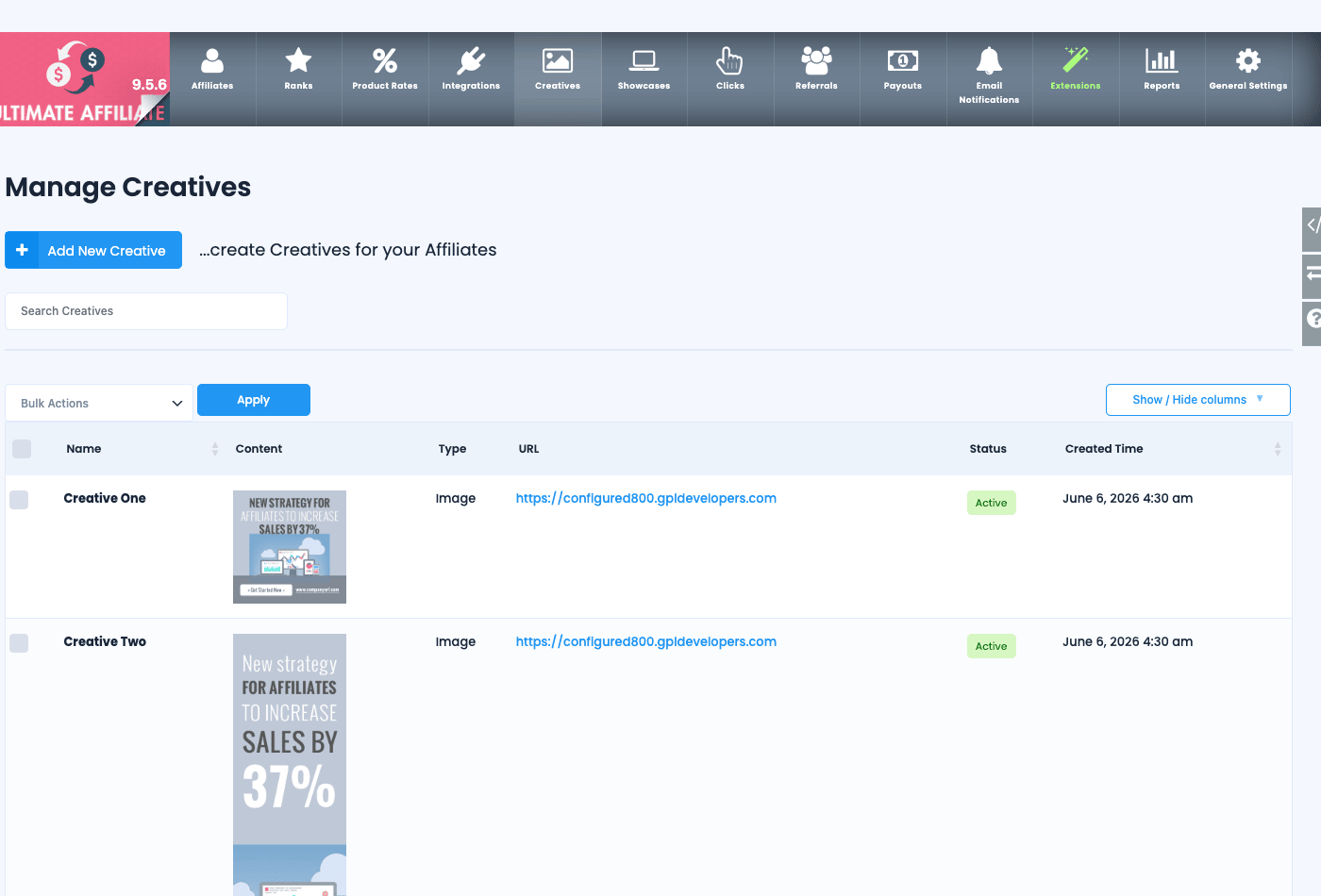
Creatives (the tab is labeled Creatives, internally banners) are the marketing assets you hand your affiliates. You create an entry with a Name, the Content, a Type (such as Image), a destination URL, and a Status, and it shows up in the affiliate’s dashboard ready to grab. Instead of every affiliate cobbling together their own graphics, they pull a banner you’ve pre-approved, with their referral link already baked in.
Showcases are pre-built display blocks for the affiliate area. The plugin gives you ready-made layouts so the affiliate-facing pages don’t look like a raw data table. I’ll be honest that this is the corner of the plugin I found least documented, so treat it as a styling convenience for the affiliate dashboard rather than a headline feature.
The affiliate dashboard itself is the [uap-affiliate] shortcode. Drop it on a page and an affiliate-role user sees their stats, their referral links, the creatives you’ve published, and their payout history. One quirk to know: if you (an admin) view that page, you’ll see an "Admin Info" placeholder rather than a real dashboard, because the dashboard renders against the logged-in affiliate’s data. To preview the real thing, log in as a test affiliate account.
There are also public-facing shortcodes for showing off your program. [uap-listing-affiliates] renders a public affiliate directory, and [uap-public-affiliate-info] shows a single affiliate’s public info. Useful if you want a "meet our top partners" page, or if affiliates need a public profile to link to. And [uap-product-links] generates per-product affiliate links, so an affiliate can grab a ready-made tracked link to one specific product rather than just the generic site link. That’s a small thing that makes a real difference, because affiliates promoting a single product convert better with a deep link than with a homepage link.
You might be wondering whether all these shortcodes mean a lot of manual page-building. They don’t have to. The Pages Setup sub-tab under General Settings can create and assign the core pages (registration, login, affiliate area) for you, so the shortcodes land on the right pages without you hand-placing each one. Once those pages exist, the affiliate journey from signup to dashboard to grabbing a creative runs entirely on your domain, in your theme.
Paying affiliates: single payouts vs mass payouts
Earning a commission and getting paid are two separate steps, and Ultimate Affiliate Pro keeps them separate on purpose. A referral sits as a recorded amount until you actually run a payout. That gap is your safety net (it’s where you catch refunds before money leaves your account), and the plugin gives you two ways to close it.
Single payouts live under Pay Affiliates (internally the new_payout subtab). You pick one affiliate, see what they’re owed, and pay them. This is fine for a small program or a one-off correction.
Mass Payouts (the manage_payouts subtab) is the real workhorse. You run a bulk payout across everyone who qualifies, usually everyone above a minimum threshold you set in Payout Settings, in one operation instead of one affiliate at a time. For a program with dozens or hundreds of affiliates, this is the difference between payday taking five minutes and taking an afternoon.
The actual money movement is handled by the two payout modules. PayPal Payouts and Stripe Payouts are extensions you enable on the Extensions tab, and once configured they push the funds to your affiliates through PayPal or Stripe rather than asking you to send transfers by hand. The Payouts screen (internally payments) is your record of every payout that’s gone out.
Heads-up: payout gateways have their own account requirements and limits. PayPal Payouts and Stripe payout features each need the right account type and verification on the gateway’s side before they’ll send money to third parties. Set those up and run one small test payout before your first real payday.
Real-world use cases
Features are abstract until you map them to a business. Here are four where Ultimate Affiliate Pro fits cleanly.
If you run a WooCommerce store, this is the obvious case. Enable the WooCommerce integration, set a global rate (or per-rank rates), publish a registration page, and your customers can sign up to earn on orders they refer. Add a launch-week Product Rate to push a new product harder. The whole loop, signup to payout, stays on your site.
If you run a membership site or a course, you probably don’t have a traditional "cart" conversion. Use the SignUp Referrals (CPL) model with the Ultimate Membership Pro or Ultimate Learning Pro integration, so affiliates earn when a referred person joins or enrolls. Recurring Commissions then keep paying them as members renew, which aligns your affiliates’ incentives with retention, not just acquisition.
If you run a SaaS or subscription product, LifeTime and Recurring Commissions are your friends. An affiliate who brings you a customer that stays for two years should get paid for two years. That generosity is what makes serious affiliates choose you over a competitor paying a one-time bounty.
For a lead-gen or local-services business with no online store at all, the CPA / Landing Commission path plus the Contact Form 7 integration lets you reward a partner every time their referral submits your quote form. Place the [uap-landing-commission] shortcode on the thank-you page and you’ve got a trackable, payable lead program without ever touching e-commerce.
Developer reference: hooks and shortcodes
This is where the plugin gets genuinely interesting if you write code. The developer surface is a hook-and-shortcode API. There are no custom post types, no WP-CLI commands, and while a REST namespace called ultimate-affiliates-pro/v1 exists, it’s the plugin’s internal, auth-gated admin/AJAX API, not a public content API. So if you want to extend behavior, you do it the WordPress way, with actions and filters. The hooks are all prefixed uap_.
Changing the commission amount
The most useful filter lets you inject custom commission amounts. It passes four arguments (an empty default array, the input amount, the product id, and an attributes array) and expects you to return an array of candidate amounts. Each value you return is compared against the rank and product-rate amounts using the program’s biggest-or-lowest rule (the same "Which Rate" dropdown from General Settings), so on the default "Biggest Amount" setting, returning [ 10 ] means the affiliate earns whichever is larger, your 10 or the existing rate. Return a scalar and the plugin ignores it (it checks for an array), so always return an array.
add_filter( 'uap_filter_referral_amount', function( $custom, $input_amount, $product_id, $attr ) {
    // Offer a 10 candidate on product 42; it competes with the rank
    // and product rates under the biggest-or-lowest rule.
    if ( 42 === (int) $product_id ) {
        return [ 10 ];
    }
    return $custom; // empty array = leave the normal calculation untouched
}, 10, 4 );
Auto-approving (or holding) new affiliates
By default you decide your approval policy in settings, but you can override it per-registration in code. Return true to auto-approve, false to hold for manual review.
add_filter( 'uap_save_as_affiliate_filter', function( $approve ) {
    // Auto-approve only company-domain emails, hold the rest.
    $user = wp_get_current_user();
    return ( $user && str_ends_with( $user->user_email, '@yourcompany.com' ) );
}, 10, 1 );
Blocking a referral before it’s recorded
uap_filter_insert_referral runs before a referral row is saved. It takes two arguments: a stop flag and the referral data. Set the flag to block the insert.
add_filter( 'uap_filter_insert_referral', function( $stop, $post_data ) {
    // Reject referrals under a 1.00 commission to cut noise.
    if ( isset( $post_data['amount'] ) && (float) $post_data['amount'] < 1 ) {
        return true; // stop the insert
    }
    return $stop;
}, 10, 2 );
Reacting to transaction status changes
When a referral or transaction changes status (for example unpaid to paid, or pending to accepted), uap_action_change_transaction_status fires with the id and the new status. This is the right place to hold commissions until an order is final.
add_action( 'uap_action_change_transaction_status', function( $id, $status ) {
    if ( 'paid' === $status ) {
        // Sync to your accounting tool, fire a Slack ping, etc.
        do_something_with_paid_referral( $id );
    }
}, 10, 2 );
Registration and lifecycle hooks
A handful of action hooks let you react to affiliate lifecycle events, each with a known signature:
// Fires when an affiliate registers (1 arg: user id)
add_action( 'uap_on_register_action', function( $user_id ) {
    add_user_to_crm( $user_id, 'affiliate' );
}, 10, 1 );

// Fires when an affiliate updates their profile (1 arg)
add_action( 'uap_on_update_action', function( $user_id ) { /* ... */ }, 10, 1 );

// A referral was inserted (2 args: referral id, args)
add_action( 'uap_action_referral_insert_from_main', function( $referral_id, $args ) { /* ... */ }, 10, 2 );

// A payout/payment was created (2 args: id, status)
add_action( 'uap_action_insert_payment', function( $id, $status ) { /* ... */ }, 10, 2 );

// Affiliate saved (2 args: user id, affiliate id)
add_action( 'uap_save_affiliate_action', function( $uid, $affiliate_id ) { /* ... */ }, 10, 2 );
Injecting fields into the registration form
The register form exposes output hooks with zero arguments so you can print extra markup. Use uap_register_form_after_form_fields (there’s also _before_form_fields and _before_submit_button) to add a custom field or a consent checkbox.
add_action( 'uap_register_form_after_form_fields', function() {
    echo '<label><input type="checkbox" name="agree_terms" required> I accept the affiliate terms</label>';
} );
MLM controls
If you enable multi-level commissions, a small filter family controls the matrix. uap_filter_mlm_matrix_depth (one argument) sets the maximum number of levels.
add_filter( 'uap_filter_mlm_matrix_depth', function( $max_depth ) {
    return 3; // cap the network at three levels
}, 10, 1 );
There are also uap_filter_mlm_matrix_type, uap_mlm_filter_amount_for_level, uap_mlm_filter_amount_type_for_level, and an uap_action_new_mlm_relation action for when a new multi-level relationship is formed. Read the source before wiring per-level amounts, because the math compounds fast.
Other useful hooks (in prose)
Several more hooks are worth knowing without a full example: uap_filter_admin_dashboard_tabs (one arg) lets you add or remove admin tabs; uap_filter_integrations_systems filters the integrations list; uap_filter_insert_visit filters a visit before it’s stored; uap_notification_filter and uap_save_notification_action cover the email-notification layer; uap_magic_feature_list and uap_is_magic_feat_active_filter deal with the commission-model modules; uap_become_affiliate_warning_message (one arg) customizes the "become an affiliate" prompt; and uap_public_filter_on_referral_insert_amount_value (two args: the sum and the currency) lets you adjust the recorded amount. Rank and creative lifecycle events fire uap_ranks_save / uap_ranks_update and uap_banners_save / uap_banners_update.
The shortcode set
Fifteen shortcodes cover the entire front-end. The account flow: [uap-register], [uap-login-form], [uap-logout], [uap-reset-password], and [uap-user-become-affiliate]. The dashboard and account: [uap-affiliate] and [uap-account-page]. Public-facing: [uap-listing-affiliates], [uap-public-affiliate-info], and [uap-product-links] (per-product affiliate links). The CPA trigger: [uap-landing-commission]. And four conditional-content shortcodes that let you show different content based on affiliate or referral status: [if_affiliate]...[/if_affiliate], [if_not_affiliate]...[/if_not_affiliate], [visitor_referred]..., and [visitor_not_referred].... Those last four are quietly powerful for marketing, because you can show a referred visitor a welcome offer that everyone else never sees.
Don’t pay commissions you can’t claw back
Here’s the failure mode that costs real money, and almost everyone hits it once.
Don’t pay commissions before an order is final. It’s tempting to credit a referral the moment an order is placed, because it feels fast and generous. Then a chunk of those orders get refunded, cancelled, or charged back, and you’ve already paid commission on revenue that walked out the door. On a store with even a five percent refund rate, paying commissions on placed-not-completed orders means you’re handing affiliates a slice of money you never kept. Hold referrals until the order is actually completed and past your refund window. Use uap_action_change_transaction_status to react only when the status flips to paid, and run your Mass Payout on a delay (weekly or monthly), never instantly on order placement.
Don’t let affiliates self-refer. Without a guard, an affiliate can buy through their own referral link to grab the discount and the commission on their own purchase. That’s pure margin leakage, and on a popular program it adds up to a serious number fast. Lock down self-referrals and watch for coupon stacking, where an affiliate combines their referral commission with a public coupon to buy below your cost.
Don’t enable MLM without modeling the total liability. Multi-level commissions multiply your payout per sale across every level, so a 30 percent base rate plus three levels of override can quietly commit you to far more than 30 percent of a sale. Worse, multi-level payout structures cross into legally fraught "pyramid" territory in some regions. Before you set uap_filter_mlm_matrix_depth above one, write down the worst-case total payout percentage across all levels, and check your local rules. This is the one feature where moving slowly protects both your margin and your trust with your affiliates.
Performance, compatibility, and gotchas
A few honest notes from poking at this in a real install.
Click tracking is write-heavy. Every click on a referral link and every tracked visit writes a row. The plugin stores these in its own tables (not as posts), which is the correct design and keeps your wp_posts table clean, but a very high-traffic affiliate program will still grow those tables. Plan to prune old visit data periodically if you’re at serious scale.
Cookie duration and attribution matter more than any setting. If your referral cookie is too short, affiliates who send traffic that converts a week later get nothing, and they’ll quit. Decide your attribution window (and whether you credit first-click or last-click) deliberately, then tell your affiliates what it is. Nothing erodes affiliate trust faster than a referral that "should have counted" and didn’t.
The defaults are sensible but the settings are deep. There are ten sub-tabs under General Settings alone. You can launch on defaults, but read through Payout Settings, Public Workflow, and the referral-rate-calculation dropdown before you go live, because those three quietly shape your whole program.
Compatibility. It’s a standard WordPress plugin with no free-base dependency, so it runs on a normal LAMP or LEMP stack and activates cleanly. The integrations only do anything if the partner plugin (WooCommerce, EDD, and so on) is also installed and active. If you enable, say, the WooCommerce Subscriptions integration without WooCommerce Subscriptions present, nothing breaks, it just has nothing to track.
The affiliate dashboard preview gotcha is worth repeating: as an admin you see a placeholder on the [uap-affiliate] page, not the real thing. Always test the front end as a real affiliate account so you’re seeing what your affiliates see.
Ultimate Affiliate Pro vs AffiliateWP
This is the comparison most people are actually weighing, so let me be specific. The honest summary: AffiliateWP is the leaner, store-integration-focused tool, and Ultimate Affiliate Pro is the heavier all-in-one platform. Which is "better" depends entirely on whether you want simple or complete.
| Ultimate Affiliate Pro | AffiliateWP | |
|---|---|---|
| Pricing model | One-time (CodeCanyon, around $69) | Yearly recurring (Personal around $149.50/yr, Plus around $299.50/yr) |
| Shortcodes | 15 built in | Fewer; leaner front end |
| Commission models | 9 (CPL, CPC, CPM, Lifetime, Recurring, CPA, Social, plus PayPal/Stripe payouts) | Core sale-based, more via add-ons |
| Ranks / gamification | Included | Add-on territory |
| MLM / matrix | Included | Not core |
| Mass payouts (PayPal/Stripe) | Bundled modules | Often paid add-ons |
| Built-in registration/login/portal | Yes, full front-end flow | Lighter, store-centric |
A few numbers to anchor the decision. On price, the structures are fundamentally different: Ultimate Affiliate Pro is a one-time purchase (roughly $69 on CodeCanyon, and GPL on GPL Times), while AffiliateWP is a yearly license that renews at around $149.50/yr for Personal and around $299.50/yr for the Plus tier. Over three years that’s the difference between paying once and paying three times.
On breadth, Ultimate Affiliate Pro ships 15 shortcodes and 9 commission models in the box, including ranks, MLM, and PayPal plus Stripe mass payouts, features that are frequently paid add-ons in the AffiliateWP world. AffiliateWP’s counterargument is real, though: it’s tighter, its WooCommerce and EDD integrations are battle-tested, and its add-on architecture means you only install what you need. If you run a clean store and just want reliable per-order commissions, AffiliateWP’s simplicity is a feature, not a limitation.
My take: reach for Ultimate Affiliate Pro when your program needs gamification, multi-level commissions, no-store commission models, or a complete front-end affiliate area, and you’d rather pay once. Reach for AffiliateWP when you want a lean, store-only program and don’t mind the yearly cost for that focus. If you’re cloaking and tracking external affiliate links rather than running your own program, that’s a different job entirely, and a tool like Pretty Links is the better fit.
Pricing and licensing
Ultimate Affiliate Pro is sold on CodeCanyon as a one-time purchase, which is the headline financial difference from the subscription-based competitors. You pay once, you own it, and updates come through the standard Envato model. The setup wizard’s License step is where a CodeCanyon copy asks for an Envato Marketplace key.
The Ultimate Affiliate Pro release on GPL Times is the GPL version of the same plugin, with the same nine commission models, ranks, MLM, integrations, and payout modules intact. There’s no per-payout fee and no metered tier: the PayPal and Stripe payout modules are included, not upsells.
FAQ
Do I need WooCommerce to use Ultimate Affiliate Pro?
No, and that’s one of its strengths. You can run a program off membership signups (Ultimate Membership Pro), course enrollments (Ultimate Learning Pro), digital downloads (EDD), or even plain Contact Form 7 submissions via the CPA model. WooCommerce is the most common commission source, but it’s optional.
Can affiliates earn recurring commissions on subscriptions?
Yes. Enable the Recurring Commissions module and the WooCommerce Subscriptions integration, and affiliates get paid on each renewal, not just the first sale. For a subscription business this matters a lot, because it aligns affiliate incentives with customer retention. The trade-off is that recurring payouts grow your ongoing commission liability, so model the lifetime cost before you set the rate.
How do affiliates get paid?
Through single payouts (one affiliate at a time) or Mass Payouts (everyone over a threshold at once). The PayPal Payouts and Stripe Payouts modules push the money automatically once configured. The catch: each gateway has its own account requirements for sending money to third parties, so verify your PayPal or Stripe account supports payouts before your first payday.
Does it support multi-level (MLM) commissions?
Yes, it includes MLM and matrix commissions with configurable depth and per-level amounts. Be careful here. Multi-level structures multiply your payout per sale and can raise legal questions in some regions, so model your total payout percentage across all levels and check local regulations before enabling more than one level.
What’s the difference between Ranks and Product Rates?
Ranks set a commission rate based on who the affiliate is (their tier). Product Rates set a rate based on what product is sold, or a special deal for a specific affiliate, with start and end dates. When both apply to a sale, a General Settings dropdown decides which wins (the default takes the biggest amount). Knowing this prevents commission-math surprises.
Can I customize the affiliate registration form?
Yes. The [uap-register] form has a Form Template dropdown of built-in skins (Standard, BootStrap, Radius, and more) to match your site, plus Custom Fields, Custom Messages, and Opt-In Settings sub-tabs so you can add your own fields and consent capture without code. Existing logged-in users can also join in one click with the [uap-user-become-affiliate] button instead of filling out the whole form again.
Will it slow down my site?
Click and visit tracking writes rows to the plugin’s own database tables, which keeps your posts table clean. On most sites the impact is negligible. On a very high-traffic affiliate program those tracking tables grow, so prune old visit data periodically and you’ll be fine.
Is there a public REST API for developers?
Not in the "build a mobile app against it" sense. There’s an internal ultimate-affiliates-pro/v1 namespace, but it’s the plugin’s auth-gated admin/AJAX layer, not a public content API. The real developer surface is the uap_ hook family and the 15 shortcodes, which together let you customize commission logic, approval flow, the registration form, and the affiliate area.
Can I prevent affiliates from referring themselves?
You should, and you can control referral acceptance in code through the referral-insert filters. Self-referral is the most common abuse of any affiliate program, where an affiliate buys through their own link to pocket the commission plus any discount. Lock it down before you launch, not after you’ve already paid out on self-purchases.
Final thoughts
Ultimate Affiliate Pro is the most "everything" affiliate plugin I’ve used on WordPress, and that’s both the pitch and the warning. If you want a real program with ranks, multiple commission models, multi-level options, a full front-end affiliate area, and one-time pricing instead of a yearly bill, very little else on WordPress matches the scope. The flip side of that scope is depth: ten settings sub-tabs, nine toggleable models, and a rate-resolution dropdown you genuinely need to understand before you go live. Give it an unhurried afternoon and it rewards you.
What I’d tell a friend: start small. Turn on one commission model, one integration, and a simple rank structure, run a test referral end to end, then expand. The plugin can grow into a serious affiliate network, but you don’t have to launch it all at once.
If you want to set up a self-hosted referral program where you keep every dollar of margin and never share a cut with a third-party network, Ultimate Affiliate Pro is on GPL Times with all nine commission models, ranks, MLM, and the PayPal plus Stripe payout modules in place, ready to install and configure on your own site.