

Everyone says web directories are dead. Google Maps ate local search, Yelp owns the reviews, and the Yellow Pages clones from 2009 deserved what they got. Here’s what that obituary misses: niche directories never stopped making money. The city food guide that owns "best brunch downtown", the wedding-vendor list every planner bookmarks, the dental directory charging practices for placement. Those sites invoice real businesses every month. The difference between the dead directories and the earning ones was never the idea. It’s the engine underneath. The ListingPro theme is that engine, or at least the most complete off-the-shelf version of it I’ve reviewed.
ListingPro, made by CridioStudio, is the flagship directory and listing theme on ThemeForest, and it treats a directory as a business, not a layout. Listings, multi-criteria reviews, claim-this-listing, paid pricing plans, invoices, ad placements, and lead tracking all ship in one package. This review walks through the whole machine: the admin, the data model, the monetization engine, the developer surface, and the two honest costs nobody puts on the sales page (the bundled-stack weight and your Google Maps bill).
Directories aren’t dead. Bad directories are.
Table of Contents
- What ListingPro is, and who makes it
- The ListingPro Command Center
- Listings, categories, and the data model
- How a visitor uses the directory
- Making money: plans, claims, ads, and leads
- Reviews and front-end submission
- Google Maps, done with your own key
- Who runs a ListingPro theme site
- Developer reference
- Don’t launch without your own Maps key and billing caps
- ListingPro vs the plugin route and other vertical themes
- Performance, compatibility, and gotchas
- FAQ: ListingPro
- Final thoughts
What ListingPro is, and who makes it
ListingPro is a WordPress theme by CridioStudio, sold on ThemeForest under GPL v3, and pitched in its own theme header as "a complete solution for any type of directory/Listing theme". For once the marketing line is roughly accurate. This is the theme people mean when they say "the Yelp-style WordPress theme": restaurant guides, clinic finders, salon directories, home-services listings, city guides, all the local-business verticals.
The part that matters, and the part most reviews gloss over, is the architecture. ListingPro is not really one theme. It’s a theme plus a bundled plugin stack that ships inside the theme package: the ListingPro Core plugin (the actual directory engine), ListingPro Reviews, ListingPro Ads, the CubeWP Framework with its Forms companion, Redux Framework for theme options, and WPBakery Page Builder for layout work. Six of those pieces ship as zips inside the theme itself, and the installer pulls the remaining required bits (CubeWP Forms and a small SEO Repair Kit utility) from wordpress.org during setup. The package also ships a child theme, a Bulk Import add-on, demo content, and the documentation.
Why the split matters: the directory engine lives in the Core plugin, not the theme. Your listings, plans, claims, and reviews are plugin data. The theme is the front end that renders them. That’s the correct way to do it, and it’s not a given in the ThemeForest world, where plenty of themes bury custom post types in functions.php and hold your content hostage.
I’ll be blunt about the trade-off, because it shapes everything else in this review. That stack is from the WPBakery and Redux era of WordPress. It works, it’s maintained, and the bundling is genuinely convenient. But you are adopting eight plugins to run one theme, and two of them (WPBakery, Redux) are frameworks a lot of developers have moved on from. CubeWP is the newer fields-and-forms framework the theme has been layering underneath, which tells you they know it too.
If you want the full package, ListingPro is available on GPL Times as the complete theme bundle, plugin stack and child theme included, which is the cheapest way to put the engine on a real install and poke at every screen in this review.
The ListingPro Command Center
Most theme dashboards are a changelog, a license box, and a support link. ListingPro ships an operations screen instead, and it’s the first hint that this theme thinks like a business.
But first, the setup, because I promised to fold it in. Installation is the standard theme flow: upload the theme zip under Appearance » Themes, activate it, then activate the child theme from the package so your customizations survive updates. On activation, ListingPro prompts you to install its required plugins. Most of the plugin zips ship inside the theme, so the step takes a couple of minutes; the installer fetches the last two required pieces from wordpress.org. Either way, you’re not hunting down companion plugins from five different vendors. When the stack is active, a ListingPro menu appears in the admin, and the Command Center is its front page.
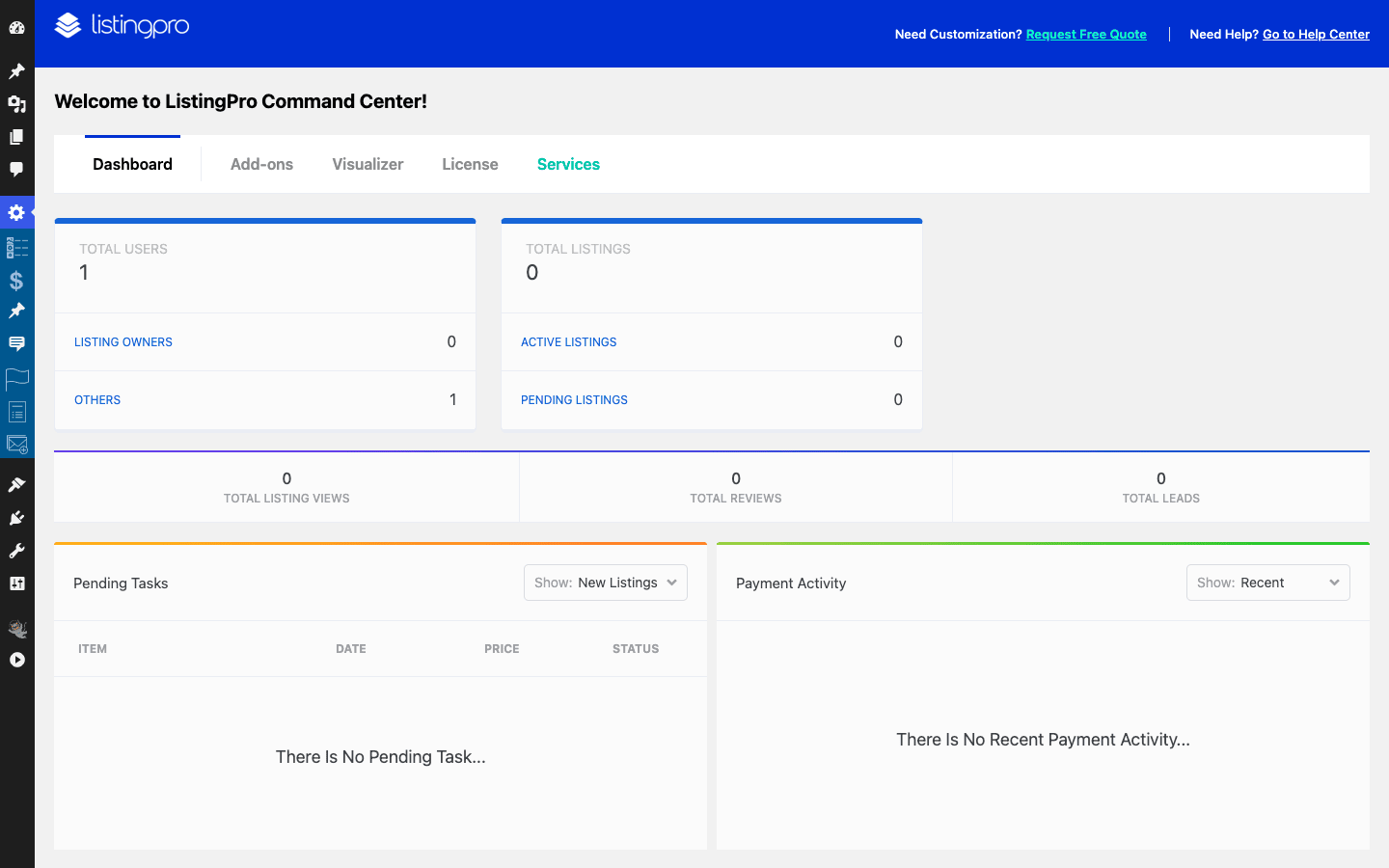
The Dashboard tab reads like a small SaaS admin. You get totals for users, listings, listing owners, active and pending listings, listing views, reviews, and leads, all on one screen. Below the stats sit the two queues you’ll actually work from on a live directory: Pending Tasks (listings waiting for approval, claims waiting for review, the stuff that piles up when real businesses start submitting) and Payment Activity (a feed of what’s been bought). When your directory has 40 pending submissions and 6 open claims, this screen is where you live.
The Command Center has five tabs: Dashboard, Add-ons, Visualizer, License, and Services. Two of them deserve a closer look.
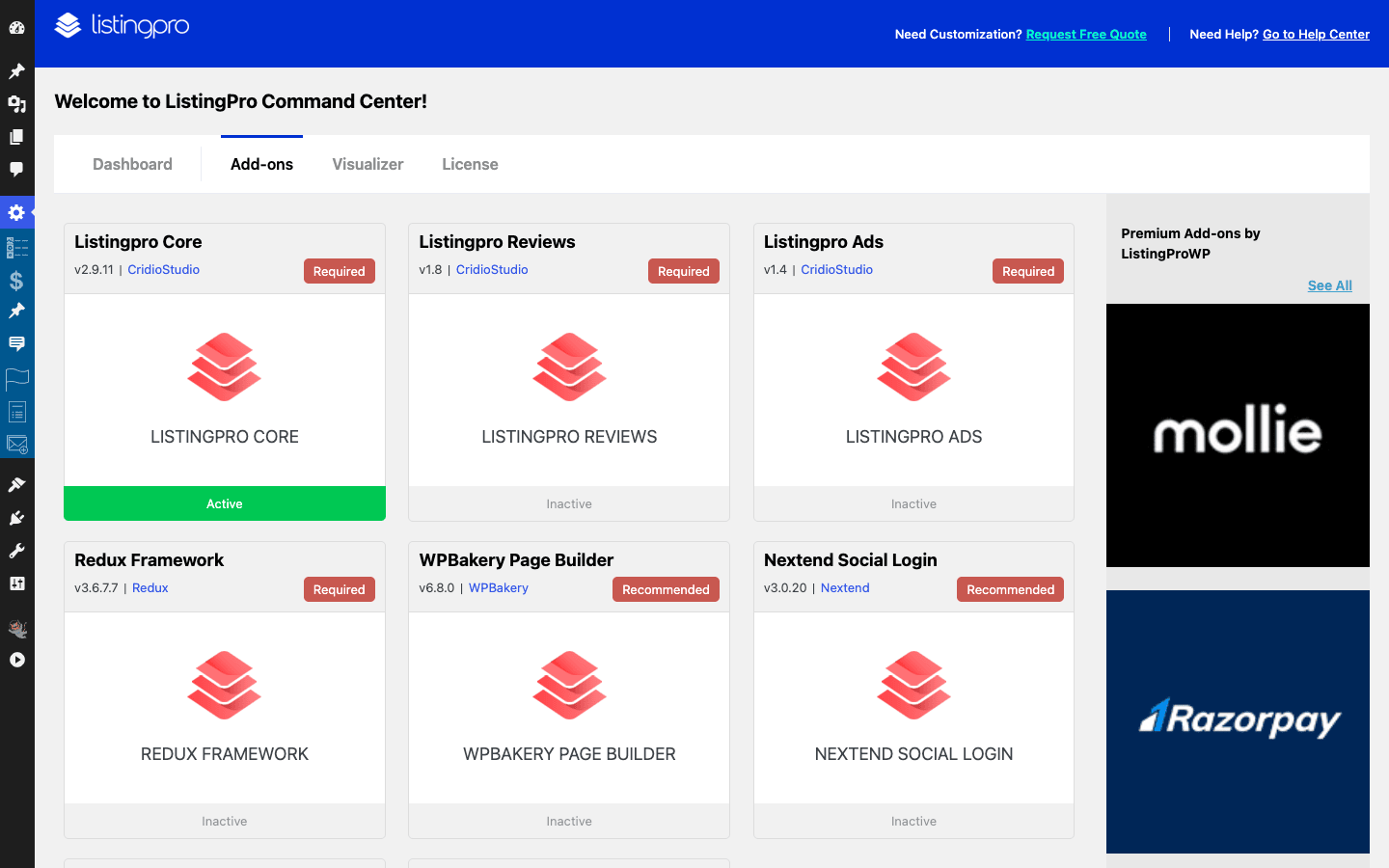
The Add-ons tab is the stack manager. It lists every bundled plugin with its status: Listingpro Core, Listingpro Reviews, Listingpro Ads, and Redux Framework marked as Required, with WPBakery Page Builder and Nextend Social Login as Recommended. Next to the bundled stack sits a rail of premium add-ons, including Mollie and Razorpay payment gateways sold separately. I like that the theme is honest about what’s required versus optional, and I like even more that you can see the whole dependency picture on one screen instead of discovering it plugin-by-plugin.
The Visualizer tab is the feature switchboard. This is where the bigger behaviors toggle on and off, including the two that define the product for me: Multi-Criteria Rating (visitors rate food, service, and value separately instead of leaving one star number) and the FES Form Builder (the front-end submission form builder that lets business owners add their own listings). More on both in the reviews section below.
Heads-up: budget a real hour for first-time setup, not ten minutes. The plugin installs are quick, but you’ll want to walk the Visualizer toggles, set your Maps key, and create at least one pricing plan before anything on the front end makes sense.
Alongside the Command Center, the stack adds a row of top-level admin menus: Listings, Pricing Plans, Events, Claims, Flag (visitor reports on listings), Invoices, Subscription, and CubeWP for the framework settings. That’s the whole business in the sidebar: inventory, pricing, disputes, and billing.
Listings, categories, and the data model
Under the hood, ListingPro models the directory with five custom post types. This is worth two minutes of your attention even if you never write code, because it tells you what the theme thinks a directory is made of:
listing, the business listing itself. The center of everything.events, an events layer that lives alongside the listings, for the "what’s happening" side of a city guide.form-fields, the saved fields that power the front-end submission form builder.lp-claims, claim requests from businesses that want ownership of their listing.price_plan, the paid listing plans you sell.
Notice what’s in that list. Claims and pricing plans are first-class content types, not options buried in a settings page. The data model itself is monetization-shaped.
All five are regular WordPress custom post types, so they behave the way WordPress content always behaves: they show up in the admin, they’re queryable, they export with standard tools. Listings are organized by three taxonomies: listing-category (what kind of business), location (where it is), and features (the filterable amenities, the "free wifi" and "outdoor seating" layer). The URL slugs for all three are filterable through the theme’s listing_cat_slug, listing_loc_slug, and listing_features_slug config keys, so a dentist directory can run on /specialty/ and /city/ instead of generic paths.
The per-listing editing surface is where ListingPro stops feeling like a blog theme. Every listing gets a "listing settings" box with the fields a real business profile needs: Business Tagline, Google Address with Latitude and Longitude and a Map Pin, Phone, WhatsApp, Email, Website, and a full set of social profiles (Twitter, Facebook, LinkedIn, YouTube channel, Instagram), plus a YouTube video URL for an embedded promo. Price-range details live in the same per-listing options, and business hours are set through the submit and edit forms. Filling all of it in is what turns a thin post into a profile a visitor trusts.

What a complete listing looks like: a name and tagline, a pinned address, a phone number a visitor can tap, working hours, a category, a location term, a handful of feature terms for the filters, a photo gallery, and a video if the business has one. That’s maybe ten minutes of data entry per listing. Multiply by 300 listings and you understand why the package ships a Bulk Import add-on, and why the front-end submission system (covered below) exists: past a certain size, the businesses enter their own data.
A small criticism while we’re here: the field set is defined by the theme’s metabox system rather than native custom fields you’d recognize from other stacks, so auditing exactly which keys exist means reading the Core plugin. It works fine day to day. It’s just more opaque than I’d like when you start building on top of it.
How a visitor uses the directory
One honesty note before this section. My test sandbox had no demo content imported and no Google Maps key configured, so the front end rendered bare and I have no front-end screenshots to show you. The admin shots in this review are real captures. What follows is the front-end flow described from the theme’s templates, fields, and shortcode surface, not from pictures.
The visitor flow is the Yelp pattern, and ListingPro doesn’t pretend otherwise. The home page leads with a search hero: a keyword box, a category picker, and a location picker, sitting over a hero image of your city or niche. Type "tacos", pick a neighborhood, hit search.
Results come back as the familiar split view: a grid of listing cards on one side and a Google map with pins on the other. The cards carry the trust signals (rating, category, location), and the features taxonomy powers the filter layer, so "open now, free parking" style narrowing is a click, not a new search. This split view is the screen your visitors will spend most of their time on, and it’s entirely Maps-dependent, which matters for the cost section later.
Click through to a single listing and you get the business profile page: photo gallery up top, then the tagline, hours, price details, the review stream with its per-criteria scores, a contact block built from the phone, WhatsApp, email, and website fields, the embedded video if one was set, and the map pin. Two buttons on this page do the commercial work: the inquiry contact (which becomes a counted lead) and Claim this listing, which starts the claims workflow that the monetization section covers.
The events post type adds the calendar dimension. A city guide isn’t only "where do I eat", it’s "what’s on this weekend", and having events as a native content type means the answer lives on your domain instead of a Facebook page.
For page building, the theme leans on WPBakery plus a set of its own shortcodes, more than 40 in total. The useful ones for assembling a home page are [listing_grids] (a grid of listings, with variants for hand-picked IDs and listings with coupons), [listing_cats] (the category tiles), and [listingpro_calltoaction] for the "add your business" banner. You compose the landing pages; the engine renders the directory.
It’s a dated-feeling toolchain, and I’d rather see blocks. But the flow it produces is the one users already know from every major directory on the internet, and that familiarity is worth something.
Making money: plans, claims, ads, and leads
This is the section that separates ListingPro from "a theme with a listings post type". A directory owner has four ways to get paid, and all four are wired into the product rather than bolted on.
| Revenue stream | How it works | Where you manage it |
|---|---|---|
| Pricing plans | Businesses pay for listing tiers, one-time or recurring | Pricing Plans menu (the price_plan post type), plus Invoices and Subscription |
| Claims | A business pays to take ownership of an existing listing | Claims menu (the lp-claims post type) and your claim-pricing page |
| Ads | Sell placement slots in the directory, or run ad network code | The ListingPro Ads plugin |
| Leads | Inquiries route to listing owners and get counted, so you can sell access to them | Lead totals in the Command Center |
Pricing plans are the backbone. Each plan is a price_plan entry: what the tier costs, how long it runs, and what a listing on that tier gets. The classic ladder is a free plan to seed inventory, a paid plan with more photos and contact fields, and a featured plan that buys placement. Plans can run as recurring subscriptions, and developers can adjust the recurring duration through the lp_price_plan_recurring_duration filter. Checkout happens on a page carrying the [listingpro_checkout] shortcode, and every sale lands in the Invoices menu, with recurring plans tracked under Subscription. You’re not exporting payment records from a third-party plugin; the billing paper trail is part of the theme’s own admin.
Claims are the cleverest stream. Here’s the play, and it’s the same one Yelp ran at scale: you seed the directory with listings (the Bulk Import add-on exists for exactly this), the businesses discover that their profile already exists and ranks, and the Claim this listing button lets them take it over, typically by buying a plan in the process. Each claim becomes an lp-claims entry waiting in your Claims queue, and a page with the [listingpro_claim_pricing] shortcode presents the paid tiers to claimants. That’s the whole pitch: ownership. A business will pay to control a page about itself that already has traffic.
Ads fill the remaining space. The bundled ListingPro Ads plugin sells placement inside the directory, with hook points for header, footer, and banner positions (listingpro_addon_header, listingpro_addon_footer, listingpro_addon_banner for developers who want to render into them). If you’d rather run programmatic ads than sell direct, there’s a Google ads toggle surface (the listingpro_show_google_ads filter) and an ad-status check (lp_get_ad_status) for conditional logic. Direct-sold placements to your own listed businesses usually beat network rates, because "be the banner on the page where people search for plumbers" is an easy sale to a plumber.
Leads are the quiet fourth stream. Every inquiry a visitor sends through a listing’s contact surface is a lead for that business, and the Command Center counts them. That number is your sales deck. When you can tell a salon "your free listing got 23 inquiries last quarter", upgrading to the paid tier stops being a cold pitch.
Now, gateways, because none of this matters if you can’t take the money. The code’s gateway surface includes recurring-payment hooks for Mollie, PayFast, Paystack, Flutterwave, and Razorpay (each has its own unsubscribe action, lp_mollie_unsubscribe and siblings), and the Command Center sells Mollie and Razorpay as premium add-ons. For anything else, including offline payments, there’s a documented pair of extension points: the lp_checkout_payment_methods filter (one argument, defaults to false) switches custom methods on, and the lp_add_custom_payment_method_html action lets you render your own method into the checkout. There’s also an lp_wire_payment_method filter on the wire-transfer side. The Developer reference below has a working sketch.
The catch: four revenue streams means four things to configure, and a half-configured money path is worse than none. Before you announce the site, run one fake business through the whole cycle yourself: submit, claim, buy a plan, confirm the invoice appears, cancel the subscription. Every step in that chain is a screen a paying customer will eventually see.
Reviews and front-end submission
Reviews are the moat of a directory site. Google can clone your listing data in an afternoon; it can’t clone two hundred local reviews with photos. ListingPro treats them accordingly, with a dedicated ListingPro Reviews plugin in the required stack rather than a comment-template hack.
The headline feature is Multi-Criteria Rating, toggled in the Command Center’s Visualizer tab. Instead of one star number, visitors score separate criteria, the classic example being food, service, and value for a restaurant guide. Multi-criteria scores read as more credible to visitors (a 5-star food, 2-star service review tells a story a flat middle-of-the-road average doesn’t), and they give claimed businesses something specific to respond to. If you want to change how the aggregate number renders, the lp_rating_number_format filter receives the rating value and returns your formatted version.
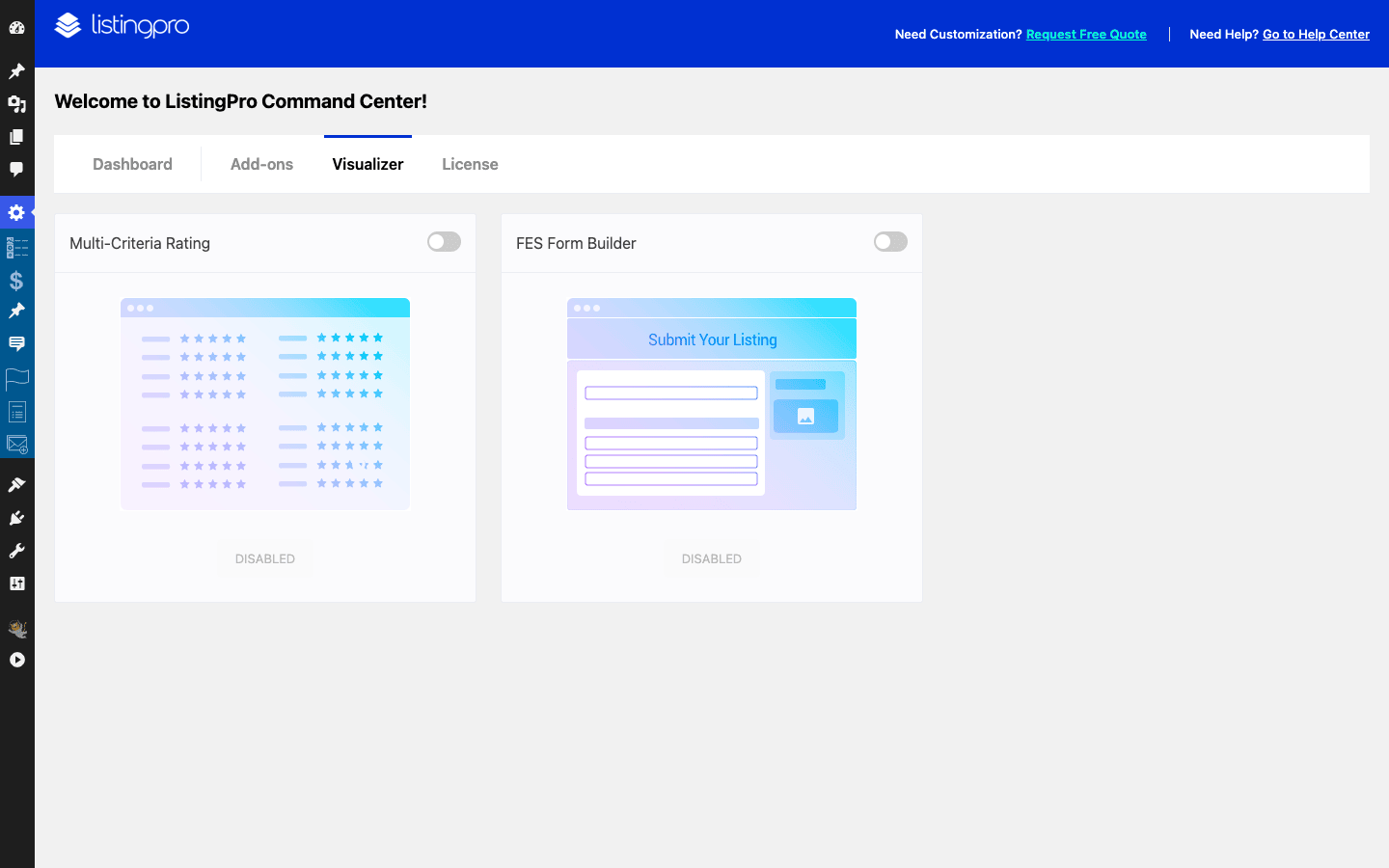
The other Visualizer toggle that changes the business model is the FES Form Builder, the front-end submission system. Switch it on and business owners can submit their own listings from the front of the site, through a form you compose yourself. Every field you add is stored as a form-fields entry, which is why that post type exists, and the finished form is what plugs into the pricing plans: choose a plan, fill the form, pay, land in the Pending Tasks queue for approval. There’s a popup registration surface for the signup moment (filterable via lp_register_popup_form), and once owners have accounts, the [listingpro_edit] shortcode powers their edit-listing page while [frontend-button] drops submission buttons wherever you need them.
This is the moment a directory flips from a content site you maintain into a platform other people fill. You stop being the data-entry department and become the editor who approves the queue.
The claims workflow closes the loop between the two. An unclaimed listing (one you seeded) shows its claim button; a business that claims it goes through the lp-claims queue; once approved and on a plan, that owner manages the listing through the same front-end editing surface. Seed, rank, get claimed, get paid. The machinery for each step is in the box.
One honest gripe: all of this is toggle-and-configure rather than convention. The FES builder gives you real freedom in what the submission form asks, which also means you can build a bad form. Keep the free-plan form short (name, category, location, contact), and save the twenty-field interrogation for tiers where the business has already decided to pay.
Google Maps, done with your own key
Maps are not a feature of ListingPro. They’re the substrate. The per-listing address, latitude and longitude, and map pin fields, the location search, the results map, the single-listing map: all of it renders through the Google Maps Platform, and the theme even exposes a lp_call_maps_scripts action where its map scripts load.
That dependency comes with a requirement the demo content hides: you need your own Google Maps API key, attached to your own Google Cloud account, with billing enabled. This isn’t optional polish. In my sandbox, which had no key configured, the map pin field on the listing editor failed outright with a "Sorry! Something went wrong" error. No key, no map. It’s that blunt.
Getting a key is a one-time chore on the Google Maps Platform console: create a project, enable the mapping APIs the theme’s features use (the JavaScript map rendering plus the places and geocoding services that power address fields, typically), and generate the key. Google’s pricing model gives every account a monthly free usage credit, and a small directory usually lives inside it. The operative word is "usually", and the anti-pattern section below is about the days when it isn’t.
Tip: set the key up before you import or create listings, not after. Address fields, pins, and coordinates behave correctly from the first listing onward, and you won’t be re-saving a hundred half-broken entries later, wondering which ones have real coordinates.
Two practical notes from this corner of the setup. First, restrict the key to your domain by HTTP referrer the moment you create it, because the key ships in your page source by design and an open key is everyone’s key. Second, treat the map as a paid component when you make layout choices. A map on every archive page is a nice-to-have; a map on the results page is the product. If you’re trimming API usage, you know which one to trim.
Who runs a ListingPro theme site
The honest answer is: an operator. ListingPro rewards the person who treats the directory as a small business with inventory, customers, and a sales motion. Here’s who that is in practice.
The city or neighborhood guide. "Eat, drink, do" for one metro area. Listings are restaurants and venues, the events post type carries the weekend calendar, reviews build the moat, and the money comes from featured plans and direct-sold banner placements to the businesses themselves. This is the canonical ListingPro site, the one the vendor’s own demos are built around.
The niche vertical directory. Dentists, wedding vendors, gyms, tattoo artists, dog groomers. One category, national or regional scope. The features taxonomy becomes the differentiator here ("accepts insurance", "emergency appointments"), and claims are the engine: seed the listings from public data with the Bulk Import add-on, rank for "dentist in [city]" searches, and let the claim button convert practices into customers.
The tourism board or destination site. The customer is a region marketing itself. Plans matter less; completeness and events matter more. The multi-criteria reviews and the video field per listing matter a lot, because the goal is making the destination look alive.
The chamber of commerce or community organization. Membership has a natural mapping onto pricing plans: members get listed, premium members get featured. The Invoices and Subscription menus quietly replace a spreadsheet someone was maintaining by hand.
The placement entrepreneur. The person who builds "best contractors in [metro]" because they understand that ranking page is worth money, then sells featured spots and leads. ListingPro’s lead counting and plan ladder were built for exactly this person. Whether you find this model charming or grubby, the tooling is real.
Who should skip it: anyone who wants a general blog or business theme with a "directory page" on the side. ListingPro’s stack is too much machinery for that job, and you’d carry eight plugins to use a tenth of them. Same for anyone planning a headless or app-first product (the developer section explains why), Committed Elementor users should read the FAQ note below first: WPBakery is the house default here, though an Elementor route exists. If your directory is ten static entries that never change, a plain page and an embedded map will serve you better than an engine.
Developer reference
The developer story on ListingPro is modest but real, and I’d rather give you the accurate version than an inflated one. You get a handful of getters, a set of action and filter hooks concentrated where customization actually happens (the single-listing template, checkout, ads, ratings), standard custom post types you can query, and more than 40 shortcodes. WordPress hooks work the usual way here; if actions versus filters is new territory, the Plugin Handbook’s hooks primer is the five-minute read.
Reading listing data. The per-listing fields from the listing settings box are read through two getters: listing_get_metabox( $name ) inside the loop for the current listing, and listing_get_metabox_by_ID( $name, $postid ) for any listing by ID. Field keys mirror the listing settings surface, but they’re defined in the Core plugin’s code rather than documented, so confirm the exact key names against your install before shipping. Here’s the shape of it, rendering call and website buttons into the single-listing page via the listing_single_page_content action (which fires with no arguments inside the single-listing template):
add_action( 'listing_single_page_content', function () {
    $phone   = listing_get_metabox( 'phone' );
    $website = listing_get_metabox( 'website' );

    if ( $phone ) {
        printf(
            '<a class="lp-call-cta" href="tel:%s">%s</a>',
            esc_attr( $phone ),
            esc_html__( 'Call this business', 'your-textdomain' )
        );
    }
    if ( $website ) {
        printf(
            '<a class="lp-site-cta" href="%s" rel="nofollow">%s</a>',
            esc_url( $website ),
            esc_html__( 'Visit website', 'your-textdomain' )
        );
    }
} );
Querying the directory. The five post types (listing, events, form-fields, lp-claims, price_plan) and three taxonomies (listing-category, location, features) are standard WordPress objects, so WP_Query does what you expect. A "popular in this category" widget is an ordinary tax query plus the by-ID getter:
$popular = new WP_Query( array(
    'post_type'      => 'listing',
    'posts_per_page' => 6,
    'tax_query'      => array(
        array(
            'taxonomy' => 'listing-category',
            'field'    => 'slug',
            'terms'    => 'restaurants',
        ),
    ),
) );

while ( $popular->have_posts() ) {
    $popular->the_post();
    $website = listing_get_metabox_by_ID( 'website', get_the_ID() );
    // render your card with the title, permalink, and $website
}
wp_reset_postdata();
Adding a payment method. The checkout’s custom-gateway surface is a two-step: the lp_checkout_payment_methods filter (one argument, default false) enables custom methods, and the lp_add_custom_payment_method_html action is where you print your method’s markup. A bank-transfer sketch:
add_filter( 'lp_checkout_payment_methods', '__return_true' );

// The action passes a context string: 'listing' on the plan
// checkout, 'ads' on the ad checkout.
add_action( 'lp_add_custom_payment_method_html', function ( $context ) {
    if ( 'listing' !== $context ) {
        return;
    }
    ?>
    <div class="lp-payment-method lp-bank-transfer">
        <label>
            <input type="radio" name="payment_method" value="bank-transfer">
            <?php esc_html_e( 'Direct bank transfer', 'your-textdomain' ); ?>
        </label>
        <p><?php esc_html_e( 'Your plan activates once the transfer clears.', 'your-textdomain' ); ?></p>
    </div>
    <?php
} );
You still own the back half of that flow (confirming the transfer and activating the plan), but the hook pair gets your method into the checkout UI without template surgery. Related extension points worth knowing in the same neighborhood: lp_checkout_template_ui and lp_checkout_plan_time filter the checkout’s rendering and plan timing, lp_plan_extra_attr adds plan attributes, lp_price_plan_recurring_duration adjusts recurring length, and lp_wire_payment_method covers the wire-transfer path. On the recurring side, the gateway integrations expose unsubscribe actions per provider (lp_mollie_unsubscribe, lp_payfast_unsubscribe, lp_paystack_unsubscribe, lp_flutterwave_unsubscribe, lp_razorpay_unsubscribe) if you need to react when a subscription ends.
Formatting ratings. Small but commonly wanted, the lp_rating_number_format filter receives the rating value:
add_filter( 'lp_rating_number_format', function ( $rating ) {
    return number_format_i18n( (float) $rating, 1 );
} );
Shortcodes. More than 40 ship with the stack. The ones I’d actually reach for: [listing_grids] for listing grids (with [listing_grids_by_id] for hand-picked sets), [listing_cats] for category tiles, [listingpro_checkout] and [listingpro_claim_pricing] for the two money pages, and [listingpro_edit] for the owner’s edit-listing page. The rest are layout helpers (content boxes, partners, galleries, call-to-action bands) that mostly exist to feed WPBakery layouts.
Now the honest negatives, scoped precisely. ListingPro itself, theme and Core plugin both, registers no REST API routes. The REST routes that do exist in the stack belong to the bundled CubeWP framework: a small set of generic framework endpoints (license verification, field rendering, a posts query, form handling). That’s CubeWP plumbing, not a purpose-built listings API, so there’s no documented ListingPro JSON surface for listings, plans, or reviews, and a mobile app or headless front end still means designing your own endpoints over the post types. There’s also no WP-CLI command anywhere in the stack, so scripted listing management runs through wp post generics and the metabox getters rather than purpose-built commands. For a data-heavy product, both absences are disappointing, and they’re my biggest developer-side criticism of the theme.
Hooks for theme-level surfaces also exist around the edges (lp_add_at_startof_footer, the ads trio mentioned earlier, listingpro_addons_dynamic_css for add-on styling, lp_call_maps_scripts, lp_invoices_filter, plus print and PDF enqueue points via lp_enqueue_print_script and lp_pdf_enqueue_scripts). It’s not a framework-sized API. It is enough to customize the screens that matter without forking templates, which is the bar most ThemeForest themes fail.
Don’t launch without your own Maps key and billing caps
ListingPro puts a map on nearly everything: the results page, the single-listing page, the submission form’s address picker. Every one of those map loads is an API call billed against whatever Google Cloud account owns the key. Google grants a monthly free usage credit, and a quiet site may never exceed it. A busy directory is a different animal. A homepage that fires a map for every visitor, plus a results page that re-renders on every filter click, can burn through the free credit mid-month, and Google does not stop serving when the credit runs out. It bills the card on file.
The community horror stories are real money: surprise four-figure invoices after a traffic spike, and the uglier variant where an unrestricted key gets scraped and racks up someone else’s usage on your bill. Your key sits in your page source by design. Anyone can read it.
So do four things before launch, in this order. Create the key in its own Google Cloud project and restrict it by HTTP referrer to your domain only. Enable only the APIs the theme’s map and address features need, not the whole platform. Set a budget cap with email alerts at 50 and 90 percent, so a runaway week warns you before it drains an account. And rehearse the failure state once: load a listing with the key removed so you know exactly what visitors would see if billing ever lapses, because the map fields don’t fail gracefully (mine showed a flat "something went wrong" error). Ten minutes of Cloud console hygiene is the difference between a hosting-bill-sized cost and a mortgage-payment-sized one.
ListingPro vs the plugin route and other vertical themes
The realistic alternative to ListingPro isn’t another theme. It’s assembling a directory yourself: a generic theme, a directory core plugin, and the satellites. Having priced that route more than once, here’s how the comparison actually falls.
Versus the DIY stack. To match what ships in the ListingPro package you need 4 to 6 separate plugins on top of a generic theme: a directory engine, a reviews system that does more than comments, a claims mechanism, a payments and plans layer, an ads manager, and something like FacetWP for the filtered-search experience. Each piece is individually replaceable and often individually excellent, and a senior developer can wire the stack into something cleaner than ListingPro. But you become the integrator: every renewal, every conflict between the reviews plugin and the cache, every "the claims plugin updated and broke checkout" morning is yours. ListingPro’s answer is one package: 5 post types, 3 taxonomies, more than 40 shortcodes, an eight-piece plugin stack (six bundled, two from wordpress.org), and all 4 revenue streams pre-wired to each other, for a single ThemeForest license in the $59 neighborhood. The satellites on the DIY route typically price between $49 and $99 per plugin per year, so that stack passes ListingPro’s one-time figure inside year one, before you bill your own integration hours.
| Approach | Pieces to assemble | Typical cost shape | Who maintains the glue |
|---|---|---|---|
| ListingPro | One package: theme + 8 plugins (6 bundled, 2 from wordpress.org) | One license, around $59 | CridioStudio |
| Generic theme + plugins | 4 to 6 plugins plus theme and filtering | Several annual renewals | You |
Versus Houzez. Houzez is the same philosophy aimed at a different vertical: it does for real-estate agencies what ListingPro does for local-business directories, property CPTs and agent workflows instead of listings and claims. If your "directory" is actually property inventory, Houzez is the right cousin; if it’s businesses people review and claim, that’s ListingPro’s home turf. Choosing between them is choosing a vertical, not comparing features.
Versus WP Job Manager. WP Job Manager is the listings cousin from the plugin world: lightweight, well-built, and focused on job boards, with paid add-ons growing it toward resumes and applications. It’s the better starting point when the thing being listed expires (jobs do, businesses don’t) and when you want a minimal core instead of a full vertical theme. It has nothing like ListingPro’s claims engine or ad placements, because job boards monetize differently.
The pattern across all three: vertical products win when your site is the vertical. ListingPro is a poor general-purpose theme and a strong directory product. Buy it for what it is.
Performance, compatibility, and gotchas
Time for the part the sales page doesn’t cover. None of these are dealbreakers, but all of them are real, and you should walk in knowing them.
The stack has weight. Eight plugins, including WPBakery, Redux, and the CubeWP framework, load on top of WordPress before your first listing renders. This is a heavier baseline than a modern block theme, and no setting inside the theme changes that. What does change it: a proper page cache for the pages that can be static (home, category landing pages, single listings between updates), an object cache if your host offers one, and restraint with how many listing grids and maps you stack onto the homepage. Treat search results and checkout as the dynamic pages they are and keep them out of aggressive caching.
WPBakery is the builder, like it or not. If your team lives in Elementor or the block editor, the layout workflow here will feel like a time capsule. It’s functional and the bundled templates carry most of the load, but I won’t pretend it’s pleasant in 2026.
Hosting: give it headroom. A directory site is a database workload (meta-heavy queries, taxonomy filtering, geodata) plus an import workload on day one. Run a current PHP version, and before importing the demo content or a bulk listing set, raise the PHP memory limit and max execution time, because live-demo-content.zip and the Bulk Import add-on both do real work in one request window. Budget shared hosting will technically run ListingPro. It will not enjoy it, and neither will you.
Note: if the demo import stalls partway, it’s almost always the execution-time limit, not the theme. Raise it, re-run, and the import picks up.
Use the child theme from day one. One ships in the package. Activate it before you touch a template, because the parent theme updates as a unit with its bundled stack, and update day on a customized parent is how template edits evaporate. Run updates on a staging copy first, then production: with eight interlocking plugins, the failure mode of a casual update is rarely "white screen", it’s "checkout quietly broken for three days".
The Maps key, one last time. Slow maps or empty map areas after launch are a key problem (missing, unrestricted and throttled, or billing-capped) far more often than a theme problem. Check the Cloud console before you check the theme settings.
FAQ: ListingPro
Do directory websites still make money?
Niche ones do, general ones mostly don’t. You will not out-Yelp Yelp, and a "list every business in America" site is dead on arrival. A directory that owns one vertical or one locality (wedding vendors in one region, dentists in one metro) can still charge for plans, claims, ads, and leads. The honest trade-off: the software is the easy part, and ListingPro doesn’t sell listings for you. Expect months of seeding content and pitching businesses before the Payment Activity feed gets interesting.
Do I need a Google Maps API key, and does it cost money?
Yes, and potentially yes. Address fields, map pins, and location search all run on the Google Maps Platform with your own key, and without one the map fields simply error out. Google includes a monthly free usage credit that covers small directories, but a high-traffic site can exceed it, and overage bills the card on your Cloud account. Restrict the key to your domain, enable only the needed APIs, and set billing alerts before launch.
Can business owners claim their listings?
Yes, and it’s one of the best reasons to pick ListingPro. Unclaimed listings show a claim button, each request lands in the Claims queue as an lp-claims entry for your approval, and a claim-pricing page (the [listingpro_claim_pricing] shortcode) ties claiming to your paid plans. Seeding listings first and converting businesses through claims is the proven directory playbook.
How do I actually get paid?
Through the checkout page (the [listingpro_checkout] shortcode) backed by a payment gateway. The stack’s gateway surface includes recurring hooks for Mollie, PayFast, Paystack, and Flutterwave, with Mollie and Razorpay offered as premium add-ons in the Command Center. The trade-off to know upfront: depending on your country and processor, your preferred gateway may be a paid add-on or a custom integration via the documented checkout hooks, so confirm your payment path before you promise plans to customers.
Is ListingPro heavy or slow?
It’s heavier than a minimal theme, and pretending otherwise would be silly: the package runs an eight-plugin stack including WPBakery and Redux. In practice a cached, well-hosted ListingPro site performs fine, because most directory pages are cacheable. The pages that stay dynamic (search results with live maps) are the same pages that would be dynamic on any stack. Budget for decent hosting and a caching setup, and skip the theme if your goal is a minimalist scores-obsessed brochure site.
Can visitors submit their own listings?
Yes. The FES Form Builder (toggled in the Command Center’s Visualizer tab) powers front-end submission: you design the form, each field is stored in the form-fields post type, and submissions flow through your pricing plans into the Pending Tasks approval queue. Owners then manage their listings through the front-end edit page. That’s the mechanism that turns the directory from your data-entry job into a platform businesses maintain for you.
Does ListingPro work with Elementor?
It bundles WPBakery Page Builder, not Elementor, and the layout system is built around WPBakery plus the theme’s own shortcodes. If Elementor is non-negotiable for your team, this is a real mismatch and you should weigh it honestly rather than fight the theme. If you just need pages built, the bundled WPBakery plus the demo layouts get you there without buying anything extra.
Does ListingPro handle events?
Yes, events are a native post type (events) with their own admin menu, designed to live alongside listings. For city guides and tourism sites that’s the difference between "where to eat" and "where to eat this weekend during the festival". It’s an events layer for a directory, though, not a full ticketing platform.
What is CubeWP, and why is it installed?
CubeWP is a fields-and-forms framework (from the CubeWP team) that ListingPro bundles along with its Forms companion. It’s plumbing rather than a feature you operate day to day: it underpins custom fields and form handling, and it gets its own settings menu in the admin. One precise note for the technically curious: the only REST routes in the whole ListingPro stack are CubeWP’s own generic framework endpoints (verification, field rendering, a posts query, forms), which are plumbing for the framework, not an API designed for your listings.
Does ListingPro have a REST API or WP-CLI commands?
No on both, and it’s worth knowing before you plan integrations. The theme and its Core plugin register no REST routes (the only routes in the stack are the bundled CubeWP framework’s generic endpoints, plumbing rather than a listings API), and there are no WP-CLI commands anywhere in the package. Listings are standard custom post types, so generic wp post commands and your own custom endpoints work, but anything app-shaped means building that layer yourself.
Final thoughts
ListingPro is the rare ThemeForest product that’s honest about what it is: not a pretty theme with a listings page, but a directory business in a box, with the unglamorous parts (claims queues, invoices, subscription records, lead counts) given the same weight as the homepage hero. The data model is sound, the monetization engine is the most complete I’ve seen shipped inside a theme, and the Command Center is a genuinely useful operations screen rather than dashboard theater.
The costs are equally real. You adopt an eight-plugin stack from the WPBakery era, you owe Google a properly configured Maps key with billing caps, and developers get a modest hook surface with no REST API or WP-CLI to lean on. None of that kills the product. All of it belongs in your decision.
My take after living in the admin: if you’re building a niche or local directory you intend to run like a business, ListingPro is the strongest single-package starting point on WordPress, and the gap between it and a DIY stack is measured in months of integration work. If you just want a nice website with a map page, you don’t need this much machine.
ListingPro’s code is GPL v3, and the full ListingPro package on GPL Times (theme, bundled plugin stack, child theme, Bulk Import add-on, and demo content) is the lowest-cost way to get the real thing onto a server and click through every screen this review covered. Pick your vertical, restrict your Maps key, seed a hundred listings, and start the claims flywheel.
The engine is here. The directory part is up to you.