

Strip the branding off any Airbnb-style site and you find the same machine underneath: availability calendars, seasonal pricing, deposits, host payouts, two-sided reviews, and a private message thread attached to every booking. Most people assume that machine requires a SaaS subscription or a development team. The Homey theme is the strongest argument I’ve found that it requires neither, because it turns a plain WordPress install into a self-hosted rental booking platform where hosts list properties, guests book and pay, and the revenue stays with you.
I spent several days inside Homey’s source and a sandboxed install for this review. What follows is the whole picture: the architecture, the five booking modes, the payment plumbing, the host and guest layer, the developer surface, and the parts I think you should go in with eyes open about.
Table of Contents
- What is Homey?
- Homey, Homey Core, and the host-and-guest model
- What you actually get with the Homey theme
- The booking engine: five rental modes, iCal, and seasonal pricing
- Experiences: the second marketplace inside Homey
- Getting paid: gateways, the wallet, and host payouts
- Who Homey is for (and who should pick something else)
- Don’t take real bookings without a cancellation policy
- Homey vs a booking plugin vs the marketplaces
- Developer reference: hooks, filters, and the AJAX engine
- Performance, maps, and what a booking platform weighs
- FAQ
- Final thoughts
What is Homey?
Homey is a booking and rentals WordPress theme by Favethemes, the same studio that makes Houzez, the real estate theme I reviewed a while back. That lineage matters. Favethemes has been shipping listing-driven WordPress products for years, and Homey is what happens when that experience gets pointed at short-term rentals instead of property sales: same front-end-first philosophy, same companion-plugin architecture, but with an actual transaction engine bolted on. If you’ve read our Houzez review, a lot of the DNA here will feel familiar.
Calling Homey a "theme" undersells it, honestly. The theme’s own description pitches it as a booking platform for residential or commercial rentals, and after digging through the source I think that’s the accurate frame. Hosts register from the front end, submit listings, manage calendars, answer messages, and request payouts. Guests search, book, pay a deposit or the full amount, leave reviews, and get reviewed back. You, the site owner, sit in the middle setting the rules: which booking mode the site runs on, what gets approved, how money moves, and what the cancellation terms are.
You can pick up Homey from the GPL Times catalog, and because the booking engine lives in the bundled companion plugins rather than the theme alone, the package includes the add-ons that make the platform actually work.
One thing I want to flag early: Homey is sold on ThemeForest under the marketplace’s usual split-license arrangement, where the PHP and integrated HTML are GPL and the bundled assets sit under separate terms. I’ll come back to what that means practically in the final section.
Homey, Homey Core, and the host-and-guest model
The single most important thing to understand before you install anything: Homey is not one piece of software. It’s a theme plus a small fleet of companion plugins, and the division of labor between them explains almost every "why isn’t this showing up" moment you’ll have in the first hour.
The three pieces that matter
- The Homey theme carries the design layer: the templates, the booking page layouts, and the Redux-powered "Homey Options" panel where nearly every behavioral decision lives.
- Homey Core is the content engine, delivered as a required companion plugin. This is where the custom post types, taxonomies, shortcodes, and the Elementor and WPBakery page builder elements live. I can confirm from the sandbox that before activating Homey Core there are no Listings menus in the admin at all. Activate it and the whole spine appears: 9 custom post types and 16 taxonomies, covering listings, experiences, reservations, experience reservations, invoices, reviews, partners, testimonials, and cancellation policies.
- Homey Login Register handles the front-end authentication: host and guest registration, login, and password reset (there’s a dedicated AJAX password-reset flow), all without ever sending a user to
wp-login.php.
Around those three sit the supporting cast: Redux (the options framework, from wp.org), Elementor as the required page builder, the Favethemes Currency Converter, Slider Revolution, and a set of bundled add-ons in the package: homey-membership (paid membership packages for hosts), homey-woocommerce-addon (route payments through WooCommerce), and XML/CSV importers for listings, experiences, and reviews. If you want the full Elementor toolset beyond the bundled widgets, Elementor Pro slots in alongside without conflict, but it’s not required.
That the membership packages and the WooCommerce payment route are separate bundled plugins, not theme features, is worth keeping straight. You activate them only if you need them, which keeps a simple single-host site lighter.
Setup in practice
Setup is the standard TGM dance, and in my testing it behaved itself. You activate the theme, WordPress shows the "this theme requires the following plugins" notice, and you install the lot from that screen. Everything installed and activated cleanly in my sandbox, including the wp.org dependencies like Redux and Elementor.
Note: the one genuine gotcha is permalinks. After Homey Core registers the listing post type, your listing URLs will 404 until you flush rewrite rules. Go to Settings » Permalinks and click Save Changes, no edits needed. It takes ten seconds and it will save you a confused half hour.
After that, the two roles appear: homey_host and homey_renter. Hosts get the front-end dashboard for submitting listings and managing reservations; renters get the guest-side account. There’s a User Roles section in the options panel for tuning what each side can do.
A tour of Homey Options
The Homey Options panel (under Homey » Theme Options in the admin, built on Redux) is where you’ll spend your first afternoon. It’s big. The section list runs: Booking Mode, General, Labels, Logos & Favicon, Header Nav, Login & Register, Splash Page Listings, Splash Page Experiences, Top Bar, Price & Currency, Reservation Listings, Reservation Experiences, Wallet Settings, Search Listings, Search Experiences, Contact Forms, Payment Gateways, Typography, Styling, Add New Listing, Listing Detail Page, Print Listing, Listings, Listing Taxonomies Layout, the Experiences mirror set, Map Settings, and User Roles.
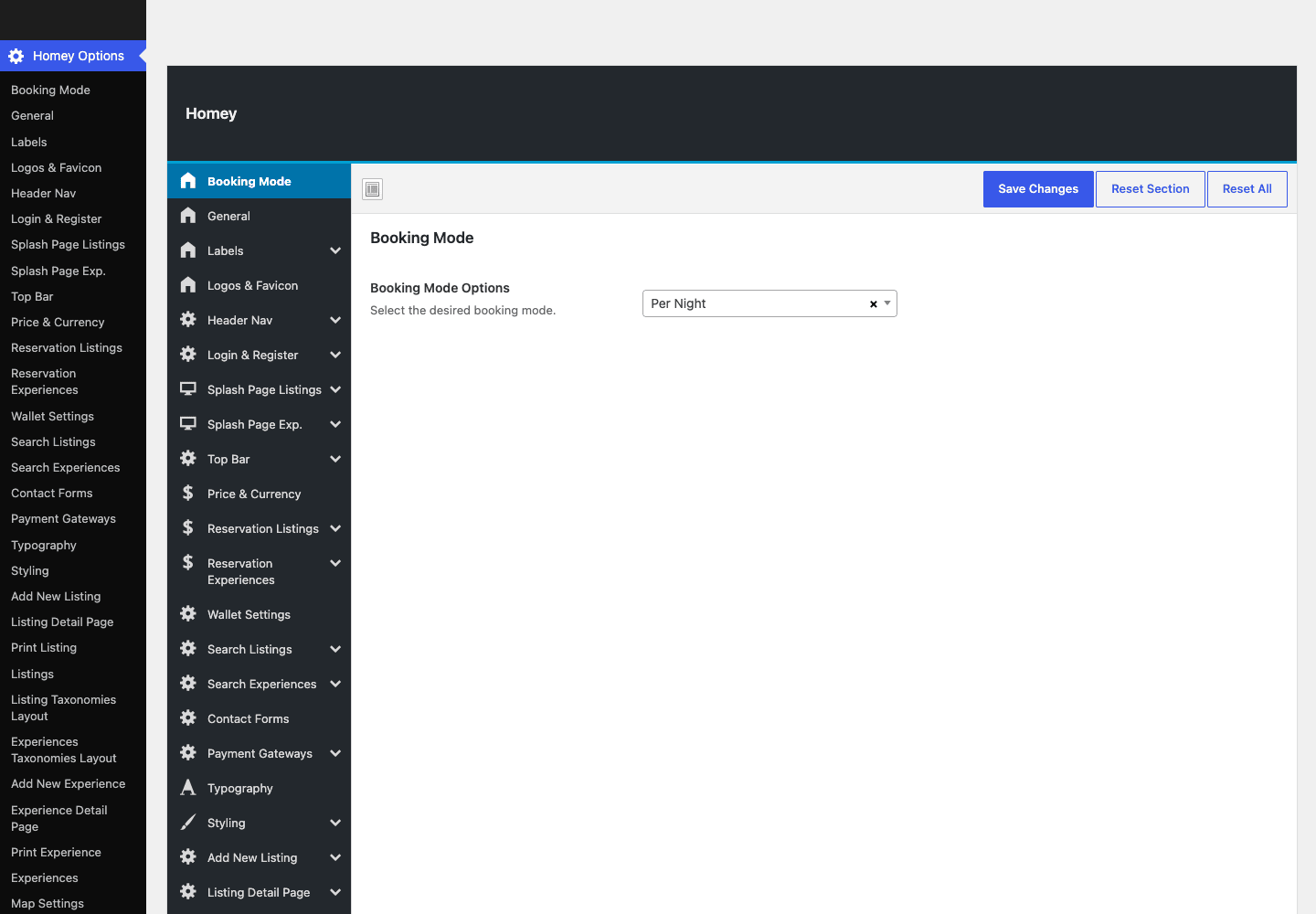
That screenshot is the real panel from my test install, not a marketing render. The very first setting, Booking Mode, is the most consequential one on the site, and we’ll get to it next.
My honest take on the panel: Redux gets the job done, but the sheer count of sections means related settings end up rooms apart. Reservation behavior lives in one section, the payment split in another, expiry windows in a third. You will use the search box at the top of the panel a lot, and I’d suggest doing one full top-to-bottom pass before launch so you know where everything is.
What you actually get with the Homey theme
Feature lists on theme sales pages blur together, so here’s the inventory of what the Homey theme and its companions actually register, grouped by who it serves.
For guests:
- Search with availability checking. Date-aware search across listings, with separate option sections for listing search and experience search, plus availability-check filters wired into the engine.
- Booking without an account, if you allow it. There’s a "No Login Need For Booking" toggle in the reservation settings. Friction-free, but think about whether you want anonymous-ish bookings before flipping it.
- Favorites. Guests can save listings to a favorites list from the listing page.
- Reviews that go both ways. Guests review properties, hosts review guests, and either side can post a reply. Reviews are a first-class post type, not comments wearing a costume.
- A currency switcher. The bundled Favethemes Currency Converter drives a front-end currency display switch, with a developer filter if you need to alter its behavior.
For hosts:
- A front-end dashboard. Listing submission, editing, reservation management, and messaging all happen on the front end. Your hosts never need to see wp-admin, which is exactly right for a marketplace.
- Per-reservation messaging threads. Every reservation spawns a private host-guest conversation thread on the site itself, so the negotiation trail lives next to the booking instead of in someone’s inbox.
- Payout requests and payment methods. Hosts register how they want to be paid and request payouts from their earnings. More on the money flow below.
- Paid visibility and membership packages. A "Make Featured" paid upgrade for individual listings, and, if you activate the bundled membership add-on, recurring host packages that gate how many listings a host can publish.
For you, the operator:
- Invoices as a content type. Partial payments generate invoices for the balance, and every invoice is a queryable post in the admin.
- Cancellation policies as a content type. You write policies once and attach them to listings. (There’s a whole section later on why you must not skip this.)
- Partners and testimonials post types for the marketing pages, plus splash-page options for both listings and experiences.
- 22 shortcodes of Homey’s own, from listing grids and carousels to promo boxes and a registration form, with matching Elementor widgets and WPBakery elements, so the content pieces work in whichever builder you commit to.
- XML/CSV importers for listings, experiences, and reviews, which is the difference between re-keying 80 properties by hand and importing them over lunch.
That’s a long list, and it’s the honest core of why I’d reach for Homey over assembling the same machine from parts. None of these features is individually rare. Having all of them pre-wired to each other is.
The booking engine: five rental modes, iCal, and seasonal pricing
Here’s where Homey separates itself from the directory themes it superficially resembles.
The five booking modes
The first dropdown in Homey Options sets the site’s booking mode, and there are five: per night, per day, per week, per month, and per hour. This is a genuinely wider range than most of the category offers. Per night is the classic vacation-rental setup. Per month turns the same machine into a mid-term or corporate-housing platform. And per hour is the sleeper: it has its own dedicated reservation flow in the engine (there’s a separate hourly reservation file and its own AJAX action), which means meeting rooms, photo studios, and event spaces are first-class citizens, not a hack.
| Booking mode | The business it fits |
|---|---|
| Per night | Vacation rentals, cabins, B&B-style stays |
| Per day | Day-use spaces, equipment with daily rates |
| Per week | Holiday lets in markets that book by the week |
| Per month | Mid-term stays, corporate housing, student rentals |
| Per hour | Meeting rooms, studios, courts, event spaces |
One mild criticism: booking mode is a site-wide decision, set once in the options panel. You’re choosing what kind of platform you run, not mixing nightly cabins with hourly studios on one install. For most operators that’s fine, and arguably it keeps the search and pricing UX coherent, but go in knowing the dropdown defines the whole site.
Request to Book, instant booking, and reservation expiry
The default flow is Airbnb-style Request to Book: a guest picks dates and guest count, optionally introduces themselves to the host, and submits a request. The button copy even reassures them with "You won’t be charged yet." Hosts can alternatively run a listing on instant booking, where confirmation doesn’t wait on a manual approval.
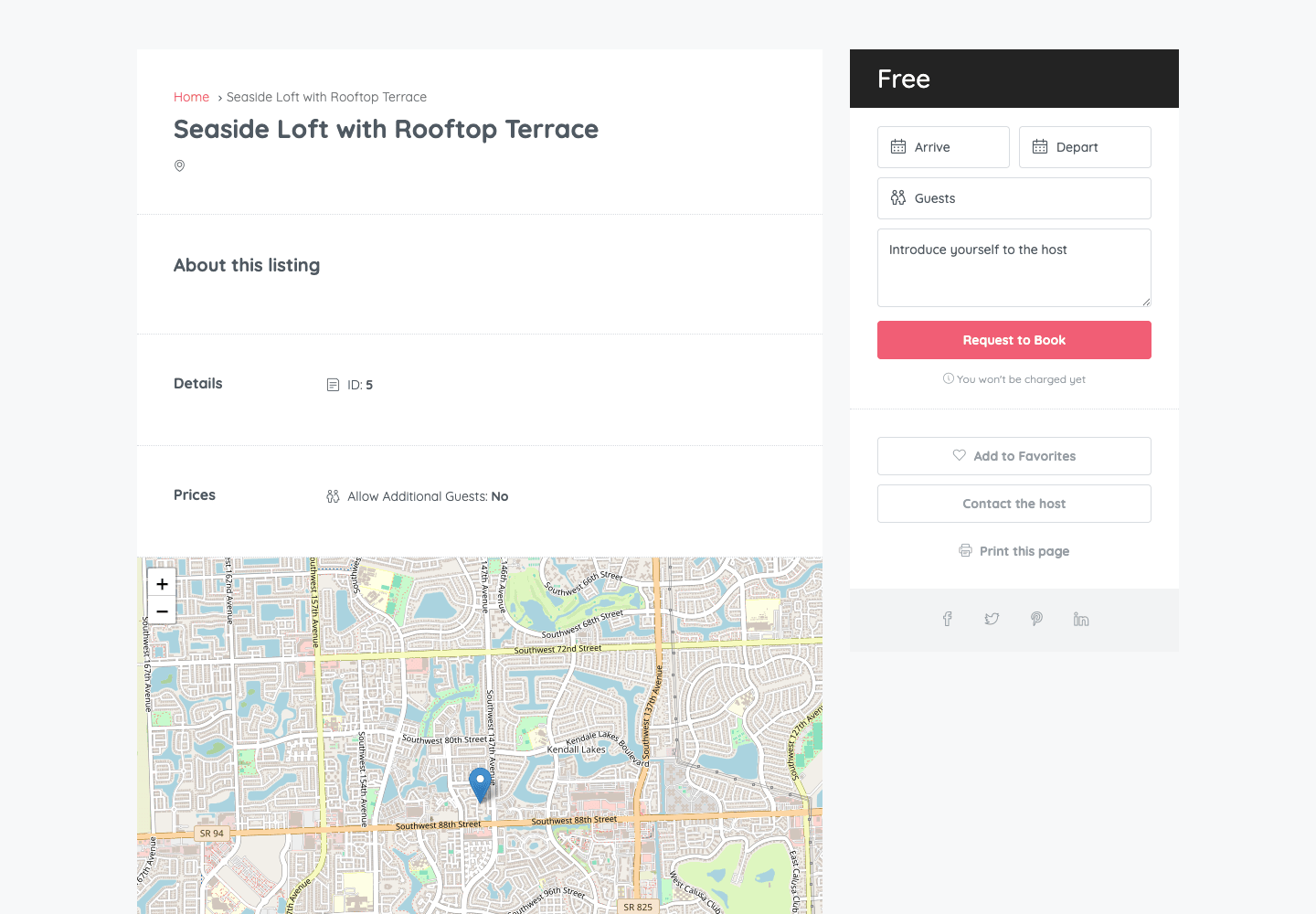
A word of honesty about that screenshot: the glossy homepage you’ve seen on the sales page comes from the demo importer, which fetches content from external servers and was blocked on my test host. So what you’re looking at is a hand-seeded listing on a fresh install, which I’d argue is more useful anyway. Even with zero demo content, the single listing template renders the breadcrumb, the About section, Details, Prices, a working map (more on the map later), and the full booking sidebar with Arrive, Depart, and Guests fields, Add to Favorites, Contact the Host, and a print option.
Reservations themselves are posts in a dedicated reservation post type, so the whole pipeline is visible and queryable in the admin. The reservation settings also give you auto-expiry windows, measured in hours before and after the relevant checks, so a request the host never answers, or a confirmed booking the guest never pays, doesn’t squat on the calendar forever. Set these deliberately. The defaults won’t know your business.
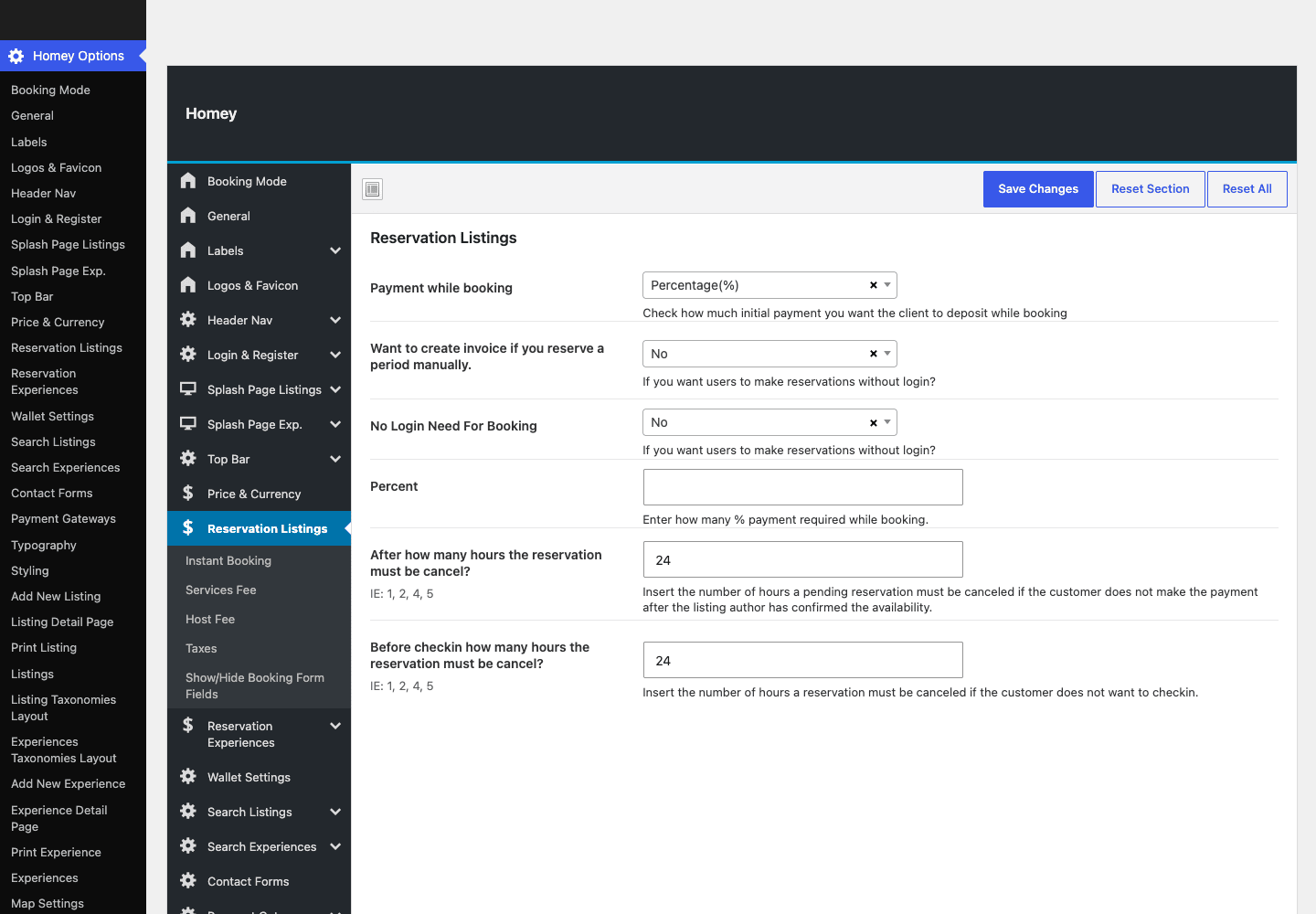
That’s the real Reservation Listings screen: the percentage-based "payment with booking" deposit, invoice generation for the balance, the no-login booking toggle, and those expiry windows, all in one place.
Seasonal pricing through custom periods
Flat nightly pricing dies the first July you operate. Homey’s answer is custom pricing periods: hosts define date ranges with their own rates on top of the base price, which is how you express high season, holiday weekends, and shoulder-season discounts. The engine handles these through their own dedicated AJAX action, and they stack with the other price components (guest counts, fees) when a quote is calculated. If you manage listings for owners, teach them this screen first. It’s the one with revenue in it.
iCal: the anti-double-booking layer
If your hosts also list on the big marketplaces, the calendars must talk to each other or someone eventually sleeps in a hallway. Homey ships a real ICS parser and an iCal feeds feature: paste in the calendar export URL from an external platform and Homey imports those events to block the dates locally. Experiences get their own parallel iCal import.
Tip: iCalendar is a feed format, not a push API. Feeds get fetched and parsed, not streamed in real time, so treat iCal sync as a strong safety net rather than split-second parity, and keep an eye on lead times for high-demand dates.
Experiences: the second marketplace inside Homey
This is the part of Homey I expected to be a checkbox feature and turned out to be a full parallel system.
Alongside listings, Homey Core registers an experience post type for tours and activities, and it doesn’t share the listing plumbing so much as mirror it completely. There’s a separate experience reservation post type. There are eight mirrored taxonomies (experience type, amenity, facility, country, state, city, area, plus language, which property listings don’t have). The options panel has parallel sections for experience search, experience reservations, an experiences splash page, and experience layouts. The shortcode set mirrors too: experience grids, carousels, and by-ID embeds next to their listing equivalents. Even the iCal import and the XML/CSV importer exist in experience flavors.
Two structures are unique to experiences and tell you Favethemes actually thought about the vertical: what-to-bring and what-is-provided fields, built into the experience submission form as repeatable structured entries. A kayak tour can say "bring sunscreen and a towel, we provide the kayak and the dry bag" as itemized data rather than a paragraph someone forgets to read.
So if your business is walking tours, cooking classes, or boat trips rather than apartments, you’re not bending a rental theme out of shape. You’re using a system that was built twice on purpose. And if you want both, a stays-plus-experiences operation on one install is exactly what the dual structure is for.
Getting paid: gateways, the wallet, and host payouts
A booking platform that can’t move money is a brochure. This is the section where Homey either fits your operation or doesn’t, so I’ll be specific.
Two payment architectures, pick one
In Homey Options » Payment Gateways there’s a single decisive dropdown: payment gateway type, with two choices. Homey Custom Gateways is the native route, with built-in PayPal and Stripe settings sections plus an Off-site Payment option for "pay on arrival" arrangements. WooCommerce is the second route, powered by the bundled homey-woocommerce-addon, which hands the checkout to WooCommerce so you can use any gateway from the WooCommerce documentation and extensions catalog, which matters enormously if your country’s dominant payment method isn’t PayPal or Stripe.
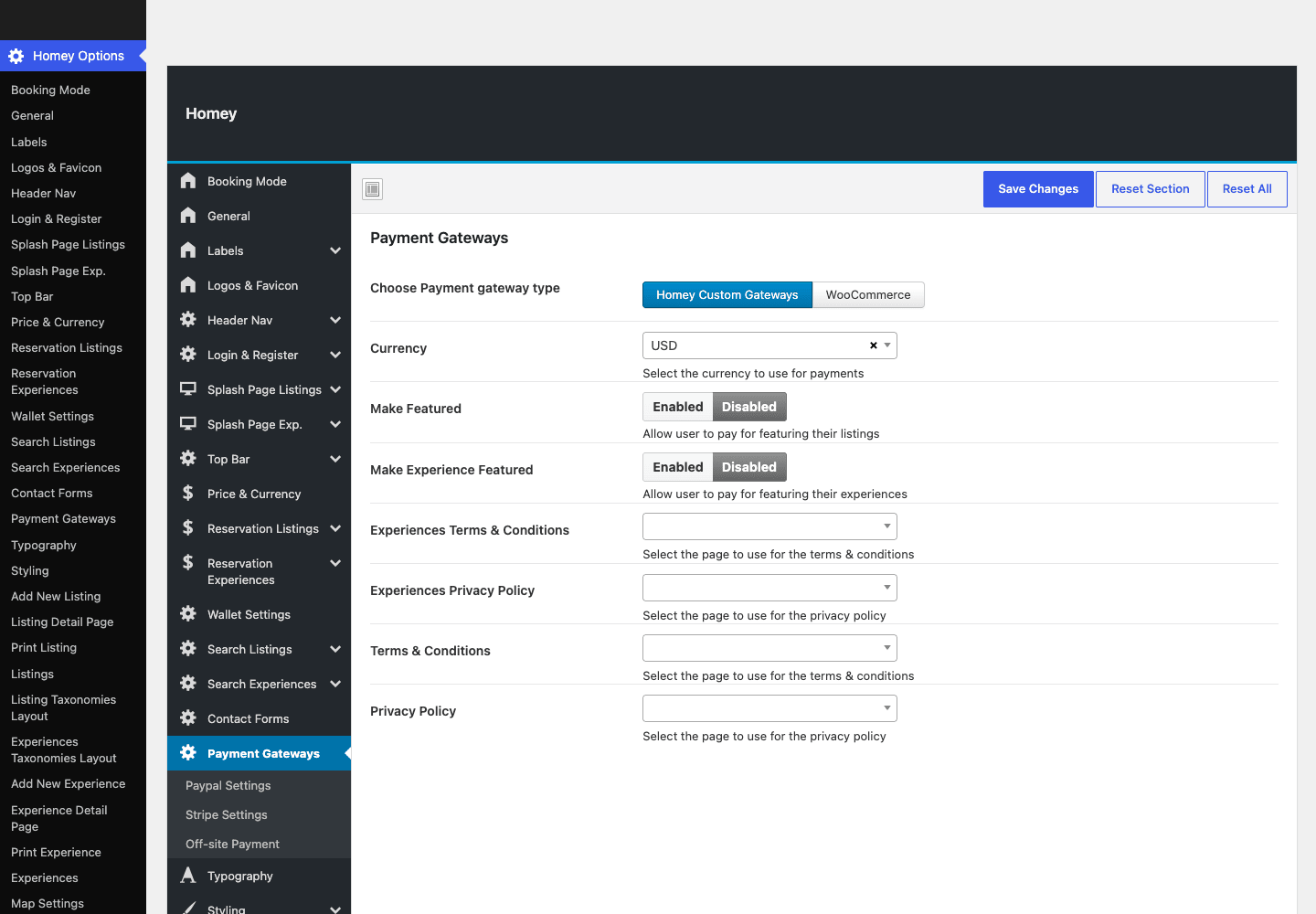
My advice: if Stripe and PayPal cover your market, stay native. The flow is purpose-built for reservations and there’s one less plugin layer between a guest and a confirmed booking. Reach for the WooCommerce route when you need a regional gateway, and read Stripe’s documentation on your account’s requirements either way before you take a live booking.
Deposits, invoices, and the wallet
The deposit model is percentage-based "payment with booking": you set what slice of the total a guest pays at confirmation, and Homey generates an invoice for the balance. Invoices being a real post type is one of my favorite small decisions in the whole product, because "what does this guest still owe" becomes a record you can open, not a number you reconstruct.
Then there’s the wallet, an on-site balance system that touches a surprising amount of the engine (it shows up across dozens of files) and has its own Wallet Settings section. Funds can sit on the platform as balance, which is the mechanism that makes the marketplace model work: money comes in from guests, the platform holds it, hosts draw it out.
Host payouts
Hosts register their payment methods and request payouts through dedicated flows in the engine, and you process them from the admin side. Combined with the "Make Featured" paid listing upgrade and the membership add-on’s host packages, you have three distinct revenue levers: a cut of bookings, paid placement, and recurring host subscriptions.
Heads-up: Homey gives you the levers, not the bookkeeping advice. Decide your fee structure, your payout schedule, and your refund source-of-truth before launch, and run at least one end-to-end test transaction through your chosen gateway in test mode. Money bugs found in production cost trust you can’t refund.
Who Homey is for (and who should pick something else)
After all that machinery, the practical question: is this your tool? Here’s my honest matching, persona by persona.
A vacation-rental manager with 5 to 50 properties: yes, emphatically. This is the center of the target. You get owner-facing listings, seasonal pricing, deposits with invoiced balances, iCal feeds against the marketplaces you also list on, and policies attached per listing. The XML/CSV importer gets an existing portfolio in fast.
An Airbnb-style multi-host marketplace: yes, with stamina. All the marketplace primitives are present: host registration, listing moderation and approval, two-sided reviews, per-reservation messaging, the wallet, payouts, featured listings, and host membership packages. Homey solves the software problem on day one. The audience problem, finding hosts and guests, is yours, and it’s the harder one.
An hourly-space operator: yes, and almost nobody else serves you this directly. Meeting rooms, recording studios, sports courts, event venues. The per-hour mode with its own reservation flow is rare in this category and it’s the reason I’d shortlist Homey for this business even before vacation rentals.
A tours and activities operator: yes. The experience mirror system described above, with its what-to-bring and what-is-provided structures, means you’re a primary use case rather than an afterthought.
A hotel with rooms, rates, and housekeeping: no, wrong tool. Hotels need room types and rate plans more than they need hosts and payouts. MotoPress Hotel Booking is built around exactly that model, and we’ve covered it in depth in our MotoPress Hotel Booking review.
A single property owner: honestly, Homey is overkill. If you’re renting one cottage, you don’t need roles, payouts, or a wallet. A booking plugin on the theme you already like, something like JetBooking on an Elementor site or WooCommerce Bookings on a store, gets you a calendar and payments with far less surface to maintain.
Don’t take real bookings without a cancellation policy
Here’s the failure mode I most want to talk you out of, because Homey makes it easy to stumble into.
Homey treats cancellation policies as first-class objects: there’s a dedicated cancellation-policy post type, and policies attach to listings so they ride along with every reservation. That’s better design than most of the category. But nothing in the setup flow forces you to write a single policy before going live. The payment settings will happily take a percentage deposit on day one with zero policies published.
Picture the sequence. You launch, a guest books a July week, pays your 30 percent deposit through Stripe, and three weeks out, cancels. Or the host cancels on them. There is no written policy attached to that booking. Now it’s not a process, it’s an argument: the guest wants the deposit back, the host wants it kept, and you’re the platform with nothing to point at. The argument becomes a PayPal dispute or a Stripe chargeback, which costs you the money plus the dispute fee, plus a one-star review that outlives the refund, and depending on your jurisdiction’s consumer law, a written cancellation policy may not have been optional in the first place.
The fix costs you one evening before launch. Write the policies as actual cancellation-policy entries, flexible and strict tiers at minimum. Attach one to every listing and make it a rule of host onboarding. Set the reservation expiry windows in the reservation settings so stale requests die on schedule instead of ambiguously. Decide your deposit percentage deliberately, knowing it’s the exact amount you’ll be arguing about. Then run one full booking and one full cancellation end to end as a fake guest, and read every screen and email the way an annoyed customer would.
Homey vs a booking plugin vs the marketplaces
There are really three ways to run a rental operation on the web, and Homey only makes sense if you see where it sits between the other two.
| Homey (self-hosted platform) | Generic theme + booking plugin | Listing on the marketplaces | |
|---|---|---|---|
| Software cost | One-time theme purchase, $0/mo recurring | Theme + plugin licenses, often annually renewed | $0 upfront |
| Revenue kept | 100 percent of booking revenue stays with you | 100 percent, minus your gateway fees | Marketplace service fees come off every booking |
| Multi-host marketplace | Built in: roles, moderation, payouts, wallet | Not really; booking plugins assume one operator | You’re the host, not the platform |
| Booking modes | 5 (night, day, week, month, hour) | Varies; nightly and daily are typical | Whatever the marketplace supports |
| Audience on day one | Zero. You bring the traffic | Zero, same problem | The entire reason marketplaces exist |
| Who handles disputes | You | You | The marketplace, by their rules |
The DIY route, a theme you like plus JetBooking or WooCommerce Bookings, is genuinely right for a single operator with a few units; I said as much in the persona section, and our JetBooking review shows how far that route goes. But the gap to Homey is bigger than it looks from a feature checklist. What you’re skipping by going DIY is everything around the calendar: 9 purpose-built post types, 16 taxonomies, 210 registered AJAX hooks wiring the front-end flows, two-sided reviews, messaging threads, invoices, payouts, and the wallet. Rebuilding even half of that around a generic booking plugin is months of custom work.
Against the marketplaces, the math is simpler and harsher in both directions. Self-hosting with Homey costs $0 per month in software and keeps 100 percent of booking revenue on your platform, where the marketplaces deduct service fees from every single booking, forever. But the marketplaces bring the one thing no theme can: demand. A self-hosted platform starts with zero audience, and you inherit marketing, support, and disputes the day you launch. The mature play I’ve seen work is both at once: list on the marketplaces for discovery, run Homey as the direct-booking home where repeat guests pay no middleman, and let iCal keep the calendars honest.
Developer reference: hooks, filters, and the AJAX engine
Now the part the sales page won’t tell you. I grepped the theme and Homey Core end to end, so the numbers and names below are verified against the source, not the documentation.
The shape of the engine
Homey’s engine is admin-AJAX, wall to wall: 210 registered wp_ajax_ hooks (counting the logged-in and logged-out variants) drive everything from reservations (including the dedicated hourly flow) and custom pricing periods to iCal feed imports, payouts, host payment methods, listing approval, reviews, review replies, favorites, and password resets.
Two consequences you should plan around. There is no REST API. I grepped for REST route registration in both the theme and Homey Core and found none, so if you’re dreaming of a headless front end or a companion mobile app, you’d be reverse-engineering AJAX endpoints that were never designed as a public contract. There’s no Homey WP-CLI surface either. The only CLI in the package belongs to the bundled One Click Demo Import library (wp ocdi), which is the importer’s, not Homey’s. I’d call the AJAX-everywhere architecture dated as a design choice in an era of REST-first WordPress, but it’s also battle-tested and consistent, and for a conventional theme-rendered site you’ll never notice.
Reading options: homey_option()
Every Homey Options value flows through one getter, defined in the theme’s framework:
$value = homey_option( 'your_option_id', 'your-fallback' );

if ( ! empty( $value ) ) {
    // react to the configured setting
}
The signature is homey_option( $id, $fallback = false, $param = false ), with $param reaching into array-type options. In child-theme templates this is how you stay consistent with the panel instead of hardcoding values. Grep the theme’s templates for the option ID you care about before reading it; the panel’s section names map closely to the IDs.
Actions: the listing lifecycle
Homey exposes exactly 8 of its own action hooks, and 6 of them are the listing and experience submission lifecycle: before-submit, after-submit, and before-update for each post type. (See the WordPress hooks reference if actions and filters are new ground.) The practical one is firing side effects when a host submits a new listing from the front-end dashboard:
add_action( 'homey_after_listing_submit', function ( $listing_id ) {
    wp_mail(
        get_option( 'admin_email' ),
        'New listing submitted on the platform',
        'A host just submitted "' . get_the_title( $listing_id ) . '" from the front-end dashboard. It may be awaiting approval.'
    );
} );
The hook passes the new listing’s ID, which is all the context the notification needs. The remaining two actions are homey_core and homey_create_messages_thread. The messaging one fires when a reservation’s host-guest thread is created, which makes it a tempting integration point, but its argument list varies between call sites (sometimes two arguments, sometimes three), so probe it carefully in your own install before consuming its parameters. I’m deliberately not printing an example that pretends the signature is stable.
Filters: 98 of them, and the one worth learning first
The filter surface is much wider: 98 unique homey_ filters. The first one to learn is homey_search_filter, which hands you the search results query arguments right before the listing search runs:
add_filter( 'homey_search_filter', function ( $search_qry ) {
    $search_qry['posts_per_page'] = 12;
    $search_qry['orderby']        = 'date';
    $search_qry['order']          = 'DESC';

    return $search_qry;
} );
Those are standard WP_Query arguments, so the same pattern lets you append a meta_query clause against your own custom meta to fence search results however your business needs. There’s a parallel homey_search_filter_exp for experience search.
Other verified filters worth bookmarking:
homey_listing_post_type_argsandhomey_experience_post_type_argsto adjust the post type registrations (rewrite slugs, supports, labels).homey_check_search_availability_filterand its optimized, experience, and hourly variants, sitting inside the availability check itself.homey_custom_post_listing_columnsto add or change the admin list-table columns for listings.homey_dashboard_template_pathto relocate front-end dashboard templates, the cleanest path to deep dashboard customization from a child theme.homey_currency_switcher_filterto alter the currency switcher’s behavior.
Shortcodes
Homey Core registers 22 shortcodes of its own, mirroring the Elementor and WPBakery elements: listing grids and carousels ([homey-listings], [homey-grids], [homey-listing-carousel], by-ID variants), the full experience set ([homey-experiences], [homey-experience-grids], carousels and by-ID variants), plus [homey-blog-posts], [homey-partners], [homey-testimonials], [homey-promobox], [homey-register], [homey-section-title], and [homey-space]. One attribution footnote: you’ll also find an rwmb_meta shortcode in the package, but that belongs to the bundled Meta Box library, not to Homey itself.
Performance, maps, and what a booking platform weighs
A few honest observations from running Homey on a bare test host, because a booking platform has different performance physics than a brochure theme.
The map worked with no API key, which genuinely surprised me. I seeded a listing, opened it, and the location map rendered on OpenStreetMap-style tiles without my entering any key anywhere. Compare that with directory themes that greet you with a Google billing error on day one. There’s a Map Settings section in the options for configuring providers, so I’ll say it precisely: map providers are configurable, and the default rendered without a Google key in my testing. If you want a specific provider, budget the setup time and any usage costs that come with it.
Caching needs a logged-in strategy. A big slice of a Homey site, the host dashboard, guest accounts, messaging, favorites, is per-user and rendered for logged-in visitors, which most page caches rightly bypass. And the live machinery runs over admin-AJAX, which is never page-cached. So expect full-page caching to accelerate your public listing and search pages, and size your PHP workers for the logged-in, AJAX-driven remainder. Decent PHP-level hosting matters more here than another caching layer.
Watch what you activate. The package bundles Slider Revolution and WPBakery alongside Elementor. You do not need all three, and each one you skip is scripts and styles your guests never download. Pick one builder, skip the slider unless a specific page demands it, and the front end stays reasonably lean for what it’s doing.
The demo import depends on external servers. One Click Demo Import fetches the demo content remotely, and on my locked-down test host that fetch was blocked, which is why this review’s screenshots are the real options panel and a hand-seeded listing rather than the sales-page homepage. On a normal host with outbound requests allowed you shouldn’t hit this, but if your firewall is strict, build from a blank slate with the shortcodes and builder elements instead. The structure renders fine without a single imported page, as the listing screenshot above shows.
The first five problems you’ll hit (and the fixes)
Every Homey support thread I’d expect to see boils down to one of these, so save yourself the search:
- Listing pages return 404. The classic. Homey Core registered the listing post type after your rewrite rules were last saved. Open Settings » Permalinks, click Save Changes, done.
- There are no Listings menus in the admin. Homey Core isn’t active. The theme alone is just the design layer; activate the companion from Appearance » Install Plugins (the TGM screen) and the post types appear.
- Hosts say they can’t submit listings. Check the user’s role first. Submission lives in the front-end host dashboard and expects the
homey_hostrole; a user who registered through the wrong form may be sitting onhomey_renter. The User Roles section in Homey Options controls what each side can do. - The demo import sits at a spinner forever. The importer is fetching demo content from external servers and your host is blocking the outbound request. Either allow it, or skip the import and build pages from the shortcodes and builder widgets, which is what I did for this review.
- A reservation seems stuck and the dates stay blocked. Look at the auto-expiry windows in Reservation Listings. If they’re generous or unset, unanswered requests and unpaid confirmations linger. Tighten the before-check and after-check hours and the calendar cleans itself up.
FAQ
Is Homey a theme or a platform?
Functionally, a platform delivered as a theme. The design layer is the theme; the engine is the required Homey Core plugin (9 post types, 16 taxonomies, the shortcodes and builder elements) plus Homey Login Register for front-end accounts. Nothing meaningful works without the companions, so evaluate it as a platform, not a skin.
Does Homey need WooCommerce to take payments?
No. The native Homey Custom Gateways route covers PayPal, Stripe, and off-site payment out of the box. WooCommerce is an alternative route via a bundled add-on, worth choosing when you need a gateway beyond those, such as a regional payment provider from the WooCommerce catalog.
Can guests book by the hour?
Yes, and it’s a real mode, not a workaround. Per-hour is one of the five booking modes, with its own reservation flow in the engine, which makes Homey a legitimate pick for meeting rooms, studios, and venues.
Does Homey sync calendars with Airbnb or Vrbo?
It imports their iCal feeds, yes: paste the external calendar URL and Homey blocks those dates locally, with a bundled ICS parser doing the work. The trade-off is that iCal is a fetched feed format, not a real-time push, so there’s always a window between an external booking and your calendar reflecting it. Treat it as a strong guard, not an instant one.
Does Homey have a REST API for a mobile app or headless front end?
No. I verified this against the source: the engine is built on 210 registered admin-AJAX hooks and registers no REST routes, and there’s no Homey WP-CLI either. If an API-first architecture is a hard requirement, that’s a real limitation and you should weigh it before buying, not after.
Will I get bookings as soon as I launch?
No, and anyone who tells you otherwise is selling something. Homey solves the software side completely, but a self-hosted platform starts with zero audience, while the marketplaces exist precisely because they aggregate demand. Plan a real acquisition channel, repeat guests, local SEO, direct-booking discounts, or run Homey alongside marketplace listings with iCal keeping the calendars aligned.
How does the site owner actually make money with Homey?
Three levers: keep a share of booking revenue through the deposit-and-payout flow, sell "Make Featured" placement on individual listings, and sell recurring host membership packages through the bundled membership add-on. You can run any combination.
Do I need a Google Maps API key?
Not in my testing. The listing map rendered without any key on OpenStreetMap-style tiles, and a Map Settings section exists for configuring providers. If you standardize on a specific commercial provider, expect that provider’s keys and billing to apply.
Can I run property rentals and tours on the same site?
Yes. Experiences are a full parallel system, with their own post type, reservations, eight mirrored taxonomies plus what-to-bring and what-is-provided structures, search, splash page, and iCal import. A stays-plus-activities operation is a designed-for use case, not a stretch.
Which page builder should I use with Homey, Elementor or WPBakery?
Pick Elementor unless you’re migrating a site that already lives in WPBakery. Elementor is the builder the theme requires through its install screen, both builders get matching Homey elements from Homey Core, and the 22 shortcodes work in either. What you shouldn’t do is run both at once; that’s two builders’ worth of assets on every page for no benefit.
Final thoughts
I came into this review expecting a pretty listings theme with a booking form, and what I found was closer to a small SaaS product that happens to install like a theme. The architecture is opinionated in mostly good ways: reservations, invoices, reviews, and cancellation policies as real post types; hosts and guests as real roles; money handled with deposits, invoices, a wallet, and payouts rather than a single "pay now" button. The five booking modes, the hourly flow especially, and the fully mirrored experiences system give it range that the category mostly lacks.
The criticisms I’d stand behind: the options panel sprawls and makes you hunt, the booking mode is one site-wide decision, the AJAX-everywhere engine with no REST surface closes the door on headless ambitions, and the glossy demo depends on an external import your host may block. None of these is disqualifying for the businesses Homey targets. All of them are things I’d rather you know on day one.
On cost: Homey is a one-time ThemeForest purchase under the marketplace’s usual split-license arrangement (the PHP and integrated HTML are GPL, bundled assets carry their own terms), with the membership and WooCommerce add-ons included in the package rather than sold separately. Homey on GPL Times gets you that same package, which for a platform this broad makes the software the cheapest line item in your launch budget by a wide margin.
If you’re the rental manager, the marketplace founder, the hourly-space operator, or the tour company from the personas above, Homey is the most complete self-hosted answer I’ve reviewed in this category. Write your cancellation policies first, test one booking end to end, and bring your own audience. The machine is ready before you are.